
Yearly Archives: 2019
House MD – Funny Moments: Season 1 (HD) #youtubevids
My Wife Is My Sister?! | House M.D. #youtubevids
#TheMentalist 5.1 – What’s in your pocket? #youtubevids
#TheMentalist 2.01 – First Episode, First Scene #youtubevids
Modern Corner Shelf with Hidden Drawer and Secret Compartment #youtubevids
Funny Court Moments 1 #youtubevids
Just Another Accurate Diagnosis | House M.D. #youtubevids
[1 HOUR ] Gifs With Sound #5

Pacman on Google
Did you know that if you search for “google pacman” you get a playable in-browser pacman game for desktop pc?
Give it a try
- May 21, 2010
- 30th Anniversary of PAC-MAN
- When I was growing up, my dad had the best job I could possibly imagine: he was an arcade game and pinball technician. For me, that meant summer trips through Poland’s coastal cities with their seasonal arcade parlors; peeking inside cabinets to learn programming and engineering secrets; and—of course—free games!
One of my favorites was PAC-MAN, whose popularity transcended the geopolitical barriers of that time. During the heyday of space shooters, Tōru Iwatani’s creation stood out as one of the first video games aimed at a broader audience, with a cute story of pizza-shaped character gobbling dots in a maze, colorful (literally!) characters, friendly design, very little violence and everlasting fun.
Today, on PAC-MAN’s 30th birthday, you can rediscover some of your 8-bit memories—or meet PAC-MAN for the first time—through our first-ever playable Google doodle. To play the game, go to google.com during the next 48 hours (because it’s too cool to keep for just one day) and either press the “Insert Coin” button or just wait for a few seconds.
Google doodler Ryan Germick and I made sure to include PAC-MAN’s original game logic, graphics and sounds, bring back ghosts’ individual personalities, and even recreate original bugs from this 1980’s masterpiece. We also added a little easter egg: if you throw in another coin, Ms. PAC-MAN joins the party and you can play together with someone else (PAC-MAN is controlled with arrow keys or by clicking on the maze, Ms. PAC-MAN using the WASD keys).

- PAC-MAN™ & ©1980 NAMCO BANDAI Games Inc.
PAC-MAN seems like a natural fit for the Google homepage. They’re both deceptively straightforward, carefully hiding their complexity under the hood. There’s a light-hearted, human touch to both of them. And we can only hope you find using Google at least a quarter as enjoyable as eating dots and chasing ghosts. You know, without actually needing any quarters.
Posted by Marcin Wichary, senior UX designer and developer

Jessica Nigri
BEST CUBE #46 #youtubevids
Tesla Powerwall
Technical Specs

45.3″ / 1150 mm29.6″ / 753 mm5.75″ / 147 mm
- Usable Capacity13.5 kWh
- Depth of Discharge100%
- Efficiency90% round-trip
- Power7kW peak / 5kW continuous
- Supported ApplicationsSolar self-consumptionBack-up powerTime-Based controlOff-grid capabilities
- Warranty10 years
- ScalableUp to 10 Powerwalls
- Operating Temperature-4°F to 122°F / -20°C to 50°C
- DimensionsL x W x D: 45.3″ x 29.6″ x 5.75″(1150 mm x 753 mm x 147 mm)
- Weight251.3 lbs / 114 kg
- InstallationFloor or wall mountedIndoor or outdoor
- CertificationNorth American and InternationalStandardsGrid code compliant

Arduino RGB Color Mixer
A fun, interactive project for makers new to Arduino. Control the brightness of an RGB LED with Potentiometers, with on/off switch built in.
ABOUT THIS PROJECT
Who is this for?: This RGB LED color mixer project is perfect for the beginner Arduino user who is keen to try an build an interactive gadget this is not only fun and easy to make, but could be useful for anyone who uses RBG colors, such as artists, web developers and interactive lighting controllers.
What is does: This simple circuit combines three potentiometers to set the brightness for each of the red, green and blue LED’s inside an RGB LED.
A pushbutton switch is added an an extra feature to turn the circuit on and off.
How do I build it tho? Wire the diagram as shown in the schematics. The RGB Led is wired to PMW pins 9, 10 and 11 on the Arduino. The pushbutton is connected to pin 7 and the 3 potentiometers to A0, A1 and A2. Remember to add a 10K ohm pull up resistor to the ground connection on the pushbutton. For an explanation as to how this works, check out here https://playground.arduino.cc/CommonTopics/PullUpDownResistor
Also make sure to connect 3 220 ohm resistor’s between the LED and the output pins, this will ensure your LED does not burn out.
The value of each Potentiometer is printed to the serial monitor, so if you are fiddling with the LED and find a color you like, you can record the RGB value to use later.
Once you have the circuit wired up and the sketch uploaded, try turning the knobs on the potentiometers. Nothing should happen at first until you hit the button. Now try turning the knobs again. The led should now light up. Time to play with light! Remember RGB light is not like mixing paint. when all the potentiometers are on full, the light should be white. Try leaving one of the potentiometers off or very low, and varying the other two.
An extension to this project would be to hard code some RBG values for particular colours you like, and add some more push buttons which, when pressed, would set the RGB LED to those colours. Feel free to share the code if you try an extension like this!
Enjoy!
int blue = 9; // Define Digital Pins for each colour of the LED
int green = 10;
int red = 11;

int redPot = A0;
int greenPot = A1; //Define Analog Pins for the 3 potentiometers
int bluePot = A2;


int greenVal = 0; //Create a variable to store the state of each Potentiometer
int blueVal = 0;
int redVal = 0;

const int BUTTON = 7; //Define the button Pin
int state = 0;    //Create a variable to store wether button is on or off
int val = 0;      //Create a variable to store the momentary state of the button
int old_val = 0;  //create a variable to store the previous state of the button

void setup() {
  // put your setup code here, to run once:

  pinMode(green, OUTPUT);  //Set LED's as output's, button as input
  pinMode(blue, OUTPUT);
  pinMode(red, OUTPUT);
  pinMode(BUTTON, INPUT);
  Serial.begin(9600);
}

void loop() {
  // put your main code here, to run repeatedly:
  Serial.begin(9600);                       //Open the serial monitor at 9600 baud

  val = digitalRead(BUTTON);                // Check state of button

  if ((val == HIGH) && (old_val == LOW)) {  //Check to see if state of button has changed
    state = 1 - state;                      //Set the button as either on (1) or off (0)
    delay(10);
  }

  old_val = val;                            // Save the previous button reading to compare next time through loop

  greenVal = analogRead(greenPot);          //Read the position of the potentiometers
  blueVal = analogRead(bluePot);
  redVal = analogRead(redPot);

  if (state == 1) {                         //If button is on, set the state of each LED according to position
    analogWrite(green, greenVal / 4);       //of its correspoding potentiometer. Anolog inputs range from 0-1023,
    analogWrite(blue, blueVal / 4);         // while anolog outputs as PMW can be from 0-255. Therefore we must
    analogWrite(red, redVal / 4);           // divide the potentiometer readings by 4 to set the state correctly

    Serial.print("RGB(");
    Serial.print(redVal/4);
    Serial.print(",");
    Serial.print(greenVal/4);
    Serial.print(",");
    Serial.print(blueVal/4);                 //Print the RGB Code, resuable in any RGB application
    Serial.println(")");

    delay(50);
  } else {                                   // If button is off, set all LED's to LOW/off
    analogWrite(green, 0);
    analogWrite(blue, 0);
    analogWrite(red, 0);
    delay(50);
  }
}

Want more? Click here to see the other projects on the Arduino Projects hub
Kitchen Nightmares US S01E08 #youtubevids
Kitchen Nightmares US S01E07 #youtubevids
Death to all Coca Cola Cans with This Miniature Arduino Powered Cannon
[MJKZZ] sends in this entertaining little tutorial on building a small automated cannon out of a syringe.
He starts the build off by modifying an arc lighter, the fancy kind one might use to light a fire on a windy day, so that it can be controlled by a micro-controller. The arc is moved to the needle end of the syringe with a careful application of wires and hot glue. When the syringe is filled with a bit of alcohol and the original plunger is pressed back in a small spark will send it flying back out in a very satisfying fashion.
Of course it wouldn’t be a proper hack without an Arduino added on for no reason other than the joy of doing so. [MKJZZ] adds an ultrasonic sensor into the mix which, when triggered appropriately by an invading object fires the arc lighter using a reed relay.
He demonstrates the build by eliminating an intruding coke can on his work bench. You can see it in the video after the break. All in all a very fun hack.

Fiverr
Action. Community. Quality.
At Fiverr, it’s our mission to grow and cultivate the world’s largest digital marketplace, a place where people can find and purchase any service they need, and build any business they dream. As an employee, your work is inspired by the success of our users and the celebration of your own personal growth. Join us.
How To Find The Right Freelancer
Use Fiverr to easily hire freelancers for your projects.
Join over 11,000,000 happy businesses who found their freelance match in minutes.
4 Easy Steps To Find A Freelancer:
Use Fiverr’s search and side filters, to find the right freelancer for your project. Once you’ve found a service you’d like to order, click the gig. Choosing the right freelancer is easy:
1. Check out the freelancer’s work samples.
2. Check out the feedback from buyers like you.
3. Choose the package that best fits your needs.
4. Contact the freelancer with any questions to make sure they are aligned with your expectations.Browse Services

Leaddyno
Affiliate Marketing: As Cost Effective As It Gets
Pay-per-click (PPC) advertising – like Google Adwords and Facebook – are getting more expensive all the time. While we invest heavily in Google Adwords ourselves here at LeadDyno, I can tell you that our click costs are constantly creeping up. Which means that next month, I know we’ll have to pay a little bit more to get the same results. Our affiliate program, on the other hand, is always profitable… because we pay our affiliates a commission based on the sales they bring us. Until they sell something, we don’t have to pay them anything. Affiliate marketing is also more scalable than pay-per-click (PPC) marketing. While there are a fixed number of relevant keywords that we (and you) can bid on and make money, there’s basically an unlimited amount of product that you can sell with affiliate partners.
A Quick “Plug and Play” With Your E-Commerce Provider
As you probably know by now, most affiliate tracking software is pretty complex to get setup! You won’t have any setup issues with LeadDyno. We designed it to be really easy to integrate with your website. Many of our E-Commerce integrations are “one-click.” For example, if you’re a Shopify store owner, you simply enter the URL of your store, give LeadDyno permission to connect with it, and you’re done. You simply do this once, and you’re ready to start rolling out links and marketing materials to your affiliates! We also provide complimentary setup help. We’re available to assist five days per week via phone, six days per week via live chat, and seven days per week via email.
Easy Marketing For Your Affiliates, Too
New prospective users often ask me how easy it is for their affiliate to share their link. It’s “stupid simple.” Here’s how it works… When your affiliates sign up with you, they’ll automatically receive an email from you welcoming them to your affiliate program. This email will contain their unique referral link. It will also contain a “one-click” login link to their Affiliate Dashboard. The Affiliate Dashboard is where your affiliate can share their link via email and social media with a single click. For example, when they click the Facebook button, they’ll automatically be forwarded over to Facebook, with a new post pre-populated, and their affiliate link already embedded! They can add a personal note or recommendation if they’d like – or they can simply click “Post” to get the message up on their Wall immediately. This “convenience factor” is huge. Affiliates are able to share their link early and often with their friends and colleagues. It really couldn’t be any easier. The Affiliate Dashboard is also where they can grab marketing materials like banner ads for their website or blog. The banners will already have their affiliate link embedded. So, your affiliate can simply copy the HTML and paste it to their site – or they can have their web developer do this for them.
Use LeadDyno to Track Online Marketing Success
Pay-per-click advertising is becoming increasingly expensive. With LeadDyno, you can use our affiliate program and gain a profitable commission without worrying about creeping costs. As one of the best tracking systems in the market, offering a comprehensive set of features, our software tracking program allows you to manage and observe results of your marketing endeavors. Providing complete information through the affiliate dashboard, LeadDyno’s customizable link tracking platform is easy to understand, responsive and effective. With the one-click sharing option, affiliates can now share their products on various social media platforms and integrate the plug-in on numerous e-commerce stores as well.
Use LeadDyno for Google Adwords Conversion Tracking, Too
I never really knew how Google Adwords was working for me until I began tracking conversions with LeadDyno. While I always used the conversion tracking pixel that Google provides, I always found it to be imperfect. That’s because I want to measure specific $$$ amounts and sales… while Google is only able to tell me if someone made it to a certain page. Like a sign up, or “thank you” page. That’s a good start – but I need more! Specifically, I need to know what somebody bought and/or signed up for… how much they purchased… and how long they stayed with us afterwards. This is easy to do with LeadDyno. All you need to do is create a new marketing campaign tracking link – as use this link as the Target URL within Adwords. Or, if you’re advertising on Facebook, just make sure the link that you provide Facebook with is a campaign tracking link from LeadDyno. Don’t just give Facebook the link to your homepage – give them this link instead. It’s pretty much the same thing as using an affiliate link to track the effectiveness of a specific marketing campaign. Because LeadDyno is already plugged into your website – and most importantly, your E-Commerce provider – you’ll have visibility into the entire sales funnel that was generated as a result of each specific advertising campaign you are tracking. I’ve been doing online marketing for the past decade, and I can tell you this is huge. It allows me to test campaigns quickly and easily. I’m able to let our winners run, and cut our losers short.

iKhoka
We make it easier to accept card payments
Independent and innovative, iKhokha card machines make it easier for thousands of South African businesses to accept card payments.
Pair any iKhokha card machine with your Android or iOS device via Bluetooth and – Boom – you’re in business.

phTagr
You can easily upload, manage, and download files using phTagr. Discuss the media though comments and get updates of new media/comments via RSS or MediaRSS.

Images and videos are no more organized in folders, instead the data is accessed through their meta data e.g. view all screenshots though the category “screenshot“. phTagr reads (and writes) the meta data of EXIF and IPTC from images into a database backend to speed up the access to your images. In the same time in enables flexible filtering and searching of meta data like date, tags, categories and locations (also with exclusion of tags, categories, etc.!).
phTagr is ideal to publish and share your media in the Internet, too. Group based access control allows you to keep your personal files private and allows in the same time selected access for your friends including the original files.
To see phTagr in action visit the demo page! Fur further details read the blog or visit the wiki. Install instructions could be found here.
Core Features
- OpenSource (GPLv2), written in MVC framework CakePHP
- Media (images/video) web gallery for multiple users
- Supported file formats: JPG, FLV (Flash video), AVI, MOV, MPEG, NMEA (GPS log)
- Multiple Languages (so far: English, German, Dutch, Estonian, Polish)
- Automatic creation of images previews and flash videos
- Extraction of EXIF, IPTC, and geo location
- View the geo location via Google maps
- Easy single and multiple media editing for date, tags, categories, location and geo location or access rights
- Search by meta data and their combination: user, group, tags, categories, locations, date (also exclusion search!)
- File upload via browser upload or built-in WebDAV server
- Auto rotation using the EXIF orientation
- Synchronization of meta data between database and photos
- RSS/MediaRSS feeds e.g via WordPress gSlideShow plugin
- Builtin-Slide show via PicLensLite
- User Comments
- Upload limits per user
- Group based access control for viewing or meta data editing
Requirements
phTagr runs on Apache with PHP5, MySQL, and ImageMagick or GD. See SoftwareRequirements for further details. Go to the installation instructions.
License
Its free! The source code is written under GPLv2.
Features
- Free web album softwareThe photo gallery is open source! Download, install and use it on your webserver. PHP >= 5.2.8 and mysql required.
- Your web space – Your controllCreate your own stock sharing platform, a private web album, or your own multi media cloud storage with your photos, fotos, videos – your digital memory, your digital life
- Tag your photosOrganize your photos, videos with keywords, categories, or geo location of your web gallery. Enrich your stock photos with meta data.
- Browse your media galleryUse the flexible search in this php gallery with time range, calandar days, months, keywords, location. Exclusion filter are supported, too. Or use embedded slideshow (via piclense)
- Share your private web albumShare your photo album with friends with other user accounts, guest accounts or simple authenticated user link. Download multiple files as ZIP archive. Comments, RSS, and email notifications are included!
- Import picture, video file formats, and GPS loggerFormats like JPG, PNG, TIF, AVI, MOV, MPEG, GPX file and more
- Automatic rotation and resizing of preview imagesPhotos are rotated automatically by EXIF orientation tag. Requires GD or ImageMagik
- Automatic flash video conversionYour vaction videos of your digital camera are converted automatically to flash movies and can be viewed in the build-in flash video player. Requires ffmpeg
- Upload via HTTP, WebDAV, local storageUse different ways to upload and import your pics with unlimted upload size. Simple ZIP archives and large file uploads are supported due chunked upload and drag and drop support. The web gallery phtagr can be used as desktop photo organizer, too. Just use WAMP or XAMPP
- Geo Tagging – View your favourite photos on online world mapRequires google map key
- Single or multiple edit of meta data like tags, keywords, categories, location or geo locationTagging of your photos will be done within seconds by selecting and tagging multiple images at once
- Read and write support of EXIF, IPTC, and Geo DataRequires exiftool. Never loose your hard work of tagged photos and videos
- Multiple user supportUse phTagr as social media hub for friends, company, or organization where each user has its own upload web space
- Flexible and simple access right managementGroup based access (similar to friends list in Facebook or circles like in Google+) with different right levels for viewing or editing meta data. You decide who can add tags or download original files
The Barn Find IBM 360 Comes Home
It’s a story that may be familiar to many of us, that of bidding on an item in an online auction and discovering once we go to pick it up that we’ve bought a bit more than we’d bargained for. We told you earlier in the year about the trio of Brits who bought an IBM System/360 mainframe computer from the mid 1960s off of a seller in Germany, only to find in the long-abandoned machine room that they’d bought not just one but two 360s, and a System/370 to boot. Their van was nowhere near big enough for all three machines plus a mountain of cabling, documentation, and period storage media, so they moved it to a hastily-rented storage unit and returned home to work out what on earth to do next.
Now we’ve received an email from the trio with some good news; not only have they managed to bring their hoard of vintage big iron computing back home, but also they’ve found a home for it in the rather unusual surroundings of a former top-secret UK Government signals intelligence station. With the help of a friendly specialist IT relocation company they unleashed it from their temporary storage and into the truck for the UK. It’s a tale of careful packing and plenty of wrapped pallets, as we begin to glimpse the true extent of the collection as you can see in the video below the break, because not only have they secured all the hardware but they also have a huge quantity of punched cards and disk packs. The prospect of a software archaeology peek into how a 1960s mainframe was used by its original customer is a particularly interesting one, as it’s likely those media contain an ossified snapshot of its inner workings.
We’re hoping to follow this project as it evolves, and see (we hope) a room full of abandoned junk transformed into a facsimile of a typical 1960s business computing setup. If you’d like to catch up, read our original coverage of the find.
source https://hackaday.com/2019/12/08/the-barn-find-ibm-360-comes-home/
Grandma Got a Facebook – (Your Favorite Martian music video) #youtubevids
Using Glow-in-the-Dark Fish Gut Bacteria to Make Art
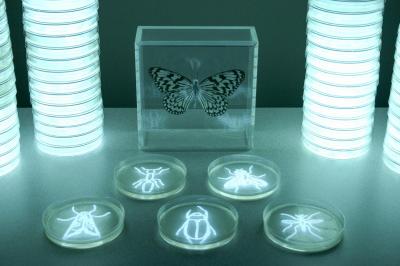
In New Orleans, a Loyola University professor has been creating original art out of glow-in-the-dark fish gut bacteria, enough to fill 1000 Petri dishes. Her first major foray into art was biomorphic abstractions, inspired by Impressionist painters, with her current work reflecting much of the abstraction of the earlier style.
The bacteria comes from the Pacific Rock Fish and glows a vibrant electric-blue. It is typically kept in a freezer and has a texture and color similar to water when it’s being used. The luminescence only lasts for 24 hours, presenting timing challenges when preparing artwork for a photoshoot, as artist [Hunter Cole] often does. With a Q-tip, [Cole] paints roses, lilies, and insects onto the Petri dishes and arranges them for surreal photography shoots. In addition to painting shapes in agar, she uses a light painting technique by filling clear water bottles with the bacteria for long-exposure shots.
[Cole] is planning on presenting her work at an art exhibit in New Orleans, along with showcasing a performance piece featuring models clad in chandelier-like costumes glowing with bioluminescent bacteria in petri dishes.
source https://hackaday.com/2019/12/07/using-glow-in-the-dark-fish-gut-bacteria-to-make-art/