The Adorable Robot Spot, Now In Affordable Form

If you’ve been following the Boston Dynamics project Spot, you’ve seen its capabilities and how we’re starting to see it being used in public more since its official release last year. But in a true display of how hobbyist electronics have been evolving and catching up with the big companies over the past few years, [Miguel Ayuso Parrilla] shows us his own take on the walking robot with CHOP, one of the finalists in this year’s Hackaday Prize.

CHOP is a DIY quadruped robot that works much in the same way as Spot, although in a smaller form-factor and, perhaps most impressive of all, a bill of materials that can be all acquired for under $500. The entire project is open source, meaning that anyone can built their own version of it with off-the-shelf parts and some 3D printing. If you can’t get the hardware however, you can still play with the PyBullet simulation of the mechanics that were used during the debugging process.

Running the show are two main components, a Raspberry Pi 4B and an Arduino Mega. While the Mega interfaces with the servo controllers and provides filtering for sensors like the inertial measurement unit, the Pi takes all that data in and uses a series of Python scripts in order to determine the gait of the robot and which way the servos should move through an inverse kinematics model. To control the direction in which the body of the robot should accelerate, a Bluetooth remote controller sends commands to the Raspberry Pi.

We’re excited to see home-grown projects rise to this level of complexity, which would be mostly unheard of a few years ago in the maker scene, and only presented by large tech companies with tons of money to spend on research and development. There are other quadruped robots to inspire yourself on than Spot though, like this one with a spherical design and fold-out legs. Check this one in action after the break.

source https://hackaday.com/2020/10/23/the-adorable-robot-spot-now-in-affordable-form/

Complex Wood Joints, Thanks To New Software’s Interactive Features

Artfully-crafted wooden joints that fit together like puzzle pieces and need neither glue nor nails is fascinating stuff, but to call the process of designing and manufacturing them by hand “time-consuming” would be an understatement. To change that, a research team from the University of Tokyo presented Tsugite, a software system for interactively designing and fabricating complex wooden joints. It’s named after the Japanese word for joinery, and aims to make the design and manufacture of glue and fastener-free joints much easier than it otherwise would be.

Three-way joint that requires no glue or fasteners.

It looks like the software is so far only a research project and not something that can be downloaded, but the approach it takes is interesting. This downloadable PDF explains how the software approaches the problem of how to make such a task interactive and practical.

The clever bit is that the software not only provides design assistance for the joints themselves in a WYSIWYG (what you see is what you get) interface, but also generates real-time feedback based on using a three-axis CNC tool as the manufacturing method. This means that the system understands the constraints that come from the fabrication method, and incorporates that into design feedback.

The two main limitations of using a three-axis CNC are that the cutting tool can only approach the material from above, and that standard milling bits cannot create sharp inner corners; they will have a rounded fillet the same radius as the cutting bit. Design can be done manually, or by selecting joints from a pre-defined gallery. Once the design is complete, the system generates the toolpaths for manufacture.

Currently, Tsugite is limited to single joints meant for frame structures, but there’s no reason it couldn’t expand beyond that scope. A video to accompany the paper is embedded below, it’s short and concise and shows the software in action, so be sure to give it a look.

We love the idea, and it reminds of the Matchsticks project, which also used CNC specifically to ease the fabrication of joints.

[via SciTechDaily]

source https://hackaday.com/2020/10/23/complex-wood-joints-thanks-to-new-softwares-interactive-features/

Complex Wood Joints, Thanks To New Software’s Interactive Features

Artfully-crafted wooden joints that fit together like puzzle pieces and need neither glue nor nails is fascinating stuff, but to call the process of designing and manufacturing them by hand “time-consuming” would be an understatement. To change that, a research team from the University of Tokyo presented Tsugite, a software system for interactively designing and fabricating complex wooden joints. It’s named after the Japanese word for joinery, and aims to make the design and manufacture of glue and fastener-free joints much easier than it otherwise would be.

Three-way joint that requires no glue or fasteners.

It looks like the software is so far only a research project and not something that can be downloaded, but the approach it takes is interesting. This downloadable PDF explains how the software approaches the problem of how to make such a task interactive and practical.

The clever bit is that the software not only provides design assistance for the joints themselves in a WYSIWYG (what you see is what you get) interface, but also generates real-time feedback based on using a three-axis CNC tool as the manufacturing method. This means that the system understands the constraints that come from the fabrication method, and incorporates that into design feedback.

The two main limitations of using a three-axis CNC are that the cutting tool can only approach the material from above, and that standard milling bits cannot create sharp inner corners; they will have a rounded fillet the same radius as the cutting bit. Design can be done manually, or by selecting joints from a pre-defined gallery. Once the design is complete, the system generates the toolpaths for manufacture.

Currently, Tsugite is limited to single joints meant for frame structures, but there’s no reason it couldn’t expand beyond that scope. A video to accompany the paper is embedded below, it’s short and concise and shows the software in action, so be sure to give it a look.

We love the idea, and it reminds of the Matchsticks project, which also used CNC specifically to ease the fabrication of joints.

[via SciTechDaily]

source https://hackaday.com/2020/10/23/complex-wood-joints-thanks-to-new-softwares-interactive-features/

Complex Wood Joints, Thanks To New Software’s Interactive Features

Artfully-crafted wooden joints that fit together like puzzle pieces and need neither glue nor nails is fascinating stuff, but to call the process of designing and manufacturing them by hand “time-consuming” would be an understatement. To change that, a research team from the University of Tokyo presented Tsugite, a software system for interactively designing and fabricating complex wooden joints. It’s named after the Japanese word for joinery, and aims to make the design and manufacture of glue and fastener-free joints much easier than it otherwise would be.

Three-way joint that requires no glue or fasteners.

It looks like the software is so far only a research project and not something that can be downloaded, but the approach it takes is interesting. This downloadable PDF explains how the software approaches the problem of how to make such a task interactive and practical.

The clever bit is that the software not only provides design assistance for the joints themselves in a WYSIWYG (what you see is what you get) interface, but also generates real-time feedback based on using a three-axis CNC tool as the manufacturing method. This means that the system understands the constraints that come from the fabrication method, and incorporates that into design feedback.

The two main limitations of using a three-axis CNC are that the cutting tool can only approach the material from above, and that standard milling bits cannot create sharp inner corners; they will have a rounded fillet the same radius as the cutting bit. Design can be done manually, or by selecting joints from a pre-defined gallery. Once the design is complete, the system generates the toolpaths for manufacture.

Currently, Tsugite is limited to single joints meant for frame structures, but there’s no reason it couldn’t expand beyond that scope. A video to accompany the paper is embedded below, it’s short and concise and shows the software in action, so be sure to give it a look.

We love the idea, and it reminds of the Matchsticks project, which also used CNC specifically to ease the fabrication of joints.

[via SciTechDaily]

source https://hackaday.com/2020/10/23/complex-wood-joints-thanks-to-new-softwares-interactive-features/

This Week in Security: Too Little Too Late, and Other Stories

Microsoft has just announced a way to disable JScript in Internet Explorer. This would have been very useful a few years ago, to proactively prevent problems found in the now-ancient JScript engine, which ran their own slightly different version of standard JavaScript. Even though IE is no longer under active development, it still receives security updates. JScript, on the other hand, is basically done. If you’re one of the 1.06% that still use IE, then go flip the switch to protect yourself from additional JScript vulnerabilities.

Zerologon and Samba?

Samba is an open source re-implemenation of Microsoft’s SMB protocol. There’s a clever term that describes the reality of this situation: “Bug for bug compatibility”. Remember Zerologon, the flaw where a security token’s generation could be manipulated to vastly reduce the key space? Samba follows the specification, and therefore suffers from the same issue, though it seems to be unusual to actually run Samba in a vulnerable configuration.

Other implementations cannot say the same. QNAP in particular has been bitten by Zerologon when configured as a domain controller. What’s not clear is whether QNAP is running Samba on the NAS products, or if this is yet another vulnerable implementation. Either way, go update your devices.

CVE-2020-17023

Some times, a bug has a story to tell, and CVE-2020-17023 is one of those bugs. With a score of 7.8, it’s not the most critical vulnerability of all time, but it could be of specific interest to the HaD audience, as it was in Visual Studio Code. This open source editor is widely considered to be quite good, and is gaining a following. Microsoft has a habit of being less than forthcoming with their security bulletins, but perhaps the open source nature of this project will be helpful. Running to their GitHub and searching for the CVE leads to this issue.

Let’s break down what we have here. First, [Justin Steven] is explaining details about a previous flaw, CVE-2020-16881. That flaw was a result of using a .exec() function, which has all the same problems as a system() call. It acts like it’s executing something on the command line, so all sorts of command injection trickery is possible. The worst part is that hovering over a malicious package is enough to trigger the exploit. Microsoft fixed this earlier problem, and all was well, right? Well, no. Their fix was to add a filter to catch invalid package names, rather than remove the unsafe system call. As you can guess, there is a loophole — not all failures are treated equally. The filter function can fall through, and return True, even when the name is invalid. MS eventually implemented the right fix, using a safer exec function, and even credited [Justin] with a CVE of his own.

What Harm is an Open Redirect?

There’s a class of website vulnerability that seems very innocuous at first glance — open redirects, and similar problems like subdomain hijacking. What harm could these possibly cause? Both of these can lead to subtle vulnerabilities in web applications, and today we have a good example of how an open redirect can be used as part of an account takeover attack.

First, what exactly is an open redirect? It’s a page on someone’s website that will automatically redirect the visitor to a different page. Redirection is only half the definition, though. An open redirect takes the redirect target as one of its parameters, and can send the user anywhere that parameter points. Not every example is straightforward. Requesting a URL like http://local.dev?source=message&script_name=ggg might redirect you to http://local.devggg/welcome/index. If instead of “ggg”, we inject “mybaddomain.com”, we can suddenly redirect a user to a domain we control. This is the exact pattern that William Bowling, AKA [vakzz], discovered in GitHub Enterprise.

The attack goes like this, then. Send someone a GitHub Gist link, but add a “script_name” parameter, that points to a domain that you own. They click on the link, go through GitHub’s authentication process, but get redirected to your domain. Since their session information is in the URL, configure your server to log that information, and then redirect them to the proper next URL in GitHub’s authentication flow. It happens quickly enough that no-one knows the difference. However, take the logged information, and you can recreate the session and act as that user.

You may notice that we’re a little short on stories this week. I’m sure our collective hair will be on fire next week to make up for it. If you see something you think we should cover, drop it in the tips line, or tag me directly on Twitter.

source https://hackaday.com/2020/10/23/this-week-in-security-too-little-too-late-and-other-stories/

Battery Swap Gives Nissan LEAF New Lease on Life

It’s often said that one of the advantages of owning an electric vehicle is reduced maintenance costs, and for the most part, that’s true. That is, until the vehicle’s battery pack starts to show its age. Then you might be on the hook for a repair bill comparable to swapping out the engine on your old gas-burner. Depending on the age of the vehicle at that point, you might find yourself in the market for a new ride.

But in his latest video, [Daniel Öster] demonstrates that you can replace the battery in a modern electric vehicle without breaking the bank. While it’s not exactly an easy job, he manages to swap the pack in his 2012 Nissan LEAF from the comfort of his own garage using common tools and with the vehicle up on jack stands. The old battery wasn’t completely shot, so he was even able to recoup some of his costs by selling it; bringing the total price of the operation to approximately €2,122 ($2,500 USD).

Splicing on a new diagnostic connector.

While that wouldn’t be a bad deal even for a simple swap, the operation was actually an upgrade. The car was originally sold with a 24 kWh battery, but [Daniel] has replaced it with a 30 kWh pack intended for the 2017 LEAF. His car now has a greater range than it did the day it rolled off the assembly line, though as you might expect, the installation was more complex than it would have been with a contemporary battery.

[Daniel] has produced a kit that has all the adapters required to perform your own battery upgrade, including a module that translates the diagnostic signals from the newer battery into something the older vehicle can understand. With all the electrical bits simplified, all you’ve got to worry about is drilling the new battery mounting holes in the frame.

The battery pack is truly the heart and soul of an electric car, so its no surprise that mechanics and hackers alike are eager to learn as much about them as possible. They’ll have their work cut out for them, as the technology is only going to get more advanced with time.

source https://hackaday.com/2020/10/23/battery-swap-gives-nissan-leaf-new-lease-on-life/

Cardboard Models Trace Design Process of Vintage Tektronix Miniscopes

There aren’t many brands that inspire the kind of passion and fervency among its customers as Tektronix does. The venerable Oregon-based manufacturer of top-end test equipment has produced more collectible gear over the last 75 years than just about anyone else.

Over that time they have had plenty of innovations, and in the 1970s they started looking into miniaturizing their flagship oscilloscopes. The vintageTEK museum, run by current and former employees, has a review of the design process of the 200 series of portable oscilloscopes that’s really interesting. At a time when scopes were portable in the way a packed suitcase is portable, making a useful instrument in a pocketable form factor was quite a challenge — even for big pockets.

The article goes into great detail on the back-and-forth between the industrial designers, with their endless stream of models, and the engineers who would actually have to stuff a working scope into whatever case they came up with. The models from the museum’s collection are wonderful bits of history and show where the industrial designers really pushed for some innovative designs.

Some of the models are clearly derived from the design of the big bench scopes, but some have innovative flip-down covers and other interesting elements that never made it to production. Most of the models are cardboard, but some were made of aluminum in the machine shop and sport the familiar “Tek blue” livery. But the pièce de résistance of the collection is a working engineering model of what would become the 200-series of miniscopes, a handmade prototype with a tiny round CRT and crudely labeled controls.

The vintageTEK museum sounds like another bucket-list stop for computer and technology history buffs. Tek has been doing things their own way for a long time, and stopping by the museum is sure to be a treat.

Thanks to [Tanner Bass] for the tip.

source https://hackaday.com/2020/10/22/cardboard-models-trace-design-process-of-vintage-tektronix-miniscopes/

Cardboard Models Trace Design Process of Vintage Tektronix Miniscopes

There aren’t many brands that inspire the kind of passion and fervency among its customers as Tektronix does. The venerable Oregon-based manufacturer of top-end test equipment has produced more collectible gear over the last 75 years than just about anyone else.

Over that time they have had plenty of innovations, and in the 1970s they started looking into miniaturizing their flagship oscilloscopes. The vintageTEK museum, run by current and former employees, has a review of the design process of the 200 series of portable oscilloscopes that’s really interesting. At a time when scopes were portable in the way a packed suitcase is portable, making a useful instrument in a pocketable form factor was quite a challenge — even for big pockets.

The article goes into great detail on the back-and-forth between the industrial designers, with their endless stream of models, and the engineers who would actually have to stuff a working scope into whatever case they came up with. The models from the museum’s collection are wonderful bits of history and show where the industrial designers really pushed for some innovative designs.

Some of the models are clearly derived from the design of the big bench scopes, but some have innovative flip-down covers and other interesting elements that never made it to production. Most of the models are cardboard, but some were made of aluminum in the machine shop and sport the familiar “Tek blue” livery. But the pièce de résistance of the collection is a working engineering model of what would become the 200-series of miniscopes, a handmade prototype with a tiny round CRT and crudely labeled controls.

The vintageTEK museum sounds like another bucket-list stop for computer and technology history buffs. Tek has been doing things their own way for a long time, and stopping by the museum is sure to be a treat.

Thanks to [Tanner Bass] for the tip.

source https://hackaday.com/2020/10/22/cardboard-models-trace-design-process-of-vintage-tektronix-miniscopes/

Tracking Boats and Ships in Real Time at the Same Time

Software-defined radio came on the hacker scene in a big way less than a decade ago thanks to the discovery that a small USB-based TV tuner dongle could be used for receiving all kinds of radio transmissions. Two popular projects from that era are tracking nearby airplanes and boats in real time. Of course, these projects rely on different frequencies and protocols, but if you live in a major port city like [Ian] then his project that combines both into a single user interface might be of interest.

This project uses an RTL-SDR dongle for the marine traffic portion of the project, but steps up to a FlightAware Pro dongle for receiving telemetry from airplanes. Two separate antennas are needed for this, and all of the information is gathered and handled by a pair of Raspberry Pis. The Pis communicate with various marine and air traffic databases as well as handles the custom user interface that knits both sets of information together. This interface was custom-built from a previous project of his and was repurposed slightly to fit the needs of this one.

This is a great project that goes into a lot of interesting detail about how the web traffic moves and how the UI works, so even if you’re not into software-defined radio it might be worth a look. However, it’s also worth noting that it hasn’t been easier to set up a system like this thanks to the abundance and low price of RTL-SDR dongles and the software tools that make setting them up a breeze.

source https://hackaday.com/2020/10/22/tracking-boats-and-ships-in-real-time-at-the-same-time/

Digital Preservation for Old Batteries

The times they are a-changin’. It used to be that no household was complete without a drawer filled with an assortment of different sizes and types of batteries, but today more and more of our gadgets are using integrated rechargeable cells. Whether or not that’s necessarily an improvement is probably up for debate, but the fact of the matter is that some of these old batteries are becoming harder to find as time goes on.

Which is why [Stephen Arsenault] wants to preserve as many of them as possible. Not in some kind of physical battery museum (though that does sound like the sort of place we’d like to visit), but digitally in the form of 3D models and spec sheets. The idea being that if you find yourself in need of an oddball, say the PRAM battery for a Macintosh SE/30, you could devise your own stand-in with a printed shell.

The rather brilliantly named Battery Backups project currently takes the form of a Thingiverse Group, which allows other alkaline aficionados to submit their own digitized cells. The cells that [Stephen] has modeled so far include not only the STL files for 3D printing, but the CAD source files in several different flavors so you can import them into your tool of choice.

Like the efforts to digitally preserve vintage input devices, it’s not immediately clear how many others out there are willing to spend their afternoons modeling up antiquated batteries. But then again, we’ve long since learned not to underestimate the obscure interests of the hacker community.

source https://hackaday.com/2020/10/22/digital-preservation-for-old-batteries/

Digital Preservation for Old Batteries

The times they are a-changin’. It used to be that no household was complete without a drawer filled with an assortment of different sizes and types of batteries, but today more and more of our gadgets are using integrated rechargeable cells. Whether or not that’s necessarily an improvement is probably up for debate, but the fact of the matter is that some of these old batteries are becoming harder to find as time goes on.

Which is why [Stephen Arsenault] wants to preserve as many of them as possible. Not in some kind of physical battery museum (though that does sound like the sort of place we’d like to visit), but digitally in the form of 3D models and spec sheets. The idea being that if you find yourself in need of an oddball, say the PRAM battery for a Macintosh SE/30, you could devise your own stand-in with a printed shell.

The rather brilliantly named Battery Backups project currently takes the form of a Thingiverse Group, which allows other alkaline aficionados to submit their own digitized cells. The cells that [Stephen] has modeled so far include not only the STL files for 3D printing, but the CAD source files in several different flavors so you can import them into your tool of choice.

Like the efforts to digitally preserve vintage input devices, it’s not immediately clear how many others out there are willing to spend their afternoons modeling up antiquated batteries. But then again, we’ve long since learned not to underestimate the obscure interests of the hacker community.

source https://hackaday.com/2020/10/22/digital-preservation-for-old-batteries/

A Linear Stencil Clock Built for Quiet Operation

We around the Hackaday shop never get tired of seeing new ways to mark the passage of time. Hackers come up with all manner of interesting timekeeping modalities using every imaginable material and method of moving the mechanism once per whatever minimum time unit the hacker chooses to mark.

But honestly, there are only so many ways to make a clock, and while we’re bound to see some repeats, it’s still nice to go over old ground with a fresh approach. Take this linear sliding stencil clock for instance. [Luuk Esselbrugge] has included some cool design elements that bear a closer look. The video below shows that the display is made up of four separate stepper motors, each driving a vertical stencil via a rack-and-pinion mechanism. There a simple microswitch for homing the display, and a Neopixel for lighting things up.

The video below shows that the stencils move very, very slowly; [Luuk] says that this is to keep the steppers as quiet as possible. Still, this means that some time changes take more than a minute to accomplish, which is a minor problem. The Neopixel also doesn’t quite light up just one digit, which should be a pretty easy fix for version 2. Still, even with these issues, we like the stately movements of this clock, and appreciate [Luuk]’s attempts to make it easier to live with.

Don’t let the number of clocks you see on these pages dissuade you from trying something new, or from putting your twist on an old design. Start with fridge magnets, an old oscilloscope, or even a bevy of steel balls, and let your imagination run wild. Just make sure to tell us all about it when you’re done.

[via r/Arduino]

source https://hackaday.com/2020/10/22/a-linear-stencil-clock-built-for-quiet-operation/

What If You Could Design Your Own Aluminum Hand?

[Ian Davis] has decided to start over on his hand. [Ian] is missing four fingers on his left hand and has for a year now been showcasing DIY prosthetics on his YouTube channel. Back in July, we covered [Ian]’s aluminum hand.

Why aluminum? [Ian] found himself reprinting previous versions’ 3D printed plastic parts multiple times due to damage in the hinged joints, or UV damage rendering them brittle. With an ingenious splaying mechanism and some sensors powered by an Arduino, [Ian] has been wearing the custom machined aluminum hand on a daily basis.

However, as with many makers, he had that itch to revisit and refine the project. Even though the last version was a big jump in quality of life, he still found room for improvement. One particular problem was that the sensors tended to shift around and made it hard to get an accurate reading. To overcome this, [Ian] turned to a molding process. However, adding a stabilizing silicon layer meant that the design of the prosthetic needed to change. With several improvements in mind, [Ian] started the process of creating the plaster positive of his palm, working to create a silicon negative. The next step from here was to create a fiberglass shell that can go over the silicone with sensor wires embedded into the fiberglass shell.

It has been amazing to see the explosion in 3D printed prosthetics over the past few years and hope the trend continues. We look forward to seeing the next steps in [Ian’s] journey towards their ideal prosthetic!

Thanks [morgan] for sending this one in!

source https://hackaday.com/2020/10/22/what-if-you-could-design-your-own-aluminum-hand/

Cluster Deck Packs Four Pis into One Portable Package

Parallel computing is a fair complex subject, and something many of us only have limited hands-on experience with. But breaking up tasks into smaller chunks and shuffling them around between different processors, or even entirely different computers, is arguably the future of software development. Looking to get ahead of the game, many people put together their own affordable home clusters to help them learn the ropes.

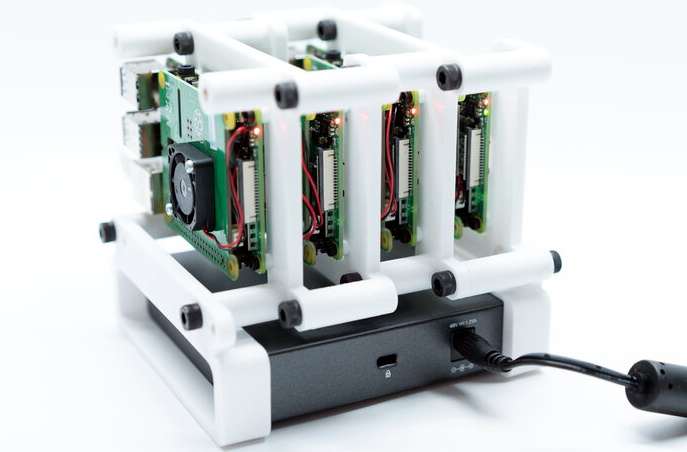
As part of his work with decentralized cryptocurrency, [Jay Doscher] recently found himself in need of a small research cluster. He determined that the Raspberry Pi 4 would give him the best bang for his buck, so he started work on a small self-contained cluster that could handle four of the single board computers. As we’ve come to expect given his existing body of work, the final result is compact, elegant, and well documented for anyone wishing to follow in his footsteps.

The core unit would make a great desktop cluster.

Outwardly the cluster looks quite a bit like the Mil-Plastic that he developed a few months back, complete with the same ten inch Pimoroni IPS LCD. But the internal design of the 3D printed case has been adjusted to fit four Pis with a unique staggered mounting arrangement that makes a unit considerably more compact than others we’ve seen in the past. In fact, even if you didn’t want to build the whole Cluster Deck as [Jay] calls it, just printing out the “core” itself would be a great way to put together a tidy Pi cluster for your own experimentation.

Thanks to the Power over Ethernet HAT, [Jay] only needed to run a short Ethernet cable between each Pi and the TP-Link five port switch. This largely eliminates the tangle of wires we usually associate with these little Pi clusters, which not only looks a lot cleaner, but makes it easier for the dual Noctua 80 mm to get cool air circulated inside the enclosure. Ultimately, the final product doesn’t really look like a cluster of Raspberry Pis at all. But then, we imagine that was sort of the point.

Of course, a couple of Pis and a network switch is all you really need to play around with parallel computing on everyone’s favorite Linux board. How far you take the concept after that is entirely up to you.

source https://hackaday.com/2020/10/22/cluster-deck-packs-four-pis-into-one-portable-package/

Cluster Deck Packs Four Pis into One Portable Package

Parallel computing is a fair complex subject, and something many of us only have limited hands-on experience with. But breaking up tasks into smaller chunks and shuffling them around between different processors, or even entirely different computers, is arguably the future of software development. Looking to get ahead of the game, many people put together their own affordable home clusters to help them learn the ropes.

As part of his work with decentralized cryptocurrency, [Jay Doscher] recently found himself in need of a small research cluster. He determined that the Raspberry Pi 4 would give him the best bang for his buck, so he started work on a small self-contained cluster that could handle four of the single board computers. As we’ve come to expect given his existing body of work, the final result is compact, elegant, and well documented for anyone wishing to follow in his footsteps.

The core unit would make a great desktop cluster.

Outwardly the cluster looks quite a bit like the Mil-Plastic that he developed a few months back, complete with the same ten inch Pimoroni IPS LCD. But the internal design of the 3D printed case has been adjusted to fit four Pis with a unique staggered mounting arrangement that makes a unit considerably more compact than others we’ve seen in the past. In fact, even if you didn’t want to build the whole Cluster Deck as [Jay] calls it, just printing out the “core” itself would be a great way to put together a tidy Pi cluster for your own experimentation.

Thanks to the Power over Ethernet HAT, [Jay] only needed to run a short Ethernet cable between each Pi and the TP-Link five port switch. This largely eliminates the tangle of wires we usually associate with these little Pi clusters, which not only looks a lot cleaner, but makes it easier for the dual Noctua 80 mm to get cool air circulated inside the enclosure. Ultimately, the final product doesn’t really look like a cluster of Raspberry Pis at all. But then, we imagine that was sort of the point.

Of course, a couple of Pis and a network switch is all you really need to play around with parallel computing on everyone’s favorite Linux board. How far you take the concept after that is entirely up to you.

source https://hackaday.com/2020/10/22/cluster-deck-packs-four-pis-into-one-portable-package/

Cluster Deck Packs Four Pis into One Portable Package

Parallel computing is a fair complex subject, and something many of us only have limited hands-on experience with. But breaking up tasks into smaller chunks and shuffling them around between different processors, or even entirely different computers, is arguably the future of software development. Looking to get ahead of the game, many people put together their own affordable home clusters to help them learn the ropes.

As part of his work with decentralized cryptocurrency, [Jay Doscher] recently found himself in need of a small research cluster. He determined that the Raspberry Pi 4 would give him the best bang for his buck, so he started work on a small self-contained cluster that could handle four of the single board computers. As we’ve come to expect given his existing body of work, the final result is compact, elegant, and well documented for anyone wishing to follow in his footsteps.

The core unit would make a great desktop cluster.

Outwardly the cluster looks quite a bit like the Mil-Plastic that he developed a few months back, complete with the same ten inch Pimoroni IPS LCD. But the internal design of the 3D printed case has been adjusted to fit four Pis with a unique staggered mounting arrangement that makes a unit considerably more compact than others we’ve seen in the past. In fact, even if you didn’t want to build the whole Cluster Deck as [Jay] calls it, just printing out the “core” itself would be a great way to put together a tidy Pi cluster for your own experimentation.

Thanks to the Power over Ethernet HAT, [Jay] only needed to run a short Ethernet cable between each Pi and the TP-Link five port switch. This largely eliminates the tangle of wires we usually associate with these little Pi clusters, which not only looks a lot cleaner, but makes it easier for the dual Noctua 80 mm to get cool air circulated inside the enclosure. Ultimately, the final product doesn’t really look like a cluster of Raspberry Pis at all. But then, we imagine that was sort of the point.

Of course, a couple of Pis and a network switch is all you really need to play around with parallel computing on everyone’s favorite Linux board. How far you take the concept after that is entirely up to you.

source https://hackaday.com/2020/10/22/cluster-deck-packs-four-pis-into-one-portable-package/

Affordable Ground-Penetrating Radar

While you might think of radar pointing toward the skies, applications for radar have found their way underground as well. Ground-penetrating radar (GPR) is a tool that sends signals into the earth and measures their return to make determinations about what’s buried underground in much the same way that distant aircraft can be located or identified by looking for radar reflections. This technology can also be built with a few common items now for a relatively small cost.

This is a project from [Mirel] who built the system around a Arduino Mega 2560 and antipodal Vivaldi antennas, a type of directional antenna. Everything is mounted into a small cart that can be rolled along the ground. A switch attached to the wheels triggers the radar at regular intervals as it rolls, and the radar emits a signal and listens to reflections at each point. It operates at a frequency range from 323 MHz to 910 MHz, and a small graph of what it “sees” is displayed on an LCD screen that is paired to the Arduino.

Using this tool allows you to see different densities of materials located underground, as well as their depths. This can be very handy when starting a large excavation project, detecting rock layers or underground utilities before digging. [Mirel] made all of the hardware and software open-source for this project, and if you’d like to see another take on GPR then head over to this project which involves a lot of technical discussion on how it works.

source https://hackaday.com/2020/10/22/affordable-ground-penetrating-radar/

Do Your Part to Stop the Robot Uprising

One of the pleasures of consuming old science fiction movies and novels is that they capture the mood of the time in which they are written. Captain Kirk was a 1960s guy and Picard was a 1990s guy, after all. Cold war science fiction often dealt with invasion. In the 1960s and 70s, you were afraid of losing your job to a computer, so science fiction often had morality tales of robots running amok, reminding us what a bad idea it was to give robots too much power. As it turns out, robots might be dangerous, but not for the reasons we thought. The robots won’t turn on us by themselves. But they could be hacked. To that end, there’s a growing interest in robot cybersecurity and Alias Robotics is releasing Alurity, a toolbox for robot cybersecurity.

Currently, the toolbox is available for Linux and MacOS with some support for Windows. It targets 25 base robots including the usual suspects. There’s a white paper from when the product entered testing available if you want more technical details.

We aren’t clear about the licensing details of Alurity. There is a GitHub repo that has some components, and there is mention of an individual license and an educational one, but no real details about pricing. However, the repo has some interesting items including the RVD or Robot Vulnerability Database, that is worth reading (the issues, not the code) if you are working with industrial robots.

If you are satisfied that your robot is off the grid and physically secure, maybe you don’t care. However, the cybersecurity world is full of stories of bad actors breaking into something as innocuous as a thermostat or camera and then pivoting into business and industrial control networks that were considered highly secure. No one wants to be that story in tomorrow’s newspaper. Of course, you can get cybersecurity insurance, but good luck getting it to pay out.

source https://hackaday.com/2020/10/21/do-your-part-to-stop-the-robot-uprising/

Correlated Electron Memory… Coming Soon?

We often see press releases and announcements about the next big technology in batteries, memory, displays, capacitors, or any of a number of other things. Usually we are suspicious since we typically don’t see any of this new technology in the marketplace over any reasonable timescale. So when we read about correlated-electron memory Cerfe Labs, we had to wonder if it would be more of the same. IOur suspicions may be justified of course, but it is telling that the company is a spin-off from ARM, so that gives them some real-world credibility.

Correlated-electron RAM or CeRAM is the usual press release material. Nonvolatile, smaller than SRAM, and fast. It sounds as though it could replace the SRAM in PC caches, for example, and take up less die space on the CPU chip. The principle is a bit odd. When electrons are forced together in certain materials, the properties of the material can change. This Mott transition (named after the inventor [Neville Mott]) can take carbon-doped nickel oxide and switch it from its natural electrical insulating state to a conducting state and back again.

Whereas a traditional static RAM cell requires up to six transistors, a Mott cell is just a bit of material and one transistor. Speedwise it seems devices exist with 2ns write cycle, something they expect to get better with more work. We’ve read that the material changes state within 100 femtoseconds. There are some other tantalizing features. The memory appears to work at very cold temperatures (like, cryogenic temperatures) and very hot temperatures, as well. It also may be radiation resistance and can be made to operate on very low voltages.

The new company doesn’t plan to actually build devices but wants to develop the technology to the point that a major manufacturer will take over the technology and bring it to market. There are doubtlessly many hurdles to putting something like this in real production and it is yet unknown if the devices can be written to repeatedly without degradation.

source https://hackaday.com/2020/10/21/correlated-electron-memory-coming-soon/

Exoskeleton Muscles Powered By Hydrogen

The idea of building a suit that increases the wearer’s strength is a compelling one, often featured in science fiction. There are a handful of real world examples, and [Alex] can now add his to the list. The build comes with a twist however, relying on hydrogen to do the work.

At its heart, the build is not dissimilar to other artificial muscle projects. The muscles in [Alex’s] build consist of a rubber tube inside a nylon braid. When the rubber tube is inflated, it expands, causing the nylon braid to shorten as it grows wider. Commonly, such builds rely on compressed air to power the muscles, however [Alex] took a different path. Instead, water is electrolysed in a chamber designed to look like Iron Man’s arc reactor, with the resulting gases produced being used to drive the muscles. With five muscles ganged up to pull together, the wearable arm support is capable of generating up to 15 kg of pull force.

It’s a design that has a few benefits; the electrolyser has no moving parts, and is much simpler and quieter than a typical air compressor. Obviously, there is a risk of fire thanks to the flammable gases used, but [Alex] explains the precautions taken to minimise this risk in the video.

Exosuits may not be mainstream just yet, but that doesn’t mean people aren’t working to make them a reality. We’ve featured a few before, like this open-source design. Video after the break.

[Thanks to Keith Olson for the tip!]


source https://hackaday.com/2020/10/21/exoskeleton-muscles-powered-by-hydrogen/

Small Spotify Remote Broadens Musical Horizons

When was the last time you tried listening to a new genre of music, or even explored a sub-genre of something you already like? That’s what we thought. It’s good to listen to other stuff once in a while and remind ourselves that there’s a whole lot of music out there, and our tastes are probably not all that diverse. As a reminder, [sorghum] made a spiffy little Spotify remote that can cruise through the musical taxonomy that is Every Noise at Once and control any Spotify-enabled device.

There’s a lot to like about this little remote, which is based upon a LilyGo TTGO ESP32 board with on-board display. The circuitry is basically that and a rotary encoder plus a tiny LiPo battery. Can we talk about the finish on those prints? Yes, those are both printed enclosures. Getting that buttery smooth finish took two grits of wet/dry sandpaper plus nine grits of polishing cloths.

As you can see in the brief demo after the break, there are several ways to discover new music. [sorghum] can surf through all kinds of Japanese music for example, or surf by the genre’s ending word and listen to metalcore, deathcore, and grindcore from all over the globe. For extra fun, there’s a genre-ending randomizer so you can discover just how many forms of *core there are.

Want everyone in the room to know what you’re listening to? Behold the Spotify split-flap display.

Via reddit

source https://hackaday.com/2020/10/21/small-spotify-remote-broadens-musical-horizons/

Small Spotify Remote Broadens Musical Horizons

When was the last time you tried listening to a new genre of music, or even explored a sub-genre of something you already like? That’s what we thought. It’s good to listen to other stuff once in a while and remind ourselves that there’s a whole lot of music out there, and our tastes are probably not all that diverse. As a reminder, [sorghum] made a spiffy little Spotify remote that can cruise through the musical taxonomy that is Every Noise at Once and control any Spotify-enabled device.

There’s a lot to like about this little remote, which is based upon a LilyGo TTGO ESP32 board with on-board display. The circuitry is basically that and a rotary encoder plus a tiny LiPo battery. Can we talk about the finish on those prints? Yes, those are both printed enclosures. Getting that buttery smooth finish took two grits of wet/dry sandpaper plus nine grits of polishing cloths.

As you can see in the brief demo after the break, there are several ways to discover new music. [sorghum] can surf through all kinds of Japanese music for example, or surf by the genre’s ending word and listen to metalcore, deathcore, and grindcore from all over the globe. For extra fun, there’s a genre-ending randomizer so you can discover just how many forms of *core there are.

Want everyone in the room to know what you’re listening to? Behold the Spotify split-flap display.

Via reddit

source https://hackaday.com/2020/10/21/small-spotify-remote-broadens-musical-horizons/

How an Engineer Designs a DIY Energy Recovery Ventilator

We have no idea whether [Nick Goodey] is a trained engineer or not. But given the detailed design of this DIY energy recovery ventilator for his home HVAC system, we’re going to go out on a limb and say he probably knows what he’s doing.

For those not in the know, an energy recovery ventilator (ERV) is an increasingly common piece of equipment in modern residential and commercial construction. As buildings have become progressively “tighter” to decrease heating and cooling energy losses to the environment, the air inside them has gotten increasingly stale. ERVs solve the problem by bringing fresh, unconditioned air in from the outside while venting stale but conditioned air to the outside. The two streams pass each other in a heat exchanger so that much of the energy put into the conditioned air is transferred to the incoming unconditioned air.

While ERV systems are readily available commercially, [Nick] decided to roll his own after a few experiments with Coroplast and some extensive calculations convinced him it would be a viable idea. One may scoff at the idea of corrugated plastic for the heat exchanger, but the smooth channels through the material make it a great choice. He built up a block of Coroplast squares with the channels in alternate layers oriented orthogonally, letting stale inside air pass very close to fresh outside air to exchange heat without every mixing directly. The entire system, including fans, an Arduino for control, sensors galore, and the Hubitat home automation hub, is powered by DC, so no electrician was needed. [Nick] has a ton of detail in his build log, including all the tools and calculators he used to design the system.

Given the expense of ERV systems, we’re surprised we haven’t seen more stories about DIY versions. We have talked about HVAC systems a lot, though — after all, HVAC techs are hackers who make housecalls.

source https://hackaday.com/2020/10/21/how-an-engineer-designs-a-diy-energy-recovery-ventilator/

Google Meddling With URLs In Emails, Causing Security Concerns

Despite the popularity of social media, for communication that actually matters, e-mail reigns supreme. Crucial to the smooth operation of businesses worldwide, it’s prized for its reliability. Google is one of the world’s largest e-mail providers, both with its consumer-targeted Gmail product as well as G Suite for business customers [Jeffrey Paul] is a user of the latter, and was surprised to find that URLs in incoming emails were being modified by the service when fetched via the Internet Message Access Protocol (IMAP) used by external email readers.

This change appears to make it impossible for IMAP users to see the original email without logging into the web interface, it breaks verification of the cryptographic signatures, and it came as a surprise.

Security Matters

A test email sent to verify the edits made by Google’s servers. Top, the original email, bottom, what was received.

For a subset of users, it appears Google is modifying URLs in the body of emails to instead go through their own link-checking and redirect service. This involves actually editing the body of the email before it reaches the user. This means that even those using external clients to fetch email over IMAP are affected, with no way to access the original raw email they were sent.

The security implications are serious enough that many doubted the initial story, suspecting that the editing was only happening within the Gmail app or through the web client. However, a source claiming to work for Google confirmed that the new feature is being rolled out to G Suite customers, and can be switched off if so desired. Reaching out to Google for comment, we were directed to their help page on the topic.

The stated aim is to prevent phishing, with Google’s redirect service including a link checker to warn users who are traveling to potentially dangerous sites. For many though, this explanation doesn’t pass muster. Forcing users to head to a Google server to view the original URL they were sent is to many an egregious breach of privacy, and a security concern to boot. It allows the search giant to further extend its tendrils of click tracking into even private email conversations. For some, the implications are worse. Cryptographically signed messages, such as those using PGP or GPG, are broken by the tool; as the content of the email body is modified in the process, the message no longer checks out with respect to the original signature. Of course, this is the value of signing your messages — it becomes much easier to detect such alterations between what was sent and what was received.

Inadequate Disclosure

Understandably, many were up in arms that the company would implement such a measure with no consultation or warning ahead of time. The content of an email is sacrosanct, in many respects, and tampering with it in any form will always be condemned by the security conscious. If the feature is a choice for the user, and can be turned off at will, then it’s a useful tool for those that want it. But this discovery was a surprise to many, making it hard to believe it was adequately disclosed before roll-out. The question unfolded in the FAQ screenshot above hints at this being part of Google’s A/B test and not applied to all accounts. Features being tested on your email account should be disclosed yet they are not.

Protecting innocent users against phishing attacks is a laudable aim,  and we can imagine many business owners enabling such a feature to avoid phishing attacks. It’s another case where privacy is willingly traded for the idea of security. While the uproar is limited due to the specific nature of the implementation thus far, we would expect further desertion of Google’s email services by the tech savvy if such practices were to spread to the mainstream Gmail product. Regardless of what happens next, it’s important to remember that the email you read may not be the one you were sent, and act accordingly.

source https://hackaday.com/2020/10/21/google-meddling-with-urls-in-emails-causing-security-concerns/

Arduino and Wire Detects Metal

Our old math teacher famously said, “You have to take what you know and use it find what you don’t know.” The same holds true for a lot of microcontroller designs including [rgco’s] clever metal detector that uses very little other than an Arduino. The principle of operation is simple. An Arduino can measure time, a coil and a resistor will create a delay proportional to the circuit values, and metal around the coil will change the coil’s inductance. As the inductance changes, so does the delay and, thus, the Arduino can sense metal, as you can see in the video below.

The simple principle is also simple in practice. Besides the Arduino and the coil, there’s a single resistor. You want a small coil since larger coils won’t detect smaller objects. If you don’t want to wind your own coil, [rgco] suggests using a roll of hookup wire as long as the resistance is under 10 ohms.

You could omit it, but the original design has a buzzer and an electrolytic capacitor connected to generate a buzz in addition to the built-in LED indicator when metal is near. The LED also shows a blink pattern if the coil is open, too short, too long, or has too much resistance.

The biggest problem is that the poor Arduino needs to measure delays down in the nanosecond range. It can’t actually do this directly, so the code takes a ranging measurement to get in the ballpark and then produces appropriately-sized pulses and adds them up to get a better idea of the total delay. There are several videos in the post of a prototype and the final device built in a Tic Tac container, which you can see below.

If you want something a bit fancier, here’s another simple design that has a few more parts. Or you can go for one that is ultrasensitive.

source https://hackaday.com/2020/10/21/arduino-and-wire-detects-metal/