Learn IC Decapping

Decapsulating ICs used to be an exotic technique. (I should know, I did that professionally for one of the big IC vendors back in the 1980s.) These days, more and more people are learning to take apart ICs for a variety of reasons. If you are interested in doing it yourself, [Juan Carlos Jimenez] has a post you should read about using acid to remove epoxy from ICs.

[Juan Carlos] used several different techniques with varying degrees of success. Keep in mind, that using nitric acid is generally pretty nasty. You need safety equipment and be sure to plan for bad things to happen. Have eyewash ready because once you splash acid in your eye, it is too late to get that together.

We never took apart MEMS devices, so that was especially interesting. A little metal lid keeps the epoxy out of the moving parts and that turns out to be hard to remove.

We were surprised he used 69% nitric. We used to use white fuming nitric, but that may be a bit harder to get now since it is associated with explosives. Then again, you can make it yourself. We used to also use copper bars to sit between the hot plate and the device to get better heat transfer. The acid reaction is much stronger when you heat it.

By the way, if you ever wanted to actually probe the device, you’d have to remove the passivation layer which is SiO2 glass. That takes hydrofluoric acid which is very nasty stuff, indeed. You can see the edge of the passivation around the bond pads under a microscope. You’ll notice the surface of the pad focuses differently than the edge where the thin passivation layer starts. When you can’t see that edge anymore, you’ve removed the glass.

Of course, you might not need to probe the actual circuit to get results. If you don’t care about the circuit’s survival, you can try more mechanical means.

source https://hackaday.com/2020/10/21/learn-ic-decapping/

Light Fields: Missing Ingredient for Immersive 3D Video Gets Improved

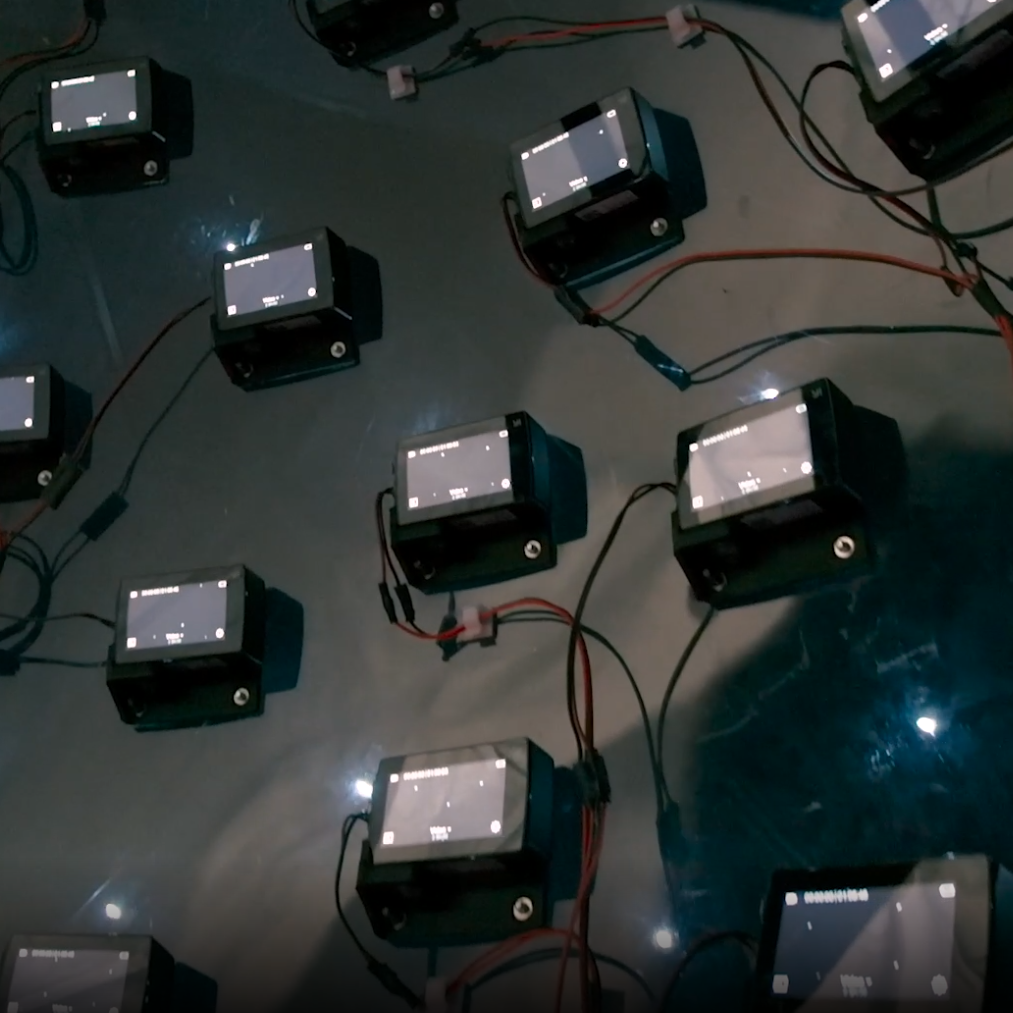
46 time-synchronized action cameras make up the guts of the capture device.

3D video content has a significant limitation, one that is not trivial to solve. Video captured by a camera — even one with high resolution and a very wide field of view — still records a scene as a flat plane, from a fixed point of view. The limitation this brings will be familiar to anyone who has watched a 3D video (or “360 video”) in VR and moved their head the wrong way. In these videos one is free to look around, but may not change the position of their head in the process. Put another way, pivoting one’s head to look up, down, left, or right is fine. Moving one’s head higher, lower, closer, further, or to the side? None of that works. Natural movements like trying to peek over an object, or moving slightly to the side for a better view simply do not work.

Light field video changes that. It is captured using a device like the one in the image above, and Google has a resource page giving an excellent overview of what light field video is, what it can look like, and how they are doing it. That link covers recent improvements to their camera apparatus as well as to video encoding and rendering, but serves as a great show-and-tell of what light fields are and what they can do.

Light field image, with viewer’s point of view moving in a figure eight pattern. Colors show depth layers interpolated by software.

The meta-camera is a hemisphere just under one meter in diameter that contains an array of 46 time-synchronized action cameras pointed outwards. On the software end, camera input is used to reconstruct the scene and create a 6 DoF volumetric video. In other words, the perspective of the video correctly changes depending on a user moving their point of view (within an area very roughly corresponding to the size of the camera device, anyway.)

The other significant improvement is in compression and rendering of the resulting video. By reducing the video down to a small, fixed number of depth layers to represent the light field content, conventional video encoding and compression can be leveraged to deliver lightweight representations that can render easily on just about any platform. A picture is worth a thousand words, so here is a short animation showing a light field image. The point of view moves in a figure eight, and the perspectives and sight lines all change exactly as one would expect them to. The animation also briefly peeks behind the curtain, showing the color-coded depth layers that the software uses to decide what belongs where.

You can download the PDF of the SIGGRAPH 2020 technical paper, or browse the DeepView resource page hosted on GitHub for plenty of in-browser demos and a downloadable VR headset demo. The team’s video presentation is also embedded below, and gives an excellent overview.

Light fields don’t have to be complex affairs, and there is plenty of room for curious hackers to explore. Interested? [Alex Hornstein] shared a fascinating presentation on working with light fields in his 2018 Hackaday Superconference talk, so check it out.

source https://hackaday.com/2020/10/20/light-fields-missing-ingredient-for-immersive-3d-video-gets-improved/

Raspberry Pi and Raspberry Pi Spy: This Is How Trademark SNAFUs Should Be Handled

In the eight years or so since the Raspberry Pi first landed as tangible hardware, we’ve all dealt with the Pi folks whether as customers or through their many online support and outreach activities. They’ve provided our community with the seed that led to an explosion of inexpensive Linux-capable single board computers, while their own offerings have powered so many of the projects we have featured here. Their heart lies in their educational remit, but they have also become an indispensable part of our community.

The statement from the Pi Foundation’s Philip Colligan.

Thus it was a surprise when [Raspberry Pi Spy], a long-time commentator on all things Pi, received a legal notice from the Raspberry Pi Foundation that their use of the Raspberry Pi name contravened the acceptable use guidelines and demanding that all content be removed and the domains be handed over. Some consternation ensued, before Pi foundation boss [Philip Colligan] released a statement retracting the original letter and explaining that the incident was the result of an over-zealous legal adviser and that the Foundation has no wish to undermine the Pi community.

All’s well that ends well, but what just happened? In the first instance, it’s natural for any organisation to wish to protect their brand, and there would be plenty of unscrupulous entities ready to sell fake Pi products were the Foundation not active in asserting their rights. In this case it seems that it was the use of the full Raspberry Pi trademark in a domain name that triggered the letter and not the fair-use blogging about the Pi products. We can see that however much we might wish otherwise it was not without legal merit. There have been numerous cybersquatting cases heard since the creation of the Web, and even though some of them have been on more dubious ground than others it remains a well-trodden path.

Where this story differs from so many others though is that the Pi Foundation acted with common sense in withdrawing the notice issued against a member of its community. It is inevitable that sometimes even the best of us can take regrettable paths by whatever means, and respect is earned by how such situations are resolved. We applaud the Pi folks for their swift action in this matter, we’d suggest to anyone that they take care when registering domain names, and we suspect that somewhere a legal adviser will be in the doghouse. But that all such incidents in our community could be resolved with such ease.

source https://hackaday.com/2020/10/20/raspberry-pi-and-raspberry-pi-spy-this-is-how-trademark-snafus-should-be-handled/

OSIRIS-REx Reaches Out and Touches Asteroid Bennu

After a four year trek through deep space, OSIRIS-REx made history this evening as it became the first NASA spacecraft to try and collect a surface sample from an asteroid (Editor’s note: servers may be down due to the breaking news). Once sensors verify the collected material is safely onboard, the vehicle will begin drifting away from the 490 meter wide Bennu in preparation of its eventual departure and return to Earth. If all goes according to plan, the craft’s conical Sample Return Capsule carrying its precious cargo will renter the atmosphere and land at the Utah Test and Training Range in September of 2023.

OSIRIS-REx with solar panels in “Y-Wing” configuration.

Due to its extremely low gravity and rocky surface, a traditional landing on Bennu was deemed impractical. Instead, OSIRIS-REx performed a daring touch and go maneuver that brought the spacecraft into contact with the surface for just a few seconds.

A camera on the bottom of the vehicle took images every few minutes during the descent and ran them through an onboard system called Natural Feature Tracking (NFT) that autonomously steered it away from dangerous surface features. As a precaution, the solar panels on the OSIRIS-REx were angled backwards in a “Y-Wing” configuration shortly before the descent to help protect them from striking the surface or being damaged by ejected material.

Once the colander-like Touch-And-Go Sample Acquisition Mechanism (TAGSAM) mounted to the end of the spacecraft’s 3.35 meter (11 foot) articulated robotic arm arm made contact with the regolith, pressurized nitrogen was used to kick up material and push it towards storage caches built into the mechanism. With so much riding on the successful collection of surface material, this largely passive system was selected to minimize the possible failures in the critical few seconds that OSIRIS-REx would be in contact with Bennu. Mission planners say it might take until Saturday to determine if a sample was successfully collected, and that the spacecraft has the ability to perform two more attempts if needed.

After its discovery in September 1999, both the Arecibo Observatory and the Goldstone Deep Space Network were used to make radar observations of Bennu to study its shape and size. Calculations have shown it has a cumulative 1 in 2,700 chance of striking the Earth by the year 2199. By mapping the asteroid, studying it at close range, and bringing a geological sample back home, NASA hopes to gain valuable insight on how similar near-Earth objects can be detected and ultimately diverted if needed.

source https://hackaday.com/2020/10/20/osiris-rex-reaches-out-and-touches-asteroid-bennu/

This (mostly) Transparent Tesla Coil Shows It All

You’d be forgiven for assuming that a Tesla coil is some absurdly complex piece of high-voltage trickery. Clarke’s third law states that “any sufficiently advanced technology is indistinguishable from magic”, and lighting up a neon tube from across the room sure looks a lot like magic. But in his latest Plasma Channel video, [Jay Bowles] tries to set the record straight by demonstrating a see-through Tesla coil that leaves nothing to the imagination.

Of course, we haven’t yet mastered the technology required to produce transparent copper wire, so you can’t actually see through the primary and secondary coils themselves. But [Jay] did wind them on acrylic tubes to prove there aren’t any pixies hiding in there. The base of the coil is also made out of acrylic, which lets everyone see just how straightforward the whole thing is.

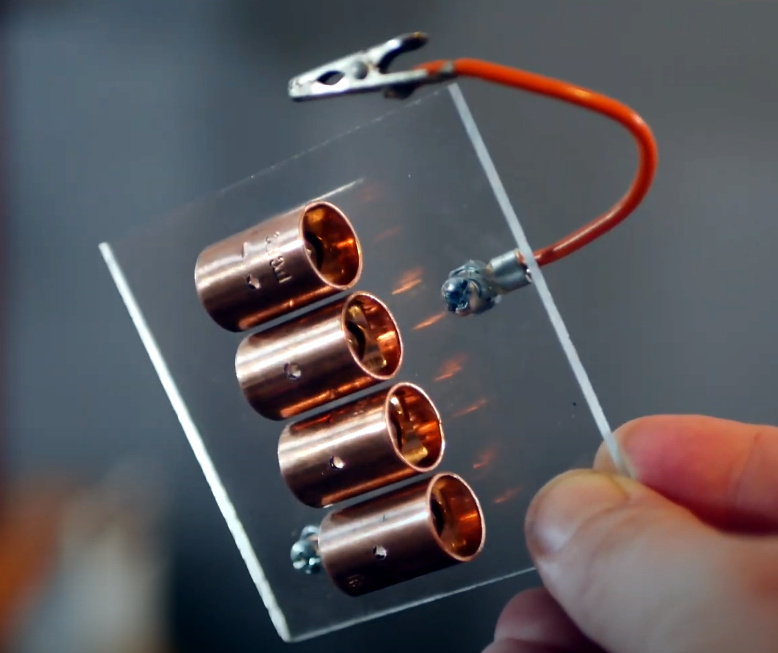
Beyond the coils, this build utilizes the DIY high-voltage power supply that [Jay] detailed a few months back. There’s also a bank of capacitors mounted to a small piece of acrylic, and a clever adjustable spark gap that’s made of little more than a few strategically placed pieces of copper pipe and an alligator clip. Beyond a few little details that might not be obvious at first glance, such as grounding the secondary coil to a layer of aluminum tape on the bottom of the base, it’s all right there in the open. No magic, just science.

[Jay] estimates this beauty can produce voltages in excess of 100,000 volts, and provides a demonstration of its capabilities in the video after the break. Unfortunately, before he could really put the new see-through coil through its paces, it took a tumble and was destroyed. A reminder that acrylic enclosures may be pretty, but they certainly aren’t invulnerable. With the value of hindsight, we’re sure the rebuilt version will be even better than the original.

If you’d rather not have your illusions shattered, we’ve seen plenty of complex Tesla coils to balance this one out. With witchcraft like PCB coils and SMD components, some of them still seem pretty magical.

source https://hackaday.com/2020/10/20/this-mostly-transparent-tesla-coil-shows-it-all/

Thinking about Creating a Raspberry Pi Replacement?

If you’ve ever wanted to try your hand at creating a Raspberry Pi-like board for yourself, you should check out [Jay Carlson’s] review of 10 different Linux-capable SoCs. Back in the 1960s, a computer was multiple refrigerator-sized boxes with thousands of interconnections and building one from scratch was only a dream for most people. Then ICs can and put all the most important parts in a little relatively inexpensive IC package and homebrew computing became much more accessible. Systems on Chip (SoC) has carried that even further, making it easier than ever to create entire systems, like the Pi and its many competitors.

Only a few years ago, making an SoC was still a big project because the vendors often didn’t want to release documentation to the public. In addition, most of the parts use ball grid array (BGA) packaging. BGA parts can be hard to work with, and require a multilayer PC board. Sure, you can’t plug these into a typical solderless breadboard. But working with these relatively large BGAs isn’t that hard and multilayer boards are now comparatively cheap. [Jay] reports that he got cheap PCBs and used a hot plate to build each board, and has some sage advice on how to do it.

Although he’s looking at 10 different chips, he wound up making about 25 boards and he deliberately avoided using example PCB layouts. This let him optimize for hand assembly and try a few different strategies for things like memory layout. [Jay] points out the boards are more for evaluation than use. He didn’t put any peripherals onboard that you would probably want in a working system. He only included what was necessary to boot the chip into Linux.

There’s a long part of the post where [Jay] talks about why you might want to use Linux, why you might not want to use Linux, and why the Raspberry Pi 4 might not be your best choice, depending on your design goals. He also gives a tutorial on simplified single-chip DDR memory layout.

This has a reputation of being difficult to do, and the post acknowledges that for multip-chip designs, it is harder. However, at the speeds involved and the proposed topology, [Jay] was able to build several working designs and was even able to overclock the memory. The takeaway is that for all the panic over DRAM signal timing on a board, some of it may be unnecessarily strict and buying modules with RAM already in place might be unnecessarily expensive. Of course, some of that is because none of these processors are running at very high-speeds or with overly complex and fast RAM.

The first half of the post is full of information like that, but devoid of any testing of the actual parts. When you get to the bottom half, you’ll see, though, that he uses ten different chips from vendors like Microchip, ST, NXP, Ti, Allwinner, and others. We were impressed with how much work was done, including benchmarks. The actual write up is impressive, too Each part has its own quirks, like the Allwinner part that can only address the first 16MB of flash. He even threw in a video, you can see below.

Truthfully, most of us won’t do this. We’ll just continue to buy boards. We have, however, seen people steal the SoC off a Pi and put it on their own board. If ARM SoC’s aren’t your thing, there have been x86 boards, too. Read more Thinking about Creating a Raspberry Pi Replacement? ›

Upgrading a Classic Function Generator

If you need an oscilloscope, function generator, or other piece of kit for your electronics workbench, there are plenty of modern options. Dropping $4,000 for a modern oscilloscope is nice if you have the money, but if you’d rather put it to better use there are great options that don’t cost a fortune. There are some addons that can turn a smartphone into an oscilloscope but one of the best values out there are older pieces of equipment from the 80s that still work great. You can even upgrade them with some more modern features too, like [NFM] did with this vintage function generator.

This function generator is an HP3325A and it is several decades old, so some work was needed just to restore it to original working condition. The cooling fan and capacitors all needed to be replaced, as well as a few other odds and ends. From there [NFM] set about adding one of the two optional upgrades available for this device, the high voltage output. This allows the function generator to output 40 volts peak-to-peak at 40 milliamps. While he did have an original version from HP, he actually had a self-made design produced that matches the function of the original.

Even if you don’t have this specific function generator, this guide goes into great details about the functioning of older equipment like this. Most of the parts are replaceable and upgrades aren’t completely out of the question like some modern equipment, and with the right care and maintenance these pieces of equipment could last for decades longer.

source https://hackaday.com/2020/10/20/upgrading-a-classic-function-generator/

Simplifying the Ruggedized Raspberry Pi Portable

Over the last year we’ve seen a wave of portable computer builds that center around the Raspberry Pi taking up residence inside a commercial heavy-duty storage case. It’s not hard to see why; whether you spring for the Pelican case or get a cheaper alternative, these water-tight cases are far stronger than anything you’re going to 3D print or otherwise cobble together in the home shop. Especially if you can avoid popping any holes in the side.

Inspired by these builds but looking to make it even easier and cheaper to roll your own version, [Dmitry] recently took the wraps off of what he calls the Militarish Pi. You don’t need a CNC to cut out any face plates or a 3D printer to create an internal framework for all your components. You could even do it without soldering anything, if you really wanted to. Short of just buying one of theses rigs pre-built from somebody, it’s hard to imagine it could get much easier than this.

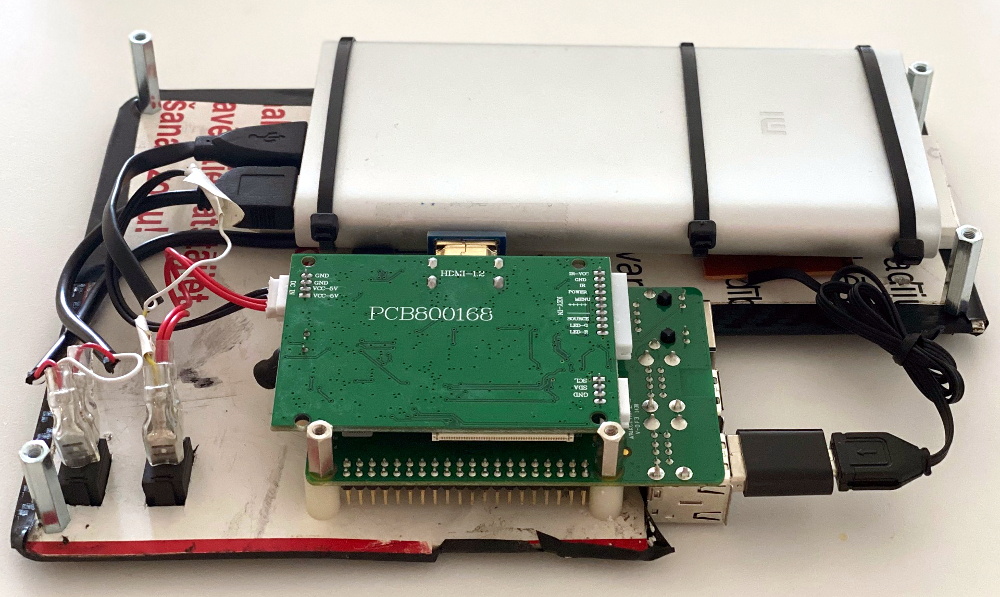
Most of the effort involves cutting the PVC foam sheet that holds the Raspberry Pi, battery pack, and the driver board for the LCD in the bottom of the $15 USD case [Dmitry] managed to track down on AliExpress. The “carbon fiber” sticker he put on the PVC sheet won’t do much for the structural integrity of the build, but it sure looks nice. Of course if you have access to the appropriate tools, you could certainly cut the plate out of something stouter. As for the display, the nine inch LCD is perfectly sized to press fit into the lid.

Rounding out the build, [Dmitry] found a cheap Android phone case that included a tiny USB keyboard which plugs right into the Pi. He’s looking to add a BlackBerry trackball to the setup down the line, but in the meantime you can always tap on the screen. We especially like the large open area that he’s kept around the Raspberry Pi’s ports that allow you to easily hook up to the network or plug in a flash drive. It could also be a nice compartment to keep your RTL-SDR for some mobile radio work.

For those that don’t mind spending name-brand money and have access to a 3D printer, the Raspberry Pi Quick Kit by [Jay Doscher] is another great way to get yourself a rough and tumble Pi without reinventing the wheel.

source https://hackaday.com/2020/10/19/simplifying-the-ruggedized-raspberry-pi-portable/

Simplifying the Ruggedized Raspberry Pi Portable

Over the last year we’ve seen a wave of portable computer builds that center around the Raspberry Pi taking up residence inside a commercial heavy-duty storage case. It’s not hard to see why; whether you spring for the Pelican case or get a cheaper alternative, these water-tight cases are far stronger than anything you’re going to 3D print or otherwise cobble together in the home shop. Especially if you can avoid popping any holes in the side.

Inspired by these builds but looking to make it even easier and cheaper to roll your own version, [Dmitry] recently took the wraps off of what he calls the Militarish Pi. You don’t need a CNC to cut out any face plates or a 3D printer to create an internal framework for all your components. You could even do it without soldering anything, if you really wanted to. Short of just buying one of theses rigs pre-built from somebody, it’s hard to imagine it could get much easier than this.

Most of the effort involves cutting the PVC foam sheet that holds the Raspberry Pi, battery pack, and the driver board for the LCD in the bottom of the $15 USD case [Dmitry] managed to track down on AliExpress. The “carbon fiber” sticker he put on the PVC sheet won’t do much for the structural integrity of the build, but it sure looks nice. Of course if you have access to the appropriate tools, you could certainly cut the plate out of something stouter. As for the display, the nine inch LCD is perfectly sized to press fit into the lid.

Rounding out the build, [Dmitry] found a cheap Android phone case that included a tiny USB keyboard which plugs right into the Pi. He’s looking to add a BlackBerry trackball to the setup down the line, but in the meantime you can always tap on the screen. We especially like the large open area that he’s kept around the Raspberry Pi’s ports that allow you to easily hook up to the network or plug in a flash drive. It could also be a nice compartment to keep your RTL-SDR for some mobile radio work.

For those that don’t mind spending name-brand money and have access to a 3D printer, the Raspberry Pi Quick Kit by [Jay Doscher] is another great way to get yourself a rough and tumble Pi without reinventing the wheel.

source https://hackaday.com/2020/10/19/simplifying-the-ruggedized-raspberry-pi-portable/

Let KiCad and Python Make Your Coils

We like to pretend that our circuits are as perfect as our schematics. But in truth, PCB traces have unwanted resistance, capacitance, and inductance. On the other hand, that means you can use those traces to build components. For example, it isn’t uncommon to see a very small value current sense resistor be nothing more than a long PC board trace. Using PC layers for decoupling capacitance and creating precise transmission lines are other examples. [IndoorGeek] takes us through his process of creating coils on the PCB using KiCad. To help, he used a Python script that works out the circles, something KiCAD has trouble with.

The idea is simple. A coil of wire has inductance even if it is a flat copper trace on a PCB. In this case, the coils are more for the electromagnetic properties, but the same idea applies if you wanted to build tuned circuits. The project took inspiration from FlexAR, an open-source flexible PCB magnet.

KiCAD doesn’t like curved traces, but since the file format is open and text-based, it is easy to write scripts that can create shapes for you. [Joan Spark] provided the script. By the way, the goal for these magnets is to improve the mechanical 7-segment display we’ve looked at earlier.

It is really great to be able to work with text files and modify your PCB layouts; it leads to very handy tools. Of course, you can do the same kinds of tricks with gcode, but by that time, you’ve lost a lot of information.

source https://hackaday.com/2020/10/19/let-kicad-and-python-make-your-coils/

Stomp Button, Receive Candy

If there’s any holiday that is worth adjusting for strange times, it’s gotta be Halloween. Are you inclined to leave a bowl of candy on the porch to avoid the doorbell? If so, this is the perfect year to finally figure out some sort of metering apparatus so that greedy preteens are less likely to steal your stash in one sweep. There’s still time to make something fun like [Brankly]’s automatic candy dispenser, which we think ought to stick around for many years to come. Video is posted after the break.

Underneath that skeleton’s jack-o-lantern head is the heart of this build — an orange 5-gallon bucket that matches it perfectly. Simply step on the giant lighted arcade button, and the equally giant NEMA-23 stepper motor moves a 3D-printed turntable inside the bucket with the help of an Arduino Nano. This moves the candy toward the 3D-printed ramp and out the mouth of the jack-o-lantern, where it lands in a bowl that lights up when it hits the bottom thanks to a relay and a second Nano.

[Brankly] made clever use of IR break-beam switches, which sit underneath the two square holes in the ramp. Once candy passes over one of them, the turntable stops and rotates backward to move the candy where it can’t be reached.

Frankly, we love that [Brankly] reused the sound effects module that came with the jack-o-lantern. This build is totally open, and [Brankly] is even giving away 40 PCBs if you want to make your own. For now, you can check out the code and start printing the STLs.

If time is tight, build a spooky slide that puts six feet between you and the trick or treaters.

source https://hackaday.com/2020/10/19/stomp-button-receive-candy/

Motorized Magic Over HDMI

There is a certain warmth that seems to emanate from stereo receivers of the 70s, 80s, and 90s. Despite their large footprint and considerable heft, the soft glow of the indicator lights and solid kerthunk of switches provide a sense of coziness. When [Tom] recently swapped his receiver for a 1970s Pioneer SX-950, he found himself getting up from the couch to adjust the volume when watching TV far too often for his liking. Resolving to do something about it, he added some magic in the form of a motorized volume knob. One of the coolest tricks for stereos was to have a small motor attached to the volume knob so that it could turn the volume up or down via a remote.

The first obstacle came when [Tom] had to forgo the center tap on the potentiometer to get a motorized one. This meant the volume compensation feature would be disabled, which is but a small price to pay for convenience. After scouring the internet, he finally had the part in hand only to discover some troublesome capacitors in the way. The new pot had a rather large motor hanging off the back that the previous one didn’t have. Fortunately, there was a good bit of space between the PCB and the bottom of the chassis, so Tom was able to just flip the capacitors to the underside of the board and bend them on their sides.

The next problem to solve was how to change the volume remotely. IR was considered as well as optical cable control signals. What [Tom] did instead was to implement HDMI CEC (consumer electronics control). CEC was well documented and seemed simple to implement on an ATTINY4313 with the help of a half-H driver. The CEC protocol implemented by [Tom’s] TV seemed to be very sensitive to timing, so an external crystal was used to get more precise timing and additional handshaking was implemented to get the TV to accept the microcontroller as valid. A few fail-safes were added to make sure the motor didn’t burn out if something went wrong with the CEC protocol and a nice enclosure wrapped up the build quite nicely.

We’ve seen CEC implemented before on a PIC 18F87J50, but as a sender of CEC commands not a receiver. [Tom’s] code is available on GitHub and might prove useful if you’re looking to implement CEC on an AVR.

Thanks [Tom] for sending this one in!

source https://hackaday.com/2020/10/19/motorized-magic-over-hdmi/

TTGO ESP32 Module with Multiple Personalities

Volos Projects educator [Danko Bertović] had a TTGO ESP32 board looking for a project, so he implemented a surprisingly functional weather station for such a small screen. Presumably that was too boring for him, so he decided to write a version of the classic Atari game Breakout instead. [Danko] prefers using the Arduino IDE for ESP32 projects, and has made the Breakout software available as an Arduino sketch. We hope the weather station sketch will be released soon, too. The TTGO is a small ESP32 board with an ST7789V 1.14 in (29 mm) TFT color display, available from your favorite Shenzhen market supplier. This platform is perfect for all kinds of niche applications. We’d love to hear how you are using, or plan to use, these modules in your projects.  

We wrote about one such project last summer, where a similar TTGO module was used to display 50-year broadcast delayed transcripts of the Apollo 11 mission. [Danko] is no stranger to Hackaday — he has made several Arduino-based calculator projects.  Perhaps the most remarkable being the circuit sculpture binary number calculator from last year, another project that morphed into a computer game (Pong).  

https://www.youtube.com/watch?v=N6V7ZJkhSbc

source https://hackaday.com/2020/10/19/ttgo-esp32-module-with-multiple-personalities/

Bench Supplies Get Smaller Thanks to USB-C

Bench power supplies are an indispensable tool when prototyping electronics. Being able to set custom voltages and having some sort of current limiting feature are key to making sure that the smoke stays inside all of the parts. Buying a modern bench supply might be a little too expensive though, and converting an ATX power supply can be janky and unreliable. Thanks to the miracle of USB-C, though, you can build your own fully-featured benchtop power supply like [Brian] did without taking up hardly any space, and for only around $12.

USB-C can be used to deliver up to 100W but is limited to a few set voltage levels. For voltages that USB-C doesn’t support, [Brian] turns to an inexpensive ZK-4KX buck-boost DC-DC converter that allows for millivolt-level precision for his supply’s output. Another key aspect of using USB-C is making sure that your power supply can correctly negotiate for the amount of power that it needs. There’s an electronic handshake that goes on over the USB connection, and without it there’s not a useful amount of power that can be delivered. This build includes a small chip for performing this negotiation as well.

With all the electronics taken care of, [Brian] houses all of this in a 3D-printed enclosure complete with a set of banana plugs. While it may not be able to provide the wattage of a modern production unit, for most smaller use cases this would work perfectly. If you already have an ATX supply around, though, you can modify [Brian]’s build using that as the supply and case too.

source https://hackaday.com/2020/10/19/bench-supplies-get-smaller-thanks-to-usb-c/

Retro Calculator Design Has Creative Tactile Touchscreen

We’ve all heard it a thousand times – they don’t make ’em like they used to. Sometimes, that’s for good reason, but there is a certain build quality to electronics of the mid-20th century that is hard to find in hardware today. This inspires great nostalgia and dedication in some, like [Michael Park], who set out to build a calculator reminiscent of the best HP designs from yesteryear.

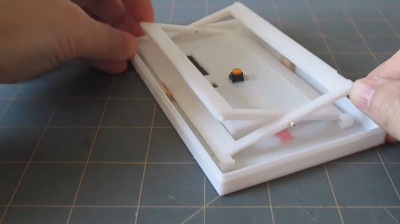
The scissor mechanism allows the touch screen to move linearly and activate the tactile switch without twisting, no matter where along its surface it is pressed.

One of the major factors for [Michael] was the great feel of the keys on these classic units. Wanting to experiment with different layouts without a lot of rewiring, the idea of keys with individual displays became attractive. Existing parts on the market were prohibitively expensive, however. Instead, [Michael] used a single touchscreen with a switch mounted underneath to provide tactile feedback with a nifty scissor-arm guide mechanism. Combined with individual see-through plastic overlays, the MP-29 has a fully reconfigurable pad of 30 keys with dynamically updatable labels.

It’s a creative choice, and one that looks highly satisfying to use. It has all the tactile benefits of individual keys, both in the keypresses and being able to navigate the keypad without looking. Combined with the benefit of reconfigurable keys thanks to the touch screen underneath, it’s a great way to build a user-interface.

The rest of the calculator design closely mimics the HP-29, though [Michael] is also experimenting with alternative layouts too. There are plenty of religious wars in the calculator community over usability, after all – mostly over which side of the pad has the arithmetic functions.

We’ve lamented the demise of the standalone calculator recently; with so many smart devices around, it’s hard to see it making a major comeback anytime soon. Of course, if you’re opinionated on the topic, sound off in the comments below. Video after the break.


source https://hackaday.com/2020/10/18/retro-calculator-design-has-creative-tactile-touchscreen/

Free P2P VPN

People use a VPN — virtual private network — for a lot of reasons. However, for many people it is synonymous with hiding your network traffic, one thing that VPN can do. FreePN is a relatively new open source project that aims to build a free peer-to-peer VPN network. Like TOR, it is decentralized.

Right now, you can download for Ubuntu and Gentoo. There is a way to ask for early access for Debian, Fedora, and Arch. Windows, iOS, MacOS, and Android versions are promised for the future.

The code is on GitHub, so all questions are in theory answerable. Digging into the fpnd README told us most of the features we hoped to find on the main page (but didn’t):

The FreePN network daemon (fpnd) is a P2P implementation of a distributed virtual private network (dVPN) that creates an anonymous “cloud” of peers where each peer is both a client node and an exit node. Peers are randomly connected on startup and reconnected to new (random) peers as needed.

The FreePN network daemon (fpnd) is a P2P implementation of a distributed virtual private network (dVPN) that creates an anonymous “cloud” of peers where each peer is both a client node and an exit node. Peers are randomly connected on startup and reconnected to new (random) peers as needed.

In addition, the page notes that they only route http(s) traffic and, optionally, DNS traffic. IPv6 packets are dropped, unless you configure it to pass without VPN.

Is this a better answer than TOR? We don’t know. We weren’t clear on how you could set this up for some possible use cases, but there appears to be a fledgling support group on Reddit. If this works well and can support more platforms, it could be a good thing for online privacy and protection.

We’ve noted before that truly secure networking can be hard to accomplish. For many of us, a VPN is just an extra layer of security, or a way to watch TV that is only available in another country. But for some people, a VPN is a political necessity.

source https://hackaday.com/2020/10/18/free-p2p-vpn/

Hackaday Links: October 18, 2020

Remember subliminal advertising? The idea was that a movie theater operator would splice a single frame showing a bucket of hot buttered popcorn into a movie, which moviegoers would see and process on a subconcious level and rush to the concession stand to buy the tub o’ petrochemical-glazed starch they suddenly craved. It may or may not work on humans, but it appears to work on cars with advanced driver assistance, which can be spoofed by “phantom street signs” flashed on electronic billboards. Security researchers at Ben Gurion University stuck an image of a stop sign into a McDonald’s ad displayed on a large LCD screen by the side of the road. That was enough to convince a Tesla Model X to put on the brakes as it passed by the sign. The phantom images were on the screen anywhere from an eighth of a second to a quarter second, so these aren’t exactly subliminal messages, but it’s still an interesting attack that bears looking into. And while we’re skeptical about the whole subliminal advertising thing in the first place, for some reason we really want a bacon cheeseburger right now.

Score one for the good guys in the battle against patent trolls. Mycroft AI, makers of open-source voice assistants, proudly announced their latest victory against what they claim are patent trolls. This appears to be one of those deals where a bunch of investors get together and buy random patents, and then claim that a company that actually built something infringes on their intellectual property. Mycroft got a letter from one such entity and decided to fight it; they’ve won two battles so far against the alleged trolls and it looks pretty good going forward. Their not pulling their punches, either, since Mycroft is planning to go after the other parties for legal expenses and punitive damages under the State of Missouri’s patent troll legislation. Here’s hoping this sends a message to IP squatters that it may not be worth the effort and that their time and money are better spent actually creating useful things.

Good news from Mars — The Mole is finally completely buried! We’ve been following the saga of the HP³, or “Heat Flow and Physical Properties Package” aboard NASA’s Mars InSight lander for quite a while. The self-drilling “Mole”, which is essentially the guts of an impact screwdriver inside a streamlined case, has been having trouble dealing with the Martian regolith, which is simultaneously to soft to offer the friction needed to keep the penetrator in its hole, but also too hard to pierce in places where there is a “duricrust” of chemically amalgamated material below the surface. It took a lot of delicate maneuvers with the lander’s robotic arm to get the Mole back on track, and it’s clearly not out of the woods yet — it needs to get down to three meters depth or so to do the full program of science it was designed for.

If watching Martian soil experiments proceed doesn’t scratch your itch for space science, why not try running your own radio astronomy experiments? Sure, you could build your own radio telescope to do that, but you don’t even have to go that far — just log into PICTOR, the free-to-use radio telescope. It’s a 3.2-m parabolic dish antenna located near Athens, Greece that’s geared toward hydrogen line measurements of the galaxy. You can set up an obervation run and have the results mailed back to you for later analysis.

Here’s a fun, quick hack for anyone who hates the constant drone of white noise coming from fans. Build Comics apparently numbers themselves among that crowd, and decided to rig up a switch to turn on their fume extractor only when the soldering iron is removed from its holder. This hack was executed on a classic old Weller soldering station, but could easily be adapted to Hakko or other irons

And finally, if you’ve never listened to a Nobel laureate give a lecture, here’s your chance. Andrea Ghez, co-winner of the 2020 Nobel Prize in physics for her work on supermassive black holes, will be giving the annual Maria Goeppert Mayer lecture at the University of Chicago. She’ll be talking about exactly what she won the Nobel for: “The Monster at the Heart of Our Galaxy”, the supermassive black hole Sagittarius A*. We suspect the talk was booked before the Nobel announcement, so in normal times the room would likely be packed. But one advantage to the age of social distancingis that everything is online, so you can tune into a livestream of the lecture on October 22.

source https://hackaday.com/2020/10/18/hackaday-links-october-18-2020/

Custom Electronic Load Makes Use Of Gaming PC Tech

At first glance, you might think the piece of hardware pictured here is a modern gaming computer. It’s got water cooling, RGB LED lighting, and an ATX power supply, all of which happen to be mounted inside a flashy computer case complete with a clear window. In truth, it’s hard to see it as anything but a gaming PC.

In actuality, it’s an incredible custom electronic load that [EE for Everyone] has been developing over the last four months that’s been specifically designed to take advantage of all the cheap hardware out there intended for high-performance computers. After all, why scratch build a water cooling system or enclosure when there’s such a wide array of ready-made ones available online?

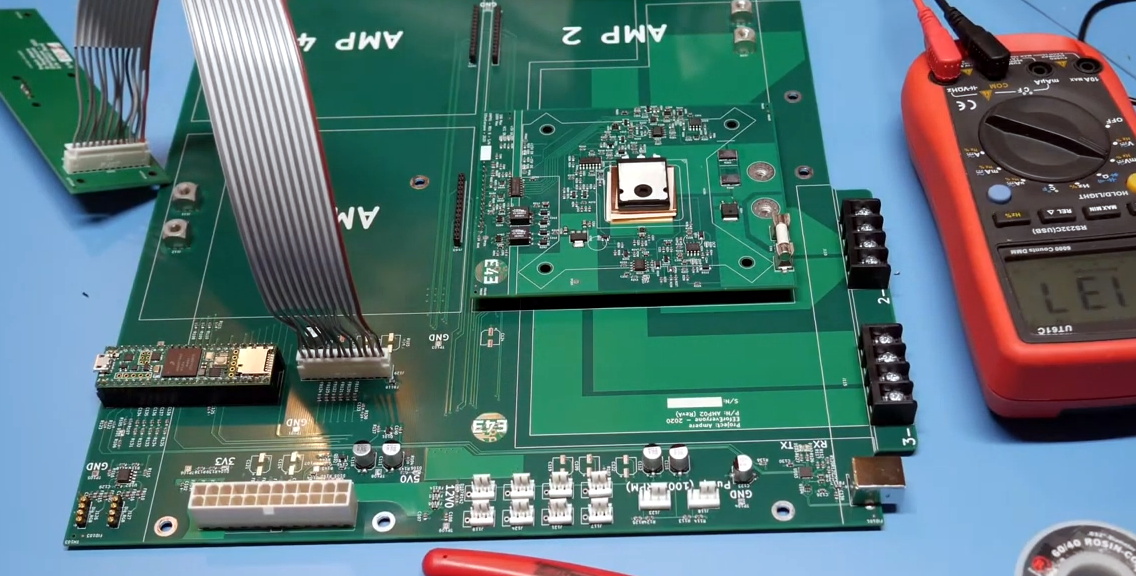
The “motherboard” with single load module installed.

Inside that fancy case is a large PCB taking the place of the original motherboard, to which four electronic load modules slot into. Each of these loads is designed to accept a standard Intel CPU cooler, be it the traditional heatsink and fan, or a water block for liquid cooling. With the current system installed [EE for Everyone] can push the individual modules up to 275 watts before the temperatures rise to unacceptable levels, though he’s hoping to push that a little higher with some future tweaks.

So what’s the end game here? Are we all expected to have a massive RGB-lit electronic load hidden under the bench? Not exactly. All of this has been part of an effort to design a highly accurate electronic load for the hobbyist which [EE for Everyone] refers to as the “Community Edition” of the project. Those smaller loads will be derived from the individual modules being used in this larger testing rig.

We’ve actually seen DIY liquid cooled electronic loads in the past, though this one certainly sets the bar quite a bit higher. For those with more meager requirements, you might consider flashing a cheap imported electronic load with an open source firmware to wring out some extra functionality.

[Thanks to Zane for the tip.]

source https://hackaday.com/2020/10/18/custom-electronic-load-makes-use-of-gaming-pc-tech/

Custom Electronic Load Makes Use Of Gaming PC Tech

At first glance, you might think the piece of hardware pictured here is a modern gaming computer. It’s got water cooling, RGB LED lighting, and an ATX power supply, all of which happen to be mounted inside a flashy computer case complete with a clear window. In truth, it’s hard to see it as anything but a gaming PC.

In actuality, it’s an incredible custom electronic load that [EE for Everyone] has been developing over the last four months that’s been specifically designed to take advantage of all the cheap hardware out there intended for high-performance computers. After all, why scratch build a water cooling system or enclosure when there’s such a wide array of ready-made ones available online?

The “motherboard” with single load module installed.

Inside that fancy case is a large PCB taking the place of the original motherboard, to which four electronic load modules slot into. Each of these loads is designed to accept a standard Intel CPU cooler, be it the traditional heatsink and fan, or a water block for liquid cooling. With the current system installed [EE for Everyone] can push the individual modules up to 275 watts before the temperatures rise to unacceptable levels, though he’s hoping to push that a little higher with some future tweaks.

So what’s the end game here? Are we all expected to have a massive RGB-lit electronic load hidden under the bench? Not exactly. All of this has been part of an effort to design a highly accurate electronic load for the hobbyist which [EE for Everyone] refers to as the “Community Edition” of the project. Those smaller loads will be derived from the individual modules being used in this larger testing rig.

We’ve actually seen DIY liquid cooled electronic loads in the past, though this one certainly sets the bar quite a bit higher. For those with more meager requirements, you might consider flashing a cheap imported electronic load with an open source firmware to wring out some extra functionality.

[Thanks to Zane for the tip.]

source https://hackaday.com/2020/10/18/custom-electronic-load-makes-use-of-gaming-pc-tech/

Custom Electronic Load Makes Use Of Gaming PC Tech

At first glance, you might think the piece of hardware pictured here is a modern gaming computer. It’s got water cooling, RGB LED lighting, and an ATX power supply, all of which happen to be mounted inside a flashy computer case complete with a clear window. In truth, it’s hard to see it as anything but a gaming PC.

In actuality, it’s an incredible custom electronic load that [EE for Everyone] has been developing over the last four months that’s been specifically designed to take advantage of all the cheap hardware out there intended for high-performance computers. After all, why scratch build a water cooling system or enclosure when there’s such a wide array of ready-made ones available online?

The “motherboard” with single load module installed.

Inside that fancy case is a large PCB taking the place of the original motherboard, to which four electronic load modules slot into. Each of these loads is designed to accept a standard Intel CPU cooler, be it the traditional heatsink and fan, or a water block for liquid cooling. With the current system installed [EE for Everyone] can push the individual modules up to 275 watts before the temperatures rise to unacceptable levels, though he’s hoping to push that a little higher with some future tweaks.

So what’s the end game here? Are we all expected to have a massive RGB-lit electronic load hidden under the bench? Not exactly. All of this has been part of an effort to design a highly accurate electronic load for the hobbyist which [EE for Everyone] refers to as the “Community Edition” of the project. Those smaller loads will be derived from the individual modules being used in this larger testing rig.

We’ve actually seen DIY liquid cooled electronic loads in the past, though this one certainly sets the bar quite a bit higher. For those with more meager requirements, you might consider flashing a cheap imported electronic load with an open source firmware to wring out some extra functionality.

[Thanks to Zane for the tip.]

source https://hackaday.com/2020/10/18/custom-electronic-load-makes-use-of-gaming-pc-tech/

Precision Metal Detector Finds Needles in Haystacks

Full-size metal detectors are great for narrowing down a region to start digging through. But what if you had a smaller metal detector that could pinpoint the location? Then you could spend far less time digging and way more time sweeping for metal.

Metal detectors work because of the way metal behaves around electromagnetic fields. [mircemk] reused the ferrite core from an old MW radio to build the antenna coils. When metal objects are close enough, the induced electromagnetism changes the frequency, and the Arduino blinks an LED and beeps a buzzer in time with the new frequency.

[mircemk]’s handheld metal detector is quite sensitive, especially to smaller objects. As you can see in the demo video after the break, it can sense coins from about 4cm away, larger objects like lids from about 7 cm, and tiny things like needles from a few millimeters away. There’s also an LED for treasure hunting in low light.

Don’t want to pinpoint a bunch of useless junk? Build in some phase detection to help you discriminate.

source https://hackaday.com/2020/10/18/precision-metal-detector-finds-needles-in-haystacks/

Worm Bot Inches Along As You’d Expect

Robot locomotion is a broad topic, and there are a multitude of choices for the budding designer. Often, nature is an inspiration, and many ‘bots have been built to explore the motion regimes of various insects and animals. Inspired himself by the common inch worm, [jegatheesan.soundarapandian] decided to build a robot that moved in a similar way.

The build consists of a series of 3D printed linkages, with servos fitted in between. This allows the robot’s body to articulate and flex in much the same way as a real inch worm. By flexing the body up, shifting along, and flexing back down, the robot can slowly make its way along a surface. An Arduino Pro Mini is the brains of the operation, being compact enough to fit on the small robot while still having enough outputs to command the multiple servos required. Control is via a smartphone app, using MIT’s AppInventor platform and the venerable HC-05 Bluetooth module.

It’s a fun build, and we’d love to see it go further with batteries replacing the tether and perhaps some sensors to enable it to further interact with its environment. We’ve seen other creative 3D-printed designs before, too – like this spherical quadruped ‘bot. Video after the break.

source https://hackaday.com/2020/10/18/worm-bot-inches-along-as-youd-expect/

Duality of Light Explored by Revisiting the Double-Slit Experiment

We’ve all seen recreations of the famous double-slit experiment, which showed that light can behave both as a wave and as a particle. Or rather, it’s likely that what we’ve seen is the results of the double-slit experiment, that barcode-looking pattern of light and dark stripes, accompanied by some handwaving about classical versus quantum mechanics. But if you’ve got 20 minutes to invest, this video of the whole double-slit experiment cuts through the handwaving and opens your eyes to the quantum world.

For anyone unfamiliar with the double-slit experiment,  [Huygens Optics] actually doesn’t spend that much time explaining the background. Our explainer does a great job on the topic, but suffice it to say that when coherent light passes through two closely spaced, extremely fine openings, a characteristic pattern of alternating light and dark bands can be observed. On the one hand, this demonstrates the wave nature of light, just as waves on the ocean or sound waves interfere constructively and destructively. On the other hand, the varying intensity across the interference pattern suggests a particle nature to light.

To resolve this conundrum, [Huygens] jumps right into the experiment, which he claims can be done with simple, easily sourced equipment. This is belied a little by the fact that he used photolithography to create his slits, but it should still be possible to reproduce with slits made in more traditional ways. The most fascinating bit of this for us was the demonstration of single-photon self-interference using nothing but neutral density filters and a CCD camera. The explanation that follows of how it can be that a single photon can pass through both slits at the same time is one of the most approachable expositions on quantum mechanics we’ve ever heard.

[Huygens Optics] has done some really fascinating stuff lately, from variable profile mirrors to precision spirit levels. This one, though, really helped scratch our quantum itch.

source https://hackaday.com/2020/10/18/duality-of-light-explored-by-revisiting-the-double-slit-experiment/

Where We’re Calculating, We Don’t Need No Seven Segments!

There have been many attempts at electronic numerical display technology over the decades since the first incandescent bulb or neon tube flickered into life at the command of a primordial computer, but the lowest common denominator has remained the humble seven segments. Here it might end, but for [Ken Yap] who has taken inspiration from a 1960s Sharp calculator to re-create a numerical display with only six segments.

This seemingly impossible feat is achieved by having six curved segments arranged as a figure-eight, which can render all the digits after a fashion, but which soon reveals why the extra segment made an appearance. The numbers that are made up of curves look good enough, but the straight lines in the 1, 4, and 7, are compromised by the diagonal, and the zero is curiously small at half the height.  You can read the digits, but it takes getting used to.

What made sense to reduce the complexity of 1960s electronics is only a fascinating curiosity in 2020, but we maybe won’t see these displays appearing too often. You can take a look at it in the video below the break, and if you’re curious about the Sharp calculator which inspired it then you can take a look at its page in the Vintage Calculator Museum.

source https://hackaday.com/2020/10/18/where-were-calculating-we-dont-need-no-seven-segments/

Climbing Everest One Hill At A Time – And Keeping Track Of It

The internet is full of self-proclaimed challenges, ranging from some absolutely pointless fads to well-intended tasks with an actual purpose. In times of TikTok, the latter is of course becoming rarer, as a quick, effortless jump on the bandwagon is just easier for raising your internet points. Cyclists on the other hand love a good challenge where they compete with one another online, testing their skills and gamifying their favorite activity along the way. One option for that is Everesting, where you pick a hill of your choice, and within a single session you ride it up and down as many times it takes until you accumulated the height of Mount Everest on it. Intrigued by the idea, but not so much its competitive aspect, [rabbitcreek] became curious how long it would take him to reach that goal with his own casual bicycle usage, so he built a bicycle computer to measure and keep track of it.

While the total distance and time factors into the actual challenge, [rabbitcreek]’s primary interest was the accumulated height, so the device’s main component is a BMP388 barometric pressure sensor attached to a battery-powered ESP32. An e-paper display shows the total height and completed percentage, along with some random Everest-related pictures. Everything is neatly packed together in a 3D-printed case that can be mounted on the bicycle’s handlebar, and the STL files are available along with the source code in his write-up.

Of course, if you’re actually interested in the challenge itself, you probably have an assortment of sports tracking equipment anyway, but this is a nice addition to keep track as you go, and has a lower risk of ransomware attacks. And in case [rabbitcreek] sounds like a familiar name to you, he’s indeed become a Hackaday regular with his environmental hacks like the tide clock, a handheld particle sniffer, or logging temperatures in the Alaskan wilderness.

source https://hackaday.com/2020/10/17/climbing-everest-one-hill-at-a-time-and-keeping-track-of-it/