World’s Smallest Benchy Shows off What 3D-Printing Can Do for “Microswimmers”

We’ve said it before, but we cast a wary eye at any superlative claims that come our way. “World’s fastest” or “world’s first” claims always seem to be quickly debunked, but when the claim of “World’s Smallest Benchy” is backed up by a tugboat that two dozen E. coli would have a hard time finding space on, we’re pretty comfortable with it.

Of course the diminutive benchmark was not printed just for the sake of it, but rather as part of a demonstration of what’s possible with “microswimmers”, synthetic particles which are designed to move about freely in microscopic regimes. As described in a paper by [Rachel P. Doherty] et al from the Soft Matter Physics lab at Leiden University, microswimmers with sizes on the order of 10 to 20 μm can be constructed repeatably, and can include a small area of platinum catalyst. The catalyst is the engine of the microswimmer; hydrogen peroxide in the environment decomposes on the catalyst surface and provides a propulsive force.

Artificial microswimmers have been around for a while, but most are made with chemical or evaporative methods which result in simple shapes like rods and spheres. The current work describes much more complex shapes — the Benchy was a bit of a flex, since the more useful microswimmers were simple helices, which essentially screw themselves into the surrounding fluid. The printing method was based on two-photon polymerization (2PP), a non-linear optical process that polymerizes a resin when two photons are simultaneously absorbed.

The idea that a powered machine so small could be designed and manufactured is pretty cool. We’d love to see how control mechanisms could be added to the prints — microfluidics, perhaps?

source https://hackaday.com/2020/10/26/worlds-smallest-benchy-shows-off-what-3d-printing-can-do-for-microswimmers/

Simple Induction Heater Helps with Homebrew Shrink-Fitting

Machinists have a lot of neat shop tricks, but one especially interesting one is shrink-fitting tools. Shrink-fitting achieves an interference fit between tool and holder by creating a temperature difference between the two before assembly. Once everything returns to temperature, the two parts may as well be welded together.

The easiest way to shrink-fit machine tooling is with induction heating, and commercial rigs exist for doing the job. But [Roetz 4.0] decided to build his own shrink-fitting heater, and the results are pretty impressive. The induction heater itself is very simple — a 48 volt, 20 amp power supply, an off-the-shelf zero-voltage switching (ZVS) driver, and a heavy copper coil. When the coil is powered up, any metal within is quickly and evenly heated by virtue of the strong magnetic flux in the coil.

To use the shrinker, [Roetz 4.0] starts with a scrupulously clean tool holder, bored slightly undersized for the desired tool. Inside the coil, the steel tool holder quickly heats to a lovely deep brown color, meaning it has gotten up to the requisite 250-300°C. The tool is quickly dropped into the now-expanded bore, which quickly shrinks back around it. The advantage of this method over a collet or a chuck is clear in the video below: practically zero runout, and the tool is easily released after another run through the heater.

You say you’ve got no need for shrink-fitting tools? How about stuck bolts? Induction heaters work great there too.

source https://hackaday.com/2020/10/26/simple-induction-heater-helps-with-homebrew-shrink-fitting/

Plastic Strips Protect Ball Screws on This Homebrew CNC Router

It’s a fact of life for CNC router owners — swarf. Whether it’s the fine dust from a sheet of MDF or nice fat chips from a piece of aluminum, the debris your tool creates gets everywhere. You can try to control it at its source, but swarf always finds a way to escape and cause problems.

Unwilling to deal with the accumulation of chips in the expensive ball screws of his homemade CNC router, [Nikodem Bartnik] took matters into his own hands and created these DIY telescopic ball screw covers. Yes, commercial ball screw covers are available, but they are targeted at professional machines, and so are not only too large for a homebrew machine like his but also priced for pro budgets. So [Nikodem] recreated their basic design: strips of thin material wound into a tight spring that forms a tube that can extend and retract. The first prototypes were from paper, which worked but proved to have too much friction. Version 2 was made from sheets of polyester film, slippery enough to get the job done and as a bonus, transparent. They look pretty sharp, and as you can see in the video below, seem to perform well.

It’s nice to see a build progress to the point where details like this can be addressed. We’ve been following [Nikodem]’s CNC build for years now, and it really has come a long way.

source https://hackaday.com/2020/10/26/plastic-strips-protect-ball-screws-on-this-homebrew-cnc-router/

Improved Flexible Build Plate for SLA is Ready to Rock

The Elegoo Mars is an affordable SLA (resin-based) 3D printer, and there are probably few that have seen more mods and experimentation than [Jan Mrázek]’s machine. The final design of his DIY flexible build plate is a refinement of his original proof of concept, which proved a flexible build platform can be every bit as useful on an SLA printer as it is for FDM; instead of chiseling parts off a rigid build platform, simply pop the flexible steel sheet off the magnetic base and flex it slightly for a much easier part removal process. His original design worked, but had a few rough edges that have since been ironed out.

[Jan]’s magnetic build platform.

We love how [Jan] walks through all of the design elements and explains what worked and what didn’t. For example, originally he used a galvanized steel sheet which was easy enough to work with, but ended up not being a viable choice because once it’s bent, it stays bent. Spring steel is a much better material for a flexible build platform, but is harder for a hobbyist to cut.

Fortunately, it’s a simple job for any metal fabrication shop and [Jan] got a variety of thicknesses cut very cheaply. It turns out that the sweet spot is 0.3 mm (although 0.2 mm is a better choice for particularly fragile parts.) [Jan] also suggests cutting the sheet a few millimeters larger than the build platform; it’s much easier to peel the sheet off the magnetic base when one can get a fingertip under an edge, after all.

The magnetic base that the steel sheet sticks to is very simple: [Jan] converted a stock build platform by mounting an array of 20 x 20 x 1 mm magnets with 3M adhesive mounting tape. He was worried that resin might seep in between the magnets and cause a problem, perhaps even interfering with the adhesive; but so far it seems to be working very well. Resin is viscous enough that it never penetrates far into the gaps, and no effect on the adhesive has been observed so far.

Watch how easily parts are removed in the short video embedded below, in which [Jan] demonstrates his latest platform design.

It looks like only fine tuning is left from here on out. [Jan] suspects the new sheet is responsible for a slight apparent increase in elephant foot distortion (where an object widens out slightly right at the base) but that’s a minor issue at worst. Flexible build platforms for SLA are recently starting to show up for sale as aftermarket parts, but [Jan]’s work shows that an effective DIY solution is perfectly accessible to a hobbyist.

If you’re curious about adding an SLA 3D printer to your workshop, here’s an article that explains what you’d be getting into in terms of moving from FDM to SLA.

source https://hackaday.com/2020/10/26/improved-flexible-build-plate-for-sla-is-ready-to-rock/

A Unique Display Makes An Unusual Clock

Do you know the clock speed of the computer you’re reading this article on? Maybe Hackaday readers are more likely to reply “Yes!” to that question than the general public, but if there’s a takeaway it’s that for most computer users their clock speed is now an irrelevance. It’s quick enough for the job in hand and that’s all that matters. This was not always the case though, and a few decades ago the clock speed of a PC was its major selling point. Beige boxes would have seven-segment displays lit up with the figure, and it was an unusual example of one that [Ken Yap] used to produce a clock that he believes is one-of-a-kind; unless by some slim chance somebody else has rescued the same part.

The displays were hard wired without any signals from the processor, and what makes this one unusual is that as well as having a couple of digits in yellow it also sports a segmented “MHz” in red. This would have been quite a big deal on your 486 back in about 1994. To make a clock from this unpromising start required a little creative thinking, and he manages it by using the “M” and the “H” digits to represent minutes and hours, and displaying each figure in turn. The display is wired on a piece of protoboard with an STM8 dev board, and yes, as you can see in the very short video below the break, it does tell the time.

Custom displays are more usually seen in the world of LCDs than LEDs, so this one remains a rarity on these pages. Happily there are projects out there in which people spin their own takes on the idea.

source https://hackaday.com/2020/10/25/a-unique-display-makes-an-unusual-clock/

STM32 Gets Up Close and Personal with Mandelbrot

The Mandelbrot set is a curious mathematical oddity that, while interesting in its own right, is also a useful tool for benchmarking various types of computers. Its constant computing requirement when zooming in and out on the function, combined with the fact that it can be zoomed indefinitely, means that it takes some quality hardware and software to display it properly. [Thanassis] has made this a pet project of his, running Mandelbrot set visualizations in different ways on many different hardware platforms.

This particular one is based on an STM32 board called the Blue Pill, which [Thanassis] chose because he hadn’t yet done a continuous Mandelbrot zoom on a microcontroller yet. The display is handled by a tiny 16K IPS color screen, and some clever memory tricks had to come into play in order to get smooth video output since the STM has only 20 kB available. The integer multiplication is also tricky on a platform this small while keeping the continuous zoom function, so it’s limited to fixed point multiplication.

Even with the limitations of the platform, he is still able to achieve nearly double-digit FPS rates with this one. If you want to play around with graphics like this on an STM platform, [Thanassis] has released all of the source code on his GitHub page, but if you’d like to see more Mandelbrot manipulation you can check out one of his older projects where he built a similar project on an FPGA.

source https://hackaday.com/2020/10/25/stm32-gets-up-close-and-personal-with-mandelbrot/

Hackaday Links: October 25, 2020

Siglent has been making pretty big inroads into the mid-range test equipment market, with the manufacturers instruments popping up on benches all over the place. Saulius Lukse, of Kurokesu fame, found himself in possession of a Siglent SPD3303X programmable power supply, which looks like a really nice unit, at least from the hardware side. The software it came with didn’t exactly light his fire, though, so Saulius came up with a Python library to control the power supply. The library lets him control pretty much every aspect of the power supply over its Ethernet port. There are still a few functions that don’t quite work, and he’s only tested it with his specific power supply so far, but chances are pretty good that there’s at least some crossover in the command sets for other Siglent instruments. We’re keen to see others pick this up and run with it.

From the “everyone needs a hobby” department, we found this ultra-detailed miniature of an IBM 1401 mainframe system to be completely enthralling. We may have written this up at an earlier point in its development, but it now appears that the model maker, 6502b, is done with the whole set, so it bears another look. The level of detail is eye-popping — the smallest features of every piece of equipment, from the operator’s console to the line printer, is reproduced . Even the three-ring binders with system documentation are there. And don’t get us started about those tape drives, or the wee chair in period-correct Harvest Gold.

Speaking of diversions, have you ever wondered how many people are in space right now? Or how many humans have had the privilege to hitch a ride upstairs? There’s a database for that: the Astronauts Database over on Supercluster. It lists pretty much everything — human and non-human — that has been intentionally launched into space, starting with Yuri Gagarin in 1961 and up to the newest member of the club, Sergey Kud-Sverchkov, who took off got the ISS just last week from his hometown of Baikonur. Everyone and everything is there, including “some tardigrades” that crashed into the Moon. They even included this guy, which makes us wonder why they didn’t include the infamous manhole cover.

And finally, for the machinists out there, if you’ve ever wondered what chatter looks like, wonder no more. Breaking Taps has done an interesting slow-motion analysis of endmill chatter, and the results are a bit unexpected. The footage is really cool — watching the four-flute endmill peel mild steel off and fling the tiny curlicues aside is very satisfying. The value of the high-speed shots is evident when he induces chatter; the spindle, workpiece, vise, and just about everything starts oscillating, resulting in a poor-quality cut and eventually, when pushed beyond its limits, the dramatic end of the endmill’s life. Interesting stuff — reminds us a bit of Ben Krasnow’s up close and personal look at chip formation in his electron microscope.

source https://hackaday.com/2020/10/25/hackaday-links-october-25-2020/

Hackaday Links: October 25, 2020

Siglent has been making pretty big inroads into the mid-range test equipment market, with the manufacturers instruments popping up on benches all over the place. Saulius Lukse, of Kurokesu fame, found himself in possession of a Siglent SPD3303X programmable power supply, which looks like a really nice unit, at least from the hardware side. The software it came with didn’t exactly light his fire, though, so Saulius came up with a Python library to control the power supply. The library lets him control pretty much every aspect of the power supply over its Ethernet port. There are still a few functions that don’t quite work, and he’s only tested it with his specific power supply so far, but chances are pretty good that there’s at least some crossover in the command sets for other Siglent instruments. We’re keen to see others pick this up and run with it.

From the “everyone needs a hobby” department, we found this ultra-detailed miniature of an IBM 1401 mainframe system to be completely enthralling. We may have written this up at an earlier point in its development, but it now appears that the model maker, 6502b, is done with the whole set, so it bears another look. The level of detail is eye-popping — the smallest features of every piece of equipment, from the operator’s console to the line printer, is reproduced . Even the three-ring binders with system documentation are there. And don’t get us started about those tape drives, or the wee chair in period-correct Harvest Gold.

Speaking of diversions, have you ever wondered how many people are in space right now? Or how many humans have had the privilege to hitch a ride upstairs? There’s a database for that: the Astronauts Database over on Supercluster. It lists pretty much everything — human and non-human — that has been intentionally launched into space, starting with Yuri Gagarin in 1961 and up to the newest member of the club, Sergey Kud-Sverchkov, who took off got the ISS just last week from his hometown of Baikonur. Everyone and everything is there, including “some tardigrades” that crashed into the Moon. They even included this guy, which makes us wonder why they didn’t include the infamous manhole cover.

And finally, for the machinists out there, if you’ve ever wondered what chatter looks like, wonder no more. Breaking Taps has done an interesting slow-motion analysis of endmill chatter, and the results are a bit unexpected. The footage is really cool — watching the four-flute endmill peel mild steel off and fling the tiny curlicues aside is very satisfying. The value of the high-speed shots is evident when he induces chatter; the spindle, workpiece, vise, and just about everything starts oscillating, resulting in a poor-quality cut and eventually, when pushed beyond its limits, the dramatic end of the endmill’s life. Interesting stuff — reminds us a bit of Ben Krasnow’s up close and personal look at chip formation in his electron microscope.

source https://hackaday.com/2020/10/25/hackaday-links-october-25-2020/

Iconic Yugoslavian Galaksija Computer Reborn, With a Documentary Too

One of the humbling things about writing for Hackaday is the breadth of experience among our colleagues, despite one’s own skills or achievements there is probably for all of us a level of impostor syndrome when we look at their work. This week provided a reminder of this, while taking a closer look at the crowdfunder for a documentary about the Galaksija, the Yugoslavian 8-bit computer from the 1980s designed by our colleague [Voja Antonić]. Not only will the documentary be produced, but also they are recreating the Galaksija as a kit, so you can experiment with this historic computer for yourself. The campaign has reached passed its goal a couple times over but still has a few days left, so jump in if you are interested.

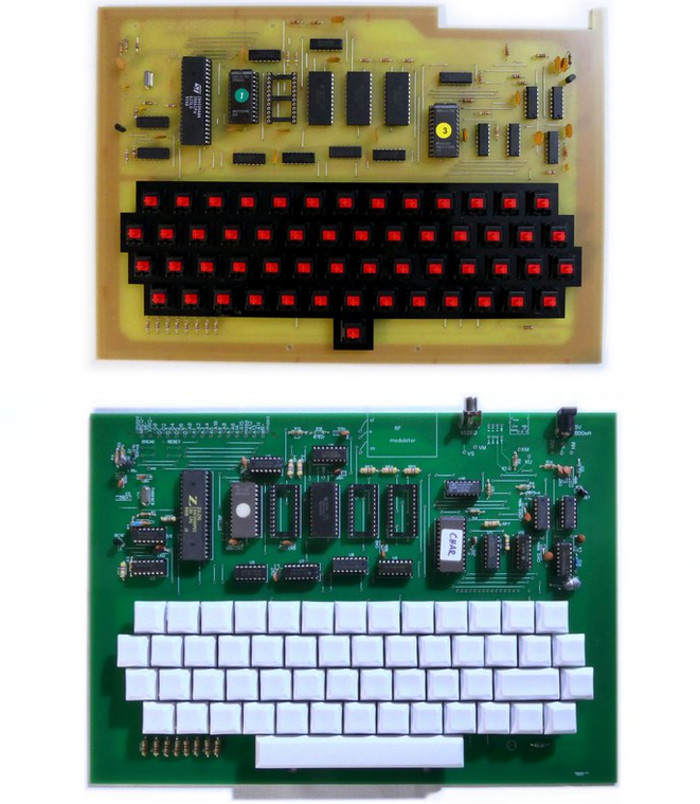
Freshly made original Galaksija (top), and new double-sided Galaksija (bottom).

With the advantage of being able to reach out to [Voja] as a colleague, it was time to secure the straight dope on the project. Though he’s not spearheading it, aside from appearing in the documentary he’s also produced the new Galaksija PCB to take advantage of double-sided manufacture and remove the wire links that were a feature of the original.

In that sense this isn’t so much a clone of the original as an updated version from the same designer, with only a few other updates such as key switches and connectors where the exact original component could no longer be sourced. A particularly fascinating side-tale comes from a reprint of the first Galaksija magazine. Photo-reproductions of the original printed pictures did not yield good results, so [Voja] built from scratch an entirely original Galaksija, carefully recreating the framing of each step shown in those original photos.

This project has faced its fair share of obstacles before launching on CrowsSuppy, so it’s very good indeed to see it receive its funding with time to spare. We look forward to seeing the results, meanwhile you can see a promo video in Serbian with Youtube’s English subtitling below the break. You can read [Voja]’s writing on the machine in Hackaday articles past, but don’t miss the opportunity to meet him at a live event — he’s the mastermind behind a number of hardware badges at Hackaday events.

source https://hackaday.com/2020/10/25/iconic-yugoslavian-galaksija-computer-reborn-with-a-documentary-too/

Smoothing Big Fonts on Graphic LCDs

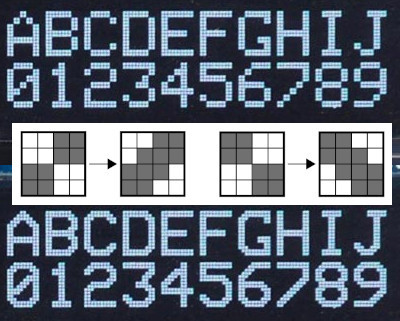
Here’s a neat little trick: take the jaggies out of scaled fonts on the fly! This technique is for use on graphic displays where you might want to scale your fonts up. Normally you’d just write a 2×2 block of pixels for every area where there would have been one pixel and boom, larger font. Problem is, that also multiplies each empty area and you end up with jagged edges in the transitions that really catch your eye.

[David Johnson-Davies] entered big-brain mode and did something much cleverer than the obvious solution of using multiple font files. Turns out if you analyze the smoothing problem you’ll realize that it’s only the angled areas that are to blame, horizontal and vertical scaling are nice and smooth. [David’s] fix looks for checker patterns in what’s being drawn, adding a single pixel in the blank spots to smooth out the edge incredibly well!

The technique has been packaged up in a simple function that [David] wrote to play nicely in the Arduino ecosystem. However, the routine is straightforward and would be quick to implement no matter the language or controller. Keep this one in your back pocket!

Now if all you have on hand is an HD44780 character LCD, that one’s arguably even more fun to hack around on just because you’re so limited on going beyond the hard-coded font set. We’ve seen amazing things like using the custom character slots to play Tetris.

source https://hackaday.com/2020/10/25/smoothing-big-fonts-on-graphic-lcds/

POV LED Staff Takes Art for a Spin

The human body does plenty of cool tricks, but one of the easiest to take advantage of is persistence of vision (POV). Our eyes continue to see light for a fraction of a second after the light goes off, and we can leverage this into fun blinkenlight toys like POV staffs. Sure, you can buy POV staffs and other devices, but they’re pretty expensive and you won’t learn anything that way. Building something yourself is often the more expensive route, but that’s not the case with [shurik179]’s excellent open-source POV staff.

There’s a lot to like about this project, starting with the detailed instructions. It’s based on the ItsyBitsyM4 Express and Adafruit’s Dotstar LED strips. You could use the Bluetooth version, but it’s already quite easy to load images to the staff because it shows up as a USB mass storage device. We like that [shurik179] added an IMU and coded the staff so that the images look consistent no matter how fast the staff is spinning. In the future, [shurik179] might make a Bluetooth version that’s collapsible. That sounds like quite the feat, and we can’t wait to see it in action.

As cool as it is to wave a POV staff around, there’s no real practical application. What’s more practical than a clock?

source https://hackaday.com/2020/10/25/pov-led-staff-takes-art-for-a-spin/

The Clock Under the Dome

In what can only be described as a work of art, [suedbunker] has created a clock under a glass dome. Sporting Nixie tubes, a DS3223, BCD encoders, and MPSA43 transistors driven by an MCP23008 I/O expander it is truly a sight to behold. [suedbunker] has previously created the Circus Clock, a similar clock that celebrated a diversity of ways of displaying the time.

The dome clock represents a continuation of that idea. Reading the clock requires looking at the horizontal and vertical numbers separately. The hours are on the horizontal and minutes are on the vertical. Monday to Sunday is represented in the neon bulbs on the back. The power supply at the bottom provides a wide range of voltages including 5 V, 12 V, 24 V, 45 V, 90 V, 150 V, and -270 V for all the various types of lights. For safety, an optocoupler is used on the -270 volts to drive the clear seven-segment display.

An Arduino Nano controls the whole clock by communicating with the DS3223 real-time clock module and the port expanders via I2C. The soldering and wiring work, in particular, is tidy and beautiful. We look forward to future clocks by [suedbunker] and his wife.

source https://hackaday.com/2020/10/25/the-clock-under-the-dome/

When Only The Tiniest Of Violins Will Do

Playing the tiniest of violins may be a phrase to encapsulate the complete lack of sympathy as someone unpleasant receives their just deserts, but have any of you ever considered how such a feat might be achieved? Unless you’re an unusually talented virtuoso with the bow, it’s difficult to believe that such a small instrument could be played with ease, even if it were to be available in the first place.

Happily a solution is at hand to all those minuscule stringed instrument woes, courtesy of [Alexandra Covor], who has created a miniature PCB violin that is after a fashion playable. It may not be a conventional instrument with a horsehair bow and traditional sounding mechanism, but its electronic voice should still deliver enough to delight.

At the heart of the violin-shaped PCB is an ATtiny85 and a piezoelectric buzzer, and just where you might expect them are a set of strings made from wire attached to the PCB. The instrument can play stored tunes, but since the strings are hooked up to an analogue input on the microcontroller, it can be played as a touch instrument. Finally a pair of LEDs behind the translucent FR4-only F-holes complete the look. It’s fair to say that Itzhak Perlman and his ilk are safe from challengers bearing this instrument, but it’s still an eye-catching piece of PCB art.

This isn’t the first tiny violin that’s been featured here, some others are much smaller.

source https://hackaday.com/2020/10/25/when-only-the-tiniest-of-violins-will-do/

Flash is Dead, but Its Culture Should Live On

Flash is all but gone already, but as we approach the official Adobe end-of-life date on December 31st, it’s picking up traction one last time as people reminisce about the days of Internet past. Back in July, [Jonas Richner] created an impressive website that catalogs not only almost 20 years of Flash games, but also testimonials for the software from dozens of developers who began their careers with it.

Flash started in 1996 with the intention of being a standard for animations and vector graphics on the early Web. With the release of Flash Player 5 in August of 2000, Macromedia (later acquired by Adobe) presented the first version of ActionScript, an object-oriented scripting language meant to bring interactivity to animated Flash movies. Since then, thousands of games made with the platform were released online through websites like Newgrounds and shared all over the world, with the most popular games easily reaching tens of millions of plays.

These games became popular in part thanks to how quickly they could be created with the Flash authoring tools, but also because it was so easy for players to run them. With a single plugin for your web browser of choice, the barrier of entry was extremely low. Most home computers from the mid-2000s were able to run Flash software without needing dedicated graphics hardware. This prompted a “creative chaos” as [Richner] puts it, spawning millions of games and animations which started genres and careers lasting to this day.

Unfortunately, browsers have been dropping support for the plugin due to vulnerabilities in the most recent iterations of its scripting engine and Google no longer indexes Flash files. It would seem this particularly creative era of the Internet is coming to an end. However, you can still relive old games and animations made with plugins such as Flash and Shockwave with [BlueMaxima]’s Flashpoint, and like [Richner], we also hope that the people building today’s platforms and technologies keep the lessons from Flash in mind.

source https://hackaday.com/2020/10/24/flash-is-dead-but-its-culture-should-live-on/

A Transistor-less Sound Synthesizer

A synthesizer without transistors could almost be the basis of a trick question, surely without transistors it must be using a vacuum tube or similar. Not [Dr. Cockroach]’s synth though, instead of transistors it uses coupled pairs of LEDs and light-dependent resistors as its active components. Its oscillator circuit comes courtesy of [Patrick Flett], and uses a pair of LED/LDR combinations to alternately charge and discharge a capacitor. This feeds another LDR/LED pair that appears to act as a buffer to drive a bridge rectifier, with a final amplifier following it.

The result oscillates, though at frequencies in the low audio range with a cluster of harmonics thrown in. Its sound is best described as something akin to a small single-cylinder motorcycle engine at the lower frequencies, and is something we see could have all sorts of interesting possibilities.

This approach of using LDR-based active devices may be something of a dead end that could have had its day back in the 1930s, but it’s nevertheless an entertaining field to explore. It’s not the first time we’ve followed [Dr. Cockroach] at it, in the past we’ve seen the same technique applied to logic gates.

Have a listen to the synth in the video below the break.

source https://hackaday.com/2020/10/24/a-transistor-less-sound-synthesizer/

Let The Solar Free

Anyone tackling solar power for the first time will quickly find there’s a truly dizzying amount of information to understand and digest. You might think you just need to buy some solar panels, wire them together, and just sort of plug them in. But there are a hundred and one different questions about how they’ll be connected, the voltage of the panels, and the hardware for driving a load. [Michel], [case06], and [Martin Jäger] have set out to create a simpler and easier to understand charge controller named LibreSolar.

a diagram showing how the libre solar is wired up

A charge controller is fundamentally a simple idea. The goal is to charge a battery with solar panels, which means it’s essentially just a heavy-duty DC/DC buck converter. What makes this project different is that it is an open platform built for extensibility.

There are UEXT connectors included for adding extra peripherals, and with some tweaks to the STM32 firmware, it would be easy to handle small wind turbines (with some rectification to convert to DC, of course). LibreSolar seems to be designed with an eye towards creating a nano-scale localized networked grid. For example, they’ve developed a Raspberry Pi Zero module that uses WiFi to create a CAN bus allowing the boxes to communicate their maximum voltage to each other. This makes the system as plug-and-play as possible, as the bus doesn’t require a master controller to communicate.

With features such as MPPT (Maximum Power Point Tracking), 20 amp peak charging, a USB interface for updating, and several built-in protection mechanisms, it’s clearly a well thought through project. We look forward to seeing it deployed in the real world!

source https://hackaday.com/2020/10/24/let-the-solar-free/

Let The Solar Free

Anyone tackling solar power for the first time will quickly find there’s a truly dizzying amount of information to understand and digest. You might think you just need to buy some solar panels, wire them together, and just sort of plug them in. But there are a hundred and one different questions about how they’ll be connected, the voltage of the panels, and the hardware for driving a load. [Michel], [case06], and [Martin Jäger] have set out to create a simpler and easier to understand charge controller named LibreSolar.

a diagram showing how the libre solar is wired up

A charge controller is fundamentally a simple idea. The goal is to charge a battery with solar panels, which means it’s essentially just a heavy-duty DC/DC buck converter. What makes this project different is that it is an open platform built for extensibility.

There are UEXT connectors included for adding extra peripherals, and with some tweaks to the STM32 firmware, it would be easy to handle small wind turbines (with some rectification to convert to DC, of course). LibreSolar seems to be designed with an eye towards creating a nano-scale localized networked grid. For example, they’ve developed a Raspberry Pi Zero module that uses WiFi to create a CAN bus allowing the boxes to communicate their maximum voltage to each other. This makes the system as plug-and-play as possible, as the bus doesn’t require a master controller to communicate.

With features such as MPPT (Maximum Power Point Tracking), 20 amp peak charging, a USB interface for updating, and several built-in protection mechanisms, it’s clearly a well thought through project. We look forward to seeing it deployed in the real world!

source https://hackaday.com/2020/10/24/let-the-solar-free/

Optical Centrepunch Is An Easy Build If You Need One

Tired of getting his centerpunches thereabouts but not quite there, [Uri] decided something had to be done. A common tool to solve this problem is the optical centerpunch, but models on sale were just a little too pricy for something so basic. Instead, [Uri] elected to build his own.

An optical centerpunch is a simple tool that helps machinists hit a centerpunch dead on target, time after time. A guide is used that holds a clear plastic rod with a dot in the center. This dot is lined up over the spot to be centerpunched. The plastic rod is then removed and replaced with the actual punch that does the work. Not content to build something utilitarian, [Uri] instead sculpted the tool into a likeness of Sgt Pepper (of Yellow Submarine fame). Seeing the hunk of bare brass quickly become a recognisable figure on camera is a testament to [Uri’s] skill as a sculptor.

It’s a tool that can be readily built by anyone with a lathe, or, at the very least, a decent drill press. We imagine it would be particularly useful for those without perfect vision, making it easier to get punches on the mark on a regular basis. [Uri] has graced these pages before, too — he previously built an ornate tool to make all the other hammers jealous. Video after the break.

source https://hackaday.com/2020/10/24/optical-centrepunch-is-an-easy-build-if-you-need-one/

Get Over Your Fears

Some projects are just too complex, that’s for sure. But I’d be willing to bet that some things you think are too difficult actually aren’t, and it may be that all you need to get over your personal hurdle is a good demonstration. Here come three cases in point.

I was looking at the new Raspberry Pi Compute Module last weekend. They have a whole bunch of high-speed traces: things like Gigabit Ethernet, HDMI, and those crazy-fast SDI serial camera interfaces. I have no experience in high-speed design and layout at all, and frankly it gives me the willies. But the Raspberries also shipped me an IO demo board, and concomitant KiCAD design files, with the review board. Looking at it, they were just wires — maybe pairwise length-matched and impedance controlled — but also just wires. Opening up the KiCAD board file and clicking on the traces just like I do with my own designs, I’m a lot less scared. That was a revelation for me.

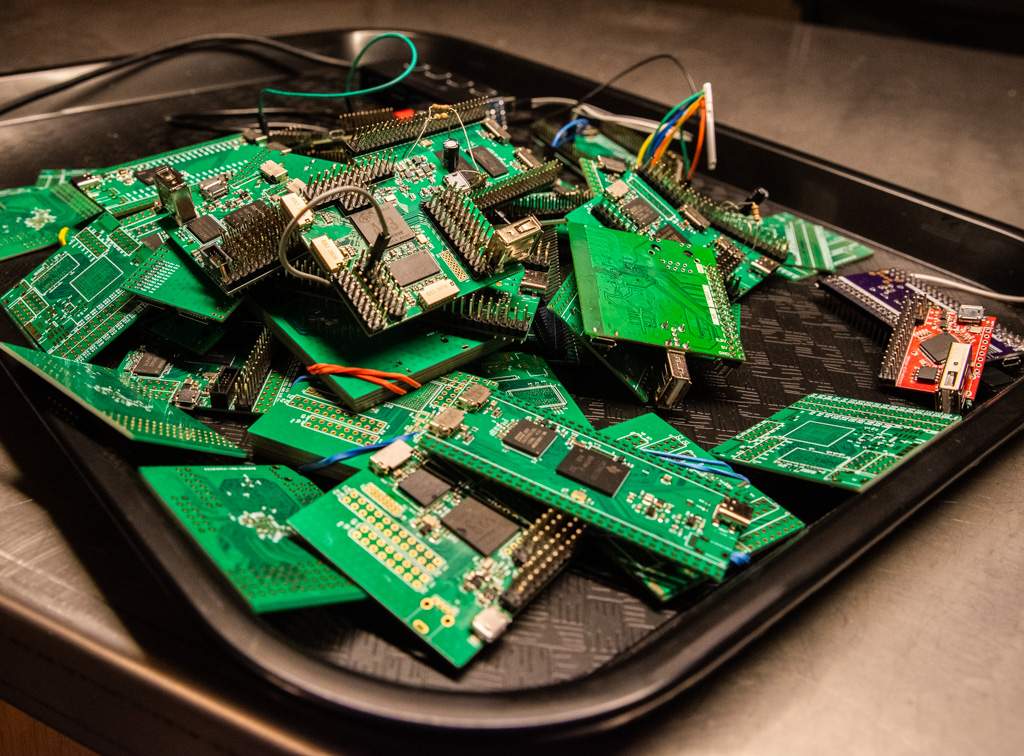
In a great writeup of his experience building ten different Linux single-board-computers from scratch, Jay Carlson had a similar effect on me. I would never have considered breaking out the hotplate for some CPU-and-DRAM action, and I’ve never had to lay out a PCB with a high density BGA chip before either. I’m not quite into Dunning-Kruger territory yet; I still have a healthy respect for the layout intricacies in fanning out a tight BGA CPU into a DRAM. But Jay’s frank assessments of what is easy and what is hard make it all seem within the realm of the doable.

As Mike and I were talking on the podcast about Jay’s work, Mike came clean about his fear of BGAs. I’ve done enough reflow-plate soldering, with parts that have a lead pitch that’s a factor of two finer than the 0.8 mm pitch BGAs in question, so it doesn’t seem implausible to me. And I’m 100% sure Mike could pull it off too, but he is in need of a BGA guru. Any good hobbyist videos out there?

Being a nerdy type, I’m much more focused on the knowledge and the inspiration, but maybe the courage is equally important — at least I think I undervalue it. I don’t need to lay out HDMI lines, or build a from-scratch Linux box, but I am no longer afraid that I couldn’t, and that’s because I’ve seen detailed examples of fellow hackers who’ve done the same. I might not get it right on the first shot, but I’m not afraid to try, and I wouldn’t have said the same before looking over other folks’ shoulders. Forza e corragio!

source https://hackaday.com/2020/10/24/get-over-your-fears/

Get Over Your Fears

Some projects are just too complex, that’s for sure. But I’d be willing to bet that some things you think are too difficult actually aren’t, and it may be that all you need to get over your personal hurdle is a good demonstration. Here come three cases in point.

I was looking at the new Raspberry Pi Compute Module last weekend. They have a whole bunch of high-speed traces: things like Gigabit Ethernet, HDMI, and those crazy-fast SDI serial camera interfaces. I have no experience in high-speed design and layout at all, and frankly it gives me the willies. But the Raspberries also shipped me an IO demo board, and concomitant KiCAD design files, with the review board. Looking at it, they were just wires — maybe pairwise length-matched and impedance controlled — but also just wires. Opening up the KiCAD board file and clicking on the traces just like I do with my own designs, I’m a lot less scared. That was a revelation for me.

In a great writeup of his experience building ten different Linux single-board-computers from scratch, Jay Carlson had a similar effect on me. I would never have considered breaking out the hotplate for some CPU-and-DRAM action, and I’ve never had to lay out a PCB with a high density BGA chip before either. I’m not quite into Dunning-Kruger territory yet; I still have a healthy respect for the layout intricacies in fanning out a tight BGA CPU into a DRAM. But Jay’s frank assessments of what is easy and what is hard make it all seem within the realm of the doable.

As Mike and I were talking on the podcast about Jay’s work, Mike came clean about his fear of BGAs. I’ve done enough reflow-plate soldering, with parts that have a lead pitch that’s a factor of two finer than the 0.8 mm pitch BGAs in question, so it doesn’t seem implausible to me. And I’m 100% sure Mike could pull it off too, but he is in need of a BGA guru. Any good hobbyist videos out there?

Being a nerdy type, I’m much more focused on the knowledge and the inspiration, but maybe the courage is equally important — at least I think I undervalue it. I don’t need to lay out HDMI lines, or build a from-scratch Linux box, but I am no longer afraid that I couldn’t, and that’s because I’ve seen detailed examples of fellow hackers who’ve done the same. I might not get it right on the first shot, but I’m not afraid to try, and I wouldn’t have said the same before looking over other folks’ shoulders. Forza e corragio!

source https://hackaday.com/2020/10/24/get-over-your-fears/

Super-Simple VGA Adapter Sports Low-Res Output with Only Four TTL Chips

Here at Hackaday we cast a wary eye at tips that come in with superlative claims. Generally, if we post something that claims to be the fastest or the smallest of all time, we immediately get slapped down in the comments by someone who has done it faster or smaller. So we present the simplest TTL video card ever knowing the same thing will happen, but eager to see how anyone might scale things down.

To be fair, [George Foot] does qualify his claim to the simplest usable VGA adapter, and he does note that it descends from [Ben Eater]’s “world’s worst video card”, which he uses for his 6502 breadboard computer. But where [Ben]’s VGA adapter uses about 20 TTL chips and an EEPROM, [George] has managed to decrease the BOM to just four TTL chips along with the memory and a crystal oscillator. This required a fair number of compromises, of course; the color depth is fairly low, as is the resolution. Each pixel appears as a thin horizontal bar rather than a small square, leading the images to be smeared out across the screen. They’re still surprisingly viewable, though, which probably says more about the quality of the pattern-recognition wetware between our ears than anything about the quality of the adapter. [George] gives a tour of the circuit in the brief video below.

It looks like [George] has posted a few improvements to the project since we first spotted it, so we’re looking forward to seeing how much the parts count went up. We’re also keen to see if anyone can outdo the simplicity of this effort — be sure to let us know if you give it a shot.

source https://hackaday.com/2020/10/24/super-simple-vga-adapter-sports-low-res-output-with-only-four-ttl-chips/

Proprietary Lenses Are No Problem With This USB Adaptor

There was a time when a camera lens was simply a set of shaped pieces of glass in a tube, with a mount and an aperture. But as cameras have embraced electronics ever more, technology has found its way past the lens mount to the extent that all features of a modern lens are electronically controllable. Can they be used outside the confines of the camera they were designed for? If the user is [Jan Henrik] then certainly, because he’s created a nifty USB adapter and mount for Canon lenses for use with his custom streaming camera.

The hardware is a 3D printed lens mount with a PCB that mates with the pins on the lens. An STM32 does the hard work and talks to the outside world through a USB interface, however it’s in the software that the real effort lies. The Canon lens protocol has been extended since the 1980s, and the commands for different generations of lenses can be convoluted. All the information is in a GitHub repository, so the curious hacker can roll their own.

There are a wealth of camera projects to be found for those that don’t mind tearing apart some of their more valuable possessions, and this isn’t the first we’ve seen involving the hacking of the Canon protocol.

source https://hackaday.com/2020/10/24/proprietary-lenses-are-no-problem-with-this-usb-adaptor/

Relay Computer Consumes Six Years and 4.5 Suitcases

If you thought your home-brew project was taking a long time, [Jeroen Brinkman]’s MERCIA Relay Computer project probably has you beat. He began working on this impressive computer back in 2014, and has been at it ever since.  In fact, the ongoing nature of the project is embedded into the name itself — the English translation of the acronym MERCIA is “My Simple Relay Computer Under Construction”.  Being interested in old analog and relay computers from an early age, [Jeroen] took on this project to educate students about how computers work.  The entire computer is build only using relays, diodes, and capacitors, not to mention color-coded wire based on signal functions. Using relays as the primary switching elements is at the core of his educational goal — anyone can understand how a relay works.

Understandably, this thing is big.  But he has cleverly packaged it to visually show the major building blocks of a computer.  While the exact size isn’t stated, we can estimate based on the photo of [Jeroen] standing next to the modules that these panels are about 1.5 m tall and perhaps 60 cm wide.  The whole computer is nine panels wide, making it about 5 meters long.  Except for the ROM assembly, pairs of panels are hinged together and they fold like a book and carried like a suitcases when being moved.  If you enjoy the clickety-clack sound of relays, be sure to watch the relay longevity test in the video below and check out our article on the 1958 FACOM from last year.

This is a fascinating project, but unless you have a couple thousand relays laying around and a decade of free time, it’s probably better to just enjoy [Jeroen]’s work rather than build your own.  We hope he releases schematics and other documentation once the project is finished.  You can follow his Facebook build log if you want to keep track of the progress. Thanks to [David Gustafik] for the tip.

source https://hackaday.com/2020/10/23/relay-computer-consumes-six-years-and-4-5-suitcases/

Short Video Recaps A Long Tradition of Space Hacks

Human spaceflight has always been, and still remains, a risky endeavor. We mitigate risk by being as prepared as we can. Every activity is planned, reviewed, and practiced long before any rocket engines are ignited. But space has a history of not cooperating with plans, and thus there is a corresponding history of hacks to get missions back on track. YouTube space fan [Scott Manley] recaps some of his favorites in How a $2 Toothbrush Saved the ISS and Other Unbelievable Space Hacks.

The introduction explained this compilation was motivated by the latest International Space Station drama, where an elusive air leak has finally been tracked down. Air leaks are obviously much more worrying in a space station than in, say, a bicycle tire. Thus there exists a wide array of tools to track down leaks but they couldn’t find this one. Reportedly the breakthrough came from an improvised airflow visualization tool: leaves from a cut-open tea bag. Normally small floating particles are forbidden in space because they might end up in troublesome places. (Eyes, noses, onboard equipment…) Apparently the necessity of the hack outweighed the rules here.

Tea leaves are but the latest in a long line of hacks devised in the course of space missions, because things don’t always go according to the original plan. Or even any of the large volume of contingency plans. Solutions have to be cobbled together from resources on hand, because when we’re in space, what we brought is all we have. From directly editing production code during Apollo 14, to a field-built replacement fender for the Apollo 17 Lunar Rover Vehicle (top picture), to the $2 toothbrush pressed into service as metal debris cleaner. The mission must go on!

source https://hackaday.com/2020/10/23/short-video-recaps-a-long-tradition-of-space-hacks/

Don’t Guess, Listen to Your Plants’ Pleas for Water

Plants are great to have around, but they all have different watering needs. If only they could cry out when they’re thirsty, right? Well, now they can. All you need to hear them suffer is your very own Klausner Machine. [RoniBandini] based the Klausner machine on one of Roald Dahl’s short stories, which features an inventor who builds a machine that can make audible the sound of plants shrieking whenever they’re cut.

In [RoniBandini]’s version of the Klausner Machine, the point is to judge the plant’s feelings based on its soil moisture content. An Arduino Nano reads in from the soil moisture sensor, and if the soil is dry, the plant screams. If the soil is moist, the plant emits happy sounds from DF Player Mini and SD card.  We think the analog meters are a great touch, and the jumping needles really anthropomorphize the plant.

Go forth and gain a better appreciation for your plants’ feelings, because this project is wide open. Maybe it will help you water them more often. Some plants need to be cut back, so we think it would be cool if you could make it scream when you take a cutting. Check out the demo after the break.

This is isn’t the first time we’ve seen an analog meter used in conjunction with soil moisture. What is a VU meter, anyway? Our own [Dan Maloney] really moved the needle on the subject a while back.

source https://hackaday.com/2020/10/23/dont-guess-listen-to-your-plants-pleas-for-water/