Nightmare Robot Only Moves When You Look Away

What could be more terrifying than ghosts, goblins, or clowns? How about a shapeless pile of fright on your bedroom floor that only moves when you’re not looking at it? That’s the idea behind [Sciencish]’s nightmare robot, which is lurking after the break. The Minecraft spider outfit is just a Halloween costume.

In this case, “looking at it” equates to you shining a flashlight on it, trying to figure out what’s under the pile of clothes. But here’s the thing — it never moves when light is shining on it. It quickly figures out the direction of the light source and lies in wait. After you give up and turn out the flashlight, it spins around to where the light was and starts moving in that direction.

The brains of this operation is an Arduino Uno, four light-dependent resistors, and a little bit of trigonometry to find the direction of the light source. The robot itself uses two steppers and printed herringbone gears for locomotion. Its chassis has holes in it that accept filament or wire to make a cage that serves two purposes — it makes the robot into more of an amorphous blob under the clothes, and it helps keep clothes from getting twisted up in the wheels. Check out the demo and build video after the break, because this thing is freaky fast and completely creepy.

While we usually see a candy-dispensing machine or two every Halloween, this year has been more about remote delivery systems. Don’t just leave sandwich bags full of fun size candy bars all over your porch, build a candy cannon or a spooky slide instead.

Via r/duino

source https://hackaday.com/2020/10/29/nightmare-robot-only-moves-when-you-look-away/

A Clock From An Electricity Meter

Electric utilities across the world have been transitioning their meters from the induction analog style with a distinctive spinning disc to digital “smart” meters which aren’t as aesthetically pleasing but do have a lot of benefits for utilities and customers alike. For one, meter readers don’t need to visit each meter every month because they are all networked together and can download usage data remotely. For another, it means a lot of analog meters are now available for projects such as this clock from [Monta].

The analog meters worked by passing any electricity used through a small induction motor which spun at a rate proportional to the amount of energy passing through it. This small motor spun a set of dials via gearing in order to keep track of the energy usage in the home or business. To run the clock, [Monta] connected a stepper motor with a custom transmission to those dials for the clock face because it wasn’t possible to spin the induction motor fast enough to drive the dials. An Arduino controls that stepper motor, but can’t simply drive the system in a linear fashion because it needs to skip a large portion of the “minutes” dials every hour. A similar problem arises for the “hours” dials, but a little bit of extra code solves this problem as well.

Once the actual clock is finished, [Monta] put some finishing touches on it such as backlighting in the glass cover and a second motor to spin the induction motor wheel to make the meter look like it’s running. It’s a well-polished build that makes excellent use of some antique hardware, much like one of his other builds we’ve seen which draws its power from a Stirling engine.

source https://hackaday.com/2020/10/29/a-clock-from-an-electricity-meter/

Massive Battle Bot Needs Equally Chunky Custom-Molded Wheels

We’ve all run into situations where the right part for the job isn’t something that you can just buy off the shelf. In a lot of cases, 3D-printing is the cure for that problem, but sometimes you need to go big with tough parts for a tough job. These custom molded urethane battlebot wheels are a great example of that. (Video, embedded below.)

The robotic warrior in question is “Copperhead”, a heavyweight death-dealer that has competed on the “BattleBots” show on TV. It’s an incredibly stout machine with a ridiculous 50 pound (23 kg) drum of spinning tool-steel on the front to disassemble competitors. Add to that the sheer mass of the bot’s armor plating and running gear, throw in the need to withstand the punishment meted out by equally diabolical weapons, and standard wheels are not going to fly.

As [Robert Cowan] details in the video below, nothing but the sturdiest wheels will do, so the bot builders mold custom wheels with integrated hubs. The four-piece mold was machined out of aluminum to hold the plastic hubs, which were also machined but could easily have been 3D-printed. Polyurethane resin is poured in and adheres to the plastic hub better than we’d have thought it would: enough so to avoid coming apart despite some pretty severe blows. The whole casting process is a good watch, as is the overview of Copperhead’s design. And watching it tear apart “War Hawk” was a treat too.

You may not be building battle bots, but a scaled-down version of this process could be a handy trick to have stored away for someday.

Thanks for the tip, [Zane Atkins].

source https://hackaday.com/2020/10/29/massive-battle-bot-needs-equally-chunky-custom-molded-wheels/

DIY Regular Expressions

In the Star Wars universe, not everyone uses a lightsabe, and those who do wield them had to build them themselves. There’s something to be said about that strategy. Building a car or a radio is a great way to learn how those things work. That’s what [Low Level JavaScript] points out about regular expressions. Sure, a lot of people think they are scary. So why not write your own regular expression parser and engine? Get that under your belt and you’ll probably never fear another regular expression.

Of course, most of us probably won’t do it ourselves, but you can still watch the process in the video below. The code is surprisingly short, but don’t expect all the bells and whistles you might find in Python or even Perl.

In the hands of the skilled, regular expressions are very powerful and offer a quick way to split apart text data. Like a lot of powerful ideas, the basic concept — that of a finite state machine — is really simple. It is the application to real problems that becomes difficult.

If you want a primer on regular expressions that doesn’t require you to write your own tools, we have had a few posts that can help. If you just want some practice, try a crossword puzzle.

source https://hackaday.com/2020/10/29/diy-regular-expressions/

This Z80 Computer Bootstraps Itself

[Plasmode] has created several Z80-compatible board designs, at least four of them using the oddball Z280. The Z280 was a special variant of a Z80 that could bootstrap itself with no external PROM, making it ideal for anyone trying to build a system on a breadboard. According to his post, the cost to build the board is about $35.

Although the 8080 CPU got a lot of glory, it was much harder to use than the Zilog Z80. The Z80 only required a single clock and power supply, so it was much easier to build a system, even on a breadboard. On top of that, the bus wasn’t multiplexed and it could refresh DRAM memory by itself. Maybe that’s why you can still get Z80-derived chips readily. There was one thing, though, you needed an EPROM or some other way to run some initial code to bootstrap your system. Zilog knew this a problem. In those days, you had to use a special tool to burn a PROM and unless it was erasable (and you had the special UV light to erase it), any mistakes cost you a chip.

With the Z280, it was possible to load files via the bootloader to make the device program its own EPROM, as this board does. The bootloader is simple. It loads 256 bytes of memory from the serial port and runs it. The chip has two modes with a 16-bit data bus and 24 address bits. However, it can also operate in a Z80-compatible mode. The chip had many innovative features like a memory management unit and cache, but failed to become a success.

As a CP/M board, though, this should be an easy build. The CPU runs with a 12 MHz bus and has a cool megabyte of memory split between RAM and EPROM. There’s a 44-pin IDE interface and two RC2014 expansion connectors.

While $35 doesn’t seem like much, you can get by with a lot less using a classic Z80. If you don’t mind using an Arduino for support, you can spend as little as $4.

source https://hackaday.com/2020/10/28/this-z80-computer-bootstraps-itself/

Projecting Halloween Peril

Every holiday has a few, dedicated individuals committed to “going all out.” Whether they’re trying to show up the neighbors, love the look, or just want to put a smile on the faces of those passing by; the results are often spectacular. A recent trend in decorations has been away from analog lights and ornaments and towards digital light shows via a projector. [Georgia Clegg] and [Luma Bakery] have written up a fantastic guide detailing the involved process of house projection for those feeling the holiday spirit.

There is more to the effect than simply pointing a projector at a home and running a video clip. The good displays make use of the geometry of the home and the various depths of the walls don’t distort the picture. The house itself is mapped into the image being displayed.

There are generally two approaches to mapping: point of view mapping and neutral/orthographic mapping. The first is just setting the projector in a fixed position and designing the graphics in such a way that they will look correct. The downside is that if there are multiple projectors, each projector will need to be separately designed for and they cannot be moved or adjusted. The second maps the house in an actual 3d sense and figures out how to display the content according to the viewpoint that the projector is currently at. This means you can create one source content and simply export it for the various projectors.

As you can imagine, the second is much more involved and this is where [Georgia Clegg] has stepped in. There’s a whole series that covers creating your house in MeshRoom, cleaning it up in Blender, creating the videos in After Effects, and setting up your projector to keep it running through the season.

We’ve seen other amazing projector mapping displays with lasers here at Hackaday. Now you can make one yourself. Just don’t get bogged down refurbishing your vector projector along the way.
Check out the results they’ve achieved in this highlight reel:

source https://hackaday.com/2020/10/28/projecting-halloween-peril/

PyGame Celebrates 20 Years by Releasing PyGame 2.0

Python is an absolutely fantastic language for tossing bits of data around and gluing different software components together. But eventually you may find yourself looking to make a program with an output a bit more advanced than the print() statement. Once you’ve crossed into the land of graphical Python programming, you’ll quickly find that the PyGame library is often recommended as a great way to start pushing pixels even if you’re not strictly making a game.

Today, the project is celebrating an incredible milestone: 20 years of helping Python developers turn their ideas into reality. Started by [Pete Shinners] in 2000 as a way to interface with Simple DirectMedia Layer (SDL), the project was quickly picked up by the community and morphed into a portable 2D/3D graphics library that lets developers deploy their code on everything from Android phones to desktop computers.

Things haven’t always gone smoothly for the open source library, and for awhile development had stalled out. But the current team has been making great progress, and decided today’s anniversary was the perfect time to officially roll out PyGame 2.0. With more than 3,300 changes committed since the team started working on their 2.0 branch in July of 2018, it’s a bit tough to summarize what’s new. Suffice to say, the library is more capable than ever and is ready to tackle everything from simple 2D art up to 4K GPU-accelerated applications.

Rip and tear in PyGame 2.0

If you haven’t given PyGame a try in awhile, don’t worry. The team has put special effort into making the library as backwards compatible as possible, so if you’ve got an old project kicking around that you haven’t touched in a decade, it should still run against the latest and greatest version. If you’ve never used it before, the team says they’ll soon be releasing new tutorials that show you how to get the most out of this new release.

Whether you’re putting together your own implementation of Conway’s “Game of Life” or creating the graphical front-end for your own Linux distribution, PyGame is a powerful tool to have in your collection. Our sincere congratulations to all PyGame developers, past and present, for making it to this auspicious occasion. We can’t wait to see what the next decade will bring.

[Thanks to deshipu for the tip.]

source https://hackaday.com/2020/10/28/pygame-celebrates-20-years-by-releasing-pygame-2-0/

Making a 3D Printed DSLR Camera Mount Even Better

We’d love to say that all of our projects worked perfectly on the first try, but the average Hackaday reader is a bit too experienced to buy a fib like that. The reality is, DIY projects rarely get everything right out of the gate. It takes some time to identify issues and work out all the kinks. But of course, that’s half the fun.

For a perfect example of this process, check out the latest update on the 3D printed DSLR camera mount that [isaac879] has been working on. When we last checked in with this project over the summer the mount was already impressive, but with the latest improvements and the addition of a whole new axis of movement, this homebrew camera motion system is an extremely compelling project for anyone who wants to take their project videos to the next level.

The new Hall effect sensor mounts are a very nice touch.

Back in June, the mount [isaac879] showed off was only capable of pan and tilt. But as you can see in the video after the break, he’s since mounted that to a track made of 20×40 aluminum extrusion and added another stepper motor. This allows the pan/tilt mount to move itself back and forth on the track to get those slick panning shots that all the cool kids use in their videos nowadays.

But even if you’re not interested in the slider aspect, the core pan/tilt mount has also received a number of refinements over the last few months. Perhaps the most obvious is the switch over to thinner and lighter stepper motors. Reducing mass is always an improvement with a moving system like this, and in the case of the pan motor, the shorter can prevents a potential collision with the camera itself. Obviously the smaller motors are weaker, but [isaac879] considers that a feature; the mini motors will just start skipping steps if things get bound up instead of potentially damaging your expensive camera.

He’s switched to flange bearings to help hold the frame together, improved wire routing, added a mounting point for the electronics, reprinted the pinion gears in a flexible filament to help absorb some vibrations, and switched over to TMC2208 stepper drivers. The new drivers may actually be one of the biggest usability upgrades, as they allow the entire mount to move faster and more accurately. Critically, [isaac879] also reports the new drivers have solved a troublesome vibration issue he was seeing when the camera was moving slowly.

Obviously you can throw together a simple pan and tilt mount with a couple of servos and some zip ties if you only need to use it once or twice, but a project of this caliber would rightfully become a permanent fixture in your workspace. Perfect if you’re looking to up your project photography game.

[Thanks to Steven for the tip.]

source https://hackaday.com/2020/10/28/making-a-3d-printed-dslr-camera-mount-even-better/

Making a 3D Printed DSLR Camera Mount Even Better

We’d love to say that all of our projects worked perfectly on the first try, but the average Hackaday reader is a bit to experienced to buy a fib like that. The reality is, DIY projects rarely get everything right out of the gate. It takes some time to identify issues and work out all the kinks. But of course, that’s half the fun.

For a perfect example of this process, check out the latest update on the 3D printed DSLR camera mount that [isaac879] has been working on. When we last checked in with this project over the summer the mount was already impressive, but with the latest improvements and the addition of a whole new axis of movement, this homebrew camera motion system is an extremely compelling project for anyone who wants to take their project videos to the next level.

The new Hall effect sensor mounts are a very nice touch.

Back in June, the mount [isaac879] showed off was only capable of pan and tilt. But as you can see in the video after the break, he’s since mounted that to a track made of 20×40 aluminum extrusion and added another stepper motor. This allows the pan/tilt mount to move itself back and forth on the track to get those slick panning shots that all the cool kids use in their videos nowadays.

But even if you’re not interested in the slider aspect, the core pan/tilt mount has also received a number of refinements over the last few months. Perhaps the most obvious is the switch over to thinner and lighter stepper motors. Reducing mass is always an improvement with a moving system like this, and in the case of the pan motor, the shorter can prevents a potential collision with the camera itself. Obviously the smaller motors are weaker, but [isaac879] considers that a feature; the mini motors will just start skipping steps if things get bound up instead of potentially damaging your expensive camera.

He’s switched to flange bearings to help hold the frame together, improved wire routing, added a mounting point for the electronics, reprinted the pinion gears in a flexible filament to help absorb some vibrations, and switched over to TMC2208 stepper drivers. The new drivers may actually be one of the biggest usability upgrades, as they allow the entire mount to move faster and more accurately. Critically, [isaac879] also reports the new drivers have solved a troublesome vibration issue he was seeing when the camera was moving slowly.

Obviously you can throw together a simple pan and tilt mount with a couple of servos and some zip ties if you only need to use it once or twice, but a project of this caliber would rightfully become a permanent fixture in your workspace. Perfect if you’re looking to up your project photography game.

[Thanks to Steven for the tip.]

source https://hackaday.com/2020/10/28/making-a-3d-printed-dslr-camera-mount-even-better/

Making a 3D Printed DSLR Camera Mount Even Better

We’d love to say that all of our projects worked perfectly on the first try, but the average Hackaday reader is a bit to experienced to buy a fib like that. The reality is, DIY projects rarely get everything right out of the gate. It takes some time to identify issues and work out all the kinks. But of course, that’s half the fun.

For a perfect example of this process, check out the latest update on the 3D printed DSLR camera mount that [isaac879] has been working on. When we last checked in with this project over the summer the mount was already impressive, but with the latest improvements and the addition of a whole new axis of movement, this homebrew camera motion system is an extremely compelling project for anyone who wants to take their project videos to the next level.

The new Hall effect sensor mounts are a very nice touch.

Back in June, the mount [isaac879] showed off was only capable of pan and tilt. But as you can see in the video after the break, he’s since mounted that to a track made of 20×40 aluminum extrusion and added another stepper motor. This allows the pan/tilt mount to move itself back and forth on the track to get those slick panning shots that all the cool kids use in their videos nowadays.

But even if you’re not interested in the slider aspect, the core pan/tilt mount has also received a number of refinements over the last few months. Perhaps the most obvious is the switch over to thinner and lighter stepper motors. Reducing mass is always an improvement with a moving system like this, and in the case of the pan motor, the shorter can prevents a potential collision with the camera itself. Obviously the smaller motors are weaker, but [isaac879] considers that a feature; the mini motors will just start skipping steps if things get bound up instead of potentially damaging your expensive camera.

He’s switched to flange bearings to help hold the frame together, improved wire routing, added a mounting point for the electronics, reprinted the pinion gears in a flexible filament to help absorb some vibrations, and switched over to TMC2208 stepper drivers. The new drivers may actually be one of the biggest usability upgrades, as they allow the entire mount to move faster and more accurately. Critically, [isaac879] also reports the new drivers have solved a troublesome vibration issue he was seeing when the camera was moving slowly.

Obviously you can throw together a simple pan and tilt mount with a couple of servos and some zip ties if you only need to use it once or twice, but a project of this caliber would rightfully become a permanent fixture in your workspace. Perfect if you’re looking to up your project photography game.

[Thanks to Steven for the tip.]

source https://hackaday.com/2020/10/28/making-a-3d-printed-dslr-camera-mount-even-better/

An Automatic Label Dispenser for Quicker Stickers

If you have any kind of business, chances are it involves stickers at some point in the process. More accurately it involves you peeling the backs off of sticker after sticker, slowly wasting time and working your way toward a repetitive stress injury. Why do that to yourself when you could have a machine do it for you?

That’s exactly the thinking behind [Mr Innovative]’s automatic label dispensing machine. All he has to do is load up the roll of labels, dial in the length of each label, and away the machine goes, advancing and dispensing and taking up the empty paper all at once. In fact, that’s how it works: the take-up reel is on the shaft of a NEMA-17 stepper motor, which gets its instructions from an Arduino Nano and an A4988 motor driver. Our favorite part is the IR sensor located underneath the sticker that’s ready to take — the machine doesn’t feed another until it senses that you’ve taken the previous sticker. We stuck the demo and build video after the break.

Our other favorite thing about this build is that [Mr Innovative] seems to have used the same PCB as his freaky fast bobbin winder.

source https://hackaday.com/2020/10/28/an-automatic-label-dispenser-for-quicker-stickers/

Linux Fu: Troubleshooting Incron

You probably know about cron, a program that lets you schedule programs to run at various times. We’ve also talked about incron, which is very similar but instead of time, it reacts to changes in the file system. If you ever wanted to write a program that, say, detects a change in a file and automatically uploads it to a programmer, backs it up, e-mails it somewhere, or anything else, then incron might be for you. Although we’ve talked about it before, incron has some peculiarities that make it very difficult to debug problems, so I thought I’d share some of the tricks I use when working with incron.

I was thinking about this because I wanted to set up a simple system where I have a single document directory under git control. Changing a markdown file in that folder would generate Word document and PDF equivalents. Conversely, changing a Word document would produce a markdown version.

This is easy to do with pandoc — it speaks many different formats. The trick is running it only on changed files and as soon as they change. The task isn’t that hard, but it does take a bit to debug since it’s a bit nontrivial.

Incron Review

Setting up incron can be a bit of a pain. I’m going to assume you have a way to install it using a package manager like apt and that your system uses systemd to start and stop the service.

There’s more to it than that, though. You’ll need to be named in the /etc/incron.allow file (and not named in /etc/incron.deny). Once you are set up, it is pretty easy to use. Until it isn’t.

Each user has an incrontab. Use: man 5 incrontab to find out about it. To edit it, use this command:

incrontab -e

Each line has three fields and you must use a single tab between each field. The first field is the directory or file to watch, the second field has comma-separated entries to tell incron what kind of changes you are looking for and some other options. The final field is the command to run.

There are some special characters you can use in the command line. $@ gives you the directory name, for example. The $# macro is the file name while $% gives you the event type as a string ($& is a numeric code for the same). If you need a real dollar sign, just double it.

The events are things like IN_CREATE, IN_DELETE, IN_MODIFY, and many others. You can use any number of them together, just use commas between them. I’ll have more to say about that later. There are also some options like IN_DONT_FOLLOW which stops symbolic link dereferencing. You can also set recursive=false to stop monitoring subdirectories and loopable=true which is supposed to stop a common problem but doesn’t always.

You’ll see documentation on the internet that is sometimes out of date. The current development is on GitHub, but the main developer stopped back in 2012 and there was a two-year gap before someone picked it up for bug fixes. Sometimes it pays to read the source code of the version you have to understand exactly what’s going on.

What’s Wrong With It?

The incron service suffers from an identity crisis. Both by function and name, it must be similar to cron, right? Superficially, that’s true, but the details are quite a bit different. For one thing, older versions of incron don’t allow comments in the table. So you might think you’ve commented something out, but you haven’t really. On top of that, it is very difficult to get the output from your commands or even decent status. Not impossible, though, just difficult. Recent versions do allow comments, but it was a long time coming, and your version may or may not be up to date.

The other thing that is frequently a problem is that any action you take in your program that triggers a file system change might put you in an endless loop. You would think incron would figure this out and do something. Instead, your one line in your private incrontab can crash the entire daemon.

To further compound things, many programs do things you don’t expect that break some of the events. You might think, for example, that if you want to know when a file changes you should monitor IN_MODIFY. Makes sense. But most editors don’t work that way. If you edit the file, it will sometimes work on a copy of the file in /tmp and then the save operation is really a move. Sometimes programs with similar functions will have different event flows. For example, scp and rsync handle files differently and catching when a new file appears will require different handling depending on which program put it there.

The First Tip: Log as You Work on Commands

So that leads to the first tip. Write a temporary rule using the IN_ALL_EVENTS keyword and use a little shell script to just log what happens when you do thinks you think will happen to the file. You might find the results surprising and it is better to understand the event flow for your use case before you start writing real scripts.

Suppose you have a script called echoarg.sh:

#!/bin/bash
fn="$1"
shift
echo "$@" >>"$fn"

Just a quick and dirty script, but you can use it with incron:

/home/user/tmp/itest IN_ALL_EVENTS /bin/bash echoarg.sh /home/user/tmp/echoarg.log $% - $@/$#

The file names ought to have quotes, of course, but since we are just printing them out, it doesn’t matter here. One thing to note: some installations will not allow incron to write to places like /tmp or even monitor files there. You are better off sticking to a directory you know you own (in this case /home/user/tmp). Here’s the result of running touch foo in the ~/tmp/itest directory:


IN_ATTRIB -  /home/user/tmp/itest/foo
IN_CREATE - /home/user/tmp/itest/foo
IN_OPEN - /home/user/tmp/itest/foo
IN_CLOSE_WRITE - /home/user/tmp/itest/foo

More Things to Worry About

Each distribution packages things a bit differently, so you may have to read some documentation. For example, on Debian-based systems, what little it does get logged by incron is written to the system log. But on some other common distributions, it reuses the cron log file.

The program is very finicky about spaces and tabs, too. So a stray space between the second and third fields will mess things up. So will a tab after the program name, the shell will take the tab and the next token as part of the program name.

Speaking of the shell, incron is very peculiar about finding shells and setting environments. Your version may vary, but the safest thing to do is assume you will need a path to everything and an explicit shell in the incrontab. If you need special things in the PATH or other environment configuration, do it in the script. Even if you are running a binary, it pays to write a little wrapper so you can set everything up the way you want. At the very least, when you run your test, dump the runtime environment out to a temporary log file so you don’t find out the hard way that you are missing a lot of your expected environment.

Using a command like $(date) is doomed because incron will eat the dollar sign. If you feel lucky, try using $$(date).

The Big Event

After you understand the events you want to process, you need to write your script and test it as much as you can without using incron. In my case, I wrote autopandoc with the idea that I’d add the PDF functions later:


#!/bin/bash
if [ -z "$1" ]
then
     exit 1
fi
if [ ! -f "$1" ]
then
     exit 2
fi
dir=$(dirname "$1")
ffilename=$(basename -- "$1")
ext="${ffilename##*.}"
filename="${ffilename%.*}"

case "$ext" in
doc*) newext="md"
;;
md) newext="docx"
;;

*) exit 3
esac

if [ ! -f "$dir/generated" ]
then
    mkdir "$dir/generated"
fi
exec pandoc "$1" -o "$dir/generated/$filename.$newext"

This is simple to run from a command line with fake directory, file, and event arguments and make sure the logic does what you want. Trust me, that will be much easier than debugging during incron events.

My first attempt didn’t work well at all and there was very little explanation. By watching the logs, I could see that the file events were happening, but there was no evidence that my scripts — no matter how simple — were running. Turns out, adding an explicit /bin/bash to the table made everything work.

However, getting incron to stop retriggering if I wrote back to the same directory proved to be challenging. I wound up making a subdirectory which would trigger a change that would then make another subdirectory, triggering another change. Eventually, incron would die. Not just a worker thread for my user. Incron would die for all users. I suppose you could change systemd to relaunch it, but that isn’t really a solution.

There are a few options to inhibit incron from reacting multiple times to the same file, but making a new file still causes events and, honestly, if it didn’t that would be another problem if you were trying to handle multiple users. I wound up punting, but first, let’s see how you can peek inside of what’s happening during an incron run.

It’s Log!

As I mentioned, the log file can show up in a few different places. KSystemLog is handy if you use KDE since it can filter and show you events as they happen. You can also use tail -f, of course, but you might need a grep to cut down on the noise.

If you use systemd, you can try something like this:

journalctl -f -u incron.service

This acts like a tail -f for the incron log file. Watching incron repeatedly trigger events on /my_dir/subdir/subdir/subdir…. will tell you a lot about what’s going on in your script.

Other Tips: Run the Daemon Yourself, Use strace, and Max Your Watches

You can stop the incron daemon using your choice of methods (e.g., systemctl stop incron) and then run incrond yourself with the -n option. That shows you what the program is doing. Be sure to run it as root.

Another thing that makes possible is using strace to run the program. This will reveal all the system calls the program makes, so if you are wondering what files it opens and the results of those opens, that’s the way to do it:

sudo strace incrond -n

The -n option makes the program stay in the foreground. Just remember to kill it when you are done and start the service again. Of course, if you are on a machine you share with other people, this is probably a pretty rude idea.

If you do start making use of incron, you may find you run out of file system watches. If you do, try:

sysctl fs.inotify.max_user_watches

You can temporarily change the number allowed by using

sysctl -w fs.inotify.max_user_watches=1000000

Make it permanent by editing /etc/sysctl.conf or add a file to /etc/sysctl.d.

Does it Work?

Once you do get things working, it works well. For production, though, it worries me that one errant script can crash the whole service. There are alternatives. If you don’t mind systemd, there are path units. There are several possible alternatives on GitHub, although none seem recently maintained.

Like most Linux tools, sometimes this is the right choice, and sometimes you’ll want to use something else. But it still pays to understand all the tools you can have in your box.

source https://hackaday.com/2020/10/28/linux-fu-troubleshooting-incron/

The 10,000 Pixel Per Inch Display is Now Possible

A good smartphone now will have about 500 pixels per inch (PPI) on its screen. Even the best phones we could find clock in at just over 800 PPI. But Stanford researchers have a way to make displays with more than 10,000 pixels per inch using technology borrowed from solar panel research.

Of course, that might be overkill on a six-inch phone screen, but for larger displays and close up displays like those used for virtual reality, it could be a game-changer. Your brain is good at editing it out, but in a typical VR headset, you can easily see the pixels from the display even at the highest PPI resolutions available. Worse, you can see the gaps between pixels which give a screen door-like effect. But with a density of 10,000 PPI it would be very difficult to see individual pixels, assuming you can drive that many dots.

Working with Samsung, the team added an extra layer to the bottom of a conventional OLED screen. The new layer — an optical metasurface — has very tiny corrugated mirrors that reflect white light into red, green, and blue components allowing the high density of pixels. A normal OLED panel uses white OLEDs also, but uses a filter to create the different pixel colors.

If you read the Standford paper, you’ll learn about Fabry-Pérot cavities and the Purcell effect. We are sure if you spend all day thinking about OLED displays, this is stuff that makes sense to you, but we had to look up quite a few things on Wikipedia.

While this is not in production, the team did create a proof-of-concept device not only had dense pixel packing, but also high color purity and twice the efficiency of a conventional display. Samsung is investigating scaling the technique to production.

We know you can make OLEDs at home, but probably not at that density. Of course, for serious organic lighting, why not consider a pickle?

source https://hackaday.com/2020/10/28/the-10000-pixel-per-inch-display-is-now-possible/

A VGA Retro Console With Everything Generated From A Single ARM Cortex M0

The later game consoles of the 8-bit era such as Nintendo’s NES or Sega’s Master System produced graphics that went beyond what owners of early 1980s home computers had come to expect from machines with the same processors, but they did so only with the help of powerful custom chipsets for their day that took care of the repetitive hard work of assembling frames and feeding them to the display device. Reproducing their equivalent with more modern hardware requires either some means of creating similar custom silicon, or a processor significantly more powerful such that it can do the work of those extra chips itself. But even with a modern microcontroller it’s still a significant challenge, so [Nicola Wrachien]’s uChip, a VGA console that does the whole job in software on a humble ARM Cortex M0 is a significant achievement.

If you are familiar with the home computers that used the processor to generate the display output, you’ll know that they spent most of their time working on the lines of the display and only had a few milliseconds of the frame blanking period for the device to perform any computing tasks before returning to the next frame. The 320×240 at 57 frames per second gives a line sync frequency of 30 kHz, and the computing happens while the display is sent the black space at the top and bottom of the screen. This is reckoned to be equivalent of the ATSAMD21E18 microcontroller on the uChip module the system uses running at only 10MHz rather than the 48MHz it is running at in reality, and with these resources it also runs the game logic, USB controller interfacing, reading games from the SD card, and game sound.

The result is a complete game console on a small PCB little longer on its longest side than its connectors. We may have largely seen the demise of VGA on the desktop several years after we called it, but it seems there is plenty of life in the interface yet for hardware hackers.

source https://hackaday.com/2020/10/28/a-vga-retro-console-with-everything-generated-from-a-single-arm-cortex-m0/

Circuit Sculpture Breathes Life into Discrete Components

We’ve probably all given a lot of thought to breathing this year in various contexts. Though breathing is something we all must do, this simple act has become quite the troublemaker in 2020. They say the best art imitates life, and [bornach]’s Astable Exhalation certainly does that, right down to the part about astability. It’s especially interesting that the end result — breathing, visualized — is so calming, it could almost be a meditative device.

There is nary a microcontroller to be found on this circuit sculpture, which uses a pair of astable multivibrator(s) to light two sets of LEDs that represent air being inhaled and exhaled. We like that [bornach] used two sized of exhale LEDs to represent droplets and aerosols in this beautiful circuit sculpture, and we love that most of the components were scavenged from old electronics and older projects.

Our Circuit Sculpture Challenge runs until November 10th, so even if you’re waiting to take the Remoticon workshop before entering, there’s still a little bit of time to whip something up afterward in the post-con adrenaline rush phase. If you need inspiration, check out some of the other contest entries or just surf through all things circuit sculpture.

source https://hackaday.com/2020/10/27/circuit-sculpture-breathes-life-into-discrete-components/

Quantum Inspired Algorithm Going Back To The Source

Recently, [Jabrils] set out to accomplish a difficult task: porting a quantum-inspired algorithm to run on a (simulated) quantum computer. Algorithms are often inspired by all sorts of natural phenomena. For example, a solution to the traveling salesman problem models ants and their pheromone trails. Another famous example is neural nets, which are inspired by the neurons in your brain. However, attempting to run a machine learning algorithm on your neurons, even with the assistance of pen and paper would be a nearly impossible exercise.

The quantum-inspired algorithm in question is known as the wavefunction collapse function. In a nutshell, you have a cube of voxels, a graph of nodes, or simply a grid of tiles as well as a list of detailed rules to determine the state of a node or tile. At the start of the algorithm, each node or point is considered in a state of superposition, which means it is considered to be in every possible state. Looking at the list of rules, the algorithm then begins to collapse the states. Unlike a quantum computer, states of superposition is not an intrinsic part of a classic computer, so this solving must be done iteratively. In order to reduce possible conflicts and contradictions later down the line, the nodes with the least entropy (the smallest number of possible states) are solved first. At first, random states are assigned, with the changes propagating through the system. This process is continued until the waveform is ultimately collapsed to a stable state or a contradiction is reached.

What’s interesting is that the ruleset doesn’t need to be coded, it can be inferred from an example. A classic use case of this algorithm is 2D pixel-art level design. By providing a small sample level, the algorithm churns and produces similar but wholly unique output. This makes it easy to provide thousands of unique and beautiful levels from an easy source image, however it comes at a price. Even a small level can take hours to fully collapse. In theory, a quantum computer should be able to do this much faster, since after all, it was the inspiration for this algorithm in the first place.

[Jabrils] spent weeks trying to get things running but ultimately didn’t succeed. However, his efforts give us a peek into the world of quantum computing and this amazing algorithm. We look forward to hearing more about this project from [Jabrils] who is continuing to work on it in his spare time. Maybe give it a shot yourself by learning the basics of quantum computing for yourself.

source https://hackaday.com/2020/10/27/quantum-inspired-algorithm-going-back-to-the-source/

Community Rallies Behind youtube-dl After DMCA Takedown

At this point, you’ve likely heard that the GitHub repository for youtube-dl was recently removed in response to a DMCA takedown notice filed by the Recording Industry Association of America (RIAA). As the name implies, this popular Python program allowed users to produce local copies of audio and video that had been uploaded to YouTube and other content hosting sites. It’s a critical tool for digital archivists, people with slow or unreliable Internet connections, and more than a few Hackaday writers.

It will probably come as no surprise to hear that the DMCA takedown and subsequent removal of the youtube-dl repository has utterly failed to contain the spread of the program. In fact, you could easily argue that it’s done the opposite. The developers could never have afforded the amount of publicity the project is currently enjoying, and as the code is licensed as public domain, users are free to share it however they see fit. This is one genie that absolutely won’t be going back into its bottle.

In true hacker spirit, we’ve started to see some rather inventive ways of spreading the outlawed tool. A Twitter user by the name of [GalacticFurball] came up with a way to convert the program into a pair of densely packed rainbow images that can be shared online. After downloading the PNG files, a command-line ImageMagick incantation turns the images into a compressed tarball of the source code. A similar trick was one of the ways used to distribute the DeCSS DVD decryption code back in 2000; though unfortunately, we doubt anyone is going to get the ~14,000 lines of Python code that makes up youtube-dl printed up on any t-shirts.

Screenshot of the Tweet sharing YouTube-dl repository as two images

It’s worth noting that GitHub has officially distanced themselves from the RIAA’s position. The company was forced to remove the repo when they received the DMCA takedown notice, but CEO Nat Friedman dropped into the project’s IRC channel with a promise that efforts were being made to rectify the situation as quickly as possible. In a recent interview with TorrentFreak, Friedman said the removal of youtube-dl from GitHub was at odds with the company’s own internal archival efforts and financial support for the Internet Archive.

But as it turns out, some changes will be necessary before the repository can be brought back online. While there’s certainly some debate to be had about the overall validity of the RIAA’s claim, it isn’t completely without merit. As pointed out in the DMCA notice, the project made use of several automated tests that ran the code against copyrighted works from artists such as Taylor Swift and Justin Timberlake. While these were admittedly very poor choices to use as official test cases, the RIAA’s assertion that the entire project exists solely to download copyrighted music has no basis in reality.

source https://hackaday.com/2020/10/27/community-rallies-behind-youtube-dl-after-dmca-takedown/

AMD Acquires Xilinx for $35 Billion

News this morning that AMD has reached an agreement to acquire Xilinx for $35 Billion in stock. The move to gobble up the leading company in the FPGA industry should come as no surprise for many reasons. First, the silicon business is thick in the age of mergers and acquisitions, but more importantly because AMD’s main competitor, Intel, purchased the other FPGA giant Altera back in 2015.

Primarily a maker of computer processors, AMD expands into the reconfigurable computing market as Field-Programmable Gate Arrays (FPGA) can be adapted to different tasks based on what bitstream (programming information written to the chips) has been sent to them. This allows the gates inside the chip to be reorganized to perform different functions at the hardware level even after being put into products already in the hands of customers.

Xilinx invented the FPGA back in the mid-1980s, and since then the falling costs of silicon fabrication and the acceleration of technological advancement have made them evermore highly desirable solutions. Depending on volume, they can be a more economical alternative to ASICs. They also help with future-proofing as technology not in existence at time of manufacture — such as compression algorithms and communications protocols — may be added to hardware in the field by reflashing the bitstream. Xilinx also makes the Zynq line of hybrid chips that contain both ARM and FPGA cores in the same device.

The deal awaits approval from both shareholders and regulators but is expected to be complete by the end of 2021.

source https://hackaday.com/2020/10/27/amd-acquires-xilinx-for-35-billion/

Going For The Home Run Record With Explosive Help

The baseball home run distance challenge for crazy engineers is really heating up, with the two main (only?) competitors joining forces. [Shane] of [Stuff Made Here] and [Destin] of [Smarter Every Day] did a deep dive into [Shane]’s latest powder charged baseball bat, designed to hit a ball 600+ feet.

[Shane] built two new versions of his bat this time, using the lessons he learned from his previous V1 and V2 explosive bats. It still uses blank cartridges, but this time the max capacity was increased from three to four cartridges. For V3 a section of the bat was removed, and replaced with a four-bar linkage, which allowed the entire front of the bat to move. The linkage integrated a chamber for four blank cartridges that could be loaded almost like a double barrel shotgun and closed with a satisfying snap. Unfortunately the mass of the moving section was too much for the welds, and the entire the front broke off on the first test, so the design was scrapped.

V4 returned to the piston concept of the initial version, except V4 contains two parallel pistons, in a metal bat, with a larger hitting surface. With two cartridges it worked well, but parts started breaking with three and four, and required multiple design updates to fix. [Destin] covered the physics of the project and took some really cool high speed video. He and [Jeremy Fielding] hold the current distance record of 617 ft with their crazy Mad Batter. Unfortunately on [Shane]’s final distance attempt the bat broke again, and the ball was lost in a field with tall grass beyond the 600-foot mark, so they could not confirm if the record was actually broken.

[Destin] and his team still remain the undisputed baseball velocity record holders, with their supersonic baseball canon. It sounds like there might be another collaboration between [Destin] and [Shane] in the future, and we’re definitely looking forward to the results of that crazy venture.

source https://hackaday.com/2020/10/27/going-for-the-home-run-record-with-explosive-help/

Low-Tech Fix Saves Expensive, High-Tech TV From Junk Pile

Wiggling this connector caused the backlight to turn off and on.

[Tweepy]’s TV stopped working, and the experience is a brief reminder that if a modern appliance fails, it is worth taking a look inside because the failure might be something simple. In this case, the dead TV was actually a dead LED backlight, and the fix was so embarrassingly simple that [Tweepy] is tempted to chalk it up to negligently poor DFM (design for manufacture) at best, or even some kind of effort at planned obsolescence at worst.

What happened is this: the TV appeared to stop working, but one could still make out screen content while shining a bright light on the screen. Seeing this, [Tweepy] deduced that the backlight had failed, and opened up the device to see if it could be repaired. However, the reason for the backlight failure was a surprise. It was not the power supply, nor even any of the LEDs themselves; the whole backlight wouldn’t turn on because of a cheap little PCB-to-PCB connector, and the two small spring contacts inside that had failed.

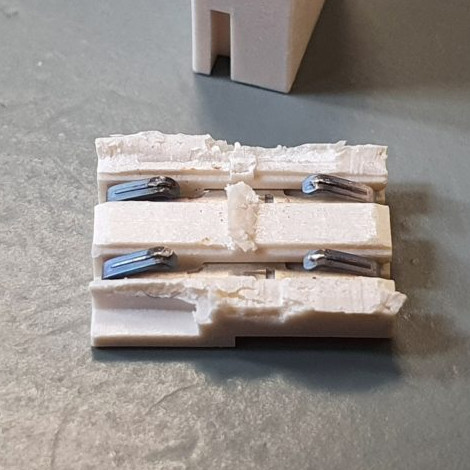
The failed connector, once cut open, showed contacts in poor condition (click to enlarge). It was ditched for a soldered connection, and the TV lived again.

From the outside things looked okay, but wiggling the connector made the backlight turn on and off, so the connection was clearly bad. Investigating further, [Tweepy] saw that the contact points of the PCBs and the two little conductors inside the connector showed clear signs of arcing and oxidation, leading to a poor connection that eventually failed, resulting in a useless TV. The fix wasn’t to clean the contacts; the correct fix was to replace the connector with a soldered connection.

Using that cheap little connector doubtlessly saved some assembly time at the factory, but it also led to failure within a fairly short amount of time. Had [Tweepy] not been handy with a screwdriver (or not bothered to investigate) the otherwise working TV would doubtlessly have ended up in a landfill.

It serves as a good reminder to make some time to investigate failures of appliances, even if one’s repair skills are limited, because the problem might be a simple one. Planned obsolescence is a tempting doorstep upon which to dump failures like this, but a good case can be made that planned obsolescence isn’t really a thing, even if manufacturers compromising products in one way or another certainly is.

source https://hackaday.com/2020/10/27/low-tech-fix-saves-expensive-high-tech-tv-from-junk-pile/

Low-Tech Fix Saves Expensive, High-Tech TV From Junk Pile

Wiggling this connector caused the backlight to turn off and on.

[Tweepy]’s TV stopped working, and the experience is a brief reminder that if a modern appliance fails, it is worth taking a look inside because the failure might be something simple. In this case, the dead TV was actually a dead LED backlight, and the fix was so embarrassingly simple that [Tweepy] is tempted to chalk it up to negligently poor DFM (design for manufacture) at best, or even some kind of effort at planned obsolescence at worst.

What happened is this: the TV appeared to stop working, but one could still make out screen content while shining a bright light on the screen. Seeing this, [Tweepy] deduced that the backlight had failed, and opened up the device to see if it could be repaired. However, the reason for the backlight failure was a surprise. It was not the power supply, nor even any of the LEDs themselves; the whole backlight wouldn’t turn on because of a cheap little PCB-to-PCB connector, and the two small spring contacts inside that had failed.

The failed connector, once cut open, showed contacts in poor condition (click to enlarge). It was ditched for a soldered connection, and the TV lived again.

From the outside things looked okay, but wiggling the connector made the backlight turn on and off, so the connection was clearly bad. Investigating further, [Tweepy] saw that the contact points of the PCBs and the two little conductors inside the connector showed clear signs of arcing and oxidation, leading to a poor connection that eventually failed, resulting in a useless TV. The fix wasn’t to clean the contacts; the correct fix was to replace the connector with a soldered connection.

Using that cheap little connector doubtlessly saved some assembly time at the factory, but it also led to failure within a fairly short amount of time. Had [Tweepy] not been handy with a screwdriver (or not bothered to investigate) the otherwise working TV would doubtlessly have ended up in a landfill.

It serves as a good reminder to make some time to investigate failures of appliances, even if one’s repair skills are limited, because the problem might be a simple one. Planned obsolescence is a tempting doorstep upon which to dump failures like this, but a good case can be made that planned obsolescence isn’t really a thing, even if manufacturers compromising products in one way or another certainly is.

source https://hackaday.com/2020/10/27/low-tech-fix-saves-expensive-high-tech-tv-from-junk-pile/

Inside the Top Secret Doughnut: a Visit to GCHQ

There’s an old joke that the world’s greatest secret agent was Beethoven. Didn’t know Beethoven was a secret agent? That’s why he was the greatest one! While most people have some idea about the CIA, MI6, and the GRU, agencies like the NRO and GCHQ keep a much lower profile. GCHQ (Government Communications Headquarters) is the United Kingdom’s electronic listening center housed in a 180 meter round doughnut. From there they listen to… well… everything. They are also responsible for codebreaking and can trace their origin back to Bletchley Park as well as back to the Great War. So what’s inside the Doughnut? National Geographic managed to get a tour of GCHQ and if you have any interest in spies, radios, cybersecurity, or codebreaking, it is worth having a look at it.

Of course, only about half of the GCHQ’s employees work in the Doughnut. Others are scattered about the UK and — probably — some in other parts of the world, too. According to the article, GCHQ had a hand in foiling 19 terrorist attacks, arresting at least two sex offenders, and prevented about £1.5 billion of tax evasion.

The agency wasn’t even mentioned in public until 1982. Before that, an American journalist wrote an article about the operation and was promptly deported. The article, of course, shows the agency in a favorable light, but it does mention that Edward Snowden revealed the agency’s controversial Tempora program to collect all online and telephone data within the UK. However, as one employee put it, “We save people’s lives, we stop bombs going off, we stop army units being killed in Afghanistan.”

As an aside, they also release a puzzle to the public once a year. We virtually went to a museum exhibit in London about GCHQ, and that post is also worth a look if you want to read more about the historical technology in the Doughnut.

source https://hackaday.com/2020/10/26/inside-the-top-secret-doughnut-a-visit-to-gchq/

Jetson Emulator Gives Students a Free AI Lesson

With the Jetson Nano, NVIDIA has done a fantastic job of bringing GPU-accelerated machine learning to the masses. For less than the cost of a used graphics card, you get a turn-key Linux computer that’s ready and able to handle whatever AI code you throw at it. But if you’re trying to set up a lab for 30 students, the cost of even relatively affordable development boards can really add up.

Spoiler: These things don’t exist.

Which is why [Tea Vui Huang] has developed jetson-emulator. This Python library provides a work-alike environment to NVIDIA’s own “Hello AI World” tutorials designed for the Jetson family of devices, with one big difference: you don’t need the actual hardware. In fact, it doesn’t matter what kind of computer you’ve got; with this library, anything that can run Python 3.7.9 or better can take you through NVIDIA’s getting started tutorial.

So what’s the trick? Well, if you haven’t guessed already, it’s all fake. Obviously it can’t actually run GPU-accelerated code without a GPU, so the library [Tea] has developed simply pretends. It provides virtual images and even “live” camera feeds to which randomly generated objects have been assigned.

The original NVIDIA functions have been rewritten to work with these feeds, so when call something like net.Classify(img) against one of them you’ll get a report of what faux objects were detected. The output will look just like it would if you were running on a real Jetson, down to providing fictitious dimensions and positions of the bounding boxes.

If you’re a hacker looking to dive into machine learning and computer vision, you’d be better off getting a $59 Jetson Nano and a webcam. But if you’re putting together a workshop that shows a dozen people the basics of NVIDIA’s AI workflow, jetson-emulator will allow everyone in attendance to run code and get results back regardless of what they’ve got under the hood.

source https://hackaday.com/2020/10/26/jetson-emulator-gives-students-a-free-ai-lesson/

Jetson Emulator Gives Students a Free AI Lesson

With the Jetson Nano, NVIDIA has done a fantastic job of bringing GPU-accelerated machine learning to the masses. For less than the cost of a used graphics card, you get a turn-key Linux computer that’s ready and able to handle whatever AI code you throw at it. But if you’re trying to set up a lab for 30 students, the cost of even relatively affordable development boards can really add up.

Spoiler: These things don’t exist.

Which is why [Tea Vui Huang] has developed jetson-emulator. This Python library provides a work-alike environment to NVIDIA’s own “Hello AI World” tutorials designed for the Jetson family of devices, with one big difference: you don’t need the actual hardware. In fact, it doesn’t matter what kind of computer you’ve got; with this library, anything that can run Python 3.7.9 or better can take you through NVIDIA’s getting started tutorial.

So what’s the trick? Well, if you haven’t guessed already, it’s all fake. Obviously it can’t actually run GPU-accelerated code without a GPU, so the library [Tea] has developed simply pretends. It provides virtual images and even “live” camera feeds to which randomly generated objects have been assigned.

The original NVIDIA functions have been rewritten to work with these feeds, so when call something like net.Classify(img) against one of them you’ll get a report of what faux objects were detected. The output will look just like it would if you were running on a real Jetson, down to providing fictitious dimensions and positions of the bounding boxes.

If you’re a hacker looking to dive into machine learning and computer vision, you’d be better off getting a $59 Jetson Nano and a webcam. But if you’re putting together a workshop that shows a dozen people the basics of NVIDIA’s AI workflow, jetson-emulator will allow everyone in attendance to run code and get results back regardless of what they’ve got under the hood.

source https://hackaday.com/2020/10/26/jetson-emulator-gives-students-a-free-ai-lesson/

Jetson Emulator Gives Students a Free AI Lesson

With the Jetson Nano, NVIDIA has done a fantastic job of bringing GPU-accelerated machine learning to the masses. For less than the cost of a used graphics card, you get a turn-key Linux computer that’s ready and able to handle whatever AI code you throw at it. But if you’re trying to set up a lab for 30 students, the cost of even relatively affordable development boards can really add up.

Spoiler: These things don’t exist.

Which is why [Tea Vui Huang] has developed jetson-emulator. This Python library provides a work-alike environment to NVIDIA’s own “Hello AI World” tutorials designed for the Jetson family of devices, with one big difference: you don’t need the actual hardware. In fact, it doesn’t matter what kind of computer you’ve got; with this library, anything that can run Python 3.7.9 or better can take you through NVIDIA’s getting started tutorial.

So what’s the trick? Well, if you haven’t guessed already, it’s all fake. Obviously it can’t actually run GPU-accelerated code without a GPU, so the library [Tea] has developed simply pretends. It provides virtual images and even “live” camera feeds to which randomly generated objects have been assigned.

The original NVIDIA functions have been rewritten to work with these feeds, so when call something like net.Classify(img) against one of them you’ll get a report of what faux objects were detected. The output will look just like it would if you were running on a real Jetson, down to providing fictitious dimensions and positions of the bounding boxes.

If you’re a hacker looking to dive into machine learning and computer vision, you’d be better off getting a $59 Jetson Nano and a webcam. But if you’re putting together a workshop that shows a dozen people the basics of NVIDIA’s AI workflow, jetson-emulator will allow everyone in attendance to run code and get results back regardless of what they’ve got under the hood.

source https://hackaday.com/2020/10/26/jetson-emulator-gives-students-a-free-ai-lesson/