Flexible Actuators Spring Into Action

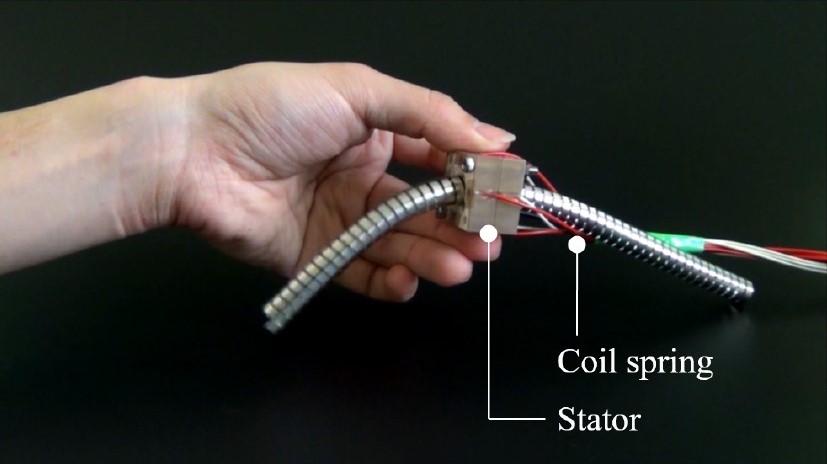
Most experiments in flexible robot actuators are based around pneumatics, but [Ayato Kanada] and [Tomoaki Mashimo] has been working on using a coiled spring as the moving component of a linear actuator. Named the flexible ultrasonic motor (FUSM), [Yunosuke Sato] built on top of their work and assembled a pair of FUSM into a closed-loop actuator with motion control in two dimensions.

A single FUSM is pretty interesting by itself, its coiled spring is the only mechanical moving part. An earlier paper published by [Kanada] and [Mashimo] laid out how to push the spring through a hole in a metal block acting as the stator of this motor. Piezoelectric devices attached to that block minutely distorts it in a controlled manner resulting in linear motion of the spring.

For closed-loop feedback, electrical resistance from the free end of the spring to the stator block can be measured and converted to linear distance to within a few millimeters. However, the acting end of the spring might be deformed via stretching or bending, which made calculating its actual position difficult. Accounting for such deformation is a future topic for this group of researchers.

This work was presented at IROS2020 which like many other conferences this year, moved online and became IROS On-Demand. After a no-cost online registration we can watch the 12-minute recorded presentation on this project or any other at the conference. The video includes gems such as an exaggerated animation of stator block deformation to illustrate how a FUSM works, and an example of the position calculation challenge where the intended circular motion actually resulted in an oval.

Speaking of conferences that have moved online, we have our own Hackaday Remoticon coming up soon!

[via Open Robotics Twitter feed]

source https://hackaday.com/2020/11/01/flexible-actuators-spring-into-action/

Big Workshop Clock Is 3D Printing Done Right

Time is something uniquely important to humans, and they remain the only creatures on the planet to build devices to regularly track its progress. [Ivan Miranda] is one such creature, and built a giant 7-segment clock for his workshop that really ties the room together.

The clock is a testament to [Ivan]’s design skills in the 3D printed space. Taking advantage of his large format printer, each segment consists of a front panel, large single-piece diffuser, LED carrier, and backing plate. There are plenty of nice touches, from the interlocking ridges between each digit, to integral printed arrows on the inside that guide installation of the LED strips. Fit and finish approaches the level of a commercial product, a reward for [Ivan]’s years of practice in the field.

Electronically, an ESP8266 runs the show, synchronizing the time over its in-built WiFi connection. Each segment contains 9 WS2812B LEDs, wired up in a single long strip that’s addressed by the microcontroller. This means that the segments can be lit up to any color of the rainbow, though [Ivan] is a man who best appreciates the look of classic red.

[Ivan]’s long been a proponent of big 3D-printed builds — his tank-tracked electric skateboard is a particularly good example. Video after the break.

source https://hackaday.com/2020/11/01/big-workshop-clock-is-3d-printing-done-right/

Burning Your Own PS1 Modchip Is Easy

The original Sony PlayStation came out just in time for CD piracy to really start taking off. Aware of this threat to sales, Sony engineers included a copy protection and region locking mechanism that placated executives and annoyed end-users alike. [MattKC] explores how this copy protection worked, and how you can burn your own modchip at home for just a few dollars.

Sony’s method of copy protection relied on steps taken during the manufacturing process, pressing a special groove into the game media that regular CD burners couldn’t replicate, a topic our own [Drew Littrell] has covered in depth. This groove contained a four letter code that could be read by the console, corresponding to the region in which the game was sold. The console would read this groove on startup, and check that the code in the game matched the code in the console before booting. Modchips circumvent this by injecting a spoof code into the console that matches the local region, regardless of what is read off the disc. This has the effect of both allowing users to run bootleg CD-Rs, homebrew code, as well as games from other regions.

Today, we’re blessed with the Internet and cheap hardware. As [MattKC] demonstrates, it’s no longer necessary to mail-order a chip from a dodgy ad in the back of a games magazine; instead, one can download source code and flash it to a commodity PIC microcontroller for just a few bucks. With the chip soldered in to the relevant points of the PS1’s motherboard, you’re good to go.

As far as console modding goes, the PS1 is a great platform to start with — simple to work on, and also the best selling console of all time, so the stakes are low if you mess up. Video after the break.

source https://hackaday.com/2020/11/01/burning-your-own-ps1-modchip-is-easy/

Fuel Cell Drone Aims For Extended Flight Times

The RC world was changed forever by the development of the lithium-polymer battery. No longer did models have to rely on expensive, complicated combustion engines for good performance. However, batteries still lack the energy density of other fuels, and so flying times can be limited. Aiming to build a drone with impressively long endurance, [Игорь Негода] instead turned to hydrogen power.

The team fitted a power meter to the plane, aiming a camera at it to measure power draw during flight.

With a wingspan of five meters, and similar length, the build is necessarily large in order to carry the hydrogen tank and fuel cell that will eventually propel the plane, which uses a conventional brushless motor for propulsion. Weighing in at 6 kilograms, plenty of wing is needed to carry the heavy components aloft. Capable of putting out a maximum of 200W for many hours at a time, the team plans to use a booster battery to supply extra power for short bursts, such as during takeoff. Thus far, the plane has flown successfully on battery power, with work ongoing to solve handling issues and determine whether the platform can successfully fly on such low power.

We’re eager to see how the project develops, particularly in regards to loiter time. We can imagine having a few pilots on hand may be necessary with such a long flight time planned — other drones of similar design have already surpassed the 60-minute mark. Video after the break.

source https://hackaday.com/2020/10/31/fuel-cell-drone-aims-for-extended-flight-times/

Fuel Cell Drone Aims For Extended Flight Times

The RC world was changed forever by the development of the lithium-polymer battery. No longer did models have to rely on expensive, complicated combustion engines for good performance. However, batteries still lack the energy density of other fuels, and so flying times can be limited. Aiming to build a drone with impressively long endurance, [Игорь Негода] instead turned to hydrogen power.

The team fitted a power meter to the plane, aiming a camera at it to measure power draw during flight.

With a wingspan of five meters, and similar length, the build is necessarily large in order to carry the hydrogen tank and fuel cell that will eventually propel the plane, which uses a conventional brushless motor for propulsion. Weighing in at 6 kilograms, plenty of wing is needed to carry the heavy components aloft. Capable of putting out a maximum of 200W for many hours at a time, the team plans to use a booster battery to supply extra power for short bursts, such as during takeoff. Thus far, the plane has flown successfully on battery power, with work ongoing to solve handling issues and determine whether the platform can successfully fly on such low power.

We’re eager to see how the project develops, particularly in regards to loiter time. We can imagine having a few pilots on hand may be necessary with such a long flight time planned — other drones of similar design have already surpassed the 60-minute mark. Video after the break.

source https://hackaday.com/2020/10/31/fuel-cell-drone-aims-for-extended-flight-times/

Fuel Cell Drone Aims For Extended Flight Times

The RC world was changed forever by the development of the lithium-polymer battery. No longer did models have to rely on expensive, complicated combustion engines for good performance. However, batteries still lack the energy density of other fuels, and so flying times can be limited. Aiming to build a drone with impressively long endurance, [Игорь Негода] instead turned to hydrogen power.

The team fitted a power meter to the plane, aiming a camera at it to measure power draw during flight.

With a wingspan of five meters, and similar length, the build is necessarily large in order to carry the hydrogen tank and fuel cell that will eventually propel the plane, which uses a conventional brushless motor for propulsion. Weighing in at 6 kilograms, plenty of wing is needed to carry the heavy components aloft. Capable of putting out a maximum of 200W for many hours at a time, the team plans to use a booster battery to supply extra power for short bursts, such as during takeoff. Thus far, the plane has flown successfully on battery power, with work ongoing to solve handling issues and determine whether the platform can successfully fly on such low power.

We’re eager to see how the project develops, particularly in regards to loiter time. We can imagine having a few pilots on hand may be necessary with such a long flight time planned — other drones of similar design have already surpassed the 60-minute mark. Video after the break.

source https://hackaday.com/2020/10/31/fuel-cell-drone-aims-for-extended-flight-times/

Kelvin Probes Review Shows How 4-Wire Resistance Measurement Works

You might think the probes in the picture are just funny looking alligator clips. But if you watch [tomtektest’s] recent video, you’ll learn they are really Kelvin probes. Kelvin probes are a special type of probe for making accurate resistance measurements using four wires and, in fact, the probe’s jaws are electrically isolated from each other.

We liked [Tom’s] advice from his old instructor: you aren’t really ever measuring a resistance. You are measuring a voltage and a current. With a four-wire measurement, one pair of wires carries current to the device under test and the other pair of wires measure the voltage drop.

If you wonder why that’s better than two probes, it all comes down to resistance in the test probes. Pulling supply current through the probe wires — which have some resistance — causes a voltage drop that affects the measurement. While the sense wire pair will also have resistance, the sensing current can be very small which means there will be correspondingly less error in the measurement.

We’ve seen these probes built from scratch, too. You do need a meter that will do the actual four-wire measurement, although a power supply and a voltmeter will do the job, too. If you don’t want to probe in real life, you can always do it in virtual reality. (Well, a circuit simulator, anyway.)

source https://hackaday.com/2020/10/31/kelvin-probes-review-shows-how-4-wire-resistance-measurement-works/

Self-Driving RC Truck is a Master’s Thesis in Cybernetics and Robotics

RC cars are a fun pastime, but for many hackers, taking things to the next level involves making the cars drive themselves. For his Masters thesis, [Jon] did just that, building a self-driving robot truck that confidently cruises the floor of his laboratory.

The truck is based on a 1/14th scale Tamiya chassis, and had been fitted out by a prior group with an inductive charging system. On top of this platform, [Jon] added a Jetson TX2 to act as the brains of the system, hooking it up with a Slamtec RPLIDAR scanner to map its surrounding environment. There’s also a Teensy microcontroller onboard which handles synthesizing PWM signals for the radio control hardware that drives the truck, and a Logitech webcam up front for machine vision. The truck is capable of operating in a variety of modes, from full manual operation, to driving based on LIDAR mapping or with an AI controlling the truck based on camera data. The truck is programmed to drive a route including an inductive charging pad so it can keep its power levels up without human intervention.

It’s a great blueprint for a self-driving system, and [Jon]’s thesis goes into great detail on how everything works at the base level (available on this page as a 67 MB PDF). His Code is on Github for the curious. We’ve seen similar projects before too, like this robot that navigates its builder’s house using LIDAR. Video after the break.

source https://hackaday.com/2020/10/31/self-driving-rc-truck-is-a-masters-thesis-in-cybernetics-and-robotics/

Using Open Source to Train your Dog

An open-source canine training research tool was just been released by [Walter Arce] and [Jeffrey Stevens] at the University of Nebraska — Lincoln’s Canine Cognition and Human Interaction Lab (C-CHIL).

We didn’t realize that dog training research techniques were so high-tech. Operant conditioning, as opposed to Pavlovian, gives a positive reward, in this case dog treats, to reinforce a desired behavior. Traditionally operant conditioning involved dispensing the treat manually and some devices do exist using wireless remote controls, but they are still manually operated and can give inconsistent results (too many or too few treats). There weren’t any existing methods available to automate this process, so this team decided to rectify the situation.

They took a commercial treat dispenser and retro-fitted it with an interface board that taps into the dispenser’s IR sensors to detect that the hopper is moving and treats were actually dispensed. The interface board connects to a Raspberry Pi which serves as a full-featured platform to run the tests. In this demonstration it connects to an HDMI monitor, detecting touches from the dog’s nose to correlate with events onscreen. Future researchers won’t have to reinvent the wheel, just redesign the test itself, because [Walter] and [Jeffrey] have released all the firmware and hardware as open-source on the lab’s GitHub repository.

In the short video clip below, watch the dog as he gets a treat when he taps the white dot with his snout. If you look closely, at one point the dog briefly moves the mouse pointer as well. We predict by next year the C-CHIL researchers will have this fellow drawing pictures and playing checkers.

This isn’t the first animal behavior hack we’ve seen this month. Check out [Hans’] feeder that trains birds to clean up bottlecaps.

source https://hackaday.com/2020/10/31/using-open-source-to-train-your-dog/

School Project Turns Plastic Waste Into Bricks

Many plastics are, in theory at least, highly recyclable. Unfortunately, in reality, most plastic ends up as waste instead, harming the environment and providing no ongoing value to society. Wanting to investigate possible ways to repurpose this material, [Rehaan33] built a rig to create bricks out of waste plastic for a school project.

The aim of the project is to take waste plastic, in this case high-impact polystyrene, and reform it into a brick that could be used as a low-cost building material. The material is shredded, before being packed into a steel mould and heated to 270 degrees in an oven. As polystyrene is a thermoplastic, it can readily be heated in this way for reforming without harming the material’s properties. Once heated, the mould is placed into the press rig, which uses parts of an old drill press to force down a steel plate, helping shape the final form of the brick.

While you’re unlikely to see old soda bottles used to build a skyscraper in New York any time soon, such techniques could be a good way to help eliminate plastic waste in impoverished areas and stem the flow of plastic into the world’s oceans. The project served as a useful learning experience, allowing [Rehaan33] to pick up skills in metalworking, machine design, and working with thermoplastics. Recycling plastics is a key area of interest for many, particularly in the 3D printing space, with many exploring ways to reuse thermoplastics in more efficient ways. If you’ve got your own project turning waste plastics into useful material, be sure to let us know!

source https://hackaday.com/2020/10/31/school-project-turns-plastic-waste-into-bricks/

Nerf Blaster Becomes Light Gun Controller

Traditional light guns rely on quirks of CRT technology, and thus don’t play well with modern LCD televisions and monitors. However, die hard retro gamers aren’t known for moving on from the classics, and have persevered to build new hardware to suit the games of old. In just this vein, [BrittLiv] grabbed some Nerf blasters, and built a pair of light guns that work with today’s hardware.

The build relies on Ultramarc’s light gun kits, which work in a similar way to the original Wiimote. A camera inside the blaster is used to triangulate an LED bar placed on top of the screen for clean and accurate tracking. [BrittLiv] combined the Ultramarc kit with some clever hacks to a Nerf DoubleStrike blaster, stealthily hiding the buttons inside to interface with the original trigger and cocking mechanism, as well as the locking tab in the rail.

There’s both a wired and wireless version, and the setup looks to be a great way to enjoy classics like Duck Hunt and Point Blank. The blasters work great with common platforms like MAME and RetroPi as the Ultramarc hardware emulates a standard USB mouse.

We’ve seen some wild light gun hacks before, like this build that uses cameras and maths to make things work without an LED bar at all! Video after the break.

source https://hackaday.com/2020/10/31/nerf-blaster-becomes-light-gun-controller/

Ubuntu (Finally) Officially Lands on the Raspberry Pi. But Will Anyone Notice?

The Raspberry Pi has been with us for over eight years now, and during that time it has seen a myriad operating system ports. It seems that almost anything can be run on the little computer, but generally the offerings have seen minority uptake in the face of the officially supported Raspbian, or as it’s now called, Raspberry Pi OS.

Maybe that could change, with the arrival of an Ubuntu release for the platform. For those of you pointing out that this is nothing new, what makes the new version 20.10 release special is that it’s the first official full Ubuntu release, rather than an unofficial port.

So Raspberry Pi 4 owners can now install the same full-fat Ubuntu they have on their PCs, and with the same official Ubuntu support. What does this really do for them that Raspberry Pi OS doesn’t? Underneath they share Debian underpinnings, and they both benefit from a huge quantity of online resources should the user find themselves in trouble. Their repositories both contain almost every reasonable piece of software that could be imagined, so the average Pi user might be forgiven for a little confusion.

We don’t expect this news to take the Pi desktop world by storm then. Ubuntu is a powerful distribution, but it’s fair to say that it is not the least bloated among distributions, and that some of its quirks such as Snap applications leave many users underwhelmed. By contrast Raspberry Pi OS is relatively lightweight, and crucially it’s optimised for the Pi. Its entire support base online is specific to the Pi hardware, so the seeker of solutions need not worry about encountering some quirk in an explanation that pertains only to PC platforms.

It’s fair to say though, that this release is almost certainly not targeted at the casual desktop user. We’d expect that instead it will be in the Ubuntu portfolio for commercial and enterprise users, and in particular for the new Raspberry Pi 4 Compute Module in which it will no doubt form the underpinnings of many products without their owners ever realising it.

[via OMG Ubuntu]

source https://hackaday.com/2020/10/31/ubuntu-finally-officially-lands-on-the-raspberry-pi-but-will-anyone-notice/

Altair Front Panel Tutorials

If you aren’t old enough to remember when computers had front panels, as [Patrick Jackson] found out after he built a replica Altair 8800, their operation can be a bit inscrutable. After figuring it out he made a pair of videos showing the basics, and then progressing to a program to add two numbers.

Even when the Altair was new, the days of front panels were numbered. Cheap terminals were on their way and MITS soon released a “turnkey” system that didn’t have a front panel. But anyone who had used a minicomputer from the late 1960s or early 1970s really thought you needed a front panel.

You may never program an Altair by the front panel, but it is still an interesting glimpse into what computing looked like only a few decades ago. While you might think that the front panel was a mere curiosity, it was not unusual to have to key in a bootloader program manually so you could then load other software — often a better bootloader — from paper or magnetic tape. Some computers even had the early bootloader code printed on the front panel for reference.

A front panel can also help you debug programs and hardware problems since you are probably looking right at the bus in a real computer. Of course, with an emulator, the emulator is just driving the front panel for make-believe, but it still works the same way.

We did our own front panel tutorial for the PDP/8. The operation is similar, but not exactly the same. The front panel for the BLUE computer was especially fun because it used the limited lights and switches available to the FPGA board it lived on. You can see it in a video in this post about the real-world implementation of a fake educational computer.

source https://hackaday.com/2020/10/30/altair-front-panel-tutorials/

Easy-SDR Gets Updates

Back in 2018, we covered [Igor’s] Easy-SDR project that aimed to provide open hardware extensions for the chap RTL-SDR receivers. If you haven’t been there for a while, it’s worth a look as there have been many recent updates. According to the author’s Reddit post:

  1. Most of the devices are now prepared for installation in a metal case measuring 80 x 50 x 20 millimeters.
  2. There’s a completely redesigned LNA design. Now, Bias Tee powered amplifiers are housed in a 50 x 25 x 25mm metal case and have N-type connectors.
  3. There’s an added amplifier based on the PGA-103 microcircuit.
  4. Added is the ability to install filters in final amplifiers (a separate printed circuit board, depending on the filter used).
  5. A new device – SPDT antenna switch for receiving antennas.
  6. The upconverter has been redesigned. Added intermediate buffer stage between the crystal generator and mixer.
  7. RF lines in all devices were recalculated to correspond to the characteristic wave impedance of 50 Ohm.
  8. Reduced size of PI attenuator PCB.

There is an emphasis on ease of assembly, so the projects generally have a gerber file and can use through hole or surface mount parts. They are also available live on EasyEDA if you want to make changes. Some of the designs, like the new upconverter, are SMD only, but for some devices these days that’s your only choice.

We were impressed with the instructions included with some of the projects. It should be very possible to duplicate these projects with just a little effort. If you missed our first pass at [Igor’s] great repo, you can still catch up. Since he uses EasyEDA, you might want to read our experience with that, too.

source https://hackaday.com/2020/10/30/easy-sdr-gets-updates/

Cryptic Calendar Makes For A Useful Wall Ornament

Hackers love a good clock build, but its longer term cousin, the calendar, is more seldom seen in the wild. Regardless, they can be just as useful and elegant a project, as this cryptic design from [Wolfspaw] demonstrates.

The project consists of a series of rotating wheels, displaying a series of arcane symbols. When the markings on the wheel align correctly with the viewing window, they display the date, month, and day of the week, respectively. The wheels themselves are fitted with 3D printed gear rings, which are turned by stepper motors under the control of an Arduino Nano. Hall effect sensors and magnets are used to keep everything appropriately aligned, while a DS3231 real time clock handles timekeeping duties.

It’s a tidy build, and we think the cryptic design adds a little mystery, making this an excellent conversation piece. The build is actually a remix of a project we’ve featured before, scaled and given a unique twist to suit [Wolfspaw]’s own personal aesthetic. Video after the break.

source https://hackaday.com/2020/10/30/cryptic-calendar-makes-for-a-useful-wall-ornament/

Adding Remote Control to the Elegoo Mars Pro

Recent price drops put entry level masked stereolithography (MSLA) resin 3D printers at around $200 USD, making them a very compelling tool for makers and hackers. But as you might expect, getting the price this low often involves cutting several corners. One of the ways manufacturers have made their machines so cheap is by simplifying the electronics and paring down the feature set to the absolute minimum.

So it was hardly a surprise for [Luiz Ribeiro] to find that his new Elegoo Mars Pro didn’t offer WiFi connectivity or a remote control interface. You’re supposed to just stick a USB flash drive into the printer and select the object you want to print from its menu system. But that doesn’t mean he couldn’t hack the capability in himself.

Monitoring a print with Mariner.

If this were a traditional 3D printer, he might have installed OctoPrint and been done with it. But resin printers are a very different beast. In the end, [Luiz] had to develop his own remote control software that worked around the unique limitations of the printer’s electronics. His software runs on a Raspberry Pi Zero and uses Linux’s “USB Gadget” system to make it appear as a flash drive when plugged into the USB port on the Elegoo Mars Pro.

This allows sending object files to the printer over the network, but there was a missing piece to the puzzle. [Luiz] still needed to manually go over to the printer and select which file he wanted to load from the menu. Until he realized there was an exposed serial port on control board that allowed him to pass commands to the printer. Between the serial connection and faux USB Mass Storage device, his mariner software has full control over the Mars Pro and is able to trigger and monitor print jobs remotely.

It might not offer quite the flexibility of adding OctoPrint to your FDM 3D printer, but it’s certainly a start.

source https://hackaday.com/2020/10/30/adding-remote-control-to-the-elegoo-mars-pro/

Hackaday Podcast 091: Louisville Exploder, Generating Japanese Joinery, Relay Retrocomputer Rally, and Chop the Robopup

Hackaday editors Mike Szczys and Elliot Williams dig through the greatest hacks that ought not be missed this week. There’s a wild one that flexes engineering skills instead of muscles to beat the homerun distance record with an explosively charged bat. A more elegant use of those engineering chops is shown in a CNC software tool that produces intricate wood joinery without needing an overly fancy machine to fabricate it. If your flesh and blood pets aren’t keeping up with your interests, there’s a new robot dog on the scene that far outperforms its constituent parts which are 3D-printed and of the Pi and Arduino varieties. And just when you thought you’d seen all the craziest retrocomputers, here’s an electromechanical relay based machine that took six years to build (although there’s so much going on here that it should have taken sixteen).

Take a look at the links below if you want to follow along, and as always, tell us what you think about this episode in the comments!

Direct download (~60 MB)

Places to follow Hackaday podcasts:

Episode 091 Show Notes:

New This Week:

Interesting Hacks of the Week:

Quick Hacks:

Can’t-Miss Articles:

source https://hackaday.com/2020/10/30/hackaday-podcast-091-louisville-exploder-generating-japanese-joinery-relay-retrocomputer-rally-and-chop-the-robopup/

ESP8266 Does RC Without the Transmitter

While the cost of a hobby-grade remote control transmitter has dropped significantly over the last decade or so, even the basic models are still relatively expensive. It’s not such a big deal if you only need to get one for personal use, but for a school to outfit a classroom’s worth of students their own radios, they’d need to have a serious STEM budget.

Which is why [Miharix], himself an educator with a decade of experience, developed a project that leverages the ESP8266 to create affordable RC vehicles that can be controlled with a smartphone’s web browser. There’s a bit of irony at play since the smartphones are more expensive than the RC transmitters would have been; but with more and more school-age kids having their own mobile devices, it takes the cost burden off of the educators. Depending on the age of the students, the teacher would only need to keep a couple of burner phones on hand for student that doesn’t have a device of their own.

A custom PCB makes connections easier for students.

In its fully realized form, the project uses an open hardware board that allows standard RC hobby servos to be connected to the GPIO pins of a ESP-12E module. But if you don’t want to go through the trouble of building the custom hardware, you could put something similar together with an ESP development board. From there it’s just a matter of installing the firmware, which starts up a server providing a touch-based controller interface that’s perfect for a smartphone’s screen.

Since the ESP8266 pops up as an Access Point that client devices can connect to, you don’t even need to have an existing network in place. Or Internet access, for that matter. [Miharix] says that in tests, the range between a common smartphone and the ESP8266 is approximately 85 meters (260 feet), which should be more than enough to get the job done.

In the videos after the break you can see this system being used with an RC car and boat, though the only limit to what you could control with this project is your own imagination.

source https://hackaday.com/2020/10/30/esp8266-does-rc-without-the-transmitter/

ESP8266 Does RC Without the Transmitter

While the cost of a hobby-grade remote control transmitter has dropped significantly over the last decade or so, even the basic models are still relatively expensive. It’s not such a big deal if you only need to get one for personal use, but for a school to outfit a classroom’s worth of students their own radios, they’d need to have a serious STEM budget.

Which is why [Miharix], himself an educator with a decade of experience, developed a project that leverages the ESP8266 to create affordable RC vehicles that can be controlled with a smartphone’s web browser. There’s a bit of irony at play since the smartphones are more expensive than the RC transmitters would have been; but with more and more school-age kids having their own mobile devices, it takes the cost burden off of the educators. Depending on the age of the students, the teacher would only need to keep a couple of burner phones on hand for student that doesn’t have a device of their own.

A custom PCB makes connections easier for students.

In its fully realized form, the project uses an open hardware board that allows standard RC hobby servos to be connected to the GPIO pins of a ESP-12E module. But if you don’t want to go through the trouble of building the custom hardware, you could put something similar together with an ESP development board. From there it’s just a matter of installing the firmware, which starts up a server providing a touch-based controller interface that’s perfect for a smartphone’s screen.

Since the ESP8266 pops up as an Access Point that client devices can connect to, you don’t even need to have an existing network in place. Or Internet access, for that matter. [Miharix] says that in tests, the range between a common smartphone and the ESP8266 is approximately 85 meters (260 feet), which should be more than enough to get the job done.

In the videos after the break you can see this system being used with an RC car and boat, though the only limit to what you could control with this project is your own imagination.

source https://hackaday.com/2020/10/30/esp8266-does-rc-without-the-transmitter/

ESP8266 Does RC Without the Transmitter

While the cost of a hobby-grade remote control transmitter has dropped significantly over the last decade or so, even the basic models are still relatively expensive. It’s not such a big deal if you only need to get one for personal use, but for a school to outfit a classroom’s worth of students their own radios, they’d need to have a serious STEM budget.

Which is why [Miharix], himself an educator with a decade of experience, developed a project that leverages the ESP8266 to create affordable RC vehicles that can be controlled with a smartphone’s web browser. There’s a bit of irony at play since the smartphones are more expensive than the RC transmitters would have been; but with more and more school-age kids having their own mobile devices, it takes the cost burden off of the educators. Depending on the age of the students, the teacher would only need to keep a couple of burner phones on hand for student that doesn’t have a device of their own.

A custom PCB makes connections easier for students.

In its fully realized form, the project uses an open hardware board that allows standard RC hobby servos to be connected to the GPIO pins of a ESP-12E module. But if you don’t want to go through the trouble of building the custom hardware, you could put something similar together with an ESP development board. From there it’s just a matter of installing the firmware, which starts up a server providing a touch-based controller interface that’s perfect for a smartphone’s screen.

Since the ESP8266 pops up as an Access Point that client devices can connect to, you don’t even need to have an existing network in place. Or Internet access, for that matter. [Miharix] says that in tests, the range between a common smartphone and the ESP8266 is approximately 85 meters (260 feet), which should be more than enough to get the job done.

In the videos after the break you can see this system being used with an RC car and boat, though the only limit to what you could control with this project is your own imagination.

source https://hackaday.com/2020/10/30/esp8266-does-rc-without-the-transmitter/

This Week in Security: Discord, Chromium, and WordPress Forced Updates

[Masato Kinugawa] found a series of bugs that, when strung together, allowed remote code execution in the Discord desktop app. Discord’s desktop application is an Electron powered app, meaning it’s a web page rendered on a bundled light-weight browser. Building your desktop apps on JavaScript certainly makes life easier for developers, but it also means that you inherit all the problems from running a browser and JS. There’s a joke in there about finally achieving full-stack JavaScript.

The big security problem with Electron is that a simple Cross Site Scripting (XSS) bug is suddenly running in the context of the desktop, instead of the browser. Yes, there is a sandboxing option, but that has to be manually enabled.

And that brings us to the first bug. Neither the sandbox nor the contextIsolation options were set, and so both defaulted to false. What does this setting allow an attacker to do? Because the front-end and back-end JavaScript runs in the same context, it’s possible for an XSS attack to override JS functions. If those functions are then called by the back-end, they have full access to Node.js functions, including exec(), at which point the escape is complete.

Now that we know how to escape Electron’s web browser, what can we use for an XSS attack? The answer is automatic iframe embeds. For an example, just take a look at the exploit demo below. On the back-end, all I have to do is paste in the YouTube link, and the WordPress editor does its magic, automatically embedding the video in an iframe. Discord does the same thing for a handful of different services, one being Sketchfab.

This brings us to vulnerability #2. Sketchfab embeds have an XSS vulnerability. A specially crafted sketchfab file can run some JS whenever a user interacts with the embedded player, which can be shoehorned into discord. We’re almost there, but there is still a problem remaining. This code is running in the context of an iframe, not the primary thread, so we still can’t override functions for a full escape. To actually get a full RCE, we need to trigger a navigation to a malicious URL in the primary pageview, and not just the iframe. There’s already code to prevent an iframe from redirecting the top page, so this RCE is a bust, right?

Enter bug #3. If the top page and the iframe are on different domains, the code preventing navigation never fires. In this case, JavaScript running in an iframe can redirect the top page to a malicious site, which can then override core JS functions, leading to a full escape to RCE.

It’s a very clever chaining of vulnerabilities, from the Discord app, to an XSS in Sketchfab, to a bug within Electron itself. While this particular example required interacting with the embedded iframe, it’s quite possible that another vulnerable service has an XSS bug that doesn’t require interaction. In any case, if you use Discord on the desktop, make sure the app is up to date. And then, enjoy the demo of the attack, embedded below.

Chromium Freetype Overflow

Chromium 86 has a fix for a particularly nasty bug. Tracked as CVE-2020-15999, this is a bug in how FreeType fonts are rendered. Now that Microsoft has switched to Edgium (Chromium powered Edge), we get two-for-one deals on Chromium vulnerabilities. This bug is interesting because it’s reportedly being actively exploited already. Google has marked the bug public, so we can take a closer look at exactly what happened.

The problem is in the FreeType library, regarding how fonts are handled when they contain embedded PNGs. To put it simply, the PNG width and height are stored in the font as 32-bit values, but those values are truncated to 16-bit before the buffer is allocated. After this, the PNG is copied to the buffer, but using the non-truncated values. A check is then performed to make sure the copy didn’t overflow, but unhelpfully, this was checked *after* the copy had taken place. The bug includes a test case, so feel free to go check your devices using that code. It’s not clear how long this bug has existed, but it’s possible it also affects Android’s System WebView, which is much slower to update.

Step-by-step of Chrome Exploit

[Man Yue Mo] recently published a detailed report on a Use-After-Free Chrome bug he discovered back in March, tracked as CVE-2020-6449. What makes this one worth looking at is the detailed account he gives us of the process of developing a working exploit from the bug. The whole account is a masterclass in abusing JavaScript to manipulate the state of the underlying engine. As a bonus, he gives us a link to the PoC exploit code to look at, too.

FBI Warning

The FBI, along with CISA and HHS, has issued a warning (PDF) about an ongoing redoubling of ransomware attacks against US hospitals and other healthcare providers. This attack is using the Trickbot malware and the Ryuk ransomware. They also note the use of DNS tunneling for data exfiltration, and specifically mention Point of Sale systems as a target.

The mitigation steps are particularly interesting in trying to read between the lines here. Before we look too deeply, I have to call out an outdated piece of advice: “Regularly change passwords”. This has been the bane of many users and administrators, and leads to weaker security, not stronger. With that out of the way, let’s look at the other recommendations.

A few recommendations are boiler-plate, like two-factor authentication, install security updates, have backups, etc. I was surprised to see the recommendation to allow local administration, in order to get things working again. What might be the most interesting is the recommendation to take a hard look at any RDP services that are running. Does this mean that some healthcare PoS system is running an out-of-date Windows, with a vulnerable RDP service open to the network by default, and it’s suddenly being targeted? Maybe. I’ve learned not to put too much stock in these advisories, unless actual details are given, and this particular example is quite light on details.

Loginizer’s SQL Injection

The popular Loginizer WordPress plugin is intended to protect your site’s login page from attack. It can add two-factor authentication, CAPTCHAs for repeated login attempts, and even detect brute-force attempts and blacklist the offending IP. That last one is where the problem lies. Incoming login attempts are logged to a SQL database, and that logging wasn’t properly sanitized, nor were prepared statements used. Because of this, the login page was subject to a very simple SQL injection attack. The Lesson? Sanitize your inputs, and use prepared statements! The latest update fixes this, as well as a separate but similar security issue.

What makes this bug novel is that WordPress found it a big enough problem to break the glass and push the big red button labeled “Force Update”. I didn’t know the folks at WordPress had a button that did that, but for particularly bad bugs like this one, it’s a useful capability. A few users complained that this update was installed even though they had auto-updates disabled. It’s a fine line to walk here, but it seems like WordPress should make it clear in the settings that this feature exists, and include a way to opt-out of forced updates like this one.

source https://hackaday.com/2020/10/30/this-week-in-security-discord-chromium-and-wordpress-forced-updates/

Color E-Ink Display Photo Frame Pranks [Mom]

As a general rule, it’s not nice to prank your mother. Moms have a way of exacting subtle revenge, generally in the form of guilt. That’s not to say it might not be worth the effort, especially when the prank is actually wrapped in a nice gesture, like this ever-changing e-paper family photo frame.

The idea the [CNLohr] had was made possible by a new generation of multicolor e-paper displays by Waveshare. The display [Charles] chose was a generous 5.65″ unit with a total of seven colors. A little hacking revealed an eighth color was possible, adding a little more depth to the images. The pictures need a little pre-processing first, of course — dithering to accommodate the limited palette — but look surprisingly good on the display. They have a sort of stylized look, as if they were printed on a textured paper with muted inks.

The prank idea was simple — present [Mrs. Lohr] with a cherished family photo to display, only to find out that it had changed to another photo overnight. The gaslighting attempt required a bit more hacking, including some neat tricks to keep the power consumption very low. It was also a bit of a squeeze to get it into a frame that was slim enough not to arouse suspicion. The video below details some of the challenges involved in this build.

In the end, [Mom] wasn’t tricked, but she still seemed pleased with the final product. These displays seem like they could be a lot of fun — perhaps a version of the very-slow-motion player but for color movies would be doable.

source https://hackaday.com/2020/10/30/color-e-ink-display-photo-frame-pranks-mom/

Crowd Funded Jumping Cubes

The Japan Aerospace Exploration Agency (JAXA) recently contributed their Int-Ball  technology to a Kickstarter campaign operated by the Japanese electronics manufacturer / distributor Bit Trade One (Japanese site). This technology is based on the Cubli project out of the Swiss Federal Institute of Technology in Zurich (ETH Zurich), which we covered back in 2013. The Cubli-based technology has been appearing in various projects since then, including the Nonlinear Mechatronic Cube in 2016.  Alas, the current JAXA-based “3-Axis Attitude Control Module” project doesn’t have a catchy name — yet.

One interesting application of these jumping cubes, presumably how JAXA got involved with these devices, is a floating video camera that was put to use on board the International Space Station (ISS) in 2017.  The version being offered by the Kickstarter campaign doesn’t include the cameras, and you will need to provide your own a gravity-free environment to duplicate that application.  Instead, they seem to be marketing this for educational uses.  You’d better dig deep in your wallet if you want one — a fully assembled unit requires a pledge of over $5000 ( there is a “some assembly required” kit that can save you about $1000 ).  Most of us won’t be backing this project for that reason alone, but it is nice to see the march of progress of such a cool technology:  from inception to space applications to becoming available to the general public.  Thanks to [Lincoln Uehara] for sending in this tip.

source https://hackaday.com/2020/10/30/crowd-funded-jumping-cubes/

N64 Power Adapter Works Around The World

Modern electronics such as phone and laptop chargers are pretty versatile no matter where you find yourself in the world. Capable of running off anything from 100-250V, all you need is a socket adaptor and you’re good to go. Video game consoles of the 1990s weren’t so flexible however. [MattKC] was tired of messing around with step down transformers to run his US market N64, and decided to rectify this, building a universal adapter to run the console instead.

It’s a proper hacked build, assembled out of a jumble of old parts. An broken N64 power adapter was harvested for its case and unique DC plug, which carries 12V and 3.3V to the console. Few compact power supplies exist delivering this pair of voltages, so [MattKC] got creative. An old router was sourced for its 12V 2A supply, and was combined with a 3.3V buck converter to supply both rails. With some creative bodging and plenty of mounting tape, the supplies were crammed inside the original case and wired up to the original jack and a figure 8 cable, allowing easy socket changes in different countries without the use of ugly adapters.

While few of us routinely travel with 25 year old Nintendo consoles, for those that do, the convenience of a single universal supply can’t be overstated. Fitting a step-down transformer into carry-on luggage simply isn’t practical, after all. We’ve featured similar hacks as far back as 2006, or more recently, a project seeking to rebuild a new PSU for the venerable Amiga 500. Video after the break.

source https://hackaday.com/2020/10/29/n64-power-adapter-works-around-the-world/

A Look Behind the “Big Boards” at Mission Control in the Golden Age of NASA

Certified space-nerd and all-around retro-tech guru [Fran Blanche] has just outdone herself with a comprehensive look at how NASA ran the Mission Control “Big Boards” that provided flight data for controllers for Apollo and for the next 20 years of manned spaceflight.

We’ve got to admit, [Fran] surprised us with this one. We had always assumed that the graphs and plots displayed in front of the rows of mint-green consoles and their skinny-tie wearing engineers were video projections using eidophor projectors. And to be sure, an eidophor, the tech of which [Jenny] profiled a while back, was used on one of the screens to feed video into Mission Control, either live from the Moon or from coverage of the launch and recovery operations. But even a cursory glance at the other screens in front of “The Pit” shows projections of a crispness and clarity that was far beyond what 1960s video could achieve.

Instead, plots and diagrams were projected into the rear of the massive screens using a completely electromechanical system. Glass and metal stencils were used to project the icons, maps, and grids, building up images layer by layer. Colors for each layer were obtained by the use of dichroic filters, and icons were physically moved to achieve animations. Graphs and plots were created Etch-a-Sketch style, with a servo-controlled stylus cutting through slides made opaque with a thin layer of metal. The whole thing is wonderfully complex, completely hacky, and a great example of engineering around the limits of technology.

Hats off to [Fran] for digging into this forgotten bit of Space Race tech. Seeing something like this makes the Mission Control centers of today look downright boring by comparison.

source https://hackaday.com/2020/10/29/a-look-behind-the-big-boards-at-mission-control-in-the-golden-age-of-nasa/