
Interesting-nesses
Interesting people I find online.
Have a look at some of the interesting things I found online in the various places I browse to see if you can find interest in them too.
For some sites you may be required to make a profile and obviously I have profiles there myself. Should you want a link to my profile there and it is not already shown on my follow bar; shoot me a message to get the link or username.

Daniela de Azevedo

Wee Scottish Lass

Scottish vlogger / youtuber in Scotland
Welcome to my channel! I’m nothing more than a Wee Scottish Lass fae the bonnie bonnie land of Scotland. If ye have any requests drop me a comment on one of my videos or send me a message!
Otherwise catch me up on the following: Instagram – Wee_Scottish_Lass Twitter – MoscoMoon DeviantArt – MoscoMoon Facebook – MoscoMoon

Great Scott!

Anya Chalotra

Naomi Wu aka Sexy Cyborg
New Inventions That Are At Another Level ▶30 #youtubevids
Light Graffiti Skateboard
By blitzgone in CircuitsArduino
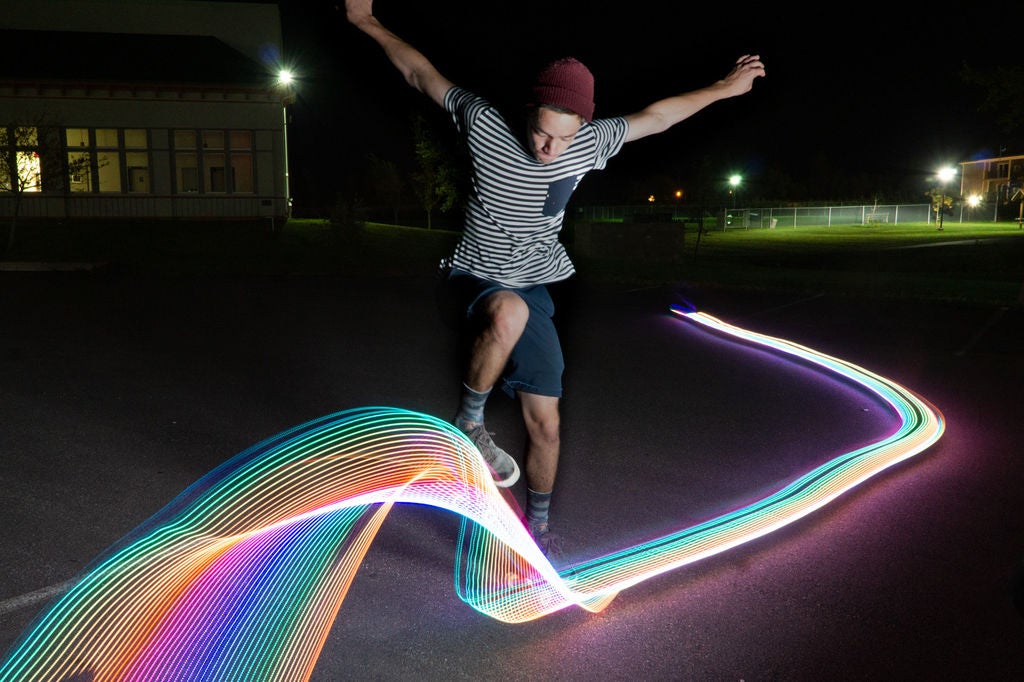
I’ve done light graffiti in the past and always find the results and process so much fun. I wanted to take it a step further and work on my maker skill to build a light graffiti skateboard. Here is how I did it.
Supplies:
- An old skateboard that you aren’t afraid to drill holes in
- 4mm zip ties
- Neopixel led strip
- Arduino nano
- 3 pin led connector
- 2 pin power connectors
- 7.4 Lipo battery, the smaller the better
- Camera capable of long exposures, you can use a smart phone on manual
- Tripod
- Flash – I used a softbox, but you can also use a bare flash off camera
Add TipAsk QuestionCommentDownload
Teacher Notes
Teachers! Did you use this instructable in your classroom?
Add a Teacher Note to share how you incorporated it into your lesson.Add Teacher Note
Step 1: Prep the Board


I drilled holes every 6-9 inches along the board, this would be to hold the LED’s in place with the zipties. I tried to keep them as close to the edge as possible.Add TipAsk QuestionCommentDownload
Step 2: Assemble Arduino


I used an Arduino nano to power to project in order to keep the weight down. I 3D printed this case from thingverse. I connected a button and switch so I could turn it on and off, and cycle different light affects. In the end I only really used the rainbow effect. For simplicity sake I could have simply plugged the battery and removed the switch and button.
I used a single 7.4 lipo battery. You can see the basic arduino sketch, this is the simple version with no button or switch for power. Keep in mind the diagrams are using a Arduino Uno, but a nano is needed.Add TipAsk QuestionCommentDownload
Step 3: Programming the Arduino
I decided to go with the fastLED Arduino library, but you can also use the NeoPixel library if you are more familiar with that.
There are two sketches attached one with the button that cycles several light effects and one with no button that uses the rainbow light pattern. Even though I had a had programmed several light patterns I used the rainbow pattern the most.
Here is an example on Tinkercad using the NeoPixel library:
https://www.tinkercad.com/things/7NkVtp6PWm0
Note: Tinkercad requires the Neopixels to take power from the from the Arduino, but in order to power a full 115 LED strip you’ll need to draw from power from the battery.
Note: You’ll need to change the LED count to match the amount of lights you have for your strand.
Attachments
- Simple_Skateboard_with_no_button.inoDownload
- Complicated with button – Skate_Lights_Fast_LED_button.inoDownload
Add TipAsk QuestionCommentDownload
Step 4: Full Assembly


I secured everything to the board with short screws, glued down the battery with hot glue gun, and connected all the components for a test.Add TipAsk QuestionCommentDownload
Step 5: Getting the Shoot
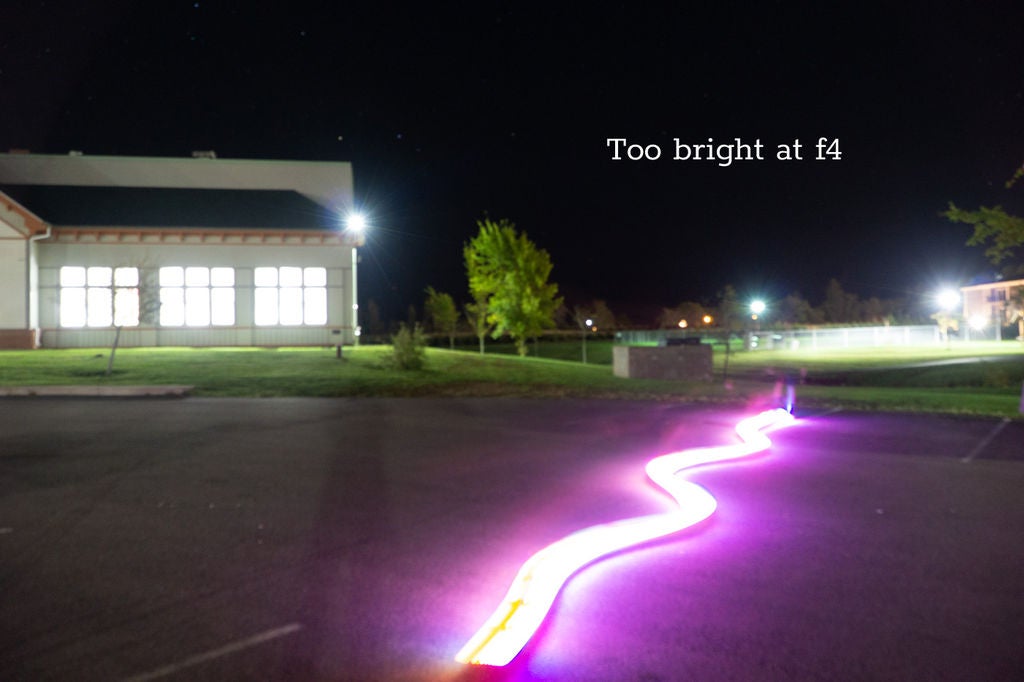

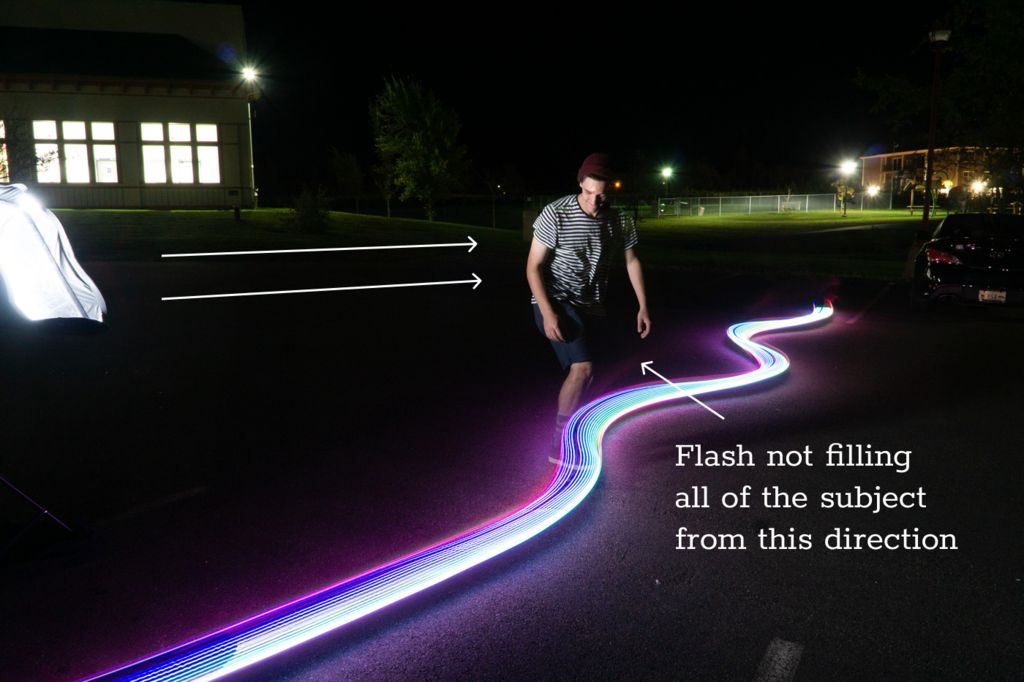
2 More Images
Put your camera on your tripod and set up your flash. Your camera will need to be on shutter priority. I triggered the flash manually with the flash “test” button when the subject was at the right spot.
Depending on the ambient light in your surroundings you’ll have to change your ISO and f-stop. It is best to do this with a number of test shoots. In the end I used ISO 1600 and at f11 for most of my shoots. You set your shutter speed based on how long you want your light trails, I used 4 seconds.
It takes a lot of testing to get it all right!Add TipAsk QuestionCommentDownload
Step 6: Celebrate
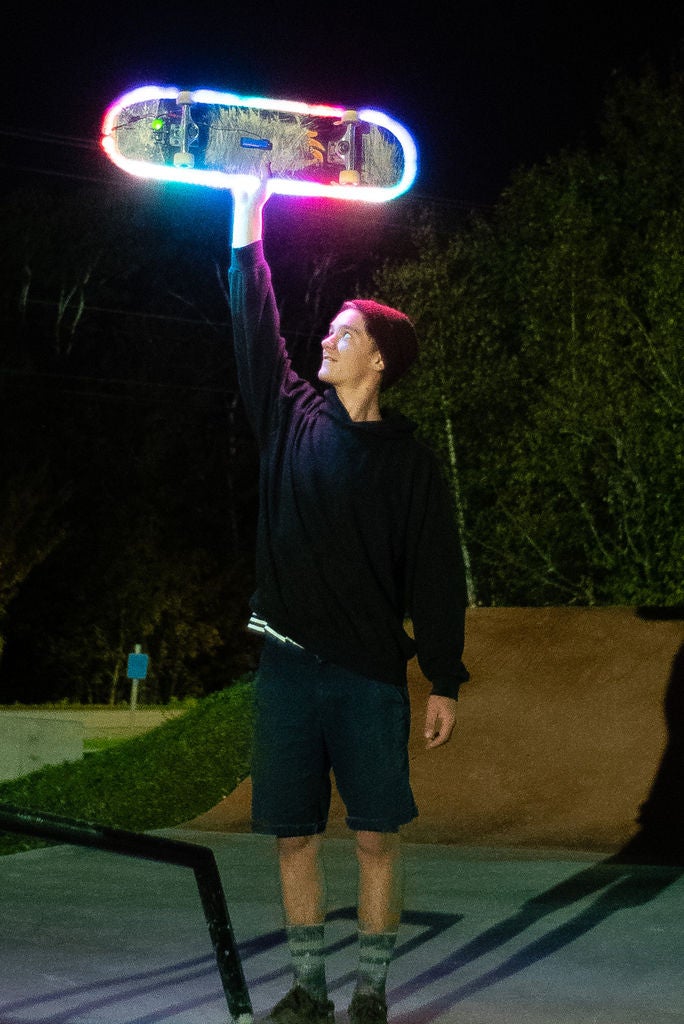
With a lot of hard work and lots of practice you can get the shoot.
The original Technoviking video. #youtubevids

Mikayla
Kaynova – Mikayla is a content creator on tiktok and other platforms. Keep an eye out, there’s more to come…
@19_kaynova_98
♡Birthday: 11/12/1998♡
♡Let your past make you BETTER not BITTER♡

Wickr
Wickr Pro Is Your Secure Team Collaboration Space
Fully encrypted. Enterprise-ready. Private. Set up in minutes and invite your team to join your private Wickr Network.
Control and protect your most critical communications. Wickr’s end-to-end encrypted platform offers features like: Voice & Video Calls, File transfer, SSO and MDM integration, Bots, full administrative controls and a whole lot more.


Wickr Me
Sign-up, download the app, and invite your contacts in minutes. It’s that easy. Take control of your critical communications and personal data. Always anonymous, fully-encrypted and ephemeral. Join millions of users worldwide

Wickr Pro
Sign-up, invite your team with the convenient Network Dashboard, and download the app to get your own secure and private Wickr network in minutes. Take control of your most critical communications and data exchanges. On multiple networks? No problem, Wickr has cross-network communications with other Wickr Pro and Wickr Me users. It’s that easy.

Jessica Nigri

Fiverr
Action. Community. Quality.
At Fiverr, it’s our mission to grow and cultivate the world’s largest digital marketplace, a place where people can find and purchase any service they need, and build any business they dream. As an employee, your work is inspired by the success of our users and the celebration of your own personal growth. Join us.
How To Find The Right Freelancer
Use Fiverr to easily hire freelancers for your projects.
Join over 11,000,000 happy businesses who found their freelance match in minutes.
4 Easy Steps To Find A Freelancer:
Use Fiverr’s search and side filters, to find the right freelancer for your project. Once you’ve found a service you’d like to order, click the gig. Choosing the right freelancer is easy:
1. Check out the freelancer’s work samples.
2. Check out the feedback from buyers like you.
3. Choose the package that best fits your needs.
4. Contact the freelancer with any questions to make sure they are aligned with your expectations.Browse Services

Holovect – Holographic Vector Display
The Holovect Mk II is a self-contained laser-based volumetric display system that fits on your lab bench or desktop. It is the perfect companion to a 3D printer and a stand-alone educational or promotional device. The Holovect Mk II is the first commercially available, laser-based desktop “holographic” display, capable of drawing 3D objects in air with light.

Holographic
Holovect images are NOT holograms but instead volumetric vector images projected onto modified air (i.e. projections in space). This distinction is due to the fact that a hologram is a recording of interference patterns on film or glass plates that contains three-dimensional information about an object (greek root “holo” means whole or complete, and “gram” means record). However, since Holovect images contain three dimensional information and are free-floating objects in air, they are most certainly holographic. They are real 3-D projections.
Mirage Technology
So how does it work? The principles are simple. When light travels between two different mediums in most cases you get three different effects to some degree: refraction (bending), reflection, and/or diffusion, depending on the different “refractive index” (RI) of the materials. An example of this are mirages, which occur when a portion of air has a different RI than its surroundings, causing light beams to bend and be reflected in unexpected ways. This can happen because of temperature or pressure differences from one region to the next.
With the holovect technology, we have invented how to control air within a box shaped section of space to precisely modify the RI within specific regions to refract and reflect a laser beam. This modification raises the “albedo” which is defined as the proportion of the incident light that is reflected by a surface, as well as the refractive properties at the boundary between the modified and unmodified air. Therefore by simultaneously controlling the aim of the laser and the position of a modified air column, a computer can place a volumetric pixel or voxel of light anywhere in 3D space. Then by keeping a laser beam on as it aims from point A to point B a line is drawn which is a 3D vector, and by joining many vectors in a sequence a holographic vector object can be generated. The Holovect Mk II is capable of drawing a complete image 50 times per second within
a 12cm by 12cm by 12cm cube we call the “drawbox”. Outside of this box things get messy, unpredictable and, in general, not useful.

VECTS
“Vect” objects are the data-structure developed for the Holovect. Put simply it is a list of 3D coordinates that result in lines drawn in a head-to-tail sequence in space, which are compiled into vect class objects. The files are straightforward and easy to create using a variety of online tools, spreadsheets, or good old pencil and graph paper. Once loaded, vects can be rotated in three axes and moved around within the cubic canvas. These objects can be manipulated using the control knob, preset functions such as spin and move, or used within your own applications.

3-D printing pre-visualizer and Applications
Holovect Mk II can be used to visualize CAD models in STL format before 3D printing. This can be done in two ways: importing STL files and convert them to vect format, or visualized directly. Depending on the desired visualization, converting the STL will result in a volumetric wireframe projection, whereas direct STL visualization slices the model into layers which is ideal to inspect for potential manufacturing errors and revise inner structure in hollow parts before printing. This volumetric pre-visualization ability increases design and manufacturing efficiency by saving time and printing material before committing to a long printing process.
Other applications include the visualization of 3D data acquired through a 3D scanner, or a computed tomography scan. Commercial applications could also include advertising and branding.

Beyond
As the community grows, our open source software philosophy will allow users to create applications that take advantage of Holovect’s glasses-free, touchable volumetric display. Games, tools and art applications are all in the works and should be available to users by shipping time. Moreover, the hardware will accommodate any advancements in 3D image capture and creation.
Risks and challenges
Our biggest challenge is producing enough units to keep costs low and maintain a large community of content creators. Your contributions will help our efforts and push this nascent technology further than even our imaginations can predict.
We have spent a year redesigning and streamlining the product and production line. We are ready to put considerable amount of units into the hands of developers, early adopters and enthusiasts. Help us make Holovect the standard of holographic volumetric displays.

Dwarf Fortress
Dwarf Fortress (officially called Slaves to Armok: God of Blood Chapter II: Dwarf Fortress) is a part construction and management simulation, part roguelike, indie video game created by Tarn and Zach Adams. Freeware and in development since 2002, its first alpha version was released in 2006 and it received attention for being a two-member project surviving solely on donations. The primary game mode is set in a procedurally generated fantasy world in which the player indirectly controls a group of dwarves, and attempts to construct a successful and wealthy underground fortress. Critics praised its complex, emergent gameplay but had mixed reactions to its difficulty. The game influenced Minecraft and was selected among other games to be featured in the Museum of Modern Art to show the history of video gaming in 2012.
The game has text-based graphics and is open-ended with no main objectives. Before playing, the player has to set in motion a process which generates worlds with continents, oceans and histories documenting civilizations. The main game mode, Dwarf Fortress, consists of selecting a suitable site from the generated-world, establishing a successful colony or fortress, combating threats like goblin invasions, generating wealth and taking care of the dwarves. Each dwarf is modeled down to its individual personality, has likes or dislikes and possesses specific trainable skills in various labors. The second main game mode, Adventurer, is a turn-based, open-ended roguelike mode where the player starts off as an adventurer in the world and is free to explore, complete quests, or even visit old abandoned fortresses. The combat system is anatomically detailed with combat logs describing events like organs getting pierced, fat getting bruised and limbs getting severed.
Prior to Dwarf Fortress, Tarn Adams was working on a project called Slaves to Armok: God of Blood which was a role-playing game. By 2004, Adams decided to shift from the original Armok to Dwarf Fortress after the former became difficult to maintain. Adams calls it his life’s work and said in 2011 that version 1.0 will not be ready for at least another 20 years, and even after that he would continue to work on it. The game has a cult following and an active online community. As there is no way to win, every fortress, no matter how successful, is usually destroyed somehow. This prompts the official community motto: “Losing is Fun!”

Carron Engelbrecht

Pantone

Pantone provides a universal language of color that enables color-critical decisions through every stage of the workflow for brands and manufacturers. More than 10 million designers and producers around the world rely on Pantone products and services to help define, communicate and control color from inspiration to realization – leveraging advanced X-Rite technology to achieve color consistency across various materials and finishes for graphics, fashion and product design. Pantone Standards feature digital and physical color specification and workflow tools. The Pantone Color Institute™ provides customized color standards, brand identity and product color consulting as well as trend forecasting inclusive of Pantone Color of the Year, Fashion Runway Color Trend Reports, color psychology and more. Pantone B2B Licensing incorporates the Pantone Color System into different products and services, enabling licensees to communicate and reproduce approved Pantone values and improve efficiencies for their users. Pantone Lifestyle brings color and design together across apparel, home, and accessories. Learn more and connect with Pantone on Instagram, Facebook, Pinterest, and LinkedIn.

About Pantone Standards
In 1963, Pantone revolutionized the printing industry with the colorful PANTONE MATCHING SYSTEM®, an innovative tool allowing for the faithful selection, articulation and reproduction of consistent, accurate color anywhere in the world. The tool organizes color standards through a proprietary numbering system and chip format, which have since become iconic to the Pantone brand.
Pantone’s color language supports all color conscious industries; textiles, apparel, beauty, interiors, architectural and industrial design, encompassing over 10,000 color standards across multiple materials including printing, textiles, plastics, pigments, and coatings.
Pantone Standards are available both digitally and physically. Integrated workflow tools such as PantoneLIVE and Pantone Studio, ensure market-relevancy and color achievability as technology continues to transform the design process.

About Pantone Lifestyle
An iconic name in the fashion, product, graphic design and lifestyle-oriented industries, Pantone is a symbol of the design-minded. Pantone Lifestyle, the consumer-licensing division of Pantone, offers consumer products inspired by the signature Pantone chip design, to infuse daily life with intentional color and patterns.
The Pantone Lifestyle division celebrates a modern design aesthetic and bold use of color, brought to life through collaborations with likeminded brands and licensing partnerships in categories including home furnishings, apparel, beauty, travel, and desktop accessories.SHOP PANTONE LIFESTYLE

About Pantone Color Institute
The Pantone Color Institute™ is a consulting service within Pantone that forecasts global color trends and advises companies on color in brand identity and product development, for the application and integration of color as a strategic asset. Recognized around the world as a leading source of color information through seasonal trend forecasts, custom color development, and palette recommendations for product and corporate identity, Pantone Color Institute partners with global brands to leverage the power, psychology and emotion of color in their design strategy.LEARN MORE


Our Parent X-Rite
Headquartered in Grand Rapids, Michigan, X-Rite is a global company with locations around the world. Experts in blending the art and science of color, they focus on providing complete end-to-end color management solutions for their clients in every industry where color matters.LEARN MORE
Colors of the Year
2020Classic Blue19-40522019Living Coral16-15462018Ultra Violet18-38382017Greenery15-03432016Rose Quartz13-15202016Serenity15-39192015Marsala18-14382014Radiant Orchid18-32242013Emerald17-56412012Tangerine Tango17-14632011Honeysuckle18-21202010Turquoise15-55192009Mimosa14-08482008Blue Iris18-39432007Chili Pepper19-1557
2006

Sand Dollar
13-1106
2005
Blue Turquoise
15-5217
2004
Tigerlily
17-1456
2003
Aqua Sky
14-4811
2002
True Red
19-1664
2001
Fuchsia Rose
17-2031
2000
Cerulean Blue
15-4020

Nerdforge
https://www.youtube.com/channel/UCggHsHce2n3vvbJf_8YKrMA
Hello! We’re the Nerdforge couple Martina & Hansi! Our channel is about making all kinds of things! If you’re wondering what to expect we really couldn’t tell you, as our inspiration is largely random, unplanned and chaotic. One day you get a soda dispenser, another day you get an epic castle! But, some common denominators are: leds, arduino, foam, leather and epicness! See you in the comments ! 🙂

Doni Bobes
https://www.youtube.com/user/DoniBobesMC/featured
Doni Bobes is me. Minecraft Video I make. The video you like. The subscribe button you will hit. pls

DIY Electronics
https://www.diyelectronics.co.za/
DIYElectronics is commited as a company to provide you with the widest range of electronics to suit your professional or hobby needs. We understand that good electronics is important to any project, we also understand that every new project brings a host of new challenges. That is why we have created this WIKI for you, to help you in your projects, whether you are buying your first 3d printer or building a rocket to the moon, our aim is to make every step of your creative journey just a little bit easier.

Dealzer
Dealzer has some interesting items for sale that focuses on hydroponics and indoor plant growing.
As I have the scenario set up from many years of reading castaway type stories I have been on the lookout for plant growing systems that would work underground or in space. Mars here I come…

Volkano
Raw Power, Pure Symplicity
VOLKANO·THURSDAY, 19 APRIL 2018· Create, play, listen, relax or work with the confidence that your Volkano Product will perform as you need it to when you need it to. Get ready to explore our range of top quality consumer electronics and experience raw power, through sheer simplicity.Volkano is the fastest growing personal electronics brand in the world with an ever increasing global footprint. We are committed to the ideal that price should never discount quality and with this in mind have introduced more than 100 different audio products, personal user electronics, computer peripherals and electronic accessories to the market. We firmly believe that for every electronic challenge you face, there is a Volkano Solution.


Phanzi Museum
Roberts House is an important example of the middle class British Colonial Style villa built in the late nineteenth century. It is a National Monument and an exotic immigrant to the Last Outpost of the British Empire nestled in a green oasis of indigenous trees.
The Roberts family’s daughter Esther was born here and grew up to be the first female social anthropologists of the then Colony of Natal. She was well known as a librarian, author of research papers and books dealing with the indigenous population, and as a confidant and friend of Killie Campbell one of the doyens of Africana collectors in the country. Her large collection and library is now linked to the University of KwaZulu-Natal. Most importantly Esther stood many-a-day silently outside the city hall with her solidarity group called the Black Sash,lamenting injustices endured by the non-white population.
She died here more than ten years before South Africa was liberated. In the new democratic South Africa, the road was named after her.

THE YARD
On the perimeter of the property are the offices of Architects and Planners who all subscribe and contribute to the museum. Shared spaces are used for talks, lectures and exhibitions.

NDRL Furniture
Self-Driving Cars Are Predicting Driving Personalities
In a recent study by a team of researchers at MIT, self driving cars are being programmed to identify the social personalities of other drivers in an effort to predict their future actions and drive safer on roads.
It’s already been made evident that autonomous vehicles lack social awareness. Drivers around a car are regarded as obstacles rather than human beings, which can hinder the automata’s ability to identify motivations and intentions, potential signifiers to future actions. Because of this, self-driving cars often cause bottlenecks at four-way stops and other intersections, perhaps explaining why the majority of traffic accidents involve them getting rear-ended by impatient drivers.
The research taps into social value orientation, a concept from social psychology that classifies a person from selfish (“egoistic”) to altruistic and cooperative (“prosocial”). The system uses this classification to create real-time driving trajectories for other cars based on a small snippet of their motion. For instance, cars that merge more often are deemed as more competitive than other cars.
When testing the algorithms on tasks involving merging lanes and making unprotected left turns, the behavioral predictions were shown to improve by a factor of 25%. In a left-turn simulation, the automata was able to wait until the approaching car had a more prosocial driver.
Even outside of self-driving cars, the research could help human drivers predict the actions of other drivers around them.
Thanks [Qes] for the tip!
source https://hackaday.com/2019/12/02/self-driving-cars-are-predicting-driving-personalities/