Exotic Device Gets Linux Support via Wireshark And Rust

What can you do if you have a nice piece of hardware that kinda works out of the box, but doesn’t have support for your operating system to get the full functionality out of it? [Harry Gill] found himself in such a situation with a new all-in-one (AIO) water cooling system. It didn’t technically require any operating system interaction to perform its main task, but things like settings adjustments or reading back statistics were only possible with Windows. He thought it would be nice to have those features in Linux as well, and as the communication is done via USB, figured the obvious solution is to reverse engineer the protocol and simply replicate it.

His first step was to set up a dual boot system (his attempts at running the software in a VM didn’t go very well) which allowed him to capture the USB traffic with Wireshark and USBPcap. Then it would simply be a matter of analyzing the captures and writing some Linux software to make sense of the data. The go-to library for USB tasks would be libusb, which has bindings for plenty of languages, but as an avid Rust user, that choice was never really an issue anyway.

How to actually make use of the captured data was an entirely different story though, and without documentation or much help from the vendor, [Harry] resorted to good old trial and error to find out which byte does what. Eventually he succeeded and was able to get the additional features he wanted supported in Linux — check out the final code in the GitHub repository if you’re curious what this looks like in Rust.

Capturing the USB communication with Wireshark seems generally a great way to port unsupported features to Linux, as we’ve seen earlier with an RGB keyboard and the VGA frame grabber that inspired it. If you want to dig deeper into the subject, [Harry] listed a few resources regarding USB in general, but there’s plenty more to explore with reverse engineering USB.

source https://hackaday.com/2020/08/20/exotic-device-gets-linux-support-via-wireshark-and-rust/

Want to Support Hacker-friendly Hardware Design? Follow Valve’s Example

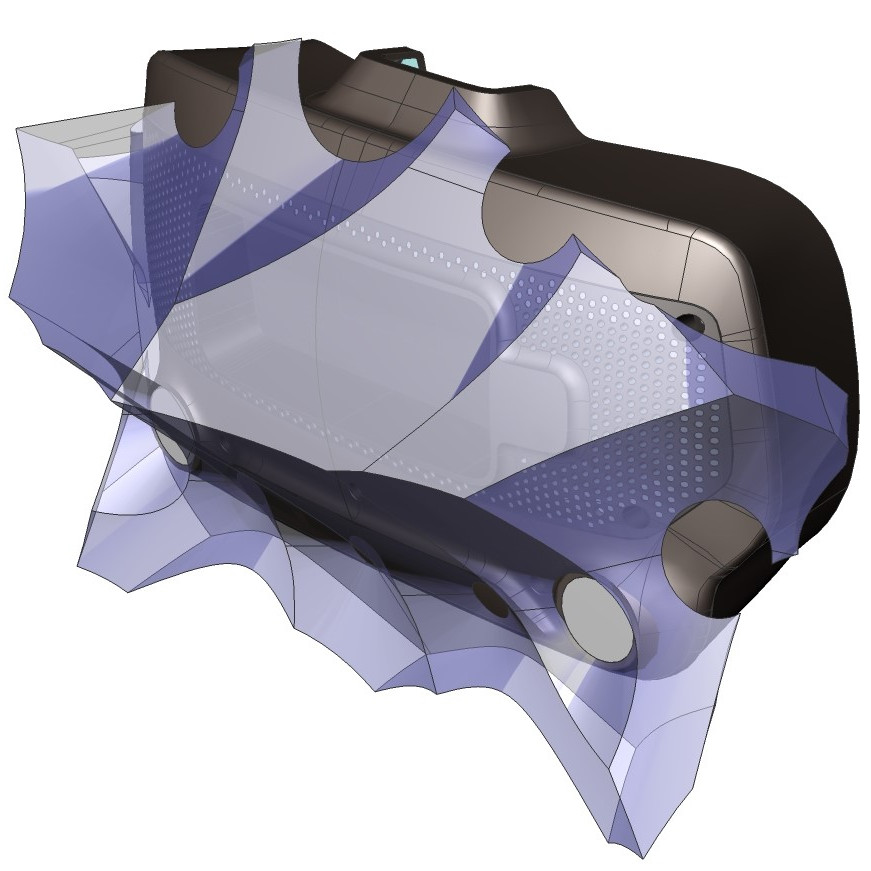
It’s been just over a year since Valve released Index, their flagship VR system, and it’s worth looking back at this GitHub repository as a fine example of how to provide supporting materials to a hacker-friendly hardware design. The image above shows off one of the hacker-friendly design elements: an empty space behind the visor, with a USB port off to the right, that exists for no reason other than to make it easier to mount and plug in whatever one might come up with. There’s more to it than that, however. If one wishes to provide supporting materials for a hardware design, one could certainly do worse than emulate Valve’s example.

The violet 3D model shows the area that modifications can occupy without getting in the way of any sensors.

The hardware repository contains not just CAD models of mod-friendly hardware pieces (both in high-resolution STEP models as well as STL files) but also 3D models of the sensor zones, so modders can ensure they avoid occluding any sensors with their creations. Examples are great, and one provided by Valve is the Booster; a hand controller add-on providing extra comfort for people with large hands or long thumbs. The model also doubles as a reference for designing attachments that will not interfere with any of the tracking or touch-sensitive surfaces of the controllers.

Being hacker-friendly doesn’t mean the hardware has no warranty, but it does mean that there is concrete guidance on what does or doesn’t risk voiding it. In the case of the Index hardware, the guidance is simple: “Anything that requires a T5 or smaller is not user serviceable.”

To us, the whole attitude of being hacker-friendly is exemplified by a statement about the headstrap, found about half-way down the page. The words “removing the headstrap is not recommended” are followed immediately by clear directions on how to do exactly that, demonstrating the kind of trust necessary to reduce barriers for add-ons and modifications. That is a great way to help foster experimentation, like this project for 1:1 mapping of physical elements to their VR counterparts, to make awesome spaceship cockpits.

source https://hackaday.com/2020/08/20/want-to-support-hacker-friendly-hardware-design-follow-valves-example/

Eavesdropping on Satellites for Fun and Profit

Geosynchronous satellites, girdling the Earth from their perches 36,000 km above the equator, are remarkably useful devices. Depending on where they’re parked, they command views of perhaps a third of the globe at a time, making them perfect communications relays. But as [James Pavur] points out in his DEF CON Safe Mode talk, “Whispers Among the Stars”, geosynchronous satellite communication links are often far from secure.

[James], a D. Phil. student in Systems Security at Oxford University, relates that his exploits rely on the wide areas covered by the downlink signals from the satellites, coupled with security as an afterthought, if it was even thought of at all by satellite service providers. This lackadaisical approach let him use little more than a regular digital satellite TV dish and a tuner card for a PC — off-the-shelf stuff that you’d really have to try hard to spend more than $300 on — to tap into sensitive information.

While decoding the digital signals from satellites into something parseable can be done with commercial applications, [James] and his colleagues built a custom tool, GSExtract, to pull data from the often noisy signals coming down from on high. The setup returned an amazing bounty of information, like maritime operators relaying the passport information of crew members from ship to shore, point-of-sale terminal information from cruise ships in the Mediterranean, and in-flight entertainment systems in jet airliners. The last example proved particularly alarming, as it revealed an exploitable connection between the systems dedicated to keeping passengers content and those in the cockpit, which clearly should not be the case.

We found [James’] insights on these weaknesses in satellite communications fascinating, and it’s well worth the 45 minutes to watch the video below and perhaps try these exploits, which amount to side-channel attacks, for yourself.

source https://hackaday.com/2020/08/20/eavesdropping-on-satellites-for-fun-and-profit/

Palm-Sized Sixteen Segments Light the Way to Our Hearts

It’s no secret that we here at the Hackaday are suckers for cool display. LEDs, OLEDs, incandescent, nixie or neon, you name it and we want to see it flash. So it fills us with joy to discover a new way to build large, daisy-chainable 16-segment digits, and even more excited to learn how easy they are to fab and assemble.

A cousin of the familiar 7 segment display, the 16 segment gives so many more possibilities (128% more possibilities to be exact) for digit display. To be specific, those extra segments unlock the ability to display upper and lowercase latin characters as well as scads of punctuation.

But where the character set is complex, the assembly is anything but thanks to a great design from [Kolibri] called klais-16. They’re available fully assembled if you want to jump straight to code, but thanks to thorough documentation (seriously, check this out) assembly is a snap.

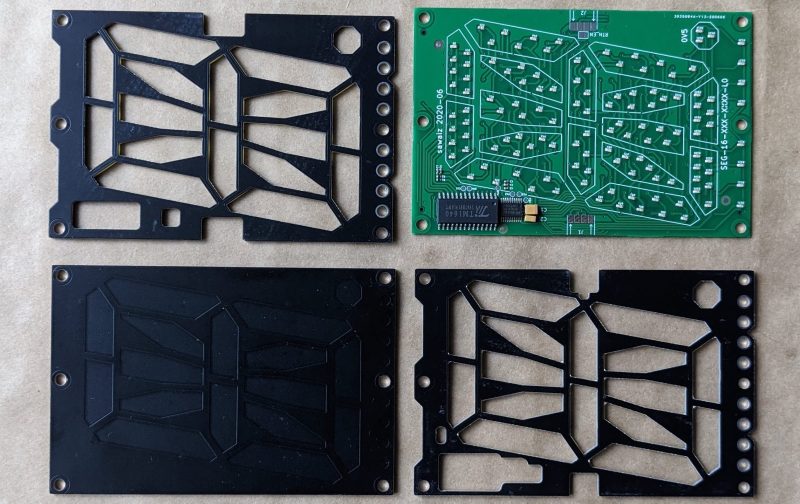
Each module is composed a very boring PCBA base layer which should be inexpensive from the usual sources, even when ordering one fully assembled. A stackup of three more PCBs are used for spacing and diffusion with plans for die-cut or injection mold layers if a larger production run ends up happening. Board dimensions for each character are 100 mm x 66.66 mm (about 4″ x 2.5″). Put together, each module can stand on its own or be easily daisy-chained together to make a longer single display.

Addressing all those bits with an elaborate, ugly control scheme would be a drag but fortunately the firmware for the onboard STM8 microcontroller exposes a nice boring serial interface which can be used without configuration to display strings. There’s even an example Windows Batch script!

source https://hackaday.com/2020/08/20/palm-sized-sixteen-segments-light-the-way-to-our-hearts/

Palm-Sized Sixteen Segments Light the Way to Our Hearts

It’s no secret that we here at the Hackaday are suckers for cool display. LEDs, OLEDs, incandescent, nixie or neon, you name it and we want to see it flash. So it fills us with joy to discover a new way to build large, daisy-chainable 16-segment digits, and even more excited to learn how easy they are to fab and assemble.

A cousin of the familiar 7 segment display, the 16 segment gives so many more possibilities (128% more possibilities to be exact) for digit display. To be specific, those extra segments unlock the ability to display upper and lowercase latin characters as well as scads of punctuation.

But where the character set is complex, the assembly is anything but thanks to a great design from [Kolibri] called klais-16. They’re available fully assembled if you want to jump straight to code, but thanks to thorough documentation (seriously, check this out) assembly is a snap.

Each module is composed a very boring PCBA base layer which should be inexpensive from the usual sources, even when ordering one fully assembled. A stackup of three more PCBs are used for spacing and diffusion with plans for die-cut or injection mold layers if a larger production run ends up happening. Board dimensions for each character are 100 mm x 66.66 mm (about 4″ x 2.5″). Put together, each module can stand on its own or be easily daisy-chained together to make a longer single display.

Addressing all those bits with an elaborate, ugly control scheme would be a drag but fortunately the firmware for the onboard STM8 microcontroller exposes a nice boring serial interface which can be used without configuration to display strings. There’s even an example Windows Batch script!

source https://hackaday.com/2020/08/20/palm-sized-sixteen-segments-light-the-way-to-our-hearts/

Palm-Sized Sixteen Segments Light the Way to Our Hearts

It’s no secret that we here at the Hackaday are suckers for cool display. LEDs, OLEDs, incandescent, nixie or neon, you name it and we want to see it flash. So it fills us with joy to discover a new way to build large, daisy-chainable 16-segment digits, and even more excited to learn how easy they are to fab and assemble.

A cousin of the familiar 7 segment display, the 16 segment gives so many more possibilities (128% more possibilities to be exact) for digit display. To be specific, those extra segments unlock the ability to display upper and lowercase latin characters as well as scads of punctuation.

But where the character set is complex, the assembly is anything but thanks to a great design from [Kolibri] called klais-16. They’re available fully assembled if you want to jump straight to code, but thanks to thorough documentation (seriously, check this out) assembly is a snap.

Each module is composed a very boring PCBA base layer which should be inexpensive from the usual sources, even when ordering one fully assembled. A stackup of three more PCBs are used for spacing and diffusion with plans for die-cut or injection mold layers if a larger production run ends up happening. Board dimensions for each character are 100 mm x 66.66 mm (about 4″ x 2.5″). Put together, each module can stand on its own or be easily daisy-chained together to make a longer single display.

Addressing all those bits with an elaborate, ugly control scheme would be a drag but fortunately the firmware for the onboard STM8 microcontroller exposes a nice boring serial interface which can be used without configuration to display strings. There’s even an example Windows Batch script!

source https://hackaday.com/2020/08/20/palm-sized-sixteen-segments-light-the-way-to-our-hearts/

Antenna Pulls in AM Stations

While we can’t argue that FM has superior audio quality and digital streaming allows even higher quality in addition to worldwide access, there’s still something magic about hearing a weak and fading AM signal from thousands of miles away with nothing between the broadcaster’s antenna and yours. If you can’t have a big antenna — or even if you can — a loop antenna can help your big antenna fit in less space. In the video after the break, [TheOffsetVolt] covers an AM loop and shows how it can pull in distant AM stations.

Continuing with the educational radio he’s talked about before,  he adds a loop antenna that is two feet on each side of a square, making it four square feet in area. Although he calls it an amplifier, it’s really just a passive tuned circuit that couples to the radio’s built-in antenna. There’s no actual connection between the antenna and the radio.

We aren’t sure if the reradiation explanation is really what’s happening, or if it is just transformer coupled to the main antenna. But either way, it seems to work well. You can think of this as adding a preselector to the existing radio. Loop antennas are directional, so this design could work as a direction finder.

We have seen many loop antennas, some with novel construction methods.  Some even tune themselves.

source https://hackaday.com/2020/08/19/antenna-pulls-in-am-stations/

IBM Reveals POWER10 CPU Based On The OpenPOWER ISA 3.1 Specification

This week, IBM revealed their POWER10 CPU, which may not seem too exciting since it’s primarily aimed at big iron like mainframes and servers. The real news for most is that it is the first processor to be released that is based on the open Power ISA specification v3.1. This new version of the Power ISA adds a number of new instructions as well as the notion of optionality. It updates the v3.0 specification that was released in 2015, right after the founding of the OpenPOWER Foundation.

Currently, a number of open source designs for the Power ISA exists, including MicroWatt (Power v3.0, VHDL) and the similar ChiselWatt (written in Scala-based Chisel).  In June of this year, IBM also released the VHDL code for the IBM A2 processor on Github. This is a multi-core capable, 4-way multithreaded 64-bit design, with silicon-implementations running at up to 2.3 GHz and using the Power ISA v2.06 specification.

The ISA specifications and other relevant technical documentation can be obtained from the OpenPOWER website, such as for example the Power ISA v3.0B specification from 2017. The website also lists the current cores and communities around the Power ISA.

(Main image: POWER10 CPU, credit IBM)

source https://hackaday.com/2020/08/19/ibm-reveals-power10-cpu-based-on-the-openpower-isa-3-1-specification/

Re-imagining the Crossed Gantry 3D Printer

Simply having a few go-to 3D printer motion system designs is no reason to stop exploring them, as even small iterations on an existing architecture can yield some tremendous improvements. In the last few months, both [Annex_Engineering] and [wesc23] have been piloting a rail-derived crossed gantry architecture, a “CroXY” as it’s come to be known. Borrowing concepts from Ultimaker’s crossed gantry using rods, the Hypercube Overkill project, and perhaps even each other, the results are two compact machine frames capable of beautiful prints at extremely high speeds–upwards of 400 mm/sec in [Annex_Engineering’s] case!

Both gantry designs take a rotated MGN12 rail (a la the Railcore) and cross two of them, mounting the carriage at the intersection point much like an Ultimaker. Each crossed rail controls a degree of freedom with vanilla Cartesian kinematics, but each degree of freedom also has a redundant motor for added torque. Like the CoreXY design, this setup is tailored for clean prints at high speeds since the motion-related motors have been removed from the moving mass. However the overall belt length has been reduced tremendously, resulting in a much stiffer setup.

But the innovation doesn’t stop there. Both gantries also feature a unique take on a removable Z probe. When the machine needs to level the bed, it travels to a corner to “quickdraw” a magnetically attached limit switch from a holster. Once mounted, this probe becomes the lowest point on the carriage, allowing the carriage to travel around the bed probing points. When finished, the probe simply slots back into its holster, and the print can begin.

Both [wesc23’s] CroXY and a variant of [Annex_Engineering’s] K2 are up on Github complete with bills of materials if you’re curious to poke into the finer details. With commercial 3D printer manufacturers spending the last few years in a race to the bottom, it’s exciting to still see new design pattern contributions that push for quality and performance. For more design patterns contributions, have a look at [Mark Rehorst’s] Kinematically coupled bed design.

source https://hackaday.com/2020/08/19/re-imagining-the-crossed-gantry-3d-printer/

Printing, Plating, and Baking Makes DIY Microlattices Possible

To be honest, we originally considered throwing [Zachary Tong]’s experiments with ultralight metallic microlattices into the “Fail of the Week” bucket. But after watching the video below for a second time, it’s just not fair to call this a fail, so maybe we’ll come up with a new category — “Qualified Success of the Week”, perhaps?

[Zachary]’s foray into the strange world of microlattices began when he happened upon a 2011 paper on the subject in Science. By using a special photocurable resin, the researchers were able to use light shining through a mask with fine holes to create a plastic lattice, which was then plated with nickel using the electroless process, similar to the first half of the electroless nickel immersion gold (ENIG) process used for PCBs. After removing the resin with a concentrated base solution, the resulting microlattice is strong, stiff, and incredibly light.

Lacking access to the advanced materials and methods originally used, [Zachary] did the best he could with what he had. An SLA printer with off-the-shelf resin was used to print the skeleton using the same algorithms used in the original paper. Those actually turned out pretty decent, but rather than electroless plating, he had to go with standard electroplating after a coat of graphite paint. The plated skeletons looked great — until he tried to dissolve the resin. When chemical approaches failed, into the oven went the plated prints. Sadly, it turns out that the polymers in the resin expand when heated, which blew the plating apart. A skeleton in PLA printed on an FDM printer fared little better; when heated to drive out the plastic, it became clear that the tortuous interior of the lattice didn’t plate very well.

From aerogels to graphene, we love these DIY explorations of new and exotic materials, so hats off to [Zachary] for giving it a try in the first place.

source https://hackaday.com/2020/08/19/printing-plating-and-baking-makes-diy-microlattices-possible/

Model Railroad Engine Gets A Tiny OLED Rollsign While Showing off Tidy Protoboard Skills

When catching public transport, it’s very helpful if the bus or train in question has a large display indicating the route or destination. While many transit lines now rely on flipdot or LED displays, the classic rollsign still gets the job done. [diorama111] wanted to emulate this on a model railroad, and set about building a simulacrum at tiny scale.

Intended to suit an HO-scale model train, the build makes use of a tiny 0.6 inch NHD-0.6-6464G OLED display. It’s wired up with a boost converter for power and hooked up to a tiny circuit consisting of an ATMEGA328p and an infrared receiver. The microcontroller is responsible for receiving commands from the remote control, and displaying the appropriate image on the screen. The hidden beauty of this one is well shown in the video below as [diorama111] cleanly and meticulously assembles the circuit on protoboard with just an iron and tweezers.

What makes this project great is how neatly it’s integrated into the body of the train. Nestled inside the locomotive, it almost looks like a stock part of the model. While the nature of the OLED display does come across a touch anachronistic, implementing the vertical scroll really does add a lot to the final effect.

We love to see creative scale modelling projects, and we’ve seen some great work from [diorama111] in the past, too. Video after the break.

source https://hackaday.com/2020/08/19/model-railroad-engine-gets-a-tiny-oled-rollsign-while-showing-off-tidy-protoboard-skills/

Model Railroad Engine Gets A Tiny OLED Rollsign While Showing off Tidy Protoboard Skills

When catching public transport, it’s very helpful if the bus or train in question has a large display indicating the route or destination. While many transit lines now rely on flipdot or LED displays, the classic rollsign still gets the job done. [diorama111] wanted to emulate this on a model railroad, and set about building a simulacrum at tiny scale.

Intended to suit an HO-scale model train, the build makes use of a tiny 0.6 inch NHD-0.6-6464G OLED display. It’s wired up with a boost converter for power and hooked up to a tiny circuit consisting of an ATMEGA328p and an infrared receiver. The microcontroller is responsible for receiving commands from the remote control, and displaying the appropriate image on the screen. The hidden beauty of this one is well shown in the video below as [diorama111] cleanly and meticulously assembles the circuit on protoboard with just an iron and tweezers.

What makes this project great is how neatly it’s integrated into the body of the train. Nestled inside the locomotive, it almost looks like a stock part of the model. While the nature of the OLED display does come across a touch anachronistic, implementing the vertical scroll really does add a lot to the final effect.

We love to see creative scale modelling projects, and we’ve seen some great work from [diorama111] in the past, too. Video after the break.

source https://hackaday.com/2020/08/19/model-railroad-engine-gets-a-tiny-oled-rollsign-while-showing-off-tidy-protoboard-skills/

Restoring Commodore’s Unloved Plus/4

The Commodore Plus/4 was not loved by the marketplace after its launch in 1984. Despite its namesake feature of having productivity programs built in, its lack of compatibility with Commodore 64 software and oddball status meant that it struggled to find acceptance. However, like so many retro computers, it maintains a following to this day. [Drygol] had collected a total of eight neglected units, and set to giving them a full workover.

First on the docket is cleaning, and [Drygol] makes short work of disassembling the computers and removing decades of dirt and dust. Keycaps are treated with Retrobright to restore their original color. The black styling of the case means it gets a simple wash down instead, and then a rub with thin oil to restore the plastic’s original sheen.

[Drygol] steps through various popular hacks for the platform too, from 6510 CPU replacements for the often-failing 7501 and 8501, to SD2IEC card interfaces to replace the much-maligned storage original storage options. Damaged keyboard studs are replaced with hacked-up Amiga parts, while LEDs that are long out of production are swapped out for cut-down modern parts.

The impressive thing is just how much community support there is for an also-ran Commodore that never truly caught the public’s eye. Efforts are ongoing, too, with projects like THED aiming to reproduce some of the custom chips used on the platform.

We’ve featured posts on the engineering that goes into Commodore’s 8-bit computers as well, like this excellent piece from [Bil Herd] on the story of the Commodore 128. Of course, if you’re working your own wonders with retro hardware, you know who to call.

source https://hackaday.com/2020/08/18/restoring-commodores-unloved-plus-4/

dropController Sets the Bar For Documentation

dropController has the kind of documentation we wish would spontaneously generate itself whenever we build something. [Martyn Currey] built a robust rig for water droplet photography, and we don’t want to dismiss the hardware, but the most impressive part might be the website. It might not be very fancy, but it’s thorough and logically organized. You can find parts lists, assembly manuals, tutorials, sketches, and schematics. If only all the projects that came our way were so well detailed.

Water droplet photography is pretty cool, although freehanding it will make your patience fall faster than 9.81 m/s². The concept is that a solenoid valve will flicker open to release a drop of water, wait for a certain number of microseconds, and then trigger your DSLR via a wired remote cable. The tricky part comes from controlling as many as six valves and three flashes. We don’t have enough fingers and toes to press all those buttons.

The bill of materials contains many commonly available parts like an Arduino Nano, an LM2596 voltage regulator, some MOSFETS, an HC-06 Bluetooth module, plus standard audio connectors to hook everything up. Nothing should break the bank, but if money is not an issue, [Martyn] sells kits and complete units.

Waterdrop controllers are not the newest kids on the block, and strobe photography is a time-honored tradition.

All pictures credits are to [Martyn Currey].

source https://hackaday.com/2020/08/18/dropcontroller-sets-the-bar-for-documentation/

Open Exosuit Project Helps Physically Challenged Put One Foot in Front of Another

Humans make walking look simple, but of course that’s an illusion easily shattered by even small injuries. Losing the ability to walk has an enormous impact on every part of your day, so rehabilitative advances are nothing short of life-changing. The Open Exosuit for Differently Abled project is working feverishly on their Hackaday Prize entry to provide a few different layers of help in getting people back on their feet.

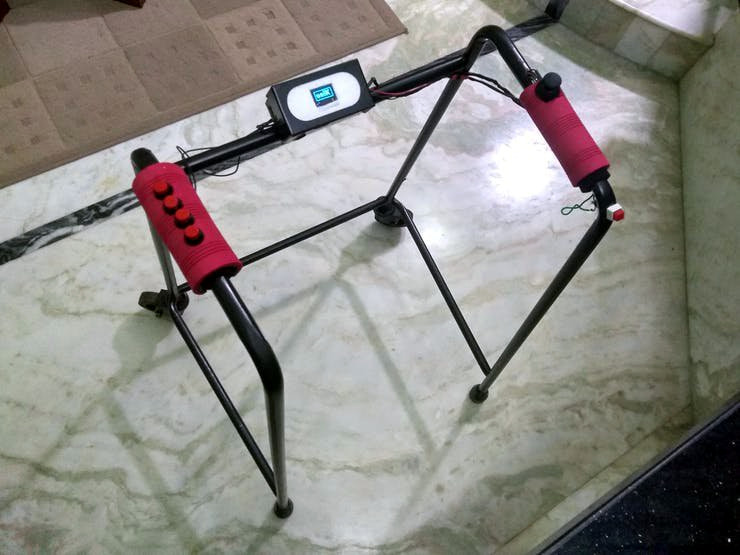
We’ve seen a number of exosuit projects in the past, and all of them struggle in a few common places. It’s difficult to incorporate intuitive user control into these builds, and quite important that they stay out of the way of the user’s own balance. This one approaches those issues with the use of a walker that both provides a means of steadying one’s self, and facilitates sending commands to the exosuit. Using the OLED screen and buttons incorporated on the walker, the user can select and control the walking, sitting, and standing modes.

The exoskeleton is meant to provide assistance to people with weakness or lack of control. They still walk and balance for themselves, but the hope is that these devices will be an aid at times when human caregivers are not available and the alternative would be unsteady mobility or complete loss of mobility. Working with the assistive device has the benefit of continuing to make progress in strengthening on the march to recovery.

The team is hard at work on the design, and with less than two weeks left before the entry deadline of the 2020 Hackaday Prize, we’re excited to see where the final push will bring this project!

source https://hackaday.com/2020/08/18/open-exosuit-project-helps-physically-challenged-put-one-foot-in-front-of-another/

Linux-Fu: One at a Time, Please! Critical Sections in Bash Scripts

You normally think of a critical section — that is, a piece of a program that excludes other programs from using a resource — as a pretty advanced technique. You certainly don’t often think of them as part of shell scripting but it turns out they are surprisingly useful for certain scripts. Most often, a critical section is protecting some system resource like a shared memory location, but there are cases where a shell script needs similar protection. Luckily, it is really easy to add critical sections to shell scripts, and I’ll show you how.

Sometimes Scripts Need to Be Selfish

One very common case is where you want a script to run exactly one time. If the same script runs again while the original is active, you want to exit after possibly printing a message. Another common case is when you are updating some file and you need undisturbed access while making the change.

That was actually the case that got me thinking about this. I have a script — may be the subject of a future Linux-Fu — that provides dynamic DNS by altering a configuration file for the DNS server. If two copies of the script run at the same time, it is important that only one of them does modifications. The second copy can run after the first is totally complete.

Atomic Files

The problem is one of atomicity. You could, for example, create a temporary file with an obscure name and make sure that the file doesn’t exist. But what if someone else checks at the same time? You both note the file isn’t there and then you both create the file thinking you are running alone. No good.

It turns out files are a possible answer, but the locking of a file using flock is the right way to do it. There are two general options here: call flock to execute a command for you and it will acquire the lock and release it when the command completes, or you can use flock in your own script to protect a block of code.

The Easy Case

The idea behind flock is that it will put a lock on a file. The file can be open for reading or writing — it doesn’t really matter. You can get a shared lock or — the default — ask for an exclusive lock. You can only get an exclusive lock if there are no other locks on the file.

What file do you use? It depends. For a script, sometimes it is worth using the script file itself as the lock. That certainly makes it unambiguous although if someone copies the script to a new name, lookout. Another answer is to use a temporary file. Most systems will have /var/lock directory for just this purpose.

Consider a case where you have a script that works with a file. One option to the script deletes the file, but you don’t want to do that if another instance of the file is using it at the time. You might do something like this:

flock "$0"  rm "$SHAREDFILE"

This gets an exclusive lock. Other parts of the script might look like this:

flock -s "$0" awk -f script.awk "$SHAREDFILE"

The -s means the lock is shared, so anyone else asking for a shared lock will get it, but the exclusive lock for the rm will block until the file — which in this case is the shell script itself — is unlocked.

Unblocking

Of course, sometimes you don’t want to wait forever. You can use the -n option to tell flock to not block. Or use -w to wait for a specified number of seconds (which does not have to be an integer). By default, if the lock doesn’t work, flock will return a 1, but you can change that by using -E to select a different code since the command you run may also return a 1 for some reason.

Critical Section Blocks

Sometimes you don’t want to run a single command. You want to lock up an entire portion of a script. You can do that, too. The flock command can take a numeric file descriptor. The file can be open for reading or writing, but it must exist. If you use the script file, that’s a sure bet that it exists, of course.

You can use all the same options for blocking and time outs and you have to open up a file descriptor using bash constructs. There are several ways to do that — and I’ve made a repo of examples which I’ll reference below — but I usually just use a redirect in a subshell. You can also use exec to get the same effect.

Have a look at this script. It is a bit contrived, but it prepares a log file and then calls itself twice to create two different entries in that log file. There’s no critical section protecting the log, so you’ll see after the script completes how the output from both subprocesses mix together.

You can use the easy method by just having flock lock the script file before calling the subprocesses. That’s the approach in cs.sh that you can see here. However, in a script like this it is usually more effective to use the block with a numeric file handle. Here’s the same example using that style of flock. The subprocesses look like this:

( flock 99 
echo Here is a log entry from A along with a directory of /etc >>"$LOGFILE"
ls /etc >>"$LOGFILE"
echo That is all from A >>"$LOGFILE" ) 99<"$LOCKFILE"
exit 0

Of course, this is a silly example. It would be just as easy in this case to run process A, wait for it to complete, and then run process B. But that’s not always the case and in a complex script, you may have work that both processes can execute in parallel, only waiting for specific critical sections. In that case, running the processes in series would be less efficient.

Singleton

A very common use case for the critical section block is to stop a script from running more that one instance at any given time.

#!/bin/bash
LOCKFILE="$0"
( if flock -n 99
then
  echo Running task
  sleep 20
  echo Done
  exit 0
else
  echo You can only run one copy of this script at a time!
  exit 1
fi ) 99<$LOCKFILE"

This pattern is useful if you have a program that you plan to run periodically using something like cron. You might run it every minute, but — on occasion — the program might take more than a minute to complete. A flock barrier can prevent a large number of copies from running all at once.

In all of these cases, the file closing automatically releases the lock, so you don’t have to explicitly let go of the lock. If you ever do need to release it early, the -u option is your friend.

A Few Notes

Turns out flock isn’t part of the POSIX standard, but it is pretty common. Before Linux kernel 2.6. 12, flock didn’t work correctly over NFS, either. If you use /var/lock or /tmp, those are very unlikely to be NFS mounted, anyway. If, for some reason, you are on a system without flock, mkdir is not assured to be atomic, but it usually is, so that could be another option since it also returns a status if it created a directory or not.

This locking technique is one of those things you won’t need every day. But when you do need it, it is invaluable.

The opposite of running things one at a time is running them in parallel. You normally don’t need to unlock a lock file, since flock takes care of that when the file closes, but if you want to be super defensive, maybe consider cleaning up anything that needs cleaning using a trap.

source https://hackaday.com/2020/08/18/linux-fu-one-at-a-time-please-critical-sections-in-bash-scripts/

New Contest: Circuit Sculpture Challenge

We’re bringing back one of our most popular contests, the Hackaday Circuit Sculpture Challenge! Make your functional circuits go beyond utility by turning them into art!

Solar-powered circuit sculpture by [Mohit Bhoite] which was featured last year.

Wire and circuit boards are a fantastic media for creating beautiful projects, and for this one we want both the copper and the boards (or lack of) to be part of the beauty. Your sculpture could be crisp and angular bends in brass rod, a rat’s nest of enamel wire, PCBs with organic shapes, or something completely wild. Your only constraint is that there needs to be some type of working circuit involved.

Three entries will be chosen as top winners in the Most Functional, Most Beautiful, and Best Video categories and be awarded $200 in components from Digi-Key who are sponsoring this contest and also putting together a calendar with images of the top twelve sculptures.

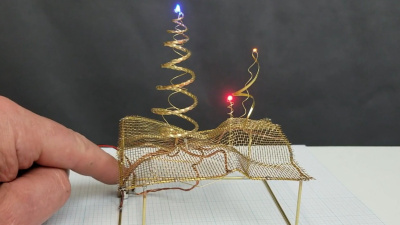
The Wonderlandscape by [Michael Aichlmayr] takes the “sculpture” part of Circuit Sculpture to new levels.

Tell us the story of your creation, including a deep dive into how you built the sculpture and what trial and error you went through to pull it off. Many circuit sculptures in the past have included jig-building to get the wire bends just right, so we have a fourth prize of $100 in Tindie credit for the Best Jig build.

Get your project started now on Hackaday.io and use that “Submit Project To:” button in the left sidebar of your project page to enter it in the Circuit Sculpture Challenge. You have until November 10th to submit your entry.

source https://hackaday.com/2020/08/18/new-contest-circuit-sculpture-challenge/

Get Your SQL Statements Right the First Time With SQL Lint

What’s your average success rate of getting a SQL statement right on the first try? In best case, you botched a simple statement without side effects and just have to try again with correct syntax or remove that typo from a table name, but things can easily go wrong fast here. But don’t worry, the days of fixing it on the fly can be over, thanks to [Joe Reynolds] who wrote a linter for SQL.

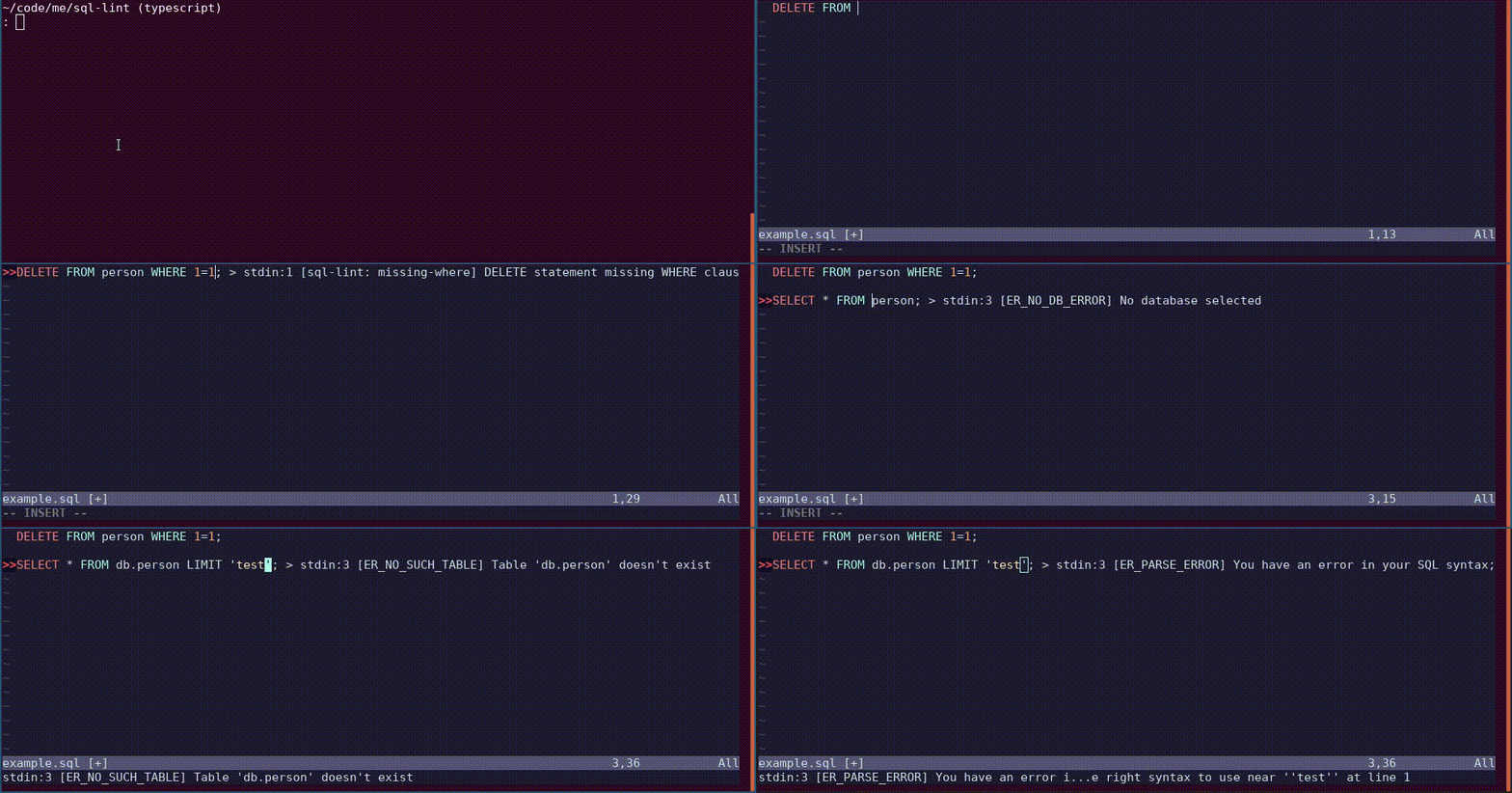
A linter parses code to tell you where you screwed up. While checking SQL syntax itself is somewhat straightforward, [Joe]’s sql-lint tool will also check the semantics of it by looking up the actual database and performing sanity checks on it. Currently supporting PostgreSQL and MySQL, it can be either run on a single SQL file or a directory of files, or take input directly from the command line. Even better, it also integrates within your editor of choice — assuming it supports external plugins — and the documentation shows how to do that specifically for Vim.

If you can look past the fact that it’s written in TypeScript and consequentially results in a rather large executable (~40 MB), it might serve as an interesting starting point for the language itself, or adds a new perspective on writing this type of analyzer. And if databases aren’t your terrain, how about shell scripts?

sql-lint in action
Example use of sql-lint

source https://hackaday.com/2020/08/18/get-your-sql-statements-right-the-first-time-with-sql-lint/

E3D Teaches Additive Machines How to Subtract

We might’ve thought that extrusion based 3D printers have hit their peak in performance capabilities. With the remaining process variables being tricky to model and control, there’s only so much we can expect on dimensional accuracy from extruded plastic processes. But what if we mixed machines, adding a second machining process to give the resulting part a machined quality finish? That’s exactly what the folks at E3D have been cooking up over the last few years: a toolchanging workflow that mixes milling and 3D printing into the same process to produce buttery smooth part finishes with tighter dimensional accuracy over merely 3D printing alone.

Dubbed ASMBL (Additive/Subtractive Machining By Layer), the process is actually the merging of two complimentary processes combined into one workflow to produce a single part. Here, vanilla 3D printing does the work of producing the part’s overall shape. But at the end of every layer, an endmill enters the workspace and trims down the imperfections of the perimeter with a light finishing pass while local suction pulls away the debris. This concept of mixing og coarse and fine manufacturing processes to produce parts quickly is a re-imagining of a tried-and-true industrial process called near-net-shape manufacturing. However, unlike the industrial process, which happens across separate machines on a large manufacturing facility, E3D’s ASMBL takes place in a single machine that can change tools automatically. The result is that you can kick off a process and then wander back a few hours (and a few hundred tool changes) later to a finished part with machined tolerances.

What are the benefits of such an odd complimentary concoction, you might ask? Well, for one, truly sharp outer corners, something that’s been evading 3D printer enthusiasts for years, are now possible. Layer lines on vertical surfaces all but disappear, and the dimensional tolerances of holes increases as the accuracy of the process is more tightly controlled (or cleaned up!) yielding parts that are more dimensionally accurate… in theory.

But there are certainly more avenues to explore with this mixed process setup, and that’s where you come in. ASMBL is still early in development, but E3D has taken generous steps to let you build on top of their work by posting their Fusion 360 CAM plugin, the bill-of-materials and model files for their milling tool, and even the STEP files for their toolchanging motion system online. Pushing for a future where 3d printers produce the finer details might just be a matter of participating.

It’s exciting to see the community of 3D printer designers continue to rethink the capabilities of its own infrastructure when folks start pushing the bounds beyond pushing plastic. From homebrew headchanging solutions that open opportunity by lowering the price point, to optical calibration software that makes machines smarter, to breakaway Sharpie-assisted support material, there’s no shortage of new ideas to play with in an ecosystem of mixed tools and processes.

Have a look at ASMBL at 2:29 in their preview after the break.

source https://hackaday.com/2020/08/18/e3d-teaches-additive-machines-how-to-subtract/

Fitting Snake Into a QR Code

QR codes are usually associated with ASCII text like URLs or serial numbers, but did you know you can also encode binary data into them? To demonstrate this concept, [MattKC] embarked on a journey to create a QR code that holds an executable version of Snake. Video after the break.

As you might expect, the version 40 QR code he ended up using is much larger than the ones you normally see. Consisting of a 171 by 171 grid, it’s the largest version that can still be read by most software. This gave [MattKC] a whopping 2,953 bytes to work with. Not a lot of space, but still bigger than some classic video games of the past.

To start, he first wrote Snake to run in a web browser using HTML, CSS, and JavaScript, which was able to fit in the available space. Modern browsers do a lot of the lifting with built-in features, and [MattKC] wanted more of a challenge, so he decided to instead create a Windows executable file. His first attempts with compiled C code were too large, which led down the rabbit trail of x86 Assembly. Here he found that his knowledge of Assembly was too limited to create a small enough program without investing months into the project. He went back to C and managed to compress his executable using Crinkler, a compressing linker commonly used in the demoscene. This shrunk the file down to 1,478 bytes.

Zbar, a command-line barcode reader for Windows was used to test the final Snake QR code. [MattKC] discovered a bug in Zbarcam that prevented it from reading binary data via a webcam input, so through the power of open source, he submitted a bug fix which is now integrated into the official release.

All the files are available for anyone to play with on [MattKC]’s website. The video below goes into a lot of detail on the entire journey. Since this project proves software can be embedded in QR codes, it means that malware could also be hidden in a QR code, if there is an exploitable bug somewhere in a smartphone QR reader app.

QR codes are a interesting tool with a variety of uses. Take a deep dive into how they work, generate a 3D printable version, or build a QR jukebox, if you want to learn more.

source https://hackaday.com/2020/08/17/fitting-snake-into-a-qr-code/

Simple MP3 Player Hides Home Automation Brilliance

Like bubble wrap or the corkscrew, plenty of everyday objects have lost almost all ties to their original purpose. It could be that the original product had no market but was able to find one in an unexpected place, or simply that the original use case disappeared. We think that this MP3 player for children might arrive at a similar fate as a home automation controller thanks to a recent project by [Sebastian].

The MP3 player is known as a Jooki and works by using small figurines (and a few buttons) to control the device. Different figurines cause the MP3 player to change playlists, for example, but it turns out that the device is capable of communicating over MQTT. This means that [Sebastian] was able to use the MQTT messages from the Jooki to do all kinds of things beyond its intended use with openHAB, an open-source home automation system, such as dimming the lights and closing the blinds when he puts his son to bed.

This platform has considerable potential for hacking thanks to the lightweight communications system it uses under the hood. The Jooki is a little pricey, but if you happen to have one around, it’s an impressive tool that can go well beyond its original intended use.

source https://hackaday.com/2020/08/17/simple-mp3-player-hides-home-automation-brilliance/