If you are even a casual Linux user, you probably know how to use grep. Even if you aren’t a regular expression guru, it is easy to use grep to search for lines in a file that match anything from simple strings to complex patterns. Of course, grep is fine for looking, but what if you want to find things and change them. Maybe you want to change each instance of “HackADay” to “Hackaday,” for example. You might use sed, but it is somewhat hard to use. You could use awk, but as a general-purpose language, it seems a bit of overkill for such a simple and common task. That’s the idea behind ripgrep which actually has the command name rg. Using rg, you can do things that grep can do using more modern regular expressions and also do replacements.
A Note on Installing Ripgrep
Your best bet is to get ripgrep from your repositories. When I tried running KDE Neon, it helpfully told me that I could install a version using apt or take a Snap version that was newer. I usually hate installing a snap, but I did anyway. It informed me that I had to add –classic to the install line because ripgrep could affect files outside the Snap sandbox. Since the whole purpose of the program is to change files, I didn’t think that was too surprising, so I did the install.
Simple Usage
If you want to use rg as a grep, go ahead. One refreshing upgrade is that it does output line numbers when printing to stdout:

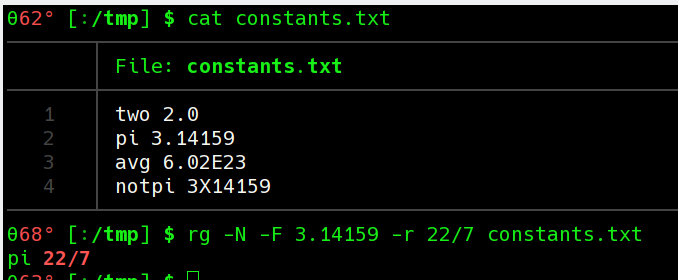
If you don’t want the line numbers, use the -N option. You can also specify a replacement with -r:
Suppose you wanted to create a new file with the replacement, though. In that case, send the --passthru option so that all lines are sent through even if they don’t match.
Conversely, you might want to only print out the parts that match and not the entire line. The -o option will do that. You can also use many grep-like options. For example, -v will invert the match so that only lines that don’t match print.
Overwriting
One of the classic problems with Linux multitasking is trying to overwrite a file. For example, try this:
cd /tmp
cp /etc/fstab test.txt
cat test.txt  # plenty of stuff there
cat test.txt > test.txt
cat test.txt  # oops, the file is now empty
This is a common use case for rg, though. Of course, you can send the output to a temporary file and then replace the original file with the temporary one. But that seems inelegant. A utility called sponge is a neater way to do it. Sponge copies its standard input to a file, but it waits until there is no more input before it does so. Replace the second line above with:
cat test.txt | sponge test.txt
So to make a replacement in a file you could use something like:
rg --passthrough 'Jen' -r 'Jennifer' invite.txt | sponge invite.txt
Flavors
By default, rg uses regular expressions from Rust. These are known to be fast, but have some limitations in the name of performance. You can use the -P option to select PCRE2 regular expressions which have more features but might be slower. Another option is to use --engine=auto. This will cause rg to use Rust expressions unless you appear to use features that require PCRE2. If you provide multiple expressions, they will all use the same expression engine, so any PCRE2 expression will force the use of that engine.
With the PCRE2 engine you can do look-around, backreferences, and more. If you have trouble quoting regular expressions when you just want to find some text, you’ll appreciate the -F option. This causes the search expression to be an ordinary string:
There are many other options. Try the --help option to see them all. You can match across lines, match binary files, use CRLF as a line terminator, show context lines, or filter each file through an external program.
Toolbox
This is one of those simple tools that you can certainly live without, but it is much nicer to do many common tasks with it than without it. Of course, to get the most out of any grep-like tool, you really need to know regular expressions. If you want a fun way to learn regular expressions, try a crossword puzzle.
source https://hackaday.com/2020/10/14/linux-fu-global-search-and-replace-with-ripgrep/