Illuminating the Inner Workings of a Venus Flytrap

As a carnivorous plant, Venus flytraps have always been a fascinating subject of study. One of their many mysteries is how they differentiate an insect visit from less nutritious stimulants such as a windblown pebble. Now scientists are one step closer to deciphering the underlying mechanism, assisted by a new ability to visualize calcium changes in real time.

Calcium has long been suspected to play an important part in a Venus flytrap’s close/no-close decision process, but scientists couldn’t verify their hypothesis before. Standard chemical tests for calcium would require cutting the plant apart, which would only result in a static snapshot. The software analogy would be killing the process for a memory dump but unable to debug the process at runtime. There were tantalizing hints of a biological calcium-based analog computer at work, but mother nature had no reason to evolve JTAG test points on it.

Lacking in-circuit debug headers, scientists turned to the next best thing: add diagnostic indicator lights. But instead of blinking LEDs, genes were added to produce a protein that glows in the presence of calcium. Once successful, they could work with the engineered plants and get visual feedback. Immediately see calcium levels change and propagate in response to various stimuli over different time periods. Confirming that the trap snaps shut only in response to patterns of stimuli that push calcium levels beyond a threshold.

With these glowing proteins in place, researchers found that calcium explained some of the behavior but was not the whole picture. There’s something else, suspected to be a fast electrical network, that senses prey movement and trigger calcium release. That’ll be something to dig into, but at least we have more experience working with electrical impulses and not just for plants, either.

source https://hackaday.com/2020/11/10/illuminating-the-inner-workings-of-a-venus-flytrap/

Linux Fu: Send in the (Cloud) Clones

Storing data “in the cloud” — even if it is your own server — is all the rage. But many cloud solutions require you to access your files in a clumsy way using a web browser. One day, operating systems will incorporate generic cloud storage just like any other file system. But by using two tools, rclone and sshfs, you can nearly accomplish this today with a little one-time setup. There are a few limitations, but, generally, it works quite well.

It is a story as old as computing. There’s something new. Using it is exotic and requires special techniques. Then it becomes just another part of the operating system. If you go back far enough, programmers had to pull specific records from mass storage like tapes, drums, or disks and deblock data. Now you just open a file or a database. Cameras, printers, audio, and even networking once were special devices that are now commonplace. If you use Windows, for example, OneDrive is well-supported. But if you use another service, you may or may not have an easy option to just access your files as a first-class file system.

The rclone program is the Swiss Army knife of cloud storage services. Despite its name, it doesn’t have to synchronize a local file store to a remote service, although it can do that. The program works with a dizzying array of cloud storage providers and it can do simple operations like listing and copying files. It can also synchronize, as you’d expect. However, it also has an experimental FUSE filesystem that lets you mount a remote service — with varying degrees of success.

What’s Supported?

If you don’t like using someone like Google or Amazon, you can host your own cloud. In that case, you can probably use sshfs to mount a file using ssh, although rclone can also do that. There are also cloud services you can self-host like OwnCloud and NextCloud. A Raspberry Pi running Docker can easily stand up one of these in a few minutes and rclone can handle these, too.

The project claims to support 33 types of systems, although some of those are serving local files, but by any count, it is at least 30. The big players like Google, Box, Dropbox, and Amazon are there. There are variations for things like Google Drive vs Google Photos. Some of the protocols are generic like SFTP, HTTP, and WebDAV, so they will work with multiple providers. Then there are lesser-known names like Tardigrade, Mega, and Hubric.

Each system has its idiosyncracies, of course. Some file systems are case-sensitive and some are not. Some support modification time recording, but others don’t. Some are read-only and some do not support duplicate files. You can mount most of the filesystems and there are also meta systems that can show files from multiple remotes (e.g., Google Drive and Dropbox together) and other special ones that can cache another remote or split up large files.

How Does It Work?

When you setup rclone, you use the program to configure one or more remotes. The program stores the setup in ~/.config/rclone/rclone.conf although you rarely need to edit that file. Instead, you run rclone config.

From there you can see any remotes you already have and edit them or you can define new ones. Each backend provider has slightly different setup, but you’ll generally have to provide some sort of login credentials. In many cases, the program will launch a Web browser to authenticate you or allow you to grant permission for rclone to access the service.

Once you have a remote, you can use it with rclone. Suppose you have a Google Drive and you’ve made a remote named HaDFiles: that points to that drive. You could use commands like:

rclone ls HaDFiles:
rclone ls HaDFiles:/pending_files    # directory name, not file wildcard!
rclone copy ~/myfile.txt HaDFiles:/notes/myfile.txt
rclone copy HaDFiles:/notes/myfile.txt ~/myfile.txt
rclone sync ~/schedule HaDFiles:/schedules

The copy is more like a synchronization. The file is copied from one path to another path. You can’t copy a directory. In other words, consider this command:

rclone copy /A/B/C/d.txt remote:/X/Y/Z

This copies d.txt from /A/B/C to /X/Y/Z. If won’t copy a file that already exists on the other side unless it hashes to a different value than the new file, indicating the file changed. There is also a move command, as well as delete, mkdir, rmdir, and all the other things you would expect. The sync command updates the destination to match the source, but not vice versa.

However, what we are interested in is the mount command. On the face of it, it is simple:

rclone mount remote:/ /some_local_mount_point

Caveats

There are a few problems, though. First, the performance of some of the filesystems is pretty poor and could be even worse if you have a slow connection. This is especially bad if you have tools like a file index program (e.g., baloo) or a backup program that walks your entire file system. The best thing to do is to exclude these mount points from those programs.

Hitting the remote filesystem can be inefficient so rclone will cache file attributes for a short period of time. If a file changed on the remote side, you could get stale data and that could be bad for your data. It also caches directories, so if you are using this with multiple users, be sure to read the documentation.

You also can’t write randomly into files by default. This stops some programs like word processors from working. You can pass --vfs-cache-mode with an argument to cause rclone to cache the file locally, which may help that. There’s no free lunch, though. If you set the cache mode to full, all file operations will work, but you risk rclone not being able to move the complete file over to the remote later which, again, isn’t good for your data integrity.

Problems

If you don’t mind manually setting up things, it is really just this simple. Run a mount command, probably specifying a cache mode, and you are done. However, I wanted to mount the cloud all the time and that leads to some problems.

You can set up rclone to run as a systemd service, but that didn’t work well for me. Just putting my commands in my login profile seemed to work better. But there were two problems. First, it was wasteful to call it every time I run a login shell, even if the mount was already there. Second, sometimes the network connection would drop and the mounted directory was in some kind of zombie state. You couldn’t remount, but you also couldn’t get any files out.

The Script

The answer to my problems? Create a simple script.

#!/bin/bash 
# error checking 
if [ $# != 2 ] 
then 
cat <<EOF 
   Usage rclonemount volume mount_point 
EOF 
exit 1 
fi 

if ! which rclone >/dev/null # check we have rclone
then 
   echo Can\'t find rclone, exiting. 
   exit 3 
fi 

if [ ! -d "$2" ] 
then 
   echo Mount point $2 does not exist. 
   exit 2 
fi 

VOL="$1" 
DIR="$2" 

# Check if getting something out of the dir fails 
# if so, maybe a stale mount so try to unmount 
if ! ls "$DIR/." >/dev/null 
then 
   fusermount -u "$DIR" 
fi 
# See if directory appears to be mounted. If so, we are done 
if grep "$DIR" /etc/mtab >/dev/null 
then 
   echo $VOL Mounted 
else # if not, mount it 
   echo Mounting $VOL 
   rclone mount --vfs-cache-mode full "$VOL"/ "$DIR" & # run in background
fi
exit 0  # we tried

In my shell startup, I simply call this script once for each remote and mount them to things like ~/cloud/googledrive or ~/cloud/dropbox. You could also run the script as a user service for systemd, of course.

There is one caveat. One day, one of your remotes will fail to mount. You have to remember you probably need to run the configuration again to reauthorize the connection to the remote service or change the password if you recently changed it. The error messages won’t make that clear.

You can use the same general script with sshfs instead of rclone, and rclone can mount over SSH, too. Pick your poison.

Head in the Clouds

I have my own WebDAV server and having it simply look like a directory on all my machines is really handy. I’ll admit that I enjoy having Google Photos mapped to my filesystem, too. The scope of rclone is very impressive and it seems to have kept up with the various changes that the remote services seem to make every few months that often breaks tools like these. Overall, it is a good tool to have in your Linux box.

I haven’t tried it, but apparently rclone will also work on other platforms including BSD, MacOS, and even Windows, where it looks like it mounts a drive letter. Let us know!

source https://hackaday.com/2020/11/10/linux-fu-send-in-the-cloud-clones/

Binary Calculator For All 0b10 Types

You know the old joke: There are 10 types of people in the world — those who understand binary, and those who don’t. Most of us on Hackaday are firmly in the former camp, which is why projects like this circuit sculpture binary calculator really tickle our fancies.

Inspired by the brass framework and floating component builds of [Mohit Bhoite], [dennis1a4] decided to take the plunge into circuit sculpture in an appropriately nerdy way. He wisely decided on a starter build, which was a simple 555 timer circuit, before diving into the calculator. Based on an ATMega328P in a 28-pin DIP, the calculator is built on an interesting hybrid platform of brass wire and CNC-routed wood. The combination of materials looks great, and we especially love the wooden keycaps on the six switches that make up the keyboard. There’s also some nice work involved in adapting the TLC5928 driver to the display of 16 discrete LEDs; suspended as it is by fine magnet wires, the SSOP chip looks a bit like a bug trapped in a spider web.

Hats off to [dennis1a4] for a great entry into our soon-to-conclude Circuit Sculpture Contest. The entry deadline is (today!) November 10, so it might be a bit too late for this year. But rest assured we’ll be doing this again, so take a look at all this year’s entries and start thinking about your next circuit sculpture build.

source https://hackaday.com/2020/11/10/binary-calculator-for-all-10-typbinary-calculator-for-all-0b10-typeses/

Proper Cassettes For Your FPGA Retrocomputer

You can tell the age of someone in our community with a simple question: what were the first removable data storage media you used? Punched cards for the venerable, cassettes for the middle-aged, floppies for the thirtysomethings, Flash cards for the twentysomethings, and maybe even “What’s a removable storage medium?” for the kids brought up on cloud services.  Even with refreshed interest in retrocomputing the cassette hasn’t made a comeback, but maybe that owes something to the hardware. Createing a cassette interface for an FPGA is a task that’s often overlooked, and that’s a project [zpekic] has tackled.

Cassette data recordings are frequency shift keyed, with the 0 and 1 of the binary information represented by different tones. An expected solution to detect these might be to use a Fourier transform, but instead he opts for a simpler solution of counting zero crossings and timing their interval. The resulting stream of data is fed into a UART from which the data itself can be reconstructed. All this is implemented on a Mercury FPGA board which contains a Xilinx Spartan 3A FPGA, but it’s a technique that could be used on other devices too.

So your FPGA retrocomputer deserves an authentic cassette interface, and now it can have one. We’d be especially impressed if all this 2020s wizardry could produce a more stable chuntey field, but we guess that might take a bit more work.

As a final aside, the project is dedicated to the memory of the pioneering Yugoslavian broadcaster [Zoran Modli], whose innovative 1980s radio show featured broadcasts of tape software for the computers of the time including our Hackaday colleague [Voja Antonić]’s Galaksija. Broadcasting software over the radio? That’s a cool hack.

source https://hackaday.com/2020/11/10/proper-cassettes-for-your-fpga-retrocomputer/

Kinect Gave Us A Preview Of The Future, Though Not The One It Intended

This holiday season, the video game industry hype machine is focused on building excitement for new PlayStation and Xbox consoles. Ten years ago, a similar chorus of hype reached a crescendo with the release of Xbox Kinect, promising to revolutionize how we play. That vision never panned out, but as [Daniel Cooper] of Engadget pointed out in a Kinect retrospective, it premiered consumer technologies that impacted fields far beyond gaming.

Kinect has since withdrawn from the gaming market, because as it turns out gamers are quite content with handheld controllers. This year’s new controllers for a PlayStation or Xbox would be immediately familiar to gamers from ten years ago. Even Nintendo, whose Wii is frequently credited as motivation for Microsoft to develop the Kinect, have arguably taken a step back with Joy-cons of their Switch.

But the Kinect’s success at bringing a depth camera to consumer price levels paved the way to explore many ideas that were previously impossible. The flurry of enthusiastic Kinect hacking proved there is a market for depth camera peripherals, leading to plug-and-play devices like Intel RealSense to make depth-sensing projects easier. The original PrimeSense technology has since been simplified and miniaturized into Face ID unlocking Apple phones. Kinect itself found another job with Microsoft’s HoloLens AR headset. And let’s not forget the upcoming wave of autonomous cars and drones, many of which will see their worlds via depth sensors of some kind. Some might even be equipped with the latest sensor to wear the Kinect name.

Inside the Kinect was also one of the earliest microphone arrays sold to consumers. Enabling the Kinect to figure out which direction a voice is coming from, and isolate it from other noises in the room. Such technology were previously the exclusive domain of expensive corporate conference room speakerphones, but now it forms the core of inexpensive home assistants like an Amazon Echo Dot. Raising the bar so much that hacks needed many more microphones just to stand out.

With the technology available more easily elsewhere, attrition of a discontinued device is reflected in the dwindling number of recent Kinect hacks on these pages. We still see a cool project every now and then, though. As the classic sensor bar itself recedes into history, others will take its place to give us depth sensing and smart audio. But for many of us, Kinect was the ambitious videogame peripheral that gave us our first experience.

source https://hackaday.com/2020/11/09/kinect-gave-us-a-preview-of-the-future-though-not-the-one-it-intended/

Watching Global Oil Trade With Satellite Imagery

The global oil market plays a large role in the geopolitical arena, and it is often in the interest of various role players to conceal the figures on production, consumption and movement of oil. This may simply to be to gain an advantage at the negotiation tables, or to skirt around international sanctions. The website [TankerTrackers] is in the business of uncovering these details, often from open source intelligence. Using satellite imagery, they are using a simple way to monitor the occupancy crude oil storage facilities around the world.

The key is in the construction of large capacity crude oil storage tanks. To prevent the flammable gasses emitted by crude oil from collecting inside partially empty tanks, they have roofs that physically float on top of the oil, moving up and down inside the steel sides as the levels change. By looking at imagery from the large number of commercial satellites that constantly photograph earth’s surface, one can determine how full the tanks are by comparing the length of a shadow inside the tank to the shadow outside the tank. Of course, you also need to know the diameter and height of a tank. Diameter is easy, just use Google Earth’s ruler tool. Height is a bit more tricky, but can often be determined by just checking the facilities’ website for ground level photos of the tanks. Of course these methods won’t give you exact numbers, but it’s good enough for rough estimates.

Another interesting detail we found perusing the [TankerTrackers] news posts (requires sign-up) is that tankers will sometimes purposefully switch off their AIS transponders, especially when heading to and from sanctioned countries such as Venezuela and Iran. Even in today’s world of omnipresent tracking technologies, it’s surprisingly easy for a massive ship to just disappear. Sometimes [TankerTrackers] will then use imagery to track down these vessels, often by just watching ports.

Thanks for the tip [Arpad Toth]!

Photo by [Terryjoyce] CC BY-SA 3.0

source https://hackaday.com/2020/11/09/watching-global-oil-trade-with-satellite-imagery/

Hello From The NearSpace

A key challenge for any system headed up into the upper-atmosphere region sometimes called near space is communicating back down to the ground. The sensors and cameras onboard many high altitude balloons and satellites aren’t useful if the data they collect can’t be retrieved. Often times, custom antennas or beacons are added to help. Looking at the cost and difficulty of the problem, [arko] and [upaut] teamed up to try and make a turn-key solution for any near-space enthusiast by building CUBEX, a wonderful little module with sensors and clever radio that can be easily reused and repurposed.

CUBEX is meant as a payload for a high-altitude balloon with a camera, GPS, small battery, solar cell, and the accompanying power management circuits. The clever bit comes in the radio back down. By using the 434.460 Mhz band, it can broadcast around a hundred miles at 10mW. The only hardware to receive is a radio listener (a cheap RTL USB stick works nicely). Pictures and GPS coordinates stream down at 300 baud.

Their launch was quite successful and while they didn’t catch a solar eclipse, their balloon reached an impressive 33698m (110,560ft) while taking pictures. Even though it did eventually splashdown in the Pacific Ocean, they were able to enjoy a plethora of gorgeous photos thanks to their easy and cost-effective data link.

source https://hackaday.com/2020/11/09/hello-from-the-nearspace/

January is “Get Organised” and “Clean Up Your Computer” Month

January is “Get Organised” and “Clean Up Your Computer” month. This helps you start your new year on a clean slate and organise everything so you can focus on being productive. January is one of the busiest months of the year, so by getting your things sorted and organised, you’ll feel less overwhelmed and ready to kick off the year with a bang!

Need new office equipment and supplies to help you organise your work environment? Visit Junk Mail today!

Get Organised For The New Year | Junk Mail
Photo Source – www.freepik.com

Benefits of being organised

  • It
    increases productivity
  • It
    reduces your stress level
  • It
    improves your time management skills and helps you meet deadlines
  • It
    improves your work-life balance
  • Being
    organised improves your energy levels and enthusiasm

How to get organised

  • Consider
    whether you are truly organised
  • Keep
    both your personal and workspaces clean and tidy
  • Sort
    out your cabinets or drawers at the office and your cupboards at home
  • You
    can even help sort out the work environment around you
  • Download
    apps or implement some systems to help you stay organised digitally
Delete Unused Files And Apps On Your PC | Junk Mail
Photo Source – www.freepik.com

Benefits of cleaning up your computer

  • It
    improves the performance and speed of your computer. You can delete apps and
    files you don’t need any more and even run disk cleanup tools to further boost
    the performance of your PC
  • Performing
    a disk cleanup helps detect junk files that usually takes up a lot of space
  • Cleaning
    up your computer helps you get more organised, which in turn helps you to be more productive

Tips on how to clean up your computer

  • Run
    a backup of your computer
  • Uninstall
    programs you no longer use
  • Delete
    your cookies and temporary files
  • Prevent
    unnecessary programmes from running on start-up
  • Run
    a disk defragment
  • Empty
    your recycle bin
  • Delete
    duplicate files or files you no longer need
  • Turn
    off your PC and physically clean it

Summarised checklist:

  • Set
    your goals for the new year
  • Write
    down the steps you need to take in order to reach your goals
  • Clean
    up your computer
  • Create
    and label file folders to keep your computer organised
  • Delete
    unnecessary emails
  • Tidy
    up your office
Get A New Year Checklist | Junk Mail
Photo Source – www.pixabay.com

Now that you know how to get organised, you can visit Junk Mail for affordable office equipment and supplies. 

Infinity Mirror Guitar Shreds Forever

Just when we thought there was nothing left to make into an infinity mirror, [Burls Art] goes and builds something that seems obvious now that it exists — an infinity mirror guitar. Check out the build video after the break, where [Burls Art] gets right to it without wasting any time.

He started by making a 3/4″ wood frame for the body and the one-piece neck and headstock. The acrylic on the top has two-way mirror film, and the back piece is painted with mirror paint to get the infinity effect going. [Burls Art] also fashioned acrylic boxes for the pickup and the electronics. Those are both buffed to be frosty, so the lights reflect nicely off of them.

There’s nothing super-fancy going on with the electronics, just some app-controlled RGB LEDs. We would love to see a version where the LEDs respond in real time to the music. The effect is still quite cool, so if you don’t want to watch the whole build, at least check out the demo at the end where [Burls Art] plays a riff. Never has a delay pedal been so appropriate.

If you’re not much of a luthier, don’t fret about not being able to make a cover version. We’ve seen plenty of infinity mirrors, but if you want something useful, whip up some infinity drink coasters.

Thanks for the tip, [Keith]!

source https://hackaday.com/2020/11/09/infinity-mirror-guitar-shreds-forever/

The Logic Chip RISC-V Project Reboots

The RISC-V architecture is inexorably inching from its theoretical origins towards the mainstream, as what could once only be done on an exotic FPGA can now be seen in a few microcontrollers as well as some much more powerful processors. It’s exciting because it offers us the prospect of fully open-source hardware on which to run our open-source operating systems, but it’s more than that. RISC-V isn’t a particular processor core so much as a specification that can be implemented at any of a number of levels, and in its simplest form can even be made real using 74 logic chips. This was the aim of [Robert Baruch]’s LMARV-1 that caused a stir a year or two ago but then went on something of a hiatus. We’re pleased to note that he’s posted a video announcing a recommencement of the project, along with a significant redesign.

We’ve placed the video below the break, and it’s much more than a simple project announcement. Instead, it’s an in-depth explanation of the design decisions and the physical architecture of the processor. It amounts to a primer on processor design, and though it’s a long watch we’d say you won’t be disappointed if your interests lie in that direction.

We first covered the LMARV-1 back in early 2018, so we’re glad to see it back in progress and we look forward to seeing its continued progress.

source https://hackaday.com/2020/11/09/the-logic-chip-risc-v-project-reboots/

Ethernet Goes to the Ether

Since the ether is an old term for the fictitious space where radio waves propagate, we always thought it was strange that the term ethernet refers to wired communication. Sure, there are wireless devices, but that’s not really ethernet. [Jacek] had the same thought, but decided to do something about it.

What he did is use two different techniques to alter the electromagnetic emission from an ethernet adapter on a Raspberry Pi. The different conditions send Morse code that you can receive at 125 MHz with a suitable receiver.

Practical? Hardly, unless you are looking to exfiltrate data from an air-gapped machine, perhaps. But it does have a certain cool factor. The first method switches the adapter between 10 Mbps and 100 Mbps. The second technique uses a stream of data to accomplish the modulation. The switching method had a range of around 100 meters while the data-based method topped out at about 30 meters. The code is on GitHub if you want to replicate the experiment.

There is plenty of precedent for this sort of thing. In 1976 Dr. Dobb’s Journal published an article about playing music on an Altair 8800 by running code while an AM radio was nearby. We’ve seen VGA adapters forced to transmit data, too.


source https://hackaday.com/2020/11/09/ethernet-goes-to-the-ether/

Teardown Experts Sing Praise Of Stretch-Release Adhesives

Anyone who enjoys opening up consumer electronics knows iFixit to be a valuable resource, full of reference pictures and repair procedures to help revive devices and keep them out of electronic waste. Champions of reparability, they’ve been watching in dismay as the quest for thinner and lighter devices also made them harder to fix. But they wanted to cheer a bright spot in this bleak landscape: increasing use of stretch-release adhesives.

Nokia BL-50J Battery
An elegant battery, for a more civilized age.

Once upon a time batteries were designed to be user-replaceable. But that required access mechanisms, electrical connectors, and protective shells around fragile battery cells. Eliminating such overhead allowed slimmer devices, but didn’t change the fact that the battery is still likely to need replacement. We thus entered into a dark age where battery pouches were glued into devices and replacement meant fighting clingy blobs and cleaning sticky residue. Something the teardown experts at iFixit are all too familiar with.

This is why they are happy to see pull tabs whenever they peer inside something, for those tabs signify the device was blessed with stretch-release adhesives. All we have to do is apply a firm and steady pull on those tabs to release their hold leaving no residue behind. We get an overview of how this magic works, with the caveat that implementation details are well into the land of patents and trade secrets.

But we do get tips on how to best remove them, and how to reapply new strips, which are important to iFixit’s mission. There’s also a detour into their impact on interior design of the device: the tabs have to be accessible, and they need room to stretch. This isn’t just a concern for design engineers, they also apply to stretch release adhesives sold to consumers. Advertising push by 3M Command and competitors have already begun, reminding people that stretch-release adhesive strips are ideal for temporary holiday decorations. They would also work well to hold batteries in our own projects, even if we aren’t their advertised targets.

Our end-of-year gift-giving traditions will mean a new wave of gadgets. And while not all of them will be easily repairable, we’re happy that this tiny bit of reparability exists. Every bit helps to stem the flow of electronics waste.

source https://hackaday.com/2020/11/08/teardown-experts-sing-praise-of-stretch-release-adhesives/

Teardown Experts Sing Praise Of Stretch-Release Adhesives

Anyone who enjoys opening up consumer electronics knows iFixit to be a valuable resource, full of reference pictures and repair procedures to help revive devices and keep them out of electronic waste. Champions of reparability, they’ve been watching in dismay as the quest for thinner and lighter devices also made them harder to fix. But they wanted to cheer a bright spot in this bleak landscape: increasing use of stretch-release adhesives.

Nokia BL-50J Battery
An elegant battery, for a more civilized age.

Once upon a time batteries were designed to be user-replaceable. But that required access mechanisms, electrical connectors, and protective shells around fragile battery cells. Eliminating such overhead allowed slimmer devices, but didn’t change the fact that the battery is still likely to need replacement. We thus entered into a dark age where battery pouches were glued into devices and replacement meant fighting clingy blobs and cleaning sticky residue. Something the teardown experts at iFixit are all too familiar with.

This is why they are happy to see pull tabs whenever they peer inside something, for those tabs signify the device was blessed with stretch-release adhesives. All we have to do is apply a firm and steady pull on those tabs to release their hold leaving no residue behind. We get an overview of how this magic works, with the caveat that implementation details are well into the land of patents and trade secrets.

But we do get tips on how to best remove them, and how to reapply new strips, which are important to iFixit’s mission. There’s also a detour into their impact on interior design of the device: the tabs have to be accessible, and they need room to stretch. This isn’t just a concern for design engineers, they also apply to stretch release adhesives sold to consumers. Advertising push by 3M Command and competitors have already begun, reminding people that stretch-release adhesive strips are ideal for temporary holiday decorations. They would also work well to hold batteries in our own projects, even if we aren’t their advertised targets.

Our end-of-year gift-giving traditions will mean a new wave of gadgets. And while not all of them will be easily repairable, we’re happy that this tiny bit of reparability exists. Every bit helps to stem the flow of electronics waste.

source https://hackaday.com/2020/11/08/teardown-experts-sing-praise-of-stretch-release-adhesives/

Teardown Experts Sing Praise Of Stretch-Release Adhesives

Anyone who enjoys opening up consumer electronics knows iFixit to be a valuable resource, full of reference pictures and repair procedures to help revive devices and keep them out of electronic waste. Champions of reparability, they’ve been watching in dismay as the quest for thinner and lighter devices also made them harder to fix. But they wanted to cheer a bright spot in this bleak landscape: increasing use of stretch-release adhesives.

Nokia BL-50J Battery
An elegant battery, for a more civilized age.

Once upon a time batteries were designed to be user-replaceable. But that required access mechanisms, electrical connectors, and protective shells around fragile battery cells. Eliminating such overhead allowed slimmer devices, but didn’t change the fact that the battery is still likely to need replacement. We thus entered into a dark age where battery pouches were glued into devices and replacement meant fighting clingy blobs and cleaning sticky residue. Something the teardown experts at iFixit are all too familiar with.

This is why they are happy to see pull tabs whenever they peer inside something, for those tabs signify the device was blessed with stretch-release adhesives. All we have to do is apply a firm and steady pull on those tabs to release their hold leaving no residue behind. We get an overview of how this magic works, with the caveat that implementation details are well into the land of patents and trade secrets.

But we do get tips on how to best remove them, and how to reapply new strips, which are important to iFixit’s mission. There’s also a detour into their impact on interior design of the device: the tabs have to be accessible, and they need room to stretch. This isn’t just a concern for design engineers, they also apply to stretch release adhesives sold to consumers. Advertising push by 3M Command and competitors have already begun, reminding people that stretch-release adhesive strips are ideal for temporary holiday decorations. They would also work well to hold batteries in our own projects, even if we aren’t their advertised targets.

Our end-of-year gift-giving traditions will mean a new wave of gadgets. And while not all of them will be easily repairable, we’re happy that this tiny bit of reparability exists. Every bit helps to stem the flow of electronics waste.

source https://hackaday.com/2020/11/08/teardown-experts-sing-praise-of-stretch-release-adhesives/

“Hey, You Left the Peanut Out of My Peanut M&Ms!”

Candy-sorting robots are in plentiful supplies on these pages, and with good reason — they’re a great test of the complete suite of hacker tools, from electronics to machine vision to mechatronics. So we see lots of sorters for Skittles, jelly beans, and occasionally even Reese’s Pieces, but it always seems that the M&M sorters are the most popular.

This M&M sorter has a twist, though — it finds the elusive and coveted peanutless candies lurking in most bags of Peanut M&Ms. To be honest, we’d never run into this manufacturing defect before; being chiefly devoted to the plain old original M&Ms, perhaps our sample size has just been too small. Regardless, [Harrison McIntyre] knows they’re there and wants them all to himself, hence his impressive build.

To detect the squib confections, he built a tiny 3D-scanner from a line laser, a turntable, and a Raspberry Pi camera. After scanning the surface to yields its volume, a servo sweeps the candy onto a scale, allowing the density to be calculated. Peanut-free candies will be somewhat denser than their leguminous counterparts, allowing another servo to move the candy to the proper exit chute. The video below shows you all the details, and more than you ever wanted to know about the population statistics of Peanut M&Ms.

We think this is pretty slick, and a nice departure from the sorters that primarily rely on color to sort candies. Of course, we still love those too — take your pick of quick and easy, compact and sleek, or a model of industrial design.

source https://hackaday.com/2020/11/08/hey-you-left-the-peanut-out-of-my-peanut-mms/

Hackaday Links: November 8, 2020

Saturday, November 7, 2020 – NOT PASADENA. Remoticon, the virtual version of the annual Hackaday Superconference forced upon us by 2020, the year that keeps on giving, is in full swing. As I write this, Kipp Bradford is giving one of the two keynote addresses, and last night was the Bring a Hack virtual session, which I was unable to attend but seems to have been very popular, at least from the response to it. In about an hour, I’m going to participate in the SMD Soldering Challenge on the Hackaday writing crew team, and later on, I’ll be emceeing a couple of workshops. And I’ll be doing all of it while sitting in my workshop/office here in North Idaho.

Would I rather be in Pasadena? Yeah, probably — last year, Supercon was a great experience, and it would have been fun to get together again and see everyone. But here we are, and I think we’ve all got to tip our hacker hats to the Remoticon organizers, for figuring out how to translate the in-person conference experience to the virtual space as well as they have.

The impact of going to a museum and standing in the presence of a piece of art or a historic artifact is hard to overstate. I once went to an exhibit of artifacts from Pompeii, and was absolutely floored to gaze upon a 2,000-year-old loaf of bread that was preserved by the volcanic eruption of 79 AD. But not everyone can get to see such treasures, which is why Scan the World was started. The project aims to collect 3D scans of all kinds of art and artifacts so that people can potentially print them for study. Their collection is huge and seems to concentrate on classic sculptures — Michelangelo’s David is there, as are the Venus de Milo, the Pieta, and Rodin’s Thinker. But there are examples from architecture, anatomy, and history. The collection seems worth browsing through and worth contributing to if you’re so inclined.

For all the turmoil COVID-19 has caused, it has opened up some interesting educational opportunities that probably wouldn’t ever have been available in the Before Time. One such opportunity is an undergraduate-level course in radio communications being offered on the SDRPlay YouTube channel. The content was created in partnership with the Sapienza University of Rome. It’s not entirely clear who this course is open to, but the course was originally designed for third-year undergrads, and the SDRPlay Educators Program is open to anyone in academia, so we’d imagine you’d need some kind of academic affiliation to qualify. The best bet might be to check out the intro video on the SDRPlay Educator channel and plan to attend the webinar scheduled for November 19 at 1300 UTC. You could also plan to drop into the Learning SDR and DSP Hack Chat on Wednesday at noon Pacific, too — that’s open to everyone, just like every Hack Chat is.

And finally, as if bald men didn’t suffer enough disrespect already, now artificial intelligence is having a go at them. At a recent soccer match in Scotland, an AI-powered automatic camera system consistently interpreted an official’s glabrous pate as the soccer ball. The system is supposed to keep the camera trained on the action by recognizing the ball as it’s being moved around the field. Sadly, the linesman in this game drew the attention of the system quite frequently, causing viewers to miss some of the real action. Not that what officials do during sporting events isn’t important, of course, but it’s generally not what viewers want to see. The company, an outfit called Pixellot, knows about the problem and is working on a solution. Here’s hoping the same problem doesn’t crop up on American football. Check out the video after the break.

source https://hackaday.com/2020/11/08/hackaday-links-november-8-2020/

Fail of the Week: Roboracer Meets Wall

There comes a moment when our project sees the light of day, publicly presented to people who are curious to see the results of all our hard work, only for it to fail in a spectacularly embarrassing way. This is the dreaded “Demo Curse” and it recently befell the SIT Acronis Autonomous team. Their Roborace car gained social media infamy as it was seen launching off the starting line and immediately into a wall. A team member explained what happened.

A few explanations had started circulating, but only in the vague terms of a “steering lock” without much technical detail until this emerged. Steering lock? You mean like The Club? Well, sort of. While there was no steering wheel immobilization steel bar on the car, a software equivalent did take hold within the car’s systems.  During initialization, while a human driver was at the controls, one of the modules sent out NaN (Not a Number) instead of a valid numeric value. This was never seen in testing, and it wreaked havoc at the worst possible time.

A module whose job was to ensure numbers stay within expected bounds said “not a number, not my problem!” That NaN value propagated through to the vehicle’s CAN data bus, which didn’t define the handling of NaN so it was arbitrarily translated into a very large number causing further problems. This cascade of events resulted in a steering control system locked to full right before the algorithm was given permission to start driving. It desperately tried to steer the car back on course, without effect, for the few short seconds until it met the wall.

While embarrassing and not the kind of publicity the Schaffhausen Institute of Technology or their sponsor Acronis was hoping for, the team dug through logs to understand what happened and taught their car to handle NaN properly. Driving a backup car, round two went very well and the team took second place. So they had a happy ending after all. Congratulations! We’re very happy this problem was found and fixed on a closed track and not on public roads.

[via Engadget]

source https://hackaday.com/2020/11/08/fail-of-the-week-roboracer-meets-wall/

Today at Remoticon: Sunday Live Events

Hackaday Remoticon is a worldwide virtual conference happening now!

Public Livestreams (all times are PST, UTC-8):

Hackaday YouTube and Facebook Live:

  • 12:00pm SDR Workshop
  • 2:15pm Hacker’s Guide to Hardware Debugging Workshop

Hackaday Twitch:

  • 11am SMD Challenge: Remoticon Attendees (Heat 2)
  • 1pm SMD Challenge: LayerOne Badge Team
  • 3pm SMD Challenge: Remoticon Attendees (Heat 3)

Hackaday Twitch Two:

  • 12:00pm Design Methodology Workshop
  • 12:45pm 0 to ASIC Workshop
  • 2:45pm IC Reverse Engineering
  • 3:30pm How to Create Guides People Will Actually Use

source https://hackaday.com/2020/11/08/today-at-remoticon-sunday-live-events/

Under the Sea GPS Uses Sound

If you’ve ever tried to use GPS indoors, you know that the signals aren’t easy to acquire in any sort of structure. Now imagine trying to get a satellite fix underwater. Researchers at MIT have a new technique, underwater backscatter localization or UBL, that promises to provide a low-power localization system tailored for the subsea environment.

Like other existing solutions, UBL uses sound waves, but it avoids some of the common problems with using sonic beacons in that environment. A typical system has a fixed beacon constrained by the availability of power or battery-operated beacons that require replacement or recharging. Since the beacon acts as a transponder — it receives a signal and then replies — it requires either constant power or time to wake up from the external stimulus and that time typically varies with the environment. That variable startup time interferes with computing the round-trip time of the signal, which is crucial for estimating position.

A UBL reader pings for nodes and, when a node replies, the pair change frequencies in a hopping scheme that allows measurement at many different frequencies. This allows an estimate of the true propagation time that is more accurate in the presence of reflections of the signal on the seabed, the water’s surface, and other elements of the environment. The speed of the communications between the node and the reader can also alter to tradeoff between multipath rejection and better ability to locate objects in motion.

Like traditional navigation or even GPS, knowing how much delay there is between you and a fixed position allows you to draw a circle around that position and you know you are somewhere on that circle. Find two fixed positions and you must be at one of the points where the two circles overlap. With three fixed positions that are far enough apart, you’ll have only one point where all three circles intersect. Finding fixed positions could use a star, a GPS satellite, or, in this case, an acoustic signal. The principle is the same.

We’ve looked at finding submarines before which is a similar problem. Another solution to the variable delay time is to not look at the transit time, but the difference between arrival times at two different points.

source https://hackaday.com/2020/11/08/under-the-sea-gps-uses-sound/

Robots Can Finally Answer, Are You Talking To Me?

Voice Assistants, love them, or hate them, are becoming more and more commonplace. One problem for voice assistants is the situation of multiple devices listening in the same place. When a command is given, which device should answer? Researchers at CMU’s Future Interfaces Group [Karan Ahuja], [Andy Kong], [Mayank Goel], and [Chris Harrison] have an answer; smart assistants should try to infer if the user is facing the device they want to talk to. They call it direction-of-voice or DoV.

Currently, smart assistants use a simple race to see who heard it first. The reasoning is that the device you are closest to will likely hear it first. However, in situations with echos or when you’re equidistant from multiple devices, the outcome can seem arbitrary to a user.

The implementation of DoV uses an Extra-Trees Classifier from the python sklearn toolkit. Several other machine learning algorithms were considered, but ultimately efficiency won out and Extra-Trees was selected. Another interesting facet of the research was determining what facing really means. The team had humans ‘listeners’ stand in for smart assistants.  A ‘talker’ would speak the key phrase while the ‘listener’ determined if the talker was facing them or not. Based on their definition of facing, the system can determine if someone is facing the device with 90% accuracy that rises to 93% with per-room calibration.

Their algorithm as well as the data they collected has been open-sourced on GitHub. Perhaps when you’re building your own voice assistant, you can incorporate DoV to improve wake-word accuracy.

Thanks [Karan] for sending this in!

source https://hackaday.com/2020/11/08/robots-can-finally-answer-are-you-talking-to-me/

Near-Silent Bellows Uses Water Flow And Magnetic Coupling

Fan noise is a contentious issue among the computer community. Some don’t notice it, others rage against it as an annoyance and distraction. Some turn to liquid cooling, while others look to passive solutions to eliminate the scourge. [Matt] of [DIY Perks] may have found a far more oddball solution, however.

The build is essentially a giant bellows, but the manner in which it operates is unlike anything we’ve seen previously. To shift the large pusher plate inside back and forth, [Matt] initially experimented with building his own linear motor out of coils and magnets. After that failed, he began to tinker with a system of moving a magnet back and forth through a tube with water pressure from a pump, which would then drive the pusher plate through magnetic coupling. This looked promising, but reversing the flow proved difficult. After building his own set of water valves to change the flow direction, the bellows began to work slowly, but with limited performance. Realizing the valves weren’t up to scratch, [Matt] rebuilt the system with 10 pumps, set up in two banks of 5. With the pumps hooked up in series, they supplied plenty of pressure to force the bellows back and forth. Reed switches were used to reverse the flow at either end to make the bellows run continuously.

In testing, the bellows compared well with a bank of four large case fans, though at 20 times the size. Suffice to say this is not exactly a compact solution. We look forward to seeing [Matt] do more with the bellows, with his intention being to use it as the primary cooling system for a computer. Of course, if this looks too complex, you could always consider a mineral oil setup instead. Video after the break.

source https://hackaday.com/2020/11/08/near-silent-bellows-uses-water-flow-and-magnetic-coupling/

Door Mutes Microphone to Prevent Remote Learning Humiliation

In a kind of reverse twist on the doorbell, [TheStaticTurtle] whipped up a system to mute his computer’s microphone whenever someone opens the door to his room. He lives in France, where the government announced a strict lockdown last Friday. Like many university students around the world these days, he is now forced to take online classes. Even though he has his own room, occasionally someone will barge in and announce something, often to [TheStaticTurtle]’s embarrassment.  When his classmates suddenly heard “Do you want some pie?” the other day, it was the last straw.

His first decision was to sense the door opening with a magnet and sensor, which he stuck to the door and frame with hot glue. He then ran a long cable to his desk, where it connected to an ATTiny 85 with a DigiSpark boot-loader. He wrote firmware to simulate special key combinations, which were then registered with his audio routing software Voicemeeter Potato. We presume he isn’t using an external mic, in which case muting might have been easier to accomplish with a hardware switch. All in all, this is a pretty clever and timely hack. Should you be in a similar predicament and want to try this out, he’s published the source code on GitHub.

If you recognize the triangular motif on [TheStaticTurtle]’s desktop, that’s because we wrote about a couple of his projects last summer, most recently a compact 70 cm transceiver.

source https://hackaday.com/2020/11/08/door-mutes-microphone-to-prevent-remote-learning-humiliation/

An Old-School Control Panel For Your Computer

For as long as computers have been in the hands of programmers, they have offered frequent mildly tedious tasks that their operators have sought to automate. Who hasn’t written a shell script or a batch file that unites a string of commands into one just to save a bit of typing?

But even that effort can be reduced with a hardware add-on that ties the script to a physical control, and in this endeavor [Tomas] has created a beauty. His control panel project mimics the robust industrial panels of yesteryear with an array of metal buttons and toggle switches in a sturdy metal case sourced from an old KVM switch.

Behind the scenes are a pair of I/O extenders and a NodeMCU board, whose ESP8266 does the talking to the host computer on which a daemon awaits its call. Individual addressable LEDs next to each switch convey the state of operation, and the switches trigger useful operations such as connecting to a VPN. All the code is available in a handy GitHub repository, and you can see it in action in the video we’ve placed below the break.

We rather like the idea of a desktop control panel here at Hackaday, indeed this isn’t the first one we’ve brought you.

source https://hackaday.com/2020/11/07/an-old-school-control-panel-for-your-computer/

One Wheel Is All We Need To Roll Into Better Multirotor Efficiency

Multirotor aircraft enjoy many intrinsic advantages, but as machines that fight gravity with brute force, energy efficiency is not considered among them. In the interest of stretching range, several air-ground hybrid designs have been explored. Flying cars, basically, to run on the ground when it isn’t strictly necessary to be airborne. But they all share the same challenge: components that make a car work well on the ground are range-sapping dead weight while in the air. [Youming Qin et al.] explored cutting that dead weight as much as possible and came up with Hybrid Aerial-Ground Locomotion with a Single Passive Wheel.

As the paper’s title made clear, they went full minimalist with this design. Gone are the driveshaft, brakes, steering, even other wheels. All that remained is a single unpowered wheel bolted to the bottom of their dual-rotor flying machine. Minimizing the impact on flight characteristics is great, but how would that work on the ground? As a tradeoff, these rotors have to keep spinning even while in “ground mode”. They are responsible for keeping the machine upright, and they also have to handle tasks like steering. These and other control algorithm problems had to be sorted out before evaluating whether such a compromised ground vehicle is worth the trouble.

Happily, the result is a resounding “yes”. Even though the rotors have to continue running to do different jobs while on the ground, that was still far less effort than hovering in the air. Power consumption measurements indicate savings of up to 77%, and there are a lot of potential venues for tuning still awaiting future exploration. Among them is to better understand interaction with ground effect, which is something we’ve seen enable novel designs. This isn’t exactly the flying car we were promised, but its development will still be interesting to watch among all the other neat ideas under development to keep multirotors in the air longer.

[IROS 2020 Presentation video (duration 10:49) requires no-cost registration, available until at least Nov. 25th 2020. Forty-two second summary embedded below]

source https://hackaday.com/2020/11/07/one-wheel-is-all-we-need-to-roll-into-better-multirotor-efficiency/

How To Improve a Smart Motor? Make It Bigger!

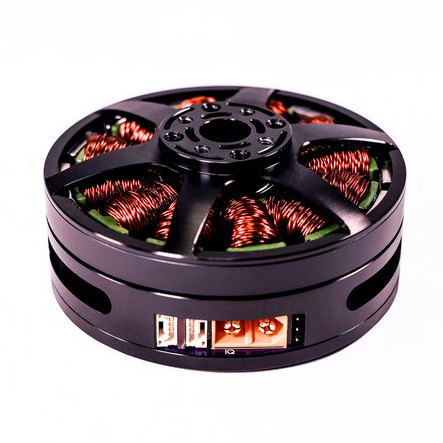
Brushless motors can offer impressive torque-to-size ratios, and when combined with complex drive control and sensor feedback, exciting things become possible that expand the usual ideas of what motors can accomplish. For example, to use a DC motor in a robot leg, one might expect to need a gearbox, a motor driver, plus an encoder for position sensing. If smooth, organic motion is desired, some sort of compliant mechanical design would be involved as well. But motors like the IQ Vertiq 6806 offered by [IQ Motion Control] challenge those assumptions. By combining a high-torque brushless DC motor, advanced controller, and position sensing into an integrated device, things like improved drone performance and direct-drive robotic legs like those of the Mini Cheetah become possible.

IQ Vertiq 6806 brushless DC motor with integrated controller, driver, and position sensing.

First, the bad news: these are not cheap motors. The IQ Vertiq 6806 costs $399 USD each through the Crowd Supply pre-order ($1499 for four), but they aren’t overpriced for what they are. The cost compares favorably with other motors and controllers of the same class. A little further than halfway down the Crowd Supply page, [IQ Motion Control] makes a pretty good case for itself by comparing features with other solutions. Still, these are not likely to be anyone’s weekend impulse purchase.

So how do these smart motors work? They have two basic operating modes: Speed and Position, each of which requires different firmware, and which one to use depends on the intended application.

The “Speed” firmware is designed with driving propeller loads in mind, and works a lot like any other brushless DC motor with an ESC (electronic speed control) on something like a drone or other UAV. But while the unit can be given throttle or speed control signals like any other motor, it can also do things like accept commands in terms of thrust. In other words, an aircraft’s flight controller can communicate to motors directly in thrust units, instead of a speed control signal whose actual effect is subject to variances like motor voltage level.

The “Position” mode has the motor function like a servo with adjustable torque, which is perfect for direct drive applications like robotic legs. The position sensing also allows for a few neat tricks, like the ability to use the motors as inputs. Embedded below are two short videos showcasing both of these features, so check them out.

If you’re wishing these motors were a bit less spendy, there’s good news! [IQ Motion Control] previously released a smaller motor with similar features: the IQ Vertiq 2306. That unit is available in 220KV (low-speed) and 2200KV (high-speed) versions for servo and drone applications, respectively. Check out our earlier coverage of these smaller units and get a feel for their capabilities, and maybe get a few ideas of your own in the process.

source https://hackaday.com/2020/11/07/how-to-improve-a-smart-motor-make-it-bigger/