
Yearly Archives: 2019
I Coded A Trading Bot And Gave It $1000 To Trade! #youtubevids
WWII Aircraft Radio Roars to Life: What it Takes to Restore a Piece of History
I’ve been told all my life about old-timey Army/Navy surplus stores where you could buy buckets of FT-243 crystals, radio gear, gas masks, and even a Jeep boxed-up in a big wooden crate. Sadly this is no longer the case. Today surplus stores only have contemporary Chinese-made boots, camping gear, and flashlights. They are bitterly disappointing except for one surplus store that I found while on vacation in the Adirondacks: Patriot of Lake George.
There I found a unicorn of historical significance; an un-modified-since-WW2 surplus CBY-46104 receiver with dynamotor. The date of manufacture was early-war, February 1942. This thing was preserved as good as the day it was removed from its F4F Hellcat. No ham has ever laid a soldering iron or a drill bit to it. Could this unit have seen some action in the south Pacific? Imagine the stories it could tell!
My unconventional restoration of this radio followed strict rules so as to minimize the evidence of repair both inside and out yet make this radio perform again as though it came fresh off the assembly line. Let’s see how I did.
A Flavor of Radio for Every Need
The list of radio systems installed into WW2 aircraft goes on and on, even more so for special aircraft like night fighters which depended entirely on radio navigation and radar systems to fly their missions and jamming aircraft who’s purpose was to hide fleets of bombing aircraft or invasions of coastal territories. There were different systems for each specialized task:

- Long range radio systems to communicate back to base, typically consisting of an ART-13 transmitter and a BC-348 receiver.
- Short-range radio systems designed for aircraft-to-aircraft communication, known as command sets subdivided into a multitude of bands.
- Air to ground radio communication equipment.
- Radar beacons to identify the aircraft as a friendly (identify friend or foe, or IFF).
- Radio navigation receivers of various types from
- radio direction finders,
- glide slope receivers for landing purposes, and
- TDOA radio navigation systems akin to modern GPS (except that you had to manually measure the time difference of arrival with an oscilloscope and line it up on special charts), such as GEE.
- Radar systems of various types.
- Electronic warfare receivers to detect enemy radar signals.
Part of the ARC-5 Radio Equipment

Somewhere in this menagerie of radio systems, you would find a CBY-46104 receiver. This receiver is part of a series of radio gear known as ARC-5 command sets, which describes an entire class of WW2 transmitting and receiving equipment for aircraft-to-aircraft communication. This class of equipment includes separate transmitters and receivers that can be controlled remotely by the pilots through a remote control head mounted somewhere in the flight deck.
These radios were designed in the mid 1930’s. Transmitters utilize a MOPA (Master Oscillator Power Amplifier) architecture supporting AM phone and CW (aka Morse code) transmission. Receivers use a single-conversion heterodyne architecture similar to that of big wood console radios of the era. Octal tubes were used as the active devices and the operational frequencies did not exceed 20 MHz, which was considered a high frequency for the mid 1930’s.
This radio gear was light-weight for WW2 standards, the CBY-46104 weighs only 6 lbs and is made entirely from aluminum. It is a carefully balanced chassis/radio design for weight minimization (these were installed in aircraft after all) while also remaining rugged and able to provide stable operation across MIL-SPEC temperature ranges and intense vibration.
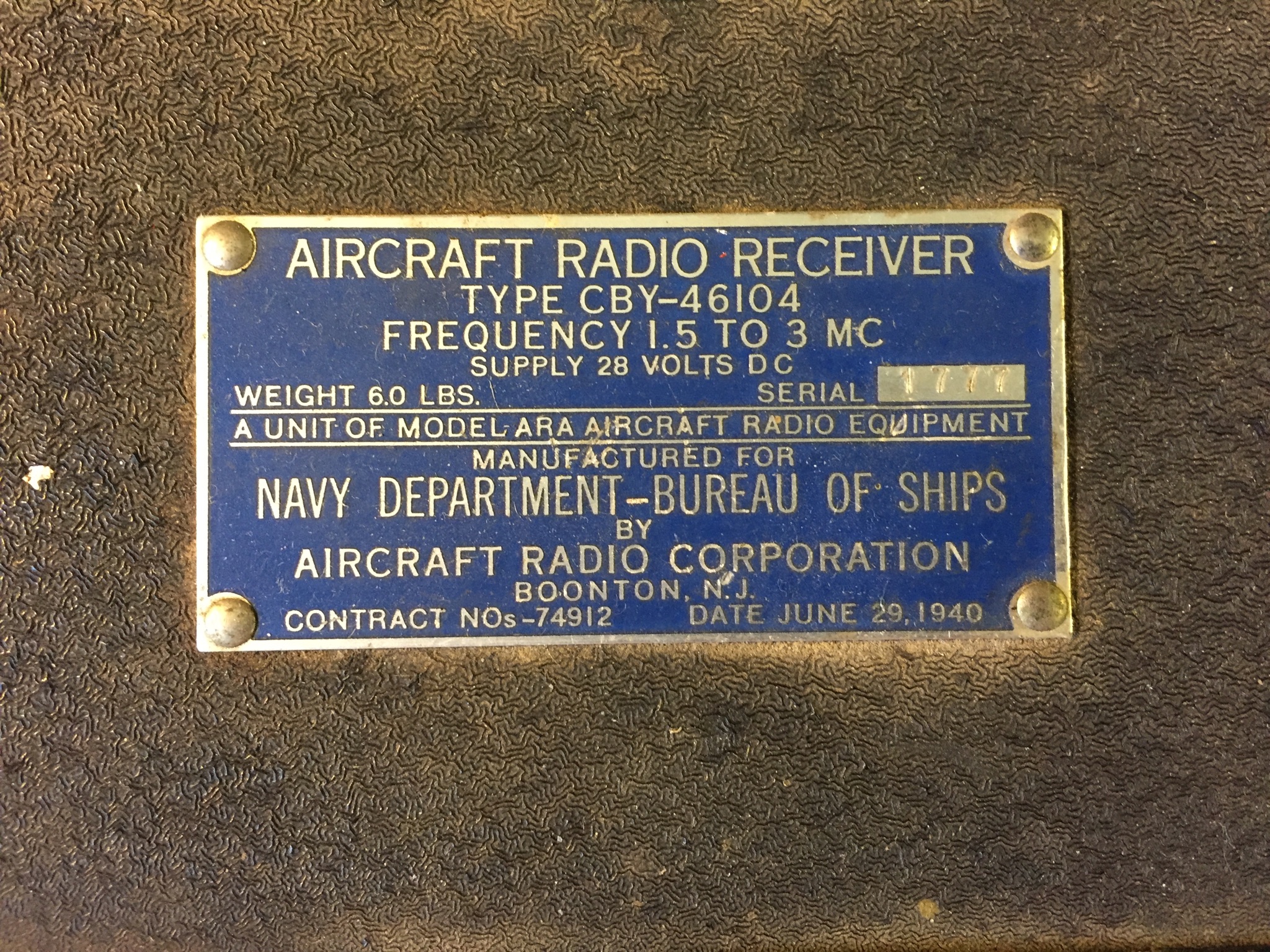
The CBY-46104 covers 1.5-3 Mc either AM or CW (it can also tune in SSB in CW mode), made by the Aircraft Radio Corporation of Boonton N.J. in February 1942 with SN# 1777. The contract for this run was #74812 dated June 29, 1940, demonstrating the ramp-up in war materiel purchasing/production in advance of Pearl Harbor. In other words, they were planning ahead for this conflict (an interesting book on this topic, how war production in the US was set up in advance by an executive from General Motors who established GM’s global supply chain in the 20’s and 30’s).
Rules of Engagement for the Restoration
To preserve this historic treasure my rules of restoration were:
- No replacement of any components whatsoever.
- If a capacitor failed, then it must be re-stuffed.
- Unit must be made fully operational to original specification.
- Unit must run off of its dynamotor, as it was intended.
- No holes can be drilled, either on the chassis or on the plug-in.
- Rear power connector must stay as-is.
- No chassis modifications whatsoever.
These were not easy rules to follow because, as we know, the first step to antique radio restoration is to replace all of the paper and electrolytic capacitors, saving a lot of headache and time.
Initial Assessment
Instead of replacing the caps I opted to do a cursory check of the caps and try powering the unit up for an assessment. I tested the electrolytic and paper caps with a Fluke DVM in resistance mode for obvious shorts or low impedance. All caps were open-circuit as far as my DVM was concerned (unfortunately DVM’s are not sensitive enough for a proper leakage test, more on this later).
Next I had to locate documentation. Fortunately, it is easy to find documentation for WW2 radio gear because it was ubiquitous in the late 40’s through the early 70’s in amateur radio stations across the world (here is a PDF link to the manual for all or most ARC-5 gear). A typical practice of the post-WW2 era was for the Elmer hams to gift an ARC-5 receiver to a young ham working to earn their license. With such a receiver the young ham would be able to tune in radio traffic from all over the world and practice listening to Morse code (CW) transmissions.
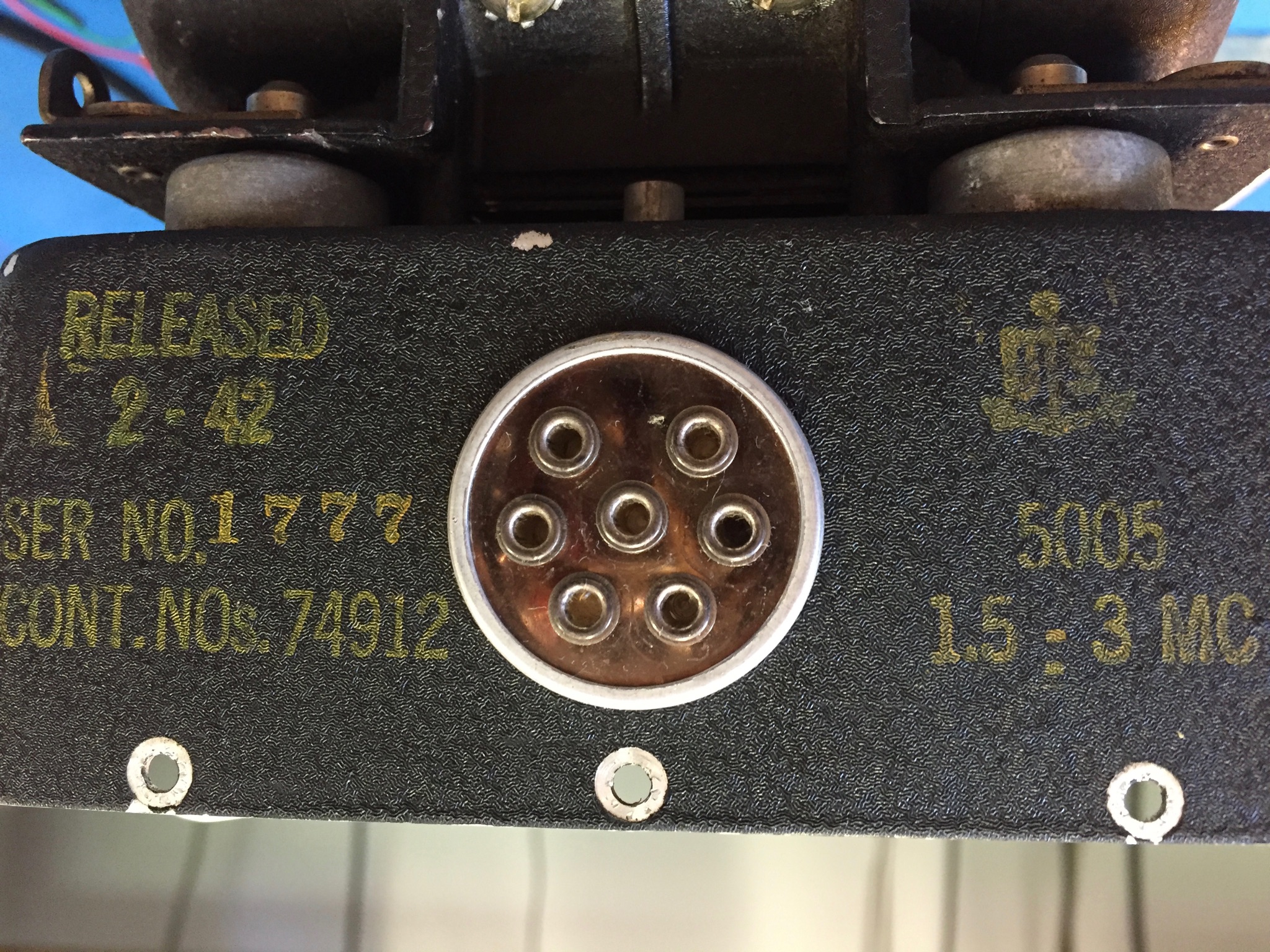
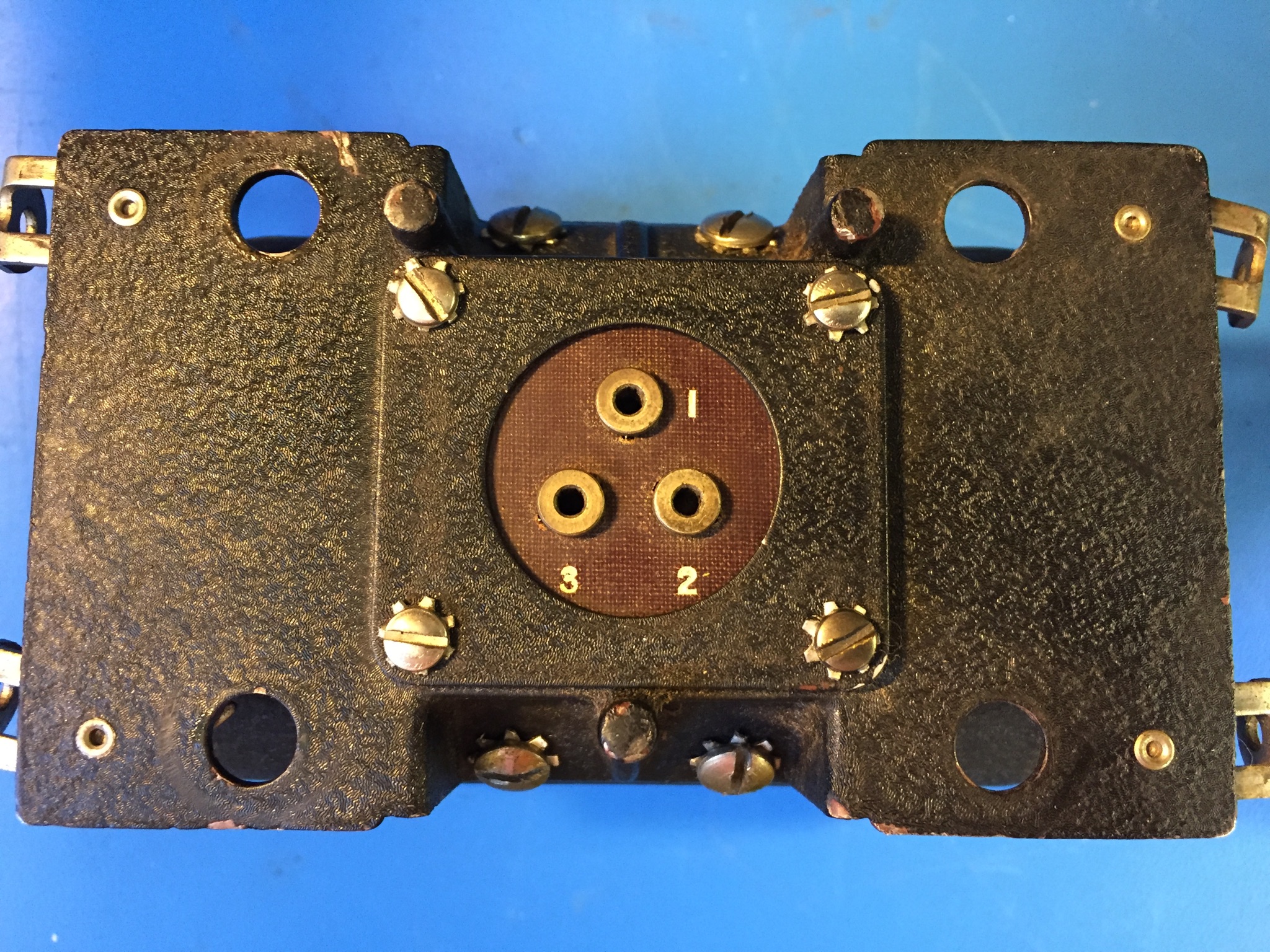
It is not easy hooking-up military surplus radios because they typically use multi-pin multi-use connectors for power and other controls. From the documentation I figured out what had to plug into the multi-pin connector on the back; +28 VDC, an external CW/AM toggle switch, RF gain control pot, 600 ohm speaker (I used an 8 ohm speaker and impedance matching transformer).
But one might ask, “with 28VDC input, how do we get high voltage for the vacuum tube plates?” Here is how they did it in WW2: This unit has what is known as a Dynamotor. High voltage was generated from the Dynamotor. Everything from receivers to transmitters that ran on low voltage DC busses used dynamotors to generate the 200-1000V, or more, needed for operation.

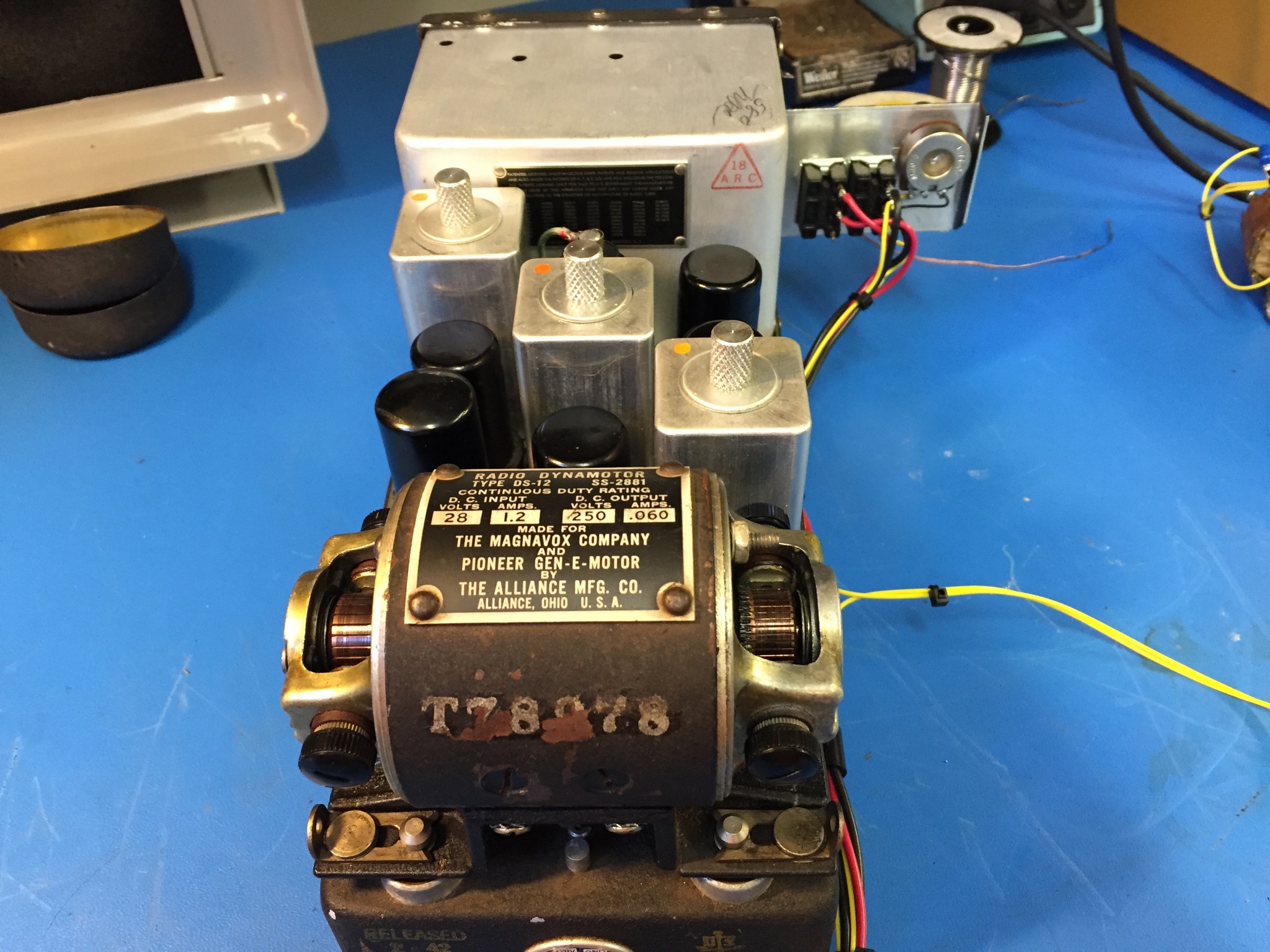
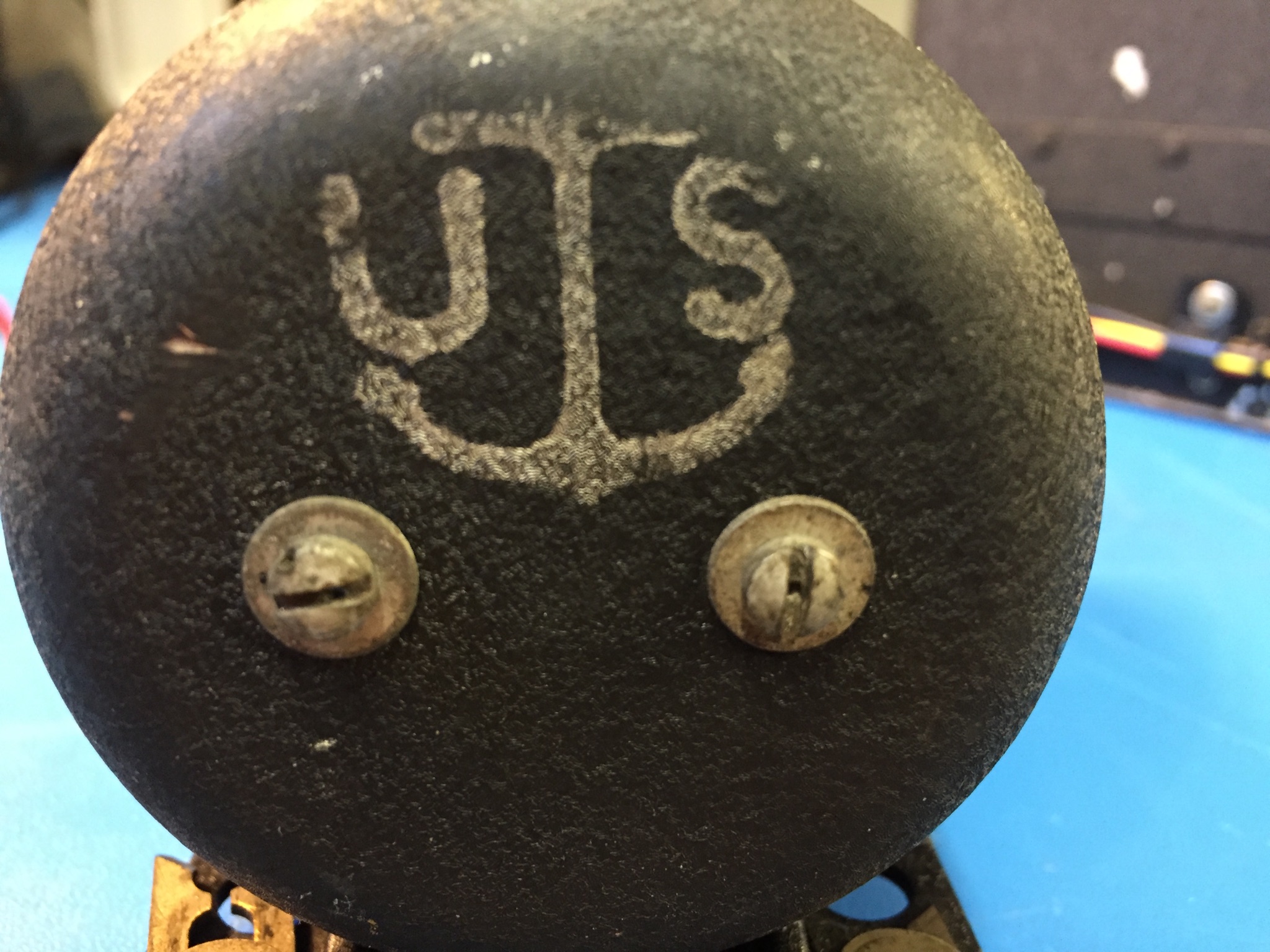
Dynamotors are motor-generators; in my case one end is a spinning motor at 28VDC motor and the other end is a 250VDC generator. Rather than having two motors with two shafts tied together (larger units on ships actually used such configurations) this motor is built into one compact unit with two armatures and two sets of brushes. 28VDC in, 250VDC out all the while spinning like a whirly-bird.
I removed the bells (end caps) from both sides of the motor. I applied 28V and, carefully with my finger, pushed the armature on the 28V side of the dynamotor to coax it into operation. It spun up like a 1950’s jet engine! Whrrrrrrrrrrr…..
After about 30 seconds the Whrrr sounded slightly bogged down, loaded down actually, by the vacuum tubes warming up and drawing current from the 250VDC output of the dynamotor. Then noise came out of the speaker. I hooked up my 20m dipole and to my amazement I was tuning in AM broadcast stations at around 1500 Kc. There was a lot of noise coming through the speaker likely due to failed decoupling caps that would otherwise quiet the dynamotor’s hum. The receiver was not too sensitive, and tuning was jammed up at the higher frequency ranges on the dial. It was at this point that I shut it down, this radio wanted to work and all I had to do now was clean her up and fix a few things.
Servicing Capacitors and Resistors
First order of business was to accurately test the capacitors because it was obvious that some were not functioning to spec. It is tough to test capacitors correctly, it requires multiple tests to troubleshoot for bad capacitors:
- Test with a DVM in ohm setting.
- Testing capacitors with a DVM in resistance mode will show which are short-circuited but it will not reveal the leaking capacitors that are only leaking ever so slightly (e.g. have extremely high DC impedance) at high voltages. DVM testing only reveals the short-circuited caps, this is a necessary first step.
- Test for specified value.
- A capacitor must operate to its specified value so it is good to test to see if the cap is functioning as a cap. This test will show if a cap is functioning as a cap and as specified. Unfortunately some leaky capacitors will measure to their specified value, so this test is not definitive.
- Electrostatic Resistance (ESR).
- In modern low-voltage electronics the key metric to capacitor goodness is ESR. This test will confirm that a capacitor is presenting a low impedance to a high frequency signal. In other words, how much series DC resistance does a capacitor present when it is measured at a relatively high frequency. Ideally, capacitors should present no resistance whatsoever, but practical capacitors do present some low resistance and bad capacitors present a lot more than some resistance.
- With that said, ESR testing is useful for testing the electrolytic power supply capacitors in tube equipment.
- Leakage.
- For high voltage capacitors, the key metric of goodness is leakage. How much current leaks through an old capacitor? If small amounts of current (on the order of single-digit uA) leak through then that capacitor is bad. A leaky cap will act like a high value resistor, in the many-multi-mega ohm range thereby reverse-biasing the grids of tubes or discharging itself causing it to not function like a capacitor at all. Leakage testing is absolutely critical and must be done for each and every cap.
Given all of that, the keys to troubleshooting tube equipment are to test the capacitance of each cap to verify that it is functioning and test the leakage to make sure it is not leaking current between circuits.
To check for value and leakage with one test device you must resurrect an old piece of test gear known as the capacitor checker. I found mine at the Dayton Hamvention many years ago for $10. It consists of a few dials and a very sensitive ‘Magic Eye’ tube which will deflect leakage is detected. Mr Carlson’s Lab has a great video on how to use one.
To check each cap I had to remove each of them from circuit, one at a time. There’s no getting around this, otherwise you might miss-read the cap value or leakage test. Remarkably enough, the vast majority of these Feb 1942 capacitors tested good. This is a testament to not replacing all the caps if you don’t have to. I found that all but three of the metal-can-sealed wax and paper caps (special to ARC-5 and other WW2 radio equipment, otherwise known as ‘flower pot’ capacitors due to the shape of their metal cans) and the electrolytic caps needed to be replaced. I opted to re-stuff the defective caps by opening the metal cans, extracting the guts, and putting in a modern replacement, then gluing the cans back together.
Resistor Care
Next I checked all of the resistors with my Fluke DVM. The nice thing about tube gear is that when the power is turned off the tubes present an open-circuit and therefore you can test resistors reliably in-circuit without removing them.
Old resistors tend to increase in value over time. Particularly the higher valued ones in the 100’s of K or M ohm range. For this radio not one resistor was out of tolerance! Amazing for resistors built before February of ’42.
Servicing the Dynamotor
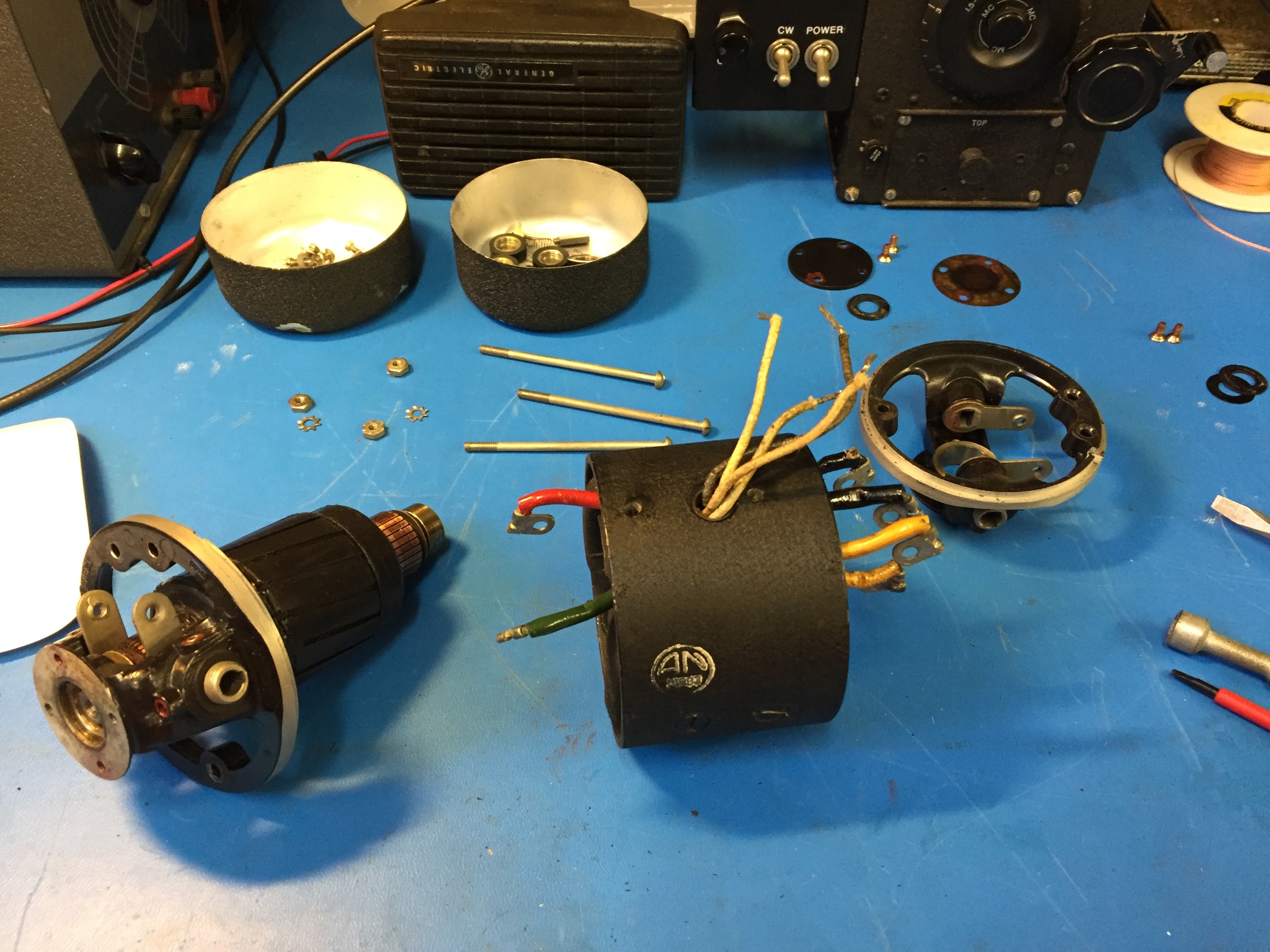
I then moved onto cleaning the Dynamotor. It was running but not well. Fortunately these are easy to service, they are designed so that anyone with a flat-head screwdriver can fix them. I found a video on servicing a similar motor and proceeded to strip mine down, clean out the old grease in the bearings, put new grease into the bearings, clean the armatures, and re-assemble. Dynamotor worked perfectly, just like new again!
Problems with the Tuning Variable Capacitor
With good resistors, good caps, a working dynamotor I then moved onto the tuning mechanism. Something was not right with it, the plates on the large variable tuning cap were literally grinding against each other. I made the necessary repairs; it appears that this unit was dropped at some point and the fixed plates, which were normally electrically isolated from ground, had popped off of their plastic insulators. I put them back into place and the tuning unit was good as new.
Old radios are like old cars, they could use an alignment from time to time. Given the changes to the tuning unit I realized that I had to do a full alignment. I followed the instructions from the original service manual, aligning the IF first (using a modern synthesized signal generator to get it spot-on), then the front-end variable cap assembly that I had just repaired. The later was tricky, with some high, medium, and low-band-specific alignments required.
With the receiver aligned I tested its sensitivity. I measured <1 uV on AM at 2 MHz, more than good enough for me and easily exceeding the original factory spec.
Build a Wiring Harness
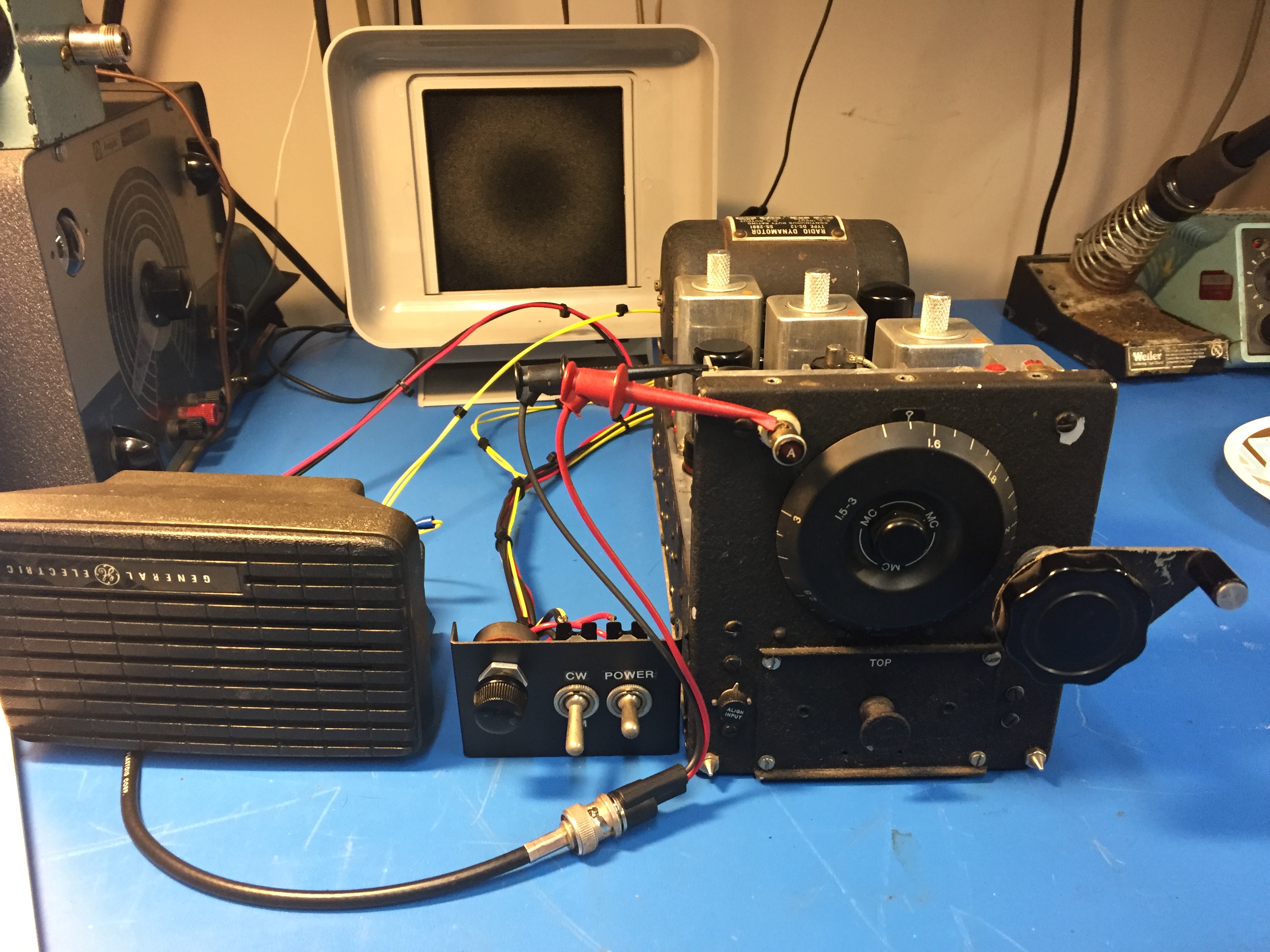
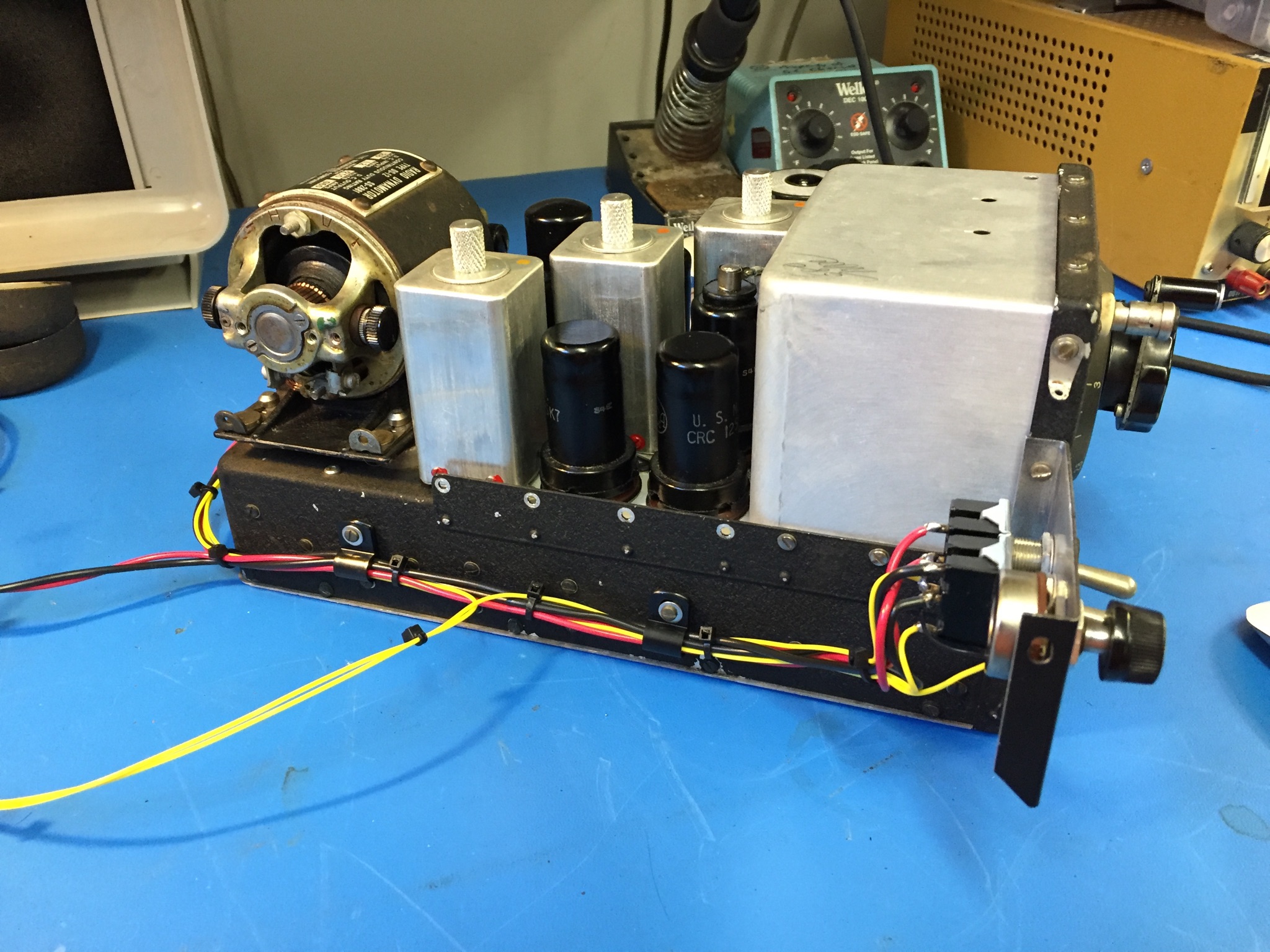

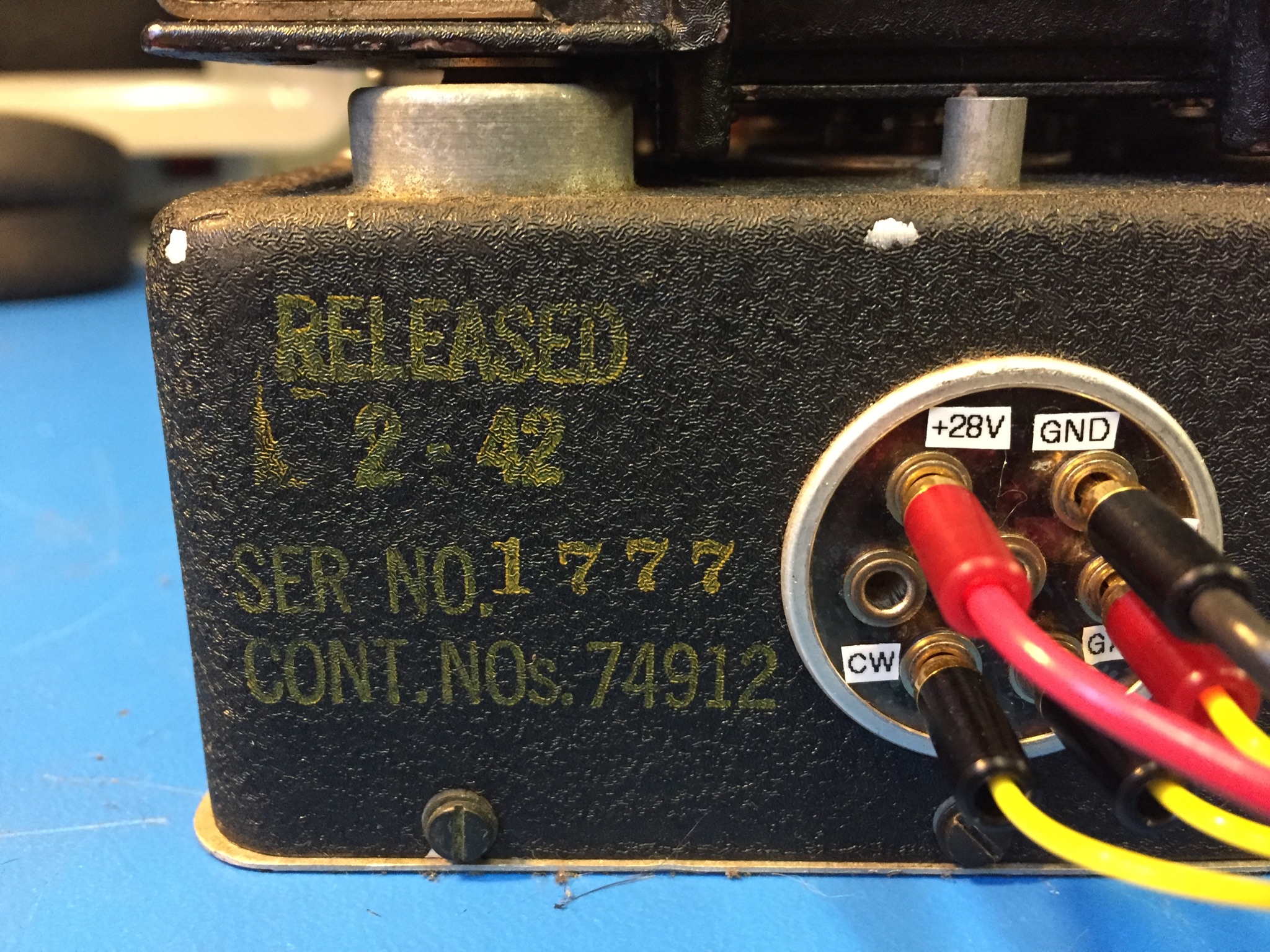
At this point I had two toggle switches and a pot with a mess of wire shoved into the rear panel connector pins. To organize this mess and to make a more permanent functional display for the radio I built up a small external switch panel and drilled a hole pattern in it so it would simply bolt to the side of the radio using two of the existing machine screws on the case. I left the original rear power plug in place and found out that ‘miniature banana’ plugs fit perfectly into the WW2 socketed pins. I used these banana plugs to connect up the control panel and a 600 ohms speaker. With all of this I made a neat wire harness to tie it all together.
Final Testing, It’s Alive!
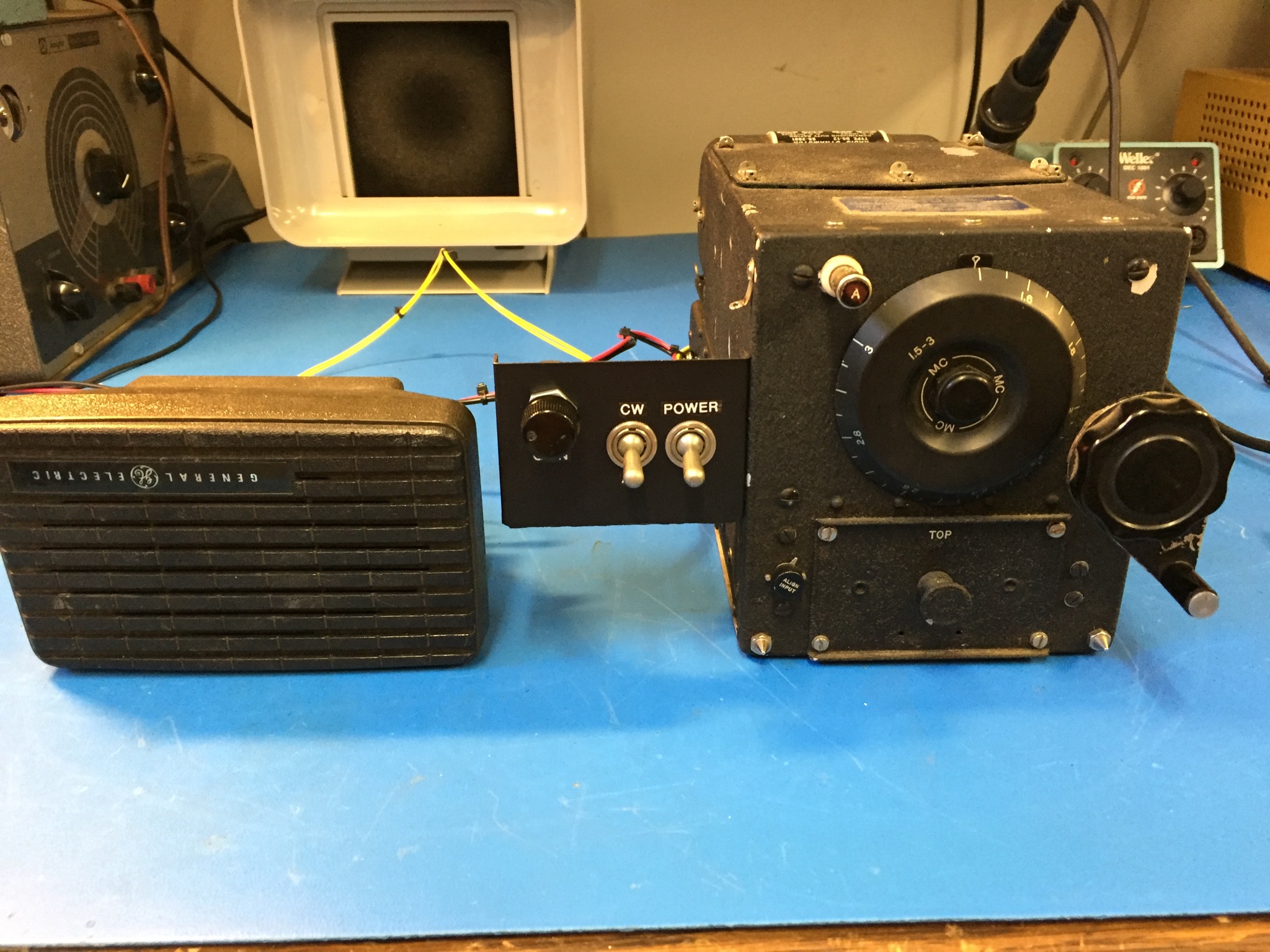
Now that everything was in order it was time to try the radio in its final configuration. I connected up my 20 m external dipole and powered up the radio. The whrrrr was smoother than ever. Within seconds stations starting coming in strong, much louder than before. I tweaked the antenna coupling control, they were louder still. I listened to a basketball game from an AM broadcast station in Chicago, I tuned into WWV at 2.5 MHz, and tuned in an 80 m AM net. What an incredible receiver, it was wide awake and operating to its original specifications once more!
After 3 Years of Operation…
This unit switches-on every time without fail, whrring away for innumerable demos for friends and family. Everyone is thrilled and amazed to see a dynamotor-powered receiver that is running almost entirely on its original parts and as it was originally built.
By accident I even connected the DC input backwards, reverse polarity. The dynamotor roared into life but the radio never produced audio. I figured out the problem after about five minutes of reverse polarity operation. Fortunately for me, and unlike solid state equipment, no damage was done. I re-connected it the correct way and it worked just as well as it did before.
If It’s from WW2, Don’t Hack it, Preserve It!
We are now at a point where the surplus WW2 electronics should no longer be hacked to bits. Join the movement, there are many others who restore WW2 and other vintage gear to be original as possible. Most of the community orbits around Electric Radio Magazine. Test those capacitors before throwing them in the garbage and keep those filaments lit!
Sleeper PlayStation Hides a Raspberry Pi 4
[Andreas Wilcox] wanted to get his brother a birthday gift that reflected their shared love for the early days of 3D gaming, but just handing him a second-hand original PlayStation lacked a certain style. So he decided to gut the classic system and replace its dated internals with a shiny new Raspberry Pi 4. But rather than taking the easy way out, he put in the time and effort to integrate the new hardware so seamlessly that the nearly 25 year old console still looks stock from the outside.
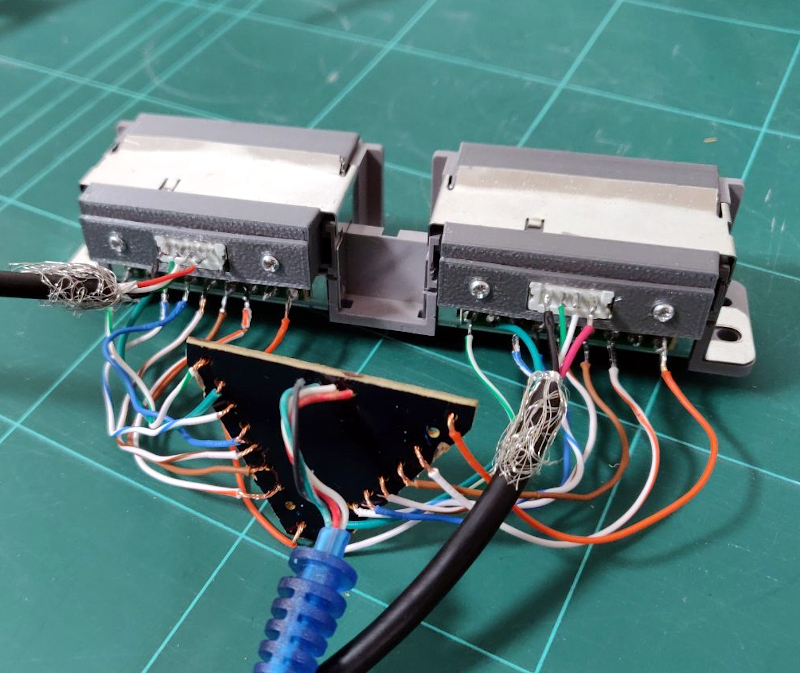 The fact that the front ports are functional and work with the original controllers really helps sell the stock look. [Andreas] found a USB to PlayStation controller adapter, liberated the PCB, and soldered it to the back of the system’s ports. Even the memory card slots got in on the action, thanks to female USB connectors installed where the original connector went. It was a tight fit, but the final result was well worth it.
We also love the GPIO-controlled cooling fan complete with a duct designed to blow across the notoriously toasty Pi, and check out that carefully designed holder for the power and reset buttons. This entire project is really a fantastic example of how 3D printed parts can give your projects a far cleaner and more professional look than the hacker’s old standby of hot glue; though of course it demands a considerable time investment.
This isn’t the first time we’ve seen a Raspberry Pi shoehorned into a classic video game console, but it’s absolutely one of the cleanest examples we’ve ever seen. Though if we lump Raspberry Pi portables into the running, the competition is considerably fiercer.
source https://hackaday.com/2019/12/12/sleeper-playstation-hides-a-raspberry-pi-4/
Are You Getting Your Money’s Worth from Threaded Inserts?
Have you ever wondered whether it’s worth the time and expense to install threaded inserts into your 3D-printed projects? [Stefan] from CNC Kitchen did, and decided to answer the question once and for all, with science.
If this sounds familiar, it’s with good reason: we covered [Stefan]’s last stab at assessing threaded inserts back in March. Then, he was primarily interested in determining if threaded inserts are better than threads cut or printed directly into parts. The current work is concerned with the relative value of different designs of threaded inserts. He looked at three different styles of press-in inserts, ranging in price from pennies apiece to a princely 25 cents. The complexity of the outside knurling seems not to be correlated with the price; the inserts with opposed helical knurls seem like they’d be harder to manufacture than the ones with simple barbs on the outside of the barrel, but cost less. And in fact, the mid-price insert outperformed the expensive one in pull-out tests. Surprisingly, the cheapest inserts were actually far worse at pull-out resistance than printing undersized holes and threading an M3 screw directly into the plastic.
[Stefan] also looked at torque resistance, and found no substantial difference between the three insert types. Indeed, none of the inserts proved to be the weak point, as the failure mode of all the torque tests was the M3 bolt itself. This didn’t hold with the bolt threaded directly into the plastic, of course; any insert is better than none for torque resistance.
We enjoyed seeing [Stefan]’s tests, and appreciate the data that can help us be informed consumers. [John] over at Project Farm does similar head-to-head tests, like this test of different epoxy adhesives.
Thanks to [MLewis] for the tip.
source https://hackaday.com/2019/12/12/are-you-getting-your-moneys-worth-from-threaded-inserts/
HFM COUB 167 BEST CUBE Best Coub Приколы 2019 Gifs With Sound Best Fails like a boss #youtubevids
Creationist quote mine collapse #youtubevids
Reverse Engineering An Old Bus Display
When his makerspace was gifted a pair of Luminator LED signs of the sort you might see on the front of a bus, [PWalsh] decided to pull one apart to see what made it tick. Along the way, he managed to reverse engineer its control protocol and replace its original control board with a WiFi-connected Raspberry Pi. Now they can use the LED signs to show whatever they want; no bus required.
As they were designed for automotive use, the signs were wired for 12 volts DC. So the first order of business was fitting it with an AC/DC converter so it could be plugged into the wall. After he measured the display’s current consumption, [PWalsh] estimated it’s maximum energy consumption and determined an old ATX computer power supply was more than up to the task.
 With the sign happily running battery-free, he could begin figuring out how to talk to it. Noticing a MAX485 RS-485 converter on the PCB, gave a pretty good idea of what language it was speaking, and with the aid of his trusty oscilloscope, he was able to suss out the baud rate. A cheap USB to RS-485 converter was then wired in between the sign and its control board so he could sniff the data passing over the line.
From there, the final piece of the puzzle was studying the captured data and figuring out the protocol. [PWalsh] was able to identify packet headers and ASCII characters, and pretty soon knew enough about how the sign communicated that he was able to remove the control board entirely and just push text and images to it right from the Pi. He’s even made his framework available for anyone else who might have a similar piece of bus-signage laying around.
Even if you’re not looking to add one of these signs to your lab, this project is a fantastic example of protocol reverse engineering with low-cost tools and simple techniques. We always love to see the process broken down step by step like this, and our hat’s off to [PWalsh] for delivering the goods in a big way.
This isn’t the first time we’ve seen these sort of LED signs get the “Internet of Things” treatment, and if you’re content with a somewhat scaled down version, you could always just build your own display rather than waiting on the local public transit vehicle to get parted out.
source https://hackaday.com/2019/12/11/reverse-engineering-an-old-bus-display/
How We CRUSHED The Fake HOA! | r/ProRevenge | #253 #youtubevids
r/IDontWorkHereLady – Mistaken For a Wal-mart Employee #youtubevids
Code The Classics Is Coming
We feel sorry for youth of today. If you spend a few hours playing a modern video game and decide you want to write your own, there’s a big job ahead of you. Games now are as much performances as programs, with cinematic 3D renderings, polyphonic sound and music tracks, and detailed storylines. That wasn’t true 40 years ago, when you could play Pong and then think about writing your own version. The Raspberry Pi people must agree as they are taking preorders for a book called “Code the Classics.” In it, they interview designers of several classic arcade games and then show Python versions of the games you can run — and hack — yourself. You can see their video about the title, below.
The code is from Raspberry Pi founder [Eben Upton] and as you might expect the games aren’t necessarily faithful reproductions but inspired by the old arcade standards.
The 224-page book is listed as volume one and apparently, between the two volumes, the book will tackle different genres of classic games ranging from Pong to Sensible Soccer. From the video, we think the other games are Centipede, Frogger, and Bubble Bobble.
If you are interested in retrogaming, this should be a good read. We don’t know how much is in volume 1 and when volume 2 will be around, though.
If you don’t want to play games written in Python, you can always write Python programs to play games for you. If your favorite programming language is solder, you can still play Pong.
source https://hackaday.com/2019/12/11/code-the-classics-is-coming/
Programmable Wrist Synth Pushes The Envelope
Synths are a ton of fun no matter how good or bad they sound. Really, there are no bad-sounding ones, it’s just that some are more annoying to listen than others to if you’re not the one making the beep boops. [Clem] had built a tiny LDR-based synth into a watch case a few years back and took it to many a Maker Faire, where it delighted and annoyed until it ultimately broke.
Naturally, it was time to make a new version that’s more capable. Whereas the first one was Atari-punk-console-meets-light-Theremin, this one has a bunch of inputs and can be programmed on the fly to record and play back bendable tones. It’s driven by an Arduino MKR, and the inputs are managed by an impressively squash bug-wired shift register. [Clem] used beefy switches this time in the hopes that this one will last longer. We think the slide pots are a great touch, as are the candy-colored knobs printed in PMMA.
Our favorite part is that [Clem] took advantage of the random states the microcontroller pins are in when it’s first powered on. If you don’t want to program any notes, you can use the ones generated at boot and just play around with those. Be sure to check out the build video after the break.
We’ve seen our share of synths, but few as delicious-looking as KELPIE from this year’s Hackaday Prize.
source https://hackaday.com/2019/12/11/programmable-wrist-synth-pushes-the-envelope/
Stackable Open Source 3D Printer Enclosure
One of the unfortunate realities of desktop FDM 3D printing is that environmental factors such as ambient temperature and humidity can have a big impact on your results. Even with the exact same settings, a part that printed beautifully in the summer can warp right off the bed during the winter months. The solution is a temperature-controlled enclosure, but that can be a daunting project without some guidance. Luckily, [Jay Doscher] has spent the last few months designing a very impressive enclosure that he’s released to the community as open source.
 While we’ve seen no shortage of DIY printer enclosures over the years, they tend to be fairly lightweight. But that’s not the case here. Obviously not wanting to leave anything to chance, [Jay] designed this enclosure with 2020 extrusion and aluminum side panels. You could probably sit on the thing with no ill-effects, which is good, since he also designed the enclosure to be stackable should your print farm need to expand vertically.
Of course, there’s more to this enclosure than just an aluminum box. It’s packed with features like an integrated Raspberry Pi for running Octoprint, internal and external environmental monitoring with the Adafruit SHT31-D, and a Logitech Brio 4K video camera to watch the action. While not currently implemented, [Jay] says he’s also working on an internal fire suppression system and a fan controller system which will circulate air inside the enclosure should things get a little too toasty.
The enclosure has been designed around the ever-popular Prusa i3 MK3/S, even going so far as to relocate the printer’s display to the outside so you don’t have to open the door to fiddle with the settings. But adapting it to whatever rig you happen to be running shouldn’t be a problem. Though admittedly, perhaps not as easy as adjusting an enclosure made out of metal shelving.
source https://hackaday.com/2019/12/11/stackable-open-source-3d-printer-enclosure/
Angela Sheehan is Developing Wearable Tech with Whimsy
As a concept, wearable technology excites many of us, but in practice, it’s been hard to nail down. Up to this point, the most high-tech thing the average person might reasonably wear has been a wrist watch. Devices like Google Glass tried to push the state-of-the-art, but it arguably raised more questions than it answered. It demonstrated in a very public way that developing wearable technology that’s simultaneously visually appealing, useful, and robust enough to handle daily life is exceptionally difficult. If Google couldn’t pull it off, what hope do we lowly hackers have?
 But maybe we’ve been going about things the wrong way. Compelling as the end result may seem, the move from wrist watches to head-mounted computers is simply too large of a technical and psychological leap to make. To help develop the skills and techniques necessary to build practical wearable electronics, it might help to take a slightly more fanciful approach.
It seems to be working pretty well for Angela Sheehan, at least. In her talk “Building Whimsical Wearables: Leveling Up Through Playful Prototyping” at the 2019 Hackaday Superconference, she went over some of the things she’s learned while developing her Color Stealing Fairy costume. The product of several years of iterative design, the costume is able to mimic colors seen in the environment through the use of a wireless sensor wand, and features a number of design elements that are critical to any successful wearable project.
Even if a custom RGB Fairy costume isn’t on your short list of projects, there’s information in this talk that will surely be of interest to anyone who’s even contemplated a wearable project. From technical aspects like battery placement to logistical considerations such as making adjustments for multiple wearers, Angela’s make-believe creation has become a testbed for real-world considerations.
Bringing Imagination to Life
Angela starts her talk by saying she isn’t a programmer or an engineer, but an artist who “crash landed” into the world of wearable technology. When she started this project, her goals were more emotional than technical. She simply wanted a way to recreate magical effects like those seen in movies, particularly the enchanted color changing dress from the animated Sleeping Beauty. She knew exactly where she wanted to go with this project, all she had to do was figure out how to get there.

As such, her first piece of advice for anyone looking to start their own project is to do something that excites them. Even if it’s just for your own enjoyment and serves no practical purpose, if you’re passionate about it, you’ll have the drive to keep pushing forward when you might otherwise have given up. All the while, you’ll be increasing your personal knowledge and honing your skills.
Coming from a more artistic background. Angela perhaps had a bit farther to go but she eventually found a workflow that played to her particular strengths. Describing herself as a “two dimensional thinker”, she approaches her designs conceptually as flat layers that stack up. She’s also found success sketching out her ideas in Adobe Illustrator, importing the design into her CAD software as a DXF file, and then extruding it into the third dimension. Interestingly, fellow wearable creator Sophy Wong utilizes a similar technique to bring her hand-drawn sketches into the physical world.
Learning from Experience
In taking on this project Angela checked a number of “firsts” off her list, from creating a custom PCB in Eagle to learning Fusion 360. Coming from a purely personal standpoint, her skills have come a long way since she committed to making her childhood dreams a reality. On these merits alone, the project has been an incredible success, and she’s a better and more well-rounded maker for it.
But in building the Color Stealing Fairy costume and sharing what she’s learned along the way, she’s done an invaluable service to anyone else working on their own wearable projects. Through both her talk at Supercon and the impeccably well documented Hackaday.io page for the costume, she reveals a wealth of information that you can put to use even if your ideal wearable doesn’t include giant glowing butterfly wings.
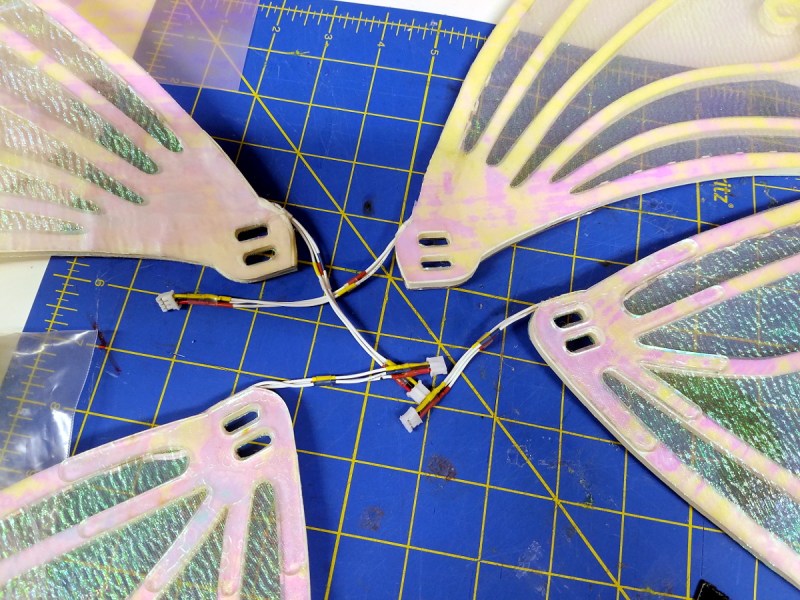
Perhaps the biggest lesson she learned is how rough the real-world can be on hardware. Between simply moving around and the fact that young children can’t seem to help but run up and throw their arms around her when they see the costume light up, the first generation of her laser-cut foam wings didn’t last long once they left the workshop. Not wanting to compromise on her goal of making the wings lightweight enough to wear comfortably, Angela eventually adapted the design to include Delrin ribs to add mechanical strength while maintaining the ethereal look.
She eventually embraced a modular design with connectors that can be quickly and easily undone, as it not only made repairs and maintenance easier, but meant she could take the costume apart to more easily transport it. She also realized that embedding the battery into the costume was not only inconvenient but potentially unsafe. In her case, the solution was to use a hip-mounted battery pack that always remains within reach.

The first time another person asked to use her costume in a performance was also a valuable learning experience. As the creator of the piece she was always very careful while wearing it, but once away from her almost maternal care, it was subjected to a much rougher handling than she anticipated. While the costume ultimately survived the ordeal unscathed, it did make Angela reflect on the challenges of “multi-user” wearable technology. For example, designing in sufficient adjustments so it can be fitted to different wearers without significant modification.
Keep Pushing Forward
Angela’s talk wasn’t Fairy Making 101, nor does she presume that everyone in the audience is working on their own cosplay project. In reality, her talk is about the benefits of following your passion wherever it may take you, learning as you go, and not letting yourself get discouraged because you don’t (yet) have the knowledge to achieve your goals.
 Calling it “inspirational” might be a bit heavy handed. After all, there’s a fairly high likelihood that most of the people attending the Hackaday Supercon have an oddball project or two back home that they’re inching to get back to. But it’s a fantastic reminder of why those sort of passion projects are so important. As hackers and makers, it’s sometimes easy to forget that every project we take on is a learning experience. Even if you’re a seasoned professional, working on the occasional “pointless” project is an excellent way to stay on the ball.
So whatever you’re excited about, keep building and iterating until it comes out just the way you want it. But don’t keep it to yourself. Take pictures, document the project, maybe even give a talk on it! There’s an excellent chance that somebody out there can learn from your experience, and in the end, that’s what this whole community is about.
source https://hackaday.com/2019/12/11/angela-sheehan-is-developing-wearable-tech-with-whimsy/
Bow Hunter Breaks Down Bow and Arrow Scenes from Movies & TV | GQ #youtubevids
How to Hack Wi-Fi & Networks with the Lazy Script Framework #youtubevids
Matt Dillahunty – A cluless & selfish christian calls in – Atheist Experience #youtubevids
The Worst Anti-Vaxxer Posts of ALL TIME! #youtubevids
Nerd Gets Revenge on Evil Kid and Principal! | r/NuclearRevenge | #100 #youtubevids
Linux Fu: Debugging Bash Scripts
A recent post about debugging constructs surprised me. There were quite a few comments about how you didn’t need a debugger, as long as you had printf. For that matter, we’ve all debugged systems where you had nothing but an LED to flash or otherwise turn on to communicate with the user. However, it is hard to deny that a debugger can help with complex code.
To say you only need printf would be like saying you only need machine language. Technically accurate — you can do anything in machine language. But it sure makes things easier to have an assembler or some language to help you work out your problem. If you write a simple bash script, you can use the equivalent to printf — maybe that’s the echo command, although there is usually a printf command on a typical system, if you want to use it. However, there are other things you can do with bash including a pretty cool debugger if you know how to find it.
I assume you already know how to use echo and printf, but let’s dig into how to use trace execution line by line without the need for echo statements on every other line. Along the way, you’ll learn how to get started with the bash debugger.
Tracing
It isn’t always easy to read, but you can get a trace of the entire execution of a running script by adding the -x option to its invocation of bash. There are at least three ways to do this. First, you can do a set -x in your current session. The problem with this is that any fancy things you have happening in your shell prompt will show up, too. That makes the output even harder to read. If you do brave this method, you can turn the tracing back off at a shell prompt with set +x.
#!/bin/bash -x
for I in {1..10}
do
   banner $((9-I)) - HAD
   echo
   echo
   echo
done
 You can add also add the flag when executing the script from the command line:
 bash -x ./had.sh or to the shebang on the first line of your script. Usually, you’ll have #!/bin/bash at the top of the file, just add the -x on that line.
For example, the following script has a few errors in it. I put the -x at the top, so if you run it, you’ll see what the trace looks like. Note the lines that start with a plus sign. That’s the line of the script that is executing. The other lines are actually output from the script.
Installing the Bash Debugger
There is a bash debugger available. However, Ubuntu and similar distributions haven’t included it in their software repos for awhile. You can, of course, go get it yourself. You’ll want to know what version of bash you are using (try bash --version). Download the version that matches what you have and follow the instructions.
The debugger itself is written in bash. It uses a special trap that fires at the end of each statement that is there especially for debugging. In theory, you could create your own debugger using that trap, but it is quite a bit of work.
Using the Debugger
There are at least two ways to invoke the debugger. You can run it along with the name of the script which is pretty safe: bashdb had.sh.
The only problem with this is that it can confuse $0 and the script itself shows up in the call tree. Running bash with the –debugging option will also run the program, or at least it should. It works for me, but anecdotally, some people have trouble with this method.
If you ask for help on the bashdb program, there are plenty of options, but none you’ll use often. Inside the program, you have commands similar to gdb commands. You can review them all by typing “help” at the prompt.
Asking for help in the bashdb program will show how to set breakpoints, look at backtraces or even have commands run when certain conditions are met. Quite a few of these commands worth further investigation:
- list – Shows the script with line numbers
- break – Set a breakpoint on a line (note: tbreak sets a one-time breakpoint)
- backtrace – View call stack
- condition – Sets up a conditional breakpoint
- display – Set up to print a variable before each stop
- handle – Set up trap handling
- step, next, skip – Single stepping commands
- trace, untrace – Like the -x argument
- watch, watche – Set up watches
The debugging process is a familiar one. Whether single-stepping through code, or setting break points to pause the program flow, this lets you track down problems with much more flexibility than echoing out information would.

There are two things wrong with my script. Well, at least two things. First, I meant for the banner to count down: 10, 9, 8, etc. I also wanted everything on one line. One of those is easy to find with the debugger.
If you want a video walkthrough, the one below is pretty old, but still good.
The best way to not have to debug shell scripts is to not put bugs in to start with. There are tools to help you strive for that. Then again, you could write your shell scripts in C.
source https://hackaday.com/2019/12/11/linux-fu-debugging-bash-scripts/
Supernatural Top 8 Badass Dean Moments #youtubevids
WORKING ELEVATOR! Stranded Deep S2 Episode 21 #youtubevids
A Tree of LEDs That Blows Out Like a Candle
The beautiful workmanship in [Andrew]’s LED tree is gorgeous all on its own, but of course there’s more going on than meets the eye. This LED tree can be blown out like a candle and it even playfully challenges a user to blow out all the lights at once in a single breath.
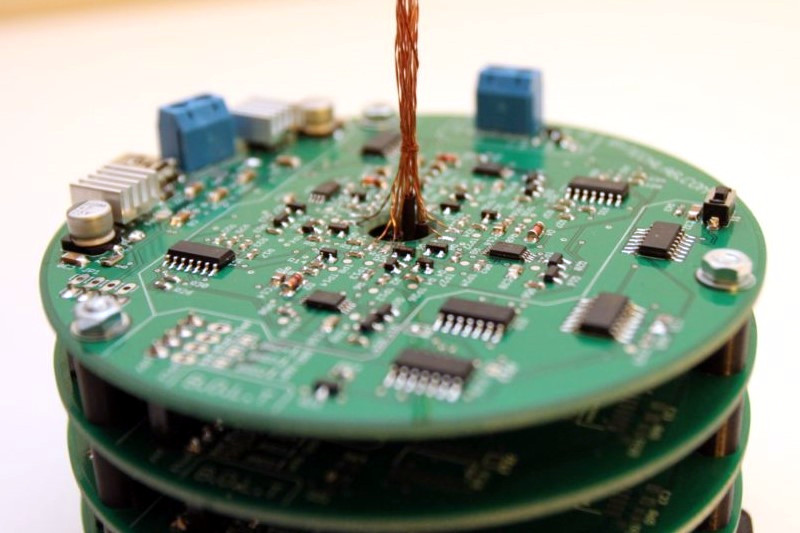 Some of you may remember the fascinating example of an LED you can blow out like a candle which had the trick of using the LED itself as a sensor. Like any diode, the voltage drop across the LED changes very slightly based on temperature. By minimizing thermal mass with surface-mount LEDs and whisker-thin wires, it was possible to detect when the LED was being blown on.
The LED tree shown here uses the same basic principle, but with a few important changes. The electronics have been redesigned and improved, and the Arduino used in the original proof of concept is ditched for stacked custom PCBs. Each board has a diameter under 100 mm in order to take advantage of the fab house’s lower cost for small boards. [Andrew] says that while the boards required a lot of time-consuming hand soldering and assembly, the payoff was that five boards rang in at barely five dollars (plus shipping) and that’s hard to beat.
Watch the tree in action in the brief video embedded below.
source https://hackaday.com/2019/12/11/a-tree-of-leds-that-blows-out-like-a-candle/