3D Printed Metro Charger Ready for the Wasteland

In the video game Metro 2033 and its subsequent sequels, players fight their way through a post-apocalyptic version of Russia using improvised weapons and tools cobbled together from the sort of bits and bobs the survivors of a nuclear war might be able to scavenge from the rubble. One of the most useful devices in the game is known as the “Universal Charger”: a hand-operated dynamo that the player must use periodically recharge their electrical devices.

The in-game Universal Charger

Being a fan of the series, [Nikola Petrov] wanted to build his own version of the Metro 2033 charger; but rather than going for an exact screen replica, he decided to explore the mechanism itself and see if he could 3D print a functional device.

As demonstrated in the video after the break, his charger manages to produce enough energy to light an LED on each squeeze of the trigger. Though if we were packing our gear to go fight mutated beasties in alternate-future Moscow, we might look for something with a bit more kick.

Beyond the 3D printed parts, the charger uses a couple short pieces of 8 mm rod, a NEMA 17 stepper motor, and a one-way bearing that’s usually used for pull starting small gasolene engines.

Interestingly, [Nikola Petrov] is no stranger to 3D printed electrical generation. If you’re interested in getting some real power out of a NEMA 17 stepper, his fantastic printed wind turbine is a must-see.

source https://hackaday.com/2019/12/13/3d-printed-metro-charger-ready-for-the-wasteland/

This Week in Security: VPNs, Patch Tuesday, and Plundervault

An issue in Unix virtual private networks was disclosed recently, where an attacker could potentially hijack a TCP stream, even though that stream is inside the VPN. This attack affects OpenVPN, Wireguard, and even IPSec VPNs. How was this possible? Unix systems support all manner of different network scenarios, and oftentimes a misconfiguration can lead to problems. Here, packets sent to the VPNs IP address are processed and responded to, even though they are coming in over a different interface.

The attack initially sounds implausible, as an attacker has to know the Virtual IP address of the VPN client, the remote IP address of an active TCP connection, and the sequence and ACK numbers of that connection. That’s a lot of information, but an attacker can figure it out one piece at a time, making it a plausible attack.

The scenario suggested in the disclosure was a rogue access point with multiple clients. An attacker can scan the private address space, 10.*.*.* for example, and discover all the VPN clients on the network. Unless the client’s firewall is configured to block it, the VPN interface will happily respond to that scan when the correct IP address is probed.

Once a target has been found, the next step is to figure out an active TCP connection. An attacker can’t see the data inside the VPN, but can see the packet size and frequency. Sending a TCP SYN packet with a spoofed source address will trigger a different response based on whether it matches the addresses and ports. Keep in mind the address and port space here: An attacker could make an educated guess about the remote port, and already has the target’s IP address. The remote IP address and the target’s source port still need to be guessed.

After the addresses and ports are discovered, the TCP sequence number and ACK number can each be discovered in a similar way, with the VPN packet size and timing. Once an attacker has all this information, he can inject data into a TCP stream, but can’t read data from within the VPN. An HTTPS connection still completely protects against this attack, so it’s of limited real world value. Even so, it’s a clever attack, and the resulting fixes will make the entire network stack more secure.

When I heard about this attack, I reached out to [Jason Donefeld], creator of Wireguard, and asked about the status of this vulnerability.

WireGuard’s wg-quick(8) has had mitigations in place since before that
announcement came out on oss-sec.

[Jason] has had a busy few days, with Wireguard finally pulled into the Linux net-next tree, meaning it should land in the 5.6 release. I was glad to hear that fixes were already landing for this problem, and am looking forward to Wireguard’s official inclusion in Linux.

Patch Tuesday

Windows Patch Tuesday included quite the roundup of vulnerabilities, including an escalation of privilege being actively exploited in the wild. That zero-day, CVE-2019-1458, is being used in conjunction with a Chrome zero-day. The Chrome vulnerability is a race condition that results in a use after free. These two together have been observed as part of the WizardOpium attack, which has primarily spread through Korean web sites.

A second vulnerability, CVE-2019-1468, was patched this Tuesday. It wasn’t actively being exploited, but was quite the bug in the font handling code. Documents or web sites could embed a malicious font that would execute arbitrary code simply by being displayed. This exploit is a good example of why running Windows 7 after January 2020 is a dangerous proposition. This one will get fixed, but the next one won’t.

Plundervault

Stealing a play from the world of overclockers, researchers have discovered that undervolting certain Intel processors can cause errors in the secure CPU enclave. Calling the attack Plundervolt, researchers used an undocumented instruction to change CPU voltage on the fly and change protected bits.

Intel responded quickly, and has released a microcode update to fix the issue. This flaw affects processors all the way up to Intel’s 9th generation. The full paper is available, go check it out to learn more.

Ring

Making the news recently is Ring, particularly the creepy videos of “internet hackers” talking to children through Ring cameras in their home. It was humorous to watch the evening news, and hear the announcers report on this near mystical hacking activity. Let’s see if we can pierce the veil of mystery.

The obvious starting point is password reuse. It’s likely we have all had at least one account exposed in a data breach. Many of those breaches, unfortunately, included plaintext passwords. A very quick path to getting your account compromised is to reuse a username and password that’s been exposed in a breach. Ring claims that each account breach was the result of weak passwords or password reuse, combined with the lack of two factor authentication.

It appears that a tool has been circulating the forums that loads a username/password list, and attempts to log in to the Ring service through a list of proxies. Those proxies allow an attacker to make many guesses in parallel without tripping Ring’s brute force mitigations. These accounts were almost certainly not targeted against the accounts that were cracked, they were just the unlucky ones.

Vice’s Motherboard turned up some additional information about what was behind these pranks. Apparently a podcast called NulledCast specializes in trolling people on the air. It appears that these incidents were a part of that podcast, and the pranksters didn’t intend to attract nearly so much attention.

source https://hackaday.com/2019/12/13/this-week-in-security-vpns-patch-tuesday-and-plundervault/

3D-Printer and CNC Make This Russian Calculator Bilingual

Let’s be clear right up front: there are probably more obvious solutions to the problem of using a Russian calculator when you don’t speak Russian than printing new keys and engraving translated markings on them. But easy solutions are boring and generally considered beyond the scope of Hackaday articles, so let’s dive in.

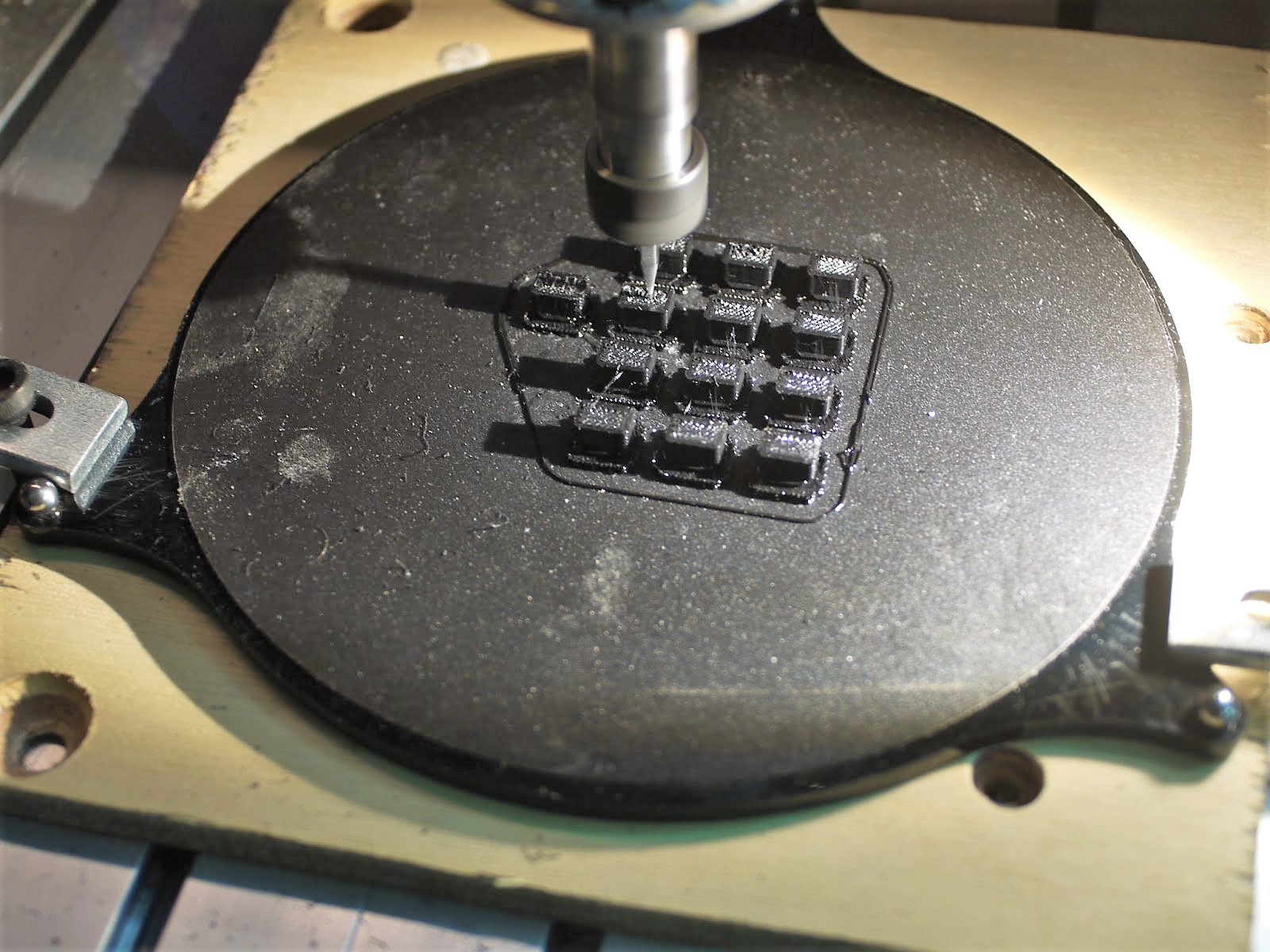
They say that mathematics is the universal language, but that’s only true to an extent. Still, even with our limited non-existent Cyrillic skills, the Russian keyboard on this RPN calculator isn’t that hard to figure out. But as [Amen] points out, in the midst of fevered calculations, one prefers not to mentally translate Χ→П to STO or remember that В↑ is the Enter key. So he printed a set of replacements for the confusing keys from PLA. While pondering how to safely fixture such small parts for the later engraving step, [Amen] hit on a genius solution: move the print bed to the CNC router and fixture everything in one go. The resulting characters are large enough to be legible and deep enough to be filled with air-drying polymer clay for contrast. After sanding and polishing, the calculator looks like it came from the Министерство электронной промышленности that way.

Honestly, we’d love to get a look inside this calculator. The insides of Russian electronics can be fascinating, and we’ve even seen entire forums dedicated to decapping Russian parts. But we understand the desire to keep it intact.

source https://hackaday.com/2019/12/13/3d-printer-and-cnc-make-this-russian-calculator-bilingual/

Feeding Both Filament And Electrons Through A Custom D-Sub Connector

We sometimes forget that 3D printers are just CNC platforms with a hotend attached, and there a whole range of alternative tool heads to use. [Jón Schone] has been doing exactly that, and needed a way to quickly disconnect his hotend completely from his printer, so he 3D printed his own custom D-sub connector for both filament and wires. (Video, embedded below.)

[Jon] has added a number of upgrades for his Creality CR10 3D printer, including a quick change tool mount to allow him to also use a laser engraver and even a small spindle. When the hotend is removed there’s no way to quickly disconnect the wiring , so the print head is usually left connected and placed to one side of the printer. For a quick detach solution for both wiring and the Bowden tube, he first modified an off-the-shelf D-sub connector. The connector was relatively expensive, and the tube had a tendency to pop out, which led to some failed prints.

[Jon] wanted to use proper Bowden tube fittings inside the connector, so he designed and printed his own D-sub connector and bought loose contacts. Pushing the contacts into the housing turned out to be quite difficult to do without breaking them, so he’s working on making that process simpler. This is just one of many examples of 3D printing 3D printer upgrades, which has been a core feature of the RepRap project right from the beginning. Check out the video after the break

We have no shortage of 3D printer hacks and there will be many more to come. Some cool recent ones includes the Jubilee CNC that was built from the start with automatic tool changing in mind, and a printer that fits in your backpack.

source https://hackaday.com/2019/12/13/feeding-both-filament-and-electrons-through-a-custom-d-sub-connector/

Catch The Old School BASIC Bug With This Computer Kit

Does the complexity of modern computing ever get you down? Do you find yourself longing for the old days, where you could actually understand what your desktop machine’s hardware and software was doing at any given moment? You aren’t alone, but unfortunately running a 40+ year old computer as your daily driver isn’t really a viable option.

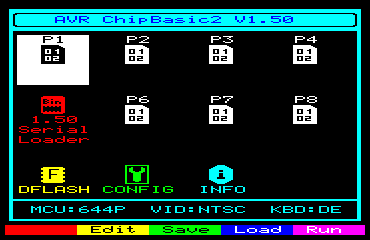
But that doesn’t mean you don’t have options. [Kostas] writes in to tell us about the “CB2 micro”: a diminutive open source retrocomputer kit that can be built in as little as 30 minutes thanks to its through-hole construction and exceptionally low parts count. When completed the miniature computer is an all-in-one BASIC development platform; just connect up a display and a PS/2 keyboard, and you’ve got everything you need to write you own programs or run games and applications developed by the community. You don’t even need a floppy, as the ATmega644P powered board has enough internal flash to store eight programs for easy access through its graphical menu system.

Main menu of the CB2 micro

For many in the audience, a cheap little board that you can assemble yourself and use as a stand-alone BASIC experimentation platform is appealing enough. But thanks to a collection of hardware add-on boards, the CB2 micro can be augmented with some interesting capabilities.

Some are fairly obvious such as adding additional flash storage or RAM, but you can also run the computer on AA or AAA batteries, or add an S-Video port. [Kostas] even explains how to assemble a special serial cable that allows you to network multiple boards together. If you take the plunge and start building your own hardware modules, the sky’s the limit.

Of course, purists may balk because the CB2 micro isn’t using a “real” computer processor. Fair enough. For those that want a more authentic retro experience, you could always pick up a kit like the RC2014, or go all out and cram a Z80 into an Altoids tin so you can carry it around with you.

source https://hackaday.com/2019/12/12/catch-the-old-school-basic-bug-with-this-computer-kit/

An Open Assistive Robotic Arm to Help People Feed Themselves

Despite being otherwise capable, not everyone is able to feed themselves. [Julien]’s robot arm project aims to bring this crucial independence back to those people. Assistive devices in this space do exist, but as always they’re prohibitively expensive and the approval process is a nightmare. The development of the arm started by working closely with people who needed it at a local hospital. We note with approval, quite a few cardboard mock-ups to get the size and shape right before more formal work was done in CAD.

The robot arm only has to support a very light payload so its construction can be quite light. A frame of steel rods or plywood is all that’s required. We like how the motion is transferred from stepper motors to the joints of the arm by generously sized timing belts allowing the weight of the arm to remain towards the base. The team behind the project has gotten it to a point, but they’re hoping it will inspire community involvement as they move forward with it.

It’s worth noting, this is not the first assistive eating aid we’ve covered.

source https://hackaday.com/2019/12/12/an-open-assistive-robotic-arm-to-help-people-feed-themselves/

A Stunning Ray Gun Built From Junk

If ever there was a quintessential weapon of science fiction, it would have to be the ray gun. [lonesoulsurfer] built this one-of-a-kind stunner from his impressive collection of junk. It’s centered around a vintage Bakelite soldering gun, a vacuum tube, and a portable stove burner, all of which contribute to the fantastic mid-century look.

Inside is a slightly modified version of a ray gun sound effects circuit from MAKE: that squeezes square waves from a lo-fi synth builder’s favorite IC, the 40106 hex inverting Schmitt trigger. [lonesoulsurfer] was able to reuse the soldering gun’s trigger to start the pew-pew-pew, and he can adjust the death ray’s output with potentiometers. The gun is powered by an old cell phone battery and a combo Li-ion charger/step-up module from the world’s largest virtual auction house. Blast past the break to watch the build video.

If one little green LED isn’t enough for you, maybe you’d prefer this light painting gun.

source https://hackaday.com/2019/12/12/a-stunning-ray-gun-built-from-junk/

Software Defined Radio Gets Physical Control

Software Defined Radio (SDR) is a great technology, but there’s something so satisfying about spinning a physical knob to cruise the airwaves. Wanting to restore that tactile experience, [Tysonpower] purchased a cheap USB volume knob and set out to get it working with his software. Unfortunately, getting it up and running took a lot more work than you’re probably expecting.

Programming the knob’s STM32

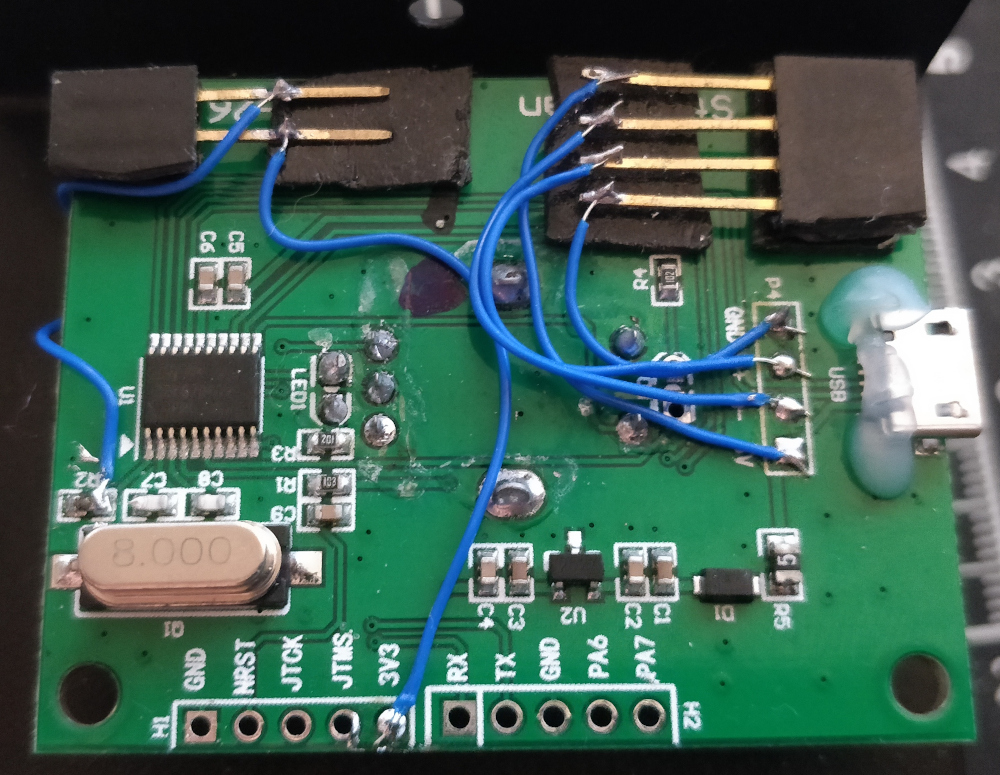
After verifying that the knob worked for volume control on his computer, [Tysonpower] decided to try and pull the firmware from the device’s STM32 microcontroller. Unfortunately, this is where things got tricky. It turned out the chip had Code Protection enabled, so when it was wired up to a programmer and put into DFU mode, the firmware got wiped. Oops.

That left [Tysonpower] with no choice but to write a new firmware from scratch, which naturally required reverse engineering the device’s hardware. Step one was reading up on STM32 development and getting the toolchain working, which paved the way to getting the knob’s LED to blink. A couple more hours worth of work and some multimeter poking later, and he was able to read the knob’s movement. He describes getting USB HID working as a nightmare due to lack of documentation, but eventually he got that sorted out as well.

The end result is a firmware allows the volume knob to mimic a mouse scroll wheel, which can be used for tuning in many SDR packages. But we think the real success story is the experience [Tysonpower] gained with reverse engineering and working with the STM32 platform. After all, sometimes the journey is just as important as the end result.

source https://hackaday.com/2019/12/12/software-defined-radio-gets-physical-control/

An Arduino and an Enigma All Rolled Into One

This hacker has been wanting to design an Enigma machine simulator for a while, but didn’t take the leap until they realized there was a compact Arduino with a surplus of I/O.

The logs go through all sort of variations on the machine. Everything from a plug board variation similar to the original to a 16 segment LED tester are covered. In one of the posts you can even see it decode a real U-Boat message. 

The earlier revisions are housed in very attractive laser cut cases but the latest designs employ an even more elegant casing solution. The simulator uses 16 segment displays and momentary push buttons for the keys. At its core is a 2560 Pro mini. The write-up contains a lot of detail about the code behind the Enigma and is interesting to read.  Interestingly, the PCB was designed in Fritzing, the EDA software many love to hate.

We love the craftsmanship and attention going into this project and can see it turning into a very appealing kit as it goes through its design cycles.

source https://hackaday.com/2019/12/12/an-arduino-and-an-enigma-all-rolled-into-one/

Supercon SMD Challenge Gets 3D Printed Probes: Build Your Own

This year was the second SMD challenge at Supercon, so it stands to reason we probably learned a few things from last year. If you aren’t familiar with the challenge, you are served some pretty conventional tools and have to solder a board with LEDs getting progressively smaller until you get to 0201 components. Those are challenging even with proper tools, but a surprising number of people have managed to build them even using the clunky, large irons we provide.

During the first challenge, we did find one problem though. The LEDs are all marked for polarity. However, since we don’t provide super high power magnification, it was often difficult to determine the polarity, especially on the smaller parts. Last year, [xBeau] produced some quick LED testers to help overcome this problem. This year we refined them a bit.

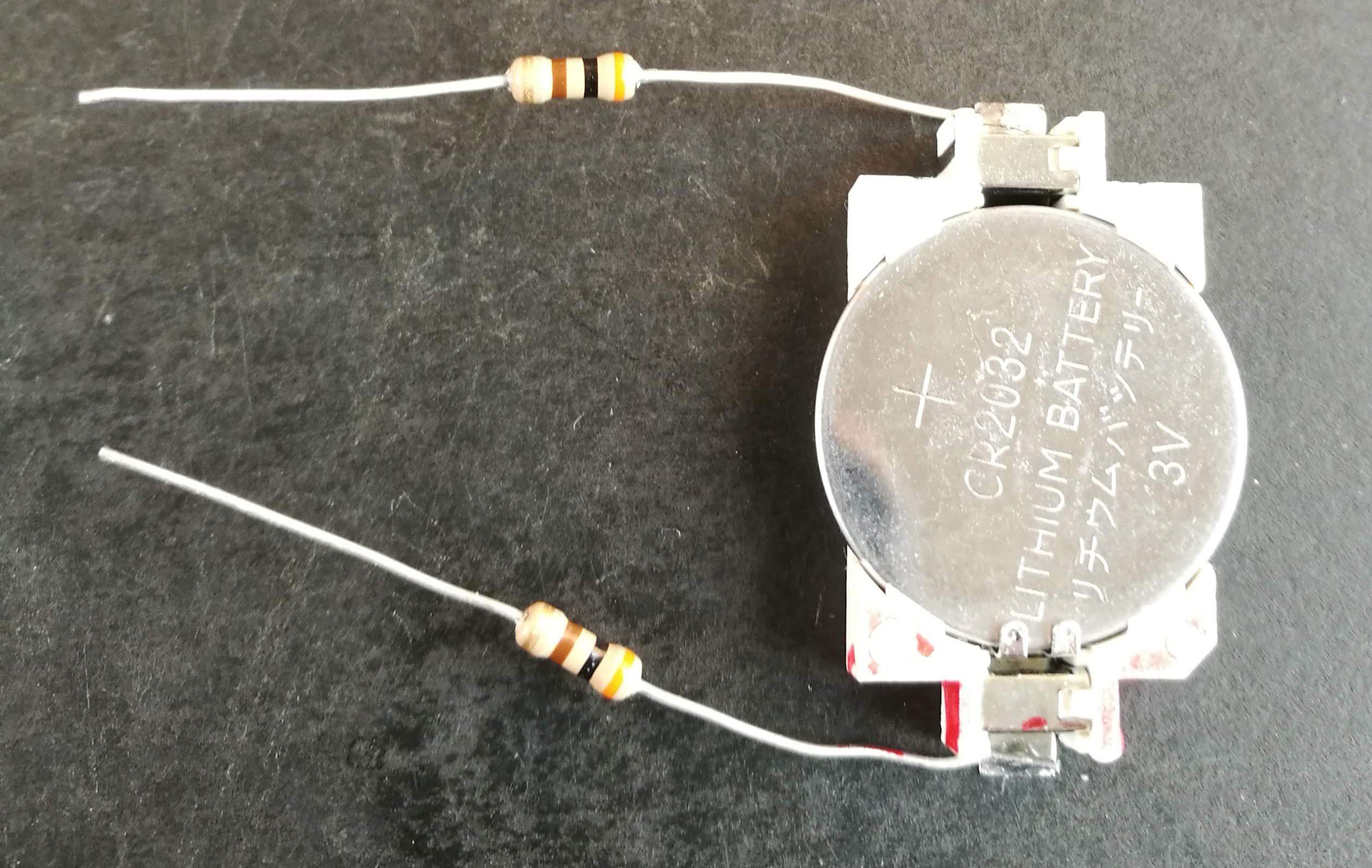
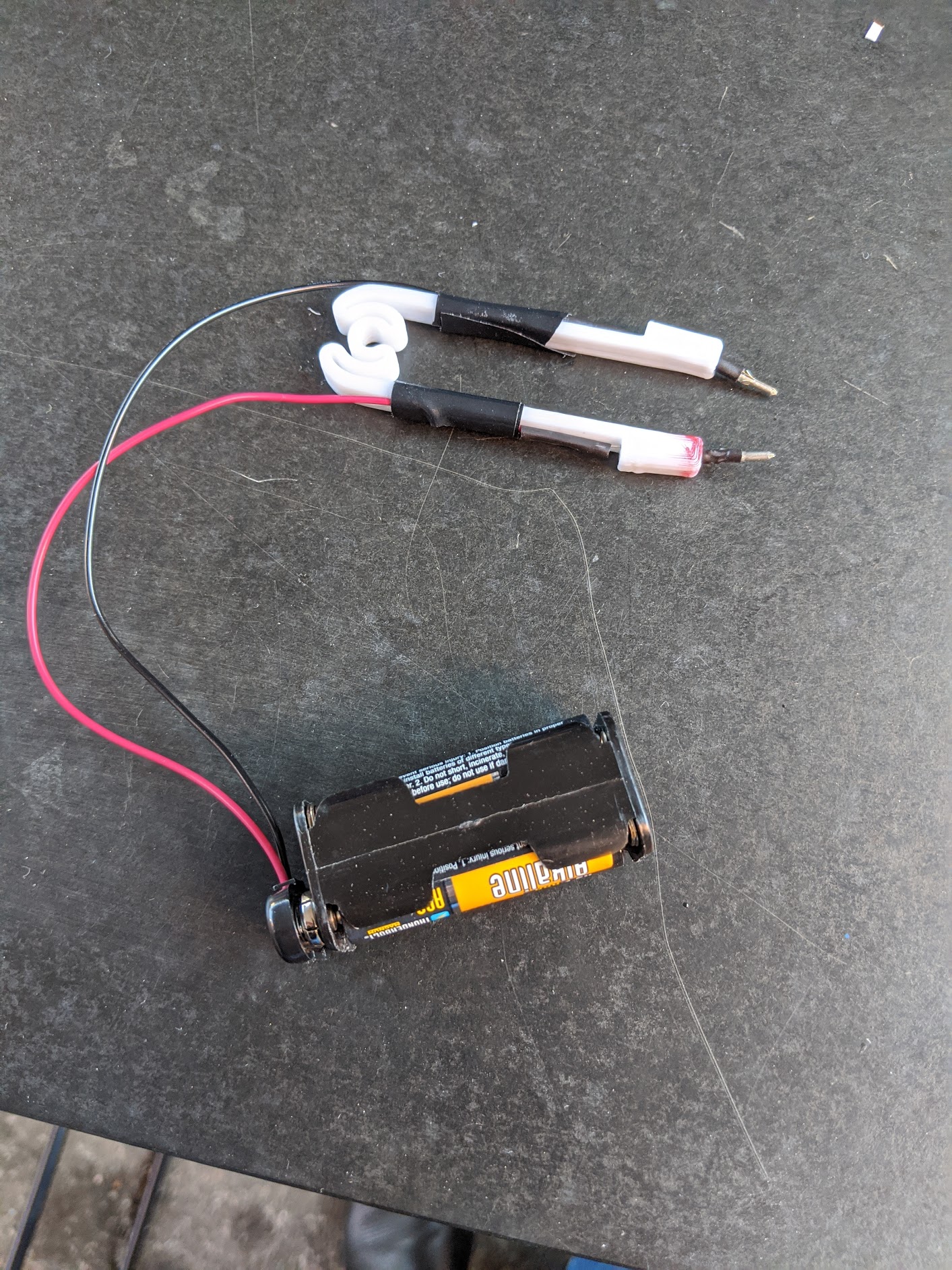
As you can see, the 2018 model was a very clever use of what was on hand. A CR2032 holder powered the probes and the probes themselves were two resistors. If you can get the LED to light with the probes you know which lead is the anode and which is the cathode. A little red ink makes it even more obvious.

Mess with Success

One school of thought was that these probes worked well in 2018 so we could just build up some more for the 2019 challenge. However, while these worked well enough, they were not very handy to use. The little wires aren’t really springs, and they would fatigue after long use.

I wanted something that would hold up to abuse better and have a little bit better ergonomics. I thought about 3D printing something. As I always do before I try to design something, I did a quick search to see if there was anything similar out there.

Over on Thingiverse, [Tom20170] had just what I needed. It was a simple 3D print for an SMD test clamp. It had a springy little plastic coil, and a housing to hold breadboard cables to use as probes.

Customize

Printing was easy, but I didn’t want to have too many wires or connections, so I wound up making two very simple modifications.

Here’s my bill of materials:

  • Eagle Plastic Devices 12BH443B-GR – 4 AAA battery holder with 9 V snaps
  • Keystone 237-M – 9 V battery snap with 8″ leads
  • 100 Ω resistors from my junk box (see below)
  • Molex 02-06-2132 – Crimp pins (only needed for the second version)
  • Heat shrink tubing
  • Electrical tape

The 9 V snaps were ideal. I got the better kind that has a molded body instead of the cheap ones that tend to break after 9 or 10 snaps. They do cost a little more, but even if you are only buying one they are still under a dollar. Saving fifty cents and breaking the connector every few months is definitely false economy.

I made a few with the Molex pins and decided the resistor leads were probably just as good bare, so I didn’t use the rest of the pins. I used heat shrink on them when I did use them. You could probably also use the wires the Thingiverse design calls for, if you wanted.

The resistors are what I had on hand. They aren’t super critical and if I had to do it over again, they are one of a few things I’d change.

Construction

I printed a bunch of probe bodies using PLA at 0.3 mm layer height on an ANET A8. I used 20% infill, but that probably wasn’t very important. They don’t take long to print, so I fit as many as I could put on the bed at one time, and then did a few runs.

The resistors slot nicely into the cavity on either side and a little heatshrink hides the solder joints. Electrical tape or heatshrink ties the wires to the sides to strain relief everything. As before, a little red ink makes it easy to see which lead is positive.

If you look closely, you’ll see that a permanent marker isn’t the best way to mark PLA. It sort of soaks into places you didn’t mean for it to go. However, for a positive mark, that’s not very important. I wouldn’t use it to color a 3D print, though, if it mattered that the color region was crisp.

More Tweaks?

We couldn’t really tell if anyone preferred the tips versus the bare resistor leads. Having the batteries detachable definitely made it easier to transport the probes.

The resistors limit the current depending on the LED’s forward voltage. Typically, an LED will have somewhere between 1.8 V and 3.3 V drop. With a 100 Ω resistor, that works out to a range between 13.5 mA and 21 mA. That’s a little hot on the high end, and you could probably safely increase the resistor values. With two 470 Ω resistors, you’d have the current run between roughly 3 mA and 8 mA. 1 kΩ should also work, but might be a little dim.

Instead of using a higher resistance, I had toyed with the idea of putting a second LED in series so the tweezers could double as a continuity probe.  A 1.8 V red LED, for example, would see about 12 mA if you short the probe, but would still let most LEDs under test to get 5 or 6 mA with a 100 Ω resistor.

The Right Stuff

Of course, if your multimeter has a diode setting, that’s probably the right tool for the job. The positive probe will indicate the anode of the LED if the device lights. If it doesn’t light, switch the probes around.

If you look at the LED datasheet, you should find a way to identify the polarity optically. For example, some have a green stripe, a dot, or a notch. You can also intuit the polarity by noting the connections inside the LED if it has a clear lens. Sometimes the shape of the solder pad will tell you. If the components are on a reel, the reel usually has a way to tell, but that doesn’t help you if you just have a few loose parts.

Have a look at this LED datasheet from Vishay. You can see the terminals and pad look a little different. This one from Kingbright clearly shows a cut-off corner. You can see many examples in this Digikey TechForum post.

If you want to see more about the SMD challenge, check out [Dan Maloney’s] experience. Perhaps you prefer your tweezers a bit smarter. However, if you do make a pair of these, post them up and send us a link. Meanwhile, you can start practicing for next year’s competition. It is never too early.

source https://hackaday.com/2019/12/12/supercon-smd-challenge-gets-3d-printed-probes-build-your-own/


Custom Nixies Perform When Cranked Up to 100,000 Hertz

With the popularity of Nixie clocks, we’d be forgiven for thinking that the glowing tubes are only good for applications with a stately pace of change. But we forget that before they became the must-have hobbyist accessory, Nixies were used in all kinds of scientific instruments, from frequency counters to precision multimeters. In such applications, update rates in the hundreds or thousands of Hertz aren’t uncommon, and the humble Nixie handled display refreshes with ease.

But what about refreshing a Nixie at 100 kHz? That was the question put to artisanal Nixie maker [Dalibor Farný] by a client who wanted a timer to calibrate high-speed cameras. It was a feat that [Dalibor] wasn’t sure his custom-made tubes could handle. The video below shows his efforts to find out.

If you ever wanted to know about the physics of gas-discharge displays like the Nixie, the fifteen minutes starting at about 5:13 will give you everything you need. That basic problem boils down to the half-life of excited neon, or how long it takes for half the population of excited molecules to return to the ground state. That, in turn, dictates how long a given cathode will continue to visibly glow after it’s turned off, which determines how many digits will appear illuminated at once.

To answer that, they engaged a company in Prague with a camera capable of a mind-blowing 900,000 frames per second. Even though they found a significant afterglow period for each cathode, even at 100 kHz it’s clear which digit is the one that’s currently illuminated. They also looked at the startup of digits in a cold Nixie versus one that’s warmed up, leading to some fascinating footage at around 26:30.

We appreciate [Dalibor]’s attention to detail, not only in the craftsmanship of his custom tubes but in making sure they’re going to do their job. He recently did a failure analysis on some of his high-end clocks that showed the same care for his product and his brand.

Thanks to [Chris Muncy] for the tip.

source https://hackaday.com/2019/12/12/custom-nixies-perform-when-cranked-up-to-100000-hertz/