Helping Hands, Reinvented

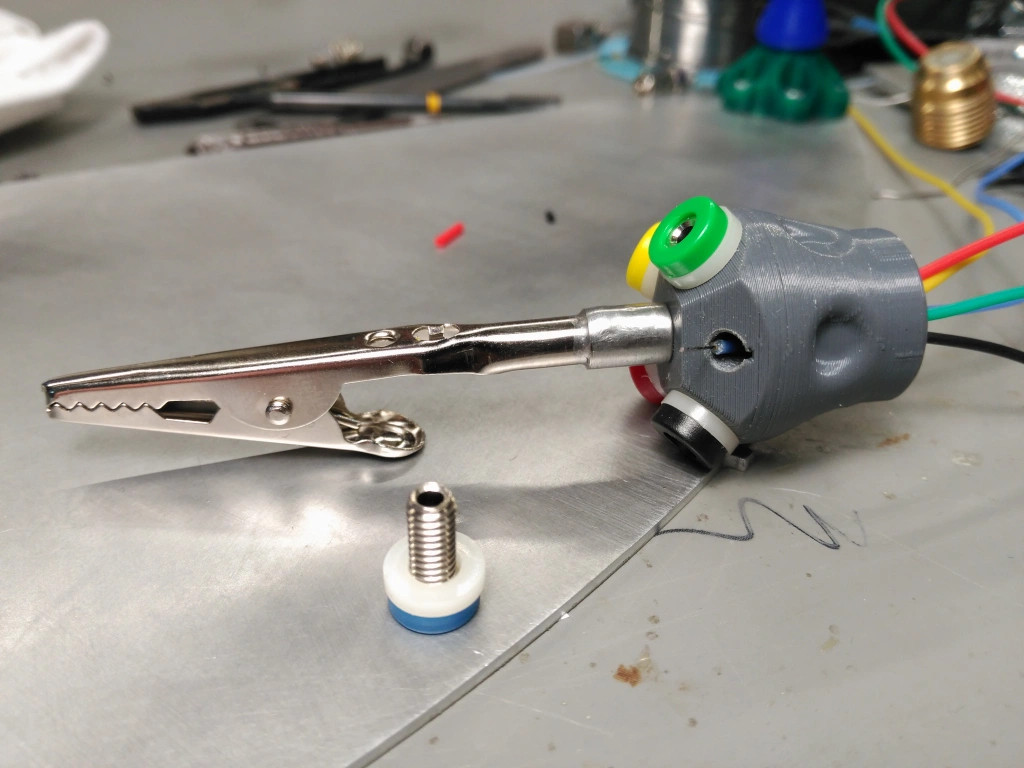
[Nixie] was tired of using whatever happens to be around to hold things in place while soldering and testing. It was high time to obtain a helping hands of some kind, but [Nixie] was dismayed by commercial offerings — the plain old alligator clips and cast metal type leave a lot to be desired, and the cooling tube cephalopod type usually have the alligator clips just jammed into the standard tube ends with no thought given to fine control or the possibility of reducing cable count.

[Nixie] happened to have some unneeded cooling tube lying around and started designing a new type of helping hands from the ground plane up. Taking advantage of the fact that cooling tubes are hollow,  [Nixie] routed silicone-jacketed wires through them for power and low speed signals. These are soldered to five banana jacks that are evenly spaced around an alligator clip.

Even if you don’t need power, all those extra alligators would come in quite handy for circuit sculpture or anything else that requires a lot of hands. [Nixie] put the files up on Thingiverse if you want to make your own.

We’ve seen plenty of helping hands over the years, but this concrete-based helper ought to cement your decision to make your own.

source https://hackaday.com/2021/01/08/helping-hands-reinvented/

Helping Hands, Reinvented

[Nixie] was tired of using whatever happens to be around to hold things in place while soldering and testing. It was high time to obtain a helping hands of some kind, but [Nixie] was dismayed by commercial offerings — the plain old alligator clips and cast metal type leave a lot to be desired, and the cooling tube cephalopod type usually have the alligator clips just jammed into the standard tube ends with no thought given to fine control or the possibility of reducing cable count.

[Nixie] happened to have some unneeded cooling tube lying around and started designing a new type of helping hands from the ground plane up. Taking advantage of the fact that cooling tubes are hollow,  [Nixie] routed silicone-jacketed wires through them for power and low speed signals. These are soldered to five banana jacks that are evenly spaced around an alligator clip.

Even if you don’t need power, all those extra alligators would come in quite handy for circuit sculpture or anything else that requires a lot of hands. [Nixie] put the files up on Thingiverse if you want to make your own.

We’ve seen plenty of helping hands over the years, but this concrete-based helper ought to cement your decision to make your own.

source https://hackaday.com/2021/01/08/helping-hands-reinvented/

Helping Hands, Reinvented

[Nixie] was tired of using whatever happens to be around to hold things in place while soldering and testing. It was high time to obtain a helping hands of some kind, but [Nixie] was dismayed by commercial offerings — the plain old alligator clips and cast metal type leave a lot to be desired, and the cooling tube cephalopod type usually have the alligator clips just jammed into the standard tube ends with no thought given to fine control or the possibility of reducing cable count.

[Nixie] happened to have some unneeded cooling tube lying around and started designing a new type of helping hands from the ground plane up. Taking advantage of the fact that cooling tubes are hollow,  [Nixie] routed silicone-jacketed wires through them for power and low speed signals. These are soldered to five banana jacks that are evenly spaced around an alligator clip.

Even if you don’t need power, all those extra alligators would come in quite handy for circuit sculpture or anything else that requires a lot of hands. [Nixie] put the files up on Thingiverse if you want to make your own.

We’ve seen plenty of helping hands over the years, but this concrete-based helper ought to cement your decision to make your own.

source https://hackaday.com/2021/01/08/helping-hands-reinvented/

Old Kindle Shows HDMI Video, Eventually

Even with the recent price reductions on stand-alone panels, picking up a used Kindle is still arguably the most cost effective way to get your hands on a large electronic paper display. Especially when you consider the Kindle includes a battery, case, and electronics to drive the display. Bending the Kindle software to your whims introduces its own unique challenges of course, but with a little tweaking, an old e-reader can live again as whatever you wish it to be.

Case in point, the OkMonitor project by [Brendan Sleight]. Using a somewhat dizzying combination of software and hardware, he’s figured out a way to turn an older Kindle Paperwhite into a plug-and-play HDMI monitor. Is it a great monitor? Far from it. As the name implies, the best you can hope to get from this solution is an OK monitor. But at least it’s something.

There’s quite a bit going on behind the scenes in OkMonitor, which [Brendan] describes through a slideshow on the project page. But the high-level idea is that a Raspberry Pi 4 with a simple USB HDMI capture device takes the video input and converts it on the fly to a scaled down Kindle-friendly format. The converted video is streamed over WiFi to the jailbroken Kindle with netcat, where it’s displayed by a native video player. In the video after the break you can see that the end result looks pretty impressive, even if there is a considerable delay involved.

Despite the demonstration [Brendan] has put together for OkMonitor, we can’t say we’d watch many films over this setup. But the fact that you can plug any HDMI device into the “base station” and have the video sent out to one or more Kindles is undeniably impressive. It’s definitely worth a close look, even if you just take some of the concepts of this project to get your own Kindle repurposing idea off the ground.

We’ve recently seen some promising progress made towards repurposing large e-paper price tags labels, but it’s hard to imagine such niche devices will ever become cheaper than second hand Kindles. With continued software development, these old e-readers are likely to remain quite popular among hackers.

source https://hackaday.com/2021/01/08/old-kindle-shows-hdmi-video-eventually/

Hackaday Podcast 100: Arduino Plays CDs, Virtual Reality in the 60s, and Magical Linear Actuators

Hackaday editors Elliot Williams and Mike Szczys kick off the first episode of the new year with the best hacks the internet has to offer. There’s a deep dive into water-level sensing using a Christmas tree as an excuse. We ooh and ah over turning a CD-ROM drive into a CD player (miraculous tech of the previous century?). Do you have any use cases for ATtiny oscillator calibration registers? We look in on a hack that makes it dead simple to measure and set their values. The episode finishes up with a discussion of the constantly moving goal posts of virtual reality.

Take a look at the links below if you want to follow along, and as always, tell us what you think about this episode in the comments!

Direct download (~65 MB)

Places to follow Hackaday podcasts:

Episode 100 Show Notes:

New This Week:

  • Elliot’s been rebuilding his CNC foam cutter
  • Mike’s getting closer to a proper automated backup system

Interesting Hacks of the Week:

Quick Hacks:

Can’t-Miss Articles:

source https://hackaday.com/2021/01/08/hackaday-podcast-100-arduino-plays-cds-virtual-reality-in-the-60s-and-magical-linear-actuators/

Solid Oak Arcade Cabinet: When Particle Board Won’t Do

Having an arcade cabinet of one’s own is a common dream among those who grew up during the video game arcade heyday of the 80s and early 90s. It’s a fairly common build that doesn’t take too much specialized knowledge to build. This cabinet, on the other hand, pulled out all of the stops for the cabinet itself, demonstrating an impressive level of woodworking expertise.

The cabinet enclosure is made with red oak boards, which the creator [Obstreperuss] sawed and planed and then glued together to create the various panels (more details are available on his Imgur album). The Mario artwork on the sides and front aren’t just vinyl stickers, either. He used various hardwoods cut into small squares to create pixel art inlays in the oak faces. After the fancy woodwork was completed, the build was finished out with some USB arcade controllers, a flat-panel screen, and a Raspberry Pi to run the games.

While the internals are pretty standard, we have to commend the incredible quality of the woodworking. It’s an impressive homage to classic arcade machines and we wouldn’t mind a similar one in our own homes. If you’re lacking the woodworking equipment, though, it’s possible to get a refined (yet smaller) arcade cabinet for yourself with a 3D printer instead.

source https://hackaday.com/2021/01/08/solid-oak-arcade-cabinet-when-particle-board-wont-do/

This Week in Security: Android Bluetooth RCE, Windows VMs, and HTTPS Everywhere

Android has released it’s monthly round of security updates, and there is one patched bug in particular that’s very serious: CVE-2021-0316. Few further details are available, but a bit of sleuthing finds the code change that fixes this bug.

Fix potential OOB write in libbluetooth
Check event id if of register notification command from remote to avoid OOB write.

It’s another Bluetooth issue, quite reminiscent of BleedingTooth on Linux. In fact, in researching this bug, I realized that Google never released their promised deep-dive into Bleedingtooth. Why? This would usually mean that not all the fixes have been rolled out, or that a significant number of installations are unpatched. Either way, the details are withheld until the ramifications of releasing them are minimal. This similar Bluetooth bug in Android *might* be why the BleedingTooth details haven’t yet been released. Regardless, there are some serious vulnerabilities patched this in this Android update, so make sure to watch for the eventual rollout for your device.

HTTPS Everywhere

Google and Firefox are continuing their push toward a web based on HTTPS. Some of the changes, particularly by Google, have been viewed with some skepticism. However, this upcoming Chromium change looks like a welcome one. Put simply, when a user types in a URL without specifying HTTP or HTTPS, Chrome will try to load the website over HTTPS first. This change has been spotted in the Chromium source, and isn’t deployed by default anywhere — yet. The eventual implementation will probably feature a parallel lookup of web sites over HTTP and HTTPS, in order to avoid a large slowdown for HTTP only sites. If you live on the Firefox side of the fence, you’re still covered, as Firefox has an optional HTTPS everywhere mode as well.

Zyxel and the Hard-coded Credentials

[Niels Teusink] from EYE was doing some research on his Zyxel router, and came across an undocumented user account, zyfwp. Just looking at the username, I would guess it enables Zxel firmware updates of some sort — And yes, the account is to enable automatic firmware updates. It wasn’t supposed to be enabled for SSH login, though. Yes, a handful of Zyxel models had an unintentional backdoor. [Niels] believes he discovered the problem just weeks after the vulnerable firmware was released, so the impact of this one is minimal. Go check the list of products and firmware to see if your device was affected. One last note, while this sort of vulnerability is always facepalm-worthy, Zyxel absolutely owned up to the goof, responded quickly, and has absolutely done the right thing in fixing this.

Legal and Easy Windows VMs

There’s often a need for disposable Windows installs. Whether you’re looking at a file that is probably a virus, or want to check something out on a clean install, there’s a certain safety in knowing that if something goes wrong, you can just trash the VM and start over. Yes, it’s possible to manage all this manually, but when I came across [Rolando Anton]’s guide to automating the process, I had to make a mental bookmark and share it with you guys.

He first gives us the details on how to manually turn a fresh Windows install into a VM image, which is a useful howto in it’s own right. What comes next is impressive. If I understand what I’m seeing, he’s using Packer to run the whole process as a one-liner. He’s careful to point out that these images are legal for testing, research, and evaluation — not for production environments, as per Microsoft’s licensing.

Using Google to Defeat Google reCAPTCHA

And in a fun turn, it was pointed out to me this week, that you can use Google’s speech to text service to defeat Google’s reCAPTCHA service. ReCAPTCHA is widely considered one of the best CAPTCHA services, or “Completely Automated Public Turing test to tell Computers and Humans Apart”. One of the laudable things Google has done is include alternative ways to solve a CAPTCHA. A blind person, for instance, would be unable to complete a visual CAPTCHA test. One of the alternatives is to listen to a brief audio file, and transcribe what is being said. It just so happens that Google also has a really robust speech-to-text API. With a success rate of something like 91%, you can automatically pass reCAPTCHA using Google’s own service. Man bites dog.

source https://hackaday.com/2021/01/08/this-week-in-security-android-bluetooth-rce-windows-vms-and-https-everywhere/

FISHBOT Reels Them In So You Don’t Have To

Fishing is generally thought of as a relaxing and laid-back activity, but it still requires a certain amount of physical strength and dexterity. This can be a problem for older anglers or those with physical disabilities. To bring back the simple joy of fishing to those who may no longer be able to hold a rod on their own, [Ozz] has been working on the FISHBOT.

The FISHBOT looks like a miniature crane, complete with an electric motor and winch to pull in the line. But there’s a bit more going on here than meets the eye. Anyone who’s tried to land a large fish knows you have to be cautious of snapping the line, so [Ozz] has added a load cell to the system that can tell when its being pulled too tightly. In the future he hopes to make this feature a bit smarter by taking into account additional variables, but for now it should at least keep the more energetic of your quarry from getting away.

[Ozz] is controlling the beefy 400 watt motor with an IBT-2 H-bridge module connected to an Arduino Mega. The electronics can communicate with the user’s smartphone over a HM-10 Bluetooth module, which allows for more advanced features such as gesture controls that utilize the accelerometer in the phone. Long term, it sounds like he hopes to use the microcontroller in conjunction with the load cell to pull off more advanced tricks like weighing the fish and sending the data off to the user’s fishing buddies to show off.

In the past we’ve seen a drone used to get a lure out where the fish are, but bring able to catch one and reel it back in is a very different challenge. It looks like [Ozz] still has some work to do on this project, but so far it seems things are going well. Being able to return a simple pleasure like this to those who thought their fishing days were behind them will surely prove worthy of the effort.

source https://hackaday.com/2021/01/08/fishbot-reels-them-in-so-you-dont-have-to/

FISHBOT Reels Them In So You Don’t Have To

Fishing is generally thought of as a relaxing and laid-back activity, but it still requires a certain amount of physical strength and dexterity. This can be a problem for older anglers or those with physical disabilities. To bring back the simple joy of fishing to those who may no longer be able to hold a rod on their own, [Ozz] has been working on the FISHBOT.

The FISHBOT looks like a miniature crane, complete with an electric motor and winch to pull in the line. But there’s a bit more going on here than meets the eye. Anyone who’s tried to land a large fish knows you have to be cautious of snapping the line, so [Ozz] has added a load cell to the system that can tell when its being pulled too tightly. In the future he hopes to make this feature a bit smarter by taking into account additional variables, but for now it should at least keep the more energetic of your quarry from getting away.

[Ozz] is controlling the beefy 400 watt motor with an IBT-2 H-bridge module connected to an Arduino Mega. The electronics can communicate with the user’s smartphone over a HM-10 Bluetooth module, which allows for more advanced features such as gesture controls that utilize the accelerometer in the phone. Long term, it sounds like he hopes to use the microcontroller in conjunction with the load cell to pull off more advanced tricks like weighing the fish and sending the data off to the user’s fishing buddies to show off.

In the past we’ve seen a drone used to get a lure out where the fish are, but bring able to catch one and reel it back in is a very different challenge. It looks like [Ozz] still has some work to do on this project, but so far it seems things are going well. Being able to return a simple pleasure like this to those who thought their fishing days were behind them will surely prove worthy of the effort.

source https://hackaday.com/2021/01/08/fishbot-reels-them-in-so-you-dont-have-to/

The Amiga 1000, Still Receiving New Peripherals 35 Years Later

In the world of retrocomputing it’s the earliest models that garner the most  interest, usually either due to their rarity, or sometimes just because of their flaws. The Commodore Amiga 1000 is a case in point, it was the machine everybody wanted but its A500 home computer sibling made the Amiga a success story. Peripherals for the 500 are plentiful then, while those for the 1000 remain a rarity. Thus it’s a treat to see an A1000 peripheral appear in the present day, in the form of a memory, clock, and SD card expansion called the Parciero. It packs 8Mb of SRAM to give the Amiga some truly quick fast memory, something that would have used an eye-wateringly expensive brace of chips back in the day but now has just a single package.

We like the description of the Parciero’s case as “about the size of a harmonica that’s been run over by a steam roller“, but it conceals the effect of the march of technology. Amiga enthusiasts are used to their peripherals being chunky affairs full of through-hole chips. Its creator [David Dunklee] is a retired senior US Space Force officer, and we appreciate his humour in the silkscreen layer. It’s a small-scale commercial product, but in a field so select as Amiga 1000 owners it’s unusual enough to make it noteworthy to all retrocomputer enthusiasts by virtue of its mere existence. We congratulate him for helping keep that little corner of vintage technology alive.

The Amiga 1000 may be the original, but it’s possible that it may not be the rarest Amiga.

source https://hackaday.com/2021/01/08/the-amiga-1000-still-receiving-new-peripherals-35-years-later/

Party Canoe Lights Up The Water

Generally, any activity out on the water is more dangerous when done at night. Hazards are less visible, and it can be easy to get into trouble. [Xyla Foxlin]’s party canoe can’t help with that, but it does look the business after dark.

The canoe is made out of fiberglass, directly formed onto an existing canoe to make getting the shape right easy. It was formed in two halves, with special care taken to make the final result as clear as possible. Obviously, fiberglass is never going to be perfectly transparent, but [Xyla] does a great job of getting a nice translucent frosted look. The final effect means that it’s the perfect canoe to stuff full of addressable LEDs. A string of WS2812Bs, hooked up to an Arduino, make for an appealing lightshow when boating at night.

The diffusive nature of the fiberglass really makes the difference here. We’ve talked about the topic before – it’s the key to making your glowy project really pop. Video after the break.

source https://hackaday.com/2021/01/07/party-canoe-lights-up-the-water/

Companies Have New Take on Old Energy Storage Tech

According to Spectrum, several companies are poised to make a splash storing energy with gravity. That sounds fancy and high tech at first, but is it, really? Sure, we usually think of energy storage as some sort of battery, but there are many energy storage systems that use water falling, for example, which is almost what this new technology is all about. Almost, since instead of water these new systems move around multi-ton blocks.

The idea itself is nothing new. You probably learned in high school that you have kinetic energy when a rock rolls down a hill, but a rock sitting on a mountain immobile has potential energy. These systems use the same idea. Moving the “rock” up stores energy and letting it fall releases the same energy. The big difference between the systems is what “up” means.

For Swiss company Energy Vault, the 35 metric ton bricks rise into the air manipulated by towers that look like alien construction cranes. To store energy, the crane builds a tower of bricks around itself. When the bricks return to the ground, they form a lower ring around the tower.

Another company, Scotland-based Gravitricity, uses weights up to 5,000 metric tons and moves them up and down very deep mine shafts, an approach shared by several other companies in this field. Some of the systems use the mechanical motion of the weight falling while others use the weight as a piston to drive water through a pretty ordinary generator.

Why not use batteries? According to the post, Energy Vault claims that blocks made of dirt, waste, and polymer are environmentally friendly compared to batteries. The blocks don’t wear out much, either, so operating costs are low since there’s not much to replace frequently as is the case of batteries.

The scale of the weights is hard to imagine. Another company, Gravity Power, claims they could deliver 400 megawatts for 16 hours using an 8 million metric ton piston. There’s no word on how long it takes to bring that piston back to the charged position after the 16 hours, though. A Boeing 757-200, for example, weighs about 100 tons when loaded with fuel and passengers. So imagine 80,000 giant airplanes melted down. It makes Energy Vault’s 35-ton weights seem much more reasonable.

Keep in mind, these systems don’t generate electricity. They store it, so there will be some loss. However, the principle of these is straightforward, the only complication is the scale. We wondered if anyone has used some sort of system like this on a small scale on a project that would have normally used rechargeable batteries? Sounds like a weekend project and if you do it, be sure to let us know.

source https://hackaday.com/2021/01/07/companies-have-new-take-on-old-energy-storage-tech/

DIY Laser Tag System Comes With All The Bells And Whistles

While VR is becoming really immersive, it still can’t compete with a game of good old laser tag to get the blood pumping and spending quality time with friends. [Xasin] has been working on a DIY laser tag system for a while now, and it has grown to include an impressive array of features and customizability.

Named LZRTag, the project started back in 2018 with simple ATmega328 based prototypes on breadboards. It has since evolved to a fully-featured system with ESP32s in the 3D printed pistol communicating with a Raspberry Pi/Linux game server over MQTT. Each pistol also features an accelerometer, I2S audio amp and speaker for game sounds, and WS2812 RGP LEDs for light effects. IR Lasers are used as emitters to target wearable IR receivers with more RGB LEDs wired to the pistol.

A Ruby server on a Linux machine takes care of all the communications, game management, shot validation, and scoring. It can handle up to 255 players and is designed to be extremely customizable for game modes, weapons classes, or any other feature you would like to have. [Xasin] has also created IR beacons to add even more possibilities, such as capture the flag, safe zones, and revive zones.

We really like the flexibility of the system, and it would make an awesome group project for a hackerspace. You could also add a shock module to motivate players a bit more to avoid getting shot. If you want more gun, take a look at the laser tag rifle with a HUD we featured earlier in the year

source https://hackaday.com/2021/01/07/diy-laser-tag-system-comes-with-all-the-bells-and-whistles/

A Tubular Fairy Tale You Control with Your Phone

At first glance, this might appear to be a Rube Goldberg machine made of toys. The truth isn’t far off — it’s a remote-control animatronic story machine driven by its spectators and their phones. [Niklas Roy] and a team of volunteers built it in just two weeks for Phaenomenale, a festival centered around art and digital culture that takes place every other year.

A view of the tubes without the toys.

A red ball travels through a network of clear acrylic tubes using 3D printed Venturi air movers, gravity, and toys to help it travel. Spectators can change the ball’s path with their phones via a local website with a big picture of the installation. The ball triggers animations along its path using break beam detection and weaves a different story each time depending on the toys it interacts with.

Here’s how it works: a Raspberry Pi 4 is responsible for releasing the ball at the beginning of the track and for controlling the track switches. The Pi also hosts a server for smartphones and the 25 Arduino Nanos that control the LEDs and servos of the animatronics. As a bonus animatronic, there’s a giant whiteboard that rotates and switches between displaying the kids’ drawings and the team’s plans and schematics. Take a brief but up-close tour after the break.

This awesome art project was a huge collaborative effort that involved the people of Wolfsburg, Germany — families in the community donated their used and abandoned toys, groups of elementary school kids were brought in to create stories for the toys, and several high school kids and other collaborators realized these drawings with animatronics.

Toys can teach valuable lessons, too. Take this body-positive sushi-snarfing Barbie for example, or this dollhouse of horrors designed to burn fire safety into children’s brains.

source https://hackaday.com/2021/01/06/a-tubular-fairy-tale-you-control-with-your-phone/

A Tubular Fairy Tale You Control with Your Phone

At first glance, this might appear to be a Rube Goldberg machine made of toys. The truth isn’t far off — it’s a remote-control animatronic story machine driven by its spectators and their phones. [Niklas Roy] and a team of volunteers built it in just two weeks for Phaenomenale, a festival centered around art and digital culture that takes place every other year.

A view of the tubes without the toys.

A red ball travels through a network of clear acrylic tubes using 3D printed Venturi air movers, gravity, and toys to help it travel. Spectators can change the ball’s path with their phones via a local website with a big picture of the installation. The ball triggers animations along its path using break beam detection and weaves a different story each time depending on the toys it interacts with.

Here’s how it works: a Raspberry Pi 4 is responsible for releasing the ball at the beginning of the track and for controlling the track switches. The Pi also hosts a server for smartphones and the 25 Arduino Nanos that control the LEDs and servos of the animatronics. As a bonus animatronic, there’s a giant whiteboard that rotates and switches between displaying the kids’ drawings and the team’s plans and schematics. Take a brief but up-close tour after the break.

This awesome art project was a huge collaborative effort that involved the people of Wolfsburg, Germany — families in the community donated their used and abandoned toys, groups of elementary school kids were brought in to create stories for the toys, and several high school kids and other collaborators realized these drawings with animatronics.

Toys can teach valuable lessons, too. Take this body-positive sushi-snarfing Barbie for example, or this dollhouse of horrors designed to burn fire safety into children’s brains.

source https://hackaday.com/2021/01/06/a-tubular-fairy-tale-you-control-with-your-phone/

Turning a CMM Into A 3d Printer

There are two paths to owning a 3D printer: purchasing one or crafting your own 3D printer designed to your own exacting specifications. [Roetz 4.0] has decided to go this latter route and converted a 1.3-ton air-bearing Coordinate-measuring machine (CMM) into an FDM 3D printer. A CMM is a tool used to precisely measure the geometry of an object via gently lowering a calibrated probe. We’ve seen scratch build printers before, but this particular build benefits from having the CMM machinery and its 18 air bearings. The CMM head is moved by [Roetz 4.0]’s own custom system, but it takes advantage of the bearings. After some careful CAD planning as well as a fair bit of milling, lathing, and prototyping, he had buttery smooth controlled motion.

With an off the shelf driver board wired together with a large red button, he was ready for a maiden test print. A determination to finish before the year was out pushed things along. There are still a few quirks to fix, like the hole in the air drying system but those can be tackled next year. Ultimately, we think the results are stunning and it was a journey we were glad to go on with [Roetz 4.0]. The final episode of the series is after the break.

Thanks [Jan] for sending this one in!

source https://hackaday.com/2021/01/06/turning-a-cmm-into-a-3d-printer/

Electric Puzzle Board Lets You Assemble Circuits With Ease

Many hackers learned about electronics over the years with home experimenter kits from Radio Shack and its ilk. Eschewing soldering for easier screw or spring based connections, they let the inexperienced build circuits with a minimum of fuss, teaching them the arcane ways of the electron along the way. [victorqedu] has put a modern spin on the form, with his Electric Puzzle Game.

The build consists of a series of 3D printed blocks, each containing a particular electronic component or module. The blocks can be joined together to form circuits, with magnets in the blocks mating with screws in the motherboard to hold everything together and make electrical contact between the parts. It’s a project that requires a significant amount of 3D printing and upfront assembly to build, but it makes assembling circuits a cinch.

The variety of circuits that can be built is impressive. [victorqedu] shows off everything from simple LED and switch arrangements to touch sensors and even a low-powered “Tesla coil”. We imagine playing with the blocks and snapping circuits into place would be great fun. We’ve seen other unconventional approaches before, too – such as building squishy circuits for educational purposes. Video after the break.

source https://hackaday.com/2021/01/06/electric-puzzle-board-lets-you-assemble-circuits-with-ease/

Automating Your Car With a Spare Fob and an ESP8266

Despite the name, home automation doesn’t have to be limited to only the devices within your home. Bringing your car into the mix can open up some very interesting possibilities, such as automatically getting it warmed up in the morning if the outside air temperature drops below a certain point. The only problem is, not everyone is willing to start hacking their ride’s wiring to do it.

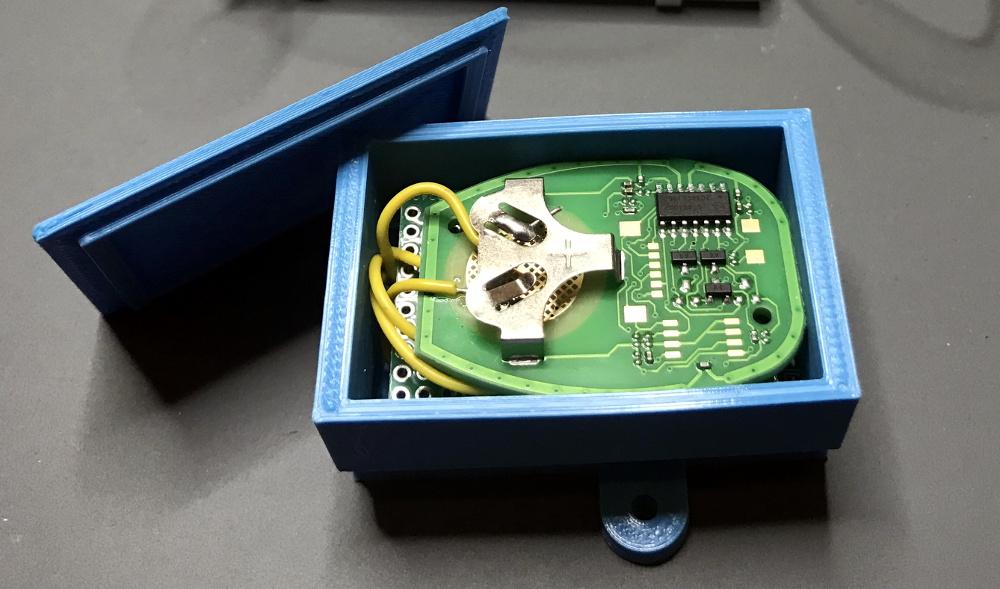
Which is exactly why [Matt Frost] went the non-invasive route. By wiring up an ESP8266 to a cheap aftermarket key fob for his Chevrolet Suburban, he’s now able to wirelessly control the door locks and start the engine without having to make any modifications to the vehicle. He was lucky that the Chevy allowed him to program his own fob, but even if you have to spend the money on getting a new remote from the dealer, it’s sure to be cheaper than the repair bill should you cook something under the dash with an errant splice or a misplaced line of code.

The hardware for this project is about as simple as it gets. The fob is powered by the 3.3 V pin on the Wemos D1 Mini, and the traces for the buttons have been hooked up to the GPIO pins. By putting both boards into a custom 3D printed enclosure, [Matt] came up with a tidy little box that he could mount in his garage and run off of a standard USB power supply.

On the software side of things [Matt] has the device emulating a smart light so it can easily be controlled by his Alexa, with a few helpful routines sprinkled in that allow him to avoid the awkward phraseology that would be required otherwise. There’s also a minimal web server running on the microcontroller that lets him trigger various actions just by hitting the appropriate URLs, which made connecting it to Home Assistant a snap. One downside of this approach is that there’s no acknowledgement from the vehicle that the command was actually received, but you can always send a command multiple times to be sure.

This isn’t the first time we’ve seen an ESP8266 used to “push” buttons on a remote. If you’ve got a spare fob for your device, or can get one, it’s an excellent way to automate it on the cheap.

source https://hackaday.com/2021/01/06/automating-your-car-with-a-spare-fob-and-an-esp8266/

Bad Idea for Desoldering Actually Might be Pretty Smart

This video on building a DIY desoldering iron says it all right up front: this is stupid and dangerous, and you shouldn’t do it. But that doesn’t mean it doesn’t work, or that it doesn’t have potential to be turned into something else.

The story begins, as it often does these days, on the pages of Amazon as [AnotherMaker] shopped for a real desoldering setup. Despite a case of sticker shock, he took the plunge on a nice Hakko vacuum desolderer, but as is also often the case, it failed to arrive. Rather than accept defeat, [AnotherMaker] purchased a cheap-o soldering iron and a brass tee fitting for small-bore tubing that would chuck nicely into the spot where the stock tip once lived, giving him a way to both melt solder and move air.

Unfortunately, rather than applying a vacuum, he chose to blast 100 PSI compressed air through the tip, which certainly moves a lot of solder, perhaps at the cost of burns and eye injuries. The potential for accidental short circuits is pretty high too, but c’mon — it’s not like we all haven’t flicked or dropped a board to desolder something. Is this really much different?

As fraught with peril as this method may be, [AnotherMaker] is onto something here. Perhaps adding a 3D-printed venturi generator could turn that blast of air into a vacuum. Or maybe a vacuum pump for a manual pick-and-place would do the trick too.

source https://hackaday.com/2021/01/06/bad-idea-for-desoldering-actually-might-be-pretty-smart/

Heat Turns 3D Printer Filament into Springs

The next time you find yourself in need of some large-ish plastic springs, maybe consider [PattysLab]’s method for making plastic springs out of spare filament. The basic process is simple: tightly wind some 3D printer filament around a steel rod, secure it and wrap it in kapton tape, then heat it up. After cooling, one is left with a reasonably functional spring, apparently with all the advantages of annealed plastic.

The basic process may be simple, but [PattysLab] has a number of tips for getting best results. The first is to use a 3D-printed fixture to help anchor one end of filament to the steel rod, then use the help of an electric drill to wind the filament tightly. After wrapping the plastic with kapton tape (wrap counter to the direction of the spring winding, so that peeling the tape later doesn’t pull the spring apart), he suspends it in a pre-heated oven at 120 C for PLA and 160 C for PETG. How long does it stay in there? [PattysLab] uses the following method: when the spring is wound, he leaves a couple inches of filament sticking out to act as a visual indicator. When this segment of filament sags down, that’s his cue to begin the retrieval process. After cooling, the result is a compression or extension spring, depending on how it was wound before being heated.

[PattysLab] shared a short video on this Reddit post that shows both springs in action, and the process is all covered in the video, embedded below.

This method clearly works for [PattysLab] and doesn’t require any unusual hardware or equipment, but should anyone wish to apply a bit more finesse to the process, this scientific approach to annealing plastics used in 3D printing might come in handy.

source https://hackaday.com/2021/01/06/heat-turns-3d-printer-filament-into-springs/

Custom Controller makes Turbomolecular Pump Suck

[Mark Aren] purchased a pair of Turbomolecular pumps (TMP) sans controllers, and then built an FPGA based BLDC controller for the Turbomolecular pumps. A TMP is similar to a jet turbine, consisting of several stages of alternating moving turbine blades and stationary stator blades, and having turbine rotation speeds ranging from 10,000 rpm to 90,000 rpm. TMP’s cannot exhaust directly to atmosphere, and must be combined with a backing (or roughing) pump to create a lower grade vacuum first. They find use in lots of applications such as electron microscopy, analytical sciences, semiconductors and lamp manufacturing. With the lamp industry rapidly embracing LEDs, many of the traditional lamp making lines are getting decommissioned, and if you are lucky, you can snag a TMP at a low cost – but it still will not be cheap by any means.

The two BOC-Edwards EXT255H Compound Molecular Pumps (PDF), that [Mark] bought did not have their accompanying EXC100E Turbomolecular Pump Controllers (PDF), and given pandemic related restrictions, he decided to build a controller of his own, using components and modules from his parts bin. The pump and controller user manuals offered only sketchy details about the sensored BLDC motor used in the pump. The low phase-to-phase resistance implied low drive voltage, and [Mark] decided to try running it at 24 V to start with. He already had experience using the Mitsubishi PS21245-E IGBT inverter bridge, and even though it was rated for much higher voltages, he knew that it would work just fine at 24 V too.

After figuring out a state machine for motor commutation that utilized PWM based adjustable current control, he implemented it on a 128 element FPGA board. Considering how expensive the TMP was, he wisely decided to first try out his driver on a smaller “expendable” BLDC motor. This whole process was non-trivial, since his available IGBT module was untested and undocumented, and required several tweaks before he could run it at the required 12 kHz PWM signals. His test motor was also undocumented, failing to run correctly when first hooked up. Fixing that issue meant having to disassemble the motor to check its internal wiring. Eventually, his efforts paid off, and he was able to safely run the TMP motor to confirm that his design worked.

With FPGA code, IGBT wiring and power supply issues sorted, the next step was to add a supervisory micro-controller, using an Arduino Nano. Its functions included interfacing with a touch screen LCD as a user interface, communicating with the FPGA module, and controlling several relays to switch power to the motor power supply, the roughing pump, TMP cooling fan, and a solenoid for the vacuum vent. Spindle current is calculated by measuring voltage drop across shunt resistors on the low side of the IGBT. Motor speed is measured using one of the motor hall sensors, and a thermistor provides motor temperature sensing. [Mark]’s PCB fabrication technique seems a bit different too. Using an Excellon drill file, he drills holes in a piece of plastic using a laser cutter to create a bare board, and then solders copper tracks by hand.

His initial tests at atmospheric pressure (although not recommended unless you monitor pump temperature), resulted in 7300 rpm while consuming about 7 Amps before he had to shut it down. In further tests, after adding a roughing pump to the test setup, he was able to spin the TMP to 20,000 rpm while it consumed 0.6 A. Obviously, the pump is rated to operate at a higher voltage, possibly 48 V based on the values mentioned in the TMP controller manual. The project is still “work in progress” as [Mark] hopes to eventually drive the pump up to its specified 60,000 rpm operating speed. What is not clear is what he eventually intends to do with this piece of exotic machinery. All he mentions is that “he has recently taken an interest in high-vacuum systems and is interested in exploring the high-vacuum world of electron guns.”

Maybe [Mark] can compare notes with the Open Source Turbomolecular Pump Controller that we featured some time back. And if you’d like to be a little bit more adventurous and build you own TMP, we got you covered with this DIY Everyman’s Turbomolecular Pump.

source https://hackaday.com/2021/01/06/custom-controller-makes-turbomolecular-pump-suck/

Xbox Controller Mod Gets Serious About Stick Drift

Many a gamer has found that after a few years of racing around the track or sending demons back from whence they came, the analog sticks on their trusty controller can start to drift around. Many times it’s a fairly minor problem, something you might only notice if you were really keeping an eye out for it, but it can definitely be annoying. Those handy with a soldering iron might just swap out the sticks for replacements once it gets to that point, but [Taylor Burley] wondered how difficult it would be to recalibrate the ailing sticks instead.

To be clear, [Taylor] acknowledges this approach is overkill. It would be cheaper and easier to just replace the drifting stick with a new one. Even if you take into account that new sticks might not be as high quality as the originals and could give up the ghost faster, this probably isn’t worth the effort. But that doesn’t mean it’s not an interesting hack.

In the video after the break, [Taylor] starts by explaining how stick drift occurs in the first place. Each axis of the stick is physically connected to the wiper of a potentiometer, so for 10K pots, the stick’s center point should correspond to a resistance of 5K. He then goes on to measure the resistance in a bad joystick, and sure enough, the center resistance is off by several hundred Ohms.

To fix this, he comes up with a simple circuit that places additional potentiometers between the wipers. With two joysticks and two adjustment pots per axis, that makes eight little adjustment wheels that need to be fiddled with to get the center points calibrated properly. In this case [Taylor] uses a controller diagnostic tool for the Xbox to quantify the impact his adjustments are making so he can dial it in perfectly, but the idea is the same no matter who’s logo is on the box.

We’d say this is the most overkill attempt at addressing the issue of stick drift on gaming controllers we’ve ever seen, but that title has to go to [Matteo Pisani], who replaced the analog stick on his Switch Joy-Con with a custom circular touchpad.

source https://hackaday.com/2021/01/05/xbox-controller-mod-gets-serious-about-stick-drift/

Xbox Controller Mod Gets Serious About Stick Drift

Many a gamer has found that after a few years of racing around the track or sending demons back from whence they came, the analog sticks on their trusty controller can start to drift around. Many times it’s a fairly minor problem, something you might only notice if you were really keeping an eye out for it, but it can definitely be annoying. Those handy with a soldering iron might just swap out the sticks for replacements once it gets to that point, but [Taylor Burley] wondered how difficult it would be to recalibrate the ailing sticks instead.

To be clear, [Taylor] acknowledges this approach is overkill. It would be cheaper and easier to just replace the drifting stick with a new one. Even if you take into account that new sticks might not be as high quality as the originals and could give up the ghost faster, this probably isn’t worth the effort. But that doesn’t mean it’s not an interesting hack.

In the video after the break, [Taylor] starts by explaining how stick drift occurs in the first place. Each axis of the stick is physically connected to the wiper of a potentiometer, so for 10K pots, the stick’s center point should correspond to a resistance of 5K. He then goes on to measure the resistance in a bad joystick, and sure enough, the center resistance is off by several hundred Ohms.

To fix this, he comes up with a simple circuit that places additional potentiometers between the wipers. With two joysticks and two adjustment pots per axis, that makes eight little adjustment wheels that need to be fiddled with to get the center points calibrated properly. In this case [Taylor] uses a controller diagnostic tool for the Xbox to quantify the impact his adjustments are making so he can dial it in perfectly, but the idea is the same no matter who’s logo is on the box.

We’d say this is the most overkill attempt at addressing the issue of stick drift on gaming controllers we’ve ever seen, but that title has to go to [Matteo Pisani], who replaced the analog stick on his Switch Joy-Con with a custom circular touchpad.

source https://hackaday.com/2021/01/05/xbox-controller-mod-gets-serious-about-stick-drift/

Xbox Controller Mod Gets Serious About Stick Drift

Many a gamer has found that after a few years of racing around the track or sending demons back from whence they came, the analog sticks on their trusty controller can start to drift around. Many times it’s a fairly minor problem, something you might only notice if you were really keeping an eye out for it, but it can definitely be annoying. Those handy with a soldering iron might just swap out the sticks for replacements once it gets to that point, but [Taylor Burley] wondered how difficult it would be to recalibrate the ailing sticks instead.

To be clear, [Taylor] acknowledges this approach is overkill. It would be cheaper and easier to just replace the drifting stick with a new one. Even if you take into account that new sticks might not be as high quality as the originals and could give up the ghost faster, this probably isn’t worth the effort. But that doesn’t mean it’s not an interesting hack.

In the video after the break, [Taylor] starts by explaining how stick drift occurs in the first place. Each axis of the stick is physically connected to the wiper of a potentiometer, so for 10K pots, the stick’s center point should correspond to a resistance of 5K. He then goes on to measure the resistance in a bad joystick, and sure enough, the center resistance is off by several hundred Ohms.

To fix this, he comes up with a simple circuit that places additional potentiometers between the wipers. With two joysticks and two adjustment pots per axis, that makes eight little adjustment wheels that need to be fiddled with to get the center points calibrated properly. In this case [Taylor] uses a controller diagnostic tool for the Xbox to quantify the impact his adjustments are making so he can dial it in perfectly, but the idea is the same no matter who’s logo is on the box.

We’d say this is the most overkill attempt at addressing the issue of stick drift on gaming controllers we’ve ever seen, but that title has to go to [Matteo Pisani], who replaced the analog stick on his Switch Joy-Con with a custom circular touchpad.

source https://hackaday.com/2021/01/05/xbox-controller-mod-gets-serious-about-stick-drift/

AI on the Highway

A couple of announcements caught our attention last week regarding AI-controlled cars. South Korea’s Kakao Mobility and local startup Autonomous A2G launched a limited self-driving taxi service in Sejong City this month, made possible by enabling legislation passed in May. For now, the service is restricted to government employees, and the AI driver will be backed-up by an engineer who is there to monitor the systems and take over in an emergency. The companies plan to expand the fleet and service areas this year, although no details are given.

Another announcement comes from the Ministry of Land, Infrastructure and Transport about the on-going successes of the semi-autonomous truck platooning program. This is a collaboration between the Korean Expressway Corporation, Kookmin University in Seoul, and Hyundai Motors. Previously restricted to a designated test road called the Yeoju Smart Highway, the program is now being tested on public roads at speeds up to 70 kph. This year the program will expand to platoons of 4 trucks running at 90 kph. We’ve always thought that long-haul trucking and freight industries would be an early adaptor AI technologies, and one which AI could offer significant benefits.

source https://hackaday.com/2021/01/05/ai-on-the-highway/