Remote Control Robot Deals Dominoes

Oh, dominoes — the fun of knocking them down is inversely proportional to the pain of setting them all up again. [DIY Machines] is saving loads of time by automating the boring part with a remote control domino-laying machine. If only it could pick them back up.

This machine can be driven directly over Bluetooth like an R/C car, or programmed to follow a predetermined path via Arduino code. Here’s how it works: an Arduino Uno drives two servos and one motor. The 1:90 geared motor drives the robot around using a 180° servo to steer. A continuous servo turns the carousel, which holds nearly 140 dominoes. We love that the carousel is designed to be hot-swappable, so you can keep a spare ready to go.

[DIY Machines] really thought of everything. Every dozen or so dominoes, the machine leaves a gap in case one of the dominoes is tipped prematurely. There are also a couple of accessories for it, like a speedy domino loading stick and a fun little staircase bridge to add to your domino creations. Though all the machine files are freely available, [DIY Machines] requests a small donation for the accessories files. Check out the complete build video after the break, followed by a bonus video that focuses on upgrading the machine with an HM10 Bluetooth module for controlling it directly with a phone.

This certainly isn’t the first domino-laying device we’ve seen, though it might be the most accessorized. [Matthias Wandel]’s version uses only one motor to move and deal the dominoes.

source https://hackaday.com/2021/01/12/remote-control-robot-deals-dominoes/

Visualizing Ionizing Radiation With DIY Plastic Scintillators

Although most types of radiation are invisible, except for the visible part of the EM spectrum, there are many ways that we can make various types of radiation visible. One of these methods is called ‘scintillation’, which can be used to make ionizing radiation visible. Recently [Lukas Springer] demonstrated how to make scintillators out of what is essentially plastic: bisphenol-A (E45, ‘epoxy’) resin with hardener and other additives.

The essential principle of operation behind a scintillator is its sensitivity to ionizing radiation, along with the tendency to absorb the energy and re-emit it in the form of light, i.e. luminescence. This is akin to the luminescence of LEDs, except that in their case the underlying principle is that of electro-luminescence. In the case of a plastic scintillator, the scintillating material is suspended in the solid polymer matrix base.

As [Lukas] points out, plastic scintillators are hardly ideal when it comes to their sensitivity to ionizing radiation, but they compensate for this by being easy to shape and produce, while being very durable. For this experiment, he used regular epoxy as the scintillator matrix, p-Terphenyl as primary scintillator and Coumarin 102 as the wavelength shifter. These three compounds act as a reaction chain, with the matrix absorbing the radiation and transferring it to the primary scintillator, which in turns emits the energy as light.

As the primary scintillator tends to radiate in the deep UV part of the EM spectrum, a wavelength shifter (i.e. secondary scintillator) which ‘shifts’ the emitted UV radiation into the visible part of the spectrum.

After producing a batch of plastic scintillators following the above recipe, [Lukas] irradiated them with gamma radiation, and found them to perform worse than some already not remarkable Russian PS-based scintillators. [Lukas’s] guess is that the matrix may be absorbing the primary scintillator’s output, or a mismatch between the primary and second scintillator.

While tricky to get right, it does seem like a fun hobby if one has some interesting in chemistry. [Lukas] (@GigaBecquerel on Twitter) provides a basic recipe as well as many other compounds to use for the primary and secondary scintillator, as well as the matrix compound. Enough to get started with.

source https://hackaday.com/2021/01/12/visualizing-ionizing-radiation-with-diy-plastic-scintillators/

Spacing Out: Launch Successes And Failures, Next Stop Mars, Rocket Catching, & Space Stations

As large sections of the globe have seen themselves plunged into further resurgences of the pandemic over the past few weeks there has been no let-up in the world of space exploration even for the Christmas holidays, so here we are with another Spacing Out column in which we take a look at what’s going up, what’s flying overhead, and what’s coming down.

Not today, Paul. r2hox from Madrid, Spain, CC BY-SA 2.0.

December was eventful, with China returning lunar samples and Japan doing the same with asteroid dust. And it was reported that we  might just possibly have detected radio waves from ET. The truth may be out there and we sincerely want to believe, but this widely reported signal from Proxima Centauri probably isn’t the confirmation of alien life we’ve all been waiting for.

There has been no shortage of launches over the last month from the usual agencies and companies, with a first launch from China of their Long March 8 heavy lift rocket from the Wenchang launch site in Hainan Province. Its payload of five satellites made it safely to orbit, and we expect the rocket will be a workhorse of their future exploration programme. Meanwhile SpaceX conducted a high-altitude test of their Starship SN8 vehicle, which proceeded according to plan until the craft was approaching the landing pad, at which point the failure of one of its engines to fire caused a spectacular crash. This does not equate to an unsuccessful test flight as it performed faultlessly in the rest of its manoeuvres, but it certainly made for some impressive video.

On the subject of SpaceX and Starship, Elon Musk has said he will sell all his personal property to fund a Martian colony. This will require a fleet of up to 1000 Starships, with three launches a day to ferry both colonists and supplies to the Red Planet. He attracted controversy though by saying that interplanetary immigration would be open to people of all means with loans available for the estimated $50,000 one-way travel cost, and Martian jobs on offer to enable the debt to be paid. Many critics replied to his Tweets likening the idea to indentured servitude. It’s worth remembering that Musk is the master of the grand publicity stunt, and while it seems a good bet that SpaceX will indeed reach Mars, it’s also not inconceivable that his timeline and plans might be somewhat optimistic.

A more tangible story from SpaceX comes in their super heavy booster rocket, which is to be reusable in the same manner as their existing Falcon 9, but not landing on its own legs in the manner of the earlier rocket. It will instead dock with its launch tower, being caught by the same support structures used to stabilise it before launch. At first glance this might seem too difficult to succeed, but no doubt people expressed the same doubts before the Falcon 9s performed their synchronised landings.

Finally away from more troubling developments in the political field, The Hill takes a look at some of those likely to have a hand in providing a commercial replacement for the ISS when it eventually reaches the end of its life. They examine the likely funding for NASA’s tenancy on the station, and looked at the cluster of Texas-based companies gearing up for space station manufacture. That’s right — space station modules from the likes of Axiom Space will become a manufactured assembly rather than one-off commissions. The decades beyond the ISS’s current 2030 projected end of life are likely to have some exciting developments in orbit.

The coming year is likely to be an exciting one, with a brace of missions heading to Mars for February as well as a new space station to catch our attention. The Chinese aren’t content to stop at the Moon, with their Tianwen-1 Mars mission due to start exploring our planetary neighbour, and the first Tianhe module of what will become their much larger space station taking to the skies in the coming year. Meanwhile the Red planet will see NASA’s Perseverance rover also reaching its surface, taking with it the Ingenuity helicopter. Finally, the United Arab Emirates’ Hope probe will go into orbit, making the second month one that should have plenty of news.

Wherever you are, keep yourself safe from Earth-bound viruses, and keep looking at the skies in 2021.

source https://hackaday.com/2021/01/12/spacing-out-launch-successes-and-failures-next-stop-mars-rocket-catching-and-new-space-stations/

3D Printing in Five Axes Makes the World Flat

Just when you thought your 3D printer was hot stuff, along comes a 5D printer. Two doctoral students at Penn State want to add two more axes to get rid of overhangs. This means that instead of supports or breaking objects into pieces, the printer simply orients the print so each region of the part is printing as if it were flat. Of course, 5D printers aren’t really new, even though you don’t hear much about them. However, the paper details a new algorithm that eliminates manually defining print regions and rotations.

You do this all the time manually when you’re setting the print up. For example, if you want to print a letter T, you could print it with supports under the cross pieces or flip it upside down and print it with no support at all. The difference here is the printer can flip the workpiece itself to different angles and can change it on the fly during printing. The printer might print the shaft of the T, rotate it to draw half of the crossbar, then rotate it 180 degrees to print the other half. In all three zones, the print head is depositing materials flat with no overhang. In a simple case like a T that doesn’t really require a special machine or an algorithm, but in the general case, you often can’t just rotate a model to avoid using supports.

The proposed algorithm can take into account how much overhang angle the printer can handle so that it can reorient the model as few times as possible. Presumably, rotating the print is relatively time-consuming compared to just laying down a new layer.

We really wanted to see a picture of the 5D machine in operation, but we didn’t find any actual pictures. However, the video below is of a commercial 5D machine — presumably, you have to set it up manually — and it also shows a good example of how a part rotates to get flat prints. We honestly aren’t sure if the algorithm in the paper has actually been applied to real prints yet. The photos don’t look like the models are actually 3D printed.

We have to wonder if 5D will make it to the consumer 3D printing market. Then the marketing hype will kick in and we’ll have 20D printers driven by the marketing department.

This reminded us of 2.5D printing, but it isn’t really the same thing. If your part is spinning around, it probably adds a whole new level of grief for bed adhesion.


source https://hackaday.com/2021/01/12/3d-printing-in-five-axes-makes-the-world-flat/

Make Room For A New Arduino Competitor – With Native Brainf*ck!

With so many smaller and more capable microcontroller boards on the market it’s now fairly safe to say that the classic Arduino footprint and form factor is rather outdated. That’s not to say that there’s no fight left in the old contender though, and to prove it here’s a new platform in the familiar style set by the venerable Atmel-based board. [Eduardo Corpeño]’s Brainfuino is an Arduino competitor that runs everyone’s favourite esoteric programming language, Brainf*ck. (Keeping it SFW, folks.)

And in case you mistake it for a Brainf*ck emulator on a PCB then stand ready to be corrected, for this board runs the language natively in a Brainf*ck softcore on a Lattice MachXO2 FPGA. This is the real deal, on which only a true genius or masochist would dare to code.

The board itself is very neatly executed with a graphical style that presents more than a nod to the original Arduino. On this board is the FPGA, 256 kB ROM and 138 kB RAM, an STM32 to provide a USB serial port and an analogue input, and a level shifter to provide Arduino-style 5 V logic on the pins. We can see it’ll provide hours of fun to anyone interested in learning Brainf*ck, but besides that it has potential as an Arduino-shaped FPGA board. We like the joke, we like the graphical and engineering design, but underneath that lies quite the technical achievement.

Brainf*ck has made it to Hackaday before, not least in this jaw-dropping relay computer.

source https://hackaday.com/2021/01/12/make-room-for-a-new-arduino-competitor-with-native-brainfck/

Growing Opals In The Lab

Opals are unique amongst gemstones, being formed from tiny silica nanospheres arranged in precise structures that give them their characteristic shifting color when seen from different angles. [The Thought Emporium] loves a challenge, so set about growing some himself.

It’s not the hardest gemstone synthesis ever, but it’s no cakewalk either. The process requires tetraethyl orthosilicate, or TEOS, which can be difficult to find, but the rest of the chemicals required are commonly available. The initial phase involves mixing the TEOS with reactants to form nanoscale silica spheres in the range of 200-350 nanometers wide. With the spheres in solution, the mixture must then be carefully dried in such a way as to create the right structure to produce opal’s famous color effects. At this stage, industrial producers add further silica to stabilize the matrix, though [The Thought Emporium] wasn’t able to find literature that explained how to do this. Instead, he relied on resin, which while imperfect, did allow the specimens to be stabilised and shown off for the purposes of the video.

The video notes that many of the steps in this process were perfected decades ago, but remain held as trade secrets, making replication an exercise in experimentation. Nonetheless, success was had in producing recognisably opalescent specimens, and we can’t wait to see further refinement of the DIY process.

We’ve seen similar work from [The Thought Emporium] before, exploring structural color and holograms. Video after the break.

source https://hackaday.com/2021/01/11/growing-opals-in-the-lab/

Starlink Satellite Dish X-Rayed to Unlock RF Magic Inside

When [Kenneth Keiter] took apart his Starlink dish back in November, he did his best to explain the high-level functionality of the incredibly complex device in a video posted to his YouTube channel. It was a fascinating look at the equipment, but by his own admission, he wasn’t the right person to try and explain the nuances of how the phased array actually functioned. But he knew who could do the technology justice, which is why he shipped the dismembered dish over to [Shahriar Shahramian] of The Signal Path.

Don’t be surprised if you can’t quite wrap your head around his detailed analysis after your first viewing. You’ll probably have a few lingering questions after the second re-watch as well. But that’s OK, as [Shahriar] still has a few of his own. Even after cutting out a section of the dish and putting it under an X-ray, it’s still not completely clear how the SpaceX engineers managed to cram everything into such a tidy package. Though there seems to be no question that the $500 price for the early-access hardware is an absolute steal, all things considered.

The layered antenna works on multiple frequencies.

Most of the video is spent examining the stacked honeycomb construction of the phased antenna array, which as expected, holds a number of RF secrets if you know what to look for. Put simply, there’s no such thing as an insignificant detail to the trained eye. From the carefully sized injection molded spacer sheet that keeps the upper array a specific distance from the RF4-like radome, to the almost microscopic holes that have been bored through each floating patch to maintain equalized air pressure through the stack up, [Shahriar] picks up on fascinating details which might otherwise seem like arbitrary design decisions.

But a visual inspection will only get you so far. Eventually [Shahriar] has to cut out a slice of the PCB so he can fit it into the X-ray machine, but don’t feel too bad, the dish was long dead before he got his hands on it. While he hasn’t yet completed his full analysis, an initial examination indicates that each large IC and the eight chips surrounding it make up a 16 channel beam forming module. Each channel is further split into two RX and TX pairs, which provides the necessary right and left hand polarization. That said, he admits there’s some room for interpretation and that further work would be necessary before any hard conclusions could be made.

Between this RF analysis and the initial overview provided by [Kenneth], we’ve already learned a lot more about this device than many might have expected considering how rare and expensive the hardware is. While we admit it’s not immediately clear what kind of hijinks hardware hackers could get into once this device is fully understood, we’re certainly eager to find out.

source https://hackaday.com/2021/01/11/starlink-satellite-dish-x-rayed-to-unlock-rf-magic-inside/

Starlink Satellite Dish X-Rayed to Unlock RF Magic Inside

When [Kenneth Keiter] took apart his Starlink dish back in November, he did his best to explain the high-level functionality of the incredibly complex device in a video posted to his YouTube channel. It was a fascinating look at the equipment, but by his own admission, he wasn’t the right person to try and explain the nuances of how the phased array actually functioned. But he knew who could do the technology justice, which is why he shipped the dismembered dish over to [Shahriar Shahramian] of The Signal Path.

Don’t be surprised if you can’t quite wrap your head around his detailed analysis after your first viewing. You’ll probably have a few lingering questions after the second re-watch as well. But that’s OK, as [Shahriar] still has a few of his own. Even after cutting out a section of the dish and putting it under an X-ray, it’s still not completely clear how the SpaceX engineers managed to cram everything into such a tidy package. Though there seems to be no question that the $500 price for the early-access hardware is an absolute steal, all things considered.

The layered antenna works on multiple frequencies.

Most of the video is spent examining the stacked honeycomb construction of the phased antenna array, which as expected, holds a number of RF secrets if you know what to look for. Put simply, there’s no such thing as an insignificant detail to the trained eye. From the carefully sized injection molded spacer sheet that keeps the upper array a specific distance from the RF4-like radome, to the almost microscopic holes that have been bored through each floating patch to maintain equalized air pressure through the stack up, [Shahriar] picks up on fascinating details which might otherwise seem like arbitrary design decisions.

But a visual inspection will only get you so far. Eventually [Shahriar] has to cut out a slice of the PCB so he can fit it into the X-ray machine, but don’t feel too bad, the dish was long dead before he got his hands on it. While he hasn’t yet completed his full analysis, an initial examination indicates that each large IC and the eight chips surrounding it make up a 16 channel beam forming module. Each channel is further split into two RX and TX pairs, which provides the necessary right and left hand polarization. That said, he admits there’s some room for interpretation and that further work would be necessary before any hard conclusions could be made.

Between this RF analysis and the initial overview provided by [Kenneth], we’ve already learned a lot more about this device than many might have expected considering how rare and expensive the hardware is. While we admit it’s not immediately clear what kind of hijinks hardware hackers could get into once this device is fully understood, we’re certainly eager to find out.

source https://hackaday.com/2021/01/11/starlink-satellite-dish-x-rayed-to-unlock-rf-magic-inside/

Dangerous Greeting Cards You Probably Shouldn’t Send Anyone

Regular paper greeting cards are pricey for what they are, and of course the annoying musical variety are even more so. If you really want to go all out, however, you’ve got to go custom made. That’s what [Xyla] and [Ian] did, though we’d stop short of recommending you build or send these to anyone!

Two variants of the “dangerous cards” were built. One repurposed an electric shocking circuit from a handheld buzzer, tucking it inside a shiny Disney greeting card. Using a switch from a musical greeting card, when opened, the shocking circuit is activated. With the circuit connected to aluminium tape electrodes hidden in the shiny foil design, when the user opens the card, they receive a painful shock. The flamethrowing variant was triggered by the same mechanism, though instead sent power to an electric match, shooting a fireball with flash cotton when the card was opened.

These cards make excellent pranks, though we’d be wary about sending them by mail for obvious reasons. We’ve seen [Xyla’s] work before too, with her glowing kayak a particular highlight. Video after the break.


source https://hackaday.com/2021/01/11/dangerous-greeting-cards-you-probably-shouldnt-send-anyone/

Laser Blasts Out High-Quality PCBs

With how cheap and how fast custom PCBs have gotten, it almost doesn’t make sense to roll your own anymore, especially when you factor in the messy etching steps and the less than stellar results. That’s not the only way to create a PCB, of course, and if you happen to have access to a 20-Watt fiber laser, you can get some fantastic homemade PCBs that are hard to tell from commercial boards.

Lucikly, [Saulius Lukse] of Kurokesu fame has just such a laser on hand, and with a well-tuned toolchain and a few compromises, he’s able to turn out 0.1-mm pitch PCBs in 30 minutes. The compromises include single-sided boards and no through-holes, but that should still allow for a lot of different useful designs. The process starts with Gerbers going through FlatCAM and then getting imported into EZCAD for the laser. There’s a fair bit of manual tweaking before the laser starts burning away the copper between the traces, which took about 20 passes for 0.035-mm foil on FR4. We have to admit that watching the cutting proceed in the video below is pretty cool.

Once the traces are cut, UV-curable solder resist is applied to the whole board. After curing, the board goes back to the laser for another pass to expose the pads. A final few passes with the laser turned up to 11 cuts the finished board free. We wonder why the laser isn’t used to drill holes; we understand that vias would be hard to connect to the other side, but it seems like through-hole components could be supported. Maybe that’s where [Saulius] is headed with this eventually, since there are traces that terminate in what appears to be via pads.

Whatever the goal, these boards are really slick. We usually see lasers used to remove resist prior to traditional etching, so this is a nice change.

source https://hackaday.com/2021/01/11/laser-blasts-out-high-quality-pcbs/

Retro Terminals Bring Some Style to Your Desktop

It wasn’t so long ago that a desktop computer was just a beige box with another, heavier, beige box sitting next to it or maybe perched on top. They’re a bit more visually exciting these days, with even mass produced PCs now shipping with RGB lighting and clear side panels. But even so, few could really look at a modern desktop computer and call it objectively beautiful.

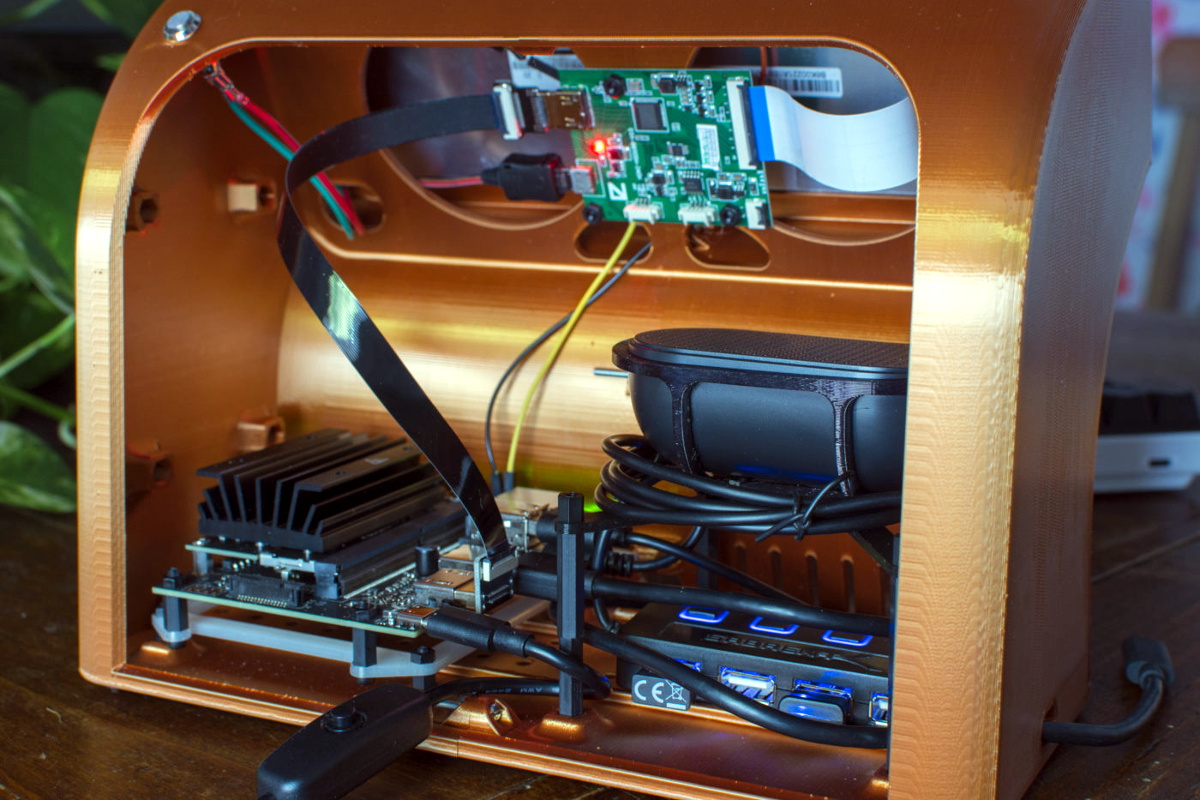
But [Oriol Ferrer Mesià] wonders if we couldn’t improve on things a bit. Over the last few months, he’s been experimenting with small 3D printed enclosures that reimagine the traditional desktop computer aesthetic. With their distinctively retro-futuristic style, they look like the kind of gadgets science magazines in the 1960s thought would be dotting kitchens, living rooms, and space stations by the year 2000. But unlike those fanciful creations, each one of these beauties is a fully functional computer.

A few of the designs are relatively conservative, and not entirely unlike some of the old “dumb terminals” of the 1970s. With a Raspberry Pi 4 and a tablet-sized screen, these diminutive terminals would be perfectly usable for light desktop work or some retro gaming.

But we particularly like the ultra-widescreen design that [Oriol] has come up with. With a fairly unusual 4:1 aspect ratio LCD, the printed enclosure for this one was so large that it had to be done in two pieces on his Ender 3. To keep the 8″ 1920 x 480 panel well fed, this design uses a Jetson Nano 2GB which has considerably more graphical punch than other Linux SBCs of similar size and price.

As part of the recent cyberdeck craze, we’ve seen plenty of people recreating the look and feel of vintage portable computers with 3D printed cases and modern components. Desktop creations have been far less common, but with gorgeous designs like these to serve as inspiration, that may change.

source https://hackaday.com/2021/01/11/retro-terminals-bring-some-style-to-your-desktop/

Circuit Sculpture Vibration Sensor

Here’s your useful and beautiful circuit for the day — [New Pew]’s vibration sensor takes manual control of the flip-flop inside a 555 timer and lights an LED in response. Use it to detect those vibrations you expect, like laundry machines, or those you only suspect, like the kind that might be coming from your engine. This gadget isn’t super-precise, but it will probably get the job done.

The vibration-detecting bit is a tiny ball bearing soldered to the spring from an old pen, which is tied between the trigger and ground pins of the 555. When the chip is powered with a 9 V battery, nearby vibrations will induce wiggle in the spring, causing the ball bearing to contact the brass rod and completing the circuit. When this happens, the internal flip flop’s output goes high, which turns on the LED. Then the flip flop must be reset with a momentary button. Check out the build video after the break.

Want to pick up Earthly vibrations? You can detect earthquakes with a homemade variable capacitor, a 555, and a Raspberry Pi.

source https://hackaday.com/2021/01/10/circuit-sculpture-vibration-sensor/

Hackaday Links: January 10, 2021

You know that feeling when your previously niche hobby goes mainstream, and suddenly you’re not interested in it anymore because it was once quirky and weird but now it’s trendy and all the newcomers are going to come in and ruin it? That just happened to retrocomputing. The article is pretty standard New York Times fare, and gives a bit of attention to the usual suspects of retrocomputing, like Amiga, Atari, and the Holy Grail search for an original Apple I. There’s little technically interesting in it, but we figured that we should probably note it since prices for retrocomputing gear are likely to go up soon. Buy ’em while you can.

Remember the video of the dancing Boston Dynamics robots? We actually had intended to cover that in Links last week, but Editor-in-Chief Mike Szczys beat us to the punch, in an article that garnered a host of surprisingly negative comments. Yes, we understand that this was just showboating, and that the robots were just following a set of preprogrammed routines. Some commenters derided that as not dancing, which we find confusing since human dancing is just following preprogrammed routines. Nevertheless, IEEE Spectrum had an interview this week with Boston Dynamics’ VP of Engineering talking about how the robot dance was put together. There’s a fair amount of doublespeak and couched terms, likely to protect BD’s intellectual property, but it’s still an interesting read. The take-home message is that despite some commenters’ assertions, the routines were apparently not just motion-captured from human dancers, but put together from a suite of moves Atlas, Spot, and Handle had already been trained on. That and the fact that BD worked with a human choreographer to work out the routines.

Looks like 2021 is already trying to give 2020 a run for its money, at least in the marketplace of crazy ideas. The story, released in Guitar World of all places, goes that some conspiracy-minded people in Italy started sharing around a schematic of what they purported to be the “5G chip” that’s supposedly included in the SARS-CoV-2 vaccine. The reason Guitar World picked it up is that eagle-eyed guitar gear collectors noticed that the schematic was actually that of the Boss MetalZone-2 effects pedal, complete with a section labeled “5G Freq.” That was apparently enough to trigger someone, and to ignore the op-amps, potentiometers, and 1/4″ phone jacks on the rest of the schematic. All of which would certainly smart going into the arm, no doubt, but seriously, if it could make us shred like this, we wouldn’t mind getting shot up with it.

Remember the first time you saw a Kindle with an e-ink display? The thing was amazing — the clarity and fine detail of the characters were unlike anything possible with an LCD or CRT display, and the fact that the display stayed on while the reader was off was a little mind-blowing at the time. Since then, e-ink technology has come considerably down market, commoditized to the point where they can be used for price tags on store shelves. But now it looks like they’re scaling up to desktop display sizes, with the announcement of a 25.3″ desktop e-ink monitor by Dasung. Dubbed the Paperlike 253, the 3200 x 1800 pixel display will be able to show 16 shades of gray with no backlighting. The videos of the monitor in action are pretty low resolution, so it’s hard to say what the refresh rate will be, but given the technology it’s going to be limited. This might be a great option as a second or third monitor for those who can work with the low refresh rate and don’t want an LCD monitor backlight blasting them in the face all day.

And finally, if it feels like time has been flying lately, you’re right. The Earth’s rotation on its axis has been shortening lately, such that days are spinning by not in a glacial 24 hours, but at a frenetic pace of 23 hours, 59 minutes, and 59.9998927 seconds. Laugh if you will, but those microseconds add up over the year. Leap seconds have been applied at least 27 times in the last 50 years to correct for Earth’s slowing rotation, but we’re now in a regime that may require a “negative leap second” be applied. Scientists will be studying the trends in Earth’s rotation and make a decision at the World Radiocommunication Conference in 2023, so our 24-hour day is safe until then.

source https://hackaday.com/2021/01/10/hackaday-links-january-10-2021/

Cyberpunk Mazda MX-5 Packs Onboard Cyberdeck

Back in April of 2019, inspired by iconic films such as Blade Runner and Akira, [Chris Watson] embarked on a journey to create his very own cyberpunk roadster from a 1991 Mazda MX-5. After pouring an incredible amount of blood, sweat, and fiberglass into the project, he now has a vehicle that wouldn’t look out of place cruising the streets of Neo Tokyo. Even if you’re not usually into car mods, his impeccably photographed build log is an absolutely fascinating journey.

But as impressive as the car itself might be, what really caught our attention was the computer sitting on the dash. From early on, [Chris] wanted the vehicle to have a companion cyberdeck that would be used to control various onboard systems. At this point it’s just for show, but he says ultimately it will be integrated with the electric motor he plans to install in place of the MX-5’s original power plant. We can’t wait to see it.

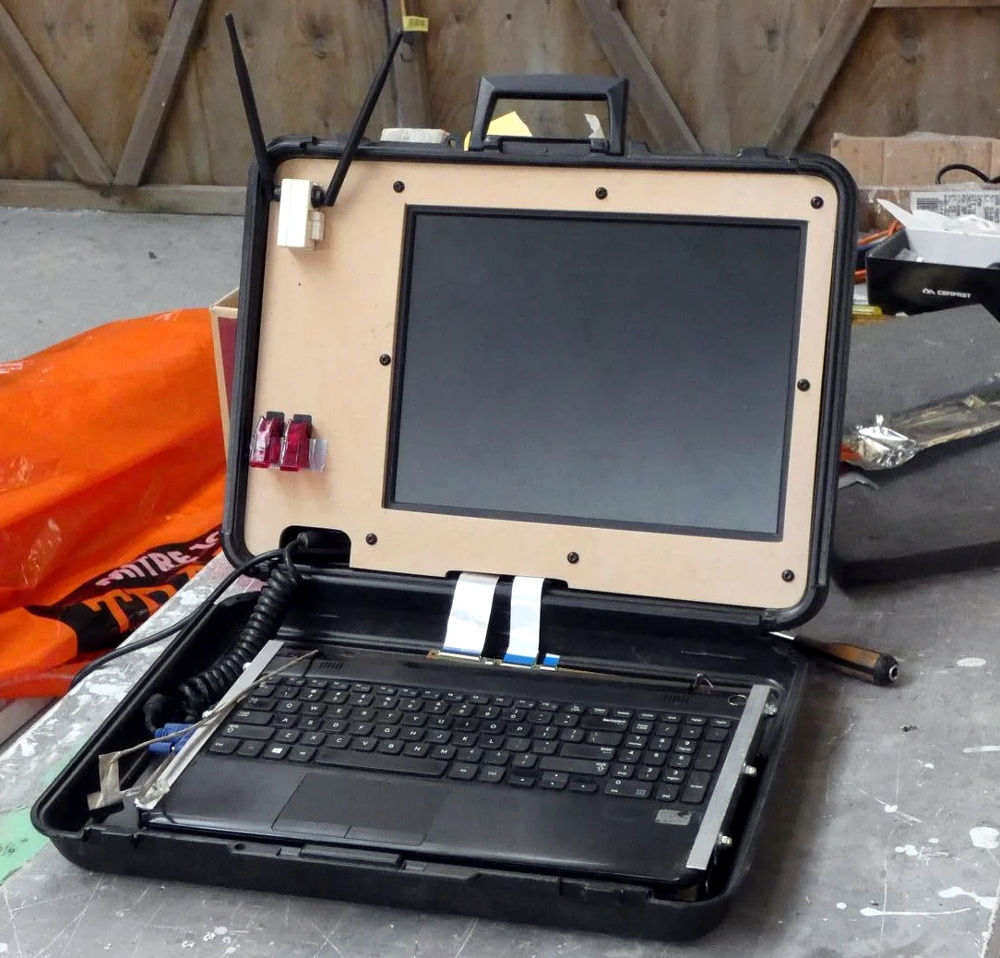
Of course, the lack of a practical application has hardly stopped us from admiring any of the other cyberdecks we’ve covered thus far. This one started out life as a laptop with a broken screen, which [Chris] beheaded and connected it to 15″ external display mounted in the top of a heavy-duty case. With a new SSD and a fresh copy of Linux Mint to verify all the hardware was still functional, he put together an MDF bezel for the display that includes some faux antennae and covered aircraft style switches.

When this futuristic roadster is making an appearance at a car show or contest, [Chris] makes sure to load up some suitably high-tech looking imagery on the display. It even shows some flashing technobabble error messages pulled from The Fast & The Furious.

Traditionally we haven’t covered many custom car projects, though to be fair, we traditionally haven’t seen many that looked like this either. But between ever more technologically advanced vehicles and the insightful car modding column helmed by our very own [Lewin Day], we expect tricked out rides may become an increasingly common sight on these pages.

source https://hackaday.com/2021/01/10/cyberpunk-mazda-mx-5-packs-onboard-cyberdeck/

Turning a Waffle Iron into a Reflow Station

There are a ton of ways to go about building your own reflow oven. Most of these builds start with, well, an oven — usually a toaster oven — with a small but significant minority choosing to modify a hotplate. But this might be the first time we’ve seen a waffle iron turned into a reflow oven.

Of course, what [Vincent Deconinck] came up with is not an oven per se. But his “RefloWaffle” certainly gets the job done. It started with an old waffle maker and a few experiments to see just how much modification it would take to create the various thermal reflow profiles. As it turned out, the original cooking surfaces had too much thermal inertia, so [Vincent] replaced them with plain copper sheets. That made for quicker temperature transitions, plus created some space between the upper and lower heating elements for the SMD board.

As for control, [Vincent] originally used an Arduino with a relay and a thermocouple, but he eventually built a version 2.0 that used a hacked Sonoff as both controller and switch. Adding the thermocouple driver board inside the Sonoff case took a little finagling, but he managed to get everything safely tucked inside. A web interface runs on the Sonoff and controls the reflow process.

We think this is a great build, one that will no doubt see us trolling the thrift stores for cheap waffle irons to convert. We’ve seen some amazing toaster oven reflows, of course, but something about the simplicity and portability of RefloWaffle just works for us.

source https://hackaday.com/2021/01/10/turning-a-waffle-iron-into-a-reflow-station/

Careful Drilling Keeps Stadia From Listening In

Google’s fledgling Stadia service leverages the Chrome ecosystem to deliver streamed PC games on mobile devices, web browsers, and TVs. While not strictly required, the company even offers a dedicated Stadia controller that connects directly to the streaming servers over its own WiFi connection to reduce overall system latency. Of course, being a Google product, the controller has a tiny microphone that’s always listening in.

[Heikki Juva] didn’t like the privacy implications of this, but unfortunately, there appears to be no way to turn off this “feature” in software. He decided the most expedient solution would be to simply remove the microphone from the controller, but it turns out there was a problem. By researching previous teardowns, he found out that it’s nearly impossible to take the controller apart without damaging it.

Getting close to the target.

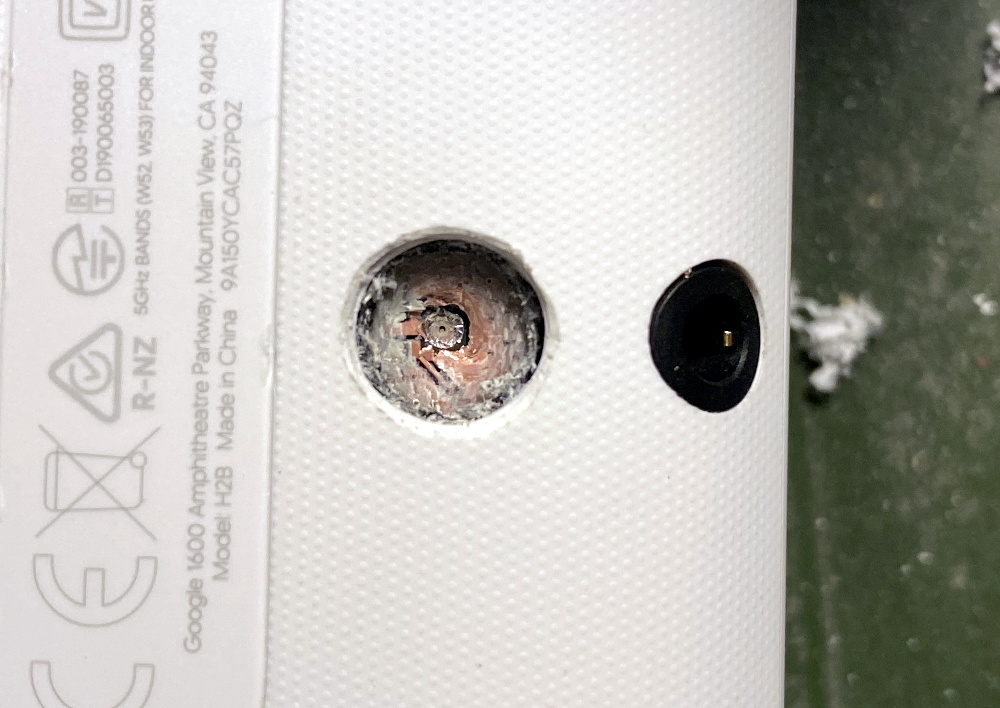
So [Heikki] came up with a bold idea. Knowing roughly the position of the microphone, he would simply drill through the controller’s case to expose and ultimately remove the device. The operation was complicated by the fact that, from the teardown video he saw, he knew he’d also have to drill through the PCB to get to the microphone mounted to the opposite side. The only bright spot was that the microphone was on its own separate PCB, so physically destroying it probably wouldn’t take the whole controller out with it.

Now we don’t have to explain why drilling into a gadget powered by an internal lithium-ion battery is dangerous, and we’re not necessarily vouching for the technique [Heikki] used here. But when presented with a sealed unit like this, we admit there weren’t a lot of good options. The fact that the user should have to go to such ridiculous lengths to disable the microphone in a game controller is a perfect example of why we should try to avoid these adversarially designed devices, but that’s a discussion for another time.

In the end, with a steady and and increasingly larger bits, [Heikki] was able to put a 7 mm hole in the back of the Stadia controller that allowed him to extract the microphone in one piece. Removing the microphone seems to have had no adverse effect on the device as, surprisingly enough, it turns out that a game controller doesn’t actually need to listen to the player. Who knew?

As our devices get smarter, hidden microphones and cameras are unfortunately becoming more common. Thankfully a few manufacturers out there are taking the hint and including hardware kill switches for these intrusive features, but until that becomes the norm, hackers will have to come up with their own solutions.

source https://hackaday.com/2021/01/10/careful-drilling-keeps-stadia-from-listening-in/

Careful Drilling Keeps Stadia From Listening In

Google’s fledgling Stadia service leverages the Chrome ecosystem to deliver streamed PC games on mobile devices, web browsers, and TVs. While not strictly required, the company even offers a dedicated Stadia controller that connects directly to the streaming servers over its own WiFi connection to reduce overall system latency. Of course, being a Google product, the controller has a tiny microphone that’s always listening in.

[Heikki Juva] didn’t like the privacy implications of this, but unfortunately, there appears to be no way to turn off this “feature” in software. He decided the most expedient solution would be to simply remove the microphone from the controller, but it turns out there was a problem. By researching previous teardowns, he found out that it’s nearly impossible to take the controller apart without damaging it.

Getting close to the target.

So [Heikki] came up with a bold idea. Knowing roughly the position of the microphone, he would simply drill through the controller’s case to expose and ultimately remove the device. The operation was complicated by the fact that, from the teardown video he saw, he knew he’d also have to drill through the PCB to get to the microphone mounted to the opposite side. The only bright spot was that the microphone was on its own separate PCB, so physically destroying it probably wouldn’t take the whole controller out with it.

Now we don’t have to explain why drilling into a gadget powered by an internal lithium-ion battery is dangerous, and we’re not necessarily vouching for the technique [Heikki] used here. But when presented with a sealed unit like this, we admit there weren’t a lot of good options. The fact that the user should have to go to such ridiculous lengths to disable the microphone in a game controller is a perfect example of why we should try to avoid these adversarially designed devices, but that’s a discussion for another time.

In the end, with a steady and and increasingly larger bits, [Heikki] was able to put a 7 mm hole in the back of the Stadia controller that allowed him to extract the microphone in one piece. Removing the microphone seems to have had no adverse effect on the device as, surprisingly enough, it turns out that a game controller doesn’t actually need to listen to the player. Who knew?

As our devices get smarter, hidden microphones and cameras are unfortunately becoming more common. Thankfully a few manufacturers out there are taking the hint and including hardware kill switches for these intrusive features, but until that becomes the norm, hackers will have to come up with their own solutions.

source https://hackaday.com/2021/01/10/careful-drilling-keeps-stadia-from-listening-in/

Careful Drilling Keeps Stadia From Listening In

Google’s fledgling Stadia service leverages the Chrome ecosystem to deliver streamed PC games on mobile devices, web browsers, and TVs. While not strictly required, the company even offers a dedicated Stadia controller that connects directly to the streaming servers over its own WiFi connection to reduce overall system latency. Of course, being a Google product, the controller has a tiny microphone that’s always listening in.

[Heikki Juva] didn’t like the privacy implications of this, but unfortunately, there appears to be no way to turn off this “feature” in software. He decided the most expedient solution would be to simply remove the microphone from the controller, but it turns out there was a problem. By researching previous teardowns, he found out that it’s nearly impossible to take the controller apart without damaging it.

Getting close to the target.

So [Heikki] came up with a bold idea. Knowing roughly the position of the microphone, he would simply drill through the controller’s case to expose and ultimately remove the device. The operation was complicated by the fact that, from the teardown video he saw, he knew he’d also have to drill through the PCB to get to the microphone mounted to the opposite side. The only bright spot was that the microphone was on its own separate PCB, so physically destroying it probably wouldn’t take the whole controller out with it.

Now we don’t have to explain why drilling into a gadget powered by an internal lithium-ion battery is dangerous, and we’re not necessarily vouching for the technique [Heikki] used here. But when presented with a sealed unit like this, we admit there weren’t a lot of good options. The fact that the user should have to go to such ridiculous lengths to disable the microphone in a game controller is a perfect example of why we should try to avoid these adversarially designed devices, but that’s a discussion for another time.

In the end, with a steady and and increasingly larger bits, [Heikki] was able to put a 7 mm hole in the back of the Stadia controller that allowed him to extract the microphone in one piece. Removing the microphone seems to have had no adverse effect on the device as, surprisingly enough, it turns out that a game controller doesn’t actually need to listen to the player. Who knew?

As our devices get smarter, hidden microphones and cameras are unfortunately becoming more common. Thankfully a few manufacturers out there are taking the hint and including hardware kill switches for these intrusive features, but until that becomes the norm, hackers will have to come up with their own solutions.

source https://hackaday.com/2021/01/10/careful-drilling-keeps-stadia-from-listening-in/

Lego Heist Bot Steals Keys

Breaking and entering is a felony offense, and one that risks the interloper receiving serious bodily harm for the trouble. Sending in a robot instead is an attractive alternative. While we doubt any actual intention to use their creation for evil, [Brick Experiment Channel] have nonetheless built a viable heist bot out of Lego.

The robot in question is actually two, that work together to execute their mission. Once lowered in the house, the scissor lift bot drives into position next to a coffee table. It then lifts its companion bot into position by extending its motor-driven linear actuators. The recovery bot then drives out onto the table, snatches a set of keys with its arm, and returns to the lift bot, before exiting the house. It’s all achieved with the use of the SBrick, a third-party Lego accessory which allows remote control of Lego motors over Bluetooth. A wireless camera also helps out with vision for the platform.

Lego really does make it easy to build quick, functional mechanisms without a whole lot of fuss. We’ve seen it employed in all sorts of ways, like this handy film scanner. Video after the break.

source https://hackaday.com/2021/01/09/lego-heist-bot-steals-keys/

South Korea Blankets Country with Free WiFi On All Public Transit

Wrapping up a multi-year project to provide free WiFi on all public transportation, South Korea’s Ministry of Science and Information and Communications Technology (MSIT) announced that a total of 35,006 buses had been equipped nationwide.

Previously, subscriber-based WiFi had been installed on subways and in subway stations. It was provided privately by two phone carriers and free only for their subscribers. The coverage was spotty and slow, and in 2017 the government took over and implemented a better system. With this announcement, the whole public transportation system is now covered with stable and free WiFi.

We also noticed that the government has released the details of the 220,000 WiFi access points to the public. This includes the location, IP address, and RSSI data for use by people and companies wanting to develop location-based services. What is the state of free WiFi access points in your region, and does it extend to public transportation? Do you find it reliable, or do you use your data plan when out and about?

source https://hackaday.com/2021/01/09/south-korea-blankets-country-with-free-wifi-on-all-public-transit/

New Part Day: Espressif ESP32-S3

Since Espressif Systems arrived in our collective consciousness they have expanded their range from the ESP8266 to the ESP32, and going beyond the original WROOM and WROVER modules to a range of further ESP32 products. There’s a single-core variant and one that packs a RISC-V core in place of the Tensilica one, and now they’ve revealed their latest product. The ESP32-S3 takes the ESP to a new level, packing as it does more I/O, onboard USB, and an updated version of the two Tensilica cores alongside Bluetooth version 5. It’s still an ESP32, but one that’s more useful, and it’s worth a closer look because we expect it to figure in quite a few projects.

Espressif's block diagram for the chip.
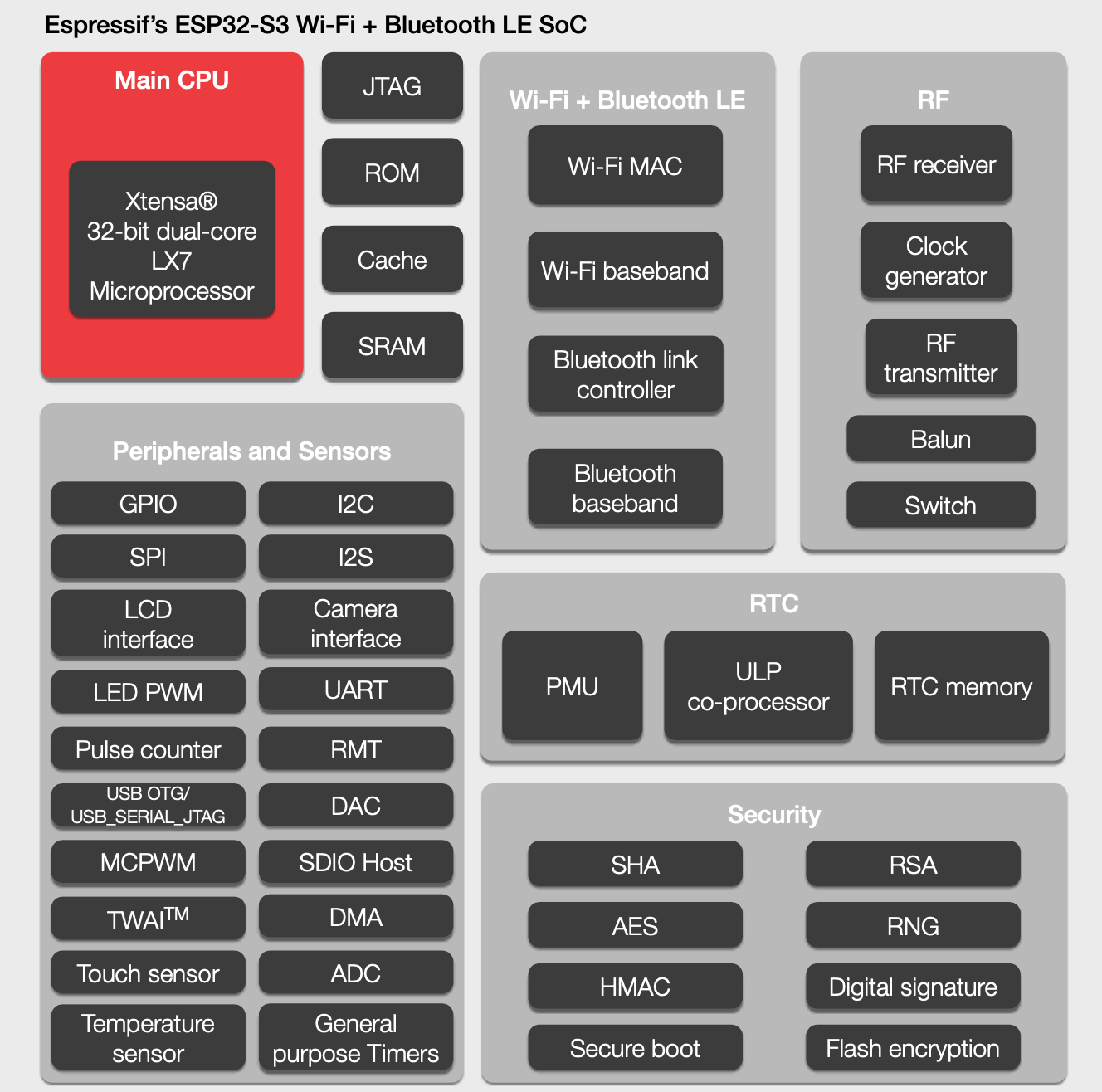
Espressif’s block diagram for the chip.

Sadly the data sheet does not seem to have been released, but we do have some titbits to consider. Espressif are anxious to tell us about its “AIOT” capabilities thanks to the vector instructions in the EXTensa LX7 cores (PDF) that were not present in the previous model’s LX6. They claim that this will speed up software neural networks; this does have an air of marketing about it but we’ll withhold judgement until we see it in use. The new core certainly will offer a performance improvement across the board though, which should be of interest to all ESP32 developers. Meanwhile the ultra-low-power core that existing ESP32 developers will be familiar with remains.

Then there is that USB support, which appears in the feature block diagram but has little information elsewhere. It’s listed as USB OTG which raises the possibility of the ESP32 being the host, but what it should also bring is the ability to emulate other USB devices. We’ve seen badges mount as WebUSB devices using STM32 clones as peripherals for an ESP32, but in future these tricks should be possible on the Espressif chip itself.

Probably the most anticipated piece of the new device’s specification comes in the addition of 10 new I/O lines. This has historically been a weakness of the ESP line, that it’s an easy chip with which to run out of available pins. These extra lines will make it more competitive with for example the STM32 series of microcontrollers that have larger package options, and will also mean that designs can have more in the way of peripherals without the use of port expanders.

In summary then, the latest member of the ESP32 family delivers a significant and useful update, and brings some of the features first seen in the single core version to the more powerful line of chips. Sadly it doesn’t have the hoped-for on-chip RAM boost, but it brings enough in the way of new capabilities to be of interest. At the moment it doesn’t look like the ESP32-S3 is available to order, but we hope to have engineering samples soon and should be bringing you a hands-on report in due course.

source https://hackaday.com/2021/01/09/new-part-day-espressif-esp32-s3/

New Part Day: Espressif ESP32-S3

Since Espressif Systems arrived in our collective consciousness they have expanded their range from the ESP8266 to the ESP32, and going beyond the original WROOM and WROVER modules to a range of further ESP32 products. There’s a single-core variant and one that packs a RISC-V core in place of the Tensilica one, and now they’ve revealed their latest product. The ESP32-S3 takes the ESP to a new level, packing as it does more I/O, onboard USB, and an updated version of the two Tensilica cores alongside Bluetooth version 5. It’s still an ESP32, but one that’s more useful, and it’s worth a closer look because we expect it to figure in quite a few projects.

Espressif's block diagram for the chip.
Espressif’s block diagram for the chip.

Sadly the data sheet does not seem to have been released, but we do have some titbits to consider. Espressif are anxious to tell us about its “AIOT” capabilities thanks to the vector instructions in the EXTensa LX7 cores (PDF) that were not present in the previous model’s LX6. They claim that this will speed up software neural networks; this does have an air of marketing about it but we’ll withhold judgement until we see it in use. The new core certainly will offer a performance improvement across the board though, which should be of interest to all ESP32 developers. Meanwhile the ultra-low-power core that existing ESP32 developers will be familiar with remains.

Then there is that USB support, which appears in the feature block diagram but has little information elsewhere. It’s listed as USB OTG which raises the possibility of the ESP32 being the host, but what it should also bring is the ability to emulate other USB devices. We’ve seen badges mount as WebUSB devices using STM32 clones as peripherals for an ESP32, but in future these tricks should be possible on the Espressif chip itself.

Probably the most anticipated piece of the new device’s specification comes in the addition of 10 new I/O lines. This has historically been a weakness of the ESP line, that it’s an easy chip with which to run out of available pins. These extra lines will make it more competitive with for example the STM32 series of microcontrollers that have larger package options, and will also mean that designs can have more in the way of peripherals without the use of port expanders.

In summary then, the latest member of the ESP32 family delivers a significant and useful update, and brings some of the features first seen in the single core version to the more powerful line of chips. Sadly it doesn’t have the hoped-for on-chip RAM boost, but it brings enough in the way of new capabilities to be of interest. At the moment it doesn’t look like the ESP32-S3 is available to order, but we hope to have engineering samples soon and should be bringing you a hands-on report in due course.

source https://hackaday.com/2021/01/09/new-part-day-espressif-esp32-s3/

New Part Day: Espressif ESP32-S3

Since Espressif Systems arrived in our collective consciousness they have expanded their range from the ESP8266 to the ESP32, and going beyond the original WROOM and WROVER modules to a range of further ESP32 products. There’s a single-core variant and one that packs a RISC-V core in place of the Tensilica one, and now they’ve revealed their latest product. The ESP32-S3 takes the ESP to a new level, packing as it does more I/O, onboard USB, and an updated version of the two Tensilica cores alongside Bluetooth version 5. It’s still an ESP32, but one that’s more useful, and it’s worth a closer look because we expect it to figure in quite a few projects.

Espressif's block diagram for the chip.
Espressif’s block diagram for the chip.

Sadly the data sheet does not seem to have been released, but we do have some titbits to consider. Espressif are anxious to tell us about its “AIOT” capabilities thanks to the vector instructions in the EXTensa LX7 cores (PDF) that were not present in the previous model’s LX6. They claim that this will speed up software neural networks; this does have an air of marketing about it but we’ll withhold judgement until we see it in use. The new core certainly will offer a performance improvement across the board though, which should be of interest to all ESP32 developers. Meanwhile the ultra-low-power core that existing ESP32 developers will be familiar with remains.

Then there is that USB support, which appears in the feature block diagram but has little information elsewhere. It’s listed as USB OTG which raises the possibility of the ESP32 being the host, but what it should also bring is the ability to emulate other USB devices. We’ve seen badges mount as WebUSB devices using STM32 clones as peripherals for an ESP32, but in future these tricks should be possible on the Espressif chip itself.

Probably the most anticipated piece of the new device’s specification comes in the addition of 10 new I/O lines. This has historically been a weakness of the ESP line, that it’s an easy chip with which to run out of available pins. These extra lines will make it more competitive with for example the STM32 series of microcontrollers that have larger package options, and will also mean that designs can have more in the way of peripherals without the use of port expanders.

In summary then, the latest member of the ESP32 family delivers a significant and useful update, and brings some of the features first seen in the single core version to the more powerful line of chips. Sadly it doesn’t have the hoped-for on-chip RAM boost, but it brings enough in the way of new capabilities to be of interest. At the moment it doesn’t look like the ESP32-S3 is available to order, but we hope to have engineering samples soon and should be bringing you a hands-on report in due course.

source https://hackaday.com/2021/01/09/new-part-day-espressif-esp32-s3/

Micromachining Glass with a Laser — Very, Very Slowly

When it comes to machining, the material that springs to mind is likely to be aluminum, steel, or plastic. We don’t necessarily think of glass as a material suitable for machining, at least not in the chuck-it-up-in-the-lathe sense. But glass is a material that needs to be shaped, too, and there are a bunch of different ways to accomplish that. Few, though, are as interesting as micromachining glass with laser-induced plasma bubbles. (Video, embedded below.)

The video below is from [Zachary Tong]. It runs a bit on the longish side, but we found it just chock full of information. The process, formally known as “laser-induced backside wet-etching,” uses a laser to blast away at a tank of copper sulfate. When a piece of glass is suspended on the surface of the solution and the laser is focused through the glass from the top, some interesting things happen.

The first pulse of the laser vaporizes the solution and decomposes the copper sulfate. Copper adsorbs onto the glass surface inside the protective vapor bubble, which lasts long enough for a second laser pulse to come along. That pulse heats up the adsorbed copper and the vapor in the original bubble, enough to melt a tiny bit of the glass. As the process is repeated, small features are slowly etched into the underside of the glass. [Zachary] demonstrates all this in the video, as well as what can go wrong when the settings are a bit off. There’s also some great high-speed footage of the process that’s worth the price of admission alone.

We doubt this process will be a mainstream method anytime soon, not least because it requires a 50-Watt Nd:YAG fiber laser. But it’s an interesting process that reminds us of [Zachary]’s other laser explorations, like using a laser and Kapton to make graphene supercapacitors.

source https://hackaday.com/2021/01/09/micromachining-glass-with-a-laser-very-very-slowly/

Replacement LED light build uses a few tricks

Microscopes have become essential work bench tools for hackers, allowing them to work with tiny SMD parts for PCB assembly and inspection. Couple of years back, mad scientist [smellsofbikes] picked up a stereo microscope from eBay. But its odd-sized, 12 volt Edison-style screw base lamp, connected to a 17 volt AC supply, burned off after a while. He swapped the burnt lamp with the spare, which too blew up after some time. Dumb lamps. Maybe the original spec called for 24 volt lamps, which were unobtanium due to the odd Edison screw base, but those would throw out a pretty yellow-orange glow. Anyhow, for some time, he worked with a jury-rigged goose neck lamp, but frequently moving the microscope and the lamp was becoming a chore. When he got fed up enough about it, he decided to Build a Replacement LED Microscope Light.

Usually, such builds are plain vanilla and not much to write in about, but [smellsofbikes] has a few tricks worth taking note of. He found a couple of high power, SMD LEDs in his parts bin. They were just slightly wider than 1.6 mm across the terminals. So he took a piece of double sided, copper clad FR4, and edge mounted the LED against one side of the PCB piece, twisting it slightly so he could solder both terminals. This works as a great heat sink for the LED while still having a very narrow profile. This was important as the replacement LED board had to fit the cylinder in which the original lamp was fitted.

The LED is driven by a constant current buck regulator, powered by the original 17 volt transformer. A bridge rectifier and several filter capacitors result in a low ripple DC supply, for which he used the KiCad spice functionality to work out the values. The LM3414 driver he used is a bit off the beaten track. It can run LEDs up to 60 watts at 1 amps and does not require an external current sense resistor. This was overkill since he planned to run the LED at just 150 mA, which would result in a very robust, long lasting solution. He designed the driver PCB in KiCad, and milled it on his LPKF circuit board plotter. The nice thing with CNC milled PCBs is that you can add custom copper floods and extend footprint pads. This trick lets you solder either a 0805 or a 1206 part to the same footprint – depending on what you can dig up from your parts bin.

What left us wondering was [smellsofbikes] statement that “The only annoying bit is it (LM3414) also needs to have its enable pin tied high, but the enable pin has a max voltage of 5.5V, so I have to derive 5.5V from the 20-ish volts of the rectified transformer voltage.” Looking at the LM3414 datasheet, there is a VCC output on pin 1, derived from an internal regulator. From the data sheet, “The VCC provides self bias for the internal gate drive and control circuits.” We are not sure why this could not be used to tie the Enable (actually the PWM pin) to 5 volts without having to use an external regulator. Instead, he added a SOT-23 regulator in his design to get the 5 volt to enable the driver. But the regulator he had on hand had an odd, inverted pin out, and had to dead-bug solder the SOT-23 LDO to make it work. Eventually, it all worked out great, so we guess all’s well that ends well.

To fit the LED PCB in side the original cylinder, he designed a 3D printed collar with tapered fingers which hold the PCB without having to use any fasteners. For the main PCB, a simple 3D printed housing was used to fit it inside the transformer box. Even at 150 mA drive current, the LED lamp is mighty bright, and the over-kill driver will make sure he doesn’t have to worry about a burnt out lamp any time soon.

source https://hackaday.com/2021/01/08/replacement-led-light-build-uses-a-few-tricks/