Running a camera studio is a complicated affair from pretty much every angle. Not only is the camera gear expensive but the rest of the studio setup takes care and attention down to the lighting as well. When adding multiple cameras to the mix, like for a television studio, the level of complexity increases exponentially. It’s great to have a few things that simplify the experience of running all of this equipment too, without the solution itself causing more problems than it solves, like these network-operated Raspberry Pi-powered tally lights.
A tally light is the light on a camera that lets the person being recorded know which camera is currently in use. Networking them all together often requires complex wiring or at least some sort of networking solution, which is what this particular build uses. However, the lights are controlled directly over HTTP rather than using a separate application which might need a port open on a firewall or router, which not only simplifies their use but doesn’t decrease network security.
The HTTP interface, plus all of the software and schematics for this build, are available on the project’s GitHub page. We imagine the number of people operating a studio and who are in need of a tally light system to be fairly low, but the project is interesting from a networking point-of-view regardless of application. If you do have a studio like this and are looking for other ways to improve it, we do have a simple teleprompter hack that might be right up your alley.
Whether you are vegan or just want to try something new in the shoe department, Adidas will soon have your feet covered. They are currently working on a leather alternative made of mycelium, which is the network of fungal filament material that produces mushrooms, toadstools, truffles, and more. Hopefully they’re not using live mycelium, otherwise your shoes will grow mushrooms when they get wet like this mycelium canoe we saw a few weeks ago.
Adidas have really rooted themselves in sustainability over the past few years. They claim to have made 15 million pairs of shoes in 2020 out of recycled plastic waste collected from beaches and coastlines, and they’re shooting for 17 million pairs in 2021. The company started offering these in 2017, and they feature thread in the laces and other places that was spun from ocean plastic waste. Adidas are also using a lot of recycled polyester and are developing a new type of recycled cotton, according to Business Insider.
The setup is a little different than builds you may be used to. The website runs on a cloud-hosted virtual machine on Digital Ocean, rather than running locally. This allows anyone on the web to visit the site, and use the interface to control the lights on the Christmas tree. An image of the tree is used as the interface, and allows users to set the color of each individual LED on the tree. The LEDs themselves are driven from an NodeMCU ESP8266, which uses its WiFi connection to query the website itself and grab the color data as needed. [JT] has also included a secondary interface, where the chat of the Youtube livestream can be used to control the LEDs, too.
It’s a build that’s a touch more complicated than most typical online LED blinkers, but one that teaches useful skills in interfacing on the web and using virtual machines. We’ve seen other builds in this genre too; even some that are reactive to “Christmas fever” itself. Video after the break.
A common complaint we’ve seen on many of the recent cyberdeck builds is that they don’t offer any display technology more advanced than a tablet-sized IPS panel. The argument goes that to be a true deck in the Gibsonian sense, it’s got to have some kind of virtual reality interface or at least a head mounted display. Unfortunately such technology is expensive, and often not particularly hacker friendly.
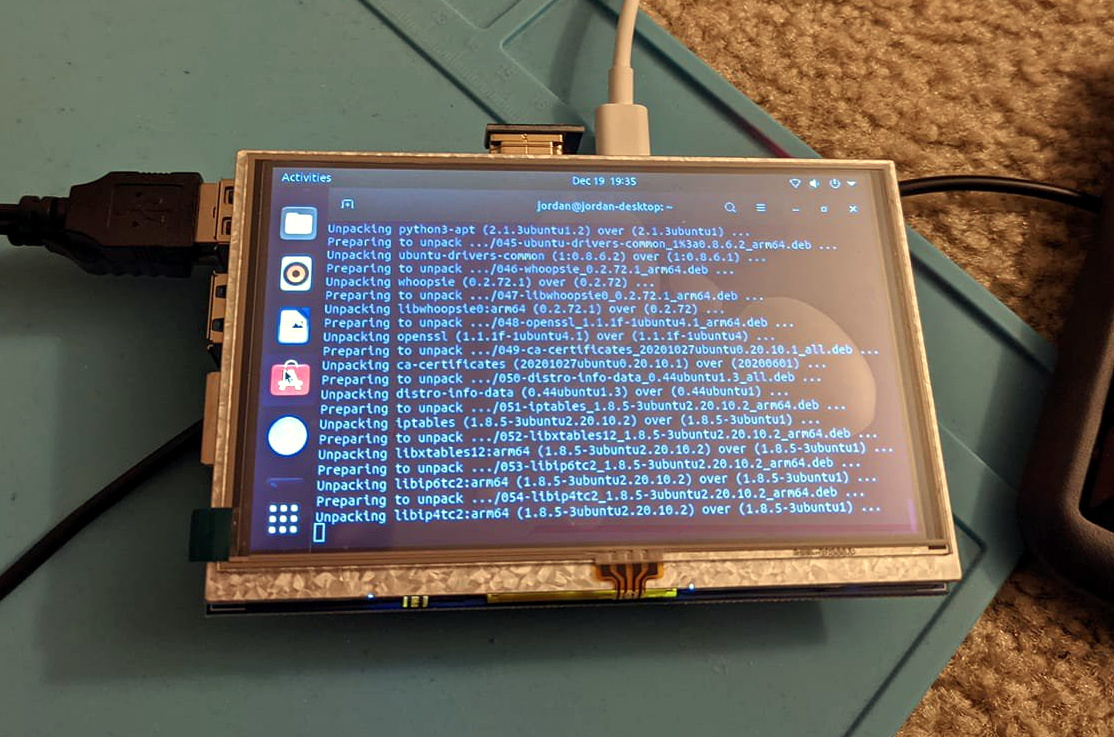
But assuming you can settle for a somewhat low-tech alternative, the simple head mounted display that [Jordan Brandes] has been fiddling with is certainly a viable option. By mounting a five inch 800×480 TFT LCD to the front of a pair of goggles designed for first person view (FPV) flying, you can throw together a workable rig for around $30 USD. Add in some headphones, and you’ve got a fairly immersive experience for not a lot.
Naturally the display will show whatever HDMI signal you give it, but in his case, [Jordan] has mounted a Raspberry Pi to the back of it to make it a complete wearable computer. With a Bluetooth travel keyboard in the mix, he’s even able to get some legitimate work done with this setup. If he ends up combining this with the ultrasonic keyboard he was working on earlier in the year, he’ll be getting pretty close to jacking into cyberspace for real.
A common complaint we’ve seen on many of the recent cyberdeck builds is that they don’t offer any display technology more advanced than a tablet-sized IPS panel. The argument goes that to be a true deck in the Gibsonian sense, it’s got to have some kind of virtual reality interface or at least a head mounted display. Unfortunately such technology is expensive, and often not particularly hacker friendly.
But assuming you can settle for a somewhat low-tech alternative, the simple head mounted display that [Jordan Brandes] has been fiddling with is certainly a viable option. By mounting a five inch 800×480 TFT LCD to the front of a pair of goggles designed for first person view (FPV) flying, you can throw together a workable rig for around $30 USD. Add in some headphones, and you’ve got a fairly immersive experience for not a lot.
Naturally the display will show whatever HDMI signal you give it, but in his case, [Jordan] has mounted a Raspberry Pi to the back of it to make it a complete wearable computer. With a Bluetooth travel keyboard in the mix, he’s even able to get some legitimate work done with this setup. If he ends up combining this with the ultrasonic keyboard he was working on earlier in the year, he’ll be getting pretty close to jacking into cyberspace for real.
A common complaint we’ve seen on many of the recent cyberdeck builds is that they don’t offer any display technology more advanced than a tablet-sized IPS panel. The argument goes that to be a true deck in the Gibsonian sense, it’s got to have some kind of virtual reality interface or at least a head mounted display. Unfortunately such technology is expensive, and often not particularly hacker friendly.
But assuming you can settle for a somewhat low-tech alternative, the simple head mounted display that [Jordan Brandes] has been fiddling with is certainly a viable option. By mounting a five inch 800×480 TFT LCD to the front of a pair of goggles designed for first person view (FPV) flying, you can throw together a workable rig for around $30 USD. Add in some headphones, and you’ve got a fairly immersive experience for not a lot.
Naturally the display will show whatever HDMI signal you give it, but in his case, [Jordan] has mounted a Raspberry Pi to the back of it to make it a complete wearable computer. With a Bluetooth travel keyboard in the mix, he’s even able to get some legitimate work done with this setup. If he ends up combining this with the ultrasonic keyboard he was working on earlier in the year, he’ll be getting pretty close to jacking into cyberspace for real.
The circuit is a simple one, and a classic. The spring from a ballpoint pen is soldered to the base of a BC547 transistor, and when held close enough to a conductor carrying AC power, a current is induced in the spring which is sufficient to turn the transistor on. The transistor then switches on a second BC547, which lights an LED. The whole circuit is built on top of a battery clip so it can be run straight from the top of a standard 9 volt battery.
It’s a circuit you’ll find all over the place, even built into many modern multimeters. It can be particularly useful to help avoid drilling through mains wires embedded in the walls of your home. Of course, if you’d like even more information about what’s lurking within your walls, consider this capacitive imaging hack. Video after the break.
Virtual reality has seen enormous progress in the past few years. Given its recent surges in development, it may come as a bit of a surprise to learn that the ideas underpinning what we now call VR were laid way back in the 60s. Not all of the imagined possibilities have come to pass, but we’ve learned plenty about what is (and isn’t) important for a compelling VR experience, and gained insights as to what might happen next.
If virtual reality’s best ideas came from the 60s, what were they, and how did they turn out?
Interaction and Simulation
First, I want to briefly cover two important precursors to what we think of as VR: interaction and simulation. Prior to the 1960s, state of the art examples for both were the Link Trainer and Sensorama.
The Link Trainer was an early kind of flight simulator, and its goal was to deliver realistic instrumentation and force feedback on aircraft flight controls. This allowed a student to safely gain an understanding of different flying conditions, despite not actually experiencing them. The Link Trainer did not simulate any other part of the flying experience, but its success showed how feedback and interactivity — even if artificial and limited in nature — could allow a person to gain a “feel” for forces that were not actually present.
Sensorama was a specialized pod that played short films in stereoscopic 3D while synchronized to fans, odor emitters, a motorized chair, and stereo sound. It was a serious effort at engaging a user’s senses in a way intended to simulate an environment. But being a pre-recorded experience, it was passive in nature, with no interactive elements.
Combining interaction with simulation effectively had to wait until the 60s, when the digital revolution and computers provided the right tools.
The Ultimate Display
In 1965 Ivan Sutherland, a computer scientist, authored an essay entitled The Ultimate Display (PDF) in which he laid out ideas far beyond what was possible with the technology of the time. One might expect The Ultimate Display to be a long document. It is not. It is barely two pages, and most of the first page is musings on burgeoning interactive computer input methods of the 60s.
The second part is where it gets interesting, as Sutherland shares the future he sees for computer-controlled output devices and describes an ideal “kinesthetic display” that served as many senses as possible. Sutherland saw the potential for computers to simulate ideas and output not just visual information, but to produce meaningful sound and touch output as well, all while accepting and incorporating a user’s input in a self-modifying feedback loop. This was forward-thinking stuff; recall that when this document was written, computers weren’t even generating meaningful sounds of any real complexity, let alone visual displays capable of arbitrary content.
A Way To Experience The Unreal
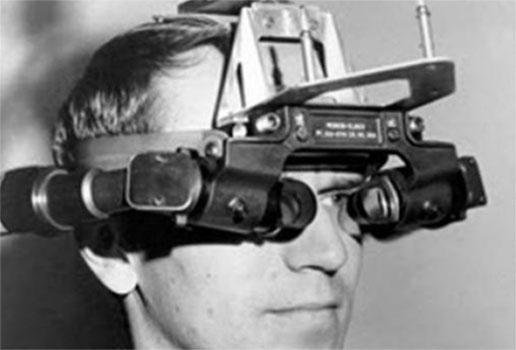
Closeup of Sutherland’s Sword of Damocles, a ceiling-suspended system into which a user’s head was strapped. [image source: History of VR]
Sutherland’s main idea was this: as humans, we have an intuitive familiarity with what we can see and feel. The effects of gravity, how it feels to start or stop something from moving, or imagining how an object will look from a different angle, these are all things we comprehend effortlessly.
What if we could similarly experience concepts that could not be realized in our physical world? It would be a way to gain intuitive and intimate familiarity with concepts not otherwise available to us.
As a first step in actualizing these ideas, Sutherland and some of his students created a large ceiling-suspended system dubbed Sword of Damocles. It was the first head-mounted display whose visuals did not come from a camera, but were generated by a computer. It displayed only line-based vector graphics, but it was able to modify what it showed in real-time based on head position and user input.
Leveraging a computer’s ability to process feedback and dynamically generate visuals was key to an interactive system capable of generating its own simulated environment. For the first time, a way to meaningfully fuse interaction with abstract simulation was within reach, and there was nowhere to go but up.
Ideas From the 60s That Happened
Many concepts that Sutherland predicted have come to pass, at least partially, and are recognizable in some modern form.
Objects Displayed by a Computer Need Not Follow Ordinary Rules of Reality
Being able to define things free from the confines of physical reality, and adjust their properties at will, encompasses functions like CAD modeling and other simulation work as well as it does entertainment like gaming. In fact, it would even be fair to say that gaming in particular thrives in this space.
Sutherland envisioned a computer-controlled display as a looking glass into a mathematical wonderland. A great example of this concept is this 3D engine for non-Euclidean geometry which presents impossible geometries in a familiar, interactive way.
Tactile and Haptic Feedback
Today’s VR controllers (and mobile devices like phones, for that matter) rely heavily on being able to deliver a range of subtle vibrations as meaningful feedback. While not measuring up to Sutherland’s ideal of accurately simulating things like complex physics, it nevertheless gives users an intuitive understanding of unseen forces and boundaries, albeit simple ones, like buttons that do not exist as physical objects.
Head Tracking
Making a display change depending on where one is looking is a major feature of VR. While Sutherland only mentioned this concept briefly, accurate and low-latency tracking has turned out to be a feature of critical importance. When Valve was first investigating VR and AR, an early indicator that they were onto something was when researchers experienced what was possible when low-persistence displays were combined with high-quality tracking; it was described as looking through a window into another world.
Hand and Body Tracking, Including Gaze Tracking
Sutherland envisioned the ability of a computer to read a user’s body as an input method, particularly high-dexterity parts of the body like the hand and eyes. Hand tracking is an increasingly common feature in consumer VR systems today. Eye tracking exists, but more on that in a moment.
Some Ideas Haven’t Happened Yet
There are a number of concepts that haven’t happened, or exist only in a very limited way, but that list is shrinking. Here are the most notable standouts.
Robust Eye Tracking Is Hard
Sutherland wrote “it remains to be seen if we can use a language of glances to control a computer,” and so far that remains the case.
It turns out that eye tracking is fairly easy to get mostly right: one simply points a camera at an IR-illuminated eyeball, looks for the black circle of the pupil, and measures its position to determine where its owner is looking. No problems there, and enterprising hackers have made plenty of clever eye tracking projects.
Eye tracking gets trickier when high levels of reliable accuracy are needed, such as using it to change how visuals are rendered based on exactly where a user is looking. There are a number of reasons for this: not only does the human eye make frequent, involuntarily movements called saccades, but roughly 1% of humans have pupils that do not present as nice round black shapes, making it difficult for software to pick out. On top of that, there is a deeper problem. Because a pupil is nothing more than an opening in the flexible tissue of the iris, it is not always a consistent shape. The pupil in fact wobbles and wiggles whenever the eye moves — which is frequently — and this makes highly accurate positioning difficult to interpret. Here is a link (cued to 37:55 in) to a video presentation explaining these issues, showing why it is desirable to avoid eye tracking in certain applications.
Simulation-Accurate Force Feedback Isn’t Ready
Force feedback devices have existed for years, and there is renewed interest in force feedback thanks to VR development. But we are far from using it in the way Sutherland envisioned: to simulate and gain intuitive familiarity with complex concepts and phenomena, learning them as well as we know our own natural world.
Probably the most frequently-quoted part of The Ultimate Display is the final few sentences, in which Sutherland describes something that sounds remarkably like the holodeck from Star Trek:
The ultimate display would, of course, be a room within which the computer can control the existence of matter. A chair displayed in such a room would be good enough to sit in. Handcuffs displayed in such a room would be confining, and a bullet displayed in such a room would be fatal. With appropriate programming such a display could literally be the Wonderland into which Alice walked.
Clearly we’re nowhere near that point, but if we ever are, it might be the last thing we ever need to invent.
Important Features vs. Cool Ones
The best ideas may have come from the 60s, but we’ve learned a lot since then about what is and isn’t actually important to creating immersive experiences. Important features are the ones a technology really needs to deliver on, because they are crucial to immersion. Immersion is a kind of critical mass, a sensory “aha!” moment in which one ceases to notice the individual worky bits involved, and begins to interact seamlessly and intuitively with the content in a state of flow. Important features help that happen.
For example, it may seem that a wide field of view in an HMD is important for immersion, but that turns out to not quite be the case. We covered a fascinating presentation about how human vision uses all sorts of cues to decide how “real” something is, and what that means for HMD development. It turns out that a very wide field of view in a display is desirable, but it is not especially important for increasing immersion. Audio has similar issues, with all kinds of things being discovered as important to delivering convincing audio simulation. For example, piping sound directly into the ear canals via ear buds turns out to be a powerful way for one’s brain to classify sounds as “not real” no matter how accurately they have been simulated. Great for listening to music, less so for a convincing simulation.
Another feature of critical importance is a display with robust tracking and low latency. I experienced this for myself the first time I tried flawless motion tracking on a modern VR headset. No matter how I moved or looked around, there was no perceptible lag or drift. I could almost feel my brain effortlessly slide into a groove, as though it had decided the space I was in and the things I was looking at existed entirely separate from the thing I was wearing on my head. That was something I definitely did not feel when I wore a Forte VFX1 VR headset in the mid-90s. At the time, it wasn’t the low resolution or the small field of view that bothered me, it was the drifty and vague head tracking that I remember the most. There was potential, but it’s no wonder VR didn’t bloom in the 90s.
What’s Next?
One thing that fits Sutherland’s general predictions about body tracking, but which he probably did not see coming, is face and expression tracking. It is experimental work from Facebook, but is gaining importance mainly for the purpose of interacting with other people digitally, rather than as a means of computer input.
Speaking of Facebook, a social network spearheading VR development (while tightening their grip on it) definitely was not predicted in the 60s, yet it seems to be next for VR nevertheless. But I never said the future of VR came from the 60s, just that the good ideas did.
Virtual reality has seen enormous progress in the past few years. Given its recent surges in development, it may come as a bit of a surprise to learn that the ideas underpinning what we now call VR were laid way back in the 60s. Not all of the imagined possibilities have come to pass, but we’ve learned plenty about what is (and isn’t) important for a compelling VR experience, and gained insights as to what might happen next.
If virtual reality’s best ideas came from the 60s, what were they, and how did they turn out?
Interaction and Simulation
First, I want to briefly cover two important precursors to what we think of as VR: interaction and simulation. Prior to the 1960s, state of the art examples for both were the Link Trainer and Sensorama.
The Link Trainer was an early kind of flight simulator, and its goal was to deliver realistic instrumentation and force feedback on aircraft flight controls. This allowed a student to safely gain an understanding of different flying conditions, despite not actually experiencing them. The Link Trainer did not simulate any other part of the flying experience, but its success showed how feedback and interactivity — even if artificial and limited in nature — could allow a person to gain a “feel” for forces that were not actually present.
Sensorama was a specialized pod that played short films in stereoscopic 3D while synchronized to fans, odor emitters, a motorized chair, and stereo sound. It was a serious effort at engaging a user’s senses in a way intended to simulate an environment. But being a pre-recorded experience, it was passive in nature, with no interactive elements.
Combining interaction with simulation effectively had to wait until the 60s, when the digital revolution and computers provided the right tools.
The Ultimate Display
In 1965 Ivan Sutherland, a computer scientist, authored an essay entitled The Ultimate Display (PDF) in which he laid out ideas far beyond what was possible with the technology of the time. One might expect The Ultimate Display to be a long document. It is not. It is barely two pages, and most of the first page is musings on burgeoning interactive computer input methods of the 60s.
The second part is where it gets interesting, as Sutherland shares the future he sees for computer-controlled output devices and describes an ideal “kinesthetic display” that served as many senses as possible. Sutherland saw the potential for computers to simulate ideas and output not just visual information, but to produce meaningful sound and touch output as well, all while accepting and incorporating a user’s input in a self-modifying feedback loop. This was forward-thinking stuff; recall that when this document was written, computers weren’t even generating meaningful sounds of any real complexity, let alone visual displays capable of arbitrary content.
A Way To Experience The Unreal
Closeup of Sutherland’s Sword of Damocles, a ceiling-suspended system into which a user’s head was strapped. [image source: History of VR]
Sutherland’s main idea was this: as humans, we have an intuitive familiarity with what we can see and feel. The effects of gravity, how it feels to start or stop something from moving, or imagining how an object will look from a different angle, these are all things we comprehend effortlessly.
What if we could similarly experience concepts that could not be realized in our physical world? It would be a way to gain intuitive and intimate familiarity with concepts not otherwise available to us.
As a first step in actualizing these ideas, Sutherland and some of his students created a large ceiling-suspended system dubbed Sword of Damocles. It was the first head-mounted display whose visuals did not come from a camera, but were generated by a computer. It displayed only line-based vector graphics, but it was able to modify what it showed in real-time based on head position and user input.
Leveraging a computer’s ability to process feedback and dynamically generate visuals was key to an interactive system capable of generating its own simulated environment. For the first time, a way to meaningfully fuse interaction with abstract simulation was within reach, and there was nowhere to go but up.
Ideas From the 60s That Happened
Many concepts that Sutherland predicted have come to pass, at least partially, and are recognizable in some modern form.
Objects Displayed by a Computer Need Not Follow Ordinary Rules of Reality
Being able to define things free from the confines of physical reality, and adjust their properties at will, encompasses functions like CAD modeling and other simulation work as well as it does entertainment like gaming. In fact, it would even be fair to say that gaming in particular thrives in this space.
Sutherland envisioned a computer-controlled display as a looking glass into a mathematical wonderland. A great example of this concept is this 3D engine for non-Euclidean geometry which presents impossible geometries in a familiar, interactive way.
Tactile and Haptic Feedback
Today’s VR controllers (and mobile devices like phones, for that matter) rely heavily on being able to deliver a range of subtle vibrations as meaningful feedback. While not measuring up to Sutherland’s ideal of accurately simulating things like complex physics, it nevertheless gives users an intuitive understanding of unseen forces and boundaries, albeit simple ones, like buttons that do not exist as physical objects.
Head Tracking
Making a display change depending on where one is looking is a major feature of VR. While Sutherland only mentioned this concept briefly, accurate and low-latency tracking has turned out to be a feature of critical importance. When Valve was first investigating VR and AR, an early indicator that they were onto something was when researchers experienced what was possible when low-persistence displays were combined with high-quality tracking; it was described as looking through a window into another world.
Hand and Body Tracking, Including Gaze Tracking
Sutherland envisioned the ability of a computer to read a user’s body as an input method, particularly high-dexterity parts of the body like the hand and eyes. Hand tracking is an increasingly common feature in consumer VR systems today. Eye tracking exists, but more on that in a moment.
Some Ideas Haven’t Happened Yet
There are a number of concepts that haven’t happened, or exist only in a very limited way, but that list is shrinking. Here are the most notable standouts.
Robust Eye Tracking Is Hard
Sutherland wrote “it remains to be seen if we can use a language of glances to control a computer,” and so far that remains the case.
It turns out that eye tracking is fairly easy to get mostly right: one simply points a camera at an IR-illuminated eyeball, looks for the black circle of the pupil, and measures its position to determine where its owner is looking. No problems there, and enterprising hackers have made plenty of clever eye tracking projects.
Eye tracking gets trickier when high levels of reliable accuracy are needed, such as using it to change how visuals are rendered based on exactly where a user is looking. There are a number of reasons for this: not only does the human eye make frequent, involuntarily movements called saccades, but roughly 1% of humans have pupils that do not present as nice round black shapes, making it difficult for software to pick out. On top of that, there is a deeper problem. Because a pupil is nothing more than an opening in the flexible tissue of the iris, it is not always a consistent shape. The pupil in fact wobbles and wiggles whenever the eye moves — which is frequently — and this makes highly accurate positioning difficult to interpret. Here is a link (cued to 37:55 in) to a video presentation explaining these issues, showing why it is desirable to avoid eye tracking in certain applications.
Simulation-Accurate Force Feedback Isn’t Ready
Force feedback devices have existed for years, and there is renewed interest in force feedback thanks to VR development. But we are far from using it in the way Sutherland envisioned: to simulate and gain intuitive familiarity with complex concepts and phenomena, learning them as well as we know our own natural world.
Probably the most frequently-quoted part of The Ultimate Display is the final few sentences, in which Sutherland describes something that sounds remarkably like the holodeck from Star Trek:
The ultimate display would, of course, be a room within which the computer can control the existence of matter. A chair displayed in such a room would be good enough to sit in. Handcuffs displayed in such a room would be confining, and a bullet displayed in such a room would be fatal. With appropriate programming such a display could literally be the Wonderland into which Alice walked.
Clearly we’re nowhere near that point, but if we ever are, it might be the last thing we ever need to invent.
Important Features vs. Cool Ones
The best ideas may have come from the 60s, but we’ve learned a lot since then about what is and isn’t actually important to creating immersive experiences. Important features are the ones a technology really needs to deliver on, because they are crucial to immersion. Immersion is a kind of critical mass, a sensory “aha!” moment in which one ceases to notice the individual worky bits involved, and begins to interact seamlessly and intuitively with the content in a state of flow. Important features help that happen.
For example, it may seem that a wide field of view in an HMD is important for immersion, but that turns out to not quite be the case. We covered a fascinating presentation about how human vision uses all sorts of cues to decide how “real” something is, and what that means for HMD development. It turns out that a very wide field of view in a display is desirable, but it is not especially important for increasing immersion. Audio has similar issues, with all kinds of things being discovered as important to delivering convincing audio simulation. For example, piping sound directly into the ear canals via ear buds turns out to be a powerful way for one’s brain to classify sounds as “not real” no matter how accurately they have been simulated. Great for listening to music, less so for a convincing simulation.
Another feature of critical importance is a display with robust tracking and low latency. I experienced this for myself the first time I tried flawless motion tracking on a modern VR headset. No matter how I moved or looked around, there was no perceptible lag or drift. I could almost feel my brain effortlessly slide into a groove, as though it had decided the space I was in and the things I was looking at existed entirely separate from the thing I was wearing on my head. That was something I definitely did not feel when I wore a Forte VFX1 VR headset in the mid-90s. At the time, it wasn’t the low resolution or the small field of view that bothered me, it was the drifty and vague head tracking that I remember the most. There was potential, but it’s no wonder VR didn’t bloom in the 90s.
What’s Next?
One thing that fits Sutherland’s general predictions about body tracking, but which he probably did not see coming, is face and expression tracking. It is experimental work from Facebook, but is gaining importance mainly for the purpose of interacting with other people digitally, rather than as a means of computer input.
Speaking of Facebook, a social network spearheading VR development (while tightening their grip on it) definitely was not predicted in the 60s, yet it seems to be next for VR nevertheless. But I never said the future of VR came from the 60s, just that the good ideas did.
Metal lathes are capable machines that played a large role in the industrial revolution, and an incredible tool to have at your disposal. But that doesn’t mean they can’t be used to have a little fun, as demonstrated by [Oleg Pevtsov] who made a bidirectional bolt as a machining exercise just because he could.
Both videos after the break are in Russian, but the video and auto generated subtitles are enough to get the main points across. The bolt is an M42 size with a 40 mm pitch, with grooves cut in both directions to allow left-handed and right-handed nuts to be threaded. The large pitch means that instead of a single continuous groove like a normal bolt, ten separate grooves need to be cut for each threading direction to cover the bolt surface. Since this was all machined on a manual lathe, a dial indicator was required to maintain accurate spacing. It took [Oleg] four painstaking attempts to get it right, but the end result looks very good. Instead of a fixed cutter, he used a trimming router mounted on a custom clamp.
[Oleg] also machined three different brass nuts to go on the bolt with a fixed cutter. First left-hand and right hand threaded nuts were made, followed by a bidirectional nut. Due to the large pitch and careful machining, all three nuts will spin down the bolt under the force of gravity alone. Although the bidirectional nut doesn’t move as smoothly as the other two, it can change rotation and translation direction at random.
While this is a one-of-a-kind fidget toy, have any of our readers seen a bidirectional bolt or lead screw in the wild? We can imagine that the ability to move two nuts in opposite directions on a single lead screw might have some practical applications.
It’s possible to make incredible parts on a manual lathe. A handbuilt V10 engine and a pneumatic hexacopter model are just two examples of what’s possible with enough skill, knowledge, and patience. Sadly it is a fading form of craftsmanship, rendered mostly obsolete outside of hobby projects by CNC machines.
The cooker hood is a wonderful invention for removing excess fumes and steam from the kitchen. But like all electrically-powered devices, it only works when it is turned on. This was the problem facing [Peter], whose family are enthusiastic cooks who frequently forget to hit that switch. His solution? An automatic cooker hood switch that comes on when the cooker is in use, and stays on long enough afterwards to fully dissipate the fumes.
At its heart is a current transformer on the 3-phase stove power line, and we’re treated to a lesson in reading from these devices with an Arduino. They have a shunt resistor across which to produce a voltage, and their AC output is placed upon a reference DC voltage to supply the microcontroller pin. The impedance is quite high, so when the sensor had to be placed a distance from the microcontroller it necessitated an op-amp buffer. The readings then cause the Arduino to trigger a pair of relays to switch on or off the cooker hood. We can imagine that the family kitchen is thus a much pleasanter environment for it.
Cookers can also provide quite a hazard when they are left on. To that end, we’ve also featured a cooker alarm in the past.
While we’re big believers in 3D printing here at Hackaday, there’s no denying that some things just aren’t meant to be printed. For example, most of us would agree that it’s not the first choice for making rims for a passenger car. We imagine that [Jón Schone] from Proper Printing probably feels the same way, but that didn’t stop him from trying to do it anyway.
A couple of months ago [Jón] got a test subject in the form of an older Mercedes with 19-inch rims. The first two challenges are bed size and warping, so he modified a Creality CR10 S5 with a heated chamber capable of reaching 70 °C to reduce warping with the ABS filament he intended to use. Another challenge is the amount of filament required for the print, especially since [Jón] wasn’t keen on babysitting the machine to replace the spool every so often. His attempt at building a filament joiner ultimately didn’t work out, so in the end he simply sourced the filament in bulk size rolls.
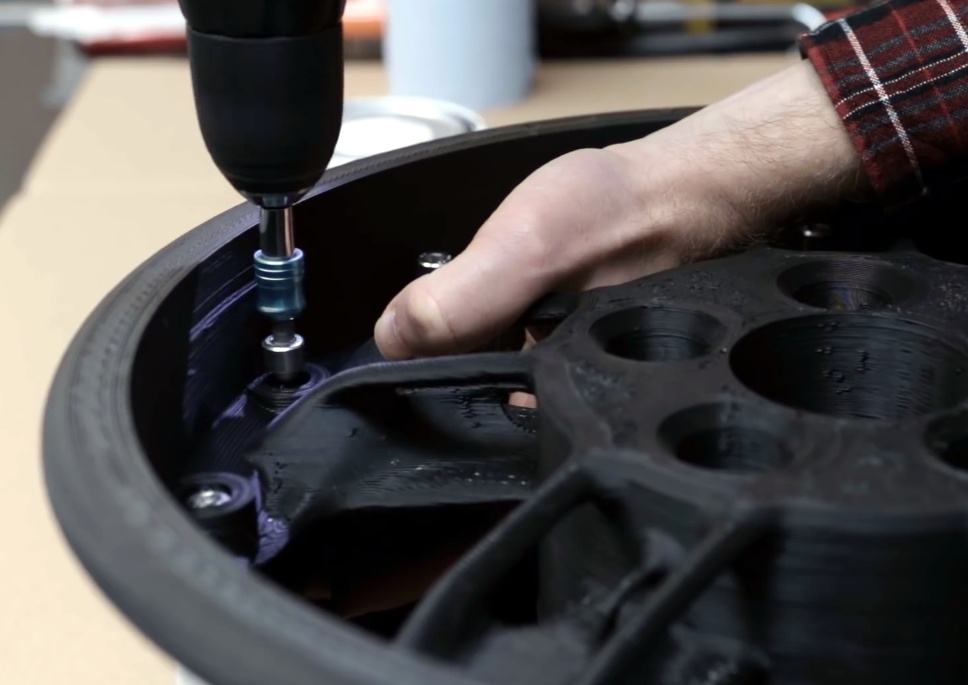
Bolts hold the two halves of the rim together.
Eventually [Jón] managed to print a complete rim in two halves, bolted together around its circumference. Unfortunately, even with the heated chamber, the parts still warped all around the edges. This left a gap at the seam, but to fit a tubeless tire, the rim had to be airtight. So the entire inside surface was painted to close any small gaps, and the larger gaps were filled with sealant.
In the end it was still unable to hold pressure with a tire mounted, so it was test fitted to the car just to see if it would carry the weight. This test also failed, splitting on the thinnest part of the rim. [Jón] has headed back to the drawing board to try again in 2021. We probably would have moved on by now, but you have to admire his tenacity. We hope to see success in the new year.
Ever heard of a Bárány chair? Neither had [Troy Denton] before he was asked to repair one, but that didn’t stop him from rolling up his sleeves and tying to get the non-functional device back in working order. As it didn’t come with a user guide, manual, schematic or any other information, he had to rely on his experience and acumen gathered over years of practical work. Luckily for us, he decided to document the whole process.
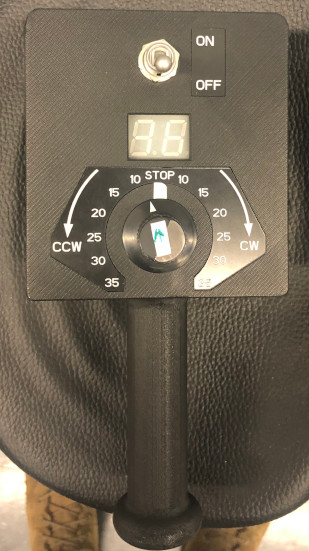
While it’s not well known outside of aviation circles, the Bárány chair is an important piece of equipment in training pilots to get used to spatial disorientation. The device is essentially a motorized revolving chair, the idea being to spin the subject to induce disorientation. Rotation speed and direction can be controlled via a handheld wireless remote terminal.
When [Troy] first powered it up, the error code on the remote indicated “no power to base unit”. That turned out to be a quick fix – he simply had to move the power connection from a switched socket that had been turned off to a different outlet. But while that cleared the error message, the chair still wouldn’t rotate for any of the knob settings.
Manually rotating the chair showed the RPM on the remote, so [Troy] narrowed down his search to the motor related sections. The motor was being driven by a servo type signal, but changing the speed and direction knob on the remote didn’t seem to alter the control signal when he checked it with his scope. Opening up the hand held remote immediately uncovered the failed part – the rotary encoder for setting the speed and direction had physically split in to two pieces.
Since there was a clean split in the encoder, he was able to temporarily hold it back together to confirm that the chair could spin up. The cause was most likely “User Error” – the last person to conduct the test probably turned the knob rather enthusiastically. A new part is on the way, and the chair should be getting back to making prospective pilots dizzy in no time.
Ever heard of a Bárány chair? Neither had [Troy Denton] before he was asked to repair one, but that didn’t stop him from rolling up his sleeves and tying to get the non-functional device back in working order. As it didn’t come with a user guide, manual, schematic or any other information, he had to rely on his experience and acumen gathered over years of practical work. Luckily for us, he decided to document the whole process.
While it’s not well known outside of aviation circles, the Bárány chair is an important piece of equipment in training pilots to get used to spatial disorientation. The device is essentially a motorized revolving chair, the idea being to spin the subject to induce disorientation. Rotation speed and direction can be controlled via a handheld wireless remote terminal.
When [Troy] first powered it up, the error code on the remote indicated “no power to base unit”. That turned out to be a quick fix – he simply had to move the power connection from a switched socket that had been turned off to a different outlet. But while that cleared the error message, the chair still wouldn’t rotate for any of the knob settings.
Manually rotating the chair showed the RPM on the remote, so [Troy] narrowed down his search to the motor related sections. The motor was being driven by a servo type signal, but changing the speed and direction knob on the remote didn’t seem to alter the control signal when he checked it with his scope. Opening up the hand held remote immediately uncovered the failed part – the rotary encoder for setting the speed and direction had physically split in to two pieces.
Since there was a clean split in the encoder, he was able to temporarily hold it back together to confirm that the chair could spin up. The cause was most likely “User Error” – the last person to conduct the test probably turned the knob rather enthusiastically. A new part is on the way, and the chair should be getting back to making prospective pilots dizzy in no time.
Last week we featured a story on the new rules regarding drone identification going into effect in the US. If you missed the article, the short story is that almost all unmanned aircraft will soon need to transmit their position, altitude, speed, and serial number, as well as the position of its operator, likely via WiFi or Bluetooth. The FAA’s rule change isn’t sitting well with Wing, the drone-based delivery subsidiary of megacorporation Alphabet. In their view, local broadcast of flight particulars would be an invasion of privacy, since observers snooping in on Remote ID traffic could, say, infer that a drone going between a pharmacy and a neighbor’s home might mean that someone is sick. They have a point, but how a Google company managed to cut through the thick clouds of irony to complain about privacy concerns and the rise of the surveillance state is mind boggling.
Speaking of regulatory burdens, it appears that getting an amateur radio license is no longer quite the deal that it once was. The Federal Communications Commission has adopted a $35 fee for new amateur radio licenses, license renewals, and changes to existing licenses, like vanity call signs. While $35 isn’t cheap, it’s not the end of the world, and it’s better than the $50 fee that the FCC was originally proposing. Still, it seems a bit steep for something that’s largely automated. In any case, it looks like we’re still good to go with our “$50 Ham” series.
Staying on the topic of amateur radio for a minute, it looks like there will be a new digital mode to explore soon. The change will come when version 2.4.0 of WSJT-X, the program that forms the heart of digital modes like WSPR and FT8, is released. The newcomer is called Q65, and it’s basically a follow-on to the current QRA64 weak-signal mode. Q65 is optimized for weak, rapidly fading signals in the VHF bands and higher, so it’s likely to prove popular with Earth-Moon-Earth fans and those who like to do things like bounce their signals off of meteor trails. We’d think Q65 should enable airliner-bounce too. We’ll be keen to give it a try whenever it comes out.
Look, we know it’s hard to get used to writing the correct year once a new one rolls around, and that time has taken on a relative feeling in these pandemic times. But we’re pretty sure it isn’t April yet, which is the most reasonable explanation for an ad purporting the unholy coupling of a gaming PC and mass-market fried foods. We strongly suspect this is just a marketing stunt between Cooler Master and Yum! Brands, but taken at face value, the KFConsole — it’s not a gaming console, it’s at best a pre-built gaming PC — is supposed to use excess heat to keep your DoorDashed order of KFC warm while you play. In a year full of incredibly stupid things, this one is clearly in the top five.
And finally, it looks like we can all breathe a sigh of relief that our airline pilots, or at least a subset of them, aren’t seeing things. There has been a steady stream of reports from pilots flying in and out of Los Angeles lately of a person in a jetpack buzzing around. Well, someone finally captured video of the daredevil, and even though it’s shaky and unclear — as are seemingly all videos of cryptids — it sure seems to be a human-sized biped flying around in a standing position. The video description says this was shot by a flight instructor at 3,000 feet (914 meters) near Palos Verdes with Catalina Island in the background. That’s about 20 miles (32 km) from the mainland, so whatever this person is flying has amazing range. And, the pilot has incredible faith in the equipment — that’s a long way to fall in something with the same glide ratio as a brick.
Motorsport became obsessed with aerodynamics in the middle of the 20th century. Moving on from simple streamlined shapes, designers aimed to generate downforce with wing elements in order to get more grip between the tyres and the track. This culminated in the development of active aero, where wing elements are controlled by actuators to adjust the downforce as needed for maximum grip and minimum drag. Recently, [Engineering After Hours] decided to implement the technology on his Traxxas RC car.
The system consists of a simple multi-element front wing, chosen for its good trade-off between downforce and drag. The wing is mounted to a servo, which varies the angle of attack as the car’s pitch changes, as detected by a gyroscope. As the car pitches up during acceleration, the angle of the wing is increased to generate more downforce, keeping the nose planted.
The basic concept is sound, though as always, significant issues present themselves in the implementation. Small bumps cause the system to over-react, folding the wing under the front wheels. Additionally, the greater front downforce caused over-steer, leading to the install of a rear wing as well for better aero balance.
Regardless of some hurdles along the way, it’s clear the system has potential. We look forward to the next build from [Engineering After Hours], which promises to mimic the fan cars of the 70s and 80s. If you’re looking to improve aero on your full-size car, we’ve got a guide to that too. Video after the break.
Here at Hackaday, we feature projects that are built of just about every material imaginable. Silicon-spangled fiber-reinforced epoxy resin is our primary medium, but we see plastic, wood, steel, aluminum, and even textiles from time to time. It’s not often we see slip-cast ceramic molding, though, and when it pops up, it’s always good to take a look at this versatile manufacturing method.
The back-story on this one is that [thoughtfulocean], a mechanical engineer idled by COVID lockdowns, wanted custom water bowls for his dogs, one of whom is clearly a grumpy Ewok. The design started with a 3D-print of the final vessel, printed in sections and glued together. These were used to create a two-piece plaster mold into which a watery slurry of clay, or slip, was poured. The plaster mold dehydrates the slip, leaving behind a semi-solid layer of clay of the desired thickness once the excess slip is poured off. The resulting casting is then fired in a kiln and glazed.
Of course, [thoughtfulocean] ran into a few problems along the way. The first mold was warped thanks to the mold box bowing under pressure from the plaster, so the whole molding process had to be revamped. The finished bowl also shrunk less than expected after firing, which led to some more revisions. But the finished bowl look really nice, and the included pump and filter keeps the Ewok’s water free from the yuck a dog’s face can introduce. As a bonus, it sounds like [thoughtfulocean] might have created a marketable product from all this. Take that, COVID!
Slip-casting ceramic may not be all that common around here, but ceramic as a material isn’t exactly a stranger. And who says slip casting is limited to ceramic? After all, we’ve seen a similar method used with plastic resin.
In an age of streaming media it’s easy to forget the audio CD, but they still remain as a physical format from the days when the “Play” button was not yet the “Pay” button. A CD player may no longer be the prized possession it once was, but it’s still possible to dabble in the world of 120 mm polycarbonate discs if you have a fancy for it. It’s something [Daniel1111] has done with his Arduino CD player, which uses the little microcontroller board to control a CD-ROM drive via its IDE bus.
The project draws heavily from the work of previous experimenters, notably ATAPIDUINO, but it extends them by taking its audio from the drive’s S/PDIF output. A port expander drives the IDE interface, while a Cirrus Logic WM8805 S/PDIF transceiver handles the digital audio and converts it to an I2S stream. That in turn is fed to a Texas Instruments PCM5102 DAC, which provides a line-level audio output. All the code and schematic can be found in a GitHub repository.
These days, such a build is quite easily approachable, thanks to the broad DIY CNC and 3D printing communities. The plotter consists of a pair of stepper motors, driven by an off-the-shelf RAMPS 1.4 controller and an Arduino Mega 2560. The motors are mounted at the top corners of the blackboard, and move the pen holder via a pair of toothed belts, counter-weighted for stability. The pen holder itself mounts a simple permanent marker, and uses a servo to push the holder away from the paper for retraction, rather than moving the pen itself. Control of the system is via the Makelangelo firmware, an open-source effort capable of driving a wide variety of CNC motion systems.
The final result is a simple plotter using readily available parts that can reliably plot large graphics on a piece of A1 paper. We’re particularly impressed by the clean, continuous lines it produces – testament to a sound mechanical design.
Like many of us, [Emily] found herself on COVID-19 lockdown over the summer. To make the most of her time in isolation, she put together an optical audio decoder for old 16 mm film, built using modern components and a bit of 3D printing.
It all started with a broken 16 mm projector that [Emily] got from a friend. After repairing and testing the projector with a roll of film bought at a flea market, she discovered that the film contained an audio track that her projector couldn’t play. The audio track is encoded as a translucent strip with varying width, and when a mask with a narrow slit is placed over the top it modulates the amount of light that can pass through to a light sensor connected to speakers via an amplifier.
[Emily] used a pair of razor blades mounted to a 3D printed bracket to create the mask, and a TI OPT101 light sensor together with a light source to decode the optical signal. She tried to use a photoresistor and a discrete photodiode, but neither had the required sensitivity. She built a frame with adjustable positions for an idler pulley and the optical reader unit, an electronics box on one end for the electronic components, and another pulley attached to a stepper motor to cycle a short loop of the film.
Low cost 3D printers have come a long way in the last few years, but have entry-level CNC machines improved by the same leaps and bounds? That’s what [ModBot] recently set out to find. Despite getting burned pretty badly on a cheap CNC a few years back, he decided to try again with a sub $400 machine from FoxAlien. You can see his full review after the break.
The machine looks very similar to other generic CNC machines you see under many brand names, sometimes for a good bit less. The 3018 number is a giveaway that the work area is 30×18 cm and a quick search pulled up several similar machines for just a bit more than $200. The FoxAlien did have a few nice features, though. It has a good-looking build guide and an acrylic box to keep down the shaving debris in your shop. There are also some other nice touches like a Z-axis probe and end stops. If you add those items to the cut-rate 3018 machines, the FoxAlien machine is pretty price competitive when you buy it from the vendor’s website. The Amazon page in the video shows $350 which is a bit more expensive but does include shipping.
As with most of these cheap CNC machines, one could argue that it’s more of an engraver than a full mill. But on the plug side, you can mount other tools and spindles to get different results. You can even turn one of these into a diode laser cutter, but you might be better off with something purpose-built unless you think you’ll want to switch back and forth often.
This reminded us of a CNC we’ve used a lot, the LinkSprite. It does fine for about the same price but we are jealous of the enclosure. Of course, half the fun of owning something like this is hacking it and there are plenty of upgrades for these cheap machines.
Ever heard of a handpan? If not, imagine a steel drum turned inside out, and in case that doesn’t help either, just think of a big metal pan you play music with by tapping your hands on its differently pitched tone fields. But as with pretty much any musical instrument, the people around you may not appreciate your enthusiasm to practice playing it at any time of the day, and being an acoustic instrument, it gets difficult to just plug in your headphones. Good news for the aspiring practitioners of Caribbean music though, as [Deepsoul77] created a MIDI version of this rather young and exotic instrument.
Using the foam salvaged from an old mattress as the core of the handpan, [Deepsoul77] cut a couple of plywood pads as tone fields that will be attached to the foam. Each plywood tone field will then have a piezo element mounted in between to pick up the hand tapping. Picking up the tapping itself and turning it into MIDI signals is then handled by an Alesis trigger interface, which is something you would usually find in electronic drums. From here on forward, it all becomes just a simple USB MIDI device, with all the perks that brings along — like headphone usage or changing MIDI instruments to make anything sound like a trumpet.
There are multiple reasons why we like [iSax]’s rebuild of a Bodet flip clock from the early 1980s. First there’s the retro charm of the timepiece itself, then the electronics used to drive it, its electromechanical month length and leap year system, and finally because here is a maker lucky enough to have a beautiful tabby cat to share the workbench with.
For those of you unfamiliar with a flip clock, these devices have their digits as a series of hinged cards on a central rotor, with each one being exposed in turn as the rotor turns. This one is part of a distributed clock system in which the clients receive a 1 Hz pulse from a central time server to drive their motors, something easily replicated with an Arduino and an H-bridge. Particularly fascinating though is the month length mechanism, part of the calendar rotor system, it has a small DC motor that is engaged to advance the days automatically by whichever number as part of the month transition. Originally this was powered by a couple of AA batteries, which have now been replaced with a small DC to DC converter. You can see it in action in the video below the break.
With or without tabby cats, we see quite a few projects featuring them. If you can’t find one, you can always make your own.
Sometime around 2009, [J. Clark Scott] published a book aimed to demystify computers for everyone by walking through construction of an 8-bit CPU from scratch. The book had a catchy, but somewhat confusing title But How Do It Know?. The back story on the title goes something like this: Joe is a very nice fellow, but has always been a little slow. He goes into a store where a salesman is standing on a soapbox in front of a group of people. The salesman is pitching the miracle new invention, the Thermos bottle. He is saying, “It keeps hot food hot, and cold food cold….” Joe thinks about this a minute, amazed by this new invention that is able to make a decision about which of two different things it is supposed to do depending on what kind of food you put in it. He can’t contain his curiosity, he is jumping up and down, waving his arm in the air, saying “but, but, but, but…” Finally he blurts out his burning question “But how do it know?” Joe looked at what this Thermos bottle could do, and decided that it must be capable of sensing something about its contents, and then performing a heating or cooling operation accordingly. Joe’s concept of how the bottle worked was far more complicated than the truth. With that introductory opening, [J. Clark Scott] goes on to cover basic number theory, leading on to logic gates, and finally the 8-bit CPU.
[Patrick LeBoutillier] decided to build a hardware version of the CPU/computer as described in [John Clark Scott]’s book. In order to keep size and cost within reasonable bounds, he choose a hybrid construction using a combination of micro-controllers and SN74HC logic IC’s. When used as a companion project alongside reading the book, he hopes people can get their hands dirty and try it out for themselves. He has published a series of 14 videos covering construction of the CPU and the first Introductory video is embedded after the break below. For the micro-controller part of the project, he is using four Arduino Nanos, the code and install instructions for which are available at his Git repo. The Fritzing schematic, also available at the repo, might look a bit daunting at first look, but when you follow along his video series, it becomes easier. You can preview the first three chapters of the book at the “But How Do It Know?” website.
If FPGA’s are more of a thing for you, or you’d like to dip your feet learning FPGA, then [Patrick] has another series of 17 videos (embedded below) where he goes through the same process using a Digilent BASYS3 FPGA development board. These aren’t your only options — if you just want to understand how it works, without having to build the hardware, then check out the online, browser based implementation of the [Clark Scott] CPU.
Thirty years ago, [Robert “Buz” Chmielewski] suffered a surfing accident as a teenager. This left him as a quadriplegic due to a C6 spinal cord injury. After becoming a participant in a brain-computer interface study at Johns Hopkins, he was recently able to feed himself through the use of prosthetic arms. The most remarkable thing about these prosthetic arms is primarily the neural link with [Buz’s] brain, which allows him to not only control the artificial arms, but also feel what they are touching, due to a closed-loop system which transfers limb sensory input to the patient’s brain.
The prosthetic limb in question is the Modular Prosthetic Limb (MPL) from Johns Hopkins Applied Physics Laboratory (APL). The Johns Hopkins Medicine Brain-Computer Interface study began a year ago, when [Buz] had six microelectrode arrays (MEA) implanted into his brain: half in the motor cortex and half in the sensory cortex. During the following months, the study focused on using the signals from the first set of arrays to control actuators, such as the MPL. The second set of arrays was used to study how the sensory cortex had to be stimulated to allow a patient to feel the artificial limb much as one feels a biological limb.
What makes this study so interesting is not only the closed-loop approach which provides the patient with feedback on the position and pressure on the prosthetic, but also that it involves both hemispheres of the brain. As a result, after only a year of the study, [Buz] was able to use two of the MPLs simultaneously to feed himself, which is a delicate and complicated tasks.
In the video embedded after the break one can see a comparison of [Buz] at the beginning of the study and today, as he manages to handle cutlery and eat cake, without assistance.