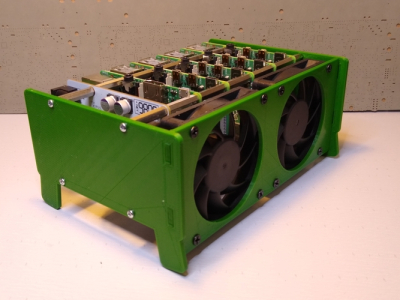
It isn’t that hard to assemble an array of Raspberry Pi boards and there are several reasons you might want to do so. The real trick is getting power to all of them and cooling all of them without having a mess of wires and keeping them all separated. The ClusterCTRL stack lets you stack up to five Raspberry Pi boards together. The PCB aligns vertically along the side of the stack of Pis with sockets for each pin header. Using a single 12 to 24V supply, it provides power for each board, a USB power connection, and provisions for two fans. There is also a USB port to control the fans and power.
There’s also a software component to deliver more granular control. Without using the software, the PI’s power on in one second and monitor a GPIO pin to control the fans. With the software, you can turn on or off individual nodes, gang the two fans to turn on together, and even add more stacks.
There is a case that you can print from STL files, although you can buy them preprinted on the Tindie listing where the bulk of information on ClusterCTRL is found. You could also have a 3D printing vendor run off a copy for you if you’d rather.
The power supply is a 10A 5.1V DC to DC converter. That works out to 2A per Pi and 51W total. The power supply for the input, then, needs to be enough to cover 51W, the power for the fans, and some overhead for regulator inefficiency and other small overhead.
We’ve seen a lot of Pi clusters over the years including one that is a good learning tool for cluster management. Of course, there’s always the Oracle cluster with 1,060 boards, which is going to take a bigger power supply.
It isn’t that hard to assemble an array of Raspberry Pi boards and there are several reasons you might want to do so. The real trick is getting power to all of them and cooling all of them without having a mess of wires and keeping them all separated. The ClusterCTRL stack lets you stack up to five Raspberry Pi boards together. The PCB aligns vertically along the side of the stack of Pis with sockets for each pin header. Using a single 12 to 24V supply, it provides power for each board, a USB power connection, and provisions for two fans. There is also a USB port to control the fans and power.
There’s also a software component to deliver more granular control. Without using the software, the PI’s power on in one second and monitor a GPIO pin to control the fans. With the software, you can turn on or off individual nodes, gang the two fans to turn on together, and even add more stacks.
There is a case that you can print from STL files, although you can buy them preprinted on the Tindie listing where the bulk of information on ClusterCTRL is found. You could also have a 3D printing vendor run off a copy for you if you’d rather.
The power supply is a 10A 5.1V DC to DC converter. That works out to 2A per Pi and 51W total. The power supply for the input, then, needs to be enough to cover 51W, the power for the fans, and some overhead for regulator inefficiency and other small overhead.
We’ve seen a lot of Pi clusters over the years including one that is a good learning tool for cluster management. Of course, there’s always the Oracle cluster with 1,060 boards, which is going to take a bigger power supply.
The Gameboy is one of the biggest platforms in the chiptune scene. While it’s possible to play a show with a single handheld, many artists choose to use two or even more to fatten their sound and rock the crowd. To ease the workflow of creating songs for such a setup, [tommitytom] created Retroplug and you can see him walk through the features in the demo video after the break.
Retroplug is a VST wrapper for the Sameboy Gameboy emulator. This makes it possible to run multiple emulated Gameboy instances within digital audio software like Ableton or Fruityloops. Rather than having to juggle multiple 30-year old Gameboys and the associated batteries and link cables, instead, it can all be done within a hosted VST window.
Presently, the software works only with 64-bit Windows and VST2, however source is available for those eager to peek under the hood. It fully implements MIDI support for mGB, and works well with LSDJ and Arduinoboy setups. *.sav files are created for each emulated instance too, so when you’re done composing, you can throw your songs onto real hardware when you go out and perform!
We see no shortage of fresh projects, from Genesis chiptune players to MIDI control for Gameboys. As its adherents always say, chiptune will never die. We’d love to see a similar project done with a C64 emulator, NES, or even the Genesis. If you happen to put it goether, drop us a line!
Tiny remote control cars burst onto the scene from time to time, often sold from mall kiosks and covered in garish stickers. However, sometimes it’s more fun to build than to buy. [diorama111] clearly fits into this camp, building a tiny 1:150 scale RC car from the ground up.
The build starts with a Tomy 1:150 model of what looks to be a Mercedes. However, only the outer shell remain. From giving the wheels rubber tires and fabricating a delicate steering assembly, to adding motors for both locomotion and turning, the mechanical build is on point. But seeing the ATtiny1616 is deadbugged with a DRV8835 motor driver, with the SMD parts hooked up with magnet wire to save the most space possible is equally impressive. A PIC79603 IR module is used to receive the commands to drive the car.
The build is an artful one, and all done by hand — no 3D printing or CNC parts involved. Watching the car drive is a delight. The smooth analog steering and slow speed give it an excellent scale appearance. The only thing we wonder about is the difficulty of driving it quickly without the aid of self-centering steering. It reminds us fondly of the 1:96 scale fully-functional Mustang RC plane we featured in 2017. Video after the break.
If you have fond childhood memories of afternoons spent at the local arcade, then you’ve had the occasional daydream about tracking down one of those old cabinets and putting it in the living room. But the size, cost, and rarity of these machines makes actually owning one impractical for most people.
While this fully functional 1/4th scale replica of the classic Star Wars arcade game created by [Jamie McShan] might not be a perfect replacement for the original, there’s no denying it would be easier to fit through your front door. Nearly every aspect of the iconic 1983 machine has been carefully recreated, right down to a working coin slot that accepts miniature quarters. Frankly, the build would have been impressive enough had he only put in half the detail work, but we certainly aren’t complaining that he went the extra mile.
[Jamie] leaned heavily on resin 3D printed parts for this build, and for good reason. It’s hard to imagine how he could have produced some of the tiny working parts for his cabinet using traditional manufacturing techniques. The game’s signature control yoke and the coin acceptor mechanism are really incredible feats of miniaturization, and a testament to what’s possible at the DIY level with relatively affordable tools.
The cabinet itself is cut from MDF, using plans appropriately scaled down from the real thing. Inside you’ll find a Raspberry Pi 3 Model A+ running RetroPie attached directly to the back of a 4.3 inch LCD with integrated amplified speakers. [Jamie] is using an Arduino to handle interfacing with the optical coin detector and controls, which communicates with the Pi over USB HID. He’s even added in a pair of 3,000 mAh LiPo battery packs and a dedicated charge controller so you can blow up the Death Star on the go.
Any modern computer with an x86 processor, whether it’s Intel or AMD, is a lost cause for software freedom and privacy. We harp on this a lot, but it’s worth repeating that it’s nearly impossible to get free, open-source firmware to run on them thanks to the Intel Management Engine (IME) and the AMD Platform Security Processor (PSP). Without libre firmware there’s no way to trust anything else, even if your operating system is completely open-source.
The IME or PSP have access to memory, storage, and the network stack even if the computer is shut down, and even after the computer boots they run at such a low level that the operating system can’t be aware of what they’re really doing. Luckily, there’s a dark horse in the race in the personal computing world that gives us some hope that one day there will be an x86 competitor that allows their users to have a free firmware that they can trust. ARM processors, which have been steadily increasing their user share for years but are seeing a surge of interest since the recent announcement by Apple, are poised to take over the personal computing world and hopefully allow us some relevant, modern options for those concerned with freedom and privacy. But in the real world of ARM processors the road ahead will decidedly long, windy, and forked.
Even ignoring tedious nitpicks that the distinction between RISC vs CISC is more blurred now than it was “back in the day”, RISC machines like ARM have a natural leg up on the x86 CISC machines built by Intel and AMD. These RISC machines use fewer instructions and perform with much more thermal efficiency than their x86 competitors. They can often be passively cooled, avoiding need to be actively cooled, unlike many AMD/Intel machines that often have noisy or bulky fans. But for me, the most interesting advantage is the ability to run ARM machines without the proprietary firmware present with x86 chips.
ARM is an Architecture Licensed to Many Manufacturers
ARM doesn’t make any chips themselves like the x86 manufacturers like Intel do. Rather, they maintain and license their architecture to other companies who in turn build processors that use the ARM instruction set. There is an almost uncountable number of companies making ARM processors: Broadcom, Qualcomm, Rockchip, Atmel, STMicroelectronics, and Texas Instruments, to name a few. And don’t forget Apple, who have been making ARM-based phones and tablets for years and who are about to transition their entire line of products to this superior architecture.
The diversity in manufacturers both is a blessing and a curse when it comes to privacy-respecting options for firmware and software. With so many manufacturers, ARM chips are in almost everything and are so common that there is an easily-accessible wealth of knowledge about how to build software for them (even though desktop computing applications are just a little bit behind).
Applications for the platform are varied as well, from microcontrollers to routers to smartphones and a handful of PCs. However, as anyone with an Android phone may have experienced when trying to unlock their bootloader, there is no uniform way that ARM processors are booted and there’s no uniform or even standardized boot software for ARM-based chips. Some use uboot or coreboot, some need to use some binary blobs, and still others have proprietary firmware that is not open source or able to be modified in any way and even prohibits modifying other software on the device.
Companies using ARM devices are free to open up their devices to be as free as possible like Pine64 does with their phones, tablets, and computers, but others (including cell phone service providers like AT&T or Verizon) can use the freedom afforded to them by the ARM platform to make sure their customers have almost no access to the software running on that hardware. Finding ARM platforms that are open is a challenge if the original manufacturer or supplier didn’t make it a priority, but there are some other options available.
Finding Your Way to ARM and Libre Firmware
One of the more favorable of those options is the Rockchip RK3288, which uses an ARM Cortex-A17 processor and can be found in a number of different Chromebooks. Libreboot, a free and open-source firmware available for a small set of computers, is available for these chips as well which means that (as long as you can get the right graphics driver installed) you can run 100% free software on this computer. Of course, the chipset is around six years old so while it is a fair bit newer than other computers running libreboot (like installing libreboot on my personal laptop which is of the 2008 vintage), it’s still not the most modern processor out there.
For something a little newer, a great example of the openness possible with ARM is from Pine64, which produces several laptops, phones, and a tablet all based on ARM chips. Their PineBook Pro, for example, uses the upgraded Rockchip RK3399 which has two Cortex-A72 cores and four Cortex-A53 cores, which allows it to split various tasks among themselves in order to make the best use of each of these chips, and of course it uses a libre bootloader as well. The offerings from Rockchip aren’t the only options, either; the Free Software Foundation has a list of other systems-on-a-chip that have varying degrees of software freedom.
Popular Choices for Open Bootloaders on ARM
While the open, diverse nature of ARM means that anyone anywhere can code a firmware/bootloader/BIOS for their specific platform of choice, it’s not necessary to reinvent the wheel. There are a few options already out there that are popular choices.
The most free of these is the oft-mentioned libreboot, which uses 100% free and open-source software and never uses any binary blobs. It is available for a handful of ARM-based laptops from the early 2010s (as well as some other older x86-based boards as well). Libreboot itself is a fork distribution of coreboot, a bootloader that is largely free (licensed under GPLv2) but occasionally uses proprietary binary “blobs” of non-free software in order to get certain hardware up and running that might not otherwise have a non-proprietary way of booting.
Besides these two main bootloaders there is also Das U-boot, or simply uboot, another free bootloader available for various platforms including ARM. Many specialty bootloaders exist as well, such as RedBoot which is built specifically for Red Hat implementations, and BareBox which is used largely in embedded devices. Of course, like the many flavors of Linux, there are an astounding number of other bootloaders available with various features and levels of freedom.
You Should Value Your Privacy and Security
With so many variables, hopefully the coming ARM revolution will include free options for those of us who value security and freedom from the ground up. While Apple almost certainly will not use a free or open-source bootloader as the firmware for their laptops, they’re not actually driving this movement. There’s sea change happening right now throughout the computing world in favor of ARM processors over their more inefficient and insecure x86 competitors and if Apple is any indication this may eventually spill over into the rest of the PC world as well.
The current state of PCs doesn’t really allow us to “vote with one’s wallet” since there are almost no options in the landscape for security or privacy. But your privacy and security have value. With the diversity of manufacturers of ARM devices, I am hopeful that the a growing number of companies will to listen our needs and finally offer modern, powerful, and competitive computers built from the ground up with hardware, firmware, and software choices that begin with privacy and security in mind.
Any modern computer with an x86 processor, whether it’s Intel or AMD, is a lost cause for software freedom and privacy. We harp on this a lot, but it’s worth repeating that it’s nearly impossible to get free, open-source firmware to run on them thanks to the Intel Management Engine (IME) and the AMD Platform Security Processor (PSP). Without libre firmware there’s no way to trust anything else, even if your operating system is completely open-source.
The IME or PSP have access to memory, storage, and the network stack even if the computer is shut down, and even after the computer boots they run at such a low level that the operating system can’t be aware of what they’re really doing. Luckily, there’s a dark horse in the race in the personal computing world that gives us some hope that one day there will be an x86 competitor that allows their users to have a free firmware that they can trust. ARM processors, which have been steadily increasing their user share for years but are seeing a surge of interest since the recent announcement by Apple, are poised to take over the personal computing world and hopefully allow us some relevant, modern options for those concerned with freedom and privacy. But in the real world of ARM processors the road ahead will decidedly long, windy, and forked.
Even ignoring tedious nitpicks that the distinction between RISC vs CISC is more blurred now than it was “back in the day”, RISC machines like ARM have a natural leg up on the x86 CISC machines built by Intel and AMD. These RISC machines use fewer instructions and perform with much more thermal efficiency than their x86 competitors. They can often be passively cooled, avoiding need to be actively cooled, unlike many AMD/Intel machines that often have noisy or bulky fans. But for me, the most interesting advantage is the ability to run ARM machines without the proprietary firmware present with x86 chips.
ARM is an Architecture Licensed to Many Manufacturers
ARM doesn’t make any chips themselves like the x86 manufacturers like Intel do. Rather, they maintain and license their architecture to other companies who in turn build processors that use the ARM instruction set. There is an almost uncountable number of companies making ARM processors: Broadcom, Qualcomm, Rockchip, Atmel, STMicroelectronics, and Texas Instruments, to name a few. And don’t forget Apple, who have been making ARM-based phones and tablets for years and who are about to transition their entire line of products to this superior architecture.
The diversity in manufacturers both is a blessing and a curse when it comes to privacy-respecting options for firmware and software. With so many manufacturers, ARM chips are in almost everything and are so common that there is an easily-accessible wealth of knowledge about how to build software for them (even though desktop computing applications are just a little bit behind).
Applications for the platform are varied as well, from microcontrollers to routers to smartphones and a handful of PCs. However, as anyone with an Android phone may have experienced when trying to unlock their bootloader, there is no uniform way that ARM processors are booted and there’s no uniform or even standardized boot software for ARM-based chips. Some use uboot or coreboot, some need to use some binary blobs, and still others have proprietary firmware that is not open source or able to be modified in any way and even prohibits modifying other software on the device.
Companies using ARM devices are free to open up their devices to be as free as possible like Pine64 does with their phones, tablets, and computers, but others (including cell phone service providers like AT&T or Verizon) can use the freedom afforded to them by the ARM platform to make sure their customers have almost no access to the software running on that hardware. Finding ARM platforms that are open is a challenge if the original manufacturer or supplier didn’t make it a priority, but there are some other options available.
Finding Your Way to ARM and Libre Firmware
One of the more favorable of those options is the Rockchip RK3288, which uses an ARM Cortex-A17 processor and can be found in a number of different Chromebooks. Libreboot, a free and open-source firmware available for a small set of computers, is available for these chips as well which means that (as long as you can get the right graphics driver installed) you can run 100% free software on this computer. Of course, the chipset is around six years old so while it is a fair bit newer than other computers running libreboot (like installing libreboot on my personal laptop which is of the 2008 vintage), it’s still not the most modern processor out there.
For something a little newer, a great example of the openness possible with ARM is from Pine64, which produces several laptops, phones, and a tablet all based on ARM chips. Their PineBook Pro, for example, uses the upgraded Rockchip RK3399 which has two Cortex-A72 cores and four Cortex-A53 cores, which allows it to split various tasks among themselves in order to make the best use of each of these chips, and of course it uses a libre bootloader as well. The offerings from Rockchip aren’t the only options, either; the Free Software Foundation has a list of other systems-on-a-chip that have varying degrees of software freedom.
Popular Choices for Open Bootloaders on ARM
While the open, diverse nature of ARM means that anyone anywhere can code a firmware/bootloader/BIOS for their specific platform of choice, it’s not necessary to reinvent the wheel. There are a few options already out there that are popular choices.
The most free of these is the oft-mentioned libreboot, which uses 100% free and open-source software and never uses any binary blobs. It is available for a handful of ARM-based laptops from the early 2010s (as well as some other older x86-based boards as well). Libreboot itself is a fork distribution of coreboot, a bootloader that is largely free (licensed under GPLv2) but occasionally uses proprietary binary “blobs” of non-free software in order to get certain hardware up and running that might not otherwise have a non-proprietary way of booting.
Besides these two main bootloaders there is also Das U-boot, or simply uboot, another free bootloader available for various platforms including ARM. Many specialty bootloaders exist as well, such as RedBoot which is built specifically for Red Hat implementations, and BareBox which is used largely in embedded devices. Of course, like the many flavors of Linux, there are an astounding number of other bootloaders available with various features and levels of freedom.
You Should Value Your Privacy and Security
With so many variables, hopefully the coming ARM revolution will include free options for those of us who value security and freedom from the ground up. While Apple almost certainly will not use a free or open-source bootloader as the firmware for their laptops, they’re not actually driving this movement. There’s sea change happening right now throughout the computing world in favor of ARM processors over their more inefficient and insecure x86 competitors and if Apple is any indication this may eventually spill over into the rest of the PC world as well.
The current state of PCs doesn’t really allow us to “vote with one’s wallet” since there are almost no options in the landscape for security or privacy. But your privacy and security have value. With the diversity of manufacturers of ARM devices, I am hopeful that the a growing number of companies will to listen our needs and finally offer modern, powerful, and competitive computers built from the ground up with hardware, firmware, and software choices that begin with privacy and security in mind.
Any modern computer with an x86 processor, whether it’s Intel or AMD, is a lost cause for software freedom and privacy. We harp on this a lot, but it’s worth repeating that it’s nearly impossible to get free, open-source firmware to run on them thanks to the Intel Management Engine (IME) and the AMD Platform Security Processor (PSP). Without libre firmware there’s no way to trust anything else, even if your operating system is completely open-source.
The IME or PSP have access to memory, storage, and the network stack even if the computer is shut down, and even after the computer boots they run at such a low level that the operating system can’t be aware of what they’re really doing. Luckily, there’s a dark horse in the race in the personal computing world that gives us some hope that one day there will be an x86 competitor that allows their users to have a free firmware that they can trust. ARM processors, which have been steadily increasing their user share for years but are seeing a surge of interest since the recent announcement by Apple, are poised to take over the personal computing world and hopefully allow us some relevant, modern options for those concerned with freedom and privacy. But in the real world of ARM processors the road ahead will decidedly long, windy, and forked.
Even ignoring tedious nitpicks that the distinction between RISC vs CISC is more blurred now than it was “back in the day”, RISC machines like ARM have a natural leg up on the x86 CISC machines built by Intel and AMD. These RISC machines use fewer instructions and perform with much more thermal efficiency than their x86 competitors. They can often be passively cooled, avoiding need to be actively cooled, unlike many AMD/Intel machines that often have noisy or bulky fans. But for me, the most interesting advantage is the ability to run ARM machines without the proprietary firmware present with x86 chips.
ARM is an Architecture Licensed to Many Manufacturers
ARM doesn’t make any chips themselves like the x86 manufacturers like Intel do. Rather, they maintain and license their architecture to other companies who in turn build processors that use the ARM instruction set. There is an almost uncountable number of companies making ARM processors: Broadcom, Qualcomm, Rockchip, Atmel, STMicroelectronics, and Texas Instruments, to name a few. And don’t forget Apple, who have been making ARM-based phones and tablets for years and who are about to transition their entire line of products to this superior architecture.
The diversity in manufacturers both is a blessing and a curse when it comes to privacy-respecting options for firmware and software. With so many manufacturers, ARM chips are in almost everything and are so common that there is an easily-accessible wealth of knowledge about how to build software for them (even though desktop computing applications are just a little bit behind).
Applications for the platform are varied as well, from microcontrollers to routers to smartphones and a handful of PCs. However, as anyone with an Android phone may have experienced when trying to unlock their bootloader, there is no uniform way that ARM processors are booted and there’s no uniform or even standardized boot software for ARM-based chips. Some use uboot or coreboot, some need to use some binary blobs, and still others have proprietary firmware that is not open source or able to be modified in any way and even prohibits modifying other software on the device.
Companies using ARM devices are free to open up their devices to be as free as possible like Pine64 does with their phones, tablets, and computers, but others (including cell phone service providers like AT&T or Verizon) can use the freedom afforded to them by the ARM platform to make sure their customers have almost no access to the software running on that hardware. Finding ARM platforms that are open is a challenge if the original manufacturer or supplier didn’t make it a priority, but there are some other options available.
Finding Your Way to ARM and Libre Firmware
One of the more favorable of those options is the Rockchip RK3288, which uses an ARM Cortex-A17 processor and can be found in a number of different Chromebooks. Libreboot, a free and open-source firmware available for a small set of computers, is available for these chips as well which means that (as long as you can get the right graphics driver installed) you can run 100% free software on this computer. Of course, the chipset is around six years old so while it is a fair bit newer than other computers running libreboot (like installing libreboot on my personal laptop which is of the 2008 vintage), it’s still not the most modern processor out there.
For something a little newer, a great example of the openness possible with ARM is from Pine64, which produces several laptops, phones, and a tablet all based on ARM chips. Their PineBook Pro, for example, uses the upgraded Rockchip RK3399 which has two Cortex-A72 cores and four Cortex-A53 cores, which allows it to split various tasks among themselves in order to make the best use of each of these chips, and of course it uses a libre bootloader as well. The offerings from Rockchip aren’t the only options, either; the Free Software Foundation has a list of other systems-on-a-chip that have varying degrees of software freedom.
Popular Choices for Open Bootloaders on ARM
While the open, diverse nature of ARM means that anyone anywhere can code a firmware/bootloader/BIOS for their specific platform of choice, it’s not necessary to reinvent the wheel. There are a few options already out there that are popular choices.
The most free of these is the oft-mentioned libreboot, which uses 100% free and open-source software and never uses any binary blobs. It is available for a handful of ARM-based laptops from the early 2010s (as well as some other older x86-based boards as well). Libreboot itself is a fork of coreboot, a bootloader that is largely free but occasionally uses proprietary binary “blobs” of non-free software in order to get certain hardware up and running that might not otherwise have a non-proprietary way of booting.
Besides these two main bootloaders there is also Das U-boot, or simply uboot, another free bootloader available for various platforms including ARM. Many specialty bootloaders exist as well, such as RedBoot which is built specifically for Red Hat implementations, and BareBox which is used largely in embedded devices. Of course, like the many flavors of Linux, there are an astounding number of other bootloaders available with various features and levels of freedom.
You Should Value Your Privacy and Security
With so many variables, hopefully the coming ARM revolution will include free options for those of us who value security and freedom from the ground up. While Apple almost certainly will not use a free or open-source bootloader as the firmware for their laptops, they’re not actually driving this movement. There’s sea change happening right now throughout the computing world in favor of ARM processors over their more inefficient and insecure x86 competitors and if Apple is any indication this may eventually spill over into the rest of the PC world as well.
The current state of PCs doesn’t really allow us to “vote with one’s wallet” since there are almost no options in the landscape for security or privacy. But your privacy and security have value. With the diversity of manufacturers of ARM devices, I am hopeful that the a growing number of companies will to listen our needs and finally offer modern, powerful, and competitive computers built from the ground up with hardware, firmware, and software choices that begin with privacy and security in mind.
To make up for some lacking athletic ability, [Shane Wighton] of [Stuff Made Here] created a custom baseball bat with an explosive sweet spot, that almost guarantees a home run. Inside a custom machined bat, he added a piston mechanism, powered by blank cartridges intended for powder actuated nailers, that can hit a ball with impressive force.
Up to three rimfire blank cartridges are placed in the stationary side of the piston mechanism, and are fired by three firing pins on the back of the piston when a ball hits the front of the piston. The expanding gasses then drive the piston out at high velocity, hitting the ball, before it is stopped from flying out completely by a crossbar. The gasses are exhausted through the side of the sleeve, into a “muffler” machined into the front of the bat. The first time [Shane] fired the mechanism with two cartridges, it almost sheared off the stopping bar, and damaged all the other components and blew the bat apart. This led to a complete redesign, including a crossbar with urethane dampers and an aluminum muffler.
The results with the “upgrades” are pretty impressive, and a little scary. Batting distance was around 350 feet with two cartridges, hitting the ball off a tee to avoid putting a pitcher in the firing line. [Shane] did a lab test with three cartridges, which put a hole in the ball and looked like it would break the bat. He expects that three cartridges would allow him to break the home run record, but would require another redesign and will be left for a future video
For garden variety daily computing tasks, the floppy disk has thankfully been a thing of the past for quite some time. Slow, limited in storage and easily corrupted, few yearn for the format to return, even if there is some lingering nostalgia for the disks. As it turns out, though, there is still hardware that relies on floppies – namely, the Boeing 747-400, as The Register reports.
The news comes from the work of Pen Test Partners, who recently inspected a 747 being retired as a result of the coronavirus pandemic. The floppy disks are used to load navigational databases which need to be updated regularly, every 28 days. Engineers responsible for loading updates must perform the process manually on the ground.
Efforts have been made in some areas to replace the disks with more modern technology. As Aviation Today covered in 2014, legacy aircraft often require updates involving up to eight floppy disks, leading to slow updates that can cause flight delays. As anyone familiar with the reliability of floppy media knows, it only takes one bad disk to ruin everything. While retrofits are possible, it’s more likely that airlines will simply stick with the technology until the legacy airplanes are retired. Certifying new hardware for flight is a major cost that is difficult to justify when the current system still works.
If you miss the days you could get an organizer that would — sort of — run Linux, you might be interested in Popcorn computer’s Pocket P. C., which was recently open-sourced on GitHub. Before you jump over to build one, though, there are a few things you should know.
First, the files are untested since the first unit hasn’t shipped yet. In addition, while the schematic looks pretty complete, there’s no actual bill of materials and the PCB layers in the PDF file might not be very easy to replicate, since they are just a series of images, one for each layer. You can see an overview video of the device, below.
Still, the information is there, although we haven’t seen the software yet. The device itself is interesting with a built-in keyboard. The specs are relatively straightforward. A quad-core ARM running at 1.2 GHz, 2GB of RAM, and 32GB of eMMC. The IPS LCD is just shy of five inches and has a 1920×1080 resolution. There’s the usual suite of connectors and interfaces and you can get a version that incorporates LoRa.
We hope Popcorn will continue releasing information on the device and will make enough software information available for the device to be truly open source. Of course, most of us will just buy one anyway, but it is nice to know that the source is there if you were to want it.
After seeing the poorly embossed paper maps used in the school, [Sergei] decided there had to be a better way. The solution was 3D printing, which makes producing a map with physical contours easy. Initial attempts involved printing street maps and world maps with raised features, such that students could feel the lines rather than seeing them.
Taking things a step further, [Sergei] went all out, producing an interactive educational device. The build consists of a world map, and contains audio files with information about countries, cultures, and more. When the ultrasonic sensor detects a user in range, it invites them to press or pull out the removable continents on the map. The device can sense touch, thanks to a pair of MPR121 capacitive touch sensor boards which are used to trigger the audio files.
If you have SSH and a few other tools set up, it is pretty easy to log into another machine and run a few programs. This could be handy when you are using a machine that might not have a lot of memory or processing power and you have access to a bigger machine somewhere on the network. For example, suppose you want to reencode some video on a box you use as a media server but it would go much faster on your giant server with a dozen cores and 32 GB of RAM.
Remote Execution
However, there are a few problems with that scenario. First, you might not have the software on the remote machine. Even if you do, it might not be the version you expect or have all the same configuration as your local copy. Then there’s the file problem. the input file should come from your local file system and you’d like the output to wind up there, too. These aren’t insurmountable, of course. You could install the program on the remote box and copy your files back and forth manually. Or you can use Outrun.
There are a few limitations, though. You do need Outrun on both machines and both machines have to have the same CPU architecture. Sadly, that means you can’t use this to easily run jobs on your x86-64 PC from a Raspberry Pi. You’ll need root access to the remote machine, too. The system also depends on having the FUSE file system libraries set up.
A Simple Idea
The idea is simple. You could do a video encoding like this:
This will work even if ffmpeg isn’t on the remote machine and the input and output files will be on your local box where you expect them. Here’s a screencast from the project’s GitHub page:
A Complex Implementation
How does this work? A FUSE file system mounts your local filesystem remotely using a lightweight RPC file system. Then a chroot makes the remote machine look just like your local machine but — presumably — faster. There are a few other things done, such as setting up the environment and current directory.
The chroot, by the way, is why you need root on the remote machine. As an ordinary user, you can’t pivot the root file system to make this trick work.
To improve performance, Outrun caches system directories and assumes they won’t change over the life of the command. It also aggressively prefetches using some heuristics to guess what files you’ll need in addition to the one that the system asked for.
The Future
We wish there was an option to assume the program will execute on the remote machine and only set up the input and output files. This would make it easier to do things like slice a 3D print on a remote PC from a Raspberry Pi running Octoprint, for example. Of course, this is all open source, so maybe we should go make that fix ourselves.
Then again, you could do something like this pretty easily with sshfs and some other tricks. If you want to run a program on a bunch of remote machines, there are ways to do that, too.
We are hurtling toward the close of entries for the 2020 Hackaday Prize. You need to have your project submitted within the next three weeks, by 7:00 AM Pacific time on Monday, August 31st. Entry is easy, just start a project page over on Hackaday.io and use the “Submit project to:” button on the left sidebar to enter it in the Hackaday Prize.
There are a number of cash prizes on the line this year. In addition to a $50,000 grand prize we have four best nonprofit solution prizes of $10,000, four $3,000 honorable mention prizes, and a $5,000 wildcard prize.
Need some inspiration to help you get started? We’ve teamed with four nonprofit organizations who have highlighted real-world challenges for you to tackle. From protecting our oceans and innovating on earthen housing designs to building assistive devices and designing systems for disaster relief, there’s plenty of ground to cover here!
Once entries close at the end August, we’ll announce a slate of finalists who will continue to refine their designs for another month. Each finalist’s project entry will be reviewed in October by our panel of expert judges to identify the top winners. Of course, with these type of challenges, having more people focus on ways to help is a win in our books. So grab your engineering notebooks and get to work!
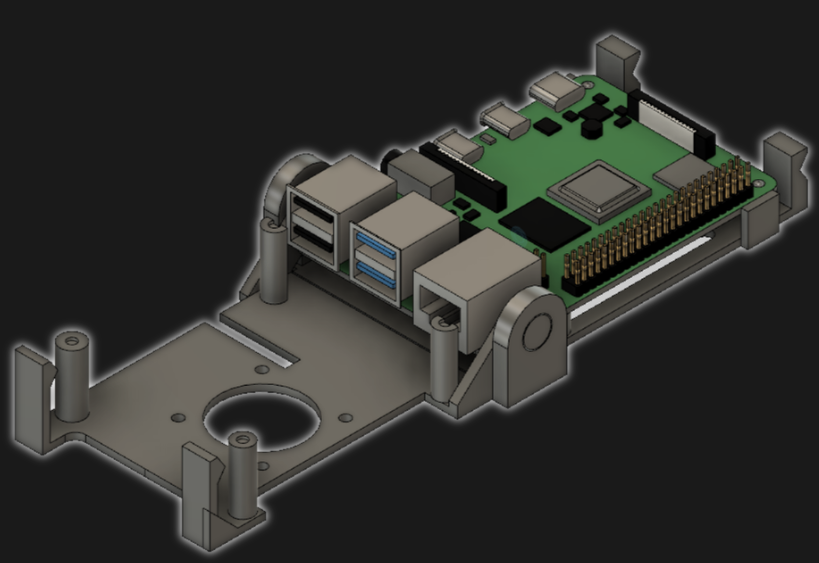
[jcprintnplay] has challenged himself to making Raspberry Pi cases in different ways, and his Fold-a-Pi enclosure tries for a “less is more” approach while also leveraging the strong points of 3D printing. The enclosure prints as a single piece in about 3 hours, and requires no additional hardware whatsoever.
The design requires no screws or other fasteners, and provides a mounting hole for a fan as well as some holes for mounting the enclosure itself to something. All the ports and headers are accessible, and the folding one-piece design is not just a gimmick; in a workshop situation where the Pi needs to be switched out or handled a lot, it takes no time at all to pop the Raspberry Pi in and out of the enclosure.
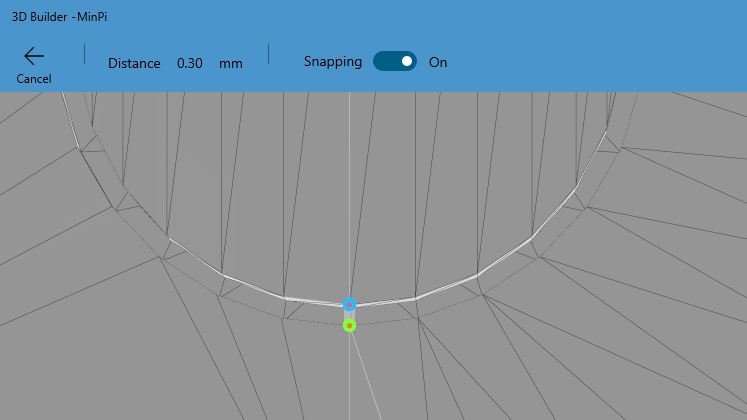
Microsoft’s 3D Builder has a pretty useful measurement tool for STLs.
[James] points out that the trick with a print-in-place hinge like this is leaving enough space between the parts so that the two pieces aren’t fused together, but not so much space that the print fails. He doesn’t go into detail about how much space worked or didn’t work, but an examination of the downloadable model shows that the clearance used looks like 0.30 mm, intended to be printed with a 0.4 mm nozzle.
[James] also demonstrates the value of being able to do quick iterations on a design when prototyping. In a video (embedded below) The first prototype had the hinge not quite right. In the second prototype there was a lack of clearance when closing. The third one solved both and shows the final design.
The tricky process of finding just the right amount of clearance for something can be made much easier with the Goldilocks approach, and can be an efficient use of 3D printing.
These days, if you’ve got a TV that’s a little too old to directly access streaming services, you’ve got plenty of options. Apple TV, Chromecast, and a cavalcade of Android boxes are available to help get content on your screen. However, if you’re really stuck in the past, ESPFLIX might just be for you.
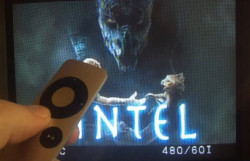
Control of the system is achieved by an Apple TV remote.
Yes, that’s right – it’s an online streaming service running on an ESP32. [rossumur] has achieved this feat through a careful use of codecs, and some efficient coding strategies to make it all come together. Video is MPEG1, at just 352×192 resolution. Audio is via the SBC codec, originally intended for use with Bluetooth devices. It’s chosen here for its tiny sample buffers, making it easier to decode in the limited RAM of the ESP32. Output is via composite video, generated on the ESP32 itself.
The titles themselves consist of public domain content, running off an Amazon Web Services instance. With limited RAM on the ESP32, there’s not much buffering to be had, so [rossumur] is bankrolling an AWS Cloudfront instance which should make it possible to use ESPFLIX from most places around the world with a solid internet connection.
These days, if you’ve got a TV that’s a little too old to directly access streaming services, you’ve got plenty of options. Apple TV, Chromecast, and a cavalcade of Android boxes are available to help get content on your screen. However, if you’re really stuck in the past, ESPFLIX might just be for you.
Control of the system is achieved by an Apple TV remote.
Yes, that’s right – it’s an online streaming service running on an ESP32. [rossumur] has achieved this feat through a careful use of codecs, and some efficient coding strategies to make it all come together. Video is MPEG1, at just 352×192 resolution. Audio is via the SBC codec, originally intended for use with Bluetooth devices. It’s chosen here for its tiny sample buffers, making it easier to decode in the limited RAM of the ESP32. Output is via composite video, generated on the ESP32 itself.
The titles themselves consist of public domain content, running off an Amazon Web Services instance. With limited RAM on the ESP32, there’s not much buffering to be had, so [rossumur] is bankrolling an AWS Cloudfront instance which should make it possible to use ESPFLIX from most places around the world with a solid internet connection.
These days, if you’ve got a TV that’s a little too old to directly access streaming services, you’ve got plenty of options. Apple TV, Chromecast, and a cavalcade of Android boxes are available to help get content on your screen. However, if you’re really stuck in the past, ESPFLIX might just be for you.
Control of the system is achieved by an Apple TV remote.
Yes, that’s right – it’s an online streaming service running on an ESP32. [rossumur] has achieved this feat through a careful use of codecs, and some efficient coding strategies to make it all come together. Video is MPEG1, at just 352×192 resolution. Audio is via the SBC codec, originally intended for use with Bluetooth devices. It’s chosen here for its tiny sample buffers, making it easier to decode in the limited RAM of the ESP32. Output is via composite video, generated on the ESP32 itself.
The titles themselves consist of public domain content, running off an Amazon Web Services instance. With limited RAM on the ESP32, there’s not much buffering to be had, so [rossumur] is bankrolling an AWS Cloudfront instance which should make it possible to use ESPFLIX from most places around the world with a solid internet connection.
Time may bring change, but kinematic couplings don’t. This handy kinematic couplings resource by [nickw] was for a design contest a few years ago, but what’s great is that it includes ready-to-use models intended for 3D printing, complete with a bill of materials (and McMaster-Carr part numbers) for hardware. The short document is well written and illustrated with assembly diagrams and concise, practical theory. The accompanying 3D models are ready to be copied and pasted anywhere one might find them useful.
What are kinematic couplings? They are a way to ensure that two parts physically connect, detach, and re-connect in a precise and repeatable way. The download has ready-to-use designs for both a Kelvin and Maxwell system kinematic coupling, and a more advanced design for an optomechanical mount like one would find in a laser system.
The download from Pinshape requires a free account, but the models and document are licensed under CC – Attribution and ready to use in designs (so long as the attribution part of the license is satisfied, of course.) Embedded below is a short video demonstrating the coupling using the Maxwell system. The Kelvin system is similar.

 There is a case that you can print from STL files, although you can buy them preprinted on the Tindie listing where the bulk of information on ClusterCTRL is found. You could also have a 3D printing vendor run off a copy for you if you’d rather.
 The build starts with a Tomy 1:150 model of what looks to be a Mercedes. However, only the outer shell remain. From giving the wheels rubber tires and fabricating a delicate steering assembly, to adding motors for both locomotion and turning, the mechanical build is on point. But seeing the ATtiny1616 is deadbugged with a DRV8835 motor driver, with the SMD parts hooked up with magnet wire to save the most space possible is equally impressive. A PIC79603 IR module is used to receive the commands to drive the car.
 Applications for the platform are varied as well, from microcontrollers to routers to smartphones and a handful of PCs. However, as anyone with an Android phone may have experienced when trying to unlock their bootloader, there is no uniform way that ARM processors are booted and there’s no uniform or even standardized boot software for ARM-based chips. Some use uboot or coreboot, some need to use some binary blobs, and still others have proprietary firmware that is not open source or able to be modified in any way and even prohibits modifying other software on the device.
 After seeing the poorly embossed paper maps used in the school, [Sergei] decided there had to be a better way. The solution was 3D printing, which makes producing a map with physical contours easy. Initial attempts involved printing street maps and world maps with raised features, such that students could feel the lines rather than seeing them.