Watch on YouTube here: Tachometer (RPM Meter) || DIY or Buy || How a 3€ sensor outdoes a 29€ product!
Via Christian Gasper
from Blogger https://ift.tt/3kauhd1
via IFTTT

Watch on YouTube here: Tachometer (RPM Meter) || DIY or Buy || How a 3€ sensor outdoes a 29€ product!
Via Christian Gasper
from Blogger https://ift.tt/3kauhd1
via IFTTT
Old TeleTypes and even typewriters had bells. Real bells. So that ASCII BEL character is supposed to make an honest to goodness ringing sound. While some modern terminals make a beep from the computer speakers, it isn’t the same. [Tenderlove] must agree, because the turned a Microchip USB to I2C bridge chip into a HID-controlled bell.
The only problem we see is that you have to have a patch to your terminal to ring the bell. We’d love to see some filter for TCP or serial that would catch BEL characters, but on the plus side, it is easy to ring the bell from any sort of application since it responds to normal HID commands.
If a bell doesn’t strike your fancy, you could use the same technique to easily add a digital output for anything. Of course, you could also use the MCP2221A as intended and put an I2C bus out there with a digital I/O expander or any number of other I2C chips.
Despite the video’s infomercial attitude, you can’t actually buy the bell. You’ll have to make it. It wouldn’t be very hard to duplicate with an Arduino or anything else you can connect to a PC as long as you modify the driving software accordingly.
We know you can play a sound file of a bell, but sometimes a real bell is just necessary. If you want to ring big bells, turns out there is an entire cult of wanna be Quasimodos.
source https://hackaday.com/2020/09/13/usb-bell-rings-in-custom-terminal/
We’ve seen homemade VR headsets before, but, often they are dependent on special software or are not really up to par with commercial products. Not so with Relativity, an open source project from [Max Coutte] and [Gabriel Combe]. [Max] says it best:
Relativty is not a consumer product. We made Relativty in my bedroom with a soldering iron and a 3D printer and we expect you to do the same: build it yourself.
Unlike some homebrew gear, Relativity has full Steam VR support. It also has experimental support for positional scaling that tracks your body based on video input.
Under the covers, a motherboard with an Atmel ARM Cortex M3 and an IMU do the heavy lifting and account for $25 of the $200 price tag. The firmware though can run on any suitable ArduinoCore processor. The displays, too, have options. You can go for price with 90 Hz 1080p screens or jump up to 4K. The prototypes use a 2K dual display at 120 frames per second.
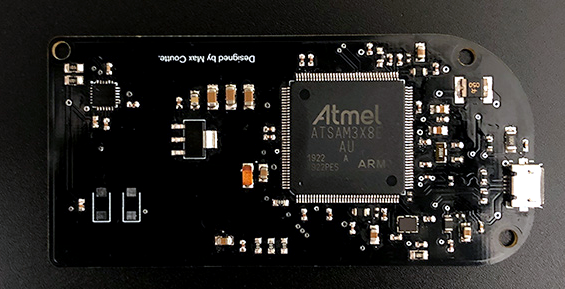
If you want to build Relativity yourself, all the details are on GitHub and there is a Discord server for help. The 3D printed case looks great and overall it seems like an impressive design.
We’ve seen a few similar projects, some even cheaper. We actually covered an earlier incarnation of the headset from the same team. You can see they’ve come a long way.
source https://hackaday.com/2020/09/13/open-source-vr-headset-for-200/
Listening to radio from distant countries used to take a shortwave rig, but thanks to the Internet we can now pull in streams from all over the globe from the comfort of our own desktop. With a few clicks you can switch between your local news station and the latest in pop trends from Casablanca. But as convenient as online streaming might be, some folks still yearn for the traditional radio experience.
For those people, the Raspberry Pi World Radio by [Abraham Martinez Gracia] might be the solution. Built into the body of a 1960s Invicta radio, this Internet radio uses a very unique interface. Rather than just picking from a list of channels, you use the knobs on the front to pan and zoom around a map of the world. Streaming channels are represented by bubbles located within their country of origin, so you’ll actually have to “travel” there to listen in. The video after the break gives a brief demonstration of how it works in practice.
We’ll admit it might become a bit tedious eventually, but from a visual standpoint, it’s absolutely fantastic. [Abraham] even gave the map an appropriately vintage look to better match the overall aesthetic. Normally we’d say using a Raspberry Pi 4 to drive a streaming radio player would be a bit overkill, but considering the GUI component used here, it’s probably the right choice.
Of course we’ve seen Internet radios built into vintage enclosures before, and we’ve even seen one that used a globe to select the station, but combining both of those concepts into one cohesive project is really quite an accomplishment.
source https://hackaday.com/2020/09/12/world-radio-lets-your-fingers-do-the-walking/
Over the last century, very little of the basic design of firearm cartridges has changed, but the mechanics of firearms themselves have undergone many upgrades. The evolution of triggers, safeties, magazines, and operating mechanisms is a fascinating field of study. Hands-on experience with these devices is rare for most people, but thanks to people like [zvc], you can 3D print accurate replicas of historical firearms and see how all the parts fit together for yourself.
[zvc] is slowly building up a library of 3D models, with nine available so far, from the Mauser C96 “Broomhandle” pistol to the modern M4 rifle. Except for springs and some fasteners, almost every single part of [zvc]’s models are 3D printed, down to the takedown pins and extractors. With the obvious exception of being able to fire a live round, it looks like all the components fit and work together like on the real firearms. None were ever designed with 3D printing in mind, so a well-tuned printer, lots of support structure, and post-processing are required to make everything work. The surface finish will be a bit rough, and some smaller and thin-walled components might be susceptible to breaking after the repeated operation or excessive force. The models are not free, but all prices are below €10.
These models do demonstrate one of the real superpowers of 3D printing: functional mock-ups and prototypes. The ability to do rapid iterative design updates and to have the latest design in hand within a few hours is invaluable in product development. [Giaco] used this extensively during the development of his kinetic driver. When you buy 3D printable models online, always make sure what possible pitfalls exist.
source https://hackaday.com/2020/09/12/learn-about-historic-firearm-design-with-a-3d-printer/
Not many of our childhood doll and action figure’s accessories revolved around lab equipment except maybe an Erlenmeyer flask if they were a “scientist.” No, they tended to be toasters, vehicles, and guns. When we were young, our heroes made food, drove sexy automobiles, and fought bad guys. Now that we’re older, some of our heroes wield soldering irons, keyboards, and oscilloscopes. [Adrian Herbez] made a scale model oscilloscope that outshines the beakers and test tube racks of yesteryear. Video also shown below.
On the left side of this ‘scope is a twistable knob that actuates a couple of internal levers to bend a neon green rubber band. The levers and background are black, so it all blends to look like a screen while the band approximates a sine wave. [Adrian]’s scope will up the game of any bread toasting, Lambo driving, tacti-cool ninja hunter. The thin rubber band would look more like a sawtooth than a sine at larger scales, but maybe that’s perfect for your Viking-cyborg-DJ-hairdresser. What would a miniature version of you have in their lab?
We love seeing new toys with a modern appeal like this ‘scope, but we respect vintage toys. Hacker parents do a fine job keeping things fresh and lively for their wee ones.
The Nissan Leaf is the best-selling electric car of all time so far, thanks largely to it being one of the first mass produced all-electric EVs. While getting into the market early was great for Nissan, they haven’t made a lot of upgrades that other EV manufacturers have made and are starting to lose customers as a result. One of those upgrades is charge limiting, which allows different charging rates to be set from within the car. With some CAN bus tinkering, though, this feature can be added to the Leaf.
Limiting the charging rate is useful when charging at unfamiliar or old power outlets which might not handle the default charge rate. In Europe, which has a 240V electrical distribution system, Leafs will draw around 3 kW from a wall outlet which is quite a bit of power. If the outlet looks like it won’t support that much power flow, it’s handy (and more safe) to be able to reduce that charge rate even if it might take longer to fully charge the vehicle. [Daniel]’s modification requires the user to set the charge rate by manipulating the climate control, since the Leaf doesn’t have a comprehensive user interface.
The core of this project is performed over the CAN bus, which is a common communications scheme that is often used in vehicles and is well-documented and easy to take advantage of. Luckily, [Daniel] has made the code available on his GitHub page, so if you’re thinking about trading in a Leaf for something else because of its lack of features it may be time to reconsider.
Photo: Chuck Allen (chucka_nc) / CC BY-SA
source https://hackaday.com/2020/09/12/adding-luxury-charging-features-to-an-entry-level-ev/
Last week, I wrote about two recent projects of mine that serve as cautionary tales in keeping projects simple — you probably can’t simplify everything, so it’s worth the time to find out which simplifications have the most bang for the buck. This week, I’d like to share a tale of lack of design focus.
German has the eierlegende Wollmilchsau: a mystical animal that lays eggs, while producing wool, milk, and meat to boot. It’s a little bit like the English “jack of all trades, master of none” except that the eierlegende Wollmilchsau doesn’t do each job badly, it plainly can’t exist. This is obviously a bad way to start a design.
The first surfboard that I made by myself was supposed to be an eierlegende Wollmilchsau. It was going to be a longboard, because we had months with smaller waves that just weren’t all that suitable for shortboarding, but it was also going to turn sharply off the rails like a shortboard. To help it turn, it was going to have tons of camber (bend like a banana), and small fins. And along the way, I thought I’d make it thin to cut through the water.
 Of course what I ended up with, not helped by my heavy fiberglassing hand, was a plow that dug into the water, would turn unexpectedly when you managed to get it onto the rails, and couldn’t pick up a small wave to save its life due to the camber and aforementioned plowing. I surfed it anyway, as a matter of pride, but I had no illusions of it being anything but the the worst board I owned. And that’s comparing it to the $30 used rasta-graphic plank that had been taking on water for at least five years, unrepaired, and was rotting out from the inside. At least it had design focus.
My surfboard didn’t suffer from feature creep, where you start piling on features until the project crumbles from overload, but rather from wanting to have my cake and eat it too. Or from failing to realize that certain design goals were necessarily tradeoffs. The “raily” behavior that I wanted when it was in bigger waves was necessarily “diggy” in small waves. Good boards trade off these features, and getting the balance between them is the art of shaping a board.
So when you start up a new project, think about which facets of your design are jointly achievable, and which are necessarily tradeoffs. Ignoring tradeoffs is a recipe for disaster, designing an eierlegende Wollmilchsau. But viewed constructively, it’s exactly these nuanced decisions that separates the simply possible from the truly marvelous. May you identify your trades, and make them well!
source https://hackaday.com/2020/09/12/the-egg-laying-wool-milk-pig/
In the early days of 3D printing, most people used ABS plastic. It is durable and sticks well to simple surfaces. However, it smells and emits fumes that may be dangerous. It also tends to warp as it cools which causes problems when printing. PLA smells nicer and since it is made from corn is supposed to be less noxious. However, PLA isn’t as temperature resistant and while it will stick better to beds without heat, it also requires more airflow to set the plastic as it prints. [Kerry Stevenson] recently reviewed PLA-F which is a blend of the two plastics. Is it the best of both worlds? Or the worst?
[Kerry] did several tests with interesting results. He did a temperature test tower and found the material printed well between 190 and 240 °C. He did note some stringing problems, though.
The material had no real issues printing gaps and did not readily warp. What was especially odd, though, was that [Kerry] noted no smell from the material at all. You’d think it would either smell like PLA or ABS or some blend of the two. Another surprise was that the PLA-F appeared to be even less heat tolerant than ordinary PLA.
Given the results, we aren’t sure why we’d pick this over regular PLA. The tests indicate it may be even less prone to warping than PLA, but that’s not usually a problem. On the other hand, we didn’t see any real reason not to use it as long as you don’t need high temperature resistance.
Honestly, we really like PETG these days. Naturally, there are plenty of alternatives.
Thanks [ptkwilliams] for the tip.
source https://hackaday.com/2020/09/12/pla-f-blends-pla-and-abs/
Persistence of vision projects are a dime a dozen, but by adding a third dimension [Madaeon] succesfully created one to stand out from the crowd. Instead of waving around a single line of LEDs, he is moving a 2D grid of them vertically to create a volumetric POV display.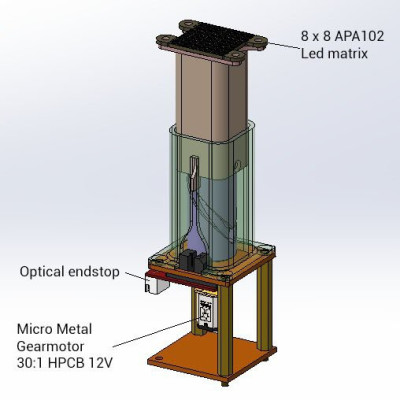
The display consists of oscillating 3D printed piston, powered by a small geared motor, on top of which sits a 8 x 8 RGB LED grid and diffusing film. The motor drives a cylindrical cam, which moves a piston that sits over it, while an optical end stop detects the bottom of the piston’s travel to keep the timing correct. [Madaeon] has not added his code to the project page, but the 3D files for the mechanics are available. The current version creates a lot of vibration, but he plans to improve it by borrowing one of [Karl Bugeja]’s ideas, and using flexible PCBs and magnets.
He also links another very cool volumetric display that he constructed a few years ago. It works by projecting images from a small DLP projector onto an oscillating piece of fabric, to created some surprisingly high definition images.
POV displays are good projects for learning, so if you want to build your own, take a look a simple POV business card, or this well-documented POV spinning top.
source https://hackaday.com/2020/09/12/3d-pov-display-has-the-shakes/
Persistence of vision projects are a dime a dozen, but by adding a third dimension [Madaeon] succesfully created one to stand out from the crowd. Instead of waving around a single line of LEDs, he is moving a 2D grid of them vertically to create a volumetric POV display.
The display consists of oscillating 3D printed piston, powered by a small geared motor, on top of which sits a 8 x 8 RGB LED grid and diffusing film. The motor drives a cylindrical cam, which moves a piston that sits over it, while an optical end stop detects the bottom of the piston’s travel to keep the timing correct. [Madaeon] has not added his code to the project page, but the 3D files for the mechanics are available. The current version creates a lot of vibration, but he plans to improve it by borrowing one of [Karl Bugeja]’s ideas, and using flexible PCBs and magnets.
He also links another very cool volumetric display that he constructed a few years ago. It works by projecting images from a small DLP projector onto an oscillating piece of fabric, to created some surprisingly high definition images.
POV displays are good projects for learning, so if you want to build your own, take a look a simple POV business card, or this well-documented POV spinning top.
source https://hackaday.com/2020/09/12/3d-pov-display-has-the-shakes/
Persistence of vision projects are a dime a dozen, but by adding a third dimension [Madaeon] succesfully created one to stand out from the crowd. Instead of waving around a single line of LEDs, he is moving a 2D grid of them vertically to create a volumetric POV display.
The display consists of oscillating 3D printed piston, powered by a small geared motor, on top of which sits a 8 x 8 RGB LED grid and diffusing film. The motor drives a cylindrical cam, which moves a piston that sits over it, while an optical end stop detects the bottom of the piston’s travel to keep the timing correct. [Madaeon] has not added his code to the project page, but the 3D files for the mechanics are available. The current version creates a lot of vibration, but he plans to improve it by borrowing one of [Karl Bugeja]’s ideas, and using flexible PCBs and magnets.
He also links another very cool volumetric display that he constructed a few years ago. It works by projecting images from a small DLP projector onto an oscillating piece of fabric, to created some surprisingly high definition images.
POV displays are good projects for learning, so if you want to build your own, take a look a simple POV business card, or this well-documented POV spinning top.
source https://hackaday.com/2020/09/12/3d-pov-display-has-the-shakes/
Inventing often combines more than one old ideas into a new one. Even when the fused things are similar, the result can be more valuable than the sum of its parts. Unlike those analog watches with a digital clock below the face, when [Mojoptix] combined the re-reflecting properties of an infinity mirror with the image twisting qualities of a funhouse mirror, we get more than just a pair of mirrors. The resulting images look like a lot of fun. Warping one surface of two parallel mirrors doesn’t just alter the result a bit, because the planes feed off each other’s view, the final product is an exponentially skewed show.
Our host mounts a 3D printed ring with an hubward-facing strip of LEDs to an ordinary glass mirror. Over that, he designs four mated plates that hold semi-reflective film sheets in different shapes. The first is a hyperbolic paraboloid, but it’s probably easier to think of it as shaped like a Pringles chip (crisp). Once the light is applied, it looks like a bowtie made by a deranged god or the start of an infinite rabbit hole of light and reflection. To further the madness, he hits us with four shapes at once, so we hope you’ll take a moment to enjoy the video below.
This guy is no stranger to optics, and we’ve reported on a couple of other cool inventions that teach a concept through demonstration. His precision calipers demonstrate the Moiré effect, and his digital sundial capitalizes on parallel light beams.
As the legend goes, if you look into this thing at midnight, you’ll see your own death.
source https://hackaday.com/2020/09/11/infinity-mirror-at-warp-speed/
Social cues are tricky, but humans are very good at detecting where someone is looking; that goes a long way toward figuring out where someone is placing their attention. All of this goes right out the window though, when you’re talking with somebody who uses eye-tracking software to speak. [Matthew Oppenheim] with Lancaster University, UK wants to give listeners the message of Give Me a Minute with an easy-to-recognize indicator. His choice is a microBit, which displays a rotating arrow on the LED array while someone composes their speech. He chose the microBit because they are readily available, and you can get cases to fit people’s personalities. After the break, you can see a demonstration, but the graphic appears scrambled because of the screen flicker. The rotating arrow is a clear indicator that someone is writing, whereas a clock might suggest a frozen computer, and a progress bar could not be accurate.
[Matthew] wrote a program for the interpreting computer which recognizes when a message is forming by monitoring the number of black pixels in the composition field. If it changes, someone must be composing a sentence. Many people will try to peek over the speaker’s shoulder and see if they are working, but we’re sure that most readers would join the users of such tech in being unhappy if someone blatantly looks at theirr computer screen while they are typing.
Wheelchairs don’t always have to come from a hospital or supply store, and they don’t have to stay on the ground.
source https://hackaday.com/2020/09/11/give-me-a-minute-my-eyes-are-busy/
When professional engineers giggling like kids, you know something interesting is about to happen. [Destin Sandlin] of [Smarter Every Day], [Jeremy Fielding], and a few other like-minded individuals have built what a very impressive air cannon, capable of launching baseballs at supersonic velocities.

The muzzleloading canon consists of a large pressure chamber and vacuum chamber stuck together, with a plug and baseball separating the two. The barrel acts as part of the vacuum is sealed off at the muzzle end with plastic tape that ruptures when fired. The firing mechanism runs the entire length of the pressure chamber, exiting out the back where it is held in place by a large pneumatic sear mechanism. When the sear is released, it “pops the cork” between the two chambers, sending high-pressure nitrogen into the vacuum chamber, forcing the ball forward. This causes the plug rod to shoot out the back of the pressure chamber, where it is stopped by a pneumatic piston. The entire thing is permanently mounted on a trailer and is ?? long with its barrel attached. A professional-looking control box is used to operate the beast from behind the safety of a steel blast shield.
Be sure to watch the videos after the break with subtitles turned on. The first is the highlights reel, and the second is a very entertaining hour-long behind the scenes look. To the surprise of the builders, they were able to shoot a baseball at Mach 1.38 (1050 mph or 1690 km/h) on the very first try, with only a partially pressurized system and a leaking vacuum chamber. When impacting the thick steel target, the ball disintegrates completely, imprinting its stitches on the target. [Destin] and co documented recorded the results with his usual high-speed cameras, but also included a Schlieren rig that allowed them to photograph the shock waves and Mach cones generated by the speeding ball. After a few shots, the bolts were stripped out of the pneumatic piston that stops the plug rod, which is no surprise judging by how much the steel frame flexes in that area.
This is a very ambitious project, and we have to agree that it is giggle-worthy. After sorting out the teething issues, we expect to see many more spectacular experiments. [Destin] is well knows for his informative and entertaining videos on everything from Fourier analysis to backwards bicycles. [Jeremy Fielding] is builds some impressive tools, and we’ve featured his CNC table saw and DIY dynamometer.
source https://hackaday.com/2020/09/11/making-baseballs-go-supersonic/
Some of us are suckers for new hardware. There’s absolutely nothing shameful about a drawer overflowing with gamepads, roll-up keyboards, and those funny-shaped ergonomic mice. MyTeleTouch won’t sate your itch for new hardware because [Dimitar Danailov] didn’t design hardware you hold, because it uses your phone as a catch-all Human Interface Device, HID. A dongle plugs into a standard USB port, and your Android phone can emulate a USB keyboard, mouse, or gamepad over Bluetooth.
Chances are high that you already set up your primary computer with your favorite hardware, but we think we’ve found a practical slant for a minimalist accessory. Remember the last time you booted an obsolete Windows desktop and dug out an old mouse with a questionable USB plug? How long have you poked around the bottom of a moving box trying to find a proprietary wireless keyboard dongle, when you just wanted to type a password on your smart TV? What about RetroPi and a game controller? MyTeleTouch isn’t going to transform your daily experience, but it’ll be there when you don’t want to carry a full-size keyboard down three flights of stairs to press {ENTER} on a machine that spontaneously forgot it has a touch screen. If you don’t have opportunities to play the hero very often, you can choose to play the villain. Hide this in a coworker’s USB port, and while they think you’re sending a text message, you could be fiddling with their cursor.
We enjoy a good prank that everyone can laugh off, and we love little keyboards and this one raises the (space) bar.
source https://hackaday.com/2020/09/11/peripheral-doesnt-need-deskspace/
Some of us are suckers for new hardware. There’s absolutely nothing shameful about a drawer overflowing with gamepads, roll-up keyboards, and those funny-shaped ergonomic mice. MyTeleTouch won’t sate your itch for new hardware because [Dimitar Danailov] didn’t design hardware you hold, because it uses your phone as a catch-all Human Interface Device, HID. A dongle plugs into a standard USB port, and your Android phone can emulate a USB keyboard, mouse, or gamepad over Bluetooth.
Chances are high that you already set up your primary computer with your favorite hardware, but we think we’ve found a practical slant for a minimalist accessory. Remember the last time you booted an obsolete Windows desktop and dug out an old mouse with a questionable USB plug? How long have you poked around the bottom of a moving box trying to find a proprietary wireless keyboard dongle, when you just wanted to type a password on your smart TV? What about RetroPi and a game controller? MyTeleTouch isn’t going to transform your daily experience, but it’ll be there when you don’t want to carry a full-size keyboard down three flights of stairs to press {ENTER} on a machine that spontaneously forgot it has a touch screen. If you don’t have opportunities to play the hero very often, you can choose to play the villain. Hide this in a coworker’s USB port, and while they think you’re sending a text message, you could be fiddling with their cursor.
We enjoy a good prank that everyone can laugh off, and we love little keyboards and this one raises the (space) bar.
source https://hackaday.com/2020/09/11/peripheral-doesnt-need-deskspace/
Some of us are suckers for new hardware. There’s absolutely nothing shameful about a drawer overflowing with gamepads, roll-up keyboards, and those funny-shaped ergonomic mice. MyTeleTouch won’t sate your itch for new hardware because [Dimitar Danailov] didn’t design hardware you hold, because it uses your phone as a catch-all Human Interface Device, HID. A dongle plugs into a standard USB port, and your Android phone can emulate a USB keyboard, mouse, or gamepad over Bluetooth.
Chances are high that you already set up your primary computer with your favorite hardware, but we think we’ve found a practical slant for a minimalist accessory. Remember the last time you booted an obsolete Windows desktop and dug out an old mouse with a questionable USB plug? How long have you poked around the bottom of a moving box trying to find a proprietary wireless keyboard dongle, when you just wanted to type a password on your smart TV? What about RetroPi and a game controller? MyTeleTouch isn’t going to transform your daily experience, but it’ll be there when you don’t want to carry a full-size keyboard down three flights of stairs to press {ENTER} on a machine that spontaneously forgot it has a touch screen. If you don’t have opportunities to play the hero very often, you can choose to play the villain. Hide this in a coworker’s USB port, and while they think you’re sending a text message, you could be fiddling with their cursor.
We enjoy a good prank that everyone can laugh off, and we love little keyboards and this one raises the (space) bar.
source https://hackaday.com/2020/09/11/peripheral-doesnt-need-deskspace/
Regular expressions — the things you feed to programs like grep — are a bit like riding a bike. It seems impossible until you learn to do it, and then it’s easy. Part of their bad reputation is because they use a very concise and abbreviated syntax that alarms people. To help people who don’t use regular expressions every day, I created a tool that lets you write them in something a little closer to plain English. Actually, I’ve written several versions of this over the years, but this incarnation that targets grep is the latest. Unlike some previous versions, this time I did it all using Bash.
Those who don’t know regular expressions might freak out when they see something like:
[0-9]{5}(-[0-9]{4})?
How long does it take to figure out what that does? What if you could write that in a more literate way? For example:
digit repeat 5 \

start_group \

   - digit repeat 4 \

end_group optional
Not as fast to type, sure. But you can probably deduce what it does: it reads US Zipcodes.
I’ve found that some of the most popular tools I’ve created over the years are ones that I don’t need myself. I’m sure you’ve had that experience, too. You know how to operate a computer, but you create a menu system for people who don’t and they love it. That’s how it is with this tool. You might not need it, but there’s a good chance you know someone who does. Along the way, the code uses some interesting features of Bash, so even if you don’t want to be verbose with your regular expressions, you might pick up a trick or two.
One of the problems is that there isn’t a single form of regular expressions. Every tool has a slightly different flavor with different rules and extensions. For the purposes of this, I’m targeting egrep, although much of it will work in other systems, too. Once you have the idea, it would be easy to extend this for different flavors of regular expressions.
Even grep has some uncommon regular expression elements, so I’m only going to work with a subset of patterns, but they are the ones you tend to use the most. It’s easy to add more exotic ones or even macros that contain multiple regular expression patterns if you decide you want to extend the program.
There are a few things that are important in our quest for literate regular expressions. The idea is to have a small program that converts our literate text into a regular expression. We can naturally combine this with grep or any tool that needs a regular expression:
egrep $(regx start space zero_or_more digit repeat 5)
The $(...) construct runs the command within and whatever it writes out is placed on the command line. So, for example:
for I in $( mount | cut -d ' ' -f 3 )
do
   echo $I
   if [ -f "$I/mountinfo.txt" ]
   then
     cat "$I/mountinfo.txt"
   fi
done
This contrived example selects every mount point from the mount command and tries to locate and display the mountinfo.txt file.
So the key is to build a regx script that can convert our verbose syntax into regular expressions and then use $() to insert the patterns into the command line.
Another odd Bash tool used a bit in these scripts is the regular expression parameter expansion. For example, if $1="Hackanight" then ${1/night/day} will give you Hackaday.
Another tool isn’t really necessary for the regx command, but I wanted to build something you can use instead of employing the $() notation with grep. The problem is you have a script getting arguments and then passing them to another program. When you have spaces, potentially, you have a problem.
If script A has $1="Hack A Day" you can assume the command line used quotes or backslashes to keep that together as one string. But passing it to another program could strip the quotes resulting in the other program seeing three different arguments. In this case, you could pass "$1” and that would be fine. But it isn’t always that simple.
To make litgrep work, you need to know about the Bash shell expansion that quotes a value so the shell can read it again:
VAR="${1@Q}"
In our previous example, VAR would now equal ‘Hack a Day’ (including the single quotes).
Why is this important? Because litgrep will pick off command line arguments and send them to regx. If you have a space in the middle of an argument, it needs to pass as a whole to regx.
Here’s an example:
litgrep Hack space a space Day space optional -- *.txt
The regx script itself is pretty simple. There are two functions to escape characters because so many special characters are present in a regular expression. The reesc function escapes backslash characters along with other metacharacters. Inside a class (that is, square brackets) there isn’t much quoting. You generally have to arrange the expression correctly. For example, to build a character class that has a dash, it needs to come first or last. I didn’t attempt to rearrange your class, but you could do that in the placeholder reescclass function. You could also use it for some other regular expression variants that have more escaping options.
There are three broad groups of patterns. The majority take no arguments like any_char (.) or end ($). The script uses shift to move these out of the way after processing.
The other groups take one or two arguments such as repeat or range. Those commands do extra shifts to dispose of their arguments Once you have the definitions, the script is almost anti-climatic.
The litgrep program is a bit more difficult to follow because it has to ensure that spaces are handled correctly. The script pulls arguments out until it reads — as an argument and the rest of the command line goes to grep. That is, you can include grep arguments and file names after the –. If you omit the –, then grep will read from standard input, the same as if you put the — with no file arguments after it.
The ${1@Q} syntax, as described above, makes sure the arguments are quoted properly. Then using eval when setting RELIST puts it back together in the right format to send to egrep.
I have had versions of this tool floating around for years. My original version was in C++ and there’s been at least one version for Python inspired by the C version.
A tool like this is certainly handy if you don’t know regular expressions. But, honestly, you should really learn regular expressions. If you want a quick start, there’s a Linux Fu post for that. Or, take your chances and let a program infer your regular expression from a data set.
source https://hackaday.com/2020/09/11/linux-fu-literate-regular-expressions/
With Editor in Chief Mike Szczys off this week, Managing Editor Elliot Williams is joined by Staff Writer Dan Maloney to look over the hacks from the last week. If you’ve ever wondered how the Beatles sound on a floppy disk, wonder no more. Do you fear the coming robopocalypse? This noisy wall-climbing robot will put those fears to rest. We’ll take a look at an undersea lab worthy of the Cousteau name, and finally we’ll look inside a digital pregnancy test and wonder at its unusual power switch.
Take a look at the links below if you want to follow along, and as always, tell us what you think about this episode in the comments!
Direct download (~65 MB)
Hide glue has been around for thousands of years, and some of it is holding wood pieces three thousand years after application. It is made from animal protein, so vegetarians may want to stick to the petroleum-based adhesives. [Surjan Singh] wanted to see if its longevity made it a contender with modern epoxy by casting a couple of fiberglass car parts with the competing glues. In short, it doesn’t hold up in this situation, but it is not without merit.
Musical instrument makers and antique restorers still buy and use hide glue, but you would never expose it to heat or moisture. To its credit, hide glue doesn’t require a ventilator. All you need is boiling water and a popsicle stick, and you are in business. [Surjan] writes his findings like a narrative rather than steps, so his adventures are a delight to read. He found that a car part made with fiberglass and epoxy will withstand the weather better than the alternative because heat and humidity will soften hide glue. His Saab 96 isn’t the right application, but since it is nearly as strong as epoxy once set, you could make other fabric shapes, like a flannel nightstand or a lace coffee table, and you could shape them in the living room without toxifying yourself
No matter how you want to work with glues and substrates, Bil Herd has you covered, and here is an excellent tip for a cheap degassing setup.
source https://hackaday.com/2020/09/11/friendly-fiberglassing-can-hide-glue-replace-epoxy/
Raccoon is the next flashy security flaw with a name, cute logo, and a website (and a PDF). Raccoon is a flaw in TLS version prior to 1.3, and seems to be a clever bit of work, albeit one with limited real-world application. The central problem is that these older versions of TLS, when using Diffie Hellman (DH), drop leading all-zero bytes in the resulting pre-master key. As that key is part of the input for calculating the master session key, a shortened pre-master key results in a slightly faster calculation of the master key. If an attacker can make fine-grained timing measurements, he can determine when the pre-master key is trimmed.
Let’s review Diffie Hellman, briefly. The client and server agree on two numeric values, a base g and modulus p, and each party generates a secret key, a and b. Each party calculates a public key by raising the shared base to their own private key, mod the shared modulus: A = g^a mod p. These public keys are exchanged, and each party raises the received key to their own secret key: A^b. Exponents have a non-obvious quirk, the power rule. A value raised to a power raised to a power is the same as the value raised to the power of the exponents multiplied together. g^a^b is equal to g^(a*b). By going through this mathematical dance, the server and client have arrived at a shared value that only they know, while preserving the secrecy of their private keys.
On to the attack, which is only exploitable when the server is reusing its DH key for multiple connections. The attack is to capture the target client’s public DH key, which is sent in the clear as part of the TLS handshake. The attacker now initiates a new TLS handshake, but chooses a special value for its own public key: The target’s public key, raised to a random-but-known exponent. Note that this means the attacker can’t actually calculate the new shared key, but can learn something about it. Through carefully measuring the server’s response time, it can be determined if this new DH shared key has a leading zero byte. This isn’t terribly useful on its own, but there is a mathematical trick that changes the game, the Hidden Number Problem.
The Hidden Number Problem (HNP) is an approach to breaking public key cryptography like DH. The math involved is above my pay grade, but we’ll try to get an overview, at least. In the DH exchange, the modulo operator is used to keep the magnitude of the numbers manageable. There is a side effect — the normally one-dimensional number line can be thought of as a two-dimensional number grid. There are some clever algorithms that work on a 2D lattice that don’t work on the normal number line. The result is that when you have enough clues about the hidden number you’re looking for, it can become much easier to find that number.
One of the unexpected conclusions of HNP is that not all bits are equally important. Knowing the most significant bits (MSBs) are much more useful when trying to solve HNP. To put it another way, it’s more useful to know that a number is between one thousand and five thousand, than to know that it is even. The fact that the information leakage reveals the most significant byte means that it’s much more useful than just shortening the key size by eight bits.
After discovering multiple cases where the new key starts with a zero byte, an HNP solution is feasible, and the victim’s session key can be calculated. With that key, the entire session can be decrypted.
Raccoon isn’t too hard to mitigate. On the server-side, simply don’t reuse DH keys. This is considered best practice anyway, and most distros and devices ship in this configuration by default. On the client side, dropping support for Diffie Hellman key exchange in the TLS handshake also mitigates the issue. All the major web browsers have already retired these older modes, but there will inevitably be support in libraries and applications for years to come. The timing side-channel that makes this all possible requires very tight measurement tolerances, so it will likely be difficult to actually use Raccoon in the real world.
There are cases where Raccoon is much easier to pull off. Certain configurations of F5 BIG-IP devices have a particular bug that makes detection of the zero byte much easier. The report indicates that there are other implementation with similar flaws, likely in the process of being reported and fixed.
Next is yet another TLS attack, but this one is entirely a vulnerability in the wolfSSL client. The report describes the problem as the TLS 1.3 state machine not being strictly enforced. Put simpler, wolfSSL accepts a “finished” message while still in the process of validating the certificate. An attacker can successfully man-in-the-middle a TLS connection. Version 4.5.0 has been released, addressing the bug.
Many web services use an architecture where an Nginx instance works as a reverse proxy and load balance. Nginx often does the TLS termination, as well as providing security and user authentication. In this arrangement, end users aren’t intended to directly connect to the back-end servers. A method to bypass that separation often brings about unexpected security problems. [Jake Miller] over at Bishop Fox Labs did some interesting work on using HTTP/2 over cleartext (h2c) as a new way to accomplish HTTP request smuggling. We’ve talked a bit about HTTP request smuggling in the past.
The trick here is that it’s possible to request a connection upgrade from HTTP/1.1 directly to an h2c connection. This is usually done using TLS-ALPN, a TLS extension specifically designed for managing allowed protocols. The HTTP/2 specification doesn’t allow the upgrade request to be sent in a regular TLS connection, but it seems that some front-ends incorrectly allow the request to be forwarded to the back-end. If the protected HTTP server allows the connection upgrade, the front-end will dutifully treat the connection as an unmanaged tunnel, bypassing any protections built into the front-end service.
How many login attempts does an open SSH service attract in three months? Thanks to [David Tomaschik], we can safely say it’s over nine (hundred) thousand! The analysis of the login attempts proves interesting, with a litany of default and often used username/password combinations represented. One password in particular caught my attention, J5cmmu=Kyf0-br8CsW. This doesn’t seem to show up anywhere other than the list of commonly guessed passwords. I immediately wondered if it was an injection attack that worked on some obscure system. [David] asks for information on this password guess, if anybody knows where it’s from, and I’ll echo that curiosity.
Finally for this week, an essay by [Utku Sen] caught my attention on the virtues of security through obscurity. It’s a good opportunity to talk about this controversial topic, but if you have time, go read the essay first. His point is essentially that obscurity is a useful component of a defense in depth strategy. So long as one is careful about it, this isn’t a terrible idea, with some caveats.
On some level, nearly all security is through obscurity. Your password is secure because it’s obscure enough to not be on a list of common passwords. Your 4096 bit key is obscure enough that it won’t be guessed before the heat death of the universe. Beyond that, things like moving your SSH port is useful to cut down log noise. Disabling root SSH logins forces an attacker to guess the account name as well as the password, essentially adding key length.
But really, neither of those scenarios are what we’re talking about when we talk negatively about security through obscurity. The phrase usually refers to vulnerable software, or really bad policy, that we don’t think will ever get attacked because it won’t get noticed, like running a super old version of WordPress on the company website, and not worrying about it, because hardly anybody visits it. A particularly troubling example is the tendency of certain companies to write really sloppy and insecure code, and trusting that because the source is closed, the flaws will never be found.
What we really need is to think about what threats we are protecting against. Avoiding SSH log spam is a bit different from protecting against a determined attacker. Moving your SSH port is helpful in the first case, but not at all in the second. In the end, I agree with [Utku]’s conclusion. Obscurity isn’t a security solution, but sometimes it can be useful. Also, since he mentioned port knocking, I have to plug Fwknop. It’s the idea of port knocking, but with real crypto, not just obscurity.
Peddling in place isn’t the most exciting pastime, so it’s no surprise that modern technology is being used to make the in-home biking experience a bit more interactive. With a stand on the rear wheel providing resistance, and a movable steering plate under the front to read the handlebar angle, you can now use your standard bike as the “controller” in a virtual environment provided by software such as Zwift.
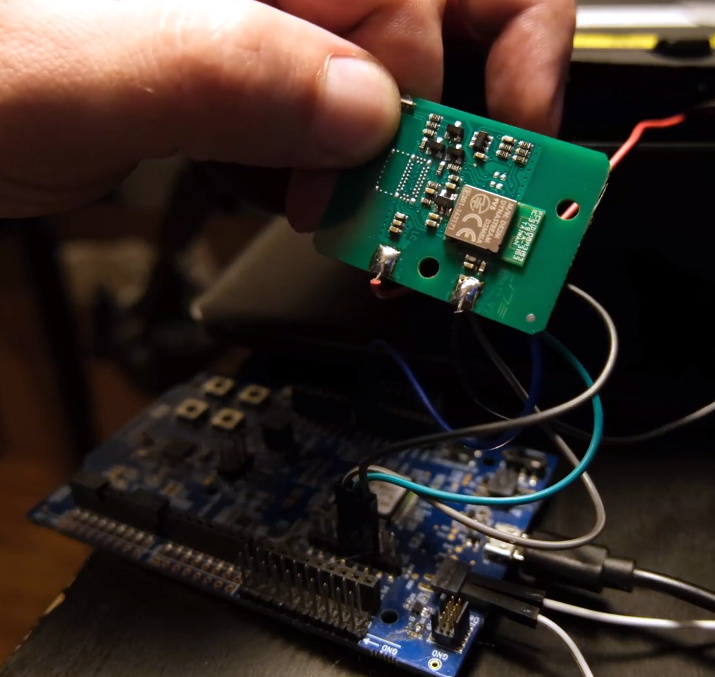
[Keith Wakeham] wanted to take a closer look at how Zwift communicated with his Sterzo steering device, and it turned into a pretty epic bout of exploration and reverse engineering. As the video after the break shows, he didn’t just go from sniffing the device’s proprietary Bluetooth Low Energy (BLE) communications protocol to figuring out how to emulate it in software so you could roll your own Zwift peripheral. He also tore the device apart, pulled the firmware from its microcontroller, and postulated how you could build your own low-cost clone device that would work with the existing software.
Even if you have absolutely zero interest in virtual biking, the video [Keith] has put together for this project is really a must watch. Have you ever wanted to sniff and reverse engineer BLE communications? Looking for a real-world example of pulling the firmware off of a consumer device? Maybe in the market for some tips on how to identify unknown ICs on a board? All of that, and quite a bit more, is covered in this nearly hour long hacking tour de force.
On the other hand, if you are interested in adding your own hardware to Zwift, then this look at getting an unsupported stationary bike working with it should be useful.
source https://hackaday.com/2020/09/11/a-deep-dive-into-the-sterzo-steering-plate/
Peddling in place isn’t the most exciting pastime, so it’s no surprise that modern technology is being used to make the in-home biking experience a bit more interactive. With a stand on the rear wheel providing resistance, and a movable steering plate under the front to read the handlebar angle, you can now use your standard bike as the “controller” in a virtual environment provided by software such as Zwift.
[Keith Wakeham] wanted to take a closer look at how Zwift communicated with his Sterzo steering device, and it turned into a pretty epic bout of exploration and reverse engineering. As the video after the break shows, he didn’t just go from sniffing the device’s proprietary Bluetooth Low Energy (BLE) communications protocol to figuring out how to emulate it in software so you could roll your own Zwift peripheral. He also tore the device apart, pulled the firmware from its microcontroller, and postulated how you could build your own low-cost clone device that would work with the existing software.
Even if you have absolutely zero interest in virtual biking, the video [Keith] has put together for this project is really a must watch. Have you ever wanted to sniff and reverse engineer BLE communications? Looking for a real-world example of pulling the firmware off of a consumer device? Maybe in the market for some tips on how to identify unknown ICs on a board? All of that, and quite a bit more, is covered in this nearly hour long hacking tour de force.
On the other hand, if you are interested in adding your own hardware to Zwift, then this look at getting an unsupported stationary bike working with it should be useful.
source https://hackaday.com/2020/09/11/a-deep-dive-into-the-sterzo-steering-plate/
Peddling in place isn’t the most exciting pastime, so it’s no surprise that modern technology is being used to make the in-home biking experience a bit more interactive. With a stand on the rear wheel providing resistance, and a movable steering plate under the front to read the handlebar angle, you can now use your standard bike as the “controller” in a virtual environment provided by software such as Zwift.
[Keith Wakeham] wanted to take a closer look at how Zwift communicated with his Sterzo steering device, and it turned into a pretty epic bout of exploration and reverse engineering. As the video after the break shows, he didn’t just go from sniffing the device’s proprietary Bluetooth Low Energy (BLE) communications protocol to figuring out how to emulate it in software so you could roll your own Zwift peripheral. He also tore the device apart, pulled the firmware from its microcontroller, and postulated how you could build your own low-cost clone device that would work with the existing software.
Even if you have absolutely zero interest in virtual biking, the video [Keith] has put together for this project is really a must watch. Have you ever wanted to sniff and reverse engineer BLE communications? Looking for a real-world example of pulling the firmware off of a consumer device? Maybe in the market for some tips on how to identify unknown ICs on a board? All of that, and quite a bit more, is covered in this nearly hour long hacking tour de force.
On the other hand, if you are interested in adding your own hardware to Zwift, then this look at getting an unsupported stationary bike working with it should be useful.
source https://hackaday.com/2020/09/11/a-deep-dive-into-the-sterzo-steering-plate/


