There comes a moment when our project sees the light of day, publicly presented to people who are curious to see the results of all our hard work, only for it to fail in a spectacularly embarrassing way. This is the dreaded “Demo Curse” and it recently befell the SIT Acronis Autonomous team. Their Roborace car gained social media infamy as it was seen launching off the starting line and immediately into a wall. A team member explained what happened.
A few explanations had started circulating, but only in the vague terms of a “steering lock” without much technical detail until this emerged. Steering lock? You mean like The Club? Well, sort of. While there was no steering wheel immobilization steel bar on the car, a software equivalent did take hold within the car’s systems. During initialization, while a human driver was at the controls, one of the modules sent out NaN (Not a Number) instead of a valid numeric value. This was never seen in testing, and it wreaked havoc at the worst possible time.
A module whose job was to ensure numbers stay within expected bounds said “not a number, not my problem!” That NaN value propagated through to the vehicle’s CAN data bus, which didn’t define the handling of NaN so it was arbitrarily translated into a very large number causing further problems. This cascade of events resulted in a steering control system locked to full right before the algorithm was given permission to start driving. It desperately tried to steer the car back on course, without effect, for the few short seconds until it met the wall.
While embarrassing and not the kind of publicity the Schaffhausen Institute of Technology or their sponsor Acronis was hoping for, the team dug through logs to understand what happened and taught their car to handle NaN properly. Driving a backup car, round two went very well and the team took second place. So they had a happy ending after all. Congratulations! We’re very happy this problem was found and fixed on a closed track and not on public roads.
If you’ve ever tried to use GPS indoors, you know that the signals aren’t easy to acquire in any sort of structure. Now imagine trying to get a satellite fix underwater. Researchers at MIT have a new technique, underwater backscatter localization or UBL, that promises to provide a low-power localization system tailored for the subsea environment.
Like other existing solutions, UBL uses sound waves, but it avoids some of the common problems with using sonic beacons in that environment. A typical system has a fixed beacon constrained by the availability of power or battery-operated beacons that require replacement or recharging. Since the beacon acts as a transponder — it receives a signal and then replies — it requires either constant power or time to wake up from the external stimulus and that time typically varies with the environment. That variable startup time interferes with computing the round-trip time of the signal, which is crucial for estimating position.
A UBL reader pings for nodes and, when a node replies, the pair change frequencies in a hopping scheme that allows measurement at many different frequencies. This allows an estimate of the true propagation time that is more accurate in the presence of reflections of the signal on the seabed, the water’s surface, and other elements of the environment. The speed of the communications between the node and the reader can also alter to tradeoff between multipath rejection and better ability to locate objects in motion.
Like traditional navigation or even GPS, knowing how much delay there is between you and a fixed position allows you to draw a circle around that position and you know you are somewhere on that circle. Find two fixed positions and you must be at one of the points where the two circles overlap. With three fixed positions that are far enough apart, you’ll have only one point where all three circles intersect. Finding fixed positions could use a star, a GPS satellite, or, in this case, an acoustic signal. The principle is the same.
We’ve looked at finding submarines before which is a similar problem. Another solution to the variable delay time is to not look at the transit time, but the difference between arrival times at two different points.
Voice Assistants, love them, or hate them, are becoming more and more commonplace. One problem for voice assistants is the situation of multiple devices listening in the same place. When a command is given, which device should answer? Researchers at CMU’s Future Interfaces Group [Karan Ahuja], [Andy Kong], [Mayank Goel], and [Chris Harrison] have an answer; smart assistants should try to infer if the user is facing the device they want to talk to. They call it direction-of-voice or DoV.
Currently, smart assistants use a simple race to see who heard it first. The reasoning is that the device you are closest to will likely hear it first. However, in situations with echos or when you’re equidistant from multiple devices, the outcome can seem arbitrary to a user.
The implementation of DoV uses an Extra-Trees Classifier from the python sklearn toolkit. Several other machine learning algorithms were considered, but ultimately efficiency won out and Extra-Trees was selected. Another interesting facet of the research was determining what facing really means. The team had humans ‘listeners’ stand in for smart assistants. A ‘talker’ would speak the key phrase while the ‘listener’ determined if the talker was facing them or not. Based on their definition of facing, the system can determine if someone is facing the device with 90% accuracy that rises to 93% with per-room calibration.
Fan noise is a contentious issue among the computer community. Some don’t notice it, others rage against it as an annoyance and distraction. Some turn to liquid cooling, while others look to passive solutions to eliminate the scourge. [Matt] of [DIY Perks] may have found a far more oddball solution, however.
The build is essentially a giant bellows, but the manner in which it operates is unlike anything we’ve seen previously. To shift the large pusher plate inside back and forth, [Matt] initially experimented with building his own linear motor out of coils and magnets. After that failed, he began to tinker with a system of moving a magnet back and forth through a tube with water pressure from a pump, which would then drive the pusher plate through magnetic coupling. This looked promising, but reversing the flow proved difficult. After building his own set of water valves to change the flow direction, the bellows began to work slowly, but with limited performance. Realizing the valves weren’t up to scratch, [Matt] rebuilt the system with 10 pumps, set up in two banks of 5. With the pumps hooked up in series, they supplied plenty of pressure to force the bellows back and forth. Reed switches were used to reverse the flow at either end to make the bellows run continuously.
In testing, the bellows compared well with a bank of four large case fans, though at 20 times the size. Suffice to say this is not exactly a compact solution. We look forward to seeing [Matt] do more with the bellows, with his intention being to use it as the primary cooling system for a computer. Of course, if this looks too complex, you could always consider a mineral oil setup instead. Video after the break.
In a kind of reverse twist on the doorbell, [TheStaticTurtle] whipped up a system to mute his computer’s microphone whenever someone opens the door to his room. He lives in France, where the government announced a strict lockdown last Friday. Like many university students around the world these days, he is now forced to take online classes. Even though he has his own room, occasionally someone will barge in and announce something, often to [TheStaticTurtle]’s embarrassment. When his classmates suddenly heard “Do you want some pie?” the other day, it was the last straw.
His first decision was to sense the door opening with a magnet and sensor, which he stuck to the door and frame with hot glue. He then ran a long cable to his desk, where it connected to an ATTiny 85 with a DigiSpark boot-loader. He wrote firmware to simulate special key combinations, which were then registered with his audio routing software Voicemeeter Potato. We presume he isn’t using an external mic, in which case muting might have been easier to accomplish with a hardware switch. All in all, this is a pretty clever and timely hack. Should you be in a similar predicament and want to try this out, he’s published the source code on GitHub.
If you recognize the triangular motif on [TheStaticTurtle]’s desktop, that’s because we wrote about a couple of his projects last summer, most recently a compact 70 cm transceiver.
For as long as computers have been in the hands of programmers, they have offered frequent mildly tedious tasks that their operators have sought to automate. Who hasn’t written a shell script or a batch file that unites a string of commands into one just to save a bit of typing?
But even that effort can be reduced with a hardware add-on that ties the script to a physical control, and in this endeavor [Tomas] has created a beauty. His control panel project mimics the robust industrial panels of yesteryear with an array of metal buttons and toggle switches in a sturdy metal case sourced from an old KVM switch.
Behind the scenes are a pair of I/O extenders and a NodeMCU board, whose ESP8266 does the talking to the host computer on which a daemon awaits its call. Individual addressable LEDs next to each switch convey the state of operation, and the switches trigger useful operations such as connecting to a VPN. All the code is available in a handy GitHub repository, and you can see it in action in the video we’ve placed below the break.
Multirotor aircraft enjoy many intrinsic advantages, but as machines that fight gravity with brute force, energy efficiency is not considered among them. In the interest of stretching range, several air-ground hybrid designs have been explored. Flying cars, basically, to run on the ground when it isn’t strictly necessary to be airborne. But they all share the same challenge: components that make a car work well on the ground are range-sapping dead weight while in the air. [Youming Qin et al.] explored cutting that dead weight as much as possible and came up with Hybrid Aerial-Ground Locomotion with a Single Passive Wheel.
As the paper’s title made clear, they went full minimalist with this design. Gone are the driveshaft, brakes, steering, even other wheels. All that remained is a single unpowered wheel bolted to the bottom of their dual-rotor flying machine. Minimizing the impact on flight characteristics is great, but how would that work on the ground? As a tradeoff, these rotors have to keep spinning even while in “ground mode”. They are responsible for keeping the machine upright, and they also have to handle tasks like steering. These and other control algorithm problems had to be sorted out before evaluating whether such a compromised ground vehicle is worth the trouble.
Happily, the result is a resounding “yes”. Even though the rotors have to continue running to do different jobs while on the ground, that was still far less effort than hovering in the air. Power consumption measurements indicate savings of up to 77%, and there are a lot of potential venues for tuning still awaiting future exploration. Among them is to better understand interaction with ground effect, which is something we’ve seen enable novel designs. This isn’t exactly the flying car we were promised, but its development will still be interesting to watch among all the other neat ideas under development to keep multirotors in the air longer.
Brushless motors can offer impressive torque-to-size ratios, and when combined with complex drive control and sensor feedback, exciting things become possible that expand the usual ideas of what motors can accomplish. For example, to use a DC motor in a robot leg, one might expect to need a gearbox, a motor driver, plus an encoder for position sensing. If smooth, organic motion is desired, some sort of compliant mechanical design would be involved as well. But motors like the IQ Vertiq 6806 offered by [IQ Motion Control] challenge those assumptions. By combining a high-torque brushless DC motor, advanced controller, and position sensing into an integrated device, things like improved drone performance and direct-drive robotic legs like those of the Mini Cheetah become possible.
IQ Vertiq 6806 brushless DC motor with integrated controller, driver, and position sensing.
First, the bad news: these are not cheap motors. The IQ Vertiq 6806 costs $399 USD each through the Crowd Supply pre-order ($1499 for four), but they aren’t overpriced for what they are. The cost compares favorably with other motors and controllers of the same class. A little further than halfway down the Crowd Supply page, [IQ Motion Control] makes a pretty good case for itself by comparing features with other solutions. Still, these are not likely to be anyone’s weekend impulse purchase.
So how do these smart motors work? They have two basic operating modes: Speed and Position, each of which requires different firmware, and which one to use depends on the intended application.
The “Speed” firmware is designed with driving propeller loads in mind, and works a lot like any other brushless DC motor with an ESC (electronic speed control) on something like a drone or other UAV. But while the unit can be given throttle or speed control signals like any other motor, it can also do things like accept commands in terms of thrust. In other words, an aircraft’s flight controller can communicate to motors directly in thrust units, instead of a speed control signal whose actual effect is subject to variances like motor voltage level.
The “Position” mode has the motor function like a servo with adjustable torque, which is perfect for direct drive applications like robotic legs. The position sensing also allows for a few neat tricks, like the ability to use the motors as inputs. Embedded below are two short videos showcasing both of these features, so check them out.
If you’re wishing these motors were a bit less spendy, there’s good news! [IQ Motion Control] previously released a smaller motor with similar features: the IQ Vertiq 2306. That unit is available in 220KV (low-speed) and 2200KV (high-speed) versions for servo and drone applications, respectively. Check out our earlier coverage of these smaller units and get a feel for their capabilities, and maybe get a few ideas of your own in the process.
We suppose it’s a bit early to call it just yet, but we definitely have a solid contender for Father of the Year. [DIY_Maxwell] made a light-up hockey game for his young son that looks like fun for all ages. Whenever the puck is hit with the accompanying DIY hockey stick (or anything else), it lights up and produces different sounds based on its acceleration.
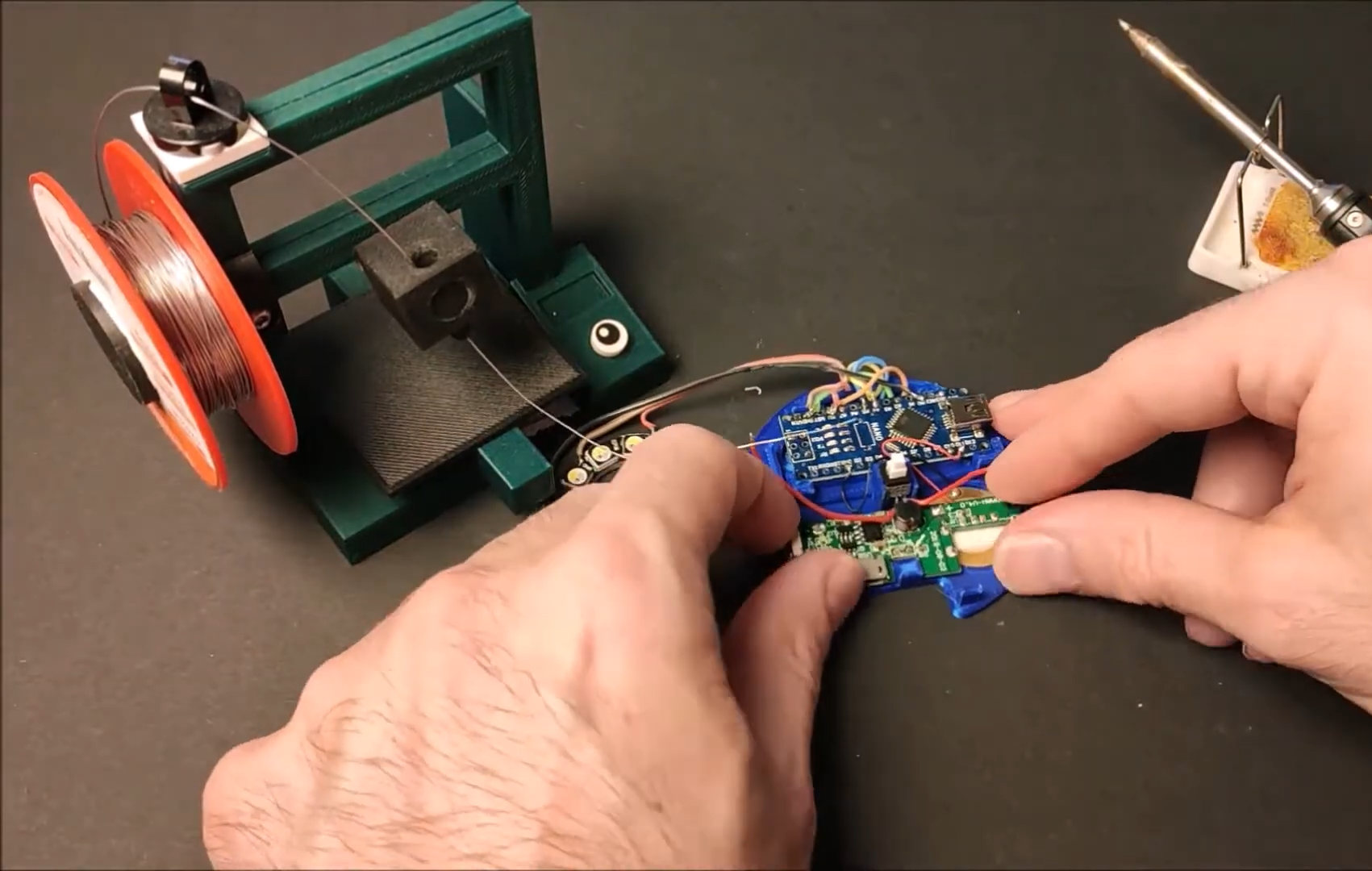
Inside the printed puck is an Arduino Nano running an MPU6050 accelerometer, a 12-NeoPixel ring, and a piezo buzzer. [DIY_Maxell] reused a power bank charging circuit to charge up the small LiPo battery.
The original circuit used a pair of coin cells, but the Arduino was randomly freezing up, probably because of the LEDs’ current draw. Be sure to check out the video after the break, which begins with a little stop motion and features a solder stand in the shape of a 3D printer.
Facebook just announced their plans for the Oculus Quest 2 VR headset. You probably won’t be surprised, but they want more of your user data, and more control over how you use the hardware. To use the device at all, you’ll need a verified Facebook account. Worse, they’re restricting access to the wide world of community-developed applications by requiring a developer account to be able to “sideload” non-Facebook software onto the device. Guess who decides who gets to be a developer. Hint: it’s not the people developing software.
Our article suggests that this will be the beginning of a race to jailbreak the headset on the community’s part, and to get ahead of the hackers on Facebook’s. Like every new release of iOS gets a jailbreak within a week or two, and then Apple patches it up as fast as they can, are we going to see a continual game of hacker cat-and-mouse with Facebook?
I don’t care. And that’s not because I don’t care about open hardware or indie VR developers. Quite the opposite! But like that romance you used to have with the girl who was absolutely no good for you, the toxic relationship with a company that will not let you run other people’s games on their hardware is one that you’re better off without. Sure, you can try to fix it, or hack it. You can tell yourself that maybe Facebook will come around if you just give them one more chance. It’s going to hurt at first.
But in the end, there is going to be this eternal fight between the user and the company that wants to use them, and that’s just sad. I used to look forward to the odd game of cat and mouse, but nowadays the cats are just too well bankrolled to make it a fair fight. If you’re buying a Quest 2 today with the intent of hacking it, I’d suggest you spend your time with someone else. You’re signing up for a string of heartbreaks. Nip it in the bud. You deserve better. There are too many fish in the sea, right?
What are our options?
This article is part of the Hackaday.com newsletter, delivered every seven days for each of the last 200+ weeks. It also includes our favorite articles from the last seven days that you can see on the web version of the newsletter.
Want this type of article to hit your inbox every Friday morning? You should sign up!
Facebook just announced their plans for the Oculus Quest 2 VR headset. You probably won’t be surprised, but they want more of your user data, and more control over how you use the hardware. To use the device at all, you’ll need a verified Facebook account. Worse, they’re restricting access to the wide world of community-developed applications by requiring a developer account to be able to “sideload” non-Facebook software onto the device. Guess who decides who gets to be a developer. Hint: it’s not the people developing software.
Our article suggests that this will be the beginning of a race to jailbreak the headset on the community’s part, and to get ahead of the hackers on Facebook’s. Like every new release of iOS gets a jailbreak within a week or two, and then Apple patches it up as fast as they can, are we going to see a continual game of hacker cat-and-mouse with Facebook?
I don’t care. And that’s not because I don’t care about open hardware or indie VR developers. Quite the opposite! But like that romance you used to have with the girl who was absolutely no good for you, the toxic relationship with a company that will not let you run other people’s games on their hardware is one that you’re better off without. Sure, you can try to fix it, or hack it. You can tell yourself that maybe Facebook will come around if you just give them one more chance. It’s going to hurt at first.
But in the end, there is going to be this eternal fight between the user and the company that wants to use them, and that’s just sad. I used to look forward to the odd game of cat and mouse, but nowadays the cats are just too well bankrolled to make it a fair fight. If you’re buying a Quest 2 today with the intent of hacking it, I’d suggest you spend your time with someone else. You’re signing up for a string of heartbreaks. Nip it in the bud. You deserve better. There are too many fish in the sea, right?
What are our options?
This article is part of the Hackaday.com newsletter, delivered every seven days for each of the last 200+ weeks. It also includes our favorite articles from the last seven days that you can see on the web version of the newsletter.
Want this type of article to hit your inbox every Friday morning? You should sign up!
Often, when we think of getting a computer to complete a task, we contemplate creating complex algorithms that take in the relevant inputs and produce the desired behaviour. For some tasks, like navigating a car down a road, the sheer multitude of input data and its relationship to the desired output is so complex that it becomes near-impossible to code a solution. In these cases, it can make more sense to create a neural network and train the computer to do the job, as one would a human. On a more basic level, [Gigante] did just that, teaching a neural network to play a basic driving game with a genetic algorithm.
The game consists of a basic top-down 2D driving game. The AI is given the distance to the edge of the track along five lines at different angles projected from the front of the vehicle. The AI also knows its speed and direction. Given these 7 numbers, it calculates the outputs for steering, braking and acceleration to drive the car.
To train the AI, [Gigante] started with 650 AIs, and picked the best performer, which just barely managed to navigate the first two corners. Marking this AI as the parent of the next generation, the AIs were iterated with random mutations. Each generation showed some improvement, with [Gigante] picking the best performers each time to parent the next generation. Within just four iterations, some of the cars are able to complete a full lap. With enough training, the cars are able to complete the course at great speed without hitting the walls at all.
It’s a great example of machine learning and the use of genetic algorithms to improve fitness over time. [Gigante] points out that there’s no need for a human in the loop either, if the software is coded to self-measure the fitness of each generation. We’ve seen similar techniques used to play Mario, too. Video after the break.
An international team at Penn State led by [Larry Cheng] made a breakthrough in printing sensors directly on skin without heat. The breakthrough here is the development of a room-temperature sintering technique. Typical sintering of copper happens at 300 C, and can be further lowered to 100 C by adding nanoparticles. But even 100 C is too hot, since skin starts to burn at around 40 C.
You can obtain their journal article if you want the details, but basically their technique combines the ingredients in peelable face masks and eggshells. With this printed circuit is applied to the skin, the sintering process only requires a hair dryer on the cool setting, and results can bend and fold without breaking the connections. A hot shower will remove the circuit without damaging the circuit or your skin. [Larry] says the circuits can be recycled.
They are using these sensors to monitor temperature, humidity, blood oxygen levels, and heart performance indicators. They’ve even linked these various on-body sensors with a WiFi network for ease of monitoring. After reading this report, we’re left wondering, if the sensor is directly on your skin, can it be really called wearable?
We’ve written about printable inks before, but for printed circuit board applications. We can’t help but wonder if this technology would help solve some problems inherent in that technology, as well. Thanks to [Qes] for the tip.
[Marquis de Geek] has a profound love of old systems. Tired of writing new emulators from scratch for each project, his newest project EMF generates the emulator for him. An XML document describes the layout of the memory, CPU description, and screen handler. The output is currently a single-page Javascript emulator application with an assembly and a dissembler. However, but that backend can easily be swapped to another language such as Rust or C++.
Since EMF is a framework that provides a common way to describe the emulated machine, you get a common emulator user interface for free. There’s a lot of flexibility offered here as well. Opcodes can be implemented as a large switch statement or individual functions, depending on the target language’s performance. Self-modifying code can be detected and handled separately. Custom features or hardware can be injected easily by writing a module in the target language.
While the source code for the EMF hasn’t been released yet, several of the machines that [Marquis de Geek] has built with EMF are open-source on GitHub. So far the list includes Dragon32, Sinclair ZX80, Sinclair ZX81, Sinclair ZX Spectrum, Elliott 903, Chip8, Cosmac VIP, and the MegaProcessor. Each has a live emulator that runs in your browser.
While [Marquis de Geek] hopes to release a binary version of the EMF soon, we’re very much looking forward to the EMF source coming out once the code has been cleaned up. We love the trend towards creating easier and more accessible emulators, such as this Twitter bot that runs Atari programs.
Companies spend thousands developing a project for the market, hoping their investment will return big. Investing like this happens every day and won’t shock anyone. What may surprise you is someone who spends more than a decade and thousands of their own dollars to make an open-source version of a highly-marketable product. In this case, we’re talking about genetically modified yeast that produces spider silk. If that sounds like a lead-in to some Spiderman jokes and sci-fi references, you are correct on both accounts. [Justin Atkin] had some geneticist work under his belt when he started, so he planned to follow familiar procedures like extracting black widow DNA, isolating and copying the silk genes, and pasting them into a yeast strain. Easy peasy, right? Naturally, good science doesn’t happen overnight.
There are a few contenders for the strongest spider silk among which the golden silk orb-weaver gets the most attention, but the black widow’s webbing is nearly as strong, and [Justin] is happy to wear black widow inspired bling, whereas the golden orb-weaver looks like it crawled out of Starship Troopers. His first attempt to extract DNA starts with a vial of preserved nightmare fuel spider specimens because that is a thing you can just go online and buy. Sadly, they were candied in alcohol, and that obliterates DNA, so he moved to dried specimens from breeders, which also failed to produce results, and those were just the landmark hangups.
After all the setbacks and dead ends, [Justin] and his lab crew take a different path and design a plasmid-to-order. Sheesh, you can buy anything on the Internet. Labs that build these sequences aren’t like a custom T-shirt producer because you can’t just send them Gattaca.TXT and a check. The labs will refuse sequences with repetitious snippets, and spider silk is long repeating chains. [Justin] has to make his recurrent silk look unique all the way through, and so he has to tweak nature’s recipe.
Silk is not a singular thing but rather a classification of what comes from a spinneret. Spiders produce as many as ten varieties of silk, and they are a combination of monomers. Some are sticky, some are stretchy, and some are strong, but for commercially viable stuff, we are interested in dragline which is firm and not elastic. It is safe to assume this is what [Peter Parker] loads into his web slingers. The variety comes from ordering and reordering the stretchy-strong sequence to increase the variabilty, but that only goes so far. [Justin] adds a new contribution to the mix, and that comes in the form of biomineralization, which we see in things like nacre (mother of pearl), chitin, and bones. This is one of the sturdiest things mother nature put into animals, so the improved formula has a little extra strength in the mix. Another ingredient is the sequence to tell the yeast to excrete the silk, not just produce it internally. This makes harvesting the difference between milking a cow and butchering one.
When the lab’s plasmid arrives, they mix it into some pichia pastoris yeast which is normally pinkish, but the modified strain is bone white. It is a fickle strain and doesn’t want to accept the new genes, but Youtube commentators provided helpful protocols. This in itself is an achievement, as if you can get the YT comment section to provide useful data, you deserve a trophy. After the new procedures, a battery of tests shows that gene modification took hold. [Justin]’s yeast was producing silk at a respectable rate. Wow.
Now, the plan is to find ways to do something with the mass-producible silk. We love the idea of growing tough-as-nails cargo pants or black widow web-shooters. Spider senses not included.
Eight-bit computers are all the retro rage these days, with people rushing to build computers either from chips like the 6502 or the Z80, or even recreating these chips from a collection of TTL logic chips. And while we respect and covet those builds immensely, 8-bit computers aren’t the only game going on. To wit we present this lovely single-board computer sporting a 1-bit CPU.
The machine, which creator [Simon Boak] cheekily dubs “the world’s least-powerful computer,” is based on the Motorola MC14500B, a chip from the 1970s that was aimed at the industrial controls market. There, the chip’s limited instruction set and narrow bus width were not as limiting as they would be in a general-purpose computer. In fact, since the chip requires an external program counter, it offers a great degree of design flexibility. [Simon] chose a 4-bit address space, but with a little wizardry he was able to get eight bits of input in the form of DIP switches and eight bits of output LEDs. It’s not good for much past making lights blink, but it does that with nary an Arduino in view — although it does sport a couple of 555s.
[Simon]’s goal for the build was simply to build cool from an unusual chip, and we think he succeeded. In fact, we can’t recall seeing a neater perfboard build — it’s almost to the level of circuit sculpture. We especially like the hybrid solder and wirewrap construction. We’ve seen builds based on this chip before, but never one so neat and attractive.
What’s the use of waiting around for something to break in order to hack into something else? As long as it’s just sitting around not being used, who cares? [OmniSaiRen] had a Behringer MIDI controller just taking up space. Instead of selling it, they decided to build it into something they would definitely use — a multi-volume controller with mute keys and other useful macros.
After gutting the case, [OmniSaiRen] gave it a couple coats of glossy white paint that looks really nice with the black keycaps and knobs. The plan was to use the original encoders, but [OmniSaiRen] replaced them with potentiometers when they couldn’t get the encoders working with the Arduino Nano. We are sad to report that Cherry Blues only made it to the build because they have all black housings and were also lying around taking up space, but maybe [OmniSaiRen] will grow to love them.
As a debugger, GDB is a veritable Swiss Army knife. And just like exploring all of the non-obvious uses of a those knives, your initial response to the scope of GDB’s feature set is likely to be one of bewilderment, subsequent confusion, and occasional laughter. This is an understandable reaction in the case of the Swiss Army knife as one is unlikely to be in the midst of an army campaign or trapped in the wilderness. Similarly, it takes a tricky debugging session to really learn to appreciate GDB’s feature set.
If you have already used GDB to debug some code, it was likely wrapped in the comfort blanket of an IDE. This is of course one way to use GDB, but limits the available features to what the IDE exposes. Fortunately, the command line interface (CLI) of GDB has no such limitations. Learning the CLI GDB commands also has the advantage that one can perform that critical remote debug session even in the field via an SSH session over the 9600 baud satellite modem inside your Swiss Army knife, Cyber Edition.
Have I carried this analogy too far? Probably. But learning the full potential of GDB is well worth your time so today, let’s dive in to sharpen our digital toolsets.
Godmode for Running Code
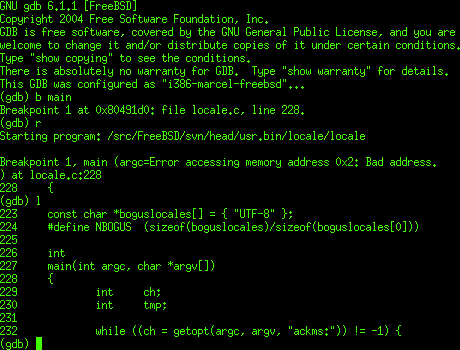
Example GDB session.
The concept behind a debugger is fairly uncomplicated: all too often something is preventing code which you have written from working, or you want to take a closer look at certain states within the application as it is executing. A simple way to do this is by printing out the values of variables to a terminal or serial port, but the much more powerful way is to use a debugger like GDB to interactively work with the code as it executes.
This means pausing the execution, stepping forward and backward through individual lines of code, inspecting stack frames and parts of memory, modifying the contents of memory and specific variables, and so on. Along with the setting of breakpoints and the watching of variables, virtually any part of the application’s execution can be monitored and influenced. This includes when things go south and the execution terminates with some fault condition, allowing a stack trace to be recalled.
While GDB can be used with any application’s binary, it’s infinitely more useful when the debug symbols are also provided to the debugger. These debug symbols are text strings including source code, as well as other information. They are included in the binary by the compiler when instructed to do so. For GCC-based compilers and LLVM this is usually done using the -g flag.
Local Hero
Running through a local debug session is a good way to become acquainted with how to use GDB’s command line interface. Be sure to have a handy command reference within easy reach at any time when using GDB. Doing so will make it easy to become familiar with the more involved commands.
The essential ones to know are break (b), for setting a break point, info for obtaining information locals, threads, etc. Further backtrace (bt) and continue (c), next (n) and step (s) for printing out a backtrace, continuing execution and moving through the code in increments, respectively. After loading the executable with GDB, the program is started with run (r), which can be supplied with any command line arguments to the executable.
Let’s write a very simple program we can use for debugging practice:
/* hello.c - Hello World */

#include<stdio.h>

int main(void) {
        char hello[] = "Hello World";
        printf("%s\n", hello);
        return 0;
}
We’ll use the -g3 flag when compiling to include debug symbols. Now let’s walk through this C-based Hello World example:
gcc -o hello -g3 hello.c
gdb ./hello

[..]
(gdb) b main
Breakpoint 1 at 0x1169: file hello.c, line 5.
(gdb) run
Starting program: /home/hackaday/hello
Breakpoint 1, main() at hello.c:5
5 int main(void) {
(gdb) n
6 char hello[] = "Hello World";
(gdb) n
7 printf("%s\n", hello);
(gdb)
We first set a break point at the main()function, then run to start the program. After the breakpoint, with each execution of next (or just hitting enter on an empty input to repeat the previous command), we’ll proceed to the next line of the application, without stepping into function calls. That’s what step is for. If we use printf() in the code, for example, using step would cause us to examine every line of that function and its implementation as well. Whether this is desirable depends on one’s needs.
Finally, we can examine variables and memory using print (p) for printing variables and x to print bytes at a memory address. E.g.:
(gdb) print hello
$1 = "Hello World"
Most of the commands are quite straight-forward, and safe. Barring the use of GDB’s set command, using which one can not only change GDB’s settings, but also edit memory contents. Use this one with caution.
Jacking Into the Remote
Running a remote GDB session is roughly the same as a local session, with the obvious complication of having to establish the session on a remote system. Said remote system can be anything from a server, desktop or other system running a full-blown OS, down to a microcontroller (MCU) running straight on the bare metal.
The main requirement for GDB to establish a debugging session on a remote system, is for there to be a GDB server (gdbserver) instance which the GDB tool can connect to. This GDB server then acts as a bridge between GDB and the active debug session. This connection can be established via TCP or a serial line. This makes it a highly portable approach that works both for remote servers or desktop systems, as well as industrial boards with an RS-232C link.
Even more interesting is to use the GDB server approach to create a bridge to the in-circuit debugger functionality provided by microcontroller platforms such as ST’s STM32 Cortex-M-based systems. This same approach will work with few modifications for Microchip’s ARM-based SAM and AVR platforms.
OpenOCD as GDB server
Anyone who has done MCU development is likely familiar with OpenOCD. This tool is invaluable in the programming of a wide variety of MCUs, but also comes with a built-in GDB server. As an example, imagine wanting to establish a GDB session on an STM32 MCU, on a common development board like the STM32F4-Discovery one.
The first step is to start OpenOCD’s GDB server:
openocd -f board/stm32f4discovery.cfg
Next, we can connect to this server via the loopback interface, while also providing GDB (from the arm-none-eabi toolchain) with the path to the ELF binary containing the firmware:
GDB will now connect to the GDB server, with OpenOCD using the STM32F4-Discovery board’s in-circuit debugger feature of the onboard ST-Link/V2 interface. All protocol translation is now done by OpenOCD, enabling all the usual GDB features, even though the code we are debugging runs on the MCU on the development board.
As the MCU will already have booted the firmware we wish to debug, we will still have to perform one more step, which is to reset the MCU to get a GDB session we can use:
(gdb) mon reset halt
The MCU will now have been reset and in a halted state until we do something. We will now add a new temporary breakpoint and continue:
(gdb) tbreak main
(gdb) c
After continuing execution, this temporary breakpoint puts us right at the beginning of our main function, from which we can set up breakpoints and more as needed. For example, we can check out the value of a specific register of the GPIOA peripheral on this STM32F4-based board. Say we want to see whether the input and output states were set properly in the GPIO_MODER register:
(gdb) x/4tb 0x40020000
$1 = 0100 0000 0000 0000
The special syntax of the x command prints a single 32-bit address, as blocks of single bytes. The GPIOA peripheral location is found in the STM32F407 datasheet, with the Reference Manual (RM) listing the offsets for specific registers within the memory-mapped IO for that peripheral type. In this case the MODER register is at offset 0x00, with GPIOA at address 0x40020000. The byte order is printed left to right, meaning that the first byte is on the left side.
In this case we can see that MODER1 (for pin 1) is set to ’01’, meaning general-purpose output mode.
Time to Quit Guessing
Many are the times when I found myself or others get stuck pouring over lines of code, speculating which one of those lines might be the cause of the weird symptoms. Suffice it to say that doing so is neither fun nor productive. Along with tools like Valgrind, debuggers like GDB are perfect for getting answers to questions, even questions you didn’t know you wanted to ask. It’s especially useful with something like embedded development, where the immediate feedback from newly flashed firmware might be… absent or not quite as expected.
It pays to establish a strict routine of testing for isolating test cases, and to hit the problematic firmware in-situ with a targeted testing plan, using tools like GDB. Create a checklist of which items to check first when something doesn’t work, then work your way up from there.
As non-deterministic as debugging sometimes may seem — and with Heisenbugs certainly endeavoring to make it appear that way — in the end there’s a good, solid reason for every issue. You just need to find out what bit to look at in which manner. Becoming comfortable with a powerful tool like GDB is definitely a major asset there.
As a debugger, GDB is a veritable Swiss Army knife. And just like exploring all of the non-obvious uses of a those knives, your initial response to the scope of GDB’s feature set is likely to be one of bewilderment, subsequent confusion, and occasional laughter. This is an understandable reaction in the case of the Swiss Army knife as one is unlikely to be in the midst of an army campaign or trapped in the wilderness. Similarly, it takes a tricky debugging session to really learn to appreciate GDB’s feature set.
If you have already used GDB to debug some code, it was likely wrapped in the comfort blanket of an IDE. This is of course one way to use GDB, but limits the available features to what the IDE exposes. Fortunately, the command line interface (CLI) of GDB has no such limitations. Learning the CLI GDB commands also has the advantage that one can perform that critical remote debug session even in the field via an SSH session over the 9600 baud satellite modem inside your Swiss Army knife, Cyber Edition.
Have I carried this analogy too far? Probably. But learning the full potential of GDB is well worth your time so today, let’s dive in to sharpen our digital toolsets.
Godmode for Running Code
Example GDB session.
The concept behind a debugger is fairly uncomplicated: all too often something is preventing code which you have written from working, or you want to take a closer look at certain states within the application as it is executing. A simple way to do this is by printing out the values of variables to a terminal or serial port, but the much more powerful way is to use a debugger like GDB to interactively work with the code as it executes.
This means pausing the execution, stepping forward and backward through individual lines of code, inspecting stack frames and parts of memory, modifying the contents of memory and specific variables, and so on. Along with the setting of breakpoints and the watching of variables, virtually any part of the application’s execution can be monitored and influenced. This includes when things go south and the execution terminates with some fault condition, allowing a stack trace to be recalled.
While GDB can be used with any application’s binary, it’s infinitely more useful when the debug symbols are also provided to the debugger. These debug symbols are text strings including source code, as well as other information. They are included in the binary by the compiler when instructed to do so. For GCC-based compilers and LLVM this is usually done using the -g flag.
Local Hero
Running through a local debug session is a good way to become acquainted with how to use GDB’s command line interface. Be sure to have a handy command reference within easy reach at any time when using GDB. Doing so will make it easy to become familiar with the more involved commands.
The essential ones to know are break (b), for setting a break point, info for obtaining information locals, threads, etc. Further backtrace (bt) and continue (c), next (n) and step (s) for printing out a backtrace, continuing execution and moving through the code in increments, respectively. After loading the executable with GDB, the program is started with run (r), which can be supplied with any command line arguments to the executable.
Let’s write a very simple program we can use for debugging practice:
/* hello.c - Hello World */

#include<stdio.h>

int main(void) {
        char hello[] = "Hello World";
        printf("%s\n", hello);
        return 0;
}
We’ll use the -g3 flag when compiling to include debug symbols. Now let’s walk through this C-based Hello World example:
gcc -o hello -g3 hello.c
gdb ./hello

[..]
(gdb) b main
Breakpoint 1 at 0x1169: file hello.c, line 5.
(gdb) run
Starting program: /home/hackaday/hello
Breakpoint 1, main() at hello.c:5
5 int main(void) {
(gdb) n
6 char hello[] = "Hello World";
(gdb) n
7 printf("%s\n", hello);
(gdb)
We first set a break point at the main()function, then run to start the program. After the breakpoint, with each execution of next (or just hitting enter on an empty input to repeat the previous command), we’ll proceed to the next line of the application, without stepping into function calls. That’s what step is for. If we use printf() in the code, for example, using step would cause us to examine every line of that function and its implementation as well. Whether this is desirable depends on one’s needs.
Finally, we can examine variables and memory using print (p) for printing variables and x to print bytes at a memory address. E.g.:
(gdb) print hello
$1 = "Hello World"
Most of the commands are quite straight-forward, and safe. Barring the use of GDB’s set command, using which one can not only change GDB’s settings, but also edit memory contents. Use this one with caution.
Jacking Into the Remote
Running a remote GDB session is roughly the same as a local session, with the obvious complication of having to establish the session on a remote system. Said remote system can be anything from a server, desktop or other system running a full-blown OS, down to a microcontroller (MCU) running straight on the bare metal.
The main requirement for GDB to establish a debugging session on a remote system, is for there to be a GDB server (gdbserver) instance which the GDB tool can connect to. This GDB server then acts as a bridge between GDB and the active debug session. This connection can be established via TCP or a serial line. This makes it a highly portable approach that works both for remote servers or desktop systems, as well as industrial boards with an RS-232C link.
Even more interesting is to use the GDB server approach to create a bridge to the in-circuit debugger functionality provided by microcontroller platforms such as ST’s STM32 Cortex-M-based systems. This same approach will work with few modifications for Microchip’s ARM-based SAM and AVR platforms.
OpenOCD as GDB server
Anyone who has done MCU development is likely familiar with OpenOCD. This tool is invaluable in the programming of a wide variety of MCUs, but also comes with a built-in GDB server. As an example, imagine wanting to establish a GDB session on an STM32 MCU, on a common development board like the STM32F4-Discovery one.
The first step is to start OpenOCD’s GDB server:
openocd -f board/stm32f4discovery.cfg
Next, we can connect to this server via the loopback interface, while also providing GDB (from the arm-none-eabi toolchain) with the path to the ELF binary containing the firmware:
GDB will now connect to the GDB server, with OpenOCD using the STM32F4-Discovery board’s in-circuit debugger feature of the onboard ST-Link/V2 interface. All protocol translation is now done by OpenOCD, enabling all the usual GDB features, even though the code we are debugging runs on the MCU on the development board.
As the MCU will already have booted the firmware we wish to debug, we will still have to perform one more step, which is to reset the MCU to get a GDB session we can use:
(gdb) mon reset halt
The MCU will now have been reset and in a halted state until we do something. We will now add a new temporary breakpoint and continue:
(gdb) tbreak main
(gdb) c
After continuing execution, this temporary breakpoint puts us right at the beginning of our main function, from which we can set up breakpoints and more as needed. For example, we can check out the value of a specific register of the GPIOA peripheral on this STM32F4-based board. Say we want to see whether the input and output states were set properly in the GPIO_MODER register:
(gdb) x/4tb 0x40020000
$1 = 0100 0000 0000 0000
The special syntax of the x command prints a single 32-bit address, as blocks of single bytes. The GPIOA peripheral location is found in the STM32F407 datasheet, with the Reference Manual (RM) listing the offsets for specific registers within the memory-mapped IO for that peripheral type. In this case the MODER register is at offset 0x00, with GPIOA at address 0x40020000. The byte order is printed left to right, meaning that the first byte is on the left side.
In this case we can see that MODER1 (for pin 1) is set to ’01’, meaning general-purpose output mode.
Time to Quit Guessing
Many are the times when I found myself or others get stuck pouring over lines of code, speculating which one of those lines might be the cause of the weird symptoms. Suffice it to say that doing so is neither fun nor productive. Along with tools like Valgrind, debuggers like GDB are perfect for getting answers to questions, even questions you didn’t know you wanted to ask. It’s especially useful with something like embedded development, where the immediate feedback from newly flashed firmware might be… absent or not quite as expected.
It pays to establish a strict routine of testing for isolating test cases, and to hit the problematic firmware in-situ with a targeted testing plan, using tools like GDB. Create a checklist of which items to check first when something doesn’t work, then work your way up from there.
As non-deterministic as debugging sometimes may seem — and with Heisenbugs certainly endeavoring to make it appear that way — in the end there’s a good, solid reason for every issue. You just need to find out what bit to look at in which manner. Becoming comfortable with a powerful tool like GDB is definitely a major asset there.
As a debugger, GDB is a veritable Swiss Army knife. And just like exploring all of the non-obvious uses of a those knives, your initial response to the scope of GDB’s feature set is likely to be one of bewilderment, subsequent confusion, and occasional laughter. This is an understandable reaction in the case of the Swiss Army knife as one is unlikely to be in the midst of an army campaign or trapped in the wilderness. Similarly, it takes a tricky debugging session to really learn to appreciate GDB’s feature set.
If you have already used GDB to debug some code, it was likely wrapped in the comfort blanket of an IDE. This is of course one way to use GDB, but limits the available features to what the IDE exposes. Fortunately, the command line interface (CLI) of GDB has no such limitations. Learning the CLI GDB commands also has the advantage that one can perform that critical remote debug session even in the field via an SSH session over the 9600 baud satellite modem inside your Swiss Army knife, Cyber Edition.
Have I carried this analogy too far? Probably. But learning the full potential of GDB is well worth your time so today, let’s dive in to sharpen our digital toolsets.
Godmode for Running Code
Example GDB session.
The concept behind a debugger is fairly uncomplicated: all too often something is preventing code which you have written from working, or you want to take a closer look at certain states within the application as it is executing. A simple way to do this is by printing out the values of variables to a terminal or serial port, but the much more powerful way is to use a debugger like GDB to interactively work with the code as it executes.
This means pausing the execution, stepping forward and backward through individual lines of code, inspecting stack frames and parts of memory, modifying the contents of memory and specific variables, and so on. Along with the setting of breakpoints and the watching of variables, virtually any part of the application’s execution can be monitored and influenced. This includes when things go south and the execution terminates with some fault condition, allowing a stack trace to be recalled.
While GDB can be used with any application’s binary, it’s infinitely more useful when the debug symbols are also provided to the debugger. These debug symbols are text strings including source code, as well as other information. They are included in the binary by the compiler when instructed to do so. For GCC-based compilers and LLVM this is usually done using the -g flag.
Local Hero
Running through a local debug session is a good way to become acquainted with how to use GDB’s command line interface. Be sure to have a handy command reference within easy reach at any time when using GDB. Doing so will make it easy to become familiar with the more involved commands.
The essential ones to know are break (b), for setting a break point, info for obtaining information locals, threads, etc. Further backtrace (bt) and continue (c), next (n) and step (s) for printing out a backtrace, continuing execution and moving through the code in increments, respectively. After loading the executable with GDB, the program is started with run (r), which can be supplied with any command line arguments to the executable.
Let’s write a very simple program we can use for debugging practice:
/* hello.c - Hello World */

#include<stdio.h>

int main(void) {
        char hello[] = "Hello World";
        printf("%s\n", hello);
        return 0;
}
We’ll use the -g3 flag when compiling to include debug symbols. Now let’s walk through this C-based Hello World example:
gcc -o hello -g3 hello.c
gdb ./hello

[..]
(gdb) b main
Breakpoint 1 at 0x1169: file hello.c, line 5.
(gdb) run
Starting program: /home/hackaday/hello
Breakpoint 1, main() at hello.c:5
5 int main(void) {
(gdb) n
6 char hello[] = "Hello World";
(gdb) n
7 printf("%s\n", hello);
(gdb)
We first set a break point at the main()function, then run to start the program. After the breakpoint, with each execution of next (or just hitting enter on an empty input to repeat the previous command), we’ll proceed to the next line of the application, without stepping into function calls. That’s what step is for. If we use printf() in the code, for example, using step would cause us to examine every line of that function and its implementation as well. Whether this is desirable depends on one’s needs.
Finally, we can examine variables and memory using print (p) for printing variables and x to print bytes at a memory address. E.g.:
(gdb) print hello
$1 = "Hello World"
Most of the commands are quite straight-forward, and safe. Barring the use of GDB’s set command, using which one can not only change GDB’s settings, but also edit memory contents. Use this one with caution.
Jacking Into the Remote
Running a remote GDB session is roughly the same as a local session, with the obvious complication of having to establish the session on a remote system. Said remote system can be anything from a server, desktop or other system running a full-blown OS, down to a microcontroller (MCU) running straight on the bare metal.
The main requirement for GDB to establish a debugging session on a remote system, is for there to be a GDB server (gdbserver) instance which the GDB tool can connect to. This GDB server then acts as a bridge between GDB and the active debug session. This connection can be established via TCP or a serial line. This makes it a highly portable approach that works both for remote servers or desktop systems, as well as industrial boards with an RS-232C link.
Even more interesting is to use the GDB server approach to create a bridge to the in-circuit debugger functionality provided by microcontroller platforms such as ST’s STM32 Cortex-M-based systems. This same approach will work with few modifications for Microchip’s ARM-based SAM and AVR platforms.
OpenOCD as GDB server
Anyone who has done MCU development is likely familiar with OpenOCD. This tool is invaluable in the programming of a wide variety of MCUs, but also comes with a built-in GDB server. As an example, imagine wanting to establish a GDB session on an STM32 MCU, on a common development board like the STM32F4-Discovery one.
The first step is to start OpenOCD’s GDB server:
openocd -f board/stm32f4discovery.cfg
Next, we can connect to this server via the loopback interface, while also providing GDB (from the arm-none-eabi toolchain) with the path to the ELF binary containing the firmware:
GDB will now connect to the GDB server, with OpenOCD using the STM32F4-Discovery board’s in-circuit debugger feature of the onboard ST-Link/V2 interface. All protocol translation is now done by OpenOCD, enabling all the usual GDB features, even though the code we are debugging runs on the MCU on the development board.
As the MCU will already have booted the firmware we wish to debug, we will still have to perform one more step, which is to reset the MCU to get a GDB session we can use:
(gdb) mon reset halt
The MCU will now have been reset and in a halted state until we do something. We will now add a new temporary breakpoint and continue:
(gdb) tbreak main
(gdb) c
After continuing execution, this temporary breakpoint puts us right at the beginning of our main function, from which we can set up breakpoints and more as needed. For example, we can check out the value of a specific register of the GPIOA peripheral on this STM32F4-based board. Say we want to see whether the input and output states were set properly in the GPIO_MODER register:
(gdb) x/4tb 0x40020000
$1 = 0100 0000 0000 0000
The special syntax of the x command prints a single 32-bit address, as blocks of single bytes. The GPIOA peripheral location is found in the STM32F407 datasheet, with the Reference Manual (RM) listing the offsets for specific registers within the memory-mapped IO for that peripheral type. In this case the MODER register is at offset 0x00, with GPIOA at address 0x40020000. The byte order is printed left to right, meaning that the first byte is on the left side.
In this case we can see that MODER1 (for pin 1) is set to ’01’, meaning general-purpose output mode.
Time to Quit Guessing
Many are the times when I found myself or others get stuck pouring over lines of code, speculating which one of those lines might be the cause of the weird symptoms. Suffice it to say that doing so is neither fun nor productive. Along with tools like Valgrind, debuggers like GDB are perfect for getting answers to questions, even questions you didn’t know you wanted to ask. It’s especially useful with something like embedded development, where the immediate feedback from newly flashed firmware might be… absent or not quite as expected.
It pays to establish a strict routine of testing for isolating test cases, and to hit the problematic firmware in-situ with a targeted testing plan, using tools like GDB. Create a checklist of which items to check first when something doesn’t work, then work your way up from there.
As non-deterministic as debugging sometimes may seem — and with Heisenbugs certainly endeavoring to make it appear that way — in the end there’s a good, solid reason for every issue. You just need to find out what bit to look at in which manner. Becoming comfortable with a powerful tool like GDB is definitely a major asset there.
Hackaday editors Elliot Williams and Mike Szczys catch the best hacks you may have missed. This week we look at the new Raspberry Pi 400, use computer vision to get ready for geeky Christmas, and decypher a negative-space calendar. We get an answer to the question of what happens if you scale up a styrofoam airplane to human-size. Facebook is locking down VR headset, will hackers break them free? And take an excellent stroll down memory lane to find out what it was like to be a space-obsessed ham at the dawn of personal computers.
Take a look at the links below if you want to follow along, and as always, tell us what you think about this episode in the comments!
Today it is pretty easy to build a robot with an onboard camera and have fun manually driving through that first-person view. But builders with dreams of autonomy quickly learn there is a lot of work between camera installation and autonomously executing a “go to chair” command. Fortunately we can draw upon work such as View Parsing Network by [Bowen Pan, Jiankai Sun, et al]
When a camera image comes into a computer, it is merely a large array of numbers representing red, green, and blue color values and our robot has no idea what that image represents. Over the past years, computer vision researchers have found pretty good solutions for problems of image classification (“is there a chair?”) and segmentation (“which pixels correspond to the chair?”) While useful for building an online image search engine, this is not quite enough for robot navigation.
A robot needs to translate those pixel coordinates into real-world layout, and this is the problem View Parsing Network offers to solve. Detailed in Cross-view Semantic Segmentation for Sensing Surroundings (DOI 10.1109/LRA.2020.3004325) the system takes in multiple camera views looking all around the robot. Results of image segmentation are then synthesized into a 2D top-down segmented map of the robot’s surroundings. (“Where is the chair located?”)
The authors documented how to train a view parsing network in a virtual environment, and described the procedure to transfer a trained network to run on a physical robot. Today this process demands a significantly higher skill level than “download Arduino sketch” but we hope such modules will become more plug-and-play in the future for better and smarter robots.
General admission tickets for this weekend’s Hackaday Remoticon are only available for two more hours! These are free, but you need to have one to get in on tonight’s Bring-a-hack.
Today’s Live Events:
The Community Bring-a-Hack meetup for all general admission ticket holders begins today at 16:00 PST. Check the ticketing hub page for your link to the event which is being held on Remo.
Live streaming events open to the public will begin on Saturday at 10:00 PST with open remarks and Kipp Bradford’s keynote talk. Workshops and the SMD Challenge will live-stream all day. And Alfred Jones will present his keynote at 18:30 PST followed by the Hackaday Prize Ceremony. Follow our media channels to be notified of all live streams: