This Week in Security: In the Wild, Through Your NAT, and Brave

Most of the stories from this week are vulnerabilities dropped before fixes are available, many of them actively being exploited. Strap yourselves in!

Windows Kernel Crypto

The first is CVE-2020-17087, an issue in the Windows Kernel Cryptography Driver. The vulnerable system calls are accessible from unprivileged user-space, and potentially even from inside sandboxed environments. The resulting buffer overflow can result in arbitrary code executing in the kernel context, meaning this is a quick jump to root-level control over a victim system.

What exactly is the code flaw here that’s being attacked? It’s in a bit of buffer allocation logic, inside a binary-to-hex conversion routine. The function accepts an unsigned short length argument. That value is used to calculate the output buffer size, by multiplying it by six, and using an unsigned short to hold that value. See the problem? A sufficiently large value will roll over, and the output buffer size will be too small. It’s a value overflow that leads to a buffer overflow.

Because the problem is being actively exploited, the report has been made public just seven days after discovery. The flaw is still unpatched in Windows 10, as of the time of writing. It also seems to be present as far back as Windows 7, which will likely not receive a fix, being out of support. [Editor’s snarky note: Thanks, closed-source software.]

Intel Key Extraction

Microcode has been a part of CPU architecture for decades. From a certain point of view, processors have always had some sort of microcode — logic that converts instructions into discrete hardware operations. Microcode, as we think of it today, came to x86 processors with the Pentium Pro. With that processor, it was finally possible to update the microcode layer at boot, fixing bugs and problems that were found after manufacture. Intel has always distributed that microcode as an encrypted blob, keeping researchers from investigating the changes between updates. That restriction may be lifted, as a trio of researchers have managed to extract the encryption key from modern Intel CPUs.

The extraction is possible because of a vulnerability allowing access to a debug interface inside Intel chips. This technique requires physical access to the machine, and the chip resets to its factory state on a power cycle. Time will tell what other interesting tidbits will be mined from the hidden depths of Intel processors. Keep an eye on the Chip Red Pill repository for their ongoing work.

Oracle In the Wild

Two separate attacks are being actively used against Oracle products. The first is CVE-2020-14882 in Weblogic, a pre-auth RCE that just requires a single HTTP GET to trigger. This was patched in the latest set of security updates, and quickly reverse engineered. (That’s written in Vietnamese. Google translate does well enough to follow along.)

The second attack is CVE-2020-14871, a PAM vulnerability in Oracle’s Solaris. This was a true zero-day, being exploited for months before it was fixed in the same set of security updates. FireEye was the company that originally found the attack, and have been kind enough to explain it. The Pluggable Authentication Module (PAM) has a maximum response size, and uses that size to construct a buffer to hold incoming requests. The Solaris code fails to do any checks on the request, and just naively copies the string into the buffer, right past the end, if the input string is too long.

Now where do you think we could manipulate the input message for a PAM request? How about the Secure SHell Daemon? Yep, make an SSH request in keyboard-interactive mode, and use a username longer than 512 characters. In a simple test, PAM just crashes, but it’s possible to manipulate the username to compromise the machine instead.

This is a worst-case scenario. The default configuration of Solaris’ SSHD daemon was vulnerable to a simple compromise. All it takes is SSH exposed to the internet, and your machine probably got compromised. It does appear that using an SSH key, and disabling all the other SSH login methods would mitigate this vulnerability, particularly if you go so far as disabling SSH PAM altogether. This vulnerability is also present in OpenIndiana as well. 2020.10 should contain the fixes, but I can’t find any information about the previous release, 2020.04 being patched. Caveat Emptor.

Beware The BMC

I’ve always looked upon Baseboard Management Controllers (BMCs) with great skepticism. Yes, it’s incredibly useful to have a way to access a remote computer’s BIOS interface. A BMC can even be used to do a remote reinstall of the entire OS. For a machine locked away in a remote datacenter, a BMC can be a life-saver.

That BMC is also a second OS running on your hardware, that you don’t control. I’ve never been comfortable connecting that black-box OS to the internet. I have a pair of servers, and I used a secondary Ethernet port on each server to cross-connect from each server into the other’s BMC port. I can SSH in and access the interface, while keeping the BMCs completely isolated. It turns out, my paranoia is entirely justified. This article is specific to an NVIDIA SCADA system, but at least some of these vulnerabilities are present in other iterations of this BMC system. The worst offender is CVE‑2020‑11483, hardcoded credentials. This sort of bug is usually a debugging account that someone forgot to disable before shipping the firmware, it still represents a major backdoor into any system running this BMC. The old adage is still relevant: Don’t connect it to the internet!

Google’s Project Zero Details GitHub Vulnerability

Project Zero has published the details of a flaw in GitHub’s Actions system. You’ve probably interacted with Actions — when a project automatically runs a test suite on pull requests, or copies new bug reports to other repositories, it’s Actions under the hood. The vulnerability is command injection. The Project Zero bug report points out the set-env command as the most troubling, and since their PoC includes arguments being sent to the underlying Node server, I’m inclined to agree.

The political angle here is interesting too. GitHub asked for a disclosure extension at the 11th hour, 103 days after receiving the report. In their defense on October 1st, GitHub did publish an advisory disclosing essentially everything but PoC code. This just happens to be one of those security problems that happens to also be a feature for some users. If you manage a GitHub project that uses Actions, it’s probably worth taking some time to make sure you aren’t vulnerable to command injection.

Slipstreaming Through NAT

NAT, love it or hate it, has been part of our networks for years now. Regardless of whether it’s really a firewall or not, I agree with Robert Graham’s opinion:

To shake things up a bit, enter Slipstream, a very clever attack against NAT routers that support connection tracking. You may have seen this in iptables, in the RELATED keyword. SIP is a notable example of why connection tracking is useful. You pick up the phone on your desk, and dial a number. That phone opens a SIP control connection, and issues INVITEs to set up the conversation with your SIP provider. The INVITE information includes the details on the actual audio connection. Usually this is shuffled off to a high level UDP port. A headache-inducing problem for SIP providers is that NAT will block those audio connections. The solution is to include a conntrack module in the firewall that can read those INVITE messages and correctly forward the audio traffic.

This is the mechanism that Slipstream abuses. Your browser cannot generate a SIP INVITE packet, but it can send HTTP GET messages to 5060, the normal SIP port. Is there a way an attacker could generate HTTP traffic that would confuse the CONNTRACK module? The answer is yes, but it’s difficult.

To effectively fool the NAT router, Slipstream gathers data on the given network, and generates large packets that will fragment in transit. By padding the front of those packets, and aligning the fragmentation point at the start of the spoofed SIP data, a malicious site can indeed fool many NAT routers on the market today. The result is that by connecting to a malicious server, and running the JavaScript hosted there, the machine running the browser is exposed to the attacking server, as if it was no longer behind the NAT router at all. All-in-all it’s a very clever technique, but time will tell whether it ever gets used for attacks in the wild. For now, it’s just a reminder that defense-in-depth is the way to go.

source https://hackaday.com/2020/11/06/this-week-in-security-in-the-wild-through-your-nat-and-brave/

Lunar Ark Boldly Goes

[Sebastian and Karl-Johan] are two award-winning Danish Space Architects who are subjecting themselves to harsh, seemingly uninhabitable conditions, for science. The pair set out to build a lunar base that could land with the manned Moon missions in 2024. Like any good engineering problem, what good is a solution without testing? So the pair have placed their habitat in a Moon Analogue habitat and are staying in their habitat for two months. They want to really feel the remoteness, the bitter cold, and the fatigue of actually being on the moon. So far they are about halfway through their journey and expect to return home in December 2020.

When asking themselves where on Earth is it most like the Moon, they came up with Moriusaq, Greenland. It’s cold, remote, in constant sunlight this time of year, and it is a vast white monochrome landscape just like the moon. The first moon settlement missions are expected to be at the South Pole of the Moon, as known as the Peak of Eternal Light.
The habitat itself is a testament to the duo’s ingenuity. The whole structure folds to fit the tight space and weight requirements of rockets. Taking 2.9m3 (102 ft3) when stored, it expands 560% in volume to 17.2m3 (607 ft3). In Greenland, the structure needs to withstand -30ºC (-22ºF) and 90 km/h winds.


Because the South Pole is in constant sunlight, the temperature varies much less there than on the rest of the Moon, which makes Greenland a very good analogue temperature-wise. The foldable skin is covered in solar panels, both on the top of the bottom. The highly reflective nature of the Moon’s surface makes it easy to capture the light bouncing up onto the bottom of the habitat.

Several other bits of technology have been included onboard, like a 3D printer, a circadian light stimulation system, an algae reactor, and a weather simulation. Since both the Moon and Greenland are in constant sunlight, the pod helps regulate the circadian rhythms of the occupants by changing the hue and brightness throughout the day. The weather simulation tries to break up the monotony of space by introducing weather like a stormy day or rainbow colours.

Their expedition is still ongoing and they post daily mission updates. While some might call their foray into the unknown madness, we call it bold. Currently, NASA is planning its Artemis mission in 2024 and we hope that the lessons learning from the Lunark and other experiments culminate in a better experience for all astronauts.

source https://hackaday.com/2020/11/06/lunar-ark-boldly-goes/

Lunar Ark Boldly Goes

[Sebastian and Karl-Johan] are two award-winning Danish Space Architects who are subjecting themselves to harsh, seemingly uninhabitable conditions, for science. The pair set out to build a lunar base that could land with the manned Moon missions in 2024. Like any good engineering problem, what good is a solution without testing? So the pair have placed their habitat in a Moon Analogue habitat and are staying in their habitat for two months. They want to really feel the remoteness, the bitter cold, and the fatigue of actually being on the moon. So far they are about halfway through their journey and expect to return home in December 2020.

When asking themselves where on Earth is it most like the Moon, they came up with Moriusaq, Greenland. It’s cold, remote, in constant sunlight this time of year, and it is a vast white monochrome landscape just like the moon. The first moon settlement missions are expected to be at the South Pole of the Moon, as known as the Peak of Eternal Light.
The habitat itself is a testament to the duo’s ingenuity. The whole structure folds to fit the tight space and weight requirements of rockets. Taking 2.9m3 (102 ft3) when stored, it expands 560% in volume to 17.2m3 (607 ft3). In Greenland, the structure needs to withstand -30ºC (-22ºF) and 90 km/h winds.

Because the South Pole is in constant sunlight, the temperature varies much less there than on the rest of the Moon, which makes Greenland a very good analogue temperature-wise. The foldable skin is covered in solar panels, both on the top of the bottom. The highly reflective nature of the Moon’s surface makes it easy to capture the light bouncing up onto the bottom of the habitat.

Several other bits of technology have been included onboard, like a 3D printer, a circadian light stimulation system, an algae reactor, and a weather simulation. Since both the Moon and Greenland are in constant sunlight, the pod helps regulate the circadian rhythms of the occupants by changing the hue and brightness throughout the day. The weather simulation tries to break up the monotony of space by introducing weather like a stormy day or rainbow colours.

Their expedition is still ongoing and they post daily mission updates. While some might call their foray into the unknown madness, we call it bold. Currently, NASA is planning its Artemis mission in 2024 and we hope that the lessons learning from the Lunark and other experiments culminate in a better experience for all astronauts.

source https://hackaday.com/2020/11/06/lunar-ark-boldly-goes/

Lunar Ark Boldly Goes

[Sebastian and Karl-Johan] are two award-winning Danish Space Architects who are subjecting themselves to harsh, seemingly uninhabitable conditions, for science. The pair set out to build a lunar base that could land with the manned Moon missions in 2024. Like any good engineering problem, what good is a solution without testing? So the pair have placed their habitat in a Moon Analogue habitat and are staying in their habitat for two months. They want to really feel the remoteness, the bitter cold, and the fatigue of actually being on the moon. So far they are about halfway through their journey and expect to return home in December 2020.

When asking themselves where on Earth is it most like the Moon, they came up with Moriusaq, Greenland. It’s cold, remote, in constant sunlight this time of year, and it is a vast white monochrome landscape just like the moon. The first moon settlement missions are expected to be at the South Pole of the Moon, as known as the Peak of Eternal Light.
The habitat itself is a testament to the duo’s ingenuity. The whole structure folds to fit the tight space and weight requirements of rockets. Taking 2.9m3 (102 ft3) when stored, it expands 560% in volume to 17.2m3 (607 ft3). In Greenland, the structure needs to withstand -30ºC (-22ºF) and 90 km/h winds.

Because the South Pole is in constant sunlight, the temperature varies much less there than on the rest of the Moon, which makes Greenland a very good analogue temperature-wise. The foldable skin is covered in solar panels, both on the top of the bottom. The highly reflective nature of the Moon’s surface makes it easy to capture the light bouncing up onto the bottom of the habitat.

Several other bits of technology have been included onboard, like a 3D printer, a circadian light stimulation system, an algae reactor, and a weather simulation. Since both the Moon and Greenland are in constant sunlight, the pod helps regulate the circadian rhythms of the occupants by changing the hue and brightness throughout the day. The weather simulation tries to break up the monotony of space by introducing weather like a stormy day or rainbow colours.

Their expedition is still ongoing and they post daily mission updates. While some might call their foray into the unknown madness, we call it bold. Currently, NASA is planning its Artemis mission in 2024 and we hope that the lessons learning from the Lunark and other experiments culminate in a better experience for all astronauts.

source https://hackaday.com/2020/11/06/lunar-ark-boldly-goes/

Walmart Gives Up on Stock-Checking Robots

We’ve seen the Jetsons, Star Wars, and Silent Running. In the future, all the menial jobs will be done by robots. But Walmart is reversing plans to have six-foot-tall robots scan store shelves to check stock levels. The robots, from a company called Bossa Nova Robotics, apparently worked well enough and Walmart had promoted the idea in many investor-related events, promising that robot workers would reduce labor costs while better stock levels would increase sales. So why did the retail giant say no to these ‘droids? Apparently, they found better ways to check stock and, according to a quote in the Wall Street Journal’s article about the decision, shoppers reacted negatively to sharing the aisle with the roving machines.

The robots didn’t just check stock. They could also check prices and find misplaced items. You can see a promotional video about the device below.

We have to wonder what this means for robots in general. People like us — Hackaday readers — tend to embrace new technology and we are more likely to follow a robot like this around trying to understand its operation. But we aren’t the majority. Are people afraid for their jobs? Being injured by a runaway machine? A robot uprising?

On the other hand, Walmart continues to use other robots. Notably, I’ve noticed QR-like barcodes that the floor mopper machines use to locate themselves. They also use less mobile robots like cash counters. However, the floor moppers aren’t rolling around during prime shopping hours.

We figure Bossa Nova still has a play. There are plenty of warehouses and maybe even warehouse stores where a machine rolling down an aisle wouldn’t warrant a second look. But if Walmart is afraid to expose customers to the device, we doubt many other retailers will for awhile. Unless there’s something about the demographic. Would people shopping in Home Depot be less worried about a machine? We don’t know.

We also have to wonder what this means for other working robots. We’ve seen robots preparing fast food and driving your car, for example. People are spending a lot of time thinking about how robots will work with coworkers. Maybe they need to also factor in how customers will react to being served by robots or even just sharing space with them.

What do you think? Will it bother you to see a robot taxi drive pass you on the freeway while you eat your robotically-prepared hamburger? Or do you think those who oppose are just modern-day Luddites?

source https://hackaday.com/2020/11/06/walmart-gives-up-on-stock-checking-robots/

A Super UPS for the Pi

One of the problems with using a Raspberry Pi or most other systems in a production environment is dealing with sudden shutdowns due to power loss. Modern operating systems often keep data in memory that should be on disk, and a sudden power cycle can create problems. One answer is an uninterruptible power supply, but maintaining batteries is no fun. [Scott] wanted to do better, so he built a UPS using supercapacitors.

A supercapacitor UPS is nearly ideal. The caps charge quickly and don’t wear out as a battery does. The capacitors also don’t care if they stay in storage for a long time. The only real downside is they don’t have the capacity that batteries can have, but for a small computer like a Pi Zero it is pretty easy to gang up enough capacitors to do the job.

In particular, [Scott’s] design uses five 10F capacitors, each charged to 2.5V. The downside is that this requires a 12V supply, so he did a second design that uses only two capacitors each taking half of a 5V supply.

There are several options for converting the capacitor voltage to the desired output voltage. There’s also software to run the onboard microcontroller and force a shutdown in the Pi if the main power drops.

Naturally, this isn’t an original idea, but it is well done. You can also buy cheap ready-made UPS boards in the Pi form factor, but you might want to check out some aftermarket software for them if you use one.

source https://hackaday.com/2020/11/05/a-super-ups-for-the-pi/

Purdue’s Powerful Paint Could Cancel Climate Change

What if a building could stay cool simply because of its paint job? We’re not talking about putting flames on the sides. Purdue engineers have come up with a formulation of white paint that reflects the heat from sunlight and keeps surfaces cooler than their surroundings. Depending on the location, a building with this paint on the roof may not need air conditioning.

Radiative cooling paint is not a completely new animal, but the formulation developed at Purdue is quite impressive compared to commercially-available paints that only reflect 80-90% of sunlight.

Purdue’s paint reflects 95.5% of sunlight. It can keep surfaces up to 18°F cooler than their surroundings, even in direct sunlight. Where does the heat go? The paint radiates infrared heat, so it escapes the atmosphere and goes into deep space.

How does it do this? With abundantly available calcium carbonate fillers — the chalky stuff that antacids are made of. The paint absorbs next to no UV rays because of the wide band gaps in the atomic structure of calcium carbonate. Take a brief tour of this amazing paint after the break.

We wonder how many rooftops and roadways we’d have to paint with this stuff to have a chance at reversing climate change. It’s not terribly expensive to make, so the problem shifts to widespread education and adoption. What do you think?

source https://hackaday.com/2020/11/05/purdues-powerful-paint-could-cancel-climate-change/

Purdue’s Powerful Paint Could Cancel Climate Change

What if a building could stay cool simply because of its paint job? We’re not talking about putting flames on the sides. Purdue engineers have come up with a formulation of white paint that reflects the heat from sunlight and keeps surfaces cooler than their surroundings. Depending on the location, a building with this paint on the roof may not need air conditioning.

Radiative cooling paint is not a completely new animal, but the formulation developed at Purdue is quite impressive compared to commercially-available paints that only reflect 80-90% of sunlight.

Purdue’s paint reflects 95.5% of sunlight. It can keep surfaces up to 18°F cooler than their surroundings, even in direct sunlight. Where does the heat go? The paint radiates infrared heat, so it escapes the atmosphere and goes into deep space.

How does it do this? With abundantly available calcium carbonate fillers — the chalky stuff that antacids are made of. The paint absorbs next to no UV rays because of the wide band gaps in the atomic structure of calcium carbonate. Take a brief tour of this amazing paint after the break.

We wonder how many rooftops and roadways we’d have to paint with this stuff to have a chance at reversing climate change. It’s not terribly expensive to make, so the problem shifts to widespread education and adoption. What do you think?

source https://hackaday.com/2020/11/05/purdues-powerful-paint-could-cancel-climate-change/

Open Source Lego Controller

A mechanical and manufacturing engineer by day, [Tyler Collins] taught himself electronics and firmware development in his spare time and created an open source Lego controller called Evlōno One. It is based on the STM32 and Arduino ecosystems, and compatible with a impressive variety of existing Lego controllers, sensors and actuators. [Tyler] encountered Lego Mindstorms while helping in an after-school program, and got to wondering whether he could make a more flexible controller. We’d have to say he succeeded, and it’s amazing how much he has packed into this 4 x 4 single-height brick format.

The Evlōno One is based on an ESP32 dual-core MCU, and has WiFi, Bluetooth, and an IR transmitter for wireless connectivity. It also boasts USB-C power delivery, three motor controllers, speakers, LEDs and a button. Dig through the Kickstarted page for more details on these interfaces and specifications. Both the firmware and the hardware will be published as open source on GitHub.

Although [Tyler] has the prototypes all running, he notes this is his first big production effort. FCC certification testing and production mold tooling are the two biggest items driving the scheduled Feb 2021 shipments. If computer driven Lego modeling is one of your hobbies, definitely check out [Tyler]’s project. And if you missed our [Daniel Pikora]’s FOSSCON 2018 presentation about the intersection (collision) of Legos and Open Source, our article must-read for you folks in the Adult Fan of Lego (AFOL) community.

source https://hackaday.com/2020/11/05/open-source-lego-controller/

Giant Blacksmith Vise From Start To Finish

In any proper workshop you want to be able to securely hold a workpiece, whether it’s a tiny PCB or a heavy piece of forged steel. [Jason Marburger] from Fireball Tool needed a really large heavy-duty vise, so he built himself a massive 1490 lbs / 676 kg floor-standing blacksmith vise from scratch.

Blacksmith vises are designed to take a lot of heavy abuse, such as holding heavy pieces of steel that are being hammered. [Jason]’s vise stands about 3 feet tall, and the main frame components were cut from 1 5/8 inch (41.3 mm) steel with a water jet cutter. The jaws are operated with a large hand wheel connected to a lead screw. Bearings on the lead screw allow the hand wheel to be spun like a flywheel, allowing it to be quickly opened and closed. The weight of the moving jaw keeps the lead screw under tension, eliminating any backlash. This allows for really fine control over the holding force, which [Jason] demonstrates by carefully clamping a tiny screw. With the hand wheel alone the vise can exert 12880 lb / 5800 kg, but a hydraulic lift was also added, boosting the force to 30000 lbs. The deep throat allows a large object to be clamped, and the jaws can also be offset to clamp something to the side of the vise.

The vise was beautifully finished with powder coating and pin striping, which will no doubt wear over time if it’s properly used, but the vise itself should last a few lifetimes. While this isn’t something you can really build in a home workshop, it is always inspiring to see what is possible with a bit more tools, knowledge and skill. The build is documented in a 4 part series (link in first paragraph), but we’ve added a short highlights reel below for your view pleasure.

[Jason] really knows his way around a piece of steel, and we’ve previously covered his techniques for cleaning up the inside to square tubing to make telescoping tubes. Another interesting recent vise build was [Alexandre Chappel]’s wide bench vise that used 3D printed gears to drive two lead screws simultaneously.

source https://hackaday.com/2020/11/05/giant-blacksmith-vise-from-start-to-finish/

A Featherweight Direct Drive Extruder in a Class of Its Own

Even a decade later, homebrew 3D printing still doesn’t stop when it comes to mechanical improvements. These last few months have been especially kind to lightweight direct-drive extruders, and [lorinczroby’s] Orbiter Extruder might just set a paradigm for a new kind of direct drive extruder that’s especially lightweight.

Weighing in at a mere 140 grams, this setup features a 7.5:1 gear reduction that’s capable of pushing filament at speeds up to 200 mm/sec. What’s more, the gear reduction style and Nema 14 motor end up giving it an overall package size that’s smaller than any Nema 17 based extruder. And the resulting prints on the project’s Thingiverse page are clean enough to speak for themselves. Finally, the project is released as open source under a Creative Commons Non-Commercial Share-Alike license for all that (license-respecting!) mischief you’d like to add to it.

This little extruder has only been around since March, but it seems to be getting a good amount of love from a few 3D printer communities. The Voron community has recently reimagined it as the Galileo. Meanwhile, folks with E3D Toolchangers have been also experimenting with an independent Orbiter-based tool head. And the Annex-Engineering crew has just finished a few new extruder designs like the Sherpa and Sherpa-Mini, successors to the Ascender, all of which derive from a Nema 14 motor like the one in the Orbiter. Admittedly, with some similarity between the Annex and Orbiter designs, it’s hard to say who inspired who. Nevertheless, the result may be that we’re getting an early peek into what modern extruders are starting to shape into: smaller steppers and more compact gear reduction for an overall lighter package.

Possibly just as interesting as the design itself is [lorinczroby’s] means of sharing it. The license terms are such you can faithfully replicate the design for yourself, provided that you don’t profit off of it, as well as remix it, provided that you share your remix with the same license. But [lorinczroby] also negotiated an agreement with the AliExpress vendor Blurolls Store where Blurolls sells manufactured versions of the design with some proceeds going back to [lorinczroby].

This is a clever way of sharing a nifty piece of open source hardware. With this sharing model, users don’t need to fuss with fabricating mechanically complex parts themselves; they can just buy them. And buying them acts as a tip to the designer for their hard design work. On top of that, the design is still open, subject to remixing as long as remixers respect the license terms. In a world where mechanical designers in industry might worry about having their IP cloned, this sharing model is a nice alternative way for others to both consume and build off of the original designer’s work while sending a tip back their way.


source https://hackaday.com/2020/11/05/a-featherweight-direct-drive-extruder-in-a-class-of-its-own/

Quadcopter with Tensegrity Shell Takes A Beating And Gets Back Up

Many of us have become familiar with the distinctive sound of multirotor toys, a sound frequently punctuated by sharp sounds of crashes. We’d then have to pick it up and repair any damage before flying fun can resume. This is fine for a toy, but autonomous fliers will need to shake it off and get back to work without human intervention. [Zha et al.] of UC Berkeley’s HiPeRLab have invented a resilient design to do so.

We’ve seen increased durability from flexible frames, but that left the propellers largely exposed. Protective bumpers and cages are not new, either, but this icosahedron (twenty sided) tensegrity structure is far more durable than the norm. Tests verified it can survive impact with a concrete wall at speed of 6.5 meters per second. Tensegrity is a lot of fun to play with, letting us build intuition-defying structures and here tensegrity elements dissipate impact energy, preventing damage to fragile components like propellers and electronics.

But surviving an impact and falling to the ground in one piece is not enough. For independent operation, it needs to be able to get itself back in the air. Fortunately the brains of this quadcopter has been taught the geometry of an icosahedron. Starting from the face it landed on, it can autonomously devise a plan to flip itself upright by applying bursts of power to select propeller motors. Rotating itself face by face, working its way to an upright orientation for takeoff, at which point it is back in business.

We have a long way to go before autonomous drone robots can operate safely and reliably. Right now the easy answer is to fly slowly, but that also drastically cuts into efficiency and effectiveness. Having flying robots that are resilient against flying mistakes at speed, and can also recover from those mistakes, will be very useful in exploration of aerial autonomy.

[IROS 2020 Presentation video (duration 14:16) requires free registration, available until at least Nov. 25th 2020.]

source https://hackaday.com/2020/11/05/quadcopter-with-tensegrity-shell-takes-a-beating-and-gets-back-up/

Rebuilding a Hero (the Robot, not the Sandwich)

When [Scott Baker] found a Heathkit Hero Junior on eBay, he grabbed it. He had one as a kid, but it was long sold. The robot arrived with no electronics, so the first order of business is to give it some new modern brains including an ATMega328 and a Raspberry Pi. You can see the start of the project in the video below.

So far, you can see a nice teardown of the chassis and what’s left of the little robot’s drive system. This wasn’t the big Hero-1 that you probably remember, but it was still a pretty solid platform, especially for the time it was on the market.

[Scott] took over the project from the eBay seller. The original plan included some 3D printed parts to mount a web camera and some other sensors. If you’ve ever wanted to see someone characterize an unfamiliar stepper motor, this is your chance.

We don’t know what happened to the original electronics, but we do know that the original Hero Jr. had a 6808 CPU with a whopping 2 K of RAM and 32 K of ROM. You could upgrade to 24 K of RAM. The original also had an SC-01 speech synthesizer, along with sensors for light and sound. There was also a sonar sensor and two 6 V rechargeable batteries. For the advanced user, you could connect a serial port and use the BASIC cartridge.

By the end of the video, [Scott] could drive the thing around using a joystick. We are sure there’s more to come. Meanwhile, if you want to see the different models Heathkit made over eight years, check out the Old Robots Site. According to them, Heath sold 4,000 of these little monsters along with some 17,000 of the bigger siblings.

We’ve seen Hero upgrades before, of course. Heathkit is back, sort of, although we don’t think we’ll see the likes of the Hero family of robots again anytime soon.

source https://hackaday.com/2020/11/05/rebuilding-a-hero-the-robot-not-the-sandwich/

DualShock Flight Simulator Yoke

Aircraft control interfaces can be divided into stick or yoke, with the stick being more popular for flight simulators. [Akaki Kuumeri] has been designing some ingenious 3D printed adaptors for game console controllers, and his latest build is a yoke adaptor for the PlayStation DualShock Controller.

Like his previous joystick/throttle combination, this yoke makes use of a series of ball and socket links to convert the yoke’s push/pull and rotation motion into the appropriate inputs on the controller’s thumbs sticks. All the components are 3D printed except for rubber bands to provide spring tension. On the sliding contact surfaces between the different components, [Akaki] specifically designed the parts to slide along the grain (layer lines) to allow for smooth motion without resorting to bearings.

If you want an absolute minimalist yoke, tape some potentiometers to a desk drawer. Or you can go to the other end of the scale and build a complete cockpit. With the arrival of Microsoft Flight Simulator 2020, we’ll be seeing a lot of controller builds.

source https://hackaday.com/2020/11/04/dualshock-flight-simulator-yoke/

Building Walks with Robot Legs

The Shanghai Evolution Shift company has just pulled off one of the most impressive robotic projects we’ve ever seen – making a building walk using 198 robotic legs. We’ve all seen structural relocation documentaries where large buildings are moved to new locations. This involves jacking up the building and installing a supporting platform on wheels, then carefully towing the building to its new site.

But the T shape of the five story, 7600 ton Lagena elementary school was problematic, and the route to the new site involved taking a curved path and rotating the building. This ruled out the more traditional methods of relocation. Robot legs came to the rescue. It took 18 days for the building to walk 62 meters and rotate 21 degrees to its new home. This project is part of a trend to preserve historic architecture rather than bulldoze everything to make space for modern buildings.

After watching the video below, we think you’ll agree that this is a unique application of robotics and an amazing engineering feat. Disclaimer – don’t try this at home. Thanks to [Chuckz] for sending us this tip.


Also, you can see a time-lapse video of the move.

source https://hackaday.com/2020/11/04/building-walks-with-robot-legs/

3D Printed Workshop Lamp Uses A Few Neat Tricks

As far as light fittings go, store bought is fine, but it’s hard to beat something you’ve built yourself from the ground up. [Heliox] demonstrates this well, with a 3D-printed workshop lamp that looks the business and is functional, too.

The lamp has plenty of neat design touches that speak to [Heliox]’s experience in the 3D printed arts. The articulating arms are modular, and feature integrated cable guides. The lamp base features nuts inserted mid-print for easy assembly, and the swivel is actually a two-piece mechanism printed as a single assembly. The table clamp uses a large screw, and the benefit of 3D printing means its easy to customise to suit any individual table. Using black and orange filaments gives the lamp a proper industrial look, and the bright LED strips are perfect for illuminating a bench for fine detailed work.

It’s a great addition to [Heliox]’s workspace, and the tall articulated design means it can cast light without getting in the way of what you’re doing. We’ve featured her work before, too – like this glorious infinity cube. Video after the break.

source https://hackaday.com/2020/11/04/3d-printed-workshop-lamp-uses-a-few-neat-tricks/

Minimalist Low Power Supercapacitor Sensor Node

One of the biggest challenges for wireless sensor networks is that of power. Solar panels usually produce less power than you hoped, especially small ones, and designing super low power circuits is tricky. [Strange.rand] has dropped into the low-power rabbit hole, and is designing a low-cost wireless sensor node that runs on solar power and a supercapacitor.

The main components of the sensor node is an ATMega 328P microcontroller running at 4Mhz, RFM69 radio transceiver, I2C temperature/humidity sensor, 1F supercapacitor, and a small solar panel. The radio, MCU, and sensor all run on 1.5-3.6V, but the supercap and solar panel combination can go up to 5.5V. To regulate the power to lower voltage components a low-drop voltage regulator might seem like the simplest solution, but [strange.rand] found that the 3.3V regulator was consuming an additional 20uA or more when the voltage dropped below 3.3V. Instead, he opted to eliminate the LDO, and limit the charging voltage of the capacitor to 3.6V with a comparator-based overvoltage protection circuit. Using this configuration, the circuit was able to run for 42 hours on a single charge, transmitting data once per minute while above 2.7V, and once every three minutes below that.

Another challenge was undervoltage protection. [strange.rand] discovered that the ATmega consumes an undocumented 3-5 mA when it goes into brown-out below 1.8V. The small solar panel only produces 1 mA, so the MCU would prevent the supercapacitor from charging again. He solved this with another comparator circuit to cut power to the other components.

We see challenges like these a lot with environmental sensors and weather stations with smaller solar panels. For communication, low power consumption of a sub-Ghz radio is probably your best bet, but if you want to use WiFi, you can get the power usage down with a few tricks.

source https://hackaday.com/2020/11/04/minimalist-low-power-supercapacitor-sensor-node/

Quick and Simple Milliohmmeter

User [mircemk] presents his “MiliOhm Meter” project which you can build with an Arduino, a handful of common parts from your lab, and a cigar box.  It doesn’t get much simpler than this, folks.  While this is something you won’t be getting calibrated with NIST traceability, it looks like a fun and quick project that’s more than suited for hobbyist measurements.  It’s not only easy to build, the Arduino sketch is less than thirty lines of code.  This is a great learning project, plus you get something useful for your lab when its finished.

We like the creative use of colored tape instead of paint on the project’s box.  If this style suits you, [mircemk] has published several other similar lab instrument projects on his Hackaday.io page, including a frequency meter, an audio spectrum analyzer, and an auto-ranging capacitance meter to name a few.  You might recognize him from some other projects we’ve featured, such as the crazy kinematic arms that set a clock’s hands every minute.


source https://hackaday.com/2020/11/04/quick-and-simple-milliohmmeter/

DIY Heavy Duty Linear Slides

The rise of cost-effective CNC platforms like 3D printers, routers, and laser cutters has gone hand in hand with the availability of affordable and accurate linear rails and extrusions. However, they quickly become expensive when you need something for heavy loads. [Andy Pugh] found himself in need of a large linear slide, so he resorted to making his own with steel square tubing and a bit of PTFE (Teflon).

The PTFE slider/spacers

[Andy] needed a compact motorcycle lift for his small workshop, so he designed one with a single vertical tube that mounts on his floor. The moving part of the lift is a slightly larger tube, onto which the motorcycle mounts. To allow the outer part to slide easily [Andy] machined a set of 16 PTFE spacers to fit between the surfaces of the tubes. The spacers have a small shoulder that lets them mount securely in the outer tube without pushing out. After a bit of fine-tuning with a file, it slides smoothly enough for [Andy]’s purposes. With a large lead screw mounted onto the lift, he can easily lift his 200 kg motorcycle with a cordless drill, without taking up all the floor space required by a traditional motorcycle lift.

Although the Teflon spacers will wear with regular use and, they are more than good enough for the occasional motorcycle service, and are also easy to replace. You may not want to use this on your next CNC machine build, but it is a handy blueprint to keep in your mental toolbox for certain use-cases. These spacers were machined on a lathe, but we found that very similar looking PTFE parts are sold as “wrist pin buttons” for the piston of old air cooled VW engines, and could be modified for the purpose.

For other lifting applications, check out this hydraulic workbench, and this forklift for moving stuff in your crawl space without crawling.

source https://hackaday.com/2020/11/04/diy-heavy-duty-linear-slides/

DIY Heavy Duty Linear Slides

The rise of cost-effective CNC platforms like 3D printers, routers, and laser cutters has gone hand in hand with the availability of affordable and accurate linear rails and extrusions. However, they quickly become expensive when you need something for heavy loads. [Andy Pugh] found himself in need of a large linear slide, so he resorted to making his own with steel square tubing and a bit of PTFE (Teflon).

The PTFE slider/spacers

[Andy] needed a compact motorcycle lift for his small workshop, so he designed one with a single vertical tube that mounts on his floor. The moving part of the lift is a slightly larger tube, onto which the motorcycle mounts. To allow the outer part to slide easily [Andy] machined a set of 16 PTFE spacers to fit between the surfaces of the tubes. The spacers have a small shoulder that lets them mount securely in the outer tube without pushing out. After a bit of fine-tuning with a file, it slides smoothly enough for [Andy]’s purposes. With a large lead screw mounted onto the lift, he can easily lift his 200 kg motorcycle with a cordless drill, without taking up all the floor space required by a traditional motorcycle lift.

Although the Teflon spacers will wear with regular use and, they are more than good enough for the occasional motorcycle service, and are also easy to replace. You may not want to use this on your next CNC machine build, but it is a handy blueprint to keep in your mental toolbox for certain use-cases. These spacers were machined on a lathe, but we found that very similar looking PTFE parts are sold as “wrist pin buttons” for the piston of old air cooled VW engines, and could be modified for the purpose.

For other lifting applications, check out this hydraulic workbench, and this forklift for moving stuff in your crawl space without crawling.

source https://hackaday.com/2020/11/04/diy-heavy-duty-linear-slides/

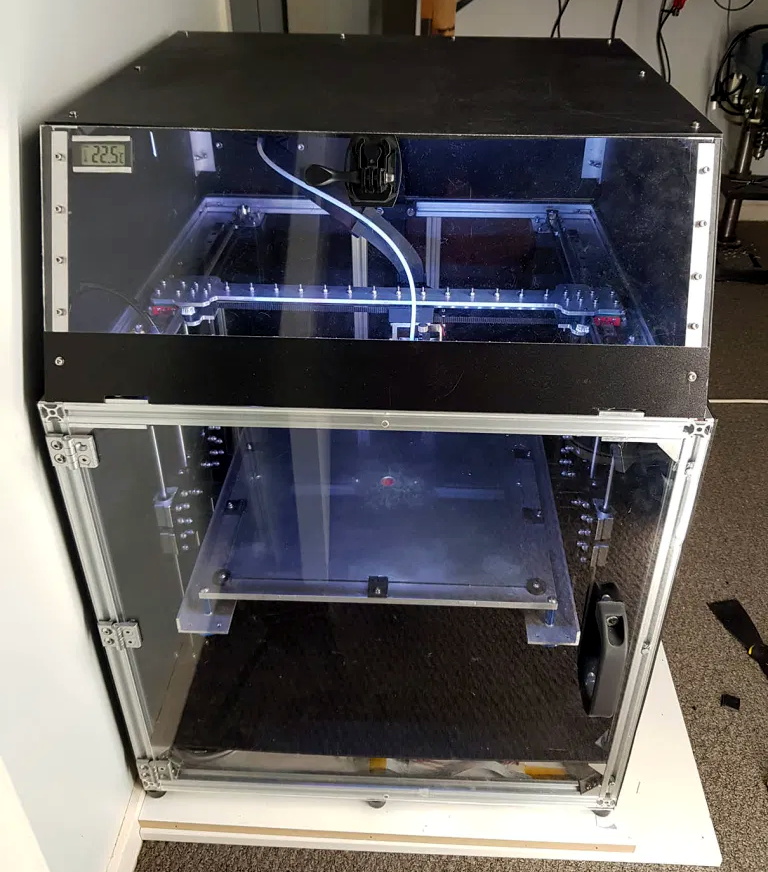
Scratch Built 3D Printer Goes Big

There was a time, not so very long ago, that buying a reliable 3D printer was a fairly expensive proposition. Many chose to build their own printer instead, and for a few years, we were flooded with very impressive custom designs. But as you might expect, with the prices on decent 3D printers now having hit rock bottom, the custom builds have largely dried up.

Arguably, the only reason you’d build rather than buy in 2020 is if you want something very specific. Which is precisely how [Joshendy] ended up building the Big F… Printer or BFP. No doubt the F stands for Fun, or Friendly. Either way, it’s certainly something special. With a 300 mm³ build volume and heavy-duty Z axis, this fully enclosed CoreXY machine is ready to handle whatever he throws at it.

It did take [Joshendy] a few attempts to get everything the way he wanted though. In fact, the prototype for the machine wasn’t even CoreXY, it started as an H-Bot. In his write-up he goes over the elements of the BFP did that didn’t quite live up to his expectations, and what he replaced them with. So when wobbly leadscrews and a knock-off V6 hotend both left something to be desired, they ended up getting replaced with ball screws and an authentic E3D Hemera, respectively.

To control this monster, [Joshendy] is using OctoPrint on a Raspberry Pi and a BigTreeTech SKR Pro running Klipper. OctoPrint gives him the ability to control and monitor the printer remotely, complete with a camera mounted inside the enclosure to keep an eye on things, while the Klipper firmware on the SKR board pushes all the computationally expensive aspects of 3D printing onto the vastly more powerful ARM chip in the Pi. The end result is faster and more accurate control of the steppers through the TMC2130 drivers than would be possible otherwise.

If you don’t mind tinkering, a cheap entry-level desktop 3D printer is good enough for most of hackers and makers. If you need something more capable or more reliable, there’s always higher-end options from the likes of Prusa and Ultimaker. Very few people need to build something as serious as the BFP, but when the do, we’re glad they send them our way.

source https://hackaday.com/2020/11/04/scratch-built-3d-printer-goes-big/

“Brain in a Vat” 6502

The 6502 was a revolutionary processor for its time. Offered at a small fraction of the cost of other processors available when it was released, it became adopted in such iconic computers at the Atari 2600, the Apple II, the NES, and the Commodore 64. For that reason it’s still extremely popular among retrocomputing enthusiasts who will often go to great lengths to restore these computers or build them from scratch. [jamesbowman] had an idea to build a 6502-based computer with the processor only, leaving the rest of the computer up to an FPGA.

He describes the system as a “brain in a vat” since a real 6502 is used as the “brain” and all other functions are passed off to the FPGA. In his build he uses an FPGA board with built-in graphics abilities, but the truly interesting part of this build is how the FPGA handles memory. If a particular value is placed on the data bus of the 6502, it loops forever through the entire memory and executes all of the instructions it finds. This saved a lot of time getting this system up and running, and he is able to demonstrate it by showing a waveform on the video output of the device.

Of course you can take an FPGA and emulate an entire computer based on a 6502, but using the actual silicon in a build like this really ensures that the user can learn and understand the hardware involved without some of the other tedium of doing things such as converting old video signals to HDMI for example. It’s a great take on retrocomputing that we expect to see more of in the future.

source https://hackaday.com/2020/11/03/brain-in-a-vat-6502/

Make Some Noise or Simulate It, at Least

Noise is a fact of life, especially in electronic circuits. But on our paper schematics and just as often our simulations, there is no noise. If you are blinking an LED on a breadboard, you probably don’t care. But if you are working on something meatier, handling electrical noise gracefully is important and simulation can help you. [Ignacio de Mendizábal] has a great piece on simulating EMC filters using LTSpice that can get you started.

There are many ways of classifying noise and [Ignacio] starts with common-mode versus differential noise, where common-mode is noise with current flowing in the same direction without regard to the circuit’s normal operation, and differential noise having currents that flow in the opposite direction of normal current flow.

The post shows how to model both types of noise and also covers how to model real-world circuit elements that will more accurately capture the behavior of a real filter. Armed with a good model of noise and some Bode plots, your filter design work will be much easier and robust.

EMC, or electromagnetic compatibility, is crucial for commercial devices. Testing is expensive, so the more you can work out in a simulation, the better. If you need a kick start on using LTSpice, we got you.

source https://hackaday.com/2020/11/03/make-some-noise-or-simulate-it-at-least/

E-Paper Weather Display is a Great Base to Build From

As e-paper modules have become more affordable, we’ve started to see them pop up more and more in hacker projects. It used to be that you had to force a second-hand Kindle to do your bidding, but now you can buy just the screen itself complete with a header to plug right into your Raspberry Pi. It will still cost you as much as a used Kindle…but at least it comes with some documentation and there are Python libraries to talk to it.

But where to start? If you need some inspiration, and perhaps a little source code, this very slick weather display put together by [James Howard] is a great as baseline. Not that it really needs any additional refinement, as we think it already looks gorgeous. But rather than starting from scratch for your own project, it would be much easier to graft some additional functionality onto his code.

A lot of that has to do with how concise and well commented his code is. We’ve seen enough of these projects to know the kind of spaghetti that’s often running on the backend, but there’s none of that here. [James] assembles the display using the powerful Pillow graphics library, which lets you draw primitives and drop in text and icons with just a couple lines of code.

Once all the data is plugged in, the entire screen is saved as an image file which is then opened up on the e-paper display. Even if you aren’t a Python expert, you should be able to understand what’s happening and how to bend it to your will.

We’ve always had high hopes for electronic paper, and it seems the technology might finally be hitting critical mass. While it’s still a bit expensive, we’ve started seeing it pop up in unexpected places to great effect. Hopefully projects like this one will inspire others to take the B&W plunge.

source https://hackaday.com/2020/11/03/e-paper-weather-display-is-a-great-base-to-build-from/

E-Paper Weather Display is a Great Base to Build From

As e-paper modules have become more affordable, we’ve started to see them pop up more and more in hacker projects. It used to be that you had to force a second-hand Kindle to do your bidding, but now you can buy just the screen itself complete with a header to plug right into your Raspberry Pi. It will still cost you as much as a used Kindle…but at least it comes with some documentation and there are Python libraries to talk to it.

But where to start? If you need some inspiration, and perhaps a little source code, this very slick weather display put together by [James Howard] is a great as baseline. Not that it really needs any additional refinement, as we think it already looks gorgeous. But rather than starting from scratch for your own project, it would be much easier to graft some additional functionality onto his code.

A lot of that has to do with how concise and well commented his code is. We’ve seen enough of these projects to know the kind of spaghetti that’s often running on the backend, but there’s none of that here. [James] assembles the display using the powerful Pillow graphics library, which lets you draw primitives and drop in text and icons with just a couple lines of code.

Once all the data is plugged in, the entire screen is saved as an image file which is then opened up on the e-paper display. Even if you aren’t a Python expert, you should be able to understand what’s happening and how to bend it to your will.

We’ve always had high hopes for electronic paper, and it seems the technology might finally be hitting critical mass. While it’s still a bit expensive, we’ve started seeing it pop up in unexpected places to great effect. Hopefully projects like this one will inspire others to take the B&W plunge.

source https://hackaday.com/2020/11/03/e-paper-weather-display-is-a-great-base-to-build-from/