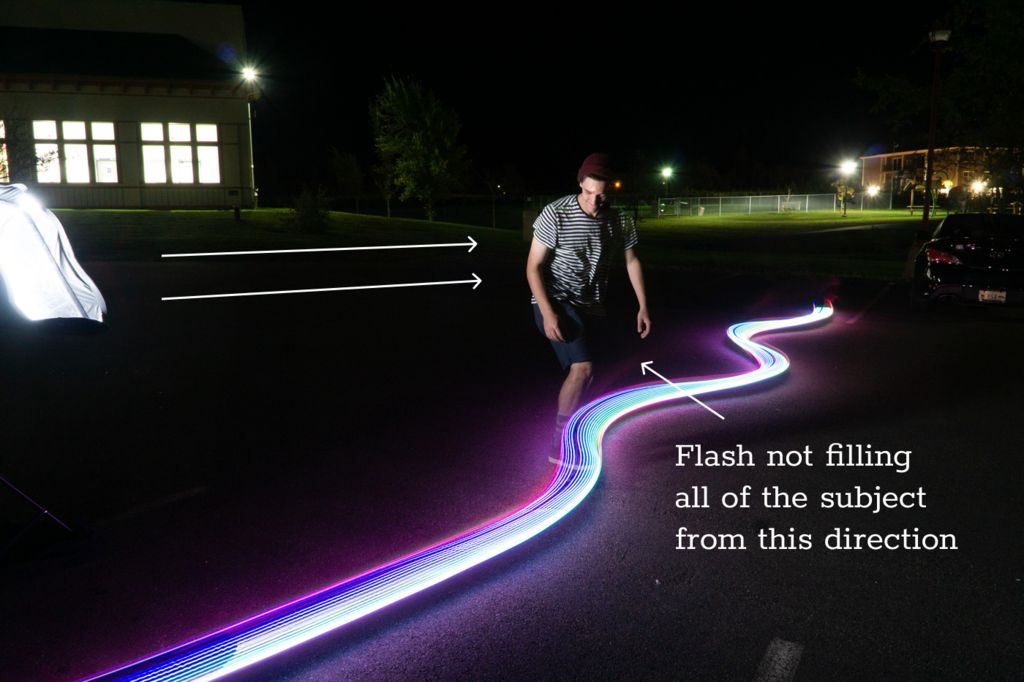
I’ve done light graffiti in the past and always find the results and process so much fun. I wanted to take it a step further and work on my maker skill to build a light graffiti skateboard. Here is how I did it.
Supplies:
An old skateboard that you aren’t afraid to drill holes in
Camera capable of long exposures, you can use a smart phone on manual
Tripod
Flash – I used a softbox, but you can also use a bare flash off camera
Add TipAsk QuestionCommentDownload
Teacher Notes
Teachers! Did you use this instructable in your classroom? Add a Teacher Note to share how you incorporated it into your lesson.Add Teacher Note
Step 1: Prep the Board
I drilled holes every 6-9 inches along the board, this would be to hold the LED’s in place with the zipties. I tried to keep them as close to the edge as possible.Add TipAsk QuestionCommentDownload
Step 2: Assemble Arduino
I used an Arduino nano to power to project in order to keep the weight down. I 3D printed this case from thingverse. I connected a button and switch so I could turn it on and off, and cycle different light affects. In the end I only really used the rainbow effect. For simplicity sake I could have simply plugged the battery and removed the switch and button.
I used a single 7.4 lipo battery. You can see the basic arduino sketch, this is the simple version with no button or switch for power. Keep in mind the diagrams are using a Arduino Uno, but a nano is needed.Add TipAsk QuestionCommentDownload
Step 3: Programming the Arduino
I decided to go with the fastLED Arduino library, but you can also use the NeoPixel library if you are more familiar with that.
There are two sketches attached one with the button that cycles several light effects and one with no button that uses the rainbow light pattern. Even though I had a had programmed several light patterns I used the rainbow pattern the most.
Note: Tinkercad requires the Neopixels to take power from the from the Arduino, but in order to power a full 115 LED strip you’ll need to draw from power from the battery.
Note: You’ll need to change the LED count to match the amount of lights you have for your strand.
I secured everything to the board with short screws, glued down the battery with hot glue gun, and connected all the components for a test.Add TipAsk QuestionCommentDownload
Step 5: Getting the Shoot
2 More Images
Put your camera on your tripod and set up your flash. Your camera will need to be on shutter priority. I triggered the flash manually with the flash “test” button when the subject was at the right spot.
Depending on the ambient light in your surroundings you’ll have to change your ISO and f-stop. It is best to do this with a number of test shoots. In the end I used ISO 1600 and at f11 for most of my shoots. You set your shutter speed based on how long you want your light trails, I used 4 seconds.
It takes a lot of testing to get it all right!Add TipAsk QuestionCommentDownload
Step 6: Celebrate
With a lot of hard work and lots of practice you can get the shoot.
Marble Clock is a 3D printed rolling ball clock that tells the time by the location of marbles/balls. It consists of 3 main rails, where,
The 5-minute rail with 1-minute intervals
The 60-minute rail with 5-minute intervals
The 12-hour rail with 1-hour intervals
add up and tell the time.
Outline
In the first step, I will give you a little bit of history of rolling ball clocks and ball clocks in general. Next, I will explain the Idea behind this project. Then I will give you an insight into the design process of this clock, so you’ll be able to design your own clock. I’ll give you a 3d print guide so you can easily print the required pieces and arrange them. After giving you a step by step assembly guide and show you how to sync your clock, I’ll end the instructable with a troubleshooting guide. So, if you encounter any problems during your build you can solve them easily.
The purpose of this instructable is not just to give you a cookbook. I’ll show you the way I built this project and provide you with open-ended questions, so you can add your own ideas, and take this project even further. Many parts I’ve designed are not connected. This way you can change the design to your own liking and then glue them together.
I strongly encourage you to share your build when it’s done!
Let’s get started.
This instructable is based on the design called “rolling ball clock” that was invented by Harley Mayenschein in the 1970s. He patented his invention and started a company which began to manufacture these clocks from solid hardwoods in the 1980s.[1]
The original rolling ball clock had 3 main rails, 2 for minutes and 1 for the hour. by adding the two rails one can get the total minute. This way the time was shown.[1]
There were many varieties of these clocks … for example the kineticlock (more info: kineticlock.ca)which had 10 minutes intervals instead of 4, or the Chronomeans Clock which was built with anodized aluminium.
I’ve been a long time fan of ball clocks. I’ve seen one when I was a kid in a novelty store. And I just stood there watching it endlessly. The movement of the balls with time was magic to me. After I heard about the clock contest on Instructables. It gave me the Idea to try to design and build a ball clock from scratch. So I started to sketch on paper.
What I wanted to do was to design a different lifting mechanism instead of the traditional rotating scoop type design. So then it hit me. I was going to use a rotary to linear motion mechanism so while the mechanism was rotated by a motor the ball would be moving in a line, up and down. Creating a little illusion.
The rails were mostly inspired from other ball clocks but I had an idea to create a bell mechanism so everytime one hour passes there would be a sound. Unfortunately, I could not build this into the project.
Step 3: Tools & Parts
Note: these are the Tools&Parts I had available. You can use any other part for your needs.
1 x Arduino uno (or any other microcontroller to drive the stepper motor)
100 x 11mm Steel Ball (you only need 30 but they get lost quite easy)
290x130x3mm wood plate
3D Printed Parts :
all parts are on step 5 I recommend you to read read step5 before printing them.
Step 4: Design Process
3 More Images
You can skip this step if you just want to print the project. This step is for people who want to design their own ball clocks or want to add new features to this project. It gives an insight on how the ball rails were designed in Fusion 360.
I suggest you to read this step after you’ve seen the tutorials.
Details on the design process are noted on the images.
Base Structure & Rails
The base structure is basically 6 rails holding 4 rods. The rods(8mmx8mm) were designed to be sturdy. They are held by bolts to a wood plate. The rails were inspired by the original rolling ball clock. But the dimensions are different due to different ball sizes and weight distribution.
Elevator
The elevator design was inspired by this mechanism. User mgg942 used this design and created a rotary to linear drive on Thingiverse . I tweaked and re-designed this to create an elevator mechanism.
Step 5: 3D Print
There are two seperate .zip files you can download.
The 3d parts.zip folder contains all the parts for the clock separately.
The 3d_parts_sets.zip contains 5 sets. each set is designed for a 25x25cm print area.
If you have a large print area you can print these like I arranged them in sets. Or you can print them separately.
I suggest you to finish printing before the assembly of any pieces. It’s much easier if you lay them on a table in an arrangement. Like a LEGO set.
Each part is given a number and a letter. these will be useful while following the building instructions next step.
you can use the pdf template to drill holes on the wood.
Parts used in this step:
[3d printed] 1a-3f (28 parts)
5 x 40mm M3 bolts & nuts
6 x 30mm M3 bolts & nuts
3 x 15mm M3 bolts & nuts
6 x 10mm M3 bolts & nuts
10 x 6mm M3 bolts & nuts
4 x (3mm*6mm*2.5mm) ball bearing
Tools used:
Tack-it
philips head screwdriver
pliers
Estimated Time:
15-20 minutes
Note: Assembly instructions are noted on the images.
Step 7: Center of Gravity
This is the most important part of this project. I did not design the rail pieces connected to the joints. This way everyone can adjust them to their needs. The rails and the connectors under them are not attached. You have to figure out the center of gravity and glue it when you are certain. Let’s begin,
The 5min rail:
Slowly put 4 balls on the minute rail. And position the connector piece accordingly so it doesn’t tip over. It should tip over when the 5th ball comes. This takes a bit of time to adjust. When you’re satisfied go to the 15min rail.
The 15min rail:
Slowly put 11 balls on the rail. again it shouldn’t tip over while 11 balls are on it. When the 12th ball arrives it should tip over.
The Hour rail:
This is the same as the 15min rail. wherever you glued the connector on the 15min rail you can glue it on the same place on the hour rail.
Lastly, to test them all at once put 11 balls on the hour and 15min rails and 4 balls on the 5 min rail. then drop one ball to the 5 min rail. They all should go smoothly and leave the rails
Step 8: Elevator Assembly
3 More Images
Parts used in this step:
[3d printed] 4a-5d (9 parts)
1 x 25byj-48 Stepper
4 x (3mm*6mm*2.5mm) ball bearing
1 x (F6-14M 6mm x 14mm x 5mm) Thrust Bearing
2 x 10mm M3 Bolts & Nuts
2 x 25mm M3 Bolts & Nuts
2 x 6mm M3 Bolts & Nuts
4 x 40mm M3 Bolts & Nuts
Tools used:
Tack-it
philips head screwdriver
pliers
Estimated Time:
5-10 minutes
Note: Assembly instructions are noted on the images.
Step 9: Driving the Motor & Timing
How to drive the motor
To drive the 28byj-48 stepper motor with a constant speed I’ve used an Arduino Uno with the AccelStepper library. you can download the library here . If you don’t have experience with Arduino or don’t know how to install libraries you can check this site.
Connect the pins on the stepper motor to the Arduino like this:
Stepper—Arduino
IN1 —-> 2
IN2 —-> 3
IN3 —-> 4
IN4 —-> 5
After uploading the code you are good to go!
Timing
The most important thing about a clock is precision. We want this clock to be as precise as any other wall clock/ watch so it works without any error. To do this we have to change the speed of the motor so the elevator completes 1 revolution in 60 seconds precisely.
Now get a stopwatch in your hand and run the motor. Start the stopwatch when the elevator gear crosses a specified point. And stop your watch when it crosses the point again. Take a note at the time. now let’s calculate the required speed
T = time on your stopwatch
t = 60s (time you want it to complete 1 revolution)
M = old motor speed(“stepper.setSpeed()” in code)
m = new motor speed(“stepper.setSpeed()” in code)
new motor speed(m) =(T*M) / t
Insert this into the code and check your stopwatch again, repeat this until you are satisfied with the result
You’re done with the build now it’s time to test this clock!
Check your watch and put the balls according to the time. And start the motor when you are ready. It’s really fun to watch time go by with this clock. Go and put yourself some tea and enjoy the sound off balls clicking. Now while doing that you should check a few things to be sure that this clock can run for 7/24 straight.
Things to look for:
Can the elevator bring a ball without dropping it each minute?
Are balls not getting stuck on the rails after 2-3 hours?
Is the clock on time after several hours?
If your answer is no for at least one of those questions, you can check the Troubleshooting step!
If your answer is yes, then congratulations you’ve built a precise ball clock!
In this Instructable I will show you step by step how to make a water filter that can filter out things like dust but if you want to use it to make pond water clean you’s need to boil the water to kill any minuscule creatures that live in the water.
Step 1: Obtaining Your Materials
The materials that I used in the filter were pretty easy to find and most of them relatively cheap. The most expensive material that I used was the activated carbon but it’s also a key part of the filter.
Fine/Play Sand: I found this at my local Home Depot but it can be found in other places, the first place you should look is your local home improvement store. I paid $3.98 for a 50 lb bag
Gravel/Pebbles: I also found this at my local Home Depot and it can be found at any home improvement store. It can be obtained from outside but you will have to make sure that they’re cleaned very well in order for them to work and not just taint the water you’re trying to filter. I paid $4.38 for the pebbles.
Activated Carbon: I obtained this at my local pet store in the fish area. this was the most expensive material on the list costing $15
Step 2: Cutting the Bottle
You will need to cut open the end of the bottle that is opposite of the cap. You need a hole in the bottom so you can put your materials into your bottle, and so you can pour the water you are trying to filter into it
Step 3: Coffee Filter
Before you begin to fill your bottle you should put a coffee filter over where the cap should be to keep everything in and for a bit of extra filtration
Step 4: Filling Your Bottle
You’re now going to begin filling your bottle with your materials
1st the cotton balls
2nd the activated carbon
3rd the sand
4th the gravel/pebbles
Step 5: Cotton Balls
The first layer of your filter is your cotton balls.
I advise putting a 1 inch layer of cotton balls
Step 6: Activated Carbon
Next you will add the activated carbon.
I would advise to put an at least half an inch layer, but for my filter I put an inch.
Step 7: Sand
Next you will add your sand, make sure it is fine sand in order for the fiter to work properly.
I advise, again, to make your layer at least half an inch, I made a 1 inch layer.
Step 8: Gravel/Pebbles
Finally, you will add your gravel/pebbles.
I suggest a layer that is at least half an inch but for this project I made a 1 inch layer
Step 9: All Done
You’re all done now and it should filter water
The bigger the bottle the more you can repeat this process
Make sure there is about 1-2 inches of free space at the top for the water.
The bigger the filter, the better it filters the water, but you need more water to push through the filter
The project began with an Arduino Leonardo, commonly used in projects that aim to create a USB Human Interface Device. [Giovanni] then installed the HID-Project library from [Nicohood]. This was used to enable the device to emulate media buttons typically found on keyboards, something the standard Arduino HID libraries were unable to do. It’s a useful tool, and one that can be implemented on even standard Arduino Unos when used in combination with the HoodLoader2 bootloader.
For ease of use and a little bit of cool factor, arcade buttons were used for the media functions. Simple to wire up, cheap, and with a great tactile feel, they’re a popular choice for fun human interface projects. It’s all wrapped up in a neat plastic box with Dymo labels outlining the functions. It’s a neat and tidy build that should make running the Christmas show a cinch!
We’re all used to the humble LED as a ubiquitous source of light, but how many of us are aware that these components can also be used as photodiodes? It’s something [Giovanni Blu Mitolo] takes us through as he demonstrates a simple data link using just a pair of LEDs and a couple of Arduinos. It’s a showing off his PJON networking layer, and while you’d need a bit more than a couple of LEDs on breadboards for a real-world application, we still think it’s a neat demonstration.
PJON itself is very much worth a look, being an implementation of a robust and error-tolerant network for Arduinos and other small microcontroller platforms. It has a variety of communication strategies for various different media, and as this LED demonstration shows, its strength is that it’s capable of working through media that other networks would balk at. Whether it’s controlling home automation through metal heating ducts or providing an alternative to LoRa at 433 MHz, it’s definitely worth a second look. We’ve mentioned it before, but remain surprised that we haven’t seen it more often since. Take a look, the video is below the break.
If you want to explore underwater, you have a few options. You can hold your breath. You can try to recycle your air. You can carry your breathing air with you as in SCUBA. You can stick a tube up like a snorkel, or you can have air sent down to you from the surface. EXOlung falls into this last category, but unlike many other surface solutions, it has a twist: it never runs out of power before you do. Watch the video below and you’ll see how it works.
A buoy puts a snorkel up out of the water, and a tube lets you dive up to 5 meters away. There’s a small tank on your chest, and your body’s motion serves to fill the tank from the outside air supply. As your legs extend and retract, you fill the tank and then put the tank’s air at ambient pressure so you can breathe. As a bonus, by varying how you inhale and exhale, you can control your buoyancy and, therefore, your depth.
The system does require you to strap your legs up to the apparatus. However, other similar systems have compressors or batteries which can fail or run down, meaning there can be a limit on how long you can stay under. EXOlung claims there is no limit to how long you can stay under.
The cost looks to be around 300 Euro, although for a bit more you can get one that uses different materials to withstand higher pressures. That one has a 7-meter hose.
Messing about in boats has always held a curious appeal for the hardware hacker. Perhaps that’s because it remains an approachable way to make something that moves under its own power with a bit of speed, and barring calamities, the worst that can happen to the unwary boater is a soaking. [NASAT Channel] is a Vietnamese hacker who is a serial producer of small motorised boats, and one of his latest is a particularly impressive example.
The boat itself is a relatively conventional expanded polystyrene hull covered with fiberglass, but the motive power is something a little special. He’s taken eight of the ubiquitous 775 DC brushed motors and used them in a star configuration with beveled gears, which in turn drives a flexible shaft which goes straight to a propeller under the craft. Each motor shares a water cooling pipe serviced by a small pump, and the drive comes from a pair of cheap PWM motor controllers. We see him zipping up and down a stretch of river next to some moored boats, and if we’re honest, we wouldn’t mind a go ourselves.
We’re not entirely convinced such a rough-and-ready eight-way gearbox will be reliable for long-term use, and we’d be interested to know just how equally so many motors are actually sharing the load. But we like it for its sheer audacity, and we think you will too. Take a look at the video below the break, and if you’re inspired then grab a hammock, some friends, and have a go.
Whether you’re new to electronics and programming, or you were bit-banging bare metal long before hair metal, CircuitPython is a great tool for getting a project up and working without all the fuss. The boards show up as mass storage devices, and programming consists of editing the Python file and saving it back to the board.
The only hard part about CircuitPython is trying to cram those official boards into small projects. [Kevin Neubauer] got tired of making his own board every time and came up with a slim system-on-module that has all the core functionality of CircuitPython. CircuitBrains Deluxe has regular holes for using headers, but also has castellated pads so he can solder these modules directly to a larger project PCB. [Kevin] says these are still in the testing and cost-optimization phase, but we would totally buy a few of them.
[Gabor Horvath] thinks even two monitors is too little space to really lay out his windows properly. That’s why he’s building a VR Desktop straight out of our deepest cyberpunk fantasies.
The software runs on Windows and Android at the moment. The user can put up multiple windows in a sphere around them. As their head moves, the window directly in front grows in focus. Imagine how many stack overflow windows you could have open at the same time!
Another exciting possibility is that the digital work-spaces can be shared among multiple users. Pair programming isn’t so bad, and now the possibility of doing it effectively while remote seems a little more possible. Even pair CAD might be possible depending on how its done. Imagine sharing your personal CAD session on another user’s screen and seeing theirs beside yours, allowing for simultaneous design.
Overall it’s a very cool tech demo that could turn into something more. It makes us wonder how long it is before tech workers on their way to lunch are marked by a telltale red circle on their face.
For a while now a series of stories have been circulating about Amazon’s Ring doorbell, an Internet-connected camera and entry system that lets users monitor and even interact with visitors and delivery people at their doors. The adverts feature improbable encounters with would-be crooks foiled by the IoT-equipped homeowner, but the stories reveal a much darker side. From reports of unhindered access by law enforcement to privately-held devices through mass releases of compromised Ring account details to attackers gaining access to children via compromised cameras, it’s fair to say that there’s much to be concerned about.
One cause for concern has been the location data exposed by the associated Amazon Neighbors crowd-sourced local crime paranoia app, and for those of us who don’t live and breathe information security there is an easy-to-understand Twitter breakdown of its vulnerabilities from [Elliot Alderson] that starts with the app itself and proceeds from there into compromising Ring accounts by finding their passwords. We find that supposedly anonymized information in the app sits atop an API response with full details, that there’s no defense against brute-forcing a Ring password, and that a tasty list of API and staging URLs is there for all to see embedded within the app. Given all that information, there’s little wonder that the system has proven to be so vulnerable.
As traditional appliance makers have struggled with bringing Internet connectivity into their products there have been a few stories of woeful security baked into millions of homes. A defense could be made that a company with roots outside the Internet can be forgiven for such a gaffe, but in the case of Amazon whose history has followed that of mass Web adoption and whose infrastructure lies behind so much of the services we trust, this level of lax security is unforgivable. Hackaday readers will be aware of the security issues behind so-called “smart” devices, but to the vast majority of customers they are simply technological wonders that are finally delivering a Jetsons-style future. If some good comes of these Ring stories it might be that those consumers finally begin to wake up to IoT security, and use their new-found knowledge to demand better.
Though many of us will never have experimented with it, most readers should be familiar with DTMF as the tones used by the telephone system for dialling. If your youth was not misspent mashing 4-4-2-6-4-6-2, 4-4-2-6-4-1 into a keypad, then you haven’t lived!
As you might expect there are a variety of chipsets to handle DTMF, and one of them has been used by [ackerman] in a slightly unusual way. Many desktop computers do not have a convenient array of GPIOs upon which to hang a piece of hardware, but a constant among them is to support some form of gaming controller. Hence he’s taken a commodity joypad and interfaced a MT8870 DTMF decoder to its switch lines with a simple transistor buffer, and is able to pull the resulting information out in the host operating system. So far there are versions for Windows, DOS, Amstrad CPC, Arduino, and even PSX ( the original PlayStation console ).
One might ask why on earth you might want a DTMF input for your desktop PC, but to do so is to miss the point. We are surrounded by computing devices from our mobile phones upwards that do not have any form of interface that can easily be used by our electronic projects, and this serves as an example of how with a bit of ingenuity that can be overcome. It’s a subject we’ve touched upon before, when we asked why people aren’t hacking their cellphones.