We have to admit, we have an odd fascination with WSL — the Windows subsystem for Linux. On the one hand, it gives us more options on Windows 10 for running the software we love. On the other hand, we wonder why we aren’t just running Linux. Sometimes it is because our cool laptop doesn’t work well on Linux. Other times we are using someone else’s computer that we aren’t allowed to reload or dual boot. Still, as long as we have to use Windows, we are glad to have WSL. A recent blog post by [Hanselman] shows some very cool tricks for using WSL that make it even better.
Exploring WSL
Did you know you can use WSL to run Linux commands in a Windows command shell? For example, you have a long directory and you want to run grep:
dir c:\archive\* | wsl grep -i hackaday
Of course, from bash you could access the same directory:
ls /mnt/c/archive | grep -i hackaday
Extensions
Many of the tricks rely on the fact that bash doesn’t assume any executable file extension. If you try to run explorer, for example, from a bash shell, nothing happens. But if you append the .exe extensions, Windows programs will run and, by default, the usual Windows directories are in the path.
You do need to watch out for path name conversion. For example, if you provide “.” as an argument to explorer, you will open up a network share //wsl$/Ubuntu/home/user_name, for example. Of course, that’s another trick. You can access your WSL directories from windows using that notation (obviously, Ubuntu and user_name may be different for your installation). However, ordinary paths do not work.
Path Conversion
You can, however, use the wslpath utility to convert paths in both directions:
$ wslpath
Usage:
-a force result to absolute path format
-u translate from a Windows path to a WSL path (default)
-w translate from a WSL path to a Windows path
-m translate from a WSL path to a Windows path, with '/' instead of '\'
For example:
$ explorer.exe `wslpath -w /bin`
X11 and More
[Hanselman] discusses a number of tips, including some about using development tools and git. You can also install multiple WSL flavors and export them to other Windows machines. He also mentions running X11 using paid tools Pengwin and X410. We say just use Swan.
Speaking of Swan, it is a great alternative to WSL on any Windows version, not just Windows 10. In truth, it is just Cygwin with X11 preconfigured, but it is much easier than trying to get X11 running on a bare Cygwin install. On the one hand, this is a much more desktop Linux solution than WSL. On the other hand, WSL loads real distributions and integrates nicely with Windows 10. But if you load both, you can get the advantages of both, too.
Sell Out?
Given the choice, we’ll just use Linux. Honestly, if your workflow is mostly Web-based, it hardly matters anymore. You load Chrome or your choice of browser and everything works. Of course, our Linux boxes tend to be way more efficient and also stay running better than Windows.
However, if you find yourself using Windows, Cygwin has long been a big help. Now WSL is another tool to get your Linux tools on a Microsoft-controlled box.
Slack is either an online collaboration tool, or a religion, depending on who you talk to. Naturally, it’s accessible across all manner of modern platforms, from Windows and MacOS to smartphones. However, some prefer to go further back. At a recent company hackathon, [Yeo Kheng Meng] decided to create a Slack client for Windows 3.1.
This is how you learned to program before the Internet.
Programming for an older OS, in this case, Windows For Workgroups 3.11, requires setting up a viable development environment. Visual C++ 1.52 was pressed into service in this case, being the last version capable of targeting Windows 3.11. The development environment is run on a Windows 2000 virtual machine running on a Mac laptop. This was chosen for its ability to run 16-bit apps, and its Samba compatibility with both Windows 3.11 and Windows 10 and modern Macs.
There were several challenges to face along the way. Old school Windows simply isn’t capable of dealing with HTTPS, necessitating a proxy to handle the exchange of packets with Slack servers. Additionally, memory management was a hassle due to the limits of the 16-bit architecture. Thankfully, an old programming manual from the era was of great help in this regard.
At the end of the hackathon, a usable Slack client was up and running, complete with garish colors from the early Windows era. There’s a few key features missing, such as the ability to resolve user IDs, but overall, the concept works. We’ve seen [Yeo]’s work with this vintage OS before too. Video after the break.
For nearly as long as there has been radio, there have been antennas trained on the sky, looking at the universe in a different light than traditional astronomy. Radio astronomers have used their sensitive equipment to study the Sun, the planets, distant galaxies, and strange objects from the very edge of the universe, like pulsars and quasars. Even the earliest moments of the universe have been explored, a portrait in microwave radiation of the remnants of the Big Bang.
And yet with all these observations, there’s a substantial slice of the radio spectrum that remains largely a mystery to radio astronomers. Thanks to our planet’s ionosphere, most of the signals below 30 MHz aren’t observable by ground-based radio telescopes. But now, thanks to an opportunity afforded by China’s ambitious lunar exploration program, humanity is now listening to more of what the universe is saying, and it’s doing so from a new vantage point: the far side of the moon.
Bouncing Both Ways
As any amateur radio operator can tell you, the key to direct global radio communication is the Earth’s ionosphere – those layers of charged particles that ebb and flow 50 to 600 miles (80 to 1000 km) above our heads. Produced by the constant stream of radiation flowing from the Sun and interacting with the Earth’s magnetic field, the ionosphere has long been known to refract radio waves. The degree to which radio waves are refracted depends on things like the structure of the ionosphere, which changes diurnally, as well as the angle at which the radio waves strike the charged particle layers. But refraction also depends heavily on the wavelength of the incident waves, with the 10-meter band, or 28 MHz, normally considered the upper limit for useful ionospheric bounce.
The refraction of radio waves below 30 MHz or so represents the core problem for ground-based low-frequency radio astronomy. (Nomenclature note: while commercial and amateur radio operators consider the space between 3 MHz and 30 MHz to be the “high frequency” (HF) band for historical reasons, the frequencies reflected by the ionosphere are very low for ground-based radio astronomy.) The ionosphere is nearly as efficient a reflector of radio waves coming from space as it is to those from terrestrial sources, and so acts as a blanket, isolating us from what the universe is telling us in those wavelengths. To be able to do any useful observations below 30 MHz, radio astronomers need to cast off that blanket, and the easiest way to do that is to build a space-based radio telescope.
The Magpie Bridge
The Chinese Chang’e-4 lunar mission presented a perfect opportunity to test what’s possible with low-frequency radio astronomy, and to potentially pave the way for larger-scale efforts in the future. Part of the ambitious, multi-decade Chinese Lunar Exploration Program (CLEP), which may culminate with a crewed mission in the 2030s, Chang’e-4 is a complicated mission made more so by the fact that it was designed to explore the far side of the Moon.
Queqiao relay satellite at Earth-Moon L2, showing its vantage point for line-of-sight to both Earth and the far side of the moon. Note the NCLE package with three antennas deployed on the top. Source: China Academy of Space Technology.
Thanks to tidal locking, the Moon rotates on its axis with exactly the same period as it rotates around Earth, meaning it only ever presents one face to us. So anything on the far side will be blocked off from radio contact with Earth. A practical far-side mission must therefore necessarily include some kind of relay system, to allow for communication between the Earth and Moon. While this could be accomplished with a satellite in lunar orbit, capable of buffering far-side signals until it’s back in sight of Earth ground stations, Chinese mission planners came up with a far more interesting idea: they’d place their relay satellite so that full-time communications would be possible.
To accomplish this, the Chang’e-4 mission planners aimed their relay satellite Queqiao at the Lagrangian point L2, a point in space that lies on the line between the Earth and the Moon, but 65,000 kilometers (40,000 miles) beyond the Moon. Queqiao orbits the L2 point in a halo orbit, an elliptical path around the point but with the orbital plane more or less perpendicular to the line between the Earth and the Moon. That gives the satellite, with its massive 4.2-meter dish antenna, full-time line-of-sight to both the Chang’e lander and the Yutu-2 rover on the lunar far side, as well as the ability to stay connected to ground stations on Earth. This also gives it full exposure to the Sun, allowing it to be powered by solar panels rather than RTGs.
(Queqiao literally means “magpie bridge”, and stems from a Chinese myth where magpies would flock to form a bridge once a year so that the daughter of the Goddess of Heaven could cross the Milky Way to be with her husband. Poetic, no?)
Slightly Stuck
Queqiao has been on-station and fulfilling its primary mission as a communications relay since June of 2018. But Queqiao‘s unique position made it the perfect place to do some science too. The Chinese Academy of Science teamed up with astronomers from Radboud University in the Netherlands to design the Netherlands-China Low-Frequency Explorer, or NCLE. The ten kilogram package includes a sensitive broadband software-defined radio (SDR) receiver and digital signal processing capabilities, fed by a trio of monopole antennas that can be extended to a length of five meters each.
Deployment of the antennas was supposed to happen early in the mission, but Queqiao‘s primary mission had priority and the antennas remained stowed for most of the last 18 months. The command to unfurl the antennas was only recently sent, and while one antenna deployed to its full 5-meter length, the other two antennas appear to be stuck with only about 2.5 meters exposed. It’s possible that the extended stowage time led to lubrication problems like those that afflicted the high-gain antenna of the Galileo probe, but whatever the problem, the science that can be done by NCLE at this point is limited.
If the NCLE is able to fully deploy all the antennas, there’s a vast amount of science waiting to be done. The observatory is perfectly poised to listen in on drastically red-shifted emissions on the 21-cm hydrogen line. Normally in the L-band section of the UHF part of the spectrum, the H-line is the characteristic spectrum of the most abundant element in the universe, and thereby provide a map of its distribution. H-line emissions from the earliest parts of the Big Bang, the so-called “dark ages” that occurred when the universe was only 800 million years old, is extremely red-shifted, lowering its frequency to the point where the ionosphere and terrestrial interference make terrestrial observation impractical. NCLE’s quiet spot in space aboard Queqiao would let cosmologists listen in on the very earliest period of the Big Bang in ways never before possible.
Schematic of the evolution of the universe. Fully deployed, NCLE will be able to see back to the “Dark Ages” period, and beyond. Source: NASA/WMAP team.
The music of the universe is not the only thing NCLE will be listening to. Using beam-steering, the NCLE antennas will be able to observe the Sun, Jupiter – an extremely bright radio source – and the Earth. Astronomers will have a vantage point to study the interactions between the Sun and the Earth’s ionosphere at lower frequencies than ever before possible, and even to characteristic the “leakage” of man-made radio signals through the ionosphere. And all the planned observations will inform decisions on how to improve low frequency space-based radio astronomy, including possibly building a permanent observatory on the Moon’s far side, or orbiting more satellites to improve resolution through very-long baseline interferometry.
Queqiao was designed to last five years, so the NCLE team has a while to work out the antenna bugs and get the observatory up and running. Here’s wishing them the best of luck as they explore the low-frequency domain from the dark side of the Moon.
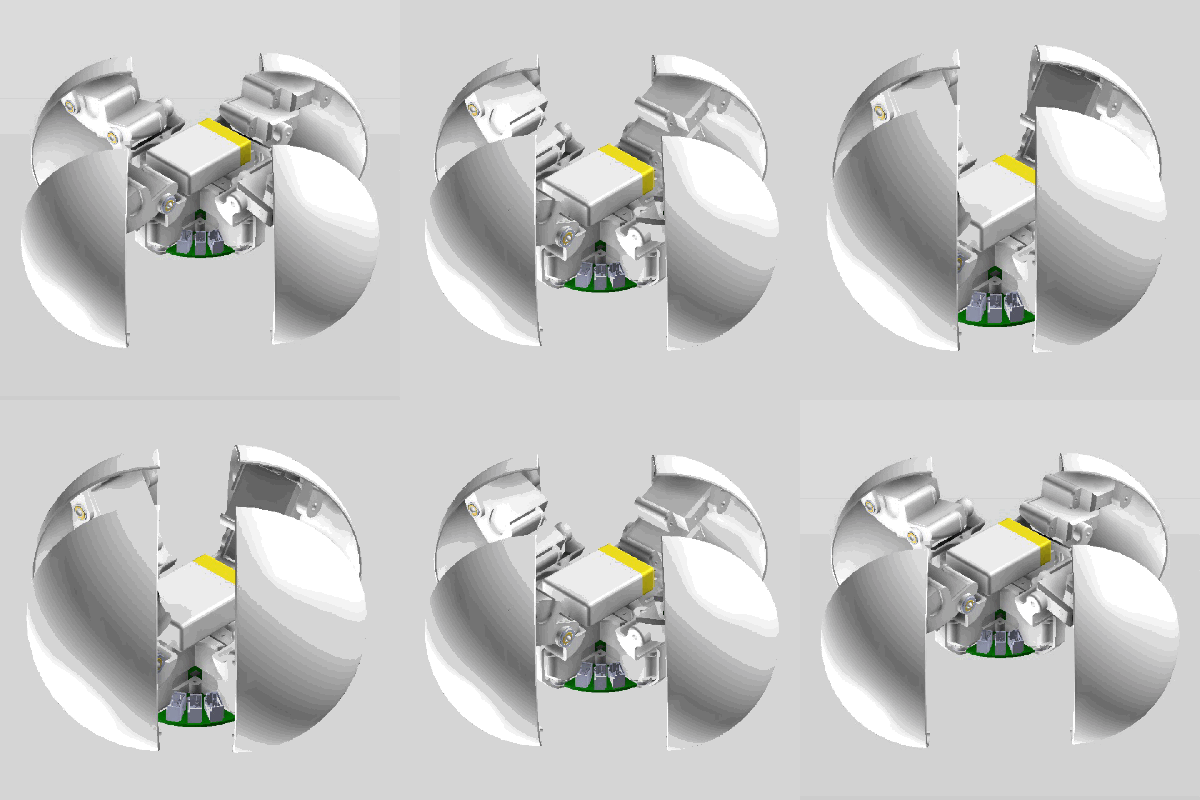
When the Skynet baseball bot swarms attack, we’ll be throwing [Carl Bugeja] some dirty looks for getting them started. He’s been working on 4B, a little quadruped robot that can transform itself into a sphere almost perfectly.
Before [Carl] was distracted by the wonders of PCB actuators more than a year ago, he started working on this little guy. He finally found some time to get it moving on its own, and the preliminary results look promising to say the least. Inside the 6 cm sphere is a total of 12 servos, 3 for each leg. All of the mechanical parts were 3D printed in nylon on an SLS machine, and the custom PCB has a BLE microcontroller module, an IMU and IR proximity sensors onboard. Everything is open source with all the files available on the Hackaday.io project page.
The microcontroller runs a full inverse kinematic model, so only the desired tip and base coordinate for each leg is input and the servo angles are automatically calculated. Ultimately [Carl] aims to have the robot both walking and rolling controllably. So far he’s achieved some degree of success in both, but it still needs some work (see the videos below. We’re eager to see what the future holds for this delightfully creepy bot.
We’ve all seen plenty of impressive free-form soldering in these pages, maybe some of us have even had a go ourselves. Using nothing but bare conductors, electronic components, and solder, complex and beautiful electronic sculptures can be created. But the latest free-form project from [Jiří Praus] takes the medium to a new level, as he’s taken no less than 194 bare surface-mount addressable LEDs and formed them into a perfect sphere supported by nothing more than soldered copper wire.
This feat was achieved with the aid of a 3D printed hemispherical jig with spaces for each LED, and each half was assembled in a marathon soldering session. Some significant fault-finding was required due to a few dry joints, and an ESP32 board and Li-Po cell were fitted in between the two halves as they were joined. The result is a triumph, a Christmas bauble like no other, and one which we aren’t sure we could manage to solder so well even on a good day.
If you recognise [Jiří ]’s work, it’s probably because we’ve featured several of his creations previously. It’s always difficult to pick a favorite, but the one which caught our eye the most was his fully functional freeform Arduino Uno.
It’s a well-known fact in capitalist societies that any product or service, if being used in a wedding, instantly triples in cost. Wanting to avoid shelling out big money for a simple photo booth for a friend’s big day, [Lewis] decided to build his own.
Wanting a quality photo output, a Canon DSLR was selected to perform photographic duties. An Arduino Nano is then pressed into service to run the show. It’s hooked up to a MAX7219 LED matrix which feeds instructions to the willing participants, who activate the system with a giant glowing arcade button. When pressed, the Nano waits ten seconds and triggers the camera shutter, doing so three times. Images are displayed on a screen hooked up to the camera’s USB port.
It’s a build that keeps things simple. No single-board PCs needed, just a camera, an Arduino, and a monitor for the display. We’re sure the wedding-goers had a great time, and we look forward to seeing what [Lewis] comes up with next. We’ve seen a few of his hacks around here before, too.
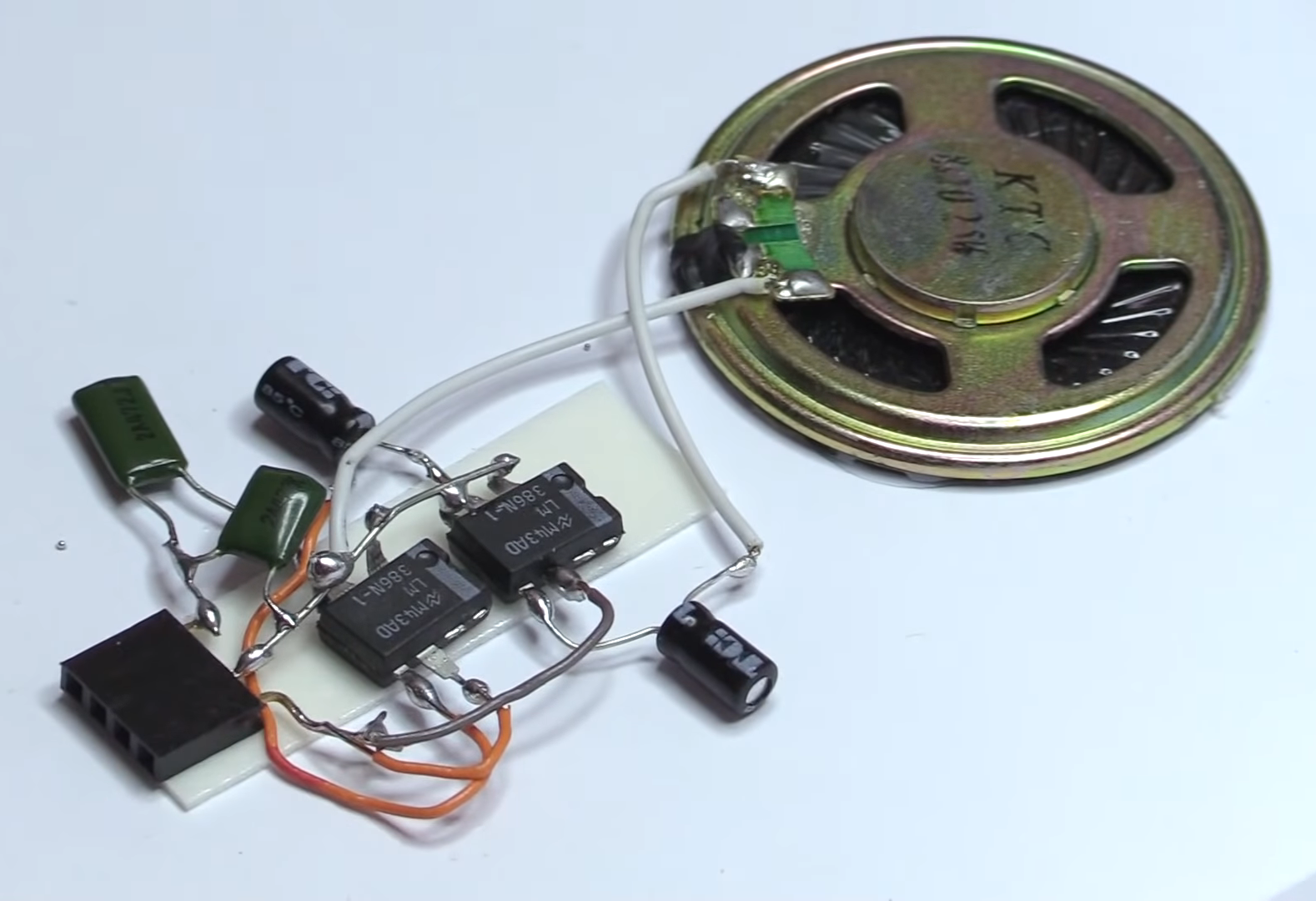
We know at least one person who ought to make Santa’s ‘nice’ list this year. [Fran] was probably near the top of it already, but sending Santa a handmade greeting card with a fully-functioning guitar amp inside will probably make him rewrite her name in glitter, or silver Sharpie.
This stocking stuffer-sized amp is based around the LM386 and the bare minimum components necessary to make it rock. Everything is dead-bug soldered and sandwiched between two pieces of card stock. The first version with a single 386 sounded okay, but [Fran] wanted it louder, so she added another stage with a second 386. [Fran] glued the rim of the speaker directly to the card so it can act like a cone and give a better sound than the speaker does by itself.
All Santa needs to rock out is his axe and a small interface made of a 1/4″ jack and a 9 V wired to a 3-pin header that plugs into the card. He can take a break from Christmas music and let some of those cookies digest while he jams. Be sure to check out the build video after the break if you want to stay off the ‘naughty’ list.
It’s hard to believe it, but the Raspberry Pi has been on the market for only seven years now. The single-board computer has become so entrenched in the hobby electronics scene that it’s hard to imagine life without it, or what we did before it came along. And with the recent announcement that the 30 millionth Raspberry Pi was recently manufactured, now we have some clarity on the scale of its success. Just roll that number around in your head for a bit – that’s one Pi for every nine or so people in the USA. Some of the other facts and figures in the linked article boggle the mind too, like Ebert Upton figured they’d only ever sell about 10,000 units, or that the factory in Wales where most Pis are made can assemble 15,000 units a day.
Speaking of manufacturing, have you ever considered what goes into getting a small-scale manufactured product ready for shipping? The good folks over at Gigatron know all about the joys of kitting, and have put together an interesting un-unboxing video for their flagship TTL-only retro computer. It’s a nice riff on the unboxing videos that are somehow popular on YouTube these days, and shows just how much effort they put into getting a Gigatron out the door. All told, it takes about an hour to ship each unit, and the care put into the process is evident. We especially like the part where all the chips are placed into antistatic foam in the same orientation they’ll be on the completed board. Nice touch.
Last time we checked in on the Lulzbot saga, the open source 3D printer manufacturer had been saved from complete liquidation by a company named FAME 3D. Now we’re getting the first solid details about where things go from here. Not only will thirteen of the remaining Lulzbot employees be staying on, but FAME 3D plans to hire 50 new employees to get operations back up as quickly as possible. The catch? The “F” in FAME 3D stands for Fargo, North Dakota, where Fargo Additive Manufacturing Equipment 3D is based. So Lulzbot will be moving north from Loveland, Colorado in the coming months.
For the last few years, adventure travelers making the pilgrimage to Shenzhen to scour the electronics markets have stuffed a copy of Andrew “Bunnie” Huang’s The Essential Guide to Electronics in Shenzhen into their soon-to-be-overflowing backpacks. The book is a goldmine of insider information, stuffed with maps and translation tables critical for navigating a different culture with no local language skills. Bunnie’s book has only been available in dead-tree format and now that all but the last few copies have been sold, he decided to make a web version available for free. We’d have to think a tablet or phone would be a bit harder to use in the heat of negotiation than the nice spiral-bound design of the print copy, but the fact that the insider information will now be widely available probably makes this a net positive.
And finally, if you’ve ever nearly been run over by an EV or hybrid silently backing out of a parking space, you’ll no doubt appreciate attempts to legislate some sort of audible presence to these vehicles. But what exactly should an electric vehicle be made to sound like? Volkswagen has begun to address that question, and while you can certainly read through the fluff in their press release, all you really need to do is listen to the sample. We’ve got to say that they pretty much nailed what a car of the future should sound like. Although they might have missed a real opportunity here.
At a low level, [Umar] is building an insole with an array of force sensors in it. These sensors are affixed to a flexible PCB which is placed in a user’s shoe. A circuit containing a ESP32, IMU, and haptic feedback unit measure the sensors and send data back to a phone or a laptop.
What’s most interesting are the possibilities opened by the data he hopes to collect. The first application he proposes is AR/VR input. The feedback from the user’s feet plus the haptics could provide all sorts of interesting interaction. Another application is dynamically measuring a user’s gait throughout the day and exercise. People could save themselves a lot of knee pain with something like this.
[Umar] also proposes that an insert like this could record a user’s weight throughout the day. Using the data on the weight fluctuation, it should be possible to calculate someone’s metabolism and hydration from this data.
Every serious metal worker will end up getting themself a roller bender at some point, but if you’re as dedicated as [Meanwhile in the Garage], you might just start building the things yourself. His heavy-duty electric roller bender, demonstrated in the video after the break, is perfect for the thicker steel and bigger radii his smaller manual machine can’t handle.
The basic concept is the same in both machines, with two fixed rollers and a third adjustable opposing one between them. Most of the components are pieces of scrap metal, and each shaft runs on bearings mounted in homemade pillow blocks. The two fixed shafts are connected together by a chain drive, and a scrap industrial motor provides the rotating power through a worm gearbox. There are two adjustable bushings on each shaft to keep the work piece aligned. The lead screw from an old car jack is used to adjust the position of the moving roller.
We picked up a few interesting tips from the video, like how to properly align a cylindrical workpiece in a drill press for drilling radial holes. He also used toggle switches as limit switches in a pretty ingenious way, and F-clamps on the work piece to activate them when it reaches the end.
Building your own tools at home is a time-honoured hacking tradition, which we have never seen a shortage of here on Hackaday. Check out this DIY drill press and vertical CNC mill.
When [learnelectronics] talks about cheap meters, he always says, “If you are doing this for a living, get yourself a Fluke.” But he realized he’s never shown the inside of a Fluke meter, so he rectified that in his most recent post. For comparison, he opens up a Fluke 26-III and an Aneng AN870 (retailing at about $500 and $30, respectively).
The initial opening shows that the Fluke has hefty brand name fuses, but the Aneng has little generic fuses. In addition, the Fluke has an internal case that helps keep you away from live voltage. The Fluke also has a proper rotary switch, while the cheap meter has a switch that is etched on the PC board; a cost-cutting trick that’s often a point of failure on these cheap meters.
The Fluke also has a significantly larger number of protection devices and heftier components, you presume can take more punishment. Of course, if you don’t have a few hundred volts running through your meter, it probably doesn’t matter. The cheap meters are certainly good enough, even though you do get what you pay for, as you might expect.
Everything we know about New World. https://fextralife.com/everything-about-new-world-amazons-atypical-mmorpg/ – In this video, we’ll be sharing the broad strokes of what makes this Sandbox MMO title unique, and some details you might not be aware of!
Don’t forget to like the video and subscribe to our channel for more!
https://www.twitch.tv/fextralife
Follow us on social media:
Facebook: https://www.facebook.com/Fextralife/
Twitter: https://twitter.com/Fextralife
Visit our wikis: https://www.wiki.fextralife.com/
Check out our blog: https://fextralife.com/
Visit our forums: https://fextralife.com/forums/
#mmorpg #newworld #amazonmmorpg
new world gameplay, new world,new world walkthrough, new world gameplay part 1, new world review,new world walkthrough part , new world part 1,new world gameplay walkthrough,new world trailer,gameplay, new world playthrough, new world full game,new world walkthrough part 1 no commentary, new world ending, new world ps4
This tutorial is about making a little shape that creates a lot of reflections inside. With holes on every angle for light and a little window to see through, you can watch this infinity proces in your hand! The idea came from watching infinity mirror video’s and trying to think of any variation on them. Hope you like it! 🙂
Step 1: Make or Order the 3mm Lasercut Acrylic Mirror Parts
i made a vector drawing and made an order online to lasercut these shapes from 3mm acrylic sheet mirror. Once received, we can start! :)Add TipAsk QuestionCommentDownload
Step 2: Make a Simple Paper Strip With Double Sided Tape to Construct the Infinity Polygon Shape
2 More Images
the assembling is pretty easy this way. I made a 2cm strip of thick paper and scored this strip. A path of 2mm wide needed to be scored in the middle. apply double sided tape on the other side and make the folds.Add TipAsk QuestionCommentDownload
Step 3: Assembling Time!
2 More Images
cut the paper strip to lengths of the pentagon side and work your way trough. Keep the 3 with the viewing hole side for last. It’s fun to see the reflections increasing with every element you assemble 🙂

 Many of the tricks rely on the fact that bash doesn’t assume any executable file extension. If you try to run explorer, for example, from a bash shell, nothing happens. But if you append the .exe extensions, Windows programs will run and, by default, the usual Windows directories are in the path.
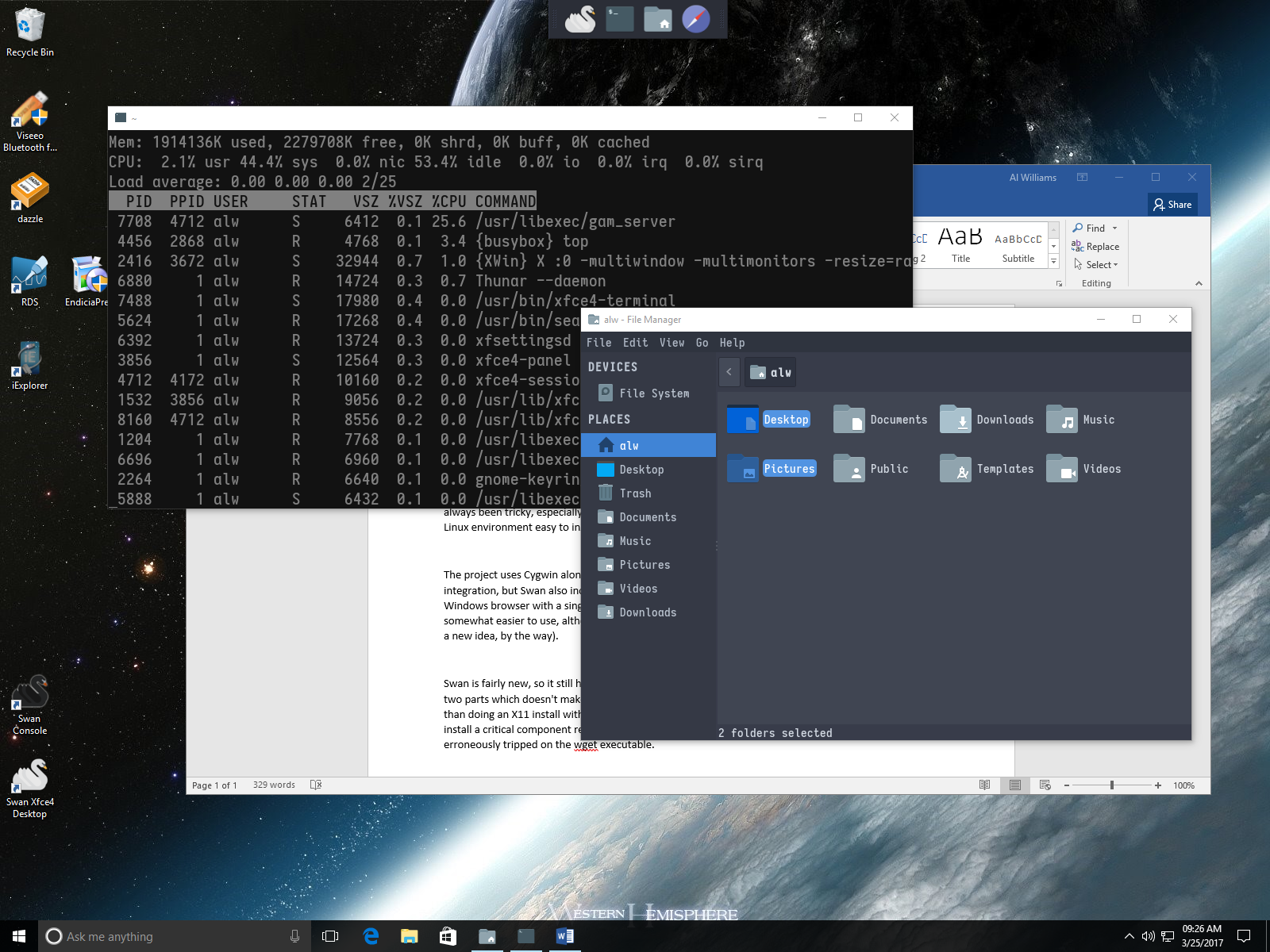 [Hanselman] discusses a number of tips, including some about using development tools and git. You can also install multiple WSL flavors and export them to other Windows machines. He also mentions running X11 using paid tools Pengwin and X410. We say just use Swan.