
Monthly Archives: December 2019
r/prorevenge | Was 5 minutes worth 30% of your GLOBAL Market? #youtubevids
Color Coded Clock Runs On Roman Numerals
Roman numerals are, by modern standards, a bit unusual. By virtue of using designations for both 5 and 10, and not scaling well to higher numbers, they’ve fallen out of favor outside of some specific uses. One of those is in time keeping, in which many clocks use the classical numerals instead of the more popular Arabic replacements. [Nicola]’s clock does too, albeit in a rather unusual way.

The build begins with a faux-neon palm tree LED decoration, which is gutted and refitted with a WS2812B LED strip, run by an Arduino Nano. An RTC is used to keep accurate time, and the time is set by running a one-off program to initialise the clock.
To tell the time, the LEDs are color coded. However, instead of using a binary representation that many can find unfamiliar, colors are chosen instead to correspond to Roman numerals. Blue, green, red and yellow are chosen to represent 1, 5, 10, and 50, or I, V, X, and L respectively. The Github has more details for the curious. The clock uses 24 hour time, and we think we’ve figured out how the display works – with hours on the left and minutes on the right.
It’s fun to see an LED clock that takes a different bent on the usual themes. We’ve seen plenty over the years, from the byte clock to this stunning blinkenlights build. If you’ve cooked up your own special timepiece, be sure to let us know.
source https://hackaday.com/2019/12/24/color-coded-clock-runs-on-roman-numerals/
LuaRadio Gives Insight into SDR
In theory, you shouldn’t need any help to develop a software-defined radio (SDR) application. But in real life you really don’t want to roll your own code every time to read the IQ samples, perform various transformations on them, and then drive audio output. At worst, you’ll use some libraries (perhaps GNU Radio) but usually, you’ll use some higher-level construct such as GNU Radio Companion (GRC). GRC is a bit heavyweight, though, so if you’ve found it daunting before, you might check out some of the material on the LuaRadio website.
We’ve looked at LuaRadio several years ago, but it has undergone a lot of changes since then and has some excellent documentation. Like Lua itself, LuaRadio emphasizes fast scripting. It supports quite a few pieces of common hardware and nearly anything that feeds data through a soundcard.
Why not use GNU Radio? LuaRadio has an official answer. However, LuaRadio doesn’t have a GUI — at least, not yet. Maybe a Hackaday reader will fix that. It also isn’t as mature as GNU Radio, but it does have a lot of positive features such as a small footprint, easy embedding, and a simple way to add additional features.
If you have an RTL-SDR, there are a number of examples:
- WBFM Broadcast Mono and Stereo Receivers
- NBFM Receiver
- AX.25 Packet Radio Receiver
- POCSAG Receiver
- RDS Receiver
- AM Receiver (envelope and synchronous)
- SSB Receiver
The project GitHub page shows recent updates to version 0.6.0. Just as an example, the flowgraph at the top of this post looks like this in Lua code:
local radio = require('radio')

radio.CompositeBlock():connect(
radio.RtlSdrSource(88.5e6 - 250e3, 1102500), -- RTL-SDR source, offset-tuned to 88.5MHz-250kHz
radio.TunerBlock(-250e3, 200e3, 5), -- Translate -250 kHz, filter 200 kHz, decimate by 5
radio.FrequencyDiscriminatorBlock(1.25), -- Frequency demodulate with 1.25 modulation index
radio.LowpassFilterBlock(128, 15e3), -- Low-pass filter 15 kHz for L+R audio
radio.FMDeemphasisFilterBlock(75e-6), -- FM de-emphasis filter with 75 uS time constant
radio.DownsamplerBlock(5), -- Downsample by 5
radio.PulseAudioSink(1) -- Play to system audio with PulseAudio
):run()
Not too hard, even without too much documentation. If you’d rather tackle GRC, we have a tutorial for that.
source https://hackaday.com/2019/12/24/luaradio-gives-insight-into-sdr/
Minimalist Mate Maker Keeps You Caffeinated
Americans love their coffee. The Brits adore their tea. In South America, the number one way to get through the day is with yerba mate, a tea made from the yerba plant. It is typically shared in a social setting, with one person preparing the beverage for everyone to enjoy. Although caffeine certainly deserves a ceremony, it never needs one. Hit the streets and you’ll see people everywhere with a thermos under one arm, keeping water hot and ready to refill the cup of mate in their hand.
The Stanley vacuum thermos is quite a popular choice for drinkers on the go, but the Argentinian government recently placed new restrictions foreign imports. [Roni Bandini] decided to build a minimum viable mate machine so he always has perfectly hot water on tap.
An Arduino Nano heats the water and displays the rising temperature on an LCD screen. When the temperature is just right, the display asks for your cup. An ultrasonic sensor detects the cup and dispenses a certain amount of water determined in the sketch. Yerba leaves can be used a few times before losing their flavor, so the machine keeps track and lets him know when it’s time to replace them. You can sip on a brief demo after the break.
Let’s say you don’t have perfectly-prepared mate, and it always comes out too hot. That’s better than too cold, but still not ideal. Why not make a temperature-sensing coaster that alerts you when it has cooled to perfection?
source https://hackaday.com/2019/12/24/minimalist-mate-maker-keeps-you-caffeinated/
Now Even Your Business Card Can Run Linux
It takes a lot of work to get a functional PCB business card that’s thin, cheap, and robust enough to be practical. If you can even blink a few LEDs on the thing and still hand them out with a straight face, you’ve done pretty well for yourself. So you can imagine our surprise when [George Hilliard] wrote in to tell us about his $3 business card computer that boots into a functioning Linux environment. If this were a bit closer to April, we might have figured it was just a joke…
Of course it helps that, as an embedded systems engineer, [George] literally does this kind of thing for a living. Which isn’t to say it was easy, but at least he keeps close enough tabs on the industry to find a suitable ARM solution at a price that makes sense, namely the Allwinner F1C100s. This diminutive chip offers both RAM and CPU in a single package, which greatly simplifies the overall design and construction of the card.
 With a root filesystem that weighs in at just 2.4 MB, the environment on the card is minimal to say the least. There’s no networking, limited I/O, and forget about running any heavy software. But it does boot in about six seconds, and [George] managed to pack in a MicroPython interpreter and a copy of the classic Unix dungeon crawler
 rogue.
Oh yeah, and it also has his resume and some samples of his photography onboard. It is, after all, a business card. All the user has to do is plug it into the USB port of their computer and wait for the virtual serial port to pop up that will let them log into the system running on the card. It also shows up as a USB Mass Storage device for recipients who might not be quite as adept at the command line.
In addition to the high-level documentation for this project, [George] has also prepared a deeper write-up that goes into more technical detail for anyone who might be looking to follow in his footsteps. Thanks to all of the source code that he’s made available, it should be a lot easier for the next person to get their own disposable pocket computer up and running.
We’ve seen all manner of electronic business cards over the years, but never anything quite like this. Which, of course, is quite the point. If you’re ever given a business card that doubles as a computer running a full-fledged operating system on it, you aren’t likely to forget it anytime soon.
source https://hackaday.com/2019/12/24/now-even-your-business-card-can-run-linux/
Tiny Tree is a Thermometer for Christmas Fever
Tired of the usual methods for animating all those RGB LEDS for your holiday display? How about using trendiness in a non-trendy way?
[8BitsAndAByte] caved in to increasing holiday madness and bought the cutest little Christmas tree. A special tree deserves special decorations, so they packed it with NeoPixels that turn from red to green and back again one by one. Here’s where the trendiness comes in: the speed at which they change is determined by the popularity of “Christmas” as a search term.
The NeoPixels are controlled by a Raspberry Pi 3B+ that uses PyTrends to grab a value from Google Trends once an hour. The service returns a value between 0 to 100, where 100 means the search term is extremely popular, and 0 means it’s probably the dead of January. Each NeoPixel is wired to the underside of a translucent printed gift box that does a great job of diffusing the light.
You know how Christmas trees have a tendency to stick around well into the new year? This one might last even longer than usual, thanks to the bonus party mode. Press the arcade button on the box cleverly disguised as a present, and the lights change from red to green and back at warp speed while the speaker inside blasts the party anthem of your choice. Be sure to check out the demo/build video waiting for you under after the break.
How could this little tree get any more special? Well, a rotating platform couldn’t hurt.
source https://hackaday.com/2019/12/24/tiny-tree-is-a-thermometer-for-christmas-fever/
Possible Fifth Force of Nature Found
Over the years, humans have come up with four forces that can be used to describe every single interaction in the physical world. They are gravity, electromagnetism, the weak nuclear force that causes particle decay, and the strong nuclear force that binds quarks into atoms. Together, these have become the standard model of particle physics. But the existence of dark matter makes this model seem incomplete. Surely there must be another force (or forces) that explain both its existence and the reason for its darkness.

Hungarian scientists from the Atomki Nuclear Research Institute led by Professor Attila Krasznahorkay believe they have found evidence of a fifth force of nature. While monitoring an excited helium atom’s decay, they observed it emitting light, which is not unusual. What is unusual is that the particles split at a precise angle of 115 degrees, as though they were knocked off course by an invisible force.
The scientists dubbed this particle X17, because they calculated its mass at 17 megaelectronvolts (MeV). One electron Volt describes the kinetic energy gained by a single electron as it moves from zero volts to a potential of one volt, and so a megaelectronvolt is equal to the energy gained when an electron moves from zero volts to one million volts.
What Are Those First Four, Again?
Let’s start with the easy one, gravity. It gives objects weight, and keeps things more or less glued in place on Earth. Though gravity is a relatively weak force, it dominates on a large scale and holds entire galaxies together. Gravity helps us work and have fun. Without gravity, there would be no water towers, hydroelectric power plants, or roller coasters.

The electromagnetic force is a two-headed beast that dominates at the human scale. Almost everything we are and do is underpinned by this force that surrounds us like an ethereal soup. Electricity and magnetism are considered a dual force because they work on the same principle — that opposite forces attract and like forces repel.
This force holds atoms together and makes electronics possible. It’s also responsible for visible light itself. Each fundamental force has a carrier particle, and for electromagnetism, that particle is the photon. What we think of as visible light is the result of photons carrying electrostatic force between electrons and protons.
The weak and strong nuclear forces aren’t as easy to grasp because they operate at the subatomic level. The weak nuclear force is responsible for beta decay, where a neutron can turn into a proton plus an electron and anti-neutrino, which is one type of radioactive decay. Weak interactions explain how particles can change by changing the quarks inside them.
The strong nuclear force is the strongest force in nature, but it only dominates at the atomic scale. Imagine a nucleus with multiple protons. All those protons are positively charged, so why don’t they repel each other and rip the nucleus apart? The strong nuclear force is about 130x stronger than the electromagnetic force, so when protons are close enough together, it will dominate. The strong nuclear force holds both the nucleus together as well as the nucleons themselves.
The Force of Change
Suspicion of a fifth force has been around for a while. Atomki researchers observed a similar effect in 2015 when they studied the light emitted during the decay of a beryllium-8 isotope. As it decayed, the constituent electrons and positrons consistently repelled each other at another strange angle — exactly 140 degrees. They dubbed it a “protophobic” force, as in a force that’s afraid of protons. Labs around the world made repeated attempts to prove the discovery a fluke or a mistake, but they all produced the same results as Atomki.
Professor Attila Krasznahorkay and his team published their observations in late October, though the paper has yet to be peer-reviewed. Now, the plan at Atomki is to observe other atoms’ decay. If they can find a third atom that exhibits this strange behavior, we may have to take the standard model back to the drawing board to accommodate this development.
So what happens if science concludes that the X17 particle is evidence of a fifth force of nature? We don’t really know for sure. It might offer clues into dark matter, and it might bring us closer to a unified field theory. We’re at the edge of known science here, so feel free to speculate wildly in the comments.
Main image via Index
source https://hackaday.com/2019/12/24/possible-fifth-force-of-nature-found/
Addressable LED Strings In Your USB
WS2812Bs, or NeoPixels, or whatever else you call them brought full-color LEDs to maker projects a meter at a time in recent years. Hooked up to a microcontroller, they make creating vibrant, full-color glowables a cinch. They won’t work on their own though, and a some point you want to ditch the dev board and let the blinking stand on its own two feet. Enter the USB LED Otter.
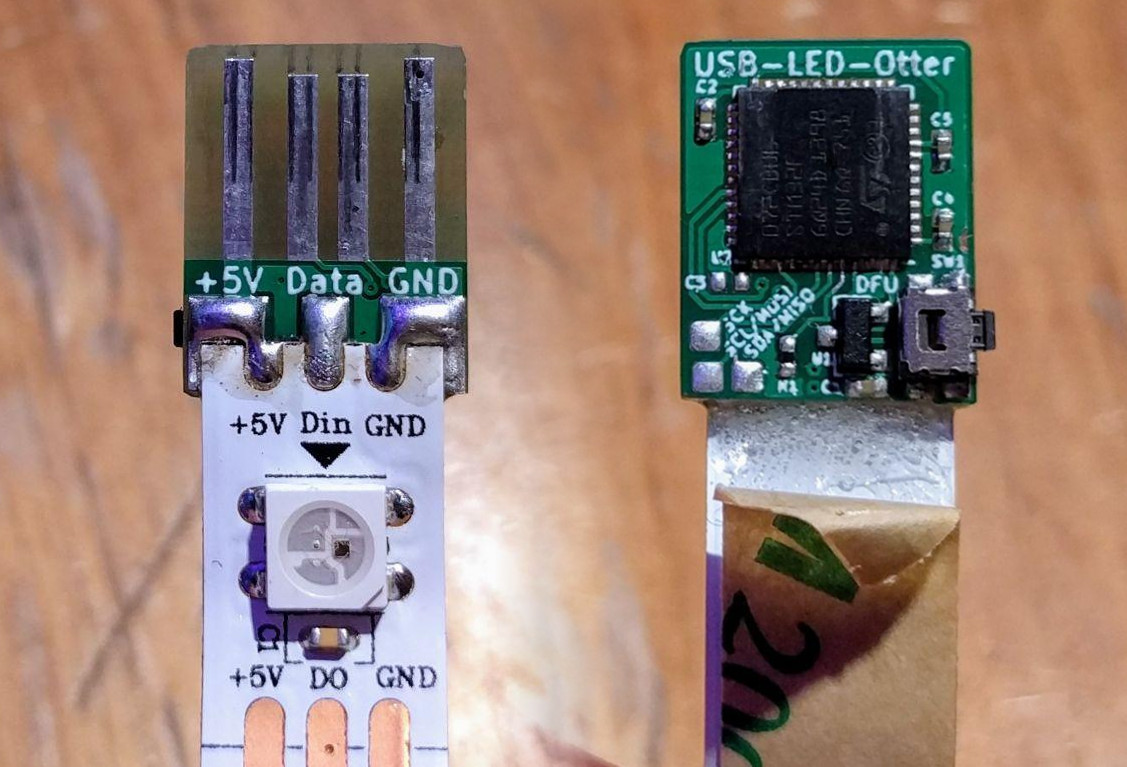 This small square of PCB lets you plug an LED strip directly into a USB port. The PCB itself has four traces on the back that mate with any USB port, and three pads for soldering the strip’s ground, 5 Volt line, and data. An STM32F072 microcontroller serves as the brains of the operation, packing plenty of horsepower and full compatibility with USB 2.0.
Code is flashed to the chip over USB using Device Firmware Upgrade (DFU) and once written the strip can then be driven by jamming the string into a suitably powerful USB wall charger. The man behind the build, [Jan Henrik], has mentioned that Open Pixel Control could be implemented but that may be an exercise left to the reader.
It’s a useful little tool, and one that promises to do even more with a little more development. Whipping up a few boards should be an easy task for anyone with a reflow oven and a free weekend. Oh, and if you’re tired of the WS2812? There’s other addressable LEDs out there, too!
source https://hackaday.com/2019/12/24/addressable-led-strings-in-your-usb/
BEST CUBE #164 #youtubevids
Mentalist: Jane Moments (Part 2) #youtubevids
BEST CUBE #8 BEST COUB JOKES 2019 September #youtubevids
AMD Introduces New Ryzen Mini PCs to Challenge Intel
For the majority of hacker and maker projects, the miniature computer of choice these last few years has been the Raspberry Pi. While the availability issues that seem to plague each new iteration of these extremely popular Single Board Computers (SBCs) can be annoying, they’ve otherwise proven to be an easy and economical way to perform relatively lightweight computational tasks. Depending on who you ask, the Pi 4 is even powerful enough for day-to-day desktop computing. Not bad for a device that consistently comes in under a $50 USD price point.

But we all know there are things that the Pi isn’t particularly well suited to. If your project needs a lot of computing power, or you’ve got some software that needs to run on an x86 processor, then you’re going to want to look elsewhere. One of the best options for such Raspberry Pi graduates has been the Intel Next Unit of Computing (NUC).
NUCs have the advantage of being “real” computers, with upgradable components and desktop-class processors. Naturally this means they’re a bit larger than the Raspberry Pi, but not so much as to be impractical. If you’re working on a large rover for example, the size and weight difference between the two will be negligible. The same could be said for small form-factor cluster projects; ten NUCs won’t take a whole lot more space than the same number of Pis.
Unfortunately, where the Intel NUCs have absolutely nothing on the Raspberry Pi is price: these miniature computers start around $250, and depending on options, can sail past the $1,000 mark. Part of this sharp increase in price is naturally the vastly improved hardware, but we also can’t ignore that the lack of any strong competition in this segment hasn’t given Intel much incentive to cut costs, either. When you’re the only game in town, you can charge what you want.
But that’s about to change. In a recent press release, AMD announced an “open ecosystem” that would enable manufacturers to build small form-factor computers using an embedded version of the company’s Ryzen processor. According to Rajneesh Gaur, General Manager of AMD’s Embedded Solutions division, the company felt the time was right to make a bigger push outside of their traditional server and desktop markets:
The demand for high performance computing isn’t limited to servers or desktop PCs. Embedded customers want access to small form factor PCs that can support open software standards, demanding workloads at the edge, and even display 4K content, all with embedded processors that have a planned availability of 10 years.
Power at the Edge
There are a number of current and upcoming Ryzen-based devices, which AMD apparently wants to call “Mini PCs” to distance themselves from the NUC terminology, and the common goal between them all is simple: to pack as much computing power as possible into a small and rugged case. Rather than the sleek consumer-friendly outward appearance that many Intel NUCs have, these first-generation AMD powered boxes have a distinctive industrial look. It seems the manufacturers most interested in putting Ryzen chips in their small form-factor computers expect them to live a very harsh life.


In fact many of the announced computers, built by relatively small firms like ASRock and OnLogic, make it clear they’re not intended for consumer use. These machines are designed for commercial applications such as driving high-resolution digital signage, or for use in communication networks. You aren’t supposed to be putting one of these things under your TV, and it shows.
All of these Mini PCs are part of the growing trend towards “Edge Computing”, where powerful processors and large amounts of RAM are brought closer to where they’re needed instead of being accessed remotely. Rather unsurprisingly, the need for an always-on broadband Internet connection can be a problem in many applications. If this sounds an awful lot like how we used to do things before “The Cloud” took over, you wouldn’t be wrong.
Professional Price
While there already seems to be a healthy number of entries into AMD’s new Mini PC ecosystem, one thing seems painfully missing: a product we can actually afford to hack on.
 Being that these devices primarily target industrial and commercial applications, they unfortunately have a sticker price to match. For even a relatively barebones AMD Mini PC, the starting price looks to be around $500. Granted pricing and availability on several of the upcoming models isn’t currently available, but with just a glance at their construction and specs, it’s painfully obvious that the lowly hardware hacker isn’t the target audience.
This is obviously disappointing for those of us looking for something to roll into our projects immediately, but it’s important to remember that competition doesn’t always develop overnight. With their push into the small-form factor market, AMD is getting an overdue foot in the door. It’s logical that the first wave of machines would target where the money is, but as production of Ryzen Embedded chips ramp up, it seems inevitable that other companies will see the opportunity to spin off more consumer oriented products to put them in.
source https://hackaday.com/2019/12/24/amd-introduces-new-ryzen-mini-pcs-to-challenge-intel/
Advancing the State of Cyberdeck Technology
It’s somewhat rare to be able to witness the birth and subsequent evolution of a technology, at least on a short enough time scale to appreciate it, but right now we’re lucky enough to see it happening within the burgeoning community of cyberdeck builders. We’ve seen an absolute explosion of cyberdeck projects in the last year or so, but this latest entry from [Tinfoil_Haberdashery] truly pushes the state of the art forward. Short of actually transmitting your consciousness into the Matrix, we’re not sure how much closer you could get to William Gibson’s original vision.
 The design is based around a split ergonomic keyboard, with an Intel NUC in the center and a 1920×1200 IPS panel on a tilting mount off to one side. Since the display started its life as a DSLR monitor it doesn’t have a touch panel, but those who’ve yet to master a mouse-free workflow will be happy to know there’s a touch pad built into the lid of the NUC. Thanks to a clever dovetail joint, the deck also separates in half if you want to put some more space between your hands, or just to make the whole thing slightly less intimidating while carrying it on your back through the Sprawl.
Power is provided by a custom 18650 battery pack running at 18 V that [Tinfoil_Haberdashery] (naturally) assembled with a homemade spot welder. He’s included both buck and boost converters so the cyberdeck can be powered with a wide array of voltages should he find himself in need of some juice in the field. To maximize battery life he’s also worked in a relay to cut power to the monitor when the NUC is sleeping, and there’s a physical master switch that can completely disconnect everything for long periods of inactivity.
The very first cyberdeck featured on Hackaday was built by [Tinfoil_Haberdashery], and we’re glad to see he’s not resting on his laurels. While that first deck was certainly impressive in its own right, this build takes inspiration from the incredible work we’ve seen from other hardware hackers and raises the bar on what’s possible from this dedicated community.
source https://hackaday.com/2019/12/24/advancing-the-state-of-cyberdeck-technology/
Hard Drive Data Recovery – Why Not DIY?
Hard drive failures can be tough to bear, particularly for the average person who doesn’t back up. When it comes to data recovery, there’s always those bleating from the sidelines that it’s a job that must be left to the professionals. However, this is Hackaday, not HireSomeoneADay, so [Matt]’s video on do-it-yourself hard drive repair is just what we like to see.
The video begins with plugging the non-functional drive into an external caddy, and using a microphone to listen to the sounds it makes. Upon analysis, [Matt] concludes that the drive is not spinning up, and suspects the heads may be stuck, causing the problem. When tapping the drive fails to unstick the heads, the next step is disassembly.
Despite the best advice from armchair commentators, this can be achieved at home without a clean room. [Matt] opens the drive carefully, and notes that the head is indeed stuck to the platter, instead of sitting in its home position. Using a screwdriver, the platters are rotated in their usual direction while gentle pressure is applied to pull the head away, being sure to use a light touch to avoid ripping the heads off entirely. With this done, the drive is reassembled and powered up. Amazingly, the repair is successful, and data is able to be recovered!
It’s important to note that this is a highly risky procedure, and not guaranteed to succeed. Truly valuable data should be left to the professionals, but if you’re skint or simply unbothered, it doesn’t hurt to have a go yourself. Be sure to avoid dust entering the drive, and take care not to touch the platters themselves. Of course, if you brick the device, you can always scavenge it for parts. Video after the break.
source https://hackaday.com/2019/12/24/hard-drive-data-recovery-why-not-diy/
Ted The Talking Toaster
The team behind [8 Bits and a Byte] have built a talking toaster. More accurately, they retrofitted their existing toaster with some hardware components to make it appear to talk and get angry at its users. While the actual toaster functionality isn’t necessary for the build, it certainly allows the project to have a more whimsical vibe.
The project uses a Raspberry Pi 3 and a Google AIY kit, consisting of a HAT, microphone, and speaker. Servos control the movement of the toaster’s eyebrows with the help of the HAT. Some decorative materials in the form of googly eyes and pipe cleaners help bring other features of the talking toaster to life.
The control flow for the chatbot makes use of Google’s speech-to-text for picking up text from audio input, the Dialogflow API to match intent, and Text-to-Speech to pipeline possible answer back to the Raspberry Pi to play over a speaker. They also used Remo.tv to broadcast live updates from the toaster to anyone on an online feed, allowing users in a chatroom to talk directly to Ted.
While Ted’s communications may be quite limited, there’s certainly no limit to the number of interactions he’ll be having online now!
source https://hackaday.com/2019/12/23/ted-the-talking-toaster/
r/maliciouscompliance | My Boss Got Fired Because Of Me… #youtubevids
r/IDOWorkHereLady – Guy Thinks I’m a Thief…I Work With Him. #youtubevids
I Was Wrongfully FIRED From The Place I Worked At!
BEST CUBE #2 BEST COUB JOKES 2019 September #youtubevids
Christopher Hitchens and Richard Dawkins Kill god – Greatest Hits #youtubevids
Robot Insect Survives Swatting
There is an old saying, that ‘the hand is quicker than the eye;, but somewhat slower than the fly.” However, with a little practice you can swat a fly, although it sometimes doesn’t seem to faze the fly. École polytechnique fédérale de Lausanne (EPFL) has announced they have used nanotech to build a 1 gram possibly untethered, autonomous robotic insect that has enough processing power and sensors to recognize black and white patterns. Artificial muscles provide propulsion. But there’s the kicker: it can survive a strike with a fly swatter.
In the video you see below, the robots can move at 3 centimeters per second and there are two different versions. The first is a tethered system using ultra-thin wires. This is the version that can be folded, smacked, or even squashed by a shoe and continue moving.
The autonomous version weighs in at under 1 gram but has everything it needs including a tiny battery. The propulsion system uses dielectric elastomer actuators (DEAs). These hair-thin muscles consist of an elastomer membrane and two soft electrodes.
Applying a voltage to the electrodes attracts them to each other, compressing the membrane. When you turn the voltage off, the membrane returns to its original shape much like a spring.
This kind of muscle usually requires a very high voltage, but the new insects use a design that doesn’t require high voltages, allowing the bug to carry its battery and other electronics on its back. Not bad for under a gram.
This reminded us somewhat of muscle wire, but on a much smaller scale. We’ve even seen robot muscles made from fishing line and nichrome wire.
source https://hackaday.com/2019/12/23/robot-insect-survives-swatting/
Replacing A Non-Replacable Laptop Keyboard
Spilling a drink on a laptop is a terrifying experience. If you’re lucky you’ll ruin just a keyboard, and if not, your entire machine could go up in smoke. Assuming you’ve just suffered the latter, you can still be out of luck, as many laptops come with fancy integrated keyboards that are not designed to be removable. It’s not always the case however, as this ingenious hack from [InsideMyLaptop] bears out.
The hack begins with removing the top case assembly from a HP Pavilion laptop. The keyboard is riveted into the top plate assembly, along with the trackpad, which would normally necessitate their replacement as a total unit. However, if properly armed with a soldering iron, these plastic rivets can be melted to allow the backing plate and keyboard to be removed. A replacement part can then be sourced, and the remaining rivet stubs can be remelted to hold the new part in place.
It’s a simple hack, but one that goes to show one shouldn’t always take “No User Servicable Parts Inside” as an answer. We’ve seen other useful work from [InsideMyLaptop] before – like this power jack repair way back in 2011.
source https://hackaday.com/2019/12/23/replacing-a-non-replacable-laptop-keyboard/
Motorizing a Plasma Cutter on the Cheap
A hand-held plasma cutter is an excellent tool to have if you are working with sheet metal, but it’s not particularly well suited to making long or repetitive cuts. Which is why [workshop from scratch] worked his usual scrapheap magic and built his own motorized track for making perfectly straight cuts.
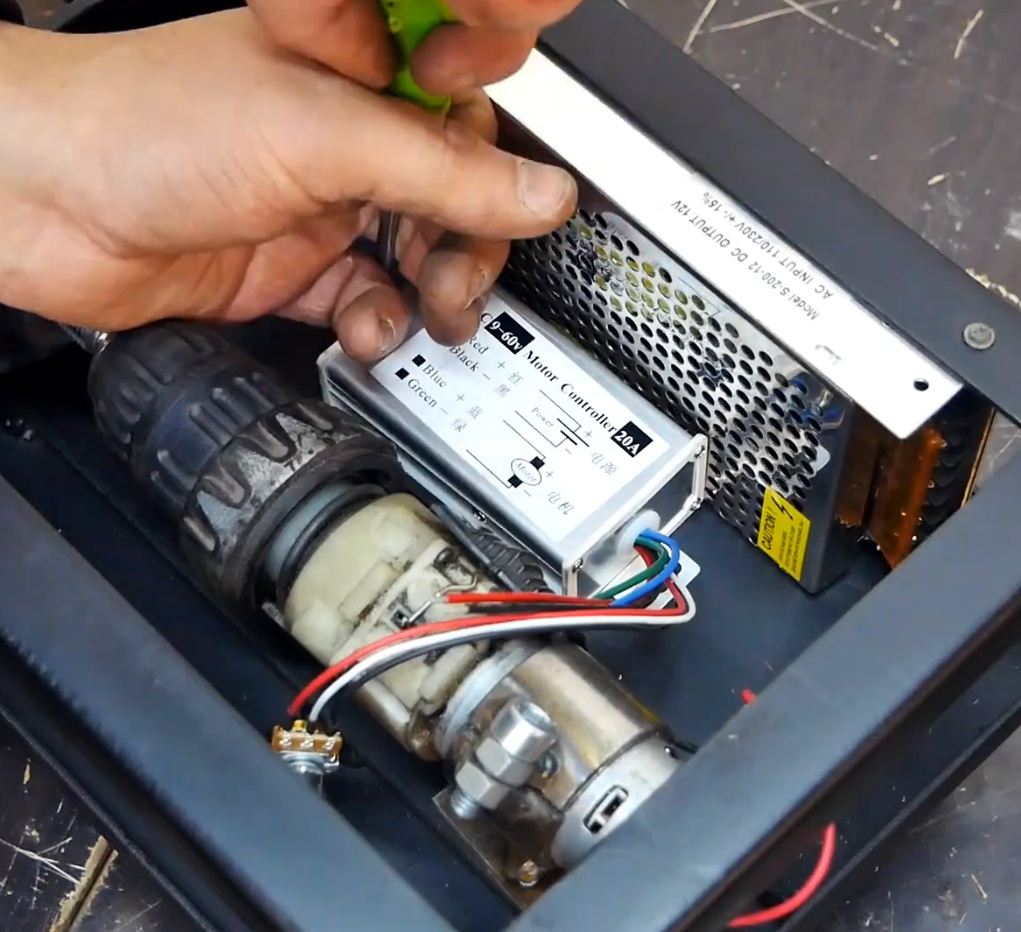 Most of the frame, and even the small truck that rides on it, is made out of square stock in various sizes. A couple of bearings are enough to make sure the movement is smooth and doesn’t have too much slop. Motion is provided by a long threaded rod and two nuts, which are welded to the side of the truck.
If you had the patience (and forearm strength) you could just put a crank on the rod and be done with it, but in this case [workshop from scratch] used the motor, gearbox, and chuck from an old electric drill to grab onto the threaded rod and do the spinning for him. He rigged up an enclosure for the side of the rack that holds the motor, DC power supply, and motor controller, along with a couple of switches and a knob to control the speed.
A modification allows him to enable the plasma cutter with one of the switches on the panel, which gives the setup a much more complete feel than just putting a zip tie on the trigger. With this design, the plasma cutter itself can still be removed from the mount and used normally. You can even remove the motorized component with a few bolts if you just wanted to do manual cuts on the bed.
In the video after the break, the keen-eyed viewer may notice a few familiar pieces of gear in the background, such as the hydraulic bench vise we covered earlier in the year. As the name of the channel implies, [workshop from scratch] is all about building the workshop tools that many take for granted, and they’ve all been phenomenally fascinating projects. While we admire the gumption it takes to try and build a lathe out of scrap granite slabs, there’s something to be said for DIY tools that end up looking nearly as good as commercial offerings.
source https://hackaday.com/2019/12/23/motorizing-a-plasma-cutter-on-the-cheap/
Supercon Talk: Emily Velasco Wants You to Work Weird
Emily Velasco seems to absolutely delight in the weird, and we think that is wonderful. Weird brings us together. If you can be weird with someone else, you’ll have a special bond for life. In her inspiring 2019 Supercon talk (embedded below), Emily explains why she is drawn to weird things, and why you should be, too. Her enthusiasm is both palpable and infectious, so don’t be surprised if you suddenly want to drop everything to accompany her on a treasure hunt adventure and spend the rest of the day making things.
 Emily doesn’t try to push making weird things on to you, but her reasons for working in weird are quite compelling. Weird things catch the eye and interrupt the tedium of our lives. They give us pause and invite us to look again. You can choose to turn away if you want. But if you look closer, you might find that ugly, weird, and annoying things begin to charm you.
Emily says the formative force that pulled her toward the weird was the gang of mutant toys that the villainous Sid made in Toy Story. They force you to look closer and to consider them. But Emily is far from mean-spirited — she builds her creations with love, and not to act out or to spite her little sister. They’re not what you expect, and even if someone finds them off-putting at first, they are undeniably interesting.
 ‘Normal’ is Relative; ‘Annoying’ is Contextual

Emily mostly wants other people to make weird things so they can have more fun in their lives. As she says, there’s nothing wrong with normal, but there’s nothing inherently right about it, either. And normal is relative, anyway. When you make something weird, you can change people’s perceptions and make them enjoy new things.
When you make something weird, you set off a chain of broadened horizons that begins with your own experience. Emily tells the story of a circuit bent toy she built into an old cigar box, and how she took the toy to her parents’ house to show it to them.
Her dad hated it as soon as he heard it, but then she handed it to him. Before long, he turned into a child, gleefully exploring the buttons and dials and body contacts. By changing the context in which Dad heard the annoying noise box, she had changed his experience and broadened his horizons.
Found is Fabulous
You know what they say — one man’s trash is another man’s foundation for a synthesizer. When Emily finds discarded things, she gives them new life and new meaning while keeping them out of the landfill. Sometimes it’s mother nature’s trash, like bird skulls on the beach. Other times the maker gods drop things in her path, like the time an arcade cabinet fell off a truck and smashed to the ground like an electronics piñata.
The point is this: you can buy all the parts and make a thing just like you want it. That’s all fine and good. But if you take a chance on incorporating found materials, you will surprise yourself. Found objects come with their own quirks and present unique challenges that Emily finds intriguing. If you build things using found objects, you will expand your worldview in the process. Sharing those things with other people will expand their worldview, and you might start a domino effect of enlightenment.
In closing, Emily invites us to interview ourselves whenever we encounter weird, ugly, and/or annoying things, rather than just passing them over because they ruffle our feathers. In the process of staring it down, you will probably feel your gaze soften as you become more familiar with it. And who knows? You may even find that it brings you happiness, or even sparks new ideas. And really, that’s what it’s all about.
source https://hackaday.com/2019/12/23/supercon-talk-emily-velasco-wants-you-to-work-weird/