Hacker has Robot Give Yubikey the Finger

[Bertrand Fan] is not a fan of the tiny, hard-to-actuate button on the average Yubikey. Before all that is 2020 occurred, [Bert] had the little 2FA nano-donglette plugged into a spare USB port on the side of their laptop so that it was always available wherever the laptop traveled. Now that working from home is the norm, [Bert] has the laptop off to the side, far out of reach.

A USB-C extension cable certainly made it more accessible, but did nothing for the actuation fail rate of the tiny button. Fed up by inconvenience and looking for a lockdown project, [Bert] decided to make a button-pressing robot finger that’s driven by a spare key on their groovy TKL keyboard.

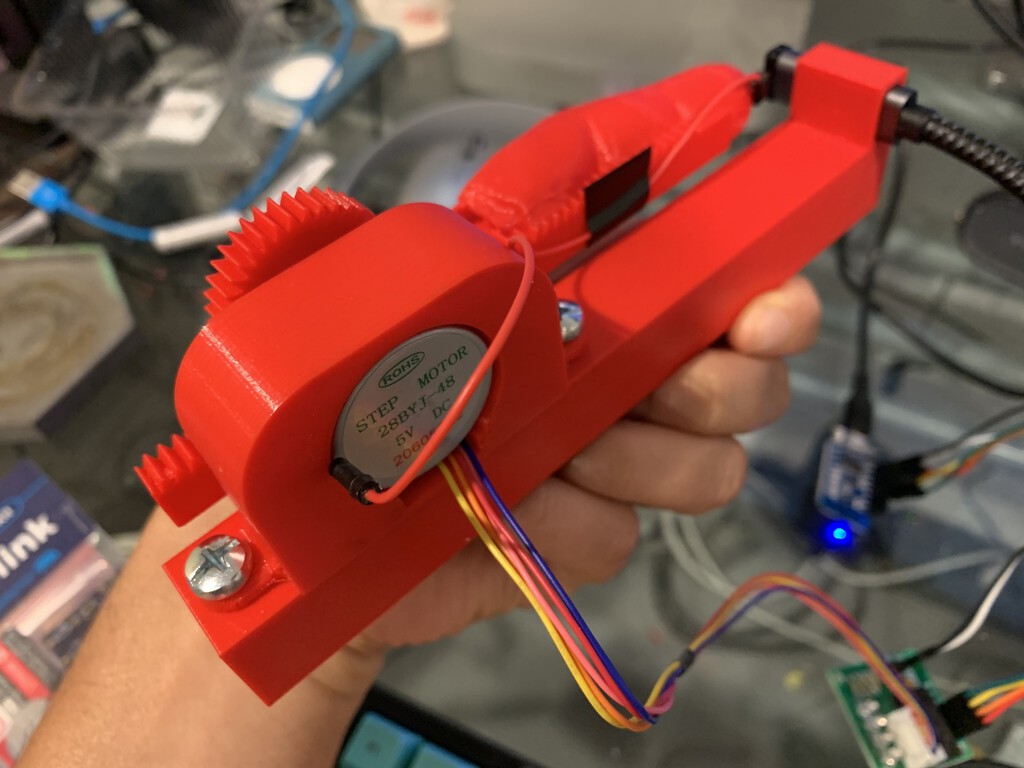
It runs on a Wemos D1 mini and uses a small stepper motor to push a 3D-printed finger along a rack-and-pinion actuator. Since the Yubikey requires capacitive touch, [Bert] added a screw to the finger tip that’s wired to ground. Now all [Bert] has to do is press a decidedly cooler key to make the finger press the button for him. Check out a brief demo after the break.

If this security flaw makes you uncomfortable, perhaps this 2FA launch console is more to your liking. And as we saw recently, if you don’t like the cost of Yubikeys, you can roll your own 2FA device with a blue pill.

source https://hackaday.com/2020/10/06/hacker-has-robot-give-yubikey-the-finger/

Hacker has Robot Give Yubikey the Finger

[Bertrand Fan] is not a fan of the tiny, hard-to-actuate button on the average Yubikey. Before all that is 2020 occurred, [Bert] had the little 2FA nano-donglette plugged into a spare USB port on the side of their laptop so that it was always available wherever the laptop traveled. Now that working from home is the norm, [Bert] has the laptop off to the side, far out of reach.

A USB-C extension cable certainly made it more accessible, but did nothing for the actuation fail rate of the tiny button. Fed up by inconvenience and looking for a lockdown project, [Bert] decided to make a button-pressing robot finger that’s driven by a spare key on their groovy TKL keyboard.

It runs on a Wemos D1 mini and uses a small stepper motor to push a 3D-printed finger along a rack-and-pinion actuator. Since the Yubikey requires capacitive touch, [Bert] added a screw to the finger tip that’s wired to ground. Now all [Bert] has to do is press a decidedly cooler key to make the finger press the button for him. Check out a brief demo after the break.

If this security flaw makes you uncomfortable, perhaps this 2FA launch console is more to your liking. And as we saw recently, if you don’t like the cost of Yubikeys, you can roll your own 2FA device with a blue pill.

source https://hackaday.com/2020/10/06/hacker-has-robot-give-yubikey-the-finger/

Clock Is Not Readable By Humans

Not every build needs to be immediately useful or revolutionary. Plenty of builds are just for fun, for education, or even purposefully useless but still challenging. This clock, for example, might fit into all three categories. It’s a clock that displays time through a QR code, making it completely inscrutable unless you have a device which likely has its own readable clock on it already.

The QR Code clock comes to us from [Aaron] and is based on the now-ubiquitous ESP32 WiFi chip. The ESP32 is connected to a 64×64 LED matrix which is updated every second with a code for the current time. With single-second resolution that means that even with a method for reading a QR code by hand, like you sometimes can with barcodes, there’s no way to read it without a smartphone since it changes so rapidly.

Of course [Aaron] recognizes the flaw in his design in his video in which he notes tongue-in-cheek that with this clock you would never have to look at a smartphone again, since the clock is right there on the wall. We appreciate the humor and also that [Aaron] has made all of his source code available in case you would like to use this as an example project for using QR codes for more useful purposes. For now, though, we’ll just forward you along to some other useless machines.

Thanks to [willmore] for the tip!

source https://hackaday.com/2020/10/06/clock-is-not-readable-by-humans/

Baseball Cap Mouse Provides A Look-And-Click Interface

Once upon a time, the computer mouse didn’t exist. Early computers used a variety of other input devices, from the typical keyboard to more esoteric options such as joysticks or light pens. While the mouse as we know it dominates all, it doesn’t mean other tools can’t find their place. One such device is this hat mouse, from [Jacek Fedorynski].

The mouse consists of an Adafruit Feather nRF52840 Sense, mounted upon a basic baseball cap. The development board packs in a 9 degree-of-freedom motion sensor package featuring the ST LSM6DS33 acceleromater/gyro and LIS3MDL magnetometer. Through a robust sensor fusion algorithm, this enables the board to measure the orientation and motion of the wearer’s head with a great degree of finesse. This allows the user to look at different parts of the screen to move the mouse cursor, with the system working in an absolute rather than relative fashion. Commands are sent to the attached PC with the Feather’s built-in Bluetooth, avoiding the need for dangly cables running down the user’s neck. Files are available on Github for those eager to spin up their own.

Combined with some built-in accessibility aids in Windows, the setup allows the user to move the mouse well, with foot switches used to activate the left and right mouse buttons. For those who find using a traditional mouse difficult, this could be a great tool for better productivity. Of course, if you wish to learn more, it pays to take a look back at the very earliest days of mouse technology. Video after the break.

source https://hackaday.com/2020/10/05/baseball-cap-mouse-provides-a-look-and-click-interface/

Graphene Generates a Little Power

We never know exactly what to make of university press releases, as we see plenty of them with breathless claims of new batteries or supermaterials, but then we don’t see much else. Sometimes, the claims in the press release don’t hold up in the paper, while other times the claims seem to be impractical for use in real life. We aren’t quite sure what to make of a press release from the University of Arkansas claiming they can draw current from a sheet of freestanding graphene purely from its temperature fluctuations.

The press release seems to claim that this is a breakthrough leading to “clean, limitless power.” But if you look at the actual paper, normal room temperature is causing tiny displacements in the graphene sheet as in Brownian motion. A scanning tunneling microscope with two diodes can detect current flowing even once the system reaches thermal equilibrium. Keep in mind, though, that this in the presence of a bias voltage and we are talking about nanometer-scale displacements and 20 pA of current. You can see a simple video from the university showing a block diagram of the setup.

It seems that the news here is that current is flowing in a thermally stable system without violating the second law of thermodynamics. The innovation, apparently, is the idea of using two diodes to harvest both positive and negative fluctuations. Not much power, though. The press release talks about millions of these tiny circuits could serve as a low-power battery replacement.

There are still some pretty mysterious comments in the press release about the change in resistance of the diodes adds “an extra factor to the power,” and that “switch-like behavior of the diodes actually amplifies the power delivered…” We will have to wade through the math in the paper to see if we can figure out what any of that means.

We hear about exciting new things graphene will do all the time. We just don’t see it much in the wild, at least not yet. All this talk of graphene and diodes made us remember that you can create PN junctions in graphene.

source https://hackaday.com/2020/10/05/graphene-generates-a-little-power/

Spare SMD Storage, With Stacking SMT Tape Reels

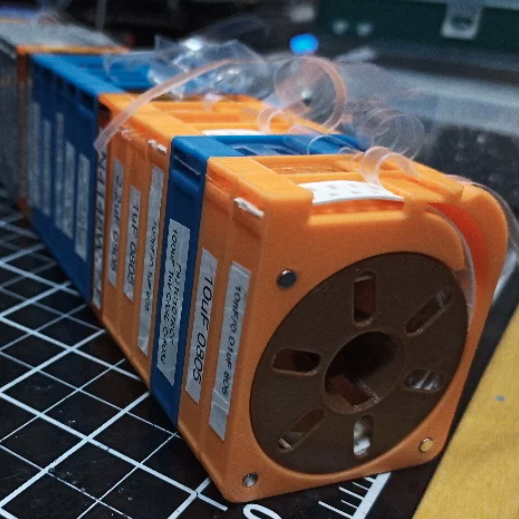
[Kadah]’s solution for storing short tapes of SMT parts is as attractive as it is clever. The small 3D-printed “tape reels” can double as dispensers, and stack nicely onto each other thanks to the sockets for magnets. The units come in a few different sizes, but are designed to stack in a consistent way.

We love the little touches such as recessed areas for labels, and the fact that the parts can print without supports (there are a couple of unsupported bridges, but they should work out fine.) Also, the outer dimensions of the units are not an accident. They have been specifically chosen to nestle snugly into the kind of part drawers that are a nearly ubiquitous feature of every hardware hacker’s work bench.

STLs are provided for handy download but [Kadah] also provides the original Fusion 360 design file, with all sizes defined as easily-customized parameters. In addition, [Kadah] thoughtfully provided each model in STEP format as well, making it easy to import and modify in almost any 3D CAD program.

Providing 3D models in STEP format alongside STLs is nice to see, because it gives more options to people if things need some tweaking, because editing the STL file can be done if needed, but isn’t optimal. Thankfully the ability to export STEP files is still open to hobbyists using Fusion 360, since Autodesk decided to leave that feature available to personal use licenses.

source https://hackaday.com/2020/10/05/spare-smd-storage-with-stacking-smt-tape-reels/

Dice Roller Keeps Germs Out of Your Snake Eyes

Do you need a to find a more sanitary way to roll the dice at your next socially-distanced board game gathering? [CJA3D]’s pop-o-matic mason jar dice roller can roll the bones two different ways — either by hitting that big, inviting arcade button, or though a web app that everyone can access on their own phones.

We think this looks great, and is a great reuse of a glass jar. The brains of this operation is an ESP8266, which drives a continuous-rotation servo underneath the dice. Push the button or use the web app and the servo disturbs the plate, moving the dice around.

Besides the sanitary aspect, one benefit of using the web app is that there are four different speed presets for the servo. As a bonus, [CJA3D] included the files for a pair of printed 6-sided dice. Click through to the project to see it in action.

We know you take games seriously, and so do we. Just look at this dice roller that uses machine vision to ensure fairness.

source https://hackaday.com/2020/10/05/dice-roller-keeps-germs-out-of-your-snake-eyes/

Hardware Store Hydroponics

Science fiction movies often portray horticulture in the future, be it terrestrial or aboard spacecraft, with hydroponic gardens overflowing with leafy greens and brightly colored fruit. There is no soil, just clear water that hints at future-people creating a utopia of plant strains untethered from their earthly roots.

This star-faring food production method is not fiction if you forego the polycarbonate tubing, neon accent lights, and gardening robots. For his 2020 Hackaday Prize entry, [AVR] shares how he creates a bed for sixteen plants with parts sourced at a nearby home-improvement store. It may lack the visual pizzaz of the Hollywood versions, but it will grow soil-less crops on a hacker budget.

The starting point for this build is a sturdy wooden base. The PVC tubing and fence parts on top are light, but the water inside them will get heavy, and if you grow large plants, they become surprisingly heavy. Speaking of water, the sub-category of hydroponics this falls under is Nutrient Film Technique, or NFT, which uses a shallow stream of water laden with all the nutrients for plant growth. The square fence posts provide a flat top for mounting mesh cups where the plants grow and a flat bottom where the stream continuously flows. A basin and pump keep the plants refreshed and fed until they are ready for harvest.

source https://hackaday.com/2020/10/05/hardware-store-hydroponics/

Making Music with a Go Board Step Sequencer

Ever wonder what your favorite board game sounds like? Neither did we. Thankfully [Sara Adkins] did, and created a step sequencer called Let’s Go that uses the classic board game Go as input.

In the game Go, two players place black and white tokens on a grid, vying for control of the board. As the game progresses, the configuration of game pieces gets more complex and coincidentally begins to resemble Conway’s Game of Life (or a weird QR Code). Sara saw music in the evolving arrangement of circles and transformed the ancient board game into a modern instrument so others could hear it too.

To an observer, [Sara’s] adaptation looks fairly indistinguishable from the version played in China 2,500 years ago — with the exception of an overhead webcam and nearby laptop, of course. The laptop uses OpenCV to digitize the board layout. It feeds that information via Open Sound Control (OSC) into popular music creation software Max MSP (though an open-source version could probably be implemented in Pure Data), where it’s used to control a step sequencer. Each row on the board represents an instrumental voice (melodic for white pieces, percussive for black ones), and each column corresponds to a beat.

Every new game is a new piece of music that starts out simple and gradually increases in complexity. The music evolves with the board, and adds a new dimension for players to interact with the game. If you want to try it out yourself, [Sara] has the project fully documented on her website, and all of the code is available on GitHub. Now we’re just left wondering what other games sound like — [tinkartank] already answered that question for chess, but what about Settlers of Catan?

source https://hackaday.com/2020/10/05/go-board-step-sequencer-lets-go-make-some-music/

Minimal TinyAVR 0 Programming

When [Alain] wanted to use some of the new TinyAVR 0 chips — specifically, the Attiny406 — it seemed overkill to use the Windows IDE. There are plenty of sources of information on programming other AVR chips using simple command line tools, but not for these newer 0-series parts which use a new programming protocol known as UPDI. That led to a deep diving into how to program a TinyAVR 0 with a text editor, makefile, and USB-to-serial cable.

The Attiny406 has 4K of flash, 256 bytes of RAM and can run at 20 MHz with no external clock. You might think programming would be similar to a regular AVR part, but these tiny devices use UPDI (Unified Programming and Debug Interface) which uses 3 pins for programming. Older devices used different protocols.

It is very easy to create a UPDI programmer. A USB to logic-level serial cable and a 4.7K resistor is all it takes. There’s Python code that knows how to drive the protocol, too. You can also use the logic-level serial port on the Raspberry Pi with some device tree modifications explained in the code’s documentation.

[Alain] made a nice breakout board for the device. It fits a breadboard, allows for 5V or 3.3V operation, and has an LED and switch. Nothing fancy, but handy. Once you know how to ship a hex file to the chip, the rest is pretty standard. While the AVR version of gcc doesn’t cross-compile for the ATTiny out of the box, there is a device pack from Microchip that enables that feature.

The trend is to go to bigger processors, not smaller, but when you need to cram something in a small space, save a few pennies per unit, or draw very little power, these tiny processors can be just the ticket. The processors may be small, but if you work you can do some pretty big things with them.

source https://hackaday.com/2020/10/05/minimal-tinyavr-0-programming/

This Tabletop Lighthouse Will Get Your Attention

If you wear headphones around the house with any regularity, you’re probably missing out on a lot of audio cues like knocks at the door, people calling your name, or maybe even the smoke alarm. What if you had a visual indicator of sound that was smart enough to point it out for you?

That is the point of [Jake Ammons’] attention-getting lighthouse, designed and built in two weeks’ time for Architectural Robotics class. It detects ambient noise and responds to it by focusing light in the direction of the sound and changing the color of the light to a significant shade to indicate different events. Up inside the lighthouse is a Teensy 4.0 to read in the sound and spin a motor in response.

[Jake]’s original directive was to make something sound-reactive, and then to turn it into an assistive device. In the future [Jake] would like to add more microphones to do sound localization. We love how sleek and professional this looks — just goes to show you what the right t-shirt stretched over 3D prints can do. Check out the demo after the break.

Seaside lighthouses once used gas lights giant Fresnel lenses, but now they use LEDs. A company in Florida is using CNC machines to crank out acrylic Fresnels.

source https://hackaday.com/2020/10/04/this-tabletop-lighthouse-will-get-your-attention/

Hackaday Links: October 4, 2020

In case you hadn’t noticed, it was a bad week for system admins. Pennsylvania-based United Health Services, a company that owns and operates hospitals across the US and UK, was hit by a ransomware attack early in the week. The attack, which appears to be the Ryuk ransomware, shut down systems used by hospitals and health care providers to schedule patient visits, report lab results, and do the important job of charting. It’s not clear how much the ransomers want, but given that UHS is a Fortune 500 company, it’s likely a tidy sum.

And as if an entire hospital corporation’s IT infrastructure being taken down isn’t bad enough, how about the multi-state 911 outage that occurred around the same time? Most news reports seemed to blame the outage on an Office 365 outage happening at the same time, but Krebs on Security dug a little deeper and traced the issue back to two companies that provide 911 call routing services. Each of the companies is blaming the other, so nobody is talking about the root cause of the issue. There’s no indication that it was malware or ransomware, though, and the outage was mercifully brief. But it just goes to show how vulnerable our systems have become.

Our final “really bad day at work” story comes from Japan, where a single piece of failed hardware shut down a $6-trillion stock market. The Tokyo Stock Exchange, third-largest bourse in the world, had to be completely shut down early in the trading day Thursday when a shared disk array failed. The device was supposed to automatically failover to a backup unit, but apparently the handoff process failed. This led to cascading failures and blank terminals on the desks of thousands of traders. Exchange officials made the call to shut everything down for the day and bring everything back up carefully. We imagine there are some systems people sweating it out this weekend to figure out what went wrong and how to keep it from happening again.

With our systems apparently becoming increasingly brittle, it might be a good time to take a look at what goes into space-rated operating systems. Ars Technica has a fascinating overview of the real-time OSes used for space probes, where failure is not an option and a few milliseconds error can destroy billions of dollars of hardware. The article focuses on the RTOS VxWorks and goes into detail on the mysterious rebooting error that affected the Mars Pathfinder mission in 1997. Space travel isn’t the same as running a hospital or stock exchange, of course, but there are probably lessons to be learned here.

As if 2020 hasn’t dealt enough previews of various apocalyptic scenarios, here’s what surely must be a sign that the end is nigh: AI-generated PowerPoint slides. For anyone who has ever had to sit through an endless slide deck and wondered who the hell came up with such drivel, the answer may soon be: no one. DeckRobot, a startup company, is building an AI-powered extension to Microsoft Office to automate the production of “company compliant and visually appealing” slide decks. The extension will apparently be trained using “thousands and thousands of real PowerPoint slides”. So, great — AI no longer has to have the keys to the nukes to do us in. It’ll just bore us all to death.

And finally, if you need a bit of a palate-cleanser after all that, please do check out robotic curling. Yes, the sport that everyone loves to make fun of is actually way more complicated than it seems, and getting a robot to launch the stones on the icy playing field is a really complex and interesting problem. The robot — dubbed “Curly”, of course — looks like a souped-up Roomba. After sizing up the playing field with a camera on an extendable boom, it pushes the stone while giving it a gentle spin to ease it into exactly the right spot. Sadly, the wickedly energetic work of the sweepers and their trajectory-altering brooms has not yet been automated, but it’s still pretty cool to watch. But fair warning: you might soon find yourself with a curling habit to support.

source https://hackaday.com/2020/10/04/hackaday-links-october-4-2020/

Porting QMK to a Cheap Mechanical Keyboard

Over the last couple of years, we’ve seen an incredible number of DIY keyboard builds come our way. Some have had their switches nestled into laser-cut aluminum and others 3D printed plastic. They may be soldered together on a custom PCB, or meticulously hand-wired. But however they were built, they almost all shared one thing in common: they ran some variant of the open source QMK keyboard firmware.

But what if you just want to run an open firmware on the keyboard you picked up for $50 bucks on Amazon? That’s exactly where [Stephen Peery] found himself nine months ago with this DK63 gaming keyboard. Since so many of these small RGB LED mechanical keyboards are very similar to existing open source designs, he wondered what it would take to blow out the original firmware and replace it with a build of QMK.

While [Stephen] doesn’t have everything working 100% yet, he’s nearly reached the end of his epic reverse engineering journey. The first step was tearing apart the keyboard and identifying all the components it used, then pulling the original firmware out of the updater. From there, between Ghidra and Serial Wire Debug, he was able to figure out most of what the stock firmware was doing so he could replicate it in QMK.

According to his README, the RGB LEDs and Bluetooth functionality don’t currently work, but other than that it seems QMK is up and running. If you’re OK with those concessions, he has information on the page about flashing his build of QMK to the stock DK63 with the ST-Link V2 so you can give it a shot. Though you do so at your own risk; we wouldn’t recommend doing this on your only keyboard.

We’ve seen commercially manufactured keyboards running QMK before, but it usually involves completely replacing the original controller with new electronics. That [Stephen] got this all working on stock hardware so other owners can follow in his footsteps is really a considerable accomplishment.

[Thanks to Baldpower for the tip.]

source https://hackaday.com/2020/10/04/porting-qmk-to-a-cheap-mechanical-keyboard/

Porting QMK to a Cheap Mechanical Keyboard

Over the last couple of years, we’ve seen an incredible number of DIY keyboard builds come our way. Some have had their switches nestled into laser-cut aluminum and others 3D printed plastic. They may be soldered together on a custom PCB, or meticulously hand-wired. But however they were built, they almost all shared one thing in common: they ran some variant of the open source QMK keyboard firmware.

But what if you just want to run an open firmware on the keyboard you picked up for $50 bucks on Amazon? That’s exactly where [Stephen Peery] found himself nine months ago with this DK63 gaming keyboard. Since so many of these small RGB LED mechanical keyboards are very similar to existing open source designs, he wondered what it would take to blow out the original firmware and replace it with a build of QMK.

While [Stephen] doesn’t have everything working 100% yet, he’s nearly reached the end of his epic reverse engineering journey. The first step was tearing apart the keyboard and identifying all the components it used, then pulling the original firmware out of the updater. From there, between Ghidra and Serial Wire Debug, he was able to figure out most of what the stock firmware was doing so he could replicate it in QMK.

According to his README, the RGB LEDs and Bluetooth functionality don’t currently work, but other than that it seems QMK is up and running. If you’re OK with those concessions, he has information on the page about flashing his build of QMK to the stock DK63 with the ST-Link V2 so you can give it a shot. Though you do so at your own risk; we wouldn’t recommend doing this on your only keyboard.

We’ve seen commercially manufactured keyboards running QMK before, but it usually involves completely replacing the original controller with new electronics. That [Stephen] got this all working on stock hardware so other owners can follow in his footsteps is really a considerable accomplishment.

[Thanks to Baldpower for the tip.]

source https://hackaday.com/2020/10/04/porting-qmk-to-a-cheap-mechanical-keyboard/

An LED Cube To Display CPU Vitals

LED cubes are all the rage right now. High-end hardware capable of driving large arrays keeps getting cheaper in price, and 3D printers and pre-built boards can make assembly a snap. After attending a major hacker con and seeing the builds on display, [Sebastian] wanted a piece of the action, so set out to build his own.

While many elect to build an LED cube you can hold in your hand, [Sebastian] preferred a stationary tabletop design. This would reduce costs, allowing him to only use 3 LED boards, as the base and remaining two sides would face away from him and not be visible when placed on his desk. The 64×64 arrays are driven by an Adafruit LED matrix bonnet on top of a Raspberry Pi 2. The Pi was a tactical choice, as [Sebastian] had one lying around, and it packed enough processing power to run an OpenGL shader that creates an image for the cube that varies with the CPU load and temperature on his main desktop. As a nice final touch, the Raspberry Pi is set up to have a read-only filesystem. This allows the project to be turned off suddenly without risk of corrupting the SD card.

It’s a tidy build, and one which gives [Sebastian] useful information at a glance. We’ve featured a few stylish cubes before, and even a LED D20 that really breaks the bank. Video after the break.

source https://hackaday.com/2020/10/04/an-led-cube-to-display-cpu-vitals/

Cleaning Up the Yard with AI — Avian Intelligence

Despite epithets like “bird-brain,” our feathered friends are actually pretty smart. Being able to maneuver in three dimensions at high speed must have something to do with it, and the cognitive abilities of birds are well-documented and still being researched. So it naturally makes sense to harness avian brainpower to keep one’s yard clean, right?

For the record, the magpies that [Hans] is training are very intelligent and strikingly beautiful birds who delight in swooping down to harass people, and who will gladly steal food from other birds and then poop on it and fly away. So they’re jerks, but that doesn’t mean they can’t be useful jerks. The goal with his BirdBox system is to use classic operant conditioning, where a desired voluntary behavior is reinforced by a reward. In this case, the reward is a treat dispensed by a 3D-printed vibratory dispenser when the bird collects a bottlecap from the yard and deposits it in the proper slot. The video below shows the birds doing exactly what they’re supposed to do.

[Hans] tells us that the trick is getting the birds to accept the BirdBox and to have them integrate it into their “patrol schematic” of their territory. Once that’s done, it’s a simpler matter to have them associate the bottlecaps with the reward. The other challenge is making everything bulletproof, or in this case magpie-proof. Did we mention that magpies are jerks?

The possibilities for trading peanuts for yardwork are endless; [Hans] mentions plans he has for fallen fruit clean-up, and mentions a persistent garden slug problem that the birds might be employed to remediate. If you want to try this, it might be a good idea to brush up on the work of [B.F. Skinner] and his pigeons of war.

source https://hackaday.com/2020/10/04/cleaning-up-the-yard-with-ai-avian-intelligence/

Cleaning Up the Yard with AI — Avian Intelligence

Despite epithets like “bird-brain,” our feathered friends are actually pretty smart. Being able to maneuver in three dimensions at high speed must have something to do with it, and the cognitive abilities of birds are well-documented and still being researched. So it naturally makes sense to harness avian brainpower to keep one’s yard clean, right?

For the record, the magpies that [Hans] is training are very intelligent and strikingly beautiful birds who delight in swooping down to harass people, and who will gladly steal food from other birds and then poop on it and fly away. So they’re jerks, but that doesn’t mean they can’t be useful jerks. The goal with his BirdBox system is to use classic operant conditioning, where a desired voluntary behavior is reinforced by a reward. In this case, the reward is a treat dispensed by a 3D-printed vibratory dispenser when the bird collects a bottlecap from the yard and deposits it in the proper slot. The video below shows the birds doing exactly what they’re supposed to do.

[Hans] tells us that the trick is getting the birds to accept the BirdBox and to have them integrate it into their “patrol schematic” of their territory. Once that’s done, it’s a simpler matter to have them associate the bottlecaps with the reward. The other challenge is making everything bulletproof, or in this case magpie-proof. Did we mention that magpies are jerks?

The possibilities for trading peanuts for yardwork are endless; [Hans] mentions plans he has for fallen fruit clean-up, and mentions a persistent garden slug problem that the birds might be employed to remediate. If you want to try this, it might be a good idea to brush up on the work of [B.F. Skinner] and his pigeons of war.

source https://hackaday.com/2020/10/04/cleaning-up-the-yard-with-ai-avian-intelligence/

Indian RISC-V Chip is Team’s Third Successful Chip

There was a time when creating a new IC was a very expensive proposition. While it still isn’t pocket change, custom chips are within reach of sophisticated experimenters and groups. As evidence, look at the Moushik CPU from the SHAKTI group. This is the group’s third successful tapeout and is an open source RISC-V system on chip.

The chip uses a 180 nm process and has 103 I/O pins. The CPU runs around 100 MHz and the system includes an SDRAM controller, analog to digital conversion, and the usual peripherals. The roughly 25 square mm die houses almost 650 thousand gates.

This is the same group that built a home-grown chip based on RISC-V in 2018 and is associated with the Indian Institute of Technology Madras. We aren’t clear if everything you’d need to duplicate the design is in the git repository, but since the project is open source, we presume it is.

If you think about it, radios went from highly-specialized equipment to a near-disposable consumer item. So did calculators and computers. Developing with FPGAs is cheaper and easier every year. At this rate it’s not unreasonable to think It won’t be long before creating a custom chip will be as simple as ordering a PCB — something else that used to be a big hairy deal.

Of course, we see FPGA-based RISC-V often enough. While we admire [Sam Zeloof’s] work, we don’t think he’s packing 650k gates into that size. Not yet, anyway.

source https://hackaday.com/2020/10/03/indian-risc-v-chip-is-teams-third-successful-chip/

Receipt Printers End It All In Moving Art Piece

Art is something that is always hard to classify, but by and large is most celebrated when it stimulates an emotional response for the intended audience. We’d say [Alexander Miller] achieved that in spades, with his elegant piece The Emergence and Decay of Computation.

An installation piece done for The School for Poetic Computation’s 2019 spring showcase, it consists of a series of receipt printers suspended from a height by their own paper. The thermal printers output a pattern from a cellular automata — a mathematical simulation that generates patterns that emerge from initial conditions, of which Conway’s Game of Life is perhaps the most popular. Fed data by an attached Raspberry Pi, as printing continues, the printers gradually lower themselves into a tank of water, permanently killing the hardware.

Watching a proud, brave printer slowly work itself into a watery grave is a sobering experience to any lover of stout commercial hardware, and one we won’t soon forget. What a shame to see them sacrificed so. We love a good art piece around these parts, after all. Especially when the hardware can be used in another project once the excitement of this one has waned. Video after the break.

source https://hackaday.com/2020/10/03/receipt-printers-end-it-all-in-moving-art-piece/

Sunshine in a Bag

Ultraviolet (UV) curing lamps are crucial if you have a resin 3D printer or work with UV adhesives. Some folks line an old Amazon shipping box with foil and drop a spotlight somewhere inside. Other folks toss their work under the all-natural light source, Sol. Both options have portability and reliability problems, but [AudreyObscura] has it covered with a reflective mat lined with UV strip lights. This HackadayPrize2020 finalist exemplifies the ideal that good ideas are often simple, and this has a remarkably short bill of materials.

Foil bubble insulation is the medium because it provides structure and reflectivity, but it doesn’t cooperate with the LED strip’s adhesive. [AudreyObscura] demonstrates that masking tape as an interfacing layer makes everyone play nicely. A fine example of an experienced maker, their design covers bundling wires and insulating connections to keep everything tidy and isolated. With different arrangements, this can form a tunnel lit from above, a chimney lit from the walls, or you can drape it over some scaffolding.

If you need something a little less portable for your own shop you might consider a mirror-filled chamber. One nice touch to add is a turntable to help make sure the entire part is cured without any missing areas.

source https://hackaday.com/2020/10/03/sunshine-in-a-bag/

Sunshine in a Bag

Ultraviolet (UV) curing lamps are crucial if you have a resin 3D printer or work with UV adhesives. Some folks line an old Amazon shipping box with foil and drop a spotlight somewhere inside. Other folks toss their work under the all-natural light source, Sol. Both options have portability and reliability problems, but [AudreyObscura] has it covered with a reflective mat lined with UV strip lights. This HackadayPrize2020 finalist exemplifies the ideal that good ideas are often simple, and this has a remarkably short bill of materials.

Foil bubble insulation is the medium because it provides structure and reflectivity, but it doesn’t cooperate with the LED strip’s adhesive. [AudreyObscura] demonstrates that masking tape as an interfacing layer makes everyone play nicely. A fine example of an experienced maker, their design covers bundling wires and insulating connections to keep everything tidy and isolated. With different arrangements, this can form a tunnel lit from above, a chimney lit from the walls, or you can drape it over some scaffolding.

If you need something a little less portable for your own shop you might consider a mirror-filled chamber. One nice touch to add is a turntable to help make sure the entire part is cured without any missing areas.

source https://hackaday.com/2020/10/03/sunshine-in-a-bag/

Sunshine in a Bag

Ultraviolet (UV) curing lamps are crucial if you have a resin 3D printer or work with UV adhesives. Some folks line an old Amazon shipping box with foil and drop a spotlight somewhere inside. Other folks toss their work under the all-natural light source, Sol. Both options have portability and reliability problems, but [AudreyObscura] has it covered with a reflective mat lined with UV strip lights. This HackadayPrize2020 finalist exemplifies the ideal that good ideas are often simple, and this has a remarkably short bill of materials.

Foil bubble insulation is the medium because it provides structure and reflectivity, but it doesn’t cooperate with the LED strip’s adhesive. [AudreyObscura] demonstrates that masking tape as an interfacing layer makes everyone play nicely. A fine example of an experienced maker, their design covers bundling wires and insulating connections to keep everything tidy and isolated. With different arrangements, this can form a tunnel lit from above, a chimney lit from the walls, or you can drape it over some scaffolding.

If you need something a little less portable for your own shop you might consider a mirror-filled chamber. One nice touch to add is a turntable to help make sure the entire part is cured without any missing areas.

source https://hackaday.com/2020/10/03/sunshine-in-a-bag/

A Digital Magic 8-Ball? Signs Point to Yes

[FacelessTech] was recently charmed by one of our prized possessions as a kid — the Magic 8-Ball — and decided to have a go at making a digital version. Though there is no icosahedron or mysterious fluid inside, the end result is still without a doubt quite cool, especially for a project made on a whim with parts on hand.

It’s not just an 8-ball, it also functions as a 6-sided die and a direct decider of yes/no questions. Underneath that Nokia 5110 screen there’s an Arduino Pro Mini and a 3-axis gyro. Almost everything is done through the gyro, including setting the screen contrast when the eight ball is first powered on. As much we as love that aspect, we really like that [FacelessTech] included a GX-12 connector for easy FTDI programming. It’s a tidy, completely open-source build, and there’s even a PCB. What’s not to like? Be sure to check out the video after the break to see it in action.

Believe it or not, this isn’t the smallest Magic 8-Ball build we’ve seen. Have you met the business card version?

[via adafruit]

source https://hackaday.com/2020/10/03/a-digital-magic-8-ball-signs-point-to-yes/

Paying it Forward

It’s all those little things. A month ago, I was working on the axes for a foam-cutting machine. (Project stalled, will pick back up soon!) A week ago, somewhere else on the Internet, people were working on sliders that would ride directly on aluminum rails, a problem I was personally experiencing, and recommended using drawer-glide tape — a strip of PTFE or UHMW PE with adhesive backing on one side. Slippery plastic tape solves the metal-on-metal problem. It’s brilliant, it’s cheap, and it’s just a quick trip to the hardware store.

Just a few days ago, we covered another awesome linear-motion mechanical build in the form of a DIY camera rig that uses a very similar linear motion system to the one I had built as well: a printed trolley that slides on skate bearings over two rails of square-profile extruded aluminum. He had a very nice system of anchoring the spacers that hold the two rails apart, one of the sticking points in my build. I thought I’d glue things together, but his internal triangle nut holders are a much better solution because epoxy doesn’t like to stick to anodized aluminum. (And Alexandre, if you’re reading, that UHMW PE tape is just what you need to prevent bearing wear on your aluminum axes.)

Between these events, I got a message thanking me for an article that I wrote four years ago on debugging SPI busses. Apparently, it helped a small company to debug a problem and get their product out the door. Hooray!

So in one week, I got help from two different random strangers on a project that neither of them knew I was working on, and I somehow saved a startup. What kind of crazy marvelous world is this? It’s become so normal to share our ideas and experience, at least in our little corner of the Internet, that I sometimes fail to be amazed. But it’s entirely amazing. I know we’ve said it before, but we are living in the golden era of sharing ideas.

Thanks to all of you out there, and Read More Hackaday!

source https://hackaday.com/2020/10/03/paying-it-forward/

Paying it Forward

It’s all those little things. A month ago, I was working on the axes for a foam-cutting machine. (Project stalled, will pick back up soon!) A week ago, somewhere else on the Internet, people were working on sliders that would ride directly on aluminum rails, a problem I was personally experiencing, and recommended using drawer-glide tape — a strip of PTFE or UHMW PE with adhesive backing on one side. Slippery plastic tape solves the metal-on-metal problem. It’s brilliant, it’s cheap, and it’s just a quick trip to the hardware store.

Just a few days ago, we covered another awesome linear-motion mechanical build in the form of a DIY camera rig that uses a very similar linear motion system to the one I had built as well: a printed trolley that slides on skate bearings over two rails of square-profile extruded aluminum. He had a very nice system of anchoring the spacers that hold the two rails apart, one of the sticking points in my build. I thought I’d glue things together, but his internal triangle nut holders are a much better solution because epoxy doesn’t like to stick to anodized aluminum. (And Alexandre, if you’re reading, that UHMW PE tape is just what you need to prevent bearing wear on your aluminum axes.)

Between these events, I got a message thanking me for an article that I wrote four years ago on debugging SPI busses. Apparently, it helped a small company to debug a problem and get their product out the door. Hooray!

So in one week, I got help from two different random strangers on a project that neither of them knew I was working on, and I somehow saved a startup. What kind of crazy marvelous world is this? It’s become so normal to share our ideas and experience, at least in our little corner of the Internet, that I sometimes fail to be amazed. But it’s entirely amazing. I know we’ve said it before, but we are living in the golden era of sharing ideas.

Thanks to all of you out there, and Read More Hackaday!

source https://hackaday.com/2020/10/03/paying-it-forward/