Prusa Mini Gets Custom Heavy Duty Enclosure

Still waiting on your Prusa Mini to arrive? Join the club. Between the incredible amount of interest in the inexpensive 3D printer and the COVID-19 pandemic, it can take months for the machine to arrive at your doorstep. But patient makers are finally taking delivery of their new printers, and as such the hacks and modifications are starting to trickle their way in.

First up is this gloriously over-engineered enclosure from [Build Comics]. While PLA and PETG usually print fine with nothing more exotic than a heated bed, trickier materials like ABS work best when the printer is enclosed as it helps maintain a consistent temperature. Plus it keeps any curious hands and paws a safe distance from the hot moving bits, and if things go really pear-shaped, can help contain smoke and flames.

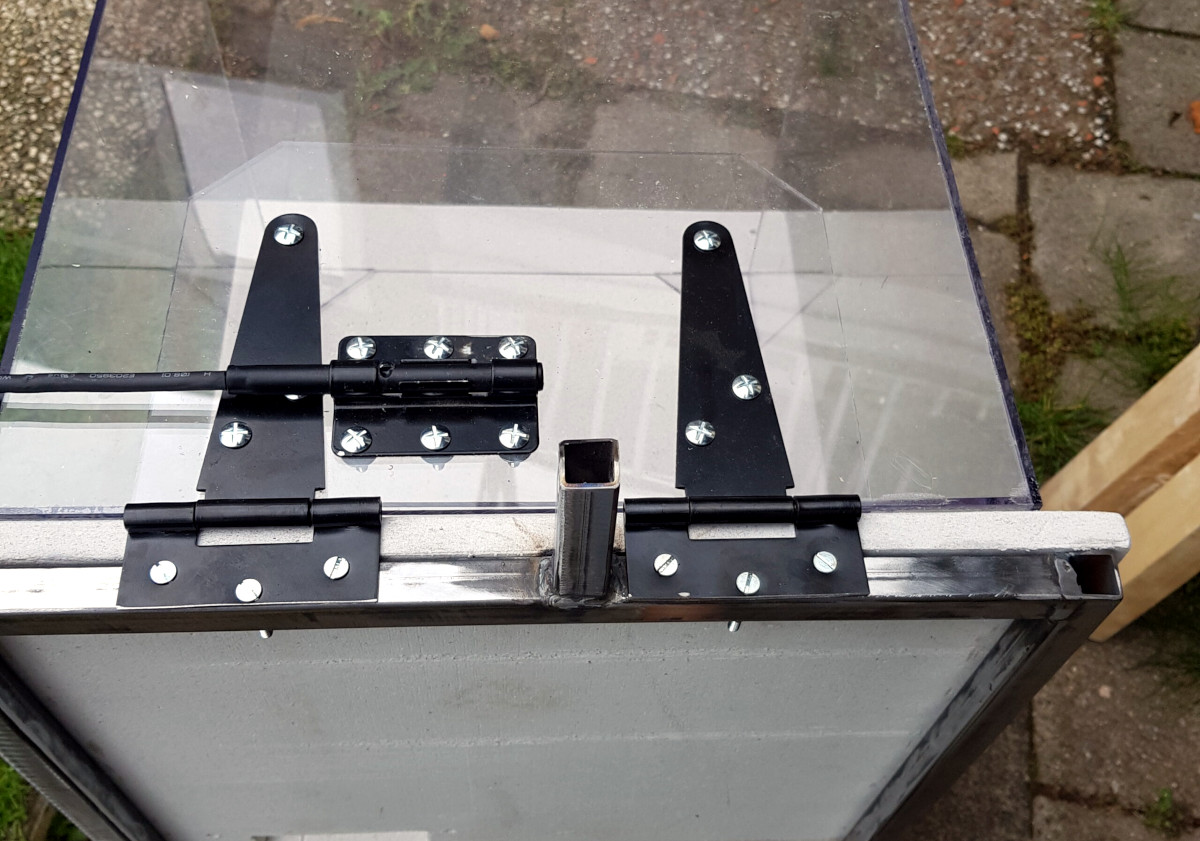
The enclosure is made from welded steel square tube, wood, and fire-retardant fiber board. A hinged polycarbonate cover, taking the form of a four-sided cube, is lowered over the printer with some heavy-duty hinges that look like they were intended for a fence. To keep the cover from slamming back down, [Build Comics] came up with a simple locking mechanism that can easily be operated from the front or side of the enclosure. With the addition of a small temperature and humidity display, the conditions inside the chamber can easily be monitored.

But [Build Comics] didn’t stop there. He also rigged up a relay box that will cut power to the printer should the smoke detector mounted above it trip. While there’s no reason to think the Prusa Mini would suffer the same fate of earlier budget desktop 3D printers, but there’s certainly no harm in taking precautions.

Will you need to build a similar enclosure whenever your Prusa Mini shows up? Maybe not. But if you felt so inclined, at least now you’ve got plenty of images and details that can help you spin up your own solution.

source https://hackaday.com/2020/11/17/prusa-mini-gets-custom-heavy-duty-enclosure/

3D Print Your Way to a Modular MIDI Playset

Have you ever wanted to experiment with MIDI, but didn’t know where to start? Or perhaps you didn’t think you could afford to properly outfit your digital beat laboratory, especially given the average hacker’s penchant for blinkenlights? Well worry no more, as [Johan von Konow] has unveiled a collection of DIY MIDI devices that anyone with a 3D printer can build on the cheap.

The LEET modular synthesizer is made up of a keyboard, drum pad, chord keyboard, arpeggiator and a step sequencer that plug into your computer and interface with industry standard digital audio workstation (DAW) programs. The down side is that they don’t do anything on their own, but this simplification allowed [Johan] to really streamline the design and bring the cost of the build down to the bare minimum.

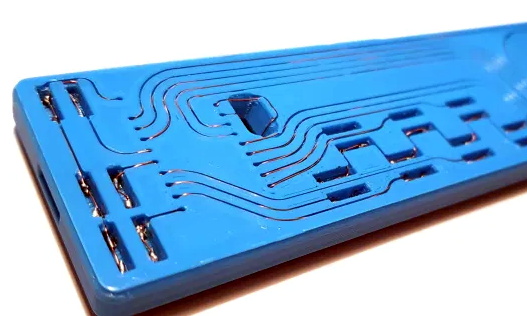
Integrated wire channels mean no PCB is required.

You don’t need to build all the components either, especially if you’re just testing the waters. The keyboard is a great starting point, and even if you have to buy all the components new from eBay, [Johan] says it shouldn’t cost you more than $10 USD to build. You just need an Arduino Pro Micro, some tact switches, and a section of WS2812 RGB LED strip. There’s an excellent chance you’ve already got some of that in the parts bin, which will make it even cheaper.

There is one missing element though: the PCB. But not because you have to source it yourself. Like his clever Arduboy clone we covered earlier in the year, the 3D printed bodies for all of the LEET devices have integrated wiring channels that serve as a stand-in for a traditional circuit board. Simply place all your components, push some stiff 0.3 mm diameter wire down into the channels, and solder the ends. It’s a very neat approach, and something we could see becoming more popular as desktop 3D printers become an increasingly common sight in the home workshop.

source https://hackaday.com/2020/11/16/3d-print-your-way-to-a-modular-midi-playset/

3D Print Your Way to a Modular MIDI Playset

Have you ever wanted to experiment with MIDI, but didn’t know where to start? Or perhaps you didn’t think you could afford to properly outfit your digital beat laboratory, especially given the average hacker’s penchant for blinkenlights? Well worry no more, as [Johan von Konow] has unveiled a collection of DIY MIDI devices that anyone with a 3D printer can build on the cheap.

The LEET modular synthesizer is made up of a keyboard, drum pad, chord keyboard, arpeggiator and a step sequencer that plug into your computer and interface with industry standard digital audio workstation (DAW) programs. The down side is that they don’t do anything on their own, but this simplification allowed [Johan] to really streamline the design and bring the cost of the build down to the bare minimum.

Integrated wire channels mean no PCB is required.

You don’t need to build all the components either, especially if you’re just testing the waters. The keyboard is a great starting point, and even if you have to buy all the components new from eBay, [Johan] says it shouldn’t cost you more than $10 USD to build. You just need an Arduino Pro Micro, some tact switches, and a section of WS2812 RGB LED strip. There’s an excellent chance you’ve already got some of that in the parts bin, which will make it even cheaper.

There is one missing element though: the PCB. But not because you have to source it yourself. Like his clever Arduboy clone we covered earlier in the year, the 3D printed bodies for all of the LEET devices have integrated wiring channels that serve as a stand-in for a traditional circuit board. Simply place all your components, push some stiff 0.3 mm diameter wire down into the channels, and solder the ends. It’s a very neat approach, and something we could see becoming more popular as desktop 3D printers become an increasingly common sight in the home workshop.

source https://hackaday.com/2020/11/16/3d-print-your-way-to-a-modular-midi-playset/

FreeCAD Debugging

Powerful software programs often have macro programming languages that you can use, and if you know how to program, you probably appreciate them. However, sometimes the program’s built-in debugging facilities are lacking or even nonexistent If it were just the language, that wouldn’t be such a problem, but you can’t just grab a, for example, VBA macro from Microsoft Word and run it in a normal Basic interpreter. Your program will depend on all sorts of facilities provided by Word and its supporting libraries. [CrazyRobMiles] was frustrated with trying to debug Python running inside FreeCAD, so he decided to do something about it.

[Rob’s] simple library, FakeFreeCad, gives enough support that you can run a FreeCAD script in your normal Python development environment. It only provides a rude view of what you are drawing, but it lets you explore the flow of the macro, examine variables, and more.

You can read more about it on the GitHub page, but essentially, you wrap your Python code into a function, import FakeFreeCAD, and then add a little boilerplate code and call the function. Here’s a partial example of a test function:


from FakeFreeCad import *

### code from FreeCad starts here
### Make it into a function that can be called to make the part

def makePlate():

plate = Part.makeBox(800,600,100)
hole = Part.makeCylinder(200,200,Base.Vector(400,300,0))
plate = plate.cut(hole)

Part.show(plate)
Gui.SendMsgToActiveView("ViewFit")
Gui.activeDocument().activeView().viewAxometric()

### End of the FreeCad code

You’ll have to dig through the code to see how many things are supported, but it would probably be pretty easy to add anything that’s missing. Naturally, having debugging support in FreeCAD would be better, but this is a pretty handy hack to get you most of the way there.

FreeCAD has gotten a lot better in recent years. We’ve seen a lot of talk about its parametric capabilities. If you want a basic tutorial, we’ve had those, too.

source https://hackaday.com/2020/11/16/freecad-debugging/

youtube-dl Makes Their Case, Returns to GitHub

Last month, the GitHub repository for the popular program youtube-dl was taken down in response to a DMCA takedown notice filed by the Recording Industry Association of America (RIAA). The crux of the RIAA complaint was that the tool could be used to download local copies of music streamed from various platforms, a claim they said was supported by the fact that several copyrighted music files were listed as unit tests in the repository.

While many believed this to be an egregious misrepresentation of what the powerful Python program was really used for, the RIAA’s argument was not completely without merit. As such, GitHub was forced to comply with the DMCA takedown until the situation could be clarified. Today we’re happy to report that has happened, and the youtube-dl repository has officially been reinstated.

Represented by the Electronic Frontier Foundation, the current maintainers of youtube-dl made their case to GitHub’s DMCA agent in a letter this afternoon which explained how the tool worked and directly addressed the issue of copyrighted videos being used as test cases in the source code. They maintain that their program does not circumvent any DRM, and that the exchange between the client and server is the same as it would be if the user had viewed the resource with a web browser. Further, they believe that downloading a few seconds worth of copyrighted material for the purpose of testing the software’s functionality is covered under fair use. Even still, they’ve decided to remove all references to the songs in question to avoid any hint at impropriety.

Having worked closely with the youtube-dl developers during this period, GitHub released their own statement to coincide with the EFF letter. They explained that the nature of the RIAA’s original complaint forced their hand, but that they never believed taking down the repository was the right decision. Specifically, they point out the myriad of legitimate reasons that users might want to maintain local copies of streamed media. While GitHub says they are glad that this situation was resolved quickly, they’ll be making several changes to their internal review process to help prevent further frivolous takedowns. Specifically the company says they will work with technical and legal experts to review the source code in question before escalating any further, and that if there’s any ambiguity as to the validity of the claim, they’ll side with the developers.

The Internet was quick to defend youtube-dl after the takedown, and we’re happy to see that GitHub made good on their promises to work with the developers to quickly get the repository back online. While the nature of open source code meant that the community was never in any real danger of losing this important tool, it’s in everyone’s best interest that development of the project can continue in the open.

source https://hackaday.com/2020/11/16/youtube-dl-makes-their-case-returns-to-github/

Gorgeous Mini-Lathe Makes the Most Out of Wood and Metal

It’s a cliche that the only machine tool that can make copies of itself is the lathe. It’s not exactly true, but it’s a useful adage in that it points out that the ability to make big round things into smaller round things, and to make unround things into round things, is a critical process in so many precision operations. That said, making a lathe primarily out of wood presents some unique challenges in the precision department

This isn’t [Uri Tuchman]’s first foray into lathe-building. Readers may recall the quirky creator’s hybrid treadle-powered and electric lathe, also primarily an exercise in woodworking. That lathe has seen plenty of use in [Uri]’s projects, turning both wood and metal stock into parts for his builds. It wasn’t really optimal for traditional metal turning, though, so Mini-Lathe 2 was undertaken. While the bed, headstock, and tailstock “castings” are wood — gorgeously hand-detailed and finished, of course — the important bits, like the linear slides for the carriage and the bearings in the headstock, are all metal. There’s a cross-slide, a quick-change tool post, and a manual lead screw for the carriage. We love the finely detailed brass handcranks, which were made on the old lathe, and all of the lovely details [Uri] always builds into his projects.

Sadly, at the end of the video below we see that the lathe suffers from a fair amount of chatter when turning brass. That’s probably not unexpected — there’s not much substitute for sheer mass whenit comes to dampening vibration. We expect that [Uri] will be making improvements to the lathe in the coming months — he’s not exactly one to leave a job unfinished.

[DainBramage] sent this tip in. Thanks!

source https://hackaday.com/2020/11/16/gorgeous-mini-lathe-makes-the-most-out-of-wood-and-metal/

Simple Tips For Better 3D-Printed Enclosures

3D printing can be great for making enclosures, and following some simple guidelines can help the whole process go much smoother. 3D Hubs has an article on designing printed enclosures that has clear steps and tips to get enclosures coming out right the first time. 3D Hubs offers 3D printing and other services, and the article starts with a short roundup of fabrication methods but the rest is a solid set of tips applicable to anyone.

The first recommendation is to model the contents of the enclosure as a way to help ensure everything fits as it should, and try to discover problems as early as possible during the design phase, before anything gets actually printed. We’ve seen how a PCB that doesn’t take the enclosure into account risks needing a redesign, because there are some issues an enclosure just can’t fix.

The rest of their advice boils down to concrete design guidelines about wall thickness (they recommend 2 mm or more), clearances (allow a minimum of 0.5 mm between internal components and enclosure), and how to size holes for fasteners, clips, or ports. These numbers aren’t absolute minimums, but good baseline values to avoid surprises.

One final useful tip is that using a uniform wall thickness throughout the enclosure is general good practice. While this isn’t strictly necessary for successful 3D printing, it will make life easier if the enclosure ever moves to injection molding. Want to know more? Our own Bob Baddeley has an excellent primer on injection molding, and his been-there-done-that perspective is invaluable.

source https://hackaday.com/2020/11/16/simple-tips-for-better-3d-printed-enclosures/

3D Printering: The Things Printers Don’t Do

3D printers are amazing things, but if one judges solely by the successes that get showcased online, it can look as through anything at all is possible. Yet in many ways, 3D printers are actually quite limited. Because success looks easy and no one showcases failure, people can end up with lopsided ideas of what is realistic. This isn’t surprising; behind every shining 3D print that pushes the boundaries of the technology, there are misprints and test pieces piled just out of sight.

If you have ever considered getting into 3D printing, or are wondering what kinds of expectations are realistic, read on because I am going to explain where objects come from, and how to recognize whether something is a good (or bad) fit for 3D printing. The important thing to understand is that printers have limitations, and to get a working idea of what those limitations are. The result will be a better understanding of what they can do, and what problems they can reliably solve.

3D Printers Have Limits

I recently had a talk with someone who wanted to know if a 3D printer could help with a problem they had. As I listened to them describe their needs, I realized I had in a way heard it all before many times.

My colleague actually had a fairly good idea of what printers could do, in theory. But they had very little grasp of what printers did not do, and that disconnect left them a bit adrift when it came to practical applications. To help address this gap, here are some tips that can give anyone a working understanding of the things 3D printers do not do well.

They Do Not Create Objects Effortlessly

Repairing household items is a common use case, but 3D printers do not work like photocopiers for objects, nor do they magic up replacements for missing or broken things. There is currently no practical way to take a few pictures of a broken part and have someone print a new one, nor is there a quick and easy way to make copies of existing objects.

Ideally, if someone required a replacement part to repair a household item, the process would begin with looking the part up online by manufacturer and model number. Then a user would download a 3D model of the missing or broken part, and print a replacement at the press of a button. We’re not there yet. There are plenty of 3D models available online, but we are far from having libraries of user-serviceable parts for manufactured products readily available for download and printing.

3D printers can only create objects from 3D models, and 3D models get made by someone using a CAD program. Creating a 3D model needs to happen first, because without a model a 3D printer is useless.

Making a Thing Means CAD Work

If an object doesn’t already exist as a 3D model, one must be created. Fortunately, the internet is already home to a staggering number of models for useful gadgets, tools, and knickknacks, ready to be downloaded from places like Thingiverse, PrusaPrinters, MyMiniFactory, and others. These models already exist and are — for the most part — ready to be 3D printed.

However, if one needs an object to interface with something else (for example, a replacement part for an appliance) then a 3D model for that object most likely does not already exist. It will need to be carefully designed from scratch, and reverse-engineering of a mechanical design is a process that will involve a lot of careful measuring and testing in addition to the CAD work. Access to both the thing being fixed, as well as the broken part being replaced, will probably be needed. The job could be anywhere between an afternoon’s work, to a multi-day effort.

3D scanning techniques, like photogrammetry, can be useful, but scanning is only a tool to aid other design work; it doesn’t yet remove the need to choose a CAD package and start designing. A good example of how 3D scanning can assist the design process is showcased nicely by this project to 3D print a custom control panel to fit onto a complex shape.

Some Things Do Not 3D Print Well

To print reliably, a 3D model must be designed with a 3D printer’s strengths and weaknesses in mind. One must always play to a tool’s strengths, and 3D printers are no different. Just as a table saw is the wrong tool for cutting curves, so too are some shapes and part geometries not easily 3D printed.

The two types of 3D printing that are most accessible to hobbyists are filament-based (FDM) and resin-based (SLA). Both work by building an object layer by layer, starting from a flat build platform, with each new layer being laid upon the foundation of the one before it. Because of this, some things print more easily and reliably than others.

How can one know whether an object will be troublesome to 3D print without having a lot of experience? Below is a simple checklist of potentially troublesome features. The more items in this list an object matches, the more likely the object will have challenges.

  • Does the object lack a flat surface to use as a base, or does it have a very small base relative to the rest of the model? Such models are often more complex to print than those with stable, flat bases.
  • Is the object very large, or very small? Object size can be an issue, and may depend on the printer and material type.
  • Does the model have thin walls or fine details? Thin walls are often weak points.
  • Does the model depend on tight tolerances and exact dimensions? If so, it may require experimentation to get right.
  • Are there protruding features that are not well connected to the rest of the model? The more parts stick out, the more challenging it will be to print.

For people who work with their hands, here is an evaluation method that is as intuitive as it is simple: Would the object be easy to build out of wet sand, as if one were building a sandcastle? If so, then it will probably 3D print just fine.

3D Printers Are Great, So Long As You Play By Their Rules

3D printers do not run flawlessly every time, nor do they operate in a foolproof manner. Operating and maintaining a 3D printer is not difficult, but it is a skill acquired through experience. It is entirely possible to damage a printer by running it carelessly. Ideally, one would simply press a button then sip a margarita until the machine spits out a perfectly-finished part. Unfortunately, this isn’t true of 3D printers any more than it is for any other power tool.

To be clear, 3D printing is one of the best things to have happened to hobbyists over the last decade, and the benefits are not limited to those who design objects from scratch. For example, printing miniatures for tabletop gaming is a niche that has probably single-handedly propelled hobbyist SLA printing to where it is today. As a result, hackers around the world have reaped the benefits, making it easier than ever to add an SLA printer to the workbench.

Successes are great, but knowing what 3D printers are not good at is also important. With a better idea of what printers do poorly, a thoughtful hacker is not only in a much better position to decide whether buying a 3D printer is a good idea, but will also have a better idea of how many beers that friendly printing favor might be worth.

source https://hackaday.com/2020/11/16/3d-printering-the-things-printers-dont-do/

3D Printering: The Things Printers Don’t Do

3D printers are amazing things, but if one judges solely by the successes that get showcased online, it can look as through anything at all is possible. Yet in many ways, 3D printers are actually quite limited. Because success looks easy and no one showcases failure, people can end up with lopsided ideas of what is realistic. This isn’t surprising; behind every shining 3D print that pushes the boundaries of the technology, there are misprints and test pieces piled just out of sight.

If you have ever considered getting into 3D printing, or are wondering what kinds of expectations are realistic, read on because I am going to explain where objects come from, and how to recognize whether something is a good (or bad) fit for 3D printing. The important thing to understand is that printers have limitations, and to get a working idea of what those limitations are. The result will be a better understanding of what they can do, and what problems they can reliably solve.

3D Printers Have Limits

I recently had a talk with someone who wanted to know if a 3D printer could help with a problem they had. As I listened to them describe their needs, I realized I had in a way heard it all before many times.

My colleague actually had a fairly good idea of what printers could do, in theory. But they had very little grasp of what printers did not do, and that disconnect left them a bit adrift when it came to practical applications. To help address this gap, here are some tips that can give anyone a working understanding of the things 3D printers do not do well.

They Do Not Create Objects Effortlessly

Repairing household items is a common use case, but 3D printers do not work like photocopiers for objects, nor do they magic up replacements for missing or broken things. There is currently no practical way to take a few pictures of a broken part and have someone print a new one, nor is there a quick and easy way to make copies of existing objects.

Ideally, if someone required a replacement part to repair a household item, the process would begin with looking the part up online by manufacturer and model number. Then a user would download a 3D model of the missing or broken part, and print a replacement at the press of a button. We’re not there yet. There are plenty of 3D models available online, but we are far from having libraries of user-serviceable parts for manufactured products readily available for download and printing.

3D printers can only create objects from 3D models, and 3D models get made by someone using a CAD program. Creating a 3D model needs to happen first, because without a model a 3D printer is useless.

Making a Thing Means CAD Work

If an object doesn’t already exist as a 3D model, one must be created. Fortunately, the internet is already home to a staggering number of models for useful gadgets, tools, and knickknacks, ready to be downloaded from places like Thingiverse, PrusaPrinters, MyMiniFactory, and others. These models already exist and are — for the most part — ready to be 3D printed.

However, if one needs an object to interface with something else (for example, a replacement part for an appliance) then a 3D model for that object most likely does not already exist. It will need to be carefully designed from scratch, and reverse-engineering of a mechanical design is a process that will involve a lot of careful measuring and testing in addition to the CAD work. Access to both the thing being fixed, as well as the broken part being replaced, will probably be needed. The job could be anywhere between an afternoon’s work, to a multi-day effort.

3D scanning techniques, like photogrammetry, can be useful, but scanning is only a tool to aid other design work; it doesn’t yet remove the need to choose a CAD package and start designing. A good example of how 3D scanning can assist the design process is showcased nicely by this project to 3D print a custom control panel to fit onto a complex shape.

Some Things Do Not 3D Print Well

To print reliably, a 3D model must be designed with a 3D printer’s strengths and weaknesses in mind. One must always play to a tool’s strengths, and 3D printers are no different. Just as a table saw is the wrong tool for cutting curves, so too are some shapes and part geometries not easily 3D printed.

The two types of 3D printing that are most accessible to hobbyists are filament-based (FDM) and resin-based (SLA). Both work by building an object layer by layer, starting from a flat build platform, with each new layer being laid upon the foundation of the one before it. Because of this, some things print more easily and reliably than others.

How can one know whether an object will be troublesome to 3D print without having a lot of experience? Below is a simple checklist of potentially troublesome features. The more items in this list an object matches, the more likely the object will have challenges.

  • Does the object lack a flat surface to use as a base, or does it have a very small base relative to the rest of the model? Such models are often more complex to print than those with stable, flat bases.
  • Is the object very large, or very small? Object size can be an issue, and may depend on the printer and material type.
  • Does the model have thin walls or fine details? Thin walls are often weak points.
  • Does the model depend on tight tolerances and exact dimensions? If so, it may require experimentation to get right.
  • Are there protruding features that are not well connected to the rest of the model? The more parts stick out, the more challenging it will be to print.

For people who work with their hands, here is an evaluation method that is as intuitive as it is simple: Would the object be easy to build out of wet sand, as if one were building a sandcastle? If so, then it will probably 3D print just fine.

3D Printers Are Great, So Long As You Play By Their Rules

3D printers do not run flawlessly every time, nor do they operate in a foolproof manner. Operating and maintaining a 3D printer is not difficult, but it is a skill acquired through experience. It is entirely possible to damage a printer by running it carelessly. Ideally, one would simply press a button then sip a margarita until the machine spits out a perfectly-finished part. Unfortunately, this isn’t true of 3D printers any more than it is for any other power tool.

To be clear, 3D printing is one of the best things to have happened to hobbyists over the last decade, and the benefits are not limited to those who design objects from scratch. For example, printing miniatures for tabletop gaming is a niche that has probably single-handedly propelled hobbyist SLA printing to where it is today. As a result, hackers around the world have reaped the benefits, making it easier than ever to add an SLA printer to the workbench.

Successes are great, but knowing what 3D printers are not good at is also important. With a better idea of what printers do poorly, a thoughtful hacker is not only in a much better position to decide whether buying a 3D printer is a good idea, but will also have a better idea of how many beers that friendly printing favor might be worth.

source https://hackaday.com/2020/11/16/3d-printering-the-things-printers-dont-do/
3D Printering: The Things Printers Don’t Do

3D printers are amazing things, but if one judges solely by the successes that get showcased online, it can look as through anything at all is possible. Yet in many ways, 3D printers are actually quite limited. Because success looks easy and no one showcases failure, people can end up with lopsided ideas of what is realistic. This isn’t surprising; behind every shining 3D print that pushes the boundaries of the technology, there are misprints and test pieces piled just out of sight.

If you have ever considered getting into 3D printing, or are wondering what kinds of expectations are realistic, read on because I am going to explain where objects come from, and how to recognize whether something is a good (or bad) fit for 3D printing. The important thing to understand is that printers have limitations, and to get a working idea of what those limitations are. The result will be a better understanding of what they can do, and what problems they can reliably solve.

3D Printers Have Limits

I recently had a talk with someone who wanted to know if a 3D printer could help with a problem they had. As I listened to them describe their needs, I realized I had in a way heard it all before many times.

My colleague actually had a fairly good idea of what printers could do, in theory. But they had very little grasp of what printers did not do, and that disconnect left them a bit adrift when it came to practical applications. To help address this gap, here are some tips that can give anyone a working understanding of the things 3D printers do not do well.

They Do Not Create Objects Effortlessly

Repairing household items is a common use case, but 3D printers do not work like photocopiers for objects, nor do they magic up replacements for missing or broken things. There is currently no practical way to take a few pictures of a broken part and have someone print a new one, nor is there a quick and easy way to make copies of existing objects.

Ideally, if someone required a replacement part to repair a household item, the process would begin with looking the part up online by manufacturer and model number. Then a user would download a 3D model of the missing or broken part, and print a replacement at the press of a button. We’re not there yet. There are plenty of 3D models available online, but we are far from having libraries of user-serviceable parts for manufactured products readily available for download and printing.

3D printers can only create objects from 3D models, and 3D models get made by someone using a CAD program. Creating a 3D model needs to happen first, because without a model a 3D printer is useless.

Making a Thing Means CAD Work

If an object doesn’t already exist as a 3D model, one must be created. Fortunately, the internet is already home to a staggering number of models for useful gadgets, tools, and knickknacks, ready to be downloaded from places like Thingiverse, PrusaPrinters, MyMiniFactory, and others. These models already exist and are — for the most part — ready to be 3D printed.

However, if one needs an object to interface with something else (for example, a replacement part for an appliance) then a 3D model for that object most likely does not already exist. It will need to be carefully designed from scratch, and reverse-engineering of a mechanical design is a process that will involve a lot of careful measuring and testing in addition to the CAD work. Access to both the thing being fixed, as well as the broken part being replaced, will probably be needed. The job could be anywhere between an afternoon’s work, to a multi-day effort.

3D scanning techniques, like photogrammetry, can be useful, but scanning is only a tool to aid other design work; it doesn’t yet remove the need to choose a CAD package and start designing. A good example of how 3D scanning can assist the design process is showcased nicely by this project to 3D print a custom control panel to fit onto a complex shape.

Some Things Do Not 3D Print Well

To print reliably, a 3D model must be designed with a 3D printer’s strengths and weaknesses in mind. One must always play to a tool’s strengths, and 3D printers are no different. Just as a table saw is the wrong tool for cutting curves, so too are some shapes and part geometries not easily 3D printed.

The two types of 3D printing that are most accessible to hobbyists are filament-based (FDM) and resin-based (SLA). Both work by building an object layer by layer, starting from a flat build platform, with each new layer being laid upon the foundation of the one before it. Because of this, some things print more easily and reliably than others.

How can one know whether an object will be troublesome to 3D print without having a lot of experience? Below is a simple checklist of potentially troublesome features. The more items in this list an object matches, the more likely the object will have challenges.

  • Does the object lack a flat surface to use as a base, or does it have a very small base relative to the rest of the model? Such models are often more complex to print than those with stable, flat bases.
  • Is the object very large, or very small? Object size can be an issue, and may depend on the printer and material type.
  • Does the model have thin walls or fine details? Thin walls are often weak points.
  • Does the model depend on tight tolerances and exact dimensions? If so, it may require experimentation to get right.
  • Are there protruding features that are not well connected to the rest of the model? The more parts stick out, the more challenging it will be to print.

For people who work with their hands, here is an evaluation method that is as intuitive as it is simple: Would the object be easy to build out of wet sand, as if one were building a sandcastle? If so, then it will probably 3D print just fine.

3D Printers Are Great, So Long As You Play By Their Rules

3D printers do not run flawlessly every time, nor do they operate in a foolproof manner. Operating and maintaining a 3D printer is not difficult, but it is a skill acquired through experience. It is entirely possible to damage a printer by running it carelessly. Ideally, one would simply press a button then sip a margarita until the machine spits out a perfectly-finished part. Unfortunately, this isn’t true of 3D printers any more than it is for any other power tool.

To be clear, 3D printing is one of the best things to have happened to hobbyists over the last decade, and the benefits are not limited to those who design objects from scratch. For example, printing miniatures for tabletop gaming is a niche that has probably single-handedly propelled hobbyist SLA printing to where it is today. As a result, hackers around the world have reaped the benefits, making it easier than ever to add an SLA printer to the workbench.

Successes are great, but knowing what 3D printers are not good at is also important. With a better idea of what printers do poorly, a thoughtful hacker is not only in a much better position to decide whether buying a 3D printer is a good idea, but will also have a better idea of how many beers that friendly printing favor might be worth.

source https://hackaday.com/2020/11/16/3d-printering-the-things-printers-dont-do/

Automatic Winder Takes the Drudgery Out of Tesla Coil Builds

What is it about coil winding automation projects that’s just so captivating? Maybe it’s knowing what a labor saver they can be once you’ve got a few manually wound coils under your belt. Or perhaps it’s just the generally satisfying nature of any machine that does an exacting task smoothly and precisely. Whatever it is, this automatic Tesla coil winder has it in abundance.

According to [aa-epilectrik]’s account, the back story of this build is that while musical Tesla coils are a big part of the performance of musical group ArcAttack, they’re also cool enough in their own right to offer DIY kits for sale. This rig takes on the job of producing the coils, which at least takes some of the drudgery out of the build. There’s no build log, but there are enough details on reddit and Instagram to work out the basics. The main spindle is driven by a gearmotor while the winding carriage translates along a linear slide thanks to a stepper-driven lead screw. The spool holding the fine magnet wire needs to hold proper tension to prevent tangling; this is achieved through by applying some torque to the spool with a small DC motor.

There are some great design elements in this one, not least being the way tension is controlled by measuring the movement of an idler pulley using a linear pot. At top speed, the machine looks like it complete a coil in just about three minutes, which seems pretty reasonable with such neat results. Another interesting point: ArcAttack numbers [Anouk Wipprecht], whom we’ve featured a couple of times on these pages, among its collaborators. Small world.


source https://hackaday.com/2020/11/16/automatic-winder-takes-the-drudgery-out-of-tesla-coil-builds/

Vectron Adds Basic and Christmas Tree Control

Not content to leave things alone, [Nick Bild] has updated his nearly practical breadboard 6502 Vectron project once again by adding Tiny Basic and home tree automation. Instead of using an LCD module like last time, or his custom-built VGA output using 7400-series logic, [Nick] chose to go modern this time and implemented a VGO output using a TinyFPGA BX.

Tiny Basic was one of the first versions of Basic released after Bill Gates famous open letter to hobbyists in 1976. While Altair Basic was selling for $150, Tim Pittman wrote Tiny Basic for the 6800 and sold it for only $5 (don’t worry, Tom has since made it free to use). We got a kick out of browsing the Tiny Basic manual and learning that our serial number can be found on the paper tape leader, and that a Teletype will generally receive one more character, at least, after getting the X-OFF control signal.

In the video, you can see [Nick] running a short Basic program and operating his Christmas tree lights from the Vectron, although it’s only on-off control. He suggests that a PCB version is in the works, but he’s having trouble deciding when to quit adding features.  That’s a conundrum we know all too well.

source https://hackaday.com/2020/11/16/vectron-adds-basic-and-christmas-tree-control/

Gyroscope Level is Digital

A spirit level, you know the kind of level with a little bubble in a tube of fluid, is a basic construction tool. [DesignBuildDestroy] took an Arduino, a gyroscope chip, and an OLED, and made a 3D printed level with no bubble, but it does have a nice digital display.

It is funny when you realize that at one time a gyroscope was a high tech item reserved for missiles and aircraft. Now you can grab a six-axis sensor for pennies. Even, better, the code used in the project can offload the Arduino for a lot of processing.

Initially, the device lived on a breadboard, which is always a good idea to get the kinks out of things. Thanks to the OLED, the Arduino can calibrate itself without a PC and do other tricks. The display is easy to read, but we thought there should be a mode that shows a little bubble made with an O character. Seems like that would be a fun rainy day project. We did like the automatic screen rotation, though.

We’ve seen a nice level done with a Raspberry Pi before. If you need something smaller, how about something the size of a dime?

source https://hackaday.com/2020/11/15/gyroscope-level-is-digital/

DIY High Voltage Kirlian Photography Rig

High voltage is a fun, if dangerous, thing to play with. [Mirko] is an enthusiast in this space, and built a high-voltage Kirlian photography device that’s capable of creating some stunning images.

The construction of the device itself is basic. High-frequency, high-voltage electricity is connected to a metal object placed on one side of a glass plate. On the other side, salt water is pooled, and connected to a second electrode. This creates a transparent window through which the electrical discharge can be viewed either by eye or with a digital camera. Historically, this was done with photographic film in place of the transparent window, but the principle is the same.

Popular in the paranormal and alternative medicine spaces, the actual scientific application of Kirlian photography is minimal. Rather, it’s an interesting way to explore high voltages that creates some pretty results! If you find yourself becoming a fan of high voltage, you might also consider your own Tesla coil build, too. Video after the break.

source https://hackaday.com/2020/11/15/diy-high-voltage-kirlian-photography-rig/

Hackaday Links: November 15, 2020

Now that we drive around cars that are more like mobile data centers than simple transportation, there’s a wealth of data to be harvested when the inevitable crashes occur. After a recent Tesla crash on a California highway, a security researcher got a hold of the car’s “black box” and extracted some terrifying insights into just how bad a car crash can be. The interesting bit is the view of the crash from the Tesla’s forward-facing cameras with object detection overlays. Putting aside the fact that the driver of this car was accelerating up to the moment it rear-ended the hapless Honda with a closing speed of 63 MPH (101 km/h), the update speeds on the bounding boxes and lane sensing are incredible. The author of the article uses this as an object lesson in why Level 2 self-driving is a bad idea, and while I agree with that premise, the fact that self-driving had been disabled 40 seconds before the driver plowed into the Honda seems to make that argument moot. Tech or not, someone this unskilled or impaired was going to have an accident eventually, and it was just bad luck for the other driver.

Last week I shared a link to Scan the World, an effort to 3D-scan and preserve culturally significant artifacts and create a virtual museum. Shortly after the article ran we got an email from Elisa at Scan the World announcing their “Unlocking Lockdown” competition, which encourages people to scan cultural artifacts and treasures directly from their home. You may not have a Ming Dynasty vase or a Grecian urn on display in your parlor, but you’ve probably got family heirlooms, knick-knacks, and other tchotchkes that should be preserved. Take a look around and scan something for posterity. And I want to thank Elisa for the link to the Pompeiian bread that I mentioned.

The Defense Advanced Research Projects Agency (DARPA)has been running an interesting challenge for the last couple of years: The Subterranean (SubT) Challenge. The goal is to discover new ways to operate autonomously below the surface of the Earth, whether for mining, search and rescue, or warfare applications. They’ve been running different circuits to simulate various underground environments, with the most recent circuit being a cave course back in October. On Tuesday November 17, DARPA will webcast the competition, which features 16 teams and their autonomous search for artifacts in a virtual cave. It could make for interesting viewing.

If underground adventures don’t do it for you, how about going upstairs? LeoLabs, a California-based company that specializes in providing information about satellites, has a fascinating visualization of the planet’s satellite constellation. It’s sort of Google Earth but with the details focused on low-earth orbit. You can fly around the planet and watch the satellites whiz by or even pick out the hundreds of spent upper-stage rockets still up there. You can lock onto a specific satellite, watch for near-misses, or even turn on a layer for space debris, which honestly just turns the display into a purple miasma of orbiting junk. The best bit, though, is the easily discerned samba-lines of newly launched Starlink satellites.

A doorbell used to be a pretty simple device, but like many things, they’ve taken on added complexity. And danger, it appears, as Amazon Ring doorbell users are reporting their new gadgets going up in flame upon installation. The problem stems from installers confusing the screws supplied with the unit. The longer wood screws are intended to mount the device to the wall, while a shorter security screw secures the battery cover. Mix the two up for whatever reason, and the sharp point of the mounting screw can find the LiPo battery within, with predictable results.

And finally, it may be the shittiest of shitty robots: a monstrous robotic wolf intended to scare away wild bears. It seems the Japanese town of Takikawa has been having a problem with bears lately, so they deployed a pair of these improbable looking creatures to protect themselves. It’s hard to say what’s the best feature: the flashing LED eyes, the strobe light tail, the fact that the whole thing floats in the air atop a pole. Whatever it is, it seems to work on bears, which is probably good enough. Take a look in the video below the break.

source https://hackaday.com/2020/11/15/hackaday-links-november-15-2020/

A Microwave Repair Even Mechanical Keyboard Fans Will Love

Microwave oven design and manufacturing have been optimized to the point where the once-expensive appliances are now nearly disposable. Despite the economics, though, some people can’t resist fixing stuff, especially when you get a chance to do it in style. Thus we present this microwave repair with its wholly unnecessary yet fabulous adornments.

The beginning of the end for [dekuNukem]’s dirt cheap second-hand microwave started where many of the appliances begin to fail first — the membrane keyboard. Unable to press the buttons reliably anymore, [dekuNukem] worked out the original keypad’s matrix wiring arrangement and whipped up a little keypad from some pushbutton switches and a scrap of perfboard. Wired into the main PCB, it was an effective and cheap solution, if a bit on the artless side.

To perk things up a bit, [dekuNukem] turned to duckyPad, a hot-swappable macropad with mechanical switches and, of course, RGB LEDs. Things got interesting from here; since duckyPad outputs serial data, an adapater was needed inside the microwave. An STM32 microcontroller and a pair of ADG714 analog switches did the trick, with power pulled from the original PCB.

The finished repair is pretty flashy, and [dekuNukem] now has the only microwave in the world with a clicky keypad. And what’s more, it works.

source https://hackaday.com/2020/11/15/a-microwave-repair-even-mechanical-keyboard-fans-will-love/

Halloween Pumpkin Scares With An Evil Eye

These days, a classic Jack O’ Lantern just doesn’t cut the mustard. Kids are expecting to be scared by high-quality animatronics at a minimum. This haunting work by [Zero To Infinity] might just do the trick.

A real pumpkin is pressed into service in this build, with the usual threatening grin and candlelit interior. However, where it differs is in its single, animated eye. The eye itself is constructed of a pingpong ball, drawn upon with markers for a creepy bloodshot look. A pair of servos allow the eye to twitch and roll, under the command of an Arduino Nano. For further interactivity, an ultrasonic sensor is used to only trigger the pumpkin when it senses a person approaching.

It’s a fun holiday build that also serves as a great primer on how to work with servos and microcontrollers. We can imagine a more advanced setup using more sensors and pumpkins to train multiple eyes on the unsuspecting visitor. If that’s not scary enough, perhaps just make your pumpkins breathe fire instead. Video after the break.

source https://hackaday.com/2020/11/15/halloween-pumpkin-scares-with-an-evil-eye/

Cutting Balsa Wood with Air (Oh, and a Laser)

[DIY3DTech] likes using his Ortur laser cutter for balsa wood and decided to add an air assist system to it. Some people told him it wasn’t worth the trouble, so in the video below, he compares the results of cutting both with and without the air assist.

The air assist helped clear the cut parts and reduced charring in the wood. The air system clears residue and fumes that can reduce the effectiveness of the laser. It can also reduce the risk of the workpiece catching on fire.

In addition, the video shows the results of cutting wood using different speeds and number of passes. So the holes marked 5/10, for example, are cut at 5mm/second and ten passes.

Although air assist might help if you are engraving, the real benefit, according to the video, is when you are trying to do cuts. However, removing the fumes is probably a good idea even when engraving.

The video doesn’t go into much detail about the air system, but there are links in the video description to pages that have more information about how to add something like this to your laser cutting setup. There’s also a more recent video specifically about how the air assist system works.

If you need more on laser cutter basics, we read a great post about it last year. Like 3D printers, it used to be fashionable to build your own cutter, but now it is cheap enough to buy one if you’d rather not mess with it.

source https://hackaday.com/2020/11/15/cutting-balsa-wood-with-air-oh-and-a-laser/

Interactive Subway Map Talks You Through The Route

Old-school rail monitoring systems had amazing displays of stations and tracks covered in flashing lights that tracked the progress of trains along a route. While it’s unlikely you’ll fit such big iron from the mid-20th century in your home, you can get a similar aesthetic with [Kothe’s] interactive subway information display.

The display relies on an Arduino Mega 2560 Pro Mini as the brains of the operation. It drives strings of WS2812B LEDs which correspond to stations along the various metro lines in the area. Additionally, the microcontroller drives a 4.3″ Nextion LCD display. The Nextion displays have the benefit of acting as a self-contained human machine interface, running their own controller on board. This means the Arduino doesn’t have to spend cycles driving the display, and the Nextion hardware comes with a useful software package for quickly and easily designing GUI interfaces. For further feedback, a DFPlayer MP3 module is used to allow the system to playback prerecorded voice samples that provide information on the rail system. The attractive front panel is made with lasercut acrylic and a color printed acetate sheet.

It’s a build that bears striking similarity to real rail information systems fielded by railways around the world. We can imagine such a device being particularly useful in a backpacker’s hostel or university dorm to help those new to town find their way around. If you prefer a more stripped-back aesthetic, we’ve seen a barebones PCB build done as well. Video after the break.

source https://hackaday.com/2020/11/15/interactive-subway-map-talks-you-through-the-route/

An EV Conversion Engineered As A Drop-in Replacement

With electric vehicles such as the Tesla or the Leaf being all the rage and joined by fresh competitors seemingly every week, it seems the world is going crazy for the electric motor over their internal combustion engines. There’s another sector to electric traction that rarely hits the headlines though, that of converting existing IC cars to EVs by retrofitting a motor. The engineering involved can be considerable and differs for every car, so we’re interested to see an offering for the classic Mini from the British company Swindon Powertrain that may be the first of many affordable pre-engineered conversion kits for popular models.

Swindon Powertrain's demo Mini
Swindon Powertrain’s demo Mini

The kit takes their HPD crate EV motor that we covered earlier in the year, and mates it with a Mini front subframe. Brackets and CV joints engineered for the kit to drop straight into the Mini. The differential appears to be offset to the right rather than the central position of the original so we’re curious about the claim of using the Mini’s own driveshafts, but that’s hardly an issue that should tax anyone prepared to take on such a task. They can also supply all the rest of the parts for a turnkey conversion, making for what will probably be one of the most fun-to-drive EVs possible.

The classic Mini is now a sought-after machine long past its days of being dirt-cheap old-wreck motoring for the masses, so the price of the kit should be viewed in the light of a good example now costing more than some new cars. We expect this kit to have most appeal in the professional and semi-professional market rather than the budget end of home conversions, but it’s still noteworthy because it is a likely sign of what is to come. We look forward to pre-engineered subframes becoming a staple of EV conversions at all levels. The same has happened with other popular engine upgrades, and no doubt some conversions featuring them will make their way to the pages of Hackaday.

We like the idea of conversions forming part of the path to EV adoption, as we’ve remarked before.

source https://hackaday.com/2020/11/15/an-ev-conversion-engineered-as-a-drop-in-replacement/

An EV Conversion Engineered As A Drop-in Replacement

With electric vehicles such as the Tesla or the Leaf being all the rage and joined by fresh competitors seemingly every week, it seems the world is going crazy for the electric motor over their internal combustion engines. There’s another sector to electric traction that rarely hits the headlines though, that of converting existing IC cars to EVs by retrofitting a motor. The engineering involved can be considerable and differs for every car, so we’re interested to see an offering for the classic Mini from the British company Swindon Powertrain that may be the first of many affordable pre-engineered conversion kits for popular models.

Swindon Powertrain's demo Mini
Swindon Powertrain’s demo Mini

The kit takes their HPD crate EV motor that we covered earlier in the year, and mates it with a Mini front subframe. Brackets and CV joints engineered for the kit to drop straight into the Mini. The differential appears to be offset to the right rather than the central position of the original so we’re curious about the claim of using the Mini’s own driveshafts, but that’s hardly an issue that should tax anyone prepared to take on such a task. They can also supply all the rest of the parts for a turnkey conversion, making for what will probably be one of the most fun-to-drive EVs possible.

The classic Mini is now a sought-after machine long past its days of being dirt-cheap old-wreck motoring for the masses, so the price of the kit should be viewed in the light of a good example now costing more than some new cars. We expect this kit to have most appeal in the professional and semi-professional market rather than the budget end of home conversions, but it’s still noteworthy because it is a likely sign of what is to come. We look forward to pre-engineered subframes becoming a staple of EV conversions at all levels. The same has happened with other popular engine upgrades, and no doubt some conversions featuring them will make their way to the pages of Hackaday.

We like the idea of conversions forming part of the path to EV adoption, as we’ve remarked before.

source https://hackaday.com/2020/11/15/an-ev-conversion-engineered-as-a-drop-in-replacement/

An EV Conversion Engineered As A Drop-in Replacement

With electric vehicles such as the Tesla or the Leaf being all the rage and joined by fresh competitors seemingly every week, it seems the world is going crazy for the electric motor over their internal combustion engines. There’s another sector to electric traction that rarely hits the headlines though, that of converting existing IC cars to EVs by retrofitting a motor. The engineering involved can be considerable and differs for every car, so we’re interested to see an offering for the classic Mini from the British company Swindon Powertrain that may be the first of many affordable pre-engineered conversion kits for popular models.

Swindon Powertrain's demo Mini
Swindon Powertrain’s demo Mini

The kit takes their HPD crate EV motor that we covered earlier in the year, and mates it with a Mini front subframe. Brackets and CV joints engineered for the kit to drop straight into the Mini. The differential appears to be offset to the right rather than the central position of the original so we’re curious about the claim of using the Mini’s own driveshafts, but that’s hardly an issue that should tax anyone prepared to take on such a task. They can also supply all the rest of the parts for a turnkey conversion, making for what will probably be one of the most fun-to-drive EVs possible.

The classic Mini is now a sought-after machine long past its days of being dirt-cheap old-wreck motoring for the masses, so the price of the kit should be viewed in the light of a good example now costing more than some new cars. We expect this kit to have most appeal in the professional and semi-professional market rather than the budget end of home conversions, but it’s still noteworthy because it is a likely sign of what is to come. We look forward to pre-engineered subframes becoming a staple of EV conversions at all levels. The same has happened with other popular engine upgrades, and no doubt some conversions featuring them will make their way to the pages of Hackaday.

We like the idea of conversions forming part of the path to EV adoption, as we’ve remarked before.

source https://hackaday.com/2020/11/15/an-ev-conversion-engineered-as-a-drop-in-replacement/

Automatic Scoring For Skeeball Mini-Golf

Minigolf is a fun, simple pastime that has the benefit of taking up much less space than the classical game it is inspired by. [gcall1979] had built himself a small game for the lounge room, but found keeping score to be a tedious exercise. Of course, that was nothing that couldn’t be solved with some electronics!

The game consists of a skeeball-type minigolf course, where the score is determined by the hole the player puts the ball through. To track this, each hole is fitted with an IR break-beam sensor that triggers when a ball passes through. Vinyl siding is used to guide the balls going through the holes to ensure the sensor is triggered consistently. The sensors are read by an Arduino Mega, which is also responsible for flashing LEDs and updating the score throughout the game on the included 7-segment displays.

It’s a basic hack, but one that makes the game far more of a self-contained experience. No more fumbling with pencils and paper means it’s easier to focus on dominating the competition on the (miniature) green. Of course, those with dreams of the driving range might consider this recreation of the famous Floating 14th Hole!

source https://hackaday.com/2020/11/14/automatic-scoring-for-skeeball-mini-golf/

Micropython on Microcontrollers

There are plenty of small microcontrollers available for all kinds of tasks, each one with its unique set of features and capabilities. However, not all of us want to spend time mucking about in C or assembly to learn the intricacies of each different chip. If you prefer the higher planes of Python instead, it’s not impossible to import Python on even the smallest of microcontrollers thanks to MicroPython, which [Rob] shows us in this project based on the ESP32.

[Rob] has been working on a small robot called Marty which uses an ESP32 as its brain, so the small microcontroller is already tasked with WiFi/Bluetooth communications and driving the motors in the robot. Part of the problem of getting Python to run on a platform like this is that MicroPython is designed to be essentially the only thing running on the device at any one point, but since the ESP32 is more powerful than the minimum requirements for MicroPython he wanted to see if he could run more than just Python code. He eventually settled on a “bottum-up” approach to build a library for the platform, rather than implementing MicroPython directly as a firmware image for the ESP32.

The blog post is an interesting take on running Python code on a small platform, and goes into some details with the shortcomings of MicroPython itself which [Rob] ended up working around for this project. He’s also released the source code for his work on his GitHub page. Of course, for a different approach to running Python and C on the same small processor, there are some libraries that accomplish that as well.

source https://hackaday.com/2020/11/14/micropython-on-microcontrollers/

A Different Kind of IKEA Hack: Javascript Price Comparison by Location

When looking for the best deal, it pays to shop around. When it comes to chain stores, of course, one expects the price to be the same across their retail network. However, where international companies are concerned, occasionally a better deal is just a border crossing away. To investigate the best possible price on IKEA’s flatpacked goods, [Sn0w5t0rm] whipped up a scirpt to make comparisons easy.

The hack consists of a small piece of Javascript that runs in a browser extension like Greasemonkey (Firefox) or Tampermonkey (Chrome). When visiting an IKEA product page, it shows the price of the same item in the alternative country of your choice. Often, significant savings can be had – the SKOGSTA table is €176 cheaper in the Netherlands compared to Belgium.

While the script does require some customization to suit your location, it could nonetheless save you a bundle on some home furnishings if your live near enough to a border. We’d love to see the concept taken further to tease out best prices in a given region for goods from all stores. Similar techniques can net you cheap airfares, too!

source https://hackaday.com/2020/11/14/a-different-kind-of-ikea-hack-javascript-price-comparison-by-location/