SLA 3D Printed Vortex Cooled Rocket Engine

3D printing is an incredible tool for prototyping and development, but the properties of the materials can be a limiting factor for functional parts. [Sam Rogers] and colleagues at [AX Technologies] have been testing and developing a small liquid-fueled rocket engine and successfully used vortex cooling to protect a resin 3D printed combustion chamber. (Video, embedded below.)

Vortex cooling works by injecting oxygen into the combustion chamber tangentially, just inside the nozzle of the engine, which creates a cooling, swirling vortex boundary layer along the chamber wall. The oxygen moves to the front end of the combustion chamber where it mixes with the fuel and ignites in the center. This does not protect the nozzle itself, which only lasts a few seconds before becoming unusable. However, thanks to the modular design of the test engine, only the small nozzle section had to be reprinted for every test. While this part could be manufactured using a metal 3D printer, the costs are still very high, especially at this experimental stage. The clear resin parts also allow the combustion observed and more accurate conclusions to be drawn from every test.

This engine intended to be used as a torch igniter for a much larger rocket engine. Fuel is injected into the front of the combustion chamber, where a spark plug is located to ignite the oxygen-fuel mixture. The flow of the oxygen and fuel is controlled by two servo-operated valves connected to a microcontroller, which is mounted with the engine on linear rails. This allows the test engine to move freely, and push against a load cell to measure thrust. The spark is created before the valves are opened to prevent a delayed ignition, which can blow up the engine, and getting the valve sequence and timing correct is critical. Many iterations and destroyed parts later, the [AX Technologies] team achieved successful ignition, with a clear supersonic Mach diamond pattern in the exhaust.

This is just one more example of 3D printing and cheap electronics allowing impressive progress on a limited budget. Another example is [Joe Barnard]’s progress in getting a model rocket to land itself with a solid fuel engine. Companies and organisations have been using 3D printed components in rocket engines for a few years now, and we’ve even seen an open source version.

source https://hackaday.com/2020/12/08/sla-3d-printed-vortex-cooled-rocket-engine/

3D Printed Rigid Chain Mechanism

One of the major advantages of 3D printing is the ability to quickly test and then iterate on mechanical designs. [gzumwalt] does a lot of this, and has recently been working on various versions of a rigid chain mechanism. (Video, embedded below.)

A rigid-chain mechanism is one way of fitting a long beam into a small box. It works similar to a zipper, meshing two separate “chains” with specially teeth designed to form a rigid beam. Due to clearances between the teeth, the beam tends to be a bit floppy. [gzumwalt] made various sizes of the mechanism, and also reduced the clearances on later versions to reduce the flop. He also integrated it into a cool “snake in a basket” automaton (second video below) by adding a reversible gearbox and a binary snap-action switch.

One possible use for this type of mechanism is for autonomously assembling long structures in space, as one of the 2017 Hackaday Prize finalist projects, ZBeam, proposed.

[gzumwalt] has not made the files available for download yet, but you can keep and eye on his Instructables pages for updates. He got a number of fascinating 3D printed devices already available, like a domino laying machine or a WiFi controlled rover.

source https://hackaday.com/2020/12/08/3d-printed-rigid-chain-mechanism/

Inside CHIP-8

Certain old computers — most frequently those using the RCA 1802 — were fond of using an early form of byte-code interpreter for programs, especially games. The interpreter, CHIP-8, was very simple to create but offered high-level features that were tedious to recreate in the native assembly language. Because there are a fair number of simple games written in CHIP-8, there are of course, emulators for it, and [River Gillis] decided to look inside the CHIP-8 byte code interpreter.

Part of the power of CHIP-8 was it only had 35 virtual instructions. That was important when you were trying to shoehorn a game and the interpreter into a very small memory. Remember, in those days 1K of memory wasn’t an unusual number, although the prototypical CHIP-8 host would have 4K.

The virtual machine has 16 8-bit data registers and a stack. Since the idea was to create games, there are features useful for that purpose. For example, drawing to the screen (by default a 64×32 pixel screen) using sprites, you get information about any collisions on the screen automatically.  The instructions offered some virtualization of the display and input device — usually, a hex keypad — and also provides the ability to convert binary numbers to binary coded decimal.

So the interpreter isn’t difficult to create by design. However, [River] has to emulate a target machine, and that’s where part two will pick up. However, if you are interested in retrocomputing, retrogaming, or you just want a better understanding of how a byte-coded interpreter works, this is a fun read with lots of code examples.

Making a custom virtual computer is actually not a bad idea when you are trying to conserve memory space and make development easier. Java uses the same idea on steroids, although mostly for different reasons. P-Code was another similar system and Forth, at its core, is the same basic concept.

It would be fun to put CHIP-8 on a small computer today to make a super retro gaming console. Or scarf up an old 1802 CPU — they are still available. You can also make your own.

Photo credit: RCA Cosmac VIP by [Dave Ruske] CC BY 2.0

source https://hackaday.com/2020/12/07/inside-chip-8/

Food Safe Printing Techniques

One thing that always provokes spirited debate around the Hackaday bunker is just how dangerous is it to use 3D printed plastic in contact with food. We mostly agree it isn’t a good thing, but we also know some people do it regularly and they don’t drop dead instantly, either. [Jakub] decided to do some testing and make some recommendations. There’s even a video explaining the results.

Unlike a lot of what we’ve read about this topic in the past, [Jakub’s] post is well-researched and does actual testing including growing bacteria cultures from cups used for milk. He starts out identifying the EU and US regulations about what you can call food-grade. There’s also recognition that while a base plastic might be safe for contact with food, there’s no way to know exactly what additives and other things are in the plastic to change its properties and color.

The chemical makeup of the plastic is just one aspect of food safety. Another important aspect is the ability for harmful pathogens to lodge in the little voids and layers of the printed object. There are also the materials used in the printer. It is possible that safe plastic can be made unsafe in a dirty hot end or by contact with something noxious in the printer.

The gaps problem led [Jakub] to an inescapable conclusion: no matter what you print with, you’ll need to coat your prints to make them actually food safe. However, the coatings are not good for things like chopping boards or things you’ll expose to heat including microwaved food or hot dishwashers. If you think SLA resin might be better, he discusses the problems with that, too.

We’ve seen plenty of prints that touch consumables, even if they might not be totally safe. We’ve even debated the safety, but we didn’t grow any cultures.

source https://hackaday.com/2020/12/07/food-safe-printing-techniques/

Cassette Synth Plays with Speed Control

Tape may not sound that great compared to vinyl, but cassette players can be tons of fun when it comes to making your own music. See for instance the Mellotron, or this relatively easy DIY alternative, [Rich Bernett]’s Cassettone cassette player synth.

The Cassettone works by substituting the trim pot that controls the speed of the tape player’s motor with a handful of potentiometers. These are each activated with momentary buttons located underneath the wooden keys. In the video after the break, [Rich] gives a complete and detailed guide to building your own. There’s also a polished Google doc that includes a schematic and the pattern pieces for making the cabinet.

Speaking of which, isn’t the case design nice? It’s built out of craft plywood but aged with varnish and Mod-Podged bits and bobs from vintage electronics magazines. This really looks like a fun little instrument to play.

Would you rather control your tape synth with a MIDI keyboard? Just add Arduino.

Thanks for the tip, [midierror]!

source https://hackaday.com/2020/12/07/cassette-synth-plays-with-speed-control/

The Gatwick Drone: Finally Someone Who Isn’t Us Asks Whether It Ever Really Existed

It’s taken two years, but finally it’s happened. Finally a respected national mass-media outlet has asked the question Hackaday were posing shortly after the event: what evidence was there that a drone was actually present in restricted airspace?

The Guardian newspaper in the UK is the outlet looking into the mystery of the Gatwick drone. It was the worldwide story of the moment around this time back in 2018 when the London airport closed down for several days in response to a series of drone reports. The assumption being put forward was that bad actors in the drone community were to blame, but there was significant disquiet in those ranks as the police and media story simply lacked credibility to anyone with knowledge of drones. At no point could they point to evidence that held water, the couple they arrested turned out to be innocent, and eventually a police officer admitted that there might not have been a drone after all. The damage had by then been done, as Received Opinion had it that irresponsible drone enthusiasts had put lives in danger and caused huge economic damage by closing an airport for several days.

The Guardian piece paints a fascinating and detailed picture of the events surrounding the investigation, by bringing the investigative journalism resources of a national newspaper into tracing and interviewing people involved from all sides. They talk to former Gatwick employees, off-the-record police officers with knowledge of the case, a drone specialist journalist, and the drone community including some of its members with significant professional experience in the world of aviation. It talks about the slow drip-feed of freedom of information requests revealing the machinations behind the scenes and furthermore the continuing lack of tangible proof of a drone. It’s very much worth a read, and we hope it will prompt further investigation of the events without the focus being on a non-existent drone.

We’d like to invite you to read Hackaday’s coverage from a few days after the event, and for an overview of the subject including the later Heathrow event, watch the CCCamp talk I presented on the topic in 2019. Then as now, our wish is for competent police investigations, responsible media reporting of drone stories, and credible official investigations of air proximity reports surrounding drones.

Header: Lucy Ingham, CC BY-SA 4.0.

source https://hackaday.com/2020/12/07/the-gatwick-drone-finally-someone-who-isnt-us-asks-whether-it-ever-really-existed/

Sinclair QL Repairs and Restoration

[Noel] was in possession of two non-working Sinclair QLs and made a series of videos about his attempts to repair and restore them. If you don’t remember the QL, it was a computer by the famous Clive Sinclair and while it was ahead of its time in some ways, it didn’t become as ubiquitous as some of its siblings or the IBM PC. It did, however, develop an almost cult-like following. You can see the trilogy of videos, below.

The machine was sophisticated for its day–after all, the QL was for quantum leap. Based on a Motorola 68008 processor running at 7.5 MHz, the QL included 128 KB of RAM and could handle up to 896 KB, a respectable amount for 1984. It even had a proprietary network interface. However, it was especially well known for having a pair of microtape drives. These were nicer than cassette tapes but perhaps not as handy as floppy disks. They were, however, cheaper to put into a computer. While there was an official operating system, it wasn’t long before most QL users switched to Minerva, a better OS.

You can really see the differences in construction techniques for 1980’s consumer electronics and today. Of course, Sinclair was known to have reasonably inexpensive gear, so that contributes, too. One interesting thing about the video: [Noel] isn’t an expert on the QL so the video documents how he approached a new problem. Even if you don’t want to fix a QL, some of the process would be useful next time you are facing an unfamiliar board.

The two computers were slightly different versions. One had an unpopulated spot for an EPROM that the newer one didn’t provide. [Noel] built a simple adapter to allow an EPROM to work with either computer. Minerva’s EPROM had a diagnostic that identifies bad chips and that was very helpful with identifying the bad RAM chips. The second video covers some of the physical restorations and the third video covers the microdrives in detail. Overall, an interesting watch.

Sinclair was pretty obsessed with the microdrives, but they never really caught on. He did have a very interesting history in the electronics marketplace.

source https://hackaday.com/2020/12/07/sinclair-ql-repairs-and-restoration/

Slim RGB Matrix Puts LEDs Inside The PCB

Sometimes all that’s required to build something interesting is to put the same old pieces together differently. [Sayantan Pal] did this for the humble RGB LED matrix, creating an extra-thin version by recessing WS2812b NeoPixel LEDs inside a PCB.

The popular WS2812B is 1.6 mm in height, which happens to be the most commonly used PCB thickness. Using EasyEDA, [Sayantan] designed a 8×8 matrix with modified WS2812B footprints. A slightly undersized cutout was added to create a friction-fit for the LEDs, and the pads were moved to the back side of the panel just outside the cutout, and their assignment were flipped. The PCB is assembled face down, and all the pads are soldered by hand. Unfortunately this creates rather large solder bridges which slightly increases the overall thickness of the panel, and is probably also unsuitable for production with conventional pick-and-place assembly.

We’ve seen some similar methods with PCB assemblies that use layered PCBs. Manufacturers are starting to even embed components inside multilayer PCBs.

source https://hackaday.com/2020/12/07/slim-rgb-matrix-puts-leds-inside-the-pcb/

A Brain Transplant For An Uncommon Smart Bulb

By now it’s a hardware hack that’s become common enough to be unremarkable, taking a smart light bulb or other mains switchable appliance and replacing its firmware with an open-source equivalent such as Tasmota. But what can be done when a new device is found to have a microcontroller unsupported by any open-source equivalents? If you are [Luca Dentella], you don’t throw in the towel and buy another one with a known processor, instead you reverse engineer it enough to give it a brain transplant of an ESP8266 module.

The Fcmila branded smart bulb in question was found to have a relatively unknown Chinese SoC, the Opulinks OPL1000. Since this couldn’t even raise a serial port it was more trouble than it was worth to write software for it, so instead he spent a while reverse engineering its schematic and electrical protocols, before grafting in a Wemos D1 ESP8266 board. He’s made a video about the project which you can see below the break.

Thankfully the majority of smart bulbs on the market seem to use more familiar hardware that can be flashed with relative ease.

source https://hackaday.com/2020/12/07/a-brain-transplant-for-an-uncommon-smart-bulb/

These Micro Mice have Macro Control

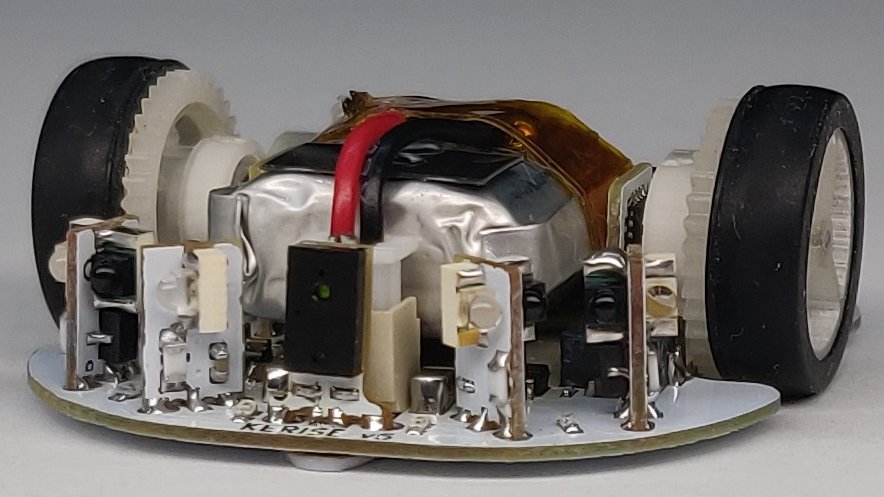
Few things fascinate a simple Hackaday writer as much as a tiny robot. We’ve been watching [Keri]’s utterly beguiling micromouse builds for a while now, but the fifth version of the KERISE series (machine translation) of ‘bots takes the design to new heights.

A family of mice v1 (largest) to v5 (smallest)

For context, micromouse is a competition where robots complete to solve mazes of varying pattern but standardized size by driving through them with no guidance or compute offboard of the robot itself. Historically the mazes were 3 meter squares composed of a 16 x 16 grid of cells, each 180mm on a side and 50mm tall, which puts bounds on the size of the robots involved.

What are the hallmarks of a [Keri] micromouse design? Well this is micromouse, so everything is pretty small. But [Keri]’s attention to detail in forming miniaturized mechanisms and 3D structures out of PCBs really stands out. They’ve been building micromouse robots since 2016, testing new design features with each iteration. Versions three and four had a wild suction fan to improve traction for faster maneuvering, but the KERISE v5 removes this to emphasize light weight and small size. The resulting vehicle is a shocking 30mm x 32mm! We’re following along through a translation to English, but we gather that [Keri] feels that there is still plenty of space on the main PCBA now that the fan is gone.

The KERISE v5 front end

The processor is a now familiar ESP32-PICO-D4, though the wireless radios are unused so far. As far as environmental sensing is concerned the v5 has an impressive compliment given its micro size. For position sensing there are custom magnetic encoders and a 3 DOF IMU. And for sensing the maze there are four side-looking IR emitter/receiver pairs and one forward-looking VL6180X laser rangefinder for measurements out to 100 or 150mm. Most of these sensors are mounted on little PCB ‘blades’ which are double sided (check out how the PCB shields the IR emitter from it’s receiver!) and soldered into slots perpendicular to the PCBA that makes up the main chassis. It goes without saying that the rest of the frame is built up of custom 3D printed parts and gearboxes.

If you’d like to build a KERISE yourself, [Keri] has what looks to be complete mechanical, electrical, and firmware sources for v1, v2, and v3 on their Github. To see the KERISE v5 dance on a spinning sheet of paper, check out the video after the break. You don’t want to miss it!

source https://hackaday.com/2020/12/06/these-micro-mice-have-macro-control/

A UV Curing Wand For Everyone

The average person’s experience with an ultraviolet (UV) wand is getting a cavity at the dentist. However, anyone with a resin-based 3d printer knows how important a UV curing system is. Often times some spots on a print need a little bit of extra UV to firm up. [Mile] has set out to create an open-source UV curing wand named Photon that is cost-effective and easy to build.

What’s interesting here is that there are dozens if not hundreds of UV curing systems ranging from $5 LED flashlights to larger industrial flood systems. [Mile] dives right in and shows the trade-offs that those cheaper modules are making as well as what the commercial systems are doing that he isn’t. [Mile’s] Photon wand tries to be energy efficient with more irradiated power while staying at a lower cost. This is done by carefully selecting the CSP LEDs instead of traditional wire-bonded and making sure the light source is properly focused and cooled. From the clean PCB and slick case, it is quite clear that [Mile] has gone the extra step to make this production-friendly. Since there are two industry-standard wavelengths that resins cure at (364nm and 405nm), the LED modules in Photon are user-replaceable.

What we love about this project is looking past what is readily available and diving deep. First understanding the drawbacks and limitations of what is there, then setting a goal and pushing through to something different. This isn’t the first UV curing tool we’ve seen recently, so it seems there is a clear need for something better that’s what is out there today.

source https://hackaday.com/2020/12/06/a-uv-curing-wand-for-everyone/

A UV Curing Wand For Everyone

The average person’s experience with an ultraviolet (UV) wand is getting a cavity at the dentist. However, anyone with a resin-based 3d printer knows how important a UV curing system is. Often times some spots on a print need a little bit of extra UV to firm up. [Mile] has set out to create an open-source UV curing wand named Photon that is cost-effective and easy to build.

What’s interesting here is that there are dozens if not hundreds of UV curing systems ranging from $5 LED flashlights to larger industrial flood systems. [Mile] dives right in and shows the trade-offs that those cheaper modules are making as well as what the commercial systems are doing that he isn’t. [Mile’s] Photon wand tries to be energy efficient with more irradiated power while staying at a lower cost. This is done by carefully selecting the CSP LEDs instead of traditional wire-bonded and making sure the light source is properly focused and cooled. From the clean PCB and slick case, it is quite clear that [Mile] has gone the extra step to make this production-friendly. Since there are two industry-standard wavelengths that resins cure at (364nm and 405nm), the LED modules in Photon are user-replaceable.

What we love about this project is looking past what is readily available and diving deep. First understanding the drawbacks and limitations of what is there, then setting a goal and pushing through to something different. This isn’t the first UV curing tool we’ve seen recently, so it seems there is a clear need for something better that’s what is out there today.

source https://hackaday.com/2020/12/06/a-uv-curing-wand-for-everyone/

Hackaday Links: December 6, 2020

By now you’ve no doubt heard of the sudden but not unexpected demise of the iconic Arecibo radio telescope in Puerto Rico. We have been covering the agonizing end of Arecibo from almost the moment the first cable broke in August to a eulogy, and most recently its final catastrophic collapse this week. That last article contained amazing video of the final collapse, including up-close and personal drone shots of the cable breaking. For a more in-depth analysis of the collapse, it’s hard to beat Scott Manley’s frame-by-frame analysis, which really goes into detail about what happened. Seeing the paint spalling off the cables as they stretch and distort under loads far greater than they were designed for is both terrifying and fascinating.

Exciting news from Australia as the sample return capsule from JAXA’s Hayabusa2 asteroid explorer returned safely to Earth Saturday. We covered Hayabusa2 in our roundup of extraterrestrial excavations a while back, describing how it used both a tantalum bullet and a shaped-charge penetrator to blast regolith from the surface of asteroid 162173 Ryugu. Samples of the debris were hoovered up and hermetically sealed for the long ride back to Earth, which culminated in the fiery re-entry and safe landing in the midst of the Australian outback. Planetary scientists are no doubt eager to get a look inside the capsule and analyze the precious milligrams of space dust. In the meantime, Hayabusa2, with 66 kilograms of propellant remaining, is off on an extended mission to visit more asteroids for the next eleven years or so.

The 2020 Remoticon has been wrapped up for most of a month now, but one thing we noticed was how much everyone seemed to like the Friday evening Bring-a-Hack event that was hosted on Remo. To kind of keep that meetup momentum going and to help everyone slide into the holiday season with a little more cheer, we’re putting together a “Holiday with Hackaday & Tindie” meetup on Tuesday, December 15 at noon Pacific time. The details haven’t been shared yet, but our guess is that this will certainly be a “bring-a-hack friendly” event. We’ll share more details when we get them this week, but for now, hop over to the Remo event page and reserve your spot.

On the Buzzword Bingo scorecard, “Artificial Intelligence” is a square that can almost be checked off by default these days, as companies rush to stretch the definition of the term to fit almost every product in the neverending search for market share. But even those products that actually have machine learning built into them are only as good as the data sets used to train them. That can be a problem for voice-recognition systems; while there are massive databases of utterances in just about every language, the likes of Amazon and Google aren’t too willing to share what they’ve leveraged from their smart speaker using customer base. What’s the little person to do? Perhaps the People’s Speech database will help. Part of the MLCommons project, it has 86,000 hours of speech data, mostly derived from audiobooks, a clever source indeed since the speech and the text can be easily aligned. The database also pulls audio and the corresponding text from Wikipedia and other random sources around the web. It’s a small dataset, to be sure, but it’s a start.

And finally, divers in the Baltic Sea have dredged up a bit of treasure: a Nazi Engima machine. Divers in Gelting Bay near the border of Germany and Denmark found what appeared to be an old typewriter caught in one of the abandoned fishing nets they were searching for. When they realized what it was — even crusted in 80-years-worth of corrosion and muck some keys still look like they’re brand new — they called in archaeologists to take over recovery. Gelting Bay was the scene of a mass scuttling of U-boats in the final days of World War II, so this Engima may have been pitched overboard before by a Nazi commander before pulling the plug on his boat. It’ll take years to restore, but it’ll be quite a museum piece when it’s done.

source https://hackaday.com/2020/12/06/hackaday-links-december-6-2020/

Leaking Data By Ultrasound

Human ears are capable of perceiving frequencies from roughly 20 Hz up to 20 kHz, at least when new. Correspondingly, our audio hardware is designed more or less to target these frequencies. However, there’s often a little extra capability at the upper edges, which [Jacek] shows can be exploited to exfiltrate data.

The hack takes advantage of the fact that most computers can run their soundcards at a sample rate of up to 48 kHz, which thanks to the Nyquist theorem means they can output frequencies up to around 24 kHz — still outside the range of human hearing. Computers and laptops often use small speaker drivers too, which are able to readily generate sound at this frequency. Through the use of a simple Linux shell script, [Jacek] is able to have a laptop output Morse code over ultrasound, and pick it up with nothing more than a laptop’s internal microphone at up to 20 meters away.

[Jacek] enjoys exploring alternative data exfiltration methods; he’s previously experimented with Ethernet leaks on the Raspberry Pi. Of course, with any airgap attack, the real challenge is often getting the remote machine to run the exfiltration script when there’s no existing remote admin access to be had. Video after the break.

source https://hackaday.com/2020/12/06/leaking-data-by-ultrasound/

No-Battery Pressure Sensors For Bike Tyres

Finding out you’ve got a flat tyres halfway into a long ride is a frustrating experience for a cyclist. Maintaining the

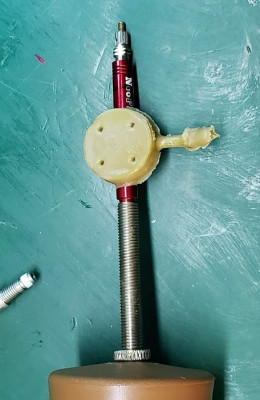
While the epoxy does a great job of sealing the PCB to the valve extension, the overmoulding process would likely be key to producing a product with shelf-quality fit and finish. This test run was done with 3D printed ABS moulds.

correct tyre pressures is key to a good ride, whether you’re stacking up the miles on the road or tackling tricky single track in the mountains. [CaptMcAllister] has put together a device that makes keeping an eye on your tyres easy.

The device consists of an ultra low power microcontroller from Texas Instruments, paired with a pressure sensor. Set up for Near Field Communication, or NFC, it’s designed to be powered by the smartphone that queries the microcontroller for a reading. We featured a prototype back in 2015 which required mounting the device within the inner tube of the tyre itself. However, this required invasive installation and the devices tended to wear out over time due to flex damaging the delicate copper coil antenna.

The new design consists of the same microcontroller hardware, but mounted in a modified valve extension that fits to the fill valve of the bicycle tyre. The PCB is directly epoxied on to the valve extension, ensuring air can’t leak out over time. The assembly is then overmoulded in an injection moulding process to provide further sealing and protection against the elements. This should help immensely in rough-and-tumble mountain biking applications.

The new device provides a simple screw-on solution for tire pressure monitoring that’s set and forget — no batteries required. [CaptMcAllister] is currently investigating options for a production run, and given the simple design, we imagine it couldn’t be too hard to rattle off a few hundred or thousand units. We could imagine it would also pair well with a microcontroller, NFC reader, and a display setup on the handlebars to give live readings where required. We look forward in earnest to seeing where this project goes next!

source https://hackaday.com/2020/12/06/no-battery-pressure-sensors-for-bike-tyres/

Parkinson’s Spoon uses Control Theory for Good

When we first saw [Barqunics’] design for a self-stabilizing spoon for people suffering from Parkinson’s disease, we wondered how well something like that could work. But take a look at the video below and you’ll see this does a fine job of responding to the user’s hand movements and keeping the spoon perfectly level through a wide range of motion.

There’s at least one commercial product that attempts to stabilize a spoon in the same way so that people suffering from that affliction can retain a measure of independence. This shows that you don’t need injection molding and factory made boards to prove the concept. An MPU6050 provides sensor information and two servo motors control the spoon using PID control.

PID — short for proportional, integral, derivative — is a way to adjust something to a desired point. For example, consider trying to heat a cup of water to 95 °C. If you simply turn the heater on full blast until you get to 95 °C, the water will actually get hotter because you’ll overshoot. Using PID, the amount of heating provided will depend on how far off you are now (proportional), how far off you’ve been over the long term (integral), and how much change you’ve effected recently (derivative). The same algorithm works for spoon-balancing and many other types of controls.

This isn’t the first bootstrapped assistive spoon project we’ve seen. We even looked at the commercial version, awhile back.

source https://hackaday.com/2020/12/06/parkinsons-spoon-uses-control-theory-for-good/

Ground Off Part Number Leads To Chip Detective Work

Sometimes when a piece of electronics lands on the bench, you find that its chips have their markings sanded off. The manufacturer is trying to make the task of the reverse engineer less easy, thus protecting their market. [Maurizio Butti] found an unexpected one in an electronic switch designed for remote control systems, it had the simple job of listening to the PWM signal from a receiver in a model aircraft or similar and opening or closing a FET.

From previous experience he suspected it might be a microcontroller from STC based on the location of power, ground, Rx, and Tx pins. This 8051-compatible device could be readily reprogrammed, so he has able to create his own firmware for it. He’s published the code and it’s pretty simple, as it simply replicates the original. He acknowledges that this might seem odd, but makes the point that it is left open for future upgrades such as for example repeatedly cycling the output as in a flashing light.

We don’t see so much of the STC chips here aside from one of their earlier offerings, but the 8051 core features here more regularly as it’s found in Nordic’s NRF24 series of wireless-capable chips.

source https://hackaday.com/2020/12/06/ground-off-part-number-leads-to-chip-detective-work/

Tiny Chain-Link Fence Made With Hand-Cranked Brilliance

Chain link fences are woven with a mechanism that is almost hypnotic to watch, so [Levsha] decided to build his own tiny hand-crank tabletop version to make tiny copper wire fences.

Chain link consist of a series of wires bent and woven in a zigzag pattern. The zigzag bends are made by winding the wire around a rotating flat plate inside a stationary tube with a spiral slot in the side to keep the spacing of the bends consistent. [Levsha]’s version is roughly 1/10 scale of the real thing, and only does the bending and winding parts. Linking the bent wire together is up to the operator. All the components were machined on a lathe and CNC router, and beautifully finished and assembled on a wood base. The hardest part was the tube with the spiral slot, which took a few attempts to get right. [Levsha] initially tried to use steel wire, but it was too stiff and caused the winding mechanism to lock up. 0.4 mm copper wire turned out to be the best choice.

Although there is no practical use for this device that we can see, the craftsmanship is excellent, and it is one of those videos that reminds us how badly we want some machine tools.

Fine attention to detail is really what makes videos like this enjoyable to watch. Wee seen a few other such project, like a beautiful scratch-built lathe, or a pneumatic powered drone that can’t fly.

source https://hackaday.com/2020/12/06/tiny-chain-link-fence-made-with-hand-cranked-brilliance/

DIY Automated Roller Blinds

Controlling blinds using off the shelf solutions can be expensive – more so if you have multiple blinds you want to control. [HumanSkunk87] felt the cost was too high, so they designed a controller to automatically open and close the blinds.

The main part of this build is a motor and a ball chain gear – a wheel that captures the balls of a ball chain so that the chain can be pulled. The wheel was designed using Fusion3D and then printed out. The motor requires enough power to pull the chain — [HumanSkunk87] figures it needs to be able to pull about 2.5kg in order to raise the blind. After giving up on stepper motors, a DC motor with a worm gear was found to have enough torque to work. A WEMOS D1 Mini controls the motor controller that drives the ball chain wheel. Two micro switches tell the WEMOS when to stop at the bottom and top of the window.

The WEMOS is programmed using ESPHome and it connects to [HumanSkunk87]’s HomeAssistant to complete the automation. Check out the descriptions in the link for the parts and the code used to run everything. There are many other creative ways to open your blinds, It’s even possible to automate curtains instead of blinds.

View post on imgur.com

[via reddit]


source https://hackaday.com/2020/12/05/diy-automated-roller-blinds/

Slot Machine Has a Handle on Fun

For some reason, when slot machines went digital, they lost their best feature — the handle. Who wants to push a button on a slot machine, anyway? Might as well just play video poker. [John Bradnam] seems to agree, and has built an open-source three-color matrix slot machine complete with handle.

In this case, you’ll be losing all of your nickels to an Arduino Pro Mini. The handle is an upgrade to an earlier slot machine project that uses three 8×8 matrices and a custom driver board. When the spring-loaded handle is pulled, it strikes a micro switch to spins the reels and then snaps back into place. Between each pull, the current score is displayed across the matrix. There’s even a piezo buzzer for victory squawks. We only wish the button under the handle were of the clickier variety, just for the feels. Check out the short demo video after the break.


If you’re not a gambler, you could always turn your slot machine into a clock.

source https://hackaday.com/2020/12/05/slot-machine-has-a-handle-on-fun/

Hybrid Respirator Uses Repurposed Filters

With the coronavirus raging worldwide, 2020 has seen major shortages of personal protective equipment impact healthcare workers and individuals alike. This has led many to improvise their own solutions. One of the more complete offerings we’ve seen is this hybrid respirator build from [Ben Howard].

[Ben’s] build goes above and beyond the usual craft project masks. It uses a laser-cut chipboard frame to fit three HEPA filters, originally designed for the Roomba robotic vacuum cleaner. Two are used for exhalation, while one is used for inhalation. A small blower fan is installed with the intake filter, to provide mild positive pressure when breathing in. The assembly is wrapped up in fabric, using layers of spandex, fleece, and ripstop nylon to provide the best possible seal against the wearer’s face.

It’s a build that should appeal to those who want to breathe cleaner air and also protect others from exhaled particles that can spread respiratory viruses. We’ve seen all kind of masks hit the scene this year; the graphene-impregnated variety is one of the more interesting designs. Still, one can hope that future years lead to less reliance on such measures!

source https://hackaday.com/2020/12/05/hybrid-respirator-uses-repurposed-filters/

A Retro Camcorder Upgraded as a Raspberry Pi HQ Camera

In 2020 when we carry an all-purpose computer and data terminal able to store our every thought and deed on a global computer network, it’s easy to forget that once upon a time we were excited by the simpler things. Take the camcorder for example, back in the 1990s the idea of a complete video recording solution that captured moving images on tape cartridges and fit in the palm of your hand was a very big deal indeed, and camcorders as we called them in those innocent times were a prized posession. Now they’re a $0.50 find a Goodwill, which is how [Dustin] picked up the RCA camcoder he’s converting into something altogether more modern. He’s gutted it and upgraded it by removing the analogue innards and retaining only the case and lens assembly to put around a Raspberry Pi and associated HQ camera module.

Opening the camcorder up reveals a ton of miniaturised analogue circuitry, but once the original assemblies are removed it’s relatively straightforward to put the Pi camera on the rear of the lens unit. There’s plenty of space for the Pi in the box, and he’s putting a touchscreen on the outside.

Sadly the camcorder’s original tiny CRT is no longer working, else that would have been the ultimate retro viewfinder. Still we hope to see some tinkering on that part of the project since those little CRTS make for delightful hacks. The project is very much a work in progress, but should serve that these once ubiquitous devices are now in the realm of the throwaway.

This isn’t the first such conversion we’ve seen with a Raspberry Pi, the original camera module is a handy fit to an 8mm movie camera.

source https://hackaday.com/2020/12/05/a-retro-camcorder-upgraded-as-a-raspberry-pi-hq-camera/

Sufficiently Advanced Technology and Justice

Imagine that you’re serving on a jury, and you’re given an image taken from a surveillance camera. It looks pretty much like the suspect, but the image has been “enhanced” by an AI from the original. Do you convict? How does this weigh out on the scales of reasonable doubt? Should you demand to see the original?

AI-enhanced, upscaled, or otherwise modified images are tremendously realistic. But what they’re showing you isn’t reality. When we wrote about this last week, [Denis Shiryaev], one of the authors of one of the methods we highlighted, weighed in the comments to point out that these modifications aren’t “restorations” of the original. While they might add incredibly fine detail, for instance, they don’t recreate or restore reality. The neural net creates its own reality, out of millions and millions of faces that it’s learned.

And for the purposes of identification, that’s exactly the problem: the facial features of millions of other people have been used to increase the resolution. Can you identify the person in the pixelized image? Can you identify that same person in the resulting up-sampling? If the question put before the jury was “is the defendant a former president of the USA?” you’d answer the question differently depending on which image you were presented. And you’d have a misleading level of confidence in your ability to judge the AI-retouched photo. Clearly, informed skepticism on the part of the jury is required.

Unfortunately, we’ve all seen countless examples of “zoom, enhance” in movies and TV shows being successfully used to nab the perps and nail their convictions. We haven’t seen nearly as much detailed analysis of how adversarial neural networks create faces out of a scant handful of pixels. This, combined with the almost magical resolution of the end product, would certainly sway a jury of normal folks. On the other hand, the popularity of intentionally misleading “deep fakes” might help educate the public to the dangers of believing what they see when AI is involved.

This is just one example, but keeping the public interested in and educated on the deep workings and limitations of the technology that’s running our world is more important than ever before, but some of the material is truly hard. How do we separate the science from the magic?

source https://hackaday.com/2020/12/05/sufficiently-advanced-technology-and-justice/

ARM and X86 Team Up in No Compromise Cyberdeck

Over the last couple of years the cyberdeck community has absolutely exploded. Among those who design and build these truly personal computers there are no hard rules, save perhaps making sure the final result looks as unconventional as possible. But one thing that’s remained fairly consistent is the fact that these machines are almost exclusively powered by the Raspberry Pi. Unfortunately, that means they often leave something to be desired in terms of raw performance.

But [MSG] had a different idea. His cyberdeck still has the customary Raspberry Pi inside, but it also has an i7 Intel NUC that can be fired up at the touch of a button. He says it’s the best of both worlds: an energy efficient ARM Linux platform for mobile experimentation, and a powerful x86 Windows box for playing games working from home. It’s the hacker equivalent of business in the front, party in the back.

With a KVM connected to the custom Planck 40% mechanical keyboard and seven inch LCD, [MSG] can switch between both systems on the fly. Assuming he’s got the juice anyway; while the Raspberry Pi 4 and LCD is able to run on a pair of 18650 batteries, the cyberdeck needs to be plugged in if he wants to use the power-hungry NUC. If he ditched the Pi he could potentially load up the case with enough batteries to get the Intel box spun up, but that would be getting a little too close to a conventional laptop.

The whole plurality theme doesn’t stop at the computing devices, either. In addition to the primary LCD, there’s also a 2.13 inch e-paper display and a retro-style LED matrix courtesy of a Pimoroni Micro Dot pHAT. With a little Python magic behind the scenes, [MSG] is able to display things like the system temperature, time, and battery percentage even when the LCD is powered down.

In a post on the aptly-named Cyberdeck Cafe, [MSG] talks about how seeing the VirtuScope built by [bootdsc] inspired him to start working towards his own personal deck, and where he hopes to take the idea from here. The unique USB expansion bay behind the screen holds particular promise, and it sounds like a few add-on modules are already in the works. But of course, it wouldn’t be a true cyberdeck if it wasn’t constantly being improved and redesigned. Come to think of it, that makes at least two rules to live by in this community.

source https://hackaday.com/2020/12/05/arm-and-x86-team-up-in-no-compromise-cyberdeck/

FM Radio from Scratch using an Arduino

Building radio receivers from scratch is still a popular project since it can be done largely with off-the-shelf discrete components and a wire long enough for the bands that the radio will receive. That’s good enough for AM radio, anyway, but you’ll need to try this DIY FM receiver if you want to listen to something more culturally relevant.

Receiving frequency-modulated radio waves is typically more difficult than their amplitude-modulated cousins because the circuitry necessary to demodulate an FM signal needs a frequency-to-voltage conversion that isn’t necessary with AM. For this build, [hesam.moshiri] uses a TEA5767 FM chip because of its ability to communicate over I2C. He also integrated a 3W amplifier into this build, and everything is controlled by an Arduino including a small LCD screen which displays the current tuned frequency. With the addition of a small 5V power supply, it’s a tidy and compact build as well.

While the FM receiver in this project wasn’t built from scratch like some AM receivers we’ve seen, it’s still an interesting build because of the small size, I2C capability, and also because all of the circuit schematics are available for all of the components in the build. For those reasons, it could be a great gateway project into more complex FM builds.

source https://hackaday.com/2020/12/04/fm-radio-from-scratch-using-an-arduino/