For as many of them as we’ve seen, we still love a good persistence of vision display project. There’s something fascinating about the combination of movement and light creating the illusion of solid surfaces, and there’s always fun to be had in electromechanical aspects of a POV build. This high-resolution spherical POV display pushes all those buttons, and more.
Called “Flicker” for obvious reasons by its creator [Dan Foisy], this POV display started with a pretty clear set of goals in terms of resolution and image quality, plus the need to support animated images, all in a spherical form factor. These goals dictated the final form of the display — a PCB disc spinning vertically. The shaft has the usual slip rings for power distribution and encoders for position feedback. The PCB, though, is where the interesting stuff is.
[Dan] chose to use an FPGA to slice and dice the images, which are fed from a Raspberry Pi’s HDMI port, to the LED drivers. And the LEDs themselves are pretty slick — he found parts with 1.6 mm lead spacing, making them a perfect fit for mounting on the rim of the PCB rather than on either side. A KiCAD script automated the process of laying out the 256 LEDs and their supporting components as evenly as possible, to avoid imbalance issues.
The video below shows Flicker in action — there are a few problem pixels, but on the whole, the display is pretty stunning. We’ve seen a few other spherical POV displays before, but none that look as good as this one does.
The big story this week is Solarwinds. This IT management company supplies network monitoring and other security equipment, and it seems that malicious code was included in a product update as early as last spring. Their equipment is present in a multitude of high-profile networks, like Fireeye, many branches of the US government, and pretty much any other large company you can think of. To say that this supply chain attack is a big deal is an understatement. The blame has initially been placed on APT42, AKA, the Russian hacking pros.
The last wrinkle to this story is the interesting timing of the sale of some Solarwinds stock by a pair of investment firms. If those firms were aware of the breech, and sold their shares before the news was made public, this would be a classic case of illegal insider trading.
So a bit of history, what is a WordPress pingback? It’s simple. Say you have a wordpress blog where you write a new article. Someone else likes your article enough to link to it on their own WordPress site. If both sites have pingbacks enabled, the wordpress instances will automatically talk to each other, and generate a pingback comment on the original article. It’s clever, but of limited use, so many sites have the feature disabled.
The problem is that an attacker can connect directly to the pingback API of many WordPress sites, and announce a new pingback originating from the target site. Each of those sites will then attempt to open a new connection to verify the pingback announcement, effectively amplifying a DDoS attack.
You might think that your content distribution service will take care of you. Cloudflare and the like can be thought of as a distributed cache. You request a protected site, and the DNS name resolves to one of Cloudflare’s IP addresses. Cloudflare uses some magic routing tricks (anycast) to automatically route your connection to their nearest datacenter. Cloudflare can then proxy your connection, or serve cached content during a traffic spike. An important element to this protection is that the public doesn’t connect directly to your server’s IP address, which protects you from the DDoS.
Unless a WordPress site is set up particularly carefully, the pingback response gives away the true IP address, allowing for a trivial bypass. Ouch.
The Worst Security Problem
Cisco got hit by the oldest security bug in the book, back in 2018. This unpatchable vulnerability led to the deletion of 456 VMs and over 16,000 Webex accounts. The price tag on the cleanup came to over two million dollars. What vulnerability was this? An employee with admin privileges and a grudge. Five months after leaving Cisco, [Sudish Ramesh] still had valid credentials, which doesn’t reflect well on Cisco’s security practices around HR. Ramesh will serve two years in prison, as well as paying a small fine.
Enhance! — er, Depixelate?
It’s the classic movie trope, present everywhere from Blade Runner to MacGyver — “Zoom in on that section and enhance the image.” (Warning, tvtropes.) We love to make fun of this one, but it turns out, there are a few limited instances where it’s possible. [Sipke Mellema] put the work in, and brings us the Depix tool. Designed to make a best-guess at the original text behind a pixelated image, assuming that you know the font that it’s written in and some other details, Depix could be a useful tool for extracting passwords and other data from poorly redacted images. For more details, check his write-up.
Thanks to [Sevron Kitsune] for sending this one in in the tips line!
OAuth Can Go Wrong
OAuth seems to be one of the better security protocols to be developed in the last few years. You have a Google or Facebook account, and you can use that single sign on to authenticate everywhere. OAuth can even be used to run your own identity service. As good as the protocol is, there are ways for it to go wrong. The good folks at Portswigger bring us a good overview of OAuth 2.0, as well as the common pitfalls.
When it comes to competitive fighting games, having the right controller in your hands can make the difference between victory and defeat. Many tournaments have strict rules around controllers for this very reason. [Akaki Kuumeri] has recently put together a custom controller, aimed at maximising performance in Super Smash Brothers: Ultimate on the Nintendo Switch. (Video, embedded below.)
The build is assembled in an attractive 3D-printed body, made to be reminiscent of the original Nintendo Entertainment System controller. Inside, a cheap third-party Gamecube controller is used to interface with the console. Mechanical keyboard switches are used to replace the buttons and even the analog sticks, with a special modifier key that enables walking and running across the stage. This is pulled off with a handful of resistors emulating the intermediate position of the analog sticks, and makes pulling off advanced combos easier.
Belgian, Italian, and Australian researchers are proposing that by stacking semiconductor sheets, they should be able to observe superconducting behavior at what is known as “kitchen temperature” or temperatures you could get in a household freezer. That’s not quite as good as room temperature, but it isn’t bad, either. The paper is a bit technical but there is a very accessible write-up at Sci-Tech Daily that gives a good explanation.
Superconductors show no loss but currently require very cold temperatures outside of a few special cases. The new material exploits the idea that an electron and a hole in a semiconducting material will have a strong attraction to each other and will form a pair known as an exciton. Excitons move in a superfluid state which should exhibit superconductivity regardless of the temperature. However, the attraction is so strong that in conventional materials, the excitons only exist for the briefest blip of time before they cancel each other out.
The new material has layers and manages the holes in one layer and the electrons in the other. The pair will move together but are not in danger of canceling each other out as they stay on their layer. As you might guess, that means one layer has p doping and the next layer will have n doping.
The team claims that their predictions are they will see superconducting currents in these 3D stacks at temperatures up to -3 °C which is only about 26 °F. Cold, but not crazy cold. Liquid nitrogen, for example, is nearly -200 °C and dry ice is about -80 °C. Compared to those, -3 °C is almost balmy.
(Editor’s note: it’s -3 °C outside our house right now.)
The researchers also think they will be able to raise the temperature with more work. As of now, the paper is just a proposal, although the researchers say that building the stacks doesn’t rely on any unusual technology. It will be interesting to see if anyone can implement superconducting materials using this method.
While building this lattice of alternating semiconductor seems hard, we’ve seen hackers do harder things. It is possible to make superconducting ceramic that works at relatively high temperatures. We have seen one room-temperature superconductor, but there’s a big catch to it that makes it pretty impractical for real use.
There are many racing wheels on the market for the budding sim enthusiast. Unfortunately, lower end models tend to have a limited range of motion and ship with cheap plastic wheels that don’t feel good in the hand. As always, if what’s on the shelf doesn’t meet your needs, you can always build your own. [ilge]’s DIY racing wheel build is a great example of how to go about it.
It’s a no-frills build, with an Arduino Leonardo doing the USB Human Interface Device duties in this case. It reads a standard 10K potentiometer via an analog input to determine wheel position. To enable a realistic 900 degrees of motion, unlike the standard 270 degree rotation of the potentiometer, [ilge] uses 3D printed gears of 15 and 54 degrees respectively. This also has the benefit of allowing the wheel to be mounted to a stout bearing for smooth motion. The steering wheel itself is a high quality drift wheel from MOMO, and the benefit of building your own setup is that you can choose whatever wheel you like to taste.
It’s a simple build both mechanically and electronically speaking, but one that serves as a great entry into building a DIY sim for the beginner. We’d love to see further upgrades towards force feedback, or even shift paddles added on the back. Those looking to go all out can even consider building a motion platform. Video after the break.
Many bash scripts start out as something quick and dirty but then become so useful that they live for years, indeed sometimes seeing more use than our traditional programs. Now that you can even run bash well under Windows (although, you’ve always been able to run it there if you tried), there are even more opportunities for your five-minute bash script to proliferate. [Maciej] decided he was tired of always having to patch up his quick and dirty scripts to be more robust, so he created (and shared) his boilerplate template for scripts.
Probably most of us have at least some basic template we start with, even if it just our last script project. What’s nice about [Maciej’s] template is that he documents what’s going on with each part of it. It is also relatively short without a lot of excess stuff. Of course, you’ll probably customize it, but it is a great place to start.
The template has a good shell selection line using env and also sets up basic error handling. That includes a trap function that runs on termination and argument parsing including a help message. There’s a oneliner that sets the current directory to the script directory (although you don’t always want that).
The only real excesses in the template are the short example script and a function that sets colors based on the terminal type that you might not need for your script. However, it is nice to print warnings with highlight color when they are not redirected and this code handles that for you.
If you don’t want to bother yanking the code from a web page, the template is also on a GitHub Gist. As [Maciej] points out, there are other similar projects out there, but some of them are a bit bloated.
The inlet and exhaust valve timing of a piston engine plays a large role in engine performance. Many modern automotive engines have some sort of variable valve timing, but the valves are still mechanically coupled together and to the crankshaft. This means that there is always a degree of performance compromise for various operating conditions. [Wesley Kagan] took inspiration from Koenigsegg’s camless Freevalve technology, and converted a Harbour Freight engine to camless technology for individual valve control.
By eliminating the traditional camshaft and giving each valve its actuator, it is possible to tune valve timing for any specific operating condition or even for each cylinder. A cheap single-cylinder engine is a perfect testbed for the garage hacker. [Wesley] removed the rocker arms and pushrods, and replaced the stock rocker cover with a 3D printed rocker cover which contains two small pneumatic pistons that push against the spring-loaded valve stems. These pistons are controlled by high-speed pneumatic solenoid valves. A reference timing signal is still required from the crankshaft, so [Wesley] built a timing system with a 3D printed timing wheel containing a bunch of embedded magnets and being sensed by a stationary Hall effect sensor. An Arduino is used to read the timing wheel position and output the control signals to the solenoid valves. With a rough timing program he was able to get the engine running, although it wouldn’t accelerate.
In the second video after the break, he makes a digital copy of the engine’s existing camshaft. Using two potentiometers in a 3D printed bracket, he measured push rod motion for a complete engine cycle. He still plans to add position sensing for each of the valves, and after a bit more work on the single-cylinder motor he plans to convert a full-size car, which we are looking forward to.
People have been tinkering with cars in their garage for as long as cars have existed. [Lewin Day] has been doing a series on how to get into tinkering with cars yourself. With all the electronics in modern automobiles, messing around with their software has become a growing part of this age-old pastime.
When we first laid eyes on Keybon, the adaptive macro keyboard, we sort of wondered what the big deal was. It honestly looked like any other USB macro keyboard, with big icons for various common tasks on the chunky keys. But looks can be deceiving, and [Max.K] worked a couple of surprises into Keybon.
First of all, each one of Keybon’s buttons is actually a tiny OLED display, making the keycaps customizable through software. Each of the nine 0.66″ displays has a resolution of 64 x 48 pixels, which is plenty for all kinds of icons, and each is mounted over an SMD pushbutton switch. He had to deal with the problem of the keycaps just wobbling around atop the switch button without depressing it; this was solved with a 3D-printed cantilever frame that forced the keycaps to pivot only in one axis, resulting in clean, satisfyingly clicky keypresses.
The other trick that Keybon has is interactivity. By itself, it boots up with a standard set of icons and sends the corresponding keystrokes over USB. But when used with its companion Windows application, the entire macro set can be switched out to accommodate whatever application is being used. This gives the users access to custom macros for a web browser, EDA suite, CAD applications, or an IDE. The app supports up to eight macro sets and can be seen in action in the video below.
We love the look and the functionality [Max.K] has built into Keybon, but we wonder if e-ink displays would be a good choice for the keycaps too. They’re available for a song as decommissioned store shelf price tags now, and they might be nice since the icon would persist without power.
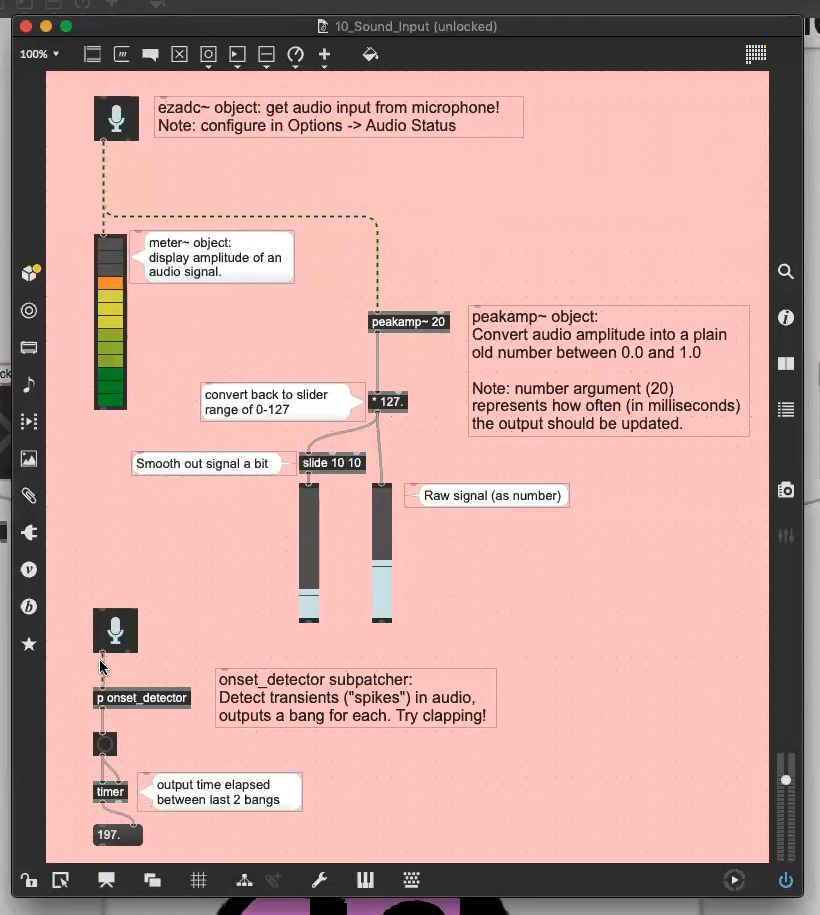
When you want to quickly pull together a combination of media and user interaction, looking to some building blocks for the heavy lifting can be a lifesaver. That’s the idea behind Max, a graphical programming language that’s gained a loyal following among anyone building art installations, technology demos (think children’s museum), and user Kiosks.
Guy Dupont gets us up to speed with a how to get started with Max workshop that was held during the 2020 Hackaday Remoticon. His crash course goes through the basics of the program, and provides a set of sixteen demos that you can play with to get your feet under you. As he puts it, if you need sound, video, images, buttons, knobs, sensors, and Internet data for both input and output, then Max is worth a look. Video of the workshop can be found below.
Head on over to the workshop page where you can download the examples from the files section. Max is a commercial program which has a free trial period. Guy points out that its sibling program, Pure Data, is free and open source, it will run on almost anything, but comparing it to Max is like like driving stick versus driving an automatic. If you have first-hand experience using both of these programs, we’d love to hear your thoughts in the comments below.
Anyone familiar with graphical programming languages will feel right at home with Max. Blocks are dragged into a workspace and connected with wires between inputs and outputs. There are a multitude of blocks available for everything you can possibly imagine. Included in some demonstrations are advanced interactivity features like accepting commands from chat messages on Twitch, triggering from IFTTT, and adding interactivity between different Max instances on the same wireless network.
The example shown in the image at the top of this article is webcam input. When Guy holds up the pink sign it unmutes his microphone, when he puts it down it is muted again. It’s the digital equivalent of having a talking stick during your Zoom calls. Guy’s recommendation for those looking for hardware interactivity is to utilize serial, or leverage MIDI control.
This quick start will get anyone up and running, no matter your previous experience. As an example of the shenanigans you can eventually get yourself into, Guy closes the session by showing off a shift register he modeled in Max, all the way down to the NAND gates. If you want to check out some of Guy’s other work, we loved his Bonnaroo Jukebox and his recreation of the Wurlitzer note visualizer.
[Proper Printing] has been trying to 3D print rims for his car for quite some time. However, the size of the print has led to problems with filament spools running out prior to completion. This led to endless headaches trying to join several smaller lengths of filament in order to make a single larger spool. After his initial attempts by hand failed, a rig was built to try and bring some consistency to the process. (Video, embedded below.)
The rig consists of a heater block intended to melt the ends of two pieces of filament so that they can be fused together. A cheap set of brass calipers was modified with a tube in order to form a guide for the filament, ensuring that it gets bonded neatly without flaring out to a larger size. Fan coolers are then placed either side of the heating area to avoid turning the whole filament into a hot mess.
Unfortunately, the rig simply didn’t work. The initial design simply never got the filament hot enough, with the suspicion being that heat was instead being dumped into the calipers instead of the filament itself. Modifications to reduce this sadly didn’t help, and in the end, more success was had by simply holding a lighter below a length of brass tube.
A trick famously used by Nintendo to keep its slowly aging SNES console fresh against newer competition was to produce new games with extra support chips in the cartridge to push out hitherto-unthinkable performance. Chips such as the famous SuperFX gave us 3D polygonal graphics, but it would have been a few more years before even much faster platforms could achieve real-time ray-tracing. Nintendo may not have managed it, but here in 2020 [Ben Carter] has a SNES on his bench rendering a complex 3D ray-traced world.
Ray tracing refers to the practice of rendering a scene with accurate lighting by tracing the rays of light that go towards making each pixel. It can achieve results that even approach photorealism, but it remains an extremely computationally intensive job for any computer. To do this with a SNES he hasn’t resorted to a modern computer like the excellent Raspberry-Pi-based NES DOOM cartridge, instead he’s tried to create something that might have graced a Nintendo custom chip back in the 1990s. The tool may be a thoroughly modern DE10-Nano FPGA dev board, but what it implements could conceivably have been made as a 1990s-spec ASIC. In it are three ray tracing cores that do the work, but the final rendering is handled by the SNES itself. At 200 x 160 pixels and 256 colours it’s no graphical powerhouse, but the maximum frame rate of 30 fps makes it no slouch for the day. The video below the break supplies extra detail.
Perhaps an unexpected takeaway of the rendered scene lies in how of its era it seems. It comes from an age in which checker-board floors, mirrored balls, and azure blue skies looked so futuristic, and just before the likes of Toy Story redefined what the general public might expect from 3D rendering. If Nintendo had produced a ray-traced SNES game using a chip like this one, it would have certainly been a defining moment for gaming in that decade.
One of the most common complaints fielded by the agents of Big Candy regards the non-homogenous nature of their products. Skittles and M&Ms are two egregious offenders in this area, and it’s left up to the determined consumer to handle sorting these candies themselves. Of course, you can always do it by hand, but as we all know – machines will do the work.
This Skittle sorter is the creation of [Lewis] of [DIY Machines], and it’s a build targeted at the beginner level. Constructed out of cardboard, it uses a pair of servos to handle the transport of the candies into their requisite colored bins, via a rotating disc and chute. Skittles are scanned with a TCS34725 color scanner hooked up to an Arduino Nano, which changes the angle of the output chute to dump the candy in the proper location. The hopper is able to handle a standard 180 gram bag of Skittles without problems.
[Lewis] does a great job explaining each stage of the build, from the mechanical and electronic side of things, to the required calibrations to make everything play together nicely. The project teaches builders a multiude of useful lessons, like how to use limit switches and other concepts of automation. We’ve featured [Lewis] on these pages before, too; his stylish shelf clock is a particular delight. Video after the break.
It sounds like the start of a joke, but what’s the difference between taking Cornell’s CS6120 online and in-person? The instructor, [Adrian Samspon] notes that the real class has deadlines, an end-of-semester project, and a discussion board that is only open to real-life students. He also notes that you only earn “imagination credits.”
Still, this is a great opportunity to essentially audit a PhD-level computer science class on a fascinating topic. The course consists of videos, papers, and open source projects using LLVM and a custom internal representation based on JSON that is made for the class. It is all open source, too. You do however need access to the papers, some of which are behind paywalls. Your local library can help if you can’t otherwise find copies of the papers.
The topics include internal representation of programs, simple optimizations, data flow, global analysis and optimization, and practical topics about LLVM. With the basics out of the way, the class turns to some classic topics like loop optimization and alias analysis, along with some more modern topics like memory management and dynamic compilers.
The final part has some more cutting-edge reading about concurrency and parallelism. We suspect you should probably be pretty fluent in programming languages before attempting this course. Of course, not everyone needs to know how to write a compiler. But if you do, this is great stuff. Even if you don’t, it is a chance to expand your understanding of how things work under the hood.
You don’t have to wire this to the ignition or anything — all you have to do is power it with the cigarette lighter (or straight-up outlet, if you’re lucky). Every time you turn the key, this pump powers up and performs a little song to remind you to use it. Electronically speaking, it couldn’t be simpler — an Arduino UNO reads your hand from the distance sensor and activates a servo that dispenses three short pumps of isopropyl alcohol. Check it out in action after the break.
If you have a pile of old VHS tapes collecting dust in your attic or basement that you know you’ll never watch again, either because all of those movies are available on DVD or a streaming service, or because you haven’t had a working VCR since 2003, there might be a way of putting them to good use in another way. With the miles of tape available in just a few cassettes, [Brother] aka [Andrew] shows us how to use that tape as filament for a 3D printer. (Video, embedded below.)
The first step of the build is to actually create the filament. He uses a purpose-built homemade press to spin several tapes into one filament similar to how cotton or flax is spun into yarn. From there the filament is simply fed into the 3D printer and put to work. The tape filament needs to be heated higher than a standard 3D printer filament so he prints at a much slower rate, but the resulting product is indistinguishable from a normal print except for the color. It has some other interesting properties as well, such as retaining its magnetism from the magnetic tape, and being a little more brittle than PET plastic although it seems to be a little stronger.
While the VHS filament might not be a replacement for all plastic 3D prints, it’s still a great use for something that would likely otherwise head straight to the landfill. There are some other uses for this magnetic tape as well, like if you wanted to build a DIY particle accelerator.
To get started, [Daniel] fitted X-acto blades to a brushless outrunner motor, and tested their ability to cut grass. Satisfied with the performance, he built a trailer to tow behind an RC tank mounted to such a setup, with some success. With the concept beginning to bear fruit, he went with a clean sheet design for maximum performance.
The final build relies on an RC rock-crawler chassis, fitted with a brushless motor using field oriented control for maximum torque at low speeds. This allows the RC mower to slowly push through the grass without overwhelming the cutter heads. As for the cutter heads, the final rig has eight motors, each sporting two blades to chop down long field grasses with impunity.
The BBC has a long history of supporting technology education in schools. The BBC Micro introduced a whole generation of students to computers, and more recently the Micro:bit is teaching today’s children about embedded systems. [Michael Klements] happens to be a grown adult, but has whipped up a project using the little board to build an automatic plant watering system.
Rather than a simple timer-based system, [Michael’s] build measures soil moisture using a capacitive sensor. This has the benefit of not needing to be in direct contact with the soil as resistive sensors do, and thus the sensor can be built in a fashion that minimises corrosion. The Micro:bit reads this sensor using an analog input, and displays the moisture level using its inbuilt LED matrix as a graph. Once levels dip below a set threshold, a pump is activated to deliver water to the plant until the soil is suitably moist again.
It’s a simple project, but one that would be a great way to teach students about interfacing with pumps and sensors, as well as the basics of control systems. [Michael] also notes that further work could involve interfacing multiple Micro:bits using their onboard wireless hardware. We’ve thus far seen the Micro:bit used for everything from handheld gaming to gumball delivery. Video after the break.
Hovercraft never really caught on as regular transportation, but they are very cool. The Saunders-Roe SR.N1 was the very first practical example of the type, and served as a research vehicle to explore the dynamics of such vehicles. [mr_fid] was looking for a lockdown project, and set about crafting a radio controlled replica of his own.
The build is crafted out of a canny combination of plywood and balsa, the latter substituted in sections within the plywood hull to save weight. A pair of brushless outrunner motors are mounted in the central duct to provide lift, fitted with counter-rotating propellers in order to avoid torque effects on handling. Steering is via puff ports a la the original design, which allows the craft to spin very quickly in place to much amusement and no practical effect. The skirt is of a colorful design, carefully assembled out of polyurethane-coated nylon.
While it’s not the quickest way to build a hovercraft, it’s all the more beautiful for its attention to the details and function of the original prototype craft. We particularly like the sharp handling thanks to the puff port design. If you’re looking for a weirder design however, consider this Coanda Effect build. Video after the break.
At some point or another, many of us have tried to see how much of our digital lives could be accessed from the comfort of a terminal. We’ve tried Alpine for email, W3M for web browsing, and even watched Star Wars via telnet. But, in the increasingly socially-distant world we find ourselves in today, we find ourselves asking: what about video calling?
As you may have guessed, {Andy]’s solution replaces the conventional video stream we’re all used to with realtime animated ASCII art. The system works by capturing a video stream from a webcam, “compressing” each pixel by converting it into an ASCII character, and stuffing the entire frame into a TCP packet. Each client is connected to a server (meeting room?) which coordinates the packets, sending them back and forth appropriately.
As impressive as it is impractical, the only area in which the project lacks is in audio. [Andy] suggests using Discord to solve that, but here’s hoping we see subtitles in version 2! Will AsciiZOOM be replacing our favorite videoconferencing suite any time soon? No. Are we glad it exists? You betcha.
Modular synthesizers, with their profusion of knobs and switches and their seemingly insatiable appetite for patch cables, are wonderful examples of over-complexity — the best kind of complexity, in our view. Play with a synthesizer long enough and you start thinking that any kind of sound is possible, limited only by your imagination in hooking up the various oscillators, filters, and envelope generators. And the aforementioned patch cables, of course, which are always in short supply.
Luckily, though, patch cables and the modules they connect can be virtualized, and in his 2020 Remoticon workshop, Jonathan Foote showed us all the ways VCV Rack can emulate modular synthesizers right on your computer’s desktop. The workshop focused on VCV Rack, where Eurorack-style synthesizer modules are graphically presented in a configurable rack and patched together just like physical synth modules would be.
John started out with a simple example using the most basic of synth modules: a voltage-controlled oscillator (VCO), a voltage-controlled filter (VCF), and an envelope generator. Along with a few housekeeping modules to drive the computer’s soundcard and to use the keyboard as, well, a keyboard, participants were able to quickly assemble their virtual synthesizers. More complex instruments can be built up from literally thousands of available modules — some free, some open source, and some premium modules available for a reasonable price.
Hats off to Jonathan for a great workshop and handling my off-the-cuff question about reproducing the “Sound of the 80s” question with aplomb. It turned out not to be possible with the stock VCV Rack modules, but it still reminded us a bit of the gated reverb drum sound of “In the Air Tonight” and other classics. Make sure you check out not only the video of the workshop but the workshop page too, which has all the details you need to get started with your own virtual synthesizer.
We as humans are limited in the ways we can look at things ourselves, and rely on on the different perspectives and insights of others to help make sense of things. All it takes is one person to look at a data set and find something completely different that changes our fundamental perception of the universe.
Cecilia Payne-Gaposchkin discovered that stars are primarily made of hydrogen and helium, at a time when astronomers thought that the Sun and the Earth had no significant elemental differences. She proposed that hydrogen wasn’t only more common, but that it was a million times more common.
This outlandish conclusion was roundly dismissed at the time, and she aquiesced to tone down some of the conclusions in her thesis, until her findings were widely confirmed a few years later. Truly groundbreaking, the discovery of the prevalence of hydrogen in stars paved the way for our current understanding of their role as the furnaces for the heavier elements that we know and love, and indeed are composed of.
Meteorites, Comets, and Bee Orchids
Cecilia Helena Payne was born May 10th, 1900 in Wendover, Buckinghamshire, England. She was one of three children born to Emma and Edward, a lawyer, historian, and musician. Her father died with she was four years old, leaving her mother to raise the family alone.
The Great Daylight Comet of 1910 as seen by Lowell Observatory. Image via Wikipedia
When she was only a few years old, Cecilia saw a meteorite blazing across the sky and was completely fascinated. She continued to show interest in science after discovering a bee orchid growing in an orchard when she was eight. This was exciting because the bee orchid is native to the Mediterranean and not to England. A few years later, she witnessed both the Great Daylight Comet of 1910 and Halley’s Comet in the same year.
Cecilia’s mother moved them to London when she was twelve for the sake of her brother Humfry’s education. Cecilia’s education focused on languages, but she was more interested in botany and other sciences. She studied botany and math on her own, and one of her teachers took her to museums and lent her books to read.
At 17, Cecilia was finally able to study science. She transferred to St. Paul’s Girls’ School and spent two years there before earning a scholarship to Newnham College at Cambridge University. She majored in botany, physics, and chemistry, but her interest shifted solidly to astronomy after she attended a lecture about solar eclipses and relativity by Sir Arthur Eddington that transformed her world picture.
Cecilia works at the observatory. Harvard College Observatory via Brain Pickings
The Stuff of Stars
Cecilia’s options in the UK were limited to teaching, so she looked for grants that would get her to the States. After graduating Newnham in 1923, she won a National Research Fellowship which she used to pursue graduate studies at Radcliffe, a women’s college associated with Harvard, which was then restricted to men.
Her academic advisor persuaded her to write a doctoral thesis even though there was no astronomy program at Radcliffe or Harvard. The common belief at the time was that the Earth and the Sun were composed of the same elements. By studying tens of thousands of spectroscopic images, Cecilia determined instead that the Sun and other stars are mostly made of hydrogen and helium. She established a stellar temperature scale and accurately related the spectral classes of stars to their temperatures by applying astronomer Meghnad Saha’s ionization theory. Her thesis was published in 1925, and she was granted the first PhD in astronomy from both Harvard University and Radcliffe College.
Several faculty members and astronomers including Henry Norris Russell found her thesis problematic because it was so unorthodox. They went as far as forcing her to add a statement saying that the presence of hydrogen in the Sun was highly unlikely. Within four years, Cecilia’s findings were independently verified by others, including Henry Norris Russell. Ironically, Russell is often credited for this discovery, though he credited Cecilia in his own paper.
After receiving her doctorate, Cecilia studied high-luminosity stars in order to better understand the structure of the Milky Way. In 1933, she met astrophysicist Sergei I. Gaposchkin in Germany. They married the following year and settled in a small town near Harvard, eventually raising three children. Cecilia had become an American citizen in 1931 and helped Sergei obtain his citizenship a few years later.
Cecilia and Sergei worked together to survey all of the stars brighter than the tenth magnitude. Together with Sergei and her assistants, Cecilia made over 3,000,000 observations of variable stars. She published several books, including The Stars of High Luminosity (1930), Variable Stars (1938) and Variable Stars and Galactic Structure (1954). Cecilia retired from teaching in 1966, but continued doing research and editing books and journals that came out of Harvard Observatory. Various people did what they could over the years to elevate her standing at Harvard. She was the first woman promoted to full professor, and the first woman to head a department. She fought for equal pay, but spent much of her teaching career earning the same wage as an entry-level male professor.
Cecilia won plenty of awards in her lifetime, and was the first recipient of the Annie Jump Cannon award in astronomy. She died December 7th, 1979 in Cambridge, Massachusetts, but will always be remembered for her huge contribution to science.
It’s hardly a secret any more at this point that today’s game consoles from Microsoft and Sony are essentially AMD gaming rigs packed up into a custom package and with tweaked system software. So it’s not too surprising that enterprising hackers got the Playstation 2 emulator of RetroArch running on an Xbox Series X|S game console despite Microsoft’s attempts to stop them. (Video, embedded below.)
It’s possible to sneak the RetroArch app past Microsoft’s security checkpoints by shelling out $19 for a Microsoft Developer Account, setting up Developer Mode on the XBox console, and getting the Universal Windows Platform (UWP) port of RetroArch from the official website. This has the advantage of it being a blessed-by-the-Redmond-gods approach. But one cannot play retail games in Developer Mode and large games due to a 2 GB limit.
More recently, a hacker by the name of [tunip3] found a flaw in the Xbox app distribution system which allows one to download a ‘retail’ version of RetroArch. This involves marking the RetroArch app as ‘private’, allowing it to skip a review by Microsoft. People whose email address is on a whitelist are then granted download permission for that app on their Xbox console. The advantage of this ‘retail’ approach is that it does not feature the 2 GB filesize limits. The disadvantage is that Microsoft is free to take the app down and ban [tunip3]’s developer account.
My Way Versus the Highway
A lot about this comes down to a simple question of ‘why?’. Why even jump through these hoops to set up a limited, possibly ToS-breaking emulator on what is ultimately a gaming PC running Windows 10? Why not use that Raspberry Pi 4 or NUC system that’s been giving you sad eyes for the past months from where it’s been stuffed into a dusty corner?
The Playstation 5 should be more than capable of playing back any Playstation title from the original PSX up to the PS4 based on its hardware specifications, yet it only offers compatibility for the PS4. The XBox Series X|S on the other hand provides such backwards compatibility along the entire lineage of XBox games, though not encompassing every single title released for a Microsoft console.
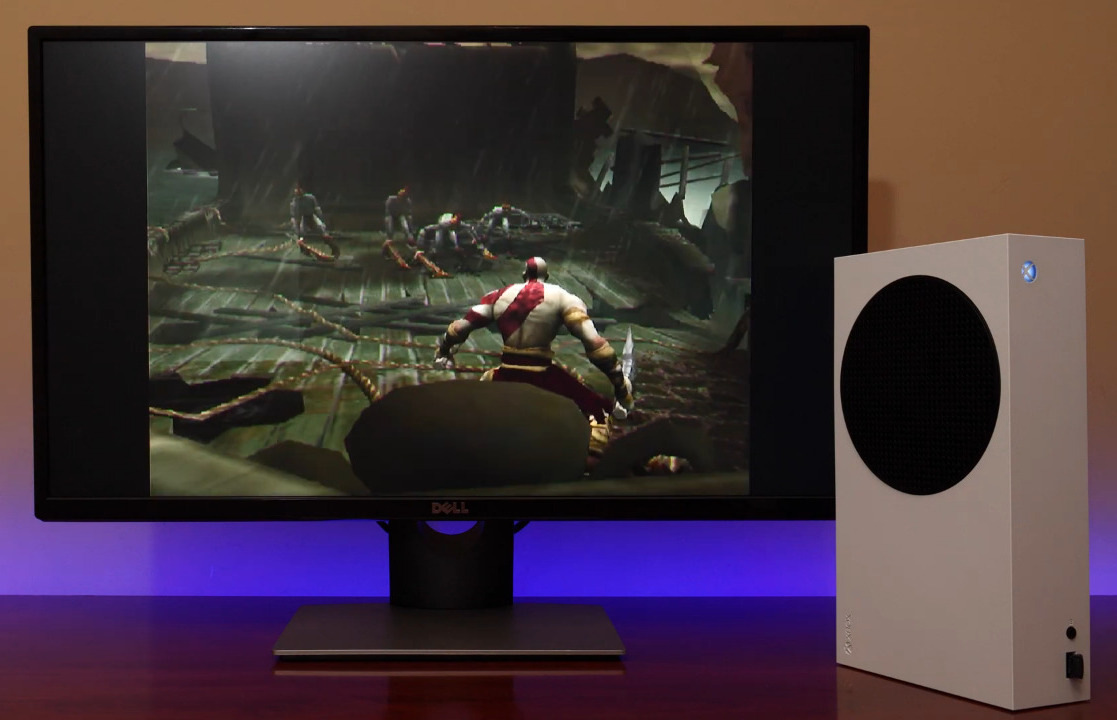
Xbox One S playing PS2 version of the original God of War
Nintendo has had an on/off relationship with running their own blessed emulator solution, such as the Virtual Console (VC) for the Wii, Wii U and 3DS which even offered access to games for non-Nintendo games. In early 2019 Nintendo began to phase out VC, however. In many ways the VC service was the closest to what RetroArch offers today, even if one could argue about the limited number of games on the VC and the per-game cost to purchase the right to play it.
All of this makes one wonder what would happen if a multi-system emulation service like the VC but with a much larger game library and lower cost (e.g. full access as part of a PSN subscription) were to be made available. Would this be enough to make people stop trying to get RetroArch on their brand-new gaming console?
It’s Called a PC
The skeptic’s view on this matter would probably be that with the lack of truly exclusive titles for video game consoles these days one might as well stick an SFF rig of one’s choosing underneath the TV, running one’s favorite OS and controlled by a controller of one’s choice. Using Steam’s Big Picture feature or equivalent, it’d be about as easy to control with a controller as if it was a dedicated game console.
Installing RetroArch and similar on this gaming rig would be a snap too, and would likely work better for more emulators as it’d be a standard Windows or Linux system for which RetroArch is actually optimized. Bringing us back again to why people try to do things the hard way instead.
A large appeal of game consoles and other walled gardens has often been the ‘it just works’ selling point. Buy it, set it up, turn it on, start playing games, stop worrying. Not everyone is into debugging obscure compatibility and driver issues on Windows, or figuring out why launching a game makes the Xserver crash on Linux. From there it is appealing to still make it do a bit more, at least to those who even as a child found ourselves staring at devices and feeling that familiar itch in one’s fingers.
In the end it’s essentially just about hobbies and interests. Even if Microsoft et al. would vehemently disagree, nobody is harmed if someone hacks their PS5 or XSX|S to run additional software on it that brings the owner of said hardware more pleasure. That’s after all how most interesting hacks are born.
It’s hardly a secret any more at this point that today’s game consoles from Microsoft and Sony are essentially AMD gaming rigs packed up into a custom package and with tweaked system software. So it’s not too surprising that enterprising hackers got the Playstation 2 emulator of RetroArch running on an Xbox Series X|S game console despite Microsoft’s attempts to stop them. (Video, embedded below.)
It’s possible to sneak the RetroArch app past Microsoft’s security checkpoints by shelling out $19 for a Microsoft Developer Account, setting up Developer Mode on the XBox console, and getting the Universal Windows Platform (UWP) port of RetroArch from the official website. This has the advantage of it being a blessed-by-the-Redmond-gods approach. But one cannot play retail games in Developer Mode and large games due to a 2 GB limit.
More recently, a hacker by the name of [tunip3] found a flaw in the Xbox app distribution system which allows one to download a ‘retail’ version of RetroArch. This involves marking the RetroArch app as ‘private’, allowing it to skip a review by Microsoft. People whose email address is on a whitelist are then granted download permission for that app on their Xbox console. The advantage of this ‘retail’ approach is that it does not feature the 2 GB filesize limits. The disadvantage is that Microsoft is free to take the app down and ban [tunip3]’s developer account.
My Way Versus the Highway
A lot about this comes down to a simple question of ‘why?’. Why even jump through these hoops to set up a limited, possibly ToS-breaking emulator on what is ultimately a gaming PC running Windows 10? Why not use that Raspberry Pi 4 or NUC system that’s been giving you sad eyes for the past months from where it’s been stuffed into a dusty corner?
The Playstation 5 should be more than capable of playing back any Playstation title from the original PSX up to the PS4 based on its hardware specifications, yet it only offers compatibility for the PS4. The XBox Series X|S on the other hand provides such backwards compatibility along the entire lineage of XBox games, though not encompassing every single title released for a Microsoft console.
Xbox One S playing PS2 version of the original God of War
Nintendo has had an on/off relationship with running their own blessed emulator solution, such as the Virtual Console (VC) for the Wii, Wii U and 3DS which even offered access to games for non-Nintendo games. In early 2019 Nintendo began to phase out VC, however. In many ways the VC service was the closest to what RetroArch offers today, even if one could argue about the limited number of games on the VC and the per-game cost to purchase the right to play it.
All of this makes one wonder what would happen if a multi-system emulation service like the VC but with a much larger game library and lower cost (e.g. full access as part of a PSN subscription) were to be made available. Would this be enough to make people stop trying to get RetroArch on their brand-new gaming console?
It’s Called a PC
The skeptic’s view on this matter would probably be that with the lack of truly exclusive titles for video game consoles these days one might as well stick an SFF rig of one’s choosing underneath the TV, running one’s favorite OS and controlled by a controller of one’s choice. Using Steam’s Big Picture feature or equivalent, it’d be about as easy to control with a controller as if it was a dedicated game console.
Installing RetroArch and similar on this gaming rig would be a snap too, and would likely work better for more emulators as it’d be a standard Windows or Linux system for which RetroArch is actually optimized. Bringing us back again to why people try to do things the hard way instead.
A large appeal of game consoles and other walled gardens has often been the ‘it just works’ selling point. Buy it, set it up, turn it on, start playing games, stop worrying. Not everyone is into debugging obscure compatibility and driver issues on Windows, or figuring out why launching a game makes the Xserver crash on Linux. From there it is appealing to still make it do a bit more, at least to those who even as a child found ourselves staring at devices and feeling that familiar itch in one’s fingers.
In the end it’s essentially just about hobbies and interests. Even if Microsoft et al. would vehemently disagree, nobody is harmed if someone hacks their PS5 or XSX|S to run additional software on it that brings the owner of said hardware more pleasure. That’s after all how most interesting hacks are born.
It’s hardly a secret any more at this point that today’s game consoles from Microsoft and Sony are essentially AMD gaming rigs packed up into a custom package and with tweaked system software. So it’s not too surprising that enterprising hackers got the Playstation 2 emulator of RetroArch running on an Xbox Series X|S game console despite Microsoft’s attempts to stop them. (Video, embedded below.)
It’s possible to sneak the RetroArch app past Microsoft’s security checkpoints by shelling out $19 for a Microsoft Developer Account, setting up Developer Mode on the XBox console, and getting the Universal Windows Platform (UWP) port of RetroArch from the official website. This has the advantage of it being a blessed-by-the-Redmond-gods approach. But one cannot play retail games in Developer Mode and large games due to a 2 GB limit.
More recently, a hacker by the name of [tunip3] found a flaw in the Xbox app distribution system which allows one to download a ‘retail’ version of RetroArch. This involves marking the RetroArch app as ‘private’, allowing it to skip a review by Microsoft. People whose email address is on a whitelist are then granted download permission for that app on their Xbox console. The advantage of this ‘retail’ approach is that it does not feature the 2 GB filesize limits. The disadvantage is that Microsoft is free to take the app down and ban [tunip3]’s developer account.
My Way Versus the Highway
A lot about this comes down to a simple question of ‘why?’. Why even jump through these hoops to set up a limited, possibly ToS-breaking emulator on what is ultimately a gaming PC running Windows 10? Why not use that Raspberry Pi 4 or NUC system that’s been giving you sad eyes for the past months from where it’s been stuffed into a dusty corner?
The Playstation 5 should be more than capable of playing back any Playstation title from the original PSX up to the PS4 based on its hardware specifications, yet it only offers compatibility for the PS4. The XBox Series X|S on the other hand provides such backwards compatibility along the entire lineage of XBox games, though not encompassing every single title released for a Microsoft console.
Xbox One S playing PS2 version of the original God of War
Nintendo has had an on/off relationship with running their own blessed emulator solution, such as the Virtual Console (VC) for the Wii, Wii U and 3DS which even offered access to games for non-Nintendo games. In early 2019 Nintendo began to phase out VC, however. In many ways the VC service was the closest to what RetroArch offers today, even if one could argue about the limited number of games on the VC and the per-game cost to purchase the right to play it.
All of this makes one wonder what would happen if a multi-system emulation service like the VC but with a much larger game library and lower cost (e.g. full access as part of a PSN subscription) were to be made available. Would this be enough to make people stop trying to get RetroArch on their brand-new gaming console?
It’s Called a PC
The skeptic’s view on this matter would probably be that with the lack of truly exclusive titles for video game consoles these days one might as well stick an SFF rig of one’s choosing underneath the TV, running one’s favorite OS and controlled by a controller of one’s choice. Using Steam’s Big Picture feature or equivalent, it’d be about as easy to control with a controller as if it was a dedicated game console.
Installing RetroArch and similar on this gaming rig would be a snap too, and would likely work better for more emulators as it’d be a standard Windows or Linux system for which RetroArch is actually optimized. Bringing us back again to why people try to do things the hard way instead.
A large appeal of game consoles and other walled gardens has often been the ‘it just works’ selling point. Buy it, set it up, turn it on, start playing games, stop worrying. Not everyone is into debugging obscure compatibility and driver issues on Windows, or figuring out why launching a game makes the Xserver crash on Linux. From there it is appealing to still make it do a bit more, at least to those who even as a child found ourselves staring at devices and feeling that familiar itch in one’s fingers.
In the end it’s essentially just about hobbies and interests. Even if Microsoft et al. would vehemently disagree, nobody is harmed if someone hacks their PS5 or XSX|S to run additional software on it that brings the owner of said hardware more pleasure. That’s after all how most interesting hacks are born.
The first person shooter genre found its feet in the PC world, relying on the holy combination of the keyboard and mouse for input. Over time, consoles have refined their own version of the experience, and the gamepad has become familiar territory for many FPS fans. [Tech Yesterday] was a die hard controller player, but after trying out a mouse, didn’t want to go back. Instead, he built a truly impressive hybrid device.
The build begins with a standard Xbox 360 wired controller, somewhat of a defacto standard for PC gamepads. The left analog stick and triggers remain untouched, however the face buttons are all relocated using mechanical keyboard switches. The D-pad has been relocated to the left hand side with tactile switches, and the right analog stick removed entirely. In its place, a cut-down optical mouse is used on a flat 4″x4″ mousepad attached to the controller, strapped to the player’s thumb.
The resulting controller combines the benefit of analog stick movement and the precision aiming of a mouse. We’re amazed at how comfortable the controller looks to use, particularly in the improved second revision. While currently only used on PC, we can imagine such controllers shaking up the console FPS scene in a serious way.

 [Dan] chose to use an FPGA to slice and dice the images, which are fed from a Raspberry Pi’s HDMI port, to the LED drivers. And the LEDs themselves are pretty slick — he found parts with 1.6 mm lead spacing, making them a perfect fit for mounting on the rim of the PCB rather than on either side. A KiCAD script automated the process of laying out the 256 LEDs and their supporting components as evenly as possible, to avoid imbalance issues.