The city of Oldsmar, Florida was the source of disturbing news this week, among reports that someone gained unauthorized access to a water treatment facility. In an era where more systems than ever are connected to the Internet, the story is a sobering one for the vast majority of people reliant on grid utilties.
The hacker was first noticed to have gained remote access to a computer system at the plant at 8 a.m. on February 5. An operator at a workstation controlling chemical dosing at the plant observed a remote connection, though did not initially raise the alarm as such access is common practice at the facility for troubleshooting purposes. However, at 1:30 pm, the hacker connected again, this time commanding the dosing system to raise levels of sodium hydroxide in the water from 100 to 11,000 ppm – dangerous levels that would make the city’s water unsafe to drink. The increased level command was immediately overridden by the operator, who then raised the alarm.
The city notes that other safeguards such as pH monitors at the plant would have triggered in the event the original intrusion went undetected. However, the event raises renewed questions about the level of security around critical utility systems connected to the internet. In the last decade, cyberattacks on physical infrastructure have become a reality, not a vague future threat.
Nothing’s known yet about the perpetrator, or how secure the system was (or wasn’t?) before the event. It’s been long known that a lot of infrastructure is simply connected to the internet, as Dan Tentler has been showing us since at least 2012. (Video, ranting.) Indeed, it’s amazing that we’ve seen so few malicious attacks.
Here at Hackaday we’re always exited to see hacks that recycle our favorite childhood consoles into something new and interesting. In that context, it’s not so uncommon to see mods which combine new and unusual control methods with old devices in ways that their manufacturers never intended. What [Mike Choi] has built with the Labo Fit Adventure Kit is the rare hack that combines radically new control schemes with a modern console: without actually modifying any hardware.
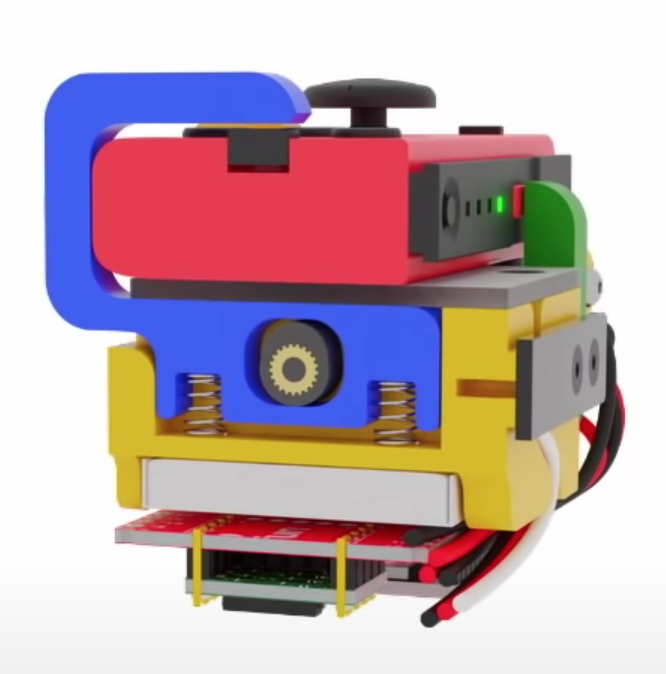
Face button pusher in blue
In short, the Labo Fit Adventure Kit lets the player play Mario Kart on the Nintendo Switch by riding a stationary exercise bike, steering with a wheel, and squeezing that wheel to use items. The Fit Kit combines the theme of Labo, Nintendo’s excellent cardboard building kit for the Nintendo Switch with the existing Ring-Con accessory for the unrelated Nintendo game Ring Fit Adventure plus a collection of custom hardware to tie it all together. That hardware senses cadence on the stationary bike, watches for the user to squeeze the handheld wheel controller, and translates those inputs to button presses on the controller to play the game.
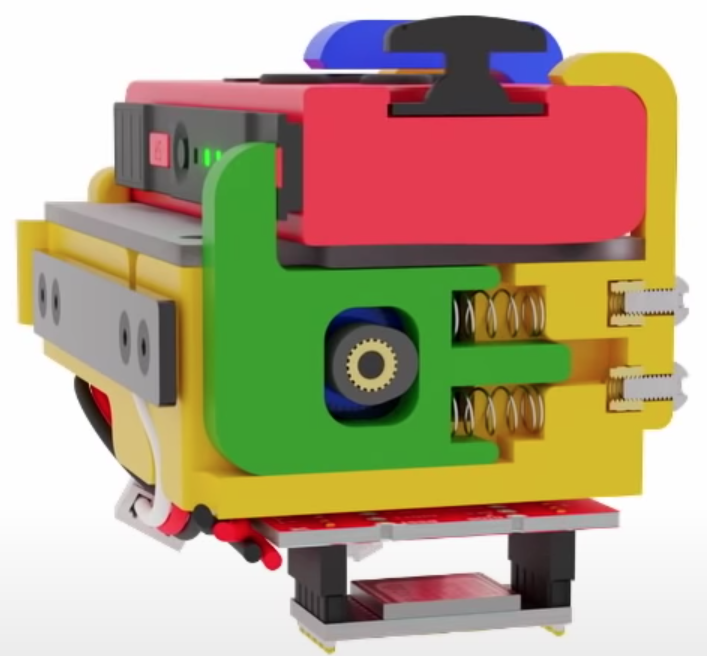
Shoulder button pusher in green
The most fascinating element of this project is the TAPBO module which adapts the Joy-Con controller to remote input. The module includes electronics, actuators, and a clever mechanical design to allow it to be mounted to the Ring-Con in place of an unmodified Joy-Con. Electrically the components will be familiar to regular Hackaday readers; there is a breakout board for a Teensy which also holds an XBee module to receive inputs remotely and drive a pair of servos. The entire module is described in detail starting at 4:42 in the video.
Mechanically the TAPBO relies on a pair of cam-actuated arms which translate rotational servo motion into linear action to press shoulder or face buttons. The module directly measures flex of the Ring-Con with an added flexible resistor and receives cadence information from another module embedded in the stationary bike via Zigbee. When these inputs exceed set thresholds they drive the servos to press the appropriate controller buttons to accelerate or use an item.
We’ve focused pretty heavily on the technical aspects of this project, but this significantly undersells the level of polish and easy to understand documentation [Mike] has produced. It includes a TAPBO Amiibo in customized packaging, and more. Check out the full video to get the complete scope of this project.
Here at Hackaday we’re always exited to see hacks that recycle our favorite childhood consoles into something new and interesting. In that context, it’s not so uncommon to see mods which combine new and unusual control methods with old devices in ways that their manufacturers never intended. What [Mike Choi] has built with the Labo Fit Adventure Kit is the rare hack that combines radically new control schemes with a modern console: without actually modifying any hardware.
Face button pusher in blue
In short, the Labo Fit Adventure Kit lets the player play Mario Kart on the Nintendo Switch by riding a stationary exercise bike, steering with a wheel, and squeezing that wheel to use items. The Fit Kit combines the theme of Labo, Nintendo’s excellent cardboard building kit for the Nintendo Switch with the existing Ring-Con accessory for the unrelated Nintendo game Ring Fit Adventure plus a collection of custom hardware to tie it all together. That hardware senses cadence on the stationary bike, watches for the user to squeeze the handheld wheel controller, and translates those inputs to button presses on the controller to play the game.
Shoulder button pusher in green
The most fascinating element of this project is the TAPBO module which adapts the Joy-Con controller to remote input. The module includes electronics, actuators, and a clever mechanical design to allow it to be mounted to the Ring-Con in place of an unmodified Joy-Con. Electrically the components will be familiar to regular Hackaday readers; there is a breakout board for a Teensy which also holds an XBee module to receive inputs remotely and drive a pair of servos. The entire module is described in detail starting at 4:42 in the video.
Mechanically the TAPBO relies on a pair of cam-actuated arms which translate rotational servo motion into linear action to press shoulder or face buttons. The module directly measures flex of the Ring-Con with an added flexible resistor and receives cadence information from another module embedded in the stationary bike via Zigbee. When these inputs exceed set thresholds they drive the servos to press the appropriate controller buttons to accelerate or use an item.
We’ve focused pretty heavily on the technical aspects of this project, but this significantly undersells the level of polish and easy to understand documentation [Mike] has produced. It includes a TAPBO Amiibo in customized packaging, and more. Check out the full video to get the complete scope of this project.
Here at Hackaday we’re always exited to see hacks that recycle our favorite childhood consoles into something new and interesting. In that context, it’s not so uncommon to see mods which combine new and unusual control methods with old devices in ways that their manufacturers never intended. What [Mike Choi] has built with the Labo Fit Adventure Kit is the rare hack that combines radically new control schemes with a modern console: without actually modifying any hardware.
Face button pusher in blue
In short, the Labo Fit Adventure Kit lets the player play Mario Kart on the Nintendo Switch by riding a stationary exercise bike, steering with a wheel, and squeezing that wheel to use items. The Fit Kit combines the theme of Labo, Nintendo’s excellent cardboard building kit for the Nintendo Switch with the existing Ring-Con accessory for the unrelated Nintendo game Ring Fit Adventure plus a collection of custom hardware to tie it all together. That hardware senses cadence on the stationary bike, watches for the user to squeeze the handheld wheel controller, and translates those inputs to button presses on the controller to play the game.
Shoulder button pusher in green
The most fascinating element of this project is the TAPBO module which adapts the Joy-Con controller to remote input. The module includes electronics, actuators, and a clever mechanical design to allow it to be mounted to the Ring-Con in place of an unmodified Joy-Con. Electrically the components will be familiar to regular Hackaday readers; there is a breakout board for a Teensy which also holds an XBee module to receive inputs remotely and drive a pair of servos. The entire module is described in detail starting at 4:42 in the video.
Mechanically the TAPBO relies on a pair of cam-actuated arms which translate rotational servo motion into linear action to press shoulder or face buttons. The module directly measures flex of the Ring-Con with an added flexible resistor and receives cadence information from another module embedded in the stationary bike via Zigbee. When these inputs exceed set thresholds they drive the servos to press the appropriate controller buttons to accelerate or use an item.
We’ve focused pretty heavily on the technical aspects of this project, but this significantly undersells the level of polish and easy to understand documentation [Mike] has produced. It includes a TAPBO Amiibo in customized packaging, and more. Check out the full video to get the complete scope of this project.
Cluster computing is a popular choice for heavy duty computing applications. At the base level, there are hobby clusters often built with Raspberry Pis, while the industrial level involves data centers crammed with servers running at full tilt. [greg] wanted something cheap, but with x86 support – so set about building a rig his own way.
The ingenious part of [greg]’s build comes in the source computers. He identified that replacement laptop motherboards were a great source of computing power on the cheap, with a board packing an i7 CPU with 16GB of RAM available from eBay for around £100, and with i5 models being even cheaper. With four laptop motherboards on hand, he set about stacking them in a case, powering them, and hooking them up with the bare minimum required to get them working. With everything wrapped up in an old server case with some 3D printed parts to hold it all together, he was able to get a 4-node Kubernetes cluster up and running for an absolute bargain price.
We haven’t seen spare laptop motherboards used in such a way before, but we could definitely see this becoming more of a thing going forward. The possibilities of a crate full of deprecated motherboards are enticing for those building clusters on the cheap. Of course, more nodes is more better, so check out this 120 Pi cluster to satiate your thirst for raw FLOPs.
When [Kai Robinson] found himself faced with the difficult task of saving as many Mac SE’s as he possibly could, the logical but daunting answer was to recreate the Mac SE logic board for machines that would otherwise be scrapped. These machines are over 30 years old and the PRAM battery often leaks, destroying parts and traces. Given that the logic board is a simple through-hole two-layer board, how hard could it be?
The first step was to get some reference photos so [Kai] set to desoldering everything on the board. The list of components and the age of solder made this an arduous task. Then a composite image was produced by merging images together using a scanner and some Inkscape magic. Rather than simply putting the pins in the right place and re-routing all the netlists, [Kai] elected instead to do a copy, trace for trace of the original SE board. [Kai] and several others on the forum have been testing the boards and tracking down the last few bugs and kinks in the design. An unconnected pin here and an improperly impedance matched resistor there. Hopefully, soon they’ll have Gerbers and design files ready for anyone should they need a new logic board PCB.
It’s no secret that we love the Macintosh SE here at Hackaday. We’ve seen new custom cases for it and now new PCBs for it. It does cause the mind to ponder though and wonder, what’s next?
Whether you’re live streaming builds or just want to take your project photography to the next level, you can’t beat an overhead camera setup. Unfortunately, they tend to be cumbersome and more often than not quite pricey. Looking for an affordable solution that could easily be moved out of the way when not in use, [Jay Doscher] had the clever idea of adapting a common VESA monitor arm to give his camera a bird’s eye view of the action.
If you think about it, one of these monitor arms is a nearly perfect base for a camera rig. They’re easily mounted to a desk or work bench, can be quickly repositioned by design, and perhaps best of all, you don’t have to spend a lot of money to get a decent one. A camera is also a far lighter and less awkward payload than the arm was designed to hold, so you don’t have to worry about it potentially dropping your expensive gear. Or cheap webcam, as the case may be.
All [Jay] had to do was come up with a way to securely mount his Sony A7R3 on the end of one. While there’s certainly a few ways you could solve this particular problem, he went the extruded plastic route and 3D printed a beefy adapter plate with the standard VESA bolt pattern. His Smallrig camera cage attaches to the plate, and thanks to a pair of press-fit bubble levels from McMaster Carr, he’s able to get everything lined up properly over the bench.
Of course, there’s an excellent chance you don’t have the same camera as [Jay]. But that doesn’t mean you can’t modify the design of his adapter to fit your own gear. To that end, he’s not only shared the final STLs, but he’s provided a link to the TinkerCAD project that you can actually edit right in the browser.
If you’ve got a light enough camera, you could put something similar together with PVC pipes or even an articulated arm intended for a desk lamp. But if you’ve got a DSLR or other full-sized camera, we think it’s more than worth the $30 USD one of these will cost you on Amazon to make sure your gear doesn’t end up smashing into the deck during a live stream.
Back in the 1970s, there were a huge variety of esoteric LED displays on the market. One of those was the DIP-packaged TIL311 from Texas Instruments, capable of displaying hexadecimal, from 0-9 and A-F. While these aren’t readily available anymore, the deep red plastic packages had some beauty to them, so [Alex] set about making a modern recreation.
The build consists of a small PCB fitted with 20 LEDs, and a STM8S microcontroller to run the show. This can be used to emulate the original decoder logic on the TIL311, or programmed with other firmware in order to test the display or enable other display functions. Where the project really shines however is in the visual presentation. [Alex] has been experimenting with potting the hardware in translucent red resin to properly emulate the look of the original parts, which goes a long way to getting that cool 70s aesthetic. Attention to detail is top notch, with [Alex] going so far as to carefully select pins that most closely match the square-cut design on the original TIL311 part.
For the past seven months, NASA’s newest Mars rover has been closing in on its final destination. As Perseverance eats up the distance and heads for the point in space that Mars will occupy on February 18, 2021, the rover has been more or less idle. Tucked safely into its aeroshell, we’ve heard little from the lonely space traveler lately, except for a single audio clip of the whirring of its cooling pumps.
Its placid journey across interplanetary space stands in marked contrast to what lies just ahead of it. Like its cousin and predecessor Curiosity, Perseverance has to successfully negotiate a gauntlet of orbital and aerodynamic challenges, and do so without any human intervention. NASA mission planners call it the Seven Minutes of Terror, since the whole process will take just over 400 seconds from the time it encounters the first wisps of the Martian atmosphere to when the rover is safely on the ground within Jezero Crater.
For that to happen, and for the two-billion-dollar mission to even have a chance at fulfilling its primary objective of searching for signs of ancient Martian life, every system on the spacecraft has to operate perfectly. It’s a complicated, high-energy ballet with high stakes, so it’s worth taking a look at the Seven Minutes of Terror, and what exactly will be happening, in detail.
Slow Down There, Buddy
To fully understand the enormity of the undertaking of landing a rover on Mars, the first thing to grasp is the scale of the problem. At the time of launch back in July, Mars and Earth were in optimal orbital positions relative to each other to keep the 480 million km crossing time to a minimum. But Perseverance was built for a very specialized mission, and therefore is headed for a very specific spot on the Red Planet.
Jezero Crater, Perseverance’s target, is an ancient lake bed about 40 km across, making it a very small target to hit on a plant the size of Mars. But that’s not the half of it. The northwest quadrant of Jezero shows evidence of a delta system, where the flow of water in the ancient river that once fed into the crater slowed and dropped its load of silt and sediment. On Earth, river deltas are highly productive biologically; planetary scientists think that if there was ever life there, the delta is the place to look. Landing near that delta system while avoiding boulder-strewn areas of the crater left mission planners aiming Perseverance at an ellipse only 7 km by 8 km.
The other problem of scale is the sheer size of Perseverance. Like the Curiosity rover that it’s based on, Perseverance is huge — about the size of a compact car. It measures three meters in length and has a mass of over 1,000 kilograms. Getting a package that size slowed down enough to land safely on the surface is a major challenge. But luckily, it’s a challenge that flight controllers have faced before, and one they conquered. Perseverance will follow nearly the same entry, descent, and landing (EDL) stages of the mission as Curiosity did back in 2012; NASA has produced a wonderful animation of the EDL phase of the mission that makes a great visual aid to the following play-by-play.
EDL starts when Perseverance sheds its supporting cruise stage, with the solar panels and maneuvering engines needed for the trip from Earth, along with two 70-kg balance masses, and first encounters the Martian atmosphere. The spacecraft will be traveling at about 20,000 km/h at that point, and will need to safely shed an enormous amount of kinetic energy in the next few minutes. The aeroshell covering the leading edge of the spacecraft will bear the brunt of this energy, turning the ablative heat shield of honeycomb aluminum and phenolic resin into a streak of plasma across the thin Martian upper atmosphere.
As on Earth, the Martian atmosphere is a turbulent place, and Perseverance will need to adjust its trajectory with continual thruster bursts to make sure it stays on track. During this guidance phase, which includes a maneuver called SUFR, or “straighten up and fly right”, the spacecraft will slow down to 1,500 km/h. It is at this point where the most dramatic part of the early EDL stage occurs: parachute deployment. The backshell of the spacecraft has a 21-m supersonic nylon and kevlar parachute tucked into it, which is deployed and inflates within 500 milliseconds. This produces over 311 kN of drag force on the spacecraft, slowing it further. If this all goes well, Perseverance will have survived about four and a half minutes of its seven-minute thrill ride.
The Skycrane
The final 150 seconds of EDL wil be somewhat calmer than the preceding breakneck race to 11 km above the Martian surface, but there are still more dramatic events in store for the mission. After the heat shield drops off the bottom of the package at an altitude of about 10 km, downward-looking cameras will begin the process of comparing what Perseverance sees below it to a high-resolution photo of its target, stored in the rover’s memory. Called Terrain Relative Navigation, this phase of EDL was not done for Curiosity, which was one reason the landing zone for the previous rover was so much larger (20 km by 25 km). TRN should allow Perseverance a landing accuracy of about 40 meters while avoiding any large obstacles.
The TRN process only takes about 20 seconds, during which time Perseverance will still be attached to its backshell. The parachute will have bled off as much energy as it can in the thin Martian atmosphere by this point, and at an altitude of 2,000 meters and a speed of about 300 km/h, the rover, attached to its powered descent stage, will release from the backshell. After free-falling for a few seconds, the eight hydrazine-fueled thrusters ringing the descent stage will fire for about the next 30 seconds, both slowing the spacecraft further as well as maneuvering it to the landing spot selected during TRN.
Now within 20 meters of the surface, and slowed to 25 km/h of vertical speed and almost zero horizontal speed, the single most dramatic and technically complex maneuver of the whole EDL process begins: skycrane deployment. In order to prevent contamination of the landing site by descent-stage propellants and to prevent kicking up dust which could obscure cameras and damage systems on the rover, the descent stage will instead lower the 1,000-kg rover to the surface on three nylon cords. The rover’s wheels, which have been folded under its hull for the last seven months, will finally rotate into the deployed position as the descent stage gently lowers the machine to the surface. If all goes well, the rover will make a six-point touchdown at a graceful vertical speed of 2 km/h.
I’ll Fly Away
Once the rover reports touchdown, explosive “guillotine” fittings on the upper hull fire to cut the skycrane cords and the small umbilical connecting it to the descent stage. Once the ascent stage confirms that it has cleanly separated from the rover, the descent engines will throttle up and gimbal to steer the descent stage away from the landing site at a 45-degree elevation, to maximize the distance between it and the rover. The descent stage will fly until its hydrazine tanks run dry, at which point the nearly inert vehicle will crash into the Martian surface well outside of Jezero crater.
Back at the landing site, Perseverance will be undertaking some early system checks and reporting back to controllers. Once we find out about it, 11 minutes later, Perseverance will be ready to start its ground operations and its primary mission of collecting samples for a future sample-return mission. As a side benefit, the 20-odd video cameras and microphones on the rover and in the descent stage, which will be active during the EDL, will have captured the landing in great detail. It’ll be weeks before that data is uploaded back to Earth, but when it’s finally ready for viewing, it ought to be pretty spectacular.
By the time you read this, Perseverance will be only about ten days away from its date with destiny. Coordinating the fast-paced, high-stakes events of the EDL phase of the mission seems almost like an impossible feat of engineering, especially given that it must be completed autonomously. If it weren’t for the precedent of Curiosity’s successful landing, there would be ample room for skepticism that this could be pulled off at all. There will certainly be a lot of tension in Mission Control and around the world as we watch events unfold on the live stream, but with a little luck, Perseverance will be able to repeat its cousin’s success and perhaps even exceed it.
As for coverage, NASA will be live-streaming the landing on their YouTube channel, so make sure to tune in if you can. The coverage will start on February 18, 2021 at 11:15 AM Pacific Standard Time (UTC-8). We’ve created a handy time zone converter and countdown so you don’t miss the show.
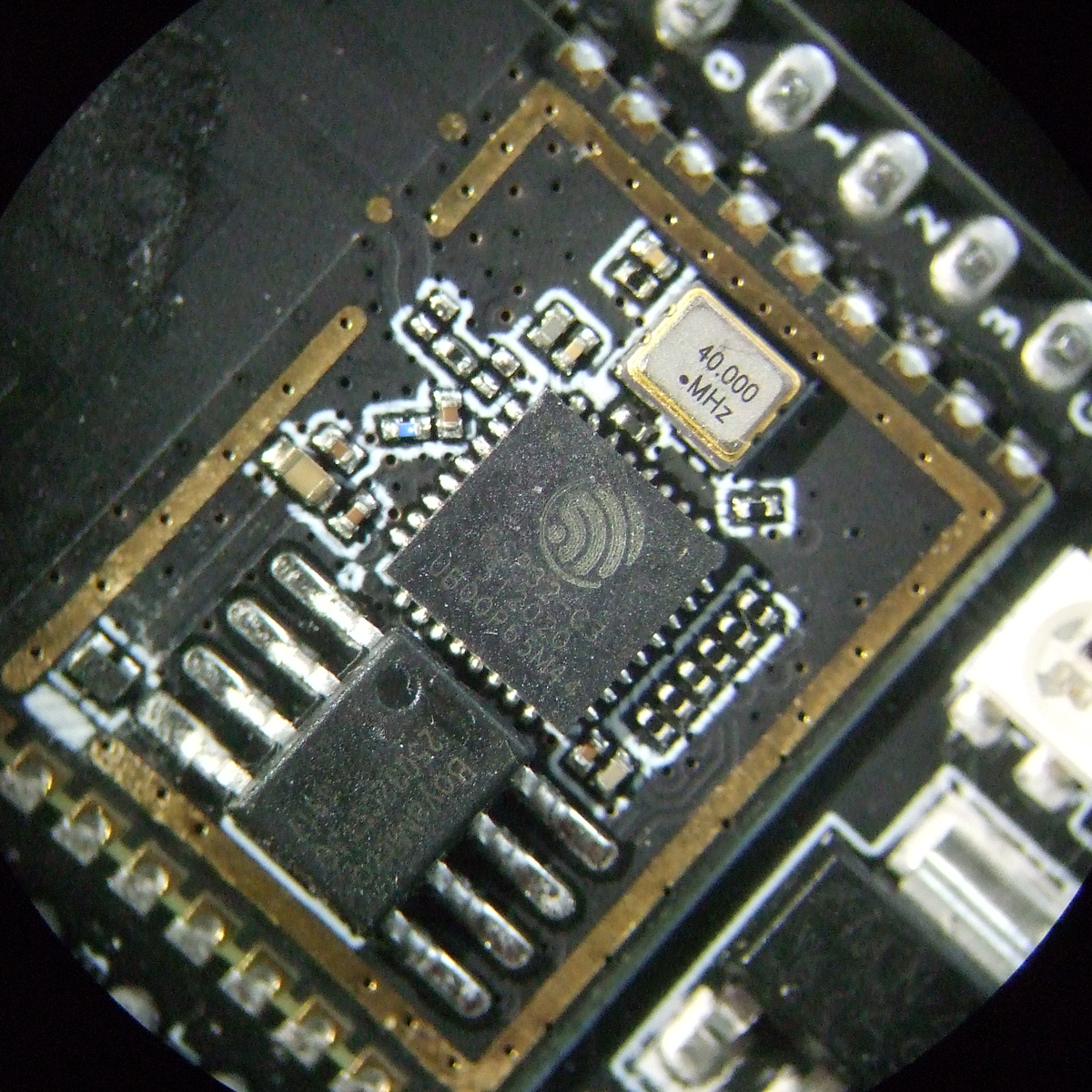
We just got our hands on some engineering pre-samples of the ESP32-C3 chip and modules, and there’s a lot to like about this chip. The question is what should you compare this to; is it more an ESP32 or an ESP8266? The new “C3” variant has a single 160 MHz RISC-V core that out-performs the ESP8266, and at the same time includes most of the peripheral set of an ESP32. While RAM often ends up scarce on an ESP8266 with around 40 kB or so, the ESP32-C3 sports 400 kB of RAM, and manages to keep it all running while burning less power. Like the ESP32, it has Bluetooth LE 5.0 in addition to WiFi.
Espressif’s website says multiple times that it’s going to be “cost-effective”, which is secret code for cheap. Rumors are that there will be eight-pin ESP-O1 modules hitting the streets priced as low as $1. We usually require more pins, but if medium-sized ESP32-C3 modules are priced near the ESP8266-12-style modules, we can’t see any reason to buy the latter; for us it will literally be an ESP8266 killer.
On the other hand, it lacks the dual cores of the ESP32, and simply doesn’t have as many GPIO pins. If you’re a die-hard ESP32 abuser, you’ll doubtless find some features missing, like the ultra-low-power coprocessor or the DACs. But it does share a lot of the ESP32 standouts: the LEDC (PWM) peripheral and the unique parallel I2S come to mind. Moreover, it shares the ESP-IDF framework with the ESP32, so despite running on an entirely different CPU architecture, a lot of code will run without change on both chips just by tweaking the build environment with a one-liner.
One of these things is not like the other
If you were confused by the chip’s name, like we were, a week or so playing with the new chip will make it all clear. The ESP32-C3 is a lot more like a reduced version of the ESP32 than it is like an improvement over the ESP8266, even though it’s probably destined to play the latter role in our projects. If you count in the new ESP32-S3 that brings in USB, the ESP32 family is bigger than just one chip. Although it does seem odd to lump the RISC-V and Tensilica CPUs together, at the end of the day it’s the peripherals more than the CPUs that differentiate microcontrollers, and on that front the C3 is firmly in the ESP32 family.
Our takeaway: the ESP32-C3 is going to replace the ESP8266 in our projects, but it won’t replace the ESP32 which simply has more of everything when we need it. The shared codebase and peripheral architecture makes it easier to switch between the two when we don’t need the full-blown ESP32. In that spirit, we welcome the newcomer to the family.
But naturally, we’ve got a lot more to say about it. Specifically, we were interested in exactly what the RISC-V core brought to the table, and ran the module through power and speed comparisons with the ESP32 and ESP8266 — and it beats them both by a small margin in our benchmarks. We’ve also become a lot closer friends with the ESP-IDF SDK that all of the ESP32 family chips use, and love how far it has come in the last year or so. It’s not as newbie-friendly as ESP-Arduino, for sure, but it’s a ton more powerful, and we’re totally happy to leave the ESP8266 SDK behind us.
RISC-V: Power and Speed
The ESP32-C3 shares the coding framework with the ESP32, some of the peripherals, and has about the same amount of memory. What’s different? The RISC-V CPU of the C3 vs. the Tensilica cores in the ESP32 and the ESP8266. So we thought we’d put them through their paces and see how they stack up in terms of processing speed and overall power use.
In terms of standard benchmarks for microcontrollers and other embedded devices, CoreMark is probably the go-to. And we found that it had been already ported to the ESP8266 and ESP32 by [Ochrin]. (Thanks!) CoreMark includes three tests: finding and sorting with linked lists to tax the memory units, running a state machine to test switch/case branching speed, and a matrix multiplication task to tax the CPU and compiler.
In practice, and mimicking our general experience with the ESP8266 and ESP32 frameworks, the code compiled without any hassle for the ESP32 and ESP32-C3. In contrast, getting it running on the ESP8266 was a hair-pulling few hours spent degrading versions of the RTOS framework, installing modules in Python 2 inside virtualenvs, and getting the set of PATHs and other environment variables just right. But we weren’t going to leave you without a proper comparo, so we burned the midnight oil.
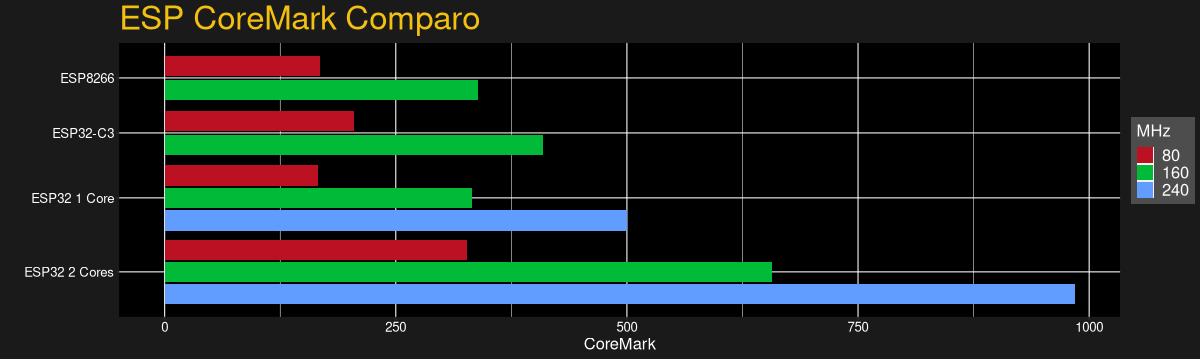
The takeaway is that a single RISC-V core on the ESP32-C3 is marginally faster per MHz than a single core on either of the Tensilica-based devices. Of course, if you’re crunching numbers hard and using both cores of the ESP32, it’s in another league, and you know who you are. But if you’re running Arduino on the ESP32 and you’re not explicitly running the RTOS tasks yourself, or running MicroPython and not using threads, you’re probably running a single core on the ESP32 anyway. Modulo some small difference in having a free core to exclusively handle WiFi, you might not be much worse off with the C3.
While running this test, we also hooked up our super-sophisticated power measuring unit to the devices under test, a USB cable with three 3 Ω resistors and an oscilloscope. Of course, if you simply wanted the chip’s power specs, you could hit up the datasheet.
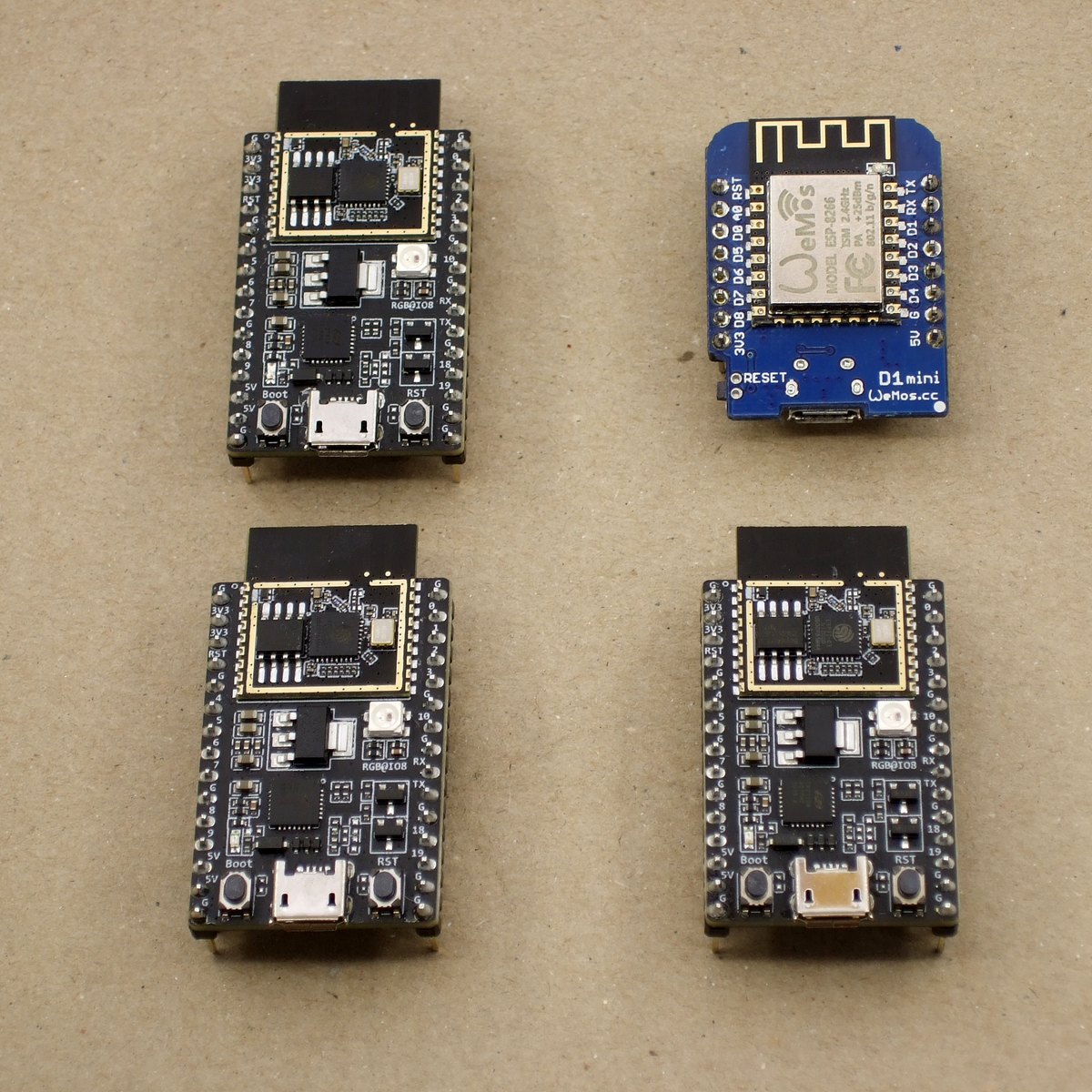
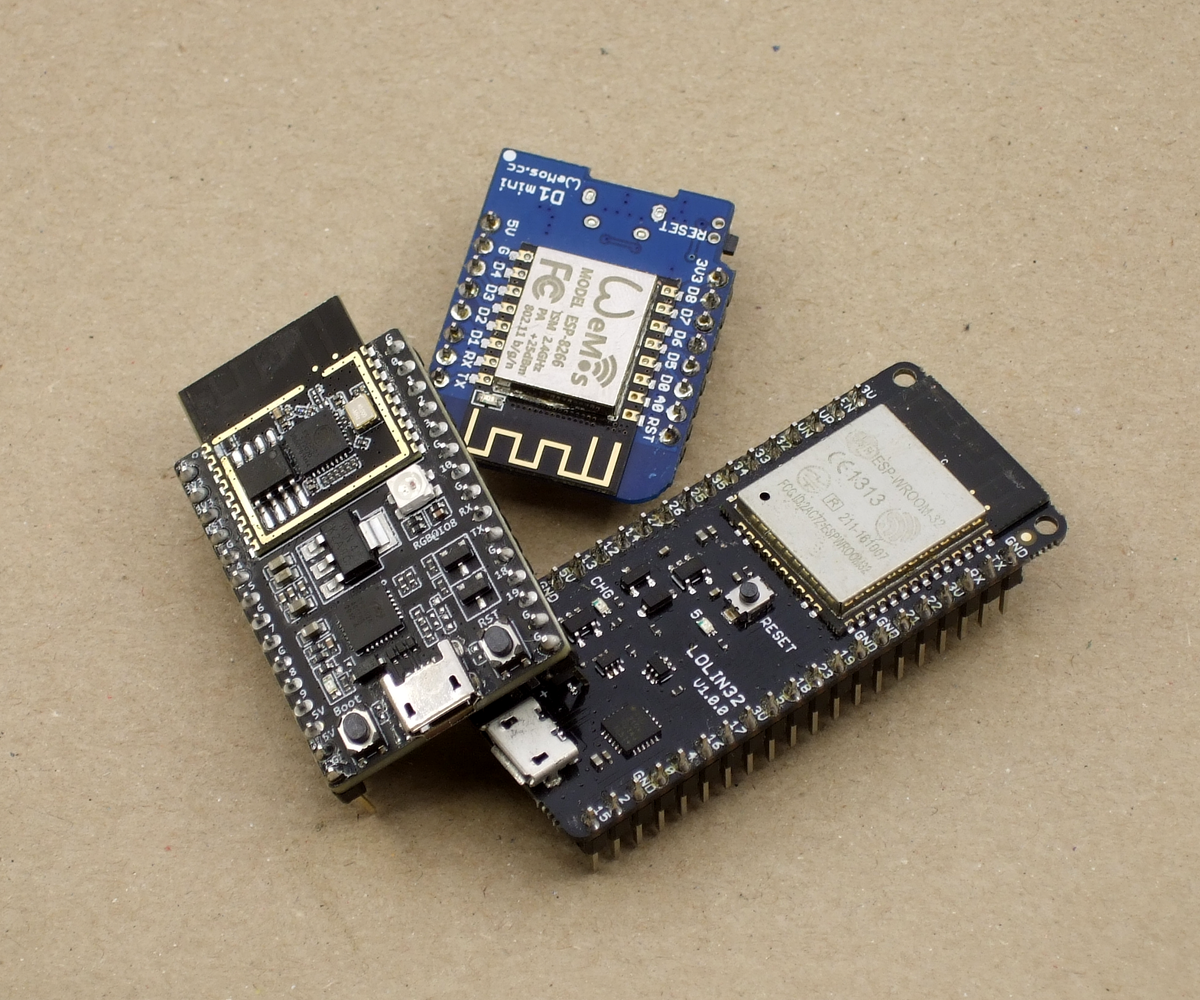
Instead, here we’re looking at the real-life performance of three different modules: the WeMos D1 mini for the ESP8266, the Lolin 32 for the ESP32, and our demo ESP32-C3-DevKitC-1, straight from Espressif. All were running with LEDs off, or clipped summarily with side-cutters in the case of the ESP32-C3 unit. (It didn’t make all that much difference, but you don’t know until you try.)
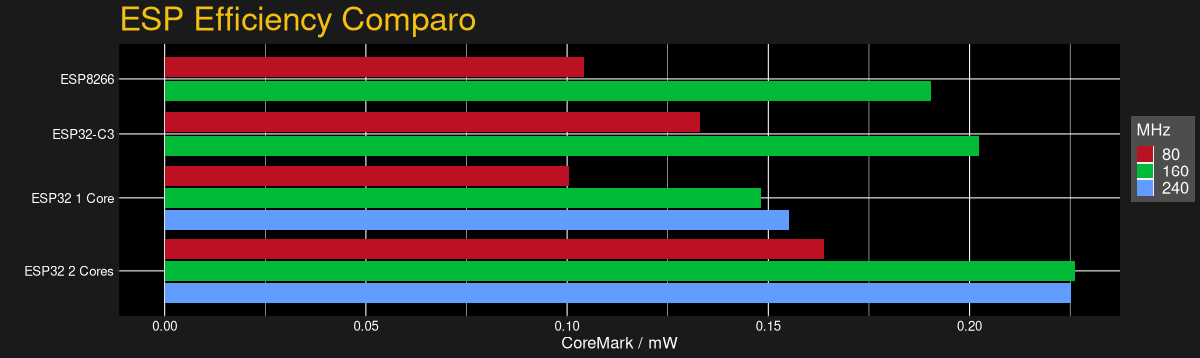
With power consumption data, we could also check out the modules’ power efficiency, measured in CoreMark score per milliwatt. Here, the ESP32-C3 does a bit better than the ESP8266, and somewhere between the ESP32 running one core and two cores respectively. This confirms what we’ve suspected for a while — if you want to save power, your best bet is to keep the chip sleeping as much as possible, and then run it full-out when it needs to run. If you’re doing that with an ESP32, use both cores.
And while our results are definitely significant and repeatable in terms of power and speed, they’re not game-changing. If we really needed to crush floats, we’d go for a chip that’s better suited for the task like an STM32F4xx or STM32F7xx, or those brutal NXP/Freescale 600 MHz i.MX ARM7 chips in the Teensy 4.0. If you’re buying an ESP-anything, it’s because you want the wireless connectivity, and it’s good to know that you’re not giving anything away with the ESP32-C3 on the CPU speed.
We hinted at it in the introduction, but the RISC-V nature of this chip, at least in terms of user experience, is no big deal. You code, compile, and flash just the same as you would with any other toolchain. The ESP-IDF makes using the new chip as easy as typing idf.py set-target esp32c3 and maybe idf.py fullclean for good measure. Then you go about your business. I must have swapped architectures 30 times in the course of this testing, and it’s literally that simple.
Of Peripherals and Pins
The first limitation you run into with an ESP8266 is that it doesn’t have enough GPIOs, or ADCs, for your particular project. While the ESP32 is a serious improvement in sheer GPIO quantity, once you’ve taken account of the pins with dedicated functions, or that are only input, you can end up pushing the limits of the chip easily. So you design in an external ADC chip and connect it via I2C, or you tack on a shift register and drive it with the blindingly fast I2S peripheral — something you can’t do with the ESP8266.
Sharing the peripheral set with the ESP32 will help alleviates some of these woes on the ESP32-C3, even though it has the same number of pins as the ESP8266. Heck, if you’re willing to allocate them, the C3 even has JTAG capabilities. And while the JTAG isn’t, a lot of the hardware peripherals are assignable to whichever pins you wish.
But we have to conclude that designing with the ESP32-C3 is still going to be a lot like designing for the ESP8266. I/O is limited. You’ll have to work with that.
Situating the ESP-C3
The ESP8266 started life as a simple AT-command-set WiFi modem, and a bunch of hackers proved that it had a lot more to offer. It’s sometimes hard to remember how difficult and expensive WiFi connectivity was before the ESP8266, but at the time, WiFi for $5 was revolutionary compared to WiFi for $50 – $100. Flash forward a few years, and the ESP32 is a competent microcontroller in its own right, with some cool quirky features. Oh yeah, and WiFi and BLE. We’ve come a long way in a very short time.
The C3 is really a blend of the two: a limited number of GPIO pins like the ESP8266, but with nice peripherals like the ESP32. If it’s priced to compete with the ESP8266, it will push that chip into retirement. But maybe it’s time.
The ESP-IDF has grown on us, but it’s still nothing compared to the overabundance of examples for ESP-Arduino or the incredible ease of use of MicroPython. When the latter gets ported over to the ESP32-C3, with its significantly expanded memory over the ESP8266, that’ll be a tremendously inexpensive platform that will make many forsake ever compiling again. But when you need the speed of the native SDK, it’s nice to be able to lean on the extant ESP32 codebase, so an ESP8266 in ESP32’s clothing is a winner.
We’ve got pre-production samples, and Espressif is still working on supporting all the features of the ESP32-C3 in the IDF. Heck, you can’t buy an ESP32-C3 module yet anyway, so we’re stuck looking into our crystal ball a little bit. But the murmurs about pricing similarly to the ESP8266 make us take notice, and it’s certainly a worthy upgrade even at a small price premium, if that’s what the market will bear. At the same time, the ESP32-C3 is fundamentally less capable than the ESP32, so it’s got to come in cheaper than that. With ESP8266 dev boards selling for $2 and ESP32 dev boards selling for $4, that doesn’t leave much wiggle room, and we suspect some folks will just pony up for the ESP32s. So it’s hard to say how much the price really matters anyway.
But it’s nice to see RISC-V cores in more devices, not least because the standardized instruction set architecture — which essentially amounts to a standard set of machine-language commands — makes writing optimizing compilers easier and faster. For the end user, it doesn’t matter all that much, but if saving money on IP licensing fees is what allows Espressif to include a more modern peripheral set for the ESP8266 price, then we’re all for it.
We just got our hands on some engineering pre-samples of the ESP32-C3 chip and modules, and there’s a lot to like about this chip. The question is what should you compare this to; is it more an ESP32 or an ESP8266? The new “C3” variant has a single 160 MHz RISC-V core that out-performs the ESP8266, and at the same time includes most of the peripheral set of an ESP32. While RAM often ends up scarce on an ESP8266 with around 40 kB or so, the ESP32-C3 sports 400 kB of RAM, and manages to keep it all running while burning less power. Like the ESP32, it has Bluetooth LE 5.0 in addition to WiFi.
Espressif’s website says multiple times that it’s going to be “cost-effective”, which is secret code for cheap. Rumors are that there will be eight-pin ESP-O1 modules hitting the streets priced as low as $1. We usually require more pins, but if medium-sized ESP32-C3 modules are priced near the ESP8266-12-style modules, we can’t see any reason to buy the latter; for us it will literally be an ESP8266 killer.
On the other hand, it lacks the dual cores of the ESP32, and simply doesn’t have as many GPIO pins. If you’re a die-hard ESP32 abuser, you’ll doubtless find some features missing, like the ultra-low-power coprocessor or the DACs. But it does share a lot of the ESP32 standouts: the LEDC (PWM) peripheral and the unique parallel I2S come to mind. Moreover, it shares the ESP-IDF framework with the ESP32, so despite running on an entirely different CPU architecture, a lot of code will run without change on both chips just by tweaking the build environment with a one-liner.
One of these things is not like the other
If you were confused by the chip’s name, like we were, a week or so playing with the new chip will make it all clear. The ESP32-C3 is a lot more like a reduced version of the ESP32 than it is like an improvement over the ESP8266, even though it’s probably destined to play the latter role in our projects. If you count in the new ESP32-S3 that brings in USB, the ESP32 family is bigger than just one chip. Although it does seem odd to lump the RISC-V and Tensilica CPUs together, at the end of the day it’s the peripherals more than the CPUs that differentiate microcontrollers, and on that front the C3 is firmly in the ESP32 family.
Our takeaway: the ESP32-C3 is going to replace the ESP8266 in our projects, but it won’t replace the ESP32 which simply has more of everything when we need it. The shared codebase and peripheral architecture makes it easier to switch between the two when we don’t need the full-blown ESP32. In that spirit, we welcome the newcomer to the family.
But naturally, we’ve got a lot more to say about it. Specifically, we were interested in exactly what the RISC-V core brought to the table, and ran the module through power and speed comparisons with the ESP32 and ESP8266 — and it beats them both by a small margin in our benchmarks. We’ve also become a lot closer friends with the ESP-IDF SDK that all of the ESP32 family chips use, and love how far it has come in the last year or so. It’s not as newbie-friendly as ESP-Arduino, for sure, but it’s a ton more powerful, and we’re totally happy to leave the ESP8266 SDK behind us.
RISC-V: Power and Speed
The ESP32-C3 shares the coding framework with the ESP32, some of the peripherals, and has about the same amount of memory. What’s different? The RISC-V CPU of the C3 vs. the Tensilica cores in the ESP32 and the ESP8266. So we thought we’d put them through their paces and see how they stack up in terms of processing speed and overall power use.
In terms of standard benchmarks for microcontrollers and other embedded devices, CoreMark is probably the go-to. And we found that it had been already ported to the ESP8266 and ESP32 by [Ochrin]. (Thanks!) CoreMark includes three tests: finding and sorting with linked lists to tax the memory units, running a state machine to test switch/case branching speed, and a matrix multiplication task to tax the CPU and compiler.
In practice, and mimicking our general experience with the ESP8266 and ESP32 frameworks, the code compiled without any hassle for the ESP32 and ESP32-C3. In contrast, getting it running on the ESP8266 was a hair-pulling few hours spent degrading versions of the RTOS framework, installing modules in Python 2 inside virtualenvs, and getting the set of PATHs and other environment variables just right. But we weren’t going to leave you without a proper comparo, so we burned the midnight oil.
The takeaway is that a single RISC-V core on the ESP32-C3 is marginally faster per MHz than a single core on either of the Tensilica-based devices. Of course, if you’re crunching numbers hard and using both cores of the ESP32, it’s in another league, and you know who you are. But if you’re running Arduino on the ESP32 and you’re not explicitly running the RTOS tasks yourself, or running MicroPython and not using threads, you’re probably running a single core on the ESP32 anyway. Modulo some small difference in having a free core to exclusively handle WiFi, you might not be much worse off with the C3.
While running this test, we also hooked up our super-sophisticated power measuring unit to the devices under test, a USB cable with three 3 Ω resistors and an oscilloscope. Of course, if you simply wanted the chip’s power specs, you could hit up the datasheet.
Instead, here we’re looking at the real-life performance of three different modules: the WeMos D1 mini for the ESP8266, the Lolin 32 for the ESP32, and our demo ESP32-C3-DevKitC-1, straight from Espressif. All were running with LEDs off, or clipped summarily with side-cutters in the case of the ESP32-C3 unit. (It didn’t make all that much difference, but you don’t know until you try.)
With power consumption data, we could also check out the modules’ power efficiency, measured in CoreMark score per milliwatt. Here, the ESP32-C3 does a bit better than the ESP8266, and somewhere between the ESP32 running one core and two cores respectively. This confirms what we’ve suspected for a while — if you want to save power, your best bet is to keep the chip sleeping as much as possible, and then run it full-out when it needs to run. If you’re doing that with an ESP32, use both cores.
And while our results are definitely significant and repeatable in terms of power and speed, they’re not game-changing. If we really needed to crush floats, we’d go for a chip that’s better suited for the task like an STM32F4xx or STM32F7xx, or those brutal NXP/Freescale 600 MHz i.MX ARM7 chips in the Teensy 4.0. If you’re buying an ESP-anything, it’s because you want the wireless connectivity, and it’s good to know that you’re not giving anything away with the ESP32-C3 on the CPU speed.
We hinted at it in the introduction, but the RISC-V nature of this chip, at least in terms of user experience, is no big deal. You code, compile, and flash just the same as you would with any other toolchain. The ESP-IDF makes using the new chip as easy as typing idf.py set-target esp32c3 and maybe idf.py fullclean for good measure. Then you go about your business. I must have swapped architectures 30 times in the course of this testing, and it’s literally that simple.
Of Peripherals and Pins
The first limitation you run into with an ESP8266 is that it doesn’t have enough GPIOs, or ADCs, for your particular project. While the ESP32 is a serious improvement in sheer GPIO quantity, once you’ve taken account of the pins with dedicated functions, or that are only input, you can end up pushing the limits of the chip easily. So you design in an external ADC chip and connect it via I2C, or you tack on a shift register and drive it with the blindingly fast I2S peripheral — something you can’t do with the ESP8266.
Sharing the peripheral set with the ESP32 will help alleviates some of these woes on the ESP32-C3, even though it has the same number of pins as the ESP8266. Heck, if you’re willing to allocate them, the C3 even has JTAG capabilities. And while the JTAG isn’t, a lot of the hardware peripherals are assignable to whichever pins you wish.
But we have to conclude that designing with the ESP32-C3 is still going to be a lot like designing for the ESP8266. I/O is limited. You’ll have to work with that.
Situating the ESP-C3
The ESP8266 started life as a simple AT-command-set WiFi modem, and a bunch of hackers proved that it had a lot more to offer. It’s sometimes hard to remember how difficult and expensive WiFi connectivity was before the ESP8266, but at the time, WiFi for $5 was revolutionary compared to WiFi for $50 – $100. Flash forward a few years, and the ESP32 is a competent microcontroller in its own right, with some cool quirky features. Oh yeah, and WiFi and BLE. We’ve come a long way in a very short time.
The C3 is really a blend of the two: a limited number of GPIO pins like the ESP8266, but with nice peripherals like the ESP32. If it’s priced to compete with the ESP8266, it will push that chip into retirement. But maybe it’s time.
The ESP-IDF has grown on us, but it’s still nothing compared to the overabundance of examples for ESP-Arduino or the incredible ease of use of MicroPython. When the latter gets ported over to the ESP32-C3, with its significantly expanded memory over the ESP8266, that’ll be a tremendously inexpensive platform that will make many forsake ever compiling again. But when you need the speed of the native SDK, it’s nice to be able to lean on the extant ESP32 codebase, so an ESP8266 in ESP32’s clothing is a winner.
We’ve got pre-production samples, and Espressif is still working on supporting all the features of the ESP32-C3 in the IDF. Heck, you can’t buy an ESP32-C3 module yet anyway, so we’re stuck looking into our crystal ball a little bit. But the murmurs about pricing similarly to the ESP8266 make us take notice, and it’s certainly a worthy upgrade even at a small price premium, if that’s what the market will bear. At the same time, the ESP32-C3 is fundamentally less capable than the ESP32, so it’s got to come in cheaper than that. With ESP8266 dev boards selling for $2 and ESP32 dev boards selling for $4, that doesn’t leave much wiggle room, and we suspect some folks will just pony up for the ESP32s. So it’s hard to say how much the price really matters anyway.
But it’s nice to see RISC-V cores in more devices, not least because the standardized instruction set architecture — which essentially amounts to a standard set of machine-language commands — makes writing optimizing compilers easier and faster. For the end user, it doesn’t matter all that much, but if saving money on IP licensing fees is what allows Espressif to include a more modern peripheral set for the ESP8266 price, then we’re all for it.
There are a lot of ways to tell time, but pretty much all of them involve some sort of sequential scale — the hands sweeping across the face of an analog clock comes to mind, as does the incremental changes of a digital clock. Clocks are predictable by their very nature, and therefore somewhat boring.
This nonsequential gear clock aims to break that predictability and make for a timepiece that’s just a little bit different. It’s the work of [Tony Goacher], who clearly put a lot of work into it and pulled out nearly every tool in the shop while doing it. He started with a laser-cut plywood prototype to get the basics worked out — a pair of nested rings with internal gear teeth, each hanging on a stepper-driven pinion. The inner ring represents hours and the outer minutes, with the numbers on each randomly distributed — more or less, since no two sequential numbers are positioned more than five seconds of rotation apart.
The finished version of the clock is rendered in brass, acrylic, hardwood, and a smattering of aluminum, with a case reminiscent of the cathedral radios of yore. There are some really nice touches, like custom-made brass screws, a CNC-engraved brass faceplate with traditional clock art, and a Latin inscription on the drive cog for the hours ring that translates roughly to “Time rules all.” When we looked that up we found that “tempus rerum imperator” is the motto of the Worshipful Company of Clockmakers, the very existence of which we find pleasing in the extreme.
The clock runs through its initialization routine in the brief video below. We’re not sure we’d want this on our nightstand, but it’s certainly a unique and enjoyable way to show the passage of time. It sort of reminds us of this three-ringed perpetual calendar, but just a bit more stochastic.
If we cast our minds back a few decades, almost all computers were a beige colour. “Beige box” even became a phrase for a generic PC, such was their ubiquity. Long before PCs though there were other beige computers, and probably one of the first to land on the desks of enthusiasts rather than professionals was the Apple ][. But exactly what beige colour was it? It’s a question that interested [Ben Zotto], and his quest led him through a fascinating exploration of a colour most of us consider to be boring.
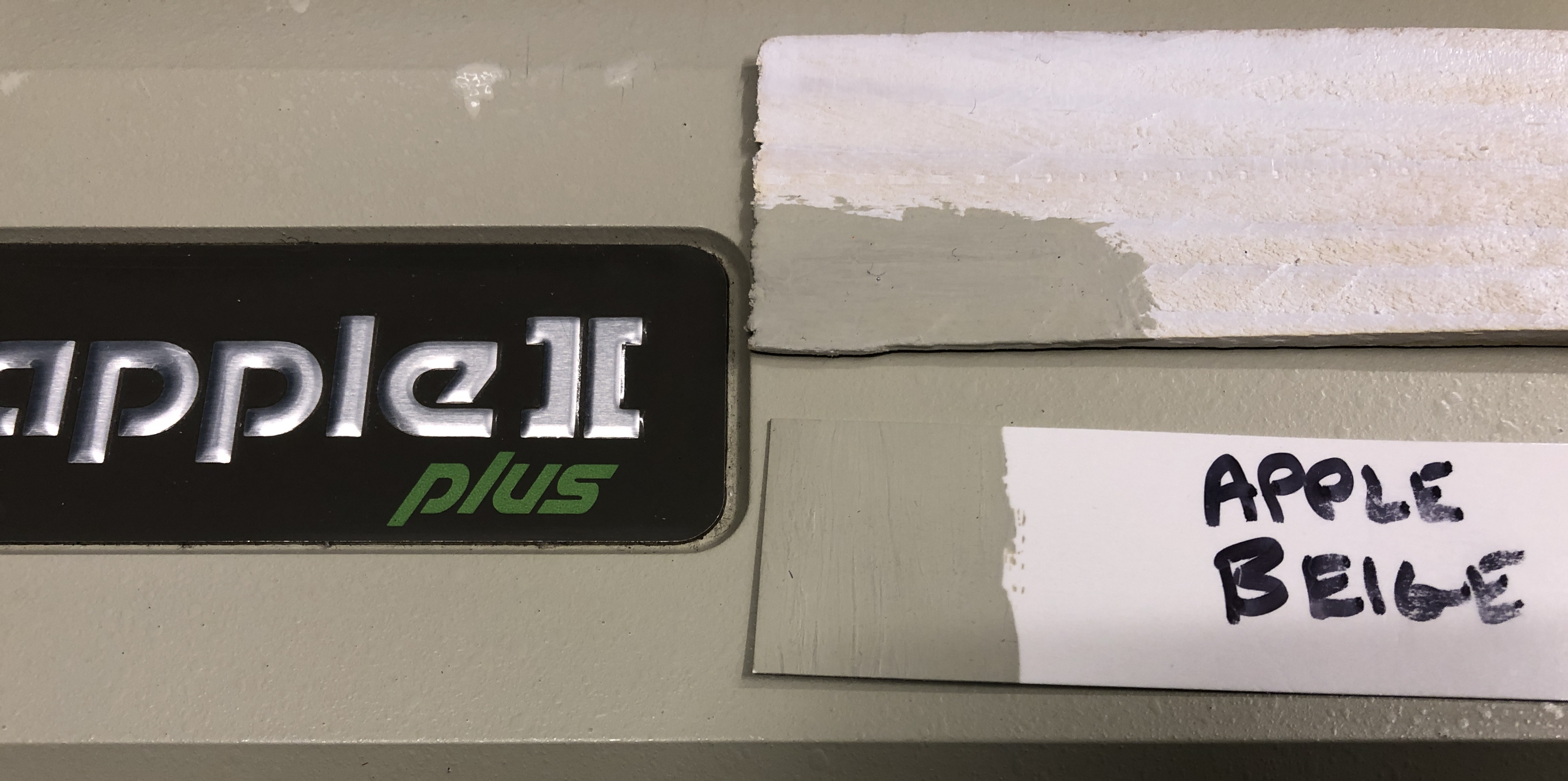
We’re used to older beige computers becoming yellow with time, as the effect of light and age causes the fire retardants in their plastic to release bromine. But the earlier Apple products haven’t done this, because their beige came not from the plastic but from a paint. [Ben] was lucky enough to find a small pot of touch-up paint from Apple that was made available to dealers, so notwithstanding any slight pigment changes from its age, he set off in pursuit of its origin.
Along the way to identifying a modern Pantone shade (Pantone 14–0105 TPG, for the curious) he treats us to a cross-section of Apple’s early colour history with reference to the memories of early Apple luminaries. He even suggests readily available shades that could suffice, pointing to Gloss Almond Rust-Oleum spray paint.
So should you wish to colour-match to an early Apple, now you can. If you have a Commodore or an Atari though, maybe your task is a little easier.
If we cast our minds back a few decades, almost all computers were a beige colour. “Beige box” even became a phrase for a generic PC, such was their ubiquity. Long before PCs though there were other beige computers, and probably one of the first to land on the desks of enthusiasts rather than professionals was the Apple ][. But exactly what beige colour was it? It’s a question that interested [Ben Zotto], and his quest led him through a fascinating exploration of a colour most of us consider to be boring.
We’re used to older beige computers becoming yellow with time, as the effect of light and age causes the fire retardants in their plastic to release bromine. But the earlier Apple products haven’t done this, because their beige came not from the plastic but from a paint. [Ben] was lucky enough to find a small pot of touch-up paint from Apple that was made available to dealers, so notwithstanding any slight pigment changes from its age, he set off in pursuit of its origin.
Along the way to identifying a modern Pantone shade (Pantone 14–0105 TPG, for the curious) he treats us to a cross-section of Apple’s early colour history with reference to the memories of early Apple luminaries. He even suggests readily available shades that could suffice, pointing to Gloss Almond Rust-Oleum spray paint.
So should you wish to colour-match to an early Apple, now you can. If you have a Commodore or an Atari though, maybe your task is a little easier.
If we cast our minds back a few decades, almost all computers were a beige colour. “Beige box” even became a phrase for a generic PC, such was their ubiquity. Long before PCs though there were other beige computers, and probably one of the first to land on the desks of enthusiasts rather than professionals was the Apple ][. But exactly what beige colour was it? It’s a question that interested [Ben Zotto], and his quest led him through a fascinating exploration of a colour most of us consider to be boring.
We’re used to older beige computers becoming yellow with time, as the effect of light and age causes the fire retardants in their plastic to release bromine. But the earlier Apple products haven’t done this, because their beige came not from the plastic but from a paint. [Ben] was lucky enough to find a small pot of touch-up paint from Apple that was made available to dealers, so notwithstanding any slight pigment changes from its age, he set off in pursuit of its origin.
Along the way to identifying a modern Pantone shade (Pantone 14–0105 TPG, for the curious) he treats us to a cross-section of Apple’s early colour history with reference to the memories of early Apple luminaries. He even suggests readily available shades that could suffice, pointing to Gloss Almond Rust-Oleum spray paint.
So should you wish to colour-match to an early Apple, now you can. If you have a Commodore or an Atari though, maybe your task is a little easier.
Plastic waste is everywhere you look, and there’s seemingly no end in sight for both the demand and production of plastic goods. So isn’t it time to try putting all that waste from the plastic industry to good use? [Nzambi Matee], a materials engineer in Kenya, thinks so. She was tired of seeing plastic littering the streets of Nairobi, and saw an opportunity to solve two problems at once — cleaning up the streets and paving them with plastic.
After about a year of trial and error, she had discovered which plastics worked and which didn’t. Then she developed machinery to churn out the sand-plastic paste and stamp it into sturdy paving bricks. Her company Gjenge Makers gets most of their plastic free from factories that would otherwise have to pay to dispose of it. The bricks are strong, lightweight, and nearly indestructible compared to concrete pavers. In the video after the break, there’s a shot of [Nzambi] spiking one on the ground to demonstrate its toughness.
Now, her company produces about 1,500 of these pavers each day. [Nzambi] and her team are planning to start making building blocks as well. With a melting point somewhere above 350° C, the material seems pretty well-suited for that purpose.
What’s that they say about death and taxes? Apparently that maxim doesn’t apply to Flash, at least when it comes to the taxman. As we noted last week, the end of the Adobe Flash era took with it a scheduling and routing app for the railway system in a Chinese city. This time around, it’s the unfortunately acronymed SARS, for South African Revenue Services, having Flash woes. They still have several online tax forms that haven’t been migrated to HTML5, so to keep the revenue flowing they built their own Flash-enabled browser. Taxpayers are free to download and use the browser while SARS works on getting the rest of their forms migrated. It sort of reminds us of those plans the Internal Revenue Service has to ensure tax collection continues after a nuclear apocalypse — death and taxes indeed.
Trouble for Nintendo in the EU? It looks that way, as consumer groups have made the case to EU regulators that Nintendo’s wildly popular Switch consoles are showing unacceptably premature obsolescence with the notorious “Joy-Con drift” issue. The problem, which manifests as players being unable to control a game due to constant movement despite no inputs on the joystick-like controller, requires a repair, one that Nintendo initially only did for free as warranty service for consoles less than a year old. For consoles out of the warranty period, Nintendo was charging €45, which is approximately the same as what a new controller would cost. This didn’t sit well with regulators, and now they’re breathing down Nintendo’s neck. They now offer free repairs for up to two years, but they’re still under the EU microscope. The interesting bit in the linked document is the technical reason for the problem, which is attributed to premature PCB wear — possibly meaning the traces wear away — and inadequate sealing of the Joy-Con mechanism against dust intrusion.
Last year looked as though it was going to be an exciting one with respect to some of our nearest solar and galactic neighbors. For a while there, it looked like the red giant Betelgeuse was going to go supernova, which would have been interesting to watch. And closer to home, there were some signs of life, in the form of phosphine gas, detected in the roiling atmosphere of our sister planet, Venus. Alas, both stories appear not to have panned out. The much-hoped-for (by me) Betelgeuse explosion, which was potentially heralded by a strange off-cycle dimming of the variable star, seems now to be due to its upper atmosphere cooling by several hundred degrees. As for Venus, the phosphine gas that was detected appears actually to have been a false positive triggered by sulfur dioxide. Disappointing results perhaps, but that’s how science is supposed to work.
Amateur radio often gets a bad rap, derided as a hobby for rich old dudes who just like to talk about their medical problems. Some of that is deserved, no doubt, but there’s still a lot of room in the hobby for those interested in advancing the state of the art in radio communications. In this vein, we were pleased to learn about HamSCI, which is short for Ham Radio Science Citizen Investigation. The group takes to heart one of the stated primary missions of amateur radio as the “ontinuation and extension of the amateur’s proven ability to contribute to the advancement of the radio art.” To that end, they’ll be holding HamSCI Workshop 2021, a virtual conference that will be focused on midlatitude ionospheric science. This appears to be a real science conference where both credentialed scientists and amateurs can share ideas. They’ve got a Call for Proposals now, with abstracts due by February 15. The conference itself will be on March 19 and 20, with free admission. The list of invited speakers looks pretty impressive, so if you have any interest in the field, check it out.
And finally, we got a tip this week about a collection of goofy US patents. Everything listed, from the extreme combover to baby bum-print art, is supposedly covered by a patent. We didn’t bother checking Google Patents, but some of these are pretty good for a laugh. We did look at a few, though, and were surprised to learn that the Gerbil Shirt is not a garment for rodents, but a rodent-filled garment for humans.
We’re guessing that we have something in common with a substantial number of our readers in that this post is being written on an open-source operating system. A well-known GNU/Linux distribution provides everything you might expect from a PC, but of course it’s not the only open-source game in town. A year-old piece from [Unixsheikh] caught the eye with the title “Why you should migrate everything from Linux to BSD“, and being naturally curious, it was worth a read. It’s interesting enough to talk about here not because of its BSD advocacy, but because of its examination of some of GNU/Linux’s shortcomings. Using and appreciating an operating system shouldn’t mean slavish fandom, it’s worth every Linux user taking a moment to consider its points.
There are two main thrusts to the argument, firstly that GNU/Linux has become a bloated kernel with a fragmented operating system, and secondly that the interests of the various big businesses that derive income from Linux-based products have led to the resulting ecosystem being shaped by those businesses and in their interests. The piece points to the huge disconnect between kernel developers and operating system users, and the seeming lack of concern over some of the problems this can create. It’s a jarring read for an open-source software enthusiast because while there is much good in the world of free software even the most devoted of fans should admit that it’s not without problems. We think it’s worth a read not necessarily to agree with but in order to stir discussion and debate. Every community needs to look in the mirror sometimes.
As for BSD, it’s worth admitting there lies a shameful gap in a Hackaday scribe’s knowledge. One that deserves to be plugged, in the interests of better understanding.
Just how tight are the manufacturing tolerances of modern FDM printer filament. Inquiring minds want to know, and when such minds are attached to handy fellows like [Thomas Sanladerer], you end up with something like this home-brew filament measurement rig to gather the data you seek.
The heart of this build is not, as one might assume, some exotic laser device to measure the diameter of filament optically. Those exist, but they are expensive bits of kit that are best left to the manufacturers, who use them on their production lines to make sure filament meets their specs. Rather, [Thomas] used a very clever homemade device, which relies on a Hall effect sensor and a magnet on a lever to do the job. The lever is attached to a roller bearing that rides on the filament as it spools through the sensor; variations in diameter are amplified by the lever arm, which wiggles a magnet over the Hall sensor, resulting in a signal proportional to filament diameter.
The full test rig has a motor-driven feed and takeup spools, and three sensors measuring across the filament in three different spots around the radius; the measurements are averaged together to account for any small-scale irregularities. [Thomas] ran several different spools representing different manufacturers and materials through the machine; we won’t spoil the results in the video below, but suffice it to say you probably have little to worry about if you buy from a reputable vendor.
When we see a filament sensor, it’s generally more of the “there/not there” variety to prevent a printer from blindly carrying on once the reel is spent. We’ve seen a few of those before, but this is a neat twist on that concept.
As home automation starts to live up to its glossy sci-fi promise there remains a deficiency when it comes to interfacing between the newer computerised components and legacy items from a previous age. A frequent example that appears in projects on Hackaday is the reading of utility meters, and in that arena [Sascha Kloß] has a very neat solution involving an ESP32 camera module and a software neural network to identify meter readings directly.
The ESP and camera sit at the top of a 3D-printed housing that fits over the meter. The clever trick comes as each photo’s orientation is determined, and not only is OCR used to read digits but also figures are derived from small dial meters and other indicators on the meter face. It’s a very well-thought-out system, with a web-based configuration tool that allows full customisation of the readable zones and how they should be treated.
This project makes full use of the ESP32’s capabilities, and the attention to detail that has gone into making it usable is particularly impressive. It certainly raises the bar against previous OCR meter reading projects.
Spec sheets are an important tool in determining the performance of a given part or system, but they’re not the be all and end all when it comes to engineering. However, specs alone don’t prove whether a given system can complete a given task. Sometimes, you need to actually do the work to prove it instead – as [Sylvain] has done, running DOOM on the iCE40 FPGA.
DOOM’s minimum specifications demand a 386 with 4MB RAM minimum, but it’s commonly agreed that a 486 DX2 running at 66MHz with 8MB of RAM is required to play the game smoothly. With an iCEBreaker v1.0b running a RISC V softcore at 25MHz, it may seem like a difficult task, but the RISC V core has the benefit that many instructions run in a single clock cycle that take many on the 486. While the iCEBreaker doesn’t have much RAM onboard, it’s a simple job to piggyback an 8MB SPI device on top of the existing flash storage. Control of the game is via keystrokes sent to the iCEBreaker over serial, while video is handled over a PMOD video interface with an HDMI connector.
[Sylvain] does a great job of explaining all the minute details of the work that was required to get things working, and has provided files on Github for those keen to replicate the feat or expand upon the code. Music is notably absent but MIDI output could likely be achieved without much hassle. “Does it run DOOM?” is still a question asked of many platforms, even the new Nintendo Game & Watch. Video after the break.
As the team outlined in a paper published in 2016, the field of plant nanobionics uses nanotechnology to enhance the natural abilities of plants and make them do new tricks. Here’s how this one works: the roots of the spinach plants absorb nitroaromatic compounds such as picric acid from the groundwater, and these transpire up through the stem and into the leaves along with water and other nutrients. When the compounds reach the leaves, they accumulate in the plants’ mesophyll — the inner tissue of the leaves.
A pair of sensors made of single-walled carbon nanotubes are built into the leaves. One sensor is engineered to detect nitroaromatic compounds using near-infrared fluorescent emission, and the other is used as a reference signal. As the the compounds build up in the mesophyll, the IR signal gets stronger. This change is detected by a camera, which triggers an email alert to the researchers within a matter of minutes. After running the experiments with a fancy-pants indium-gallium-arsenide camera, the researchers were able to duplicate the results using a Raspberry Pi and a CCD camera module with the infrared filter removed.
Plants have an ear to the groundwater like none other and absorb a lot of information about the environment around them, so the researchers believe that detecting explosive materials is only the beginning — they could also be harbingers of pollution and other environmental concerns.
Sure there are pre-made kits to add a rechargeable battery and USB-C compatibility to Nintendo’s venerable Game Boy Advance, but [HorstBaerbel] thought he could throw together something similar for a fraction of the price. Plus, he wouldn’t have to wait on shipping. The end result might not be quite as polished, but it’s certainly impressive for what’s essentially a junk bin build.
The star of the show is a USB-C variant of the popular TP4056 lithium-ion charger module, which fits nicely inside the original battery compartment while still leaving room for a 1,000 mAh pouch cell. The 4.2 V output of the fully charged battery is a bit too high for the Game Boy’s liking, so [HorstBaerbel] used the forward voltage drop of a diode to bring it down to a more acceptable 3.5 V.
Naturally this does waste a good deal of energy, especially compared to the DC-DC converters used in commercial offerings like the CleanJuice, but it still delivers a respectable seven hours of runtime. The only issue with this modification seems to be that you’ve got just five minutes to save your progress and shut down when the GBA’s low-battery light goes on; but what’s life without a little excitement?
Sure there are pre-made kits to add a rechargeable battery and USB-C compatibility to Nintendo’s venerable Game Boy Advance, but [HorstBaerbel] thought he could throw together something similar for a fraction of the price. Plus, he wouldn’t have to wait on shipping. The end result might not be quite as polished, but it’s certainly impressive for what’s essentially a junk bin build.
The star of the show is a USB-C variant of the popular TP4056 lithium-ion charger module, which fits nicely inside the original battery compartment while still leaving room for a 1,000 mAh pouch cell. The 4.2 V output of the fully charged battery is a bit too high for the Game Boy’s liking, so [HorstBaerbel] used the forward voltage drop of a diode to bring it down to a more acceptable 3.5 V.
Naturally this does waste a good deal of energy, especially compared to the DC-DC converters used in commercial offerings like the CleanJuice, but it still delivers a respectable seven hours of runtime. The only issue with this modification seems to be that you’ve got just five minutes to save your progress and shut down when the GBA’s low-battery light goes on; but what’s life without a little excitement?
We’ve been promised hydrogen-powered engines for some time now. One downside though is the need for hydrogen vehicles to have heavy high-pressure tanks. While a 700 bar tank and the accompanying fuel cell is acceptable for a city bus or a truck, it becomes problematic with smaller vehicles, especially ones such as scooters or even full-sized motorcycles. The Fraunhofer Institute wants to run smaller vehicles on magnesium hydride in a paste form that they call POWERPASTE.
The idea is that the paste effectively stores hydrogen at normal temperature and pressure. At 250C, the paste decomposes and releases its hydrogen. While your motorcycle may seem hot when parked in the sun, it isn’t getting quite to 250C.
Interestingly, the paste only provides half the available hydrogen. The rest is from water added start a reaction to release the hydrogen. Fraunhofer claims the energy density available is greater than that of a 700 bar tank in a conventional hydrogen system and ten times more than current battery technology.
One thing that’s attractive is that the paste is easy to store and pump. A gas station, for example, could invest $20-30,000 and dispense the paste from a metal drum to meet low demand and then scale up as needed. A hydrogen pumping setup starts at about $1.2 million. Fraunhofer is building a pilot production plant that will produce about four tons of the material a year.
This isn’t a totally new idea, of course. Using metal hydrides to store hydrogen chemically has other proponents, including French company McPhy energy. There have also been schemes to use other hydrides in powder form as well as chemical hydrogen carriers like formic acid and ammonia.
Will your next drone power itself on paste and water? Probably not for a while although it has been done. If you want to dig into the hydrogen energy economy, [Lewin Day] can fill you in.