
On July 23, multiple services related to Garmin were taken offline, including their call center and aviation related services. Thanks to information leaked by Garmin employees, we know that this multi-day outage was caused by the Wastedlocker ransomware campaign. After four days, Garmin was able to start the process of restoring the services.
It’s reported that the requested ransom was an eye-watering $10 million. It’s suspected that Garmin actually paid the ransom. A leaked decryptor program confirms that they received the decryption key. The attack was apparently very widespread through Garmin’s network, as it seems that both workstations and public facing servers were impacted. Let’s hope Garmin learned their lesson, and are shoring up their security practices.
KeePass
KeePass released an update this week addressing a couple flaws in the KeePassRPC service. The update announcement is light on the details, but thankfully we have the full story directly from [Philipp Danzinger], the student that discovered the vulnerabilities. Both vulnerabilities are in the implementation of the SRP-6(a) key exchange protocol.
The vulnerable component is the RPC. KeyPass is essentially a simple database containing passwords. That database is encrypted using the user’s password, so the contained passwords cannot be retrieved without that master password. When a user launches KeePass, he or she is first prompted for this master password, and the database is decrypted using that password. The KeePassRPC service allows other processes, like a browser plugin, to access the now-decrypted database. The first time a new client attemps to access the RPC service, a keypair is generated, and the user is prompted whether to allow the new connection. The public key is stored and marked as trusted, allowing that client to request passwords again in the future, so long as the database had been unlocked.
The authentication protocol is similar to a DH key exchange. A shared value is raised to the power of the secret key resulting in a value called A. This is sent as part of the key exchange, and the formal specification states that it is never allowed to be 0. The problem is that KeePassRPC doesn’t properly check that A != 0. When A is set to 0, the entire key exchange breaks down, as all the values end up equaling 0, as 0^x is always 0. This means that any client can spoof an already authorized client.
The second vulnerability is a weak random number generator used on the server side to generate the secret key b. That key is based on the current date and time, run through a pseudo-random function. Because that function is known, if an attacker can guess the exact time value used, then the secret key is easily calculated. It’s not quite as simple as it seems, as the time value is measured in “ticks”, each tick being 100 nanoseconds. It would take a bit of guesswork and a few thousand guesses to land on the right value, but without any rate limiting, that process would just take a few seconds.
What makes this attack very serious is the fact that modern web browsers allow Javascript running on a webpage to attempt to connect to localhost. If your KeePass database is unlocked, and you load a page running malicious JS, it could access the RPC port and spoof the authorized KeePass browser plugin and download your entire KeePass database. Thankfully this bug was disclosed privately and KeePassRPC has been updated to 1.12.1, which closes both vulnerabilities. Additionally, 1.13 has since been released with additional safeguards against this and similar attacks.
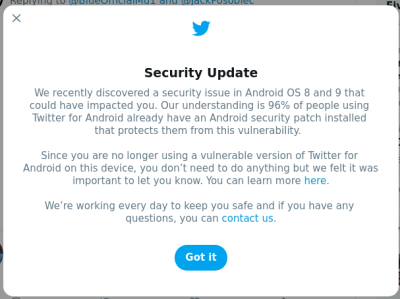 Twitter has started displaying a security warning for some users. The details are extremely scarce, but lets see what details we can tease out. First, the warning specifies that the issue in question was a vulnerability in the Twitter Android app, but that it was related to an Android vulnerability, and then links to the October 2018 Android security update. Looking through the vulnerabilities disclosed, there doesn’t seem to be an obvious candidate for the related vulnerability.
KDE Ark
We’ve seen a very simple technique show up in countless security stories: path transversal. It’s simple, you can include a “..” as part of a file path to move up a directory. Often times this can be included in unexpected places to bypass security restrictions, or do other unintended things. Archive files are no exception, and there is nothing preventing a zip archive from having such paths. Most archive programs catch this behavior and don’t allow the archive to extract as it’s written. The venerable unzip command complains like this:
# unzip relative2.zip
Archive:  relative2.zip
warning:  skipped "../" path component(s) in tmp/../../moo
 extracting: tmp/moo
KDE Ark, until recently, didn’t treat those paths as special, and would happily extract files to whatever path it was instructed to. The update doesn’t seem to be officially released at the time of writing, so be wary of blindly extracting archives until that update is available. There is a useful repository of archives that can be used to test for various transversal issues, and I’ve confirmed that one in particular (harmless zip file containing tmp/../../moo) does demonstrate the issue in Ark.
And Finally…
Remember Boothole? Multiple vendors pushed fixes to this Linux secure boot vulnerability, and a handful of unbootable systems was the result. For the case of RHEL and CentOS, another round of updated packages have been released, fixing the problem and making for bootable systems again.
And what does a criminal do with a database breach? Apparently after selling them, they release them for free. If it wasn’t stolen data, I’d call it a win. Once a breach has made as much money as the seller thinks it’s likely to make, it’s not uncommon for the data to be released for free. These aren’t very popular sites or services, but it might be worth a check to see if your data was included in the release.