A Cyclopic LCD Case For Your Raspberry Pi Server

If you’ve got a personal website that needs hosting or a few hundred gigabytes of files that could use a centralized storage location, the Raspberry Pi’s small size and extreme energy efficiency make it a compelling server choice compared to that curbside Pentium 4 box you’ve been trying to find a home for. All you need is something to put in.

Of course there’s no shortage of Pi case designs ready to be extruded from your 3D printer, but we recently found ourselves particularly taken with this unique one designed by [Ken Segler]. It’s not only small and sleek with a dash of futuristic flair, but it includes a front-mounted two inch 240 x 320 IPS display that connects to the Pi over SPI. At the minimum that gives you a way to see all those beautiful boot messages on startup, but with a little code, it could provide you with various system statics and status messages at a glance.

While the LCD is clearly the star of the show here, the case also has a few other nice features that make it worthy of your consideration. The magnetically attached fan filter on the the top, for one. The stacked layout that puts the Pi directly above the SSD also makes for a relatively compact final product.

One thing to note though is that [Ken] is using Power-over-Ethernet, meaning there’s no spot for a dedicated power jack on the case. It’s an easy enough feature to add into your own build, but naturally not everyone’s network is suitably equipped. In that case, beyond the normal annoyances of editing STL files, it shouldn’t be too much trouble to add one in without having to literally hack your way through the printed plastic.

source https://hackaday.com/2020/09/01/a-cyclopic-lcd-case-for-your-raspberry-pi-server/

A Cyclopic LCD Case For Your Raspberry Pi Server

If you’ve got a personal website that needs hosting or a few hundred gigabytes of files that could use a centralized storage location, the Raspberry Pi’s small size and extreme energy efficiency make it a compelling server choice compared to that curbside Pentium 4 box you’ve been trying to find a home for. All you need is something to put in.

Of course there’s no shortage of Pi case designs ready to be extruded from your 3D printer, but we recently found ourselves particularly taken with this unique one designed by [Ken Segler]. It’s not only small and sleek with a dash of futuristic flair, but it includes a front-mounted two inch 240 x 320 IPS display that connects to the Pi over SPI. At the minimum that gives you a way to see all those beautiful boot messages on startup, but with a little code, it could provide you with various system statics and status messages at a glance.

While the LCD is clearly the star of the show here, the case also has a few other nice features that make it worthy of your consideration. The magnetically attached fan filter on the the top, for one. The stacked layout that puts the Pi directly above the SSD also makes for a relatively compact final product.

One thing to note though is that [Ken] is using Power-over-Ethernet, meaning there’s no spot for a dedicated power jack on the case. It’s an easy enough feature to add into your own build, but naturally not everyone’s network is suitably equipped. In that case, beyond the normal annoyances of editing STL files, it shouldn’t be too much trouble to add one in without having to literally hack your way through the printed plastic.

source https://hackaday.com/2020/09/01/a-cyclopic-lcd-case-for-your-raspberry-pi-server/

Perfect Photographs For PCB Reverse Engineering

There’s an unexpected part of hacking that is very difficult to get right, namely photographing printed circuit boards. Everything seems to catch the light, making for a complex dance of manipulating light sources and camera angles. We were thus captured by [Roman Walls]’ budget rig for taking PCB photos that makes ingenious use of roadside trash to achieve a result.

It was inspired by a video featuring a much more accomplished rig, which he set out to emulate for much less outlay. Instead of an expensive lens, he’s using a Nikon camera with its kit lens. And instead of a tripod there’a a scrap drawer salvaged from the roadside and modified to become a camera holder. Lighting is diffused by baking paper, and the result is a rig that can photograph PCBs with neutral lighting and without annoying highlights.

We especially like work that takes junk and makes something useful from it, and though our purpose isn’t in reverse engineering it’s impressive to see how well the technique reveals the traces. We’ll definitely be experimenting with some of the techniques herein, and those lighting tips might also work with the Hackaday ear camera microscope.

source https://hackaday.com/2020/09/01/perfect-photographs-for-pcb-reverse-engineering/

The Hurricanes are Coming

It’s hurricane season in the northern hemisphere right now, and plenty of news and weather organizations remain dedicated to alerting people if a storm is about to impact their area. There’s no shortage of ways to receive this information, either. We all have our favorite weather app or forecasting site, and there are emergency alerts to cell phones, TV, and radio stations as well. If none of that suits you, though, you can also roll out your own weather alert readerboard.

[Damaged Dolphin] built a weather alert readerboard using a Raspberry Pi and a 64×128 LED matrix. The Raspberry Pi runs Raspbian and uses a HAT from Adafruit, and once connected to the internet pulls down weather information for a specific area using custom python code. From there it can display any emergency weather alerts instantly on the readerboard screen including alerts for hurricanes. It does rely on data from the National Weather Service though, so if that is not available in your area some modifications will need to be made to the code.

While he notes that you probably shouldn’t rely on his non-professional python code exclusively when getting weather information, it would still be a good way of retrieving information about weather events without having to refresh a browser all the time. Once the storms have passed though, be sure you’re prepared for the days following.

Thanks to [b00tfa|l] for the tip!

source https://hackaday.com/2020/08/31/the-hurricanes-are-coming/

An Analog IC Design Book Draft

[Jean-Francois Debroux] spent 35 years designing analog ASICs. He’s started a book and while it isn’t finished — indeed he says it may never be — the 180 pages he posted on LinkedIn are a pretty good read.

The 46 sections are well organized, although some are placeholders. There are sections on design flow and the technical aspects of design. Examples range from a square root circuit to a sigma-delta modulator, although some of them are not complete yet. There are also sections on math, physics, common electronics, materials, and tools.

The text is decidedly practical. For example, there’s a succinct summary of what a MOSFET channel width and length do to parameters such as capacitance, noise, and saturated resistance.

If you prefer a PDF copy, here’s a tip. When viewing the document, click on the full-screen button. Then at the top, you’ll see a download button. The link there looks as though it isn’t a static link, so you’ll need to visit the post yourself to do the download.

It is a lot of work to put a book together and even though this isn’t complete, it is a great start and already useful. If you want some more book recommendations, check out ours. We never fail to recommend The Art of Electronics, too.

source https://hackaday.com/2020/08/31/an-analog-ic-design-book-draft/

A 3D Printed Paint Mixer

To get the perfect mix for your paint, you need a good shake that is as random as possible. [Mark Rhodes] wanted to automate the process of mixing paint, so he built a 3D printed shaker to thoroughly shake small paint bottles. Using only a single motor, it shakes the bottle along three axes of rotation and one axis of translation.

A cylindrical container is attached to a U-shaped bracket on each end, which in turn is attached to a rotating shaft. Only one of these shafts are powered, the other is effectively an idler. When turned on, it rotates the cylinder partially around the pitch and yaw axis, 360 degrees around the roll axis, and reciprocates it back and forth. The design appears to be based on an industrial mixer known as a “Turbula“. Another interesting feature is how it holds the paint bottle in the cylinder. Several bands are stretched along the inside of the cylinder, and by rotating one of the rings at the end, it creates an hourglass-shaped web that can tightly hold the paint bottle.

The mechanism is mounted on a 3d printed frame that can be quickly clamped to a table. The Twitter post embedded below is a preview for a video [Mark] is working for his Youtube channel, along with which he will also release the 3D files.

Mixing machines come in all shapes and sizes, and we’ve seen a number of 3D printed versions, including a static mixer and a magnetic stirrer.

source https://hackaday.com/2020/08/31/a-3d-printed-paint-mixer/

Bright White Night Light Fights E-Waste

E-waste is a gigantic problem, and it can seem impossible as a lone individual to make any kind of dent in it. But [akshar1101] is trying to do their part by looking past the defective aspects of broken, discarded electronics to draw out the possibilities of what’s left.

This friendly night light is made from the PCBs of four broken Nokia 5110 LCD modules. The screens were all toast, but the nice white LEDs that used to light them from the sides work just fine. [akshar1101] cleverly tied all the LED and GND lines together with single right-angle header pins. To power the LEDs, they wired up a JST receptacle to one of the PCBs and connected a 3.7 V lithium battery pack that sits underneath. [akshar1101] diffused the piercing white lights into a soft glow with two pieces of acrylic.

We love to see electronic components get saved from landfills, especially when they can be turned into something useful and beautiful. Something about the traces on these boards makes them visually interesting to us — it’s that little hiccup that interrupts otherwise parallel lines.

If all of your 5110 LCDs are in working order, you could spice one of them up with an RGB backlight.

source https://hackaday.com/2020/08/31/bright-white-night-light-fights-e-waste/

100% Printed Flashlight: Conductive Filament and Melted-in Leads

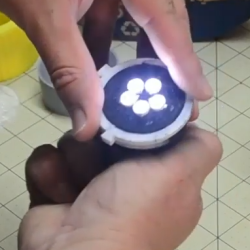
Conductive filament isn’t an ideal electrical conductor, but it’s a 3D-printable one and that’s what makes [Hercemer]’s 3D-printed flashlight using conductive filament work. Every part of the flashlight is printed except for the 9 volt battery and LEDs. Electrically speaking, the flashlight is a small number of LEDs connected in parallel to the terminals of the battery, and turning it on or off is done by twisting or loosening a cap to make or break the connection.

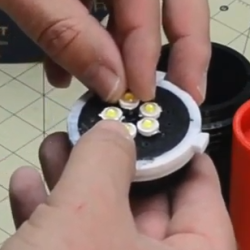
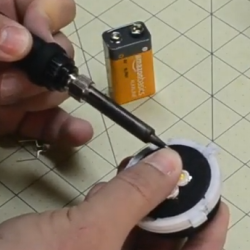
The main part of the build is a 3D-printed conductive cylinder surrounded by a printed conductive ring with an insulator between them. This disk- or pad-shaped assembly forms not only the electrical connection between the LEDs and battery terminals, but also physically holds the LEDs. To attach them, [Hercemer] simply melts them right in. He uses a soldering iron to heat up the leads, and presses them into the 3D-printed conductive block while hot. The 9 V battery’s terminals contact the bottom when the end cap is twisted, and when they touch the conductive assembly the flashlight turns on.


Anticipating everyone’s curiosity, [Hercemer] measured the resistance of his conductive block and measured roughly 350 ohms when printed at 90% infill; lower infills result in more resistance. You can see a video of the assembly and watch the flashlight in action in the video, embedded below.

Heat-setting of the LED leads is clever, and allows a variety of LEDs to be mounted as needed. It’s a lot like brass heat set inserts, which work well with 3D printed plastics and could themselves make a good electrical connection in a similar build.

source https://hackaday.com/2020/08/31/100-printed-flashlight-conductive-filament-and-melted-in-leads/

100% Printed Flashlight: Conductive Filament and Melted-in Leads

Conductive filament isn’t an ideal electrical conductor, but it’s a 3D-printable one and that’s what makes [Hercemer]’s 3D-printed flashlight using conductive filament work. Every part of the flashlight is printed except for the 9 volt battery and LEDs. Electrically speaking, the flashlight is a small number of LEDs connected in parallel to the terminals of the battery, and turning it on or off is done by twisting or loosening a cap to make or break the connection.

The main part of the build is a 3D-printed conductive cylinder surrounded by a printed conductive ring with an insulator between them. This disk- or pad-shaped assembly forms not only the electrical connection between the LEDs and battery terminals, but also physically holds the LEDs. To attach them, [Hercemer] simply melts them right in. He uses a soldering iron to heat up the leads, and presses them into the 3D-printed conductive block while hot. The 9 V battery’s terminals contact the bottom when the end cap is twisted, and when they touch the conductive assembly the flashlight turns on.


Anticipating everyone’s curiosity, [Hercemer] measured the resistance of his conductive block and measured roughly 350 ohms when printed at 90% infill; lower infills result in more resistance. You can see a video of the assembly and watch the flashlight in action in the video, embedded below.

Heat-setting of the LED leads is clever, and allows a variety of LEDs to be mounted as needed. It’s a lot like brass heat set inserts, which work well with 3D printed plastics and could themselves make a good electrical connection in a similar build.

source https://hackaday.com/2020/08/31/100-printed-flashlight-conductive-filament-and-melted-in-leads/

Grasp Kotlin’s Coroutines With This Short Tutorial

Kotlin is a relatively new programming language; a derivative of Java with lots of little handy functional bits such as coroutines. [Foalyy] is porting an app to Android and learning Kotlin at the same time, and after wrapping their mind around coroutines, has written up a concise five-part tutorial on them.

Coroutines in Kotlin are a way to simplify writing asynchronous code, which is code that doesn’t necessarily execute in the order it is written. Coroutines are like light-weight threads that can be launched and managed easily, making it simpler to bridge together blocking and non-blocking code. (However, coroutines are not threads. They are more akin to suspending functions that play very well together.)

[Foalyy] found that the official Kotlin documentation on coroutines went into great detail on how coroutines function, but wanted a more bottom-up approach to understanding how they work and can be used. Luckily for anyone who thinks the same way, [Foalyy] wrote it all up and begins with a great recap of important elements, but if you prefer you can jump straight to the examples.

Kotlin has been around for a while, and readers with sharp memories may recall it was featured in this excellent introduction to what neural networks are and how they work.

source https://hackaday.com/2020/08/31/grasp-kotlins-coroutines-with-this-short-tutorial/

Something To Look Forward To: MCH2021 Call For Participation

As we stare dejectedly at our screens and consider what might have been during the 2020 summer that didn’t quite happen, here’s a little something to look forward to in a future where the COVID-19 pandemic will with any luck be much less of a threat. We have have had precious little in the way of events in 2020, but the call for participation has been announced for one of the largest planned for 2021. MCH2021 will be big European summer camp of next year, and is scheduled for the 6th to the 10th of August at Scoutinglandgoed Zeewolde in the Netherlands province of Flevoland. It will be the latest in a long line of such events going back to 1989, and with such a track record we know it’s going to be a good one.

We know that among our community are many people who’ll be interested in going to MCH, and that each and every one of you will have some fascinating insights that others would love to hear about. The challenge of the MCH orga is to bestow upon you the courage to stand up in front of your peers and talk about it, and from our experience here at Hackaday we’d say that an event such as this one makes for a very good place to give speaking a try. As always they’re interested in all the cool stuff that comes from our diverse community, but to help you along they’ve suggested a theme. Recent events have it’s fair to say presented a challenge to the world, and in that light they state that “we are especially looking for content that is about our ability to recover from extreme events of whatever nature”. We look forward to seeing you there.

source https://hackaday.com/2020/08/30/something-to-look-forward-to-mch2021-call-for-participation/

Sudden Death Rainbow Sorting Game Reveals Your True Colors

When [marzsman]’s eight-year-old daughter thought up a game they could play together involving rainbows, he was all ears. She is a certified rainbow expert, after all. They had a few R&D sessions and came up with a rainbow sorting speed trial game that looks fun to play and fairly easy to build.

Press that blue button on the side, and the RGB LEDs along the top are put in randomized order. The object of this game is simple — just sort the rainbow before the other player by pressing each LED’s corresponding arcade button. Whoever sorts faster is rewarded with a rainbow animation behind their set of way-cool clear buttons.

Inside the laser-cut box is an Espruino, which is a handy little microcontroller that speaks JavaScript. All of the arcade buttons are wired up as a key matrix. The astute among you have noticed there is six of everything, and that’s because indigo light is too hard to distinguish from blue. Check out the intense gameplay after the break.

If [marzsman]’s daughter wants to learn computer science, rainbows are good for that, too.

source https://hackaday.com/2020/08/30/__trashed-38/

Hackaday Links: August 30, 2020

Tech history is rife with examples of bizarre product demos, but we’ve got to think that Elon Musk’s Neuralink demo this week will have to rank up there with the weirdest of them. Elon’s job here was to sell the proposition that having a quarter-sized plug removed from your skull by a surgical robot and having it plunge 1,024 tiny wires into your gray matter will be totally normal and something that all the cool kids will be doing someday. We watched the 14-minute supercut of the demo, which went on for considerably longer than that due to the realities of pig wrangling, and we remain unsold on the technology. Elon selling it as “a Fitbit in your skull, with tiny wires” probably didn’t help, nor did the somewhat terrifying appearance of the surgical robot needed to do the job. On the other hand, Gertrude the Bionic Pig seemed none the worse for her implant, which was reportedly wired to her snout and sending data wirelessly. The demonstration of reading joint positions directly from the brain was honestly pretty neat. If you want to dive deeper into Neuralink, check out Maya’s great article that separates fact from science fiction.

Jerry Carr, NASA astronaut and commander of the third and final crewed Skylab mission, passed away this week at the age of 88. Carr’s Skylab 4 mission was record-breaking in 1974, with the three astronauts living and working in the orbiting workshop for 84 days. The mission contributed a vast amount of information on space medicine and the human factors of long-duration spaceflight. Carr retired from NASA in 1977 and had a long career as an engineer and entrepreneur. It’s sad to lose yet another of the dwindling number of heroes remaining from NASA’s manned-flight heyday.

Speaking of spaceflight, the closest most of us DIYers can get to space is likely courtesy of a helium-filled balloon. If you’ve ever considered sending something — or someone — aloft, you’ll find this helium balloon calculator an invaluable tool. Just plug in the weight of your payload, select from a few common balloon sizes, and the calculator will tell you how many you need and how much gas it will take to fill them. It’s got a second section that tells you how many more balloons it’ll take to get to a certain altitude, should merely getting off the ground not be enough for you.

If 2020 has proven anything, it’s that time is, at best, a negotiable concept. Improbably, September is only a day away, after an August that somehow took forever to go by in the blink of an eye. With that in mind,  October is OSHWA’s Open Hardware Month, with this year’s theme being “Label and Certify”. We’re a little bit in love with the Open Hardware Facts generator, which takes your open-source hardware, software, and documentation license and generates a USDA “Nutrition Facts”-style label for your product. They’ve also added tools to make it easier to get OSHWA certification for your project.

And finally, what would it be like to pilot a giant exoskeleton? Like, a 9,000 pound (4,100 kg), quadrupedal all-terrain beast of a mech? Turns out you can (theoretically) find out for yourself courtesy of Furrion Exo-Bionics and their monster mech, dubbed Prosthesis. The machine has been in development for a long time, with the vision of turning mech racing into the next big thing in sports entertainment. Their Alpha Mech Pilot Training Program will allow mere mortals to learn how to pilot Prosthesis at the company’s proving ground in British Columbia. Details are sparse, so caveat emptor, but it sure looks like fun.

source https://hackaday.com/2020/08/30/hackaday-links-august-30-2020/

Solar Satellite Glows at Night

They say that imitation is the sincerest form of flattery. If we were going to imitate one of master circuit sculptor Mohite Bhoite’s creations, we’d probably pick the little blinky solar satellite as a jumping off point just like [richardsappia] did. It’s cute, it’s functional, and it involves solar power and supercapacitors. What more could you want?

SATtiny is a pummer, which is BEAM robotics speak for a bot that soaks up the sun all day and blinks (or ‘pumms’, we suppose) for as long as it can throughout the night on the juice it collected. This one uses four mini solar panels to charge up a 4 F supercapacitor.

At the controls is an ATtiny25V, which checks every eight seconds to see if the supercapacitor is charging or not as long as there is enough light. Once night has fallen, the two red LEDs will pumm like a pair of chums until the power runs out. Check out the brief demo after the break.

Would you rather have something more nightstand-friendly? Here’s a mini night light sculpture with a friendly glow. If you haven’t started your entry into our Circuit Sculpture Challenge, there’s still plenty of time — the contest runs until November 10th.

source https://hackaday.com/2020/08/30/solar-satellite-glows-at-night/

A PIN Pad Blasting UV Sanitizer

Retailers have instituted enhanced cleaning procedures in response to the COVID-19 pandemic, with an aim to keep frequently touched surfaces as clean as possible. Certainly one of the most commonly handled objects in the entire store is the payment terminal by the register, and the PIN pad specifically. Which is why [Josh Starnes] is working on a UV sterilizer that mounts onto a standard credit card terminal.

It’s a simple enough idea, but as is often the case, figuring out how to properly execute it is where things get tricky. [Josh] has already moved through several design iterations for his 3D printed enclosure in an attempt to make something that’s unobtrusive enough to be practical. The goal is to make something that the user won’t mistake for some kind of skimming device, which can certainly be tricky.

The skeptics in the audience will be happy to hear that [Josh] isn’t bothering with an LED UV source, either. We’ve all seen the pitfalls of trying to sanitize using UV LEDs, so this design goes old school with a small 12 volt UV bulb. That does mean it will need a dedicated power source however, which it seems like he’ll be addressing in the next phase of the project.


source https://hackaday.com/2020/08/30/a-pin-pad-blasting-uv-sanitizer/

OCR Reads Old Newspapers So We Don’t Have To

Plenty of people don’t bother to read the current newspaper, let alone editions that were published over 100 years ago. But there’s a wealth of important historical information buried in these dusty old publications, assuming you can find a way to reliably digitize and index it all. You might think the solution is as simple as running images of the paper through optical character recognition (OCR) software, but as [John Scancella] explains, the problem is a bit more complicated than that.

Stretching the text vertically highlights the columns.

Ultimately, the issue largely comes down to formatting. The OCR software reasonably assumes all the text is in orderly horizontal lines, because in the vast majority of cases, it would be. That’s how you’re reading these words now. But as anyone who’s seen an old time newspaper knows, that’s not how things were necessarily written back then. Pages consisted of multiple narrow columns of stories separated by vertical lines; if the OCR tries to read the page from left to right, the resulting text is a mishmash of several unrelated topics.

The answer is to break all those articles into their own images, but doing that manually at any sort of scale simply isn’t an option. So [John] has been working on a system that uses OpenCV to identify the columns of text and isolate them. He details the multi-step process down in his write-up, and even provides the Python code should you want to give it a spin. But the short version is that the image is converted to grayscale and the OpenCV dilate function is used to stretch the text in the Y dimension. This produces big blobs of white that can easily be picked out with findContours() and snipped into individual images.

It’s not a perfect solution, and there are still a few pitfalls. For one, the name of the paper needs to be removed from the front page before the stretching operation happens. But it’s clearly a step in the right direction, and the results certainly look very promising. Anything that makes OCR more accurate or easier to implement is a win in our book, so we’re excited to see where [John] takes this concept.

source https://hackaday.com/2020/08/30/ocr-reads-old-newspapers-so-we-dont-have-to/

OCR Reads Old Newspapers So We Don’t Have To

Plenty of people don’t bother to read the current newspaper, let alone editions that were published over 100 years ago. But there’s a wealth of important historical information buried in these dusty old publications, assuming you can find a way to reliably digitize and index it all. You might think the solution is as simple as running images of the paper through optical character recognition (OCR) software, but as [John Scancella] explains, the problem is a bit more complicated than that.

Stretching the text vertically highlights the columns.

Ultimately, the issue largely comes down to formatting. The OCR software reasonably assumes all the text is in orderly horizontal lines, because in the vast majority of cases, it would be. That’s how you’re reading these words now. But as anyone who’s seen an old time newspaper knows, that’s not how things were necessarily written back then. Pages consisted of multiple narrow columns of stories separated by vertical lines; if the OCR tries to read the page from left to right, the resulting text is a mishmash of several unrelated topics.

The answer is to break all those articles into their own images, but doing that manually at any sort of scale simply isn’t an option. So [John] has been working on a system that uses OpenCV to identify the columns of text and isolate them. He details the multi-step process down in his write-up, and even provides the Python code should you want to give it a spin. But the short version is that the image is converted to grayscale and the OpenCV dilate function is used to stretch the text in the Y dimension. This produces big blobs of white that can easily be picked out with findContours() and snipped into individual images.

It’s not a perfect solution, and there are still a few pitfalls. For one, the name of the paper needs to be removed from the front page before the stretching operation happens. But it’s clearly a step in the right direction, and the results certainly look very promising. Anything that makes OCR more accurate or easier to implement is a win in our book, so we’re excited to see where [John] takes this concept.

source https://hackaday.com/2020/08/30/ocr-reads-old-newspapers-so-we-dont-have-to/

OCR Reads Old Newspapers So We Don’t Have To

Plenty of people don’t bother to read the current newspaper, let alone editions that were published over 100 years ago. But there’s a wealth of important historical information buried in these dusty old publications, assuming you can find a way to reliably digitize and index it all. You might think the solution is as simple as running images of the paper through optical character recognition (OCR) software, but as [John Scancella] explains, the problem is a bit more complicated than that.

Stretching the text vertically highlights the columns.

Ultimately, the issue largely comes down to formatting. The OCR software reasonably assumes all the text is in orderly horizontal lines, because in the vast majority of cases, it would be. That’s how you’re reading these words now. But as anyone who’s seen an old time newspaper knows, that’s not how things were necessarily written back then. Pages consisted of multiple narrow columns of stories separated by vertical lines; if the OCR tries to read the page from left to right, the resulting text is a mishmash of several unrelated topics.

The answer is to break all those articles into their own images, but doing that manually at any sort of scale simply isn’t an option. So [John] has been working on a system that uses OpenCV to identify the columns of text and isolate them. He details the multi-step process down in his write-up, and even provides the Python code should you want to give it a spin. But the short version is that the image is converted to grayscale and the OpenCV dilate function is used to stretch the text in the Y dimension. This produces big blobs of white that can easily be picked out with findContours() and snipped into individual images.

It’s not a perfect solution, and there are still a few pitfalls. For one, the name of the paper needs to be removed from the front page before the stretching operation happens. But it’s clearly a step in the right direction, and the results certainly look very promising. Anything that makes OCR more accurate or easier to implement is a win in our book, so we’re excited to see where [John] takes this concept.

source https://hackaday.com/2020/08/30/ocr-reads-old-newspapers-so-we-dont-have-to/

Olaf Lets an ESP32 Listen to the Music

The joys of overengineering a simple gift. [Joren] wanted to create a dress for his daughter’s fourth birthday that would react with lights in sequence for a song from Frozen. The dress and an LED strip, along with a digital microphone and a battery were easy to procure. But how to make it all work? An ESP32 did the trick.

While the project’s name–Olaf–sounds like it was from Frozen, according to the GitHub page it actually means Overly Lightweight Acoustic Fingerprinting. Right. However, as the name implies, it can learn to identify any sound you want.

One interesting twist. The code is in C, so running it through Emscripten allows the code to run in your browser and you can watch it work alongside a YouTube video of the movie. You can see in the image above that the fingerprint screen gets red dots until it matches the audio and then the dots turn green, indicating a match.

Even if you don’t want a magic Frozen dress, the code on GitHub could be a good starting point for developing audio-sensitive applications.

source https://hackaday.com/2020/08/30/olaf-lets-an-esp32-listen-to-the-music/

Read My Lips, Under this No-Sew Mask

Humans continuously communicate with our bodies, and face masks cover one of the most expressive parts. For some, this is a muffler on strangers, but devastating for people who rely on lip-reading. Several masks exist that have a clear window for precisely this purpose, but they’re specialty and high-demand. [Erin St Blaine] over at Adafruit shows how she makes windowed masks with stuff you may already have in your house. Even if your sewing machine is locked up the local maker-space, you are in luck, because you don’t need a single stitch. For the thread-inclined, it is easy to tweak the recipe.

The part of the mask that touches your face is terry cloth, but any breathable cotton towel should work. There is a PDF in the instructions where you can print templates in four sizes. You will also find a cutout for the plastic window salvaged from your cold soft drink cup. A water bottle should work too. Flexible glue holds the fabric together, but to attach the ear-loops, we fall back on our old friend, the red Swingline. If you don’t have that color and brand, any stapler will do in a pinch. Don’t forget to add some defogger and keep smiling.

Wear your homemade mask proudly and fasten it well, but not too fast.

Thank you, [Gerben], for the tip.

source https://hackaday.com/2020/08/30/read-my-lips-under-this-no-sew-mask/

RC HalfTrack Is Lasercut Masterpiece

The half-track is a vehicle design that has gradually fallen out of favour in the decades since World War II. Combining the benefits of easy driving and handling of wheeled vehicles with the strong mud and snow performance of a tracked vehicle, they served a niche before largely being phased out with the rise of the armoured personnel carrier. [JackCarter] wished to build his own, so whipped up a lasercut RC version of the SdKfz 251 22.

The work is impressive, with [JackCarter] creating the design in Solidworks from photos and illustrations of the vehicle. The moving parts are lasercut, including the tracks themselves, assembled from many tiny lasercut MDF parts. The benefit of using lasercutting to make the model is that it was easy for [Jack Carter] to create simple jigs to ease the process of putting the tracks together. A NodeMCU with a motor shield controls the gear motors used to drive the tracks, and drives a servo for steering. Control is via a smartphone, thanks to the Blynk framework which makes building apps for custom projects easy.

The finished product really shows off [JackCarter]’s 3D design skills, and looks like great fun to build and drive. We’d love to see it with a lick of paint and some period decals to really complete the look. Hackers love a good tracked vehicle, and we’ve seen some impressive builds before. Video after the break.

source https://hackaday.com/2020/08/29/rc-halftrack-is-lasercut-masterpiece/

SDR Transmitting Gets the Power

Most hobby-grade software defined radio setups don’t transmit. Of the few that do, most of them put out anemic levels around one milliwatt or so. If you want to do something outside of the lab, you’ll need an amplifier and that’s what [Tech Minds] shows how to do in a recent video. (Embedded below.)

The video covers LimeSDR, HackRF, and the Pluto SDR, although the amplifiers should work with any transmitter. The SPF5189Z module is quite cheap and covers 50 MHz to 4 GHz, amplifying everything you throw at it. The downside is that it will amplify everything you throw at it, even parts of the signal you don’t want, such as spurs and harmonics.

There are other modules, depending on your needs. The CN0417 covers a very narrow range from 2.4 GHz to 2.5 GHz. (If you can call 100 MHz bandwidth “narrow”.) The RF2126 will cover from 400 Mhz to 2.7 GHz.

None of these are powerhouses. The maximum 20 dB gain will only give you a watt or so out with the minimal drive from most SDR transmitters. But for very many applications, that’s plenty, especially with some filtering.

Unfortunately the gain isn’t stable, and we wonder about the linearity which would affect some modulation modes. There are datasheets for these devices around, such as this one for the SPF5189Z.

If you are really into SDR, the SDR Academy went virtual this year. You might also enjoy this book.

source https://hackaday.com/2020/08/29/sdr-transmitting-gets-the-power/

A Tiny Jacob’s Ladder You Can Build At Home

Big fizzing electrical arcs are fun, and handled properly, not too dangerous either. The Jacob’s Ladder is one such piece of arc-generating equipment, one that featured heavily in vintage sci-fi films. It remains a charming demonstration of high-voltage electrical principles, and you can easily build your own mini version at home.

The build starts with a basic high-voltage step-up kit that turns 4V DC into 15 kV at the output. At this voltage level, it’s possible to generate an arc in air. To create the Jacob’s ladder, the kit is wired up to a pair of closely-spaced electrodes that slowly get farther apart as they go up vertically. When an arc jumps from one electrode to the other, it ionises the air, and the voltage sags due to the current flow. The flowing current heats up the air, which begins to rise, taking the current path with it, causing the familiar climbing arc we all know and love. As the distance between the electrodes increases towards the top, the arc can eventually no longer be sustained. With no current flowing, the voltage rises again, and a new arc forms at the bottom of the device, repeating the process.

It’s a fun build that would make an excellent desk toy, albeit best shown under glass to avoid accidental electric shocks. You can even build a larger one out of microwave parts if you’re so inclined. Video after the break.

source https://hackaday.com/2020/08/29/a-tiny-jacobs-ladder-you-can-build-at-home/

WaterAid Finds Potable Water and Stops Polluters

Millions of people all over the world don’t have access to clean drinking water, and it’s largely because of pollution by corporations and individuals. Solving this problem requires an affordable, scalable way to quickly judge water quality, package the data, and present it to an authority that can crack down on the polluters before the evidence dissipates. Ideally, the solution would be open source and easy to replicate. The more citizen scientists, the better.

[Andrei Florian]’s WaterAid flows directly from this line of thinking. Dip this small handheld device below the surface, and it quickly takes a bunch of water quality and atmospheric readings, averages them, and sends the data to a web dashboard using an Arduino MKR GSM.

WaterAid judges quality by testing the pH and the turbidity of the water, which gauges the amount of impurities. Commercial turbidity sensors work by measuring the amount of light scattered by the solids present in a liquid, so [Andrei] made a DIY version with an LED pointed at a photocell. WaterAid also reads the air temperature and humidity, and reports its location along with a timestamp.

This device can run in one of two modes, depending on the application. The enterprise mode is designed for a fleet of devices placed strategically about a body of water. In this mode, the devices sample continuously, taking readings every 15 minutes, and can send notifications that trigger on predefined thresholds. There’s also a one-and-done individual mode for hikers and campers who need to find potable water. Once WaterAid takes the readings, the NeoPixel ring provides instant color-coded judgment. Check out the demo after the break.

source https://hackaday.com/2020/08/29/wateraid-finds-potable-water-and-stops-polluters/