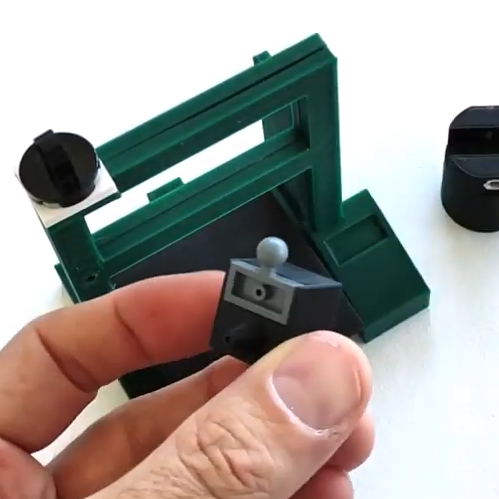
A few Lego pieces provide key functionality, like an articulated dispenser head.
Most of us have bent a length of solder into a more convenient shape and angle when soldering, and just sort of pushed the soldering iron and work piece into the hanging solder instead of breaking out a third hand. Well, [yukseltemiz] seems to have decided that a solder dispenser and a miniature 3D printer model can have a lot in common, and created a 1/5 scale Ender 3 printer model that acts as a solder stand and dispenser. The solder spool hangs where the filament roll would go, and the solder itself is dispensed through the “print head”.
It’s cute, and we do like the way that [yukseltemiz] incorporated a few Lego pieces into the build. A swivel and eyelet guides the solder off the roll and a small Lego ball and socket gives the dispenser its articulation, an important feature for bending solder to a more convenient angle for working. It makes us think that using Lego pieces right alongside more traditional hardware like M3 nuts and bolts might be an under-explored technique. You can see the unit in action in the brief assembly video, embedded below.
A few Lego pieces provide key functionality, like an articulated dispenser head.
Most of us have bent a length of solder into a more convenient shape and angle when soldering, and just sort of pushed the soldering iron and work piece into the hanging solder instead of breaking out a third hand. Well, [yukseltemiz] seems to have decided that a solder dispenser and a miniature 3D printer model can have a lot in common, and created a 1/5 scale Ender 3 printer model that acts as a solder stand and dispenser. The solder spool hangs where the filament roll would go, and the solder itself is dispensed through the “print head”.
It’s cute, and we do like the way that [yukseltemiz] incorporated a few Lego pieces into the build. A swivel and eyelet guides the solder off the roll and a small Lego ball and socket gives the dispenser its articulation, an important feature for bending solder to a more convenient angle for working. It makes us think that using Lego pieces right alongside more traditional hardware like M3 nuts and bolts might be an under-explored technique. You can see the unit in action in the brief assembly video, embedded below.
A set of helping hands is a nice tool to have around the shop, especially if soldering or gluing small components is a common task. What we all really want, though, is a robotic arm. Sure, it could help us set up glue or solder but it can do virtually any other task it is assigned as well. A general-purpose tool like this might be out of reach of most of us, unless we have a 3D printer to make this open-source robotic arm at home.
The KAUDA Robotic Arm from [Giovanni Lerda] is a five-axis arm with a gripping tool and has a completely open-source set of schematics so it can be printed on any 3D printer. The robot arm uses three stepper motors and two servo motors, and is based on the Arduino MEGA 2560 for control. The electrical schematics are also open-source, so getting this one up and running is just an issue of printing, wiring, and implementing some software. To that end there are software examples available, and they can easily be modified to fit one’s robotic needs.
A project like this could be helpful for any number of other projects, or also just as a lesson in robotics for yourself or even in a classroom, since many schools now have their own 3D printers. With everything being open-source, this is a much simpler endeavor now than other projects we’ve seen that attempted to get robotic arms running again.
When you buy a chip, how can you be sure you’re getting what you paid for? After all, it’s just a black fleck of plastic with some leads sticking out of it, and a few laser-etched markings on it that attest to what lies within. All of that’s straightforward to fake, of course, and it’s pretty easy to tell if you’ve got a defective chip once you try it out in a circuit.
But what about off-brand chips? Those chips might be functionally similar, but still off-spec in some critical way. That was the case for [Kevin Darrah] which led to his forensic analysis of potentially counterfeit MCU chips. [Kevin] noticed that one of his ATMega328 projects was consuming way too much power in deep sleep mode — about two orders of magnitude too much. The first video below shows his initial investigation and characterization of the problem, including removal of the questionable chip from the dev board it was on and putting it onto a breakout board that should draw less than a microamp in deep sleep. Showing that it drew 100 μA instead sealed the deal — something was up with the chip.
[Kevin] then sent the potentially bogus chip off to a lab for a full forensic analysis, because of course there are companies that do this for a living. The second video below shows the external inspection, which revealed nothing conclusive, followed by an X-ray analysis. That revealed enough weirdness to warrant destructive testing, which showed the sorry truth — the die in the suspect unit was vastly different from the Atmel chip’s die.
It’s hard to say that this chip is a counterfeit; after all, Atmel may have some sort of contract with another foundry to produce MCUs. But it’s clearly an issue to keep in mind when buying bargain-basement chips, especially ones that test functionally almost-sorta in-spec. Caveat emptor.
Counterfeit parts are depressingly common, and are a subject we’ve touched on many times before. If you’d like to know more, start with a guide.
There is a good chance you clicked on this article with a mouse, trackball, trackpad, or tapped with your finger. Our hands are how most of us interact with the digital world, but that isn’t an option for everyone, and [Shu Takahashi] wants to give them a new outlet to express themselves. Some folks who cannot use their hands will be able to use the Magpie MIDI, which acts as a keyboard, mouse, MIDI device, and eventually, a game controller. This universal Human Interface Device (HID) differs from a mouth-operated joystick because it has air pressure sensors instead of buttons. The sensors can recognize the difference between exhalation and inhalation, so the thirteen ports can be neutral, positive, or negative, which is like having twenty-six discrete buttons.
The harmonica mounts on an analog X-Y joystick to move a mouse pointer or manipulate MIDI sound like a whammy bar. [Shu] knows that a standard harmonica has ten ports, but he picked thirteen because all twenty-six letters are accessible by a puff or sip in keyboard mode. The inputs outnumber the Arduino Leonardo’s analog inputs, so there is a multiplexor to read all of them. There was not enough time to get an Arduino with enough native ports, like a Teensy, with HID support baked in. Most of the structure is 3D printed, so parts will be replaceable and maybe even customizable.
Later this month, people who use GitHub may find themselves suddenly getting an error message while trying to authenticate against the GitHub API or perform actions on a GitHub repository with a username and password. The reason for this is the removal of this authentication option by GitHub, with a few ‘brown-out’ periods involving the rejection of passwords to give people warning of this fact.
This change was originally announced by GitHub in November of 2019, had a deprecation timeline assigned in February of 2020 and another blog update in July repeating the information. As noted there, only GitHub Enterprise Server remains unaffected for now. For everyone else, as of November 13th, 2020, in order to use GitHub services, the use of an OAuth token, personal token or SSH key is required.
While this is likely to affect a fair number of people who are using GitHub’s REST API and repositories, perhaps the more interesting question here is whether this is merely the beginning of a larger transformation away from username and password logins in services.
No Skies Are Falling… Yet
First of all, the good news is that dealing with this change isn’t super-complicated, and if reading GitHub’s blog posts has filled you with confusion and various levels of existential dread, here’s an easy way to fix it with minimal changes if you’re used to hammering in your credentials on the command line with the git client:
Switch to SSH.
That’s it. If you already have an SSH certificate installed on your system, make sure to copy the public key into your GitHub profile. After this you can either clone your repositories anew with more SSH flavor, or change the git remote URL from HTTPS into its SSH equivalent.
Doing this requires opening the .git/config file in your local repository’s root folder in your favorite text editor (like Vim) and changing the remote’s URL. Simply change ‘https’ to ‘ssh’, and append ‘git@’ before the host name so that e.g. https://github.com/Foo/Bar.git becomes ssh://git@github.com/Foo/Bar.git.
Congratulations, you should now be able to use your SSH key to push, pull, fetch, rebase, squash and all those other naughty things with your remote repositories just like before. If you get weird SSH errors, it might be that you have the wrong permissions set on your ~/.ssh folder. Otherwise, enjoy not typing your username and password (or access token) any more every single time.
The Broader Picture
According to GitHub, the reason for this change is to increase security. Instead of passwords, they offer the use of personal access tokens (PATs) when using the REST API or accessing git repositories via HTTPS. The idea is that PATs can be created for specific services and individuals, to limit and grant certain rights. The resulting token is however a long string that you aren’t just going to remember and type in, which makes a password manager essential.
It is telling that none of this applies to logging into the GitHub website itself. There you can still use your username and password as before, possibly in addition to two-factor authentication (2FA) if you weren’t using it already. Here, the second factor in 2FA can be a code sent in a text message or mobile app, or something like WebAuthentication (FIDO2), with all the potential gotchas when using biometrics.
For those of us who were already using SSH with our GitHub repository queries, this means that essentially nothing changes. The use of access tokens should also come as no surprise to anyone who has integrated a CI system or similar with GitHub. It does however lead one to ask the question of what the point of GitHub’s change is if it only makes a few DevOps scurry around to update services (and fix the few that do fall over). Is anyone really trying to get rid of passwords?
As anyone who has ever managed a large, multi-user system at a university or large business knows, user account management is essential. Ideally you want to keep every user (whether a person, shell script or manager) in their own little permission zone. This is where GitHub’s announcement is perhaps the most puzzling. As noted by commenters over at Hacker News on the announcement, it would have made more sense to have expanded the access tokens to make more fine-grained and per-project roles.
The Power of Knowledge
Graphic courtesy of the EFF.
Whether or not passwords are actually problematic seems to mostly depend on who you ask. If it’s a study commissioned by a company that sells alternatives to password-based logins, or the company behind Windows Hello, it’s the most insecure thing ever. However, as mentioned earlier, there are significant issues with these alternatives, especially biometrics.
In user authentication, identification can take place using something you have, something you are, and something you know. Biometrics is the practice of scanning a part of a person’s body and comparing it with previously stored data. This is public data which is becoming increasingly easier to copy and reproduce to fool biometric sensors. And of course if your biometric data falls into the hands of bad actors you can never change it.
Something which one has (wallet, credit card, hardware token) is easily stolen or lost. This is why such tokens are inevitably unlocked with a password, in the form of a personal identification number (PIN), which is awkwardly danced around as being a password, even though as a thing that ‘someone knows’ it is totally a password.
Things that people know are pretty amazing, because the only ways that they can be compromised are by forgetting them or by having someone record them using keyloggers, compromised ATMs, etc. This is demonstrated by the inability of US federal departments to force their way into password-secured iPhones. With the use of facial recognition all it takes is holding the phone up to the person’s face in order to unlock it, something which might even be legal for fingerprints. In some cases a photograph of the person suffices.
All You Need Is SSH
The OpenSSH logo.
Realistically, the nice thing about GitHub’s change seems to be that it forces more people to finally toss out or rewrite those old scripts and forgotten-but-still-active Java back-end services that have username and password credentials hard-coded in them. Having them use SSH (conceivably using ssh-agent or GPG agent) eases maintenance and should improve security. Even if one just uses git repositories from the command line and doesn’t bother with a password manager, switching to SSH means less typing.
As an authentication mechanism, SSH provides two-factor authentication in the form of something you have (the secret key) and something you know (the key phrase). Its benefits are acknowledged by GitLab as well, who as of August 15th this year are no longer offering multi-factor resets for free user accounts. If one has an SSH key registered with the account, one can use SSH authentication to recover the account in cases where all of the other authentication methods have become unavailable.
It’s Passwords All the Way Down
Because of the power of keeping authentication information safely stored in our squishy, organic brains, all authentication methods seem to lead back to a form of passwords at some point. Even ‘password-less’ authentication tokens require a passcode (PIN), which one has to remember. The same is true for credit cards, debit cards, online banking accounts, SIM cards, password managers and so on.
On last count, I have to remember the PIN codes for multiple SIM cards, debit cards, credit cards, online banking apps, and one password manager for nearly a dozen total. Guess where these PIN codes end up? That’s correct, in the password manager, because remembering a random string of numbers is tricky, but remembering a dozen of them is a borderline nightmare scenario. Was it 7634 for that one debit card, or 7643? Or was that for the second credit card? Even Elliot Williams’ brain-based hashing system for PINs lets him write the public key on the card but it still demands that he remember the private key (and how to hash them in his head).
Perhaps that’s the appeal of biometrics: to have something that just is, with nothing to remember or some physical item to keep track of. Yet biometrics is the cryptology equivalent of printing your SSH private key on your forehead (or fingertips).
At the end of the day, it seems that all authentication roads end up leading to password managers and SSH keys.
Later this month, people who use GitHub may find themselves suddenly getting an error message while trying to authenticate against the GitHub API or perform actions on a GitHub repository with a username and password. The reason for this is the removal of this authentication option by GitHub, with a few ‘brown-out’ periods involving the rejection of passwords to give people warning of this fact.
This change was originally announced by GitHub in November of 2019, had a deprecation timeline assigned in February of 2020 and another blog update in July repeating the information. As noted there, only GitHub Enterprise Server remains unaffected for now. For everyone else, as of November 13th, 2020, in order to use GitHub services, the use of an OAuth token, personal token or SSH key is required.
While this is likely to affect a fair number of people who are using GitHub’s REST API and repositories, perhaps the more interesting question here is whether this is merely the beginning of a larger transformation away from username and password logins in services.
No Skies Are Falling… Yet
First of all, the good news is that dealing with this change isn’t super-complicated, and if reading GitHub’s blog posts has filled you with confusion and various levels of existential dread, here’s an easy way to fix it with minimal changes if you’re used to hammering in your credentials on the command line with the git client:
Switch to SSH.
That’s it. If you already have an SSH certificate installed on your system, make sure to copy the public key into your GitHub profile. After this you can either clone your repositories anew with more SSH flavor, or change the git remote URL from HTTPS into its SSH equivalent.
Doing this requires opening the .ssh/config file in your local repository’s root folder in your favorite text editor (like Vim) and changing the remote’s URL. Simply change ‘https’ to ‘ssh’, and append ‘git@’ before the host name so that e.g. https://github.com/Foo/Bar.git becomes ssh://git@github.com/Foo/Bar.git.
Congratulations, you should now be able to use your SSH key to push, pull, fetch, rebase, squash and all those other naughty things with your remote repositories just like before. If you get weird SSH errors, it might be that you have the wrong permissions set on your ~/.ssh folder. Otherwise, enjoy not typing your username and password (or access token) any more every single time.
The Broader Picture
According to GitHub, the reason for this change is to increase security. Instead of passwords, they offer the use of personal access tokens (PATs) when using the REST API or accessing git repositories via HTTPS. The idea is that PATs can be created for specific services and individuals, to limit and grant certain rights. The resulting token is however a long string that you aren’t just going to remember and type in, which makes a password manager essential.
It is telling that none of this applies to logging into the GitHub website itself. There you can still use your username and password as before, possibly in addition to two-factor authentication (2FA) if you weren’t using it already. Here, the second factor in 2FA can be a code sent in a text message or mobile app, or something like WebAuthentication (FIDO2), with all the potential gotchas when using biometrics.
For those of us who were already using SSH with our GitHub repository queries, this means that essentially nothing changes. The use of access tokens should also come as no surprise to anyone who has integrated a CI system or similar with GitHub. It does however lead one to ask the question of what the point of GitHub’s change is if it only makes a few DevOps scurry around to update services (and fix the few that do fall over). Is anyone really trying to get rid of passwords?
As anyone who has ever managed a large, multi-user system at a university or large business knows, user account management is essential. Ideally you want to keep every user (whether a person, shell script or manager) in their own little permission zone. This is where GitHub’s announcement is perhaps the most puzzling. As noted by commenters over at Hacker News on the announcement, it would have made more sense to have expanded the access tokens to make more fine-grained and per-project roles.
The Power of Knowledge
Graphic courtesy of the EFF.
Whether or not passwords are actually problematic seems to mostly depend on who you ask. If it’s a study commissioned by a company that sells alternatives to password-based logins, or the company behind Windows Hello, it’s the most insecure thing ever. However, as mentioned earlier, there are significant issues with these alternatives, especially biometrics.
In user authentication, identification can take place using something you have, something you are, and something you know. Biometrics is the practice of scanning a part of a person’s body and comparing it with previously stored data. This is public data which is becoming increasingly easier to copy and reproduce to fool biometric sensors. And of course if your biometric data falls into the hands of bad actors you can never change it.
Something which one has (wallet, credit card, hardware token) is easily stolen or lost. This is why such tokens are inevitably unlocked with a password, in the form of a personal identification number (PIN), which is awkwardly danced around as being a password, even though as a thing that ‘someone knows’ it is totally a password.
Things that people know are pretty amazing, because the only ways that they can be compromised are by forgetting them or by having someone record them using keyloggers, compromised ATMs, etc. This is demonstrated by the inability of US federal departments to force their way into password-secured iPhones. With the use of facial recognition all it takes is holding the phone up to the person’s face in order to unlock it, something which might even be legal for fingerprints. In some cases a photograph of the person suffices.
All You Need Is SSH
The OpenSSH logo.
Realistically, the nice thing about GitHub’s change seems to be that it forces more people to finally toss out or rewrite those old scripts and forgotten-but-still-active Java back-end services that have username and password credentials hard-coded in them. Having them use SSH (conceivably using ssh-agent or GPG agent) eases maintenance and should improve security. Even if one just uses git repositories from the command line and doesn’t bother with a password manager, switching to SSH means less typing.
As an authentication mechanism, SSH provides two-factor authentication in the form of something you have (the secret key) and something you know (the key phrase). Its benefits are acknowledged by GitLab as well, who as of August 15th this year are no longer offering multi-factor resets for free user accounts. If one has an SSH key registered with the account, one can use SSH authentication to recover the account in cases where all of the other authentication methods have become unavailable.
It’s Passwords All the Way Down
Because of the power of keeping authentication information safely stored in our squishy, organic brains, all authentication methods seem to lead back to a form of passwords at some point. Even ‘password-less’ authentication tokens require a passcode (PIN), which one has to remember. The same is true for credit cards, debit cards, online banking accounts, SIM cards, password managers and so on.
On last count, I have to remember the PIN codes for multiple SIM cards, debit cards, credit cards, online banking apps, and one password manager for nearly a dozen total. Guess where these PIN codes end up? That’s correct, in the password manager, because remembering a random string of numbers is tricky, but remembering a dozen of them is a borderline nightmare scenario. Was it 7634 for that one debit card, or 7643? Or was that for the second credit card? Even Elliot Williams’ brain-based hashing system for PINs lets him write the public key on the card but it still demands that he remember the private key (and how to hash them in his head).
Perhaps that’s the appeal of biometrics: to have something that just is, with nothing to remember or some physical item to keep track of. Yet biometrics is the cryptology equivalent of printing your SSH private key on your forehead (or fingertips).
At the end of the day, it seems that all authentication roads end up leading to password managers and SSH keys.
We all bring our own areas of expertise to our work when we build the projects that find their way in front of Hackaday writers, for instance a software developer brings clever brains to their microcontroller, or an electronic engineer might bring a well-designed piece of circuitry. [Yvo de Haas] is a mechanical engineer, and it’s pretty clear from his animatronic tentacle that he has used his expertise in that field to great effect.
If you think it looks familiar then some readers may recall that we saw a prototype model back in February at Hacker Hotel 2020. In those last weeks before the pandemic hit us with lockdowns and cancellations he’d assembled a very worthy proof of concept, and from what we can see from his write-up and the video below he’s used all the COVID time to great effect in the finished product. Back in February the control came via a pair of joysticks, we’re particularly interested to see his current use of a mini tentacle as a controller.
At its heart is a linkage of 3D-printed anti-parallelograms linked by gears, with cables holding the tension and controlling the movement of the tentacle from a set of winches. The design process is detailed from the start and makes a fascinating read, and with its gripper on the end we can’t wait for an event that goes ahead without cancellation at which we can see the tentacle for real.
For his project, [Ish] used an Arduino Nano 33 BLE Sense due to its built-in microphone, sizeable RAM for storing large chunks of data, and it’s BLE capabilities for later connecting with an app. He began his project by collecting background noise using Edge Impulse Studio’s data acquisition functionality. [Ish] really emphasized that Edge Impulse was really doing all the work for him. He really just needed to collect some test data and that was mostly it on his part. The work needed to run and test the Neural Network was taken care of by Edge Impulse. Sounds handy, if you don’t mind offloading your data to the cloud.
[Ish] ended up with an 86.3% accurate classifier which he thought was good enough for a first pass at things. To make his prototype a bit more “finished”, he added some status LEDs, providing some immediate visual feedback of his classifier and to notify the caregiver. Eventually, he wants to add some BLE support and push notifications, alerting him whenever his baby needs attention.
[ananords] and his girlfriend wanted to make a simple and easy to use music player for her grandmother. Music players like CD players and MP3s have gotten just a bit too difficult to handle, so they wanted to find a much simpler solution.
They conceived the idea of creating a little jukebox called Juuk, with a simple and easy to use interface. They created individual RFID cards with the artist’s photo on the front face, making it easy to select different options from the music library. Juuk has a built-in RFID reader that will recognize each RFID card and play the appropriate musical number from an SD card.
This simple interface is much more user-friendly than those awful touchscreen devices that we’re all forced to fiddle with today and also has a cool retro appeal that many of our readers are sure to appreciate. Juuk also has a pretty ergonomic interface with a big, easy-to-use knob for controlling the volume and two appropriately illuminated buttons, one green and one red, for simple stop and play options.
We are all intimate with face coverings to slow the spread of the coronavirus. Some are reusable, and some become waste after one use. [Dr. Ye Ruquan] and a research team from City University of Hong Kong, CityU, are developing an inexpensive reusable mask with outstanding antibacterial properties, and, get this, the graphene it contains will generate a tiny current when moistened by human breath. There isn’t enough power to charge your phone or anything, but that voltage drops as the masks get dirty, so it can help determine when it needs cleaning. The video after the break shows the voltage test, and it reminds us of those batteries.
All the remarkable qualities of this mask come from laser-induced graphene. The lab is producing LIG by lasering polyimide film with a commercial CO2 infrared model. In a speed test, the process can convert 100cm² in ninety seconds, so the masks can be made more cheaply than an N95 version with that melt-blown layer that is none too good for the earth. Testing the antibacterial properties against activated carbon fiber and blown masks showed approximately 80% of the bacteria is inert after 8 hours compared to the others in the single digits. If you put them in the sun for 10 minutes, blown fabric goes to over 85%, but the graphene is 99.998%, which means that one bacteria in 50K survives. The exact mechanism isn’t known, but [Dr. Ye] thinks it may have something to do with graphene’s sharp edges and hydrophobic quality. A couple of coronavirus species were also affected, and the species that causes COVID-19 will be tested this year.
Over the last couple of years, we’ve seen a wave of impressive rugged mobile computing devices based on the ubiquitous Raspberry Pi. Sometimes they involve repurposing an existing heavy duty enclosure, and in others the Pi takes up residence in a 3D printed case which may or may not be as strong as it appears. In either event, they usually don’t lend themselves to duplication because of the time and expense involved in tracking down or printing all the parts required.
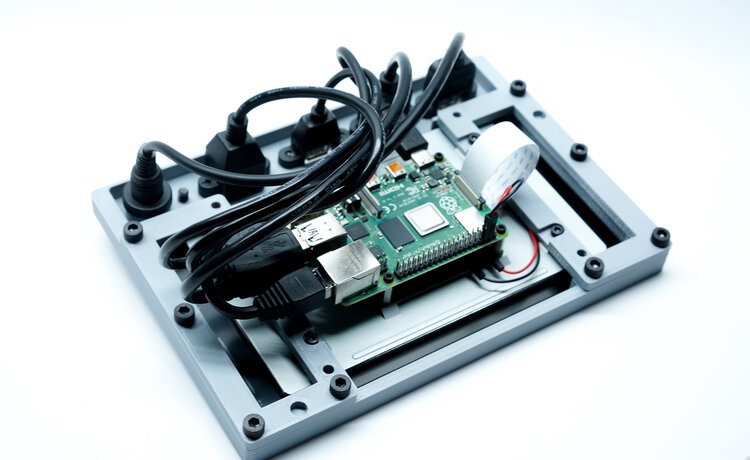
But the Raspberry Pi Quick Kit by [Jay Doscher] may change that. It represents what must surely be the simplest and fastest route to a building a rugged mobile ARM computer for your hacking adventures. Beyond the Pelican 1150 case that serves as the outer enclosure, you only need three printed parts and a handful of fasteners to complete the build. Of course you’ll need a Raspberry Pi and the official touch screen as well, but that’s sort of a given.
Electronics mounted to the 3D printed frame.
All of the electronics mount onto the three piece 3D printed frame, which is then press-fit into the opening of the Pelican case. Since you don’t need to pop any holes through the case itself, the assembled unit remains water and air tight. While [Jay] has recently shown off a very impressive 3D printed Pi enclosure, there’s really no beating a legitimate heavy duty storage case if you’re trying to protect the hardware.
When you want to use the Pi, just open the case and plug your power and accessories into the panel mount connectors under the display. There’s no integrated battery or keyboard on this build, but considering how small it is, that shouldn’t really come as a surprise.
[Jay] is targeting the Pi 4 for the Quick Kit, so that means WiFi and Bluetooth will come standard without the need for any external hardware. It looks like there might just be enough room to include an RTL-SDR receiver inside the case as well, but you’ll need to do a little redesigning of the 3D printed parts. If you do modify this design to pack in a few new tricks, we’d love to hear about it.
Over the last couple of years, we’ve seen a wave of impressive rugged mobile computing devices based on the ubiquitous Raspberry Pi. Sometimes they involve repurposing an existing heavy duty enclosure, and in others the Pi takes up residence in a 3D printed case which may or may not be as strong as it appears. In either event, they usually don’t lend themselves to duplication because of the time and expense involved in tracking down or printing all the parts required.
But the Raspberry Pi Quick Kit by [Jay Doscher] may change that. It represents what must surely be the simplest and fastest route to a building a rugged mobile ARM computer for your hacking adventures. Beyond the Pelican 1150 case that serves as the outer enclosure, you only need three printed parts and a handful of fasteners to complete the build. Of course you’ll need a Raspberry Pi and the official touch screen as well, but that’s sort of a given.
Electronics mounted to the 3D printed frame.
All of the electronics mount onto the three piece 3D printed frame, which is then press-fit into the opening of the Pelican case. Since you don’t need to pop any holes through the case itself, the assembled unit remains water and air tight. While [Jay] has recently shown off a very impressive 3D printed Pi enclosure, there’s really no beating a legitimate heavy duty storage case if you’re trying to protect the hardware.
When you want to use the Pi, just open the case and plug your power and accessories into the panel mount connectors under the display. There’s no integrated battery or keyboard on this build, but considering how small it is, that shouldn’t really come as a surprise.
[Jay] is targeting the Pi 4 for the Quick Kit, so that means WiFi and Bluetooth will come standard without the need for any external hardware. It looks like there might just be enough room to include an RTL-SDR receiver inside the case as well, but you’ll need to do a little redesigning of the 3D printed parts. If you do modify this design to pack in a few new tricks, we’d love to hear about it.
Over the last couple of years, we’ve seen a wave of impressive rugged mobile computing devices based on the ubiquitous Raspberry Pi. Sometimes they involve repurposing an existing heavy duty enclosure, and in others the Pi takes up residence in a 3D printed case which may or may not be as strong as it appears. In either event, they usually don’t lend themselves to duplication because of the time and expense involved in tracking down or printing all the parts required.
But the Raspberry Pi Quick Kit by [Jay Doscher] may change that. It represents what must surely be the simplest and fastest route to a building a rugged mobile ARM computer for your hacking adventures. Beyond the Pelican 1150 case that serves as the outer enclosure, you only need three printed parts and a handful of fasteners to complete the build. Of course you’ll need a Raspberry Pi and the official touch screen as well, but that’s sort of a given.
Electronics mounted to the 3D printed frame.
All of the electronics mount onto the three piece 3D printed frame, which is then press-fit into the opening of the Pelican case. Since you don’t need to pop any holes through the case itself, the assembled unit remains water and air tight. While [Jay] has recently shown off a very impressive 3D printed Pi enclosure, there’s really no beating a legitimate heavy duty storage case if you’re trying to protect the hardware.
When you want to use the Pi, just open the case and plug your power and accessories into the panel mount connectors under the display. There’s no integrated battery or keyboard on this build, but considering how small it is, that shouldn’t really come as a surprise.
[Jay] is targeting the Pi 4 for the Quick Kit, so that means WiFi and Bluetooth will come standard without the need for any external hardware. It looks like there might just be enough room to include an RTL-SDR receiver inside the case as well, but you’ll need to do a little redesigning of the 3D printed parts. If you do modify this design to pack in a few new tricks, we’d love to hear about it.
We’ve seen incredible strides made in the last decade or so towards democratizing manufacturing. Things that it once took huge, vertically integrated industries with immense factories at their disposal are now commonly done on desktop CNC machines and 3D printers. Open-source software has harnessed the brainpower of millions of developers into tools that rival what industry uses, and oftentimes exceeds them. Using these tools and combining them with things like on-demand PCB production and contract assembly services, and you can easily turn yourself into a legit manufacturer.
This model of pushing manufacturing closer to the Regular Joe and Josephine only goes so far, though. Your designs have pretty much been restricted to chips made by one or the other big manufacturers, which means pretty much anyone else could come up with the same thing. That’s all changing now thanks to SkyWater PDK, the first manufacturable, open-source process-design kit. With the tools in the PDK, anyone can design a chip for the SkyWater foundry’s 130-nm process. And the best part? It’s free — as in beer. That’s right, you can get an open-source chip built for nothing during chip manufacturing runs that start as early as this November and go through 2021.
We’re sure this news will stir a bunch of questions, so Tim Ansell, a software engineer at Google who goes by the handle “mithro” will drop by the Hack Chat to discuss the particulars. He’ll be joined by Mohamed Kassem, CTO and co-founder of efabless.com, and Michael Gielda, VP of Business Development at Antmicro. Together they’ll field your questions about this exciting development, and they’ll walk us through just what it takes to turn your vision into silicon.
Click that speech bubble to the right, and you’ll be taken directly to the Hack Chat group on Hackaday.io. You don’t have to wait until Wednesday; join whenever you want and you can see what the community is talking about.
We’re pretty familiar with budget resistor-based bend sensors at this point, but this sensor is in a totally different class. Instead of relying on resistive elements, [Useok Jeong] and [Kyu-Jin Cho] devised a bend sensor that relies on geometric properties of the sensor itself. The result is a higher-fidelity measuring device made from a pretty widely available collection of stock parts.
We’ll admit, calling this device a bend sensor might be a bit of a stretch, so let’s dig into some of the operating principles. What we’re actually measuring is the accumulated angle, the sum of all the curvature deformations along the length of the sensing element. The sensor is made of 3 main pieces: an outer extension spring-based wire sheath; a flexible, tensioned inner wire core that’s fixed at one end; and a small displacement sensor that measures the length changes in the wire’s free end. The secret ingredient to making this setup work is a special property of the outer wire sheath or spring guide. Here, the spring guide actually resists being compressed while being bent. Because the inner radius of the bend remains a constant length, the center wire core is forced to elongate. With the excess wire spooled up at the sensor base, we simply measure how much we collected, apply some math, and get a resulting angle! What’s more, the folks behind this trick also demonstrate that the length and angle relationship is linear with an R-square of 0.9969.
One of the best parts about this sensor is how reproducible it seems from from a modest collection of stock parts. Spring guide (aka: extension spring) is available from McMaster-Carr and DR Templeman, and that flexible core might be readily substituted with some wire rope.
It’s not everyday that new topologies for bend sensors pop into the world, let alone linear ones. To learn more, the folks behind the project have kindly made their research paper open access for your afternoon reading enjoyment. (Bring scratch paper!) Finally, if you’re looking for other bend-related sensors, have a look at this multi-bend measurement setup.
We’re pretty familiar with budget resistor-based bend sensors at this point, but this sensor is in a totally different class. Instead of relying on resistive elements, [Useok Jeong] and [Kyu-Jin Cho] devised a bend sensor that relies on geometric properties of the sensor itself. The result is a higher-fidelity measuring device made from a pretty widely available collection of stock parts.
We’ll admit, calling this device a bend sensor might be a bit of a stretch, so let’s dig into some of the operating principles. What we’re actually measuring is the accumulated angle, the sum of all the curvature deformations along the length of the sensing element. The sensor is made of 3 main pieces: an outer extension spring-based wire sheath; a flexible, tensioned inner wire core that’s fixed at one end; and a small displacement sensor that measures the length changes in the wire’s free end. The secret ingredient to making this setup work is a special property of the outer wire sheath or spring guide. Here, the spring guide actually resists being compressed while being bent. Because the inner radius of the bend remains a constant length, the center wire core is forced to elongate. With the excess wire spooled up at the sensor base, we simply measure how much we collected, apply some math, and get a resulting angle! What’s more, the folks behind this trick also demonstrate that the length and angle relationship is linear with an R-square of 0.9969.
One of the best parts about this sensor is how reproducible it seems from from a modest collection of stock parts. Spring guide (aka: extension spring) is available from McMaster-Carr and DR Templeman, and that flexible core might be readily substituted with some wire rope.
It’s not everyday that new topologies for bend sensors pop into the world, let alone linear ones. To learn more, the folks behind the project have kindly made their research paper open access for your afternoon reading enjoyment. (Bring scratch paper!) Finally, if you’re looking for other bend-related sensors, have a look at this multi-bend measurement setup.
[Ruchir] has been pretty into robotics for a while now and has always been amused by the ever-popular obstacle avoiding robot, but wanted something that could do more. So, like any good hacker, he decided to build something himself.
He wanted to incorporate all the popular beginner robot capabilities into a single invention. His robot can follow a line, detect an obstacle, and retrieve an object without switching between modes. It can even follow another robot, which is pretty neat.
His robot has a lot of the hardware you would expect. It uses a Raspberry Pi for all the heavy image processing, has optical sensors for line following and obstacle avoidance, and includes a speaker for audio feedback. What’s especially cool is the impressive interface, called the Regbot GUI, that [Ruchir] is using with his robot. According to the Wiki page, the Regbot GUI appears to accompany an educational robotics platform developed by Professor Jens Christian Andersen of the Technical University of Denmark for teaching controls to engineering students. [Ruchir] was able to adapt the GUI to his particular bot no problem.
Using the Regbot GUI, [Ruchir] can monitor all the robot’s sensor data in real-time (accelerometer, gyroscope, distance sensor, servo, encoder, etc.), dynamically adjust its calibration settings if needed, or even provide a universal killswitch in case the unthinkable happens. We’d say it’s definitely worth a look before you embark on your next robotics project.
[8BitsAndAByte] are back and this time they’re using AI to create an interactive storyteller. With the help of a Raspberry Pi, they upcycled an old Cold War era radio they dug up and the results are pretty impressive.
The main controller board of the radio was intact, so it was easy to use all the preexisting hardware to control the speaker and to trigger a few of the Pi’s GPIO using the buttons and switches on the radio’s front panel. To add some artificial intelligence, they used Google’s AIY Voice Kit, allowing them to tap into Google’s seemingly endless artificial intelligence platform. This could be a “tables have turned moment,” but we’re probably being a bit too hopeful.
Anyway, they used a pretty interesting piece of software called Dialogflow that creates a somewhat natural conversational interaction akin to a chatbox. Dialogflow processes speech to text, as you would expect, but can also interpret contextual speech and provide contextual responses. Pretty neat…but maybe also a little creepy. Who knows? The jury is still out.
Like pretty much every other big conference, the Chaos Communication Conference is going virtual this year. What was supposed to be 37C3 has been rebranded as rC3, the remote Chaos Experience. It’s understandable, as a 17,000 person live event would have not only been illegal but a bit irresponsible in the current environment. The event appears to be a hybrid of small local events hosted in hackerspaces linked with streamed talks and a program of workshops and “online togetherness.” rC3 is slated to run in the week between Christmas and New Year, and it seems like a great way to wrap up 2020.
Speaking of remote conferences, don’t forget about our own Remoticon. While it won’t be quite the same as everyone getting together in sunny — historically, at least — Pasadena for a weekend of actual togetherness, it’s still going to be a great time. The event runs November 6 to 8; we’ve had a sneak peek at the list of proposed workshops and there’s some really cool stuff. Prepare to be dazzled, and make sure you keep up on the Remoticon announcements — you really don’t want to miss this.
There’s been a strange confluence of decapping news this week that we’re all too happy to share. First is a collection of transistor die photos that are simply fascinating. Most of them feature 2N3055 power transistors of various vintages and manufacturing methods. Liberated from their TO-3 cans and driven to breakdown at the base-emitter junction, the dies light up, sometimes frighteningly bright. The innards of a potted Darlington array and 2N1613 on the next page are interesting too.
Our final bit of decapping news comes to us via a fan of Zeptobars, a decapper of some renown whose work we’ve featured on our pages quite a few times. Thanks to COVID-19, he was forced to decamp from Moscow back to Switzerland on short notice back in May, leaving behind most of his elaborate setup for decapping and etching chips. While he’s rebuilding his lab, he’s asking for donations of any surplus metal-capped chips, presumably because they’re easier to pop open and photograph. Maybe we can all dig around in our junk bins and see if we have anything interesting to help him keep the blog going.
And finally, Warped Perception is at it again. We recently covered how he put a GoPro inside a tire and showed what it looks like in there while the car drives around a bit. Then he notched it up a bit and did a burnout with a camera-fied tire, which was interesting for those with a destructive bent. And now he’s gone and stuck a GoPro inside the intake manifold of a turbocharged Toyota Supra, just because. It’s actually pretty interesting — the camera can see not only the massive throttle plate at the front of the manifold but also the velocity stacks feeding into each cylinder. We’re also treated to a look straight into the intake vales of one cylinder, with the barest glimpse of its fuel injector. We were a little puzzled by the reddish fluid leaking into the manifold, as was Warped Perception — engine oil, perhaps? It’s a long way to go to get diagnostic information, but makes for some pretty cool footage.
Let’s say you’re stranded on a desert island and want to get the news from the outside world. You’ll have to build your own crystal radio, of course, but your parts bin is nowhere to be found and Digi-Key isn’t delivering. So you’ll need to MacGuyver some components. Capacitors are easy with a couple of pieces of tinfoil, and a rectifier can be made from a pencil and a razor blade. But what about an inductor? Sure, air-core inductors will work, but just because you’re marooned doesn’t mean you’ve abandoned your engineering principles. Luckily, you’ve read [AC7ZL]’s treatise of making inductors from dirt, and with sand in abundance, you’re able to harvest enough material to put together some passable ferrite-core inductors.
Obviously, making your own inductive elements isn’t practical even in fanciful and contrived situations, but that doesn’t make the doing of it any less cool. The story begins with a walk in the Arizona desert many years ago, where [AC7ZL], aka [H.P. Friedrichs], spied bands of dark sand shooting through the underlying lighter sediments. These bands turned out to be magnetite, one of many iron-bearing minerals found in the area. Using a powerful magnet from an old hard drive and a plastic food container, he was able to harvest magnetite sand in abundance and refine it with multiple washing steps.
After experimentally determining the material’s permeability — about 2.3 H/m — [AC7ZL] proceeded with some practical applications. He was able to make a bar antenna for an AM radio by packing the sand into a PVC pipe and rewinding the coils around it. More permanent cores were made by mixing the sand with polyester resin and casting it into bars. Toroids were machined from fat bars of the composite on a lathe, much to the detriment of the cutting tools used.
The full-length PDF account of [AC7ZL]’s experiments makes for fascinating reading — the inductive elements he was able to create all performed great in everything from a Joule Thief to a Hartley oscillator up to 27 MHz. We love these kinds of stories, which remind us of some of the work being done by [Simplifier] and others.
Old TeleTypes and even typewriters had bells. Real bells. So that ASCII BEL character is supposed to make an honest to goodness ringing sound. While some modern terminals make a beep from the computer speakers, it isn’t the same. [Tenderlove] must agree, because the turned a Microchip USB to I2C bridge chip into a HID-controlled bell.
The only problem we see is that you have to have a patch to your terminal to ring the bell. We’d love to see some filter for TCP or serial that would catch BEL characters, but on the plus side, it is easy to ring the bell from any sort of application since it responds to normal HID commands.
If a bell doesn’t strike your fancy, you could use the same technique to easily add a digital output for anything. Of course, you could also use the MCP2221A as intended and put an I2C bus out there with a digital I/O expander or any number of other I2C chips.
Despite the video’s infomercial attitude, you can’t actually buy the bell. You’ll have to make it. It wouldn’t be very hard to duplicate with an Arduino or anything else you can connect to a PC as long as you modify the driving software accordingly.
We’ve seen homemade VR headsets before, but, often they are dependent on special software or are not really up to par with commercial products. Not so with Relativity, an open source project from [Max Coutte] and [Gabriel Combe]. [Max] says it best:
Relativty is not a consumer product. We made Relativty in my bedroom with a soldering iron and a 3D printer and we expect you to do the same: build it yourself.
Unlike some homebrew gear, Relativity has full Steam VR support. It also has experimental support for positional scaling that tracks your body based on video input.
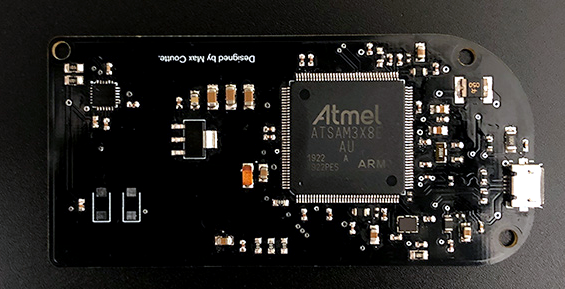
Under the covers, a motherboard with an Atmel ARM Cortex M3 and an IMU do the heavy lifting and account for $25 of the $200 price tag. The firmware though can run on any suitable ArduinoCore processor. The displays, too, have options. You can go for price with 90 Hz 1080p screens or jump up to 4K. The prototypes use a 2K dual display at 120 frames per second.
If you want to build Relativity yourself, all the details are on GitHub and there is a Discord server for help. The 3D printed case looks great and overall it seems like an impressive design.
We’ve seen a few similar projects, some even cheaper. We actually covered an earlier incarnation of the headset from the same team. You can see they’ve come a long way.
Listening to radio from distant countries used to take a shortwave rig, but thanks to the Internet we can now pull in streams from all over the globe from the comfort of our own desktop. With a few clicks you can switch between your local news station and the latest in pop trends from Casablanca. But as convenient as online streaming might be, some folks still yearn for the traditional radio experience.
For those people, the Raspberry Pi World Radio by [Abraham Martinez Gracia] might be the solution. Built into the body of a 1960s Invicta radio, this Internet radio uses a very unique interface. Rather than just picking from a list of channels, you use the knobs on the front to pan and zoom around a map of the world. Streaming channels are represented by bubbles located within their country of origin, so you’ll actually have to “travel” there to listen in. The video after the break gives a brief demonstration of how it works in practice.
We’ll admit it might become a bit tedious eventually, but from a visual standpoint, it’s absolutely fantastic. [Abraham] even gave the map an appropriately vintage look to better match the overall aesthetic. Normally we’d say using a Raspberry Pi 4 to drive a streaming radio player would be a bit overkill, but considering the GUI component used here, it’s probably the right choice.




 Switch to SSH.