Building a Cell Testing Station For 18650s

The 18650 is perhaps the world’s favorite lithium battery, even if electric car manufacturers are beginning to move towards larger cells such as the 21700. Used heavily in laptops and flashlights, it packs a useful amount of energy into a compact, easy to use package. There’s a small industry that has developed around harvesting these cells from old equipment and repurposing them, and [MakerMan] wanted to a piece of the action. Thus, he created a cell testing station to help in the effort.

Make no mistake, this is not a grandiose smart cell tester with 40 slots that logs every last iota of data into a cloud spreadsheet for further analysis. Nope, this is good old fashioned batch processing. [MakerMan] designed a single PCB that replicates the same cell testing circuit four times. Since PCB houses generally have a minimum order quantity of ten units, [MakerMan] ended up with forty individual cell testers on ten PCBs. Once populated, the boards were installed on a wooden frame with an ATX power supply which supplies the juice to run the system.

Overall, it’s a quick, cheap way for capacity testing cells en masse that should serve [MakerMan] well. We look forward to seeing where these cells end up. We’ve seen his work before, too – with a self-built laser engraver a particular highlight. Video after the break.

source https://hackaday.com/2020/09/21/building-a-cell-testing-station-for-18650s/

Circuit Board Origami Puts You Face-to-Face with Low-Poly Electronics

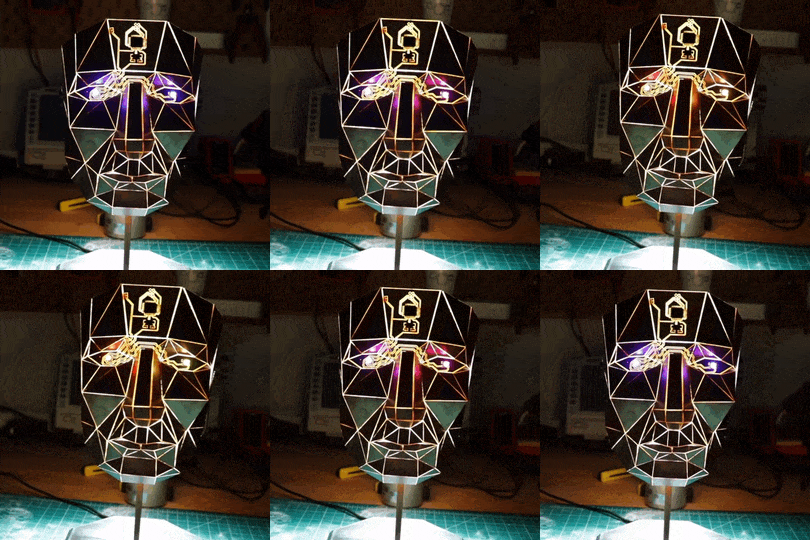
Paper craft has been around almost as long as paper itself. It’s fun to mimic paper craft and origami with low-poly 3D prints, and [Stephen Hawes] wondered whether it could be done with copper-clad PCBs. Two years after the question arose, we have the answer in the form of a fantastical mask with light-up eyes. Check it out in the video below.

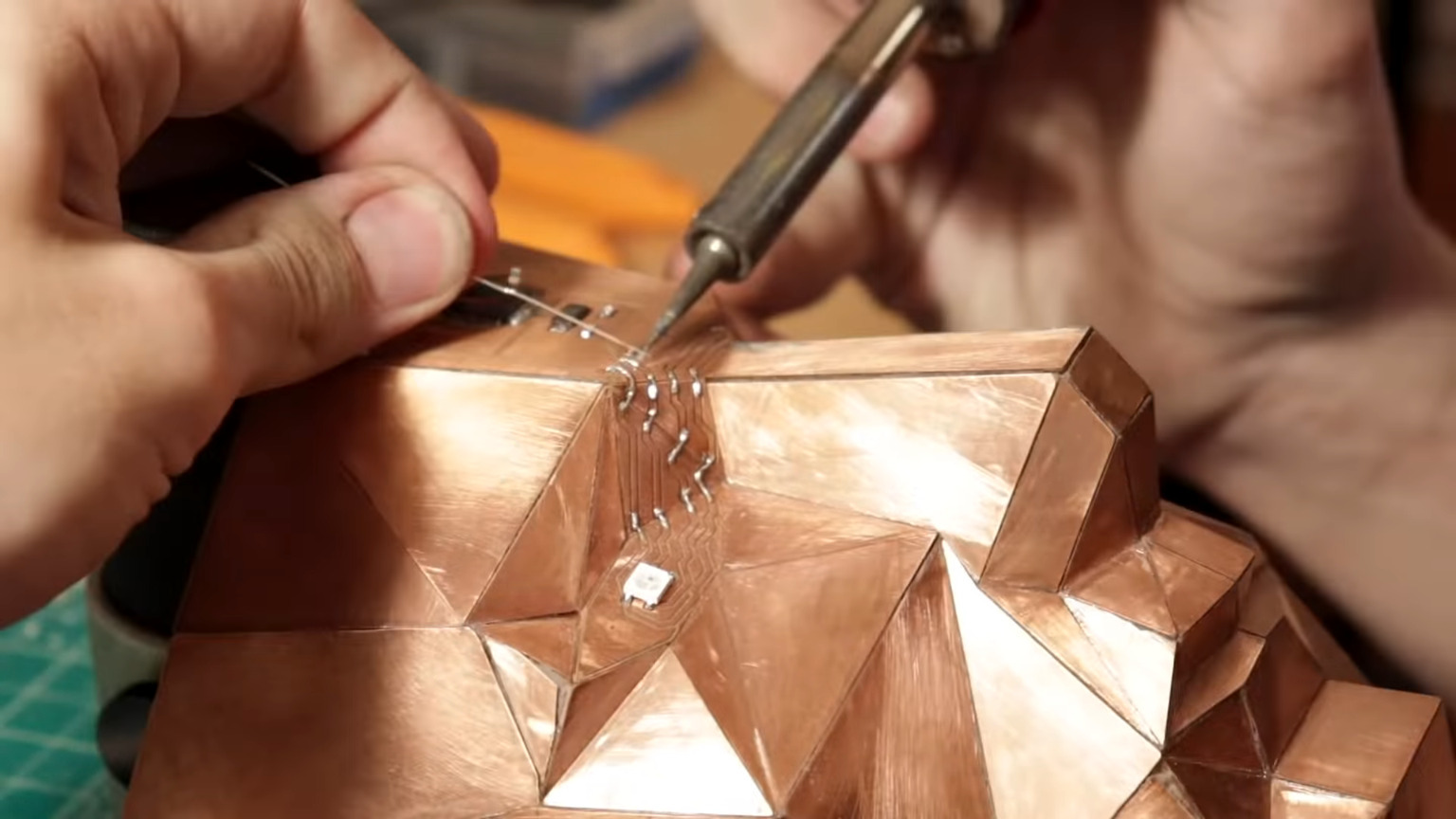
[Stephen] started with a model from the papercraft program Pepakura Designer, then milled out dozens of boards. Only a few of them support circuitry, but it was still quite the time-consuming process. The ATMega32u4 on the forehead along with the fold-traversing circuitry serve to light up the WS2812B eyes. Power runs up the copper tube, which doubles as a handy mounting rod to connect to the 3D-printed base.

To be fair, eighteen months out of the two years this project took was spent hand-sanding a chamfer on every edge of every panel so that they could be glued together. Soldering the edges together didn’t work as well as you might think, so [Stephen] used Superglue mixed with baking soda to give it body and make it dry faster. The result is a low-poly human face of shiny copper with TQFP-44 chip package a the all-seeing eye in the middle of its forehead like something from Tron come to life.

Just a reminder — we have a circuit sculpture contest running now until Tuesday, November 10, 2020 at 12:00 pm PST. We’d love to see what you can do, whether it’s in brass rod, copper clad, or a combination of the two. Take a look at the submissions we’ve received so far, and then show us what you’ve got.

Thanks to [Sophi] and [BaldPower] for the tip!

source https://hackaday.com/2020/09/21/circuit-board-origami-puts-you-face-to-face-with-low-poly-electronics/

Circuit Board Origami Puts You Face-to-Face with Low-Poly Electronics

Paper craft has been around almost as long as paper itself. It’s fun to mimic paper craft and origami with low-poly 3D prints, and [Stephen Hawes] wondered whether it could be done with copper-clad PCBs. Two years after the question arose, we have the answer in the form of a fantastical mask with light-up eyes. Check it out in the video below.

[Stephen] started with a model from the papercraft program Pepakura Designer, then milled out dozens of boards. Only a few of them support circuitry, but it was still quite the time-consuming process. The ATMega32u4 on the forehead along with the fold-traversing circuitry serve to light up the WS2812B eyes. Power runs up the copper tube, which doubles as a handy mounting rod to connect to the 3D-printed base.

To be fair, eighteen months out of the two years this project took was spent hand-sanding a chamfer on every edge of every panel so that they could be glued together. Soldering the edges together didn’t work as well as you might think, so [Stephen] used Superglue mixed with baking soda to give it body and make it dry faster. The result is a low-poly human face of shiny copper with TQFP-44 chip package a the all-seeing eye in the middle of its forehead like something from Tron come to life.

Just a reminder — we have a circuit sculpture contest running now until Tuesday, November 10, 2020 at 12:00 pm PST. We’d love to see what you can do, whether it’s in brass rod, copper clad, or a combination of the two. Take a look at the submissions we’ve received so far, and then show us what you’ve got.

Thanks to [Sophi] and [BaldPower] for the tip!

source https://hackaday.com/2020/09/21/circuit-board-origami-puts-you-face-to-face-with-low-poly-electronics/

Circuit Board Origami Puts You Face-to-Face with Low-Poly Electronics

Paper craft has been around almost as long as paper itself. It’s fun to mimic paper craft and origami with low-poly 3D prints, and [Stephen Hawes] wondered whether it could be done with copper-clad PCBs. Two years after the question arose, we have the answer in the form of a fantastical mask with light-up eyes. Check it out in the video below.

[Stephen] started with a model from the papercraft program Pepakura Designer, then milled out dozens of boards. Only a few of them support circuitry, but it was still quite the time-consuming process. The ATMega32u4 on the forehead along with the fold-traversing circuitry serve to light up the WS2812B eyes. Power runs up the copper tube, which doubles as a handy mounting rod to connect to the 3D-printed base.

To be fair, eighteen months out of the two years this project took was spent hand-sanding a chamfer on every edge of every panel so that they could be glued together. Soldering the edges together didn’t work as well as you might think, so [Stephen] used Superglue mixed with baking soda to give it body and make it dry faster. The result is a low-poly human face of shiny copper with TQFP-44 chip package a the all-seeing eye in the middle of its forehead like something from Tron come to life.

Just a reminder — we have a circuit sculpture contest running now until Tuesday, November 10, 2020 at 12:00 pm PST. We’d love to see what you can do, whether it’s in brass rod, copper clad, or a combination of the two. Take a look at the submissions we’ve received so far, and then show us what you’ve got.

Thanks to [Sophi] and [BaldPower] for the tip!

source https://hackaday.com/2020/09/21/circuit-board-origami-puts-you-face-to-face-with-low-poly-electronics/

Upcycled Dryer Motor Makes Budget Disk Sander

At the most basic level, most shop tools are just a motor with the right attachments. But the details are often far from simple. [DuctTapeMechanic] took a junker clothes dryer, yanked the electric motor from it, and converted it into a disk sander. The price was right at about $10. You can see it all after the break.

As you might imagine, having the motor is only half the battle. You also need a way to mount the thing securely and a way to affix the sanding disk. While this doesn’t pose the same challenges as, say, a drill press, it does take some thought. The motor in the donor dryer didn’t have threads on the shaft, so a bolt and some welding time took care of that. We suspect that’s tricky because you need the shaft and the bolt to be concentric and level.

Once you have a threaded shaft, the rest of the build is anti-climatic. A little carpentry and a little electrical. We would probably cover up the electrical connections a bit more. It seems like you’d want to know which way the motor spins so you could use a reverse thread, if necessary. From the video, we think the motor he has was spinning the right way, but we don’t know if that’s always true.

There’s something satisfying about building your own tools. If you work on smaller things, we’ve seen a miniature sander that might be handy to have around. If you want to go the other way, try finding an old floor polisher instead of a dryer.

source https://hackaday.com/2020/09/21/upcycled-dryer-motor-makes-budget-disk-sander/

Linux Fu: Simple SSH File Sharing

If you have more than one Linux computer, you probably use ssh all the time. It is a great tool, but I’ve always found one thing about it strange. Despite having file transfer capabilities in the form of scp and sftp, there is no way to move a file back or forth between the local and remote hosts without starting a new program on the local machine or logging in from the remote machine back to the local machine.

That last bit is a real problem since you often access a server from behind a firewall or a NAT router with an ephemeral IP address, so it can’t reconnect to you anyway. It would be nice to hit the escape character, select a local or remote file, and teleport it across the  interface, all from inside a single ssh session.

I didn’t quite get to that goal, but I did get pretty close. I’ll show you a script that can automatically mount a remote directory on the local machine. You’ll need sshfs on the local machine, but no changes on the remote machine where you may not be able to install software. With a little more work, and if your client has an ssh server running, you can mount a local directory on the remote machine, too. You won’t need to worry about your IP address or port blocking. If you can log into the remote machine, you are good.

Combined, this got me me very close to my goal. I can be working in a shell on either side and have access to read or write files on the other side. I just have to set it up carefully.

Wait… Is that Cheating?

You might say this is cheating because you are really using two ssh connections — one for the file system mount and another to log in. That’s true. However, if you have ssh set up properly, you’ll only authenticate once, and it won’t be as much overhead as two separate connections.

In addition, the script hides the details so from a user’s point of view, you connect (almost) the same as usual and it just works.

About SSHFS

The sshfs program is a user-space file system (FUSE), which means that it’s a user-space layer over the underlying file system. In this case, the underlying file system is an ssh server that can do sftp. This lets you access a file on the remote machine as if it were on the real filesystem on the local machine. If you haven’t used it, it works quite well.

If you have a login set up for a machine myserver, you simply run sshfs myserver:/home/admin ~/mounts/myserver from the local machine.

Now the /home/admin directory on the remote machine will appear at ~/mounts/myserver on the local machine.

There are some options you can use. For example, it is useful to allow the file system to reconnect a broken connection. Read the man page for more.

Because sshfs uses the remotely mounted version of the file, all changes made show up on the remote machine, but once you’ve shut sshfs down, you’ve got nothing on the local box. Let’s fix that.

Before The Script

Before I get into the script, there is a little setup on the client that you could customize if you like. I create a directory ~/remote and then create a subdirectory for each of my remote computers. For example ~/remote/fileserver and ~/remote/lab.

The script is called sshmount and it takes all the same arguments as ssh. To make life easier, you should have your details in the ~/.ssh/config file for the remote host so that you can use a simple name. For example, lab might be something like this:

Host lab
Hostname lab.wd5gnr-dyn.net
Port 444
User alw
ForwardX11 yes
ForwardX11Trusted yes
TCPKeepAlive yes
Compression yes
ControlMaster auto
ControlPath ~/.ssh/master-%r@%h:%p

Thiat isn’t strictly necessary, but then you get a nice ~/remote/lab directory and not ~/remote/alw@lab.wd5gnr-dyn.net:444 which is annoying to use. There’s nothing magic about any of these parameters but the ControlMaster and ControlPath do make multiple connections more economical which is important in this case.

You’ll also want to set up logging in automatically using a certificate if you haven’t already. We did a post on this for the Raspberry Pi, but it really applies to any ssh setup.

The Script

The script has a split personality. If you call it via a link to sshunmount it will unmount the directory associated with the named remote host. If you call it as anything else (usually sshmount), it will do three things:

  1. It checks for a directory under ~/remote that matches the remote host name (e.g., lab). If it fails to find it, it prints an error message and continues to execute ssh.
  2. If the directory exists, the script examines the list of mounted file systems to see if it is already mounted. If it is, the script just continues with ssh.
  3. If the directory is not mounted, the script calls sshfs and then proceeds with ssh.

You can find the script on GitHub, but here’s the gist of it (less some comments);


#!/bin/bash

if [ "$1" == "" ]
then
echo Usage: sshmount host [ssh_options] - Mount remote home folder on ~/remote/host and log in
echo or: sshunmount host - Remove mount from ~/remote/host
exit 1
fi

# if called as sshunmount...
if [ $(basename "$0") == sshunmount ]
then
echo Unmounting... 1>&2
fusermount -u "$HOME/remote/$1"
exit $?
fi

# normal call...
if [ -d "$HOME/remote/$1" ] # does directory exist?
then
if mount | grep "$HOME/remote/$1 " # already mounted?
then
echo Already mounted 1>&2
else
sshfs -o reconnect $1: $HOME/remote/$1 # mount
fi
else
echo No remote directory ~/remote/$1 exists 1>&2
fi
ssh $@ # do log in

This gives us half of what I wanted. My local machine has a direct mapping of the remote file system while I’m logged into the system. But getting the local directory mapped to the remote machine is a bit harder.

Reversing the Process

If you want to experiment with having a local directory mounted on the server, you can do that too if you have an ssh server running on the local machine. Of course, if your local machine is visible to the host and accessible, that’s trivial. Just run sshfs on the remote machine and mount a directory from the local machine. But in many cases, you won’t have an accessible route from the remote machine through whatever firewalls and routers you are behind, especially on something like a laptop that doesn’t stay in one place.

There is still an answer though. It requires two things. First, you need to add an extra argument when you call sshmount (you could edit the file if you wanted to always do this):


sshmount MyServer -R 5555:localhost:22

Then after you are on the host, run


sshfs -p 5555 localhost:/home/me ~/local

The -R option creates a socket on the remote machine at 5555 (which, obviously, needs to be otherwise unused) and maps it back to us on port 22. Assuming there is an ssh server on port 22, this will allow the server to log back into our local machine over the same connection. No need to know our IP address or have an open port.

The sshfs command, which you could put in your startup files, maps your local /home/me directory to the remote server’s ~/local directory. If you log in locally too, there are several SSH_ environment variables you could use to tell if you are starting up remotely, for example $SSH_CLIENT or $SSH_TTY.

Of course, you’ll need to change the hosts and directories and port numbers to suit your environment. But once set up, you can have folders on both machines visible to the other. No, I haven’t tried circularly mounting the same directories. That might create a black hole.

Be Careful Out There

You still should probably be careful going in both directions. Tools that scan the whole file system, for example, could easily get confused. I also wish I had a better answer to cleanly disconnect the server’s file share when you log out of the last session.

However, for now, the system works well and it is an easy way to share files from within an ssh session without much work. Another answer might be to just keep directories synchronized and use those directories for transfers. Want more stupid ssh tricks? We got ’em.

source https://hackaday.com/2020/09/21/linux-fu-simple-ssh-file-sharing/

Historical Satellite Tracker Saved From Scrap Heap

In a bit of rare Australian space news, the  Arnhemland Historical Society has managed to save one of the satellite trackers used during the 1960s and 1970s from the scrap heap. As the Space Race intensified during the 1950s and 1960s, every nation wanted a piece of this new technology. A number of European nations banded together in the form of ELDO, the European Launcher Development Organisation.

Australia was a partner in this program, with launches of the Europa-1 and Europa-2 rockets taking place from Woomera, South Australia. Initially the UK’s cancelled Blue Streak IRBM program provided the first stage for Europa-1, but this was later replaced with the French Diamant. France also provided the Coralie second stage in addition to the German-developed Astris third stage.

The satellite tracker being dismantled at the South Australian defence base before it was trucked north. (Photo: Arnhemland Historical Society)

The first launch of the Europa-1 took place in 1966, with the rocket performing well, but inaccurate readings from a radar station leading to the rocket to be wrongly instructed to self-destruct. Of nine launches, four were successful, with the satellite trackers at Arnhemland providing tracking support. Ultimately, the many technical setbacks led to the demise of ELDO, and it was merged by the 1970s into what is now the European Space Agency, with its main launch site in Kourou, French Guinana.

Despite the lack of success, these early days at Woomera were instrumental in getting Europe’s feet wet in the development of the Ariane rockets. Woomera’s rocketing days may also not be over yet, with NASA having announced  in 2019 plans to use Woomera for launches.

Maybe one day Arnhemland will have its own space port, with the old satellite track on display to remind of those early days.

[Top photo: The ELDO satellite trackers were state-of-the-art when they stood in Gove in the 1960s. (Supplied: Arnhemland Historical Society)]

(Thanks, David)

source https://hackaday.com/2020/09/21/historical-satellite-tracker-saved-from-scrap-heap/

Historical Satellite Tracker Saved From Scrap Heap

In a bit of rare Australian space news, the  Arnhemland Historical Society has managed to save one of the satellite trackers used during the 1960s and 1970s from the scrap heap. As the Space Race intensified during the 1950s and 1960s, every nation wanted a piece of this new technology. A number of European nations banded together in the form of ELDO, the European Launcher Development Organisation.

Australia was a partner in this program, with launches of the Europa-1 and Europa-2 rockets taking place from Woomera, South Australia. Initially the UK’s cancelled Blue Streak IRBM program provided the first stage for Europa-1, but this was later replaced with the French Diamant. France also provided the Coralie second stage in addition to the German-developed Astris third stage.

The satellite tracker being dismantled at the South Australian defence base before it was trucked north. (Photo: Arnhemland Historical Society)

The first launch of the Europa-1 took place in 1966, with the rocket performing well, but inaccurate readings from a radar station leading to the rocket to be wrongly instructed to self-destruct. Of nine launches, four were successful, with the satellite trackers at Arnhemland providing tracking support. Ultimately, the many technical setbacks led to the demise of ELDO, and it was merged by the 1970s into what is now the European Space Agency, with its main launch site in Kourou, French Guinana.

Despite the lack of success, these early days at Woomera were instrumental in getting Europe’s feet wet in the development of the Ariane rockets. Woomera’s rocketing days may also not be over yet, with NASA having announced  in 2019 plans to use Woomera for launches.

Maybe one day Arnhemland will have its own space port, with the old satellite track on display to remind of those early days.

[Top photo: The ELDO satellite trackers were state-of-the-art when they stood in Gove in the 1960s. (Supplied: Arnhemland Historical Society)]

(Thanks, David)

source https://hackaday.com/2020/09/21/historical-satellite-tracker-saved-from-scrap-heap/

Historical Satellite Tracker Saved From Scrap Heap

In a bit of rare Australian space news, the  Arnhemland Historical Society has managed to save one of the satellite trackers used during the 1960s and 1970s from the scrap heap. As the Space Race intensified during the 1950s and 1960s, every nation wanted a piece of this new technology. A number of European nations banded together in the form of ELDO, the European Launcher Development Organisation.

Australia was a partner in this program, with launches of the Europa-1 and Europa-2 rockets taking place from Woomera, South Australia. Initially the UK’s cancelled Blue Streak IRBM program provided the first stage for Europa-1, but this was later replaced with the French Diamant. France also provided the Coralie second stage in addition to the German-developed Astris third stage.

The satellite tracker being dismantled at the South Australian defence base before it was trucked north. (Photo: Arnhemland Historical Society)

The first launch of the Europa-1 took place in 1966, with the rocket performing well, but inaccurate readings from a radar station leading to the rocket to be wrongly instructed to self-destruct. Of nine launches, four were successful, with the satellite trackers at Arnhemland providing tracking support. Ultimately, the many technical setbacks led to the demise of ELDO, and it was merged by the 1970s into what is now the European Space Agency, with its main launch site in Kourou, French Guinana.

Despite the lack of success, these early days at Woomera were instrumental in getting Europe’s feet wet in the development of the Ariane rockets. Woomera’s rocketing days may also not be over yet, with NASA having announced  in 2019 plans to use Woomera for launches.

Maybe one day Arnhemland will have its own space port, with the old satellite track on display to remind of those early days.

[Top photo: The ELDO satellite trackers were state-of-the-art when they stood in Gove in the 1960s. (Supplied: Arnhemland Historical Society)]

(Thanks, David)

source https://hackaday.com/2020/09/21/historical-satellite-tracker-saved-from-scrap-heap/

What’s Inside An FPGA? Ken Shirriff Has (Again) The Answer

FPGAs are somewhat the IPv6 of integrated circuits — they’ve been around longer than you might think, they let you do awesome things that people are intrigued by initially, but they’ve never really broke out of their niches until rather recently. There’s still a bit of a myth and mystery surrounding them, and as with any technology that has grown vastly in complexity over the years, it’s sometimes best to go back to its very beginning in order to understand it. Well, who’d be better at taking an extra close look at a chip than [Ken Shirriff], so in his latest endeavor, he reverse engineered the very first FPGA known to the world: the Xilinx XC2064.

If you ever wished for a breadboard-friendly FPGA, the XC2064 can scratch that itch, although with its modest 64 configurable logic blocks, there isn’t all that much else it can do — certainly not compared to even the smallest and cheapest of its modern successors. And that’s the beauty of this chip as a reverse engineering target, there’s nothing else than the core essence of an FPGA. After introducing the general concepts of FPGAs, [Ken] (who isn’t known to be too shy to decap a chip in order to look inside) continued in known manner with die pictures in order to map the internal components’ schematics to the actual silicon and to make sense of it all. His ultimate goal: to fully understand and dissect the XC2064’s bitstream.

Of course, reverse engineering FPGA bitstreams isn’t new, and with little doubt, building a toolchain based on its results helped to put Lattice on the map in the maker community (which they didn’t seem to value at first, but still soon enough). We probably won’t see the same happening for Xilinx, but who knows what [Ken]’s up to next, and what others will make of this.

source https://hackaday.com/2020/09/21/whats-inside-an-fpga-ken-shirriff-has-again-the-answer/

Custom Strain Gauges Help Keep Paraglider Aloft

No matter what they’re flying, good pilots have a “feel” for their aircraft. They know instantly when something is wrong, whether by hearing a strange sound or a feeling a telltale vibration. Developing this sixth sense is sometimes critical to the goal of keeping the number of takeoff equal to the number of landings.

The same thing goes for non-traditional aircraft, like paragliders, where the penalty for failure is just as high. Staying out of trouble aloft is the idea behind this paraglider line tension monitor designed by pilot [Andre Bandarra]. Paragliders, along with their powered cousins paramotors, look somewhat like parachutes but are actually best described as an inflatable wing. The wing maintains its shape by being pressurized by air coming through openings in the leading edge. If the pilot doesn’t maintain the correct angle of attack, the wing can depressurize and collapse, with sometimes dire results.

Luckily, most pilots eventually develop a feel for collapse, sensed through changes in the tension of the lines connecting the wing to his or her harness. [Andre]’s “Tensy” — with the obligatory “McTenseface” surname — that’s featured in the video below uses an array of strain gauges to watch to the telltale release of tension in the lines for the leading edge of the wing, sounding an audible alarm. As a bonus, Tensy captures line tension data from across the wing, which can be used to monitor the performance of both the aircraft and the pilot.

There are a lot of great design elements here, but for our money, we found the lightweight homebrew strain gauges to be the real gem of this design. This isn’t the first time [Andre] has flown onto these pages, either — his giant RC paraglider was a big hit back in January.

Thanks to [mip] for the tip.

source https://hackaday.com/2020/09/20/custom-strain-gauges-help-keep-paraglider-aloft/

1/3 Scale Hybrid RC Car With A Scratch-Built 125cc V10 Engine

Scale model engines are fascinating pieces of engineering, and RC cars are always awesome to play with, no matter your age. [Keith57000] has gone over the top on both, creating a seriously impressive hybrid RC car built around a custom 125 cc V10 engine.

[Keith57000] started building the V10 engine back in 2013, after completing a 1/4 scale V8. The build is documented in a forum thread with lots of pictures of his beautiful craftsmanship. Most of the mechanical components were machined on a manual lathe and milling machine. No CNC, just lots of drawings and measurements, clever use of dividing heads, and careful dial reading. The engine also features electronic fuel injection with a MegaSquirt controller.

The rest of the car is just as impressive as the power plant. The chassis is bent tube, with machined brackets and carbon fiber suspension components. Two electric skateboard motors are added to give it a bit more power. The three speed gearbox is also custom, built with gears scavenged from a pit bike and angle grinder. It uses two small pneumatic pistons to do the shifting, with a clever servo mechanism that mechanically switches the solenoid valves. Check out all fourteen build videos on his channel for more details.

An amateur project of this complexity is never without speed bumps, which [Keith57000] details in the videos and build thread. It has taken seven years so far, but it is without a doubt the most impressive RC car we’ve seen. His skill with manual machine tools is something we rarely get to see in the age of CNC. We’re looking forward to the finished product, hopefully screaming around a track with a FPV cockpit.

source https://hackaday.com/2020/09/20/1-3-scale-hybrid-rc-car-with-a-scratch-built-125cc-v10-engine/

Hackaday Links: September 20, 2020

The announcement of Autodesk’s changes to the Fusion 360 personal use license terms this week caused quite a dustup. Our article on the announcement garnered a lot of discussion and not a few heated comments. At the end of the day, though, Autodesk is going to do what it’s going to do, and the Fusion 360 user community is just going to have to figure out how to deal with the changes. One person who decided to do something other than complain is Justin Nesselrotte, who came up with a quick and easy bulk export tool for Fusion 360. This gets to the heart of the issue since the removal of export to STEP, IGES, and SAT files is perhaps the most painful change for our community. Justin’s script automatically opens every design and exports it to the file type of your choice. Since the license changes go into effect on October 1, you’d better get cracking if you want to export your designs.

Over on Twitter, Hackaday superfriend Timon gives us a valuable lesson in “you get what you pay for.” He found that a bunch of his header pin jumper cables weren’t even remotely assembled properly. The conductors of the jumper wire were only loosely inserted into the terminal’s crimp, where apparently no crimping pressure had been applied. The wires were just rattling around inside the crimp, rather than making sold contact. We’ve covered the art and science of crimping before, and it’s pretty safe to say that these jumpers are garbage. So if you’re seeing weird results with a circuit, you might want to take a good, close look at your jumpers. And as always, caveat emptor.

The GNU Radio Conference wrapped up this week, in virtual format as so many other conferences have been this year, and it generated a load of interesting talks. They’ve got each day’s proceedings over on their YouTube channel, so the videos are pretty long; luckily, each day’s stream is indexed on the playbar, so along with the full schedule you can quickly find the talks you’re interested in. One that caught our eye was a talk on the Radio Resilience Competition, a hardware challenge where participants compete head-to-head using SDRs to get signals through in an adversarial environment. It sounds like a fascinating challenge for the RF inclined. More details about registering for the competition can be had on the Radio Resilience website.

You know those recipe sites that give you a few choices on what to make for dinner based on the ingredients you have on hand? We always thought that was a clever idea, and now something like it has come to our world. It’s called DIY Hub, and it aims to guide makers toward projects they can build based on the parts they have on hand. Users create projects on the site, either hosting the project directly on the site or providing a link to projects on another site. Either way, the project’s BOM is cataloged so that users can find something to build based on parts stored in their “Garage”. Granted, most of us suffer from the exact opposite problem of not knowing what to build next, but this could be an interesting tool for stimulating the creative process, especially for teachers and parents. It’s currently in beta, and we’d love to see a few Hackaday.io projects added to the site.

And finally, we got a tip to an oldie but a goodie: How to Build a Castle. No, we don’t expect to see a rash of 13th-century castle builds gracing our pages anytime soon — although we certainly wouldn’t be opposed to the idea. Rather, this is a little something for your binge-watching pleasure. The BBC series, which was actually called Secrets of the Castle, was a five-part 2014 offering that went into great detail on the construction of Guédelon Castle, an experimental archaeology project in France that seeks to build a castle using only the materials and methods available in the 1200s. The series is hosted by historian Ruth Goodman and archaeologists Peter Ginn and Tom Pinfold, and it’s great fun for anyone interested in history and technology.

source https://hackaday.com/2020/09/20/hackaday-links-september-20-2020/

ESP8266 Turned Secretive WiFi Probe Request Sniffer

When a Wi-Fi device is switched on, it starts spewing out probe requests to try and find a familiar access point. These probe requests contain the device’s MAC address and the SSID of the hotspot it’s looking for, which can potentially be used to identify a specific device and where it’s been. After experimenting with these probe requests, [Amine Mehdi Mansouri] has created OpenMAC, a tiny ESP8266 based sniffer that could be hidden anywhere.

The device consists of an ESP-07S module, a regulator circuit for getting power from a USB-C connector, and a button for power cycling. An external antenna is required for the module, which can be selected based on the size or gain requirements for a specific deployment. [Amine] tested the OpenMAC at a local library (with permission), in combination with a number of his own little Wi-Fi repeaters to expand the reach of the network. All the recorded MAC addresses were logged to a server, where the data can be used for traffic analysis in and around the library, or even for tracking and locating specific devices.

This is nothing new, and is relatively common technique used for gathering information in retail locations, and could be also be used for more nefarious purposes. Newer versions of iOS, Android, and Windows 10 feature MAC address randomization which can limit the ability to track devices in this manner, but it isn’t always activated.

We’ve seen a number of projects that exploit probe requests. FIND-LF can be used for locating devices in your home, and Linger fools probe requests sniffers by replaying previously recorded requests.

source https://hackaday.com/2020/09/20/esp8266-turned-secretive-wifi-probe-request-sniffer/

TI and Cadence Make PSpice Free

We like simulation software. Texas Instruments long offered TINA, but recently they’ve joined with Cadence to make OrCAD PSpice available for free with some restrictions. You’ve probably heard of PSpice — it’s widely used in academia and industry, but is usually quite costly. You can see a promotional overview video below.

The program requires registration and an approval step to get a license key. The downloaded program has TI models along with other standard models. There seem to be few limits as long as you stick to the supplied library. According to the datasheet, there are no size or simulation complexity limitations in that case. If you want to use other models, you can, but that’s where the limitations hit you:

There is no limitation of how many 3rd party models can be imported into the design. However, if 3rd party models are imported, a user will be able to plot a maximum of 3 signals at a time of their choice when any 3rd party model is imported from web.

We aren’t completely sure what “from web” means there, but presumably they just mean from other sources. In any event, you still get AC, DC, and transient analysis with plenty of options like worst-case timing analysis. Mixed signal designs are supported and there is a wealth of data plotting options, as you would expect.

This is a great opportunity to drive some serious software that is widely used in the industry. The only thing that bummed us out? It runs under Windows. We couldn’t get it to work under Wine, but a Windows 10 VM handled it fine, although we really hate running a VM if we don’t have to.

Still, the price is right and it is a great piece of software. We also liked the recent Micro-Cap 12 release, but we don’t expect any updates for that. Of course, LTSpice is quite capable, too.

source https://hackaday.com/2020/09/20/ti-and-cadence-make-pspice-free/

A Budget Testing Rig For Low-Volume Production

It’s not unheard of for those who tinker in the land of electronics to suddenly find themselves with a project on their hands and potential customers clamoring at the door. Of course, the road to shipping a product is a long one, and requires a unique set of skills quite distinct from those required to build the initial prototype. In developing a product for Airsoft use, [bald greg] realized that a testing rig would be key to ensuring their hundreds of units left the building in working condition.

When shipping units in the hundreds rather than thousands, keeping overheads low is key to maintain a sustainable profit margin on each unit sold. Thus, [bald greg] built a rig that would allow for effective testing of devices rather than breaking the bank. The rig also handles programming, saving the cost of purchasing pre-programmed microcontrollers from the manufacturer. A Raspberry Pi runs the show, using its GPIO pins to program boards and saving test results and serial numbers for later reference. A bed of nails fixture is used to connect to each individual board. Additionally, to test each board as realistically as possible, hardware mimicking a real Airsoft electric pistol is used to properly load the hardware.

[bald greg]’s work is a great example of approaching QC on a budget, and we suspect he’ll sleep soundly knowing the boards in the mail are going to work first time. We’ve seen others take similar approaches, too. If you’re working on your own production testing rig, be sure to let us know!

SIGMA MOSFET- Production test rig

source https://hackaday.com/2020/09/20/a-budget-testing-rig-for-low-volume-production/

A Big Computer Needs a Big Keyboard

It seems like many keyboard aficionados have been gravitating towards ever smaller boards, but not [Ren]. He’s mostly completed a 433% keyboard with a whopping 450 distinct keys. Using two off the shelf PCBs and Teensy to control it all, this keyboard means you’ll never need to strain to make some awkward chord.

The PCBs have a diode matrix arrangement for 225 keys, which we would have thought was big enough. After all, a Scrabble board has 225 squares, so we assume that’s why the vendor calls them scrabbleboards. Honestly, we’re jealous someone has the desk space for this monster. We were also thinking what other sorts of switch-like sensors you could use with this board. Imagine a home system, for example, with 225 occupancy sensors, each with its own key you could easily read via USB.

There was a time when building your own keyboard of any sort would have been challenging. But now there’s a cottage industry supplying chips, switches, caps, and PCBs to those looking to craft their own custom input devices. The ready availability of 3D printers has also sparked a minor revolution in custom keyboard enclosures and keycaps.

If you’re a fan of the tiny keyboards, we’ve seen some impressive specimens that might catch your fancy. If nothing else, at least they require less soldering. Especially when they only have seven keys.

Thanks [ptkwilliams] for the tip!

source https://hackaday.com/2020/09/19/a-big-computer-needs-a-big-keyboard/

Mirror, Mirror, on Your Cam, Show Us What You’ve Drawn by Hand

Working and learning from home may be the new norm, and if IKEA shelves are any indication, folks are tricking out their home office with furniture, gadgets, and squishy chairs. While teleconferencing has proven to be an invaluable tool, paper documents aren’t going down with out a fight.

Unfortunately dedicated document cameras require significant space and monies, so they’re impractical if you only share once in a while. [John Umekubo] didn’t want students and teachers hobbled by the same costs and inconveniences, so he modeled a mirror holder that slides over a laptop’s webcam and directs the view downward.

[John]’s adventures started with a Twitter post, as seen below, but the responses were so encouraging that he published his design on Thingiverse for everyone. There’s also a version that can be laser cut out of cardboard, though we imagine a pair of scissors would work in a pinch. He admits there’s already a consumer model, but wasn’t planning to sell them anyway. Like us, he wants to get people to share their work.

We recently covered a simpler version of the same idea in use at Northwestern University, and we’ve seen a similar hack that gives a split-screen effect to sketch and maintain eye contact. If you want to share the view in your room, we have a Raspberry Pi streaming option that’s worth checking out.

source https://hackaday.com/2020/09/19/mirror-mirror-on-your-cam-show-us-what-youve-drawn-by-hand/

E-Textile Tools Get the Multimeter Hookup

[Irene Posch] has done some incredible work with knitted, crocheted, and fabric circuits — check out the crocheted ALUs and embroidered computer for starters. Now, it seems [Irene] is building up a how-to catalog of e-textile tools that can be easily connected to a multimeter.

So far, this toolbox includes a seam ripper and a crochet hook. The concept is similar for both — print out a handle and connect the tool to a banana jack that can then be connected to a multimeter. The crochet hook is simple: just print out the handle, jam the hook in one end, and stick a mini banana jack in the other end. They’re designed to butt up against each other and make a connection without wires.

Building the ripper takes a bit more effort. There’s another printed handle involved, but you must first free the seam ripper from its stock plastic handle and solder a wire to it. Then twist the other end of the wire around a banana jack and and put that in the other end of the handle.

It’s great to see a little bit insight into the troubleshooting tools of e-textiles, especially because they are all-around fiddly. It all starts with a circuit, so why not do your prototyping with a thread-friendly breadboard?

source https://hackaday.com/2020/09/19/e-textile-tools-get-the-multimeter-hookup/

Rolex Becomes World’s Most Expensive ESD Strap

Anti-static ESD straps are de rigueur in lab settings for those working with sensitive electronics. They’re a simple protective device, and one that generally doesn’t warrant a second thought. However, [Daniel Bogdanoff] figured they could stand to be a little more fashionable, and set to work on a fancier design.

The first step was to take a look at a regular ESD strap. Typically, they consist of a band that fastens around the wearer’s wrist, with a metal stud for connecting to the earthing lead. The earthing lead contains a high resistance to limit the discharge current to avoid ugly high-energy shorts when wearing the strap.

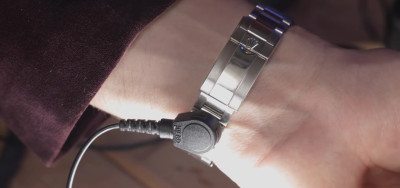
The metal stud is attached to a replacement link on the ROLEX’s strap, making the modification neat, tidy, and reversible.

With a good understanding of the basics, [Daniel] set about modifying a CASIO calculator watch for practice. After soldering a metal stud to the watch case failed, a second attempt with conductive epoxy worked great. The watch could be connected to the earthing strap, and an ESD tester confirmed the device was doing its job.

But unfortunately, permanently modifying the borrowed ROLEX wasn’t an option. Instead, [Daniel] limited his work to a single replacement link which could be inserted into the watch band. Hooked up to an earthing strap, the luxury watch also passed a basic ESD test successfully.

[Daniel] notes that while this is a fun experiment, using properly rated safety equipment is best. Additionally, he points out that the ROLEX is likely to do worse than the CASIO for the simple fact that a metal-banded watch is more likely to cause shorts when working on electronics. Of course, if a watch isn’t your thing, consider a ring instead. Video after the break.

source https://hackaday.com/2020/09/19/rolex-becomes-worlds-most-expensive-esd-strap/

Rolex Becomes World’s Most Expensive ESD Strap

Anti-static ESD straps are de rigueur in lab settings for those working with sensitive electronics. They’re a simple protective device, and one that generally doesn’t warrant a second thought. However, [Daniel Bogdanoff] figured they could stand to be a little more fashionable, and set to work on a fancier design.

The first step was to take a look at a regular ESD strap. Typically, they consist of a band that fastens around the wearer’s wrist, with a metal stud for connecting to the earthing lead. The earthing lead contains a high resistance to limit the discharge current to avoid ugly high-energy shorts when wearing the strap.

The metal stud is attached to a replacement link on the ROLEX’s strap, making the modification neat, tidy, and reversible.

With a good understanding of the basics, [Daniel] set about modifying a CASIO calculator watch for practice. After soldering a metal stud to the watch case failed, a second attempt with conductive epoxy worked great. The watch could be connected to the earthing strap, and an ESD tester confirmed the device was doing its job.

But unfortunately, permanently modifying the borrowed ROLEX wasn’t an option. Instead, [Daniel] limited his work to a single replacement link which could be inserted into the watch band. Hooked up to an earthing strap, the luxury watch also passed a basic ESD test successfully.

[Daniel] notes that while this is a fun experiment, using properly rated safety equipment is best. Additionally, he points out that the ROLEX is likely to do worse than the CASIO for the simple fact that a metal-banded watch is more likely to cause shorts when working on electronics. Of course, if a watch isn’t your thing, consider a ring instead. Video after the break.

source https://hackaday.com/2020/09/19/rolex-becomes-worlds-most-expensive-esd-strap/

Rolex Becomes World’s Most Expensive ESD Strap

Anti-static ESD straps are de rigueur in lab settings for those working with sensitive electronics. They’re a simple protective device, and one that generally doesn’t warrant a second thought. However, [Daniel Bogdanoff] figured they could stand to be a little more fashionable, and set to work on a fancier design.

The first step was to take a look at a regular ESD strap. Typically, they consist of a band that fastens around the wearer’s wrist, with a metal stud for connecting to the earthing lead. The earthing lead contains a high resistance to limit the discharge current to avoid ugly high-energy shorts when wearing the strap.

The metal stud is attached to a replacement link on the ROLEX’s strap, making the modification neat, tidy, and reversible.

With a good understanding of the basics, [Daniel] set about modifying a CASIO calculator watch for practice. After soldering a metal stud to the watch case failed, a second attempt with conductive epoxy worked great. The watch could be connected to the earthing strap, and an ESD tester confirmed the device was doing its job.

But unfortunately, permanently modifying the borrowed ROLEX wasn’t an option. Instead, [Daniel] limited his work to a single replacement link which could be inserted into the watch band. Hooked up to an earthing strap, the luxury watch also passed a basic ESD test successfully.

[Daniel] notes that while this is a fun experiment, using properly rated safety equipment is best. Additionally, he points out that the ROLEX is likely to do worse than the CASIO for the simple fact that a metal-banded watch is more likely to cause shorts when working on electronics. Of course, if a watch isn’t your thing, consider a ring instead. Video after the break.

source https://hackaday.com/2020/09/19/rolex-becomes-worlds-most-expensive-esd-strap/

Patience Beats Rage-Quit in Shattered Xbox Controller Repair

There are negative-one hacks to this project. Someone lost at their game, lost their temper, then raged at their Xbox controller with some horsepower. The result is that [Taylor Burley] gets a free controller with a non-responsive joystick out of the deal, and since he had nothing to lose, he decided to heat up the iron and bring the controller back to life.

The majority of the project is told in pictures and through the narration in the video below. In removing the joystick, [Taylor] opts for the technique of doping the connections with fresh solder (we assume containing lead for easier melting) before reaching for the desoldering wick. The diagnosis stage is brief because when the joystick lifts away, the PCB falls apart into two separate pieces! The next step was to glue the two halves together with cyanoacrylate to get into the nooks and crannies, then epoxy to provide structure. Solder bridges were not going to jump that gap, so he used 30ga wire and attached it wherever he could scrape away some solder mask. Best of all, it worked when he reattached the joystick. Job well done.

Xbox controllers are not a scarce commodity, so people do not spend their idle hours fixing them, but not many people can claim experience. Maybe someday the stakes will be higher and he will have the courage to repair vintage electronics. We won’t rant on how things aren’t built to last, and how we don’t train people to fix things. Today, we want to focus on someone who used their time to repair and learn.

The next time you have some “junked” hardware, ask yourself, do I want the XP?

source https://hackaday.com/2020/09/19/patience-beats-rage-quit-in-shattered-xbox-controller-repair/

Code for Hackers

Mike and I were talking about two very similar clock projects we’d both built recently: they both use ESP8266 modules to get the time over WiFi and NTP, and they both failed. Mike’s failed because he was visiting relatives in a different timezone with different WiFi credentials, and mine failed because daylight savings time caught me off-guard. In both cases, we hard-coded stuff that could obviously change, but we drew vastly different conclusions.

Mike thought he’d solve his WiFi problem with a fallback to a captive portal, and maybe would have to figure out some web interface for configuring the timezone. A very clean, professional solution. Me? I’ve got good comments in the code, can find the UTC offset (or the WiFi creds) in a few minutes, and flash the new version up simply by fetching a USB cable, for something that happens twice a year. It’s hardly worth the trouble to cobble together a web interface.

There’s an XKCD for everything.

We’ve accidentally embodied a quandary that spans both the hardware and software worlds: should flexibility be exposed to the end-user or to the hacker who can peer under the hood or open up the source code? (And what if the end-user is the hacker?) What are the tradeoffs, in project complexity and in ease of use?

And in this, Mike is on the side of right and good, and I’m the heretic. I don’t always write my code to be extensible or re-usable. I sometimes write it to be quickly re-edited and patched whenever I need to. Is it full of magic numbers? Sure! But I know just where they are and how to change them. Heck, most are even well documented in their own header file. You could probably figure it out just about as fast. Would my father-in-law be able to tweak the timezone? Nope! But this ain’t his project anyway.

Dare to code for hackers! Don’t over-generalize or over-abstract. Less is more. Don’t be afraid to edit code. Tweak, compile, and re-flash when the situation changes. After all, that’s how you got the code there in the first place.

And although I’m on the wrong end of history, in this case I was right. You see, before daylight savings time could come around again, and I could have made use of that captive portal that I didn’t bother coding up anyway, my son entered first grade. Everything needs to be changed, from the hardware to the software. Will I code up the next version with flexible time regimes? As flexible as I need it to be, but not more.

source https://hackaday.com/2020/09/19/code-for-hackers/

Controlling a Broken Super Nintendo With MIDI

A Super Nintendo that has trouble showing sprites doesn’t make for a very good game system. As it turns out, Super Mario World is a lot less fun when the titular hero is invisible. So it’s no surprise that [jwotto] ended up tossing this partially functional SNES into the parts bin a few years back.

But he recently came up with a project that may actually benefit from its unusual graphical issues; turning the glitched console into a circuit bent video synthesizer. The system was already displaying corrupted visuals, so [jwotto] figured he’d just help things along by poking around inside and identifying pins that created interesting visual effects when shorted out.

Installing the new electronics into the SNES.

Once he mapped out the pins, he wired them all up to a transistor switching board that he’d come up with for a previous project. That would let an Arduino short out the pins on command while still keeping the microcontroller relatively isolated from the SNES. Then it was just a matter of writing some code that would fire off the transistors based on MIDI input.

The end result is a SNES that creates visual glitches along with the music, which [jwotto] can hook up to a projector when he does live shows. A particularly neat feature is that each game responds in its own way, so he can swap out the cartridge to show completely different visuals without having to change any of the MIDI sequencing.

A project like this serves as a nice introduction to both circuit bending and MIDI hacking for anyone looking to get their digital feet wet, and should pair nicely with the MIDI Game Boy Advance.

[Thanks to Irregular Shed for the tip.]

source https://hackaday.com/2020/09/19/controlling-a-broken-super-nintendo-with-midi/