Building A Top-Notch Electret Microphone

Electret microphones are capable of high-quality output, and are prized for their smooth frequency response. However, unlike other types, they can’t simply be plugged directly into a mixing desk. Instead, they require special high-impedence circuitry to extract the audio signal for recording. [DJJules] is a big fan of these microphones, and decided to build a high-quality, easy to use circuit that he has shared with the community. 

The goal of the project was to create a circuit to match the TSB2555B electret capsule that could be used with phantom power, and that could be built with easily obtainable parts. [DJJules] had used FETs in the past, but grew tired of routinely having to hunt for obsolete parts. Instead, this design relies on a dual OPA1642 op-amp, with its low quiescent current meaning it’s perfect for running off phantom power. This means the microphone needs no batteries, and using a dual op-amp enables the circuit to properly drive a balanced audio connection.

The circuit is designed to fit inside a common BM700 or BM800 microphone body, and the PCB can be ordered from PCBWay for those interested in building their own. There’s also a saddle on Shapeways that’s designed to neatly mount the electret capsule within the housing.

The final results are impressive, and this project would make a great entry into the DIY microphone space for anyone eager to start building their own gear. Of course, there are simpler builds if you’re looking for an easier way to get started. Video after the break.

source https://hackaday.com/2020/11/02/building-a-top-notch-electret-microphone/

Peter Sripol’s DIY Electric Ultralight MK4

Peter Sripol really likes building gravity defying death traps. He recently flew the fourth ultralight, which he designed and built himself. For a taste of what’s going on here, the wings have aluminum tube spars and are made of hot-wire-cut styrofoam sections.

To keep the plane simple, he got rid of ailerons entirely. For roll stabilization he angled up the wings noticeably, adding dihedral. This gives the aircraft passive stability, because as it rolls to a side, the upper wing’s lift decreases and the lower wing’s lift increases, forcing the plane to correct itself. Interestingly he kept the rudder controls on pedals instead of moving it to the stick, so the stick only controls the elevator.

It is powered by a single large brushless electric motor borrowed from the OpenPPG project. On the first test he used a two-bladed propeller, with a small pitch angle which required full throttle to keep flying. It can be compared to driving a car only in first gear. By moving to a three bladed propeller with a higher pitch angle, and increasing the length of the wings for more lift, [Peter] was able to cruise comfortably at about 30 MPH or 48 km/h.

Although this aircraft definitely performed better than [Peter]’s previous ultralight builds, piloting something like this isn’t for the faint of heart. Although he does extensive weight-loading and thrust testing before taking to the air, adding tail weight to piloted aircraft by simply taping a water bottle to the tail just felt wrong. But we aren’t aviation experts, so we won’t pass final judgement.

source https://hackaday.com/2020/11/02/peter-sripols-diy-electric-ultralight-mk4/

OpenOffice or LibreOffice? A Star is Torn

When it comes to open source office suites, most people choose OpenOffice or LibreOffice, and they both look suspiciously similar. That isn’t surprising since they both started with exactly the same code base. However, the LibreOffice team recently penned an open letter to the Apache project — the current keepers of OpenOffice — asking them to redirect new users to the LibreOffice project. Their logic is that OpenOffice has huge name recognition, but hasn’t had a new major release in several years. LibreOffice, on the other hand, is a very active project. We could argue that case either way, but we won’t. But it did get us thinking about how things got here.

It all started when German Marco Börries wrote StarWriter in 1985 for the Zilog Z80. By 1986, he created a company, Star Division, porting the word processor to platforms like CP/M and MSDOS. Eventually, the company added other office suite programs and with support for DOS, OS/2, and Windows, the suite became known as StarOffice.

The program was far less expensive than most competitors, costing about $70, yet in 1999 that price point prompted Sun Microsystems to buy StarOffice. We don’t mean they bought a copy or a license, they bought the entire thing for just under $74 million. The story was that it was still cheaper than buying a license for each Sun employee, particularly since most had both a Windows machine and a Unix machine which still required some capability.

Sun in Charge

Sun provided StarOffice 5.2 in 2000 as a free download for personal use, which gave the software a lot of attention. It eventually released much of the code under an open source license producing OpenOffice. Sun contributed to the project and would periodically snapshot the code to market future versions of StarOffice.

This was the state of affairs for a while. StarOffice 6.0 corresponded to OpenOffice 1.0. In 2003, release 1.1 turned into StarOffice 7. A couple of years later, StarOffice 8/OpenOffice 2.0 appeared and by 2008, we had StarOffice 9 with OpenOffice 3.0 just before Oracle entered the picture.

Then Came Oracle

In 2010, Oracle bought Sun. All of it. They didn’t seem to have much of a plan for some of the things they bought and StarOffice was one of them. They renamed the program Oracle Open Office. They also did strange things with licensing. For example, StarOffice 9 was no longer free for educational customers, but they could use StarOffice 8 or, of course, just stick with OpenOffice and forego support.

In 2011, Oracle decided to kill the commercial offering, leaving OpenOffice, the official community-based keeper for the StarOffice flame. They gave responsibility over to the Apache Software Foundation.

Apparently, though, StarOffice 5.1 will still run on Windows 10 as [RickMakes] demonstrates in the following video:

Open Source and the Rise of LibreOffice

Of course, once the code went open source around 2000, people were free to create derivative projects and they did. While there have been several notable forks including NeoOffice and Go-oo, only LibreOffice has really been robust, even though NeoOffice and the original OpenOffice are still active. However, NeoOffice only targets the Mac. The timeline is a bit of a head scratcher but Wikipedia has this great graphic that lays it out:

When Oracle came on the scene, most of the OpenOffice developers formed LibreOffice. LibreOffice has been under very active development since then, and most Linux distributions now use it as their default office suite. According to the LibreOffice letter, they’ve had 15,000 code commits in 2019 compared to 595 in OpenOffice over the same period. They have had 13 major releases, while OpenOffice hasn’t had a major release in six years.

License Peculiarity

We aren’t open source lawyers — or any kind of lawyers, for that matter — but one of the problems stems from how the two projects have their licenses. OpenOffice uses the Apache License, whereas LibreOffice uses a dual LGPLv3/Mozilla Public license.

For some legal reasons, then, anything OpenOffice does can be incorporated into LibreOffice, the terms of the license permit that. But if LibreOffice adds something, take font embedding, for example, OpenOffice can’t legally incorporate that code. If you want the details, you can read this contemporary post from the Free Software Foundation. This is further complicated by issues with IBM providing some code from Lotus Symphony that may not have been properly placed into the open source domain.

Back to the Letter

That was a journey, but what about that open letter LibreOffice sent to the Apache project earlier this month? We could argue on either side of the letter. On the one hand, part of living in the open source world is understanding that other people can and will develop parallel projects. However, we can understand the frustration that some people go to OpenOffice and think there’s nothing new there. Of course, there are other open source suites, too, but given the two projects’ sibling status, we can see their point. But users might be just as happy going to Calligra (used to be KOffice) or OnlyOffice, both of which are open source, too.

What do you think? Should OpenOffice throw in the towel? Commence commenting.

source https://hackaday.com/2020/11/02/openoffice-or-libreoffice-a-star-is-torn/

How Many Punches Does it Take?

Do you ever wonder just how many punches you have thrown? The answer is going to be different if you happen to use a punching bag as part of your exercise routine. So is the case with the [DuctTapeMechanic] and while restoring an old speed ball punching bag, he decided to combine his passions for sports and electronics by adding a punch counter.

Perhaps most interesting in this build is the method used to monitor the bag. A capacitance proximity sensor most often used for industrial automation is mounted in the wooden base. He just calls it “an NPN capacitive sensor” without mentioning part number but these are rather easy to find from the usual places. It has no problem sensing each punch — assuming you swing strong enough so that the bag comes near the sensor. Two battery packs, an Arduino, and an optocoupler round out the bill of materials. We were a little disappointed not to see any duct tape in the construction of this project, but since the electronics are outside and exposed to the elements, maybe duct tape will be used to install a roof in a future episode.

The [DuctTapeMechanic] likes to repurpose items which would otherwise be thrown away, which is something to be applauded. The frame of this punching bag was welded from a discarded metal bed frame (a regular occupant of crawl spaces and self storage places), and you might remember he repurposed the electric motor from a discarded clothes dryer last month, changing it into a disk sander.

source https://hackaday.com/2020/11/02/how-many-punches-does-it-take/

ESP32 Adds New Features To 1990s Home Alarm System

Given how fast technology is progressing, some consumer gadgets lend themselves to being replaced every few years. Mobile phones are a particularly good example of a device that you probably won’t want to hold onto for more than 4 years or so, with TVs not far behind them. On the other hand, something like a home alarm system can stay in the fight for decades. As long as it still goes off when somebody tries to pop a window, what more do you need?

Well if you’re like [Brett Laniosh], you might want the ability to arm the system and check its current status from your phone. But instead of getting a whole new system, he decided to upgrade his circa 1993 Gardiner Gardtec 800 alarm with an ESP32. As it so happens, the original panel has an expansion connector which he was able to tap into without making any modifications to the alarm itself. If you’ve got a similar panel, you might even be able to use his source code and circuit schematics to perform your own modification.

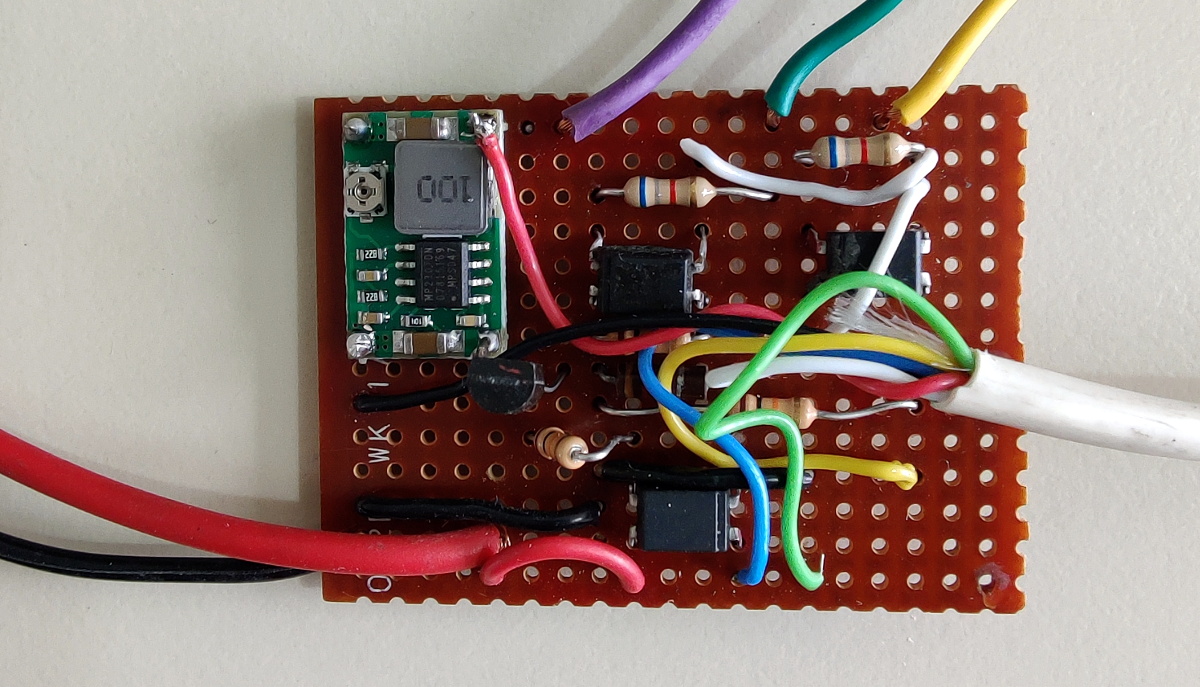
Optocouplers link the ESP and alarm panel.

Now we know what you’re thinking. Surely there’s a risk involved when trusting an ESP32 connected to the Internet with the ability to disarm your home alarm system. [Brett] has considered this, and made sure that the web server running on the microcontroller can only be accessed from the local network. If he does want to connect from beyond WiFi range, he does so through a VPN. In other words, his code is never directly exposed to the wilds of the Internet and is always hiding behind some kind of encryption.

The WiFi connection allows [Brett] to arm and disarm the alarm system remotely, check if it’s been triggered, and reset it if necessary, all from his smartphone. But he’s also added in a 433 MHz receiver so he can use simple handheld fobs to arm the system if he doesn’t want to go through the phone. Even if you dropped out the Internet connectivity, this alone is a pretty nice upgrade.

For those not afraid to take the more invasive route, you could potentially reverse engineer and reprogram your old alarm panel. Or you could even so the full DIY route and create your own low-cost alarm system using the ESP32 and off-the-shelf modules.

source https://hackaday.com/2020/11/02/esp32-adds-new-features-to-1990s-home-alarm-system/

Flies Like a Quadcopter, But This Drone Design Has Only One Propeller

When mentioning drones, most people automatically think of fixed-wing designs like the military Reaper UAV or of small quadcopters. However, thanks in large part to modern electronics, motors, and open-source control systems, it is possible to build them in a variety of shapes and sizes. [Benjamin Prescher] is working on the second version of his single rotor Ball-Drone, which uses four servo-actuated fins for control.

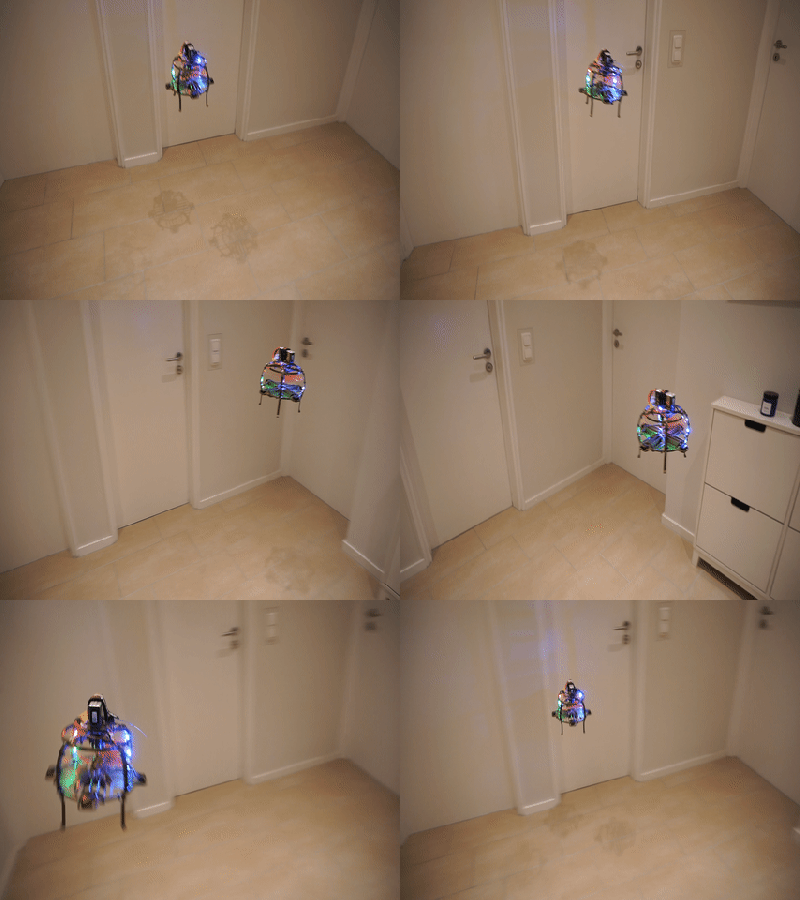
Mk II in action

The first version of the ball drone flew but was barely controllable and had a tendency to tip over. After a bit of research, he found that he had fallen victim to the drone pendulum fallacy by mounting the heavy components below the propeller and control fins. Initially, he also used conventional fin control that caused the servos to jitter due to high torque loading. By changing to grid fins, the actuation torque was reduced, eliminating the servo jitter.

Mk2 corrected the pendulum problem by moving most of the components to the top of the drone. The 3D printed frame (available on Thingiverse) was also dramatically changed and simplified to reduce weight. Although [Benjamin] designed a custom flight controller with custom control software, the latest parts list contains an off-the-shelf flight controller. He mentions that he had started working with Betaflight. The most complex part of a drone is not the mechanics or even the electronics, but the control software. Thanks to open source projects like Betaflight and Ardupilot, you don’t need to write control software from scratch to get something in the air.

The ball drone seems well suited to an indoor environment, but we’re not sure if it has any real advantages over a quadcopter with ducted propellers. Servos are cheaper than motors and ESCs, so there might be a small cost saving. Drop your thoughts on the advantages/disadvantages in the comments below.

It is not the first single-rotor drone we’ve covered, and we’re always on the lookout for weird drones and control schemes. [Tom Stanton]’s helicopter drone with a virtual swashplate was a recent example of this that’s worth a look if you missed it.

source https://hackaday.com/2020/11/02/flies-like-a-quadcopter-but-this-drone-design-has-only-one-propeller/

Sharpie Mount Brings Some Color to Your 3D Prints

The average cost of a desktop 3D printer has dropped like a stone over the last few years. They went from a piece of equipment you had to wait your turn to use at the hackerspace to something you can pick up on Prime Day, which has definitely been a good thing for our community. But to get the price down, these printers are almost exclusively running single extruder setups with no provision for multi-material printing other than swapping the filament manually.

From a practical standpoint, that’s not much of a problem. But wanting to add a little visual flair to his prints, [Devin Montes] came up with a simple 3D printed mount that holds the tip of up to three Sharpie permanent markers against the filament as it enters the top of the extruder. When used with white or translucent filaments, these markers can give the final print an interesting splash of color. Obviously it’s not true multi-color 3D printing, but it can certainly make for some attractive decorative objects.

The mount is designed for the Snapmaker 3-in-1 3D printer, which is relatively well suited to such a contraption as it has a direct drive extruder and there’s plenty of clearance for the markers to stick up. The concept could certainly be adapted to other printers, but it might be a little trickier in the case of a Bowden extruder or an i3 clone that has frame components running over the top. It sounds like [Devin] is working on a generic version of the marker holder that can work on other printers, so it should be interesting to see how he addresses these issues.

Technically this isn’t a new concept, as makers were pulling off similar tricks back in the earliest days of desktop 3D printing. But this is an especially well-implemented version of the idea, and if [Devin] can really come up with a mount that will work on a wider array of hardware, we could certainly see it becoming a popular way to make printed projects a bit more exciting.

source https://hackaday.com/2020/11/01/sharpie-mount-brings-some-color-to-your-3d-prints/

Sharpie Mount Brings Some Color to Your 3D Prints

The average cost of a desktop 3D printer has dropped like a stone over the last few years. They went from a piece of equipment you had to wait your turn to use at the hackerspace to something you can pick up on Prime Day, which has definitely been a good thing for our community. But to get the price down, these printers are almost exclusively running single extruder setups with no provision for multi-material printing other than swapping the filament manually.

From a practical standpoint, that’s not much of a problem. But wanting to add a little visual flair to his prints, [Devin Montes] came up with a simple 3D printed mount that holds the tip of up to three Sharpie permanent markers against the filament as it enters the top of the extruder. When used with white or translucent filaments, these markers can give the final print an interesting splash of color. Obviously it’s not true multi-color 3D printing, but it can certainly make for some attractive decorative objects.

The mount is designed for the Snapmaker 3-in-1 3D printer, which is relatively well suited to such a contraption as it has a direct drive extruder and there’s plenty of clearance for the markers to stick up. The concept could certainly be adapted to other printers, but it might be a little trickier in the case of a Bowden extruder or an i3 clone that has frame components running over the top. It sounds like [Devin] is working on a generic version of the marker holder that can work on other printers, so it should be interesting to see how he addresses these issues.

Technically this isn’t a new concept, as makers were pulling off similar tricks back in the earliest days of desktop 3D printing. But this is an especially well-implemented version of the idea, and if [Devin] can really come up with a mount that will work on a wider array of hardware, we could certainly see it becoming a popular way to make printed projects a bit more exciting.

source https://hackaday.com/2020/11/01/sharpie-mount-brings-some-color-to-your-3d-prints/

Sharpie Mount Brings Some Color to Your 3D Prints

The average cost of a desktop 3D printer has dropped like a stone over the last few years. They went from a piece of equipment you had to wait your turn to use at the hackerspace to something you can pick up on Prime Day, which has definitely been a good thing for our community. But to get the price down, these printers are almost exclusively running single extruder setups with no provision for multi-material printing other than swapping the filament manually.

From a practical standpoint, that’s not much of a problem. But wanting to add a little visual flair to his prints, [Devin Montes] came up with a simple 3D printed mount that holds the tip of up to three Sharpie permanent markers against the filament as it enters the top of the extruder. When used with white or translucent filaments, these markers can give the final print an interesting splash of color. Obviously it’s not true multi-color 3D printing, but it can certainly make for some attractive decorative objects.

The mount is designed for the Snapmaker 3-in-1 3D printer, which is relatively well suited to such a contraption as it has a direct drive extruder and there’s plenty of clearance for the markers to stick up. The concept could certainly be adapted to other printers, but it might be a little trickier in the case of a Bowden extruder or an i3 clone that has frame components running over the top. It sounds like [Devin] is working on a generic version of the marker holder that can work on other printers, so it should be interesting to see how he addresses these issues.

Technically this isn’t a new concept, as makers were pulling off similar tricks back in the earliest days of desktop 3D printing. But this is an especially well-implemented version of the idea, and if [Devin] can really come up with a mount that will work on a wider array of hardware, we could certainly see it becoming a popular way to make printed projects a bit more exciting.

source https://hackaday.com/2020/11/01/sharpie-mount-brings-some-color-to-your-3d-prints/

Raspberry PI 4 Now Supported by Risc OS in Latest Update

Students of ARM history will know that the origins of the wildly popular processor architecture lie in the British computer manufacturer Acorn (the original “A” in “ARM”). The first mass-market ARM-based products were their Archimedes line of desktop computers. A RISC-based computer in a school or home was significantly ahead of the curve in the mid 1980s and there was no off-the-shelf software, so alongside the new chips came a new operating system that would eventually bear the name Risc OS.

It’s since become one of those unexpected pieces of retrocomputing history that refuses to die, and remains in active development with a new version 5.28 of its open-source variant just released. Best of all, after supporting the Raspberry Pi since the earliest boards, it now runs on a Raspberry Pi 4. The original ARM operating system has very much kept up with the times, and can now benefit from the extra power of the latest hardware from Cambridge. The new release deals with a host of bugs, as well as bringing speed increases, security fixes, and other improvements. For those whose first experience of a GUI came via the Archimedes in British schools, the news that the built-in Paint package has received a thorough update will bring a smile.

The attraction of Risc OS aside from its history and speed lies in its being understandable in operation for those wishing to learn about how an OS works under the hood. It’s likely that for most of us it won’t replace our desktops any time soon, but it remains an interesting diversion to download and explore. If you’d like to read more about early ARM history then we’d like to point you at our piece on Sophie Wilson, the originator of the ARM architecture.

source https://hackaday.com/2020/11/01/raspberry-pi-4-now-supported-by-risc-os-in-latest-update/

Bodge Wire Saves a Vintage Mac SE/30 From the Heap

Anyone who pokes around old electronics knows that age is not kind to capacitors. If you’ve got a gadget with a few decades on the clock, there’s an excellent chance that some of its capacitors are either on the verge of failure or have already given up the ghost. Preemptively swapping them out is common in retrocomputing circles, but what do you do if your precious computer has already fallen victim to a troublesome electrolytic?

That’s the situation that [Ronan Gaillard] recently found himself in when he booted up his Mac SE/30 and was greeted with a zebra-like pattern on the screen. The collected wisdom of the Internet told him that some bad caps were almost certainly to blame, though a visual inspection failed to turn up anything too suspicious. Knowing the clock was ticking either way, he replaced all the capacitors on the Mac’s board and gave the whole thing a good cleaning.

Unfortunately, nothing changed. This caught [Ronan] a bit by surprise, and he took another trip down the rabbit hole to try and find more information. Armed with schematics for the machine, he started manually checking the continuity of all the traces between the ROM and CPU. But again, he came up empty handed. He continued the process for the RAM and Glue Chip, and eventually discovered that trace A24 wasn’t connected. Following the course it took across the board, he realized it ran right under the C11 axial capacitor he’d replaced earlier.

Suddenly, it all made sense. The capacitor must have leaked, corroded the trace underneath in a nearly imperceptible way, and cut off a vital link between the computer’s components. To confirm his suspicions, [Ronan] used a bodge wire to connect both ends of A24, which brought the 30+ year old computer roaring back to life. Well, not so much a roar since it turns out the floppy drive was also shot…but that’s a fix for another day.

It seems like every hardware hacker has a bad capacitor story. From vintage portable typewriters to the lowly home router, these little devils and the damage they can do should always be one of the first things you check if a piece of hardware is acting up.

source https://hackaday.com/2020/11/01/bodge-wire-saves-a-vintage-mac-se-30-from-the-heap/

Bodge Wire Saves a Vintage Mac SE/30 From the Heap

Anyone who pokes around old electronics knows that age is not kind to capacitors. If you’ve got a gadget with a few decades on the clock, there’s an excellent chance that some of its capacitors are either on the verge of failure or have already given up the ghost. Preemptively swapping them out is common in retrocomputing circles, but what do you do if your precious computer has already fallen victim to a troublesome electrolytic?

That’s the situation that [Ronan Gaillard] recently found himself in when he booted up his Mac SE/30 and was greeted with a zebra-like pattern on the screen. The collected wisdom of the Internet told him that some bad caps were almost certainly to blame, though a visual inspection failed to turn up anything too suspicious. Knowing the clock was ticking either way, he replaced all the capacitors on the Mac’s board and gave the whole thing a good cleaning.

Unfortunately, nothing changed. This caught [Ronan] a bit by surprise, and he took another trip down the rabbit hole to try and find more information. Armed with schematics for the machine, he started manually checking the continuity of all the traces between the ROM and CPU. But again, he came up empty handed. He continued the process for the RAM and Glue Chip, and eventually discovered that trace A24 wasn’t connected. Following the course it took across the board, he realized it ran right under the C11 axial capacitor he’d replaced earlier.

Suddenly, it all made sense. The capacitor must have leaked, corroded the trace underneath in a nearly imperceptible way, and cut off a vital link between the computer’s components. To confirm his suspicions, [Ronan] used a bodge wire to connect both ends of A24, which brought the 30+ year old computer roaring back to life. Well, not so much a roar since it turns out the floppy drive was also shot…but that’s a fix for another day.

It seems like every hardware hacker has a bad capacitor story. From vintage portable typewriters to the lowly home router, these little devils and the damage they can do should always be one of the first things you check if a piece of hardware is acting up.

source https://hackaday.com/2020/11/01/bodge-wire-saves-a-vintage-mac-se-30-from-the-heap/

Bodge Wire Saves a Vintage Mac SE/30 From the Heap

Anyone who pokes around old electronics knows that age is not kind to capacitors. If you’ve got a gadget with a few decades on the clock, there’s an excellent chance that some of its capacitors are either on the verge of failure or have already given up the ghost. Preemptively swapping them out is common in retrocomputing circles, but what do you do if your precious computer has already fallen victim to a troublesome electrolytic?

That’s the situation that [Ronan Gaillard] recently found himself in when he booted up his Mac SE/30 and was greeted with a zebra-like pattern on the screen. The collected wisdom of the Internet told him that some bad caps were almost certainly to blame, though a visual inspection failed to turn up anything too suspicious. Knowing the clock was ticking either way, he replaced all the capacitors on the Mac’s board and gave the whole thing a good cleaning.

Unfortunately, nothing changed. This caught [Ronan] a bit by surprise, and he took another trip down the rabbit hole to try and find more information. Armed with schematics for the machine, he started manually checking the continuity of all the traces between the ROM and CPU. But again, he came up empty handed. He continued the process for the RAM and Glue Chip, and eventually discovered that trace A24 wasn’t connected. Following the course it took across the board, he realized it ran right under the C11 axial capacitor he’d replaced earlier.

Suddenly, it all made sense. The capacitor must have leaked, corroded the trace underneath in a nearly imperceptible way, and cut off a vital link between the computer’s components. To confirm his suspicions, [Ronan] used a bodge wire to connect both ends of A24, which brought the 30+ year old computer roaring back to life. Well, not so much a roar since it turns out the floppy drive was also shot…but that’s a fix for another day.

It seems like every hardware hacker has a bad capacitor story. From vintage portable typewriters to the lowly home router, these little devils and the damage they can do should always be one of the first things you check if a piece of hardware is acting up.

source https://hackaday.com/2020/11/01/bodge-wire-saves-a-vintage-mac-se-30-from-the-heap/

Brassy, Classy WiFi Clock Shows Weather, Too

Circuit sculpture is a great way to elevate your soldering and electronics skills to the realm of three-dimensional art. In this case, art can be practical, too. Take [romaindurocher]’s interactive WiFi clock for example. Left alone, the clock cycles through showing the time, temperature, and if applicable, the precipitation forecast.

But [romain] doesn’t have to watch and wait for the info they want. Thanks to an IR proximity sensor, [romain] can interrupt the cycle and get the date, time, temperature, or even a smiley animation depending on the number of hand passes over the sensor. The clock itself is based on an Adafruit Feather HUZZAH ESP8266 and a Featherwing display. It uses the OpenWeather API to retrieve all the information.

We really like the way this looks, and the angle reminds us of oscilloscopes and other lab equipment. If you want to make your own version, this project is wide open, though the hardest part would be making it look as clean as [romain] did. Take a second and check out the brief demo after the break. It’s a wonderful entry in our Circuit Sculpture Challenge which is accepting entries for ten more days.

Not so much into straight lines and utility? Circuit sculpture takes many forms, some of them human.

source https://hackaday.com/2020/11/01/brassy-classy-wifi-clock-shows-weather-too/

Flexible Actuators Spring Into Action

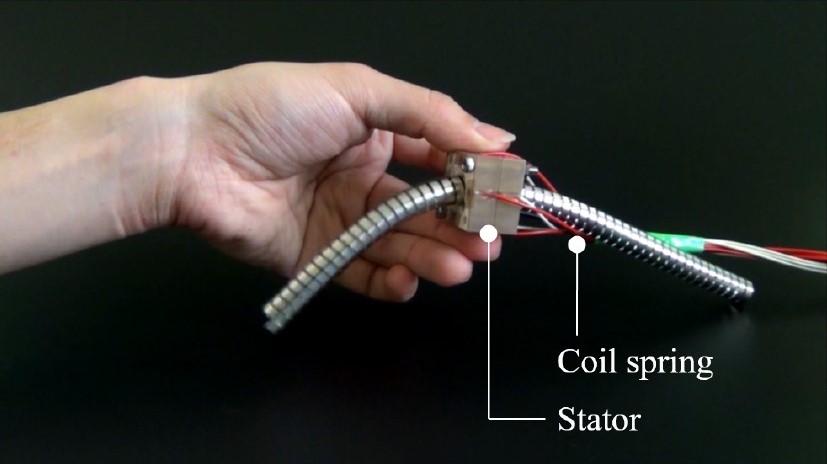
Most experiments in flexible robot actuators are based around pneumatics, but [Ayato Kanada] and [Tomoaki Mashimo] has been working on using a coiled spring as the moving component of a linear actuator. Named the flexible ultrasonic motor (FUSM), [Yunosuke Sato] built on top of their work and assembled a pair of FUSM into a closed-loop actuator with motion control in two dimensions.

A single FUSM is pretty interesting by itself, its coiled spring is the only mechanical moving part. An earlier paper published by [Kanada] and [Mashimo] laid out how to push the spring through a hole in a metal block acting as the stator of this motor. Piezoelectric devices attached to that block minutely distorts it in a controlled manner resulting in linear motion of the spring.

For closed-loop feedback, electrical resistance from the free end of the spring to the stator block can be measured and converted to linear distance to within a few millimeters. However, the acting end of the spring might be deformed via stretching or bending, which made calculating its actual position difficult. Accounting for such deformation is a future topic for this group of researchers.

This work was presented at IROS2020 which like many other conferences this year, moved online and became IROS On-Demand. After a no-cost online registration we can watch the 12-minute recorded presentation on this project or any other at the conference. The video includes gems such as an exaggerated animation of stator block deformation to illustrate how a FUSM works, and an example of the position calculation challenge where the intended circular motion actually resulted in an oval.

Speaking of conferences that have moved online, we have our own Hackaday Remoticon coming up soon!

[via Open Robotics Twitter feed]

source https://hackaday.com/2020/11/01/flexible-actuators-spring-into-action/

Flexible Actuators Spring Into Action

Most experiments in flexible robot actuators are based around pneumatics, but [Ayato Kanada] and [Tomoaki Mashimo] has been working on using a coiled spring as the moving component of a linear actuator. Named the flexible ultrasonic motor (FUSM), [Yunosuke Sato] built on top of their work and assembled a pair of FUSM into a closed-loop actuator with motion control in two dimensions.

A single FUSM is pretty interesting by itself, its coiled spring is the only mechanical moving part. An earlier paper published by [Kanada] and [Mashimo] laid out how to push the spring through a hole in a metal block acting as the stator of this motor. Piezoelectric devices attached to that block minutely distorts it in a controlled manner resulting in linear motion of the spring.

For closed-loop feedback, electrical resistance from the free end of the spring to the stator block can be measured and converted to linear distance to within a few millimeters. However, the acting end of the spring might be deformed via stretching or bending, which made calculating its actual position difficult. Accounting for such deformation is a future topic for this group of researchers.

This work was presented at IROS2020 which like many other conferences this year, moved online and became IROS On-Demand. After a no-cost online registration we can watch the 12-minute recorded presentation on this project or any other at the conference. The video includes gems such as an exaggerated animation of stator block deformation to illustrate how a FUSM works, and an example of the position calculation challenge where the intended circular motion actually resulted in an oval.

Speaking of conferences that have moved online, we have our own Hackaday Remoticon coming up soon!

[via Open Robotics Twitter feed]

source https://hackaday.com/2020/11/01/flexible-actuators-spring-into-action/

Big Workshop Clock Is 3D Printing Done Right

Time is something uniquely important to humans, and they remain the only creatures on the planet to build devices to regularly track its progress. [Ivan Miranda] is one such creature, and built a giant 7-segment clock for his workshop that really ties the room together.

The clock is a testament to [Ivan]’s design skills in the 3D printed space. Taking advantage of his large format printer, each segment consists of a front panel, large single-piece diffuser, LED carrier, and backing plate. There are plenty of nice touches, from the interlocking ridges between each digit, to integral printed arrows on the inside that guide installation of the LED strips. Fit and finish approaches the level of a commercial product, a reward for [Ivan]’s years of practice in the field.

Electronically, an ESP8266 runs the show, synchronizing the time over its in-built WiFi connection. Each segment contains 9 WS2812B LEDs, wired up in a single long strip that’s addressed by the microcontroller. This means that the segments can be lit up to any color of the rainbow, though [Ivan] is a man who best appreciates the look of classic red.

[Ivan]’s long been a proponent of big 3D-printed builds — his tank-tracked electric skateboard is a particularly good example. Video after the break.

source https://hackaday.com/2020/11/01/big-workshop-clock-is-3d-printing-done-right/

Burning Your Own PS1 Modchip Is Easy

The original Sony PlayStation came out just in time for CD piracy to really start taking off. Aware of this threat to sales, Sony engineers included a copy protection and region locking mechanism that placated executives and annoyed end-users alike. [MattKC] explores how this copy protection worked, and how you can burn your own modchip at home for just a few dollars.

Sony’s method of copy protection relied on steps taken during the manufacturing process, pressing a special groove into the game media that regular CD burners couldn’t replicate, a topic our own [Drew Littrell] has covered in depth. This groove contained a four letter code that could be read by the console, corresponding to the region in which the game was sold. The console would read this groove on startup, and check that the code in the game matched the code in the console before booting. Modchips circumvent this by injecting a spoof code into the console that matches the local region, regardless of what is read off the disc. This has the effect of both allowing users to run bootleg CD-Rs, homebrew code, as well as games from other regions.

Today, we’re blessed with the Internet and cheap hardware. As [MattKC] demonstrates, it’s no longer necessary to mail-order a chip from a dodgy ad in the back of a games magazine; instead, one can download source code and flash it to a commodity PIC microcontroller for just a few bucks. With the chip soldered in to the relevant points of the PS1’s motherboard, you’re good to go.

As far as console modding goes, the PS1 is a great platform to start with — simple to work on, and also the best selling console of all time, so the stakes are low if you mess up. Video after the break.

source https://hackaday.com/2020/11/01/burning-your-own-ps1-modchip-is-easy/

Fuel Cell Drone Aims For Extended Flight Times

The RC world was changed forever by the development of the lithium-polymer battery. No longer did models have to rely on expensive, complicated combustion engines for good performance. However, batteries still lack the energy density of other fuels, and so flying times can be limited. Aiming to build a drone with impressively long endurance, [Игорь Негода] instead turned to hydrogen power.

The team fitted a power meter to the plane, aiming a camera at it to measure power draw during flight.

With a wingspan of five meters, and similar length, the build is necessarily large in order to carry the hydrogen tank and fuel cell that will eventually propel the plane, which uses a conventional brushless motor for propulsion. Weighing in at 6 kilograms, plenty of wing is needed to carry the heavy components aloft. Capable of putting out a maximum of 200W for many hours at a time, the team plans to use a booster battery to supply extra power for short bursts, such as during takeoff. Thus far, the plane has flown successfully on battery power, with work ongoing to solve handling issues and determine whether the platform can successfully fly on such low power.

We’re eager to see how the project develops, particularly in regards to loiter time. We can imagine having a few pilots on hand may be necessary with such a long flight time planned — other drones of similar design have already surpassed the 60-minute mark. Video after the break.

source https://hackaday.com/2020/10/31/fuel-cell-drone-aims-for-extended-flight-times/

Fuel Cell Drone Aims For Extended Flight Times

The RC world was changed forever by the development of the lithium-polymer battery. No longer did models have to rely on expensive, complicated combustion engines for good performance. However, batteries still lack the energy density of other fuels, and so flying times can be limited. Aiming to build a drone with impressively long endurance, [Игорь Негода] instead turned to hydrogen power.

The team fitted a power meter to the plane, aiming a camera at it to measure power draw during flight.

With a wingspan of five meters, and similar length, the build is necessarily large in order to carry the hydrogen tank and fuel cell that will eventually propel the plane, which uses a conventional brushless motor for propulsion. Weighing in at 6 kilograms, plenty of wing is needed to carry the heavy components aloft. Capable of putting out a maximum of 200W for many hours at a time, the team plans to use a booster battery to supply extra power for short bursts, such as during takeoff. Thus far, the plane has flown successfully on battery power, with work ongoing to solve handling issues and determine whether the platform can successfully fly on such low power.

We’re eager to see how the project develops, particularly in regards to loiter time. We can imagine having a few pilots on hand may be necessary with such a long flight time planned — other drones of similar design have already surpassed the 60-minute mark. Video after the break.

source https://hackaday.com/2020/10/31/fuel-cell-drone-aims-for-extended-flight-times/

Fuel Cell Drone Aims For Extended Flight Times

The RC world was changed forever by the development of the lithium-polymer battery. No longer did models have to rely on expensive, complicated combustion engines for good performance. However, batteries still lack the energy density of other fuels, and so flying times can be limited. Aiming to build a drone with impressively long endurance, [Игорь Негода] instead turned to hydrogen power.

The team fitted a power meter to the plane, aiming a camera at it to measure power draw during flight.

With a wingspan of five meters, and similar length, the build is necessarily large in order to carry the hydrogen tank and fuel cell that will eventually propel the plane, which uses a conventional brushless motor for propulsion. Weighing in at 6 kilograms, plenty of wing is needed to carry the heavy components aloft. Capable of putting out a maximum of 200W for many hours at a time, the team plans to use a booster battery to supply extra power for short bursts, such as during takeoff. Thus far, the plane has flown successfully on battery power, with work ongoing to solve handling issues and determine whether the platform can successfully fly on such low power.

We’re eager to see how the project develops, particularly in regards to loiter time. We can imagine having a few pilots on hand may be necessary with such a long flight time planned — other drones of similar design have already surpassed the 60-minute mark. Video after the break.

source https://hackaday.com/2020/10/31/fuel-cell-drone-aims-for-extended-flight-times/

Kelvin Probes Review Shows How 4-Wire Resistance Measurement Works

You might think the probes in the picture are just funny looking alligator clips. But if you watch [tomtektest’s] recent video, you’ll learn they are really Kelvin probes. Kelvin probes are a special type of probe for making accurate resistance measurements using four wires and, in fact, the probe’s jaws are electrically isolated from each other.

We liked [Tom’s] advice from his old instructor: you aren’t really ever measuring a resistance. You are measuring a voltage and a current. With a four-wire measurement, one pair of wires carries current to the device under test and the other pair of wires measure the voltage drop.

If you wonder why that’s better than two probes, it all comes down to resistance in the test probes. Pulling supply current through the probe wires — which have some resistance — causes a voltage drop that affects the measurement. While the sense wire pair will also have resistance, the sensing current can be very small which means there will be correspondingly less error in the measurement.

We’ve seen these probes built from scratch, too. You do need a meter that will do the actual four-wire measurement, although a power supply and a voltmeter will do the job, too. If you don’t want to probe in real life, you can always do it in virtual reality. (Well, a circuit simulator, anyway.)

source https://hackaday.com/2020/10/31/kelvin-probes-review-shows-how-4-wire-resistance-measurement-works/

Self-Driving RC Truck is a Master’s Thesis in Cybernetics and Robotics

RC cars are a fun pastime, but for many hackers, taking things to the next level involves making the cars drive themselves. For his Masters thesis, [Jon] did just that, building a self-driving robot truck that confidently cruises the floor of his laboratory.

The truck is based on a 1/14th scale Tamiya chassis, and had been fitted out by a prior group with an inductive charging system. On top of this platform, [Jon] added a Jetson TX2 to act as the brains of the system, hooking it up with a Slamtec RPLIDAR scanner to map its surrounding environment. There’s also a Teensy microcontroller onboard which handles synthesizing PWM signals for the radio control hardware that drives the truck, and a Logitech webcam up front for machine vision. The truck is capable of operating in a variety of modes, from full manual operation, to driving based on LIDAR mapping or with an AI controlling the truck based on camera data. The truck is programmed to drive a route including an inductive charging pad so it can keep its power levels up without human intervention.

It’s a great blueprint for a self-driving system, and [Jon]’s thesis goes into great detail on how everything works at the base level (available on this page as a 67 MB PDF). His Code is on Github for the curious. We’ve seen similar projects before too, like this robot that navigates its builder’s house using LIDAR. Video after the break.

source https://hackaday.com/2020/10/31/self-driving-rc-truck-is-a-masters-thesis-in-cybernetics-and-robotics/

Using Open Source to Train your Dog

An open-source canine training research tool was just been released by [Walter Arce] and [Jeffrey Stevens] at the University of Nebraska — Lincoln’s Canine Cognition and Human Interaction Lab (C-CHIL).

We didn’t realize that dog training research techniques were so high-tech. Operant conditioning, as opposed to Pavlovian, gives a positive reward, in this case dog treats, to reinforce a desired behavior. Traditionally operant conditioning involved dispensing the treat manually and some devices do exist using wireless remote controls, but they are still manually operated and can give inconsistent results (too many or too few treats). There weren’t any existing methods available to automate this process, so this team decided to rectify the situation.

They took a commercial treat dispenser and retro-fitted it with an interface board that taps into the dispenser’s IR sensors to detect that the hopper is moving and treats were actually dispensed. The interface board connects to a Raspberry Pi which serves as a full-featured platform to run the tests. In this demonstration it connects to an HDMI monitor, detecting touches from the dog’s nose to correlate with events onscreen. Future researchers won’t have to reinvent the wheel, just redesign the test itself, because [Walter] and [Jeffrey] have released all the firmware and hardware as open-source on the lab’s GitHub repository.

In the short video clip below, watch the dog as he gets a treat when he taps the white dot with his snout. If you look closely, at one point the dog briefly moves the mouse pointer as well. We predict by next year the C-CHIL researchers will have this fellow drawing pictures and playing checkers.

This isn’t the first animal behavior hack we’ve seen this month. Check out [Hans’] feeder that trains birds to clean up bottlecaps.

source https://hackaday.com/2020/10/31/using-open-source-to-train-your-dog/

School Project Turns Plastic Waste Into Bricks

Many plastics are, in theory at least, highly recyclable. Unfortunately, in reality, most plastic ends up as waste instead, harming the environment and providing no ongoing value to society. Wanting to investigate possible ways to repurpose this material, [Rehaan33] built a rig to create bricks out of waste plastic for a school project.

The aim of the project is to take waste plastic, in this case high-impact polystyrene, and reform it into a brick that could be used as a low-cost building material. The material is shredded, before being packed into a steel mould and heated to 270 degrees in an oven. As polystyrene is a thermoplastic, it can readily be heated in this way for reforming without harming the material’s properties. Once heated, the mould is placed into the press rig, which uses parts of an old drill press to force down a steel plate, helping shape the final form of the brick.

While you’re unlikely to see old soda bottles used to build a skyscraper in New York any time soon, such techniques could be a good way to help eliminate plastic waste in impoverished areas and stem the flow of plastic into the world’s oceans. The project served as a useful learning experience, allowing [Rehaan33] to pick up skills in metalworking, machine design, and working with thermoplastics. Recycling plastics is a key area of interest for many, particularly in the 3D printing space, with many exploring ways to reuse thermoplastics in more efficient ways. If you’ve got your own project turning waste plastics into useful material, be sure to let us know!

source https://hackaday.com/2020/10/31/school-project-turns-plastic-waste-into-bricks/