Homebrew Metrology the CERN Way

We won’t pretend to fully grok everything going on with this open-source 8.5-digit voltmeter that [Marco Reps] built. After all, the design came from the wizards at CERN, the European Organization for Nuclear Research, home to the Large Hadron Collider and other implements of Big Science. But we will admit to finding the level of this build quality absolutely gobsmacking, and totally worth watching the video for.

As [Marco] relates, an upcoming experiment at CERN will demand a large number of precision voltmeters, the expense of which led to a homebrew design that was released on the Open Hardware Repository. “Homebrew” perhaps undersells the build a bit, though. The design calls for a consistent thermal environment for the ADC, so there’s a mezzanine level on the board with an intricately designed Peltier thermal control system, including a custom-machined heat spreader blocker. There’s also a fascinatingly complex PCB dedicated solely to provide a solid ground between the analog input connector — itself a work of electromechanical art — and the chassis ground.

The real gem of this whole build, though, is the vapor-phase reflow soldering technique [Marco] used. Rather than a more-typical infrared process, vapor-phase reflow uses a perfluropolyether (PFPE) solution with a well-defined boiling point. PCBs suspended above a bath of heated PFPE get bathed in inert vapors at a specific temperature. [Marco]’s somewhat janky setup worked almost perfectly — just a few tombstones and bridges to fix. It’s a great technique to keep in mind for that special build.

The last [Marco Reps] video we featured was a teardown of a powerful fiber laser. It’s good to see a metrology build like this one, though, and we have a feeling we’ll be going over the details for a long time.

source https://hackaday.com/2021/02/26/homebrew-metrology-the-cern-way/

Tired of Popcorn? Roast Coffee Instead

We’ve seen a lot of coffee roaster builds over the years. [Ben Eagan] started his with a hot-air popcorn maker. If you think it is as simple as putting beans in place of the popcorn, think again. You need to have good control of the heat, and that requires some temperature monitoring and a controller — in this case, an Arduino. [Ben’s] video below shows how it all goes together.

With the Arduino and the power supply strapped to the sides, it looks a bit like something out of a bad post-apocalypse movie. But it looks like it gets the job done.

In addition to the Arduino, a thermocouple measures the temperature and that takes a little circuitry in the form of a MAX31855. There’s also a relay to turn the heater on and off. There are other ways to control AC power, of course, and if a relay offends your sensibilities you can always opt for a solid state one.

The only other wrinkle was the addition of an extra power supply so the fan could operate without the heater. There might have been some other ways to manage that, but power supplies are cheap enough and at least the strapped on power supply counterbalances the strapped on Arduino on the other side of the popper.

We’ve seen popcorn poppers used like this before, of course. Thermocouples are a great way to measure high temperatures, but there are lots of other ways to measure that particular quantity.

source https://hackaday.com/2021/02/25/tired-of-popcorn-roast-coffee-instead/

Oddball x86 Instructions

David Letterman made the top ten list famous. [Creel] has a top ten that should appeal to many Hackaday readers: the top 10 craziest x86 assembly language instructions. You have to admit that the percentage of assembly language programmers is decreasing every year, so this isn’t going to have mass appeal, but if you are interested in assembly or CPU architecture, this is a fun way to kill 15 minutes.

Some would say that all x86 instructions are crazy, especially if you are accustomed to reduced instruction set computers. The x86, like other non-RISC processors, has everything but the kitchen sink. Some of these instructions might help you get that last 10 nanoseconds shaved off a time-critical loop.

There are also interesting instructions like RDSEED, which generates a real random number. That can be useful but it takes many clock cycles to run, and like anything that purports to generate random numbers, is subject to a lot of controversies.

Our favorite, though, was PSHUFB. As soon as we saw “Mr. Mojo Risin’!” as the example input string, we knew where it was going. You could probably go a lifetime without using any of these instructions. But if you need them, now you’ll know.

If you really want to learn modern assembly language, there’s plenty of help. We occasionally write a little Linux assembly, just to keep in practice.

source https://hackaday.com/2021/02/25/oddball-x86-instructions/

“MORPH” LED Ball is a There-Is-No-Spoon, Reality-Bending Art Installation

Marvelously conceived and exquisitely executed, this huge ball made up of hexagon tiles combines the best of blinky LEDs and animatronics into one amorphic ball.

The creation of [Nicholas Perillo] of Augmentl along with [MindBuffer], full details of the “morph v2” project have not yet been published. However, some tantilizing build progress is documented on [Nicholas’] Insta — most especially through the snapshots in the story thread spanning the last seven months. The scope of the project is brought into focus with time lapse video of hundreds of heat-set inserts, bundles of twisted wire, a pile of 1500 sliding rails, cases full of custom-order stepper motors, and thick cuts of copper bus bars to feed power up the shaft and out to the panels.


The demo video after the break is mesmerizing, shot by [nburdy] during a demo at MotionLab Berlin where it was built. Each hex tile is backed by numerous LEDs and a stepper motor assembly that lets it move in and out from the center of the ball. Somehow it manages to look as though it’s flowing, as they eye doesn’t pick up spaces opening between tiles as they are extended.

The Twitter thread fills in some of the juicy details: “486 stepper motors, 86,000 LEDs and a 5 channel granular synth engine (written by @_hobson_ no less, in @rustlang of course).” The build also includes speakers mounted in the core of the ball, hidden behind the moving LED hexes. The result is an artistic assault on reality, as the highly coordinated combinations of light, sound, and motion make this feel alive, otherwordly, or simply a glitch in the matrix. Watching the renders of what animations will look like, then seeing it on the real thing drives home the point that practical effects can still snap us out of our 21st-century computer-generated graphics trance.

It’s relatively easy to throw thousands of LEDs into a project these days, as PCBA just applies robots to the manufacturing problem. But motion remains a huge challenge beyond a handful of moving parts. But the Times Square billboard from a few years ago and the Morph ball both show it’s worth it.

As you’ve guessed from the name, this is the second Morph ball the team has collaborated on. Check out details of v1, a beach ball sized moving LED ball.

source https://hackaday.com/2021/02/25/morph-led-ball-is-a-there-is-no-spoon-reality-bending-art-installation/

“MORPH” LED Ball is a There-Is-No-Spoon, Reality-Bending Art Installation

Marvelously conceived and exquisitely executed, this huge ball made up of hexagon tiles combines the best of blinky LEDs and animatronics into one amorphic ball.

The creation of [Nicholas Perillo] of Augmentl along with [MindBuffer], full details of the “morph v2” project have not yet been published. However, some tantilizing build progress is documented on [Nicholas’] Insta — most especially through the snapshots in the story thread spanning the last seven months. The scope of the project is brought into focus with time lapse video of hundreds of heat-set inserts, bundles of twisted wire, a pile of 1500 sliding rails, cases full of custom-order stepper motors, and thick cuts of copper bus bars to feed power up the shaft and out to the panels.


The demo video after the break is mesmerizing, shot by [nburdy] during a demo at MotionLab Berlin where it was built. Each hex tile is backed by numerous LEDs and a stepper motor assembly that lets it move in and out from the center of the ball. Somehow it manages to look as though it’s flowing, as they eye doesn’t pick up spaces opening between tiles as they are extended.

The Twitter thread fills in some of the juicy details: “486 stepper motors, 86,000 LEDs and a 5 channel granular synth engine (written by @_hobson_ no less, in @rustlang of course).” The build also includes speakers mounted in the core of the ball, hidden behind the moving LED hexes. The result is an artistic assault on reality, as the highly coordinated combinations of light, sound, and motion make this feel alive, otherwordly, or simply a glitch in the matrix. Watching the renders of what animations will look like, then seeing it on the real thing drives home the point that practical effects can still snap us out of our 21st-century computer-generated graphics trance.

It’s relatively easy to throw thousands of LEDs into a project these days, as PCBA just applies robots to the manufacturing problem. But motion remains a huge challenge beyond a handful of moving parts. But the Times Square billboard from a few years ago and the Morph ball both show it’s worth it.

As you’ve guessed from the name, this is the second Morph ball the team has collaborated on. Check out details of v1, a beach ball sized moving LED ball.

source https://hackaday.com/2021/02/25/morph-led-ball-is-a-there-is-no-spoon-reality-bending-art-installation/

“MORPH” LED Ball is a There-Is-No-Spoon, Reality-Bending Art Installation

Marvelously conceived and exquisitely executed, this huge ball made up of hexagon tiles combines the best of blinky LEDs and animatronics into one amorphic ball.

The creation of [Nicholas Perillo] of Augmentl along with [MindBuffer], full details of the “morph v2” project have not yet been published. However, some tantilizing build progress is documented on [Nicholas’] Insta — most especially through the snapshots in the story thread spanning the last seven months. The scope of the project is brought into focus with time lapse video of hundreds of heat-set inserts, bundles of twisted wire, a pile of 1500 sliding rails, cases full of custom-order stepper motors, and thick cuts of copper bus bars to feed power up the shaft and out to the panels.


The demo video after the break is mesmerizing, shot by [nburdy] during a demo at MotionLab Berlin where it was built. Each hex tile is backed by numerous LEDs and a stepper motor assembly that lets it move in and out from the center of the ball. Somehow it manages to look as though it’s flowing, as they eye doesn’t pick up spaces opening between tiles as they are extended.

The Twitter thread fills in some of the juicy details: “486 stepper motors, 86,000 LEDs and a 5 channel granular synth engine (written by @_hobson_ no less, in @rustlang of course).” The build also includes speakers mounted in the core of the ball, hidden behind the moving LED hexes. The result is an artistic assault on reality, as the highly coordinated combinations of light, sound, and motion make this feel alive, otherwordly, or simply a glitch in the matrix. Watching the renders of what animations will look like, then seeing it on the real thing drives home the point that practical effects can still snap us out of our 21st-century computer-generated graphics trance.

It’s relatively easy to throw thousands of LEDs into a project these days, as PCBA just applies robots to the manufacturing problem. But motion remains a huge challenge beyond a handful of moving parts. But the Times Square billboard from a few years ago and the Morph ball both show it’s worth it.

As you’ve guessed from the name, this is the second Morph ball the team has collaborated on. Check out details of v1, a beach ball sized moving LED ball.

source https://hackaday.com/2021/02/25/morph-led-ball-is-a-there-is-no-spoon-reality-bending-art-installation/

Electric Airboat For Getting You Across Thin Ice

Even with all the technological progress civilization has made, weather and seasons still have a major impact on our lives. [John de Hosson] owns a cabin on an island in a Swedish lake, and reaching it involves crossing 500 m of water. In summer this is done with a conventional boat, and in winter they can simply walk across the thick ice, but neither of these is an option on thin ice in the spring or fall. To solve this [John] built an electric airboat, and it looks like a ton of fun in the video after the break

The construction is simple but functional. A 3.3 m flat-bottomed aluminum boat has used a base, and an aluminum frame was bolted on for the motor and propeller. The motor is an 18 kW brushless motor, with a 160 cm/63-inch carbon fiber propeller. Power comes via a 1000 A ESC from a 100V 3.7 kWh Lipo pack mounted in a plastic box. Steering is very similar to a normal airboat, with a pair of air rudders behind the propeller, controlled by a steering lever next to the driver’s seat. The throttle is an RC controller with the receiver wired to the ESC.

Performance is excellent, and it accelerates well on ice and slush, even with two people on board. [John] still plans to make several improvements, with a full safety cage around the propeller being at the top of the list. He is also concerned that it will capsize on the water with the narrow hull, so a wider hull is planned. [John] has already bought a large steering servo to allow full remote control for moving cargo, with the addition of an FPV system. We would also add an emergency kill switch and waterproofing for the electronics to the list of upgrades. It looks as though the battery box is already removable, which is perfect for getting it out of the cold when not in use.

Even the small scale are boats are a fun RC project which can be built from only junk bin parts, or you can go to the other extreme and add full autonomous navigation.

Thanks for the tip [Måns Almered]!

source https://hackaday.com/2021/02/25/electric-airboat-for-getting-you-across-thin-ice/

Fry’s Electronics Has Fizzled Out Completely

2020 and all its ills have claimed another stalwart among PC builders and electronics hobbyists: Fry’s announced yesterday that they have closed up shop for good after nearly 36 years in business both as a brick-and-mortar wonderland and an online mecca for all things electronic.

According to Fry’s website (PDF copy for posterity), all 31 stores across nine states were suddenly and permanently shuttered on Wednesday the 24th, citing changes in the retail industry and the widespread difficulties wrought by the pandemic. Signs of the retailer’s growing challenges were seen back in 2019 when the company began shifting toward a consignment model in an attempt to cut overhead and liability.

Burbank Fry’s electronics [Image source: Bryce Edwards CC-BY 2.0]

Sadly, I never set foot inside of a Fry’s though I hear it was an experience beginning with the themed entrances found at many of the locations. Now it seems I never will. Where I live, Microcenter is king, and it has been truly awesome to watch the hobby electronics section expand from a single four-foot panel in a dark corner to the multi-aisle marketplace it is today. I keep imagining that Microcenter suddenly went out of business instead, and it makes me want to cry.

So where can a person go to pick up some quick components now that Radio Shack and Fry’s are no more? Of course there’s the previously mentioned Microcenter, but you should also look for old-school supply stores in your area. They may not have an Adafruit section and they’re probably not open after 5:00PM or on the weekends, but these stores are still kicking and they need us now more than ever. We’ve previously reported on gems like Tanner’s Electronics which sadly closed its doors almost a year ago. Help spread the word about your favorites that are still open in the comments below.

Thank you [Ryan], [John], and [Jack] for tipping us off.

[Main image source: San Jose Fry’s by Bryce Edwards; CC-BY 2.0]

source https://hackaday.com/2021/02/25/frys-electronics-has-fizzled-out-completely/

Fry’s Electronics Has Fizzled Out Completely

2020 and all its ills have claimed another stalwart among PC builders and electronics hobbyists: Fry’s announced yesterday that they have closed up shop for good after nearly 36 years in business both as a brick-and-mortar wonderland and an online mecca for all things electronic.

According to Fry’s website (PDF copy for posterity), all 31 stores across nine states were suddenly and permanently shuttered on Wednesday the 24th, citing changes in the retail industry and the widespread difficulties wrought by the pandemic. Signs of the retailer’s growing challenges were seen back in 2019 when the company began shifting toward a consignment model in an attempt to cut overhead and liability.

Burbank Fry’s electronics [Image source: Bryce Edwards CC-BY 2.0]

Sadly, I never set foot inside of a Fry’s though I hear it was an experience beginning with the themed entrances found at many of the locations. Now it seems I never will. Where I live, Microcenter is king, and it has been truly awesome to watch the hobby electronics section expand from a single four-foot panel in a dark corner to the multi-aisle marketplace it is today. I keep imagining that Microcenter suddenly went out of business instead, and it makes me want to cry.

So where can a person go to pick up some quick components now that Radio Shack and Fry’s are no more? Of course there’s the previously mentioned Microcenter, but you should also look for old-school supply stores in your area. They may not have an Adafruit section and they’re probably not open after 5:00PM or on the weekends, but these stores are still kicking and they need us now more than ever. We’ve previously reported on gems like Tanner’s Electronics which sadly closed its doors almost a year ago. Help spread the word about your favorites that are still open in the comments below.

Thank you [Ryan], [John], and [Jack] for tipping us off.

[Main image source: San Jose Fry’s by Bryce Edwards; CC-BY 2.0]

source https://hackaday.com/2021/02/25/frys-electronics-has-fizzled-out-completely/

May (No Longer) Contain Hackers: MCH 2021 Has Been Cancelled

In a sad but unsurprising turn of events, MCH, this summer’s large hacker camp in the Netherlands, has been cancelled. Organising a large event in a pandemic would inevitably carry some risk, and despite optimism that the European vaccine strategy might have delivered a safe environment by the summer that risk was evidently too high for the event organisers IFCAT to take on. Our community’s events come from within the community itself rather than from commercial promoters, and the financial liability of committing to hire the site and infrastructure would have been too high to bear had the event succumbed to the pandemic. Tickets already purchased will be refunded, and they leave us with a crumb of solace by promising that alternatives will be considered. We understand their decision, and thank them for trying.

As with all such events the behind-the-scenes work for MCH has already started. The badge has been revealed in prototype form, the call for participation has been completed, and the various other event team planning will no doubt be well  under way. This work is unlikely to be wasted, and we hope that it will bear fruit at the next Dutch event whenever that may be.

It would have been nice to think that by now we could be seeing the light at the end of the pandemic tunnel, but despite the sterling work of scientists, healthcare workers, and epidemiologists, it seems we still have a a way to go before we’ll once more be hanging out together drinking Club-Mate in the company of thousands of others. If the pandemic is weighing upon you, take care of yourselves.

source https://hackaday.com/2021/02/25/may-no-longer-contain-hackers-mch-2021-has-been-cancelled/

What If I Never Make Version Two?

When you make something, what does version one look like? What I mean is, how much thought do you put into the design? Do you try to make it look nice as you go along, or do you just build something that functions and say screw the presentation? Do you try to solve for everything upfront, or just plow through it and promise to fix your mistakes in version two? What if you never make version two?

No matter what you like to make, there’s a first time for everything. And it doesn’t seem to matter if you need the thing you’re making or just want to have it around: it’s a given that version one will probably be a bit rough around the edges. That’s just how it goes. Even if you’re well-versed in a skill, when you try a new type of project or a new pattern, it will be a new experience. For example, I’ve sewn a dozen different purses, but when I took on a new challenge I found I was only somewhat prepared to make my first backpack.

Great is the enemy of good, and perfection is the enemy of progress. Shooting for a pristine prototype on the first go steep and rocky path that never leads to finishing the build. So our goal here is to decide what makes rev1 good enough that we still love it, even if rev2 never happens.

Want vs. Need

Of course, the answers to all of the opening questions greatly depend on want versus need. When I’m making something for fun, I’m happiest while I’m still inside the project. I want it to be over so I can see the finished product, but I also don’t want the process of making it to end, because that’s the fun part. It’s like reading a really good book. With sewing projects, I’m always really excited to see how they come together. It seems like no matter how I manipulate fabric beforehand and try to visualize how something will turn out, the end result is always a little bit of a surprise.

If I need the thing I’m making, I’m more likely to work quickly and cut corners to get the thing into use. The trouble with that is if I don’t spend enough time in the design phase, I’ll probably end up annoyed at the very least, or back to square one without a viable solution. In either case, I’ll admit that I have a pretty serious case of perfectionism. It affects everything I do. I love and hate this part of myself in equal amounts, because I’ve made some things I feel fairly proud of. But I’m usually too hard on myself along the way. If I were any harder on myself, I would probably never start or finish anything. Try to reign that in by setting expectations in the design phase, with plenty of thought spent on how you’ll achieve each needed feature.

Case in Point: The Practice Backpack

At the beginning of this year, I decided to make a backpack and document the process. I had made exactly one backpack before this one, but the designs differ enough that I decided to make a practice backpack first out of fabric I already have. This way, I can go through the pattern once and work out the kinks before buying fancy, expensive fabric — something I didn’t do with the first backpack and somewhat regret. In dressmaking, this is called making a muslin. It’s somewhat akin to a circuit made on stripboard: a functional prototype that’s more permanent than a breadboarded circuit. It may not be pretty, but it works. Ideally.

It’s not that I needed a backpack, I just wanted to practice bag-making, because I learn something from every new pattern I try. Even so, I knew I didn’t want to make any old thing. This is where my personal design conundrum begins. Yes, this is something I want to do rather than something I need to do. But I still have to consider how much time and money I’ll be investing in making the thing. I didn’t keep a clock running this time, but I would estimate that it took at least ten to fifteen solid hours of my free time. Shouldn’t I make it as pretty as possible?

Another thing to consider is that the end product will be a backpack, a real, functional backpack. This is not a breadboarded version of a backpack full of safety pins and/or hot glue. I will be using real fabric, working zippers, and actual webbing for the handles and straps. It doesn’t have to be perfect, sure. But shouldn’t it lean toward making me proud rather than embarrassed? I say yes. Because I might want to use it, or even sell it to someone else if it turns out well enough. So this practice backpack required plenty of decisions up front, from the fabric to the zippers to the hardware.

Decisions, Decisions

First and foremost was choosing the fabrics. Fabric is expensive in general, so instead of buying new fabric, I took a long, hard look at my stash — my parts bin if you will. The more bag-making I do, the more that everything looks like usable fabric to me, especially big things like table cloths and decorative shower curtains. A few years ago, I bought an off-white canvas drop cloth to use as a photography backdrop. It has since been wadded up and forgotten, so I threw it in the wash, thrilled with the idea of sewing a bunch of bags with what feels like free fabric.

This project is a lined backpack, so it calls for an exterior fabric and an interior fabric. The first pastry-pocked backpack I made, the tiny purse-sized one, uses the same fabric inside and out — a thin quilting cotton like standard bed sheet material. In order to make it suitable for a bag, it all had to be interfaced.

Interfacing is a material that’s applied as a backing to any fabric that needs more body. I’m exaggerating a little, but you can make anything out of anything if you have the right interfacing. Think of it like a veneered cabinet door: the fabric you want to show is the veneer, and the interfacing is what lies underneath, giving it the strength and structure it needs to pass as a cabinet door. In the case of the doughnuts backpack, the exterior pieces have two types of interfacing — woven first, and then foam. The backpack is empty in the pictures above; it’s the foam interfacing that gives it all that shape.

For the lining, I turned back to the fabric stash. I have several yards of a geometric-patterned quilting cotton in a southwestern/earth-toned color palette that I think looks really good next to the drop cloth canvas. At some point early on in the project, I decided to use lining fabric for the exterior side pockets to add visual interest.

Generally speaking, the heavier a fabric is, the less interfacing you need to strengthen it. The drop cloth I used is made of a lightweight canvas, so it has enough body that I didn’t have to interface it all. (Avoiding the use of interfacing is my new favorite thing, because that stuff is stupidly expensive.) On the other hand, the lining material I used is like bed sheets — too floppy to use by itself without interfacing, even in the lining.

Zippers vs. Zipper Tape

For both backpacks, the first step is making the zippered cargo pocket on the front, so I knew I had to make my zipper decisions early on.

This backpack has four zippers total: one 24″ zipper with two kissing zipper pulls for the main opening, an 11″ zipper for the front patch pocket, and two 8″ zippers, one for the exterior pocket above the patch pocket, and one for the interior pocket.

Here’s the thing about zippers: buying single, pre-made zippers gets expensive fast. Although it’s certainly not easier to do it this way, it is much more economical to buy a few yards of zipper tape and some pulls and make them myself. Plus, now I have some extra black zipper tape and pulls in my stash for the next bag.

Webbing, Handles, and Hardware

This pattern calls for ladder lock buckles, which are your standard backpack strap adjuster thingies. Standard as they may be, I didn’t have a single one on hand — only metal hardware. Much like the zippers, they are cheaper in bulk, so now I have 48 more ladder lock buckles to use in 24 more backpacks.

It’s the same with the polypropylene webbing that makes up the handles and the adjustable part of the straps. The backpack would probably look better if I found some in a fun color that matches the interior fabric, but this is version one. It’s cheaper and far more practical to buy several yards of black webbing, because black goes with almost everything. I did already have some webbing, but it’s the wrong size for the pattern. Now I have it in two sizes.

Enter the Project Conundrum

Bag-making is just like anything else — it takes materials, tools, time, and effort. I tell myself it’s cheaper in the long run to buy hardware and other things in bulk, because I’ll have them around to make more bags. I used to think that I wanted to make my own clothes, but bag-making is much more fun and practical, especially when it comes to selling them.

The problem is I now have a fully functional backpack that I merely like and don’t love because of my material decisions. I’ll be honest — I don’t know if I’ll ever make version two of this backpack. I probably will if I come across the right fabric because I don’t have any other square backpacks. I’m glad I put thought and effort into version one, but there are some things I would do differently, like adding foam padding for the laptop-sized pocket. Now that I know how it goes together, I would probably add more pockets, or maybe even hack the pattern and change the size.

So, if I had made those different decisions from the start, would I be strapping on my beloved backpack as my daily driver, or would I never have gotten the thing off the ground in the first place? That’s a tough line to walk.

And You?

So, how about you? How much effort do you put into version one of any given project? Does it really matter, as long as you finish it and move on? That question is probably worth a think piece of its own.

source https://hackaday.com/2021/02/25/what-if-i-never-make-version-two/

Micro:bit Makes Cardboard Pinball More Legit

What have you been doing to ward off the winter blues? [TechnoChic] decided to lean in to winter and make a really fun-looking game out of it by combining the awesome PinBox 3000 cardboard pinball sandbox with a couple of Micro:bits to handle and display the player’s score. Check it out the build and gameplay in the video after the break.

The story of Planet Winter is a bittersweet tale: basically, a bunch of penguins got tired of climate change and left Earth en masse for a penguin paradise where it’s a winter wonderland all year round. There’s a party igloo with disco lights and everything.

[TechnoChic] used a Micro:bit plugged into a Brown Dog Gadgets board to keep track of scoring, control the servo that kicks the ball back out of the igloo, and run the blinkenlights. It sends score updates over Bluetooth to a second Micro:bit and a Pimoroni Scrollbit display that sit opposite the pinball launcher. She went through a few switch iterations before settling on conductive maker tape and isolating the ball so it only contacts the tape tracks.

There are two ways to score on Planet Winter — the blizzard at the end of the ball launcher path nets you ten points, and getting the ball in the party igloo is good for thirty. Be careful on the icy lake in the middle of the playfield, because if the ball falls through the ice, it’s gone for good, along with your points. It’s okay, though, because both the party igloo and the ice hole trigger an avalanche which releases another ball.

Seriously, these PinBox 3000 kits are probably the most fun you can have with cardboard, even fresh out of the box. They are super fun even if you only build the kit and make a bunch of temporary targets to test gameplay, but never settle on a theme (ask us how we know). Not convinced? Hackaday Editor-in-Chief [Mike Szczys] explored them in depth at Maker Faire in 2018.

source https://hackaday.com/2021/02/24/microbit-makes-cardboard-pinball-more-legit/

Motor-Driven Movement Modernizes POV Toy

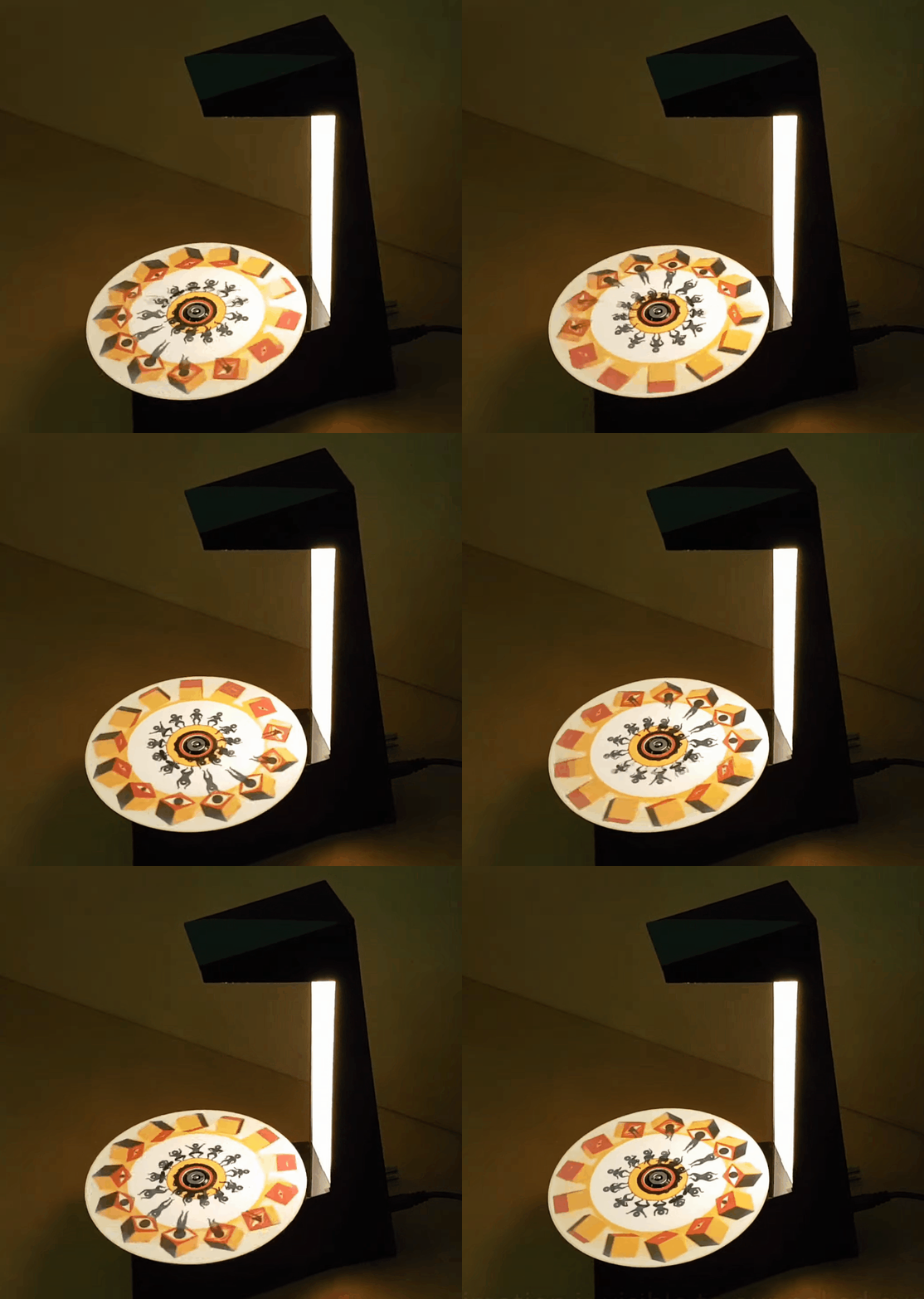
Just as we are driven today to watch gifs that get better with every loop, people 100+ years ago entertained themselves with various persistence of vision toys that used the power of optical illusions to make still images come to life. [jollifactory] recently recreated one of the first POV devices — the phenakistoscope — into a toy for our times.

The original phenakistoscopes were simple, but the effect they achieved was utterly amazing. Essentially a picture disk with a handle, the user would hold the handle with one hand and spin the disk with the other while looking in a mirror through slits in the disk. Unlike the phenakistoscopes of yore that could only be viewed by one person at a time, this one allows for group watching.

Here’s how it works: an Arduino Nano spins a BLDC motor from an old CD-ROM drive, and two strips of strobing LEDs provide the shutter effect needed to make the pictures look like a moving image.The motor speed is both variable and reversible so the animations can run in both directions.

To make the disks themselves, [jollifactory] printed some original phenakistiscopic artwork and adhered each one to a CD that conveniently snaps onto the motor spindle. Not all of the artwork looks good with a big hole in the middle, so [jollifactory] created a reusable base disk with an anti-slip mat on top to spin those.

If you just want to watch the thing in action, check out the first video below that is all demonstration. There be strobing lights ahead, so consider yourself warned. The second and third videos show [jollifactory] soldering up the custom PCB and building the acrylic stand.

There are plenty of modern ways to build old-fashioned POV toys, from all-digital to all-printable.

source https://hackaday.com/2021/02/24/motor-driven-movement-modernizes-pov-toy/

Real-Time OS Basics: Picking The Right RTOS When You Need One

When do you need to use a real-time operating system (RTOS) for an embedded project? What does it bring to the table, and what are the costs? Fortunately there are strict technical definitions, which can also help one figure out whether an RTOS is the right choice for a project.

The “real-time” part of the name namely covers the basic premise of an RTOS: the guarantee that certain types of operations will complete within a predefined, deterministic time span. Within “real time” we find distinct categories: hard, firm, and soft real-time, with increasingly less severe penalties for missing the deadline. As an example of a hard real-time scenario, imagine a system where the embedded controller has to respond to incoming sensor data within a specific timespan. If the consequence of missing such a deadline will break downstream components of the system, figuratively or literally, the deadline is hard.

In comparison soft real-time would be the kind of operation where it would be great if the controller responded within this timespan, but if it takes a bit longer, it would be totally fine, too. Some operating systems are capable of hard real-time, whereas others are not. This is mostly a factor of their fundamental design, especially the scheduler.

In this article we’ll take a look at a variety of operating systems, to see where they fit into these definitions, and when you’d want to use them in a project.

A Matter of Scale

Different embedded OSes address different types of systems, and have different feature sets. The most minimalistic of popular RTOSes is probably FreeRTOS, which provides a scheduler and with it multi-threading primitives including threads, mutexes, semaphores, and thread-safe heap allocation methods. Depending on the project’s needs, you can pick from a number of dynamic allocation methods, as well as only allow static allocation.

On the other end of the scale we find RTOSes such as VxWorks, QNX and Linux with real-time scheduler patches applied. These are generally POSIX-certified or compatible operating systems, which offer the convenience of developing for a platform that’s highly compatible with regular desktop platforms, while offering some degree of real-time performance guarantee, courtesy of their scheduling model.

Again, an RTOS is only and RTOS if the scheduler comes with a guarantee for a certain level of determinism when switching tasks.

Real-Time: Defining ‘Immediately’

Even outside the realm of operating systems, real-time performance of processors can differ significantly. This becomes especially apparent when looking at microcontrollers and the number of cycles required for an interrupt to be processed. For the popular Cortex-M MCUs, for example, the interrupt latency is given as ranging from 12 cycles (M3, M4, M7) to 23+ (M1), best case. Divide by the processor speed, and you’ve got a quarter microsecond or so.

In comparison, when we look at Microchip’s 8051 range of MCUs, we can see in the ‘Atmel 8051 Microcontrollers Hardware Manual’ in section 2.16.3 (‘Response Time’) that depending on the interrupt-configuration, the interrupt latency can be anywhere from 3 to 8 cycles. On x86 platforms the story is more complicated again, due to the somewhat convoluted nature of x86 IRQs. Again, some fraction of a microsecond.

This latency places an absolute bound on the best real-time performance that an RTOS can accomplish, though due to the overhead from running a scheduler, an RTOS doesn’t come close to this bound. This is why, for absolute best-of-class real-time performance, a deterministic single polling loop approach with fast interrupt handler routines for incoming events is by far the most deterministic.

If the interrupt, or other context switch, costs cycles, running the underlying processor faster can also obviously reduce latency, but comes with other trade-offs, not the least of which is the higher power usage and increased cooling requirements.

Adding Some Cool Threads

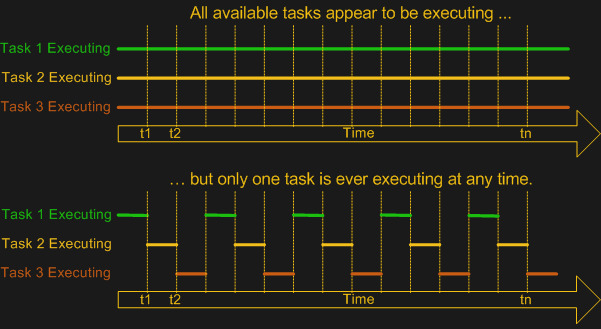
As FreeRTOS demonstrates, the primary point of adding an OS is to add multi-tasking (and multi-threading) support. This means a scheduler module that can use some kind of scheduling mechanism to chop the processor time into ‘slices’ in which different tasks, or threads can be active. While the easiest multi-tasking scheduler is a cooperative-style one, where each thread voluntarily yields to let other threads do their thing, this has the distinct  disadvantage of each thread having the power to ruin everything for other threads.

Most real-time OSes instead use a preemptive scheduler. This means that application threads have no control over when they get to run or for how long. Instead, an interrupt routine triggers the scheduler to choose the next thread for execution, taking care to differentiate between which tasks are preemptable and which are not. So-called kernel routines for example might be marked as non-preemptable, as interrupting them may cause system instability or corruption.

Although both Windows and Linux, in their usual configuration, use a preemptive scheduler, these schedulers are not considered suitable for real-time performance, as they are tuned to prioritize for foreground tasks. User-facing tasks, such as a graphical user interface, will keep operating smoothly even if background tasks may face a shortage of CPU cycles. This is what makes some real-time tasks on desktop OSes such a chore, requiring various workarounds.

A good demonstration of the difference with a real-time focused preemptive scheduler can be found in the x86 version of the QNX RTOS. While this runs fine on an x86 desktop system, the GUI will begin to hang and get sluggish when background tasks are performed, as the scheduler will not give the foreground tasks (the GUI) special treatment. The goal of the Linux kernel’s real-time patch also changes the default behavior of the scheduler to put the handling of interrupts first and foremost, while otherwise not distinguishing between individual tasks unless configured to do so by explicitly setting thread priorities.

RTOS or Not, That’s the Question

At this point it should be clear what is meant by “real-time” and you may have some idea of whether a project would benefit from an RTOS, a plain OS, or an interrupt-driven ‘superloop” approach. There’s no one-size-fits-all answer here, but in general one seeks to strike a balance between the real-time performance required and the available time and budget. Or in the case of a hobby project in far how one can be bothered to optimize it.

The first thing to consider is whether there are any hard deadlines in the project. Imagine you have a few sensors attached to a board that need to be polled exactly at the same intervals and the result written to an SD card. If any kind of jitter in between readings of more than a few dozen cycles would render the results useless, you have a hard real-time requirement of that many cycles.

We know that the underlying hardware (MCU, SoC, etc.) has either a fixed or worst-case interrupt latency. This determines the best-case scenario. In the case of an interrupt-driven single loop approach, we can likely easily meet these requirements, as we can sum up the worst-case interrupt latency, the cycle cost of our interrupt routine (ISR) and the worst-case time it would take to process and write the data to the SD card. This would be highly deterministic.

In the case of our sensors-and-SD-card example, the RTOS version would likely add overhead compared to the single loop version, on account of the overhead from its scheduler. But then imagine that writing to the SD card took a lot of time, and that you wanted to handle infrequent user input as well.

With an RTOS, because the samples need to be taken as close together as possible, you’d want to make this task non-preemptable, and give it a hard scheduling deadline.  The tasks of writing to the SD card and any user input, with a lower priority. If the user has typed a lot, the RTOS might swap back to handling the data collection in the middle of processing strings, for instance, to make a timing deadline. You, the programmer, don’t have to worry about it.

In short: an RTOS offers deterministic scheduling, while an interrupt-driven single loop eliminates the need for scheduling altogether, aside from making sure that your superloop turns around frequently enough.

Creature Comforts

When one pulls away the curtain, it’s obvious that to the processor hardware, concepts like ‘threads’ and thread-synchronization mechanisms such as mutexes and semaphores are merely software concepts that are implemented using hardware features. Deep inside we all know that a single-core MCU isn’t really running all tasks simultaneously when a scheduler performs its multi-tasking duty.

Yet an RTOS – even a minimalistic one like FreeRTOS – allows us to use those software concepts on a platform when we simultaneously need to stay as close to the hardware as possible for performance reasons. Here we strike the balance between performance and convenience, with FreeRTOS leaving us to our own devices when it comes to interacting with the rest of the system. Other RTOSes, like NuttX, QNX and VxWorks offer a full-blown POSIX-compatible environment that supports at least a subset of standard Linux code.

While it’s easy to think of FreeRTOS for example as an RTOS that one would stuff on an MCU, it runs just as well on large SoCs. Similarly, ChibiOS/RT happily runs on anything from an 8-bit AVR MCU to a beefy x86 system. Key here is finding the right balance between the project requirements and what one could call creature comforts that make developing for the target system easier.

For RTOSes that also add a hardware abstraction layer (e.g. ChibiOS, QNX, RT Linux, etc.), the HAL part makes porting between different target systems easier, which can also be considered an argument in its favor. In the end, however, whether to go single loop, simple RTOS, complicated RTOS or ‘just an OS’ is a decision that’s ultimately dependent on the context of the project.

source https://hackaday.com/2021/02/24/real-time-os-basics-picking-the-right-rtos-when-you-need-one/

Real-Time OS Basics: Picking The Right RTOS When You Need One

When do you need to use a real-time operating system (RTOS) for an embedded project? What does it bring to the table, and what are the costs? Fortunately there are strict technical definitions, which can also help one figure out whether an RTOS is the right choice for a project.

The “real-time” part of the name namely covers the basic premise of an RTOS: the guarantee that certain types of operations will complete within a predefined, deterministic time span. Within “real time” we find distinct categories: hard, firm, and soft real-time, with increasingly less severe penalties for missing the deadline. As an example of a hard real-time scenario, imagine a system where the embedded controller has to respond to incoming sensor data within a specific timespan. If the consequence of missing such a deadline will break downstream components of the system, figuratively or literally, the deadline is hard.

In comparison soft real-time would be the kind of operation where it would be great if the controller responded within this timespan, but if it takes a bit longer, it would be totally fine, too. Some operating systems are capable of hard real-time, whereas others are not. This is mostly a factor of their fundamental design, especially the scheduler.

In this article we’ll take a look at a variety of operating systems, to see where they fit into these definitions, and when you’d want to use them in a project.

A Matter of Scale

Different embedded OSes address different types of systems, and have different feature sets. The most minimalistic of popular RTOSes is probably FreeRTOS, which provides a scheduler and with it multi-threading primitives including threads, mutexes, semaphores, and thread-safe heap allocation methods. Depending on the project’s needs, you can pick from a number of dynamic allocation methods, as well as only allow static allocation.

On the other end of the scale we find RTOSes such as VxWorks, QNX and Linux with real-time scheduler patches applied. These are generally POSIX-certified or compatible operating systems, which offer the convenience of developing for a platform that’s highly compatible with regular desktop platforms, while offering some degree of real-time performance guarantee, courtesy of their scheduling model.

Again, an RTOS is only and RTOS if the scheduler comes with a guarantee for a certain level of determinism when switching tasks.

Real-Time: Defining ‘Immediately’

Even outside the realm of operating systems, real-time performance of processors can differ significantly. This becomes especially apparent when looking at microcontrollers and the number of cycles required for an interrupt to be processed. For the popular Cortex-M MCUs, for example, the interrupt latency is given as ranging from 12 cycles (M3, M4, M7) to 23+ (M1), best case. Divide by the processor speed, and you’ve got a quarter microsecond or so.

In comparison, when we look at Microchip’s 8051 range of MCUs, we can see in the ‘Atmel 8051 Microcontrollers Hardware Manual’ in section 2.16.3 (‘Response Time’) that depending on the interrupt-configuration, the interrupt latency can be anywhere from 3 to 8 cycles. On x86 platforms the story is more complicated again, due to the somewhat convoluted nature of x86 IRQs. Again, some fraction of a microsecond.

This latency places an absolute bound on the best real-time performance that an RTOS can accomplish, though due to the overhead from running a scheduler, an RTOS doesn’t come close to this bound. This is why, for absolute best-of-class real-time performance, a deterministic single polling loop approach with fast interrupt handler routines for incoming events is by far the most deterministic.

If the interrupt, or other context switch, costs cycles, running the underlying processor faster can also obviously reduce latency, but comes with other trade-offs, not the least of which is the higher power usage and increased cooling requirements.

Adding Some Cool Threads

As FreeRTOS demonstrates, the primary point of adding an OS is to add multi-tasking (and multi-threading) support. This means a scheduler module that can use some kind of scheduling mechanism to chop the processor time into ‘slices’ in which different tasks, or threads can be active. While the easiest multi-tasking scheduler is a cooperative-style one, where each thread voluntarily yields to let other threads do their thing, this has the distinct  disadvantage of each thread having the power to ruin everything for other threads.

Most real-time OSes instead use a preemptive scheduler. This means that application threads have no control over when they get to run or for how long. Instead, an interrupt routine triggers the scheduler to choose the next thread for execution, taking care to differentiate between which tasks are preemptable and which are not. So-called kernel routines for example might be marked as non-preemptable, as interrupting them may cause system instability or corruption.

Although both Windows and Linux, in their usual configuration, use a preemptive scheduler, these schedulers are not considered suitable for real-time performance, as they are tuned to prioritize for foreground tasks. User-facing tasks, such as a graphical user interface, will keep operating smoothly even if background tasks may face a shortage of CPU cycles. This is what makes some real-time tasks on desktop OSes such a chore, requiring various workarounds.

A good demonstration of the difference with a real-time focused preemptive scheduler can be found in the x86 version of the QNX RTOS. While this runs fine on an x86 desktop system, the GUI will begin to hang and get sluggish when background tasks are performed, as the scheduler will not give the foreground tasks (the GUI) special treatment. The goal of the Linux kernel’s real-time patch also changes the default behavior of the scheduler to put the handling of interrupts first and foremost, while otherwise not distinguishing between individual tasks unless configured to do so by explicitly setting thread priorities.

RTOS or Not, That’s the Question

At this point it should be clear what is meant by “real-time” and you may have some idea of whether a project would benefit from an RTOS, a plain OS, or an interrupt-driven ‘superloop” approach. There’s no one-size-fits-all answer here, but in general one seeks to strike a balance between the real-time performance required and the available time and budget. Or in the case of a hobby project in far how one can be bothered to optimize it.

The first thing to consider is whether there are any hard deadlines in the project. Imagine you have a few sensors attached to a board that need to be polled exactly at the same intervals and the result written to an SD card. If any kind of jitter in between readings of more than a few dozen cycles would render the results useless, you have a hard real-time requirement of that many cycles.

We know that the underlying hardware (MCU, SoC, etc.) has either a fixed or worst-case interrupt latency. This determines the best-case scenario. In the case of an interrupt-driven single loop approach, we can likely easily meet these requirements, as we can sum up the worst-case interrupt latency, the cycle cost of our interrupt routine (ISR) and the worst-case time it would take to process and write the data to the SD card. This would be highly deterministic.

In the case of our sensors-and-SD-card example, the RTOS version would likely add overhead compared to the single loop version, on account of the overhead from its scheduler. But then imagine that writing to the SD card took a lot of time, and that you wanted to handle infrequent user input as well.

With an RTOS, because the samples need to be taken as close together as possible, you’d want to make this task non-preemptable, and give it a hard scheduling deadline.  The tasks of writing to the SD card and any user input, with a lower priority. If the user has typed a lot, the RTOS might swap back to handling the data collection in the middle of processing strings, for instance, to make a timing deadline. You, the programmer, don’t have to worry about it.

In short: an RTOS offers deterministic scheduling, while an interrupt-driven single loop eliminates the need for scheduling altogether, aside from making sure that your superloop turns around frequently enough.

Creature Comforts

When one pulls away the curtain, it’s obvious that to the processor hardware, concepts like ‘threads’ and thread-synchronization mechanisms such as mutexes and semaphores are merely software concepts that are implemented using hardware features. Deep inside we all know that a single-core MCU isn’t really running all tasks simultaneously when a scheduler performs its multi-tasking duty.

Yet an RTOS – even a minimalistic one like FreeRTOS – allows us to use those software concepts on a platform when we simultaneously need to stay as close to the hardware as possible for performance reasons. Here we strike the balance between performance and convenience, with FreeRTOS leaving us to our own devices when it comes to interacting with the rest of the system. Other RTOSes, like NuttX, QNX and VxWorks offer a full-blown POSIX-compatible environment that supports at least a subset of standard Linux code.

While it’s easy to think of FreeRTOS for example as an RTOS that one would stuff on an MCU, it runs just as well on large SoCs. Similarly, ChibiOS/RT happily runs on anything from an 8-bit AVR MCU to a beefy x86 system. Key here is finding the right balance between the project requirements and what one could call creature comforts that make developing for the target system easier.

For RTOSes that also add a hardware abstraction layer (e.g. ChibiOS, QNX, RT Linux, etc.), the HAL part makes porting between different target systems easier, which can also be considered an argument in its favor. In the end, however, whether to go single loop, simple RTOS, complicated RTOS or ‘just an OS’ is a decision that’s ultimately dependent on the context of the project.

source https://hackaday.com/2021/02/24/real-time-os-basics-picking-the-right-rtos-when-you-need-one/

Deleting The Camshafts From A Miata Engine

The idea of camless automotive engines has been around for a while but so far has been limited to prototypes and hypercars. [Wesley Kagan] has been working on a DIY version for a while, and successfully converted a Mazda Miata to a camless valve system. See the videos after the break.

There have been many R&D projects by car manufacturers to eliminate camshafts in order to achieve independent valve timing, but the technology has only seen commercial use on Koenigsegg hypercars. [Wesley] started this adventure on a cheap single cylinder Harbor Freight engine, and proved the basic concept, so he decided to move up to an actual car. He first sourced a junkyard engine head to convert, and use as a drop-in replacement for the head on the complete project car. An off-the-shelf double-acting pneumatic cylinder is mounted over each valve and connected to the valve stem with a custom adaptor. The double-acting cylinder allows the valve to be both opened and closed with air pressure, but [Wesley] still added the light-weight return spring to keep the valve closed if there is any problem with the pneumatic system.

The controller is an Arduino, and it receives a timing signal from a factory crankshaft and operates the pneumatic solenoid valves via MOSFETs. After mounting the new head and control box into the Miata, it took a couple of days of tuning to get the engine running smoothly. Initial tests were done using the compressor in his garage, but this was replaced with a small compressor and air tank mounted in the Miata’s boot for the driving tests.

Although the pneumatic system works well for short test drives, the compressor is quite noisy and adds a couple of points of failure. [Wesley] is also working on a solenoid actuated system, which would require a lot more current from the battery and alternator, but he believes it’s a better long-term solution compared to compressed air. However, he is still struggling to find solenoids with the required specifications.

[Wesley] will be open-sourcing all his designs and code, with the hope that others will be able to modify and improve the design. The results could be very interesting, so we’re hoping a community develops around these camless conversions.

source https://hackaday.com/2021/02/24/deleting-the-camshafts-from-a-miata-engine/

Increasing the Resolution of the Electrical Grid

As a society in the USA and other parts of the world, we don’t give much thought to the twisting vines of civilization that entangle our skies and snake beneath our streets. The humming electrical lines on long poles that string our nations together are simply just there. Ever-present and immutable. We expect to flick the switch and power to come on. We only notice the electrical grid when something goes wrong and there is a seemingly myriad number of ways for things to go wrong. Lighting strikes, trees falling on lines, fires, or even too many people trying to crank on the A/C can all cause rolling blackouts. Or as we found out this month, cold weather can take down generation systems that have not been weatherized.

We often hear the electrical grid described as aging and strained. As we look to the future and at the ever-growing pressure on the infrastructure we take for granted, what does the future of the electrical grid look like? Can we move past blackouts and high voltage lines that criss-cross the country?

Our Current Grid

The power we use in our homes is generated by a complex and dynamic mechanism of peaker plants, distribution nodes, and high voltage lines. We’ve written a guide on how power gets to the outlets in your home as well as a guide trying to demystify the grid as a whole. But a quick recap never hurt anyone.

In our current grid, power starts from some sort of generation source. Usually, this is a large facility such as wind turbine time, a nuclear power plant, or a hydroelectric dam. The power output of the grid must match the load, so it is carefully monitored and controlled. At any one given time, different power sources will be connected to handle the demand, or in the case of Texas over the past week, parts of the grid are shut off so that demand falls to match a reduced capacity.

Some power plants are good at spinning up quickly to meet demand (known as peaker plants) while others are able to produce a steady stream of power. However, some power sources such a wind can’t be “started” if the wind simply isn’t blowing. This is something that large-scale storage efforts like the Hornsdale Power Reserve are seeking to address as they can store power to be used when needed, but grid-scale storage remains a rarity.

Power plants benefit from economies of scale and generate huge amounts of power in a localized area. The tricky part then is getting power to everyone who needs it. Transformers boost 10,000’s volts from the generators to 100,000’s of volts for long-distance transmission. Residential substations step back down to tens of thousands of volts and local transformers take this down to the standard 120/240 volts at a socket.

As cities have rapidly grown, they’ve patched and augmented the grid, with demand and population ballooning faster than construction or budgets allowed. Systems wear out and systems never designed to service that sort of load get expanded upon. It’s a difficult job and the wonderful humans that run and build our grid are working with limited resources.

“Smart” Grids

The future of electrical infrastructure is often declared to be smart grids, without much thought on what the phrase actually means. We’ve talked about how smart the grid really is before on Hackaday. Smart meters are already starting to be rolled out in certain areas, allowing for smarter load shedding and more accurate data. Grid-scale batteries and other storage systems are being installed to help smooth loads and reduce reliance on peaker plants. The industry currently doesn’t have any sort of standard to rally behind so most providers are just experimenting by adding to their existing infrastructure, much as we’ve always done. Adding a solar station here, a local large-scale battery there, and struggling to maintain the millions of miles of electrical lines.

Decentralization

As mentioned before, large-scale power plants have made sense by congregating all the power generation into one place, making it cost-effective to produce, manage, and distribute. However, over the last few decades, we’ve seen a relentless push down in cost due to technological advances and manufacturing scale. The price of solar and wind have plunged ever lower as efficiency has slowly crept up. Solar alone has dropped 70% in price over the last decade.

In fact, the International Renewable Energy Agency (IRENA) released a dataset in June 2020, suggesting that new solar and wind projects are undercutting the cheapest of existing coal-fired plants. The Energy Information Administration (EIA) in the US released a projected LCOE (levelized cost of energy, the price at which the produced electricity must be sold to break even) for 2025 for different power sources. In that data, solar, wind, and geothermal were the best performing in terms of dollars to megawatt-hours.

The EIA also noted that in the future, the share of power generated residentially will continue to grow. Already one-third of solar energy produced is from residential rooftops. So in a world of mini-powerplants scattered across rooftops, what does our grid look like? The Office of Energy Efficiency and Renewable Energy within the Department of Energy (DOE) suggests that a new model might be the way forward. Distributed Energy Resources (DER) and microgrids can come together to form something new. Microgrids can be thought of as a way to further increase the grid size by creating smaller resilient grids within the larger macro grid.

Imagine your neighborhood as a microgrid. Right now, if there was a blackout everyone’s power would be out except for those with a backup generator, solar panels, or some other power solution. With a microgrid, your neighborhood can reconfigure itself and so that any generators or battery packs can power the neighborhood. Even when the macro grid is up and running, your microgrid can lend its power to help smooth power peaks. There’s even the potential of microgrids working together.

The idea seeks to shed the days of massive rolling blackouts when communities can be self-sufficient. By distributing the sources of power across an area rather than congregating them in small clusters, the number of long-distance high-voltage lines could potentially be reduced. Long-distance lines are estimated to cost around $1000 per mega-watt kilometer, so reducing the distance between generation and utilization would lead to significant cost savings for consumers and producers.

Of course, this interconnectivity and two-way coupling between the macro grid and the microgrids creates thousands of new states and edge cases. To help manage a system like this, IEEE has a working proposal for a control scheme for microgrids. While it does take more control out of the hands of large-scale electrical companies and more into the network itself, it provides important features such as prediction and coordination.

Storage

Storage and the intermittent nature are the persistent thorns in the sides of solar and wind power. The sun only shines for part of the day and the wind doesn’t always blow. Traditionally, we simply fire up a peaker plant to match the load as needed. With intermittent power, it needs to be stored and load-shedding algorithms and plans need to be in place.

Despite the up-front costs, storing power offers some unique advantages. Battery banks such as the Hornsdale Power Reserve are quite profitable since they can spin up faster than any gas-powered generator (generally around ten minutes for the gas and nearly instantly for the battery). This allows them to command a premium on the Frequency Control Auxiliary Services (FCAS) market compared to traditional peaker plants.

In addition, power storage can help with “black start” processes, which is the initial kick of power required to start up baseline power plants after an extended blackout. Currently, this is a carefully controlled process of gradually starting larger generators while matching load. Providers have been experimenting with adding storage systems to local areas. While scaling to megawatt scales still presents a challenge, there have been experiments with compressed air, gravity storage, flow batteries, hydro-pumped reservoirs, and dozens of other ideas. Some even suggest using excess power on sunny or windy days to synthesize hydrogen or natural gas, which can be used as storage.

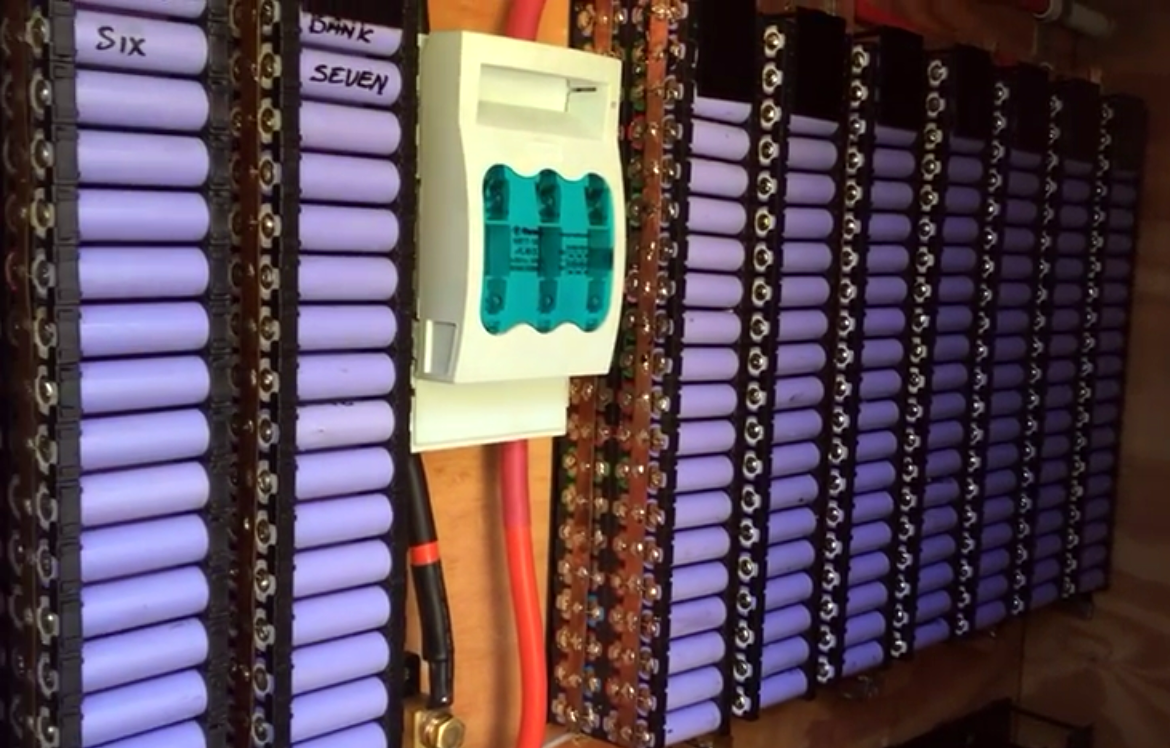
DIY 20 kWh power wall built from 18650 cells by [HBPOwerwall]

So far the trend for microgrids is positive. Every year, a great percentage of solar installs include storage systems instead of just pure solar. By and large, the most common storage solution for residential has been batteries. We’ve written up about adding batteries in a modular way to your home. New battery technologies are on the horizon but for now, most other methods of storing power just don’t make sense in a residential setting. A fun challenge to do with fellow engineers or co-workers is to try and design a power storage system that can be built into a house that doesn’t use batteries while still storing enough power for most of a day (10kWh for example).

As more and more homes and local areas have redundant storage, the microgrid becomes more self-sufficient and capable of withstanding peaks or troughs.

What’s Next

For now, the DoE has determined microgrids are a key part of infrastructure in the common decades. Research programs are ongoing across Europe, Japan, Korea, and Canada. In fact, the Office of Electricity keeps a page of the current microgrid projects here in the USA. While there is still quite a bit to flesh out and standardize, the future does look brighter. We can expect more reliable power with fewer blackouts. Despite all the investments and shifts in grid planning that will come over the next decades, not much will change for the average consumer (which is a good thing). The lights will come on, the fridge will stay cold, and the A/C will blow. Which is perhaps the greatest testament to the incredible system we’ve all built and all rely on.

source https://hackaday.com/2021/02/24/increasing-the-resolution-of-the-electrical-grid/

30 FPS Flip-Dot Display Uses Cool Capacitor Trick

Most people find two problems when it comes to flip-dot displays: where to buy them and how to drive them. If you’re [Pierre Muth] you level up and add the challenge of driving them fast enough to rival non-mechanical displays like LCDs. It was a success, resulting in a novel and fast way of controlling flip-dot displays.

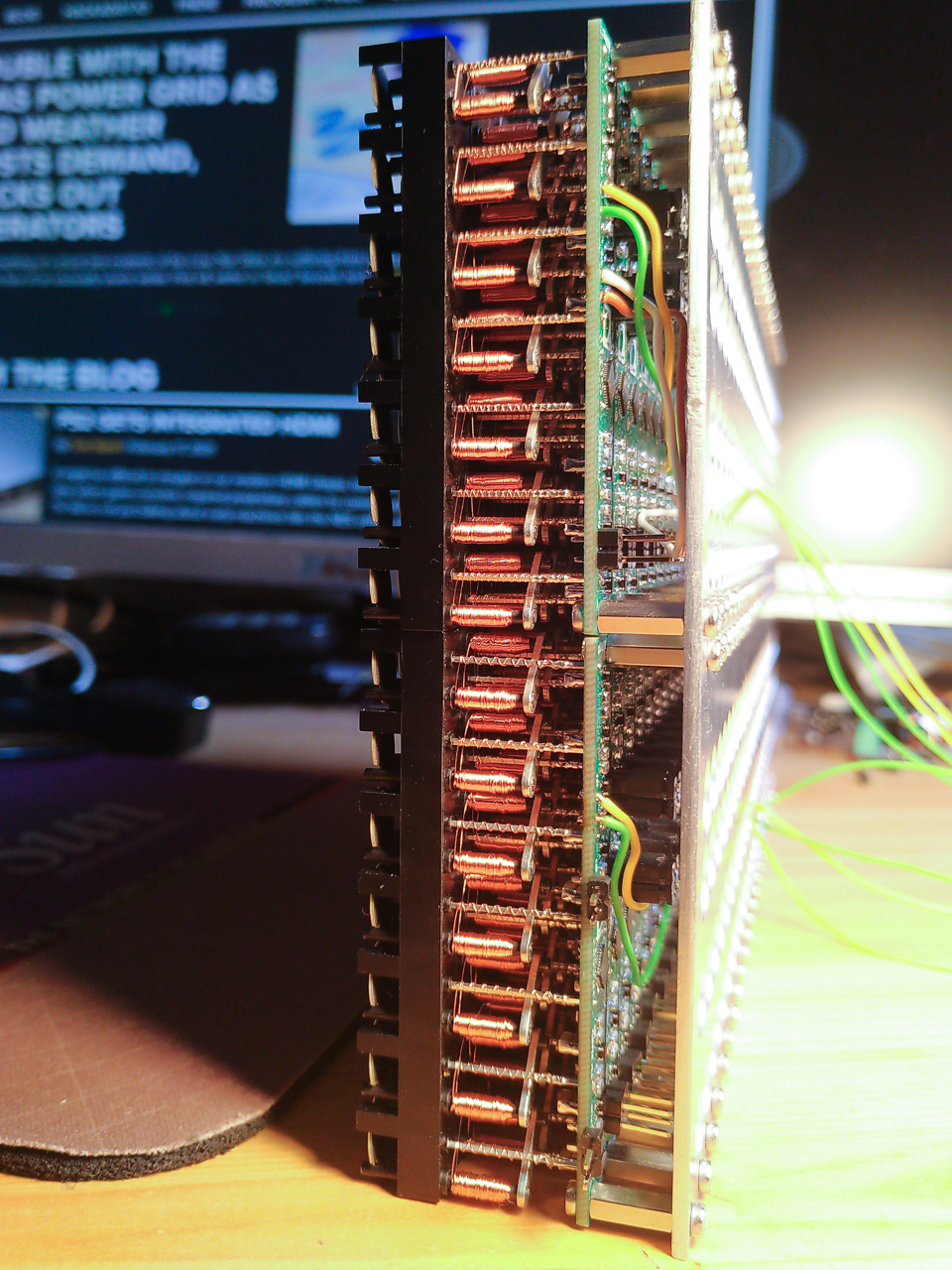
Gorgeous stackup of the completed display. [Pierre] says soldering the 2500 components kept him sane during lockdown.

If you’re lucky, you can get a used flip-dot panel decommissioned from an old bus destination panel, or perhaps the arrivals/departures board at a train station. But it is possible to buy brand new 1×7 pixel strips which is what [Pierre] has done. These come without any kind of driving hardware; just the magnetized dots with coils that can be energized to change the state.

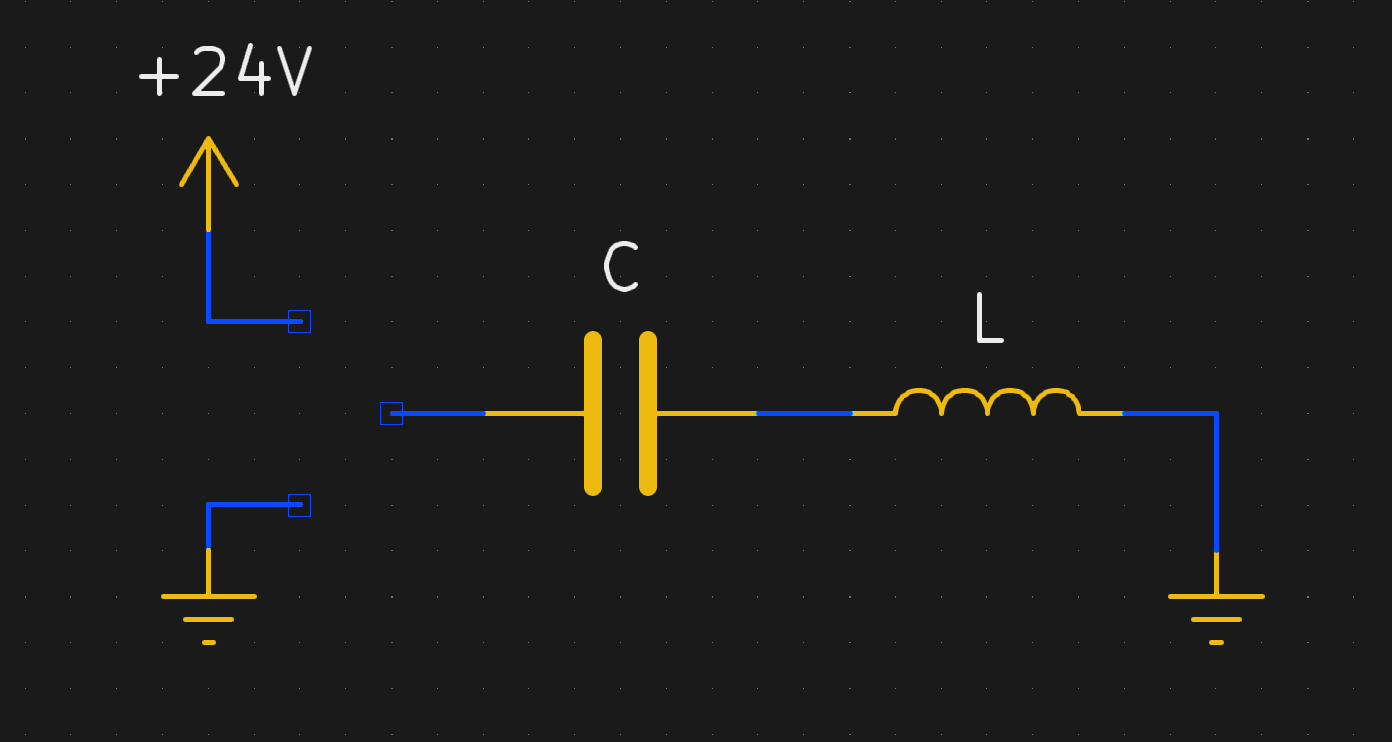
The problem comes in needing to reverse the polarity of the coil to achieve both set and unset states. Here [Pierre] has a very interesting idea: instead of working out a way to change the connections of the coils between source and sink, he’s using a capacitor on one side that can be driven high or low to flip the dot.

Using this technique, charging the capacitor will give enough kick to flip the dot on the display. The same will happen when discharged (flipping the dot back), with the added benefit of not using additional power since the capacitor is already charged from setting the pixel. A circuit board was designed with CMOS to control each capacitor. A PCB is mounted to the back of a 7-pixel strip, creating modules that are formed into a larger display using SPI to cascade data from one to the next. The result, as you can see after the break, does a fantastic job of playing Bad Apple on the 24×14 matrix. If you have visions of one of these on your own desk, the design files and source code are available. Buying the pixels for a display this size is surprisingly affordable at about 100 €.

We’re a bit jealous of all the fun displays [Pierre] has been working on. He previously built a 384 neon bulb display that he was showing off last Autumn.

source https://hackaday.com/2021/02/24/30-fps-flip-dot-display-uses-cool-capacitor-trick/

30 FPS Flip-Dot Display Uses Cool Capacitor Trick

Most people find two problems when it comes to flip-dot displays: where to buy them and how to drive them. If you’re [Pierre Muth] you level up and add the challenge of driving them fast enough to rival non-mechanical displays like LCDs. It was a success, resulting in a novel and fast way of controlling flip-dot displays.

Gorgeous stackup of the completed display. [Pierre] says soldering the 2500 components kept him sane during lockdown.

If you’re lucky, you can get a used flip-dot panel decommissioned from an old bus destination panel, or perhaps the arrivals/departures board at a train station. But it is possible to buy brand new 1×7 pixel strips which is what [Pierre] has done. These come without any kind of driving hardware; just the magnetized dots with coils that can be energized to change the state.

The problem comes in needing to reverse the polarity of the coil to achieve both set and unset states. Here [Pierre] has a very interesting idea: instead of working out a way to change the connections of the coils between source and sink, he’s using a capacitor on one side that can be driven high or low to flip the dot.

Using this technique, charging the capacitor will give enough kick to flip the dot on the display. The same will happen when discharged (flipping the dot back), with the added benefit of not using additional power since the capacitor is already charged from setting the pixel. A circuit board was designed with CMOS to control each capacitor. A PCB is mounted to the back of a 7-pixel strip, creating modules that are formed into a larger display using SPI to cascade data from one to the next. The result, as you can see after the break, does a fantastic job of playing Bad Apple on the 24×14 matrix. If you have visions of one of these on your own desk, the design files and source code are available. Buying the pixels for a display this size is surprisingly affordable at about 100 €.

We’re a bit jealous of all the fun displays [Pierre] has been working on. He previously built a 384 neon bulb display that he was showing off last Autumn.

source https://hackaday.com/2021/02/24/30-fps-flip-dot-display-uses-cool-capacitor-trick/

30 FPS Flip-Dot Display Uses Cool Capacitor Trick

Most people find two problems when it comes to flip-dot displays: where to buy them and how to drive them. If you’re [Pierre Muth] you level up and add the challenge of driving them fast enough to rival non-mechanical displays like LCDs. It was a success, resulting in a novel and fast way of controlling flip-dot displays.

Gorgeous stackup of the completed display. [Pierre] says soldering the 2500 components kept him sane during lockdown.

If you’re lucky, you can get a used flip-dot panel decommissioned from an old bus destination panel, or perhaps the arrivals/departures board at a train station. But it is possible to buy brand new 1×7 pixel strips which is what [Pierre] has done. These come without any kind of driving hardware; just the magnetized dots with coils that can be energized to change the state.

The problem comes in needing to reverse the polarity of the coil to achieve both set and unset states. Here [Pierre] has a very interesting idea: instead of working out a way to change the connections of the coils between source and sink, he’s using a capacitor on one side that can be driven high or low to flip the dot.

Using this technique, charging the capacitor will give enough kick to flip the dot on the display. The same will happen when discharged (flipping the dot back), with the added benefit of not using additional power since the capacitor is already charged from setting the pixel. A circuit board was designed with CMOS to control each capacitor. A PCB is mounted to the back of a 7-pixel strip, creating modules that are formed into a larger display using SPI to cascade data from one to the next. The result, as you can see after the break, does a fantastic job of playing Bad Apple on the 24×14 matrix. If you have visions of one of these on your own desk, the design files and source code are available. Buying the pixels for a display this size is surprisingly affordable at about 100 €.

We’re a bit jealous of all the fun displays [Pierre] has been working on. He previously built a 384 neon bulb display that he was showing off last Autumn.

source https://hackaday.com/2021/02/24/30-fps-flip-dot-display-uses-cool-capacitor-trick/

Audio Out Over A UART With An FTDI USB-To-TRS Cable

What is the easiest way to get audio from a WAV file into a line-level format, ready to be plugged into the amplifier of a HiFi audio set (or portable speaker)? As [Konrad Beckmann] demonstrated on Twitter, all you really need is a UART, a cable and a TRS phono plug. In this case a USB-TTL adapter based around the FTDI FT232R IC: the TTL-232R-3V3-AJ adapter with 12 Mbps USB on one end, and a 3 Mbps UART on the other end.

[Konrad] has made the C-based code available on GitHub. Essentially what happens underneath the hood is that it takes in a PCM-encoded file (e.g. WAV). As a demonstration project, it requires the input PCM files to be a specific sample rate, as listed in the README, which matches the samples to the baud rate of the UART. After this it’s a matter of encoding the audio file, and compiling the uart-sound binary.

The output file is the raw audio data, which is encoded in PDM, or Pulse-Density Modulation. Unlike Pulse-Code Modulation (PCM), this encoding method does not encode the absolute sample value, but uses binary pulses, the density of which corresponds to the signal level. By sending PDM data down the UART’s TX line, the other side will receive these bits. If said receiving device happens to be an audio receiver with an ADC, it will happily receive and play back the PDM signal as audio. As one can hear in the video embedded in the tweet, the end result is pretty good.


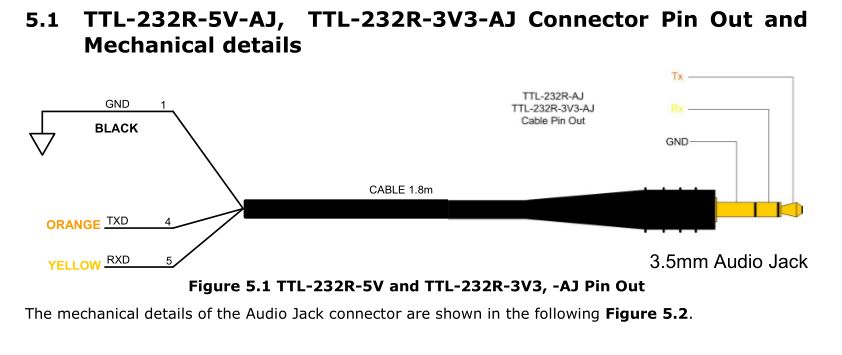
If we look at at the datasheet for the TTL-232R-3V3-AJ adapter cable, we can see how it is wired up:

When we compare this to the wiring of a standard audio TRS jack, we can see that the grounds match in both wirings, and TX (RX on the receiving device) would match up with the left channel, with the right channel unused. A note of caution here is also required: this is the 3.3V adapter version, and it lists its typical output high voltage as 2.8V, which is within tolerances for line-level inputs. Not all inputs will be equally tolerant of higher voltages, however.

Plugging random TRS-equipped devices into one’s HiFi set, phone or boombox is best done only after ascertaining that no damage is likely to result.  Be safe, and enjoy the music.

source https://hackaday.com/2021/02/24/audio-out-over-a-uart-with-an-ftdi-usb-to-trs-cable/

Retro Dreamcast Rhythm Game Controller Built From Scratch

Pop’n Music is a rhythm game which has had both arcade and home console releases over the years. [Charlie Cole] is a fan of the Dreamcast version, and decided to build his own controller for the game using the new hotness, the Raspberry Pi Pico.

The controller itself is built out of layers of lasercut MDF, along with an acrylic top and cork bottom to make it sit nicely on surfaces. Arcade buttons are installed to play the rhythm game, mimicking the design of the official cabinets seen in arcades. To run the controller, a Pico was pressed into service, with [Charlie] hoping to use the Pico’s PIO hardware to easily and effectively interface with the Dreamcast’s Maple bus. There were a few headaches along the way, and it didn’t quite live up to expectations, but with some clever use of dual cores, [Charlie] was able to get everything up and running.

Often, such vintage gaming hardware can be thin on the ground, so having the skills to build your own can come in handy. We’ve seen rhythm game hardware modded before too, like this repurposed DJ Hero controller. Video after the break.

source https://hackaday.com/2021/02/23/retro-dreamcast-rhythm-game-controller-built-from-scratch/

Capstan Winch Central to This All-Band Adjustable Dipole Antenna

The perfect antenna is the holy grail of amateur radio. But antenna tuning is a game of inches, and since the optimum length of an antenna depends on the frequency it’s used on, the mere act of spinning the dial means that every antenna design is a compromise. Or perhaps not, if you build this infinitely adjustable capstan-winch dipole antenna.

Dipoles are generally built to resonate around the center frequency of one band, and with allocations ranging almost from “DC to daylight”, hams often end up with a forest of dipoles. [AD0MZ]’s adjustable dipole solves that problem, making the antenna usable from the 80-meter band down to 10 meters. To accomplish this feat it uses something familiar to any sailor: a capstan winch.

The feedpoint of the antenna contains a pair of 3D-printed drums, each wound with a loop of tinned 18-gauge antenna wire attached to some Dacron cord. These make up the adjustable-length elements of the antenna, which are strung through pulleys suspended in trees about 40 meters apart. Inside the feedpoint enclosure are brushes from an electric drill to connect the elements to a 1:1 balun and a stepper motor to run the winch. As the wire pays out of one spool, the Dacron cord is taken up by the other; the same thing happens on the other side of the antenna, resulting in a balanced configuration.

We think this is a really clever design that should make many a ham happy across the bands. We even see how this could be adapted to other antenna configurations, like the end-fed halfwave we recently featured in our “$50 Ham” series.

source https://hackaday.com/2021/02/23/capstan-winch-central-to-this-all-band-adjustable-dipole-antenna/

dodowDIY Is A Homebrew Sleep Aid

The Dodow is a consumer device that aims to help users sleep, through biofeedback. The idea is to synchronise one’s breathing with the gentle rhythm of the device’s blue LEDs, which helps slow the heartrate and enables the user to more easily drift off to sleep. Noting that the device is essentially a breathing LED and little more, [Daniel Shiffman] set about building his own from scratch.

An ATTiny85 runs the show; no high-powered microcontrollers are necessary here. It’s hooked up to three 5mm blue LEDs, which are slowly ramped up and down to create a smooth, attractive breathing animation. The LEDs are directed upward so that their glow can be seen on the ceiling, allowing the user to lay on their back when getting ready for sleep. It’s all wrapped up in a 3D printed enclosure that is easily modifiable to suit a variety of battery solutions; [Daniel] chose the DL123A for its convenient voltage and battery life in this case. The design is available on Thingiverse for those looking to spin their own.

It’s a neat example of where DIY can really shine – reproducing a somewhat-expensive gadget that is overpriced for its fundamental simplicity. Now when it comes to waking up again, consider building yourself a nifty smart alarm clock.

source https://hackaday.com/2021/02/23/dodowdiy-is-a-homebrew-sleep-aid/

Ben Krasnow Measures Human Calorie Consumption By Collecting The “Output”

It’s a bit icky reading between the lines on this one… but it’s a fascinating experiment! In his latest Applied Science video, [Ben Krasnow] tries to measure how efficient the human body is at getting energy from food by accurately measuring what he put in and what comes out of his body.

The jumping off point for this experiment is the calorie count on the back of food packaging. [Ben] touches on “bomb calorimetry” — the process of burning foodstuff in an oxygen-rich environment and measuring the heat given off to establish how much energy was present in the sample. But our bodies are flameless… can we really extract similar amounts of energy as these highly controlled combustion chambers? His solution is to measure his body’s intake by eating nothing but Soylent for a week, then subjects his body’s waste to the bomb calorimetry treatment to calculate how much energy was not absorbed during digestion. (He burned his poop for science, and made fun of some YouTubers at the same time.)

The test apparatus is a cool build — a chunk of pipe with an acrylic/glass laminated window that has a bicycle tire value for pressurization, a pressure gauge, and electrodes to spark the combustion using nichrome wire and cotton string. It’s shown above, burning a Goldfish® cracker but it’s not actually measuring the energy output as this is just a test run. The actual measurements call for the combustion chamber to be submerged in an insulated water bath so that the temperature change can be measured.

Now to the dirty bits. [Ben] collected fecal matter and freeze-dried it to ready it for the calorimeter. His preparation for the experiment included eating nothing but Soylent (a powdered foodstuff) to achieve an input baseline. The problem is that he measures the fecal matter to have about 75% of the calories per gram compared to the Soylent. Thinking on it, that’s not surprising as we know that dung must have a high caloric level — it burns and has been used throughout history as a source of warmth among other things. But the numbers don’t lead to an obvious conclusion and [Ben] doesn’t have the answer on why the measurements came out this way. In the YouTube comments [Bitluni] asks the question that was on our minds: how do you correlate the volume of the input and output? Is comparing 1g of Soylent to 1g of fecal matter a correct equivalency? Let us know what you think the comments below.

The science of poop is one of those 8th-grade giggle topics, but still totally fascinating. Two other examples that poop to mind are our recent sewage maceration infrastructure article and the science of teaching robot vacuums to detect pet waste.

source https://hackaday.com/2021/02/23/ben-krasnow-measures-human-calorie-consumption-by-collecting-the-output/