
Yearly Archives: 2020
Alpha – A 3D printed robot
Don’t Let Endianness Flip You Around
Most of the processor architectures which we come into contact with today are little-endian systems, meaning that they store and address bytes in a least-significant byte (LSB) order. Unlike in the past, when big-endian architectures, including the Motorola 68000 and PowerPC, were more common, one can often just assume that all of the binary data one reads from files and via communication protocols are in little-endian order. This will often work fine.
The problem comes with for example image formats that use big-endian formatted integers, including TIFF and PNG. When dealing directly with protocols in so-called ‘network order’, one also deals with big-endian data. Trying to use these formats and protocol data verbatim on a little-endian system will obviously not work.
Fortunately, it is very easy to swap the endianness of any data which we handle.
Keeping Order
If bits can be packed in either order, it makes sense to tag the data with a marker up front. For instance, in TIFF (Tagged Image File Format) images, the first two bytes of the file indicate the byte order: if they read ‘II’ (from ‘Intel’) the file is in little-endian (LE) format, if they read ‘MM’ (from ‘Motorola’) then the data is in big-endian (BE) format. Since Unicode text can also be multi-byte in the case of UTF-16 and UTF-32, its endianness can optionally be encoded using the byte order mark (BOM) at the beginning of the file.
Although one could argue the need to care about endianness in most code, it bears reminding that many processor architecture in use today are in fact not LE, but bi-endian (BiE), allowing them to operate in either LE or BE mode. These architectures include ARM, SPARC, MIPS and derivatives like RISC-V, SuperH, and PowerPC. On these systems, one can’t just assume that it’s running in LE mode. Even more fun is that some of these architectures allow for endianness to be changed per process, without restarting the system.
Case Study: Dealing with Endianness
Recently I implemented a simple service discovery protocol (NyanSD) that uses a binary protocol. In order to make it work regardless of the endianness of the host system, I used another project of mine called ‘ByteBauble‘, that contains a few functions to easily convert between endiannesses. This utility was originally written for the NymphMQTT MQTT library, to also allow it work on any system.
The use of ByteBauble’s endianness features is fairly straightforward. First one has to create an instance of the ByteBauble class, after which it can be used for example to compose a binary (NyanSD) message header:
ByteBauble bb;
BBEndianness he = bb.getHostEndian();
std::string msg = "NYANSD";
uint16_t len = 0;
uint8_t type = (uint8_t) NYSD_MESSAGE_TYPE_BROADCAST;
After the message body has been defined, the length of the message (len) is the only part of the message header that is more than a single byte. As the NyanSD protocol is defined as being little-endian, we must ensure that it is always written to the byte stream in LE order:
len = bb.toGlobal(len, he);
msg += std::string((char*) &len, 2);
The global (target) endianness is set in ByteBauble as little-endian by default. The toGlobal() template method takes the variable to convert and its current endianness, here of the host. The resulting value can then be appended to the message, as demonstrated. If the input endianness and output endianness differ, the value is converted, otherwise no action is taken.
The other way around while reading from a byte stream is very similar, with the known endianness of the byte stream being used together with the toHost() template method of ByteBauble to ensure that we are getting the intended value instead of the inverted value.
Converting Between Endiannesses
Fortunately, processor architectures don’t simply leave us hanging with these endianness modes. Most of them also come with convenient hardware features to perform the byte swapping operation required when converting between LE and BE or vice versa. Although one could use the required assembly calls depending on the processor architecture, it is more convenient to use the compiler intrinsics.
This is also how ByteBauble’s byte swapping routines are implemented. Currently it targets the GCC and MSVC intrinsics. For GCC the basic procedure looks as follows:
std::size_t bytesize = sizeof(in);
if (bytesize == 2) {
	return __builtin_bswap16(in);
}
else if (bytesize == 4) {
	return __builtin_bswap32(in);
}
else if (bytesize == 8) {
	return __builtin_bswap64(in);
}
As we can see in the above code, the first step is to determine how many bytes we are dealing with, following by calling the appropriate intrinsic. The compiler intrinsic’s implementation depends on what the target architecture offers in terms of hardware features for this process. Worst case, it can be implemented in pure software using an in-place reverse algorithm.
Determining Host Endianness
As we saw earlier, in order to properly convert between host and target endianness, we need to know what the former’s endianness is to know whether any conversion is needed at all. Here we run into the issue that there is rarely any readily available OS function or such which we can call to obtain this information.
Fortunately it is very easy to figure out the host (or process) endianness, as demonstrated in ByteBauble:
uint16_t bytes = 1;
if (*((uint8_t*) &bytes) == 1) {
	std::cout << "Detected Host Little Endian." << std::endl;
	hostEndian = BB_LE;
}
else {
	std::cout << "Detected Host Big Endian." << std::endl;
	hostEndian = BB_BE;
}
The idea behind this check is a simple experiment. Since we need to know where the MSB and LSB are located in a multi-byte variable, we create a new two-byte uint16_t variable, set the LSB’s first bit high and then proceed to check the value of the first byte. If this first byte has a value of 1, we know it is the LSB and that we are working in a little-endian environment. If however the first byte is 0, we know that it is the MSB and thus that this is a big-endian environment.
The nice thing about this approach is that it does not rely on any assumptions such as the checking of the host architecture, but directly checks what happens to multi-byte operations.
Wrapping Up
We will likely never see the end of having to deal with these differences in byte order. This both due to the legacy of existing file formats and processor architectures, as well as due to the fact that some operations are more efficient when performed in big-endian order (like those commonly encountered for networking equipment).
Fortunately, as we saw in this article, dealing with differing endianness is far from complicated. The first step is to always be aware of which endianness one is dealing with in the byte stream to be processed or written. The second step is to effectively use the host endianness with readily available functions provided by compiler intrinsics or libraries wrapping those.
With those simple steps, endianness is merely a mild annoyance instead of a detail to be ignored until something catches on fire.
source https://hackaday.com/2020/08/04/dont-let-endianness-flip-you-around/
Oddly Satisfying Video – Cleaning Edition to get sleepy 3
I Created A Shark-Proof Battle Ship in Raft: The First Chapter
The Hum
Most people find this website because they are disturbed by an unusual unidentified low-frequency sound that scientists now call the Worldwide Hum. The classic description is that The Hum sounds like a car or truck engine idling outside your home or down the block. Some people describe it as a low rumbling or droning sound. It is typically perceived louder at night than during the day, and louder indoors than outdoors. The sound can usually be masked by background noise, such as a fan or keeping the radio on. We estimate that 2-4% of the global population can experience this phenomenon under certain conditions.
The typical characteristics of the World Hum are that it follows sufferers wherever they go, and that other people in the same place and time cannot hear it. This may be a type of otoacoustic phenomenon generated internally in the brain and auditory organs, through mechanisms which are not yet fully understood, but for which this project tries to find answers and possible remedies.
Another group of sufferers have exceptionally sensitive hearing (hyperacusis) and pick up actual environmental noises, which other people either cannot hear or are not bothered by. We try to provide the reasoning tools for distinguishing between these two types. For the latter there might not be a universal remedy, since each case has a different source, which may or may not be possible to remove or silence.
This website documents and maps the self-reported data from people around the world who can hear The Hum, and also provides a serious and disciplined forum for scientific investigations and commentary. This is a volunteer, non-profit effort. Fund raising barely covers the costs of web hosting and basic equipment.
This is not a place for pseudoscience or conspiracy theories. There are no discussions here regarding so-called “Targeted Individuals” or microwave weapons. There are many other websites and forums for those interested in such things.
Dr. MacPherson can be reached at glen.macpherson@gmail.com. Due to the large volume of emails received, not everybody will receive a timely or full reply.
3D Printed Evolution Door
how to make cool building in minecraft in 3 steps!
r/FatLogic | Yes Thin Privilege Exists
Feminist Triggered About men – Instant Karma – Feminist Edition #4
Infinite Grass, Snow & More! – Minecraft Skyblock Let’s Play | Part 2
Mormon bishop immediately regrets inviting non-believing member to come back to church & participate
[NileRed] Makes Superconductors
We always enjoy [NileRed’s] videos. His latest shows how he made some relatively high-temperature superconducting ceramic. After finding what appeared to be some really good instructions on the Internet, [NileRed] found there were some things in the paper that didn’t make sense. You can watch the video, below.
The superconductor was YCBO, sometimes known as 123 because of the ratio of its components. Turns out that most of the materials were available online, except for one exotic chemical that he had to buy from a more conventional source.
The purity of some of the chemicals was in doubt, so he purified some of it and did find some contaminants in it. If you want to do this yourself, you are going to need some chemical handling gear and we’d suggest reading the safety sheets on all the material involved.
If you don’t have the tools, you are going to have to arrange for vacuum chambers, an 8-ton press, furnaces, and more mundane things like stirring hot plates and lab glassware. You might even need a blender.
Of course, you also need to handle liquid nitrogen to cool things off enough to see the superconducting effect. [NileRed] actually had to buy a furnace for this effort–spending about $2,000– and had a bit of a challenge getting it in one piece, as you’ll see, along with hitting it with twice the rated voltage.
Even though we might not have had to repair the furnace, we doubt we are going to make any superconductors anytime soon. But it is reassuring to know that it is in the realm of what you could do in your garage if you wanted to.
We’ve talked about some of the projects that [NileRed] found for inspiration. While we were impressed with the process, we aren’t sure this material is up to making a practical hoverboard.
source https://hackaday.com/2020/08/04/nilered-makes-superconductors/
Cat won’t stop trilling at me!
ACTUALLY Jump Bridging in Minecraft on iOS (Not Clickbait)
Ark
Hot
IOT Pinball Puts Oktoberfest Fun on Tap
We don’t really miss going out to bars all that much, unless you’re talking about the one downtown with all the pinball machines. Don’t get us wrong — pinball emulators have gotten crazy good, and you can find exact digital replicas of most machines to play on your phone or whatever. But it just doesn’t compare to the thrill of playing a real cabinet.
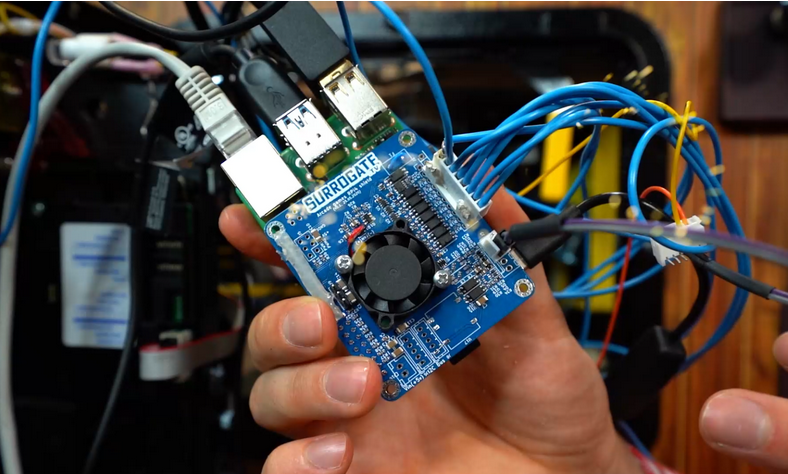 Don’t despair, because for the next couple of weeks, you can queue up to play on a real Oktoberfest pinball machine that’s sitting in Espoo, Finland. The controls are hooked up to a Raspberry Pi 4 through a custom HAT, along with a camera pointed at the playfield and another focused on the backglass screen. The game development/video streaming company Surrogate is hosting a tournament over the internet, and will be giving prizes to the top ten high rollers.
We usually have to wait until the holiday season to come across these remote-reality gaming opportunities. Having played it several times now, we recommend spamming the flippers until you get a feel for the lag. Also, just holding the flippers up while the ball is in the upper half of the playfield will catch a lot of balls that you might otherwise lose due to flipper lag, and sometimes they end up back in front of the launcher to shoot again. After the break, check out a brief but amusing video of setting up the cameras and Pi that includes a taste of the Oktoberfest music.
The tournament runs until the end of August, which should be enough time for somebody to set up CV and a keyboard to play this automatically. Need inspiration? Here’s an open-source pinball machine that can play itself.
source https://hackaday.com/2020/08/03/iot-pinball-puts-oktoberfest-fun-on-tap/
IOT Pinball Puts Oktoberfest Fun on Tap
We don’t really miss going out to bars all that much, unless you’re talking about the one downtown with all the pinball machines. Don’t get us wrong — pinball emulators have gotten crazy good, and you can find exact digital replicas of most machines to play on your phone or whatever. But it just doesn’t compare to the thrill of playing a real cabinet.
Don’t despair, because for the next couple of weeks, you can queue up to play on a real Oktoberfest pinball machine that’s sitting in Espoo, Finland. The controls are hooked up to a Raspberry Pi 4 through a custom HAT, along with a camera pointed at the playfield and another focused on the backglass screen. The game development/video streaming company Surrogate is hosting a tournament over the internet, and will be giving prizes to the top ten high rollers.
We usually have to wait until the holiday season to come across these remote-reality gaming opportunities. Having played it several times now, we recommend spamming the flippers until you get a feel for the lag. Also, just holding the flippers up while the ball is in the upper half of the playfield will catch a lot of balls that you might otherwise lose due to flipper lag, and sometimes they end up back in front of the launcher to shoot again. After the break, check out a brief but amusing video of setting up the cameras and Pi that includes a taste of the Oktoberfest music.
The tournament runs until the end of August, which should be enough time for somebody to set up CV and a keyboard to play this automatically. Need inspiration? Here’s an open-source pinball machine that can play itself.
source https://hackaday.com/2020/08/03/iot-pinball-puts-oktoberfest-fun-on-tap/
IOT Pinball Puts Oktoberfest Fun on Tap
We don’t really miss going out to bars all that much, unless you’re talking about the one downtown with all the pinball machines. Don’t get us wrong — pinball emulators have gotten crazy good, and you can find exact digital replicas of most machines to play on your phone or whatever. But it just doesn’t compare to the thrill of playing a real cabinet.
Don’t despair, because for the next couple of weeks, you can queue up to play on a real Oktoberfest pinball machine that’s sitting in Espoo, Finland. The controls are hooked up to a Raspberry Pi 4 through a custom HAT, along with a camera pointed at the playfield and another focused on the backglass screen. The game development/video streaming company Surrogate is hosting a tournament over the internet, and will be giving prizes to the top ten high rollers.
We usually have to wait until the holiday season to come across these remote-reality gaming opportunities. Having played it several times now, we recommend spamming the flippers until you get a feel for the lag. Also, just holding the flippers up while the ball is in the upper half of the playfield will catch a lot of balls that you might otherwise lose due to flipper lag, and sometimes they end up back in front of the launcher to shoot again. After the break, check out a brief but amusing video of setting up the cameras and Pi that includes a taste of the Oktoberfest music.
The tournament runs until the end of August, which should be enough time for somebody to set up CV and a keyboard to play this automatically. Need inspiration? Here’s an open-source pinball machine that can play itself.
source https://hackaday.com/2020/08/03/iot-pinball-puts-oktoberfest-fun-on-tap/
Optimizing GIF Playback For Microcontrollers
Despite being cooked up by Compuserve back in the late 1980s, GIFs have seen a resurgence on the modern internet, mostly because they’re fun. However, all our small embedded systems are getting color screens these days, and they’d love to join in the party. [Larry Bank] has whipped up a solution for just that reason, letting embedded systems play back short animated GIFs with limited resources.
[Larry] does a great job of explaining how the GIF format works, using LZW compression and variable-length codes. He talks about how the design of the format presents challenges, particularly when working with microcontrollers. Despite this, the final code works well, and is able to work with most animated GIFs of the right dimensions and construction. 24K of RAM is required, and image width is limited to 320 pixels. Images can be loaded from flash, memory, or SD cards, and he notes that best performance is gained with a microcontroller with fast SPI for writing to screens quickly.
It’s a great piece of software that promises to add a lot of charm, or silliness, to microcontroller projects. It also simplifies the use of animations, which can now be designed on computers rather than by using onboard graphics libraries. GIF really is the format that never seems to die; we’ve featured cameras dedicated to the form before. Video after the break.
source https://hackaday.com/2020/08/03/optimizing-gif-playback-for-microcontrollers/
William English, Computer Mouse Co-Creator, Has Passed
We are saddened to report that William English, co-inventor of the computer mouse, died July 26 in San Rafael, California. He was 91 years old.

Every piece of technology starts with a vision, a vague notion of how a thing could or should be. The computer mouse is no different. In fact, the mouse was built to be an integral part of the future of personal computing — a shift away from punch cards and mystery toward a more accessible and user-friendly system of windowed data display, hyperlinks, videoconferencing, and more. And all of it would be commanded by a dot on the screen moving in sync with the operator’s intent, using a piece of hardware controlled by the hand.
The stuff of science fiction becomes fact anytime someone has the means to make it so. Often times the means includes another human being, a intellectual complement who can conjure the same rough vision and fill in the gaps. For Douglas Engelbart’s vision of the now-ubiquitous computer mouse, that person was William English.
William English was born January 27, 1929 in Lexington, Kentucky. His father was an electrical engineer and William followed this same path after graduating from a ranch-focused boarding school in Arizona. After a stint in the Navy, he took a position at Stanford Research Institute in California, where he met Douglas Engelbart.

Engelbart showed William his notes and drawings, and he built the input device that Englebart envisioned — one that could select characters and words on the screen and revolutionize text editing. The X/Y Position Indicator, soon and ever after called the mouse: a sort of rough-yet-sleek pinewood derby car of an input device headed into the future of personal computing.
William’s mouse was utilitarian: a wooden block with two perpendicular wheels on the bottom, and a pair of potentiometers inside to interpret the wheels’ X and Y positions. The analog inputs are converted to digital and represented on the screen. The first mouse had a single button, and the cord was designed to run out the bottom, not the top.
This controller was designed to steer Engelbart’s magnum opus, an experimental computer dubbed oN-Line System, later NLS, which turned out to be a great prognosticator of modern networked computing. Engelbart and English presented the many facets of the NLS in a legendary demonstration given December 9th, 1968 in San Francisco. This event, known as the mother of all tech demos, was well covered by our own [Dan Maloney] in a biographical/Retrotechtacular mash-up marking the 50th anniversary. By the time they gave the demo, the mouse had three buttons and sat atop a stately chair-mounted lap console designed by Herman Miller. This NLS console contained an IBM Selectric keyboard and held a 5-button chording keyboard on the left side.

Bill designed all the audio-visuals for the demo, set everything up, and staged the 90+ minute presentation by speaking to Englebart and others through headsets. The show was only possible from a technical standpoint because Bill had a chance encounter with a Silicon Valley phone technician and convinced him to set up a wireless link for voice and video between the hall and their lab some 30 miles away in Menlo Park. That, plus the giant Eidophor projector they borrowed from NASA to show the demo to the hundreds of engineers in attendance. English and Englebart discuss the NLS, the Eidophor, and much more in the interview embedded below, but the topic is worth much a much deeper dive (something Mike Harrison did for his talk at the 2016 Hackaday Belgrade conference).
In 1971, Bill left Stanford Research Institute for Xerox’s famed Palo Alto Research Center (PARC) where he continued to develop the features of the NLS into the Alto. You likely know the story from here — Bill Gates and Steve Jobs both toured PARC, both saw the Alto, and both steered the personal computer toward their own vision.
Main and thumbnail images via NYT
source https://hackaday.com/2020/08/03/william-english-computer-mouse-co-creator-has-passed/
Vigiland – Shots & Squats (Make U Sweat Remix) ft. Tham Sway
William English, Computer Mouse Co-Creator, Has Passed
We are saddened to report that William English, co-inventor of the computer mouse, died July 26 in San Rafael, California. He was 91 years old.
Every piece of technology starts with a vision, a vague notion of how a thing could or should be. The computer mouse is no different. In fact, the mouse was built to be an integral part of the future of personal computing — a shift away from punch cards and mystery toward a more accessible and user-friendly system of windowed data display, hyperlinks, videoconferencing, and more. And all of it would be commanded by a dot on the screen moving in sync with the operator’s intent, using a piece of hardware controlled by the hand.
The stuff of science fiction becomes fact anytime someone has the means to make it so. Often times the means includes another human being, a intellectual complement who can conjure the same rough vision and fill in the gaps. For Douglas Engelbart’s vision of the now-ubiquitous computer mouse, that person was William English.
William English was born January 27, 1929 in Lexington, Kentucky. His father was an electrical engineer and William followed this same path after graduating from a ranch-focused boarding school in Arizona. After a stint in the Navy, he took a position at Stanford Research Institute in California, where he met Douglas Engelbart.
Engelbart showed William his notes and drawings, and he built the input device that Englebart envisioned — one that could select characters and words on the screen and revolutionize text editing. The X/Y Position Indicator, soon and ever after called the mouse: a sort of rough-yet-sleek pinewood derby car of an input device headed into the future of personal computing.
William’s mouse was utilitarian: a wooden block with two perpendicular wheels on the bottom, and a pair of potentiometers inside to interpret the wheels’ X and Y positions. The analog inputs are converted to digital and represented on the screen. The first mouse had a single button, and the cord was designed to run out the bottom, not the top.
This controller was designed to steer Engelbart’s magnum opus, an experimental computer dubbed oN-Line System, later NLS, which turned out to be a great prognosticator of modern networked computing. Engelbart and English presented the many facets of the NLS in a legendary demonstration given December 9th, 1968 in San Francisco. This event, known as the mother of all tech demos, was well covered by our own [Dan Maloney] in a biographical/Retrotechtacular mash-up marking the 50th anniversary. By the time they gave the demo, the mouse had three buttons and sat atop a stately chair-mounted lap console designed by Herman Miller. This NLS console contained an IBM Selectric keyboard and held a 5-button chording keyboard on the left side.
Bill designed all the audio-visuals for the demo, set everything up, and staged the 90+ minute presentation by speaking to Englebart and others through headsets. The show was only possible from a technical standpoint because Bill had a chance encounter with a Silicon Valley phone technician and convinced him to set up a wireless link for voice and video between the hall and their lab some 30 miles away in Menlo Park. That, plus the giant Eidophor projector they borrowed from NASA to show the demo to the hundreds of engineers in attendance. English and Englebart discuss the NLS, the Eidophor, and much more in the interview embedded below, but the topic is worth much a much deeper dive (something Mike Harrison did for his talk at the 2016 Hackaday Belgrade conference).
In 1971, Bill left Stanford Research Institute for Xerox’s famed Palo Alto Research Center (PARC) where he continued to develop the features of the NLS into the Alto. You likely know the story from here — Bill Gates and Steve Jobs both toured PARC, both saw the Alto, and both steered the personal computer toward their own vision.
Main and thumbnail images via NYT
source https://hackaday.com/2020/08/03/william-english-computer-mouse-co-creator-has-passed/