
Yearly Archives: 2020
DIY HID, OMG!
William English, one of the creators of the mouse back in the 60s, passed away last week. And that got me thinking of how amazing it would have been to be in the place that was inventing what would become modern computing interfaces. What a special time! Of course, they probably had no idea.
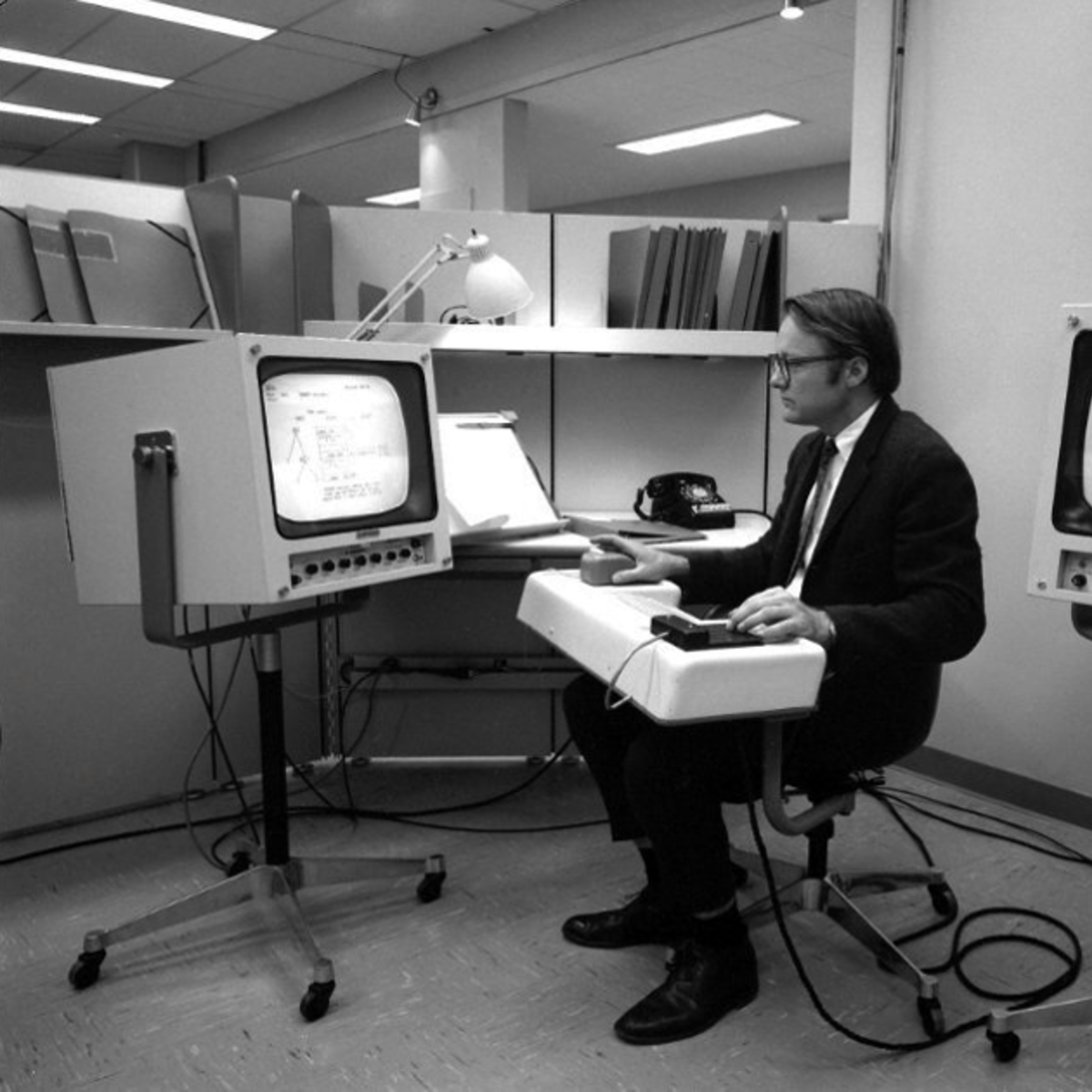 From here, it looks like the mouse changed everything, but you have to realize that they were working in a world with light-pens, where you could actually draw on the screen. In contrast, the mouse seems positively non-futuristic. They must have known they’d come up with an improvement over the status quo, but did they know they’d created a revolution?
So where has the revolutionary spirit in DIY human interface devices gone? I’d claim it’s still alive and kicking. Indeed our own Kristina Panos has a series called “Inputs of Interest” and we’ve seen a ton of DIY keyboards of late. Then there are many varieties of dial inputs. I used to have a dedicated scroll wheel made out of a hard-drive platter, and when I was reading lots of PDFs on-screen, I have to say it earned its desk-space. Heck, we’ve even seen people make their own mouse.
But what I love about the story of the development of the mouse is that they asked the question “what is the best way to locate a point on a screen” and tried to answer it. Half of their success is probably in simply asking the right question, and the other half in prototyping something half-workable. My gut says that we don’t have inputs figured out 100% on mobile yet. This sounds like a job for Hackaday. What’s the next big human-interface design need? And have you got any crazy ideas to solve it?
Hackaday Remoticon
And this week, we announced the Hackaday Remoticon, our shelter-in-place version of the Supercon. It’s going to take place in November as usual, but online instead of IRL.
The good news? It’s going to be chock full of workshops, all streamed online and recorded for posterity. And for that we need your proposals. If you’d like to teach a group of distributed hackers learning your favorite techniques and tricks, this is your chance!
The bad news is of course that we won’t get to see you all in person. That’s going to make the 2021 Hackaday Supercon seem even more super.
NASA Engineered a Box to Create the Fifth State of Matter in Space
Building a Mini IBM ThinkPad 701C Model Kit
DIY HID, OMG!
William English, one of the creators of the mouse back in the 60s, passed away last week. And that got me thinking of how amazing it would have been to be in the place that was inventing what would become modern computing interfaces. What a special time! Of course, they probably had no idea.
From here, it looks like the mouse changed everything, but you have to realize that they were working in a world with light-pens, where you could actually draw on the screen. In contrast, the mouse seems positively non-futuristic. They must have known they’d come up with an improvement over the status quo, but did they know they’d created a revolution?
So where has the revolutionary spirit in DIY human interface devices gone? I’d claim it’s still alive and kicking. Indeed our own Kristina Panos has a series called “Inputs of Interest” and we’ve seen a ton of DIY keyboards of late. Then there are many varieties of dial inputs. I used to have a dedicated scroll wheel made out of a hard-drive platter, and when I was reading lots of PDFs on-screen, I have to say it earned its desk-space. Heck, we’ve even seen people make their own mouse.
But what I love about the story of the development of the mouse is that they asked the question “what is the best way to locate a point on a screen” and tried to answer it. Half of their success is probably in simply asking the right question, and the other half in prototyping something half-workable. My gut says that we don’t have inputs figured out 100% on mobile yet. This sounds like a job for Hackaday. What’s the next big human-interface design need? And have you got any crazy ideas to solve it?
Hackaday Remoticon
And this week, we announced the Hackaday Remoticon, our shelter-in-place version of the Supercon. It’s going to take place in November as usual, but online instead of IRL.
The good news? It’s going to be chock full of workshops, all streamed online and recorded for posterity. And for that we need your proposals. If you’d like to teach a group of distributed hackers learning your favorite techniques and tricks, this is your chance!
The bad news is of course that we won’t get to see you all in person. That’s going to make the 2021 Hackaday Supercon seem even more super.
LIKE A BOSS COMPILATION #6 – Amazing People 2020
Back when cameras used… Floppy Disks? Sony Mavica
Hyperloop, the biggest Scam since Theranos
Ultimate Battery Backup Hack/Mod.
LIKE A BOSS COMPILATION #54 – Amazing People 2020 – The Boss
Fixing the Unfixable iMac Pro with Louis Rossmann!
Don’t want to answer my questions? No deal for you!
Why Apple Products Use 30 Year Old Software
Another Advanced Useless Machine
Sovereign Citizen Attempts The Travelling Not Driving B.S With Veteran Cop
Why Buy The Newer Model, When You Can Just Replicate Its User Interface?
Every now and then, along comes an awesome hack from years past that we missed at the time. We kick ourselves for somehow missing such amazing work, and since it’s that good, we share it with you with apologies. Such is the case with [Andrei Anatska]’s faithful replication of the Pioneer CDJ-2000 user interface as an upgrade to the earlier CDJ-1000 DJ controller, a piece of work of such quality that you could almost mistake it for being a commercial product.
At its heart is the STM32F746G Discovery board, which for some reason it pleases us greatly in this context that he refers to as the Disco board. If you’re hazy on the details of the various STM dev boards, this is the all-singing all-dancing one with the fancy colour LCD display. Out comes the VFD on the CDJ-1000 and a set of wires are soldered to its main board, then the Disco board is hooked up with the project firmware installed. The piece de résistance is the case, for which he eschews 3D-printing and instead cuts out from black plastic. Full instructions can be found in this PDF, so should you happen to have a CDJ-1000 that’s seen better days, you can join in the fun. See it in action in the video below.
DJ controllers may be run-of-the-mill today, but to those of us whose DJing days were in the era of a pair of Technics SL1200s and a stack of vinyl to the sound of early ’90s house music they are still nothing short of miraculous. We’ve featured plenty of hacks involving them here but they don’t always involve professional kit. Even a game controller can be pressed into service.
Thanks [Niklas Fauth] for the tip.
What happens if you photocopy a flashlight [interesting]
Sovereign Cit. Makes Nice Argument in Court – Still Wrong
BEST CUBE #214
Mythbusters Demo GPU versus CPU
4.3 Billion Dollars (Futurama, Season 1, Episode 6).
An Amiga Sampler 30 Years Later
There was a magic moment for a few years around the end of the 1980s, when home computers were better than professional ones. That’s a mighty grand pronouncement, but it refers to the crop of 16-bit home computers that genuinely were far better than nearly all PCs at the time for multimedia tasks. You could plug a sampler cartridge into your Amiga and be in the dance charts in no time, something which sparked a boom in electronic music creativity. As retrocomputing interest has soared so have the prices of old hardware, and for those still making Amiga music that cart can now be outrageously expensive. it’s something [echolevel] has addressed, with an open-source recreation of an Amiga sampler.
As anyone who peered inside one back int he day will tell you, an Amiga sampler was a very simple device consisting of a commonly-available 8-bit A to D converter, a CMOS switch for right and left samples, and maybe an op-amp preamplifier. This is exactly what he’s produced, save fpr the CMOS switch as he points out that Amiga musicians use mono samples anyway. At its heart is an ADC0820 half-flash ADC chip, and the whole thing is realised on a very retro-looking through-hole PCB.
For a Hackaday scribe with a Technosound Turbo still sitting in a box somewhere it’s a real trip down memory lane. It was a moment of magic to for the first time be able to edit and manipulate audio on a computer, and we’re glad to see that something of those days still lives on. See it in action in the video below the break.
source https://hackaday.com/2020/08/08/an-amiga-sampler-30-years-later/
BEST CUBE COMPILATION #1 BEST COUB JOKES 2020 May
Self-Contained Tape Loader For the ZX Spectrum
While these days we’re blessed with the magic of always-on internet connections and cloud services, back in the day software was delivered on physical media. Some of the most reviled media were data tapes, much maligned for their glacial loading times. However, the tangibility did give them some charm, and [JamHamster] decided to recreate this with his self-contained virtual tape loader.
The guts of the loader is a TZXDuino, a Spectrum tape emulator related to the Arduitape. It uses an Arduino Nano to store tape data files and replay them to load software on the retro platform. [JamHamster] combined this with a cassette tape shell and the head from a cassette audio adapter to make a digital tape emulator. The TZXDuino is crammed in the shell with a few mods, including a sensor that detects the play head moving inside the cassette to trigger playback. This stemmed from an earlier mod that did the same, just without an onboard battery.
It’s a tidy hack, and a very cool way to load games on your retro computer. With a firmware flash, it should be compatible with other systems too, thanks to the various computers supported by the wider Arduitape project. Tape emulators are popular with the community, thanks to eliminating the hassles of working with a now-obsolete format. Video after the break.
source https://hackaday.com/2020/08/07/self-contained-tape-loader-for-the-zx-spectrum/
Virtual Software Defined Radio
Software defined radio or SDR has changed the radio landscape forever. But to use one you need to buy some kind of hardware right? Maybe not. As [Tech Minds] shows in a recent video there are plenty of SDRs publically available on the Internet. We know that isn’t news, but the video does cover several different methods of finding and using SDR receivers including many that run totally in the browser.
Of course, there are a lot of reasons you might want to borrow an alien radio receiver, even if you have your own hardware. Maybe you don’t have a great antenna or maybe you want to hear a signal — maybe even your own — from a different location.
Some of these methods even have the ability to pipe audio data out to another program if you want to do some sort of decoding or processing. The SPY network uses the SDR# software, so you will have to install something for that. On the other hand, the program doesn’t really treat local hardware and remote any differently, so you can do lots of different things. But many of the programs will work inside a normal browser. SDR Console also needs some software, as well.
WebSDR works totally in the browser. KiwiSDR uses the very cool OpenWebRX interface and apparently it decodes radio signals on the server side, making it easy to listen to different signals in the browser.
With everyone having a bit more free time at home lately, this is a great way to take up listening to the radio with zero extra investment. Of course, if you have the inclination and the antennas, you can get a cheap dongle, although you’ll need an HF converter to listen to the shortwave bands. Or you can hack a QCX transceiver.
source https://hackaday.com/2020/08/07/virtual-software-defined-radio/