Mushroom Canoe is Rooted in Nature

Mushrooms might be the most contested pizza topping after pineapple, but can you build a boat from pineapples? Probably not, but you can from mushrooms. Mushrooms, or rather their mycelium root systems, can be used for things like packaging, insulation, and furniture, and it could be the next thing in floatation, too. Just ask [Katy Ayers], a Nebraska college student who built an eight-foot canoe molded almost entirely of mycelium.

[Katy] got into mushrooms when she was tasked with researching solutions to climate change. She loves to fish and has always wanted a boat, so when she found out that mycelium are naturally buoyant and waterproof, she decided to try using it as a building material.

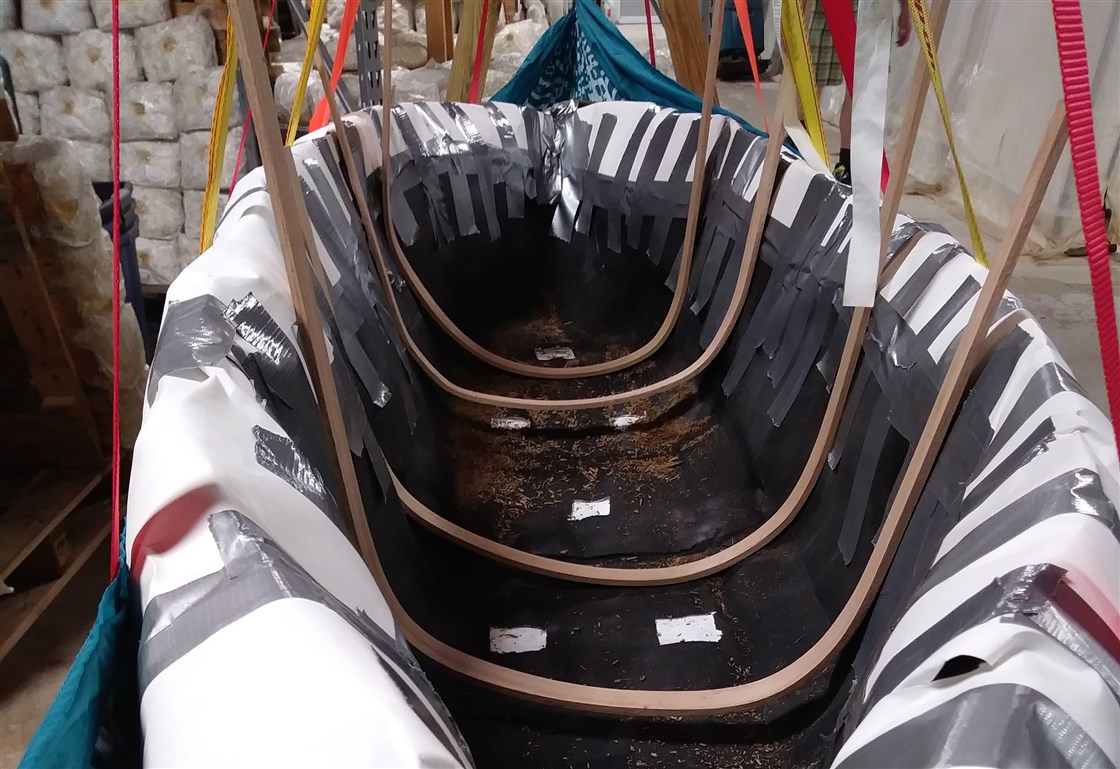
[Katy] floated the idea by the owner of a local mushroom company and they got to work, building a frame suspended in the air by a hammock-like structure. Then they covered the boat’s skeleton with spores and let it proliferate in a hot, humid growing room. Two weeks later, they had a boat made of live mycelium, which means that every time it goes out on the water, it spawns mushrooms. The total cost including tools was around $500. The boat experiment spawned even more mycelium projects. [Katy] has since experimented with making lawn chairs and landscaping bricks from mycelium.

Don’t want to wait to grow your own mycelium boat? You can build one out of stretch wrap, packing tape, and tree branches.

Thanks for the tip, [ykr300]!

Main image by Katy Ayers via NBC News

source https://hackaday.com/2020/11/20/mushroom-canoe-one-ups-climate-change/

Circuit Boards You Can Stretch: Liquid Metal Nanomaterials Make a Strange Flex

If you think polyimide-based flexible PCBs are cool, wait until you get a load of what polymerized liquid metal networks can do.

Seems like [CNLohr] has some pretty cool friends, and he recently spent some time with a couple of them who are working with poly LMNs and finding out what they’re good for. Poly LMNs use a liquid metal composed of indium and gallium that can be sprayed onto a substrate through a laser-cut stencil. This results in traces that show the opposite of expected behavior; where most conductors increase in resistance when stretched, pol LMNs stay just as conductive no matter how much they’re stretched.

The video below shows [CNLohr]’s experiments with the stuff. He brought a couple of traditional PCB-based MCU circuits, which interface easily with the poly LMN traces on a thick tape substrate. Once activated by stretching, which forms the networks between the liquid metal globules, the traces act much like copper traces. Attaching SMD components is as simple as sticking them to the tape — no soldering required. The circuits remain impressively stretchy without any apparent effect on their electrical properties — a characteristic that should prove interesting for wearables circuits, biological sensors, and a host of real-world applications.

While poly LMNs aren’t exactly ready for the market yet, they don’t seem terribly difficult to make, requiring little in the way of exotic materials or specialized lab equipment. We’d love to see someone like [Ben Krasnow] pick this up and run with it — it seems right up his alley.

source https://hackaday.com/2020/11/19/circuit-boards-you-can-stretch-liquid-metal-nanomaterials-make-a-strange-flex/

Remoticon Video: Firmware Reverse Engineering Workshop with Asmita Jha

Taking things apart to see how they work is an important part of understanding a system, and that goes for software as much as for hardware. You can get a jump start on your firmware reverse engineering skills with Asmita Jha’s workshop which was presented live at the Hackaday Remoticon. The video has just been published, and is found below along with a bit more on what she covered in her hands-on labs.

Where do you start when poking around a binary file with which you’re unfamiliar? The first part of the two-hour workshop tackles this issue. Asmita takes a systematic approach to figuring out what you’ve got and what methods will have the best chance of success.

The tools needed for static analysis are likely familiar names to you already: Binwalk, John the Ripper, Ghidra, Firmwalker, FACT Tool, and EXPLIoT Firmware Auditor. Three of the four labs use these tools to practice things like extracting firmware binaries to find hardcoded credentials, modifying and repacking binaries, and cracking passwords found inside. There is also an example of dynamic analysis where the hardware architecture for which the firmware is compiled differs from the computer you’re using for reverse engineering. In that case you can use a flavor of Qemu to make sense of it.

Beginning about half-way through the workshop the hands-on labs begin. You can follow along with this using workshop slides and setup instructions found on the workshop page.

source https://hackaday.com/2020/11/19/remoticon-video-firmware-reverse-engineering-workshop-with-asmita-jha/

Colorful Quinary Clock Makes the Most Out of Five Neopixels

If binary digits are bits, are quinary digits “quits”? Perhaps, but whatever you call them, you’re going to have to wrap your head around some new concepts in order to make sense of this quinary display clock.

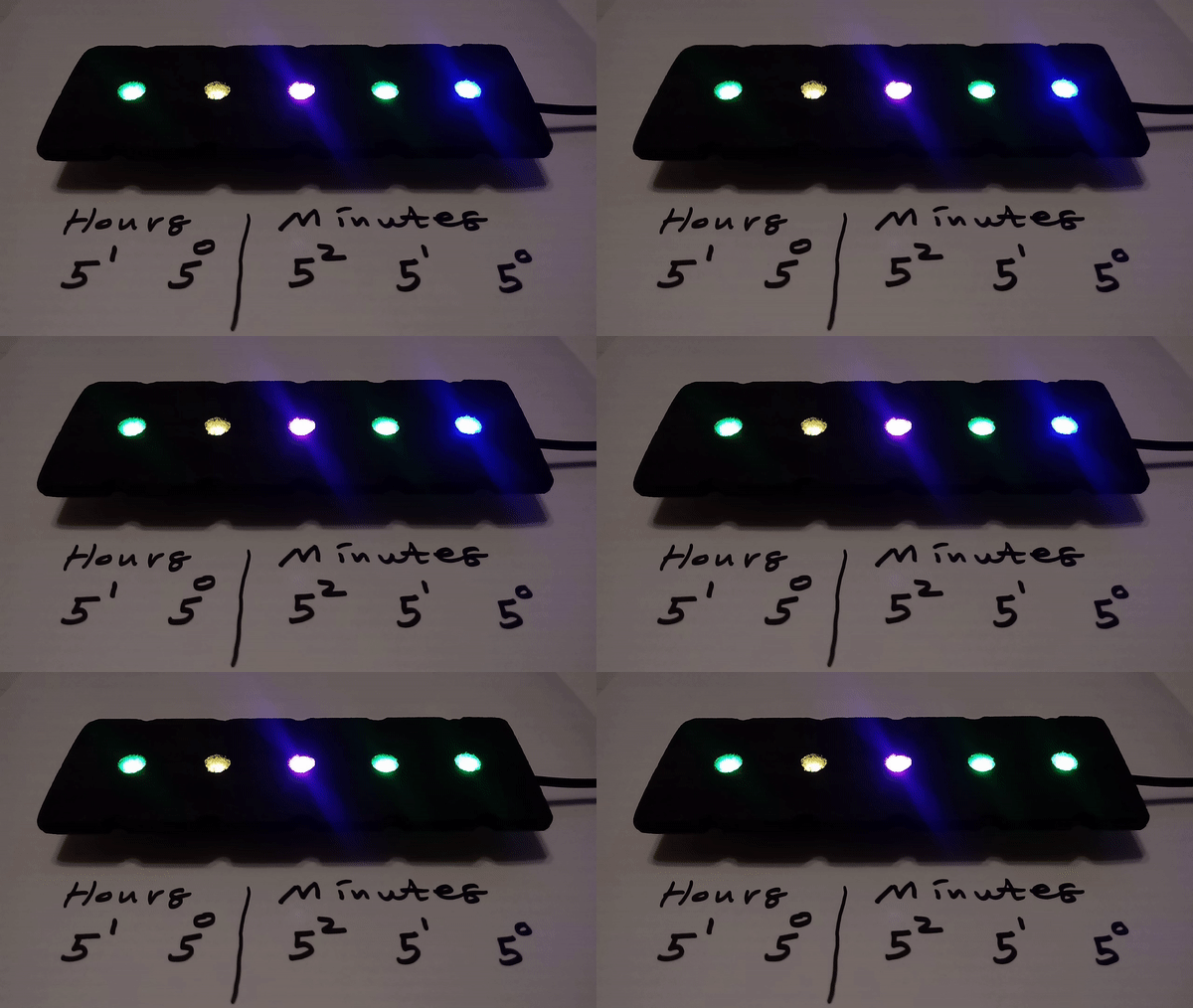
The transition between 15:42 and 15:43.

Why quinary? [Spike Snell] wanted to minimize the number of LEDs, and 52 is enough to cover all 24 hours. Binary clocks may have geek chic, but there are only so many ways to display ones and zeros.

[Spike]’s clock is unique because it shows each quit using a single WS2812 Neopixel. The values zero through four are each represented by a different color, meaning the user needs to memorize which color goes with which value, which we suspect is the hardest part of learning this clock. The clock’s software is fairly simple and runs on an ESP8266, and uses NTP to keep on track. The clock self-adjusts for Daylight Savings time, and it has a nice feature that dims the display in the evening to make living with it easier.

Even for those not up on their base-five arithmetic,  [Spike]’s clock is still a nice, slowly evolving abstract art piece. And for those who grok the quinary clock, perhaps a career awaits you in an alternate future where bi-quinary relay computers caught on.

source https://hackaday.com/2020/11/19/colorful-quinary-clock-makes-the-most-out-of-five-neopixels/

3D Printer Lets You Play “Will It Shred?”

[Brian Brocken] is at it again, building mechanisms that are as striking in their aesthetic as they are in their function. This time around, he’s extended a project we recently featured by adding a menacing 3D-printed shredder attachment. When you hear “3D-printed shredder” you think that paper is all you’ll be able to feed it, but this beast can eat its own by shredding parts from failed prints.

His original goal in building the high-torque 3D-printed gear box we looked at back in August was to show that 3D printed parts can be functional and not merely decorative. Using it as a winch to pull a car did a good job of that, but this goes much further. The very nature of shredder blades is to tear apart objects, but the forces that destroy those things are also present on the shredder parts themselves. Still, as you can see in the video below, the counter-rotating twin-shaft shredder mechanism does its work without catastrophic damage to the blades which were printed with “least 25 percent infill for the structural parts”, and up to five outer perimeters.

The result is a shredder that can gobble up small pieces of failed prints, in addition to chewing on paper, cardboard, and polystyrene with ease. [Brian] does show a few failures along the way, all in the gearbox itself. The first was a defect in the housing that let an gear shaft pop loose and was fixed up with a reprint. The second is a catastrophic gear failure when trying to shred a soda bottle. This is not surprising as PET is quite tough and not brittle like the waste prints were. The shredder teeth got bogged down, and the power of the motor strips teeth from a few gears. But when working, it’s oddly satisfying to watch that powerful gear ratio chip away at sacrificial materials.

If you’re more on the prowl for a way to usefully recycle your plastics, set the 3D-printed stress test of this one aside and take a look at the plastic shredder Fablab RUC built out of metal and plywood a few years back.

source https://hackaday.com/2020/11/19/3d-printer-lets-you-play-will-it-shred/

E-Ink Calendar Paves A Path For All

[Martin Fasani] has set out to build a beautiful low power E-Ink Calendar he can hang on his wall. But perhaps more importantly, the work he has done makes it easier for everyone in the future to have a e-ink display. Many battery-powered e-ink projects connect to some server, download a bitmap image, display the new image, and then go into a deep sleep power mode. [Martin’s] project is no different, but it uses a handy microservice that does the conversion and rendering for you.

The firmware for this ESP32/ESP32S2 based calendar is open sourced on GitHub, with a version based on the Arduino framework as well as the native ESP-IDF framework. One particularly fantastic part of the firmware is a C++ component called CalEPD that drives e-paper displays. CalEPD extends the Adafruit_GFX class and is broken out in a separate repo, making it easy to consume on other projects. Since this supports dozens of different e-paper displays, this simplifies the process of building a calendar with different screens. The firmware includes a Bluetooth setup flow from a smartphone or tablet. This means you can quickly configure how often it wakes up, what it queries, and other important features.

The hardware shown in the demo video has a 7.5″ Waveshare screen with 800 x 400 resolution nestled inside a 3D-printed shell. There is also a 5,000 mAh battery with an ESP32 TinyPICO powering the whole system. The TinyPICO was picked for its incredible deep sleep power consumption. All this fits into a frame just 11 mm thick, for which STL files are available. [Martin] continues to work on this calendar display and has recently added support for FocalTech touch panel controllers. We’re excited to see where he takes it next!

This isn’t the first e-ink display project we’ve seen but this is a great reference to build your own. If you need another good starting point, this weather display might give you that little bit of inspiration you need.

source https://hackaday.com/2020/11/19/e-ink-calendar-paves-a-path-for-all/

C64 Runs on STM32F429 Discovery

There have been various reincarnations of the Commodore C64 over the years, and [Dave Van Wagner] has created one that can run on an STM32F429ZI Discovery development board. These dev boards have been around quite a few years and feature a 2.4 inch color TFT LCD in addition to the typical I/O circuitry, and are a pretty good value — [Dave] says they currently sell for under $30 through distribution.

The project began earlier this year when [Dave] set out to write a command line program in C# that emulated C64 Basic. He had written a 6502 emulator many years earlier, but had not tested it. [Dave] went on a programming binge in March and got it up and running over a very long weekend. He subsequently decided to add support for VIC-20, TED, and PET as well.

Even though [Dave] says C# is a beautiful language, he subsequently ported the program into C (an ugly language?) in order to run on the Discovery board, swapping the command line terminal interface for real LCD video and a USB keyboard. There’s also an Arduino version (terminal interface only). It runs about 15% slower than a real C64, and there are some limitations still like no SID. But overall, this is a great project and a low-cost way to emulate a C64 in an embedded format. If you want to explore further, here is the Mbed project for the STM32F429, and you can find the Arduino and C# versions on his GitHub page. You may remember [Dave] from the C128 video hack we wrote about last year.

source https://hackaday.com/2020/11/18/c64-runs-on-stm32f429-discovery/

Turning GitHub Into A URL Shortening Service

URL shortening services like TinyURL or Bitly have long become an essential part of the modern web, and are popular enough that even Google killed off their own already. Creating your own shortener is also a fun exercise, and in its core doesn’t require much more than a nifty domain name, some form of database to map the URLs, and a bit of web technology to glue it all together. [Nelsontky] figured you don’t even have to build most of it yourself, but you could just (ab)use GitHub for it.

Using GitHub Pages to host the URL shortening website itself, [nelsontky] actually repurposes GitHub’s issue tracking system to map the shortened identifier to the original URL. Each redirection is simply a new issue, with the issue number serving as the shortening identifier, and the issue’s title text storing the original URL. To map the request, a bit of JavaScript extracts the issue number from the request, looks it up via GitHub API, and if a valid one was found (and API rate limits weren’t exceeded), redirects the caller accordingly. What’s especially clever about this is that GitHub Pages usually just serves static files stored in a repository, so the entire redirection logic is actually placed in the 404 error handling page, allowing requests to any arbitrary paths.

While this may not be as neat as placing your entire website content straight into the URL itself, it could be nicely combined with this rotary phone to simply dial the issue number and access your bookmarks — perfect in case you always wanted your own website phone book. And if you don’t like the thought of interacting with the GitHub UI every time you want to add a new URL, give the command line tools a try.

source https://hackaday.com/2020/11/18/turning-github-into-a-url-shortening-service/

Giving Recalled Fitness Trackers a Second Chance

When it was released back in 2012, the Basis B1 fitness tracker was in many ways ahead of its time. In fact, the early smartwatch was so impressive that Intel quickly snapped up the company and made it the cornerstone of their wearable division. Unfortunately a flaw in their next watch, the Basis Peak, ended up literally burning some wearers. Intel was forced to recall the whole product line, and a year later dissolved their entire wearable division.

Given their rocky history, it’s probably no surprise that these gadgets can be had quite cheaply on the second hand market. But can you do anything with them? That’s what [Ben Jabituya] recently decided to find out, and the results of his experiments certainly look very promising. So far he hasn’t found a way to activate a brand-new Basis watch, but assuming you can get your hands on one that was actively being used when Intel pulled the plug, his hacks can be used to get it back up and running.

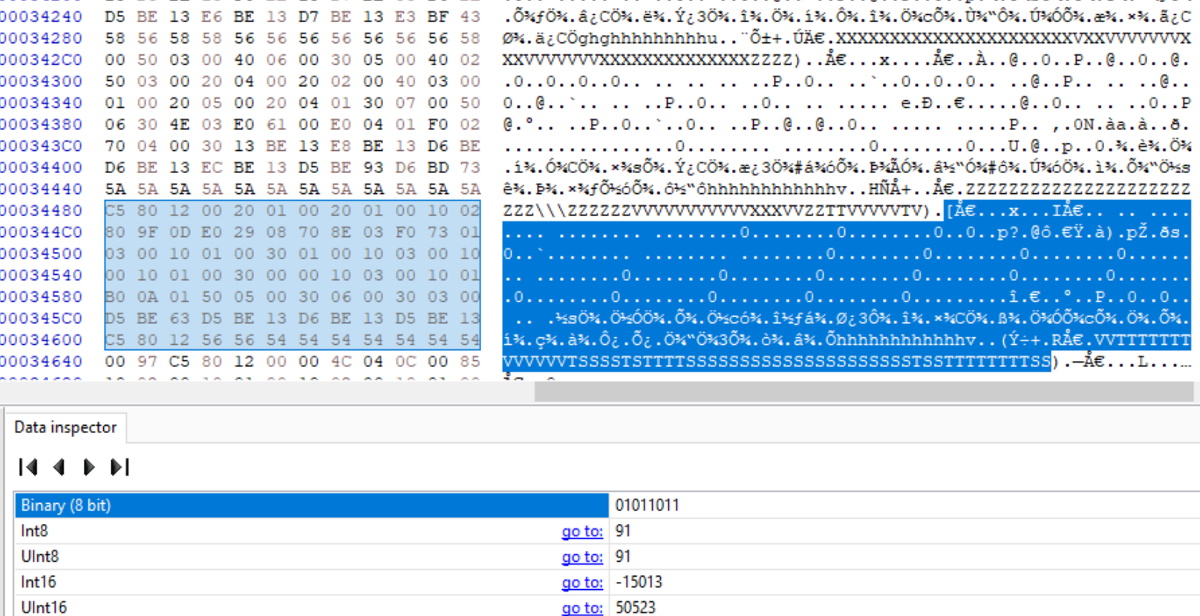
Examining the downloaded sensor logs.

The Basis Android application has long since been removed from the Play Store, but [Ben] said it wasn’t too hard to find an old version floating around on the web. After decompiling the application he discovered the developers included a backdoor that lets you configure advanced options that would normally be hidden.

How do you access it? As a reminder of the era in which the product was developed, you simply need to log into the application using Jersey and Shore as the username and password, respectively.

Between the developer options and API information he gleaned from the decompiled code, [Ben] was able to create a faux Basis authentication server and point the application to it. That let him get past the login screen, after which he was able to sync with the watch and download its stored data. Between examinations with a hex editor and some open source code that was already available online, he was able to write a Python script for parsing the data which he’s been kind enough to share with the world.

We’re very pleased to see an open source solution that not only gets these “bricked” smartwatches back online, but allows the user to keep all of the generated data under their own control. If you’d like to do something similar with a device that doesn’t have a history of releasing the Magic Smoke, the development of an open source firmware for more modern fitness trackers might be of interest.

source https://hackaday.com/2020/11/18/giving-recalled-fitness-trackers-a-second-chance/

Giving Recalled Fitness Trackers a Second Chance

When it was released back in 2012, the Basis B1 fitness tracker was in many ways ahead of its time. In fact, the early smartwatch was so impressive that Intel quickly snapped up the company and made it the cornerstone of their wearable division. Unfortunately a flaw in their next watch, the Basis Peak, ended up literally burning some wearers. Intel was forced to recall the whole product line, and a year later dissolved their entire wearable division.

Given their rocky history, it’s probably no surprise that these gadgets can be had quite cheaply on the second hand market. But can you do anything with them? That’s what [Ben Jabituya] recently decided to find out, and the results of his experiments certainly look very promising. So far he hasn’t found a way to activate a brand-new Basis watch, but assuming you can get your hands on one that was actively being used when Intel pulled the plug, his hacks can be used to get it back up and running.

Examining the downloaded sensor logs.

The Basis Android application has long since been removed from the Play Store, but [Ben] said it wasn’t too hard to find an old version floating around on the web. After decompiling the application he discovered the developers included a backdoor that lets you configure advanced options that would normally be hidden.

How do you access it? As a reminder of the era in which the product was developed, you simply need to log into the application using Jersey and Shore as the username and password, respectively.

Between the developer options and API information he gleaned from the decompiled code, [Ben] was able to create a faux Basis authentication server and point the application to it. That let him get past the login screen, after which he was able to sync with the watch and download its stored data. Between examinations with a hex editor and some open source code that was already available online, he was able to write a Python script for parsing the data which he’s been kind enough to share with the world.

We’re very pleased to see an open source solution that not only gets these “bricked” smartwatches back online, but allows the user to keep all of the generated data under their own control. If you’d like to do something similar with a device that doesn’t have a history of releasing the Magic Smoke, the development of an open source firmware for more modern fitness trackers might be of interest.

source https://hackaday.com/2020/11/18/giving-recalled-fitness-trackers-a-second-chance/

Actuator Opens the Door to Drier Dishes

Dishwashers are great at washing dishes and even rinsing them, most of the time. Where they tend to fail is in the drying part. Somehow these things dry hot enough to warp stoneware dishes, but not so well that things are actually dry when you open the door. Blame it on the lack of air movement.

Ideally, the dishwasher cycle is started soon after dinner time so it can be finished and opened up before it’s time for bed. But if you do that, then you miss all the dishes from late-night snacking and the occasional wine glass. Wait until bedtime to start it, and it has to sit several hours with moisture inside. Obviously, the answer is to listen for the victory beeps at the end of the cycle, and use a slow but forceful actuator to push the door open.

[Ivan Stepaniuk] is listening for the dishwasher’s frequencies with a microphone, amplifying them with a trusty LM386, and using an STM32 blue pill to crunch the audio. [Ivan] has plans to incorporate an ESP8266 board for IoT, presumably to get a notification when the door has been opened successfully. Check out the demo after the break.

Yes, dishwashers are great until they aren’t, and some little part breaks. But why pay for a new detergent compartment cover when you can just print one?

source https://hackaday.com/2020/11/18/actuator-opens-the-door-to-drier-dishes/

Easy Device Configuration For Your Pi Projects

We’re all familiar with a typical configuration sequence for a new mass-market IoT device. Turn it on for the first time and it exposes a temporary Wi-Fi network, connect to that network and open a Web page for device configuration. Wouldn’t it be useful to be able to incorporate that functionality into your own projects without having to write it yourself! Happily now thanks to [Peter Walsh] you can, with his AppDaemon project for the Raspberry Pi.

At its heart is  a set of Perl scripts that run whatever your software is, then monitor a GPIO. A button press toggling the GPIO stops the application and fires up the access point and web server. Handily the code can all be found in a GitHub repository, and there is a run-through of the features in a video that we’ve placed below the break. It’s not something that will appeal to everybody, but for anyone who has to pass their work onto people who can’t dive into a config file and break out the editor, it should be a particularly useful addition to the armoury.

source https://hackaday.com/2020/11/18/easy-device-configuration-for-your-pi-projects/

Hacking the FPGA Control Board from a Bitcoin Miner

For anyone serious about mining cryptocurrency such as Bitcoin, we’re well past the point where a standard desktop computer is of much use. While an array of high-end GPUs is still viable for some currencies, the real heavy hitters are using custom mining hardware that makes use of application-specific integrated circuits (ASICs) to crunch the numbers. But eventually even the most powerful mining farm will start to show its age, and many end up selling on the second hand market for pennies on the dollar.

Naturally, hackers are hard at work trying to find alternate uses for these computational powerhouses. While it won’t teach an old ASIC a new trick, [xjtuecho] has documented some very interesting details on the FPGA control board of the Ebit E9+ Bitcoin miner. Known as the EBAZ4205, this board can be purchased for around $20 USD from online importers and even less if you can find one used. Since it’s just the controller it won’t help you build a budget super computer, but there’s always interest in cheap FPGA development boards.

The Zynq SoC combines an FPGA and ARM CPU.

According to [xjtuecho], it takes a little bit of work to get the EBAZ4205 ready for experimentation. For one thing, you may have to solder on your own micro SD slot depending on where you got the board from. You’ll also need to add a couple diodes to configure which storage device to boot from and to select where the board pulls power from.

Once your done, you’ll have a dual core Cortex A9 Linux board with 256 MB DDR3 and a Artix-7 FPGA featuring 28K logic elements to play with. Where you go from there is up to you.

This isn’t the first time we’ve seen FPGA boards hit the surplus market at rock bottom prices. When IT departments started dumping their stock of Pano Logic thin clients back in 2013, a whole community of dedicated FPGA hackers sprouted up around it. We’re not sure the if the EBAZ4205 will enjoy the same kind of popularity in its second life, but the price is certainly right.

[Thanks to Rog77 for the tip.]

source https://hackaday.com/2020/11/18/hacking-the-fpga-control-board-from-a-bitcoin-miner/

Sorting Thousands of Drill Bits

[Austin Adee] came into some drill bits. A lot of them actually. But when thousands of assorted sizes are delivered in one disorganized box, are they actually useful? Not unless you’re drilling holes where diameter doesn’t matter.

So two projects were at hand: finding a place to store a few hundred different sizes of bits, and tackling the actual sorting itself. In the end, he used input from a digital caliper alongside a Python script that showed him where to put them.

The start of the tray design process was a bit of a research project, establishing the common sizes and how many would fit into a given space. This data was used to spin up the layout for trays with 244 different pockets to hold the bits. The pockets were CNC milled, but getting labels for each to work with the laser engraver was a bit of a hack. In the end, filling in the letters with white crayon really makes them pop, despite [Austin’s] dissatisfaction with the level of contrast.

But wait, we promised you an epic sorting hack! Unfortunately there’s no hopper, vibration feed, and sorting gantry that did this for him (now if it were perler beads he’d have been all set). Still, the solution was still quite a clever one.

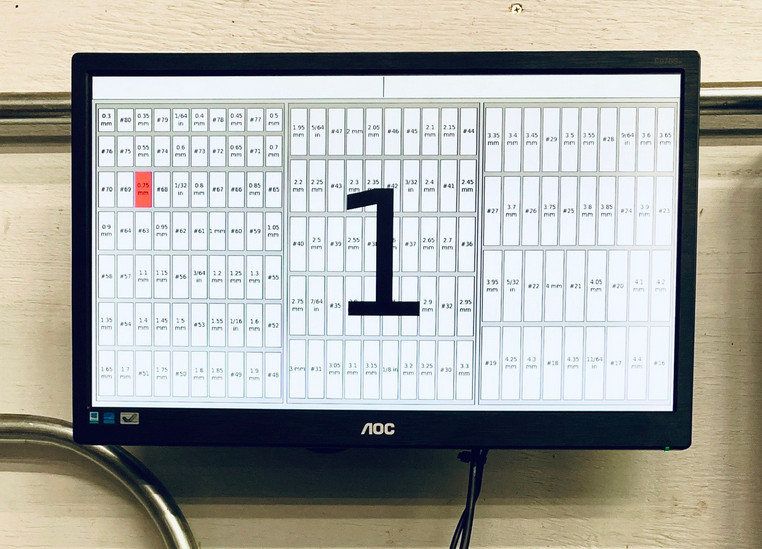
A set of digital calipers with a Bluetooth connection sends the dimension back to a python script every time you press the capture button. That script find the pocket for the nearest size and then highlights it on a map of the drill bit drawer displayed on the computer monitor. In the end the trays fit into a wide tool chest drawer, and are likely to keep things organized through exactly one project before everything is once again in disarray.

[Austin] mentions a lag of up to one second for the Bluetooth calipers to do their thing. For assembly-line style work, that adds up. We remember seeing a really snappy reaction time on these digital calipers hacked for wireless entry.

source https://hackaday.com/2020/11/17/sorting-thousands-of-drill-bits/

Sorting Thousands of Drill Bits

[Austin Adee] came into some drill bits. A lot of them actually. But when thousands of assorted sizes are delivered in one disorganized box, are they actually useful? Not unless you’re drilling holes where diameter doesn’t matter.

So two projects were at hand: finding a place to store a few hundred different sizes of bits, and tackling the actual sorting itself. In the end, he used input from a digital caliper alongside a Python script that showed him where to put them.

The start of the tray design process was a bit of a research project, establishing the common sizes and how many would fit into a given space. This data was used to spin up the layout for trays with 244 different pockets to hold the bits. The pockets were CNC milled, but getting labels for each to work with the laser engraver was a bit of a hack. In the end, filling in the letters with white crayon really makes them pop, despite [Austin’s] dissatisfaction with the level of contrast.

But wait, we promised you an epic sorting hack! Unfortunately there’s no hopper, vibration feed, and sorting gantry that did this for him (now if it were perler beads he’d have been all set). Still, the solution was still quite a clever one.

A set of digital calipers with a Bluetooth connection sends the dimension back to a python script every time you press the capture button. That script find the pocket for the nearest size and then highlights it on a map of the drill bit drawer displayed on the computer monitor. In the end the trays fit into a wide tool chest drawer, and are likely to keep things organized through exactly one project before everything is once again in disarray.

[Austin] mentions a lag of up to one second for the Bluetooth calipers to do their thing. For assembly-line style work, that adds up. We remember seeing a really snappy reaction time on these digital calipers hacked for wireless entry.

source https://hackaday.com/2020/11/17/sorting-thousands-of-drill-bits/

Sorting Thousands of Drill Bits

[Austin Adee] came into some drill bits. A lot of them actually. But when thousands of assorted sizes are delivered in one disorganized box, are they actually useful? Not unless you’re drilling holes where diameter doesn’t matter.

So two projects were at hand: finding a place to store a few hundred different sizes of bits, and tackling the actual sorting itself. In the end, he used input from a digital caliper alongside a Python script that showed him where to put them.

The start of the tray design process was a bit of a research project, establishing the common sizes and how many would fit into a given space. This data was used to spin up the layout for trays with 244 different pockets to hold the bits. The pockets were CNC milled, but getting labels for each to work with the laser engraver was a bit of a hack. In the end, filling in the letters with white crayon really makes them pop, despite [Austin’s] dissatisfaction with the level of contrast.

But wait, we promised you an epic sorting hack! Unfortunately there’s no hopper, vibration feed, and sorting gantry that did this for him (now if it were perler beads he’d have been all set). Still, the solution was still quite a clever one.

A set of digital calipers with a Bluetooth connection sends the dimension back to a python script every time you press the capture button. That script find the pocket for the nearest size and then highlights it on a map of the drill bit drawer displayed on the computer monitor. In the end the trays fit into a wide tool chest drawer, and are likely to keep things organized through exactly one project before everything is once again in disarray.

[Austin] mentions a lag of up to one second for the Bluetooth calipers to do their thing. For assembly-line style work, that adds up. We remember seeing a really snappy reaction time on these digital calipers hacked for wireless entry.

source https://hackaday.com/2020/11/17/sorting-thousands-of-drill-bits/

Kipp Bradford Discusses the Entanglement of Politics and Technology

Kipp Bradford wrapped up his keynote talk at the Hackaday Remoticon with a small piece of advice: don’t built bridges in the middle of the ocean. The point is that a bridge must connect two pieces of land to be useful and if technology isn’t useful to humanity, does it matter at all?

In reality we build bridges in the middle of the ocean all the time as each of us finds nonsensical reasons to learn new skills and try things out. But when it comes time to sit down and make an organized end goal, Kipp wisely asks us to consider the impact we’d like that work to have on the world. Equally importantly, how will we make sure completed work actually gets used? This is where the idea of politics in technology comes to play, in the sense that politics is a major mechanism for collective decision-making within a society.

Currently the CTO of Treau, and a Lecturer and Researcher at Yale, Kipp delivered this keynote live on November 7th. Kipp was an expert judge for the Hackaday Prize in 2017 and 2018. The video of his talk, and a deeper look at the topics, are found below.

Engineering is Change

Kipp shares Melvin Kranzberg’s laws of technology, the first of which is that “Technology is neither good nor bad; nor is it neutral”. That’s because new technology represents a change in how something is done, it seeks to exert change on a system merely by getting people to use it. Further, Lance Strate writes that because technology is a form of change it has an inherent bias.

In watching his talk my mind immediately leapt to current challenges for technology, like the advances in automation that are sweeping the world. Automation is making goods and services more affordable while optimizing away the jobs that used to perform those tasks. At this point the engineers might be thinking: we just wanted to build some cool robots and it got political very quickly!

Now where you land on the issues like automation is a product of the biases that shape all of our opinions in different ways. That’s an oversimplification to be certain, but these issues are all around us and this is nothing new, although the rate at which they affect our lives has accelerated immensely. Kipp has several interesting historical examples to get you thinking, from the slow adoption of new voting technology and the policy choices that shaped LED lighting manufacturing, to a bridge collapse in the 17th century that led its replacement to be designed to instill public trust in addition to just carrying a load.

Technology is Human Evolution

The talk tips into transhumansim as Kipp calls engineering our special super power. The idea is that evolution could make us better at living in warm or cold climates, but we sped that up by building heating and cooling systems for our buildings. He calls it our “extra-corporeal DNA” — the evolutionary traits that are outside of our body yet still augment our existence, shape who we are, and can be passed on to our progeny, while discarding the less useful ideas along the way.

Watching this talk provided a perfect analogy. How far can you shout? I was able to hear Kipp’s voice from 1,200 miles away, his words traveling faster than the speed of sound. That sounds very much like a super-power, and if you’re reading this you have the same power at your disposal this very moment.

The great Stan Lee popularized the Peter Parker principle that with great power comes great responsibility and it certainly applies here. Kipp is asking us all to put our work into context, to think about the impact we’d like to see in the world from the projects we work on. Take the time to educate the public on the benefits and drawbacks of utilizing technology and share the agency of what you’ve built. This is the other half of the work that makes hard-won technical solutions worth it.

Check out Some of Kipp Bradford’s Work:

source https://hackaday.com/2020/11/17/kipp-bradford-discusses-the-entanglement-of-politics-and-technology/

Another Kind of “Bare Metal”: 6502 Computer Powers RPN Calculator

[Mitsuru Yamada] states that one of the goals for this 6502 computer build was to make it strong enough to survive real-world usage. In that regard alone we’d call this a success; the die-cast aluminum enclosures used a little blast from the past and lend a nice retro industrial look to the project. The main chassis of the computer fairly bristles with LEDs and chunky toggle switches for setting the data and address busses. The interior is no less tidy, with the 6502 microprocessor — date code from 1995 — and associated support chips neatly arranged on perf board. The construction method is wire wrapping, in keeping with the old-school look and feel. Even the hand-drawn schematic is a work of art — shades of [Forrest Mims].

As for programming, this machine is as low-level as it gets. Nothing but 6502 machine language here, entered manually with the toggle switches, or via an externally programmed ROM. The machine can only address 1k of memory, a limit which the code to support the RPN calculator add-on [Yamada] also built brushes up against, at 992 bytes. The calculator keypad has a 20-key matrix pad and an eight-digit dot-matrix LED display, and can do the four basic operations on fixed-point binary-coded decimal inputs. The brief video below shows the calculator in action.

We love the look of this build and we’re eager to see more like it. We’ve seen a ton of 6502 builds from discrete chips lately, and while we love those too, it’s nice to see one of the big old DIPs put back in action for a change.

source https://hackaday.com/2020/11/17/another-kind-of-bare-metal-6502-computer-powers-rpn-calculator/

Prusa Mini Gets Custom Heavy Duty Enclosure

Still waiting on your Prusa Mini to arrive? Join the club. Between the incredible amount of interest in the inexpensive 3D printer and the COVID-19 pandemic, it can take months for the machine to arrive at your doorstep. But patient makers are finally taking delivery of their new printers, and as such the hacks and modifications are starting to trickle their way in.

First up is this gloriously over-engineered enclosure from [Build Comics]. While PLA and PETG usually print fine with nothing more exotic than a heated bed, trickier materials like ABS work best when the printer is enclosed as it helps maintain a consistent temperature. Plus it keeps any curious hands and paws a safe distance from the hot moving bits, and if things go really pear-shaped, can help contain smoke and flames.

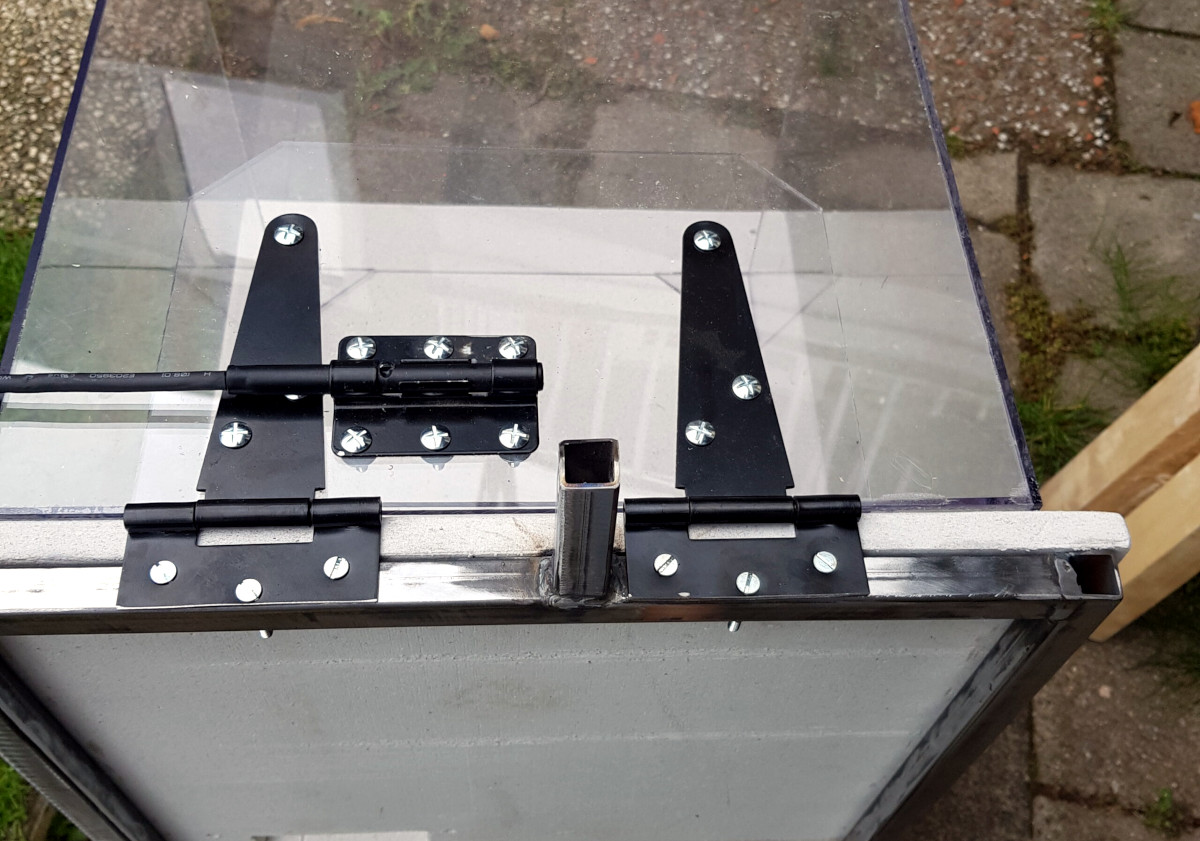
The enclosure is made from welded steel square tube, wood, and fire-retardant fiber board. A hinged polycarbonate cover, taking the form of a four-sided cube, is lowered over the printer with some heavy-duty hinges that look like they were intended for a fence. To keep the cover from slamming back down, [Build Comics] came up with a simple locking mechanism that can easily be operated from the front or side of the enclosure. With the addition of a small temperature and humidity display, the conditions inside the chamber can easily be monitored.

But [Build Comics] didn’t stop there. He also rigged up a relay box that will cut power to the printer should the smoke detector mounted above it trip. While there’s no reason to think the Prusa Mini would suffer the same fate of earlier budget desktop 3D printers, but there’s certainly no harm in taking precautions.

Will you need to build a similar enclosure whenever your Prusa Mini shows up? Maybe not. But if you felt so inclined, at least now you’ve got plenty of images and details that can help you spin up your own solution.

source https://hackaday.com/2020/11/17/prusa-mini-gets-custom-heavy-duty-enclosure/

3D Print Your Way to a Modular MIDI Playset

Have you ever wanted to experiment with MIDI, but didn’t know where to start? Or perhaps you didn’t think you could afford to properly outfit your digital beat laboratory, especially given the average hacker’s penchant for blinkenlights? Well worry no more, as [Johan von Konow] has unveiled a collection of DIY MIDI devices that anyone with a 3D printer can build on the cheap.

The LEET modular synthesizer is made up of a keyboard, drum pad, chord keyboard, arpeggiator and a step sequencer that plug into your computer and interface with industry standard digital audio workstation (DAW) programs. The down side is that they don’t do anything on their own, but this simplification allowed [Johan] to really streamline the design and bring the cost of the build down to the bare minimum.

Integrated wire channels mean no PCB is required.

You don’t need to build all the components either, especially if you’re just testing the waters. The keyboard is a great starting point, and even if you have to buy all the components new from eBay, [Johan] says it shouldn’t cost you more than $10 USD to build. You just need an Arduino Pro Micro, some tact switches, and a section of WS2812 RGB LED strip. There’s an excellent chance you’ve already got some of that in the parts bin, which will make it even cheaper.

There is one missing element though: the PCB. But not because you have to source it yourself. Like his clever Arduboy clone we covered earlier in the year, the 3D printed bodies for all of the LEET devices have integrated wiring channels that serve as a stand-in for a traditional circuit board. Simply place all your components, push some stiff 0.3 mm diameter wire down into the channels, and solder the ends. It’s a very neat approach, and something we could see becoming more popular as desktop 3D printers become an increasingly common sight in the home workshop.

source https://hackaday.com/2020/11/16/3d-print-your-way-to-a-modular-midi-playset/

3D Print Your Way to a Modular MIDI Playset

Have you ever wanted to experiment with MIDI, but didn’t know where to start? Or perhaps you didn’t think you could afford to properly outfit your digital beat laboratory, especially given the average hacker’s penchant for blinkenlights? Well worry no more, as [Johan von Konow] has unveiled a collection of DIY MIDI devices that anyone with a 3D printer can build on the cheap.

The LEET modular synthesizer is made up of a keyboard, drum pad, chord keyboard, arpeggiator and a step sequencer that plug into your computer and interface with industry standard digital audio workstation (DAW) programs. The down side is that they don’t do anything on their own, but this simplification allowed [Johan] to really streamline the design and bring the cost of the build down to the bare minimum.

Integrated wire channels mean no PCB is required.

You don’t need to build all the components either, especially if you’re just testing the waters. The keyboard is a great starting point, and even if you have to buy all the components new from eBay, [Johan] says it shouldn’t cost you more than $10 USD to build. You just need an Arduino Pro Micro, some tact switches, and a section of WS2812 RGB LED strip. There’s an excellent chance you’ve already got some of that in the parts bin, which will make it even cheaper.

There is one missing element though: the PCB. But not because you have to source it yourself. Like his clever Arduboy clone we covered earlier in the year, the 3D printed bodies for all of the LEET devices have integrated wiring channels that serve as a stand-in for a traditional circuit board. Simply place all your components, push some stiff 0.3 mm diameter wire down into the channels, and solder the ends. It’s a very neat approach, and something we could see becoming more popular as desktop 3D printers become an increasingly common sight in the home workshop.

source https://hackaday.com/2020/11/16/3d-print-your-way-to-a-modular-midi-playset/

FreeCAD Debugging

Powerful software programs often have macro programming languages that you can use, and if you know how to program, you probably appreciate them. However, sometimes the program’s built-in debugging facilities are lacking or even nonexistent If it were just the language, that wouldn’t be such a problem, but you can’t just grab a, for example, VBA macro from Microsoft Word and run it in a normal Basic interpreter. Your program will depend on all sorts of facilities provided by Word and its supporting libraries. [CrazyRobMiles] was frustrated with trying to debug Python running inside FreeCAD, so he decided to do something about it.

[Rob’s] simple library, FakeFreeCad, gives enough support that you can run a FreeCAD script in your normal Python development environment. It only provides a rude view of what you are drawing, but it lets you explore the flow of the macro, examine variables, and more.

You can read more about it on the GitHub page, but essentially, you wrap your Python code into a function, import FakeFreeCAD, and then add a little boilerplate code and call the function. Here’s a partial example of a test function:


from FakeFreeCad import *

### code from FreeCad starts here
### Make it into a function that can be called to make the part

def makePlate():

plate = Part.makeBox(800,600,100)
hole = Part.makeCylinder(200,200,Base.Vector(400,300,0))
plate = plate.cut(hole)

Part.show(plate)
Gui.SendMsgToActiveView("ViewFit")
Gui.activeDocument().activeView().viewAxometric()

### End of the FreeCad code

You’ll have to dig through the code to see how many things are supported, but it would probably be pretty easy to add anything that’s missing. Naturally, having debugging support in FreeCAD would be better, but this is a pretty handy hack to get you most of the way there.

FreeCAD has gotten a lot better in recent years. We’ve seen a lot of talk about its parametric capabilities. If you want a basic tutorial, we’ve had those, too.

source https://hackaday.com/2020/11/16/freecad-debugging/

youtube-dl Makes Their Case, Returns to GitHub

Last month, the GitHub repository for the popular program youtube-dl was taken down in response to a DMCA takedown notice filed by the Recording Industry Association of America (RIAA). The crux of the RIAA complaint was that the tool could be used to download local copies of music streamed from various platforms, a claim they said was supported by the fact that several copyrighted music files were listed as unit tests in the repository.

While many believed this to be an egregious misrepresentation of what the powerful Python program was really used for, the RIAA’s argument was not completely without merit. As such, GitHub was forced to comply with the DMCA takedown until the situation could be clarified. Today we’re happy to report that has happened, and the youtube-dl repository has officially been reinstated.

Represented by the Electronic Frontier Foundation, the current maintainers of youtube-dl made their case to GitHub’s DMCA agent in a letter this afternoon which explained how the tool worked and directly addressed the issue of copyrighted videos being used as test cases in the source code. They maintain that their program does not circumvent any DRM, and that the exchange between the client and server is the same as it would be if the user had viewed the resource with a web browser. Further, they believe that downloading a few seconds worth of copyrighted material for the purpose of testing the software’s functionality is covered under fair use. Even still, they’ve decided to remove all references to the songs in question to avoid any hint at impropriety.

Having worked closely with the youtube-dl developers during this period, GitHub released their own statement to coincide with the EFF letter. They explained that the nature of the RIAA’s original complaint forced their hand, but that they never believed taking down the repository was the right decision. Specifically, they point out the myriad of legitimate reasons that users might want to maintain local copies of streamed media. While GitHub says they are glad that this situation was resolved quickly, they’ll be making several changes to their internal review process to help prevent further frivolous takedowns. Specifically the company says they will work with technical and legal experts to review the source code in question before escalating any further, and that if there’s any ambiguity as to the validity of the claim, they’ll side with the developers.

The Internet was quick to defend youtube-dl after the takedown, and we’re happy to see that GitHub made good on their promises to work with the developers to quickly get the repository back online. While the nature of open source code meant that the community was never in any real danger of losing this important tool, it’s in everyone’s best interest that development of the project can continue in the open.

source https://hackaday.com/2020/11/16/youtube-dl-makes-their-case-returns-to-github/

Promote your Junk Mail ad with easy online payments

Sell your goods and services faster by promoting your ads on Junk Mail. From home page ads to top ads, there are plenty of opportunities to get extra exposure. Online payments make it easy to give your listing a boost. Post a FREE ad on Junk Mail and promote it to get more exposure.


Quick Links:


Junk Mail | Your one-stop online marketplace

Junk Mail advert promotion options:

Homepage Ads

The location of your ad is important since it has a huge impact on how many users are exposed to your goods or services. When your listing is featured on the Junk Mail homepage, it will be visible to hundreds of thousands of users and you’ll benefit from five times the visibility. Choose how long you want to promote your ad (up to a maximum of one month). Your listing will be part of a rotation that features in the homepage gallery.

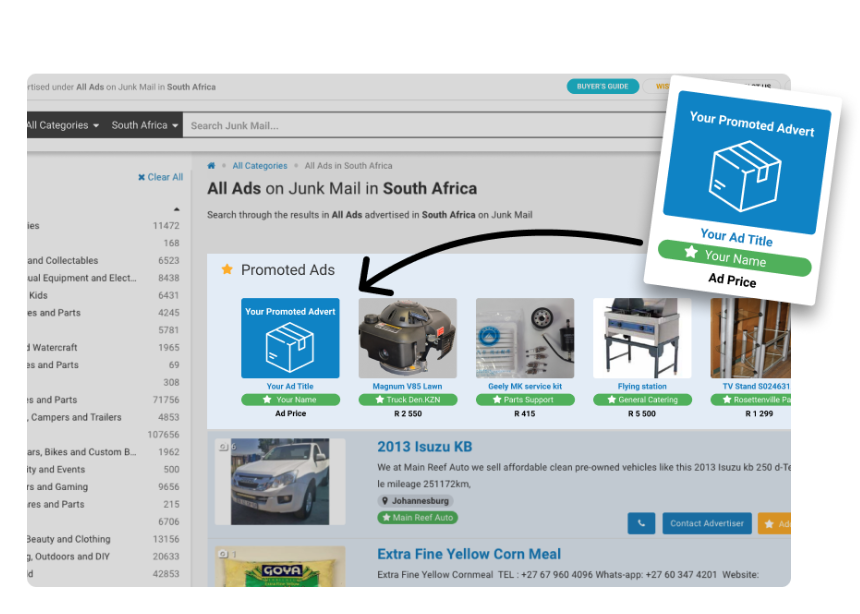
Promote your ads on the Junk Mail home page

Top Ads

Make
your listing stand out from the crowd by promoting it as part of the top ads
section. Your ad will be rotated in the top five slots above the normal search
results so that it grabs the attention of users right from the start. This
means that users are on average 19.43% more likely to take a closer look at
your products or services. Top ads are also category, region, and keyword
specific. You can select how long you want to promote your ad (a maximum of one month). When you
promote your
products in top ads, potential buyers will see what you have to offer first before
looking at other listings.

Get more exposure by promoting your advert as a top ad on Junk Mail

Gallery Ads

Feature
your listing in the gallery section on the search results page, above the top
ads section. Similar to top ads, the gallery ads are category, region, and
keyword specific and will rotate with other adverts. You can choose how long
you would want to promote
your ad for (up to one month at a time).

Get more exposure by promoting your advert as a gallery ad on Junk Mail

How to Promote Your Ads through Online Payments:

The great news is that promoting your listing is easy. In a few simple steps, you’ll be able to showcase your products and services to buyers across South Africa. You’ll need to have an advert on Junk Mail in order to promote it through online payments. If you haven’t created an ad yet, you can start by placing a new ad. Once you’ve created an ad, you can follow the steps below to promote it.

Junk Mail Advert Promotion Payment Process:

  1. Log in to your account:

    Visit Junk Mail and log in to your account.
    Junk Mail Login

  2. Choose an advert to promote:

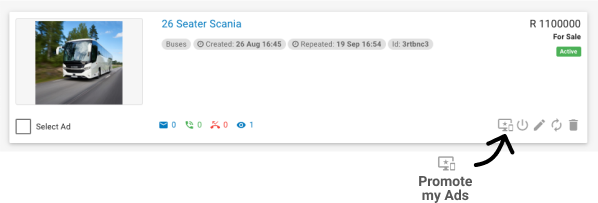
    Once you have logged in, go to the “My Ads” section and select the adverts you want to promote by clicking on the promote advert icon at the bottom of every advert.

    Please note that you can only promote adverts that have an image and have been approved by our moderation team.

    If you do not have any adverts, please visit the Ad Placement page.
    Ad Promotion Button On Adverts | Junk Mail

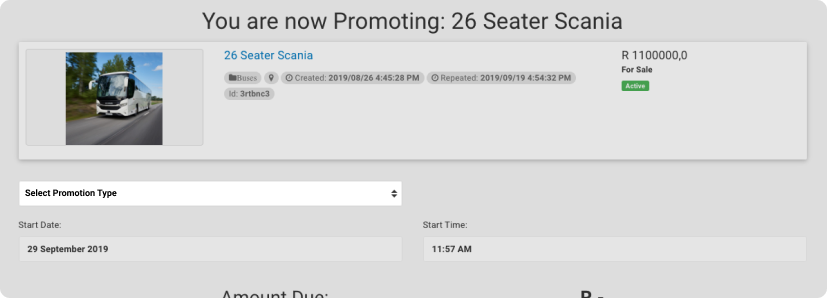
  3. Select a promotion type:

    Your options include home page promotions, top adverts, and gallery adverts.

    Select Promotion Type | Junk Mail

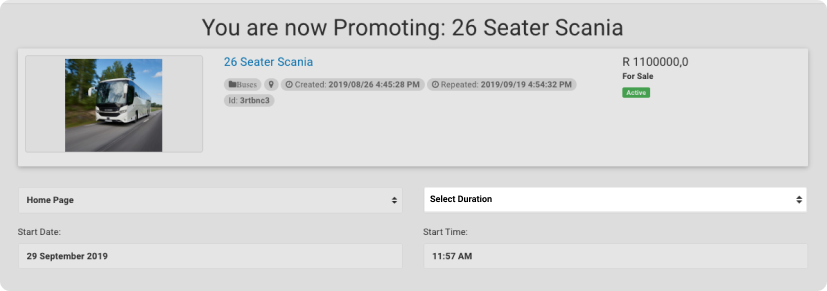
  4. Select the duration of the promotion:

    Choose how long you would like to run your promotion (up to one month at a time).

    Select Duration | Junk Mail

  5. Select a date:

    Choose when the promotion should start running.

    Select Date | Junk Mail

  6. Select a time:

    Choose what time the promotion should start running.

    Select Time | Junk Mail

  7. Proceed to Payment:

    Once you have selected all the fields, you may proceed to payment. Fill in all your payment information in the fields provided and complete the process.

    Proceed To Payment | Junk Mail

With so many easy opportunities to promote your ad on Junk Mail, it’s easy to see why this option is so popular. Visit Junk Mail and showcase your products and services today!

Gorgeous Mini-Lathe Makes the Most Out of Wood and Metal

It’s a cliche that the only machine tool that can make copies of itself is the lathe. It’s not exactly true, but it’s a useful adage in that it points out that the ability to make big round things into smaller round things, and to make unround things into round things, is a critical process in so many precision operations. That said, making a lathe primarily out of wood presents some unique challenges in the precision department

This isn’t [Uri Tuchman]’s first foray into lathe-building. Readers may recall the quirky creator’s hybrid treadle-powered and electric lathe, also primarily an exercise in woodworking. That lathe has seen plenty of use in [Uri]’s projects, turning both wood and metal stock into parts for his builds. It wasn’t really optimal for traditional metal turning, though, so Mini-Lathe 2 was undertaken. While the bed, headstock, and tailstock “castings” are wood — gorgeously hand-detailed and finished, of course — the important bits, like the linear slides for the carriage and the bearings in the headstock, are all metal. There’s a cross-slide, a quick-change tool post, and a manual lead screw for the carriage. We love the finely detailed brass handcranks, which were made on the old lathe, and all of the lovely details [Uri] always builds into his projects.

Sadly, at the end of the video below we see that the lathe suffers from a fair amount of chatter when turning brass. That’s probably not unexpected — there’s not much substitute for sheer mass whenit comes to dampening vibration. We expect that [Uri] will be making improvements to the lathe in the coming months — he’s not exactly one to leave a job unfinished.

[DainBramage] sent this tip in. Thanks!

source https://hackaday.com/2020/11/16/gorgeous-mini-lathe-makes-the-most-out-of-wood-and-metal/