A Double Shot Of Vintage Computing This Weekend

Going anywhere interesting this weekend? No, of course you aren’t. None of us are. So why not tune your computer or smartphone to the online stream of one of the virtual Vintage Computer Festivals that will be taking place between October 10th and 11th. Granted only one of them is in English, but we’ve often thought of blinky lights as something of a universal language anyway.

Vintage Computer Festival East, which normally would have happened in the Spring, has finally decided that 2020 is a wash for any in-person meetings and has decided to switch over to virtual. Interestingly, it sounds like they’ll be live streaming at least some of the exhibitor tables from the InfoAge museum in New Jersey where the physical event would have been held. So from an attendee perspective, the virtual event should be a bit closer to the real thing than if everyone had to figure out their own streaming setups from home. Presentations will run from 9:00 AM to 6:00 PM Eastern on both days.

On the other side of the globe, Vintage Computing Festival Berlin will be broadcasting their own exhibitions, workshops, and lectures. In an interesting use of the virtual format, they’ll be giving viewers an intimate look at vintage computers and technology that’s held in private collections, museums, or otherwise inaccessible storage and research facilities. Content will be streaming from 10:00 AM to 8:00 PM CEST on both days, with a musical performance overnight.

While there’s an understandable tendency to bemoan the trend of moving events online in the face of COVID-19, there are certainly situations where the format can actually bring you more content than you’d have access to otherwise. Especially when they end up being free, as is the case with both of these Festivals. We’re still eagerly awaiting the point where we can get back to attending these events in person, but we certainly aren’t complaining when so many incredible people are willing to put on these presentations without seeing a dime.

source https://hackaday.com/2020/10/08/a-double-shot-of-vintage-computing-this-weekend/

OpenFluid Warmer Aims To Get Medical Equipment Where It’s Needed

Intravenous fluids, or IV fluids, are a vital part of modern life-saving medicine. Depending on the fluids in question, they must often be stored at low temperatures, however, for delivery to a patient, it is beneficial to warm them to approximately 38 degrees to avoid causing hypothermia. To achieve this, an IV fluid warmer is used, but these are not readily available all over the world. To help rectify this shortcoming, [John Opsahl] started the OpenFluidWarmer project.

The goal of the project is to produce a safe, reliable IV fluid warmer that is also easily reproducible. Materials used must be cheap and readily available, and ideally should be easily substitutable where possible to maximise the design’s ability to be built anywhere it’s needed. The name of the project is a nod towards its open design – with the goal of the project to deliver medical equipment to those that don’t have it, there’s little benefit to keeping the design under wraps.

Development continues at a solid pace, with work to optimise the heater performance, firmware, and even the tools required for assembly all documented in the build logs. It’s a project that recalls the scramble earlier this year to create open source ventilators for COVID-19 patients. Ultimately, at the end of the day, it’s about getting medical hardware to where it’s needed most, and we applaud [John]’s efforts in this field! Video after the break.


source https://hackaday.com/2020/10/08/openfluid-warmer-aims-to-get-medical-equipment-where-its-needed/

Hackaday Passes 1,000,000 Comments

For just over sixteen years we’ve been publishing fresh hacks every day. We’ve just passed another milestone: the one millionth Hackaday comment was made just a few minutes ago.

A million of anything is impressive, but it’s not the sheer volume that’s on my mind today, but how time and again I’m gobsmacked by the insightful comments I find on these pages, and the people who put them there. We find leads for futures stories, answers to unknowns voiced in the articles, and have conversations with thousands of people whose paths we never would have crossed otherwise.

Not a week goes by that I don’t lose myself in a comment thread, usually taking me down the rabbit hole of exploring a bit of technology previously hidden to me but revealed by a few words. How many Hackaday articles were spawned by someone posting just the right link in the comment section?

Too often the people who moved the world with interesting technologies move through their careers and beyond without anyone to really tell their stories to, and those are some of the best stories from the people working with the tech on a daily basis for decades. But then we publish an article that puts a spotlight on their corner of knowledge and we get to hear how it was from their perspective. It’s so gratifying to get these moments of insight on who and what have kept humanity’s relay-race of science forward.

So thank you! Keep those comments and those stories coming!

A Little Levity for the Regular Readers

Now when you mine for ore, not every granule is a gold flake. Throughout the years the Hackaday writers have come to recognize a few recurring gripes in the comments that are always good for a chuckle. Recently, Roger Cheng turned this into a game of bingo we can all play.

We’d love to hear your favorite (positive) comments from years of reading Hackaday. Let us know in the comments below. And remember, if you don’t have something nice to say…

[Editor’s note: Elliot totally cheated. He wrote a script to pull down the number of posts continually, and post a comment when the counter hit 999,999. This is Hackaday, after all.]

source https://hackaday.com/2020/10/08/hackaday-passes-1000000-comments/

3D Printed Mini MacBook with a Raspberry Pi Heart

Do you like the sleek look of Apple’s laptops? Are you a fan of the Raspberry Pi? Have a particular affinity for hot glue and 3D printed plastic? Then you’re in luck, because this tiny “MacBook” built by serial miniaturizer [Michael Pick] features all of the above (and a good bit more) in one palm-sized package. (Video link, embedded below.)

Getting the LCD panel and Raspberry Pi 4 to fit into the slim 3D printed case took considerable coaxing. In the video after the break, you can see [Michael] strip off any unnecessary components that would stand in his way. The LCD panel had to lose its speakers and buttons, and the Pi has had its Ethernet and USB ports removed. While space was limited, he did manage to squeeze an illuminated resin-printed Apple logo into the lid of the laptop to help sell the overall look.

The bottom half of the machine has a number of really nice details, like the fan grill cut from metal hardware cloth and a functional “MagSafe” connector made from a magnetic USB cable. The keyboard PCB and membrane was liberated from a commercially available unit, all [Michael] needed to do was model in the openings for the keys. Since the keyboard already came with its own little trackpad, the lower one is just there for looks.

Speaking of which, to really drive home the Apple aesthetic, [Michael] made the bold move of covering up all the screws with body filler after assembly. It’s not a technique we’d necessarily recommend, but gluing it shut would probably have made it even harder to get back into down the line.

We’ve previously seen [Michael] create a miniature rendition of the iMac and an RGB LED equipped “gaming” computer using many of the same parts and techniques. He’ll have to start branching off into less common machines to replicate soon, which reminds us that we’re about due for another tiny Cray X-MP.

source https://hackaday.com/2020/10/08/3d-printed-mini-macbook-with-a-raspberry-pi-heart/

3D Printed Mini MacBook with a Raspberry Pi Heart

Do you like the sleek look of Apple’s laptops? Are you a fan of the Raspberry Pi? Have a particular affinity for hot glue and 3D printed plastic? Then you’re in luck, because this tiny “MacBook” built by serial miniaturizer [Michael Pick] features all of the above (and a good bit more) in one palm-sized package. (Video link, embedded below.)

Getting the LCD panel and Raspberry Pi 4 to fit into the slim 3D printed case took considerable coaxing. In the video after the break, you can see [Michael] strip off any unnecessary components that would stand in his way. The LCD panel had to lose its speakers and buttons, and the Pi has had its Ethernet and USB ports removed. While space was limited, he did manage to squeeze an illuminated resin-printed Apple logo into the lid of the laptop to help sell the overall look.

The bottom half of the machine has a number of really nice details, like the fan grill cut from metal hardware cloth and a functional “MagSafe” connector made from a magnetic USB cable. The keyboard PCB and membrane was liberated from a commercially available unit, all [Michael] needed to do was model in the openings for the keys. Since the keyboard already came with its own little trackpad, the lower one is just there for looks.

Speaking of which, to really drive home the Apple aesthetic, [Michael] made the bold move of covering up all the screws with body filler after assembly. It’s not a technique we’d necessarily recommend, but gluing it shut would probably have made it even harder to get back into down the line.

We’ve previously seen [Michael] create a miniature rendition of the iMac and an RGB LED equipped “gaming” computer using many of the same parts and techniques. He’ll have to start branching off into less common machines to replicate soon, which reminds us that we’re about due for another tiny Cray X-MP.

source https://hackaday.com/2020/10/08/3d-printed-mini-macbook-with-a-raspberry-pi-heart/

3D Printed SCARA Arm With 3D Printer Components

One of the side effects of the rise of 3D printers has been the increased availability and low cost of 3D printer components, which are use fill for range of applications. [How To Mechatronics] capitalized on this and built a SCARA robot arm using 3D-printed parts and common 3D-printer components.

The basic SCARA mechanism is a two-link arm, similar to a human arm. The end of the second joint can move through the XY-plane by rotating at the base and elbow of the mechanism. [How To Mechatronics] added Z-motion by moving the base of the first arm on four vertical linear rods with a lead screw. A combination of thrust bearings and ball bearings allow for smooth rotation of each of the joints, which are belt-driven with NEMA17 stepper motors. Each joint has a microswitch at a certain position in its rotation to give it a home position. The jaws of the gripper slide on two parallel linear rods, and are actuated with a servo. For controlling the motors, an Arduino Uno and CNC stepper shield was used.

The arm is operated from a computer with a GUI written in Processing, which sends instructions to the Arduino over serial. The GUI allows for both direct forward kinematic control of the joints, and inverse kinematic control,  which will automatically move the gripper to a specified coordinate. The GUI can also save positions, and then string them together to do complete tasks autonomously.

The base joint is a bit wobbly due to the weight of the rest of the arm, but this could be fixed by using a frame to support it at the top as well. We really like the fact that commonly available components were used, and the link in the first paragraph has detailed instructions and source files for building your own. If the remaining backlash can be solved, it could be a decent light duty CNC platform, especially with the small footprint and large travel area. This is very similar to a wooden SCARA robots we’ve seen before, except that one put the Z-axis at the gripper. We’ve also seen a few 3D printers and pen plotters that used this layout.

source https://hackaday.com/2020/10/08/3d-printed-scara-arm-with-3d-printer-components/

An Impressive Modular Mold Box

Prolific maker and product designer [Eric Strebel] has years of experience making reusable mold boxes for silicone and resin casting. He’s always used 3/4″ plywood before, but it comes with some problems such as inaccuracy, screws that eventually slip out, and no room at all for expansion. Now [Eric] has decided to devise a modular mold box system that’s so awesome, it’s even stack-able. Check out the design and build process in the video after the break.

[Eric] took advantage of additive manufacturing and made fancy trapezoidal walls with recessed bits that allow for the magic that this modular system hinges on — a handful of M6 socket cap screws and matching nuts for tensioning. Once the prints were ready, [Eric] pounded the nuts captive into the walls and marked fill lines every 10mm. As usual, [Eric]’s video comes with bonus nuggets of knowledge, like his use of a simple card scraper to clean up prints, smooth the sides, and chamfer all the edges.

If you want to mold stuff like concrete and plaster, you may be better off using flexible filament.

source https://hackaday.com/2020/10/07/an-impressive-modular-mold-box/

Developing an Open Source Electronics Trainer

It’s a safe bet that most Hackaday reader’s interest in electronics started at a young age, and that their early forays into the world of hardware hacking likely involved some form of “playground” kit. As long as you didn’t lose any of the components, these kits promised the user that hundreds of possible projects were just a few jumper wires away. Extra points awarded for when you decide to toss away the manual and fly solo.

While there’s still no shortage of such products on the market, [Josh Kittle] felt the concept could do with a freshening up. His open hardware “Microcontroller Trainer” harkens back to those old multi-kits, but adds in the sort of high-tech gadgetry that makes the modern DIY world go round.

It’s still got the traditional layout: a center mounted breadboard surrounded by an array of LEDs, a handful of buttons, and a pair of potentiometers. But there’s also sockets for the Raspberry Pi, ESP8266, ESP32, and Arduino. Plus a few of their most popular friends to keep them company: a .96″ OLED, 2.4″ Touch TFT, and a BC05 Bluetooth module.

Originally [Josh] created this design to help clean up his own workspace, figuring he could just put his most used components on a single compact board. But as you might expect, others expressed interest in the concept. Now he’s producing them as kits, and even working his way towards a third hardware revision that adds features such as an integrated 18650 battery for portable use.

While electronics kits that have you build a functional device are a great way to learn the ropes, we’re always glad to see fresh takes on the classic electronic “playground” concept.

source https://hackaday.com/2020/10/07/developing-an-open-source-electronics-trainer/

Developing an Open Source Electronics Trainer

It’s a safe bet that most Hackaday reader’s interest in electronics started at a young age, and that their early forays into the world of hardware hacking likely involved some form of “playground” kit. As long as you didn’t lose any of the components, these kits promised the user that hundreds of possible projects were just a few jumper wires away. Extra points awarded for when you decide to toss away the manual and fly solo.

While there’s still no shortage of such products on the market, [Josh Kittle] felt the concept could do with a freshening up. His open hardware “Microcontroller Trainer” harkens back to those old multi-kits, but adds in the sort of high-tech gadgetry that makes the modern DIY world go round.

It’s still got the traditional layout: a center mounted breadboard surrounded by an array of LEDs, a handful of buttons, and a pair of potentiometers. But there’s also sockets for the Raspberry Pi, ESP8266, ESP32, and Arduino. Plus a few of their most popular friends to keep them company: a .96″ OLED, 2.4″ Touch TFT, and a BC05 Bluetooth module.

Originally [Josh] created this design to help clean up his own workspace, figuring he could just put his most used components on a single compact board. But as you might expect, others expressed interest in the concept. Now he’s producing them as kits, and even working his way towards a third hardware revision that adds features such as an integrated 18650 battery for portable use.

While electronics kits that have you build a functional device are a great way to learn the ropes, we’re always glad to see fresh takes on the classic electronic “playground” concept.

source https://hackaday.com/2020/10/07/developing-an-open-source-electronics-trainer/

Developing an Open Source Electronics Trainer

It’s a safe bet that most Hackaday reader’s interest in electronics started at a young age, and that their early forays into the world of hardware hacking likely involved some form of “playground” kit. As long as you didn’t lose any of the components, these kits promised the user that hundreds of possible projects were just a few jumper wires away. Extra points awarded for when you decide to toss away the manual and fly solo.

While there’s still no shortage of such products on the market, [Josh Kittle] felt the concept could do with a freshening up. His open hardware “Microcontroller Trainer” harkens back to those old multi-kits, but adds in the sort of high-tech gadgetry that makes the modern DIY world go round.

It’s still got the traditional layout: a center mounted breadboard surrounded by an array of LEDs, a handful of buttons, and a pair of potentiometers. But there’s also sockets for the Raspberry Pi, ESP8266, ESP32, and Arduino. Plus a few of their most popular friends to keep them company: a .96″ OLED, 2.4″ Touch TFT, and a BC05 Bluetooth module.

Originally [Josh] created this design to help clean up his own workspace, figuring he could just put his most used components on a single compact board. But as you might expect, others expressed interest in the concept. Now he’s producing them as kits, and even working his way towards a third hardware revision that adds features such as an integrated 18650 battery for portable use.

While electronics kits that have you build a functional device are a great way to learn the ropes, we’re always glad to see fresh takes on the classic electronic “playground” concept.

source https://hackaday.com/2020/10/07/developing-an-open-source-electronics-trainer/

Portable Printer Is A Top Notch High School Project

When we think 3D printers, we most commonly think of the fused-deposition modelling type that squirts molten plastic out of a hot nozzle. Typically, these are tabletop units designed to be set up and used in a workshop environment. [BingoFishy] dared to think outside the box however, and whipped up a compact, portable 3D printer for working out on the road.

The printer is almost entirely self-contained, running an OctoPrint controller with built-in hotspot which allows print files to be sent to the unit over a smartphone. The motion platform is built out of DVD drive stepper motors and rails, with dual motors used on the Z-axis to ensure there’s enough torque to move smoothly. Power is courtesy of 26650 cells, in a 2S3P configuration, which provides 3 hours of runtime. While this might not sound like much, for a compact printer with a small build volume, it’s a useful period of time to work with.

While such a build will never replace a solid desktop unit with a large build volume, it nevertheless could come in handy for producing small parts out in the field. We can imagine a college robotics team toting one of these to a regional contest, where it could prove invaluable for whipping up some bushings after something breaks unexpectedly. The finish of the project is great, too, though we’ve seen great results from less-polished builds in the past as well. Video after the break.

For my high school summer project, I designed and built the world’s most portable 3D printer from 3Dprinting

source https://hackaday.com/2020/10/07/portable-printer-is-a-top-notch-high-school-project/

Raspberry Pi Crazy Guitar Rig Turns You Into a Hard ‘N Heavy One-Man Band

It’s a common problem: you’re at a party, there’s a guitar, and your plan to impress everyone with your Wonderwall playing skills is thwarted by the way too loud overall noise level. Well, [Muiota betarho] won’t have that issue ever again, and is going to steal the show anywhere he goes from now on with his Crazy Guitar Rig 2.0, an acoustic guitar turned electric — and so much more — that he shows off in three-part video series on his YouTube channel. For the impatient, here’s video 1, video 2, and video 3, but you’ll also find them embedded after the break.

To start off the series, [Muiota betarho] adds an electric guitar pickup, a set of speakers, and an amplifier board along with a battery pack into the body of a cheap acoustic guitar. He then dismantles a Zoom MS-50G multi-effect pedal and re-assembles it back into the guitar itself with a 3D-printed cover. Combining a guitar, effect pedal, amp and speaker into one standalone instrument would make this already an awesome project as it is, but this is only the beginning.

Touch screen and controls closeup
RPi touch screen running SunVox, plenty of buttons, and integrated multi-effect pedal on the left

So, time to add a Raspberry Pi running SunVox next, and throw in a touch screen to control it on the fly. SunVox itself is a free, but unfortunately not open source, cross-platform synthesizer and tracker that [Muiota betarho] uses to add drum tracks and some extra instruments and effects. He takes it even further in the final part when he hooks SunVox up to the Raspberry Pi’s GPIO pins. This allows him to automate things like switching effects on the Zoom pedal, but also provides I/O connection for external devices like a foot switch, or an entire light show to accompany his playing.

Of course, adding a magnetic pickup to an acoustic guitar, or generally electrifying acoustic instruments like a drum kit for example, isn’t new. Neither is using a single-board computer as effect pedal or as an amp in your pocket. Having it all integrated into one single device on the other hand rightfully earns this guitar its Crazy Guitar Rig name.

(Thanks for the tip, [alex]!)


source https://hackaday.com/2020/10/07/raspberry-pi-crazy-guitar-rig-turns-you-into-a-hard-n-heavy-one-man-band/

Keep Your YouTube Habits To Yourself With FreeTube

If your usual YouTube viewing selection covers a wild and random variety of music, tech subjects, cooking, history, and anything in-between, you will sooner or later be baffled by some of the “Recommended for you” videos showing up. When it features a ten-hour mix of Soviet propaganda choir music, you might start wondering what a world taken over by an artificial intelligence might actually look like, and realize that your browser’s incognito / private mode really isn’t just for shopping birthday presents in secret. Things get a bit tricky if you actually enjoy or even rely on the whole subscribing-to-channels concept though, which is naturally difficult to bring in line with privacy in today’s world of user-data-driven business models.

Entering the conversation: the FreeTube project, a cross-platform application whose mission is to regain privacy and put the control of one’s data back into the user’s hands. Bypassing YouTube and its player, the watch history and subscriptions — which are still possible — are kept only locally on your own computer, and you can import either of them from YouTube and export them to use within FreeTube on another device (or back to YouTube). Even better, it won’t load a video’s comments without explicitly telling it to, and of course it keeps out the ads as well.

Originally, the Invidious API was used to get the content, and is still supported as fallback option, but FreeTube comes with its own extractor API nowadays. All source code is available from the project’s GitHub repository, along with pre-built packages for Linux (including ARM), Windows, and Mac. The application itself is created using Electron, which might raise a few eyebrows as it packs an entire browser rendering engine and essentially just disguises a website as standalone application. But as the FAQ addresses, this allows easy cross-platform support and helps the project, which would have otherwise been Linux-only, to reach as many people as possible. That’s a valid point in our book.

Keep in mind though, FreeTube is only a player, and more of a wrapper around YouTube itself, so YouTube will still see your IP and interaction with the service. If you want to be fully anonymous, this isn’t a silver bullet and will require additional steps like using a VPN. Unlike other services that you could replace with a local alternative to avoid tracking and profiling, content services are just a bit trickier if you want to actually have a useful selection. So this is a great compromise that also just works out of the box for everyone regardless of their technical background. Let’s just hope it won’t break too much next time some API changes.

source https://hackaday.com/2020/10/07/keep-your-youtube-habits-to-yourself-with-freetube/

Hacking a Netgear Router

Have you ever wanted to watch someone reverse engineer a piece of hardware and pick up some tips? You can’t be there while [Jeremy] tears open a Netgear N300 router, but you can see his process step by step in some presentation charts, and you’ll get a few ideas for the next time you want to do something like this.

The first part of the presentation might be a little basic for most Hackaday readers, but presumably, the intended audience might not know much about soldering or multimeters. But we enjoyed the methodology used to work out the UART pins on the board. We would have read the baud rate with the scope, which [Jeremy] does, but he also mentions a script to work it out and create a minicom profile that looked interesting.

The router runs OpenWRT, so once you have access to the UART, you are in as root. Getting into the bootloader allowed access to the firmware. At first, [Jeremy] though he found a JTAG interface, but it didn’t work. He suspects the JTAG is disabled, but shows how he would dump the firmware from another device that does have JTAG. He also shows how you could dump the flash chip directly. Fair warning: it required removing the device from the PCB.

Once you have the firmware, there are tools to extract the root file system and even emulate the running system. Then you no longer have a hardware problem, you have a software problem, and that’s where [Jeremy] leaves it.

We were impressed with the completeness of the presentation and how each step provided multiple methods. Sometimes, as you can see, one method doesn’t work and you need to try an alternative.

You can hack other types of devices using similar techniques. Even games.

source https://hackaday.com/2020/10/07/hacking-a-netgear-router/

Toddler Arcade Cabinet is a Stand-Up Job

A few years ago, [Mark] built an arcade cabinet into a low table. But once his new gaming buddy [Grayson] came along and started crawling, it wasn’t practical to have a low, pointy table around. Trouble is, [Mark] had already given [Grayson] his first taste with a Thomas the Tank Engine game. Since the kid was hooked, [Mark] rebuilt the table arcade into a toddler-sized arcade cabinet that they can both use.

The brain — a Raspberry Pi running RetroPie — should be familiar to most of our readers. [Mark] found the perfect crappy old monitor when they were upgrading at his office, and found some nice speakers to give it good bass. We love the details like the chrome edging, and especially the kick bar/footrest along the bottom. It can be difficult to decide how to decorate a multi-arcade cabinet, so [Mark] went the sticker bomb route with 700 of them randomly distributed and safe from toddler wear and tear under five coats of clear wood varnish.

We think this looks great, especially since [Mark] doesn’t have a workshop and cut all that MDF by hand on a jigsaw in the kitchen. Check out the happy train engineer after the break.

Maybe once [Grayson] is old enough to break tablets, [Mark] can build a gaming tab-inet out of it. Just sayin’.

source https://hackaday.com/2020/10/06/toddler-arcade-cabinet-is-a-stand-up-job/

Getting Started With Geometric Algebra For Robotics, Computer Vision And More

[Hugo Hadfield] wrote to let us know about an intriguing series of talks that took place in February of this year at GAME2020, on the many applications of geometric algebra. The video playlist of these talks can be found here along with the first video embedded after the break. For those of us who did not take advanced algebra during university, one can picture geometric algebra (GA) as an extension of vector algebra, adding more algebraic structures.

The essential difference is that GA adds a new vectors product, called the ‘geometric product’. The Cliff’s Notes version is that this is very useful for doing for example transformations, like in 3D spaces. For a quick algebraic introduction to GA for those familiar with vector algebra, the associated biVector website is helpful, from where one can also find additional information, software and other resources on getting started with GA.

These talks will take the viewer through the use of GA with robot kinematics (co-presented by [Hugo]), in astrophysics and AI. Definitely worth a watch, even algebra isn’t one’s strongest points.

source https://hackaday.com/2020/10/06/getting-started-with-geometric-algebra-for-robotics-computer-vision-and-more/

Making a Halloween Costume Fit For 2020

All across the country, parents are wondering what to do about the upcoming Trick Or Treat season. Measures such as social distancing, contact free treats, or simply doing it at home are all being weighed as a balance of fun and safety. [BuildXYZ] has decided to lean into the challenges this year and incorporate a mask as part of the costume for his boys.

It started with a 3d printed mask, printed in two halves, and sealed with silicon caulk and N95 filter material in the inlet and outlet holes on the sides. The real magic of the mask is the small OLED screen mounted to the front that works along with a small electret microphone inside the mask. By sampling the microphone and applying a rolling average, the Arduino Nano determines if the mouth drawn on the display should be open or closed. A small battery pack on a belt clip (with a button to flash “Trick or Treat” on the screen) powers the whole setup and can be easily hidden under a cape or costume.

This isn’t the first hack we’ve seen for Halloween this year, such as this socially distant candy slide. We have a feeling that there will be many more as the month rolls on and people start to apply their ingenuity to the season.

source https://hackaday.com/2020/10/06/making-a-halloween-costume-fit-for-2020/

Making a Modern Version of a Steam Engine from Antiquity

Imagine traveling back in time about 2,200 years, to when nothing moves faster than the speed at which muscle or wind can move it. Think about how mind-shattering it would have been to see something like Hero’s Engine, the first known example of a steam turbine. To see a sphere whizzing about trailing plumes of steam while flames licked around it would likely have been a nearly mystical experience.

Of course we can’t go back in time like that, but seeing a modern replica of Hero’s Engine built and tested probably isn’t to far from such an experience. The engine, also known as an aeolopile, was made by the crew over at [Make It Extreme], whose metalworking videos are always a treat to watch. The rotor of the engine, which is fabricated from a pair of hemispherical bowls welded together, is supported by pipes penetrating the lid of a large kettle. [Make It Extreme] took great pains to make the engine safe, with relief valves and a pressure gauge that the original couldn’t have included. The aeolopile has a great look and bears a strong resemblance to descriptions of the device that may or may not have actually been invented by Greek mathemetician [Heron of Alexandria], and as the video below shows, when it spins up it puts on a great show.

One can’t help but wonder how something like this was invented without someone — anyone — taking the next logical step. That it was treated only as a curiosity and didn’t kick off the industrial revolution two millennia early boggles the mind. And while we’ve seen far, far simpler versions of Hero’s Engine before, this one really takes the cake on metalworking prowess.

source https://hackaday.com/2020/10/06/making-a-modern-version-of-a-steam-engine-from-antiquity/

Scratch-Built XY Table Gets the Job Done

Unless you have one large pile of cash to burn through, properly equipping a workshop can take years of burning through little piles of cash. Whether to save a bit of cash or simply for the challenge, [Workshop from Scratch] is doing exactly what his channel name suggests, and his latest project is a XY table. (Video, embedded below.)

A XY table, or cross table, allows a workpiece to be translated in two dimensions, usually on a drill press or milling machine. On a drill press they make repetitive task like drilling a series of holes simpler and quicker. [Workshop from Scratch] built most of the frame with steel flat bar, and the moving parts run on ground steel rods with linear bearings. Lead screws with hand wheels are used to translate the table.

A machine like this requires the opposing plates of each table to be perfectly aligned, which [Workshop from Scratch] achieved by spot welding the matching plates together and drilling them in one operation. He also added T-slot top surface, created by welding wide flat bar on top of narrower flat bar.

With the lack of dials, it doesn’t look like it’s meant for precision work, but we would still be interested to know how repeatable the lead screw positioning is. Regardless, it’s still a useful addition to the shop.

[Workshop from Scratch] is building a rather impressive collection of DIY tools, including a magnetic vise (that he already used with the XY table), magnetic drill press and a hydraulic lift table. We look forward to seeing what’s next on the list.

source https://hackaday.com/2020/10/06/scratch-built-xy-table-gets-the-job-done/

Hacker has Robot Give Yubikey the Finger

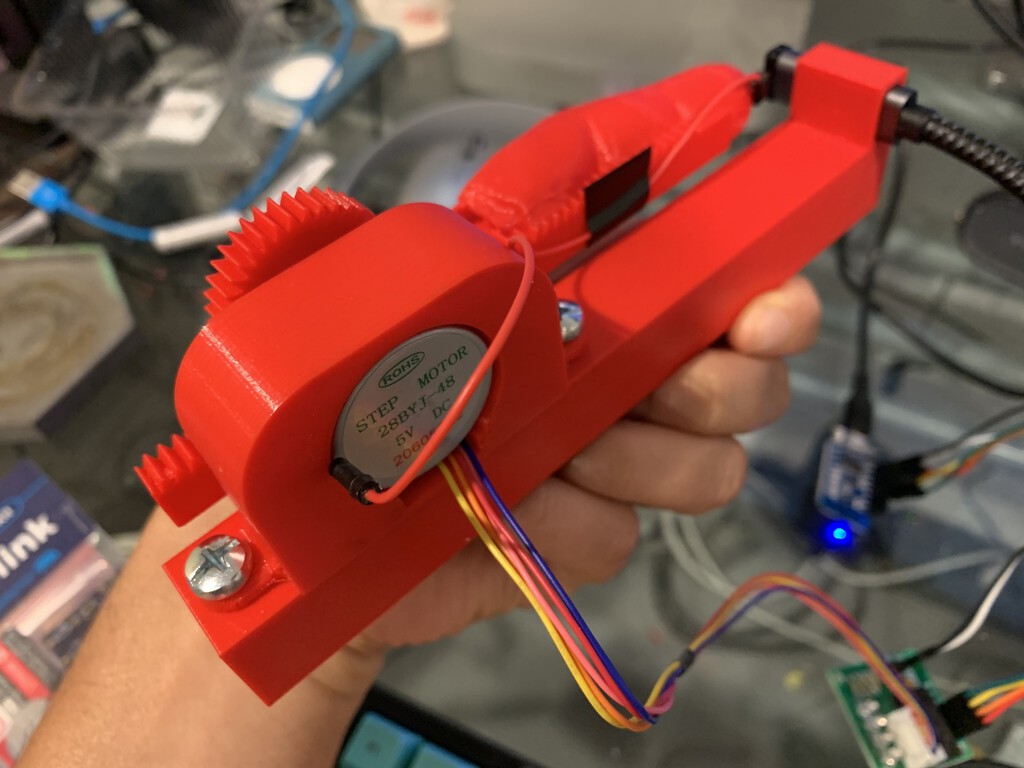
[Bertrand Fan] is not a fan of the tiny, hard-to-actuate button on the average Yubikey. Before all that is 2020 occurred, [Bert] had the little 2FA nano-donglette plugged into a spare USB port on the side of their laptop so that it was always available wherever the laptop traveled. Now that working from home is the norm, [Bert] has the laptop off to the side, far out of reach.

A USB-C extension cable certainly made it more accessible, but did nothing for the actuation fail rate of the tiny button. Fed up by inconvenience and looking for a lockdown project, [Bert] decided to make a button-pressing robot finger that’s driven by a spare key on their groovy TKL keyboard.

It runs on a Wemos D1 mini and uses a small stepper motor to push a 3D-printed finger along a rack-and-pinion actuator. Since the Yubikey requires capacitive touch, [Bert] added a screw to the finger tip that’s wired to ground. Now all [Bert] has to do is press a decidedly cooler key to make the finger press the button for him. Check out a brief demo after the break.

If this security flaw makes you uncomfortable, perhaps this 2FA launch console is more to your liking. And as we saw recently, if you don’t like the cost of Yubikeys, you can roll your own 2FA device with a blue pill.

source https://hackaday.com/2020/10/06/hacker-has-robot-give-yubikey-the-finger/

Hacker has Robot Give Yubikey the Finger

[Bertrand Fan] is not a fan of the tiny, hard-to-actuate button on the average Yubikey. Before all that is 2020 occurred, [Bert] had the little 2FA nano-donglette plugged into a spare USB port on the side of their laptop so that it was always available wherever the laptop traveled. Now that working from home is the norm, [Bert] has the laptop off to the side, far out of reach.

A USB-C extension cable certainly made it more accessible, but did nothing for the actuation fail rate of the tiny button. Fed up by inconvenience and looking for a lockdown project, [Bert] decided to make a button-pressing robot finger that’s driven by a spare key on their groovy TKL keyboard.

It runs on a Wemos D1 mini and uses a small stepper motor to push a 3D-printed finger along a rack-and-pinion actuator. Since the Yubikey requires capacitive touch, [Bert] added a screw to the finger tip that’s wired to ground. Now all [Bert] has to do is press a decidedly cooler key to make the finger press the button for him. Check out a brief demo after the break.

If this security flaw makes you uncomfortable, perhaps this 2FA launch console is more to your liking. And as we saw recently, if you don’t like the cost of Yubikeys, you can roll your own 2FA device with a blue pill.

source https://hackaday.com/2020/10/06/hacker-has-robot-give-yubikey-the-finger/

Hacker has Robot Give Yubikey the Finger

[Bertrand Fan] is not a fan of the tiny, hard-to-actuate button on the average Yubikey. Before all that is 2020 occurred, [Bert] had the little 2FA nano-donglette plugged into a spare USB port on the side of their laptop so that it was always available wherever the laptop traveled. Now that working from home is the norm, [Bert] has the laptop off to the side, far out of reach.

A USB-C extension cable certainly made it more accessible, but did nothing for the actuation fail rate of the tiny button. Fed up by inconvenience and looking for a lockdown project, [Bert] decided to make a button-pressing robot finger that’s driven by a spare key on their groovy TKL keyboard.

It runs on a Wemos D1 mini and uses a small stepper motor to push a 3D-printed finger along a rack-and-pinion actuator. Since the Yubikey requires capacitive touch, [Bert] added a screw to the finger tip that’s wired to ground. Now all [Bert] has to do is press a decidedly cooler key to make the finger press the button for him. Check out a brief demo after the break.

If this security flaw makes you uncomfortable, perhaps this 2FA launch console is more to your liking. And as we saw recently, if you don’t like the cost of Yubikeys, you can roll your own 2FA device with a blue pill.

source https://hackaday.com/2020/10/06/hacker-has-robot-give-yubikey-the-finger/

Clock Is Not Readable By Humans

Not every build needs to be immediately useful or revolutionary. Plenty of builds are just for fun, for education, or even purposefully useless but still challenging. This clock, for example, might fit into all three categories. It’s a clock that displays time through a QR code, making it completely inscrutable unless you have a device which likely has its own readable clock on it already.

The QR Code clock comes to us from [Aaron] and is based on the now-ubiquitous ESP32 WiFi chip. The ESP32 is connected to a 64×64 LED matrix which is updated every second with a code for the current time. With single-second resolution that means that even with a method for reading a QR code by hand, like you sometimes can with barcodes, there’s no way to read it without a smartphone since it changes so rapidly.

Of course [Aaron] recognizes the flaw in his design in his video in which he notes tongue-in-cheek that with this clock you would never have to look at a smartphone again, since the clock is right there on the wall. We appreciate the humor and also that [Aaron] has made all of his source code available in case you would like to use this as an example project for using QR codes for more useful purposes. For now, though, we’ll just forward you along to some other useless machines.

Thanks to [willmore] for the tip!

source https://hackaday.com/2020/10/06/clock-is-not-readable-by-humans/

Baseball Cap Mouse Provides A Look-And-Click Interface

Once upon a time, the computer mouse didn’t exist. Early computers used a variety of other input devices, from the typical keyboard to more esoteric options such as joysticks or light pens. While the mouse as we know it dominates all, it doesn’t mean other tools can’t find their place. One such device is this hat mouse, from [Jacek Fedorynski].

The mouse consists of an Adafruit Feather nRF52840 Sense, mounted upon a basic baseball cap. The development board packs in a 9 degree-of-freedom motion sensor package featuring the ST LSM6DS33 acceleromater/gyro and LIS3MDL magnetometer. Through a robust sensor fusion algorithm, this enables the board to measure the orientation and motion of the wearer’s head with a great degree of finesse. This allows the user to look at different parts of the screen to move the mouse cursor, with the system working in an absolute rather than relative fashion. Commands are sent to the attached PC with the Feather’s built-in Bluetooth, avoiding the need for dangly cables running down the user’s neck. Files are available on Github for those eager to spin up their own.

Combined with some built-in accessibility aids in Windows, the setup allows the user to move the mouse well, with foot switches used to activate the left and right mouse buttons. For those who find using a traditional mouse difficult, this could be a great tool for better productivity. Of course, if you wish to learn more, it pays to take a look back at the very earliest days of mouse technology. Video after the break.

source https://hackaday.com/2020/10/05/baseball-cap-mouse-provides-a-look-and-click-interface/

Graphene Generates a Little Power

We never know exactly what to make of university press releases, as we see plenty of them with breathless claims of new batteries or supermaterials, but then we don’t see much else. Sometimes, the claims in the press release don’t hold up in the paper, while other times the claims seem to be impractical for use in real life. We aren’t quite sure what to make of a press release from the University of Arkansas claiming they can draw current from a sheet of freestanding graphene purely from its temperature fluctuations.

The press release seems to claim that this is a breakthrough leading to “clean, limitless power.” But if you look at the actual paper, normal room temperature is causing tiny displacements in the graphene sheet as in Brownian motion. A scanning tunneling microscope with two diodes can detect current flowing even once the system reaches thermal equilibrium. Keep in mind, though, that this in the presence of a bias voltage and we are talking about nanometer-scale displacements and 20 pA of current. You can see a simple video from the university showing a block diagram of the setup.

It seems that the news here is that current is flowing in a thermally stable system without violating the second law of thermodynamics. The innovation, apparently, is the idea of using two diodes to harvest both positive and negative fluctuations. Not much power, though. The press release talks about millions of these tiny circuits could serve as a low-power battery replacement.

There are still some pretty mysterious comments in the press release about the change in resistance of the diodes adds “an extra factor to the power,” and that “switch-like behavior of the diodes actually amplifies the power delivered…” We will have to wade through the math in the paper to see if we can figure out what any of that means.

We hear about exciting new things graphene will do all the time. We just don’t see it much in the wild, at least not yet. All this talk of graphene and diodes made us remember that you can create PN junctions in graphene.

source https://hackaday.com/2020/10/05/graphene-generates-a-little-power/