Lowering the Bar for Exam Software Security

Most standardized tests have a fee: the SAT costs $50, the GRE costs $200, and the NY Bar Exam costs $250. This year, the bar exam came at a much larger cost for recent law school graduates — their privacy.

Many in-person events have had to find ways to move to the internet this year, and exams are no exception. We’d like to think that online exams shouldn’t be a big deal. It’s 2020. We have a pretty good grasp on how security and privacy should work, and it shouldn’t be too hard to implement sensible anti-cheating features.

It shouldn’t be a big deal, but for one software firm, it really is.

The NY State Board of Law Examiners (NY BOLE), along with several other state exam boards, chose to administer this year’s bar exam via ExamSoft’s Examplify. If you’ve missed out on the Examplify Saga, following the Diploma Privilege for New York account on Twitter will get you caught up pretty quickly. Essentially, according to its users, Examplify is an unmitigated disaster. Let’s start with something that should have been settled twenty years ago.

Did They Just Email Me My Password?

Passwords are stored in plaintext. Seriously- how is this still a thing? Users report being able to call customer support and retrieve not only their usernames but their passwords as well. Others had their passwords emailed to them. If a customer support rep can read your password to you over the phone, you’ve got a real problem. It would only take a bit of social engineering for somebody to get into your account, and if you reuse passwords, then your unrelated accounts can be easily compromised. (Please, use a password manager!)

It turns out that you don’t even need to log into somebody’s account to scope out their personal info. Users uploaded government IDs to their accounts, which were promptly sent to a server and stored accessible publicly via a random URL. It’s worth noting that it seems like more of a shortcoming on the part of the NY BOLE and not ExamSoft. Thankfully, once users reported the problem, the BOLE fixed it — though the fact that it was a issue in the first place is ridiculous. More astonishingly, the NY BOLE isn’t the only exam board that had this sort of problem. The DC Bar published  users’ background check documents, containing SSNs and employment histories, in addition to their IDs.

12345? Amazing, I have the same combination on my luggage!
Courtesy of @milkbar$100

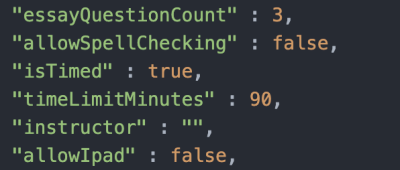
There is a set of config files that comes bundled with each downloaded exam, and those files are, well, just plaintext. Puzzlingly, the parameters in these files, such as “isTimed” and “allowSpellChecking,” seem to have little effect in the software. Examsoft claims that modifying them will corrupt and invalidate the exam, but that doesn’t appear to be the case either.

The software also downloads the exam days before the test starts, leaving the files vulnerable to being poked and prodded by the curious-minded. These files are at least encrypted with an 18-character key, according to ExamSoft. On the exam day, the key is made public and test-takers can use it to decrypt the exam files. This isn’t the best strategy, especially when the Michigan bar exam, rather than employing an 18-character key as ExamSoft promised, used the passwords green56, purple34, and blue78 for their exam files. These horribly weak passwords are probably vulnerable to a brute-force attack.

One of Examplify’s main selling points is its ability to lock down a computer. You wouldn’t want a test-taker googling anything, or glancing at a PDF of the textbook on a second monitor.  While some of the more obvious ways to cheat are blocked here, users have found a loophole that ExamSoft unsurprisingly overlooked. Mac users may be familiar with the Universal Clipboard, a feature which, when enabled, allows a user to copy something on one device and paste it on another linked to the same account. Guess what — Examplify doesn’t disable it. This is a fun loophole, since a test-taker could copy the question text, and a friend could paste it onto an iPad and copy the relevant section in the textbook for the test-taker to read. It’s unclear as to whether or not this has been fixed yet, but as of September 28th the workaround was still usable.

Users found other creative ways to get around the software lockout as well. It’s been reported that if the computer gets rebooted mid-exam, the user gets ~30s of unrestricted access to their files, as well as the internet. One user was even able to reset the timer and start the exam over by rebooting their computer.

As you can imagine, it’s not just the security that’s awful. Users report a slew of interface problems, from software freezing mid-exam to the facial tracking software (which determines whether you’ve cheated by looking away from your screen) not being able to recognize dark-skinned people.

Now What?

It’s tough to dive into this sea of shortcomings without registering for the bar exam, however we were able to find a link to the Examplify installer (Windows, macOS) hosted on ExamSoft’s servers and, of course, unprotected. Go nuts.

It’s impressive that with modern advances in technology, we’ve found ways to make exams more stressful than ever before. It may be worth considering doing away with the bar exam and other standardized tests entirely. For the time being these tests are still a reality and it goes without saying, but we’ll say it anyway: even though ExamSoft and the NY BOLE seem to have made it easy to cheat, please don’t do that. Amid all of this failure, they’ve at least succeeded in one way. They’ve given us excellent examples of how not to do, well, pretty much everything.

Thanks to [Jonathan Merrin] for the tip!

source https://hackaday.com/2020/10/14/lowering-the-bar-for-exam-software-security/
Tiny Mario Clone On A Tiny Processor

We’ve become used to seeing retro games running on commodity microcontrollers where once they would have required the bleeding-edge console hardware of their day. [Duncan]’s Mario clone takes the genre a little further, using not a processor with plenty of pins for peripherals, but instead the humble ATtiny85. Its eight pins drive two OLED displays, and accept input from the buttons of a cheap Nintendo-like controller.

The write-up is split between software and hardware sections, with all the software itself available from a GitHub repository. He’s bit-banging the i2C for the displays for an impressive turn of speed, and the ATtiny’s lack of pins is addressed by clever use of resistive dividers to present a different voltage for each button pressed. With a truth table of voltages he’s even able to detect multiple simultaneous button presses. Music is achieved with the chip’s limited resources by storing the sounds in EEPROM, and clocked it at 16 MHz for smooth gameplay.

The whole is mounted inside the shell of the controller, with its USB guts removed and replaced by a smart custom PCB. An unexpected problem with ground plane fill caused a temporary roadblock reading the buttons, but the finished product is a very Nintendo-like experience. We like it.

source https://hackaday.com/2020/10/14/tiny-mario-clone-on-a-tiny-processor/

An Open Source IR Gateway Based on the ESP8266

The market is absolutely inundated with smart gadgets, with everything from coffee makers to TVs advertising that they support the latest and greatest in home automation platforms. Don’t worry about how many of those platforms and services will still up up and running in the next few years, the thing will probably stop working before then anyway. No sense worrying about the details in a disposable world.

Of course, not all of us are so quick to dump working hardware in the name of the latest consumer trend. Which is why [Viktor] has developed an open source infrared gateway that can connect your “dumb” devices to the latest flash in the pan backend service with nothing more than a software update. Though even modern smart TVs still include IR remotes, so there’s nothing stopping you from using it with newer gear if you don’t trust like the built-in implementation.

The hardware here is really quite simple, essentially boiling down to a few IR LEDs and an IR receiver hanging off the GPIO ports of an ESP8266. While the receiver isn’t strictly necessary, it does allow [Viktor] to rapidly implement new IR codes. He just points the existing remote at the board, hits a button, and the decoded command gets sent out over MQTT where he can easily snap it up.

[Viktor] has done the hard work of creating the PCB design and testing out different IR LEDs to find the ones with the best performance. But if you wanted to just throw something together in a weekend, you should be able to get his firmware running with little more than a bare ESP and a random IR LED salvaged from an old remote. But don’t be surprised if you get hooked on the concept and end up rolling your own home automation system.

source https://hackaday.com/2020/10/14/an-open-source-ir-gateway-based-on-the-esp8266/

Making A Servo Tester Just A Bit Better

Servo testers are useful devices to have on hand, allowing one to quickly check a given part for proper operation. However, cheaper models can be quite limited, and may not output signals suitable for testing the full range of servos out there. [Buttim] had a few testers laying around, and wanted to see if they could be modified to do more.

Initial experiments with the cheapest model on hand came to naught, revealing nothing but a small IC with its markings scrubbed off. However, going a few more dollars upmarket, [buttim] found a servo tester packing a Nuvoton N75E003. An unfamiliar name to the hobbyist, Nuvoton microcontrollers are often found in mass-production designs due to their low cost.

The N75E003 is a 8051-based device, and [buttim] was able to source a programmer and tutorial resources on how to work with the chip. Armed with the right hardware and knowledge, the servo tester was first programmed with a basic blink sketch. With everything confirmed to be working as expected, [buttim] set about programming a custom firmware for the servo tester that would output a broader range of PWM signals to suit their needs.

It’s a great example of the learning possibilities available by simply cracking open the case of commodity hardware and diving in. Of course, if you need something even more capable, you can always build your own from scratch!

source https://hackaday.com/2020/10/13/making-a-servo-tester-just-a-bit-better/

Browser Makes Tiny Office Suite

There’s a recent craze of people living in tiny houses of 400 square feet down to as little as 80 square feet. Maybe [zserge] was thinking about that and created a very tiny office suite in which each tool weighs in at less than 1K. If you are guessing you couldn’t squeeze much functionality in C or C++ code or even assembly, you’d be right. The language of choice? HTML and JavaScript. So while the code is small, it relies on a pretty big piece of software. On the other hand, you have a browser open right now, so the incremental cost of using these tools is very small.

We get the idea that there’s not much chance this is going to sweep the shelves of Microsoft Office, Libre Office, and all the many competitors. However, it is a pretty stunning example of what you can do with modern HTML. There’s even a GitHub repo.

The text editor is only 63 bytes and can live inside a bookmark in the browser. While it doesn’t actually have the real features of a word processor, you can use Control+B and Control+I to set up bold and italic text. The spreadsheet is a marvel at 741 bytes and really does formulas using the somewhat unsafe eval() function. The functions don’t evaluate until you leave the cell, even if you press enter, so if it seems like it isn’t working, just try clicking in another cell.

For a paltry 410 bytes, there’s a drawing app and presentation module that weighs in at 668 bytes. This last is really just the text editor with some hotkeys to make bullets and headers and the like. There’s a hardcoded limit of 50 slides, but you could change that if you are more verbose.

Saving things can be a bit tricky. You can save as HTML or print using the browser’s native functions. You might have to take a screenshot of the drawing app. Overall, these little apps are a bit tongue-in-cheek, but we have to applaud their function to size ratio.

This project made us think of the JavaScript art project we covered before. We saw a similar technique used to provide serverless websites.

source https://hackaday.com/2020/10/13/browser-makes-tiny-office-suite/

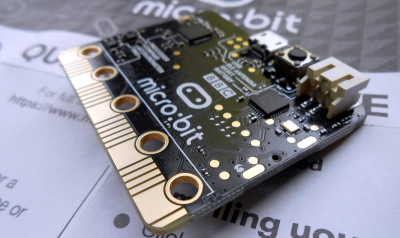
New BBC micro:bit Adds Microphone and Speaker

There’s an old tale that TV companies only need to make a few years of kids’ TV shows, because their audience constantly grows out of their offerings and is replaced by a new set with no prior knowledge of the old shows. Whether it’s true or not is up for debate, but does the same apply to single board computers aimed at kids? The original BBC micro:bit was first announced back in 2015 and must be interesting its second generation of kids by now, but that hasn’t stopped them bringing out a second version of the little educational computer. How do you update such a simple device? Time to take a look.

Edge connector shown on the original micro:bit design

The form factor of the new board is substantially the same as its predecessor, with the same edge connector and large connection pads, and the familiar LED matrix display. The most obvious additions are a small speaker and MEMS microphone allowing kids to interact with audio in their code, but less obvious is a new touch button in the micro:bit logo. The original had it in the silk screen layer, while the new one has it as copper for a capacitive sensor.

The silicon has an upgrade too, now sporting a Nordic Semiconductor nRF52833 running at 64 MHz and sporting 512k of RAM and 128k of ROM with built-in Bluetooth Low Energy. Binaries are incompatible with the original, however all the development environments can recompile code for a new universal binary format capable of running the appropriate software for either version.

The micro:bit has been more of a hit in schools than it has in our community, perhaps because it has the misfortune to have arrived alongside so many strong competitors. However it remains a powerful contender whose easy programming alongside the power of more traditional toolchains make it a good choice for kids and grown-ups alike.  We took a look at the original back in 2016, if you are interested.

source https://hackaday.com/2020/10/13/new-bbc-microbit-adds-microphone-and-speaker/

The Potatoes of DOOM

Over the years, the 1993 classic Doom has gained an almost meme-like status where it can seemingly run on anything. Everything from printers to smartwatches has been shown off running the now-iconic first level of Doom. Looking to up the bar, [Equalo] set out to run Doom on potatoes. However until we develop full biological computers, he had to settle for running Doom on a device powered by potatoes. (Video, embedded below.)

As we’ve seen with other hacks before, potatoes are a decent power source that just requires potato, zinc, and copper. Some have attempted to make it easier to scale potato power and others have focused on making the individual potatoes more powerful. The biggest obstacle when working with potatoes as a battery is that even though each potato can put out almost a volt, the current is laughably small.

The lack of current is what drove [Equalo] to dramatically scale up the typical potato battery. With a target device of a Raspberry Pi Zero requiring around 100 mA at 4.5V, this means he needed over 700 potato slices. After boiling hundreds of potatoes and with a bit of help from friends and family, the giant potato battery was constructed, and we can’t help but marvel at the sheer scale and audacity. The challenge of scaling up a potato battery is that by the time you’re wiring up the 400th potato, your first potato has already started to corrode.

Next time you’re looking for some inspiration for a monumental task, perhaps watch the tale of [Equalo’s] giant potato battery and remember what can be accomplished with some determination and a hundred pounds of spuds.

Thanks [Mike] for sending this one in!

source https://hackaday.com/2020/10/13/the-potatoes-of-doom/

USB Adaptor Isolates Multiple Serial Interfaces

You need a Swiss Army knife of serial communications? Ollie is a compact isolated USB adaptor that provides USB, CAN bus, and two UARTs at logic, RS-232, and RS-485 signaling levels, as well as an isolated power supply.  [Slimelec] has managed to squeeze all this into a package the size of a harmonica.  We like the technique of making the enclosure from PCB material, complete with clearly labeled switch, LED and connector pinout names.

So far, only the compiled firmware is available for this project, but hardware files, and presumably the source code and documentation, are coming soon.

The central themes here are  isolation and flexibility. We can’t find the isolation voltage in the project specifications, but the CANable project on which this adaptor is based provides 2.5 kV galvanic isolation.  A single isolated USB interface is also provided over a standard Type A connector. The four-wire logic-level UART signals are available on a 2 x 7 box header, and are voltage selectable.  The RS-232, RS-485, and CAN signals are on an 8-pin pluggable screw terminal block, or you can use a DB9 connector with a pluggable adaptor board.

Whether you need a troubleshooting aid for field testing, are using CAN bus on your projects, or just want to isolate your expensive computer from sketchy prototype hardware, have a look at this project.

source https://hackaday.com/2020/10/13/usb-adaptor-isolates-multiple-serial-interfaces/

Retro Computer Trainer Gets a Raspberry Pi Refit

We know what you’re thinking: this is yet another one of those “Gut the retro gear for its cool old case and then fill it up with IoT junk” projects. Well, rest assured that extending and enhancing this 1970s computer trainer is very much an exercise in respecting the original design, and while there’s a Pi inside,  it doesn’t come close to spoiling the retro goodness.

Like many of a similar vintage as [Scott M. Baker], the Heathkit catalog was perhaps only leafed through marginally less than the annual Radio Shack catalog. One particularly desirable Heathkit item was the ET-3400 microcomputer learning system, which was basically a 6800-based computer surrounded by a breadboarding area for experimentation. [Scott] got a hold of one of these, but without the optional expansion accessory that would allow it to do interesting things such as running BASIC or even supporting a serial port. So [Scott] decided to roll his own expansion board.

The expansion card that [Scott] designed is not strictly a faithful reproduction, at least in terms of the original BOM. He turned to more modern — and more readily available — components, but still managed to provide the serial port, cassette interface, and RAM/ROM expansion of the original unit. The Raspberry Pi is an optional add-on, which just allows him to connect wirelessly if he wants. The card fits into a 3D-printed case that sits below the ET-3400 and maintains the original trainer’s look and feel. The longish video below shows the build and gives a tour of the ET-3400, both before and after the mods.

It looks as though trainers like these and other artifacts from the early days of the PC revolution are getting quite collectible. Makes us wish we hadn’t thrown some things out.


source https://hackaday.com/2020/10/12/retro-computer-trainer-gets-a-raspberry-pi-refit/

An Up-To-Date Datasette for Commodore TED Series

Retro computer enthusiast [Steven Combs] documents his adventure building the TEDuino, a modern replacement for the Commodore Datasette which uses an SD card instead of audio tape. He based the design on [Peter Edwards]’s Tapuino project, which was featured by Hackaday back in 2014. [Steven] took the aesthetic design to a new level, and also modified it to work with his Plus/4 and other TED series Commodores.  We are amazed that he was able to design this enclosure in SketchUp, and impressed with the results from his Creality Ender 3. He went to great lengths to match the color and style of the Plus/4, and pulled it off quite well. [Steven] also applied some interesting design features in this enclosure. The PCB modules are snap-fit, the buttons are made as a single piece – not unlike a living hinge. The 3D-printed strain relief for the cable is a nice finishing touch, and we cannot disagree with [Steven]’s sage advice – “Gorilla anything is just cool”.

This is only part 1 of the project. Stay tuned for future improvements, tweaks and embellishments.

source https://hackaday.com/2020/10/12/retro-datasette-for-commodore-ted-series/

World’s Smallest Version of World’s Fastest Bumper Car

A few years ago, YouTubing madman [Colin Furze] took an old bumper car and made a 600-horsepower beast of a go-kart that managed to clock 100MPH with a headwind. This isn’t that. It’s a miniaturized, remote-control homage to [Colin]’s go-kart that is equally awesome.

[Forsyth Creations] started by CAD-modeling the chassis right on top of a still from the video. The entire body is 3D-printed in four large pieces, which took several days because each piece took around 24 hours. Inside the car there’s an Arduino brain driving a motor in the back and a servo in the front. This bad boy runs on a couple of rechargeable battery packs and can be controlled with either a Wii balance board or a PS2 controller. This thing really moves, although it doesn’t quite reach 100MPH. Watch it zoom around in the video after the break.

Got a Segway lying around that just doesn’t do it for you anymore? You could always turn it into a go-kart. Never had a Segway to begin with? Just roll your own.

source https://hackaday.com/2020/10/12/worlds-smallest-version-of-worlds-fastest-bumper-car/

February is Bird-Feeding Month, so build a bird feeder

Celebrate Bird-Feeding Month by building a bird feeder. From connecting to nature to promoting good health in birds, there are plenty of reasons to add a bird feeder to your garden. Get inspired and build your own feeder or buy a ready-made one online. What are you waiting for? Find a bird feeders for sale on Junk Mail today!

Buy A Bird Feeder For Bird-Feeding Month | Junk Mail
Photo Source – www.pixabay.com

The history of Bird-Feeding Month

Bird-Feeding
Month started in 1994 to acknowledge the important role
that birds play in our environment. The history of this month has its origins
in America where John Porter declared his resolution to support wild birds as
part of the Congressional Record. In America, migratory birds start returning
as the weather warms up in February. However, it can be difficult for them to
find food during this period as the weather is still unpredictable. This
predicament resulted in the beginning of Bird-Feeding Month in support of wild birds.

The importance of having a bird feeder in your garden

A bird feeder is an important addition to your garden. Feeding birds
is an opportunity to connect with nature while learning more about the
different bird species in your area. Connecting to nature reduces stress and
birds bring joy and colour to your outdoor space. A reliable source of food
supports parent birds when they’re feeding their babies. This helps families of
birds to thrive and means that the parents spend less time away from their
chicks. The food also helps to keep birds healthy and happy. Bird feeders also provide
birds with energy for migration. For birds who don’t migrate, a feeder is a
reliable source of food during the cold months.

Buy A Bird Feeder For Bird-Feeding Month | Junk Mail
Photo Source – www.pixabay.com

Different bird feeder ideas

Don’t know where to start? Here are some ideas
that will leave you feeling inspired:

  • Jar bird feeder

Recycle an old jar by turning it into a bird feeder with leather and
ribbon. Add a perch to create a space for the birds to sit on while they’re
eating.

  • Plastic bottle

Turn an empty plastic bottle into a bird feeder by adding holes
and wooden spoons. In a few easy steps, you’ll have a bird feeder that’s ready to use.

  • Teacup

Transform an old teacup into a source of food
for birds using wire and beads. You’ll need to drill holes into the sides of
the teacup to hang it up, using beads for decoration. The saucer can be
attached to the cup using a nut and bolt.

  • Logs

Create a bird feeder with a natural look from a log. Remove
the center of the log using a chainsaw and hang your creation up using chains
once you’re done.

How to build a bird feeder

  • Define your budget

Decide on how much you can afford to spend on
building your bird feeder.
Your budget will influence your choice of design and materials.

  • Decide on a design and define your materials

Choose a design and make a list of the
materials you need. You can use recycled materials to save cash while helping
to preserve our environment.

  • Decide where you are going to hang it

Choose a spot in your garden to hang/place your bird feeder. The place should be out of reach from cats and dogs. You can get the most out of your feeder by positioning it where you can watch the birds.

  • Gather all your supplies and materials

Before you get started, you’ll need to collect
the necessary materials. Proper preparation ensures that there are no
disruptions to the building process.

  • Start constructing

Follow the design you have chosen to create a unique bird feeder that will
brighten up your garden. Make sure that the feeder is easy to clean and safe
for birds to use.

  • Fill with seeds

Fill the feeder with seeds that are healthy
for the bird species in your region. Avoid using bread and other sources of
food that can be harmful to birds.

  • Install outside

Secure your feeder outside in your chosen
spot. You can use wire or durable string to attach it to a tree or pole.

Other factors to consider:

  • Will it withstand the weather conditions outside?
  • Is there enough space for the birds to sit?
  • Are the seeds secure inside?
  • Do you have the right seeds for the birds in your area?
  • If you have pets, is the bird feeder in a secure location away from your pets?
  • Will the seeds get wet when it rains? If so, can you prevent it?

Bonus Tip: Add a
birdbath or some water to your garden where birds and other insects can drink
water.

Buy A Bird Bath For Your Garden | Junk Mail
Photo Source – www.pixabay.com

With so many benefits to placing a bird feeder in your garden, it’s easy to see why these outdoor accessories are so popular. Bird-Feeding Month is the perfect opportunity to start providing the birds in your neighbourhood with a reliable source of food. Don’t delay, find a bird feeder for sale on Junk Mail today.

Fail Of The Week: Putting Guitar Strings On A Piano

The piano is a bit of an oddball within the string instrument family. Apart from rarely seeing people carry one around on the bus or use its case to discretely conceal a Tommy Gun, the way the strings are engaged in the first place — by having little hammers attached to each key knock the sound of of them — is rather unique compared to the usual finger or bow movement. Still, it is a string instrument, so it’s only natural to wonder what a piano would sound like if it was equipped with guitar strings instead of piano wire. Well, [Mattias Krantz] went on to actually find out the hard way, and shows the results in this video.

After a brief encounter with a bolt cutter, the point of no return was reached soon on. Now, the average piano has 88 keys, and depending on the note, a single key might have up to three strings involved at once. In case of [Mattias]’ piano — which, in his defense, has certainly seen better days — a total of 210 strings had to be replaced for the experiment. Guitars on the other hand have only six, so not only did he need 35 packs of guitar strings, the gauge and length variety is quite limited on top. What may sound like a futile endeavor from the beginning didn’t get much better over time, and at some point, the strings weren’t long enough anymore and he had to tie them together. Along with some inevitable breakage, he unfortunately ran out of strings and couldn’t finish the entire piano, though it seems he still managed to roughly cover a guitar’s frequency range, so that’s an appropriate result.

We’re not sure if [Mattias] ever expected this to actually work, but it kinda does — there is at least some real sound. Are the results more than questionable though? Oh absolutely, but we have to admire the audacity and perseverance he showed to actually pull through with this. It took him 28 hours just to get the guitar strings on, and another good amount of time to actually get them all in tune. Did it pay off? Well, that depends how you look at it. It definitely satisfied his and other’s curiosity, and the piano produces some really unique and interesting sounds now — but check for yourself in the video after the break. But that might not be for everyone, so luckily there are less final ways to change a piano’s sound. And worst case, you can always just turn it into a workbench.

(Thanks for the tip, [Keith])

source https://hackaday.com/2020/10/12/fail-of-the-week-putting-guitar-strings-on-a-piano/

Add Creativity to Your BOM: Hack Chat

Join us on Wednesday, October 14th at noon Pacific for the Harnessing Your Creativity Hack Chat with Leo Fernekes!

You’re sitting at your bench, surrounded by the tools of the trade — meters and scopes, power supplies and hand tools, and a well-stocked parts bin. Your breadboard is ready, your fingers are itching to build, and you’ve got everything you need to get started, but — nothing happens. Something is missing, and if you’re like many of us, it’s the one thing you can’t get from eBay or Amazon: the creative spark that makes innovation happen.

Creativity is one of those things that’s difficult to describe, and is often noticed most when it’s absent. Hardware hacking requires great buckets of creativity, and it’s not always possible to count on it being there exactly when it’s called for. It would be great if you could somehow reduce creativity to practice and making it something as easy to source for every project as any other commodity.

While Leo Fernekes hasn’t exactly commoditized creativity, judging from the breadth of projects on his YouTube channel, he’s got a pretty good system for turning ideas into creations. We’ve featured a few of his builds on our pages, like a discrete transistor digital clock, the last continuity tester you’ll ever need, and his somewhat unconventional breadboarding techniques. Leo’s not afraid to fail and share the lessons learned, either.

His projects, though, aren’t the whole story here: it’s his process that we’re going to discuss. Leo joins us for this Hack Chat to poke at the creative process and see what can be done to remain rigorous and systematic in your approach but still make the process creative and flexible. Join us with your questions about finding the inspiration you need to turn parts and skills into finished projects that really innovate.

join-hack-chatOur Hack Chats are live community events in the Hackaday.io Hack Chat group messaging. This week we’ll be sitting down on Wednesday, October 14 at 12:00 PM Pacific time. If time zones baffle you as much as us, we have a handy time zone converter.

Click that speech bubble to the right, and you’ll be taken directly to the Hack Chat group on Hackaday.io. You don’t have to wait until Wednesday; join whenever you want and you can see what the community is talking about.

source https://hackaday.com/2020/10/12/add-creativity-to-your-bom-hack-chat/

Add Creativity to Your BOM: Hack Chat

Join us on Wednesday, October 14th at noon Pacific for the Harnessing Your Creativity Hack Chat with Leo Fernekes!

You’re sitting at your bench, surrounded by the tools of the trade — meters and scopes, power supplies and hand tools, and a well-stocked parts bin. Your breadboard is ready, your fingers are itching to build, and you’ve got everything you need to get started, but — nothing happens. Something is missing, and if you’re like many of us, it’s the one thing you can’t get from eBay or Amazon: the creative spark that makes innovation happen.

Creativity is one of those things that’s difficult to describe, and is often noticed most when it’s absent. Hardware hacking requires great buckets of creativity, and it’s not always possible to count on it being there exactly when it’s called for. It would be great if you could somehow reduce creativity to practice and making it something as easy to source for every project as any other commodity.

While Leo Fernekes hasn’t exactly commoditized creativity, judging from the breadth of projects on his YouTube channel, he’s got a pretty good system for turning ideas into creations. We’ve featured a few of his builds on our pages, like a discrete transistor digital clock, the last continuity tester you’ll ever need, and his somewhat unconventional breadboarding techniques. Leo’s not afraid to fail and share the lessons learned, either.

His projects, though, aren’t the whole story here: it’s his process that we’re going to discuss. Leo joins us for this Hack Chat to poke at the creative process and see what can be done to remain rigorous and systematic in your approach but still make the process creative and flexible. Join us with your questions about finding the inspiration you need to turn parts and skills into finished projects that really innovate.

join-hack-chatOur Hack Chats are live community events in the Hackaday.io Hack Chat group messaging. This week we’ll be sitting down on Wednesday, October 14 at 12:00 PM Pacific time. If time zones baffle you as much as us, we have a handy time zone converter.

Click that speech bubble to the right, and you’ll be taken directly to the Hack Chat group on Hackaday.io. You don’t have to wait until Wednesday; join whenever you want and you can see what the community is talking about.

source https://hackaday.com/2020/10/12/add-creativity-to-your-bom-hack-chat/

Running Way More LED Strips On A Raspberry Pi With DMA

The Raspberry Pi is a powerful computer in a compact form factor, making it highly useful for all manner of projects. However, it lacks some of the IO capabilities you might find on a common microcontroller. This is most apparent when it comes to running addressable LED strings. Normally, this is done using the Pi’s PWM or audio output, and is limited to just a couple of short strings. However, [Jeremy P Bentham] has found a way to leverage the Pi’s hardware to overcome these limitations.

The trick is using the Raspberry Pi’s little-documented Secondary Memory Interface. The SMI hardware allows the Pi to shift out data to 8 or 16 I/O pins in parallel using direct memory access (DMA), with fast and accurate timing. This makes it perfect for generating signals such as those used by WS2812B LEDs, also known as NeoPixels.

With [Jeremy]’s code and the right supporting hardware, it’s possible to run up to 16 LED strips of arbitrary length from the Raspberry Pi. [Jeremy] does a great job outlining how it all works, covering everything from the data format used by WS2812B LEDs to the way cache needs to be handled to avoid garbled data. The hack works on all Pis, from the humble Pi Zero to the powerful Pi 4. Thanks to using DMA, the technique doesn’t overload the CPU, so performance should be good across the board.

Of course, there are other ways to drive a ton of LEDs; we’ve seen 20,000 running on an ESP32, for example.

[Thanks to Petiepooo for the tip!]

source https://hackaday.com/2020/10/12/running-way-more-led-strips-on-a-raspberry-pi-with-dma/

HALWOP Recreates Retro Style with the Raspberry Pi

Modern computers are incredible feats of engineering, but there are many that still yearn for the simpler times. When keyboards clacked and a desktop computer quite literally dominated the top of your desk. There’s a whole community of folks who scratch that itch by restoring vintage computers, but not everyone has the time, money, or skill for such pursuits. Plus, even the most lovingly cared for Apple II isn’t going to help you watch YouTube.

Those who wish to recreate the look and feel of a vintage computer with modern internals will certainly be interested in the HALWOP by [Maz_Baz]. While its 3D printed case isn’t a replica of any one computer, it does draw inspiration from iconic machines like the Apple Lisa and IBM XT. It’s an amalgamation of design ideas that seemed like a good idea circa 1982 or so, with plenty of 90° angles and air vents to go around.

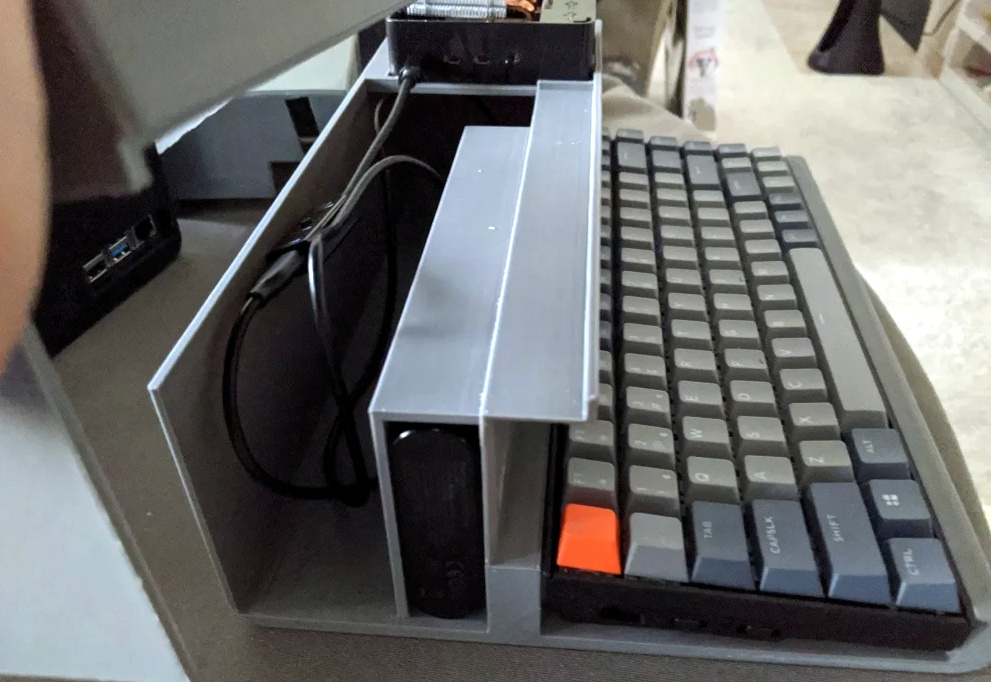
Considering the size of the Raspberry Pi 4 that powers the HALWOP, most of the case is just hollow plastic. But of course, the whole idea depends on it being almost comically large. On the plus side, [Maz_Baz] says you can use one of those empty compartments to hold a Anker PowerCore 26800 battery pack. At least in theory that makes it a “luggable” computer, though good luck trying to move it around.

In addition to the Pi 4 and battery pack, the HALWOP also uses a seven-inch touch LCD and Keychron K2 Bluetooth mechanical keyboard. Since everything is so modular, assembly is about as simple as it gets. Outside of the USB cables that power everything, you just need a long enough ribbon cable to connect the LCD to the Pi.

We know the purists don’t like the idea of a “retro” computer based on the Raspberry Pi, but of course, such projects aren’t about maintaining historical accuracy. They are a way to bridge the gap between modern technology and the unique aesthetics of a bygone era. Designs like the HALWOP allow a new generation to experience a taste of what computing was like in the early days, without giving up the ground that’s been gained in the intervening years.

source https://hackaday.com/2020/10/12/halwop-recreates-retro-style-with-the-raspberry-pi/

HALWOP Recreates Retro Style with the Raspberry Pi

Modern computers are incredible feats of engineering, but there are many that still yearn for the simpler times. When keyboards clacked and a desktop computer quite literally dominated the top of your desk. There’s a whole community of folks who scratch that itch by restoring vintage computers, but not everyone has the time, money, or skill for such pursuits. Plus, even the most lovingly cared for Apple II isn’t going to help you watch YouTube.

Those who wish to recreate the look and feel of a vintage computer with modern internals will certainly be interested in the HALWOP by [Maz_Baz]. While its 3D printed case isn’t a replica of any one computer, it does draw inspiration from iconic machines like the Apple Lisa and IBM XT. It’s an amalgamation of design ideas that seemed like a good idea circa 1982 or so, with plenty of 90° angles and air vents to go around.

Considering the size of the Raspberry Pi 4 that powers the HALWOP, most of the case is just hollow plastic. But of course, the whole idea depends on it being almost comically large. On the plus side, [Maz_Baz] says you can use one of those empty compartments to hold a Anker PowerCore 26800 battery pack. At least in theory that makes it a “luggable” computer, though good luck trying to move it around.

In addition to the Pi 4 and battery pack, the HALWOP also uses a seven-inch touch LCD and Keychron K2 Bluetooth mechanical keyboard. Since everything is so modular, assembly is about as simple as it gets. Outside of the USB cables that power everything, you just need a long enough ribbon cable to connect the LCD to the Pi.

We know the purists don’t like the idea of a “retro” computer based on the Raspberry Pi, but of course, such projects aren’t about maintaining historical accuracy. They are a way to bridge the gap between modern technology and the unique aesthetics of a bygone era. Designs like the HALWOP allow a new generation to experience a taste of what computing was like in the early days, without giving up the ground that’s been gained in the intervening years.

source https://hackaday.com/2020/10/12/halwop-recreates-retro-style-with-the-raspberry-pi/

HALWOP Recreates Retro Style with the Raspberry Pi

Modern computers are incredible feats of engineering, but there are many that still yearn for the simpler times. When keyboards clacked and a desktop computer quite literally dominated the top of your desk. There’s a whole community of folks who scratch that itch by restoring vintage computers, but not everyone has the time, money, or skill for such pursuits. Plus, even the most lovingly cared for Apple II isn’t going to help you watch YouTube.

Those who wish to recreate the look and feel of a vintage computer with modern internals will certainly be interested in the HALWOP by [Maz_Baz]. While its 3D printed case isn’t a replica of any one computer, it does draw inspiration from iconic machines like the Apple Lisa and IBM XT. It’s an amalgamation of design ideas that seemed like a good idea circa 1982 or so, with plenty of 90° angles and air vents to go around.

Considering the size of the Raspberry Pi 4 that powers the HALWOP, most of the case is just hollow plastic. But of course, the whole idea depends on it being almost comically large. On the plus side, [Maz_Baz] says you can use one of those empty compartments to hold a Anker PowerCore 26800 battery pack. At least in theory that makes it a “luggable” computer, though good luck trying to move it around.

In addition to the Pi 4 and battery pack, the HALWOP also uses a seven-inch touch LCD and Keychron K2 Bluetooth mechanical keyboard. Since everything is so modular, assembly is about as simple as it gets. Outside of the USB cables that power everything, you just need a long enough ribbon cable to connect the LCD to the Pi.

We know the purists don’t like the idea of a “retro” computer based on the Raspberry Pi, but of course, such projects aren’t about maintaining historical accuracy. They are a way to bridge the gap between modern technology and the unique aesthetics of a bygone era. Designs like the HALWOP allow a new generation to experience a taste of what computing was like in the early days, without giving up the ground that’s been gained in the intervening years.

source https://hackaday.com/2020/10/12/halwop-recreates-retro-style-with-the-raspberry-pi/

Spin the Video Track with a Mechanical Flair

One of the most difficult user interfaces to get right is video editing. It is complex and fiddly with large amounts of precision required even after four or five hours of straight editing. Seeking to bring some of that interface out into the real world, [Zack Freedman] built a mechanical video editing keyboard.

The keyboard in question features popular shortcuts and keys to breeze through different parts of editing. The biggest feature is, of course, the large scrubbing knob, allowing [Zack] to fly through long video with precision. We’ve seen our fair share of mechanical keyboards that aren’t traditional keyboards on Hackaday before, such as this number pad or this macro pad.

One of the unique constraints of this project was the fact that Zack had a deadline of two days. This self-imposed deadline was to help focus the work and drive it towards completion. This meant that it had to be designed in such a way that roadblocks or troublesome features could be designed around or cut out altogether. At its heart, this project is just 14 mechanical switches, 4 potentiometers, and a Teensy to drive it all. It is the design, prototyping, and thought that went into this project that makes it noteworthy. There are plenty of lessons here about how to manage a project’s timeline and advice about how to actually finish it.

Code, STL’s, diagrams, and instructions are all on his GitHub.

Thanks [Zack] for sending this one in!

source https://hackaday.com/2020/10/12/spin-the-video-track-with-a-mechanical-flair/

Throwing Down the FPGA Gauntlet

Gauntlet is a well-known arcade game from 1985 with many sequels and ports to more modern architectures such as Xbox and GameCube. Thanks to its popularity and relative age, the original arcade cabinet is well documented with the schematics available online. It was regarded as the most complex and ambitious hardware Atari had ever developed at the time it was released. In what can only be described as an absolute labor of love, [Alex] has recreated the arcade hardware on the Pipistrello FPGA board.

The project can actually play Gauntlet, Gauntlet II, and Vindicators II as they all ran on the same hardware. Four joysticks are supported so up to four players can play, though the EEPROM is emulated in RAM so high scores are reset when the device is powered down. The FPGA is almost out of space and can’t quite squeeze in the SRAM needed. So an SRAM expansion daughterboard is required; nothing a quick board run from our favorite purple PCB manufacturer can’t solve.

In the repo is an incredible write-up detailing the system, how it works, and the process of debugging it. This project also includes a complete simulation of the TMS5220 Voice Synthesis Processor, as Gauntlet was the first coin-operated arcade machine with a voice synthesizer. Getting the video correct was particularly tricky and it took several tries to get the color palette and motion looking right. Since [Alex] didn’t have access to an original Gauntlet arcade cabinet, they had to make do with MAME. After writing a test to make sure the FPGA was working correctly, there were differences between the MAME emulation and the FPGA output. To help out, [Colin Davies] came to the rescue. After [Colin] hooked up an original Gauntlet Arcade PCB with the motion test loaded up, the test showed that the FPGA had the correct behavior.

During development [Alex] actually simulated several frames of the game in ISIM (at a whopping 90 seconds per frame or 90 minutes per in-game second). Using ISIM allowed them to compare system state to MAME and validate the design much faster as they could better inspect the interworkings of the different modules. Using a clever trick of grabbing state from MAME after a few seconds, they primed the FPGA state and saved themselves a few hours of simulation.

If you’re looking to get into old hardware style arcade game development, give the browser-based 8bitworkshop IDE a spin. Or start with something a little smaller in scope and size with this adorable mini CRT arcade cabinet.

Thanks [Alex] for sending this one in!


source https://hackaday.com/2020/10/11/throwing-down-the-fpga-gauntlet/

Improved Part Searches for JLCPCB Parts

Finding the JLCPCB component parts library frustrating to navigate, [Jan Mrázek] took matters into his own hands and made an open-source parametric search utility. We’ve all probably wasted time before trying to track down a particular flavor of a part, and this tool promises to make the process easier.  It downloads data from the JLCPCB parts site upon initialization and presents the user with typical selection filters for categories and parameter values. You can install it yourself on GitHub Pages, or [Jan] provides a link to his site.

For the curious, the details of how to pull parts information from the JLBPCB site can be found in the project’s source code.  We like it when a distributor provides this level of access to their part details and parameters, allowing others to sort and filter the parts in ways not originally envisioned by the site design team.  We think this is a win-win situation — distributors can’t sell parts that designers can’t find.

If [Jan]’s name sounds familiar, it should be.  We have written about several of his projects before, two of them are also PCB designer tools ( KiCad Board Renderings and KiCad Panelization ).

source https://hackaday.com/2020/10/11/improved-part-searches-for-jlcpcb-parts/

Hackaday Links: October 11, 2020

If you’re interested in SDR and digital signal processing but don’t know where to start, you’re in luck. Ben Hillburn, president of the GNU Radio Project, recently tweeted about an online curriculum for learning SDR and DSP using Python. The course was developed by Dr. Mark Lichtman, who was a lead on GNU Radio, and from the look of it, this is the place to go to learn about putting SDRs to use doing cool things. The course is chock full of animations that make the concepts clear, and explain what all the equations mean in a way that’s sure to appeal to practical learners.

It’s not much of a secret that the Hackaday community loves clocks. We build clocks out of everything and anything, and any unique way of telling time is rightly applauded and celebrated on our pages. But does the clock motif make a good basis for a video game? Perhaps not, but that didn’t stop Clock Simulator from becoming a thing. To “play” Clock Simulator, you advance the hands of an on-screen clock by pressing a button once per second. Now, thanks to Michael Dwyer, you don’t even have to do that one simple thing. He developed a hardware cheat for Clock Simulator that takes the 1PPS output from a GPS module and wires it into a mouse. The pulse stream clicks the mouse once per second with atomic precision, rendering the player irrelevant and making the whole thing even more pointless. Or perhaps that is the point.

Maybe we were a little hard on Clock Simulator, though — we can see how it would help achieve a Zen-like state with its requirement for steady rhythm, at least when not cheating. Another source of Zen for some is watching precision machining, and more precise, the better. We ran into this mesmerizing video of a CNC micro-coil winder and found it fascinating to watch, despite the vertical format. The winder is built from a CNC lathe, to the carriage of which a wire dispenser and tensioning attachment have been added. The wire is hair-fine and passes through a ruby nozzle with a 0.6 mm bore, and LinuxCNC controls the tiny back and forth motion of the wire as it winds onto the form. We don’t know what the coil will be used for, but we respect the precision of winding something smaller than a matchhead.

Dave Jones over at EEVblog posted a teardown video this week that goes to a place few of us have ever seen: inside a processor module for an IBM System/390 server. These servers earned the name “Big Iron” for a reason, as everything about them was engineered to perform. The processor module Dave found in his mailbag was worth $250,000 in 1991, and from the look of it was worth every penny. From the 64-layer ceramic substrate supporting up to 121 individual dies to the stout oil-filled aluminum enclosure, everything about this module is impressive. We were particularly intrigued by the spring-loaded copper pistons used to transfer heat away from each die; the 2,772 pins on the other side were pretty neat too.

Here’s an interesting question: what happens if an earthquake occurs in the middle of a 3D printing run? It’s probably not something you’ve given much thought, but it’s something that regular reader Marius Taciuc experienced recently. As he relates, the magnitude 6.7 quake that struck near Kainatu in Papua New Guinea (later adjusted to a 6.3 magnitude) resulted in a solid 15 seconds of shaking at his location, where he was printing a part on his modified Mendel/Prusa i2. The shaking showed up clearly in the part as the machine started swaying with the room. It’s probably not a practical way to make a seismograph, but it’s still an interesting artifact.

source https://hackaday.com/2020/10/11/hackaday-links-october-11-2020/

Hackaday Links: October 11, 2020

If you’re interested in SDR and digital signal processing but don’t know where to start, you’re in luck. Ben Hillburn, president of the GNU Radio Project, recently tweeted about an online curriculum for learning SDR and DSP using Python. The course was developed by Dr. Mark Lichtman, who was a lead on GNU Radio, and from the look of it, this is the place to go to learn about putting SDRs to use doing cool things. The course is chock full of animations that make the concepts clear, and explain what all the equations mean in a way that’s sure to appeal to practical learners.

It’s not much of a secret that the Hackaday community loves clocks. We build clocks out of everything and anything, and any unique way of telling time is rightly applauded and celebrated on our pages. But does the clock motif make a good basis for a video game? Perhaps not, but that didn’t stop Clock Simulator from becoming a thing. To “play” Clock Simulator, you advance the hands of an on-screen clock by pressing a button once per second. Now, thanks to Michael Dwyer, you don’t even have to do that one simple thing. He developed a hardware cheat for Clock Simulator that takes the 1PPS output from a GPS module and wires it into a mouse. The pulse stream clicks the mouse once per second with atomic precision, rendering the player irrelevant and making the whole thing even more pointless. Or perhaps that is the point.

Maybe we were a little hard on Clock Simulator, though — we can see how it would help achieve a Zen-like state with its requirement for steady rhythm, at least when not cheating. Another source of Zen for some is watching precision machining, and more precise, the better. We ran into this mesmerizing video of a CNC micro-coil winder and found it fascinating to watch, despite the vertical format. The winder is built from a CNC lathe, to the carriage of which a wire dispenser and tensioning attachment have been added. The wire is hair-fine and passes through a ruby nozzle with a 0.6 mm bore, and LinuxCNC controls the tiny back and forth motion of the wire as it winds onto the form. We don’t know what the coil will be used for, but we respect the precision of winding something smaller than a matchhead.

Dave Jones over at EEVblog posted a teardown video this week that goes to a place few of us have ever seen: inside a processor module for an IBM System/390 server. These servers earned the name “Big Iron” for a reason, as everything about them was engineered to perform. The processor module Dave found in his mailbag was worth $250,000 in 1991, and from the look of it was worth every penny. From the 64-layer ceramic substrate supporting up to 121 individual dies to the stout oil-filled aluminum enclosure, everything about this module is impressive. We were particularly intrigued by the spring-loaded copper pistons used to transfer heat away from each die; the 2,772 pins on the other side were pretty neat too.

Here’s an interesting question: what happens if an earthquake occurs in the middle of a 3D printing run? It’s probably not something you’ve given much thought, but it’s something that regular reader Marius Taciuc experienced recently. As he relates, the magnitude 6.7 quake that struck near Kainatu in Papua New Guinea (later adjusted to a 6.3 magnitude) resulted in a solid 15 seconds of shaking at his location, where he was printing a part on his modified Mendel/Prusa i2. The shaking showed up clearly in the part as the machine started swaying with the room. It’s probably not a practical way to make a seismograph, but it’s still an interesting artifact.

source https://hackaday.com/2020/10/11/hackaday-links-october-11-2020/

Lo-Fi Art on a 32×32 Matrix

Display technology has improved by leaps and bounds over the last few years, thanks in no small part to the smartphone revolution. High-resolution LCD panels are dirt cheap and easy to interface with. There’s absolutely no logical reason to try and show images on a 32×32 array of RGB LEDs. But that didn’t stop [Felix Spöttel] from doing it anyway.

The project, which he calls thirtytwopixels, was designed to work in conjunction with MPD (Music Player Daemon) to show the album art for whatever is currently playing. The ultra-low resolution display added a certain element of abstractness to the artwork, which [Felix] said made it an interesting conversation starter. Guests would try and guess what the album art was depicting given the sparse rendition shown on the matrix.

[Felix] gives an excellent explanation of how to get the server and client-side software up and running should you want to recreate his setup, but his Python scripts also have a function where you can push an arbitrary image to the display if you don’t want to connect everything up to the MPD backend.

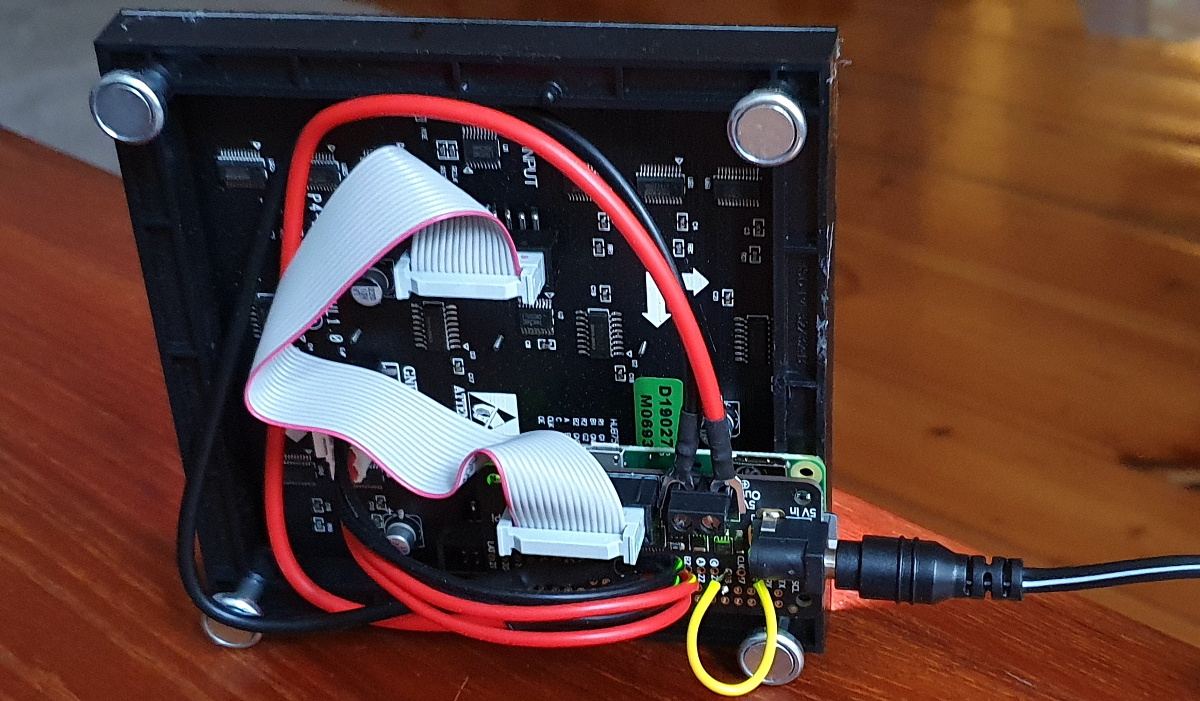
On the hardware side, thirtytwopixels uses the Raspberry Pi Zero W, a Adafruit RGB Matrix Bonnet, and a 32×32 LED matrix that uses the HUB75 interface. Even a relatively small LED matrix like this can get pretty thirsty, so [Felix] is using a 5 volt power supply that can deliver 4 amps to keep the electronics happy.

If you wanted to keep the low resolution aesthetic but make the display larger, we’ve seen WS2812B LED strips and 3D printed frames used to make a custom jumbo matrix which could surely be adapted for this concept.

source https://hackaday.com/2020/10/11/lo-fi-art-on-a-32×32-matrix/