
Monthly Archives: August 2020
Popcorn Pocket P. C. Open Sourced
If you miss the days you could get an organizer that would — sort of — run Linux, you might be interested in Popcorn computer’s Pocket P. C., which was recently open-sourced on GitHub. Before you jump over to build one, though, there are a few things you should know.
First, the files are untested since the first unit hasn’t shipped yet. In addition, while the schematic looks pretty complete, there’s no actual bill of materials and the PCB layers in the PDF file might not be very easy to replicate, since they are just a series of images, one for each layer. You can see an overview video of the device, below.
Still, the information is there, although we haven’t seen the software yet. The device itself is interesting with a built-in keyboard. The specs are relatively straightforward. A quad-core ARM running at 1.2 GHz, 2GB of RAM, and 32GB of eMMC. The IPS LCD is just shy of five inches and has a 1920×1080 resolution. There’s the usual suite of connectors and interfaces and you can get a version that incorporates LoRa.
We hope Popcorn will continue releasing information on the device and will make enough software information available for the device to be truly open source. Of course, most of us will just buy one anyway, but it is nice to know that the source is there if you were to want it.
As we’ve noted before, designing a Linux board isn’t as hard as it used to be. There are till, though, some challenges.
source https://hackaday.com/2020/08/11/popcorn-pocket-p-c-open-sourced/
3D Printing Interactive Maps For The Visually Impaired
Most maps and educational materials for teaching geography are highly visual in nature. For those with a visual impairment, it can make learning more difficult when suitable resources are not available. After visiting a boarding school in Moscow, [Sergei] set out to build an interactive map to teach students geography regardless of their vision status.
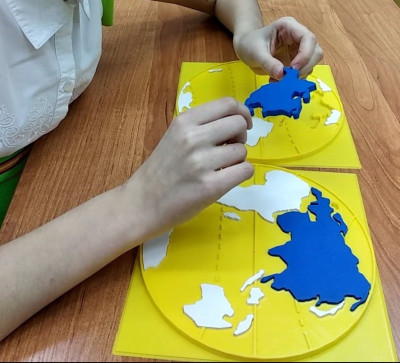 After seeing the poorly embossed paper maps used in the school, [Sergei] decided there had to be a better way. The solution was 3D printing, which makes producing a map with physical contours easy. Initial attempts involved printing street maps and world maps with raised features, such that students could feel the lines rather than seeing them.
Taking things a step further, [Sergei] went all out, producing an interactive educational device. The build consists of a world map, and contains audio files with information about countries, cultures, and more. When the ultrasonic sensor detects a user in range, it invites them to press or pull out the removable continents on the map. The device can sense touch, thanks to a pair of MPR121 capacitive touch sensor boards which are used to trigger the audio files.
It’s a great way to use the sense of touch to teach where the sense of vision may be lacking. Previous Prize entries have worked in this field too, like this haptic glove to help vision-impaired users interpret camera data. We can’t wait to see what comes next as technology improves!




source https://hackaday.com/2020/08/11/3d-printing-interactive-maps-for-the-visually-impaired/
Nox Timore! 100% Hell no!!! #ancientcoins
Linux Fu: Remote Execution Made Easy
If you have SSH and a few other tools set up, it is pretty easy to log into another machine and run a few programs. This could be handy when you are using a machine that might not have a lot of memory or processing power and you have access to a bigger machine somewhere on the network. For example, suppose you want to reencode some video on a box you use as a media server but it would go much faster on your giant server with a dozen cores and 32 GB of RAM.
Remote Execution
However, there are a few problems with that scenario. First, you might not have the software on the remote machine. Even if you do, it might not be the version you expect or have all the same configuration as your local copy. Then there’s the file problem. the input file should come from your local file system and you’d like the output to wind up there, too. These aren’t insurmountable, of course. You could install the program on the remote box and copy your files back and forth manually. Or you can use Outrun.
There are a few limitations, though. You do need Outrun on both machines and both machines have to have the same CPU architecture. Sadly, that means you can’t use this to easily run jobs on your x86-64 PC from a Raspberry Pi. You’ll need root access to the remote machine, too. The system also depends on having the FUSE file system libraries set up.
A Simple Idea
The idea is simple. You could do a video encoding like this:
outrun user@host ffmpeg -i input.mp4 -vcodec libx265 -crf 28 output.mp4
This will work even if ffmpeg isn’t on the remote machine and the input and output files will be on your local box where you expect them. Here’s a screencast from the project’s GitHub page:

A Complex Implementation
How does this work? A FUSE file system mounts your local filesystem remotely using a lightweight RPC file system. Then a chroot makes the remote machine look just like your local machine but — presumably — faster. There are a few other things done, such as setting up the environment and current directory.
The chroot, by the way, is why you need root on the remote machine. As an ordinary user, you can’t pivot the root file system to make this trick work.
To improve performance, Outrun caches system directories and assumes they won’t change over the life of the command. It also aggressively prefetches using some heuristics to guess what files you’ll need in addition to the one that the system asked for.
The Future
We wish there was an option to assume the program will execute on the remote machine and only set up the input and output files. This would make it easier to do things like slice a 3D print on a remote PC from a Raspberry Pi running Octoprint, for example. Of course, this is all open source, so maybe we should go make that fix ourselves.
Then again, you could do something like this pretty easily with sshfs and some other tricks. If you want to run a program on a bunch of remote machines, there are ways to do that, too.
source https://hackaday.com/2020/08/11/linux-fu-remote-execution-made-easy/
Ring the Bell for the Hackaday Prize: Three More Weeks to Enter Your Project!
We are hurtling toward the close of entries for the 2020 Hackaday Prize. You need to have your project submitted within the next three weeks, by 7:00 AM Pacific time on Monday, August 31st. Entry is easy, just start a project page over on Hackaday.io and use the “Submit project to:” button on the left sidebar to enter it in the Hackaday Prize.
There are a number of cash prizes on the line this year. In addition to a $50,000 grand prize we have four best nonprofit solution prizes of $10,000, four $3,000 honorable mention prizes, and a $5,000 wildcard prize.
Need some inspiration to help you get started? We’ve teamed with four nonprofit organizations who have highlighted real-world challenges for you to tackle. From protecting our oceans and innovating on earthen housing designs to building assistive devices and designing systems for disaster relief, there’s plenty of ground to cover here!
Once entries close at the end August, we’ll announce a slate of finalists who will continue to refine their designs for another month. Each finalist’s project entry will be reviewed in October by our panel of expert judges to identify the top winners. Of course, with these type of challenges, having more people focus on ways to help is a win in our books. So grab your engineering notebooks and get to work!
This Is The Most Photorealistic Survival Horror Game I Have Ever Played
Folding Raspberry Pi Enclosure Prints in One Piece, No Screws in Sight
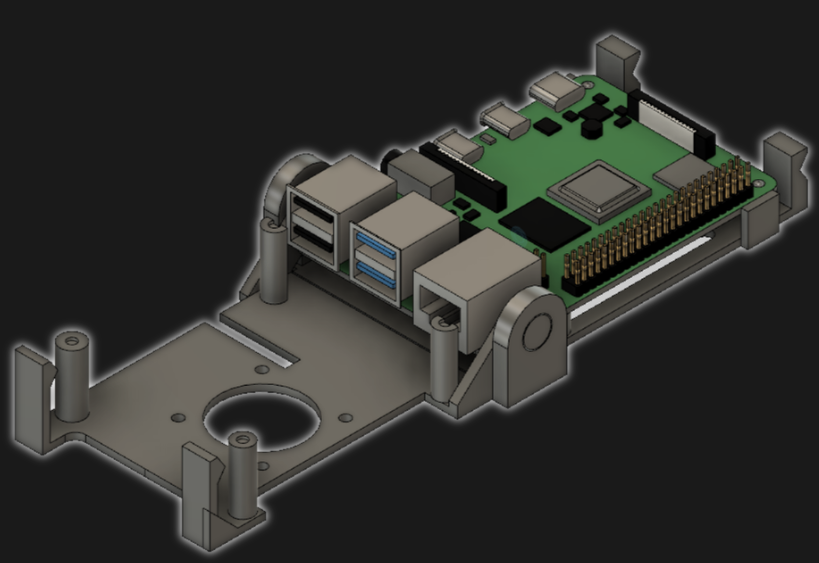 [jcprintnplay] has challenged himself to making Raspberry Pi cases in different ways, and his Fold-a-Pi enclosure tries for a “less is more” approach while also leveraging the strong points of 3D printing. The enclosure prints as a single piece in about 3 hours, and requires no additional hardware whatsoever.
The design requires no screws or other fasteners, and provides a mounting hole for a fan as well as some holes for mounting the enclosure itself to something. All the ports and headers are accessible, and the folding one-piece design is not just a gimmick; in a workshop situation where the Pi needs to be switched out or handled a lot, it takes no time at all to pop the Raspberry Pi in and out of the enclosure.
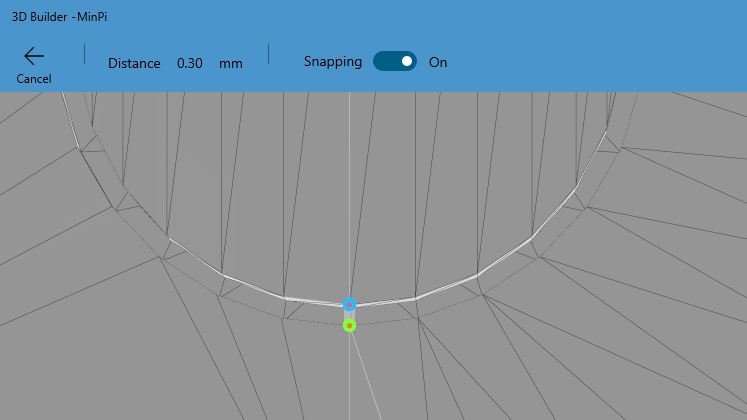
[James] points out that the trick with a print-in-place hinge like this is leaving enough space between the parts so that the two pieces aren’t fused together, but not so much space that the print fails. He doesn’t go into detail about how much space worked or didn’t work, but an examination of the downloadable model shows that the clearance used looks like 0.30 mm, intended to be printed with a 0.4 mm nozzle.
[James] also demonstrates the value of being able to do quick iterations on a design when prototyping. In a video (embedded below) The first prototype had the hinge not quite right. In the second prototype there was a lack of clearance when closing. The third one solved both and shows the final design.
The tricky process of finding just the right amount of clearance for something can be made much easier with the Goldilocks approach, and can be an efficient use of 3D printing.
[via Reddit]
Romesh Ranganathan’s Funniest Moments on Sunday Brunch
8 Out Of 10 Cats Does Countdown S17E03
ESPFLIX Brings Streaming Video To The World Of Microcontrollers
These days, if you’ve got a TV that’s a little too old to directly access streaming services, you’ve got plenty of options. Apple TV, Chromecast, and a cavalcade of Android boxes are available to help get content on your screen. However, if you’re really stuck in the past, ESPFLIX might just be for you.

Yes, that’s right – it’s an online streaming service running on an ESP32. [rossumur] has achieved this feat through a careful use of codecs, and some efficient coding strategies to make it all come together. Video is MPEG1, at just 352×192 resolution. Audio is via the SBC codec, originally intended for use with Bluetooth devices. It’s chosen here for its tiny sample buffers, making it easier to decode in the limited RAM of the ESP32. Output is via composite video, generated on the ESP32 itself.
The titles themselves consist of public domain content, running off an Amazon Web Services instance. With limited RAM on the ESP32, there’s not much buffering to be had, so [rossumur] is bankrolling an AWS Cloudfront instance which should make it possible to use ESPFLIX from most places around the world with a solid internet connection.
We’ve seen [rossumur]’s work before, with the ESP_8_BIT serving as a prelude to this project’s capabilities. Video after the break.
source https://hackaday.com/2020/08/11/espflix-brings-streaming-video-to-the-world-of-microcontrollers/
ESPFLIX Brings Streaming Video To The World Of Microcontrollers
These days, if you’ve got a TV that’s a little too old to directly access streaming services, you’ve got plenty of options. Apple TV, Chromecast, and a cavalcade of Android boxes are available to help get content on your screen. However, if you’re really stuck in the past, ESPFLIX might just be for you.
Yes, that’s right – it’s an online streaming service running on an ESP32. [rossumur] has achieved this feat through a careful use of codecs, and some efficient coding strategies to make it all come together. Video is MPEG1, at just 352×192 resolution. Audio is via the SBC codec, originally intended for use with Bluetooth devices. It’s chosen here for its tiny sample buffers, making it easier to decode in the limited RAM of the ESP32. Output is via composite video, generated on the ESP32 itself.
The titles themselves consist of public domain content, running off an Amazon Web Services instance. With limited RAM on the ESP32, there’s not much buffering to be had, so [rossumur] is bankrolling an AWS Cloudfront instance which should make it possible to use ESPFLIX from most places around the world with a solid internet connection.
We’ve seen [rossumur]’s work before, with the ESP_8_BIT serving as a prelude to this project’s capabilities. Video after the break.
source https://hackaday.com/2020/08/11/espflix-brings-streaming-video-to-the-world-of-microcontrollers/
ESPFLIX Brings Streaming Video To The World Of Microcontrollers
These days, if you’ve got a TV that’s a little too old to directly access streaming services, you’ve got plenty of options. Apple TV, Chromecast, and a cavalcade of Android boxes are available to help get content on your screen. However, if you’re really stuck in the past, ESPFLIX might just be for you.
Yes, that’s right – it’s an online streaming service running on an ESP32. [rossumur] has achieved this feat through a careful use of codecs, and some efficient coding strategies to make it all come together. Video is MPEG1, at just 352×192 resolution. Audio is via the SBC codec, originally intended for use with Bluetooth devices. It’s chosen here for its tiny sample buffers, making it easier to decode in the limited RAM of the ESP32. Output is via composite video, generated on the ESP32 itself.
The titles themselves consist of public domain content, running off an Amazon Web Services instance. With limited RAM on the ESP32, there’s not much buffering to be had, so [rossumur] is bankrolling an AWS Cloudfront instance which should make it possible to use ESPFLIX from most places around the world with a solid internet connection.
We’ve seen [rossumur]’s work before, with the ESP_8_BIT serving as a prelude to this project’s capabilities. Video after the break.
source https://hackaday.com/2020/08/11/espflix-brings-streaming-video-to-the-world-of-microcontrollers/
3D Printable Kinematic Couplings, Ready To Use
Time may bring change, but kinematic couplings don’t. This handy kinematic couplings resource by [nickw] was for a design contest a few years ago, but what’s great is that it includes ready-to-use models intended for 3D printing, complete with a bill of materials (and McMaster-Carr part numbers) for hardware. The short document is well written and illustrated with assembly diagrams and concise, practical theory. The accompanying 3D models are ready to be copied and pasted anywhere one might find them useful.
What are kinematic couplings? They are a way to ensure that two parts physically connect, detach, and re-connect in a precise and repeatable way. The download has ready-to-use designs for both a Kelvin and Maxwell system kinematic coupling, and a more advanced design for an optomechanical mount like one would find in a laser system.
The download from Pinshape requires a free account, but the models and document are licensed under CC – Attribution and ready to use in designs (so long as the attribution part of the license is satisfied, of course.) Embedded below is a short video demonstrating the coupling using the Maxwell system. The Kelvin system is similar.
In the past we saw the Maxwell system form the basis of this 3D-printed magnetic camera mount. Want a more in-depth resource for kinematic couplings? Check out [Joshua Vasquez]’s take on the book Exact Constraint: Machine Design Using Kinematic Principles.
source https://hackaday.com/2020/08/11/3d-printable-kinematic-couplings-ready-to-use/
Romesh Ranganathan’s FUNNIEST BITS on 8 Out of 10 Cats Does Countdown!
r/maliciouscompliance | I got my whole team to QUIT their jobs…
r/technicallythetruth | “his lawyer can get him out for free?”
My Boss Arrested During His Shift And Several Employees Saw Him Walked Out In Handcuffs r/ProRevenge
Glasgow Uses an FPGA as an Embedded Systems Multitool
Everyone who builds embedded systems wants tools to help build and debug systems faster, so it isn’t uncommon to see boards outfitted with various tools like serial port sniffers. We’ve seen a few incarnations and the latest is Glasgow. The small board uses an FPGA and claims to do the following:
- UART with automatic baud rate determination
- SPI or I2C
- Read and write common EEPROMs and flash chips
- Read and write common EPROMs including a data rescue function
- Program AVR chips via SPI
- Play back JTAG SVF files
- Debug ARC and some MIPS CPUs
- Program XC9500LX CPLDs
- Communicate to several wireless radios and CPUs
- Do sound synthesis
- Read raw data from floppy drives
The revC board is the first to be relatively functional and sports 16 I/O pins operating at up to 100 MHz, although the documentation hints that 6 MHz might be the top of what’s easily accomplished. The software is written in Python and the iCE40 FPGA toolchain that we’ve talked about many times in the past.
This already looks like a useful tool and the reconfigurable nature of FPGAs makes it a good platform to expand. The documentation discusses the difficulty in debugging things for the board, so the base software offers support such as a built-in logic analyzer to help.
We have seen dev boards become bench tools, like using the iCEstick as a logic analyzer. It’s nice to see dedicated tools like this one built up around the speed and versatility of FPGAs.
source https://hackaday.com/2020/08/10/glasgow-uses-an-fpga-as-an-embedded-systems-multitool/
r/idontworkherelady | “If you don’t work here, I’ll have you FIRED!”
BEST CUBE #376
Windows Refund Day – When Linux Users Demanded Their Money Back
Raspberry Pi Gets PATA/IDE Drive via GPIO Header
By and large, the Raspberry Pi is a computer that eschews legacy interfaces. Primarily relying on SD cards for storage and USB ports for further expansion, magnetic hard drives are a rare sight. However, [Manawyrm] decided that some 40-pin goodness was in order, and set to making a PATA IDE adapter for the platform.
To achieve the task of interfacing now-vintage IDE devices with the Raspberry Pi, [Manawyrm] elected to use the single board computer’s GPIO pins to get the job done. 23 pins are required, with 16 used for the data bus, with the rest dedicated to address lines, strobes, and other features.
The adapter is no speed demon, netting 800 kbit/s on reads and 500 kbit/s on writes with a Raspberry Pi 4. The main bottleneck comes from relying on libgpiod, which [Manawyrm] readily admits is designed for general IO tasks, not data transfers. Despite this, it’s still fast enough to play an audio CD from an IDE CD-ROM drive without skipping. A kernel build is required, however, as Raspberry Pis are unsurprisingly not configured to use ATA disks by default.
Obviously, more serious applications would substitute a dedicated USB hard disk adapter or give the Raspberry Pi a PCI-express (PCIe) card for sata drives instead, but that doesn’t discount the fun inherent in the build. While it may be slow, it shows that talking to PATA hard disks is actually quite straightforward when you understand the basics. Of course, if you want to do the opposite, and have your Raspberry Pi emulate a PATA disk, that’s possible too. Video after the break.
[Thanks to DosFox for the tip!]
source https://hackaday.com/2020/08/10/raspberry-pi-gets-pata-ide-drive-via-gpio-header/
COVID-19 Lockdown Update: These sectors may return to work
It has been announced that certain sectors may return to work during the second stage of the COVID-19 lockdown.
Click or tap on the following quick links to see the information immediately:
- Highlights of the lockdown-regulation updates
- Business sectors that may return to work
- Additional information
- Getting business exposure during lockdown
Highlights of the lockdown-regulation updates:
- Alcohol and cigarettes are still NOT for sale
- The sale of hot food is now explicitly banned
- Selected non-consumable goods may be sold for the care of babies and toddlers
- The number of confirmed COVID-19 cases, as of 16 April, is 2 605 with a total of 48 deaths and 903 recoveries.
Sectors that may return to work during the second stage of lockdown:
- Mining operations (excluding collieries that supply Eskom) may be reopened at 50% capacity. After lockdown, a risk-based approach will be taken to determine what capacity these operations may be increased to.
Visit https://www.gov.za/speeches/minister-gwede-mantashe-coronavirus-covid-19-amended-regulations-16-apr-2020-0000 to view the conditions that apply to starting work and the gradual increasing of capacity thereafter.
- To ensure that SA continues the supply of energy and petroleum products, the following applies:
- Collieries that supply Eskom may continue to operate at full capacity
- Refineries may operate at full capacity to avoid a shortage of fuel. This includes operations such as refineries, smelters, plants, and furnaces.
- Plumbers, electricians, glaziers, locksmiths, and roof repairers may provide emergency help. Emergency automobile repairs may also be done for people who render essential services and public transport vehicles that are permitted to operate during lockdown.
- Hardware stores and stores selling vehicle components may also reopen but should maintain a register of persons buying essential goods and must keep record of a signed declaration whereby the buyer attests that the goods are essential.
- Essential goods may be transported from warehousing sites to essentials service providers.
- Call centres may operate if they are necessary to provide the following:
- Health
- Safety
- Social support
- Government and financial services
- Debt restructuring for consumers or retailers
- Short-term insurance policies
- Information and communication technology services rendered to entities and institutions engaged in delivering essential services.
#sapsHQ #LockdownSA Regulations:
Categories of essential services. NP pic.twitter.com/MqTDuCOiRS— SA Police Service 🇿🇦 (@SAPoliceService) April 17, 2020
Additional information:
- Retailers who are permitted to sell essential goods may sell non-consumable goods essential for the care of babies and toddlers. These goods may include:
- Clothing
- Blankets
- Towels
- Cot mattresses
- Teething rings
- Pacifiers
- Bibs
- Feeding bottles
- No one may be evicted from their place of residence for the duration of the lockdown.
For more information on these and other regulations, please visit https://www.gov.za/speeches/minister-nkosazana-dlamini-zuma-coronavirus-covid-19-amended-regulations-16-apr-2020-0000
Getting business exposure during lockdown:
If your business falls into any of the categories listed above, it is imperative to ensure that you make people aware of the fact that you are trading, even if it is under special circumstances.
One way to do that is by listing your products and services on Junk Mail for FREE. That’s right, no advertising cost! It’s the perfect opportunity to advertise your business during these challenging times.
All you need to do is visit Junk Mail and start placing your FREE adverts. The best part is, it’s UNLIMITED, so place as many ads as you like!
We understand the immense strain lockdown has placed on every business in South Africa, and even though this won’t last forever, you’ll need all the help you can get to make it through. Don’t take this opportunity for granted. If you need assistance with anything else, please don’t hesitate to call us on 0872369457 or fill in the contact form below.
Contact us for help to promote your essential service:
Please enable JavaScript in your browser to complete this form.