
Monthly Archives: January 2020
Caravan Palace – Wonderland
My Ordinary Life-The Living Tombstone
Disturbed – Down With The Sickness (SYN Remix)
Bombs Away – Better Luck Next Time [Official Video]
Bombs Away – Drunk Arcade [Official Video]
Amazing Chocolate Factory Workers & Machines on Another Level
Maybe he should have listened.
r/idontworkherelady | Contractor Loses Job because I’m the CEO’s Daughter…
r/JustNoHOA – CRAZY HOA WANTS TO TAKE AWAY ALL OUR GUN$! 😨
It Turns Out, Robots Need Tough Love Too
Showing robots adversarial behavior may be the key to improving their performance, according to a study conducted by the University of Southern California. While a generative adversarial network (GAN), where two neural networks compete in a game, has been demonstrated, this is the first time adversarial human users have been used in a learning effort.
The report was presented at the International Conference on Intelligent Robots and Systems, describing the experiment in which reinforcement learning was used to train robotic systems to create a general purpose system. For most robots, a huge amount of training data is necessary in order to manipulate objects in a human-like way.
A line of research that has been successful in overcoming this problem is having a “human in the loop”, in which a human provides feedback to the system in regards to its abilities. Most algorithms have assumed a cooperating human assistant, but by acting against the system the robot may be more inclined to develop robustness towards real world complexities.
The experiment that was conducted involved a robot attempting to grasp an object in a computer simulation. The human observer observes the simulated grasp and attempts to snatch the object away from the robot if the grasp is successful. This helps the robot discern weak and firm grasps, a crazy idea from the researchers that managed to work. The system trained with the adversary rejected unstable grasps, quickly learning robust grasps for different objects.
Experiments like these can test the assumptions made in the learning task for robotic applications, leading to better stress-tested systems more inclined to work in real-world situations. Take a look at the interview in the video below the break.
[Thanks Qes for the tip!]
source https://hackaday.com/2020/01/08/it-turns-out-robots-need-tough-love-too/
Fail of the Week: Thermostat Almost Causes a House Fire
Fair warning: any homeowners who have thermostats similar to the one that nearly burned down [Kerry Wong]’s house might be in store for a sleepless night or two, at least until they inspect and perhaps replace any units that are even remotely as sketchy as what he found when he did the postmortem analysis in the brief video below.
The story begins back in the 1980s, when the Southern New England area where [Kerry] lives enjoyed a housing boom. Contractors rushed to turn rural farmland into subdivisions, and new suburbs crawled across the landscape. Corners were inevitably cut during construction, and one common place to save money was the home’s heating system. Rather than engage an HVAC subcontractor to install a complicated heating system, many builders opted instead to have the electricians install electric baseboards. They were already on the job anyway, and at the time, both copper and electricity were cheap.
Fast forward 40 years or so, and [Kerry] finds himself living in one such house. The other night, upon catching the acrid scent of burning insulation, he followed his nose to the source: a wall-mounted thermostat for his electric baseboard. His teardown revealed burned insulation, bare conductors, and scorched plastic on the not-so-old unit; bearing a 2008 date code, the thermostat must have replaced one of the originals. [Kerry] poked at the nearly combusted unit and found the root cause: the spot welds holding the wires to the thermostat terminal has become loose, increasing the resistance of the connection. As [Kerry] points out, even a tenth of an ohm increase in resistance in a 15 amp circuit would dissipate 20 watts of heat, and from the toasty look of the thermostat it had been a lot more than that.
The corner-cutting of the 1980s was nothing new, of course – remember the aluminum wiring debacle? Electrical fires are no joke, and we’re glad [Kerry] was quick to locate the problem and prevent it from spreading.
source https://hackaday.com/2020/01/08/fail-of-the-week-thermostat-almost-causes-a-house-fire/
Making Custom 3D Printed Slide Switches
For a little over a year now we’ve been covering the incredible replicas [Mike Gardi] has been building of educational “computers” from the very dawn of the digital age. These fascinating toys, many of which are now extremely rare, are recreated using 3D printing and other modern techniques for a whole new generation to enjoy and learn from.
He’s picked up a trick or two building these replicas, such as this method for creating bespoke slide switches with a 3D printer. Not only does this idea allow you to control a custom number of devices, but as evidenced in the video after the break, the printed slider sounds absolutely phenomenal in action. Precisely the sort of “clunk” you want on your front panel.
Of course, [Mike] doesn’t expect anyone to create this exact switch. He’s designed it as part of his Working Digital Computer (WDC-1) project that he’s documenting on Hackaday.io, so it has a rather specific set of design parameters. But with the steps he outlines in the write-up, you should have no problem adapting the concept to fit your specific needs.
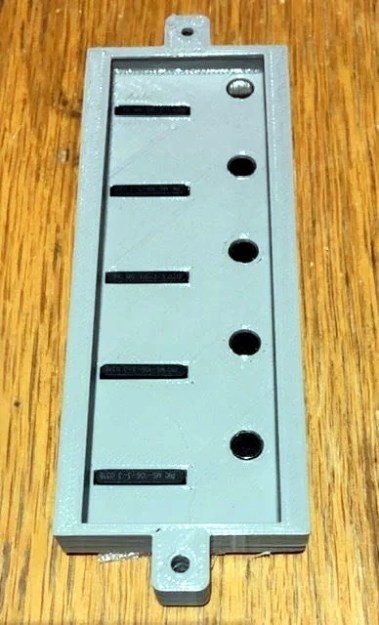
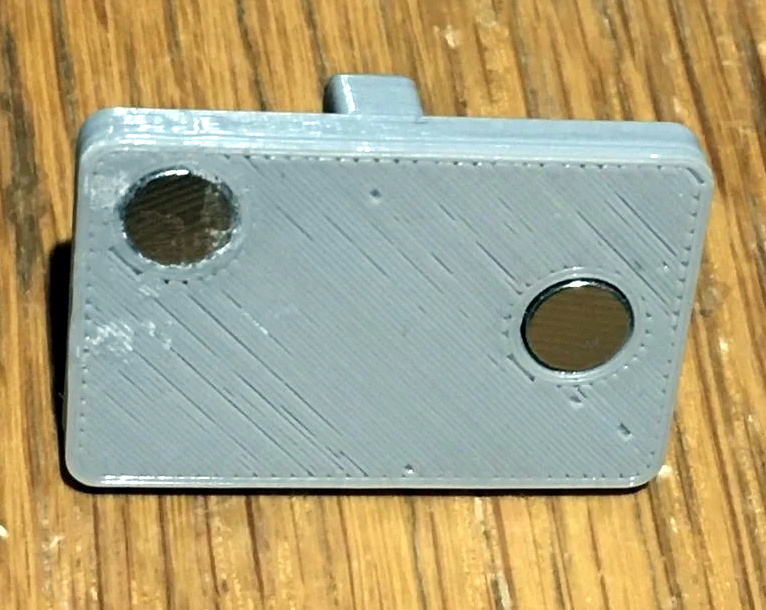
So how does it work? One half of the switch is a track is printed with indents for both reed switches and 6 x 3 mm disc magnets. The other is a small shuttle that itself has spaces for two of the same magnets. When it slides over the reed switches they’re activated by the magnet on one side, while the magnet on the other side will be attracted to the one embedded into the track. This not only gives the switch detents that you can feel and hear while moving it, but keeps the shuttle from sliding off the intended reed switch.
If you like this, you’ll absolutely love his mostly 3D printed binary encoder that we featured recently. With his track record, we’re excited to follow the WDC-1 project as it develops, and thrilled that [Mike] has brought it to Hackaday.io.
source https://hackaday.com/2020/01/08/making-custom-3d-printed-slide-switches/
Engineering Your Way to Better Sourdough (and Other Fermented Goods)
Trent Fehl is an engineer who has worked for such illustrious outfits as SpaceX and Waymo. When he got into baking, he brought those engineering skills home to solve a classic problem in the kitchen: keeping a sourdough starter within the ideal, somewhat oppressive range of acceptable temperatures needed for successful fermentation.
A sourdough starter is a wad of wild yeasts that you make yourself using flour, water, and patience. It’s good for a lot more than just sourdough bread — you can scoop some out of the jar and use it to make pancakes, waffles, pretzels, and a host of other bread-y delights. A starter is a living thing, a container full of fermentation that eats flour and has specific temperature needs. Opinions differ a bit, but the acceptable temperature range for active growth is about 60 F to 82 F. Too cold, and the starter will go dormant, though it can be revived with a little love. But if the starter gets too hot, all the yeasts and bacteria will die.
 While there are of course commercial products out there that attempt to solve this problem of temperature control, most of them seem to be aimed at people who live in some wonderland that never gets warmer than 80F. Most of these devices can’t cool, they only provide heat. But what if you live in a place with seasons where the climate ranges from hot and humid to cold and dry?
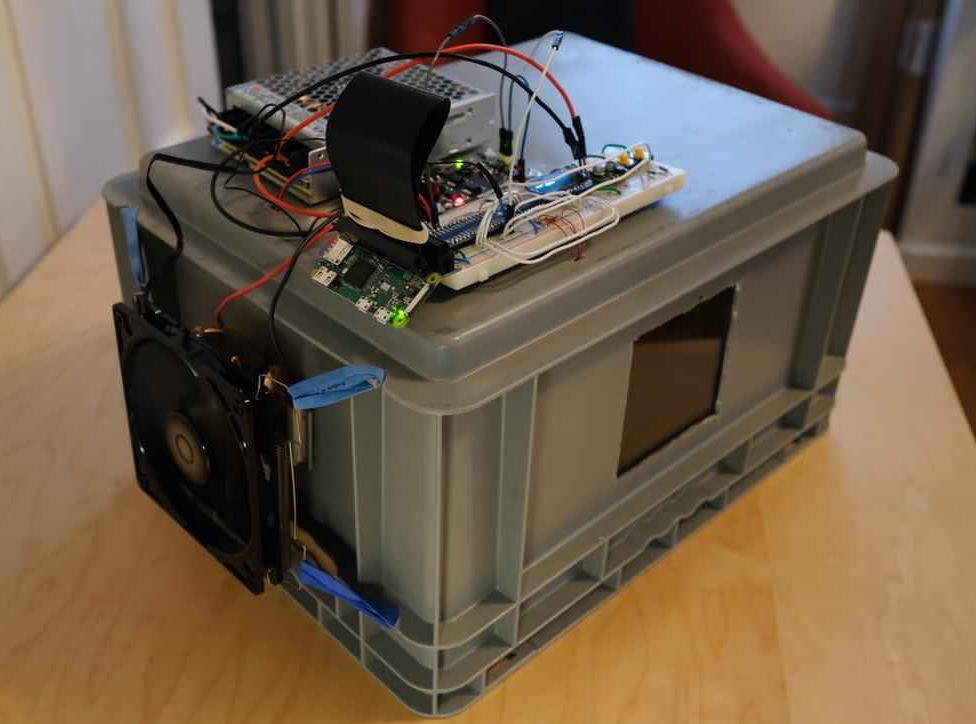
The answer lies within Chamber, a temperature-regulated haven Trent created that lets these wild yeasts grow and thrive. It uses a Peltier unit to heat and cool the box as needed to keep the mixture fermenting at 26°C /78.8°F.
Thanks to the Peltier unit, Trent can change the temperature inside the chamber simply by alternating the direction of current flow through the Peltier. He’s doing this with an H-bridge module driven by a Raspberry Pi Zero. When it starts to get too warm in the chamber, the fan on the outside wall vents the heat away. A second fan inside the chamber pulls warm air in when it gets too cold.
Trent says that Chamber performs really well, and he’s recorded temperatures as low as 60F and as high as 82F. He mostly uses it for sourdough, but it could work for other temperature-sensitive food sciences like pickling, growing mushrooms, or making yogurt. We think it could be ideal for fermenting kombucha, too.
Chamber works well enough that Trent has put further development on the back burner while he makes use of it. He does have several ideas for improvements, so if you want to help, check out his website and Github repo.
source https://hackaday.com/2020/01/08/engineering-your-way-to-better-sourdough-and-other-fermented-goods/
Commercial Circuit Simulator Goes Free
If you are looking for simulation software, you are probably thinking LTSpice or one of the open-source simulators like Ngspice (which drives Oregano and QUCs-S), or GNUCap. However, there is a new free option after the closing of Spectrum Software last year: Micro-Cap 12. You may be thinking: why use another closed-source simulator? Well, all the simulators have particular strengths, but Micro-Cap does have very nice features and used to retail for about $4,500.
The simulator boasts a multipage schematic editor, native robust digital simulation, Monte Carlo analysis, 33,000 parts in its library, worst-case and smoke analysis, Smith charts, and it can even incorporate spreadsheets. There’s a built-in designer for active and passive filters. Have a look at the brochure and you will see this is a pretty serious piece of software. And now it’s at least free as in beer.
Models
The number of models supported for active devices is impressive and includes some very recent MOSFET models, not just the old standard models. It can also read just about any regular Spice or IBIS model. It can also export Spice files if you want to use another engine or share designs with other Spice users. There are also quite a few examples provided. There are also over 2,000 standard digital parts including all the usual 7400 families, CD4000 CMOS, and even ECL.
As a bonus, we tried it under Wine and it worked well — at least the 32-bit version. The 64-bit one would probably work with a little effort. On a big monitor, you might want to use Winecfg to set a higher DPI setting, although the toolbar icons are fixed in size which is a little inconvenient. You can, however, select “large toolbar” on the Options | Preference menu, which will help.
Features
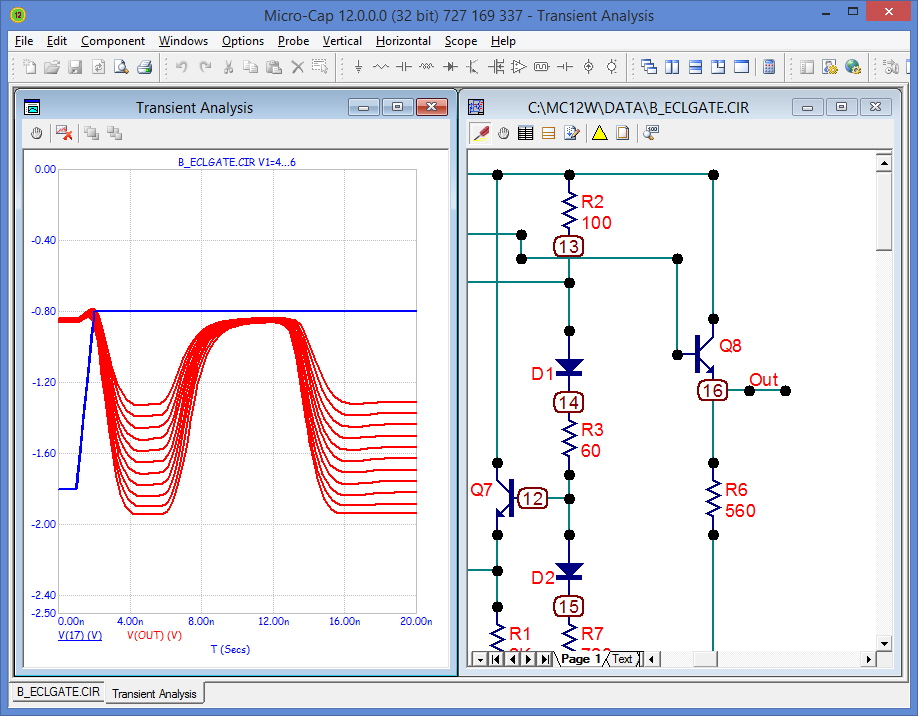 One nice touch is that you can view a simulation and interactively change component values and watch the results update right away.
We frequently use Spice when we are too lazy to do the math required to pick an optimal set of values. With this software, you can set ranges for various circuit components, tell the program what you want to optimize, and it will compute the best values for you.
The smoke analysis is somewhat unique. The idea is to run a transient analysis and the program determines if any circuit values exceed the maximum value for a component. You get a nice colored graph that tells you how close you are to smoke or, if you have some red bars, what parts will smoke.

Another neat feature is that you can create very cool 3D plots. This is especially useful if you are stepping parameters or measuring the effect on parameter variation like temperature.
One other feature we liked is that the program can output a netlist for printed circuit board programs including Protel, Accel, Orcad, and PADS. Over 18,000 components in the library have packages available and there is a package editor. We wish it would work with KiCAD, although we are pretty sure you could figure out some conversion path from one of the formats available.
Why Free?
The software was under development since 1982. We don’t know the circumstances of Spectrum’s closing but we hope it was to move on to something great. However, we appreciate the free release of this powerful simulator that can give LTSpice a run for its money. True, we expect there won’t be future development, but the package seems very complete and with the ability to import models, it will be very useful for a long time to come.
Learning
If you are trying to learn the program, there are some starting instructions for an older version that should get you the basics. You can also find the user’s manual and a reference manual on the site.
We went looking for tutorials and found that [Kiss Analog] just started a set of video tutorials. There’s only one complete, so far (see below), but we are sure there will be more on the way.
If you’d rather do LTSpice, we have a tutorial. Then again, for just playing around, the Falstad simulator is pretty nice and requires no installation.
source https://hackaday.com/2020/01/08/commercial-circuit-simulator-goes-free/
Titanium Coating Is Actually Pretty Straightforward
[Justin] enjoys tinkering in his home lab, working on a wide variety of experiments. Recently, he’d found much success in coating objects with thin layers of various metals with the help of a DC sputtering magnetron. However, titanium simply wouldn’t work with this setup. Instead, [Justin] found another way.
As it turns out, coating with titanium is quite achievable for even the garage operative. Simply run current through a titanium wire, heating it above 900 degrees in a vacuum. This will create a shower of titanium atoms that will coat virtually anything else in the chamber. [Justin] was able to achieve this with little more than some parts from Home Depot, a vacuum pump, and a cheap glass jar. He was able to produce a nice titanium oxide finish on a knife blade, giving that classic rainbow look. Coating crystals was less straightforward, but the jet black finish achieved was impressive nonetheless.
[Justin] plans to upgrade his vacuum rig further, and with better process control, we’d expect even better results. The earlier work is also very relevant if you’re interested in creating fine coatings of other materials. Video after the break.
source https://hackaday.com/2020/01/08/titanium-coating-is-actually-pretty-straightforward/
The Barcode Revolution: Welcome To Our Automated World
Featured in many sci-fi stories as a quicker, more efficient way to record and transfer information, barcodes are both extremely commonplace today, and still amazingly poorly understood by many. Originally designed as a way to allow for increased automation by allowing computer systems to scan a code with information about the item it labels, its potential as an information carrier is becoming ever more popular.
Without the tagging ability of barcodes (and their close cousin: RFID tags), much of today’s modern world would grind to a halt. The automated sorting and delivery systems for mail and parcels, entire inventory management systems, the tracing of critical avionics and rocketry components around the globe, as well as seemingly mundane but widely utilized rapid checkout at the supermarket, all depends on some variety of barcodes.
Join me on a trip through the past, present and future of the humble barcode.
Removing the Human Element
Way back in the 1930s, John Kermode, Douglas Young, and Harry Sparkes of Westinghouse Electric Co were listed as the inventors of an automated card sorter system. This system used a number of bars printed on paper, which would be read by a photo-electric cell, in turn triggering the card (statement, invoice, etc.) to be dropped through a specific trap door, sorting the item into the appropriate bin.
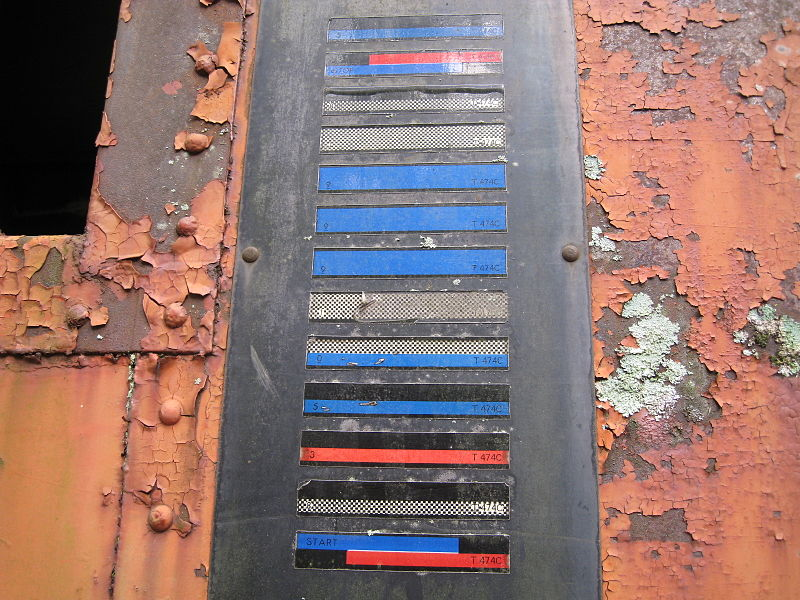
With the goal of the system was to speed up mundane tasks and to reduce the burden of having humans keep track of things like railcars, mail trucks, and other elements in the ever-increasing web of logistics that began to span the USA in the 20th century, automatic equipment identification (AEI) systems such as KarTrak were developed. This system was intended to allow the US railroad to keep track of its rolling stock.
A plate with 13 horizontal labels of varying dimensions and colors was mounted on either side of a car, from where a track side scanner would record the pattern and register the car it was attached to.
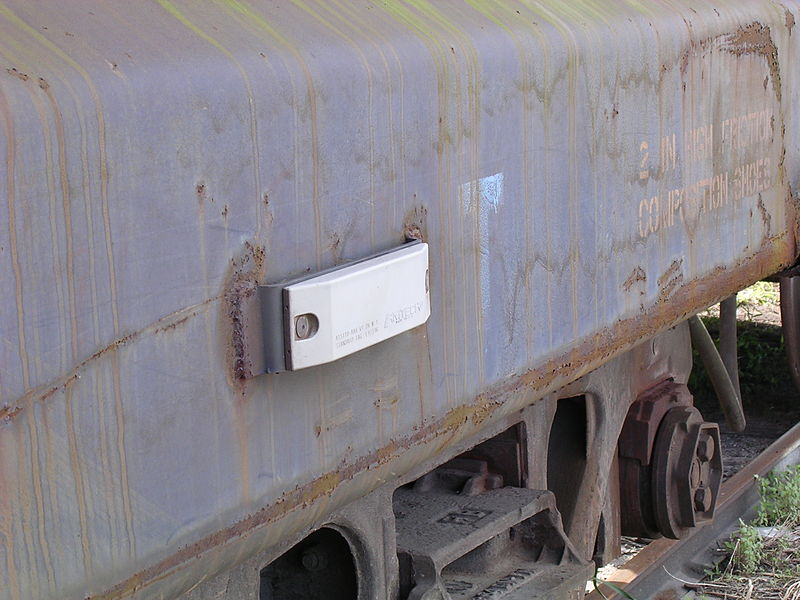
Unfortunately, KarTrak’s barcode labels proved to be too unreliable in actual use, with dirt accumulation and damage to the labels being the main reasons why the system was eventually phased out by the late 1970s. These days an RFID-based AEI system is used instead, which is immune to such issues. Cases like these proved that the main limitation of barcodes will always be one of visibility, much as a paper barcode can be damaged, drawn over, or torn off.
This limitation is however not as much of an issue in production environments, warehouses and retail stores, which is where they are most commonly used instead of RFID tags.
Scan It and Bag It
As early as the 1940s, attempts were made to invent a system that would automate parts of the checkout process in grocery stores, especially to look up and tally the prices. In 1948, graduate student Bernard Silver overheard the president of the local Food Fair food chain ask one of the deans to develop a system that would automatically read product information during checkout.
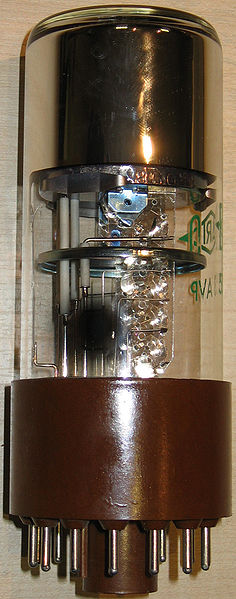
Silver would tell his friend Norman Woodland about this, and together they set out to develop such a system. After an initial failed attempt with ultraviolet ink, Silver would use the basic concept behind Morse code for creating the lines, essentially extending the dots and dashes downwards. Taking a page from the movie industry, he opted to use a photomultiplier tube along with a 500 Watt incandescent light bulb for reading the barcodes.
In their 1949 patent application, they described both this linear barcode, as well as a ‘bull’s eye’ version, which Silver deemed would be more efficient and easier to read. When Woodland moved to IBM in 1951, he tried to interest IBM in the system. Though he was successful in this, it was concluded that the technology necessary to make it work was still unavailable at the time.
It wouldn’t be until the 1960s that the topic would come up again, with IBM at Research Triangle Park in North Carolina assigning George Laurer (who sadly passed away in early December of 2019) to lead the team that would go on to create what is now known as the UPC-A barcode. This team consisted of William Crouse (inventor of the Delta C bar code), Heard Baumeister (calculating achievable characters per type of barcode), Norman Woodland (who still worked at IBM) and near the end of the project mathematician David Savir.

Near the end of the project the team was dissolved leading to some glitches in the development effort. Laurer made some changes to the Delta C barcode without applying Baumeister’s equations — making the read error rate skyrocket — but the GS1 retail organization ultimately accepted this Delta C barcode proposed by IBM as the UPC-A Universal Product Code barcode that would go on virtually unchanged to this day.
The most notable change to the system is the Internal Article Number (EAN) superset of UPC-A. EAN adds an extra digit to the beginning of the number, expanding the theoretical number of unique values to one trillion, indicating the country (using GS1 country codes) in which the company selling the product is based. These days essentially all barcodes used in retail are the EAN-13 type.
Enter the Matrix

Although these types of one-dimensional barcodes were and still are very useful, it was realized that by adding a second dimension, one could scale up the amount of information contained in a tag. Helped by improving scanners and ever cheaper CMOS and CCD image sensors, matrix barcodes like the QR code were developed. The QR (‘Quick Response’) code was developed by the Japanese company Denso Wave, back in 1994 (25 years ago) for use in the car industry.
This type of barcode was designed to contain information needed to track vehicles during manufacturing, allowing for rapid scanning using a single frame of image data. By having the position markers at the corners in the matrix barcode, it is easy to determine when one has a complete enough image to parse it.
These days QR codes are used anywhere a smartphone user might need quick access to some kind of information without manually copying strings of characters, including URLs, WiFi network login credentials or arbitrary strings of data. The ability to scan 1D and 2D barcodes is a standard feature of such smartphones, as no extra hardware is required, courtesy of miniature camera technologies one could only dream of back in the 1970s.
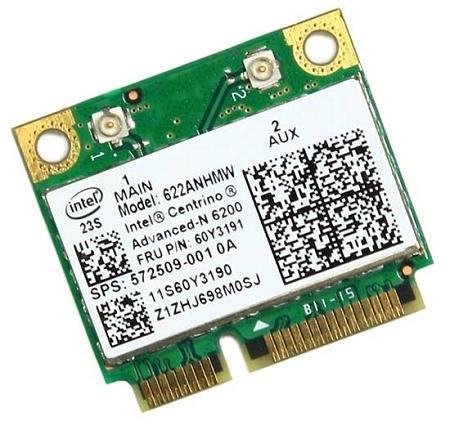
QR codes are obviously not the only type of matrix barcode. Electronic components are often marked with a Data Matrix barcode. This type of matrix barcode allows for very small tags that are readable even in poor lighting conditions. This makes it useful for tracking small components.
This type of barcode is often found on electronic components, on inventory tags, food labels. It can store from a few to up to 1,556 bytes of data, depending on the number of cells in the matrix. This is similar to QR codes, which can be tiny tags (e.g. a 21×21 matrix) or large (e.g. 177×177 matrix) with corresponding physical size.
As can be seen on the WiFi card image, the size of the chosen barcode depends on the amount of information to be encoded. Not only can one scale the barcode itself, the maximum amount of data that can be encoded also depends on the size of the matrix with the overhead from the padding, orientation markings and error correction all having to be taken into account.
As anyone who has ever tried to scan a blurry, damaged, or ridiculously tiny QR code can probably attest, achieving reliable scanning results demand you keep all of those factors in mind. What use is a high-tech matrix barcode after all if it can no longer reveal the data it contains?
Welcome to the Future
Whereas until the 1990s the reliable scanning of barcodes was anything but easy, today’s technologies have made it possible to quite literally put a highly capable 1D and 2D barcode scanner in everyone’s pocket. New technologies have made some look at creating the first 3D barcodes, which would make imprints in a material with 0.4 micron resolution, to be read out with an interferometer setup. This complexity can be used to fight things like counterfeited medication.
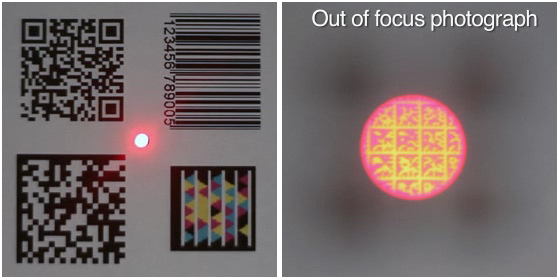
The number of 1D and 2D barcodes has quite literally exploded in number, as we noted back in 2015 and again in 2018 when the JAB (Just Another Barcode) joined the party with color instead of black and white markings to increase data depth per dot. Few of them are as insanely awesome as the Bokode tag, however, which takes ‘miniature’ to a whole new level courtesy of advanced optics. Bokodes can also be powered and rewritable, while being readable from up to 4 meters.
With the Wikipedia page for ‘Barcode’ alone listing around a hundred 1D and 2D barcode types, and with many new ones in development, it appears that we may just get that sci-fi future where barcodes are more common than human-readable text. That is, until we finally get those barcode reader upgrades for our cybernetic eyes.
source https://hackaday.com/2020/01/08/the-barcode-revolution-welcome-to-our-automated-world/
An ESP8266 Environmental Monitor in your USB Port
At this point, we’ve all seen enough ESP8266 “weather stations” to know the drill: you just put the ESP and a temperature sensor inside a 3D printed case, and let all those glorious Internet Points flow right on in. It’s a simple, and perhaps more importantly practical, project that seems to never get old. But that doesn’t mean there isn’t room for innovation.
Annoyed by the unnecessary bulk of existing solutions, [cperiod] has come up with an ESP8266 temperature and humidity sensor that can plug directly into a standard USB port. Slotted into a USB wall charger or power bank, this diminutive board can provide inconspicuous remote environmental monitoring wherever you need it. For extra hacker points, the board was even produced at home on a PCB mill.
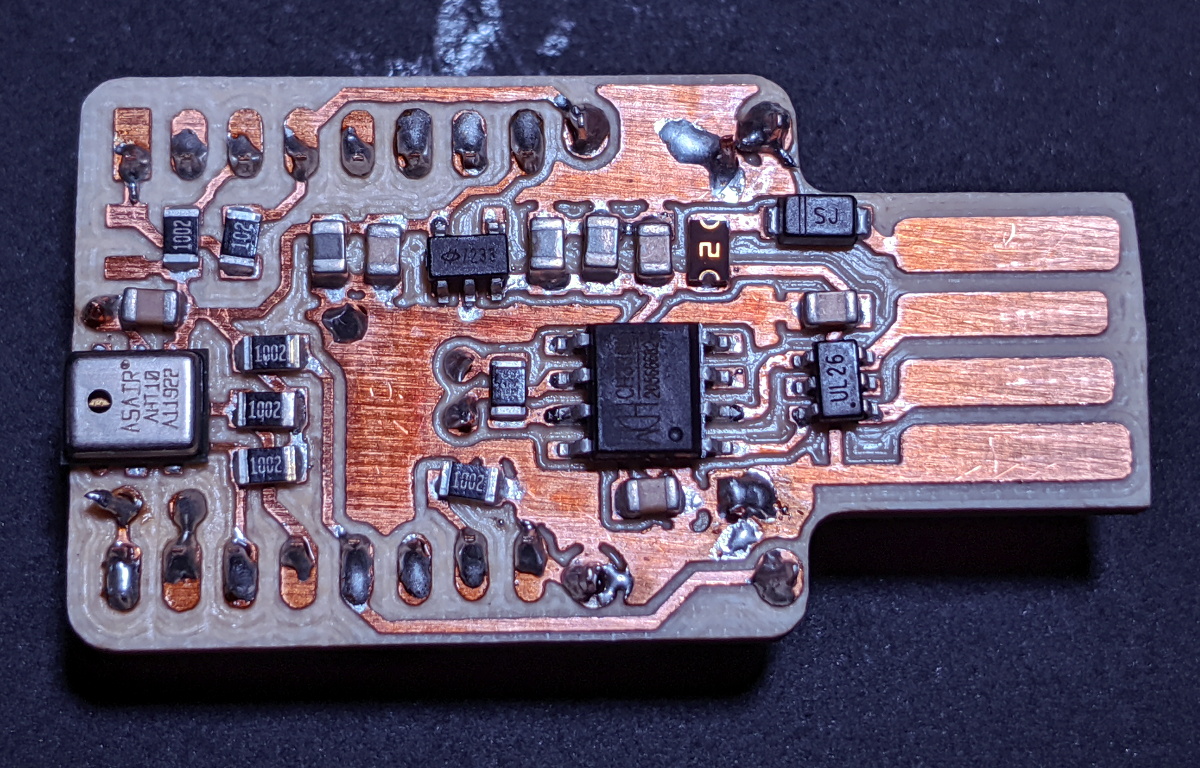 In addition to the ESP-7 or 12 module (which plugs in via a header, should you need to swap it out), the board features a CH330N USB to UART chip and HT7233 voltage regulator. For the sensor itself, [cperiod] has bucked convention a bit and went with the I2C-connected AHT10 over something more common like a member of the BME family.
Unfortunately, this design suffers from the same issue we’ve seen in other compact environmental monitoring solutions; namely, that the heat generated by the chip itself skews the temperature readings. To combat this, aggressive power saving functions are baked into the firmware to make sure the ESP is in a deep sleep as much as possible. While not a perfect solution, it does prevent the ESP from warming the PCB up so much that it invalidades the reported data.
By now, the particularly astute reader may have realized that all the additional components used for the USB side of this board aren’t strictly necessary. After all, if you can pull the ESP module out of the header and program it separately, then you don’t actually need to include that capability in each sensor node. While true, we’re hardly the ones to complain when a hacker showboats a bit on their designs.
source https://hackaday.com/2020/01/08/an-esp8266-environmental-monitor-in-your-usb-port/
The Ruscombe Gentleman’s Steam Bicycle
Cycling for health and transportation might seem like a good idea, but it unfortunately has the nasty side effect of making you tired. To ease the suffering, many have turned to electric bicycles. But what if you want to really stand out from the crowd? Well then you should look to [Mark Drake] for inspiration, the creator of the beautifully engineered Ruscombe Gentleman’s Steam Bicycle.
[Mark] wanted to create a steam powered bicycle that’s actually usable, instead of just an awkward novelty. To achieve this he made extensive use of modern tech like spreadsheets to model the steam cycle, and CAD for the mechanical design. The engineering design that went into the project really shows in level of refinement of the end product, which is able to comfortably reach 15 mph. Watch the video after the break to see it in action and get all the details.
Petrol is used a fuel source, which is forced to the vaporising burner via air pressure. The fuel is heated by the burner itself to form a vapour before entering the combustion chamber and igniting. The steam generator is a hybrid design, using both mono tube steam generator coils and a small fire tube boiler. This produces superheated steam at over 300 °C, which [Mark] says is key to the bike’s performance. Mineral oil can’t handle the high temperature, so modern synthetic oil is used for lubrication. The steam generator is so well-built that [Mark] managed to get is certified to industrial standards. For safety, it features both a pressure release valve, and a system that automatically shuts of the fuel supply when the steam exceeds a certain pressure. 130 W of power is provided to the wheels by a single cylinder slide valve engine via modern toothed belt. This also drives the air pump to keep the fuel system pressurised, and an adjustable water pump to feed the boiler.The range of the bike is limited to 16 miles by the water supply, since all steam is exhausted to atmosphere. [Mark] hopes to improve this by adding a condenser to the system to recapture some water. He also wants to add a feed water heater to preheat the water using the exhaust steam, and increase fuel efficiency.
We’ve covered a few steam bicycles over the years including wood fired and recumbent versions.
Thanks [Kelvin Ly] for the tip!
source https://hackaday.com/2020/01/08/the-ruscombe-gentlemans-steam-bicycle/
Poking Around Inside A Pair of Classic Gaming Gifts
Retro gaming is huge right now, and like probably millions of other people, [wrongbaud] found himself taking possession of a couple faux-classic gaming gadgets over the holidays. But unlike most people, who are now using said devices to replay games from their youth, he decided to tear into his new toys to see how they work.
The first to get pulled apart is a handheld The Oregon Trail game, which Hackaday readers may recall from a teardown we did back when it was first released. His work continues right where our teardown left off, by pulling the game’s two EEPROM chips out and dumping their contents. As expected, [wrongbaud] found that the I2C connected chip contained the game save information, and the SPI flash chip stored the actual game files.
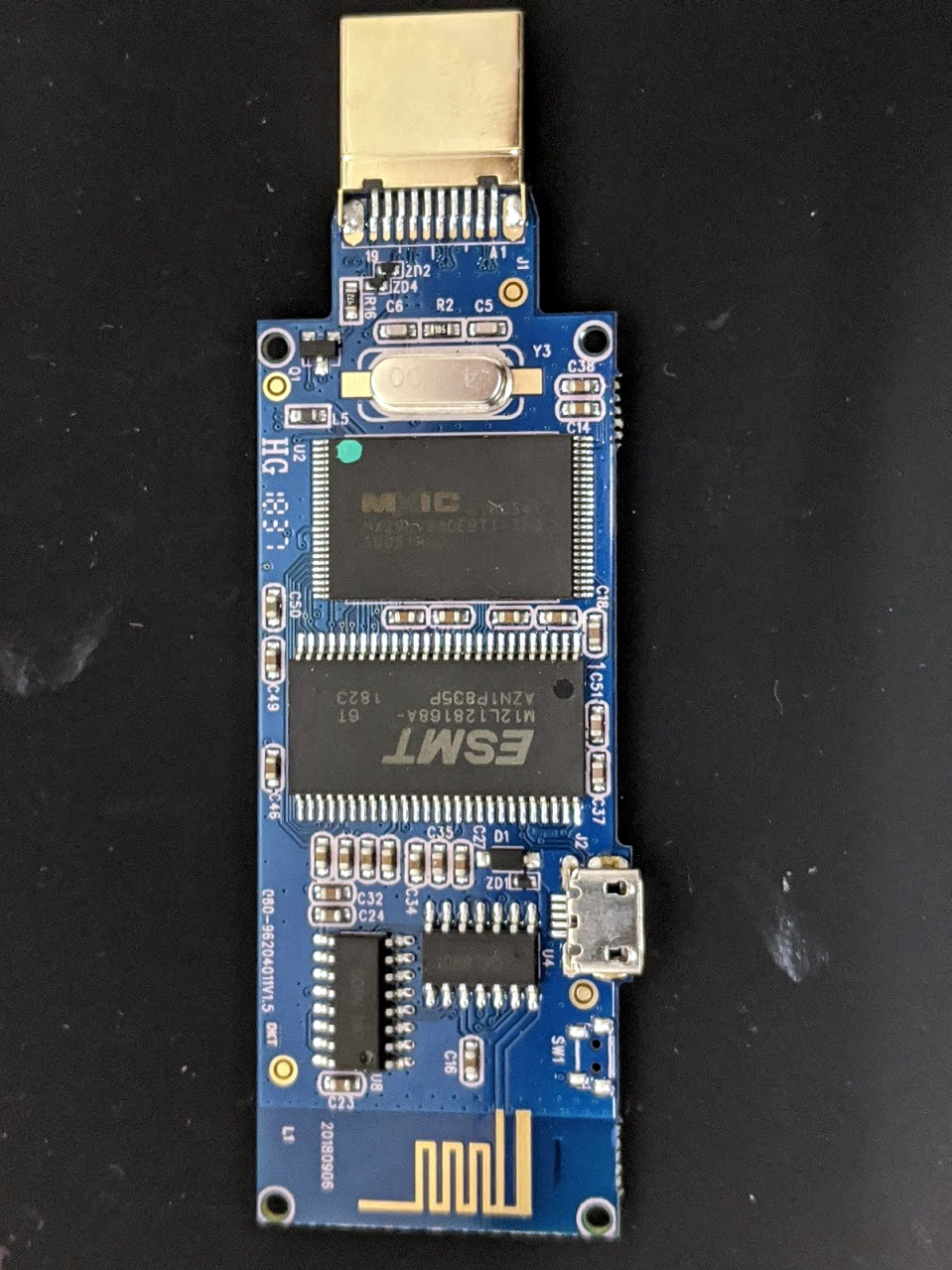 Next up was an HDMI “stick” from Bandai Namco that allows the user to play a selection of NES games. Here again [wrongbaud] liberates the flash chip and dumps it for examination, this time using an ESP32 tool of his own creation. Inside the firmware image he’s able to identify several elements with the help of
 binwalk, such as splash screen graphics and text strings.
But perhaps most interestingly, he found that binwalk was able to automatically extract the NES ROMs themselves. After verifying they were standard ROMs with an NES emulator, he theorizes that repacking the firmware with different ROMs should be possible should anyone feel so inclined.
Both of these hacks are fantastic examples of how you can reverse engineer a device’s firmware with low cost hardware, open source tools, and a healthy dose of patience. Even if you aren’t interested in fiddling with The Oregon Trail or swapping out the Mappy ROM for Contra, this write-up is an invaluable resource for anyone looking to do their own firmware analysis.
This isn’t the first time [wrongbaud] has hacked around inside these extremely popular retro games, either. Just last month we covered some of his previous exploits with the re-released versions of Rampage and Mortal Kombat.
source https://hackaday.com/2020/01/07/poking-around-inside-a-pair-of-classic-gaming-gifts/