The ability to get professionally manufactured PCBs, at least small ones, for dirt cheap has had a huge impact on the sort of projects we see around these parts. It’s getting to the point where experimenting with PCB enclosures is not only a way to make your next project stand out, but an economical choice.
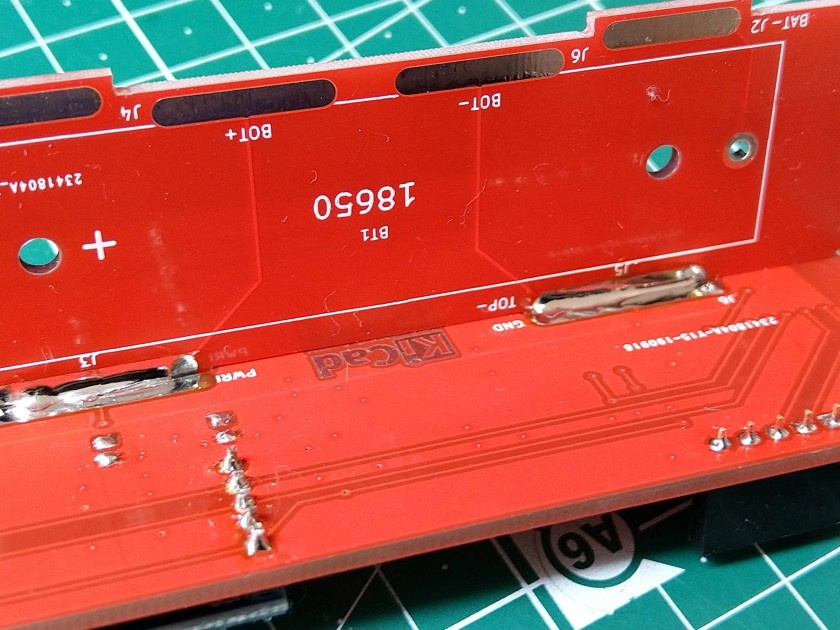
Which is how this ESP8266 sensor gadget from [Josef Adamčík] got its unique “folded over” look. The top panel is where the microcontroller and headers for various sensors live, the bottom panel is home to the TP4056 USB charging module, and the center panel provides mechanical support as well as holds the single 18650 cell. Rather than close the whole thing up with a fourth panel, he decided to leave it open so the battery can easily be removed. Plus, of course, it looks cooler this way.
Could [Josef] have fit all his electronics on a single 100 x 100 PCB and then put the whole thing into a 3D printed enclosure? Well, sure. But that’s been done to death at this point, and besides, he was looking for an excuse to get more comfortable doing PCB design. We think it also makes for a considerably more visual appealing final product than simply taking the “normal” way out.
Currently [Josef] has an SHT21 humidity/temperature sensor and a BH1750 light sensor slotted into the headers on the top side of the device, but they could just as easily be swapped out with something else if you wanted to do something a bit more exciting. We notice that homebrew air quality monitors are becoming increasingly popular.
Modern home cinema equipment is well-equipped with features for interoperability and convenience, but in practice, competing standards and arcana can make it fall over. Sometimes, you’ve gotta do a little work on your own to glue it all together, and that’s what led [Victor] to develop a little utility of his own.
ChromecastControls is a tool that makes controlling your home cinema easier by improving Chromecast’s integration with the CEC features of HDMI. CEC, or Consumer Electronics Control, is a bidirectional serial bus that is integrated as a part of the HDMI standard. It’s designed to help TVs, audio systems, and other AV hardware to communicate, and allow the user to control an entire home cinema setup with a single remote. Common use cases are TVs that send shutdown commands to attached soundbars when switched off, or Blu-Ray players that switch the TV on to the correct output when the play button is pressed.
[Victor]’s tool allows Chromecast to pass volume commands to surround sound processors, something that normally requires the user to manually adjust their settings with a seperate remote. It also sends shutdown commands to the attached TV when Chromecast goes into its idle state, saving energy. It relies on the PyChromecast library to intercept traffic on the network, and thus send the appropriate commands to other hardware. Simply running the code on a Raspberry Pi that’s hooked up to any HDMI port on a relevant device should enable the CEC commands to get through.
It’s a project that you might find handy, particularly if you’re sick of leaving your television on 24 hours a day because Chromecast never bothered to implement a simple CEC command on an idle timeout. CEC hacks have a long history, too – we’ve been covering them as far back as 2010!
Remember the WOPR from WarGames? The fictional supercomputer that went toe-to-toe with Matthew Broderick and his acoustic coupler was like a love letter to the blinkenlight mainframes of yesteryear, and every hacker of a certain age has secretly yearned for their own scaled down model of it. Well…that’s not what this project is.
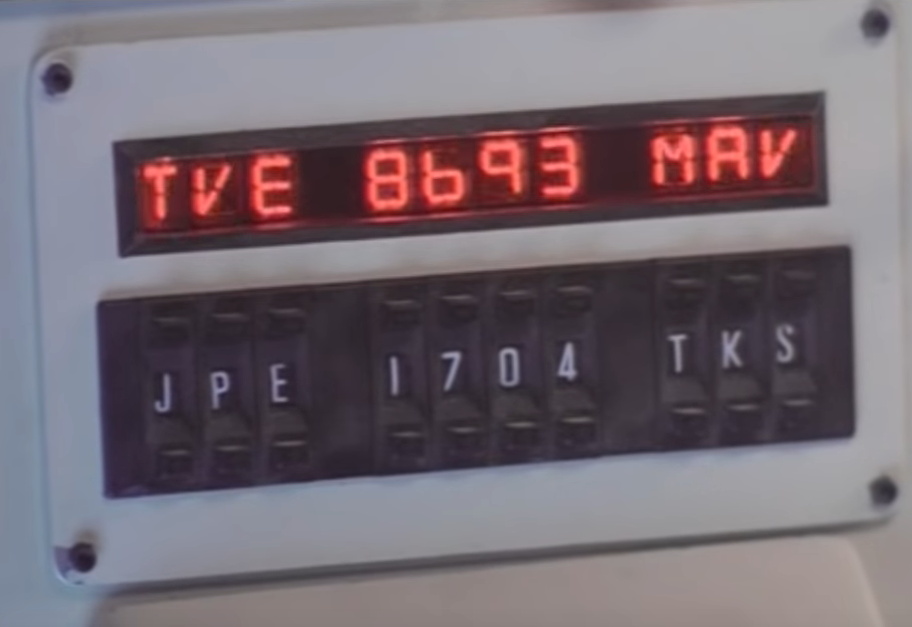
The [Unexpected Maker] is as much a WarGames fan as any of us, but he was more interested in recreating the red alphanumeric displays that ticked along as the WOPR was trying to brute force missile launch codes. These displays, complete with their thoroughly 1980s “computer” sound effects, were used to ratchet up the tension by showing how close the supercomputer was to kicking off World War III.
The display as it appeared in the film.
Of course, most us don’t have a missile silo to install his recreated display in. So when it’s not running through one of the randomized launch code decoding sequences, the display doubles as an NTP synchronized clock. With the retro fourteen segment LEDs glowing behind the smoked acrylic front panel, we think the clock itself is pretty slick even without the movie references.
Beyond the aforementioned LEDs, [Unexpected Maker] is using a ESP32 development board of his own design called the TinyPICO. An associated audio “Shield” with an integrated buzzer provides the appropriate bleeps and bloops as the display goes through the motions. Everything is held inside of an understated 3D printed enclosure that would look great on the wall or a desk.
Once you’ve got your launch code busting LED clock going in the corner, and your illuimated DEFCON display mounted on the wall, you’ll be well on the way to completing the WarGames playset we’ve been dreaming of since 1983. The only way to lose is to not play the game! (Or something like that…)
The modern ideal of pixel art is a fallacy. Videogame art crammed onto cartridges and floppy discs were beholden to the CRT display technology of their day. Transmitting analog video within the confines of dingy yellow-RCA-connector-blur, the images were really just a suggestion of on-screen shapes rather than clearly defined graphics. Even when using the superior RGB-video-over-SCART cables, most consumer grade CRT televisions never generated more than about 400 lines, so the exacting nature of digitized plots became a fuzzy raster when traced by an electron beam. It wasn’t until the late 90s when the confluence of high resolution PC monitors, file sharing, and open source emulation software that the masses saw pixels for the sharp square blocks of color that they are.
More importantly, emulation software is not restricted to any one type of display technology any more than the strata of device it runs on. The open-source nature of videogame emulators always seems to congregate around the Lowest Common Denominator of devices, giving the widest swath of gamers the chance to play. Now, that “L.C.D.” may very well be the Raspberry Pi 4. The single board computer’s mix of tinker-friendly IO at an astonishingly affordable entry price has made it a natural home for emulators, but at fifty bucks what options unlock within the emulation scene?
The Dubious Price Tag That’s Still Quite Low, All-In
The raspberry pi 4 runs a little hot out of the box.
The technological gap between the Raspberry Pi 4 and its predecessor is sizeable. A 22% jump in clock speed, upwards of four times the RAM, and support for 4K resolution all while retaining the same footprint should not be undersold. Those advancements were coupled with a heightened 3A power requirement meaning extra cost as not just any PSU over USB-C will do. All those additional amps added up to a worryingly hot surface temperature anywhere from 50 to 80 °C on launch firmware. Even with updated firmware, any serious user will want an additional cooling solution in place. You will also shell out some clams for all the gaming accouterments: keyboard/gamepad, micro-HDMI cable, and flash storage. Ultimately the promise of an inexpensive emulation box fluctuates depending on the amount of pre-existing equipment. But even considering all of the add-ons, to have a dedicated gaming rig at this entry price is pretty incredible. The question is, what kind of gaming is possible?
When it comes to arcade game emulation on a Raspberry Pi, most users’ first stop is the RetroPie distribution. It provides a lightweight user interface that scales well on a variety of resolutions. RetroPie employs the use of advMAME v3.9 as its arcade machine emulation software. While plenty capable, advMAME is actually a port of MAME v0.108 which dates back to 2006. The bulk of emulators written in that time typically prioritized speed over accuracy in order to maintain playability, so the concept of a CRT filter or console chip-level cycle accuracy was hardly possible given the constraints of mid-2000s hardware. This example is not to denigrate any of the developers of advMAME or the RetroPie wrapper, but to point out that there is a cost to the relative convenience of a Raspberry Pi. If the proficiency of emulation is relegated to the era of the original Xbox, then why not use a Xbox instead? The rebuttal is simply two words… runahead mode. And the quad-core nature of the Pi 4 makes it particularly well suited for this.
Run (Kokiri) Forest, Run
For the uninitiated, Retroarch is a frontend that aggregates a large collection of emulation software and is part of retroPie. The development team behind Retroarch announced Raspberry Pi 4 support for a latency-reduction process known as runahead mode. Their description highlights the low-latency benefits of the effort: “The runahead feature calculates the frames as fast as possible in the background to rollback the action as close as possible to the input command requested.” Emulators can be resource intensive, soaking up all the available CPU horsepower and memory. Controller polling can fall out of sync with what is currently displayed on screen when a particular game sequence becomes more demanding. Things can get laggy.
Enabling Retroarch’s runahead mode on the select emulation cores for which it is available (Genesis Plus GX, Snes9x 2010, and VBA Next) can alleviate the input lag caused by the emulator itself.
Process flow diagram of two-instance runahead mode in Retroarch.
When runahead mode is properly implemented on a Raspberry Pi 4, games control more-or-less as they did on the original hardware. This means losing a life in a run n’ gun the likes of Gunstar Heroes is solely due to user-error. On the other hand, turn based games in the vein of Final Fantasy are safe to play without runahead mode enabled. Those behemoths sure are patient folk.
It should be noted that this revolutionary feature is predicated upon being paired with a halfway decent LCD and wired gamepad/keyboard. Unfortunately, all the simultaneous instances of a game cannot overcome a poor pixel response time or a sub-par Bluetooth radio controller.
Optical Media Shifts Into View
For the first time in the Pi-lineage, there are multiple options for disc-based console emulators. Dreamcast, PSP, Saturn, and even PlayStation 2 cores via Retroarch v1.7.8 have all made their way onto Raspberry Pi 4. Granted the bulk of these systems do not run at full-speed quite yet, but there are some real overachievers still in their nascent beta forms. Specifically redream, a recently developed Sega Dreamcast emulator, has shown remarkable progress (video below) despite having no Raspberry Pi builds considered stable. Games play at or around sixty frames per second at a 720p resolution. The venerated Dolphin emulator (Gamecube/Wii) has even shown signs of promise running on the single board computer.
Beyond Gamecube, there are an array of arcade games that have only now been emulated due to their complexity and are not likely to run on a Raspberry Pi for years to come. Recreating the authentic 20th-century arcade experience may not be within reach in this form factor as more comprehensive emulators like the current iteration of MAME are simply too taxing to run currently. The yearly cadence of new Pi device revisions will prove difficult to retain developer’s attention, and further maturation of emulation software will only help alleviate a device’s lack of raw computing prowess. Runahead mode and access to previously inaccessible emulators certainly bolster the viability of the Raspberry Pi 4 as an all-in-one solution, though what’s most important is that these good ol’ games are being played at all.
Python is often touted as a great language for beginner coders to learn. Until recently, however, it simply wasn’t a viable choice in the embedded space. That’s begun to change with projects like CircuitPython, and now it’s available on the Teensy 4.0!
This milestone is thanks in part to [arturo182], who did the ground work of getting CircuitPython to run on the iMX RT series of microcontrollers. This was built upon by [tannewt], who is the lead in charge of the CircuitPython project.
It’s an exciting development, which brings easy Python development to one of the more powerful embedded development platforms on the market. We look forward to seeing many more projects take advantage of the power of the Teensy 4.0 moving forward. If you’re eager to see what can be done with CircuitPython, be sure to check out projects we’ve featured before. Video after the break.
When you think of a shooting gallery, you might envision a line of tin cans set up along a split-rail fence, or a few rows of ducks or bottles lined up at a carnival. But what do these have in common? You, standing in one spot, and shooting in the same general direction. You’re exposed! If those targets could shoot back, you’d be dead within seconds. Wouldn’t it be more fun if the targets were all around you in 360°? We think so, too.
So how could you possibly set up a shooting gallery this way? [Another Maker] already solved that problem for you with ESP32s and Node-RED (YouTube). Each target has an ESP32, a laser sensor, and an LED that lights up when the target is ready, and turns off once it’s been hit. They all make an enticing ‘shoot me’ sound that goes with their graphics, and a second mp3 plays upon direct hit.
The PVC gun houses an ESP8266, a laser module at the end of the barrel, and runs on a cylindrical USB battery slipped down in the secondary grip. [Another Maker] can spread the targets out far and wide, as long as they all stay in range of the localized WiFi access point.
The best part is that the Node-RED system is target-agnostic — it doesn’t care how many you have or how they’re made, and it can juggle up to 250 of them. Because of the way the target objects are programmed, it would be quite easy to add actuators that make them drop down or fall backward when hit. You could also implement [Another Maker]’s fantastic suggestion of hitting arcade buttons with NERF darts instead. Charge those lasers and fire at the break button to see the demo and walk-through video.
We can imagine that the origin of the doorbell is truly ancient. if you lived in a cave, you probably had a stick and a rock nearby for people to get your attention without invading your cave. In 1817 a Scot named William Murdoch had a bell in the house that visitors rang via a compressed air system, but the electric doorbell had to wait until 1831. Since then, little has changed with the basic idea. [Erientes] — who lives in the Netherlands, not Russia — wanted a smarter doorbell. In particular, he’s read about older people being victimized by people who ring the doorbell for entry. So [Erientes] used a Raspberry Pi to make a doorbell that supports facial recognition.
The exercise is really more of an operations challenge than a technical one thanks to a high-quality Python library for face recognition powered by DLib. However, we did like the user interface aimed at non-technical users. The metaphor is a traffic light in which a red light means do not allow entry. The lights are buttons, so you can use them to whitelist or blacklist a particular person.
We could see this being coupled with a keypad to make a two-factor access control system. To unlock the door, you have to present your face and enter a code number. While it is true that the facial recognition system isn’t perfect, the chances that someone would learn your code and be able to duplicate your face well enough to fool the algorithm seems pretty slim.
We can imagine that the origin of the doorbell is truly ancient. if you lived in a cave, you probably had a stick and a rock nearby for people to get your attention without invading your cave. In 1817 a Scot named William Murdoch had a bell in the house that visitors rang via a compressed air system, but the electric doorbell had to wait until 1831. Since then, little has changed with the basic idea. [Erientes] — who lives in the Netherlands, not Russia — wanted a smarter doorbell. In particular, he’s read about older people being victimized by people who ring the doorbell for entry. So [Erientes] used a Raspberry Pi to make a doorbell that supports facial recognition.
The exercise is really more of an operations challenge than a technical one thanks to a high-quality Python library for face recognition powered by DLib. However, we did like the user interface aimed at non-technical users. The metaphor is a traffic light in which a red light means do not allow entry. The lights are buttons, so you can use them to whitelist or blacklist a particular person.
We could see this being coupled with a keypad to make a two-factor access control system. To unlock the door, you have to present your face and enter a code number. While it is true that the facial recognition system isn’t perfect, the chances that someone would learn your code and be able to duplicate your face well enough to fool the algorithm seems pretty slim.
We can imagine that the origin of the doorbell is truly ancient. if you lived in a cave, you probably had a stick and a rock nearby for people to get your attention without invading your cave. In 1817 a Scot named William Murdoch had a bell in the house that visitors rang via a compressed air system, but the electric doorbell had to wait until 1831. Since then, little has changed with the basic idea. [Erientes] — who lives in the Netherlands, not Russia — wanted a smarter doorbell. In particular, he’s read about older people being victimized by people who ring the doorbell for entry. So [Erientes] used a Raspberry Pi to make a doorbell that supports facial recognition.
The exercise is really more of an operations challenge than a technical one thanks to a high-quality Python library for face recognition powered by DLib. However, we did like the user interface aimed at non-technical users. The metaphor is a traffic light in which a red light means do not allow entry. The lights are buttons, so you can use them to whitelist or blacklist a particular person.
We could see this being coupled with a keypad to make a two-factor access control system. To unlock the door, you have to present your face and enter a code number. While it is true that the facial recognition system isn’t perfect, the chances that someone would learn your code and be able to duplicate your face well enough to fool the algorithm seems pretty slim.
Make your own knee-high stockings with this simple sock sewing pattern. Learn to make your own sewing patterns with this step by step guide On cold nights, there’s nothing quite like thigh high knit stockings, a cup of chamomile tea and a good book. Right? I love wearing them with booty shorts for sexier, yet […] Read more…
In the modern world, we take certain tools for granted. High-level programming languages such as C or Python haven’t been around that long in the grand scheme of things, and Java has only existed since the ’90s. Getting these tools working on machines that predate them is more of a challenge than anything, and [Michael Kohn] was more than willing to tackle this one. He recently got Java running on a Commodore Amiga.
The Amgia predates Java itself by almost a decade, so this process wasn’t exactly straightforward. The platform has a number of coprocessors that were novel for their time but aren’t as commonplace now, taking care of such tasks such as graphics, sound, and memory handling. Any psoftware running on the Amiga needs to be in a specially formatted program as well, so that needed to be taken care of, even loading Java on the computer in the first place took some special work using a null modem cable rather than the floppy disk an Amiga would have used back in the day.
Loading Java on an antique Amiga is certainly a badge of honor, but [Michael] isn’t a stranger to Java and the Motorola 68000s found in Amigas. There’s a 68000 in the Sega Genesis as well, and we’ve seen how [Michael] was able to run Java on that too.
When you’re a kid, remote control cars are totally awesome. Even if you can’t go anywhere by yourself, it’s much easier to imagine a nice getaway from the daily grind of elementary school if you have some wheels. And yeah, R/C cars are still awesome once you’re an adult, but actual car-driving experience will probably make you yearn for more realism.
What could be more realistic and fun than an active suspension? Plenty of adults will never get the chance to hit the switches in real car, but after a year of hard work, [snoopybg] is ready to go front and back, side to side, and even drift in this super scale ’63 Oldsmobile Dynamic 88 wagon. We think you’ll agree that [snoopybg] didn’t miss a detail — this thing makes engine noises, and there are LEDs in the dual exhaust pipes to simulate flames.
An Arduino reads data from a triple-axis accelerometer in real time, and adjusts a servo on each wheel accordingly, also in real time, to mimic a real car throwing its weight around on a real suspension system. If that weren’t cool enough, most of the car is printed, including the tires. [snoopybg] started with a drift car chassis, but even that has been hacked and drilled out as needed.
There are a ton of nice pictures on [snoopybg]’s site if you want to see what’s under the hood. We don’t see the code anywhere, but [snoopybg] seems quite open to publishing more details if there is interest out there. Strap yourself in and hold on tight, because we’re gonna take this baby for a spin after the break.
The Gamecube may not have sold as many units as its competitors in its day, but it maintains a cult fanbase to this day. Due largely to the Smash Bros. community, its controllers are still highly sought after. After the release of the Nintendo Switch, with plenty of fan renders around the place [Shank Mods] figured someone would create a set of Joycons with Gamecube controls. After waiting almost four years, he decided instead to do it himself.
The build begins with a Wavebird controller shell, chosen for its larger body, which is coincidentally the same height as the Switch. The shell was cut down the middle, and 3D printed components were created to attach Joycon mounting rails to the two halves of the controller. The large controller also has plenty of space inside, making it easy to fit all the Joycon components inside. Compatibility was a key aim of this build, so much attention was paid to make the Gamecube Joycons function properly with all Switch features. Extra buttons were added where necessary, and the formerly analog triggers were modified with plugs to match the solely digital operation of the Switch components.
It’s a project that had to overcome many hurdles, from mechanical redesigns to make everything fit, to figuring out the arcane electrical design of the Joycon hardware. The hard work paid off however, and [Shank Mods], along with a couple of talented community members, was able to create a beautiful piece of hardware. We’ve seen Gamecube-themed Joycons before, but this build really does take the cake. If you’ve instead modified the original Xbox controller to work with the Switch, be sure to let us know. Video after the break.
Getting your own PCBs made is a rite of passage for the hardware hacker. Oftentimes, it’s a proud moment, and many of us choose to immortalise the achievement with a self-aggrandizing credit on the silk screen, or perhaps a joke or personal logo. However, as far as artistically customized PCBs go, the sky really is the limit, and this is the specialty of [TwinkleTwinkie], whose Supercon talk covers some of the pitfalls you can run into when working at the edges of conventional PCB processes.
[TwinkleTwinkie]’s creations are usually badges of one type or other — they’re meant to be worn on a lanyard around your neck, as a pin, or as a decoration added to another badge. The whole point is the aesthetic, and style is just as important as functionality. With diverse inspirations like Futurama, Alice in Wonderland and the shenanigans of the GIF community, his badges blend brightly colored boards with a big helping of LEDs and artistic silkscreening to create electronic works of art.
Keeping PCB Fab Houses from Upsetting the Artwork
These days, PCB fab houses offer more choice than ever, in terms of silkscreens, soldermask colors, and other options. However, fundamentally, their primary concern is to produce reliable, accurate, electronically functional boards — and it’s something that can cause problems for #badgelife hackers designing for more aesthetic reasons.
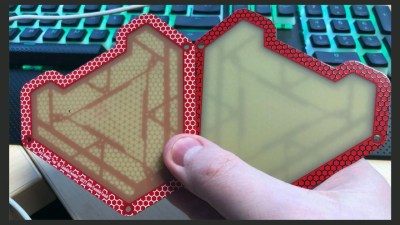
On the left, a prototype, and on the right, a model with the black silkscreen part, showing how the LEDs appear dimmer.
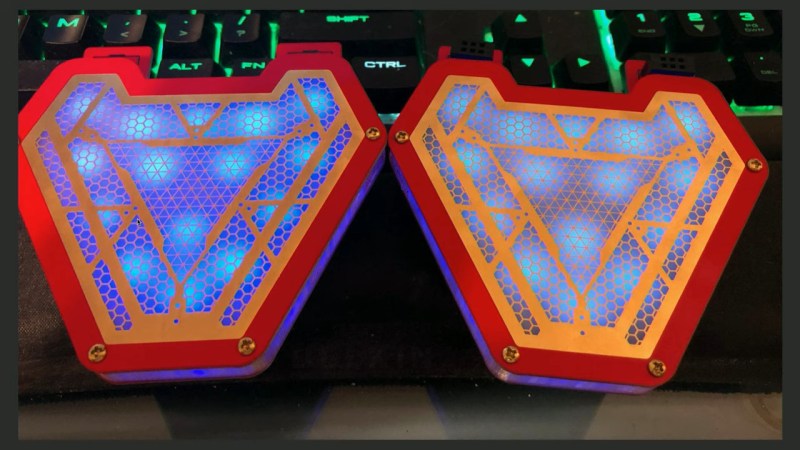
[TwinkleTwinkie] ran into this very problem during the development of the Arc Badge, a piece designed to replicate the famous arc reactor from the Iron Man and Avengers films. The basic idea of the badge was to have a base PCB which carries all the hardware, along with a spacer, and then a third top layer consisting of a PCB which the LEDs were intended to shine through. The prototype board worked well, with the fab house producing it on 1.6mm thick FR4 with white silkscreen and red soldermask. For the final product, wanting something a little fancier, black silkscreen was chosen instead. Ordered through PCBWay, this necessitated using their “Advanced Production Fab”, and a longer lead time, but after a few weeks the boards were ready.
A comparison with the final, fixed part on the left and the black silkscreen part on the right. The final design allows much more light to pass through.
Unfortunately, despite looking great with the black silkscreen contrasting with the rich red soldermask, there was a problem. When [TwinkleTwinkie] asked for black soldermask, this also led to a change in FR4 material, to a different grade which was more opaque than the prototype board. This led to the LEDs showing up very dim, and spoiled the visual effect that was desired for the ArcBadge. The dimming was so significant that users would no longer get the glow-through effect when wearing the badge under a T-shirt, a la Tony Stark. It took comparison with the prototype to figure out what had happened. PCBWay had simply used a higher-grade material when switching to the black silkscreen. Given that PCBs are sold as electronic products, and not for their optical qualities, they hadn’t done anything wrong, per se – but regardless, the new boards weren’t fit for purpose.
Order, and Order, and Order Again
The solution was simple – the boards would need to be reordered. In order to guarantee the LEDs would shine through and be truly resplendent, precautions were taken. The final board switched back to white silkscreen. As an additional precaution, in case PCBWay kept using the new material, the new part was instead 0.8mm thick, allowing it to block less light.
The redesign left [TwinkleTwinkie] with 250 coasters to give out, but his commitment to giving his customers a quality product is commendable. Despite nobody outright making a mistake, the final product would have been a little disappointing had the redesign not taken place. The Arc Badge, as delivered, glows with the best of them, and we’re sure everyone involved is wiser for the experience!
Many of the major scientific achievements of the last 100 years or so have boiled down to problems of picking out a signal from the noise. Think about analyzing the human genome, for instance: we each have something like two meters of DNA coiled up inside each cell in our body, and yet teasing out the information in a single gene had to wait until we developed sufficiently sophisticated methods like PCR and CRISPR.
Similarly, albeit on the other end of the scale, the search for planets beyond our solar system wasn’t practical until methods and instruments that could measure the infinitesimal affect a planet’s orbit on its star were developed. Once that door was unlocked, reports of exoplanets came flooding in, and Earth went from being a unique place in the galaxy to just one of many, many places life could possibly have gotten a foothold. And now, the barrier for entry to the club of planet hunters has dropped low enough that amateur astronomers are getting in on the action.
Alberto Caballero is one such stargazer, and he has turned his passion for astronomy into an organized project that is taking a good, hard look at some of our nearest stellar neighbors in the hope of finding exoplanets in the habitable zone. The Habitable Exoplanet Hunting Project is training the instruments in 33 observatories around the globe on ten stars within 100 light-years, hoping to detect the faint signal that indicates an orbiting planet. They hope to add to the list of places worthy of exploration, both from Earth via optical and radio telescopes, and perhaps, someday, in person.
Join us on the Hack Chat with Alberto as we discuss the search for habitable exoplanets. We’ll explore the project’s goals, its successes thus far, and where it’s going in the future. We’ll also find out just what the amateur astronomer needs to get in on the action, and maybe even talk a little about why the search for “Earth 2.0” is so important.
Click that speech bubble to the right, and you’ll be taken directly to the Hack Chat group on Hackaday.io. You don’t have to wait until Wednesday; join whenever you want and you can see what the community is talking about.
The wrap can be applied to things temporarily, much like that stuff you wrestle from the box and stretch over your leftovers. It can also be shrink-wrapped to any compatible surface without losing effectiveness. The ability to cover surfaces with bacteria-shielding armor could have an incredible impact on superbug populations inside hospitals. It could be shrink-wrapped to all kinds of things, from door handles to railings to waiting room chair armrests to the pens that everyone uses to sign off on receiving care.
Everything bounces right off the surface, including that classic blue testing liquid. Image via SciTech Daily
According to the CDC, there are more than 2.8 million antibiotic-resistant infections reported in the United States each year, resulting in over 35,000 deaths. These superbugs are most prevalent and dangerous in hospitals and other medical settings like nursing homes, and they’re especially threatening to the weakened immune systems of chemo patients, dialysis patients and anyone undergoing surgery.
The superbug crisis pivots on the point that antibiotics are a double-edged sword. As they fight infection, they also weaken immune systems, which allows antibiotic-resistant bugs to proliferate in easily-won battlegrounds. Doctors have little choice but to use more toxic and potentially ineffective types of antibiotics to treat antibiotic-resistant infections. On top of everything else, these drugs are often more expensive.
One of the first lines of defense for avoiding large-scale superbug threats in the first place is protecting the food supply. This fantastic plastic could really beef up sanitation practices at food-packaging plants where salmonella and E. coli lurk.
The key to this antibacterial trampoline is in the surface topography. It’s made of of microscopic wrinkles meant to mimic the lotus effect — that repellent property of lotus leaves that makes water bead on their surface.
Lotus leaves are covered with tiny pointed bumps that disrupt the surface so much that water is unable to settle and spread out. The tips of these bumps are coated in a wax secreted by the plant that furthers its hydrophobic properties. They are often described as self-cleaning, because the beaded water droplets carry dirt particles away with them.
The researchers say they also treated their plastic wrap chemically “to further enhance its repellent properties”, though it’s unclear what chemical they’re talking about. Hopefully, it’s something innocuous that acts like wax.
Door knob on the Ribe Cathedral in Denmark. Image credit: Wolfgang Sauber CC BY-SA 3.0
Where Did All the Brass Door Knobs Go?
Our more experienced readers might recall that we already have a kind of antibacterial door knob technology, and it’s been around for quite a long time.
Copper, brass, and silver all exhibit the oligodynamic effect, which means they are slowly poisonous to bacteria. Many door knobs and public surfaces used to be made of brass to take advantage of the biocidal effect. This would only go so far in the hospital setting, because the effect takes several hours.
So why aren’t all door knobs still made of brass? Who can really say? Tastes change, brass tarnishes, and people forget about the oligodynamic effect. C’est la vie.
At first blush, this special wrap sounds like something we’d want to put absolutely everywhere, like all public surfaces and our phones. MRSA and other antibiotic-resistant superbugs don’t exist solely within hospital walls, after all. But not all forms of bacteria are bad — in fact, plenty of good bacteria called gut flora lives in our intestines. It’s an important part of our immune system that keeps us from getting sick every single time we encounter a new pathogen. If every public surface was covered in this stuff, we couldn’t pick up germs nearly as well because they wouldn’t stick anywhere.
From a practical standpoint, this stuff is only going to be useful if that special surface can stand up to the wear and tear of hospital environments without being crushed or worn away. It would also have to survive the frequent, rigorous, and probably bleach-based cleaning routines. One little scratch or ding in the armor, and you have a disgusting little critter crevice crawling with superbugs.
Let’s say this stuff is everywhere ten or fifteen years from now. Is there a downside to repelling so much bacteria? Where will it all go? Will it gang up? Would it mean an increase in airborne bacteria? And what about that secret sauce chemical they treated the plastic wrap with to make it more repellent? Will we regret exposing ourselves to it?
That said, the researchers don’t intend for this stuff to be the answer to the superbug problem, just a weapon in the arsenal. It seems to us to be worth a shot to use it in medical facilities, but of course, time will tell.
If you wanted to learn about creating modern computer games, 3DBuzz had some of the best tutorials around. In fact, some of the tutorials about C#, C++, Android, and math would be useful for anyone, while the ones about game art and modeling in Maya are probably mostly for game developers. While these were once available only by subscription, the company — now defunct — has left them available for download at no cost.
We don’t know enough about things like Blender and Maya to evaluate the material, but it is well regarded and the ones we do know something about seem very high quality. There are, for example, many videos about C++ and C# that are very professional and cover quite a few topics.
Topics include: AI programming, ASP.net, Blender, iPhone and Android apps, C#, C++, Objective C, Python, OpenGL, HTML and JavaScript, Solidworks, Photoshop, GIMP, Unity, and several game engines like Unreal 4 and Doom 3. There are also quite a few classes on 2D and 3D art as well as related math like trig and vectors.
We don’t know how long the page will remain up, and it has an SSL issue, but to save you some time, here’s a quick way to grab all the ZIP files on a page:
wget -nc -r -np --span-host -l 1 -A zip --no-check-certificate https://3dbuzz.com/index.html
However, as you might expect, the site is overloaded, so expect to not get them all in one swoop. We were surprised they didn’t make them available as torrents. (Update: the site now says downloads are temporarily disabled, but a Reddit user did start a torrent that is missing two small files and a corrected torrent with all the files, but it may not have as many seeds.)
If you want to build games with less fuss, try this tool. Or, maybe you’d rather go old school.

 Could [Josef] have fit all his electronics on a single 100 x 100 PCB and then put the whole thing into a 3D printed enclosure? Well, sure. But that’s been done to death at this point, and besides, he was looking for an excuse to get more comfortable doing PCB design. We think it also makes for a considerably more visual appealing final product than simply taking the “normal” way out.