
Yearly Archives: 2019
Universal Interface Board Comes to the Rescue of Bigger Projects
As soon as a project involves other assemblies, parts, or modules, things get more complicated. Devices like fans, cooling units, probes, pumps, or lighting might have simple electrical requirements, but they are rarely identical. As a result, one’s tidy project ends up having to deal with, for example, a pump that is controlled with 5 V active high logic, a sensor that outputs 5 V active low, lights that expect to be switched with 24 VDC, and a fan that needs a relay right now. But that might change in the future.
That’s exactly what led [Lukas Fässler] to design and build the Universal Interface, a board intended to be a kind of universal translator and interface for all such devices. The idea is to have one Universal Interface board for every external device. For each board, a wide variety of input combinations controls a single output. The boards are “hardware programmable” in the sense that jumpers (zero-ohm resistors) are used to spell out in black and white exactly what combinations of inputs result in which output state. In this way, some standardization and clarity of control can be enforced while still being flexible enough to accommodate changes.
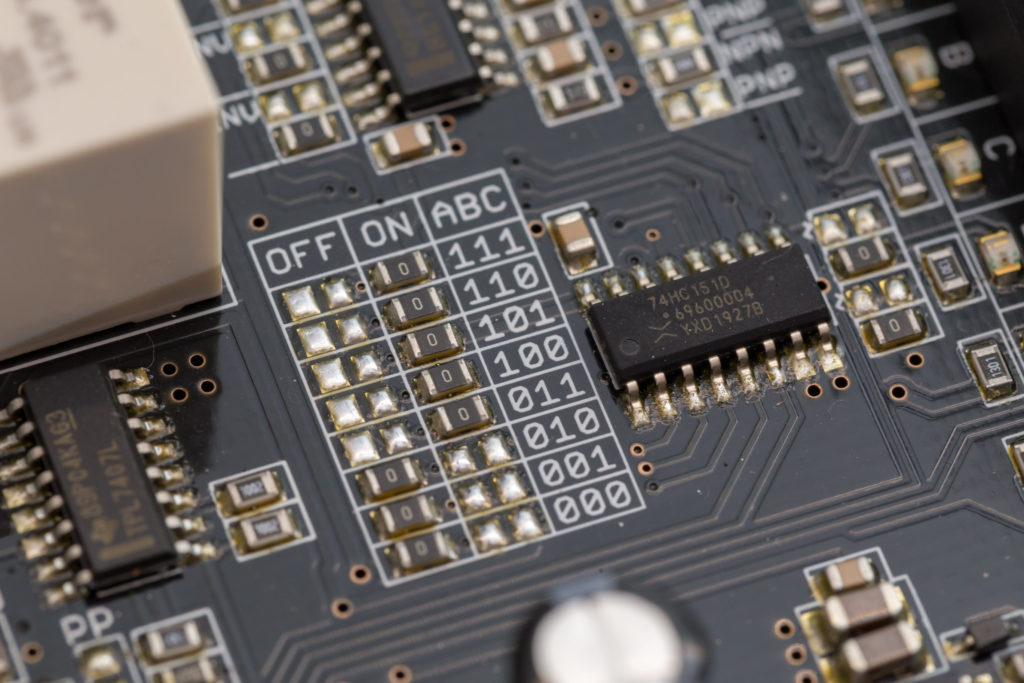
Each Universal Interface board has three inputs and an enable line, each with their own indicator LED visually confirming its state. The inputs are 24 V tolerant and each can be configured with a pull-up, a pull-down, and as an active high or active low. There is one output, but it takes several forms: a sturdy relay, a powerful open-collector output, a 5 V logic output, and a 24 V logic output. Configuring which output state corresponds to what combination of inputs is set by jumpers, so the board is very much WYSIWYG.
[Lukas] is currently using four of these devices with his CNC mill project, all in different configurations, and they’re working reliably. Interested? The GitHub repository for the project has all the board design files.
source https://hackaday.com/2019/12/19/universal-interface-board-comes-to-the-rescue-of-bigger-projects/
Epic Cycling | Truly Unique Bicycle that Walks #youtubevids
r/NuclearRevenge – “I Absolutely Wrecked Her.” | Nuclear Revenge Stories Ep.09 #youtubevids
4 Amazing and Homemade Inventions DIY #youtubevids
Stabbed him with a pumpkin-carving knife – tells Judge Pirro she’d do it again! #youtubevids
Top 5 People Who Give ZERO S#!TS (Eats Meat In Front of Vegan, Savage, No F’s Given) #youtubevids
EPOXY RESIN DIORAMA SCRAT IN ICE from Ice age #youtubevids
Santa Claws: Sharpen Your Skills For a Good Cause
Want to do a bit of good this holiday season without leaving your couch or battle station? Well step right up and try your hand at Santa Claws, the charitable claw machine created by UK-based firm Liberty Games. For every toy you can maneuver to the chute, Liberty Games will donate money to Crisis, a national charity devoted to ending homelessness.
The machine is filled with special Christmas-themed stuffed animals that represent different cash values from £1 to £5. And these toys are doing double duty — after the holiday, they’ll all be donated to a good cause. In order to make this playable worldwide, Liberty used a Raspberry Pi, two Pi Face boards to interface the claw machine’s controls, and a Pi Face rack to everything together. They have the machine set on ‘generous’, so go have fun.
Has this rekindled a longing for your own claw machine? Yeah, us too. Here’s a full-size machine that runs on a Teensy.
source https://hackaday.com/2019/12/18/santa-claws-sharpen-your-skills-for-a-good-cause/
Do you believe in Australia? (1/2) #youtubevids
Better think about the consequences before you say something out loud. #youtubevids
Annealing 3D Prints: A Scientific Approach
We’ve all been taught the scientific method: Form a hypothesis, do some experiments, gather some data, and prove or disprove the hypothesis. But we don’t always do it. We will tweak our 3D prints a little bit and think we see an improvement (or not) and draw some conclusions without a lot of data. Not [Josef Prusa], though. His team printed 856 different parts from four different materials to generate data about how parts behaved when annealed. There’s a video to watch, below.
Annealing is the process of heating a part to cause its structure to reorganize. Of course, heated plastic has an annoying habit of deforming. However, it can also make the parts firmer and with less inner tension. Printed parts tend to have an amorphous molecular structure. That is to say, they have no organization at all. The temperature where the plastic becomes soft and able to reorganize is the glass transition temperature.
Common glass transition temperatures are 65C for PLA, 75C for PET or PETG, and 105C for ABS, in fact those are the minimum temperatures. Until the plastic melts, the temperature is technically a glass transition temperature. However, the hotter you get, the more likely the plastic is to warp, shrink or deform.
There’s a lot of data in the post about how different temperatures affect PLA, ABS, ASA, and PETG. They measured the change in dimensions, how much force it takes to break a part, and the resulting part’s tensile strength.
After reviewing the data, the post and the video talk about how you might do the same thing in a home electric oven. We had to wonder whether a convection oven would be better for eradicating hot spots.
This isn’t the first time we’ve seen this, but it might be the first one to use a few hundred test prints. Even so, the results are consistent with some we’ve seen in the past.
source https://hackaday.com/2019/12/18/annealing-3d-prints-a-scientific-approach/
Watch a Sand-Cast Slingshot Made, From Start To Finish
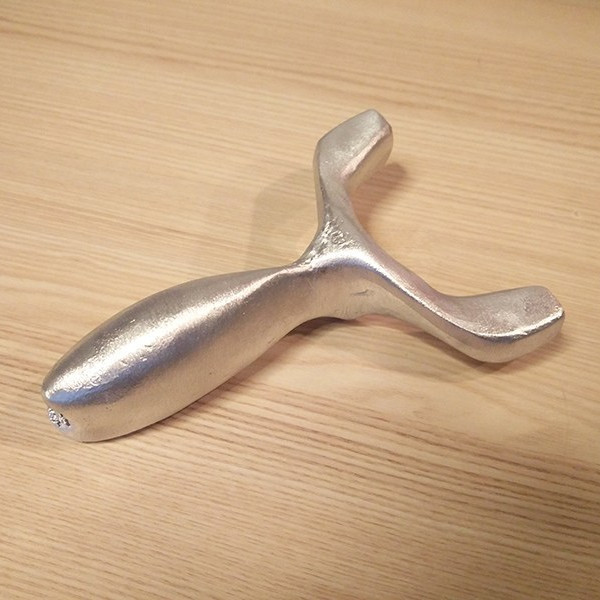 Sand-casting metal parts is a technique that has been around for a very long time, but it can be educational to see the process from start to finish. That’s exactly what [Frederico] shows us with his sand-cast slingshot of his own design, and it’s not bad for what he says is a first try!
First, [Frederico] makes a two-part green sand mold of the slingshot body. Green sand is a sand and clay mix, and is only green in the sense that it is wet or “raw” and not further processed. After the mold is made, it’s time to melt aluminum in the propane-powered furnace, and the molten aluminum is then poured into the mold.
After cooling, [Frederico] breaks up the sand to reveal the rough cast object. There is post-processing to do in the form of sprues to cut and some flashing around the seams to remove, but overall it looks to have turned out well. You can watch the whole process in the video, embedded below.
Sand casting is an old technology, but it makes friends easily and isn’t afraid to be seen with new kids on the block like 3D printing.
source https://hackaday.com/2019/12/18/watch-a-sand-cast-slingshot-made-from-start-to-finish/
Escher: Etch-a-Sketch As A Service
For better or for worse, the tech world has fully committed to pushing as many of their products into “The Cloud” as possible. Of course, readers of Hackaday see right through the corporate buzzwords. It’s all just a fancy way of saying you have to poke some server over the Internet every time you want to use the service. In a way, [Matt Welsh] has perfectly demonstrated this concept with Escher. It’s a normal Etch-a-Sketch, but since somebody else owns it and you’ve got to have an active Internet connection to use it, that makes it an honorary citizen of the Cloud.
Escher takes the form of a 3D printed mount and replacement knobs for the classic drawing toy that allow two NEMA 17 steppers to stand in for human hands. Thanks to the clever design, [Matt] can easily pull the Etch-a-Sketch out and use it the old fashioned way, though admittedly the ergonomics of holding onto the geared knobs might take a little getting used to. But who wants to use their hands, anyway?
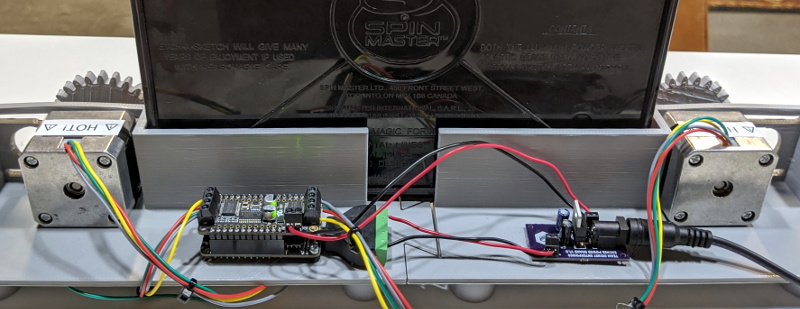 In terms of the electronics, the star of the show is the the Adafruit Feather HUZZAH32 development board, paired with a motor controller that can provide 12 V to the steppers. [Matt] even went through the trouble of making a custom voltage regulator PCB that steps down the stepper’s voltage to 5 V for the Feather. Totally unnecessary, just how we like it.
For the software folks in the audience, [Matt] goes into considerable detail about how he got his hardware talking to the web with Google Firebase. Even if the Internet of Sketches doesn’t quite tickle your fancy, we imagine his deep-dive on pushing G-Code files from the browser into the Feather will surely be of interest.
It probably will come as little surprise to hear this isn’t the first automatic Etch-a-Sketch that’s graced these pages over the years, but this might be the most fully realized version we’ve seen yet.
source https://hackaday.com/2019/12/18/escher-etch-a-sketch-as-a-service/
Hackaday Superconference: Nick Poole On Boggling The Boardhouse
By now we are all used to the role of the printed circuit board in artwork, because of the burgeoning creativity in the conference and unofficial #BadgeLife electronic badge scenes. When the masters of electronic design tools turn their hand to producing for aesthetic rather than technical reasons, the results were always going to be something rather special.
Nick Poole is an ace wrangler of electrons working for SparkFun, and as such is someone with an impressive pedigree when it comes to PCB design. Coming on stage sporting a beret with an awesome cap badge, his talk at the recent Hackaday Superconference concerned his experience in pushing the boundaries of what is possible in PCB manufacture. It was a primer in the techniques required to create special work in the medium of printed circuit boards, and it should be essential viewing for anybody with an interest in this field.
Though he starts with the basics of importing graphics into a PCB design package, the meat of his talk lies in going beyond the mere two dimensions of a single PCB into the third dimension either by creating PCBs that interlock, or by stacking boards.
As an example anyone who has ever soldered two PCBs together at right angles will know the pain of lifting an area of copper as the heat delaminates the PCB. His tip of placing vias to anchor the layers is typical of the kind of expert knowledge contained in the talk.
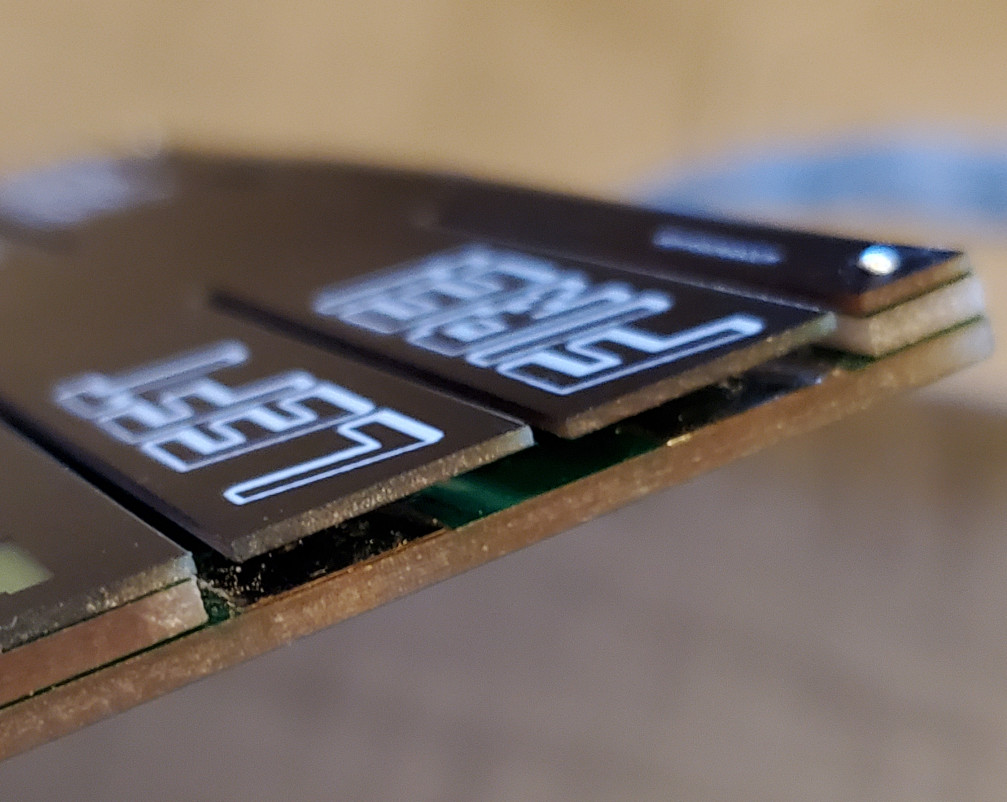 Continuing on through mouse bites, translucent displays, and switches using the springiness of PCB fingers, he uses his space invader badge as an example. This badge sports three layers and an array of APA102 addressable LEDs shining through a milled-out middle layer and a translucent top layer. Along the way we learn yet more valuable tips. Putting notes for the board house technicians as text in the off-board parts of layers that make it to the Gerbers helps immensely when boundaries are being pushed, as often the staff will question something that departs significantly from their norm.
Whether it is conquering the inside corner problem, ensuring crenelations for plated edges, or joining multiple boards together in a stack, we think there should be plenty here to keep you occupied as you take your PCB work to the next level.
source https://hackaday.com/2019/12/18/hackaday-superconference-nick-poole-on-boggling-the-boardhouse/
★UNNZY STORE HAUL ★KAWAII REVIEW ★ v honest lmao #youtubevids
Euphoria Makeup Tutorial! Maddy Perez #youtubevids
Retrotechtacular: Mechanical Arithmetic For The Masses
Last month we carried a piece looking at the development of the 8-bit home computer market through the lens of the British catalogue retailer Argos and their perennial catalogue of dreams. As an aside, we mentioned that the earliest edition from 1975 contained some of the last mechanical calculators on the market, alongside a few early electronic models. This month it’s worth returning to those devices, because though they are largely forgotten now, they were part of the scenery and clutter of a typical office for most of the century.
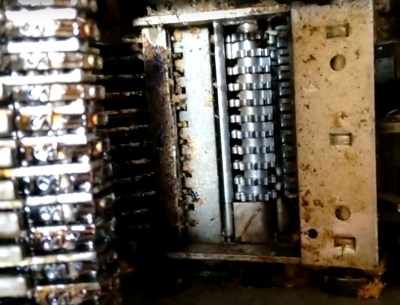
Somewhere in storage I have one of the models featured in the catalogue, an Olivetti Summa Prima. I happened upon it in a dumpster as a teenager looking for broken TVs to scavenge for parts, cut down a pair of typewriter ribbon reels to fit it, and after playing with it for a while added it to my store of random tech ephemera. It’s a compact and stylish desktop unit from about 1970, on its front is a numerical keypad, top is a printer with a holder for a roll of receipt paper and a typewriter-style rubber roller, while on its side is a spring-loaded handle from which it derives its power. It can do simple addition and subtraction in the old British currency units, and operating it is a simple case of punching in a number, pulling the handle, and watching the result spool out on the paper tape. Its register appears to be a set of rotors advanced or retarded by the handle for either addition or subtraction, and its printing is achieved by a set of print bars sliding up to line the correct number with the inked ribbon. For me in 1987 with my LCD Casio Scientific it was an entertaining mechanical curiosity, but for its operators twenty years earlier it must have represented a significant time saving.
The history of mechanical calculators goes back over several hundred years to Blaise Pascal in the 17th century, and over that time they evolved through a series of inventions into surprisingly sophisticated machines that were capable of handling financial complications surprisingly quickly. The Summa was one of the last machines available in great numbers, and even as it was brought to market in the 1960s its manufacturer was also producing one of the first desktop-sized computers. Its price in that 1975 Argos catalogue is hardly cheap but around the same as an electronic equivalent, itself a minor miracle given how many parts it contains and how complex it must have been to manufacture.
We’ve put two Summa Prima videos below the break. T.the first is a contemporary advert for the machine, and the second is a modern introduction to the machine partially narrated by a Brazilian robot, so consider translated subtitles. In that second video you can see something of its internals as the bare mechanism is cranked over for the camera and some of the mechanical complexity of the device becomes very obvious. It might seem odd to pull a obsolete piece of office machinery from a dumpster and hang onto it for three decades, but I’m very glad indeed that a 1980s teenage me did so. You’re probably unlikely to stumble upon one in 2019, but should you do so it’s a device that’s very much worth adding to your collection.
Header image: ElioAngelo at Italian Wikipedia [CC BY-SA 4.0].
source https://hackaday.com/2019/12/18/retrotechtacular-mechanical-arithmetic-for-the-masses/
Use Blueprint Process to Print on Fabric With Lasers
[Shih Wei Chieh] has built a laser cyanotype printer for fabrics. You know, for art!
How do you get an inkjet head on a shoe or a couch? Most printing processes require a flat surface to print. But hearkening back to the days when a blueprint was a blueprint, a mixture of an iron salt and an acid are mixed and applied to a surface an interesting reaction occurs when the surface is exposed to UV light. The chemicals react to form, of all things, prussian blue. After the reaction occurs simply washing away the remaining chemicals leaves a stable print behind.
[Shih Wei Chieh] uses two galvanometers and a laser to cure the fabric. He uses a slightly newer process which reduces the exposure time required. This lets him print very large pictures, but also on uneven surfaces. As you can see in the video, viewable after the break, the effect is very pretty. There’s a new way to have the coolest pen plotter on the block.
source https://hackaday.com/2019/12/18/use-blueprint-process-to-print-on-fabric-with-lasers/
This is NOT how to witness to an Atheist… ft. Todd White #youtubevids
Wonder Woman and the Real Lasso of Truth
 You might think it is strange that a story about technology would start off talking about Wonder Woman. When you realize the technology in question is a lie detector, you might think, “Oh, that’s right. Wonder Woman had the lasso of truth, so this is just a lame association.” You might think that, but you’d be wrong. Turns out, Wonder Woman and real life polygraphs have a much deeper connection; both the polygraph and Wonder Woman share a common creator.
It makes a good story to say that William Marston — an internationally famous psychologist — created the polygraph, but as you might expect it wasn’t the result of a single person’s effort. However, Marston played a key role and also was behind promoting the technology. So, too, even though he is credited as Wonder Woman’s sole creator, the truth is probably a bit more complex.
 The real wonder of Wonder Woman is that she exists at all. In 1942, a powerful female superhero was a pretty bold marketing risk. The fact that she was “not sufficiently dressed” (as one critic reported) didn’t help, either. Comic books were still relatively new media in 1942. Superman dates back to 1938 and Batman to 1939. Some would argue there weren’t any modern comic books before 1933 when Maxwell Gaines devised the first four-color saddle-stitched newsprint magazine. Like all new media, the old media was not amused. Respected newspapers called them “sex-horror serials” and a “national disgrace.”
Granted, in the 1940’s comics did have a lot of things that were objectionable. Female characters were often relegated to the “Damsel in Distress” plotline. Tied down to railroad tracks or at threat of being burnt at the stake, the hero would arrive in the nick of time and save the day so you never actually dealt with the burned or dismembered corpse of the heroine.
With the Wonder Woman comic, Marston set out to break this tired mold. In 1940, a reporter named Olive Richard interviewed Marston who said he saw “great educational potential” in comic books. This comment caught the attention of Maxwell Gaines who ran All-American Comics, along with the co-owner of Detective Comics (which would become DC), Harry Donenfield. The two comic publishers maintained close relations until Donenfeld bought out Gaines in 1946. In 1940, Gaines decided to create an editorial advisory board and hired Marston to serve on it. New to the comic scene, Marston was already well-known in other fields.
Truth, Behavior, and the Origins of Wonder Woman
To say William Marston had an unconventional life is like saying Jupiter is large. He had three degrees from Harvard, one a PhD in psychology. He had worked as a lawyer and as a professor. In 1928 he wrote a paper about DISC theory, which formed the basis for an early behavioral assessment test.
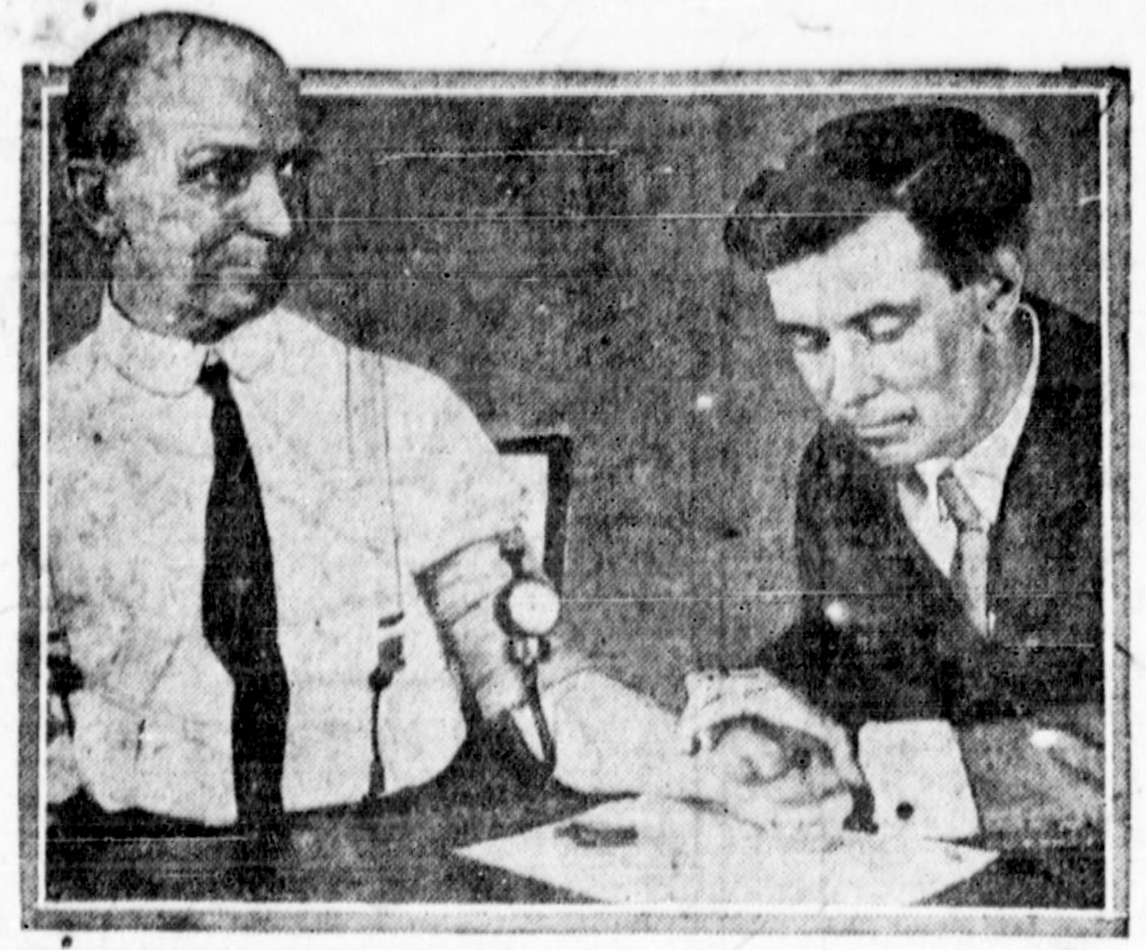 Marston’s wife Elizabeth Halloway Marston, herself an attorney and psychologist, once observed that when she got mad or excited her blood pressure would go up. This led William to experiment with observing blood pressure changes as an indicator of prevarication (a sneaky lie). This became one part of the modern polygraph, created by John Larson.
Marston did a lot of work with the polygraph, trying to commercialize it. As a result of his work, he became convinced that women were more honest than men and he also thought they could work faster and more accurately at many jobs. This was pretty radical thinking for the 1930s.
While Elizabeth was instrumental in suggesting the link between telling a lie and blood pressure, there was another woman in William’s life, too. In 1925, William was Olive Byrne’s psychology professor at Tufts University. They fell in love and William gave his wife an ultimatum. Olive would come to live with them or he would leave her to be with her. While a polyamorous relationship isn’t that scandalous these days, in 1925 it was not something most people would even think about. They lived as a family and Marston had two children with each woman. The Marston’s officially adopted Byrne’s children, doubtlessly for legal reasons.
Oh, and Olive Byrne’s pen name was Olive Richard: the same person who wrote the interview that brought Marston to the attention of comic book publisher Gaines. Even after Marston’s death, the women continued to live together as a family.
The Comic Connection
As part of the editorial board, Marston noted that the biggest problem with comics was their “blood-curdling masculinity.” He apparently shared with Elizabeth that he envisioned a superhero that would conquer with love instead of fists or firepower. Elizabeth suggested he make her a woman. Gaines was receptive to the idea. However, he told Marston he’d have to write the strip himself.
Marston developed Wonder Woman as a powerful female lead modeled partly after Elizabeth and William’s life partner Olive. In the comics, Wonder Woman was given a golden lasso. While bound with it, anyone was compelled to tell her the truth and do as she commanded. The lasso worked much better than a polygraph — actually compelling the person to tell the truth — but the influence is clear.
Polygraph
The modern polygraph uses blood pressure as one test out of many. Marston actually wasn’t the first to attempt this. In 1895, Cesare Lombroso tried the same thing with some success. Marston’s own work was on German prisoners of war and showed a strong correlation between lying and systolic blood pressure.
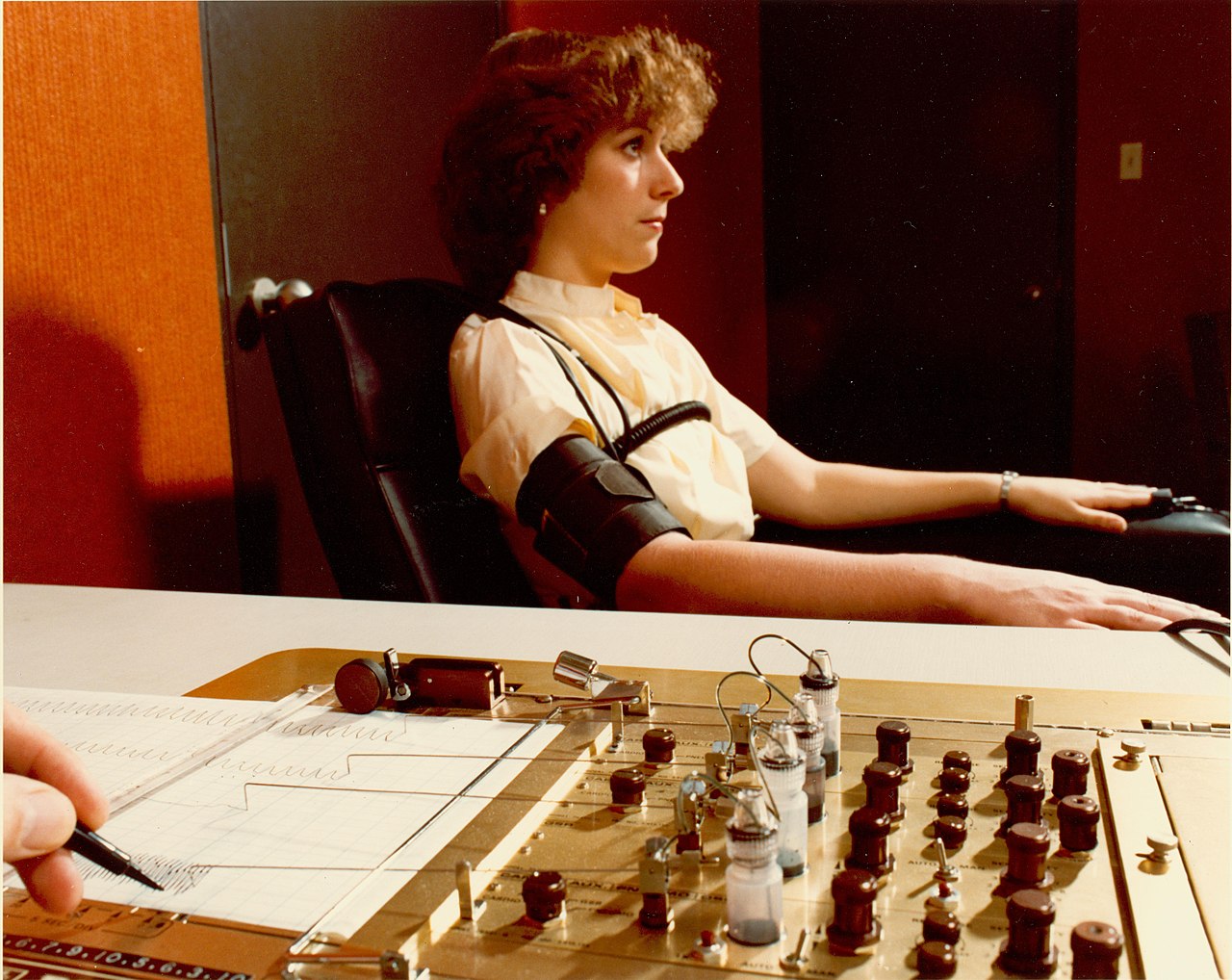 Other items polygraphs can measure include breathing, pulse, galvanic skin response, and muscular activity. The subject is asked a set of pretest questions to establish a baseline and measure reactions when the subject is being deceptive. Responses are then recorded during the interview and compared to the pretest measurements.
Does it work? It apparently does, but not universally. There are many instances of people lying yet passing polygraph tests. There is also a fear of false positives, and there have been many high profile cases of that, too. For these reasons, polygraph tests are usually inadmissible in court.
Some think that the way an examiner administers the test can cause enough anxiety in an innocent person to sway the test and there are methods for attempting to negate that effect. In Japan, for example, the examiner doesn’t know the details of the crime and asks questions in multiple choice format. The examiner isn’t really looking at the answers, but the reaction to the potential answers which can then match up with the known correct answers.
Sometimes, though, just the idea of a polygraph is enough to compel people to tell the truth. This is sometimes known as the “bogus pipeline” where a researcher will connect a subject to meaningless wires and told it is a polygraph. People are apparently less likely to lie in that situation.
Cleve Backster was a polygraph operator with the CIA. He used the machine to show that plants feel pain and have ESP. Of course, the scientific community didn’t find his experiments compelling.
There are several other lie detection technologies and strategies ranging from microexpression analysis, the silent talker detector, and voice stress analysis. We can’t help but wonder if anyone has just thought about feeding a bunch of videos into a machine learning system. We certainly have plenty of videos of people lying. Being sure about the truthful videos might be a little harder.
Meanwhile, next time you see Wonder Woman use her lasso of truth, you’ll think about the unconventional Dr. Marston and his connection to the lie detector. Not to mention the visionary creation of a female superhero at a time when that was almost unthinkable.
source https://hackaday.com/2019/12/18/wonder-woman-and-the-real-lasso-of-truth/
r/IDontWorkHereLady – I Know The MANAGER Of This Store! He Really Will FIRE You! #youtubevids
Giant 3D Printer For Giant Projects
Established FDM 3D printers designs generally lead themselves well to being scaled up, as long as you keep frame stiffness, alignment and movement in mind. [Ivan Miranda] needed a big printer for his big projects (videos below), so he built his own i3 style printer with a 800 mm × 500 mm usable print bed and about 500 mm vertical print height.
The frame of the new machine is built using 20×20 and 20×40 aluminium V-slot extrusions with some square tubing for reinforcement. To move all the weight, all 3 axis’ as driven by double NEMA17 steppers, via a DUET3D board with an expansion board for the extra motors. The extruder is the new E3D Hemera with a 0.8 mm nozzle. The print bed is a mirror, on top of the aluminium plate, headed by a large silicon heat pad. The first bed version used a smaller heat pad directly on the back of the mirror, but it heated up unevenly and the mirror ended up cracking. Look out for the ingeniously lightweight and simple cable management to the extruder. When all was said and done he printed a 800 mm long size 66 wrench as a test piece with zero warp, which is pretty good even for PLA. This project is also a perfect example of the power of 3D printing for rapid iterative development, as lot of the printed fittings went through multiple versions.
Although [Ivan] received most of the components for free, a printer like this is still within reach of the rest of us. We look forward to a lot of big prints by [Ivan] in his signature red, like a massive nerf gun and the ridable tank he is currently working on.
source https://hackaday.com/2019/12/18/giant-3d-printer-for-giant-projects/
These Lessons Were Learned in Enclosure Design, But Go Far Beyond
[Foaly] has been hard at work making an open-source long range camera remote, and recently shared a deeply thoughtful post about how it is never too early to consider all aspects of design, lest it cost you in the end. It all started with designing an enclosure for a working prototype, and it led to redesigning the PCB from scratch. That took a lot of guts, and we recommend you make some time to click that link and read up on what he shared. You’ll either learn some valuable tips, or just enjoy nodding sagely as he confirms things you already know. It’s win-win.
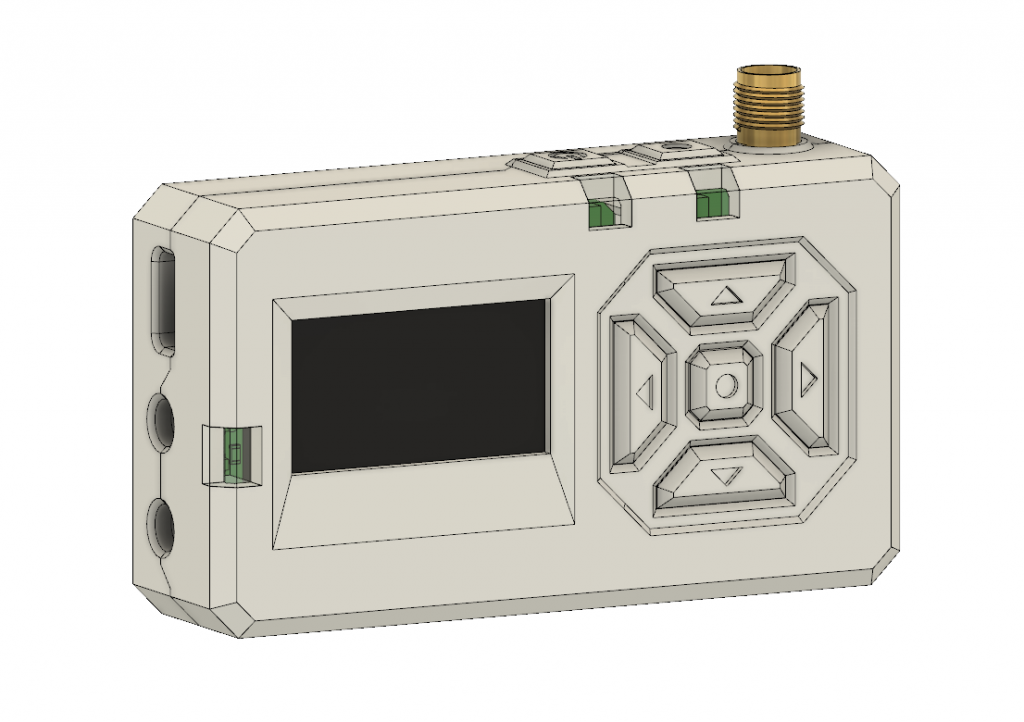
The project in question is Silver, and calling it a camera remote is selling it a bit short. In any case, [Foaly] had a perfectly serviceable set of prototypes and needed a small batch of enclosures. So far so normal, but in the process of designing possible solutions, [Foaly] ran into a sure-fire sign that a project is in trouble: problems cropping up everywhere, and in general everything just seeming harder than it should be. Holding the mounting-hole-free PCB securely never seemed quite right. Buttons were awkward to reach, ill-proportioned, and didn’t feel good to use. The OLED screen’s component was physically centered, but the display was off-center which looked wrong no matter how the lines of the bezel were sculpted. The PCB was a tidy rectangle, but the display ended up a bit small and enclosures always looked bulky by the time everything was accounted for. The best effort is shown here, and it just didn’t satisfy.
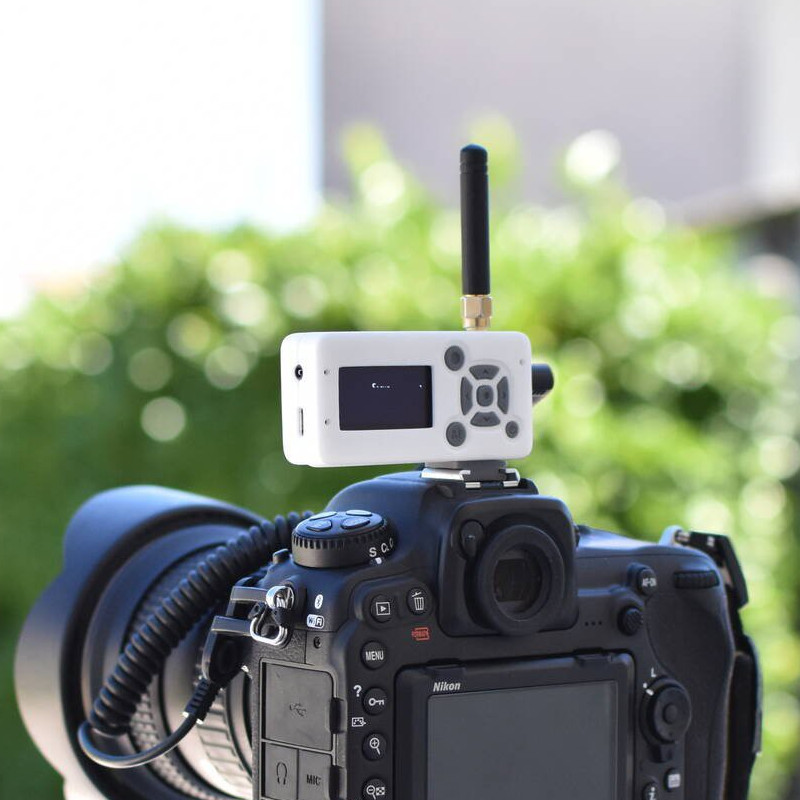 [Foaly] says the real problem was that he designed the electronics and did the layout while giving some thought (but not much thought) to their eventual integration into a case. This isn’t necessarily a problem for a one-off, but from a product design perspective it led to so many problems that it was better to start over, this time being mindful of how everything integrates right from the start: the layout, the components, the mechanical bits, the assembly, and the ultimate user experience. The end result is wonderful, and we’re delighted [Foaly] took the time to document his findings.
Enclosure design is a big deal and there are many different ways to go about it. For a more unique spin, be sure to check out our how-to make enclosures from the PCBs themselves. For a primer on more traditional enclosure manufacture and design, take a few minutes to familiarize yourself with injection molding.
source https://hackaday.com/2019/12/18/these-lessons-were-learned-in-enclosure-design-but-go-far-beyond/
Commodore Tape Drive Emulator On A Raspberry Pi
We imagine most of the people reading Hackaday have an old Raspberry Pi or two laying around. It’s somewhat less likely you’ve still got an 8-bit Commodore in working condition, but we’d wager there’s more than a few in the audience that can count themselves among both groups. So why not introduce them?
[RhinoDevel] writes in to tell us about CBM Tape Pi , an open source Commodore tape drive emulator for Raspberry Pi that needs only a handful of passive components to get wired up. Even better, the project targets the older Pis that are more likely to be languishing around in the parts bin. In the video after the break, a Commodore PET can be seen happily loading content from the original Raspberry Pi with its quaint little composite video connector.
Without any special software on the Commodore itself, the project allows the user to load and save PRGs on the Pi’s SD card, as well as traverse directories. Don’t expect stellar I/O, as [RhinoDevel] notes that no fast loader is currently implemented. Of course if you’re enough of a devotee to still be poking around a VIC-20 or C64 this far into 21st century, then we imagine you’ve got enough patience to get by.
source https://hackaday.com/2019/12/17/commodore-tape-drive-emulator-on-a-raspberry-pi/