
Monthly Archives: December 2019
Apple HomeKit Accessory Development Kit Gets More Accessible
Every tech monopoly has their own proprietary smart home standard; how better to lock in your customers than to literally build a particular solution into their homes? Among the these players Apple is traditionally regarded as the most secretive, a title it has earned with decades of closed standards and proprietary solutions. This reputation is becoming progressively less deserved when it comes to HomeKit, their smart home gadget connectivity solution. In 2017 they took a big step forward and removed the need for a separate authentication chip in order to interact with HomeKit. Last week they took another and released a big chunk of their HomeKit Accessory Development Kit (ADK) as well. If you’re surprised not to have heard sooner, that might be because it was combined the the even bigger news about Apple, Amazon, the Zigbee Alliance, and more working together on more open, interoperable home IoT standards. Check back in 2030 to see how that is shaping up.
“The HomeKit ADK implements key components of the HomeKit Accessory Protocol (HAP), which embodies the core principles Apple brings to smart home technology: security, privacy, and reliability.”
– A descriptive gem from the README
Apple’s previous loosening-of-restrictions allowed people to begin building devices which could interact natively with their iOS devices without requiring a specific Apple-sold “auth chip” to authenticate them. This meant existing commercial devices could become HomeKit enabled with an OTA, and hobbyists could interact in sanctioned, non-hacky ways. Part of this was a release of the (non-commercial) HomeKit specification itself, which is available here (with Apple developer sign in, and license agreement).
Despite many breathless mentions in the press release it’s hard to tell what the ADK actually is. The README and documentation directory are devoid of answers, but spelunking through the rest of the GitHub repo gives us an idea. It consists of two primary parts, the HomeKit Accessory Protocol itself and the Platform Abstraction Layer. Together the HAP implements HomeKit itself, and the PAL is the wrapper that lets you plug it into a new system. It’s quite a meaty piece of software; the HAP’s main header is a grueling 4500 lines long, and it doesn’t take much searching to find some fear-inspiring 50 line preprocessor macros. This is a great start, but frankly we think it will take significantly more documentation to make the ADK accessible to all.
If it wasn’t obvious, most of the tools above are carefully licensed by Apple and intended for non-commercial use. While we absolutely appreciate the chance to get our hands on interfaces like this, we’re sure many will quibble over if this really counts as “open source” or not (it’s licensed as Apache 2.0). We’ll leave that for you in the comments.
source https://hackaday.com/2019/12/27/apple-homekit-accessory-development-kit-gets-more-accessible/
Think You Know cURL? Care to Prove It?
Do you happen to remember a browser-based game “You Can’t JavaScript Under Pressure”? It presented coding tasks of ever-increasing difficulty and challenged the player to complete them as quickly as possible. Inspired by that game, [Ben Cox] re-implemented it as You Can’t cURL Under Pressure!
In it, the user is challenged in their knowledge of how to use the ubiquitous curl in a variety of different ways. Perhaps this doesn’t sound terribly daunting, especially if your knowledge of curl is limited to knowing it is a command-line tool to fetch something from a web server. But curl has a staggering number of features. The man page is over 4500 lines in length. The software’s main site offers a (free) 250+ page guide on how to use curl and libcurl. Reflecting on this is exactly what led [Ben] to create his challenge.
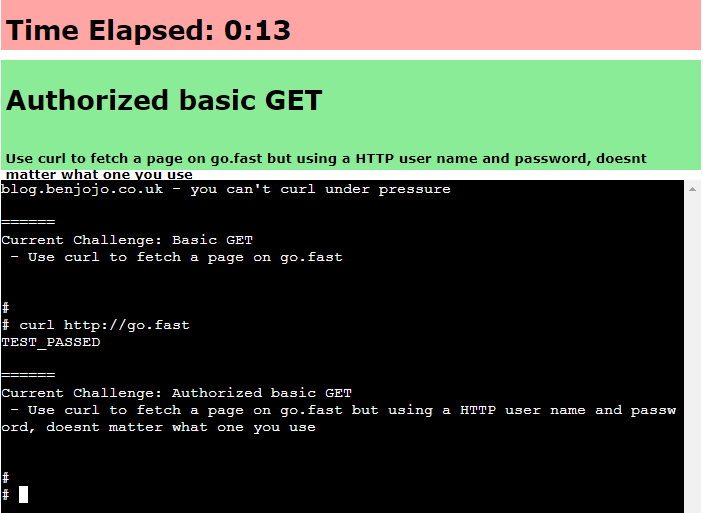 It’s a wonderful piece of work, but things get really interesting once [Ben] starts talking about the infrastructure behind it all. At its core the game works by giving the user a problem and a virtual machine, and catching outgoing HTTP calls to see whether they look correct. If the outgoing HTTP call is the right solution for the problem, terminate the current VM and start up the next one with the next problem. He’s put a lot of work into getting suitable VMs up and running quickly, securely, and properly isolated. The code can be found on the project’s GitHub repository for those who want a closer look.
But that’s not all. [Ben] says that in the past he’s had a bad habit of presenting interactive features in his blog posts that can’t keep up with sudden demand. So to address that, the system auto-scales as needed with a small Linux cluster; small brick-sized PCs are started and shut down automatically to meet demand. Hey, the only thing cooler than a functioning cluster is a cluster doing an actual job, like this one that detects NSFW images.
source https://hackaday.com/2019/12/27/think-you-know-curl-care-to-prove-it/
Word Clock Does The Job With Laser-Etched Acrylic
As far as telling the time, word clocks go out of their way to spell it out for you. As long as you know the language, they’re a stylish and effective way to get the message across. [Simon] built an elegant, stripped-back word clock of his own, with a laser cutter helping to get the job done.
The core of the build is an Arduino Nano, hooked up to a string of 22 WS2812B LEDs, driven via the FastLED library. An NXP PCF8563T serves as the real-time clock, to ensure stable and accurate timekeeping. The electronics are all housed inside an enclosure that appears to be constructed from PCBs, with instructions on operating the clock printed on the base.
The actual display is via laser-cut and laser-etched acrylic. The display piece slides into the top of the clock, with the LEDs edge lighting various segments to display the relevant words that make up the current time. The clock is designed in such a way that these display slides can be easily switched out to change the look of the clock, with different fonts and designs.
It’s a quick and clean take on the popular word clock design, and one any makerspace could whip up in a weekend. As far as word clocks go, however, the sky really is the limit when it comes to complexity. Video after the break.
source https://hackaday.com/2019/12/26/word-clock-does-the-job-with-laser-etched-acrylic/
Devil Is A Loser
Imagine Dragons – Radioactive
twenty one pilots: Heathens (from Suicide Squad: The Album) [OFFICIAL VIDEO]
Eiffel 65 – Too Much Of Heaven (Official Video with subtitles)
r/JustNoHOA – HOA COLLECTS FAKE FINES FOR 10 YEARS, GETS SUED FOR 100.000$! 💰
RESTORATION Rarely Found Tobacco Pipe – Rusted Cigar Pipe Restoration
3D Printing Paper — Sort Of
There are only a few truly ancient engineered materials, and among the oldest is paper. Traditionally, paper is flat and can be bent into shapes. However, paper can be molded into for example packing material or egg cartons. [XYZAidan] has a process that can recycle paper into 3D cardboard-like objects. You need a 3D printer, but it doesn’t actually print the paper. Instead, you use the printer to create a mold that can form paper pulp you make out of recycled paper and a blender.
[Aidan] provides seven different molds ranging from a desk tray and a dish to simple cubes and coasters. The molds are made in three parts to assist in removing the finished product.
The 3D printed molds have to be very strong because you’ll use a vise to squeeze the water out of the pulp. You can use almost any kind of paper unless it is glossy or has a plastic coating. You can tear up pieces by hand or use a shredder. A blender will create the pulp but you’ll also have to add water and a binder. [Aidan] shows that you can use PVA glue, rice paste, or cornstarch. You can make rice paste easily from ordinary rice by cooking it until it becomes paste-like.
There are some downsides. You have to let the paper dry for hours or even a day or two. In addition, the pulp shrinks as it dries, so getting exact dimensions could be a problem. The material is very wood-like but it doesn’t do well when wet.
Most of the papercraft we see here is more akin to origami. We’ve seen cloth used in papercrafts and we wondered if adding cloth fibers to the pulp might work out in some strange way.
source https://hackaday.com/2019/12/26/3d-printing-paper-sort-of/
r/maliciouscompliance | “You may NOT answer ANY questions at ANY time for ANY reason”
Folding An Off-The-Shelf 3D Printer
Most 3D printers don’t take up a lot of space, but they can be pretty bulky and awkward to travel with. [Jón Schone] needed a compact folding 3D printer for a secret project on his YouTube channel ProperPrinting, so he decided to modify a Creality Ender 3 Pro to achieve this.
Starting with a brand new Ender 3 Pro, and his first steps were to move the display and power supply unit into the bottom frame to make space for the folding top frame. For the folding mechanism, he settled on a four bar linkage that allows the vertical frame to translate to the front of the printer as it folds down, which lets it become a really compact package with minimal wasted space. The joints consist of fitting 3D printed in carbon fibre reinforced nylon, with bolts for shafts. The entire mechanism is made adjustable for fine-tuning by using threaded rod and sliding mounting points on the extruded frame. Small brackets on each side of the frame allows the printer to snap securely into both its upright and folded positions.
All in all we think this is well-designed and beautifully executed hack, enough to make us really want to build one for ourselves. It will remain to be seen if any slop develops with repeated folding and use, especially at the snap-in end stops, but that should still be an easy fix if it happens.
We’ve previously featured [Jón]’s custom 3D printed D-sub connectors, also for his Ender 3. Also check out another folding printer, the X-printer.
source https://hackaday.com/2019/12/26/folding-an-off-the-shelf-3d-printer/
Compact 3D Printed Hovercraft Is Loungeroom Floor Fun
Hovercraft come in all shapes and sizes. and while they’ve largely disappeared as a major commercial transit option, they remain popular in the hearts and minds of makers everywhere. [RCLifeOn’s] latest project concerns a compact, indoor-sized hovercraft piloted via FPV, and it looks to be brilliant fun.
The build consists of a 3D printed chassis, with a skirt cut out of a garbage bag and held on with press-fit clamps. Twin ducted fans are employed, one for propulsion, the other for levitation. A 5GHz FPV camera is nestled on top of the rear fan housing to provide a video feed for the pilot.
The craft was somewhat uncontrollable in initial testing. Tweaks to the weight distribution and the addition of a bigger rudder helped tame the rig. [RCLifeOn] also demonstrates a unique way of balancing damaged fan assemblies in the field; it’s a technique we’ll keep in the back of our mind for future use.
The trick to a good hovercraft build is light weight, big control surfaces, and a good skirt. You can even go off-book and use the Coanda effect, if you’re so inclined. Video after the break.
source https://hackaday.com/2019/12/26/compact-3d-printed-hovercraft-is-loungeroom-floor-fun/
Handheld MQTT Remote for Home Automation
If you’re working on a home automation project, you’re probably knee-deep into MQTT by now. If not, you should be. The lightweight messaging protocol is an ideal choice for getting your “Things” on the Internet, and controlling them all can be done easily through a simple web interface or an application on your mobile device. Or if you’re [serverframework], you make yourself a handsome little all-in-one MQTT remote.
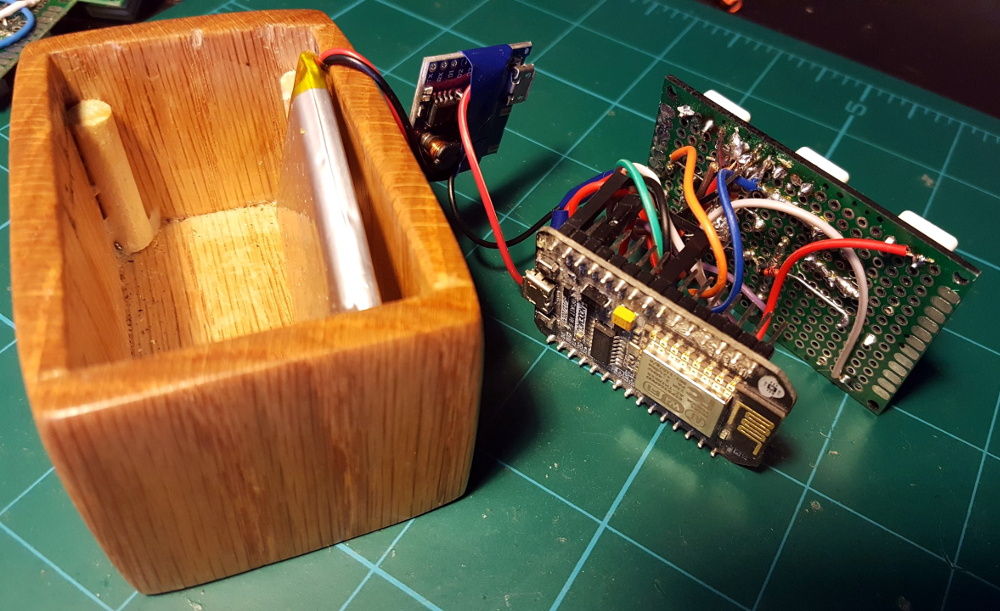 The hardware here is pretty simple; inside there’s just a NodeMCU ESP8266 development board, some buttons, an RGB LED to give feedback, and a 3.7v 1200mAh LiPo battery with associated charging module. Everything is held inside a nice little wooden box that looks like it would fit right in with the living room decor. We’d like to see some kind of a cover over the exposed perfboard the circuit is assembled on, but that’s arguably a personal preference kind of thing.
Most of the magic in this project is actually happening on the software side. Not only does the provided source code handle all the MQTT communications with Home Assistant, but it provides a clever user interface that allows [serverframework] to perform 25 functions with just five buttons. No, you aren’t seeing things. There are actually six buttons on the device, but one of them is a dedicated “power” button that wakes the remote out of deep sleep.
If you’d like to learn more about getting this protocol working for you, our resident MQTT guru [Elliot Williams] has plenty of thoughts on the subject. From his talk at the 2017 Hackaday Supercon to his home automation tutorial series, there’s plenty of information to get you started.
source https://hackaday.com/2019/12/26/handheld-mqtt-remote-for-home-automation/
Ask Hackaday: Drone Swarms Replace Fireworks; Where are the Hackers?
Your mom always warned you that those fireworks could put an eye out. However, the hottest new thing in fireworks displays is not pyrotechnic at all. Instead, a swarm of coordinated drones take to the sky with different lighting effects. This makes some pretty amazing shows possible, granting full control of direction, color, and luminosity of each light source in a mid-air display. It also has the side benefit of being safer — could this be the beginning of the end for fireworks accident videos blazing their way across social media platforms?
For an idea of what’s possible with drone swarm displays, check out the amazing pictures found on this site (machine translation) that show off the 3D effects quite well. Note that although it appears the camera is moving during many of these, the swam itself could be rotated relative to a stationary viewer for a similar effect.
What I couldn’t find was much going on here in the hobby space. Granted, in the United States, restrictive drone laws might hamper your ability to do things like this. But it seems that in a purely technical terms this wouldn’t be super hard to do — at least for simple designs. Besides, there must be some way to do this in US airspace since drone performances have been at the Super Bowl, Los Angeles, New York, Miami, and Folsom, CA.
So if the regulations were sorted, what would it take to build a swarm of your own performing drones?
The Challenge of Air Traffic Control
The hardest part would be keeping the aircraft in tight formation. Depending on how tight you wanted it, GPS might be sufficient, with the option of springing for differential GPS or some other higher resolution solution. The more difficult bit is avoiding mid-air collisions. Drones take a bit of real estate to correct from unexpected velocity change and even a small bump between two could cascade like three-dimensional dominoes through the swarm. You’d need to make sure none of them were crossing the same volume of space at the same time with enough margin of error to account for position uncertainty, wind gusts, and so forth.
According to an article from earlier in the year, many companies build their own hardware and software, some specializing in outdoor GPS-based shows while other focus on indoor presentations. That article mentions the distance between drones can be between 1.5 and 3 meters. To help with safety concerns, some companies use tiny drones which also makes a lot of sense in terms of maneuverability.
I’ve have seen some control software for setting up shows. It supports many different kinds of drones, including the relatively cheap Spark. There is a GitHub with some examples of using it — it is apparently using Blender for the animation parts. Of course, there are also competitors.
So Where is the Open Source?
I’m frankly surprised at the lack of open source or DIY projects. The most obvious limitation would be cost, as even a small display will call for dozens of drones, which need to be built, stored, transported, and tested. But considering some of the huge installations build for hacker camps it’s not outside of the realm of possibility. The widespread hunger for consumer drones means a wide set of ready-made drones are both available and affordable and much has been done to reverse engineer firmware on the most ubiquitous models.
I think almost everything you need on the software side is already out there in some form. Obviously, Blender can do the animation. There are already Open Source autopilots. There was some work on something called OpenDroneControl, but it hasn’t been active for awhile.
So am I just missing it? Are there some open source tools that are at least marginally easy to use? Or is this a ripe ground for some hacking projects? Tell us in the comments if you’ve done any swarming and how you did it. Or, if you know of any tools we should be aware of, chime in with that, too.
source https://hackaday.com/2019/12/26/ask-hackaday-drone-swarms-replace-fireworks-where-are-the-hackers/
Open-Source Analytical Balance Pits Gravity Against Electromagnetism
As the open-source movement has brought its influence to more and more fields, we’ve seen an astonishing variety of things once only available at significant expense become accessible to anyone with access to the tools required to create them. One such arena is that of scientific instrumentation, and though we have seen many interesting developments there has been one which has so far evaded us. An analytical balance, a very specialised weighing machine designed to measure the tiniest of masses, remains available only as a new unit costing a fortune, or as a second-hand one with uncertain history and possible contamination. Fortunately, friend of Hackaday [Zach Fredin] is on the case, and as part of one of his MIT courses he chose to create an open-source analytical balance.
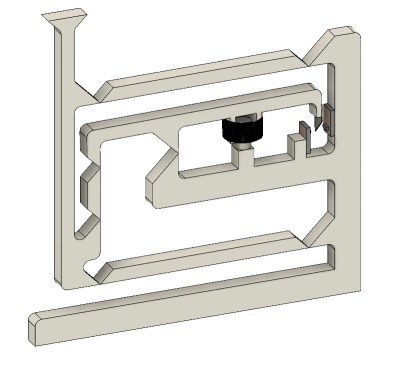 The write-up is interspersed with his course notes as he learns a series of fabrication techniques, but in addition to the milled Delrin finished model he treats us to his prototype and gives us an explanation of how these instruments work. It’s a technique that’s rather different to a traditional weighing machine: instead of measuring deformation of a spring in some way it produces a force from an electromagnet to oppose that exerted by gravity on the mass to be measured, and quantifies how much electrical energy is required to do that. The mechanism incorporates feedback through a vane and an optical sensor, which he admits he’s not yet had time to set up properly.
It’s an interesting project not least because it exposes some of the inner workings of an analytical balance, and we look forward to his completing it. If this whet your appetite for the topic it’s worth also looking at [Ben Krasnow’s] video of a balance made using a moving coil meter for an explanation of the technique.
New Part Day: Sonoff USB Smart Adaptor Taps a New WiFi Chip
For decades, we dreamt of a future where all of our electronics used a standardized power connector. Most of us probably didn’t expect that USB would ultimately fill that role, but we’ll take what we can get if it means a future without getting a new wall wart for every piece of tech we buy. From soldering irons to laptops, the number of things you can power with a lowly USB cable these days is pretty incredible.
Which makes it all the more surprising it took so long for somebody to come up with a way to toggle USB devices off and on over the network. The Sonoff “USB Smart Adaptor”, which the company says will start shipping before the end of the year, is the logical evolution of their exceptionally popular mains voltage smart switches. The Smart Adapter is designed to go between the device and its existing power supply, allowing the user to drag any USB powered device kicking and screaming into their existing smart home setup. All for the princely sum of $6.50 USD.
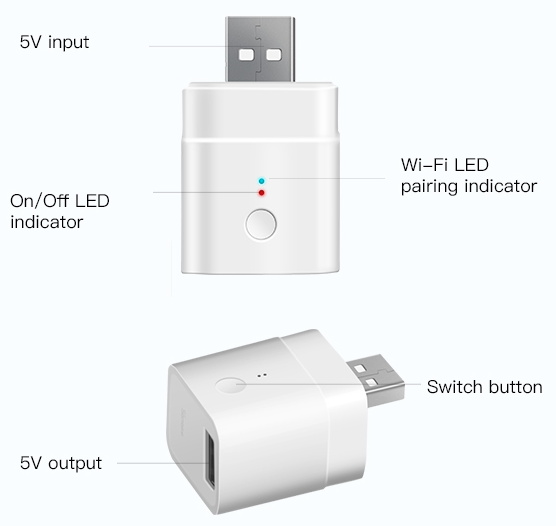 In the video after the break, Sonoff gives a few potential uses of the Smart Adapter: from controlling a string of LEDs to limiting how long a smartphone is allowed to charge for. But really, there’s a nearly limitless number of devices which could be easily and cheaply integrated into your home automation routines thanks to this gadget.
On the other end of the spectrum, those who are looking to keep a tighter control on the ears and eyes that are active in their home could use the Smart Adapter to make sure their Google and Amazon listening devices assistants are only powered up during certain hours of the day.
Unfortunately, there’s a catch. Sonoff smart switches are best known, at least among the type of folks who read Hackaday, for the fact that they’re based on the eminently hackable ESP8266 microcontroller. Given the size of this product and its intended use, it would seem logical enough to assume this device also utilizes the insanely popular chip. But according to a Sonoff representative, the USB Smart Adapter won’t be using an ESP at all; leaving its hackability an open question until people can actually get their hands on them and start poking around.
A Challenger Appears
So if there’s not an ESP heart beating at the core of this device, what is there? Sonoff says the chip is called the CKW04, which is apparently so new that there’s very little information available about it online. The best source of information we have right now is a cache of Chinese technical documents posted to GitHub by the manufacturer, CoolKit.
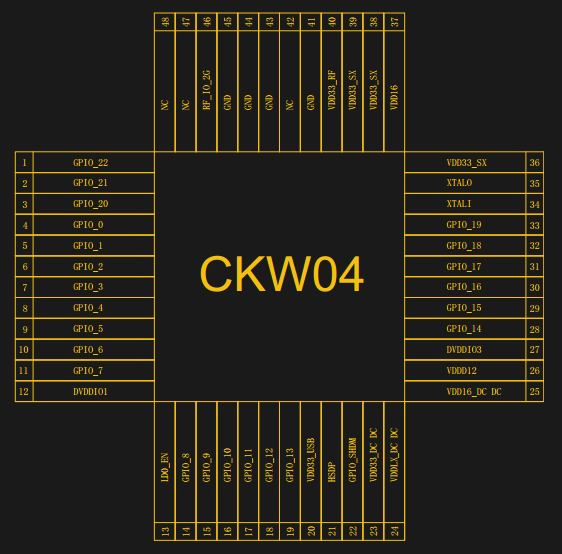 The tiny QFN-48L chip measures just 6 x 6 mm, and provides an all-in-one WiFi solution just like the ESP8266. According to the documentation, it also seems to have some sort of integrated timer functionality to trigger a dedicated GPIO pin on either a delay or a regular interval.
Whatever other advancements they made with their chip, it looks like the fine folks at CoolKit haven’t managed to improve on the ESP’s high energy consumption, though. The documents list a maximum current of 345 mA at 3.3 V, with an average energy consumption during normal operation of approximately 80 mA.
Unfortunately, it doesn’t seem like there’s any information about the software side of things, such as what the toolchain would look like to get your own firmware on the CKW04. Nor does it appear that any of the documents actually lists the chip’s specifications. Beyond the quick mention that pins 10 and 11 can be used to flash a new firmware, you wouldn’t even know the thing is programmable.
There’s plenty of hackers out there who want to write (or at least modify) the firmware that runs on their devices, and the ease with which you could do that on Sonoff’s ESP8266-based products was a definite selling point. With a new and only lightly documented chip under the hood of the USB Smart Adapter, it looks like the Sonoff hacking community is going to have to play catch up.
But who knows? The success of the ESP8266, originally intended as little more than a WiFi to serial bridge, took everyone by surprise. Perhaps by this time next year, the CKW04 will be the hot new MCU that everyone’s hacking on.
Read more New Part Day: Sonoff USB Smart Adaptor Taps a New WiFi Chip
Status

Status — Ethereum. Anywhere. (Early Access)
Status is an open source, Ethereum-based app that gives you the power to chat, transact, and access a revolutionary world of DApps from your Android device.
Important: Status is currently in beta testing. There are risks associated with testing a beta product, so when opting in you will be prompted to read and acknowledge you understand and accept these risks.
Though still a work in progress, we hope this beta shows the beginnings of a friendly, intuitive experience for Ethereum, and what will be hopefully the start of a fantastic client for the Ethereum network.
What is Status?
It’s a new kind of tool, for a new kind of Internet. Browse, chat and transact, all within one app.
We want to see a world in which people have more control over the value they create, curate and contribute to as part of larger networks. To achieve this, we build tools that make it easier to participate in, and benefit from, new kinds of human interactions and economic activity.
Beta Features:
■ Encrypted Messaging — built on top of the Whisper protocol, enabling decentralized one-on-one, group chats, and social payments.
■ Browse DApps — seamlessly interact with the emerging ecosystem of DApps using Status’ Web 3.0 browser.
■ Ether Wallet — a ‘default’ wallet, to provide ETH storage, send/receive transaction, a QR reader, and transaction logs.
Get Involved
As an open source project, the single best way to get involved with development is to download and test Status. Our mission is to facilitate the transition to a more open internet and financial system through the new paradigm Ethereum represent. With the high level goals of preserving our collective right as humans to privacy, mitigating the risk of censorship, and promoting economic trade in a transparent, open manner, Status is building a community where anyone is welcome to join and contribute to the cause. We’d love to hear from you. Join us at: https://get.status.im/chat/public/status

Replika
The AI companion who cares
If you’re feeling down, or anxious, or just need someone to talk to, your Replika is here for you 24/7.
Our Story
Replika was founded by Eugenia Kuyda and Phil Dudchuk with the idea to create a personal AI that would help you express and witness yourself by offering a helpful conversation. It’s a space where you can safely share your thoughts, feelings, beliefs, experiences, memories, dreams – your “private perceptual world.”
https://s3-us-west-1.amazonaws.com/replika-landing-images/web/video/qz-replika.mp4

Over in Texas, 21-year-old student Anthony Hutchens has also been talking to his Replika everyday for a year. “I get up in the morning and open my phone and one of the first things I’ll do is open the Replika app and say ‘Hey, I just woke up,’” he says. Good morning, Xenga1203 will reply. Hope you have a great day.

Custom Control Panels with Photogrammetry
One of the best applications for desktop 3D printing is the creation of one-off bespoke components. Most of the time a halfway decent pair of calipers and some patience is all it takes to model up whatever part you’re after, but occasionally things get complex enough that you might need a little help. If you ever find yourself in such a situation, salvation might be just a few marker scribbles away.
As [Mangy_Dog] explains in a recent video, he wanted to model a control panel for a laser cutter he’s been working on, but thought the shapes involved were a bit more than he wanted to figure out manually. So he decided to give photogrammetry a try. For the uninitiated, this process involves taking as many high-resolution images as possible of a given object from multiple angles, and letting the computer stitch that into a three dimensional model. He reasoned that if he had a 3D model of the laser’s existing front panel, it would be easy enough to 3D print some replacement parts for it.
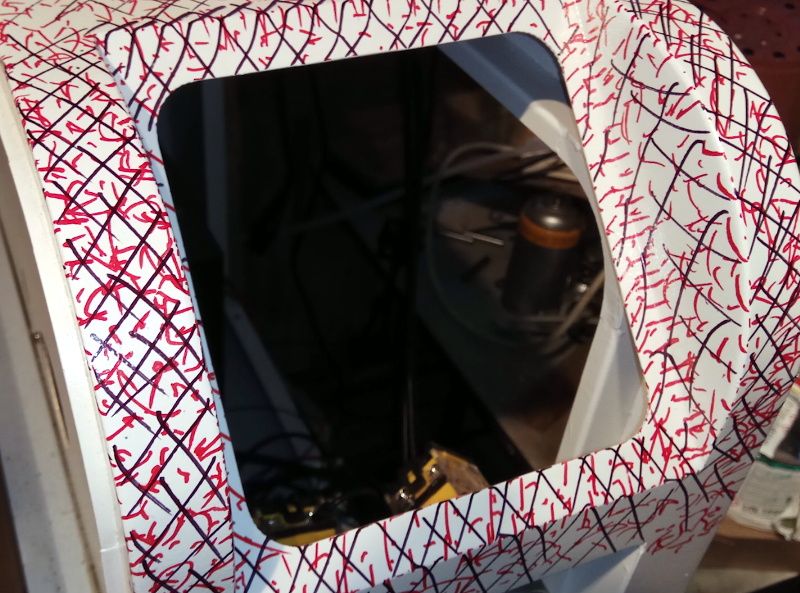 That would be a neat enough trick on its own, but what we especially liked about this video was the tip that [Mangy_Dog] passed along about increasing visual complexity to improve the final results. Basically, the software is looking for identifiable surface details to piece together, so you can make things a bit easier for it by taking a few different colored markers and drawing all over the surface like a toddler. It might look crazy, but all those lines give the software some anchor points that help it sort out the nuances of the shape.
Unfortunately the markers ended up being a little more permanent than [Mangy_Dog] had hoped, and he eventually had to use acetone to get the stains off. Certainly something to keep in mind. But in the end, the 3D model generated was accurate enough that (after a bit of scaling) he was able to design a new panel that pops right on as if it was a factory component.
Hackaday readers may recall that when we last heard from [Mangy_Dog] he was putting the finishing touches on his incredible “Playdog Blackbone” handheld gaming system, which itself is a triumph of mating 3D printed components with existing hardware.
source https://hackaday.com/2019/12/26/custom-control-panels-with-photogrammetry/